
Chapter 1 Introduction to ObjectOriented Programming and Software
Chapter 1 Introduction to Object-Oriented Programming and Software Development Animated Version ©The Mc. Graw-Hill Companies, Inc. Permission required for reproduction or display. Chapter 1 -1
Objectives After you have read and studied this chapter, you should be able to • Name the basic components of object-oriented programming • Differentiate classes and objects. • Differentiate class and instance methods. • Differentiate class and instance data values. • Draw program diagrams using icons for classes and objects • Describe significance of inheritance in object-oriented programs • Name and explain the stages of the software lifecycle ©The Mc. Graw-Hill Companies, Inc. Permission required for reproduction or display. Chapter 1 -2
Classes and Objects • Object-oriented programs use objects. • An object is a thing, both tangible and intangible. Account, Vehicle, Employee, etc. • To create an object inside the computer program, we must provide a definition for objects—how they behave and what kinds of information they maintain —called a class. • An object is called an instance of a class. ©The Mc. Graw-Hill Companies, Inc. Permission required for reproduction or display. Chapter 1 -3
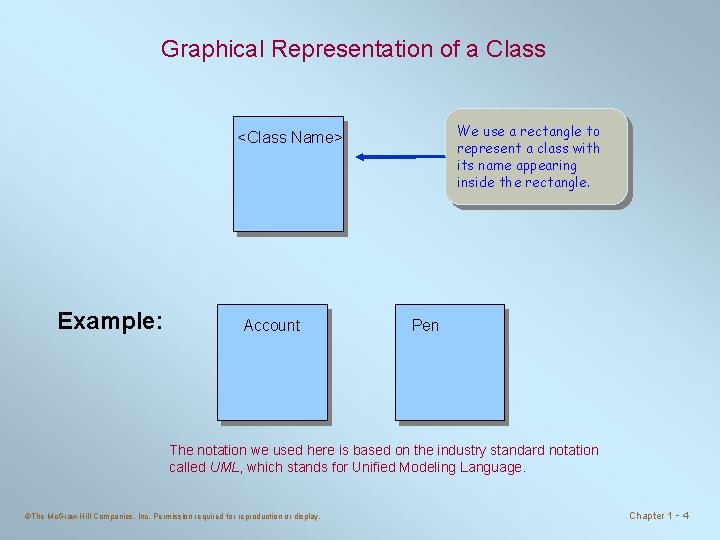
Graphical Representation of a Class We use a rectangle to represent a class with its name appearing inside the rectangle. <Class Name> Example: Account Pen The notation we used here is based on the industry standard notation called UML, which stands for Unified Modeling Language. ©The Mc. Graw-Hill Companies, Inc. Permission required for reproduction or display. Chapter 1 -4
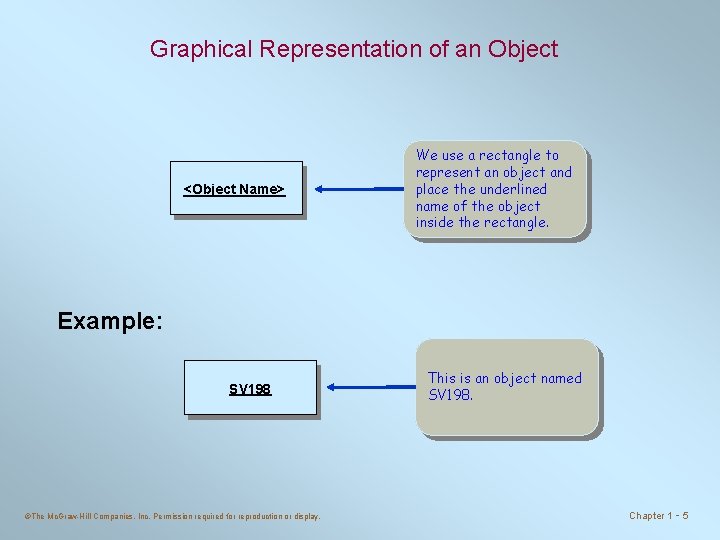
Graphical Representation of an Object <Object Name> We use a rectangle to represent an object and place the underlined name of the object inside the rectangle. Example: SV 198 ©The Mc. Graw-Hill Companies, Inc. Permission required for reproduction or display. This is an object named SV 198. Chapter 1 -5
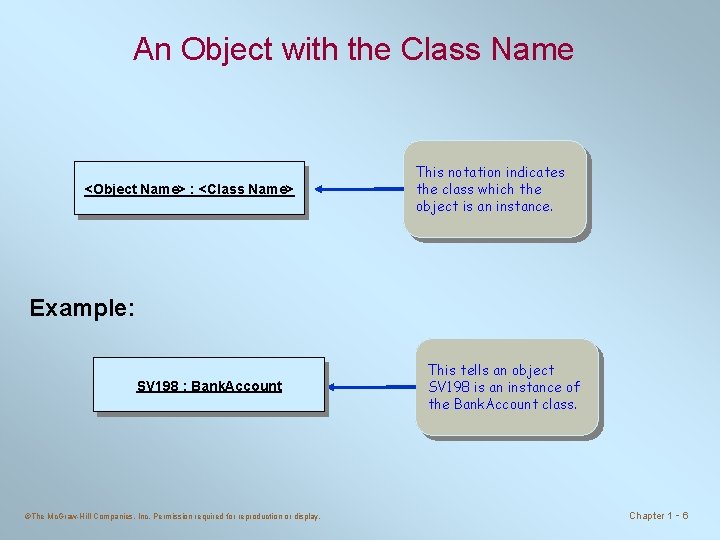
An Object with the Class Name <Object Name> : <Class Name> This notation indicates the class which the object is an instance. Example: SV 198 : Bank. Account ©The Mc. Graw-Hill Companies, Inc. Permission required for reproduction or display. This tells an object SV 198 is an instance of the Bank. Account class. Chapter 1 -6
Class and Instance Data Values • An object is comprised of data values and methods. • An instance data value is used to maintain information specific to individual instances. For example, each Bank. Account object maintains its balance. • A class data value is used to maintain information shared by all instances or aggregate information about the instances. • For example, minimum balance is the information shared by all Account objects, whereas the average balance of all Bank. Account objects is an aggregate information. ©The Mc. Graw-Hill Companies, Inc. Permission required for reproduction or display. Chapter 1 -7
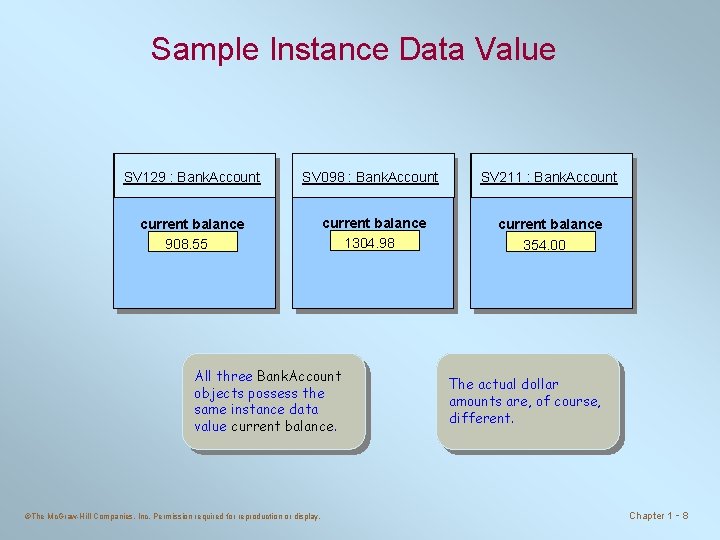
Sample Instance Data Value SV 129 : Bank. Account SV 098 : Bank. Account SV 211 : Bank. Account current balance 908. 55 current balance 1304. 98 current balance All three Bank. Account objects possess the same instance data value current balance. ©The Mc. Graw-Hill Companies, Inc. Permission required for reproduction or display. 354. 00 The actual dollar amounts are, of course, different. Chapter 1 -8
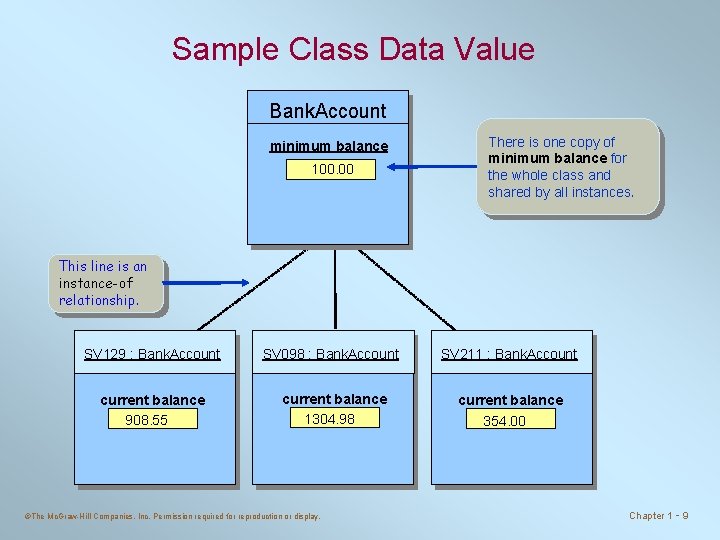
Sample Class Data Value Bank. Account minimum balance 100. 00 There is one copy of minimum balance for the whole class and shared by all instances. This line is an instance-of relationship. SV 129 : Bank. Account SV 098 : Bank. Account SV 211 : Bank. Account current balance 908. 55 current balance 1304. 98 current balance ©The Mc. Graw-Hill Companies, Inc. Permission required for reproduction or display. 354. 00 Chapter 1 -9
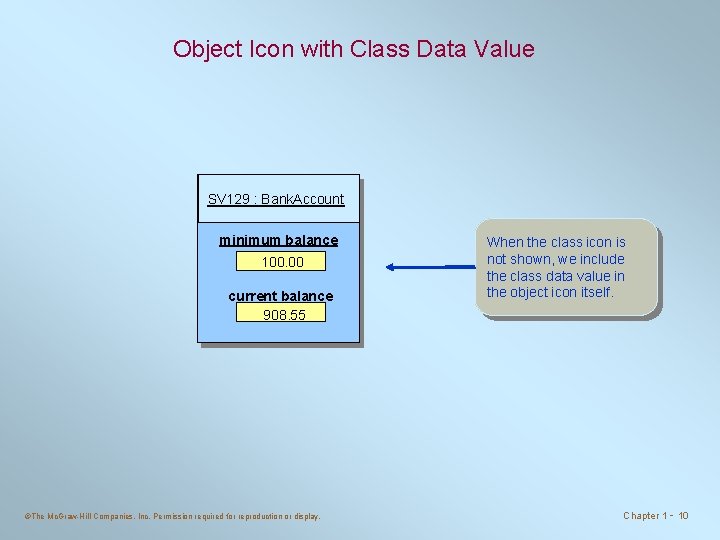
Object Icon with Class Data Value SV 129 : Bank. Account minimum balance 100. 00 current balance 908. 55 ©The Mc. Graw-Hill Companies, Inc. Permission required for reproduction or display. When the class icon is not shown, we include the class data value in the object icon itself. Chapter 1 - 10
Messages and Methods • To instruct a class or an object to perform a task, we send a message to it. • You can send a message only to the classes and objects that understand the message you sent to them. • A class or an object must possess a matching method to be able to handle the received message. • A method defined for a class is called a class method, and a method defined for an object is called an instance method. • A value we pass to an object when sending a message is called an argument of the message. ©The Mc. Graw-Hill Companies, Inc. Permission required for reproduction or display. Chapter 1 - 11
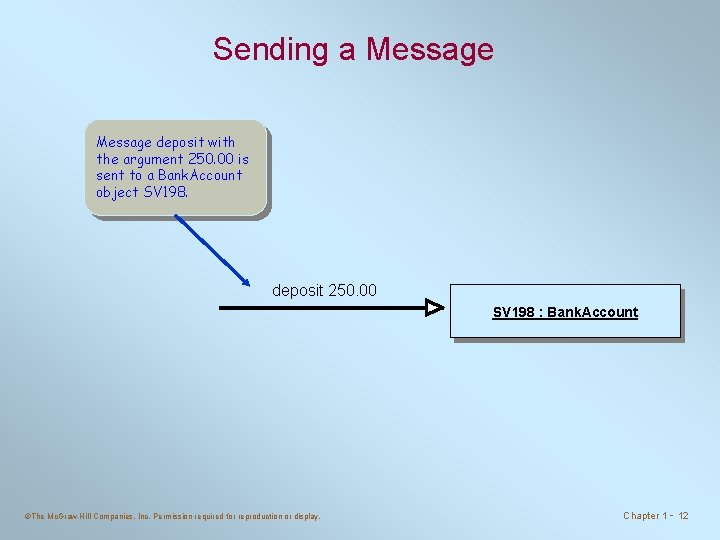
Sending a Message deposit with the argument 250. 00 is sent to a Bank. Account object SV 198. deposit 250. 00 SV 198 : Bank. Account ©The Mc. Graw-Hill Companies, Inc. Permission required for reproduction or display. Chapter 1 - 12
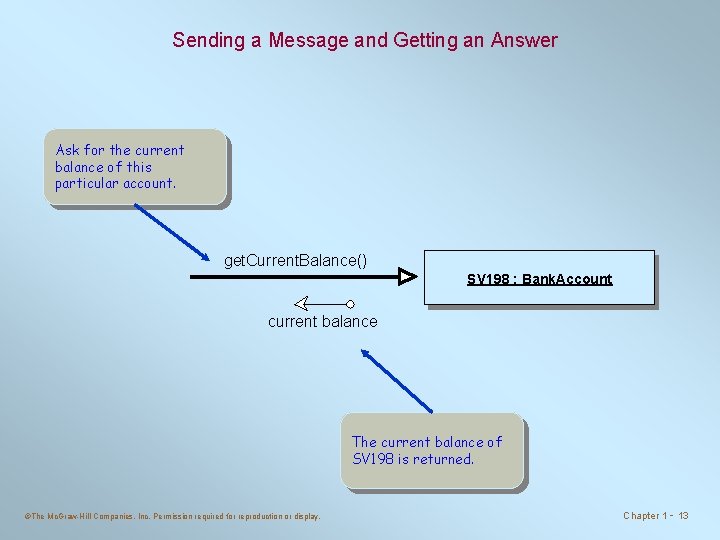
Sending a Message and Getting an Answer Ask for the current balance of this particular account. get. Current. Balance() SV 198 : Bank. Account current balance The current balance of SV 198 is returned. ©The Mc. Graw-Hill Companies, Inc. Permission required for reproduction or display. Chapter 1 - 13
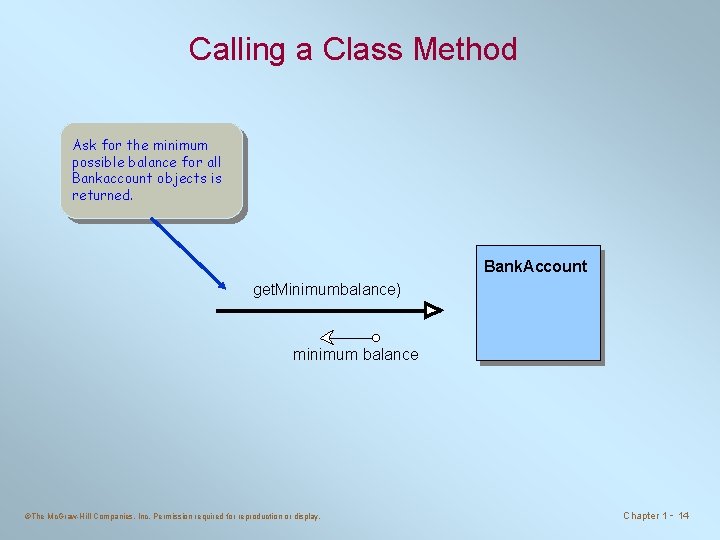
Calling a Class Method Ask for the minimum possible balance for all Bankaccount objects is returned. Bank. Account get. Minimumbalance) minimum balance ©The Mc. Graw-Hill Companies, Inc. Permission required for reproduction or display. Chapter 1 - 14
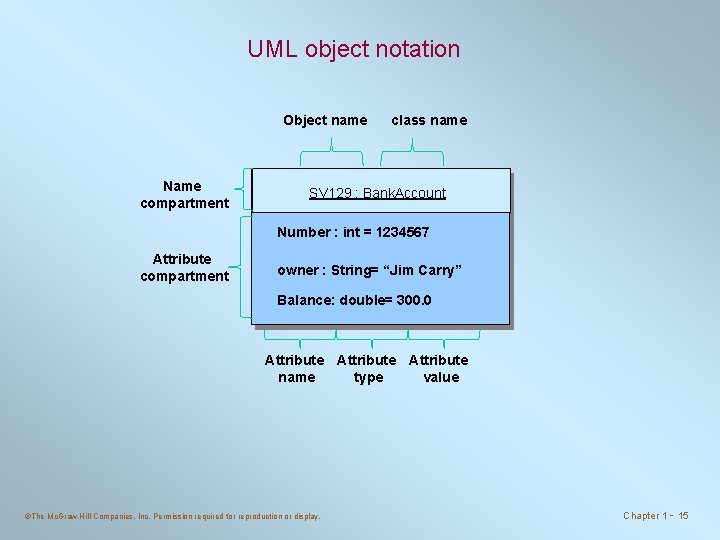
UML object notation Object name Name compartment class name SV 129 : Bank. Account Number : int = 1234567 Attribute compartment owner : String= “Jim Carry” Balance: double= 300. 0 Attribute name type value ©The Mc. Graw-Hill Companies, Inc. Permission required for reproduction or display. Chapter 1 - 15
UML object notation • UML is very flexible about how objects may be represented on object diagram. • The class name alone ( e. g Bank. Account) : means anonymous object that haven't been identified. • The object name alone ( e. g SV 129) : means a specific object but doesn’t identify which class it belongs to ( useful in very early analysis). • The object name concatenated with the class name. ©The Mc. Graw-Hill Companies, Inc. Permission required for reproduction or display. Chapter 1 - 16
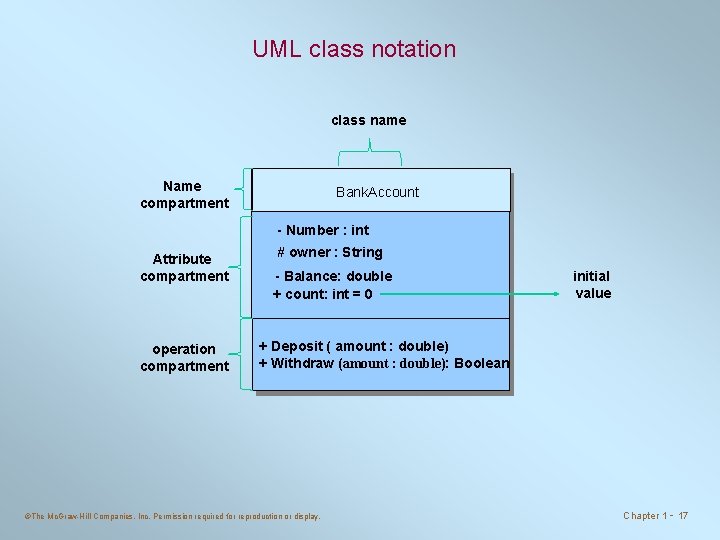
UML class notation class name Name compartment Bank. Account - Number : int Attribute compartment operation compartment # owner : String - Balance: double + count: int = 0 initial value + Deposit ( amount : double) + Withdraw (amount : double): Boolean ©The Mc. Graw-Hill Companies, Inc. Permission required for reproduction or display. Chapter 1 - 17
UML class notation • You can write only the name compartment if you are only showing the relation between classes. • You add the operation compartment if you want to illustrate the behavior of the class. • If you want to show the mapping of the class add all features. ©The Mc. Graw-Hill Companies, Inc. Permission required for reproduction or display. Chapter 1 - 18
Inheritance • Inheritance is a mechanism in OOP to design two or more entities that are different but share many common features. – Features common to all classes are defined in the superclass. – The classes that inherit common features from the superclass are called subclasses. • We also call the superclass an ancestor and the subclass a descendant. ©The Mc. Graw-Hill Companies, Inc. Permission required for reproduction or display. Chapter 1 - 19
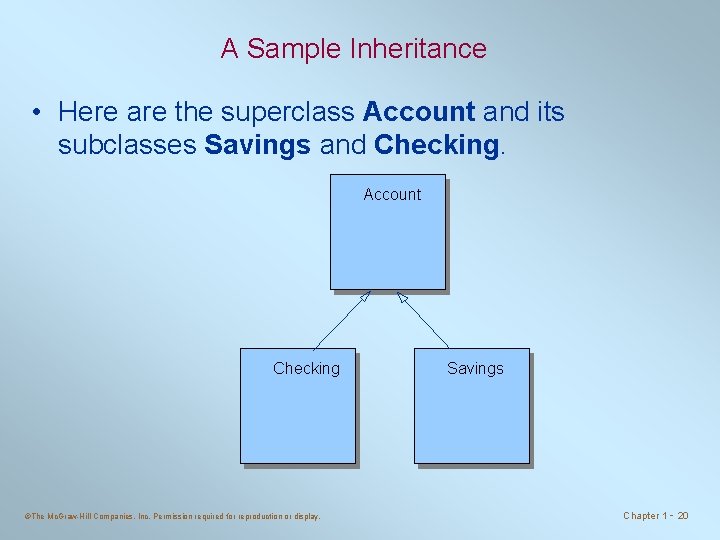
A Sample Inheritance • Here are the superclass Account and its subclasses Savings and Checking. Account Checking ©The Mc. Graw-Hill Companies, Inc. Permission required for reproduction or display. Savings Chapter 1 - 20
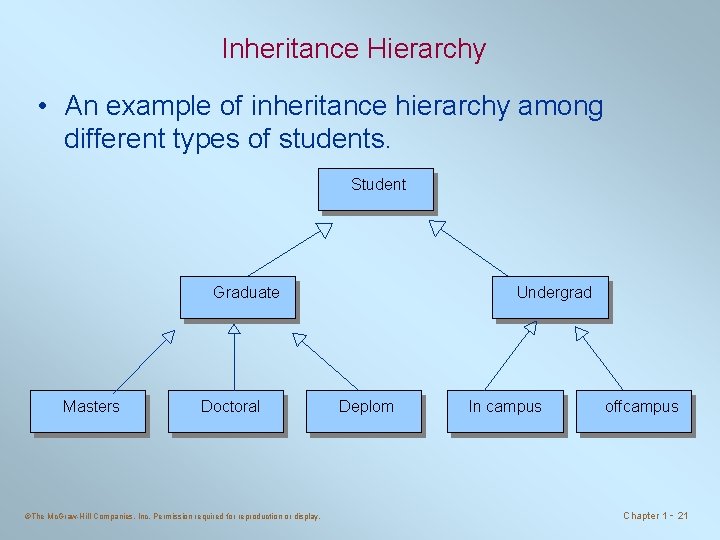
Inheritance Hierarchy • An example of inheritance hierarchy among different types of students. Student Undergrad Graduate Masters Doctoral ©The Mc. Graw-Hill Companies, Inc. Permission required for reproduction or display. Deplom In campus offcampus Chapter 1 - 21
Software Engineering • Much like building a skyscraper, we need a disciplined approach in developing complex software applications. • Software engineering is the application of a systematic and disciplined approach to the development, testing, and maintenance of a program. • In this class, we will learn how to apply sound software engineering principles when we develop sample programs. ©The Mc. Graw-Hill Companies, Inc. Permission required for reproduction or display. Chapter 1 - 22
Software Life Cycle • The sequence of stages from conception to operation of a program is called software life cycle. • Five stages are – – – Analysis Design Coding Testing Operation and Maintenance ©The Mc. Graw-Hill Companies, Inc. Permission required for reproduction or display. Chapter 1 - 23
- Slides: 23