
Chapter 1 Introduction to ObjectOriented Programming and Software
Chapter 1 Introduction to Object-Oriented Programming and Software Development ©The. Mc. Graw-Hill Companies, Inc. Permission required for reproduction or display.
Chapter 1 Objectives After you have read and studied this chapter, you should be able to • Name the basic components of object-oriented programming. • Differentiate classes and objects. • Differentiate class and instance methods. • Differentiate class and instance data values. ©The Mc. Graw-Hill Companies, Inc. Permission required for reproduction or display.
Chapter 1 Objectives, cont. After you have read and studied this chapter, you should be able to • Draw program diagrams using icons for classes, objects, and other components of object-oriented programming. • Describe the significance of inheritance in object-oriented programs. • Name and explain the stages of the software life cycle. ©The Mc. Graw-Hill Companies, Inc. Permission required for reproduction or display.
1. 1 Classes and Objects Object-oriented programs use objects. An object is a thing, both tangible and intangible. Account, Vehicle, Employee, etc. are examples of possible objects. An object is comprised of data and operations that manipulate those data. ©The Mc. Graw-Hill Companies, Inc. Permission required for reproduction or display.
1. 1 Classes and Objects To create an object inside the computer program, we must provide a definition for objects—how they behave and what kinds of information they maintain —called a class. An object is called an instance of a class. ©The Mc. Graw-Hill Companies, Inc. Permission required for reproduction or display.
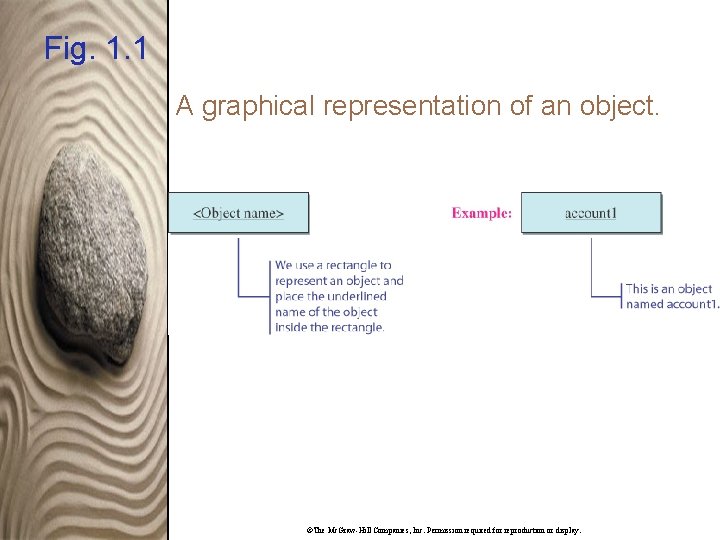
Fig. 1. 1 A graphical representation of an object. ©The Mc. Graw-Hill Companies, Inc. Permission required for reproduction or display.
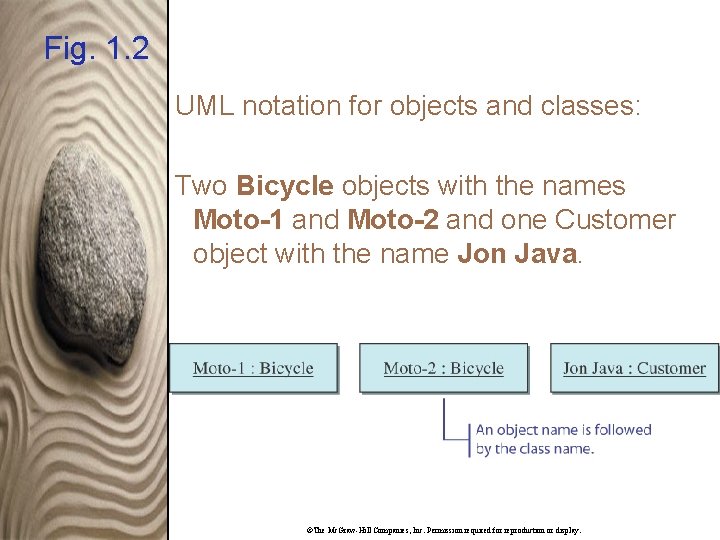
Fig. 1. 2 UML notation for objects and classes: Two Bicycle objects with the names Moto-1 and Moto-2 and one Customer object with the name Jon Java. ©The Mc. Graw-Hill Companies, Inc. Permission required for reproduction or display.
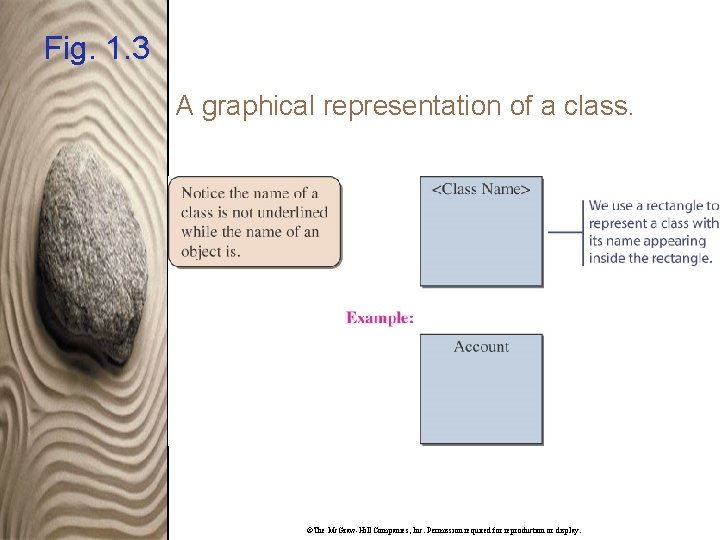
Fig. 1. 3 A graphical representation of a class. ©The Mc. Graw-Hill Companies, Inc. Permission required for reproduction or display.
1. 2 Messages and Methods To instruct a class or an object to perform a task, we send a message to it. You can send a message only to the classes and objects that understand the message you sent to them. ©The Mc. Graw-Hill Companies, Inc. Permission required for reproduction or display.
1. 2 Messages and Methods A class or an object must possess a matching method to be able to handle the received message. A method defined for a class is called a class method, and a method defined for an object is called an instance method. A value we pass to an object when sending a message is called an argument of the message. ©The Mc. Graw-Hill Companies, Inc. Permission required for reproduction or display.
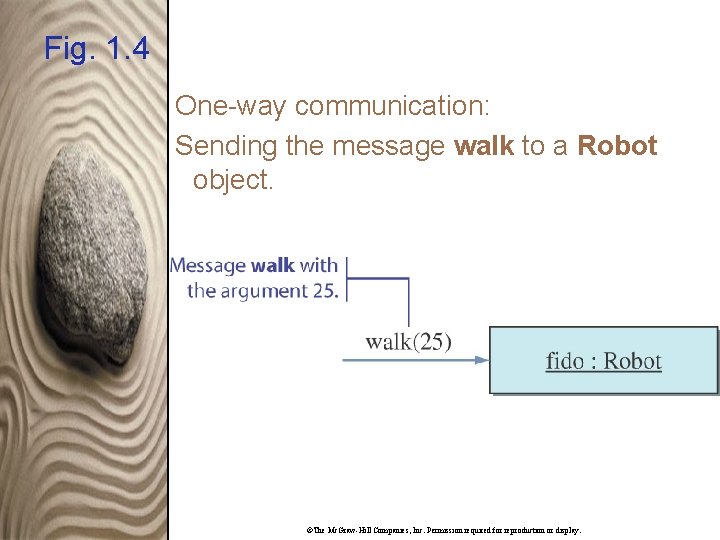
Fig. 1. 4 One-way communication: Sending the message walk to a Robot object. ©The Mc. Graw-Hill Companies, Inc. Permission required for reproduction or display.
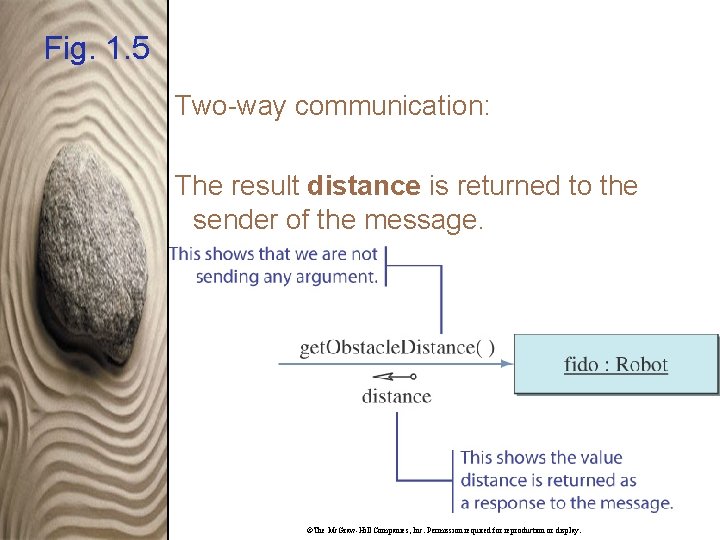
Fig. 1. 5 Two-way communication: The result distance is returned to the sender of the message. ©The Mc. Graw-Hill Companies, Inc. Permission required for reproduction or display.
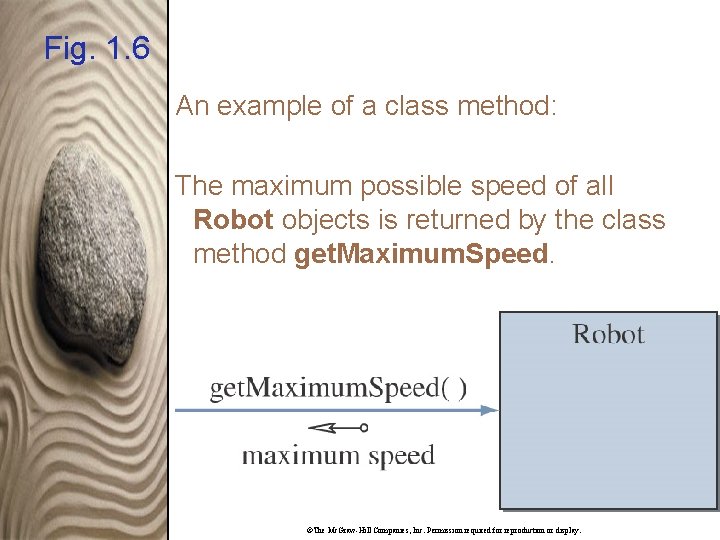
Fig. 1. 6 An example of a class method: The maximum possible speed of all Robot objects is returned by the class method get. Maximum. Speed. ©The Mc. Graw-Hill Companies, Inc. Permission required for reproduction or display.
1. 3 Class and Instance Data Values An object is comprised of data values and methods. An instance data value is used to maintain information specific to individual instances. For example, each Account object maintains its balance. ©The Mc. Graw-Hill Companies, Inc. Permission required for reproduction or display.

1. 3 Class and Instance Data Values A class data value is used to maintain information shared by all instances or aggregate information about the instances. For example, minimum balance is the information shared by all Account objects, whereas the average balance of all Account objects is aggregate information. ©The Mc. Graw-Hill Companies, Inc. Permission required for reproduction or display.
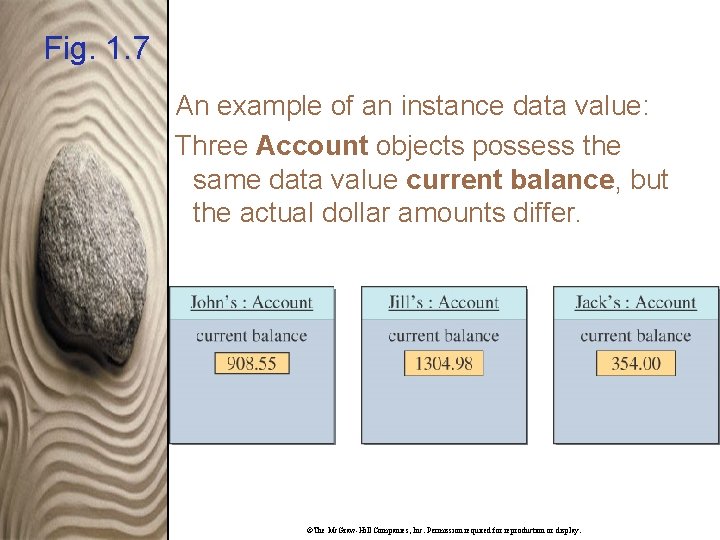
Fig. 1. 7 An example of an instance data value: Three Account objects possess the same data value current balance, but the actual dollar amounts differ. ©The Mc. Graw-Hill Companies, Inc. Permission required for reproduction or display.
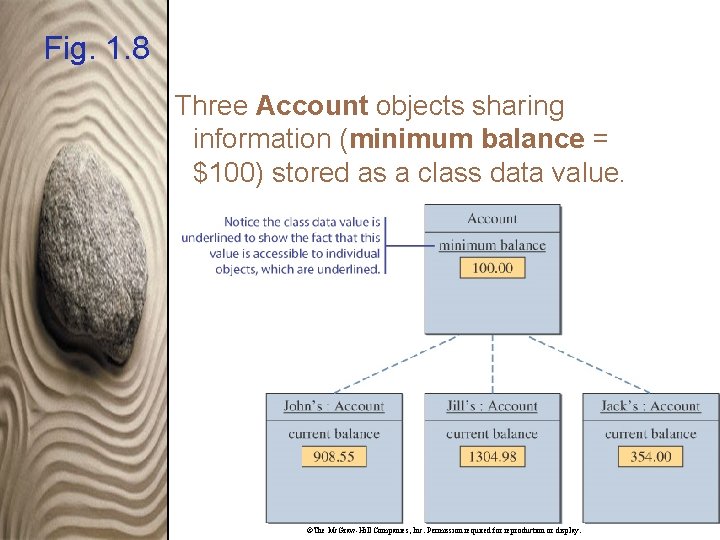
Fig. 1. 8 Three Account objects sharing information (minimum balance = $100) stored as a class data value. ©The Mc. Graw-Hill Companies, Inc. Permission required for reproduction or display.
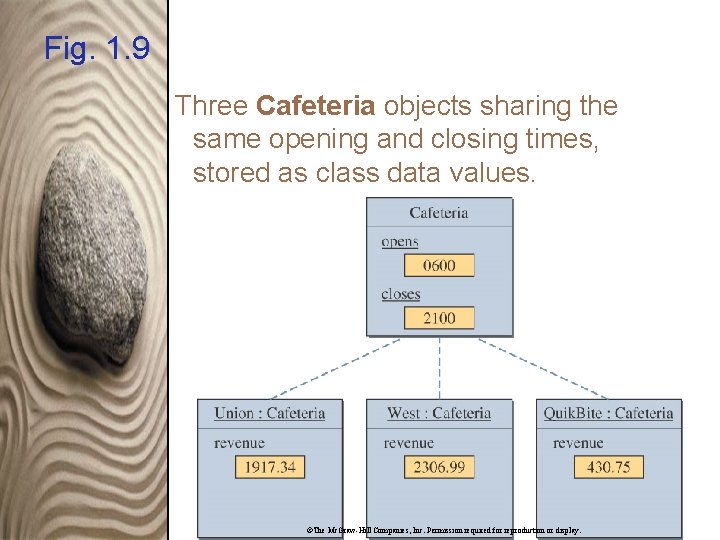
Fig. 1. 9 Three Cafeteria objects sharing the same opening and closing times, stored as class data values. ©The Mc. Graw-Hill Companies, Inc. Permission required for reproduction or display.
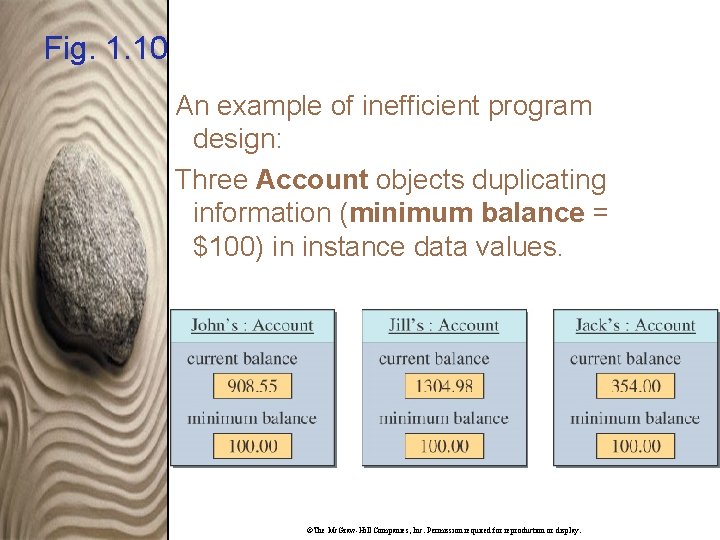
Fig. 1. 10 An example of inefficient program design: Three Account objects duplicating information (minimum balance = $100) in instance data values. ©The Mc. Graw-Hill Companies, Inc. Permission required for reproduction or display.
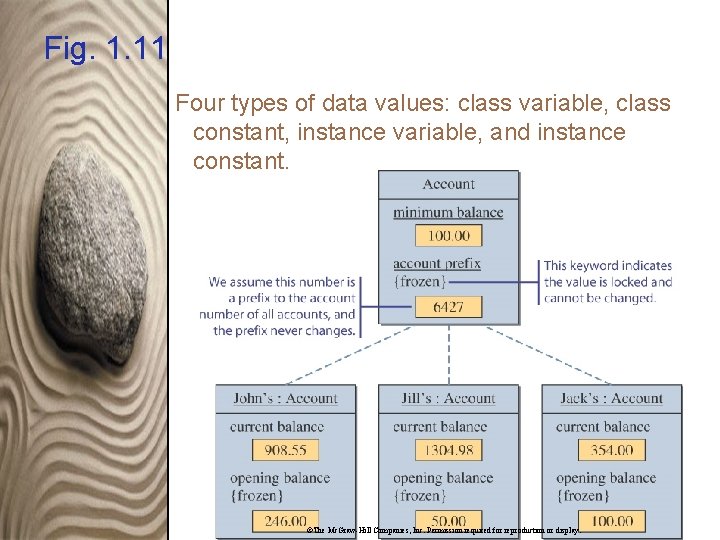
Fig. 1. 11 Four types of data values: class variable, class constant, instance variable, and instance constant. ©The Mc. Graw-Hill Companies, Inc. Permission required for reproduction or display.
1. 4 Inheritance In object-oriented programming, we use a mechanism called inheritance to design two or more entities that are different but share many common features. ©The Mc. Graw-Hill Companies, Inc. Permission required for reproduction or display.
1. 4 Inheritance First, we define a class that contains the common features of the entities. Then we define classes as an extension of the common class inheriting everything from the common class. ©The Mc. Graw-Hill Companies, Inc. Permission required for reproduction or display.
1. 4 Inheritance We call the common class the superclass and all classes that inherit from it subclasses. We also call the superclass an ancestor and the subclass a descendant. ©The Mc. Graw-Hill Companies, Inc. Permission required for reproduction or display.
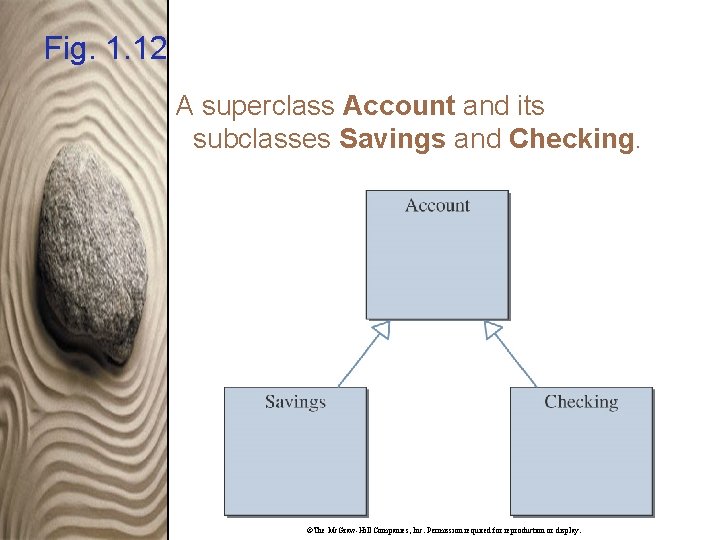
Fig. 1. 12 A superclass Account and its subclasses Savings and Checking. ©The Mc. Graw-Hill Companies, Inc. Permission required for reproduction or display.
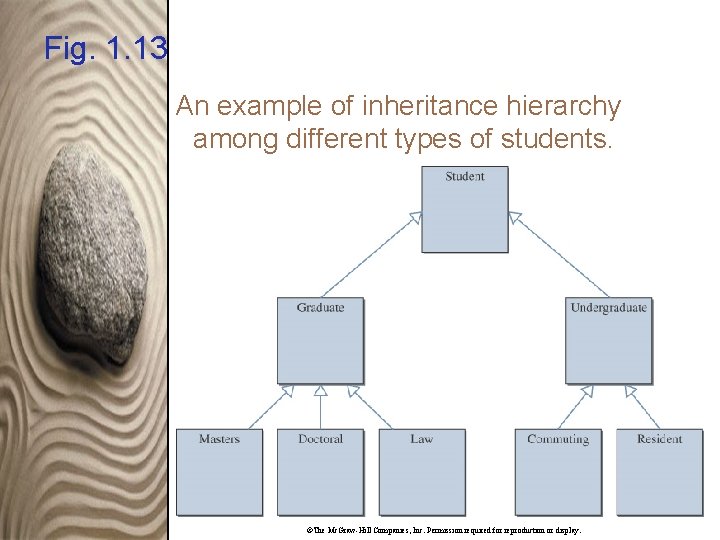
Fig. 1. 13 An example of inheritance hierarchy among different types of students. ©The Mc. Graw-Hill Companies, Inc. Permission required for reproduction or display.
1. 5 Software Engineering Software engineering is the application of a systematic and disciplined approach to the development, testing, and maintenance of a program. ©The Mc. Graw-Hill Companies, Inc. Permission required for reproduction or display.
1. 5 Software Life Cycle The sequence of stages from conception to operation of a program is called software life cycle. Five stages are • Analysis • Design • Coding • Testing • Operation and Maintenance ©The Mc. Graw-Hill Companies, Inc. Permission required for reproduction or display.
1. 5 Software Life Cycle Analysis phase: • Study the problem. • Determine if a solution is possible. • Develop a requirements specification describing the features of the program. ©The Mc. Graw-Hill Companies, Inc. Permission required for reproduction or display.
1. 5 Software Life Cycle Design phase: • Turn the requirements specification into a detailed program design. • Fully define all classes and objects, including how they behave and communicate between themselves. ©The Mc. Graw-Hill Companies, Inc. Permission required for reproduction or display.
1. 5 Software Life Cycle Coding phase: • Implement the detailed design into an actual program. ©The Mc. Graw-Hill Companies, Inc. Permission required for reproduction or display.
1. 5 Software Life Cycle Testing phase: • Run the program using different data sets to verify the program works properly. • Unit testing: Test classes individually. • Integration testing: Test that the classes work together correctly. ©The Mc. Graw-Hill Companies, Inc. Permission required for reproduction or display.
1. 5 Software Life Cycle Operation phase: • Program is put into use. • Software maintenance accounts for approximately 70% of the cost of the software. ©The Mc. Graw-Hill Companies, Inc. Permission required for reproduction or display.
- Slides: 32