
Chapter 1 Introduction to Computers and C Programming
- Slides: 50
Chapter 1 – Introduction to Computers and C++ Programming 1. 1 Computer Organization • Six logical units of computer 1. Input unit • • “Receiving” section Obtains information from input devices – Keyboard, mouse, microphone, scanner, networks, … 2. Output unit • • • “Shipping” section Takes information processed by computer Places information on output devices – Screen, printer, networks, … – Information used to control other devices 2003 Prentice Hall, Inc. All rights reserved. 1
2 1. 1 Computer Organization • Six logical units of computer 3. Memory unit • • Rapid access, relatively low capacity “warehouse” section Retains information from input unit – Immediately available for processing Retains processed information – Until placed on output devices Memory, primary memory 4. Arithmetic and logic unit (ALU) • • “Manufacturing” section Performs arithmetic calculations and logic decisions 2003 Prentice Hall, Inc. All rights reserved.
3 1. 1 Computer Organization • Six logical units of computer 5. Central processing unit (CPU) • • “Administrative” section Supervises and coordinates other sections of computer 6. Secondary storage unit • • • Long-term, high-capacity “warehouse” section Storage – Inactive programs or data Secondary storage devices – Disks Longer to access than primary memory Less expensive per unit than primary memory 2003 Prentice Hall, Inc. All rights reserved.
1. 2 Machine Languages, Assembly Languages, and High-level Languages • Three types of computer languages 1. Machine language • • Only language computer directly understands “Natural language” of computer Defined by hardware design – Machine-dependent Generally consist of strings of numbers – Ultimately 0 s and 1 s Instruct computers to perform elementary operations – One at a time Cumbersome for humans Example: +1300042774 +1400593419 +1200274027 2003 Prentice Hall, Inc. All rights reserved. 4
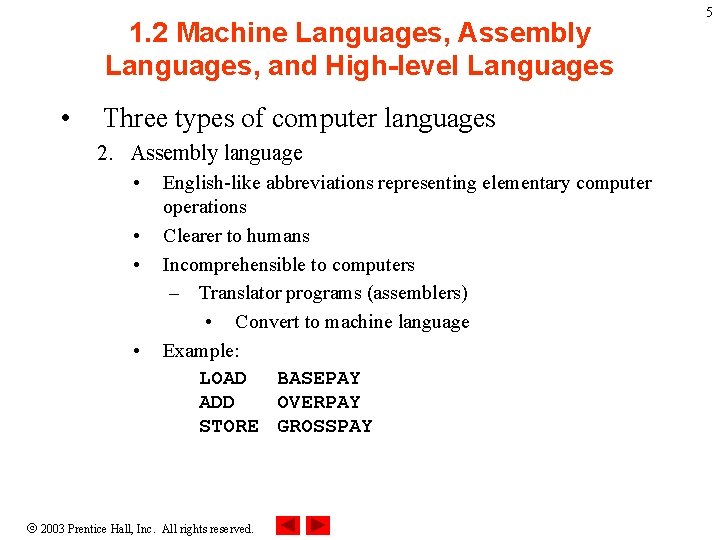
1. 2 Machine Languages, Assembly Languages, and High-level Languages • Three types of computer languages 2. Assembly language • • English-like abbreviations representing elementary computer operations Clearer to humans Incomprehensible to computers – Translator programs (assemblers) • Convert to machine language Example: LOAD BASEPAY ADD OVERPAY STORE GROSSPAY 2003 Prentice Hall, Inc. All rights reserved. 5
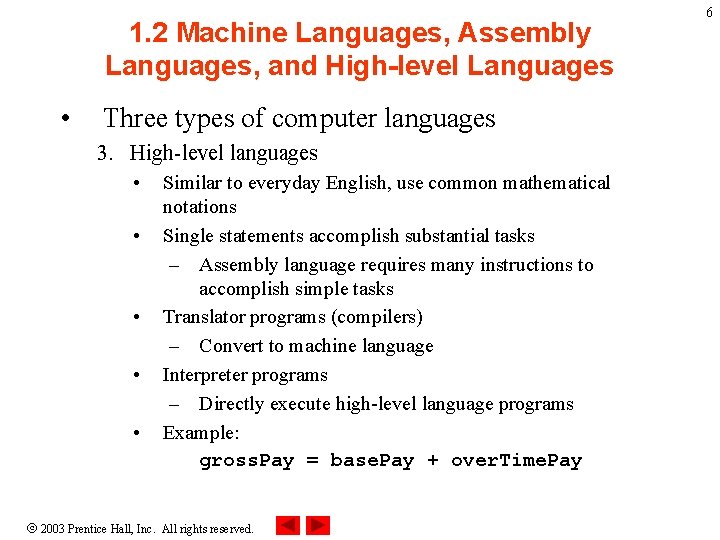
1. 2 Machine Languages, Assembly Languages, and High-level Languages • Three types of computer languages 3. High-level languages • • • Similar to everyday English, use common mathematical notations Single statements accomplish substantial tasks – Assembly language requires many instructions to accomplish simple tasks Translator programs (compilers) – Convert to machine language Interpreter programs – Directly execute high-level language programs Example: gross. Pay = base. Pay + over. Time. Pay 2003 Prentice Hall, Inc. All rights reserved. 6
7 1. 3 History of C and C++ • History of C – Evolved from two other programming languages • BCPL and B – “Typeless” languages – Dennis Ritchie (Bell Laboratories) • Added data typing, other features – Development language of UNIX – Hardware independent • Portable programs – 1989: ANSI standard – 1990: ANSI and ISO standard published • ANSI/ISO 9899: 1990 2003 Prentice Hall, Inc. All rights reserved.
8 1. 3 History of C and C++ • History of C++ – – Extension of C Early 1980 s: Bjarne Stroustrup (Bell Laboratories) “Spruces up” C Provides capabilities for object-oriented programming • Objects: reusable software components – Model items in real world • Object-oriented programs – Easy to understand, correct and modify – Hybrid language • C-like style • Object-oriented style • Both 2003 Prentice Hall, Inc. All rights reserved.
9 1. 4 C++ Standard Library • C++ programs – Built from pieces called classes and functions • C++ standard library – Rich collections of existing classes and functions • “Building block approach” to creating programs – “Software reuse” 2003 Prentice Hall, Inc. All rights reserved.
10 1. 5 Basics of a Typical C++ Environment • C++ systems – Program-development environment – Language – C++ Standard Library 2003 Prentice Hall, Inc. All rights reserved.
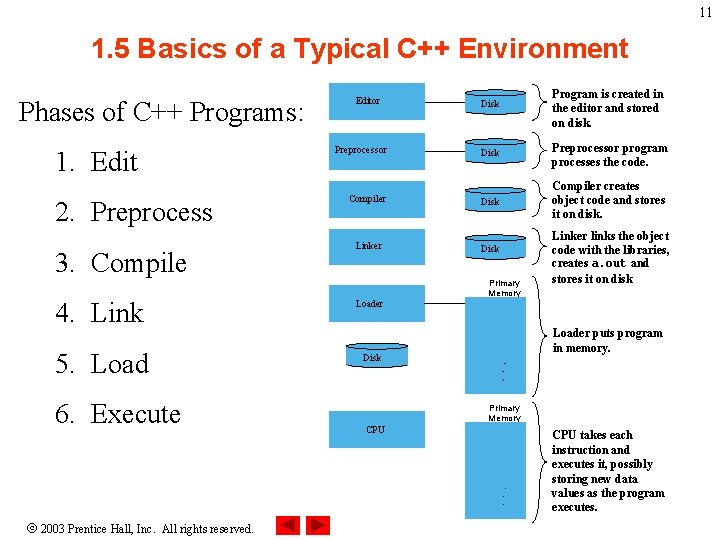
11 1. 5 Basics of a Typical C++ Environment Phases of C++ Programs: 1. Edit 2. Preprocess 3. Compile Editor Preprocessor Compiler Linker 4. Link Loader 5. Load Disk 6. Execute Disk Program is created in the editor and stored on disk. Disk Preprocessor program processes the code. Disk Compiler creates object code and stores it on disk. Disk Primary Memory Loader puts program in memory. . . . Primary Memory CPU . . . 2003 Prentice Hall, Inc. All rights reserved. Linker links the object code with the libraries, creates a. out and stores it on disk CPU takes each instruction and executes it, possibly storing new data values as the program executes.
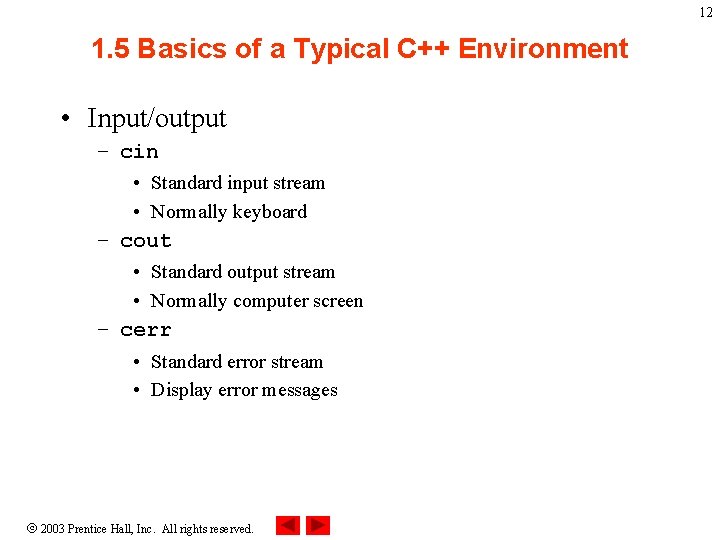
12 1. 5 Basics of a Typical C++ Environment • Input/output – cin • Standard input stream • Normally keyboard – cout • Standard output stream • Normally computer screen – cerr • Standard error stream • Display error messages 2003 Prentice Hall, Inc. All rights reserved.
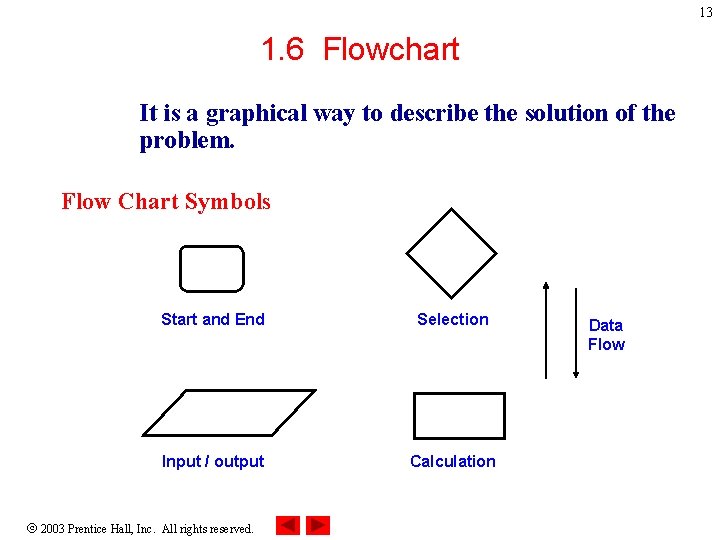
13 1. 6 Flowchart It is a graphical way to describe the solution of the problem. Flow Chart Symbols Start and End Selection Input / output Calculation 2003 Prentice Hall, Inc. All rights reserved. Data Flow
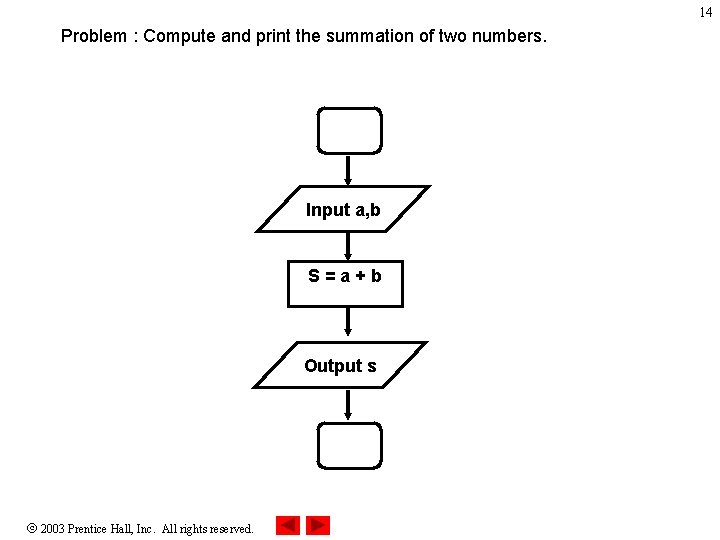
14 Problem : Compute and print the summation of two numbers. Input a, b S=a+b Output s 2003 Prentice Hall, Inc. All rights reserved.
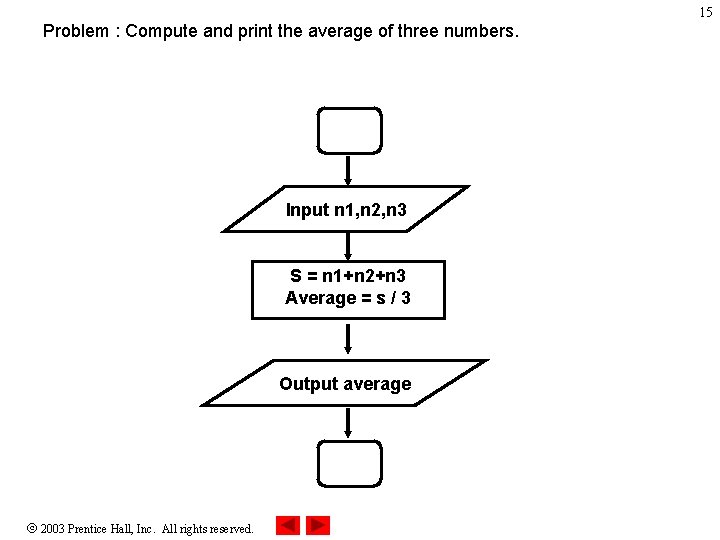
15 Problem : Compute and print the average of three numbers. Input n 1, n 2, n 3 S = n 1+n 2+n 3 Average = s / 3 Output average 2003 Prentice Hall, Inc. All rights reserved.
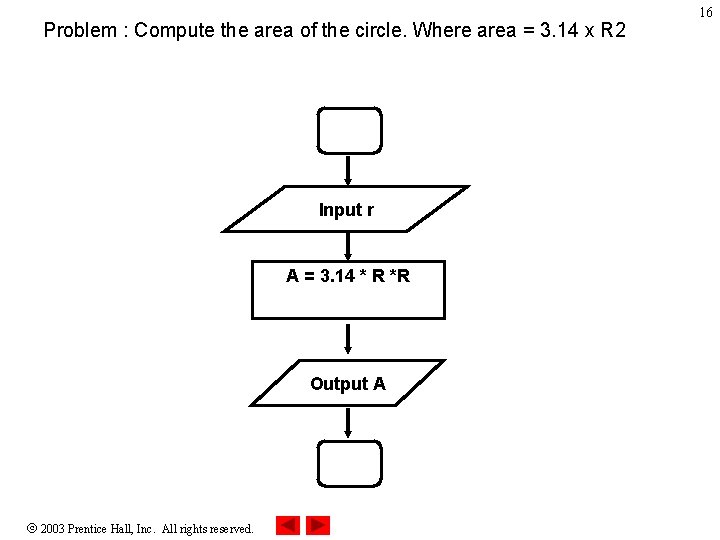
Problem : Compute the area of the circle. Where area = 3. 14 x R 2 Input r A = 3. 14 * R *R Output A 2003 Prentice Hall, Inc. All rights reserved. 16
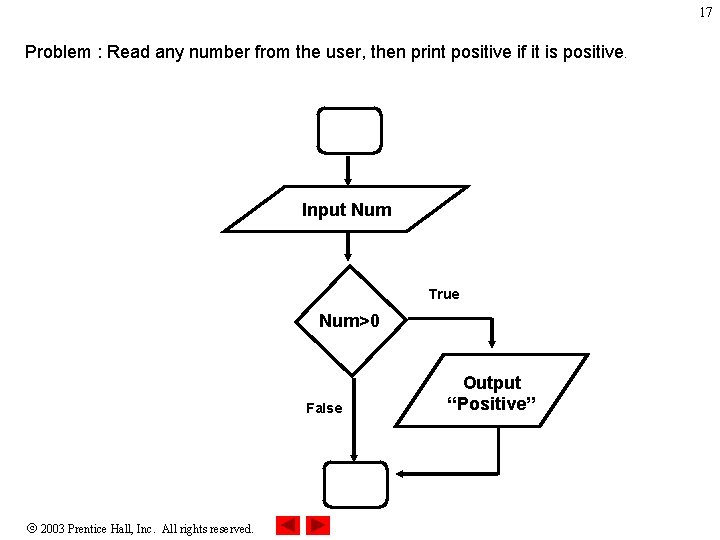
17 Problem : Read any number from the user, then print positive if it is positive. Input Num True Num>0 False 2003 Prentice Hall, Inc. All rights reserved. Output “Positive”
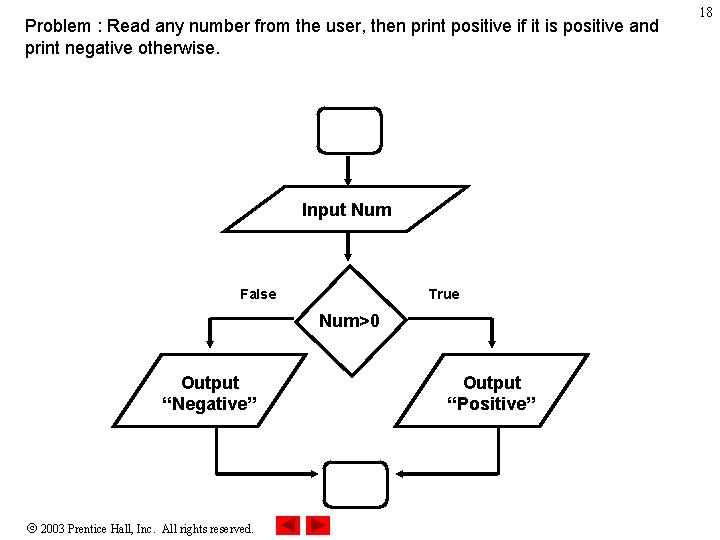
Problem : Read any number from the user, then print positive if it is positive and print negative otherwise. Input Num False True Num>0 Output “Negative” 2003 Prentice Hall, Inc. All rights reserved. Output “Positive” 18
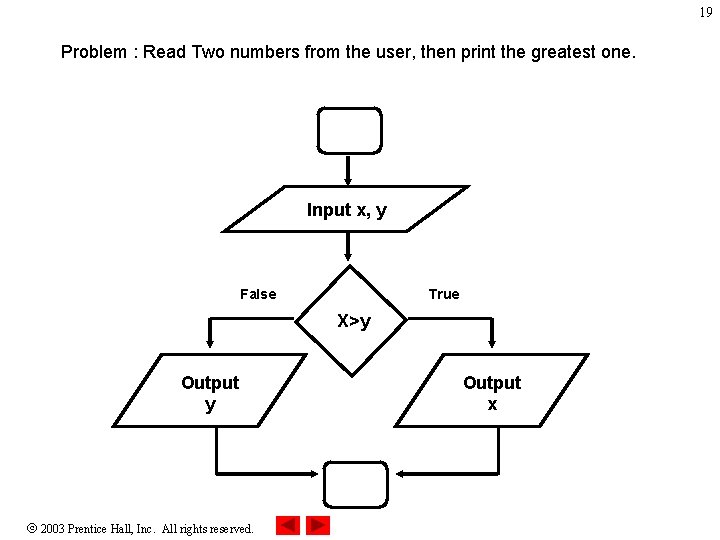
19 Problem : Read Two numbers from the user, then print the greatest one. Input x, y False True X>y Output y 2003 Prentice Hall, Inc. All rights reserved. Output x
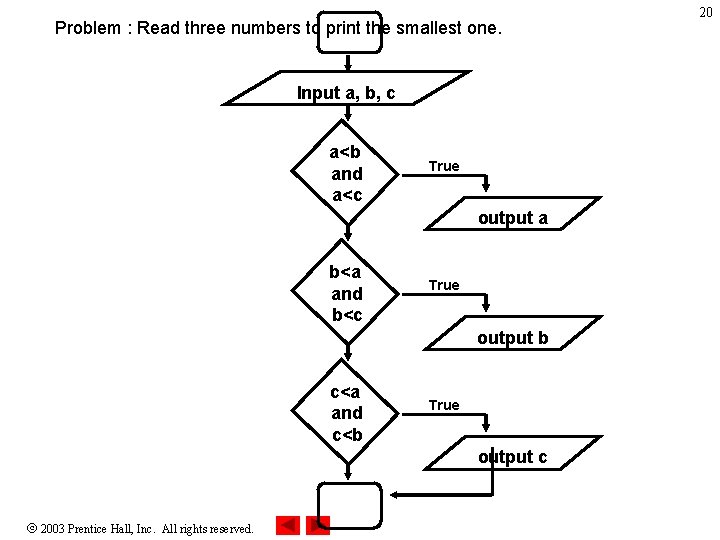
Problem : Read three numbers to print the smallest one. Input a, b, c a<b and a<c True output a b<a and b<c True output b c<a and c<b True output c 2003 Prentice Hall, Inc. All rights reserved. 20
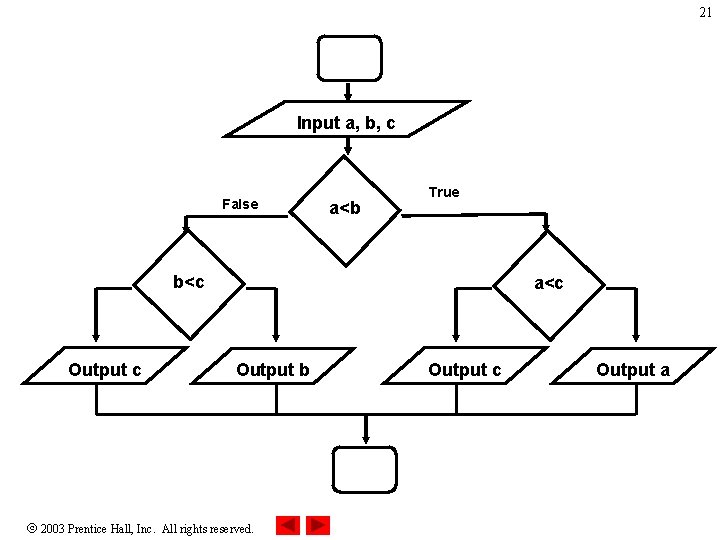
21 Input a, b, c False a<b True b<c Output c a<c Output b 2003 Prentice Hall, Inc. All rights reserved. Output c Output a
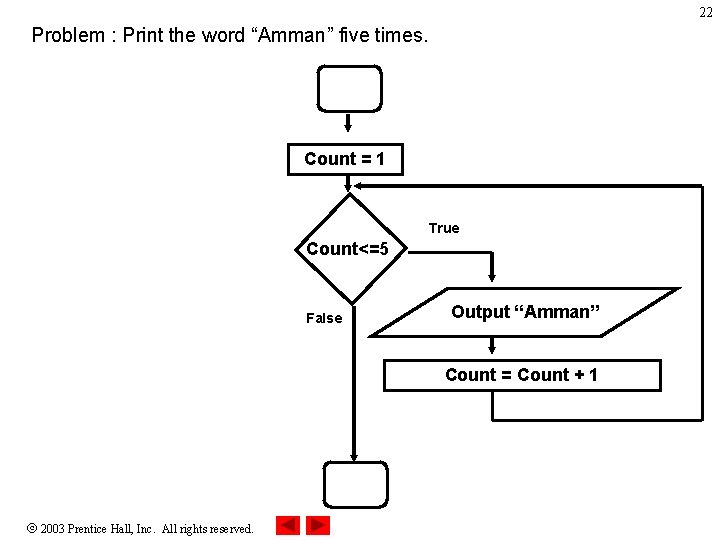
22 Problem : Print the word “Amman” five times. Count = 1 True Count<=5 False Output “Amman” Count = Count + 1 2003 Prentice Hall, Inc. All rights reserved.
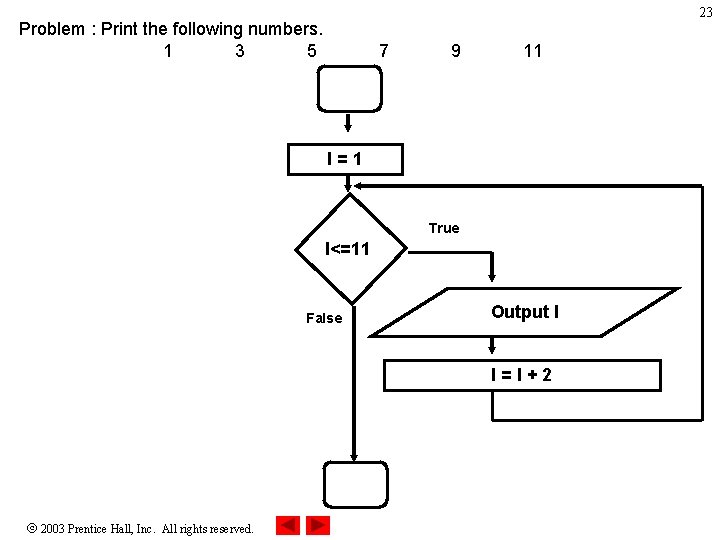
23 Problem : Print the following numbers. 1 3 5 7 9 11 I=1 True I<=11 False Output I I=I+2 2003 Prentice Hall, Inc. All rights reserved.
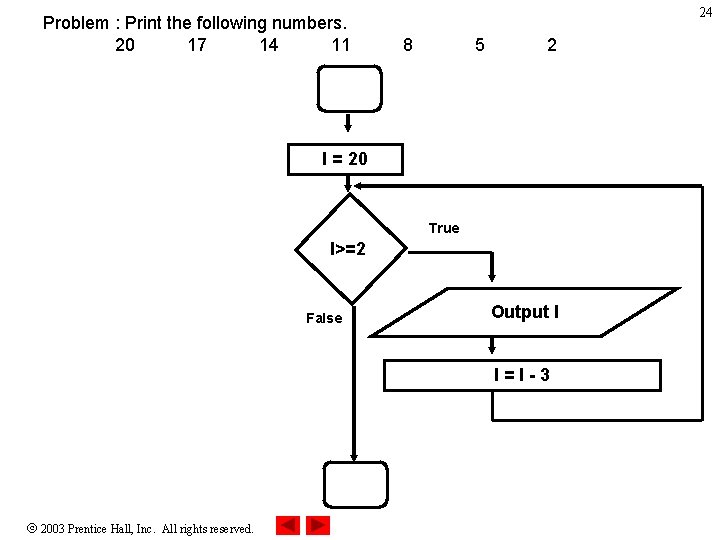
Problem : Print the following numbers. 20 17 14 11 24 8 5 2 I = 20 True I>=2 False Output I I=I-3 2003 Prentice Hall, Inc. All rights reserved.
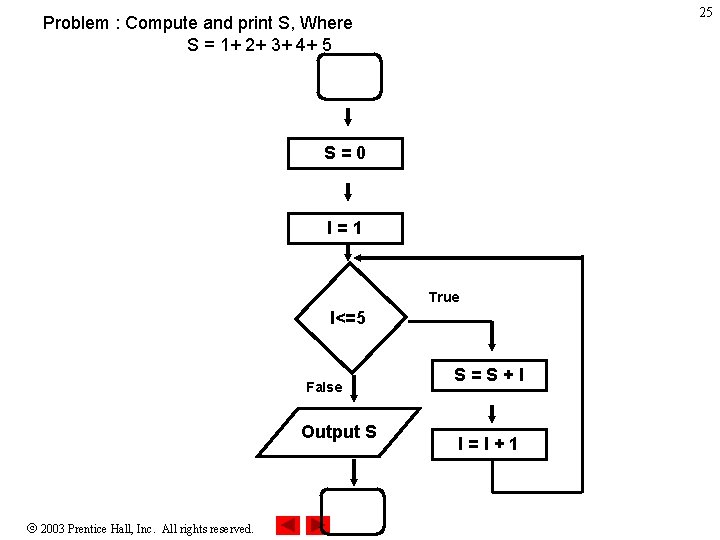
25 Problem : Compute and print S, Where S = 1+ 2+ 3+ 4+ 5 S=0 I=1 True I<=5 False Output S 2003 Prentice Hall, Inc. All rights reserved. S=S+I I=I+1
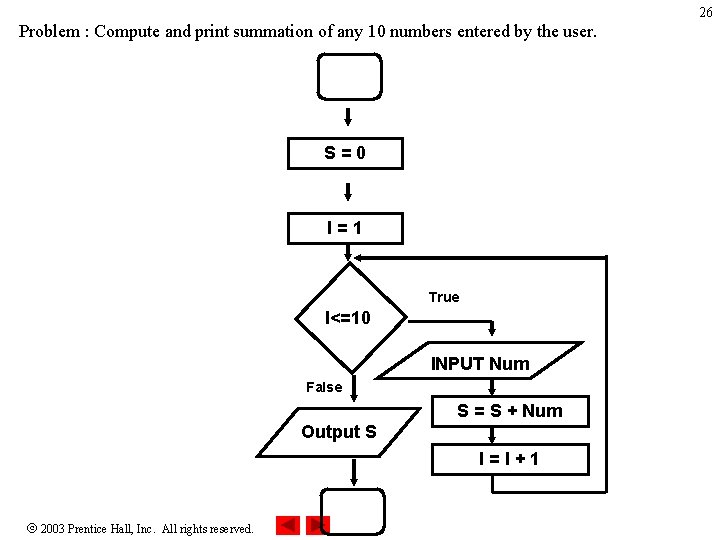
26 Problem : Compute and print summation of any 10 numbers entered by the user. S=0 I=1 True I<=10 INPUT Num False S = S + Num Output S I=I+1 2003 Prentice Hall, Inc. All rights reserved.
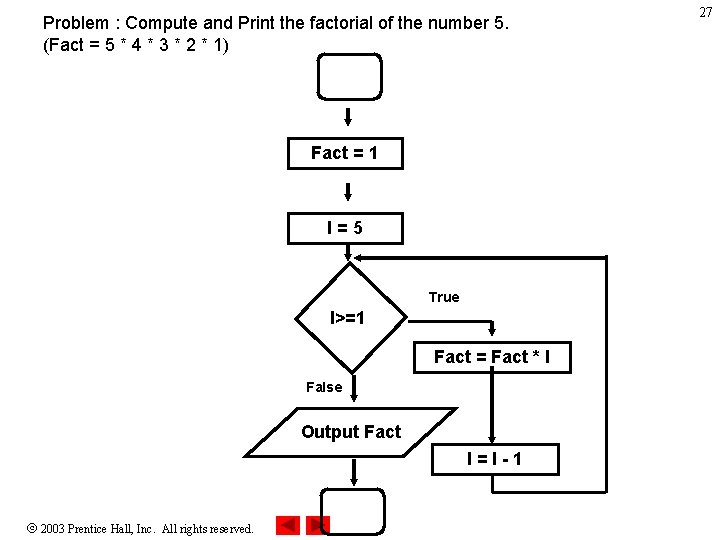
Problem : Compute and Print the factorial of the number 5. (Fact = 5 * 4 * 3 * 2 * 1) Fact = 1 I=5 True I>=1 Fact = Fact * I False Output Fact I=I-1 2003 Prentice Hall, Inc. All rights reserved. 27
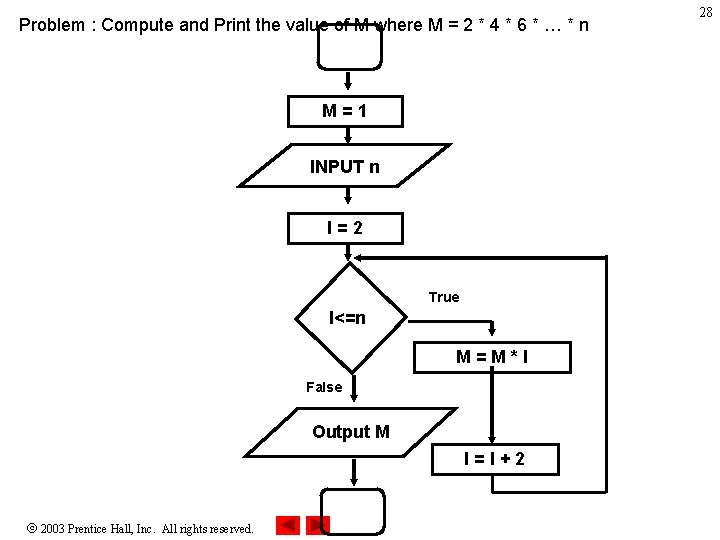
Problem : Compute and Print the value of M where M = 2 * 4 * 6 * … * n M=1 INPUT n I=2 True I<=n M=M*I False Output M I=I+2 2003 Prentice Hall, Inc. All rights reserved. 28
29 1. 7 Introduction to C++ Programming • C++ language – Facilitates structured and disciplined approach to computer program design • Following several examples – Illustrate many important features of C++ – Each analyzed one statement at a time • Structured programming • Object-oriented programming 2003 Prentice Hall, Inc. All rights reserved.
1. 8 A Simple Program: Printing a Line of Text • Comments – – Document programs Improve program readability Ignored by compiler Single-line comment • Begin with // • Preprocessor directives – Processed by preprocessor before compiling – Begin with # 2003 Prentice Hall, Inc. All rights reserved. 30
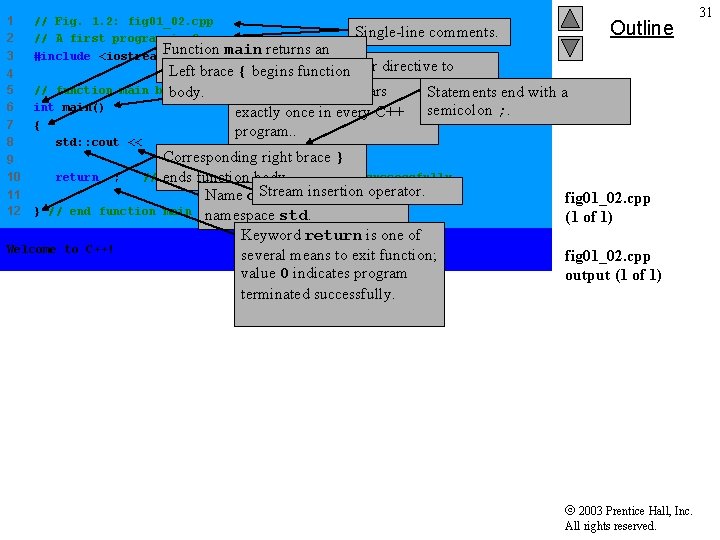
1 2 3 // Fig. 1. 2: fig 01_02. cpp // A first program in C++. Function main returns an #include <iostream> 4 5 6 7 8 // function main int main() { std: : cout << "Welcome to C++!n"; 9 10 11 12 Outline Single-line comments. Preprocessor directive to integer value. Left brace { begins function include input/output stream begins execution Function main appears body. program Statements end with a header file <iostream>. exactly once in every C++ semicolon ; . program. . return 0; // } // end function Welcome to C++! Corresponding right brace } indicate that program ended successfully ends function body. Stream insertion operator. Name cout belongs to main namespace std. Keyword return is one of several means to exit function; value 0 indicates program terminated successfully. fig 01_02. cpp (1 of 1) fig 01_02. cpp output (1 of 1) 2003 Prentice Hall, Inc. All rights reserved. 31
1. 8 A Simple Program: Printing a Line of Text • Standard output stream object – std: : cout – “Connected” to screen – << • Stream insertion operator • Value to right (right operand) inserted into output stream • Namespace – std: : specifies using name that belongs to “namespace” std – std: : removed through use of using statements • Escape characters – – Indicates “special” character output 2003 Prentice Hall, Inc. All rights reserved. 32
1. 8 A Simple Program: Printing a Line of Text 2003 Prentice Hall, Inc. All rights reserved. 33
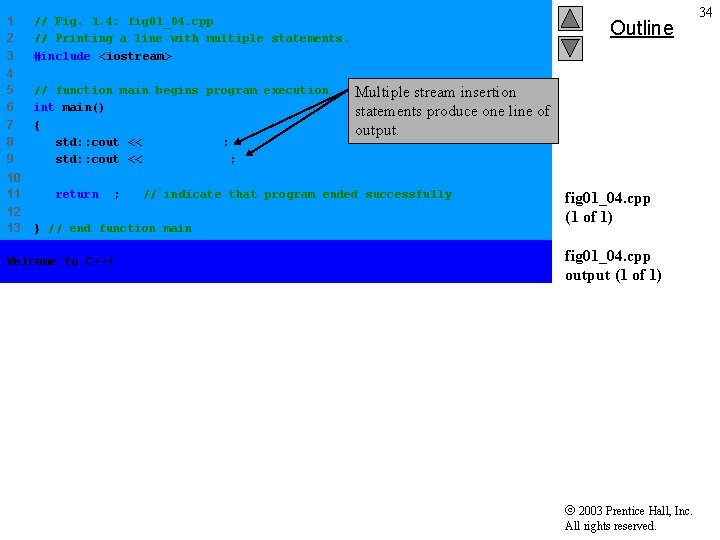
1 2 3 // Fig. 1. 4: fig 01_04. cpp // Printing a line with multiple statements. #include <iostream> 4 5 6 7 8 9 // function main begins program execution int main() { std: : cout << "Welcome "; std: : cout << "to C++!n"; 10 11 12 13 return 0; Multiple stream insertion statements produce one line of output. // indicate that program ended successfully } // end function main Welcome to C++! Outline fig 01_04. cpp (1 of 1) fig 01_04. cpp output (1 of 1) 2003 Prentice Hall, Inc. All rights reserved. 34
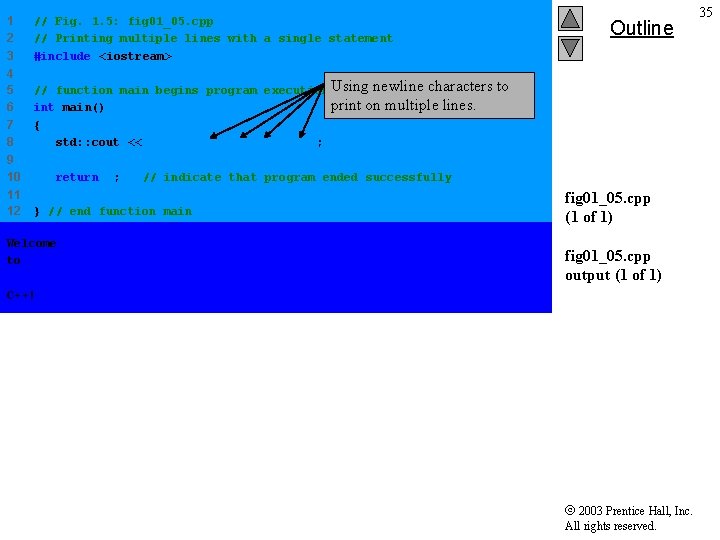
1 2 3 // Fig. 1. 5: fig 01_05. cpp // Printing multiple lines with a single statement #include <iostream> 4 5 6 7 8 // function main begins program execution Using newline characters to print on multiple lines. int main() { std: : cout << "Welcomentonn. C++!n"; 9 10 11 12 return 0; // indicate that program ended successfully } // end function main Welcome to C++! Outline fig 01_05. cpp (1 of 1) fig 01_05. cpp output (1 of 1) 2003 Prentice Hall, Inc. All rights reserved. 35
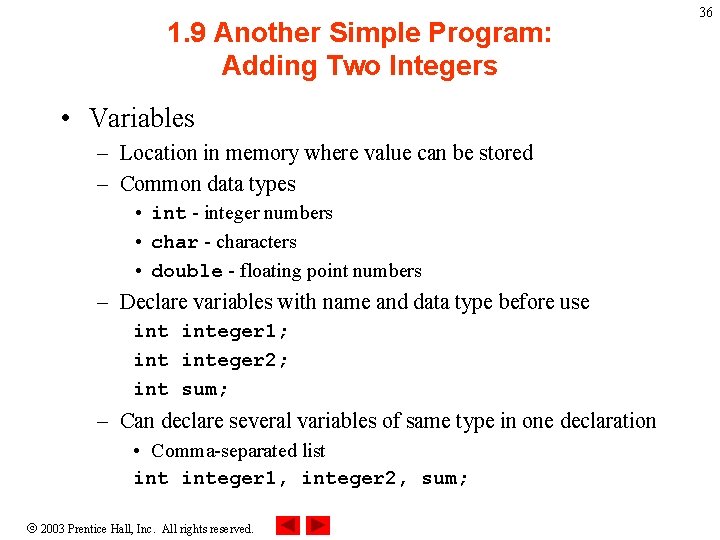
1. 9 Another Simple Program: Adding Two Integers • Variables – Location in memory where value can be stored – Common data types • int - integer numbers • char - characters • double - floating point numbers – Declare variables with name and data type before use integer 1; integer 2; int sum; – Can declare several variables of same type in one declaration • Comma-separated list integer 1, integer 2, sum; 2003 Prentice Hall, Inc. All rights reserved. 36
1. 10 Another Simple Program: Adding Two Integers • Variables – Variable names • Valid identifier – Series of characters (letters, digits, underscores) – Cannot begin with digit – Case sensitive 2003 Prentice Hall, Inc. All rights reserved. 37
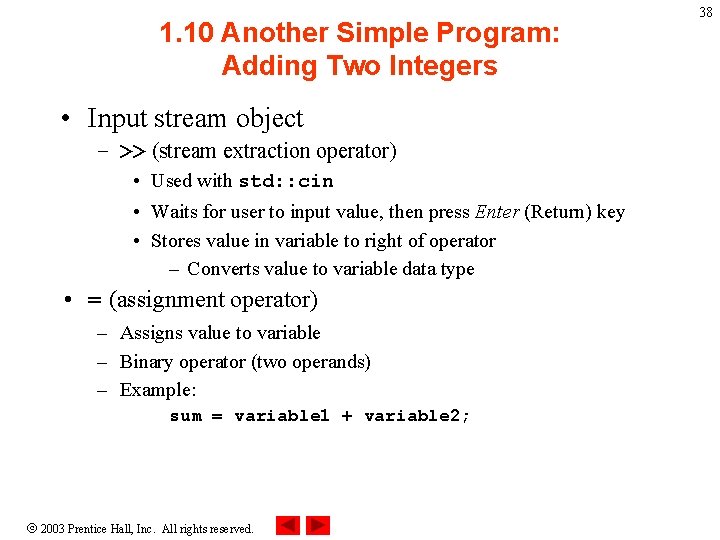
1. 10 Another Simple Program: Adding Two Integers • Input stream object – >> (stream extraction operator) • Used with std: : cin • Waits for user to input value, then press Enter (Return) key • Stores value in variable to right of operator – Converts value to variable data type • = (assignment operator) – Assigns value to variable – Binary operator (two operands) – Example: sum = variable 1 + variable 2; 2003 Prentice Hall, Inc. All rights reserved. 38
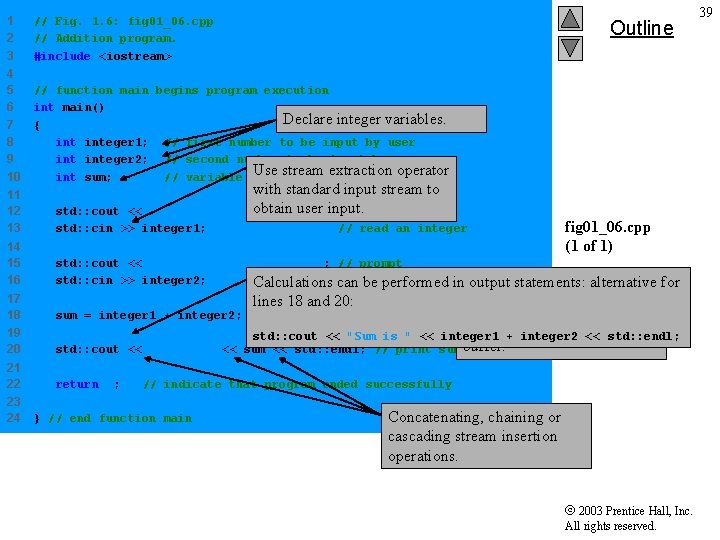
1 2 3 // Fig. 1. 6: fig 01_06. cpp // Addition program. #include <iostream> 4 5 6 7 8 9 10 // function main begins program execution int main() Declare integer variables. { integer 1; // first number to be input by user integer 2; // second number to be input by user Use stream extraction operator int sum; // variable in which sum will be stored Outline with standard input stream to obtain user input. integern"; // prompt 11 12 13 std: : cout << "Enter first std: : cin >> integer 1; 14 15 16 std: : cout << "Enter second integern" ; // prompt std: : cin >> integer 2; // read an integer Calculations can be performed in output statements: alternative for // read an integer 17 18 sum = integer 1 + integer 2; 19 20 std: : cout << "Sum is " << sum << std: : endl; // print 21 22 return 0; 23 24 lines 18 and 20: // assign result to sum fig 01_06. cpp (1 of 1) Stream manipulator std: : endl outputs a newline, then “flushes output integer 1 + integer 2 << std: : endl; sum buffer. ” // indicate that program ended successfully } // end function main Concatenating, chaining or cascading stream insertion operations. 2003 Prentice Hall, Inc. All rights reserved. 39
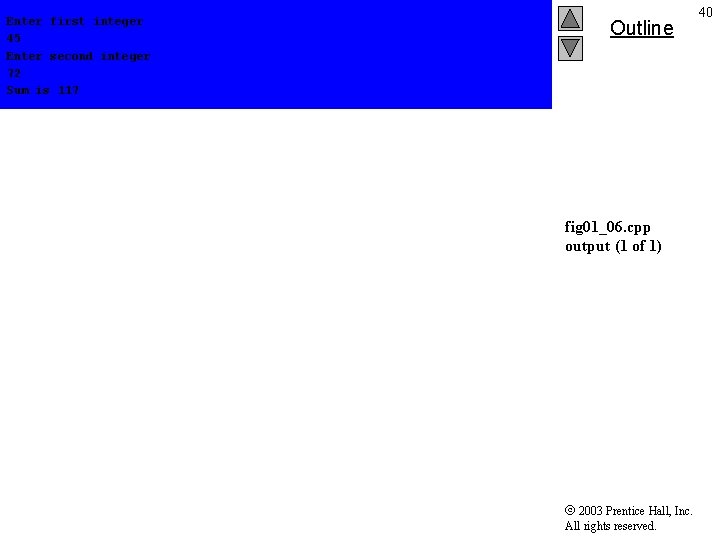
Enter first integer 45 Enter second integer 72 Sum is 117 Outline fig 01_06. cpp output (1 of 1) 2003 Prentice Hall, Inc. All rights reserved. 40
41 1. 11 Memory Concepts • Variable names – Correspond to actual locations in computer's memory – Every variable has name, type, size and value – When new value placed into variable, overwrites previous value – Reading variables from memory nondestructive 2003 Prentice Hall, Inc. All rights reserved.
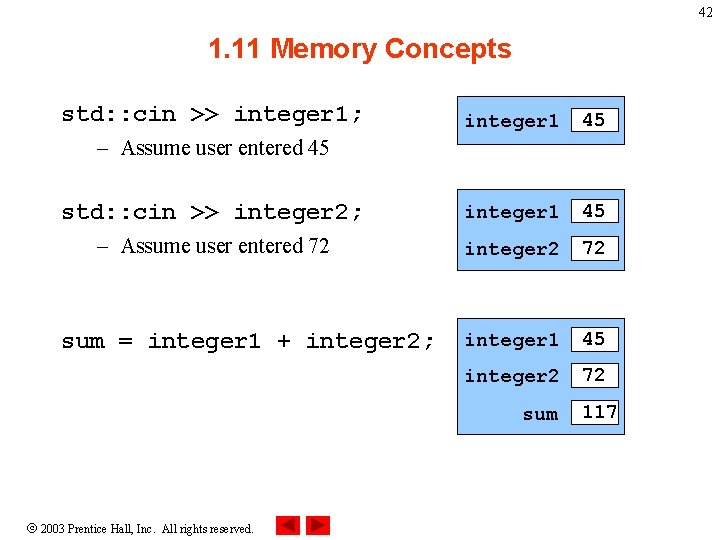
42 1. 11 Memory Concepts std: : cin >> integer 1; integer 1 45 std: : cin >> integer 2; integer 1 45 – Assume user entered 72 integer 2 72 integer 1 45 integer 2 72 – Assume user entered 45 sum = integer 1 + integer 2; sum 2003 Prentice Hall, Inc. All rights reserved. 117
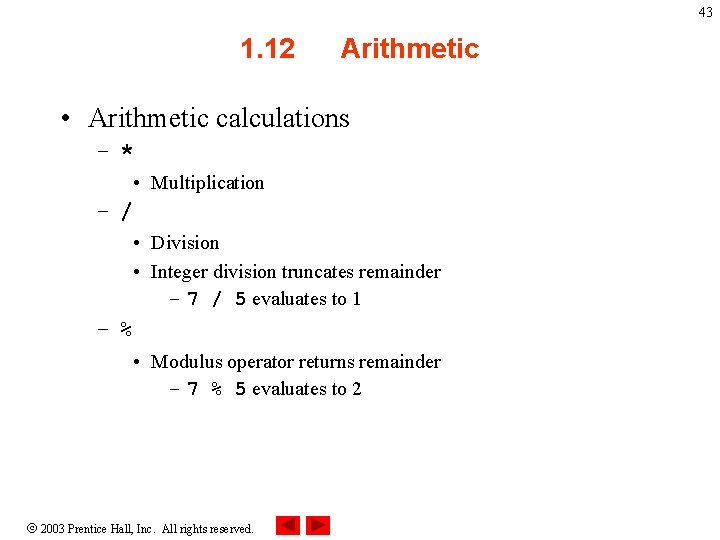
43 1. 12 Arithmetic • Arithmetic calculations – * • Multiplication – / • Division • Integer division truncates remainder – 7 / 5 evaluates to 1 – % • Modulus operator returns remainder – 7 % 5 evaluates to 2 2003 Prentice Hall, Inc. All rights reserved.
44 1. 12 Arithmetic • Rules of operator precedence – Operators in parentheses evaluated first • Nested/embedded parentheses – Operators in innermost pair first – Multiplication, division, modulus applied next • Operators applied from left to right – Addition, subtraction applied last • Operators applied from left to right 2003 Prentice Hall, Inc. All rights reserved.
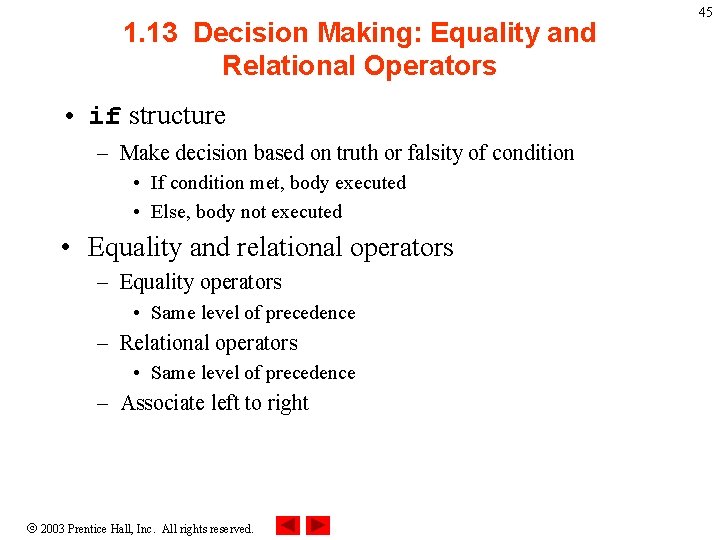
1. 13 Decision Making: Equality and Relational Operators • if structure – Make decision based on truth or falsity of condition • If condition met, body executed • Else, body not executed • Equality and relational operators – Equality operators • Same level of precedence – Relational operators • Same level of precedence – Associate left to right 2003 Prentice Hall, Inc. All rights reserved. 45
1. 13 Decision Making: Equality and Relational Operators 2003 Prentice Hall, Inc. All rights reserved. 46
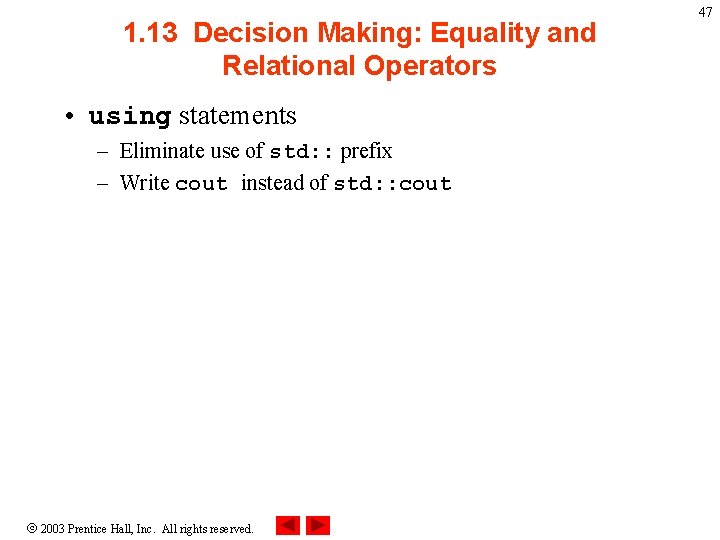
1. 13 Decision Making: Equality and Relational Operators • using statements – Eliminate use of std: : prefix – Write cout instead of std: : cout 2003 Prentice Hall, Inc. All rights reserved. 47
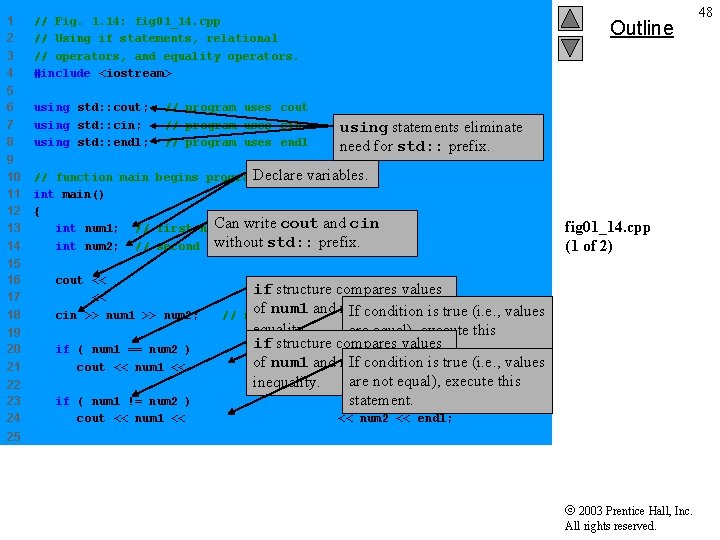
1 2 3 4 // Fig. 1. 14: fig 01_14. cpp // Using if statements, relational // operators, and equality operators. #include <iostream> 5 6 7 8 using std: : cout; using std: : cin; using std: : endl; 9 10 11 12 13 14 // function main begins program. Declare variables. execution int main() { Can write cout and cin int num 1; // first number to be read from user without std: : prefix. int num 2; // second number to be read from user // program uses cout // program uses cin // program uses endl Outline using statements eliminate need for std: : prefix. 15 16 17 18 cout << "Enter two integers, and I will tell youn" if structure compares values << "the relationships they satisfy: " ; of num 1 and num 2 to test for If condition is true (i. e. , values cin >> num 1 >> num 2; // read two integers 19 20 21 if ( num 1 == num 2 ) cout << num 1 << " is 22 23 24 if ( num 1 != num 2 ) cout << num 1 << " is not equal to " << num 2 << endl; fig 01_14. cpp (1 of 2) equality. are equal), execute this if structure compares values statement. of num 1 and num 2 to test for If condition is true (i. e. , values equal to " << num 2 << endl; are not equal), execute this inequality. statement. 25 2003 Prentice Hall, Inc. All rights reserved. 48
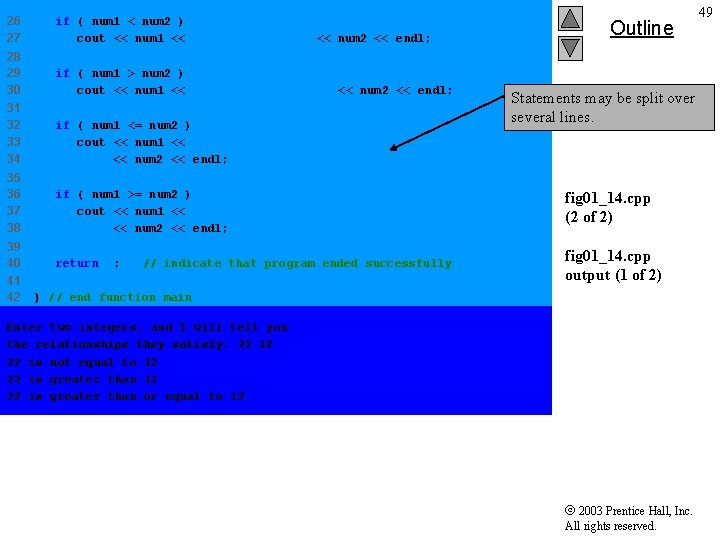
26 27 if ( num 1 < num 2 ) cout << num 1 << " is less than " << num 2 << endl; 28 29 30 if ( num 1 > num 2 ) cout << num 1 << " is greater than " << num 2 << endl; 31 32 33 34 if ( num 1 <= num 2 ) cout << num 1 << " is less than or equal to " << num 2 << endl; 35 36 37 38 if ( num 1 >= num 2 ) cout << num 1 << " is greater than or equal to " << num 2 << endl; fig 01_14. cpp (2 of 2) 39 40 return 0; fig 01_14. cpp output (1 of 2) 41 42 // indicate that program ended successfully Outline 49 Statements may be split over several lines. } // end function main Enter two integers, and I will tell you the relationships they satisfy: 22 12 22 is not equal to 12 22 is greater than or equal to 12 2003 Prentice Hall, Inc. All rights reserved.
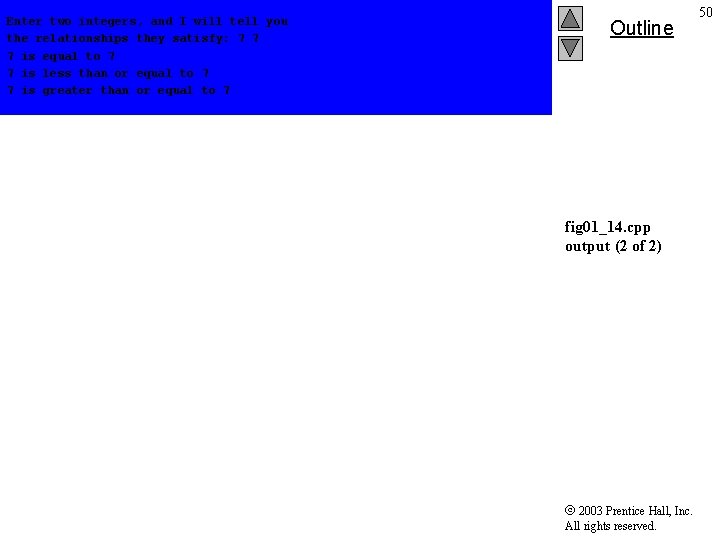
Enter two integers, and I will tell you the relationships they satisfy: 7 7 7 is equal to 7 7 is less than or equal to 7 7 is greater than or equal to 7 Outline fig 01_14. cpp output (2 of 2) 2003 Prentice Hall, Inc. All rights reserved. 50