
Chapter 1 Introduction Operating System Concepts 10 h














- Slides: 51
Chapter 1: Introduction Operating System Concepts – 10 h Edition Silberschatz, Galvin and Gagne © 2018
Chapter 1: Introduction n What Operating Systems Do n Computer-System Organization n Computer-System Architecture n Operating-System Operations n Resource Management n Security and Protection n Virtualization n Kernel Data Structures n Computing Environments Operating System Concepts – 10 th Edition 1. 2 Silberschatz, Galvin and Gagne © 2018
Objectives n Describe the general organization of a computer system and the role of interrupts n Describe the components in a modern, multiprocessor computer system n Illustrate the transition from user mode to kernel mode n Discuss how operating systems are used in various computing environments n Provide examples of free and open-source operating systems Operating System Concepts – 10 th Edition 1. 3 Silberschatz, Galvin and Gagne © 2018
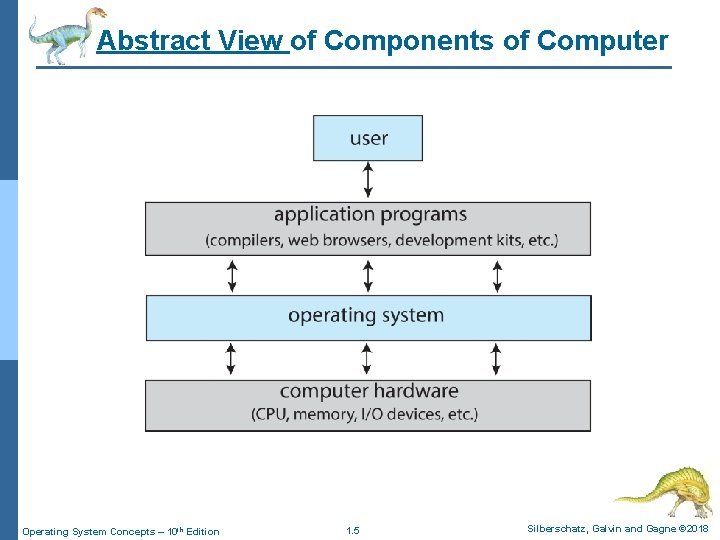
Computer System Structure n Computer system can be divided into four components: l Hardware 4 Provides – l basic computing resources i. e. CPU, memory, I/O devices, …etc. Operating system 4 Controls and coordinates use of hardware among various applications and users l Application programs 4 Define the ways in which the system resources are used to solve the computing problems of the users – l i. e. word processors, compilers, web browsers, database systems, video games Users 4 People, machines, other computers Operating System Concepts – 10 th Edition 1. 4 Silberschatz, Galvin and Gagne © 2018
Abstract View of Components of Computer Operating System Concepts – 10 th Edition 1. 5 Silberschatz, Galvin and Gagne © 2018
The Operating System as an Extended Machine Figure 1 -2. Operating systems turn ugly hardware into beautiful abstractions. Tanenbaum & Bos, Modern Operating Systems: 4 th ed. , Global Edition (c) 2015 Pearson Education Limited. All rights reserved.
What Operating Systems Do ? n Depends on the point of view !!! n Users want convenience: 1. ease of use and 2. good performance n Often, users, don’t care about resource utilization n But computers must keep all users happy l Operating system is a 1) resource allocator and 2) control program making efficient use of HW and managing execution of user programs n But: ? ? ? l Mobile devices like smartphones and tables are resource poor, optimized for usability and battery life 4 l Mobile user interfaces such as touch screens, voice recognition Some computers have little or no user interface, such as embedded computers in devices and automobiles 4 Run primarily without user intervention Operating System Concepts – 10 th Edition 1. 7 Silberschatz, Galvin and Gagne © 2018
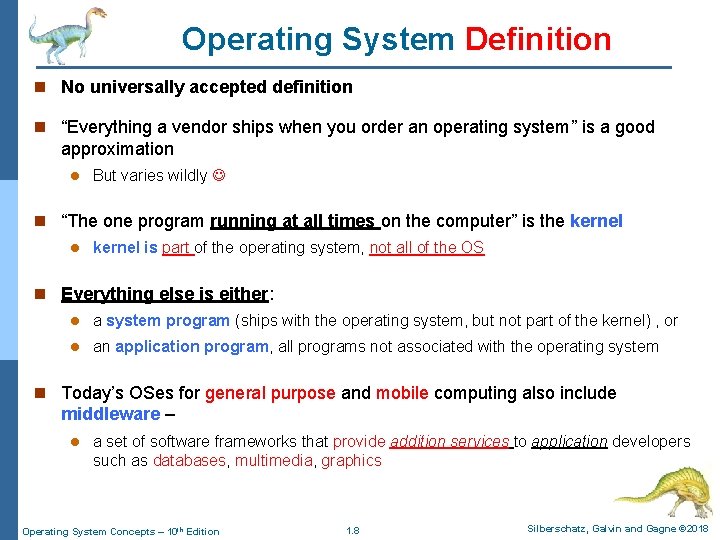
Operating System Definition n No universally accepted definition n “Everything a vendor ships when you order an operating system” is a good approximation l But varies wildly n “The one program running at all times on the computer” is the kernel l kernel is part of the operating system, not all of the OS n Everything else is either: l a system program (ships with the operating system, but not part of the kernel) , or l an application program, all programs not associated with the operating system n Today’s OSes for general purpose and mobile computing also include middleware – l a set of software frameworks that provide addition services to application developers such as databases, multimedia, graphics Operating System Concepts – 10 th Edition 1. 8 Silberschatz, Galvin and Gagne © 2018
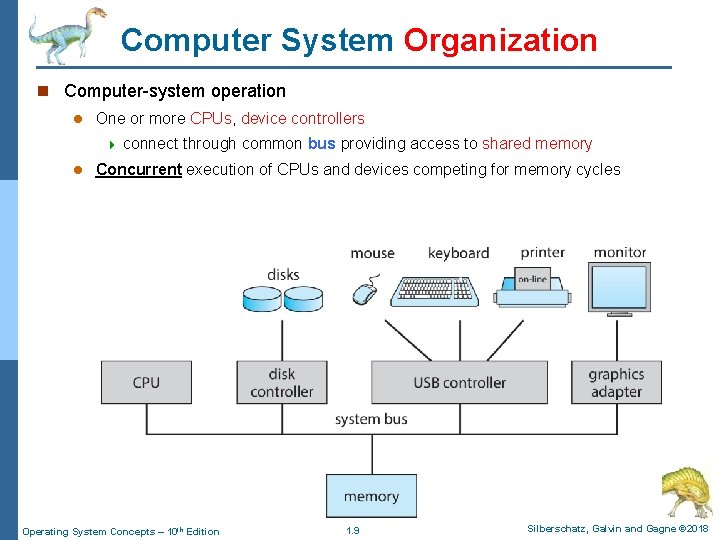
Computer System Organization n Computer-system operation l One or more CPUs, device controllers 4 l connect through common bus providing access to shared memory Concurrent execution of CPUs and devices competing for memory cycles Operating System Concepts – 10 th Edition 1. 9 Silberschatz, Galvin and Gagne © 2018
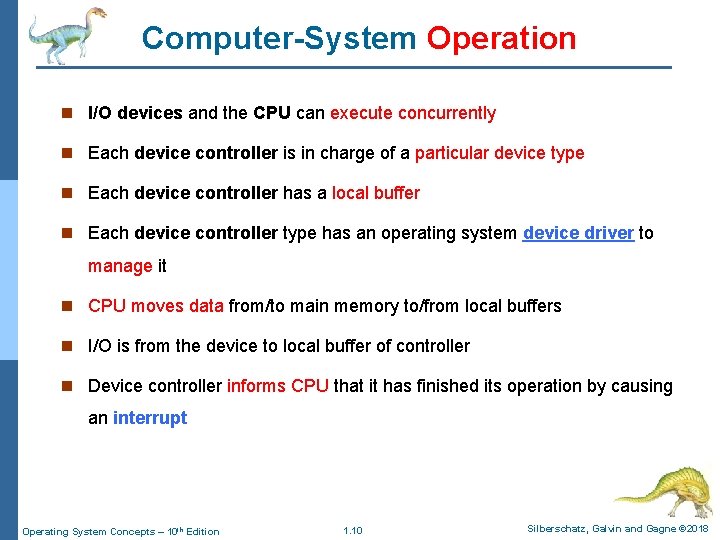
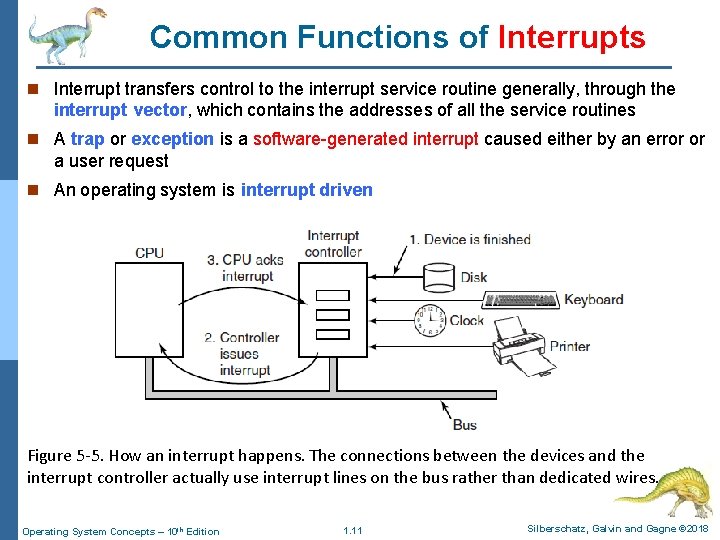
Computer-System Operation n I/O devices and the CPU can execute concurrently n Each device controller is in charge of a particular device type n Each device controller has a local buffer n Each device controller type has an operating system device driver to manage it n CPU moves data from/to main memory to/from local buffers n I/O is from the device to local buffer of controller n Device controller informs CPU that it has finished its operation by causing an interrupt Operating System Concepts – 10 th Edition 1. 10 Silberschatz, Galvin and Gagne © 2018
Common Functions of Interrupts n Interrupt transfers control to the interrupt service routine generally, through the interrupt vector, which contains the addresses of all the service routines n A trap or exception is a software-generated interrupt caused either by an error or a user request n An operating system is interrupt driven Figure 5 -5. How an interrupt happens. The connections between the devices and the interrupt controller actually use interrupt lines on the bus rather than dedicated wires. Operating System Concepts – 10 th Edition 1. 11 Silberschatz, Galvin and Gagne © 2018
I/O Devices Figure 1 -11. (a) The steps in starting an I/O device and getting an interrupt. Tanenbaum & Bos, Modern Operating Systems: 4 th ed. , Global Edition (c) 2015 Pearson Education Limited. All rights reserved.
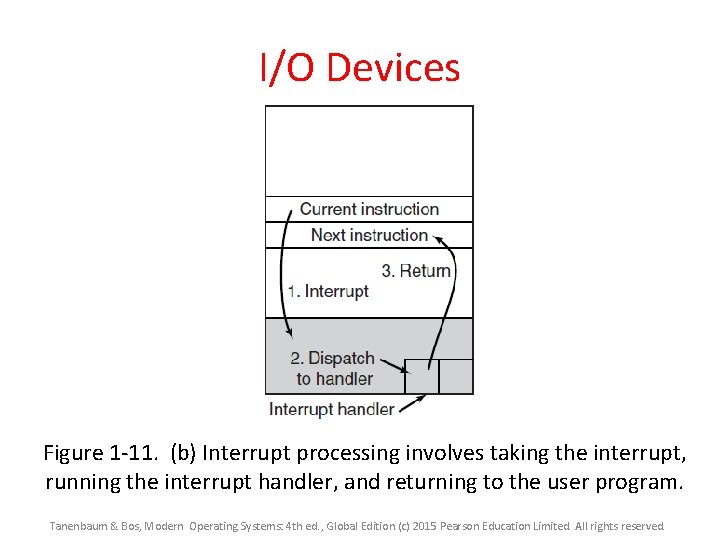
I/O Devices Figure 1 -11. (b) Interrupt processing involves taking the interrupt, running the interrupt handler, and returning to the user program. Tanenbaum & Bos, Modern Operating Systems: 4 th ed. , Global Edition (c) 2015 Pearson Education Limited. All rights reserved.
Computer Startup n bootstrap program is loaded at power-up or reboot l Typically stored in ROM or EPROM, generally known as firmware l Initializes all aspects of system l Loads operating system kernel and starts execution Operating System Concepts – 10 th Edition 1. 14 Silberschatz, Galvin and Gagne © 2018
Storage Structure n Main memory – only large storage media that the CPU can access directly l Random access l Typically volatile l Typically random-access memory in the form of Dynamic Random-access Memory (DRAM) n Secondary storage – extension of main memory that provides large nonvolatile storage capacity n Hard Disk Drives (HDD) – rigid metal or glass platters covered with magnetic recording material l Disk surface is logically divided into tracks, which are subdivided into sectors l The disk controller determines the logical interaction between the device and the computer n Non-volatile memory (NVM) devices– faster than hard disks, nonvolatile l Various technologies (i. e. flash memory) l Becoming more popular as capacity and performance increases, price drops Operating System Concepts – 10 th Edition 1. 15 Silberschatz, Galvin and Gagne © 2018
Storage Definitions and Notation Review The basic unit of computer storage is the bit. A bit can contain one of two values, 0 and 1. All other storage in a computer is based on collections of bits. Given enough bits, it is amazing how many things a computer can represent: numbers, letters, images, movies, sounds, documents, and programs, to name a few. A byte is 8 bits, and on most computers it is the smallest convenient chunk of storage. For example, most computers don’t have an instruction to move a bit but do have one to move a byte. A less common term is word, which is a given computer architecture’s native unit of data. A word is made up of one or more bytes. For example, a computer that has 64 -bit registers and 64 -bit memory addressing typically has 64 -bit (8 -byte) words. A computer executes many operations in its native word size rather than a byte at a time. Computer storage, along with most computer throughput, is generally measured and manipulated in bytes and collections of bytes. A kilobyte , or KB , is 1, 024 bytes; A megabyte , or MB , is 1, 0242 bytes; A gigabyte , or GB , is 1, 0243 bytes; A terabyte , or TB , is 1, 0244 bytes; A petabyte , or PB , is 1, 0245 bytes. Computer manufacturers often round off these numbers and say that a megabyte is 1 million bytes and a gigabyte is 1 billion bytes. Networking measurements are an exception to this general rule; they are given in bits (because networks move data a bit at a time). Operating System Concepts – 10 th Edition 1. 16 Silberschatz, Galvin and Gagne © 2018
Storage Hierarchy n Storage systems organized in hierarchy l Speed l Cost l Volatility n Caching – copying information into faster storage system; l main memory can be viewed as a cache for secondary storage n Device Driver for each device controller to manage I/O l Provides uniform interface between controller and kernel Operating System Concepts – 10 th Edition 1. 17 Silberschatz, Galvin and Gagne © 2018
Storage-Device Hierarchy Operating System Concepts – 10 th Edition 1. 18 Silberschatz, Galvin and Gagne © 2018
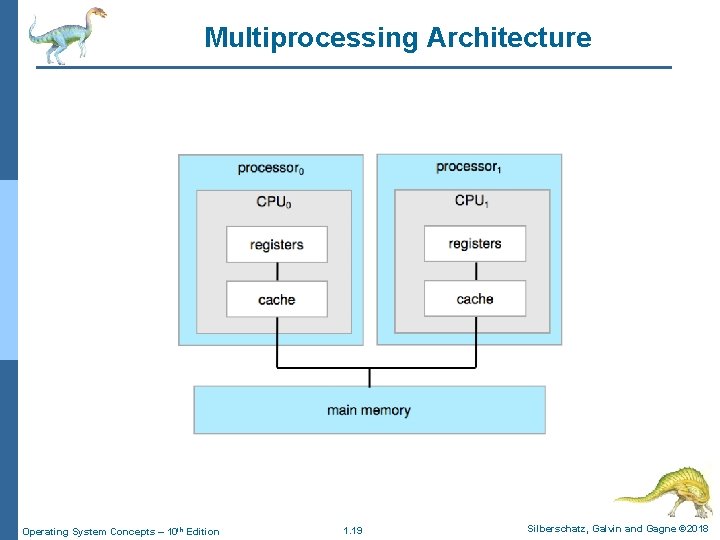
Multiprocessing Architecture Operating System Concepts – 10 th Edition 1. 19 Silberschatz, Galvin and Gagne © 2018
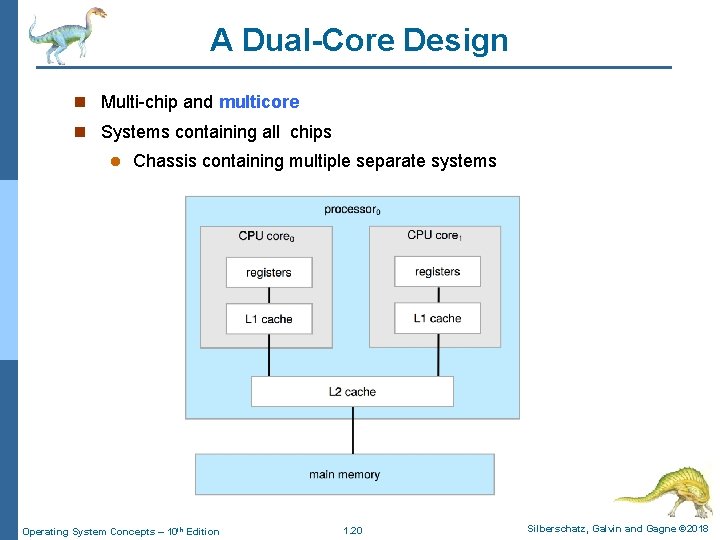
A Dual-Core Design n Multi-chip and multicore n Systems containing all chips l Chassis containing multiple separate systems Operating System Concepts – 10 th Edition 1. 20 Silberschatz, Galvin and Gagne © 2018
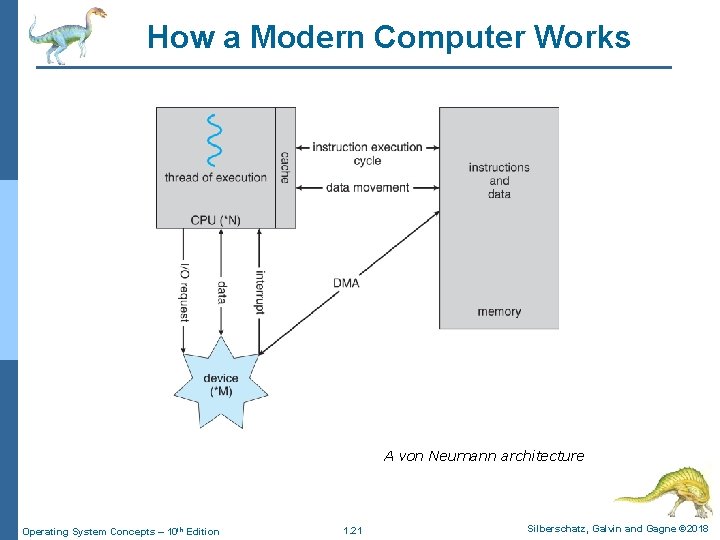
How a Modern Computer Works A von Neumann architecture Operating System Concepts – 10 th Edition 1. 21 Silberschatz, Galvin and Gagne © 2018
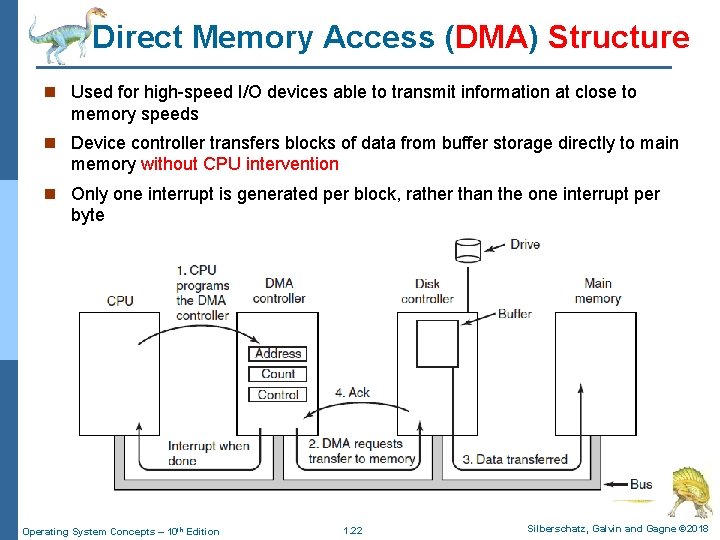
Direct Memory Access (DMA) Structure n Used for high-speed I/O devices able to transmit information at close to memory speeds n Device controller transfers blocks of data from buffer storage directly to main memory without CPU intervention n Only one interrupt is generated per block, rather than the one interrupt per byte Operating System Concepts – 10 th Edition 1. 22 Silberschatz, Galvin and Gagne © 2018
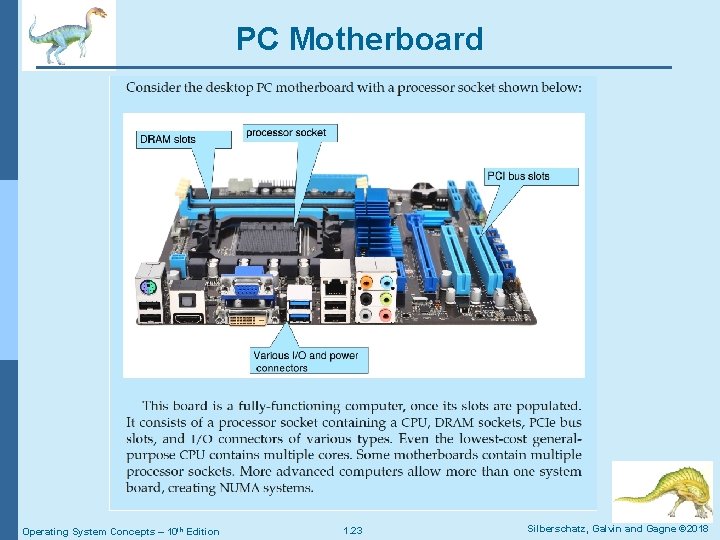
PC Motherboard Operating System Concepts – 10 th Edition 1. 23 Silberschatz, Galvin and Gagne © 2018
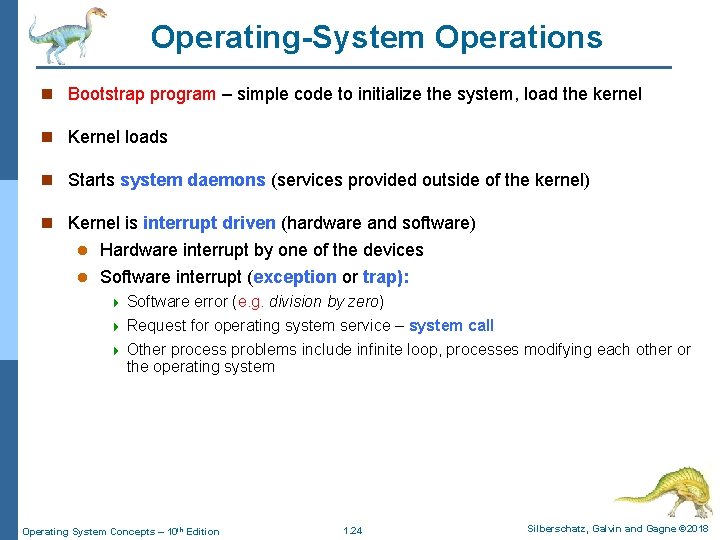
Operating-System Operations n Bootstrap program – simple code to initialize the system, load the kernel n Kernel loads n Starts system daemons (services provided outside of the kernel) n Kernel is interrupt driven (hardware and software) Hardware interrupt by one of the devices l Software interrupt (exception or trap): l 4 4 4 Software error (e. g. division by zero) Request for operating system service – system call Other process problems include infinite loop, processes modifying each other or the operating system Operating System Concepts – 10 th Edition 1. 24 Silberschatz, Galvin and Gagne © 2018
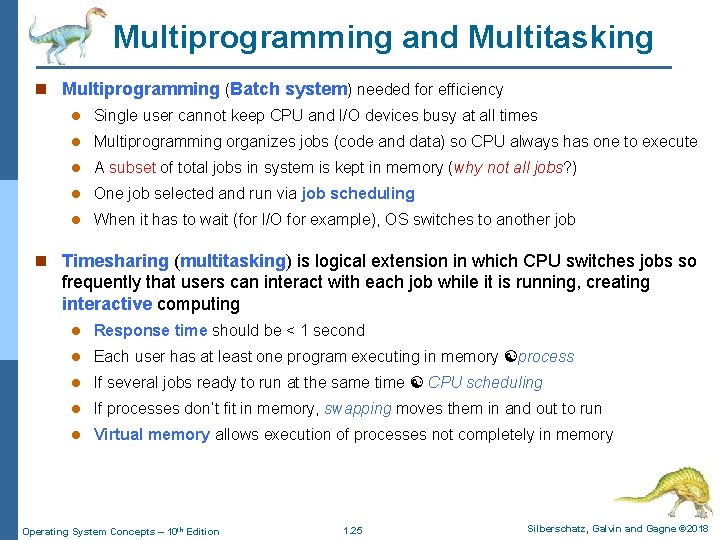
Multiprogramming and Multitasking n Multiprogramming (Batch system) needed for efficiency l Single user cannot keep CPU and I/O devices busy at all times l Multiprogramming organizes jobs (code and data) so CPU always has one to execute l A subset of total jobs in system is kept in memory (why not all jobs? ) l One job selected and run via job scheduling l When it has to wait (for I/O for example), OS switches to another job n Timesharing (multitasking) is logical extension in which CPU switches jobs so frequently that users can interact with each job while it is running, creating interactive computing l Response time should be < 1 second l Each user has at least one program executing in memory process l If several jobs ready to run at the same time CPU scheduling l If processes don’t fit in memory, swapping moves them in and out to run l Virtual memory allows execution of processes not completely in memory Operating System Concepts – 10 th Edition 1. 25 Silberschatz, Galvin and Gagne © 2018
Memory Layout for Multiprogrammed System Operating System Concepts – 10 th Edition 1. 26 Silberschatz, Galvin and Gagne © 2018
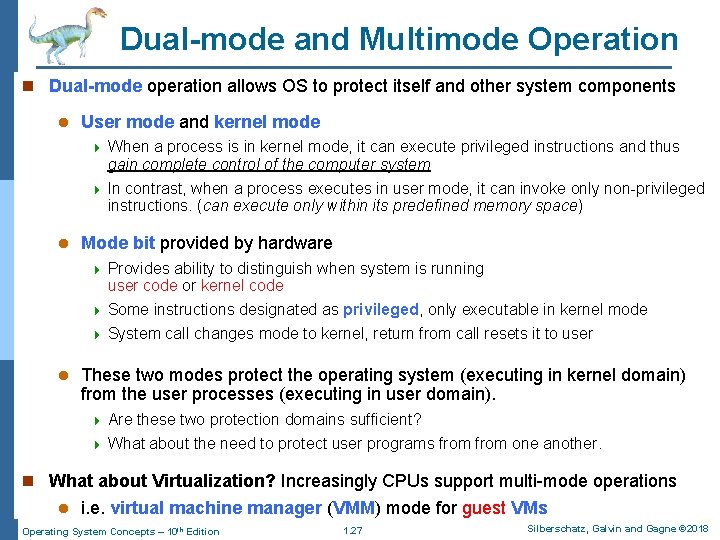
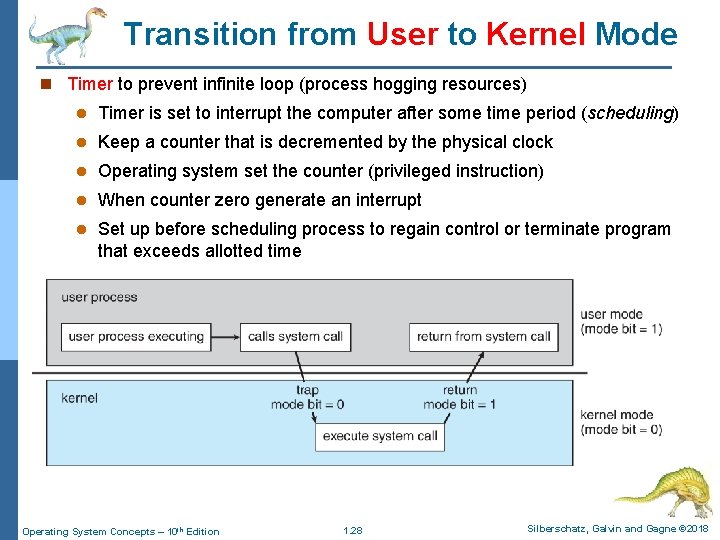
Dual-mode and Multimode Operation n Dual-mode operation allows OS to protect itself and other system components l User mode and kernel mode 4 4 l Mode bit provided by hardware 4 4 4 l When a process is in kernel mode, it can execute privileged instructions and thus gain complete control of the computer system In contrast, when a process executes in user mode, it can invoke only non-privileged instructions. (can execute only within its predefined memory space) Provides ability to distinguish when system is running user code or kernel code Some instructions designated as privileged, only executable in kernel mode System call changes mode to kernel, return from call resets it to user These two modes protect the operating system (executing in kernel domain) from the user processes (executing in user domain). 4 4 Are these two protection domains sufficient? What about the need to protect user programs from one another. n What about Virtualization? Increasingly CPUs support multi-mode operations l i. e. virtual machine manager (VMM) mode for guest VMs Operating System Concepts – 10 th Edition 1. 27 Silberschatz, Galvin and Gagne © 2018
Transition from User to Kernel Mode n Timer to prevent infinite loop (process hogging resources) l Timer is set to interrupt the computer after some time period (scheduling) l Keep a counter that is decremented by the physical clock l Operating system set the counter (privileged instruction) l When counter zero generate an interrupt l Set up before scheduling process to regain control or terminate program that exceeds allotted time Operating System Concepts – 10 th Edition 1. 28 Silberschatz, Galvin and Gagne © 2018
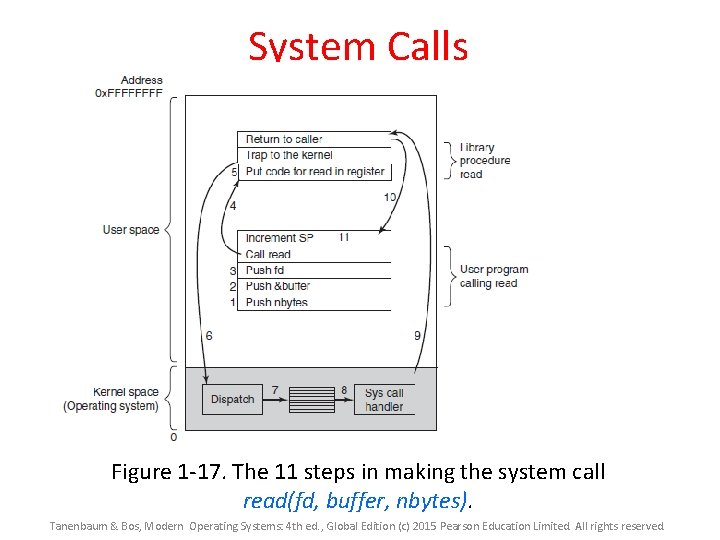
System Calls Figure 1 -17. The 11 steps in making the system call read(fd, buffer, nbytes). Tanenbaum & Bos, Modern Operating Systems: 4 th ed. , Global Edition (c) 2015 Pearson Education Limited. All rights reserved.
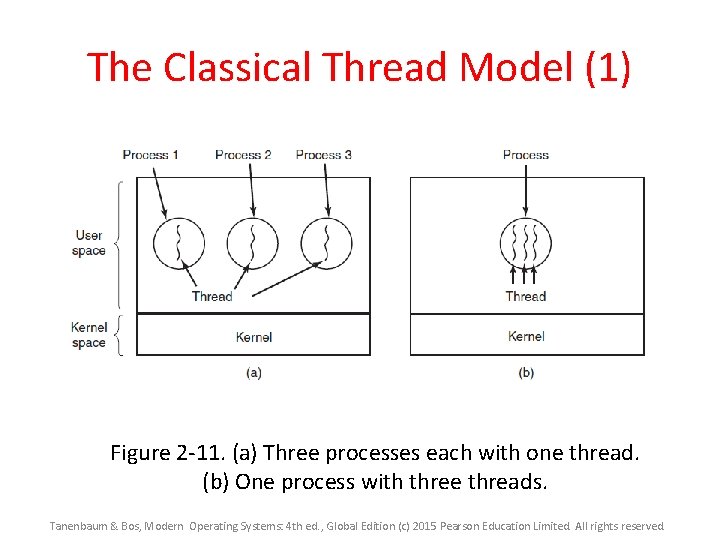
Process Management n A process is a program in execution. It is a unit of work within the system. l Program is a passive entity, l Process is an active entity. n Process needs resources to accomplish its task l CPU, memory, I/O, files, etc. l Initialization data n Process termination requires reclaim of any reusable resources n Single-threaded: l Process has one program counter (PC) specifying location of next instruction to execute l Process executes instructions sequentially, one at a time, until completion n Multi-threaded: l Process has one program counter per thread l Typically system has many processes, some user, some operating system running concurrently on one or more CPUs 4 Concurrency by multiplexing the CPUs among the processes / threads Operating System Concepts – 10 th Edition 1. 30 Silberschatz, Galvin and Gagne © 2018
The Classical Thread Model (1) Figure 2 -11. (a) Three processes each with one thread. (b) One process with three threads. Tanenbaum & Bos, Modern Operating Systems: 4 th ed. , Global Edition (c) 2015 Pearson Education Limited. All rights reserved.
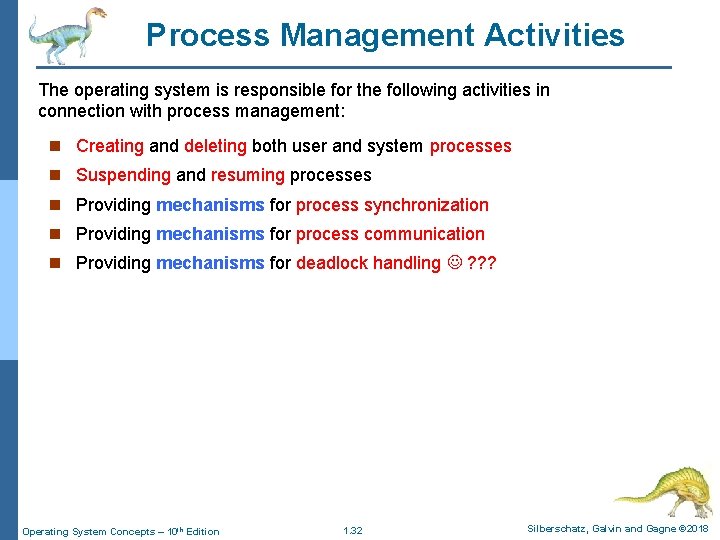
Process Management Activities The operating system is responsible for the following activities in connection with process management: n Creating and deleting both user and system processes n Suspending and resuming processes n Providing mechanisms for process synchronization n Providing mechanisms for process communication n Providing mechanisms for deadlock handling ? ? ? Operating System Concepts – 10 th Edition 1. 32 Silberschatz, Galvin and Gagne © 2018
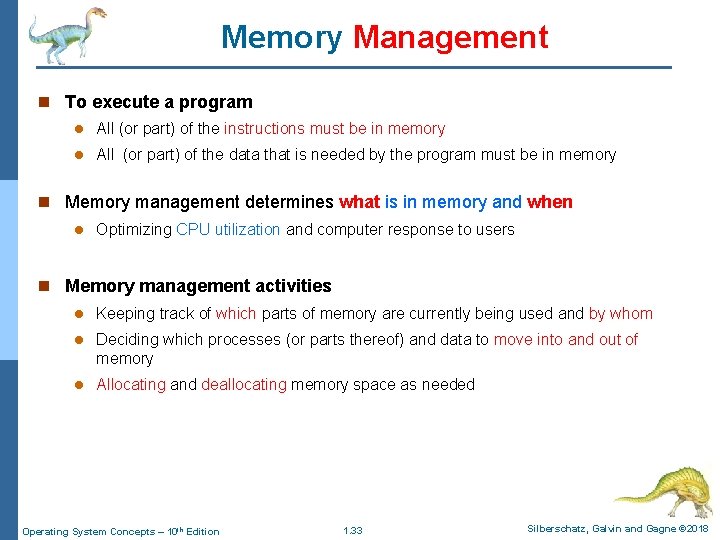
Memory Management n To execute a program l All (or part) of the instructions must be in memory l All (or part) of the data that is needed by the program must be in memory n Memory management determines what is in memory and when l Optimizing CPU utilization and computer response to users n Memory management activities l Keeping track of which parts of memory are currently being used and by whom l Deciding which processes (or parts thereof) and data to move into and out of memory l Allocating and deallocating memory space as needed Operating System Concepts – 10 th Edition 1. 33 Silberschatz, Galvin and Gagne © 2018
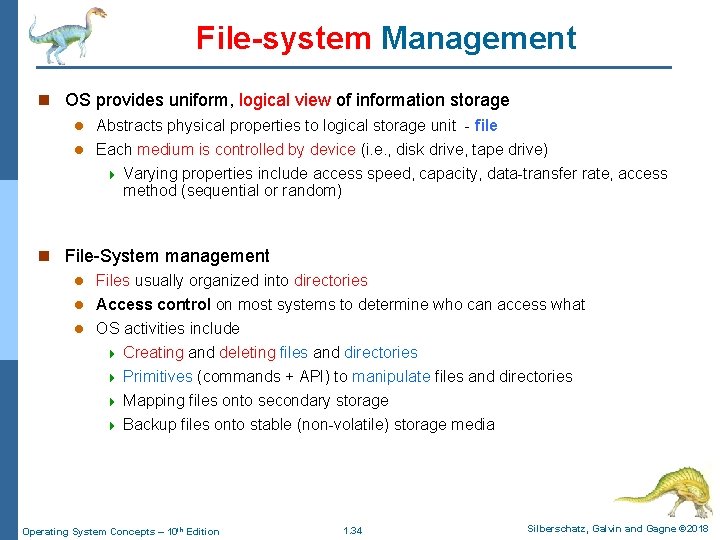
File-system Management n OS provides uniform, logical view of information storage l Abstracts physical properties to logical storage unit - file l Each medium is controlled by device (i. e. , disk drive, tape drive) 4 Varying properties include access speed, capacity, data-transfer rate, access method (sequential or random) n File-System management l Files usually organized into directories l Access control on most systems to determine who can access what l OS activities include 4 Creating and deleting files and directories 4 Primitives (commands + API) to manipulate files and directories 4 Mapping files onto secondary storage 4 Backup files onto stable (non-volatile) storage media Operating System Concepts – 10 th Edition 1. 34 Silberschatz, Galvin and Gagne © 2018
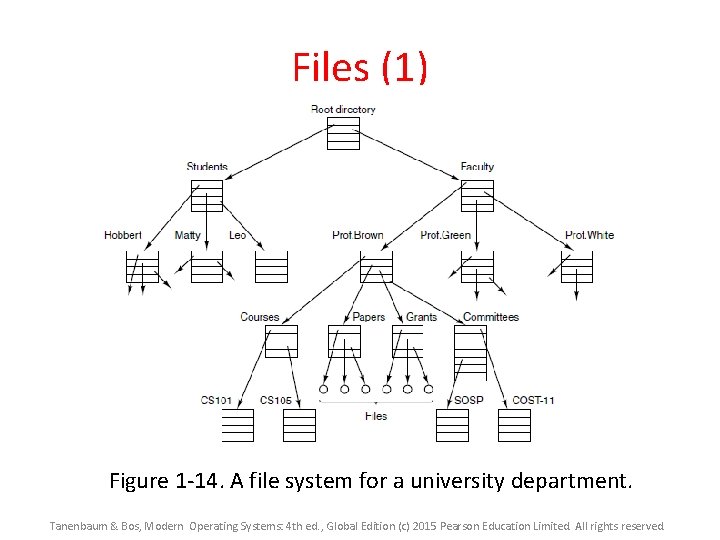
Files (1) Figure 1 -14. A file system for a university department. Tanenbaum & Bos, Modern Operating Systems: 4 th ed. , Global Edition (c) 2015 Pearson Education Limited. All rights reserved.
Files (2) Figure 1 -15. (a) Before mounting, the files on the CD-ROM are not accessible. (b) After mounting, they are part of the file hierarchy. Tanenbaum & Bos, Modern Operating Systems: 4 th ed. , Global Edition (c) 2015 Pearson Education Limited. All rights reserved.
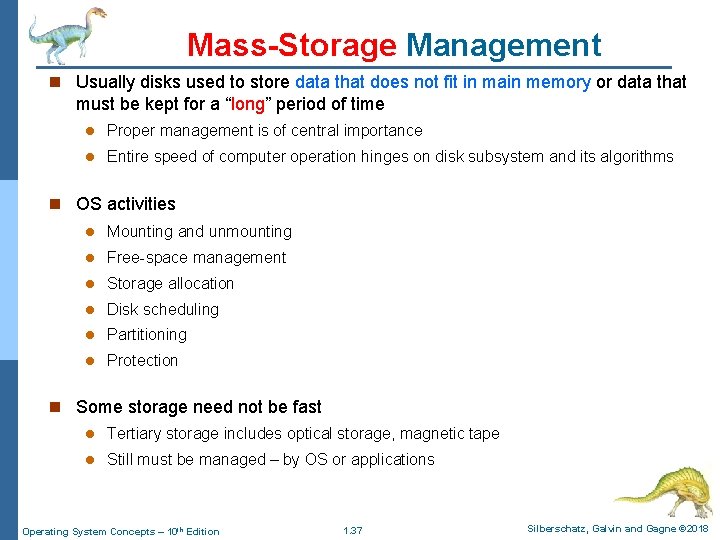
Mass-Storage Management n Usually disks used to store data that does not fit in main memory or data that must be kept for a “long” period of time l Proper management is of central importance l Entire speed of computer operation hinges on disk subsystem and its algorithms n OS activities l Mounting and unmounting l Free-space management l Storage allocation l Disk scheduling l Partitioning l Protection n Some storage need not be fast l Tertiary storage includes optical storage, magnetic tape l Still must be managed – by OS or applications Operating System Concepts – 10 th Edition 1. 37 Silberschatz, Galvin and Gagne © 2018
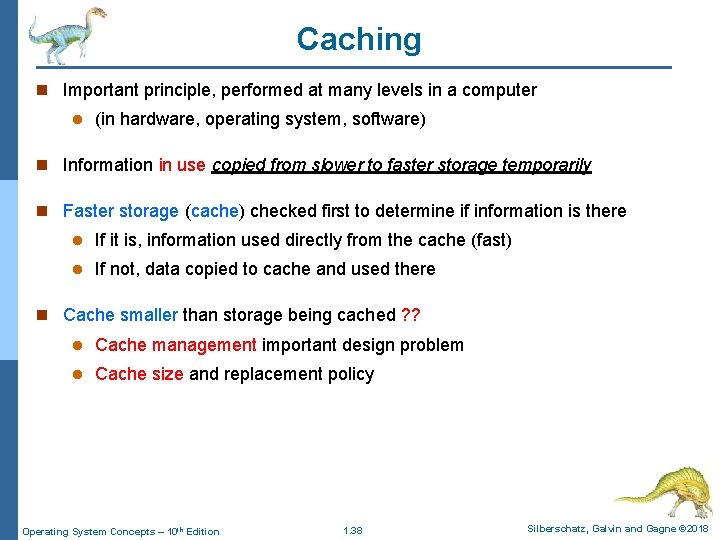
Caching n Important principle, performed at many levels in a computer l (in hardware, operating system, software) n Information in use copied from slower to faster storage temporarily n Faster storage (cache) checked first to determine if information is there l If it is, information used directly from the cache (fast) l If not, data copied to cache and used there n Cache smaller than storage being cached ? ? l Cache management important design problem l Cache size and replacement policy Operating System Concepts – 10 th Edition 1. 38 Silberschatz, Galvin and Gagne © 2018
Characteristics of Various Types of Storage Movement between levels of storage hierarchy can be explicit or implicit Operating System Concepts – 10 th Edition 1. 39 Silberschatz, Galvin and Gagne © 2018
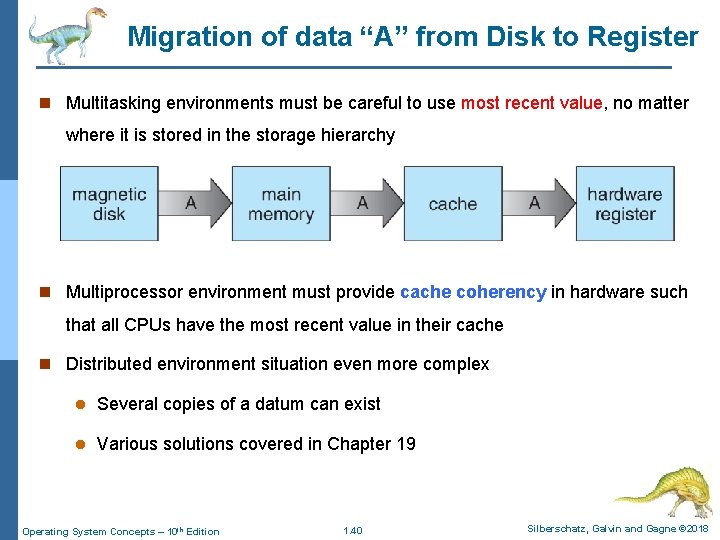
Migration of data “A” from Disk to Register n Multitasking environments must be careful to use most recent value, no matter where it is stored in the storage hierarchy n Multiprocessor environment must provide cache coherency in hardware such that all CPUs have the most recent value in their cache n Distributed environment situation even more complex l Several copies of a datum can exist l Various solutions covered in Chapter 19 Operating System Concepts – 10 th Edition 1. 40 Silberschatz, Galvin and Gagne © 2018
I/O Subsystem n One purpose of OS is to hide peculiarities of hardware devices from the user n I/O subsystem responsible for l Memory management of I/O including: 4 buffering: – storing data temporarily while it is being transferred, 4 caching: – storing parts of data in faster storage for performance, 4 spooling: – the overlapping of output of one job with input of other jobs – is one way operating systems can coordinate concurrent output l General device-driver interface l Drivers for specific hardware devices Operating System Concepts – 10 th Edition 1. 41 Silberschatz, Galvin and Gagne © 2018
Protection and Security n Protection l any mechanism for controlling access of processes or users to resources defined by the OS n Security l defense of the system against internal and external attacks 4 i. e. huge range including: denial-of-service (Do. S), worms, viruses, identity theft, theft of service n Systems generally first distinguish among users, to determine who can do what l User identities (user IDs, security IDs) include name and associated number, one per user l User ID then associated with all files, processes of that user to determine access control l Group identifier (group ID) allows set of users to be defined and controls managed, then also associated with each process, file l Privilege escalation allows user to change to effective ID with more rights Operating System Concepts – 10 th Edition 1. 42 Silberschatz, Galvin and Gagne © 2018
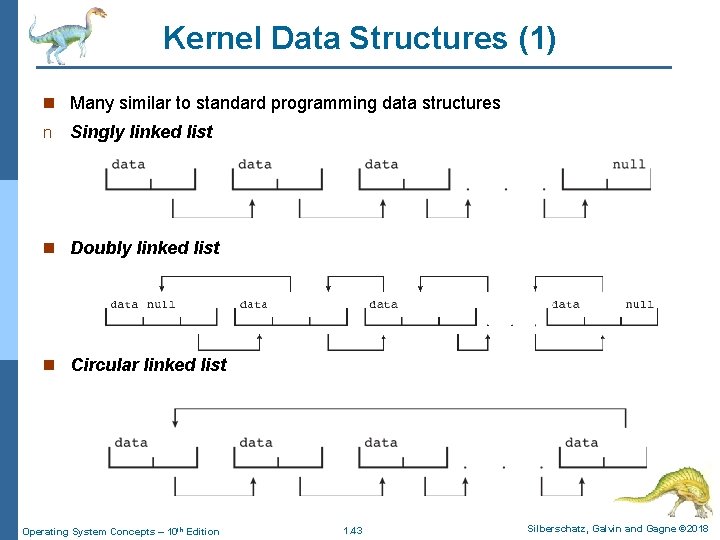
Kernel Data Structures (1) n Many similar to standard programming data structures n Singly linked list n Doubly linked list n Circular linked list Operating System Concepts – 10 th Edition 1. 43 Silberschatz, Galvin and Gagne © 2018
Kernel Data Structures (2) n Binary search tree left <= right l Search performance is O(n) l Balanced binary search tree is O(lg n) Operating System Concepts – 10 th Edition 1. 44 Silberschatz, Galvin and Gagne © 2018
Kernel Data Structures (3) n Hash function can create a hash map n Bitmap – string of n binary digits representing the status of n items n Linux data structures defined in include files, i. e. : l <linux/list. h> l <linux/kfifo. h> l <linux/rbtree. h> Operating System Concepts – 10 th Edition 1. 45 Silberschatz, Galvin and Gagne © 2018
Computing Environments Operating System Concepts – 10 h Edition Silberschatz, Galvin and Gagne © 2018
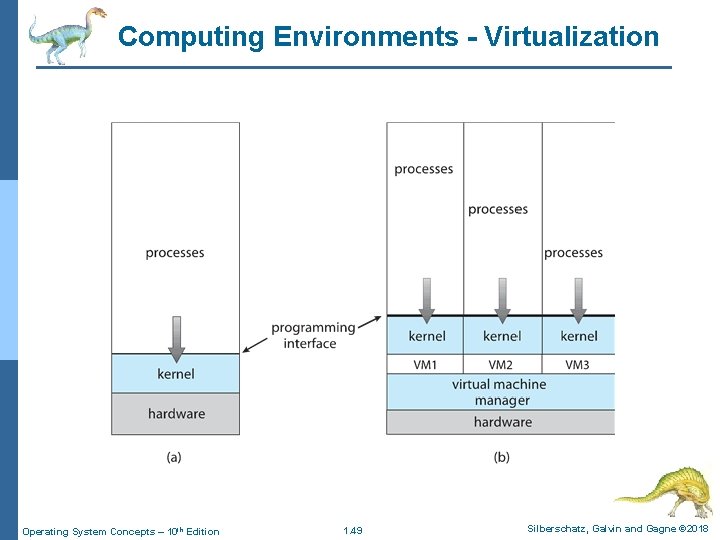
Virtualization n Allows operating systems to run applications within other OSes l Vast and growing industry n Emulation used when source CPU type different from target type (i. e. Power. PC to Intel x 86) (ARM, Intel, MIPS, RISC) l Generally slowest method l When computer language not compiled to native code – Interpretation n Virtualization – OS natively compiled for CPU, running guest OSes also natively compiled l Consider VMware running Windows 10 guests, each running applications, all on native Windows 10 host OS !! l VMM (Virtual Machine Manager) provides virtualization services l HM#1: Visit www. virtualbox. com create a virtual box for the Linux OS Operating System Concepts – 10 th Edition 1. 47 Silberschatz, Galvin and Gagne © 2018
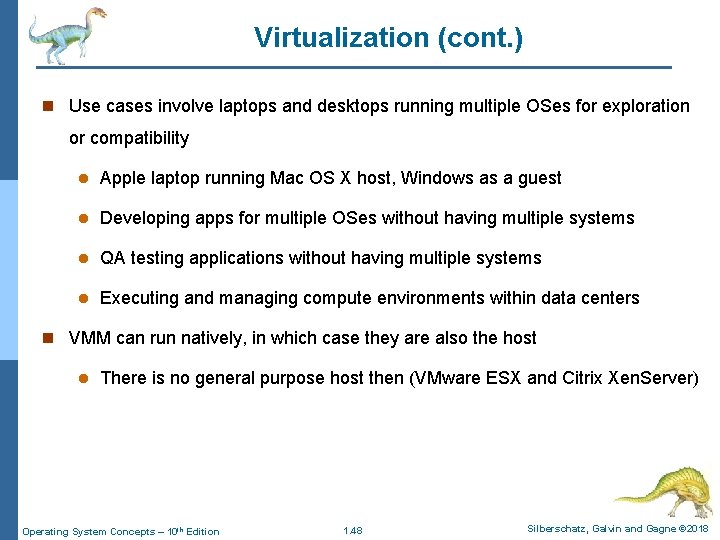
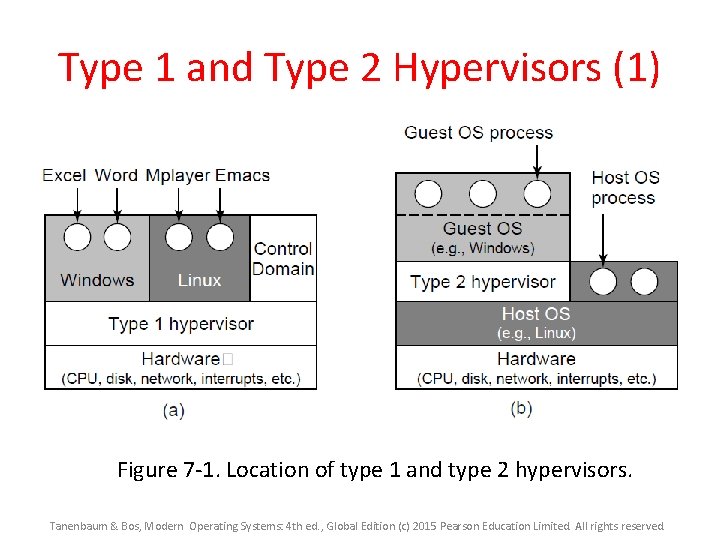
Virtualization (cont. ) n Use cases involve laptops and desktops running multiple OSes for exploration or compatibility l Apple laptop running Mac OS X host, Windows as a guest l Developing apps for multiple OSes without having multiple systems l QA testing applications without having multiple systems l Executing and managing compute environments within data centers n VMM can run natively, in which case they are also the host l There is no general purpose host then (VMware ESX and Citrix Xen. Server) Operating System Concepts – 10 th Edition 1. 48 Silberschatz, Galvin and Gagne © 2018
Computing Environments - Virtualization Operating System Concepts – 10 th Edition 1. 49 Silberschatz, Galvin and Gagne © 2018
Type 1 and Type 2 Hypervisors (1) Figure 7 -1. Location of type 1 and type 2 hypervisors. Tanenbaum & Bos, Modern Operating Systems: 4 th ed. , Global Edition (c) 2015 Pearson Education Limited. All rights reserved.
End of Chapter 1 Operating System Concepts – 10 h Edition Silberschatz, Galvin and Gagne © 2018