
Chapter 1 Introduction Database System Concepts 6 th

Chapter 1: Introduction Database System Concepts, 6 th Ed. ©Silberschatz, Korth and Sudarshan See www. db-book. com for conditions on re-use
Database Management System (DBMS) n DBMS contains information about a particular enterprise l Collection of interrelated data l Set of programs to access the data l An environment that is both convenient and efficient to use n Database Applications: l Banking: transactions l Airlines: reservations, schedules l Universities: registration, grades l Sales: customers, products, purchases l Online retailers: order tracking, customized recommendations l Manufacturing: production, inventory, orders, supply chain l Human resources: employee records, salaries, tax deductions n Databases can be very large. n Databases touch all aspects of our lives Database System Concepts - 6 th Edition 1. 2 ©Silberschatz, Korth and Sudarshan
University Database Example n Application program examples l Add new students, instructors, and courses l Register students for courses, and generate class rosters l Assign grades to students, compute grade point averages (GPA) and generate transcripts n In the early days, database applications were built directly on top of file systems Database System Concepts - 6 th Edition 1. 3 ©Silberschatz, Korth and Sudarshan
Drawbacks of using file systems to store data l Data redundancy and inconsistency 4 Multiple l file formats, duplication of information in different files Difficulty in accessing data 4 Need to write a new program to carry out each new task l Data isolation — multiple files and formats l Integrity problems 4 Integrity constraints (e. g. , account balance > 0) become “buried” in program code rather than being stated explicitly 4 Hard Database System Concepts - 6 th Edition to add new constraints or change existing ones 1. 4 ©Silberschatz, Korth and Sudarshan
Drawbacks of using file systems to store data (Cont. ) l l Atomicity of updates 4 Failures may leave database in an inconsistent state with partial updates carried out 4 Example: Transfer of funds from one account to another should either complete or not happen at all Concurrent access by multiple users 4 Concurrent access needed for performance 4 Uncontrolled concurrent accesses can lead to inconsistencies – Example: Two people reading a balance (say 100) and updating it by withdrawing money (say 50 each) at the same time l Security problems 4 Hard to provide user access to some, but not all, data Database systems offer solutions to all the above problems Database System Concepts - 6 th Edition 1. 5 ©Silberschatz, Korth and Sudarshan
Data Models n A collection of tools for describing Data l Data relationships l Data constraints l n A data model is not just a way of structuring data: it also defines a set of operations that can be performed on the data n A database model is theoretical foundation of a database fundamentally determines in which manner data l can be stored l Organized l Manipulated n It defines the infrastructure offered by a particular database system. n The most popular example of a database model is the relational model Database System Concepts - 6 th Edition 1. 6 ©Silberschatz, Korth and Sudarshan
Data Models n Example of database model l Relational model l Object-based data models (Object-oriented and Objectrelational) l Other older models: 4 Network model 4 Hierarchical model Database System Concepts - 6 th Edition 1. 7 ©Silberschatz, Korth and Sudarshan
Relational Model n collection of data items organized as a set of formallydescribed tables n data can be accessed or reassembled in many different ways without having to reorganize the database tables n was invented by E. F. Codd at IBM in 1970 n store data in 2 dimensional: rows & columns Database System Concepts - 6 th Edition 1. 8 ©Silberschatz, Korth and Sudarshan
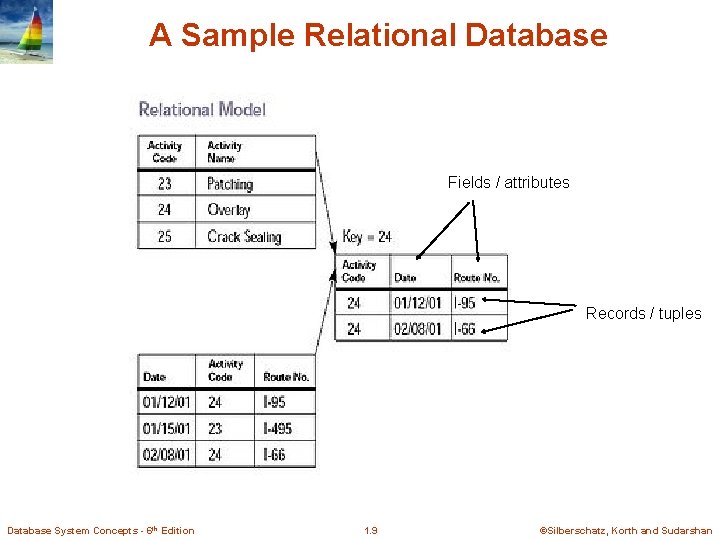
A Sample Relational Database Fields / attributes Records / tuples Database System Concepts - 6 th Edition 1. 9 ©Silberschatz, Korth and Sudarshan
Object Oriented Database model n is a database management system (DBMS) that supports the modelling and creation of data as objects n Object Oriented Databases (ODBMS) store data together with the appropriate methods for accessing it i. e. encapsulation n An extension of RDBMS n Best used when there is complex data and/or complex data relationships Database System Concepts - 6 th Edition 1. 10 ©Silberschatz, Korth and Sudarshan
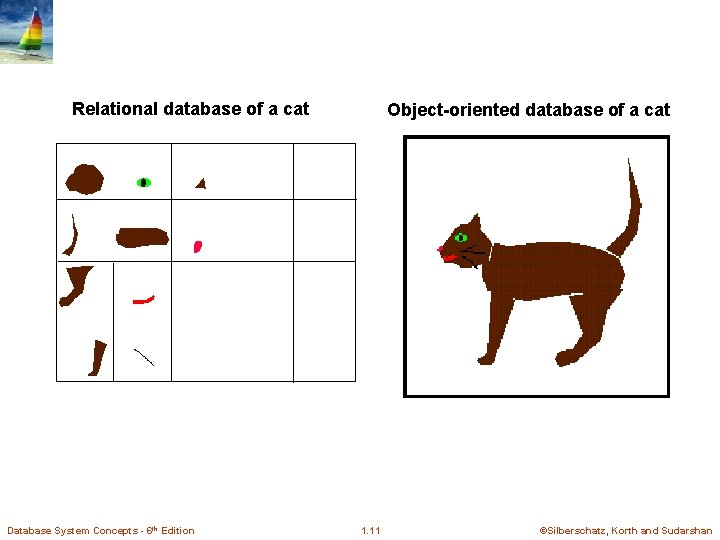
Relational database of a cat Database System Concepts - 6 th Edition Object-oriented database of a cat 1. 11 ©Silberschatz, Korth and Sudarshan
Object-Relational Data Models n Relational model: flat, “atomic” values n Object Relational Data Models l Extend the relational data model by including object orientation and constructs to deal with added data types. l Allow attributes of tuples to have complex types, including nonatomic values such as nested relations. l Preserve relational foundations, in particular the declarative access to data, while extending modeling power. l Provide upward compatibility with existing relational languages. Database System Concepts - 6 th Edition 1. 12 ©Silberschatz, Korth and Sudarshan
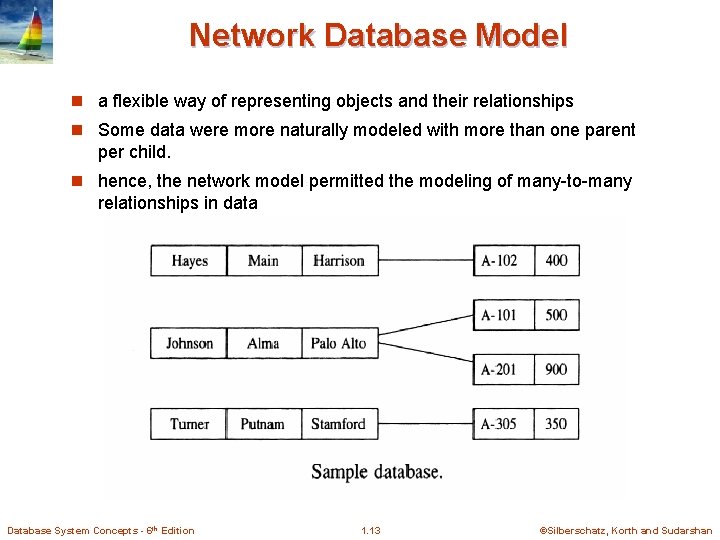
Network Database Model n a flexible way of representing objects and their relationships n Some data were more naturally modeled with more than one parent per child. n hence, the network model permitted the modeling of many-to-many relationships in data Database System Concepts - 6 th Edition 1. 13 ©Silberschatz, Korth and Sudarshan
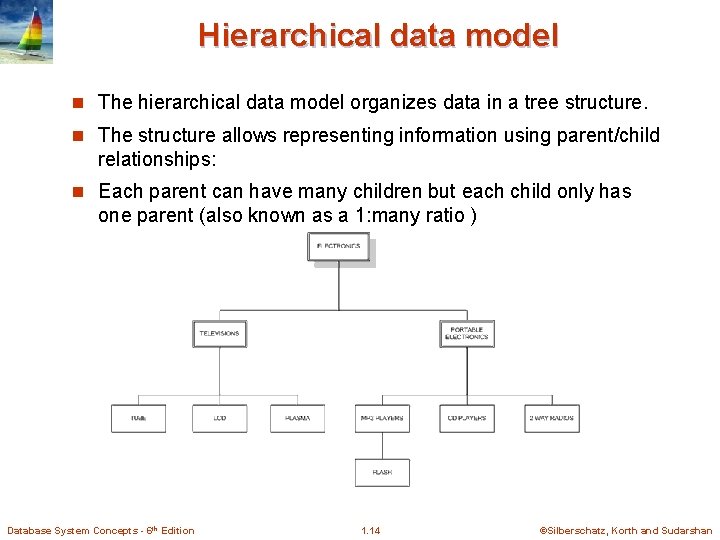
Hierarchical data model n The hierarchical data model organizes data in a tree structure. n The structure allows representing information using parent/child relationships: n Each parent can have many children but each child only has one parent (also known as a 1: many ratio ) Database System Concepts - 6 th Edition 1. 14 ©Silberschatz, Korth and Sudarshan
Database Design The process of designing the general structure of the database: n Logical Design – Deciding on the database schema. Database design requires that we find a “good” collection of relation schemas. l Business decision – What attributes should we record in the database? l Computer Science decision – What relation schemas should we have and how should the attributes be distributed among the various relation schemas? n Physical Design – Deciding on the physical layout of the database Database System Concepts - 6 th Edition 1. 15 ©Silberschatz, Korth and Sudarshan
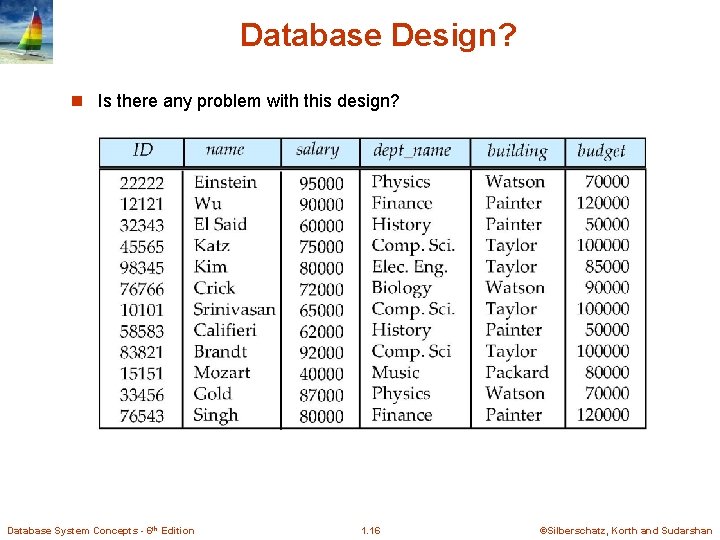
Database Design? n Is there any problem with this design? Database System Concepts - 6 th Edition 1. 16 ©Silberschatz, Korth and Sudarshan
Terminologies n A simple key contains a single attribute. n A composite key is a key that contains more than one attribute. n A candidate key is an attribute (or set of attributes) that uniquely identifies a row. A candidate key must possess the following properties: l Unique identification - For every row the value of the key must uniquely identify that row. l Non redundancy - No attribute in the key can be discarded without destroying the property of unique identification. n A primary key is the candidate key which is selected as the principal unique identifier. Every relation must contain a primary key. The primary key is usually the key selected to identify a row when the database is physically implemented. For example, a part number is selected instead of a part description. Database System Concepts - 6 th Edition 1. 17 ©Silberschatz, Korth and Sudarshan
Terminologies n A superkey is any set of attributes that uniquely identifies a row. A superkey differs from a candidate key in that it does not require the non redundancy property. n A foreign key is an attribute (or set of attributes) that appears (usually) as a non key attribute in one relation and as a primary key attribute in another relation. I say usuallybecause it is possible for a foreign key to also be the whole or part of a primary key: l A many-to-many relationship can only be implemented by introducing an intersection or link table which then becomes the child in two one-to-many relationships. The intersection table therefore has a foreign key for each of its parents, and its primary key is a composite of both foreign keys. l A one-to-one relationship requires that the child table has no more than one occurrence for each parent, which can only be enforced by letting the foreign key also serve as the primary key. Database System Concepts - 6 th Edition 1. 18 ©Silberschatz, Korth and Sudarshan
History of Database Systems n 1950 s and early 1960 s: l Data processing using magnetic tapes for storage 4 Tapes l provided only sequential access Punched cards for input n Late 1960 s and 1970 s: l Hard disks allowed direct access to data l Network and hierarchical data models in widespread use l Ted Codd defines the relational data model 4 Would 4 IBM 4 UC l win the ACM Turing Award for this work Research begins System R prototype Berkeley begins Ingres prototype High-performance (for the era) transaction processing Database System Concepts - 6 th Edition 1. 19 ©Silberschatz, Korth and Sudarshan
History (cont. ) n 1980 s: Research relational prototypes evolve into commercial systems 4 SQL becomes industrial standard l Parallel and distributed database systems l Object-oriented database systems n 1990 s: l Large decision support and data-mining applications l Large multi-terabyte data warehouses l Emergence of Web commerce l n Early 2000 s: XML and XQuery standards l Automated database administration n Later 2000 s: l Giant data storage systems 4 Google Big. Table, Yahoo PNuts, Amazon, . . l Database System Concepts - 6 th Edition 1. 20 ©Silberschatz, Korth and Sudarshan
End of Chapter 1 Database System Concepts - 6 th Edition 1. 21 ©Silberschatz, Korth and Sudarshan
- Slides: 21