
Chapter 1 Databases and Database Users Basic Definitions
Chapter 1 Databases and Database Users • • • Basic Definitions Example of a Database Main Characteristic of Database Technology Classes of Database Users Additional Characteristics of Database Technology • When Not to Use a DBMS
1. Basic Definitions • Database: A collection of related data • Data: Known facts that can be recorded and have an implicit meaning • Mini-world: some part of the real world about which data is stored in a database. For example, student grades and transcripts at a university. • Database Management System(DBMS): A software package to facilitate the creation and maintenance of a computerized database • Database System: The DBMS software together with the data itself
2. Example of a Database • Mini-world for the example: Part of a UNIVERSITY environment • Some mini-world entities: – STUDENTs – COURSEs – SECTIONs(of COURSEs) – (academic) DEPARTMENTs – INSTRUCTORs • Some mini-world relationships: – SECTIONs are of specific COURSEs
(cont. ) – STUDENTs take SECTIONs – COURSEs have prerequisite COURSEs – INSTRUCTORs teach SECTIONs – COURSEs are offered by DEPARTMENTs – STUDENTs major in DEPARTMENTs
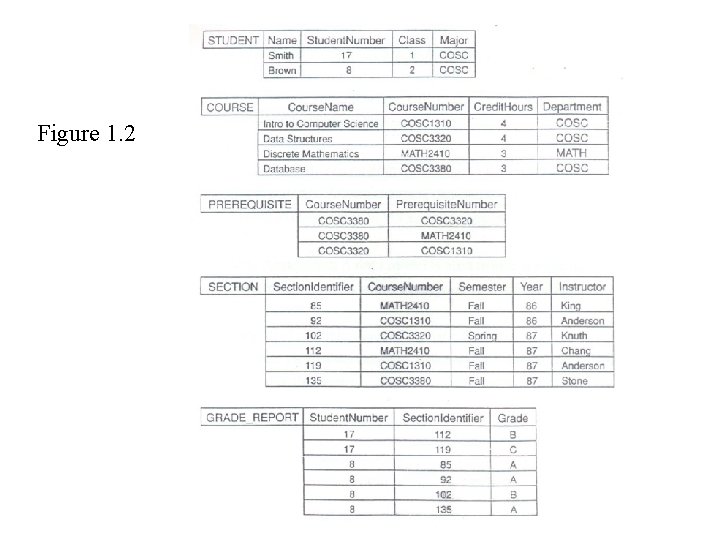
Figure 1. 2

3. Main Characteristics of Database Technology • Self-contained nature of a database system: A DBMS catalog stores the description of the database. The description is called meta-data. This allows the DBMS software to work with different databases. • Insulation between programs and data: Called program-data independence. Allows changing data storage structures without having to change the DBMS access programs.
(cont. ) • Data Abstraction: A data model is used to hide storage details and present the users with a conceptual view of the database • Support of multiple views of the data: Each user may see a different view of the database, which describes only the data of interest to that user.
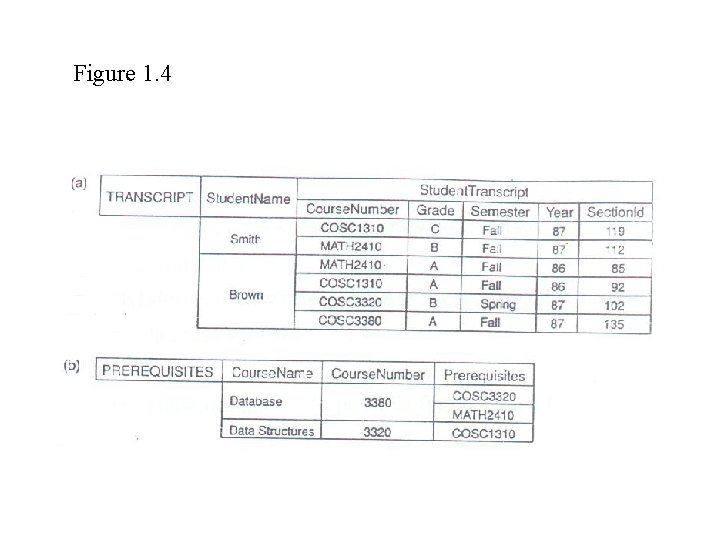
Figure 1. 4
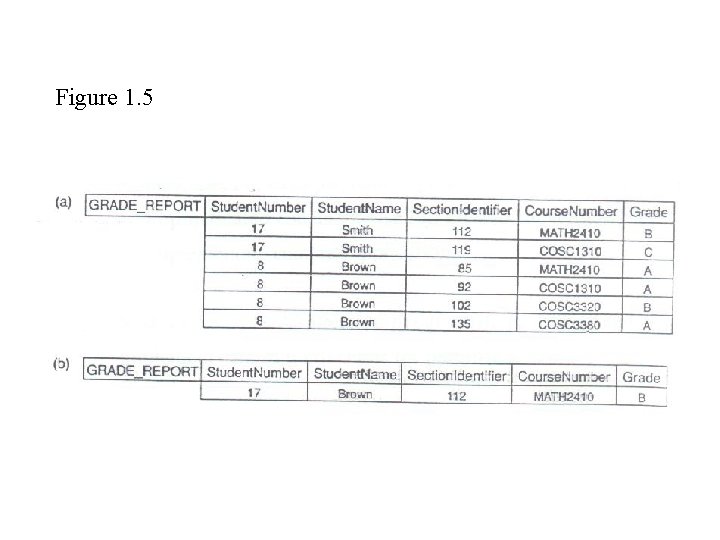
Figure 1. 5
4. Classes of Database Users (A) Workers on the scene: Persons whose job involves daily use of a large database • Database adminstrators(DBAs): Responsible for managing the database system • Database designers: Responsible for designing the database • End Users: The persons that use the database for querying, updating, generating reports, etc. – Casual end users: Occasional users – Parametric(or naïve) end users: They use pre-programmed canned transactions to interact continuously with the database. For example, bank tellers or reservation clerks

(cont. ) – Sophisticated end users: Use full DBMS capabilities for implementing complex applications. • System Analysts/Application programmers: Design and implement canned transactions for parametric users (B) Workers behind the scene: Persons whose job involves design, development, operation, and maintenance of the DBMS software and system environment. • DBMS designers and implementers: Design and implement the DBMS software package itself.
(cont. ) • Tool developers: Design and implement tools that facilitate the use of the DBMS software. Tools include design tools, performance tools, special interfaces, etc. • Operators and maintenance personnel: Work on running and maintaining the hardware and software environment for the database system.
5. Additional Characteristics of Database Technology • Controlling redundancy in data storage and in development and maintenance efforts • Sharing of data among multiple users • Restricting unauthorized access to data • Providing multiple interfaces to different classes of users • Representing complex relationships among data • Enforcing integrity constraints on the database • Providing backup and recovery services
(cont. ) • • • Potential for enforcing standards Flexibility to change data structures Reduced application development time Availability of up-to-date information Economies of scale
6. When not to use a DBMS • Main costs of using a DBMS: – High initial investment and possible need for additional hardware – Overhead for providing generality, security, recovery, integrity, and concurrency control • When a DBMS may be unnecessary: – If the database and applications are simple, well defined and not expected to change – If there are stringent real-time requirements that may not be met because of DBMS overhead – If access to data by multiple users is not required
Chapter 2 DBMS Concepts and Architecture • • • Data Models Schemas versus Instances Three-Schema Architecture Data Independence DBMS Languages DBMS Interfaces DBMS Component Modules Database System Utilities Classification of DBMSs
1. Data Models • Data Model: A set of concepts to describe the structure of a database, and certain constraints that the database should obey. • Data Model Operations: Operations for specifying database retrievals and updates by referring to the concepts of the data model • Categories of data models: – Conceptual (high-level, semantic) data models: Provide concepts that are close to the way many user perceive data. (Also called entity-based or objectbased data models. )
(cont. ) – Physical(low-level, internal) data models: Provide concepts that describe details of how data is stored in the computer. – Implementation(record-oriented) data models: Provide concepts that fall between the above two, balancing user views with some computer storage details.
2. Schemas versus Instances • Database Schema: The description of a database. Includes descriptions of the database structure and the constraints that should hold on the database. • Schema Diagram: A diagrammatic display of (some aspects of) a database schema. • Database Instance: The actual data stored in a database at a particular moment in time. Also called database state (or occurrence). • The database schema changes very infrequently. The database state changes every time the database is updated. Schema is also called intension, whereas state is called extension.
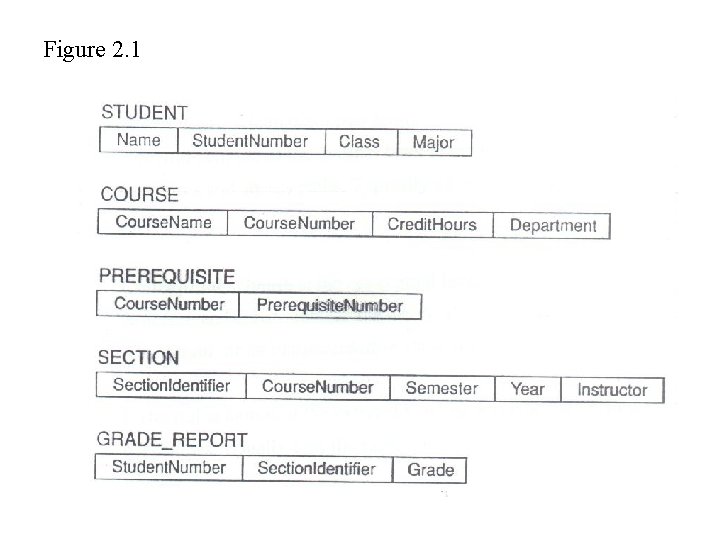
Figure 2. 1
3. Three-Schema Architecture • Proposed to support DBMS characteristics of: – Program-data independence – Support of multiple views of the data. • Defines DBMS schemas at three levels: – Internal schema at the internal level to describe data storage structures and access paths. Typically uses a physical data model. – Conceptual schema at the conceptual level to describe the structure and constraints for the whole database. Uses a conceptual or an implementation data model.
(cont. ) – External schemas at the external level to describe the various user views. Usually uses the same data model as the conceptual level. • Mappings among schema levels are also needed. Programs refer to an external schema, and are mapped by the DBMS to the internal schema for execution.
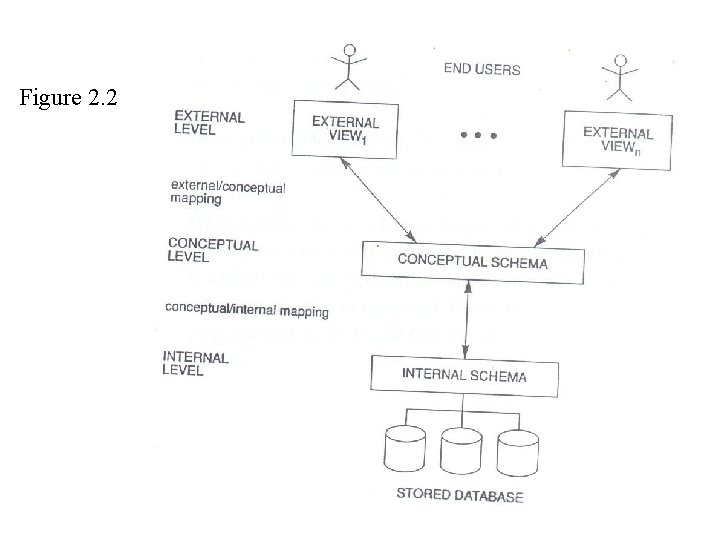
Figure 2. 2
4. Data Independence • Logical Data Independence: The capacity to change the conceptual schema without having to change the external schemas and their application programs. • Physical Data Independence: The capacity to change the internal schema without having to change the conceptual schema. • When a schema at a lower level is changed, only the mappings between this schema and higher-level schemas need to be changed in a DBMS that fully supports data independence. The higher-level schemas themselves are unchanged. Hence, the application programs need not be changed since the refer to the external schemas.
5. DBMS Languages • Data Definition Language(DDL): Used by the DBA and database designers to specify the conceptual schema of a database. In many DBMSs, the DDL is also used to define internal and external schemas (views). In some DBMSs, separate storage definition language (SDL) and view definition language (VDL) are used to define internal and external schemas. • Data Manipulation Language(DML): used to specify database retrievals and updates
(cont. ) – DML commands (data sublanguage) can be embedded in a general-purpose programming language(host language), such as COBOL, PL/1 or PASCAL. – Alternatively, stand-alone DML commands can be applied directly (query language)
Types of DML • Procedural DML: Also called record-at-a-time or low-level DML. Must be embedded in a programming language. Searches for and retrieves individual database records, and uses looping and other constructs of the host programming language to retrieve multiple records. • Declarative of non-procedural DML: Also called set-at-a-time or high-level DML. Can be used as a stand-alone query language or can be embedded in a programming language. Searches for and retrieves information from multiple related database records in a single command.
6. DBMS Interfaces • Stand-alone query language interfaces • Programmer interfaces for embedding DML in programming languages: – Pre-compiler Approach – Procedure(Subroutine) Call Approach • User-friendly interfaces: – Menu-based – Graphics-based – Forms-based – Natural language – Combinations of the above
(cont. ) • Parametric interfaces using function keys • Report generation languages • Interfaces for the DBA: – Creating accounts, granting authorizations – Setting system parameters – Changing schemas or access path
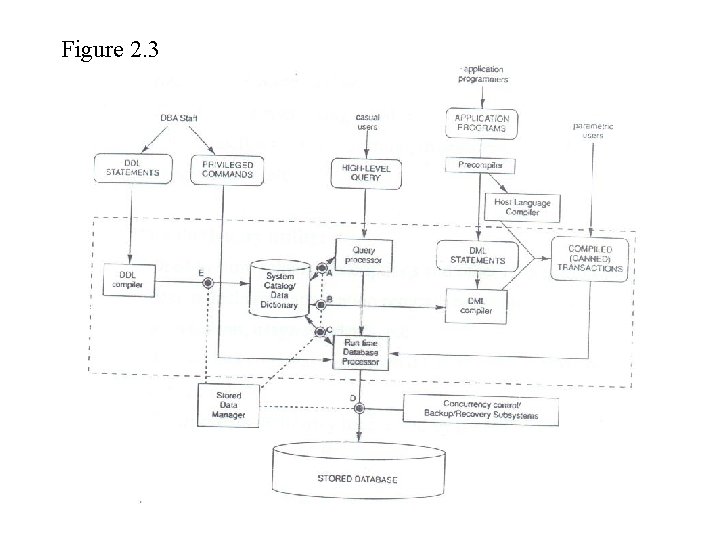
Figure 2. 3
8. Database System Utilities • To perform certain functions such as: – – – Loading data stored in files into a database Backing up the database periodically on tape Reorganizing database file structures Report generation utilities Performance monitoring utilities Other functions, such as sorting, user monitoring, data compression, etc. • Data dictionary utility: – Used to store schema descriptions and other information such as design decisions, application program descriptions, user information, usage standards, etc.
(cont. ) • Active data dictionary is accessed by DBMS software and users/DBA • Passive data dictionary is accessed by users/DBA only.
9. Classification of DBMSs • Based on the data model used: – Traditional: Relational, Network, Hierarchical – Emerging: Object-oriented, Semantic, Entity. Relationship, other • Other classifications: – Single-user (typically used with micro-computers) vs. multi-user (most DBMSs) – Centralized (uses a single computer) vs. distributed (uses multiple computers) – Cost of DBMS software – Types of access paths used.
Chapter 3 Data Modeling Using the Entity. Relationship(ER) Data Model • Database Design Process • Example Database Application(COMPANY) • ER Model Concepts – – – Entities and Attributes Entity Types, Value Sets, and Key Attributes Relationships and Relationship Types Structural Constraints and Roles Weak Entity Types • ER Diagrams Notation • Relationships of Higher Degree
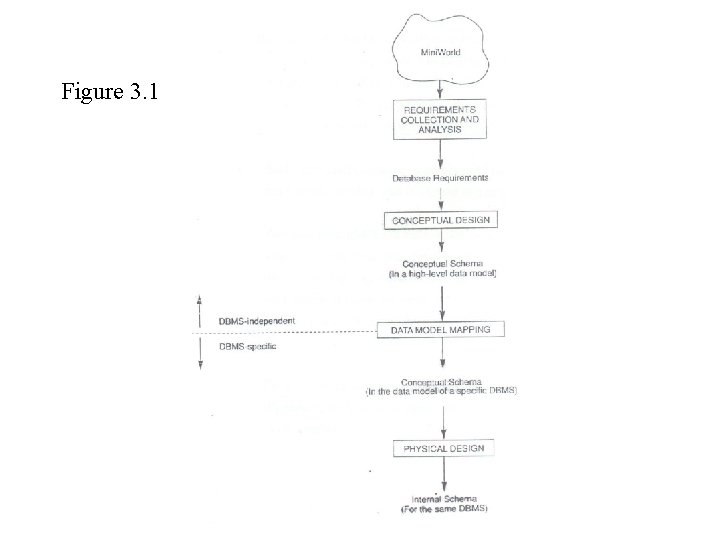
Figure 3. 1
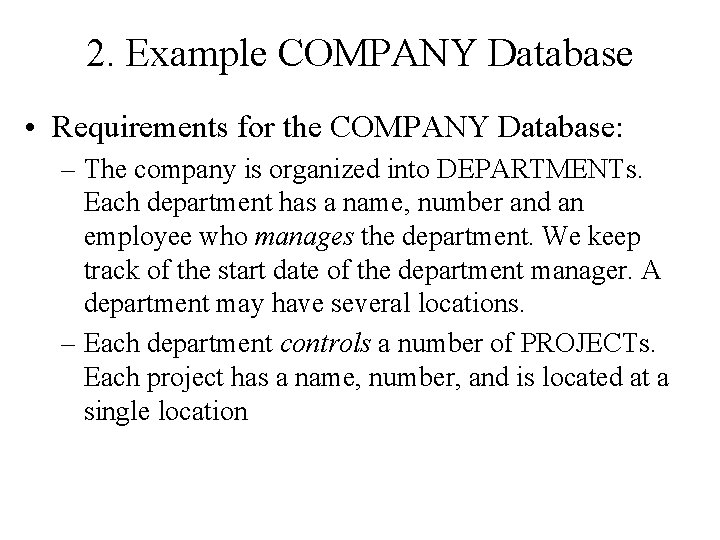
2. Example COMPANY Database • Requirements for the COMPANY Database: – The company is organized into DEPARTMENTs. Each department has a name, number and an employee who manages the department. We keep track of the start date of the department manager. A department may have several locations. – Each department controls a number of PROJECTs. Each project has a name, number, and is located at a single location
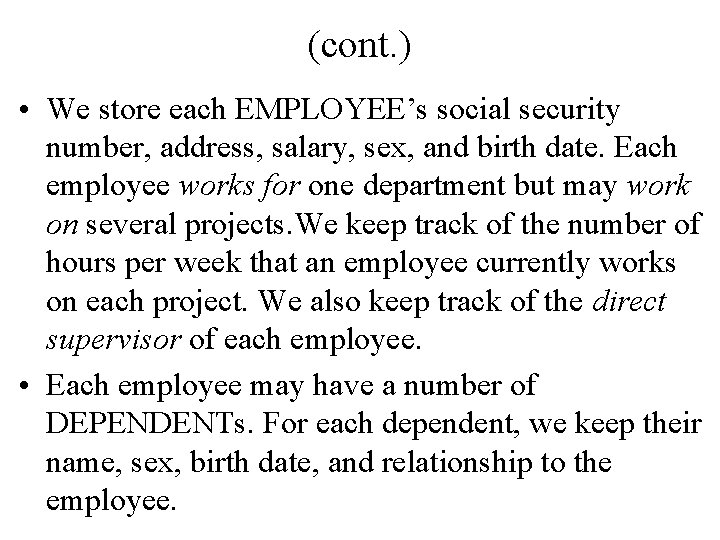
(cont. ) • We store each EMPLOYEE’s social security number, address, salary, sex, and birth date. Each employee works for one department but may work on several projects. We keep track of the number of hours per week that an employee currently works on each project. We also keep track of the direct supervisor of each employee. • Each employee may have a number of DEPENDENTs. For each dependent, we keep their name, sex, birth date, and relationship to the employee.
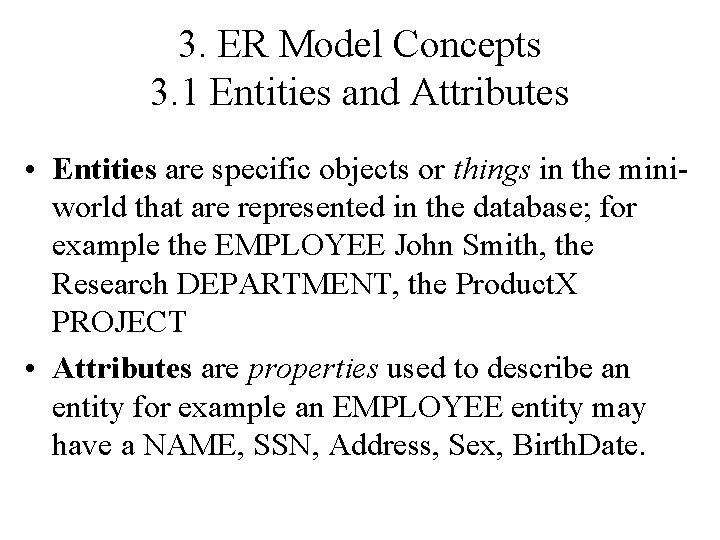
3. ER Model Concepts 3. 1 Entities and Attributes • Entities are specific objects or things in the miniworld that are represented in the database; for example the EMPLOYEE John Smith, the Research DEPARTMENT, the Product. X PROJECT • Attributes are properties used to describe an entity for example an EMPLOYEE entity may have a NAME, SSN, Address, Sex, Birth. Date.
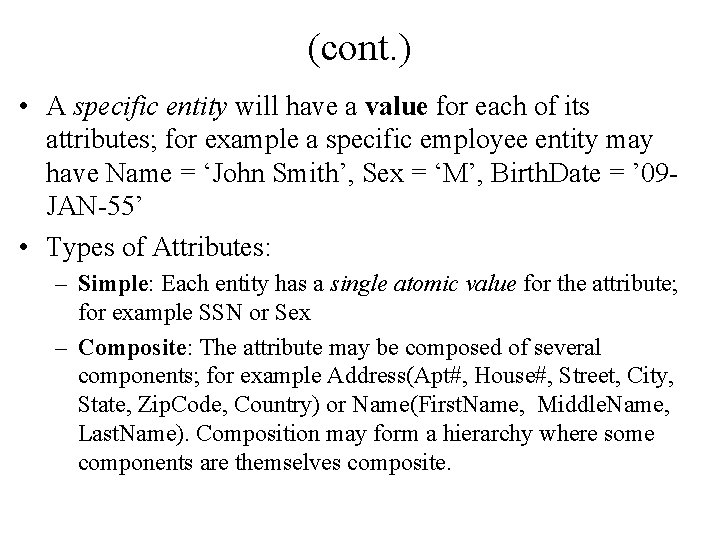
(cont. ) • A specific entity will have a value for each of its attributes; for example a specific employee entity may have Name = ‘John Smith’, Sex = ‘M’, Birth. Date = ’ 09 JAN-55’ • Types of Attributes: – Simple: Each entity has a single atomic value for the attribute; for example SSN or Sex – Composite: The attribute may be composed of several components; for example Address(Apt#, House#, Street, City, State, Zip. Code, Country) or Name(First. Name, Middle. Name, Last. Name). Composition may form a hierarchy where some components are themselves composite.
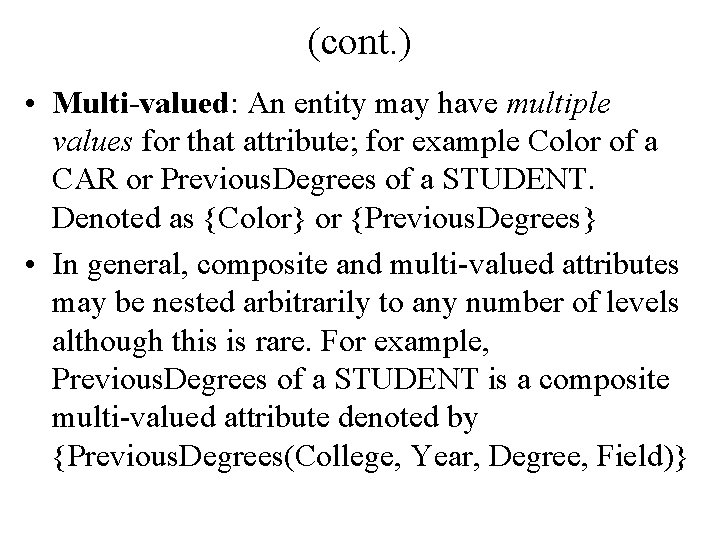
(cont. ) • Multi-valued: An entity may have multiple values for that attribute; for example Color of a CAR or Previous. Degrees of a STUDENT. Denoted as {Color} or {Previous. Degrees} • In general, composite and multi-valued attributes may be nested arbitrarily to any number of levels although this is rare. For example, Previous. Degrees of a STUDENT is a composite multi-valued attribute denoted by {Previous. Degrees(College, Year, Degree, Field)}
3. 2 Entity Types and key Attributes • Entities with the same basic attributes are grouped or typed into an entity type. For example, the EMPLOYEE entity type or the PROJECT entity type. • An attribute of an entity type for which each entity must have a unique value is called a key attribute of the entity type. For example SSN of EMPLOYEE.
(cont. ) • A key attribute may be composite. For example, Vehicle. Registration. Number is a key of the CAR entity type with components(Number, State) • An entity type may have more than one key. For example, the CAR entity type may have two keys: Vehicle. Identification. Number and Vehicle. Registration. Number(Number, State)
3. 3 Relationships and Relationship Types • A relationship relates two or more distinct entities with a specific meaning; for example, EMPLOYEE John Smith works the Product. X PROJECT or EMPLOYEE Franklin Wong manager the Research DEPARTMENT. • Relationships of the same type are grouped or typed into a relationship type. For example, the WORKS_ON relationship type in which EMPLOYEEs and PROJECTs participate, or the MANAGES relationship type in which EMPLOYEEs and DEPARTMENTs participate.
(cont. ) • The degree of a relationship type is the number of participating entity types. Both MANAGES and WORKS_ON are binary relationships. • More than one relationship type can exist with the same participating entity types; for example, MANAGES and WORKS_FOR are distinct relationships between EMPLOYEE and DEPARTMENT participate.
3. 4 Structural Constraints and Roles • A relationship can relate two entities of the same entity type; for example, a SUPERVISION relationship type relates one EMPLOYEE (in the role of supervisee) to another EMPLOYEE(in the role of supervisor). This is called a recursive relationship type. • A relationship type can have attributes; for example, Hours. Per. Week of WORKS_ON; its value for each relationship instance describes the number of hours per week that an EMPLOYEE works on a PROJECT.
(cont. ) • Structural constraints on relationships: • Cardinality ratio (of a binary relationship): 1: 1, 1: N, N: 1, or M: N • Participation constraint(on each participating entity type): total (called existence dependency) or partial.
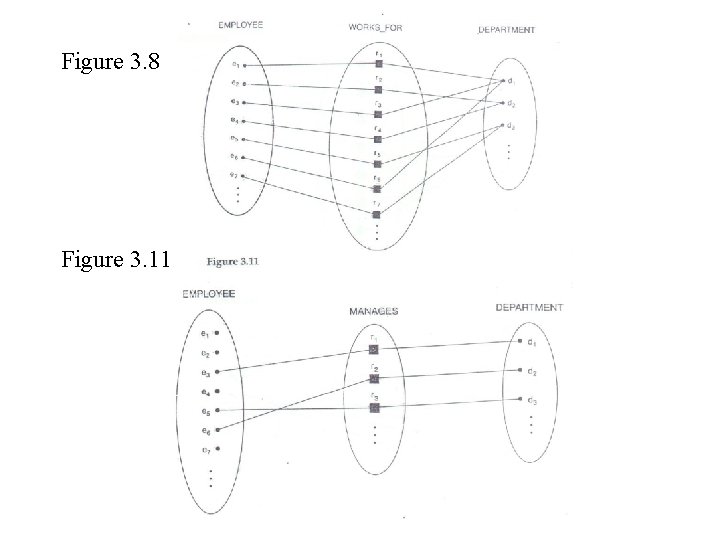
Figure 3. 8 Figure 3. 11
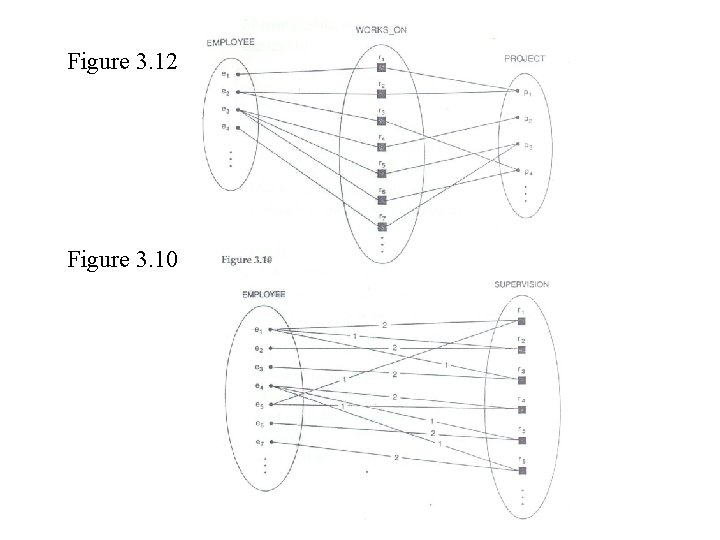
Figure 3. 12 Figure 3. 10
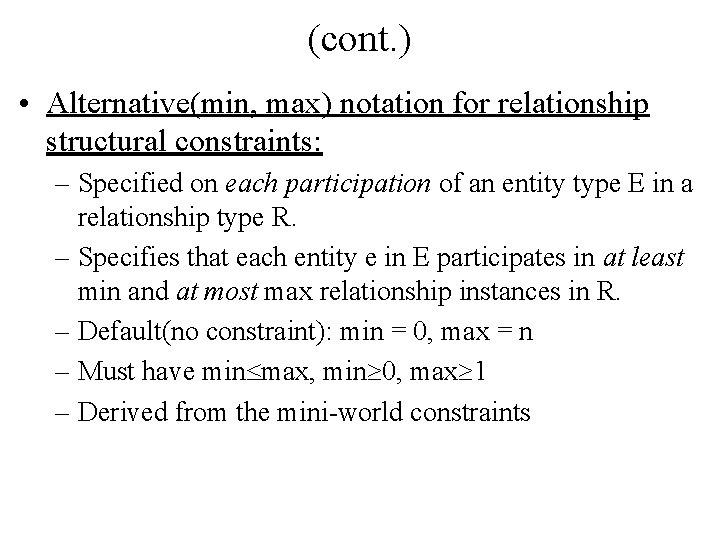
(cont. ) • Alternative(min, max) notation for relationship structural constraints: – Specified on each participation of an entity type E in a relationship type R. – Specifies that each entity e in E participates in at least min and at most max relationship instances in R. – Default(no constraint): min = 0, max = n – Must have min max, min 0, max 1 – Derived from the mini-world constraints
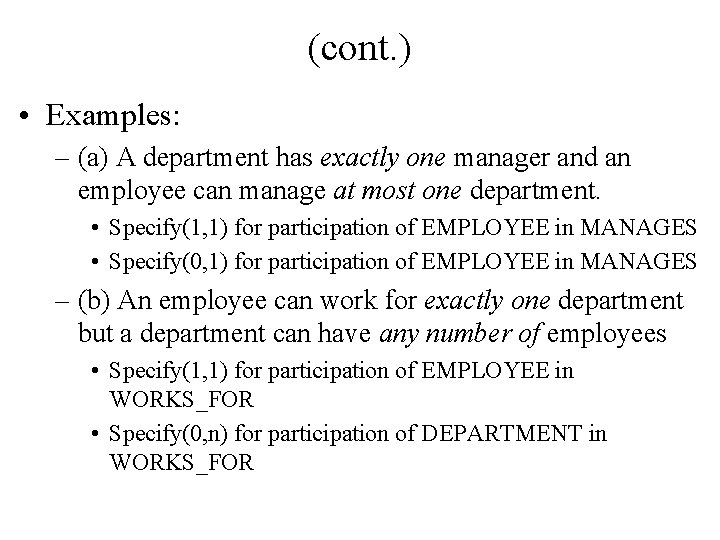
(cont. ) • Examples: – (a) A department has exactly one manager and an employee can manage at most one department. • Specify(1, 1) for participation of EMPLOYEE in MANAGES • Specify(0, 1) for participation of EMPLOYEE in MANAGES – (b) An employee can work for exactly one department but a department can have any number of employees • Specify(1, 1) for participation of EMPLOYEE in WORKS_FOR • Specify(0, n) for participation of DEPARTMENT in WORKS_FOR
3. 4 Weak Entity Types • An entity type that does not have a key attribute • A weak entity type must participate in an identifying relationship type with an owner or identifying entity type • Entities are identified by the combination of: – A partial key of the weak entity type – The particular entity they are related to in the identifying entity type • Example:
(cont. ) • Suppose that a DEPARTMENT entity is identified by the dependent’s first name and birthdate, and the specific EMPLOYEE that the dependent is related to. DEPENDENT is a weak entity type with EMPLOYEE as its identifying entity type via the identifying relationship type DEPENDENT_OF
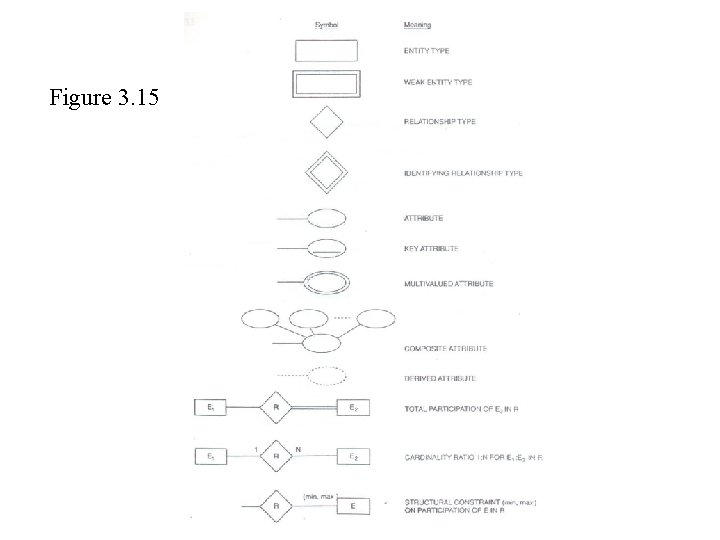
Figure 3. 15
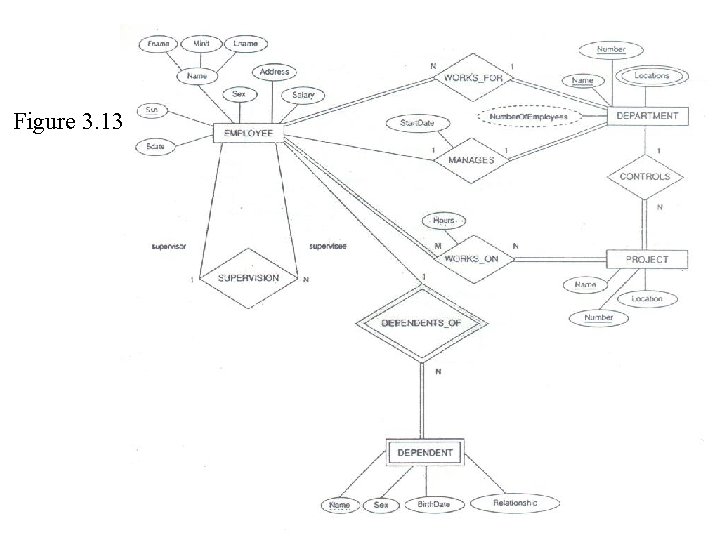
Figure 3. 13
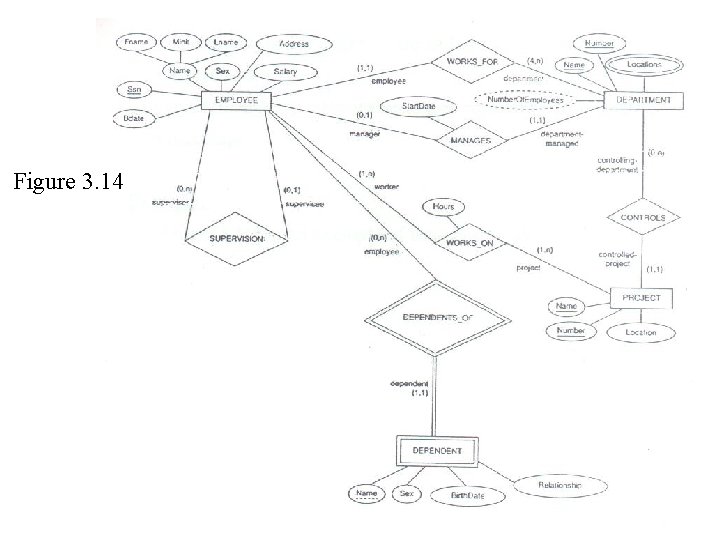
Figure 3. 14
5. Relationships of Higher Degree • Relationship types of degree 2 are called binary • Relationship types of degree 3 are called ternary and of degree n are called n-ary • In general, an n-ary relationship is not equivalent to n binary relationships • Example: – See Figure 3. 16 for an example of ternary relationship
- Slides: 56