
Chapter 1 Becoming Skilled at Information Technology Fluency
Chapter 1: Becoming Skilled at Information Technology Fluency with Information Technology Third Edition by Lawrence Snyder Copyright © 2008 Pearson Education, Inc. Publishing as Pearson Addison-Wesley
Terms of Endearment • Defining Information Technology – Learning the language of IT • Acronyms – WYSIWIG • Jargon – "Clicking around" • Metaphors – Everyday terms like "window" have special meanings in IT 1 -2 Copyright © 2008 Pearson Education, Inc. Publishing as Pearson Addison-Wesley 2
Why Know Just the Right Word? • There are many new terms in IT – Terms are invented for ideas, concepts and devices that never existed before • Educated people use the right word at the right term – "le mot juste" (the right word) 1 -3 Copyright © 2008 Pearson Education, Inc. Publishing as Pearson Addison-Wesley 3
Why Know Just the Right Word? (cont'd) • Terminology is basic to learning a new subject – Words represent ideas and concepts • Precision in word use represents precision in understanding idea • Communicating with others – To be able to ask questions and receive help – By email, by telephone, through online help facility 1 -4 Copyright © 2008 Pearson Education, Inc. Publishing as Pearson Addison-Wesley 4
Where's the Start Button? • Most computers are left on all the time – Screen savers prevent burn-in on screen – Computer is reactivated by moving or clicking mouse, or pressing a key • Why bother to learn where the Start Button is? – Sometimes computers are off – Need to power-cycle 1 -5 Copyright © 2008 Pearson Education, Inc. Publishing as Pearson Addison-Wesley 5

Two Basic Organizations • Component – Desktop PC's with separate components • • Monitor Hard Drive Speakers Etc. – Allows user to mix and match – Power switch on box with disk drives 1 -6 Copyright © 2008 Pearson Education, Inc. Publishing as Pearson Addison-Wesley 6
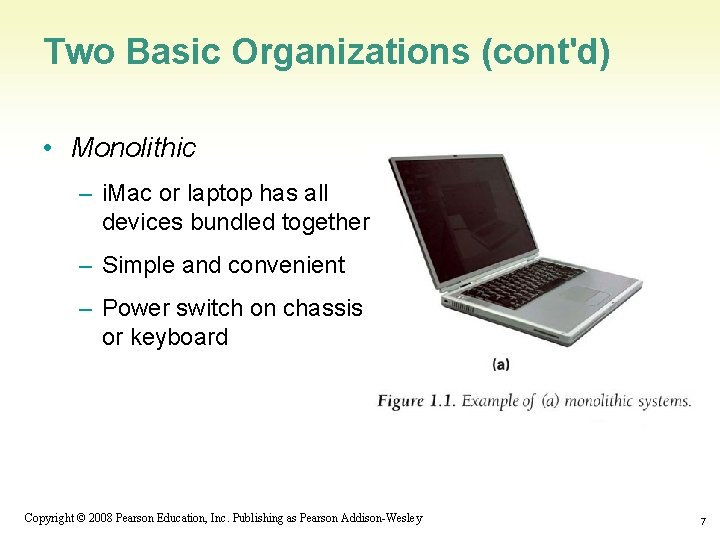
Two Basic Organizations (cont'd) • Monolithic – i. Mac or laptop has all devices bundled together – Simple and convenient – Power switch on chassis or keyboard 1 -7 Copyright © 2008 Pearson Education, Inc. Publishing as Pearson Addison-Wesley 7

The Monitor • Interactive video screen – Bit-mapped • Display information stored in computer memory 1 -8 Copyright © 2008 Pearson Education, Inc. Publishing as Pearson Addison-Wesley 8
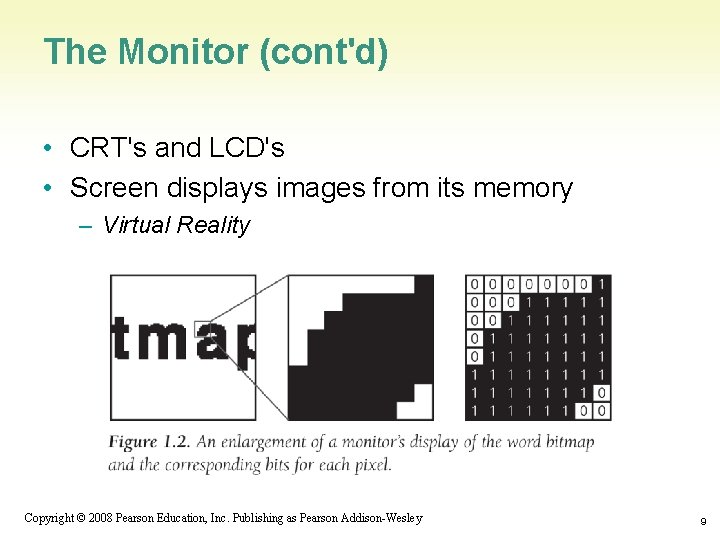
The Monitor (cont'd) • CRT's and LCD's • Screen displays images from its memory – Virtual Reality 1 -9 Copyright © 2008 Pearson Education, Inc. Publishing as Pearson Addison-Wesley 9
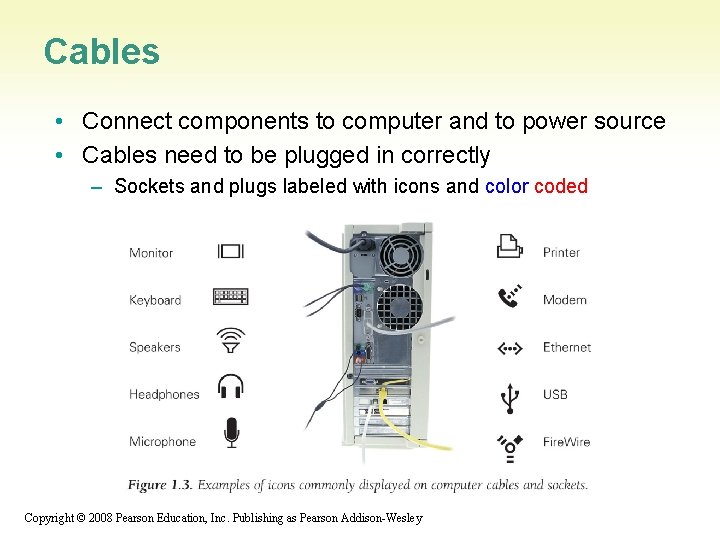
Cables • Connect components to computer and to power source • Cables need to be plugged in correctly – Sockets and plugs labeled with icons and color coded 1 -10 Copyright © 2008 Pearson Education, Inc. Publishing as Pearson Addison-Wesley
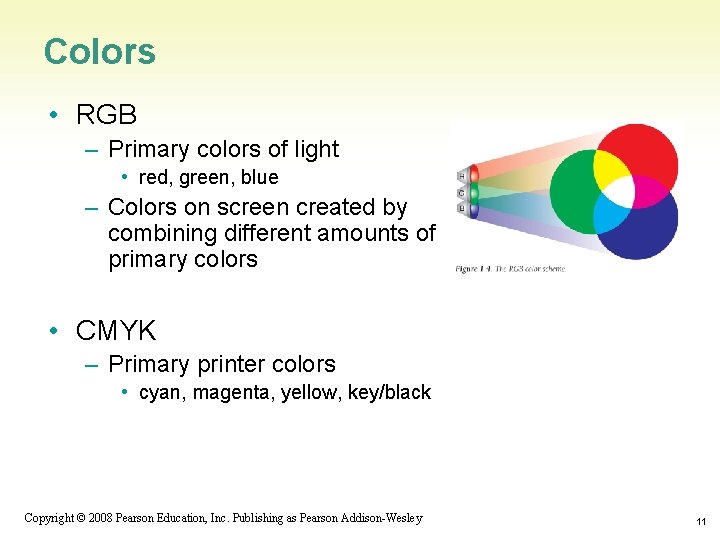
Colors • RGB – Primary colors of light • red, green, blue – Colors on screen created by combining different amounts of primary colors • CMYK – Primary printer colors • cyan, magenta, yellow, key/black 1 -11 Copyright © 2008 Pearson Education, Inc. Publishing as Pearson Addison-Wesley 11
Pixels • Grid of small units called pixels (for picture elements) – Size of the dot on letter i • Computer draws each pixel in the designated color for the image or figure • The more pixels in each row and column, the smoother and crisper the image (high resolution) 1 -12 Copyright © 2008 Pearson Education, Inc. Publishing as Pearson Addison-Wesley 12
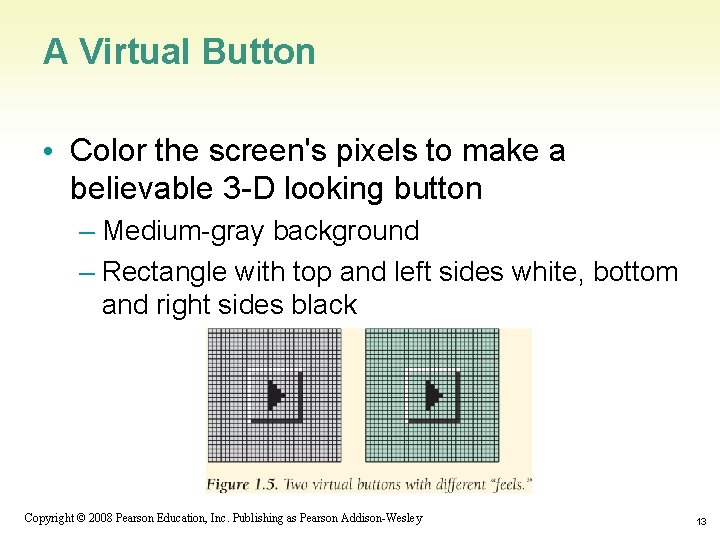
A Virtual Button • Color the screen's pixels to make a believable 3 -D looking button – Medium-gray background – Rectangle with top and left sides white, bottom and right sides black 1 -13 Copyright © 2008 Pearson Education, Inc. Publishing as Pearson Addison-Wesley 13
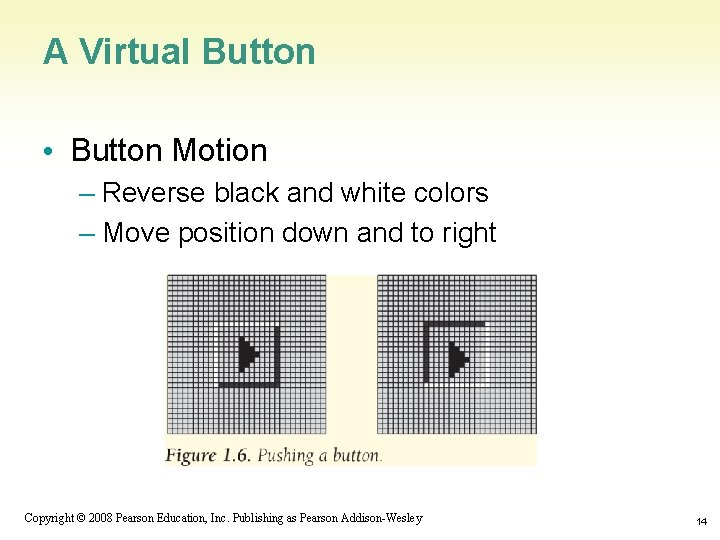
A Virtual Button • Button Motion – Reverse black and white colors – Move position down and to right 1 -14 Copyright © 2008 Pearson Education, Inc. Publishing as Pearson Addison-Wesley 14

Pressing a Virtual Button • Moving the mouse pointer – Mouse pointer is drawn on screen like any image – When mouse moves, computer re-draws in correct direction – Fast refresh rate (30 times per second) creates illusion of motion – Computer keeps track of which pixel is at the point of the arrow 1 -15 Copyright © 2008 Pearson Education, Inc. Publishing as Pearson Addison-Wesley 15
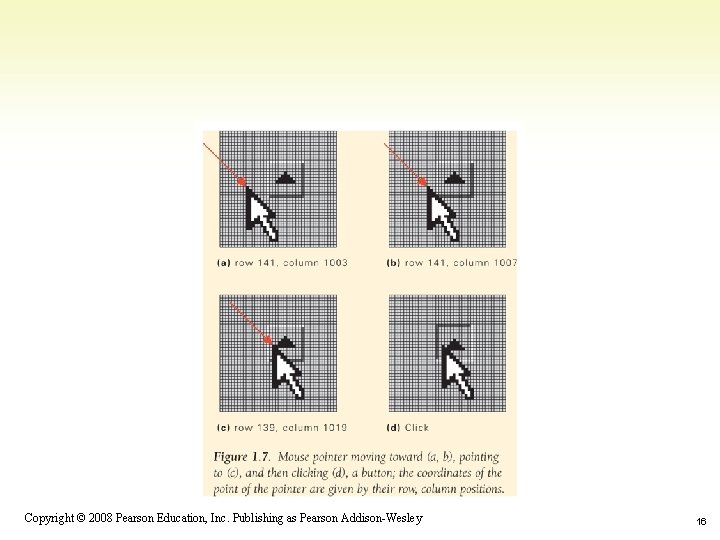
1 -16 Copyright © 2008 Pearson Education, Inc. Publishing as Pearson Addison-Wesley 16
Coordinating the Button and the Mouse • When mouse is clicked, computer redraws button that mouse is hovering over – Computer keeps a list of every button drawn on screen • Positions of upper-left and lower-right corners – When button is re-drawn in clicked position, software reacts by performing appropriate action (event-driven) 1 -17 Copyright © 2008 Pearson Education, Inc. Publishing as Pearson Addison-Wesley 17
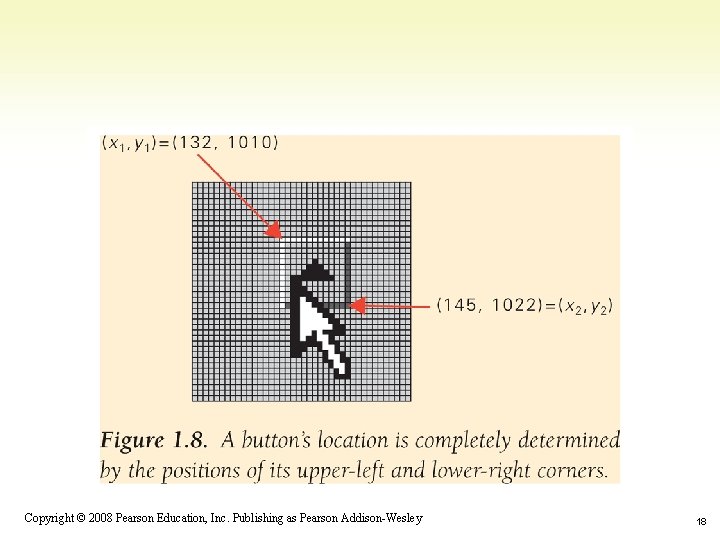
1 -18 Copyright © 2008 Pearson Education, Inc. Publishing as Pearson Addison-Wesley 18
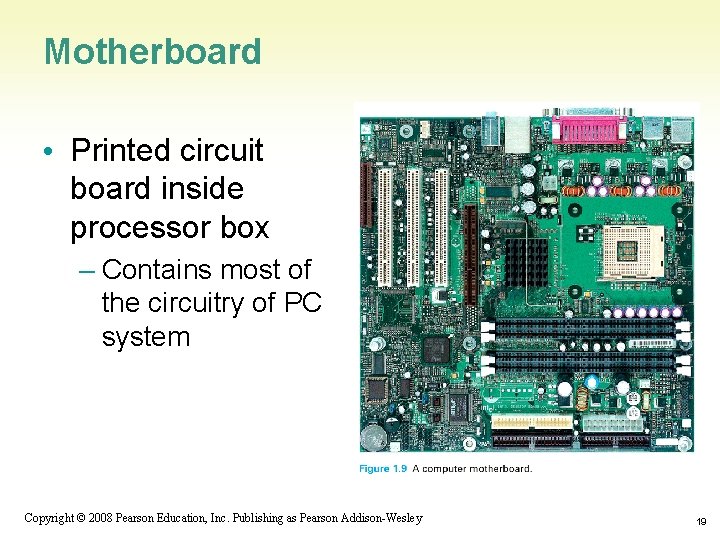
Motherboard • Printed circuit board inside processor box – Contains most of the circuitry of PC system 1 -19 Copyright © 2008 Pearson Education, Inc. Publishing as Pearson Addison-Wesley 19
Motherboard (cont'd) • Smaller circuit boards, called daughter boards or cards, plug into motherboard for added functionality • Motherboard contains the microprocessor chip or central processing unit (CPU) and the memory 1 -20 Copyright © 2008 Pearson Education, Inc. Publishing as Pearson Addison-Wesley 20
Microprocessor • "Smart" part of system • Performs actual computing • "Micro" was adopted around 1980 to distinguish single chip circuitry from larger mainframes of the day. • Term is archaic. It is more correct to say "processor" or CPU. • Multi-Cores 1 -21 Copyright © 2008 Pearson Education, Inc. Publishing as Pearson Addison-Wesley 21
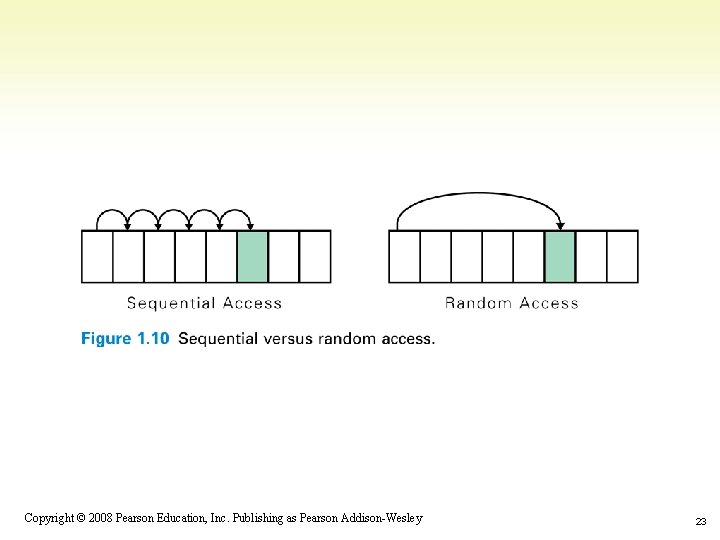
Memory (Primary/Main Memory) • Where program and data are located while program runs • RAM: Random Access Memory - volatile • PC Contains millions/billions of bytes of RAM - Megabytes (MB) / Gigabytes (GB) • What Random Access means – Any item can be retrieved directly – Unlike sequential access (ex. tapes) 1 -22 Copyright © 2008 Pearson Education, Inc. Publishing as Pearson Addison-Wesley 22
1 -23 Copyright © 2008 Pearson Education, Inc. Publishing as Pearson Addison-Wesley 23
Hard Disk (Secondary Memory) • High-Capacity, persistent peripheral storage device – Stores programs and data not in immediate use by computer – Made from magnetized iron compound • Information remains whether PC is on or off • Called permanent or persistent storage – non-volatile 1 -24 Copyright © 2008 Pearson Education, Inc. Publishing as Pearson Addison-Wesley 24
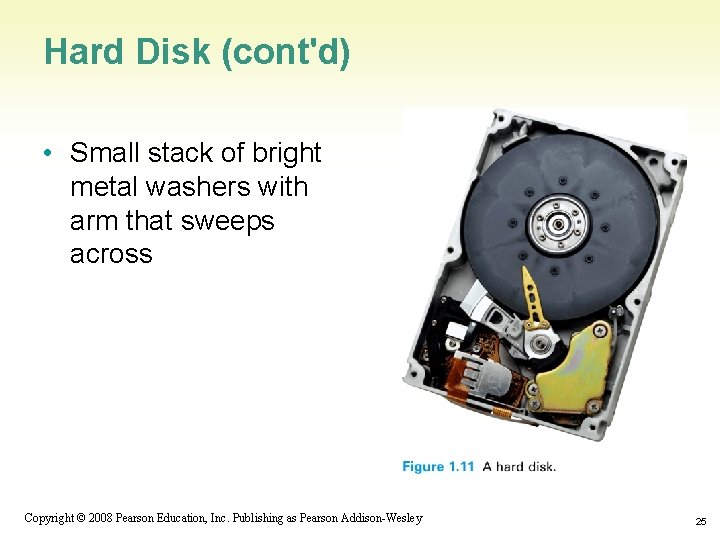
Hard Disk (cont'd) • Small stack of bright metal washers with arm that sweeps across 1 -25 Copyright © 2008 Pearson Education, Inc. Publishing as Pearson Addison-Wesley 25
Saving from RAM to Hard Disk • Saving moves information from RAM to hard disk – Prudent user saves frequently • RAM memory is volatile – Information is lost when power turns off – If computer fails or power-cycles, only data on disk will survive 1 -26 Copyright © 2008 Pearson Education, Inc. Publishing as Pearson Addison-Wesley 26
How Soft is Software? • Hardware is old term for metal items used in construction – Refers to physical parts of computer – Functions implemented directly with wires and transistors • Software is a term created for computers – Means programs or instructions the computer follows to implement functions 1 -27 Copyright © 2008 Pearson Education, Inc. Publishing as Pearson Addison-Wesley 27
Algorithms and Programs • Algorithm – Precise and systematic method for solving a problem (steps to accomplish a task) – Examples: • • Arithmetic operations Sending a greeting card Searching for a phone number Determining when a mouse pointer hovers over a button – Algorithms need to be precise 1 -28 Copyright © 2008 Pearson Education, Inc. Publishing as Pearson Addison-Wesley 28
Algorithms and Programs (cont'd) • Writing out steps of algorithm is called programming – Program is an algorithm written in specific language for specific set of conditions • Running a Program – Click on program icon (ex. Firefox browser) – We instruct computer to run or execute or interpret the program from Mozilla company that browses Internet. 1 -29 Copyright © 2008 Pearson Education, Inc. Publishing as Pearson Addison-Wesley 29
Boot • Booting: Start computer • Rebooting: Re-start computer • Boot instructions are stored in a microchip called the boot ROM • Term comes from "bootstrapping" 1 -30 Copyright © 2008 Pearson Education, Inc. Publishing as Pearson Addison-Wesley 30
The Words for Ideas • Abstract: Remove the basic concept, idea, or process from a situation • Abstraction is a more succinct and generalized form of the removed concept. – e. g. , parables and fables (moral is abstracted from story) – Decide which details are relevant – Understand convey the same point to apply to many situations 1 -31 Copyright © 2008 Pearson Education, Inc. Publishing as Pearson Addison-Wesley 31

"Generalize" • Recognize common idea in two or more situations • Summarize expression of idea, concept, or process that applies to many situations – e. g. , faucet handles usually turn left for on and right for off – Caps usually twist left to loosen, right to tighten • Remember that generalizations will not apply in every single situation 1 -32 Copyright © 2008 Pearson Education, Inc. Publishing as Pearson Addison-Wesley 32
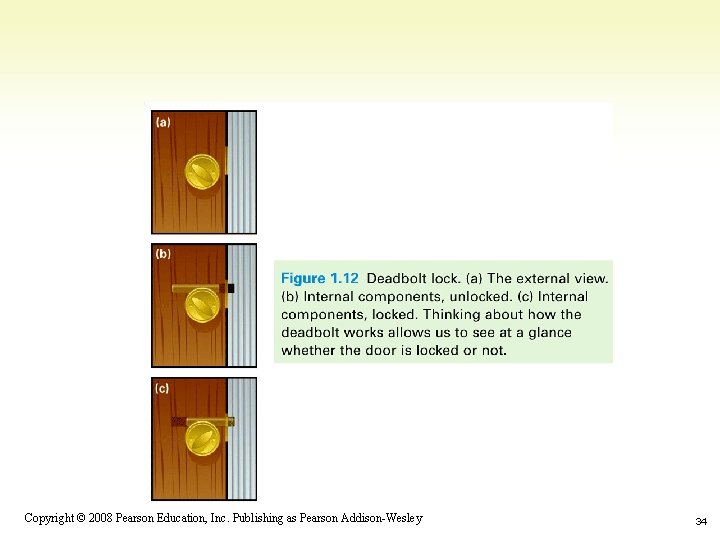
"Operationally Attuned" • Being aware of how a gadget works • Apply what we know about how device or system works to simplify use – e. g. , cap lids usually twist less to loosen, so we are confident about which way to twist if unsure • Thinking about how IT works makes it simpler to use technology 1 -33 Copyright © 2008 Pearson Education, Inc. Publishing as Pearson Addison-Wesley 33
1 -34 Copyright © 2008 Pearson Education, Inc. Publishing as Pearson Addison-Wesley 34
"Mnemonic" • Memory aid – How to pronounce words and phrases – e. g. , 5 Great Lakes are HOMES (Huron, Ontario, Michigan, Eire, Superior) – PILPOF - Plug in last, pull out first – Spring ahead; Fall back • Helps simplify use of technology – Easy memorization of infrequently used details 1 -35 Copyright © 2008 Pearson Education, Inc. Publishing as Pearson Addison-Wesley 35
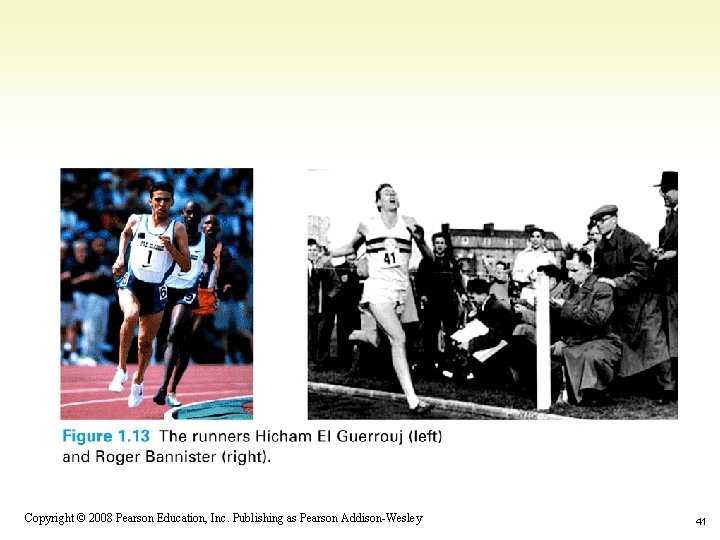
Analytical Thinking • Use specific facts and comparisons to back up statements • Non-analytical statement: – World record in the mile run has improved • Analytical statements: – In 45 years, the world record in the mile has improved from 3. 59. 4 to 3. 43. 13, a 7% improvement – The average 20 year old can run a mile in 7. 5 minutes. The world record holder is twice as fast. 1 -36 Copyright © 2008 Pearson Education, Inc. Publishing as Pearson Addison-Wesley 36
Factor of Improvement • As a percentage – Divide the new rate by the old rate – New rate is 7% faster • As a factor: – New rate is factor-of-1. 07 times faster than old rate, and factor-of-2 times faster than average person 1 -37 Copyright © 2008 Pearson Education, Inc. Publishing as Pearson Addison-Wesley 37
Super Computers • Analytical comparison of computer speeds – UNIVAC I • First commercial computer released in 1951 • Rate of 100, 000 addition operations (adds) per second – Today's Thinkpad • Affordable laptop system • Rate of 1 billion adds per second • Factor of 10, 000 improvement over UNIVAC – ASCI Red • Intel Computer built for Sandia National Labs • Rate of 2. 1 trillion floating points (decimal) adds per second • Factor of 21 million improvement over UNIVAC 1 -38 Copyright © 2008 Pearson Education, Inc. Publishing as Pearson Addison-Wesley 38
Benefits of Analytical Thinking • Learning specific facts, and comparing to other specific facts • Putting things in perspective – Factor of 1. 07 improvement in mile run record does not seem small when compared to factor of 2 difference between world record holder and average person 1 -39 Copyright © 2008 Pearson Education, Inc. Publishing as Pearson Addison-Wesley 39
Defining WYSIWYG • First acronym in this chapter – "What you see is what you get" – Text is stored in memory as long line of letters, numbers, punctuation, etc. – Original text editing software could not display formatting; users had to guess what it would look like when printed – WYSIWYG applications, like word processors, display data as formatted page 1 -40 Copyright © 2008 Pearson Education, Inc. Publishing as Pearson Addison-Wesley 40
1 -41 Copyright © 2008 Pearson Education, Inc. Publishing as Pearson Addison-Wesley 41
- Slides: 41