
Chapter 1 An Introduction to Computers and Problem
Chapter 1 - An Introduction to Computers and Problem Solving • • 1. 1 An Introduction to Computers 1. 2 Windows, Folders, and Files 1. 3 Program Development Cycle 1. 4 Programming Tools Chapter 1 - VB 2008 by Schneider 1
1. 1 An Introduction to Computers • Miscellaneous Questions Chapter 1 - VB 2008 by Schneider 2
Programs Students Will Create in This Text • Create and manage a list of friends' addresses and phone numbers • Calculate loan payments and amortization • Computations to support other course work Chapter 1 - VB 2008 by Schneider 3
Communicating with the Computer • Machine language – low level, hard for humans to understand • Visual Basic – high level, understood by humans, consists of instructions such as Click, If, Do Chapter 1 - VB 2008 by Schneider 4

Computers and Complicated Tasks • Tasks are broken down into instructions that can be expressed by a computer language • A program is a sequence of instructions • Programs can be only a few instructions or millions of lines of instructions Chapter 1 - VB 2008 by Schneider 5
All Programs Have in Common: • Take data and manipulate it to produce a result • Input – Process – Output • Input – from files, the keyboard, or other input device • Output – to the monitor, printer, file, or other output device Chapter 1 - VB 2008 by Schneider 6
Hardware and Software • Hardware – the physical components of a computer • Keyboard • Disk drive • Monitor • Software – The instructions that tell the computer what to do Chapter 1 - VB 2008 by Schneider 7
Programmer and User • Programmer – the person who solves the problem and writes the instructions for the computer • User – any person who uses the program written by the programmer Chapter 1 - VB 2008 by Schneider 8
Problem Solving • Developing the solution to a problem • Algorithm – a step by step series of instructions to solve a problem Chapter 1 - VB 2008 by Schneider 9
Types of Problems in this Text • • Business computations Managing records Managing lists And more Chapter 1 - VB 2008 by Schneider 10
Visual Basic 2008 • BASIC originally developed at Dartmouth in the early 1960 s • Visual Basic created by Microsoft in 1991 • Visual Basic 2008 is similar to original Visual Basic, but more powerful Chapter 1 - VB 2008 by Schneider 11
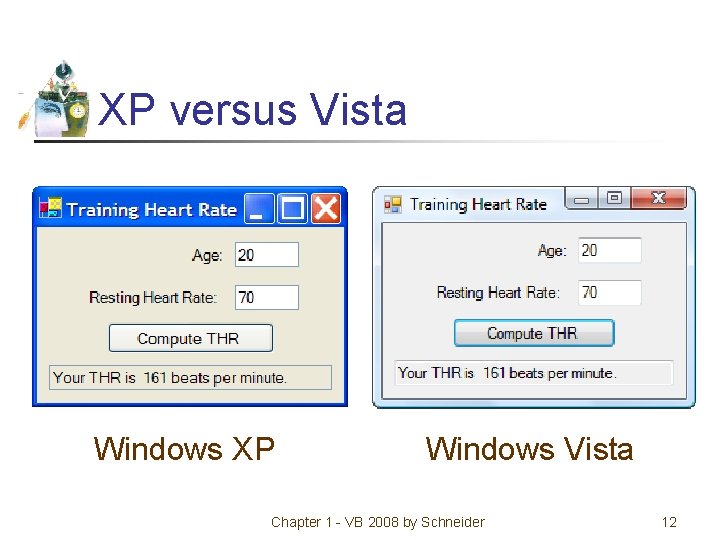
XP versus Vista Windows XP Windows Vista Chapter 1 - VB 2008 by Schneider 12
1. 2 Windows, Folders, and Files • Windows and Its Little Windows • Mouse Actions • Files and Folders Chapter 1 - VB 2008 by Schneider 13
Windows and Its Little Windows • Difference between Windows and windows. • Title bar indicates if window is active. Chapter 1 - VB 2008 by Schneider 14
Mouse Actions: • • • Hover Drag and drop Click Right-click Double-Click Chapter 1 - VB 2008 by Schneider 15
Files and Folders File: holds programs or data. Its name usually consists of letters, digits, and spaces. Folder: contains files and other folders (called subfolders). Chapter 1 - VB 2008 by Schneider 16
Key Terms in using Folders and Files • • • Term Disk File name Extension Filename Path Filespec Example Hard disk, CD PAYROLL. TXT Text. FilesPAYROLL. TXT C: Text. FilesPAYROLL. TXT Chapter 1 - VB 2008 by Schneider 17
Windows Explorer • Used to view, organize and manage folders and files. • Manage: copy, move, delete Chapter 1 - VB 2008 by Schneider 18
Invoking Windows Explorer • Right-click on Windows Start button • Click on Explore in context menu Chapter 1 - VB 2008 by Schneider 19
Display File Extensions (XP) • Alt/Tools/Folder Options • Click the View tab. • Uncheck "Hide extensions for known file types“. • Click OK. Chapter 1 - VB 2008 by Schneider 20
Display File Extensions (Vista) • • • Click on Windows Start button. Type Folder Options into Search box. Press Enter key. Click on View tab in dialog box. Uncheck ″Hide extensions for known file types″. • Click OK. Chapter 1 - VB 2008 by Schneider 21
1. 3 Program Development Cycle • Performing a Task on the Computer • Program Planning Chapter 1 - VB 2008 by Schneider 22
Terminology tip • A computer program may also be called: • Project • Application • Solution Chapter 1 - VB 2008 by Schneider 23
Program Development Cycle • Software refers to a collection of instructions for the computer • The computer only knows how to do what the programmer tells it to do • Therefore, the programmer has to know how to solve problems Chapter 1 - VB 2008 by Schneider 24
Performing a Task on the Computer • Determine Output • Identify Input • Determine process necessary to turn given Input into desired Output Chapter 1 - VB 2008 by Schneider 25
Problem-solving: approach like algebra class • How fast is a car traveling if it goes 50 miles in 2 hours? • Output: a number giving the speed in miles per hour • Input: the distance and time the car has traveled • Process: speed = distance / time Chapter 1 - VB 2008 by Schneider 26
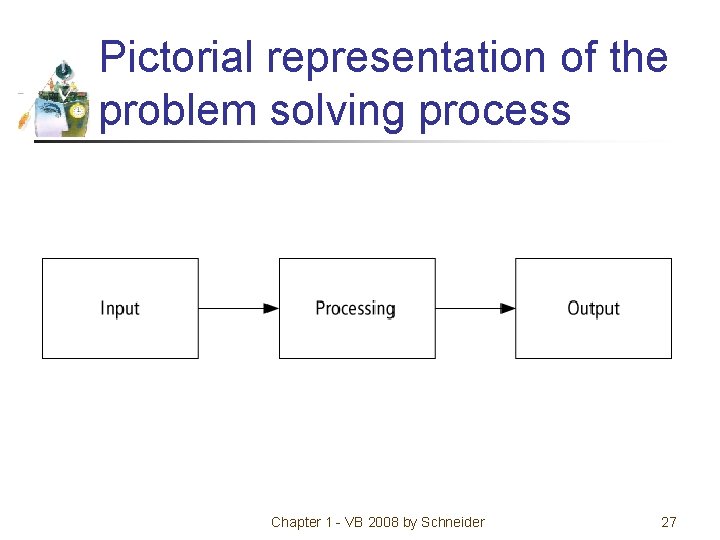
Pictorial representation of the problem solving process Chapter 1 - VB 2008 by Schneider 27
Program Planning • A recipe is a good example of a plan • Ingredients and amounts are determined by what you want to bake • Ingredients are input • The way you combine them is the processing • What is baked is the output Chapter 1 - VB 2008 by Schneider 28
Program Planning Tips • Always have a plan before trying to write a program • The more complicated the problem, the more complex the plan must be • Planning and testing before coding saves time coding Chapter 1 - VB 2008 by Schneider 29
Program development cycle 1. Analyze: Define the problem. 2. Design: Plan the solution to the problem. 3. Choose the interface: Select the objects (text boxes, buttons, etc. ). Chapter 1 - VB 2008 by Schneider 30
Program development cycle continued 4. Code: Translate the algorithm into a programming language. 5. Test and debug: Locate and remove any errors in the program. 6. Complete the documentation: Organize all the materials that describe the program. Chapter 1 - VB 2008 by Schneider 31
1. 4 Programming Tools • • Flowcharts Pseudocode Hierarchy Chart Direction of Numbered NYC Streets Algorithm • Class Average Algorithm Chapter 1 - VB 2008 by Schneider 32
Programming Tools • Three tools are used to convert algorithms into computer programs: • Flowchart - Graphically depicts the logical steps to carry out a task and shows how the steps relate to each other. • Pseudocode - Uses English-like phrases with some Visual Basic terms to outline the program. • Hierarchy chart - Shows how the different parts of a program relate to each other. Chapter 1 - VB 2008 by Schneider 33
Algorithm • A step by step series of instructions for solving a problem (a recipe is an example of an algorithm) Chapter 1 - VB 2008 by Schneider 34
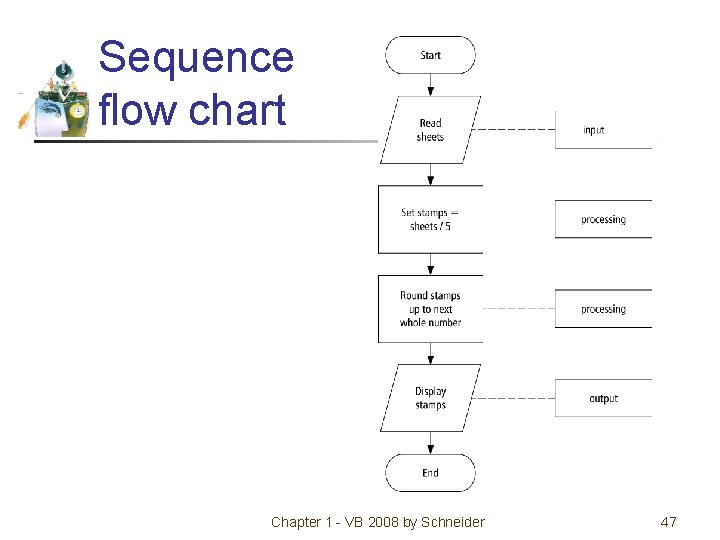
Problem solving example • How many stamps do you use when mailing a letter? • One rule of thumb is to use one stamp for every five sheets of paper or fraction thereof. Chapter 1 - VB 2008 by Schneider 35
Algorithm 1. Request the number of sheets of paper; call it Sheets. (input) 2. Divide Sheets by 5. (processing) 3. Round the quotient up to the next highest whole number; call it Stamps. (processing) 4. Reply with the number Stamps. (output) Chapter 1 - VB 2008 by Schneider 36
Flowcharts • Graphically depict the logical steps to carry out a task and show the steps relate to each other. Chapter 1 - VB 2008 by Schneider 37
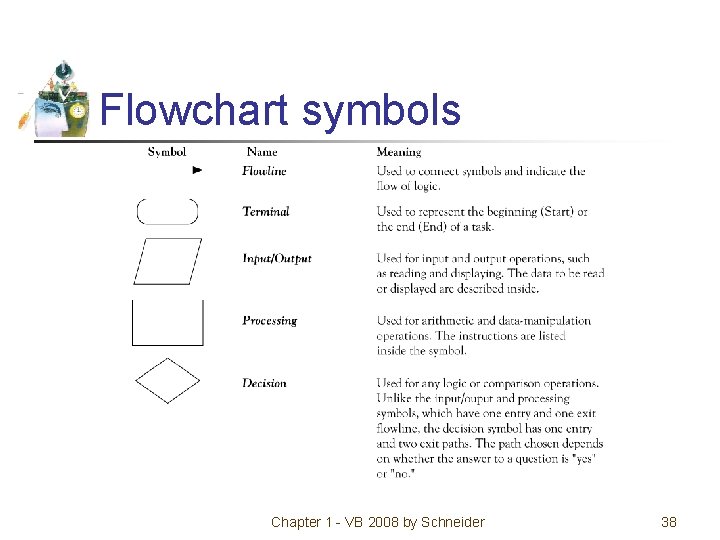
Flowchart symbols Chapter 1 - VB 2008 by Schneider 38
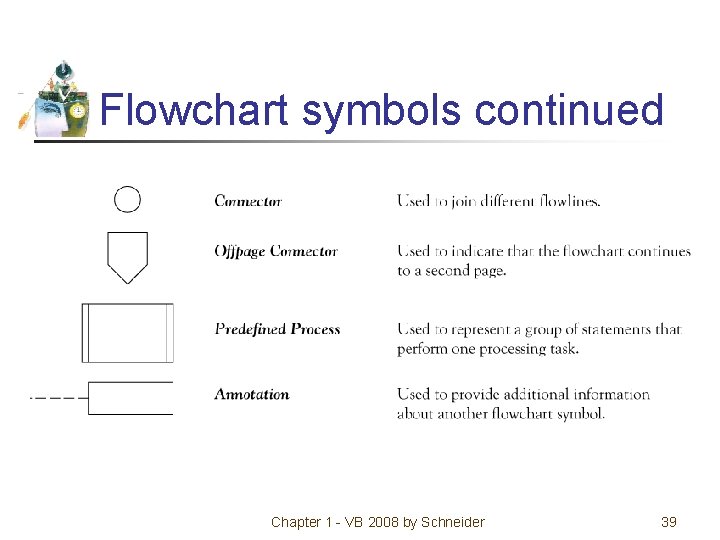
Flowchart symbols continued Chapter 1 - VB 2008 by Schneider 39
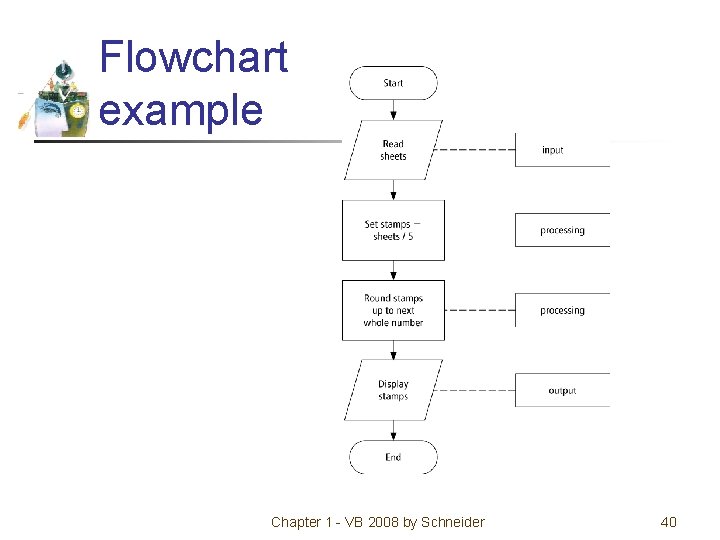
Flowchart example Chapter 1 - VB 2008 by Schneider 40
Pseudocode • Uses English-like phrases with some Visual Basic terms to outline the task. Chapter 1 - VB 2008 by Schneider 41
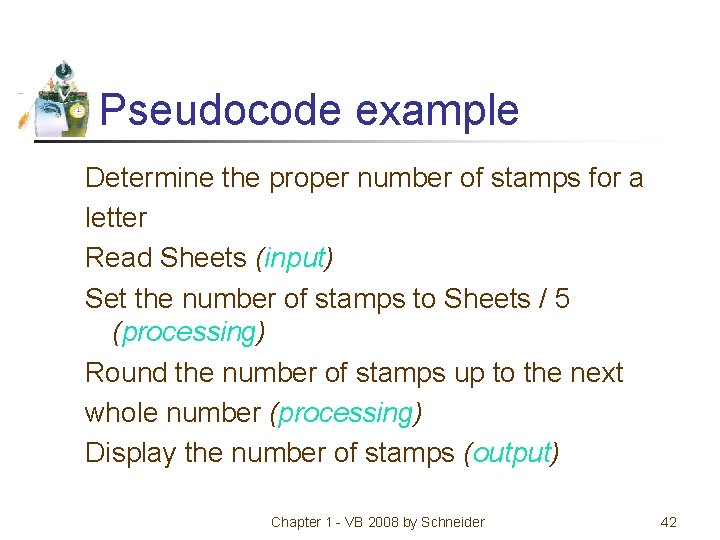
Pseudocode example Determine the proper number of stamps for a letter Read Sheets (input) Set the number of stamps to Sheets / 5 (processing) Round the number of stamps up to the next whole number (processing) Display the number of stamps (output) Chapter 1 - VB 2008 by Schneider 42
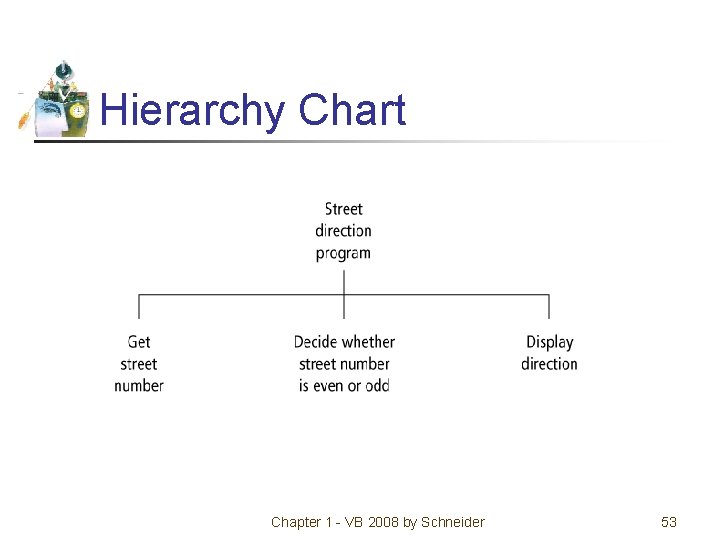
Hierarchy charts • Show the different parts of a program relate to each other Hierarchy charts may also be called • structure charts • HIPO (Hierarchy plus Input-Process-Output) charts • top-down charts • VTOC (Visual Table of Contents) charts Chapter 1 - VB 2008 by Schneider 43
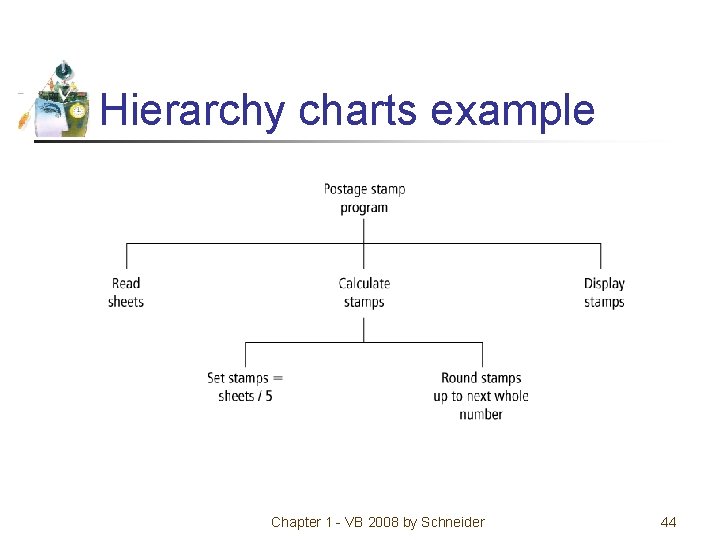
Hierarchy charts example Chapter 1 - VB 2008 by Schneider 44
Divide-and-conquer method • Used in problem solving – take a large problem and break it into smaller problems solving the small ones first • Breaks a problem down into modules Chapter 1 - VB 2008 by Schneider 45
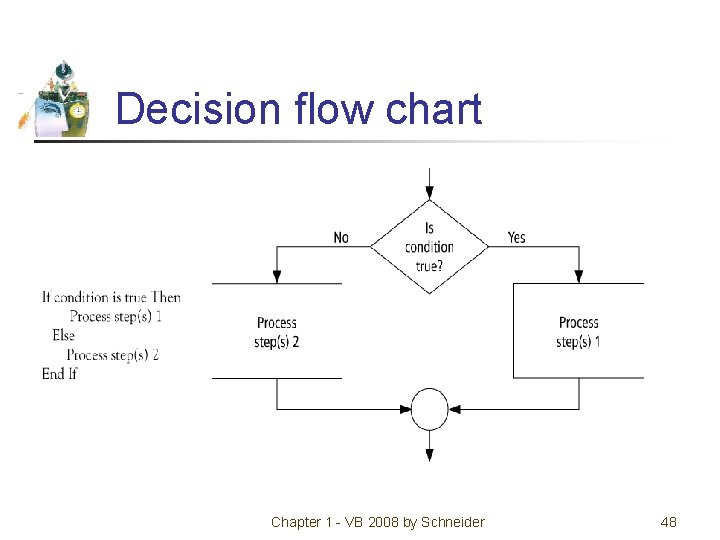
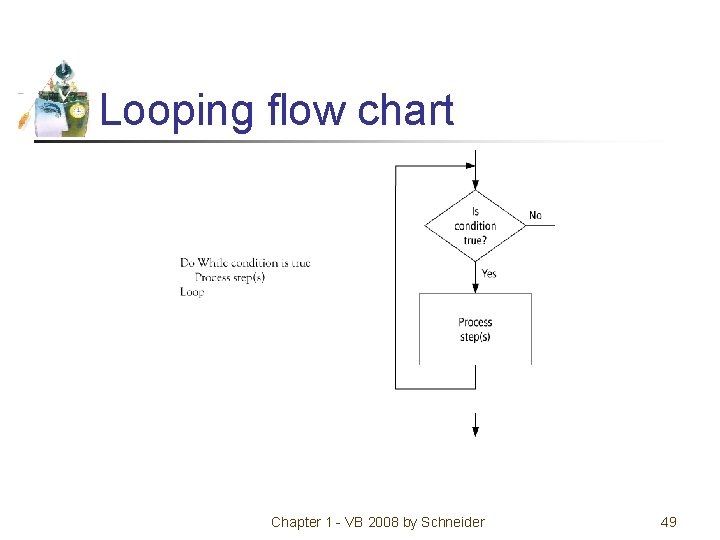
Statement structures • Sequence – follow instructions from one line to the next without skipping over any lines • Decision - if the answer to a question is “Yes” then one group of instructions is executed. If the answer is “No, ” then another is executed • Looping – a series of instructions are executed over and over Chapter 1 - VB 2008 by Schneider 46
Sequence flow chart Chapter 1 - VB 2008 by Schneider 47
Decision flow chart Chapter 1 - VB 2008 by Schneider 48
Looping flow chart Chapter 1 - VB 2008 by Schneider 49
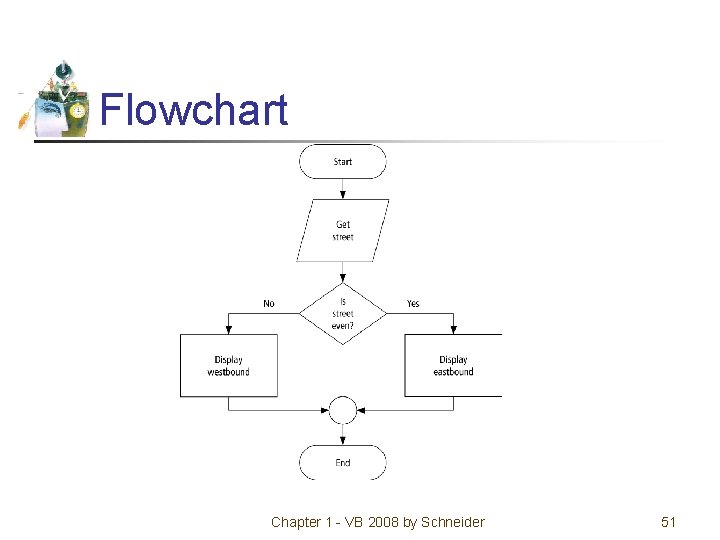
Direction of Numbered NYC Streets Algorithm • Problem: Given a street number of a one -way street in New York City, decide the direction of the street, either eastbound or westbound • Discussion: in New York City even numbered streets are Eastbound, odd numbered streets are Westbound Chapter 1 - VB 2008 by Schneider 50
Flowchart Chapter 1 - VB 2008 by Schneider 51
Pseudocode Program: Determine the direction of a numbered NYC street Get street If street is even Then Display Eastbound Else Display Westbound End If Chapter 1 - VB 2008 by Schneider 52
Hierarchy Chart Chapter 1 - VB 2008 by Schneider 53
Class Average Algorithm • Problem: Calculate and report the grade-point average for a class • Discussion: The average grade equals the sum of all grades divided by the number of students Output: Average grade Input: Student grades Processing: Find the sum of the grades; count the number of students; calculate average Chapter 1 - VB 2008 by Schneider 54
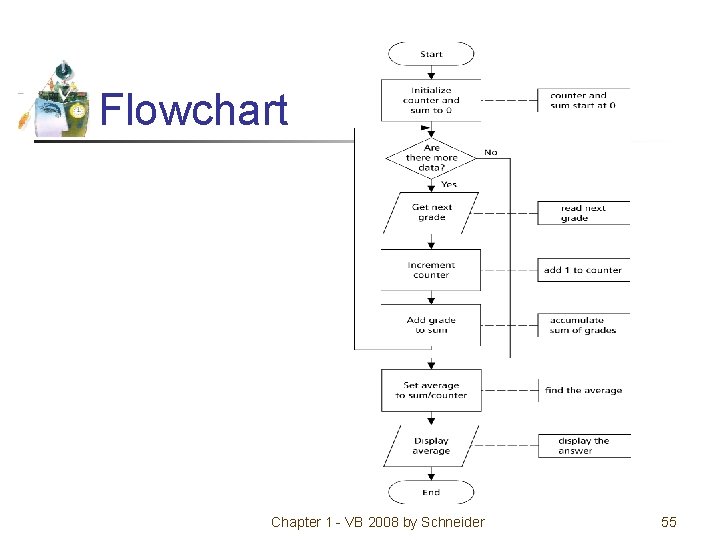
Flowchart Chapter 1 - VB 2008 by Schneider 55
Pseudocode Program: Determine the average grade of a class Initialize Counter and Sum to 0 Do While there are more data Get the next Grade Add the Grade to the Sum Increment the Counter Loop Computer Average = Sum / Counter Display Average Chapter 1 - VB 2008 by Schneider 56
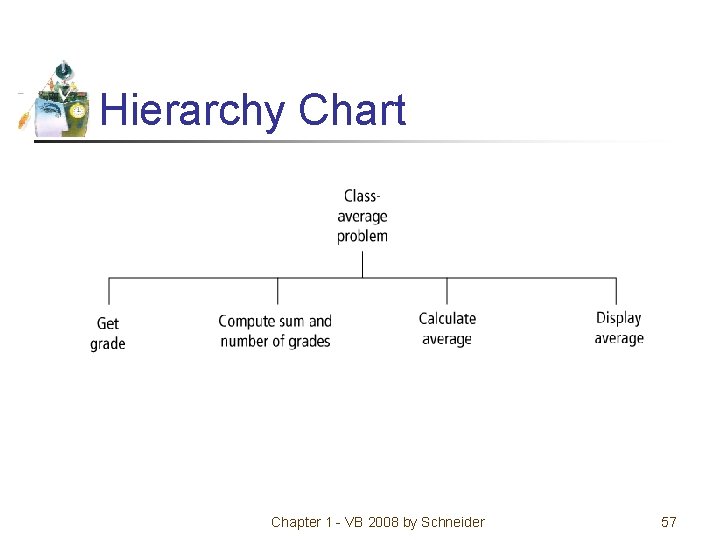
Hierarchy Chart Chapter 1 - VB 2008 by Schneider 57
Comments • When tracing a flowchart, start at the start symbol and follow the flow lines to the end symbol • Testing an algorithm at the flowchart stage is known as desk checking • Flowcharts, pseudocode, and hierarchy charts are program planning tools that are not dependent on the programming language being used Chapter 1 - VB 2008 by Schneider 58
Comments continued • There are four primary logical programming constructs • sequence • decision • loop • unconditional branch Chapter 1 - VB 2008 by Schneider 59
Unconditional branch • Appear in some languages as Goto statements • Involves jumping from one place in a program to another • Structured programming uses the sequence, decision, and loop constructs but forbids the unconditional branch Chapter 1 - VB 2008 by Schneider 60
Tips and tricks of flowcharts • Flowcharts are time-consuming to write and difficult to update • For this reason, professional programmers are more likely to favor pseudocode and hierarchy charts • Because flowcharts so clearly illustrate the logical flow of programming techniques, they are a valuable tool in the education of programmers Chapter 1 - VB 2008 by Schneider 61
Tips and tricks of pseudocode • There are many styles of pseudocode • Some programmers use an outline form • Some use a form that looks almost like a programming language • The pseudocode in the case studies of this text focus on the primary tasks to be performed by the program and leaves many of the routine details to be completed during the coding process Chapter 1 - VB 2008 by Schneider 62
Tips and tricks of hierarchy charts • Many people draw rectangles around each item in a hierarchy chart • In the text, rectangles are omitted to encourage the use of hierarchy charts by making them easier to draw Chapter 1 - VB 2008 by Schneider 63
- Slides: 63