
Chap 6 Implement InterVLAN Routing Learning Objectives Explain
Chap 6 – Implement Inter-VLAN Routing Learning Objectives • • • Explain to the satisfaction of a qualified instructor how network traffic is routed between VLANs in a converged network. Configure inter-VLAN routing on a router to enable communications between end-user devices on separate VLANs Troubleshoot common inter-VLAN connectivity issues. 1 Chapter 6
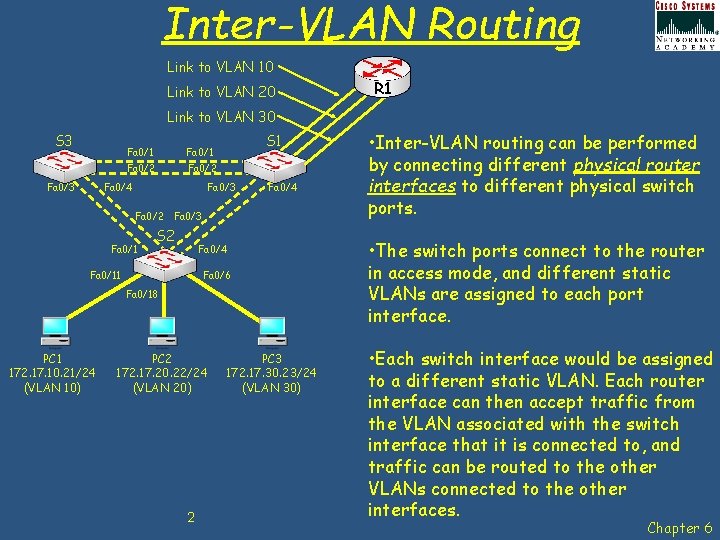
Inter-VLAN Routing Link to VLAN 10 Link to VLAN 20 R 1 Link to VLAN 30 S 3 Fa 0/1 Fa 0/2 Fa 0/4 S 1 Fa 0/3 Fa 0/2 Fa 0/1 Fa 0/4 Fa 0/3 S 2 Fa 0/4 Fa 0/11 Fa 0/6 Fa 0/18 PC 1 172. 17. 10. 21/24 (VLAN 10) PC 2 172. 17. 20. 22/24 (VLAN 20) 2 PC 3 172. 17. 30. 23/24 (VLAN 30) • Inter-VLAN routing can be performed by connecting different physical router interfaces to different physical switch ports. • The switch ports connect to the router in access mode, and different static VLANs are assigned to each port interface. • Each switch interface would be assigned to a different static VLAN. Each router interface can then accept traffic from the VLAN associated with the switch interface that it is connected to, and traffic can be routed to the other VLANs connected to the other interfaces. Chapter 6

Router-on-a -Stick "Router-on-a-stick" is a type of router configuration in which a single physical interface routes traffic between multiple VLANs on a network. S 3 Fa 0/1 Fa 0/2 Fa 0/4 S 1 Fa 0/1 R 1 - Fa 0/0 Sub-interfaces Fa 0/0. 10 – 172. 17. 10. 1 – Default Gateway to VLAN 10 Fa 0/4 Fa 0/0. 30 – 172. 17. 30. 1 – Default Gateway to VLAN 30 Fa 0/3 S 2 Fa 0/4 Fa 0/11 Fa 0/6 Fa 0/18 PC 1 172. 17. 10. 21/24 (VLAN 10) Fa 0/0. 20 – 172. 17. 20. 1 – Default Gateway to VLAN 20 Fa 0/3 Fa 0/2 R 1 PC 2 172. 17. 20. 22/24 (VLAN 20) 3 PC 3 172. 17. 30. 23/24 (VLAN 30) Sub-interfaces are multiple virtual interfaces, associated with one physical interface. These sub-interfaces are configured with an IP address and VLAN assignment to operate on a specific VLAN. • Sub-interfaces are configured for different subnets corresponding to their VLAN assignment to allow logical routing before data frames are VLAN tagged and sent back out the physical interface. Chapter 6
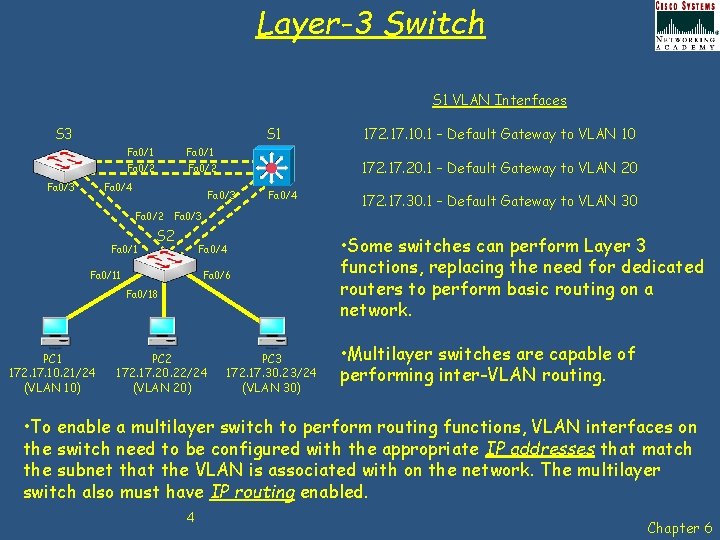
Layer-3 Switch S 1 VLAN Interfaces S 3 S 1 Fa 0/3 Fa 0/1 Fa 0/2 Fa 0/4 172. 17. 20. 1 – Default Gateway to VLAN 20 Fa 0/3 Fa 0/2 Fa 0/1 Fa 0/4 Fa 0/3 S 2 Fa 0/4 Fa 0/11 Fa 0/6 Fa 0/18 PC 1 172. 17. 10. 21/24 (VLAN 10) PC 2 172. 17. 20. 22/24 (VLAN 20) 172. 17. 10. 1 – Default Gateway to VLAN 10 PC 3 172. 17. 30. 23/24 (VLAN 30) 172. 17. 30. 1 – Default Gateway to VLAN 30 • Some switches can perform Layer 3 functions, replacing the need for dedicated routers to perform basic routing on a network. • Multilayer switches are capable of performing inter-VLAN routing. • To enable a multilayer switch to perform routing functions, VLAN interfaces on the switch need to be configured with the appropriate IP addresses that match the subnet that the VLAN is associated with on the network. The multilayer switch also must have IP routing enabled. 4 Chapter 6
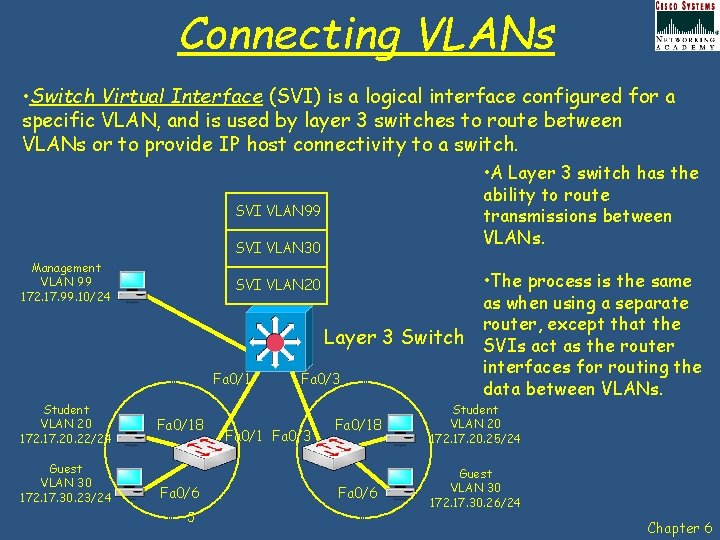
Connecting VLANs • Switch Virtual Interface (SVI) is a logical interface configured for a specific VLAN, and is used by layer 3 switches to route between VLANs or to provide IP host connectivity to a switch. • A Layer 3 switch has the ability to route transmissions between VLANs. SVI VLAN 99 SVI VLAN 30 Management VLAN 99 172. 17. 99. 10/24 Fa 0/1 Student VLAN 20 172. 17. 20. 22/24 Guest VLAN 30 172. 17. 30. 23/24 • The process is the same as when using a separate router, except that the Layer 3 Switch SVIs act as the router interfaces for routing the Fa 0/3 data between VLANs. SVI VLAN 20 Fa 0/18 Fa 0/6 5 Fa 0/1 Fa 0/3 Fa 0/18 Student VLAN 20 172. 17. 20. 25/24 Fa 0/6 Guest VLAN 30 172. 17. 30. 26/24 Chapter 6
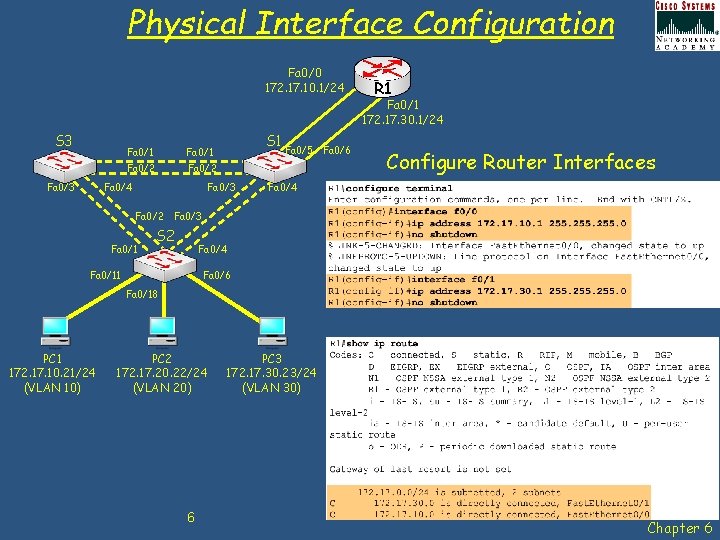
Physical Interface Configuration Fa 0/0 172. 17. 10. 1/24 R 1 Fa 0/1 172. 17. 30. 1/24 S 3 Fa 0/1 Fa 0/2 Fa 0/4 S 1 Fa 0/3 Fa 0/2 Fa 0/1 Fa 0/5 Fa 0/6 Configure Router Interfaces Fa 0/4 Fa 0/3 S 2 Fa 0/4 Fa 0/11 Fa 0/6 Fa 0/18 PC 1 172. 17. 10. 21/24 (VLAN 10) PC 2 172. 17. 20. 22/24 (VLAN 20) 6 PC 3 172. 17. 30. 23/24 (VLAN 30) Chapter 6
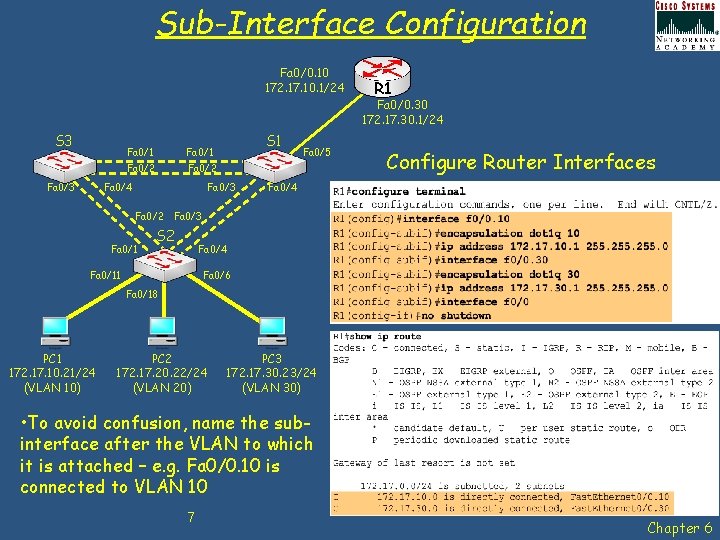
Sub-Interface Configuration Fa 0/0. 10 172. 17. 10. 1/24 R 1 Fa 0/0. 30 172. 17. 30. 1/24 S 3 Fa 0/1 Fa 0/2 Fa 0/4 S 1 Fa 0/3 Fa 0/2 Fa 0/1 Fa 0/5 Configure Router Interfaces Fa 0/4 Fa 0/3 S 2 Fa 0/4 Fa 0/11 Fa 0/6 Fa 0/18 PC 1 172. 17. 10. 21/24 (VLAN 10) PC 2 172. 17. 20. 22/24 (VLAN 20) PC 3 172. 17. 30. 23/24 (VLAN 30) • To avoid confusion, name the subinterface after the VLAN to which it is attached – e. g. Fa 0/0. 10 is connected to VLAN 10 7 Chapter 6
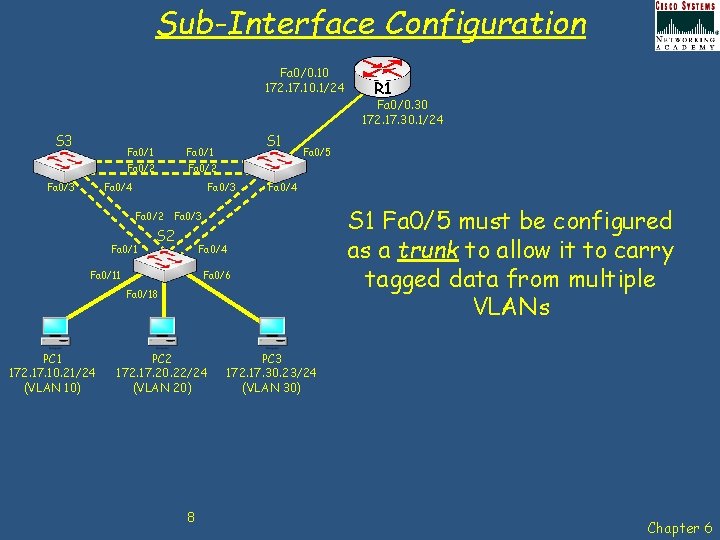
Sub-Interface Configuration Fa 0/0. 10 172. 17. 10. 1/24 R 1 Fa 0/0. 30 172. 17. 30. 1/24 S 3 Fa 0/1 Fa 0/2 Fa 0/4 S 1 Fa 0/3 Fa 0/2 Fa 0/1 Fa 0/5 Fa 0/4 Fa 0/3 S 2 Fa 0/4 Fa 0/11 Fa 0/6 Fa 0/18 PC 1 172. 17. 10. 21/24 (VLAN 10) PC 2 172. 17. 20. 22/24 (VLAN 20) 8 S 1 Fa 0/5 must be configured as a trunk to allow it to carry tagged data from multiple VLANs PC 3 172. 17. 30. 23/24 (VLAN 30) Chapter 6
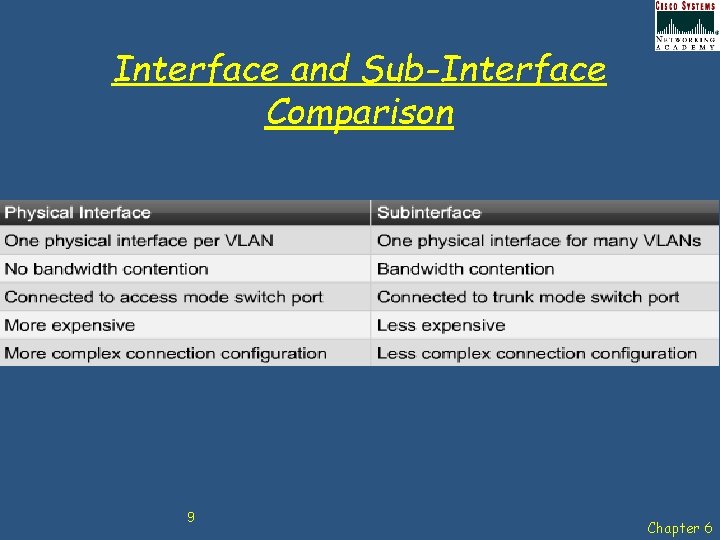
Interface and Sub-Interface Comparison 9 Chapter 6
Chap 6 – Implement Inter-VLAN Routing Learning Objectives • • • Explain to the satisfaction of a qualified instructor how network traffic is routed between VLANs in a converged network. Configure inter-VLAN routing on a router to enable communications between end-user devices on separate VLANs Troubleshoot common inter-VLAN connectivity issues. 10 Chapter 6

Any Questions? 11 Chapter 6
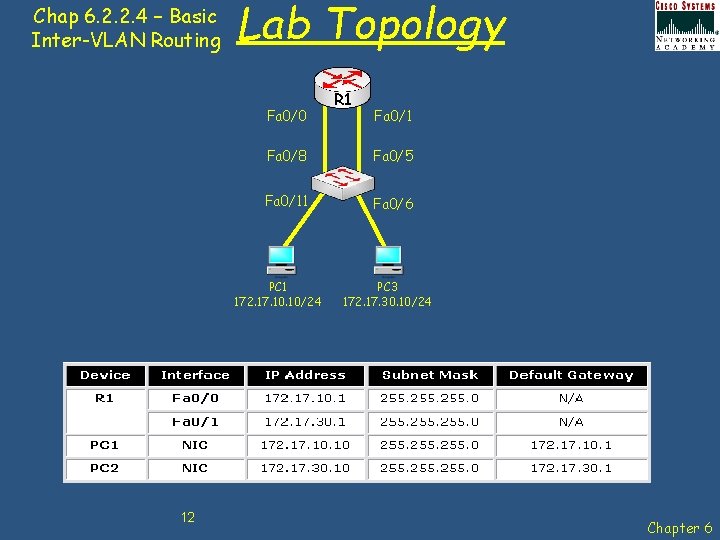
Chap 6. 2. 2. 4 – Basic Inter-VLAN Routing Lab Topology Fa 0/0 Fa 0/1 Fa 0/8 Fa 0/5 Fa 0/11 Fa 0/6 PC 1 172. 17. 10/24 12 R 1 PC 3 172. 17. 30. 10/24 Chapter 6
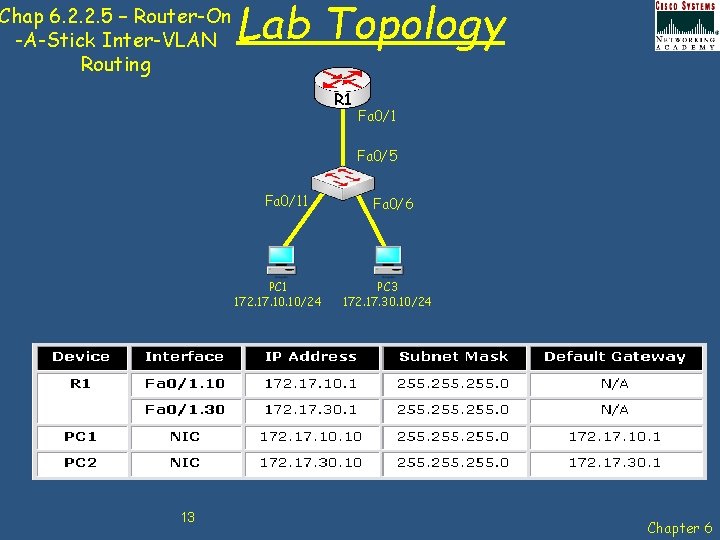
Chap 6. 2. 2. 5 – Router-On -A-Stick Inter-VLAN Routing Lab Topology R 1 Fa 0/5 Fa 0/11 PC 1 172. 17. 10/24 13 Fa 0/6 PC 3 172. 17. 30. 10/24 Chapter 6
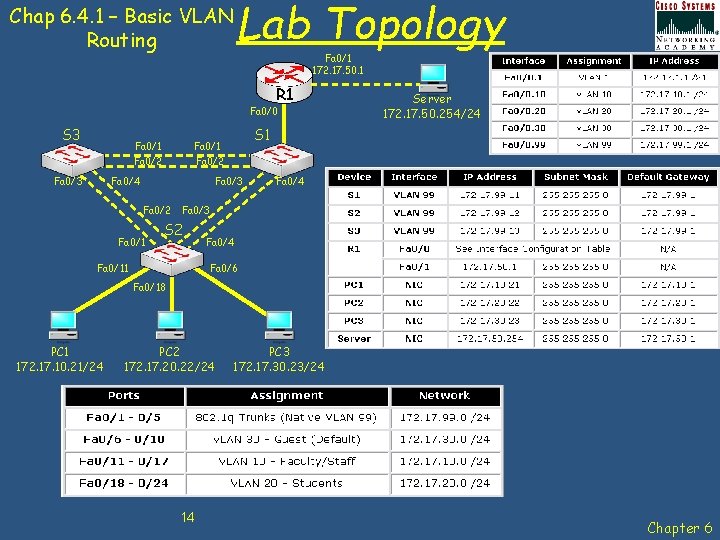
Lab Topology Chap 6. 4. 1 – Basic VLAN Routing Fa 0/1 172. 17. 50. 1 R 1 Fa 0/0 S 3 Fa 0/1 Fa 0/2 Fa 0/4 S 1 Fa 0/3 Fa 0/2 Fa 0/1 Server 172. 17. 50. 254/24 Fa 0/3 S 2 Fa 0/11 Fa 0/4 Fa 0/6 Fa 0/18 PC 1 172. 17. 10. 21/24 PC 2 172. 17. 20. 22/24 14 PC 3 172. 17. 30. 23/24 Chapter 6
- Slides: 14