
Chap 5 Access Control Lists Learning Objectives Explain
Chap 5 – Access Control Lists Learning Objectives • • • Explain how ACLs are used to secure a medium-size Enterprise branch office network. Configure standard ACLs in a medium-size Enterprise branch office network. Configure extended ACLs in a medium-size Enterprise branch office network. Describe complex ACLs in a medium-size Enterprise branch office network. Implement, verify and troubleshoot ACLs in an enterprise network environment. 1 Chapter 5
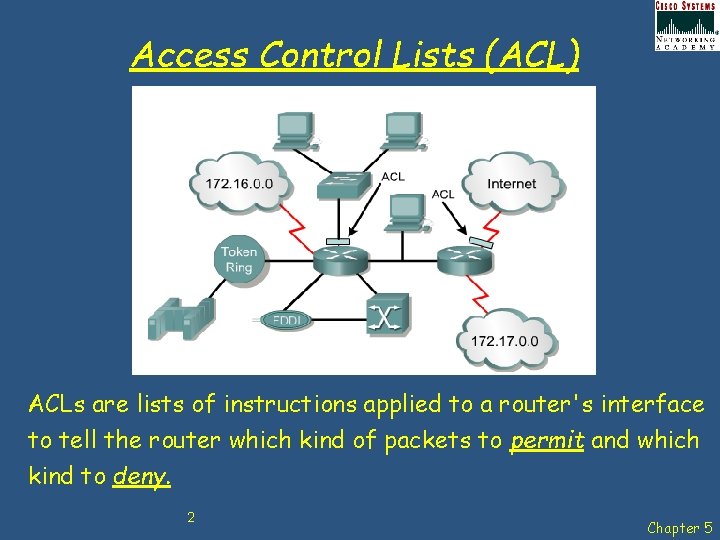
Access Control Lists (ACL) ACLs are lists of instructions applied to a router's interface to tell the router which kind of packets to permit and which kind to deny. 2 Chapter 5
Access Control Lists (ACL) • An ACL is a sequential list of permit or deny statements that apply to IP addresses or upper-layer protocols. The ACL can extract the following information from the packet header, test it against its rules, and make "allow" or "deny" decisions based on: 1. 2. 3. • Source IP address Destination IP address ICMP message type The ACL can also extract upper layer information and test it against its rules. Upper layer information includes: 1. 2. TCP/UDP source port TCP/UDP destination port 3 Chapter 5
Access Control Lists (ACL) • Limit network traffic and increase network performance. Provide traffic flow control. • ACLs can restrict the delivery of routing updates. If updates are not required because of network conditions, bandwidth is preserved. • Provide a basic level of security for network access. ACLs can allow one host to access a part of the network and prevent another host from accessing the same area. • Decide which types of traffic are forwarded or blocked at the router interfaces. ACLs can permit e-mail traffic to be routed, but block all Telnet traffic. • Control which areas a client can access on a network. • ACLs can be used to permit or deny a user to access file types such as FTP or HTTP. 4 Chapter 5
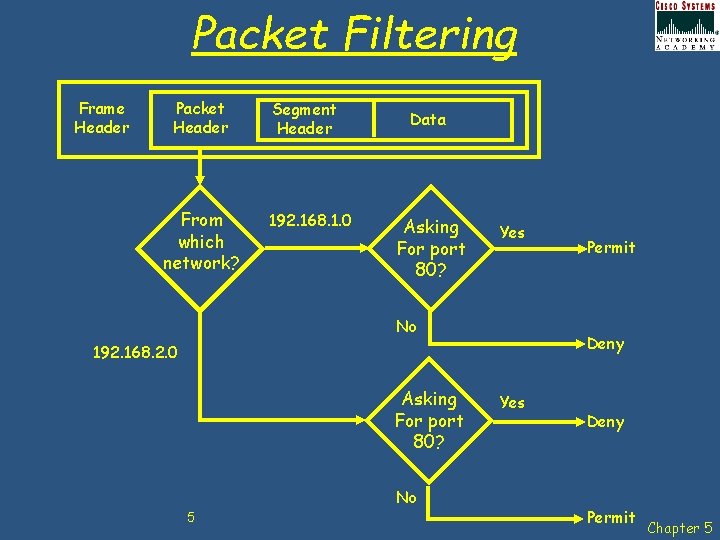
Packet Filtering Frame Header Packet Header From which network? Segment Header 192. 168. 1. 0 Data Asking For port 80? Yes No Deny 192. 168. 2. 0 Asking For port 80? No 5 Permit Yes Deny Permit Chapter 5
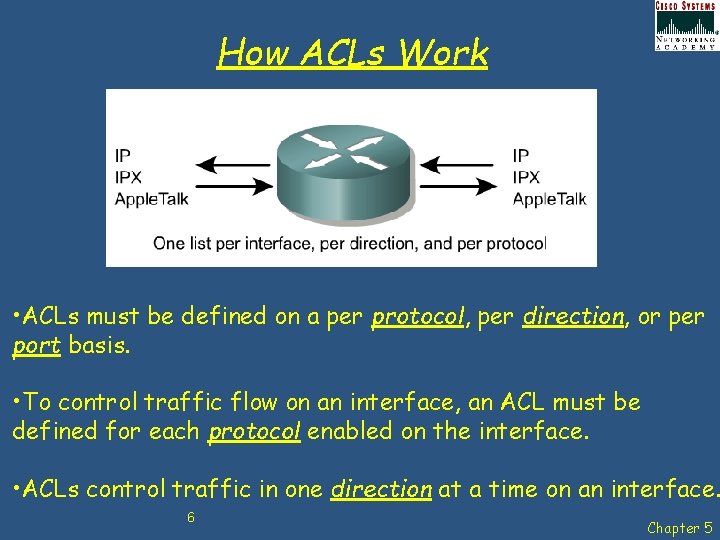
How ACLs Work • ACLs must be defined on a per protocol, per direction, or per port basis. • To control traffic flow on an interface, an ACL must be defined for each protocol enabled on the interface. • ACLs control traffic in one direction at a time on an interface. 6 Chapter 5
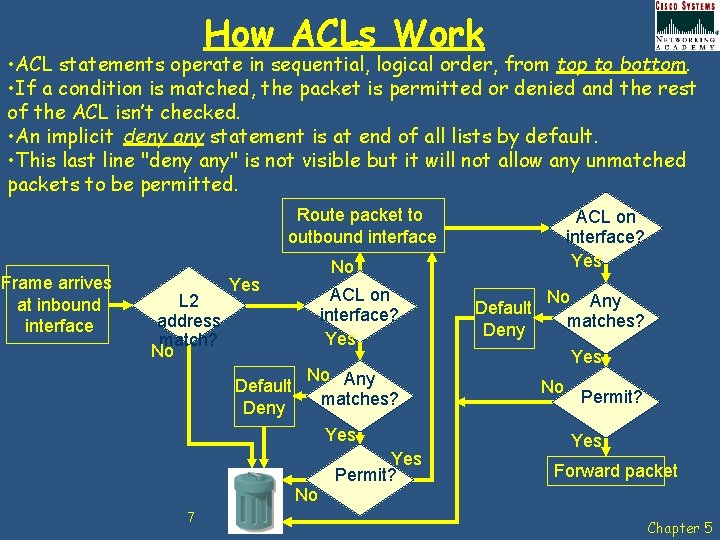
How ACLs Work • ACL statements operate in sequential, logical order, from top to bottom. • If a condition is matched, the packet is permitted or denied and the rest of the ACL isn’t checked. • An implicit deny any statement is at end of all lists by default. • This last line "deny any" is not visible but it will not allow any unmatched packets to be permitted. Route packet to outbound interface Frame arrives at inbound interface L 2 address match? No No Yes Default Deny ACL on interface? Yes No Any matches? Yes No 7 ACL on interface? Yes Permit? Default Deny No Any matches? Yes No Permit? Yes Forward packet Chapter 5
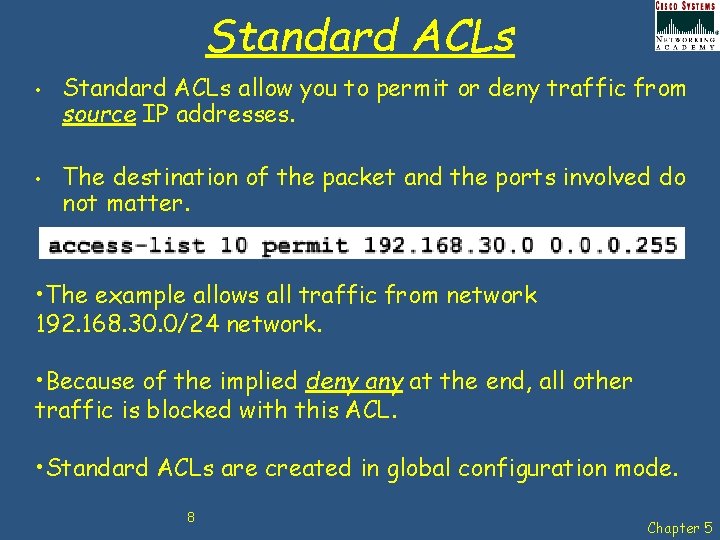
Standard ACLs • • Standard ACLs allow you to permit or deny traffic from source IP addresses. The destination of the packet and the ports involved do not matter. • The example allows all traffic from network 192. 168. 30. 0/24 network. • Because of the implied deny at the end, all other traffic is blocked with this ACL. • Standard ACLs are created in global configuration mode. 8 Chapter 5
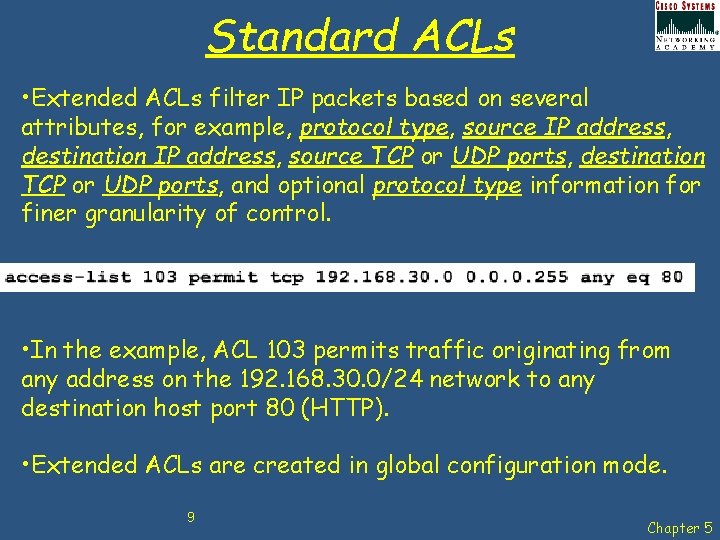
Standard ACLs • Extended ACLs filter IP packets based on several attributes, for example, protocol type, source IP address, destination IP address, source TCP or UDP ports, destination TCP or UDP ports, and optional protocol type information for finer granularity of control. • In the example, ACL 103 permits traffic originating from any address on the 192. 168. 30. 0/24 network to any destination host port 80 (HTTP). • Extended ACLs are created in global configuration mode. 9 Chapter 5
Numbering & Naming ACLs Numbered ACLs - Assign a number based on which protocol is to be filtered: • (1 to 99) and (1300 to 1999): Standard IP ACL • (100 to 199) and (2000 to 2699): Extended IP ACL Named ACLs - assign a name by providing the name of the ACL: • Names can contain alphanumeric characters. • Recommended that the name be written in CAPITAL LETTERS. • Names cannot contain spaces or punctuation and mustbegin with a letter. • Possible to add or delete entries within the ACL. 10 Chapter 5
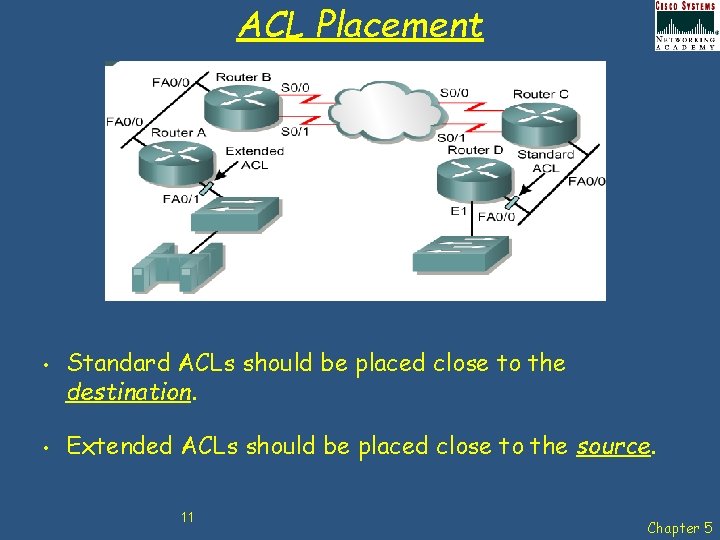
ACL Placement • • Standard ACLs should be placed close to the destination. Extended ACLs should be placed close to the source. 11 Chapter 5
ACL Best Practice Using ACLs requires attention to detail and great care. Mistakes can be costly in terms of downtime, troubleshooting efforts, and poor network service. Before starting to configure an ACL, basic planning is required: • • Base ACLs on the security policy of the organisation. Prepare a description of what ACLs are required to do. Use a text editor to create, edit and save ACLs. Test ACLs on a development network before implementing them on a production network. 12 Chapter 5
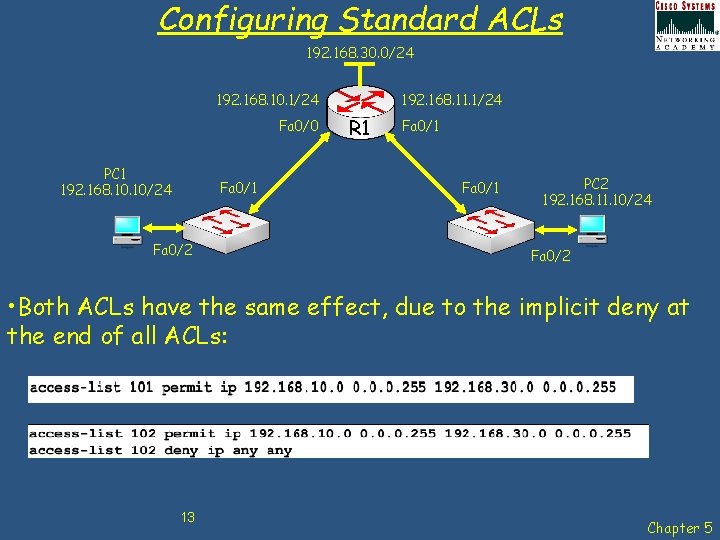
Configuring Standard ACLs 192. 168. 30. 0/24 192. 168. 10. 1/24 Fa 0/0 PC 1 192. 168. 10/24 Fa 0/1 Fa 0/2 192. 168. 11. 1/24 R 1 Fa 0/1 PC 2 192. 168. 11. 10/24 Fa 0/2 • Both ACLs have the same effect, due to the implicit deny at the end of all ACLs: 13 Chapter 5
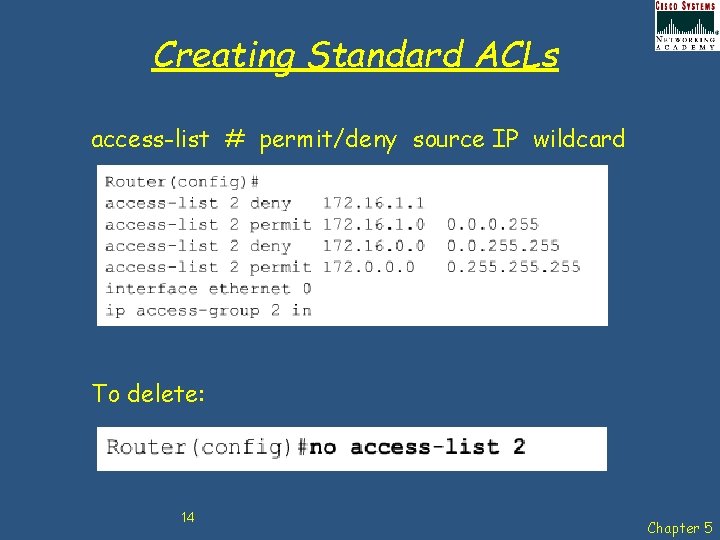
Creating Standard ACLs access-list # permit/deny source IP wildcard To delete: 14 Chapter 5
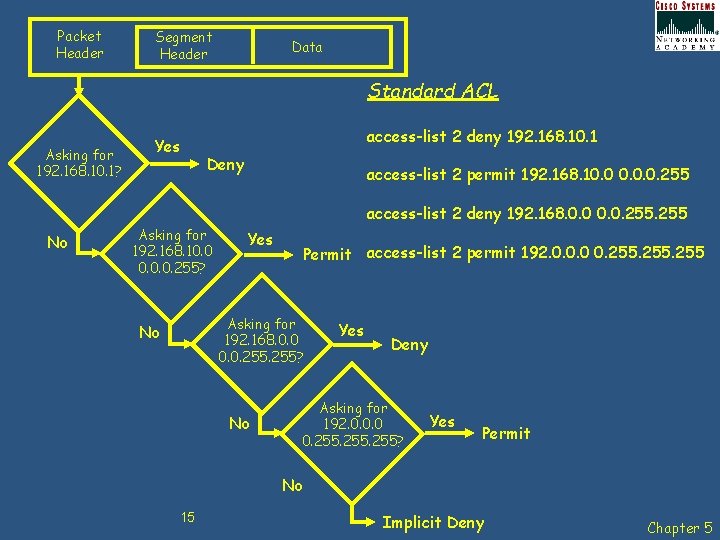
Packet Header Segment Header Data Standard ACL Asking for 192. 168. 10. 1? Yes access-list 2 deny 192. 168. 10. 1 Deny access-list 2 permit 192. 168. 10. 0. 0. 255 access-list 2 deny 192. 168. 0. 0. 255 No Asking for 192. 168. 10. 0. 0. 255? Yes Permit access-list 2 permit 192. 0. 0. 0 0. 255 Asking for 192. 168. 0. 0. 255? No No Yes Deny Asking for 192. 0. 0. 0 0. 255? Yes Permit No 15 Implicit Deny Chapter 5
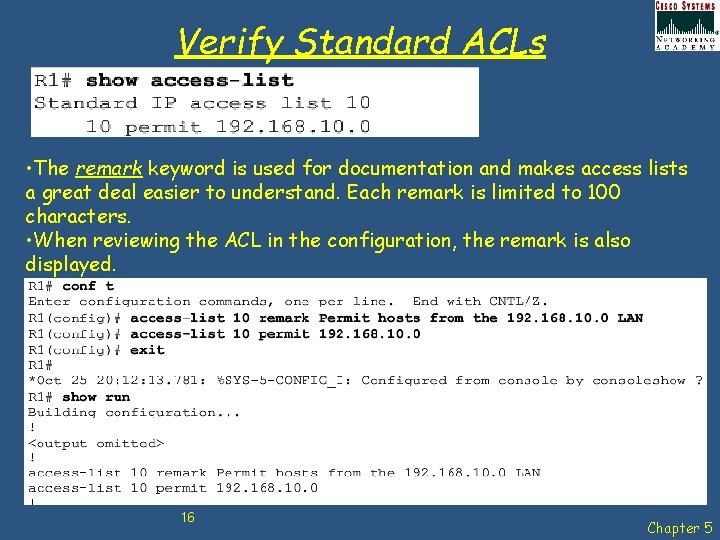
Verify Standard ACLs • The remark keyword is used for documentation and makes access lists a great deal easier to understand. Each remark is limited to 100 characters. • When reviewing the ACL in the configuration, the remark is also displayed. 16 Chapter 5
Wildcard Masks • • • ACLs statements include masks, also called wildcard masks. The mask determines how much of an IP source or destination address to apply to the address match. The numbers 1 and 0 in the mask identify how to treat the corresponding IP address bits. They are different to subnet masks, and follow different rules. Wildcard masks and subnet masks are both 32 bits long and use binary 1 s and 0 s. Subnet masks use binary 1 s and 0 s to identify the network, subnet, and host portion of an IP address. Wildcard masks use binary 1 s and 0 s to filter individual or groups of IP addresses to permit or deny access to resources based on an IP address. By carefully setting wildcard masks, you can permit or deny a single or several IP addresses 17 Chapter 5
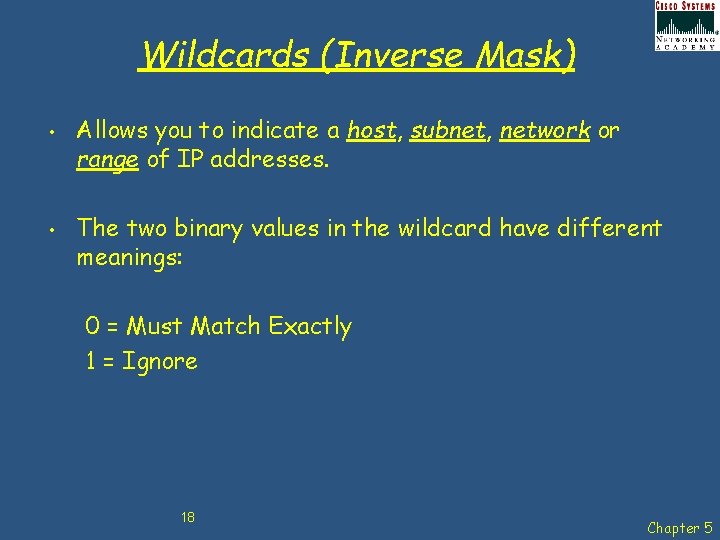
Wildcards (Inverse Mask) • • Allows you to indicate a host, subnet, network or range of IP addresses. The two binary values in the wildcard have different meanings: 0 = Must Match Exactly 1 = Ignore 18 Chapter 5
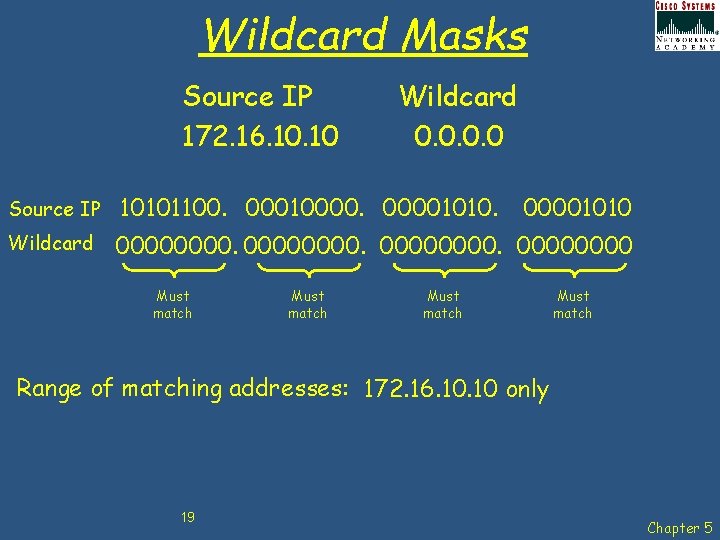
Wildcard Masks Source IP 172. 16. 10 Wildcard 0. 0 Source IP 10101100. 000100001010. Wildcard 00000000. 0000 Must match 00001010 Must match Range of matching addresses: 172. 16. 10 only 19 Chapter 5
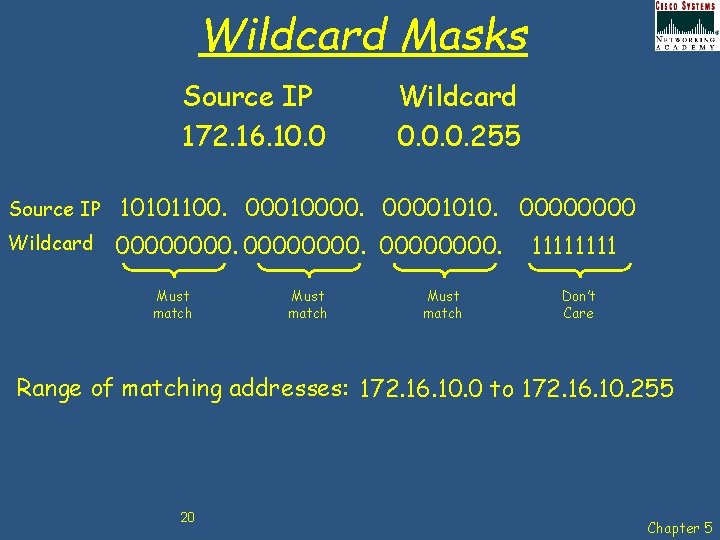
Wildcard Masks Source IP 172. 16. 10. 0 Wildcard 0. 0. 0. 255 Source IP 10101100. 000100001010. 0000 Wildcard 00000000. Must match 1111 Don’t Care Range of matching addresses: 172. 16. 10. 0 to 172. 16. 10. 255 20 Chapter 5
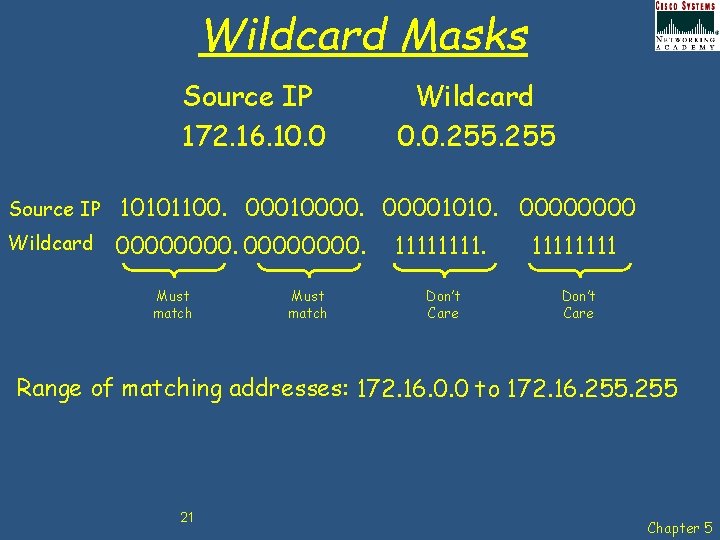
Wildcard Masks Source IP 172. 16. 10. 0 Wildcard 0. 0. 255 Source IP 10101100. 000100001010. 0000 Wildcard 00000000. Must match 1111. Don’t Care 1111 Don’t Care Range of matching addresses: 172. 16. 0. 0 to 172. 16. 255 21 Chapter 5
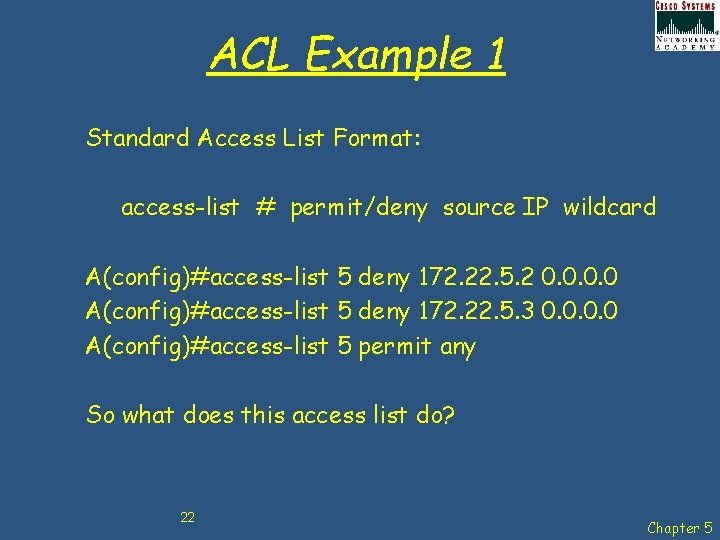
ACL Example 1 Standard Access List Format: access-list # permit/deny source IP wildcard A(config)#access-list 5 deny 172. 22. 5. 2 0. 0 A(config)#access-list 5 deny 172. 22. 5. 3 0. 0 A(config)#access-list 5 permit any So what does this access list do? 22 Chapter 5
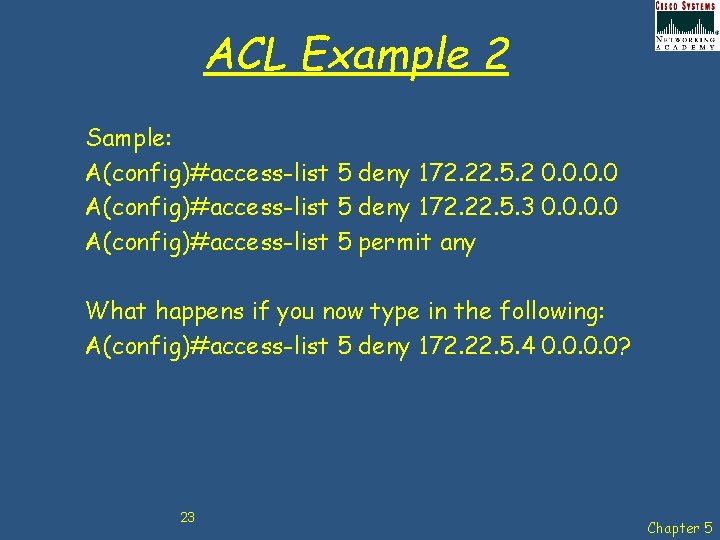
ACL Example 2 Sample: A(config)#access-list 5 deny 172. 22. 5. 2 0. 0 A(config)#access-list 5 deny 172. 22. 5. 3 0. 0 A(config)#access-list 5 permit any What happens if you now type in the following: A(config)#access-list 5 deny 172. 22. 5. 4 0. 0? 23 Chapter 5
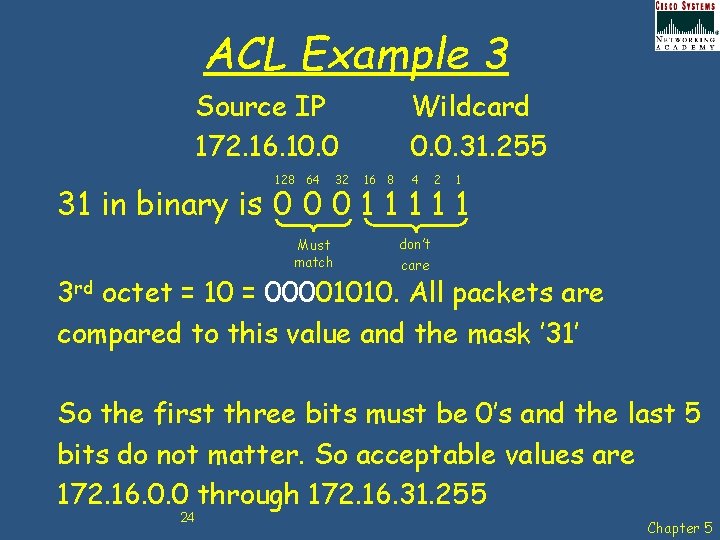
ACL Example 3 Source IP 172. 16. 10. 0 128 64 32 Wildcard 0. 0. 31. 255 16 8 4 2 1 31 in binary is 0 0 0 1 1 1 Must match don’t care 3 rd octet = 10 = 00001010. All packets are compared to this value and the mask ’ 31’ So the first three bits must be 0’s and the last 5 bits do not matter. So acceptable values are 172. 16. 0. 0 through 172. 16. 31. 255 24 Chapter 5
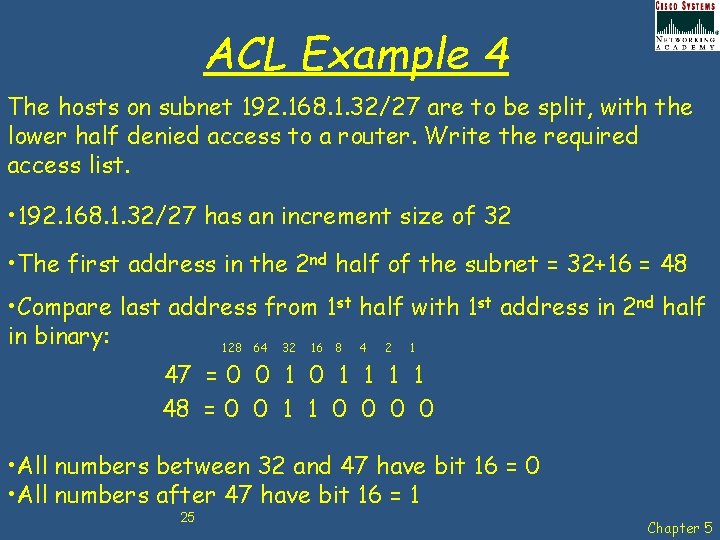
ACL Example 4 The hosts on subnet 192. 168. 1. 32/27 are to be split, with the lower half denied access to a router. Write the required access list. • 192. 168. 1. 32/27 has an increment size of 32 • The first address in the 2 nd half of the subnet = 32+16 = 48 • Compare last address from 1 st half with 1 st address in 2 nd half in binary: 128 64 32 16 8 4 2 1 47 = 0 0 1 1 1 1 48 = 0 0 1 1 0 0 • All numbers between 32 and 47 have bit 16 = 0 • All numbers after 47 have bit 16 = 1 25 Chapter 5
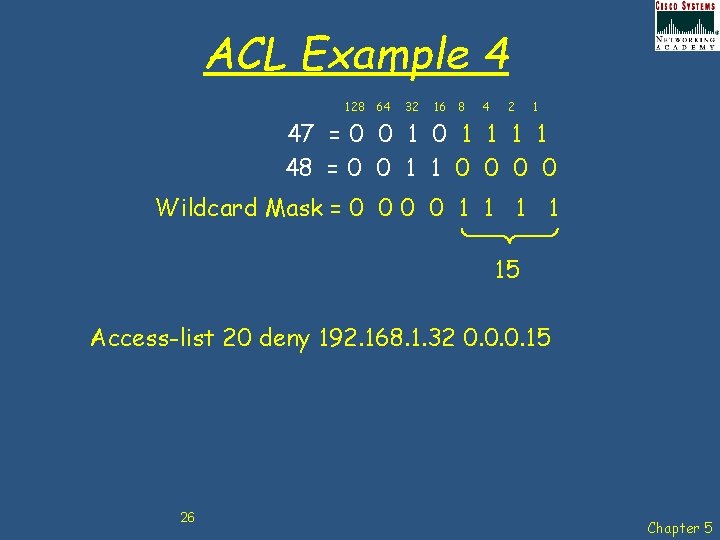
ACL Example 4 128 64 32 16 8 4 2 1 47 = 0 0 1 1 1 1 48 = 0 0 1 1 0 0 Wildcard Mask = 0 0 1 1 15 Access-list 20 deny 192. 168. 1. 32 0. 0. 0. 15 26 Chapter 5
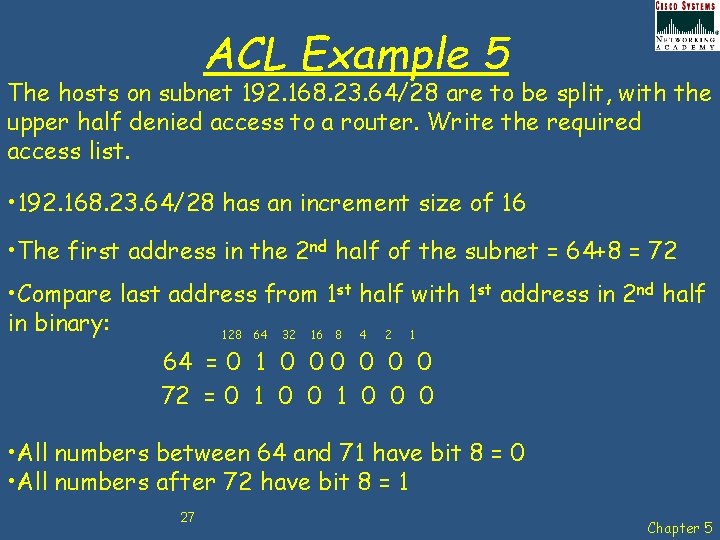
ACL Example 5 The hosts on subnet 192. 168. 23. 64/28 are to be split, with the upper half denied access to a router. Write the required access list. • 192. 168. 23. 64/28 has an increment size of 16 • The first address in the 2 nd half of the subnet = 64+8 = 72 • Compare last address from 1 st half with 1 st address in 2 nd half in binary: 128 64 32 16 8 4 2 1 64 = 0 1 0 0 0 72 = 0 1 0 0 0 • All numbers between 64 and 71 have bit 8 = 0 • All numbers after 72 have bit 8 = 1 27 Chapter 5
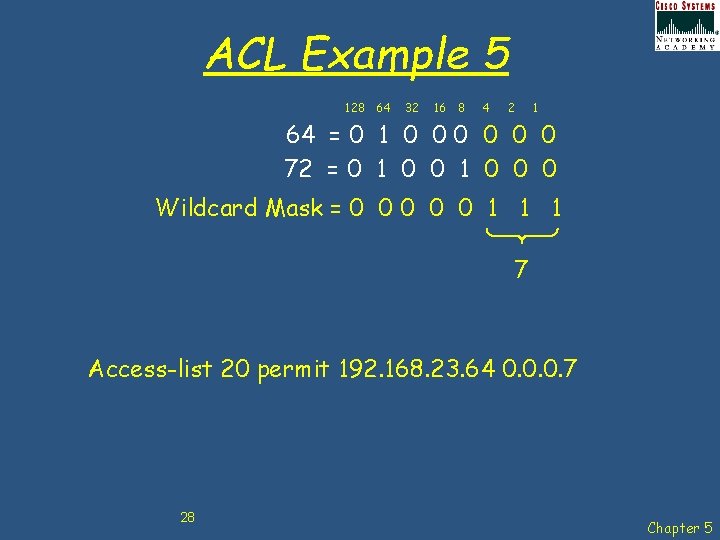
ACL Example 5 128 64 32 16 8 4 2 1 64 = 0 1 0 0 0 72 = 0 1 0 0 0 Wildcard Mask = 0 0 0 1 1 1 7 Access-list 20 permit 192. 168. 23. 64 0. 0. 0. 7 28 Chapter 5
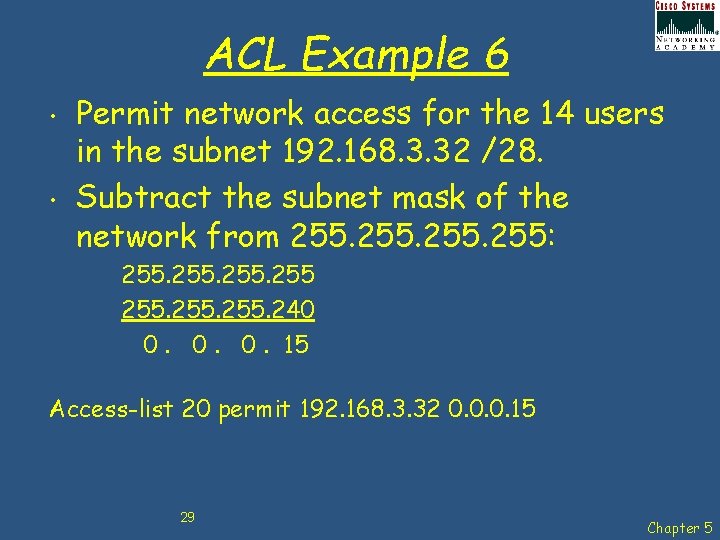
ACL Example 6 • • Permit network access for the 14 users in the subnet 192. 168. 3. 32 /28. Subtract the subnet mask of the network from 255: 255. 240 0. 0. 0. 15 Access-list 20 permit 192. 168. 3. 32 0. 0. 0. 15 29 Chapter 5
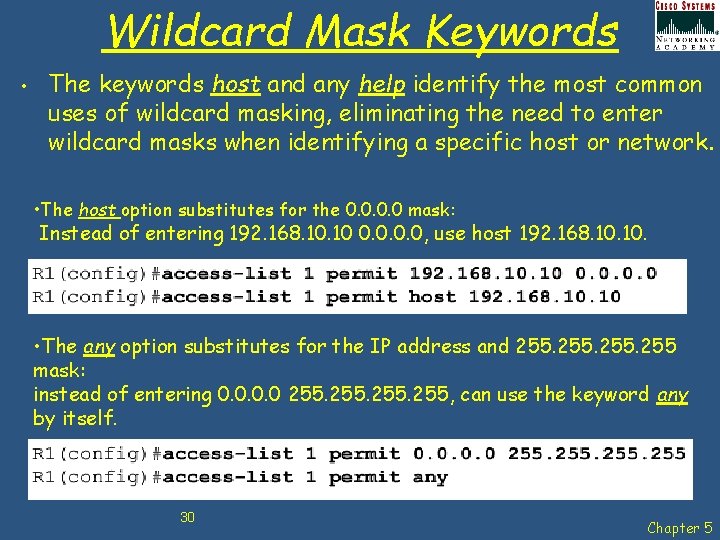
Wildcard Mask Keywords • The keywords host and any help identify the most common uses of wildcard masking, eliminating the need to enter wildcard masks when identifying a specific host or network. • The host option substitutes for the 0. 0 mask: Instead of entering 192. 168. 10 0. 0, use host 192. 168. 10. • The any option substitutes for the IP address and 255 mask: instead of entering 0. 0 255, can use the keyword any by itself. 30 Chapter 5
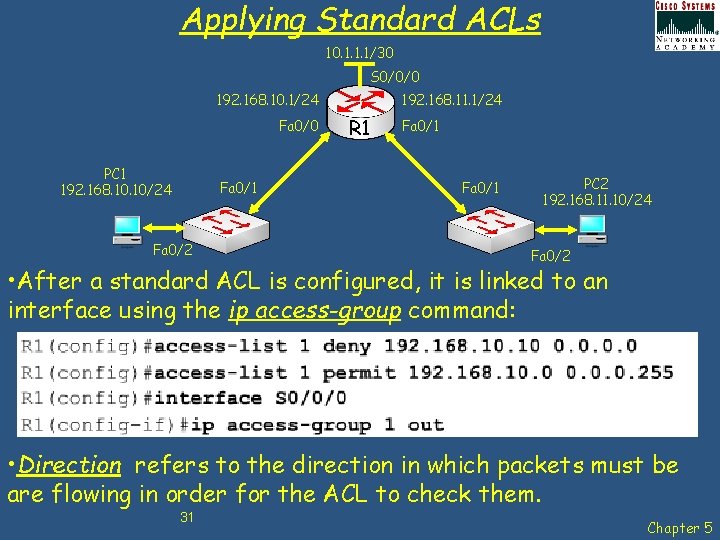
Applying Standard ACLs 10. 1. 1. 1/30 S 0/0/0 192. 168. 10. 1/24 Fa 0/0 PC 1 192. 168. 10/24 Fa 0/1 Fa 0/2 192. 168. 11. 1/24 R 1 Fa 0/1 PC 2 192. 168. 11. 10/24 Fa 0/2 • After a standard ACL is configured, it is linked to an interface using the ip access-group command: • Direction refers to the direction in which packets must be are flowing in order for the ACL to check them. 31 Chapter 5
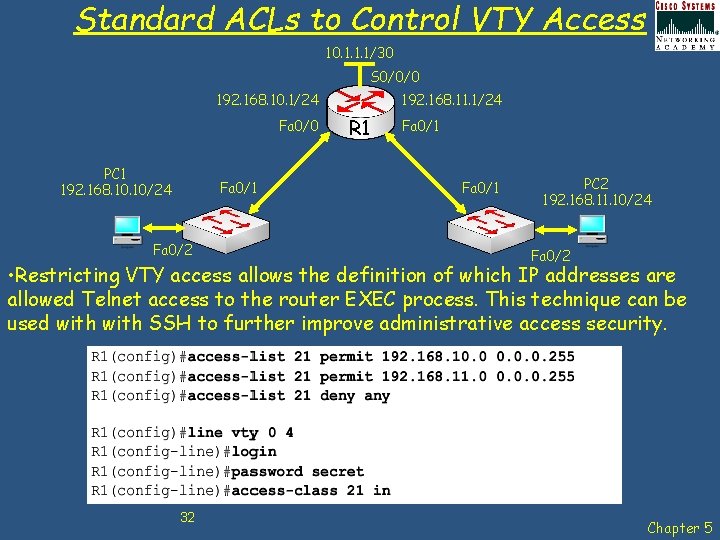
Standard ACLs to Control VTY Access 10. 1. 1. 1/30 S 0/0/0 192. 168. 10. 1/24 Fa 0/0 PC 1 192. 168. 10/24 Fa 0/1 Fa 0/2 192. 168. 11. 1/24 R 1 Fa 0/1 PC 2 192. 168. 11. 10/24 Fa 0/2 • Restricting VTY access allows the definition of which IP addresses are allowed Telnet access to the router EXEC process. This technique can be used with SSH to further improve administrative access security. 32 Chapter 5
Editing Numbered ACLs • • When configuring an ACL, the statements are added in the order that they are entered at the end of the ACL. However, there is no built-in editing feature that allows you to edit a change in an ACL selectively inserting or deleting lines is not possible. Therefore, any ACL is best constructed in a text editor such as MS Notepad, allowing the ACL to be edited and then pasted into the router as follows: 1. 2. 3. Display the ACL using the sh run command. Highlight the ACL, copy it, and then paste it into MS Notepad. Edit the list as required. Once the ACL is correctly displayed in MS Notepad, highlight it and copy it. In global configuration mode, remove the old access list using the no access-list command. Then paste the new ACL into the configuration of the router. 33 Chapter 5
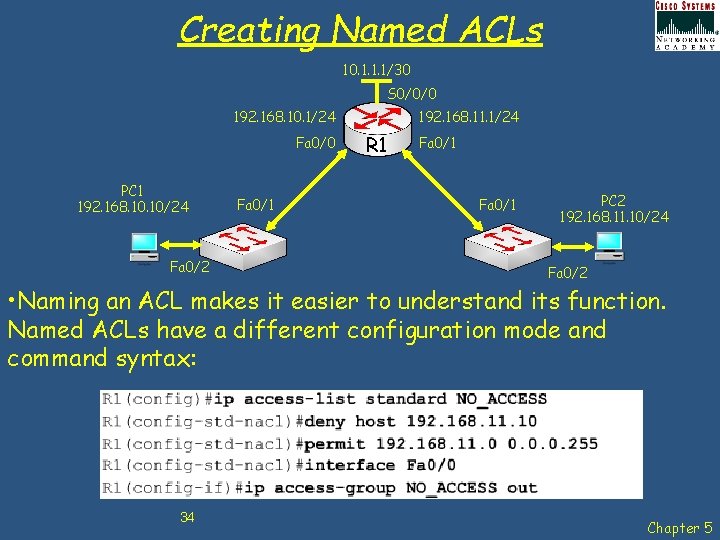
Creating Named ACLs 10. 1. 1. 1/30 S 0/0/0 192. 168. 10. 1/24 Fa 0/0 PC 1 192. 168. 10/24 Fa 0/2 Fa 0/1 192. 168. 11. 1/24 R 1 Fa 0/1 PC 2 192. 168. 11. 10/24 Fa 0/2 • Naming an ACL makes it easier to understand its function. Named ACLs have a different configuration mode and command syntax: 34 Chapter 5
Verifying ACLs There are many show commands that will verify the content and placement of ACLs on the router: • • show ip interface show access-lists show access-list <ACL-number> show running-config 35 Chapter 5
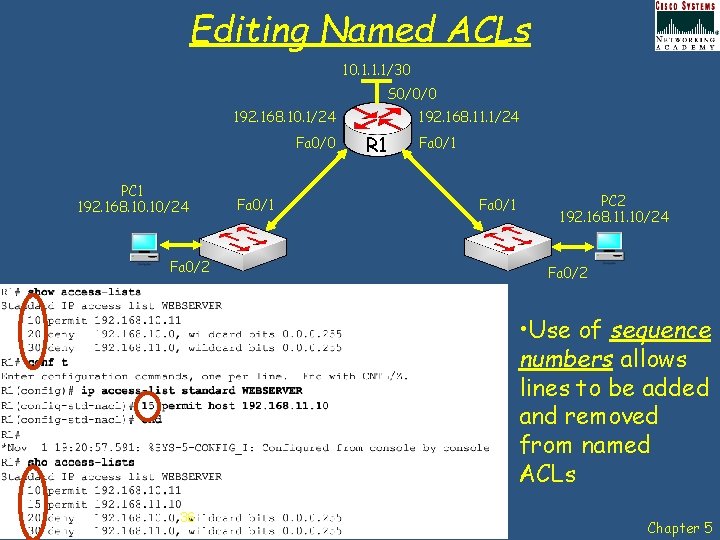
Editing Named ACLs 10. 1. 1. 1/30 S 0/0/0 192. 168. 10. 1/24 Fa 0/0 PC 1 192. 168. 10/24 Fa 0/2 Fa 0/1 192. 168. 11. 1/24 R 1 Fa 0/1 PC 2 192. 168. 11. 10/24 Fa 0/2 • Use of sequence numbers allows lines to be added and removed from named ACLs 36 Chapter 5
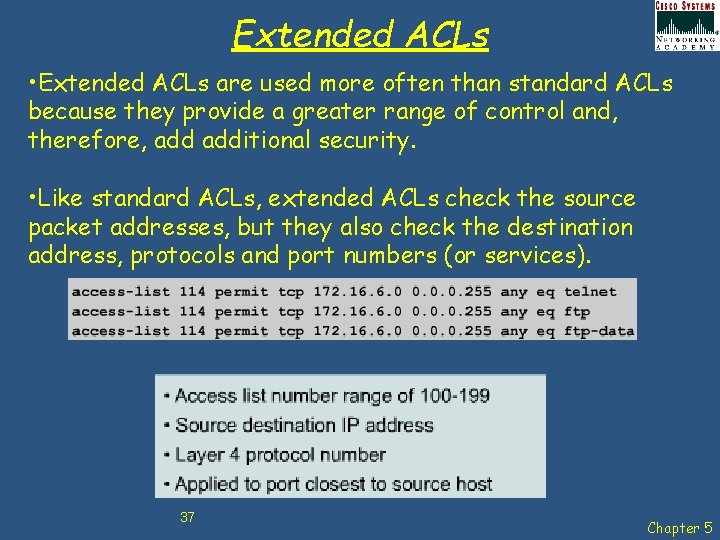
Extended ACLs • Extended ACLs are used more often than standard ACLs because they provide a greater range of control and, therefore, additional security. • Like standard ACLs, extended ACLs check the source packet addresses, but they also check the destination address, protocols and port numbers (or services). 37 Chapter 5
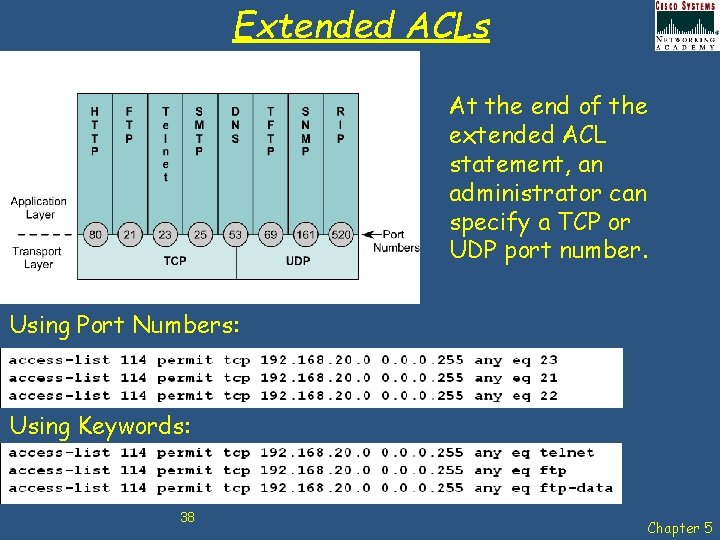
Extended ACLs At the end of the extended ACL statement, an administrator can specify a TCP or UDP port number. Using Port Numbers: Using Keywords: 38 Chapter 5
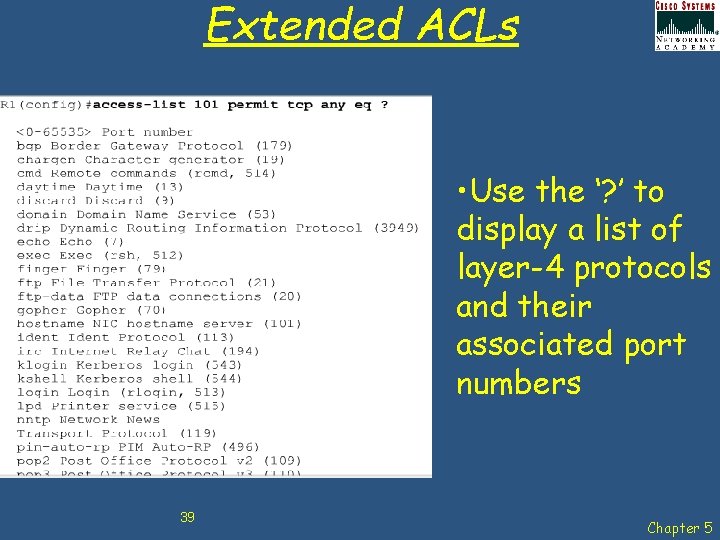
Extended ACLs • Use the ‘? ’ to display a list of layer-4 protocols and their associated port numbers 39 Chapter 5
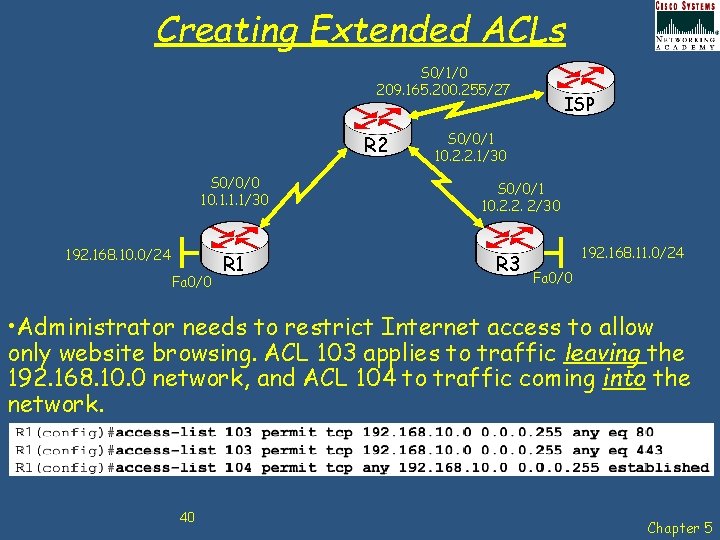
Creating Extended ACLs S 0/1/0 209. 165. 200. 255/27 R 2 S 0/0/0 10. 1. 1. 1/30 192. 168. 10. 0/24 Fa 0/0 R 1 ISP S 0/0/1 10. 2. 2. 1/30 S 0/0/1 10. 2. 2. 2/30 R 3 192. 168. 11. 0/24 Fa 0/0 • Administrator needs to restrict Internet access to allow only website browsing. ACL 103 applies to traffic leaving the 192. 168. 10. 0 network, and ACL 104 to traffic coming into the network. 40 Chapter 5
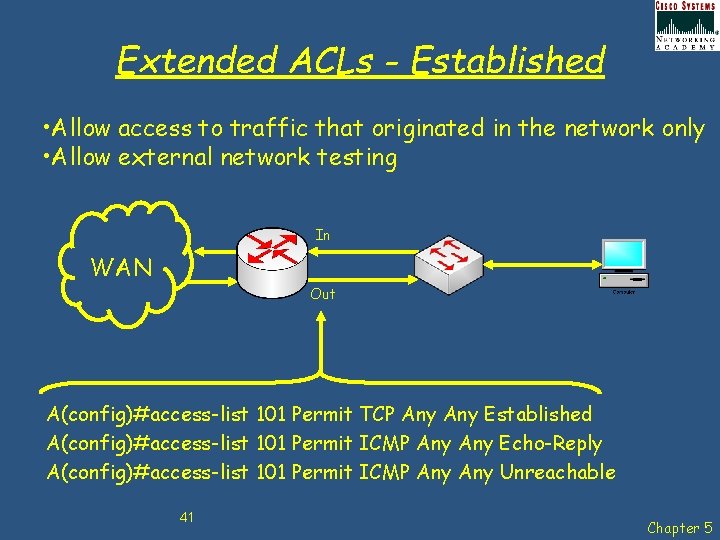
Extended ACLs - Established • Allow access to traffic that originated in the network only • Allow external network testing In WAN Out A(config)#access-list 101 Permit TCP Any Established A(config)#access-list 101 Permit ICMP Any Echo-Reply A(config)#access-list 101 Permit ICMP Any Unreachable 41 Chapter 5
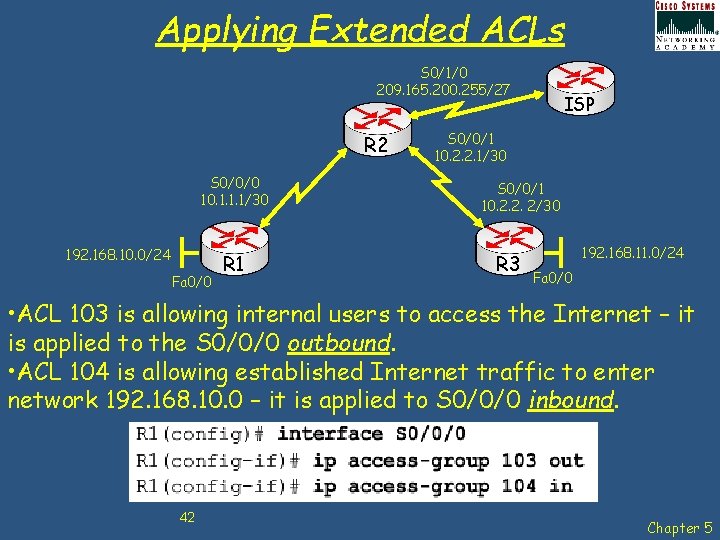
Applying Extended ACLs S 0/1/0 209. 165. 200. 255/27 R 2 S 0/0/0 10. 1. 1. 1/30 192. 168. 10. 0/24 Fa 0/0 R 1 ISP S 0/0/1 10. 2. 2. 1/30 S 0/0/1 10. 2. 2. 2/30 R 3 192. 168. 11. 0/24 Fa 0/0 • ACL 103 is allowing internal users to access the Internet – it is applied to the S 0/0/0 outbound. • ACL 104 is allowing established Internet traffic to enter network 192. 168. 10. 0 – it is applied to S 0/0/0 inbound. 42 Chapter 5
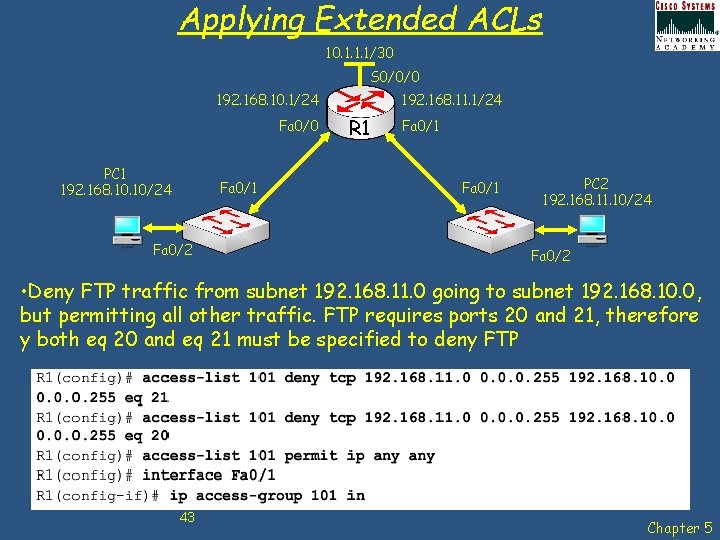
Applying Extended ACLs 10. 1. 1. 1/30 S 0/0/0 192. 168. 10. 1/24 Fa 0/0 PC 1 192. 168. 10/24 Fa 0/1 Fa 0/2 192. 168. 11. 1/24 R 1 Fa 0/1 PC 2 192. 168. 11. 10/24 Fa 0/2 • Deny FTP traffic from subnet 192. 168. 11. 0 going to subnet 192. 168. 10. 0, but permitting all other traffic. FTP requires ports 20 and 21, therefore y both eq 20 and eq 21 must be specified to deny FTP 43 Chapter 5
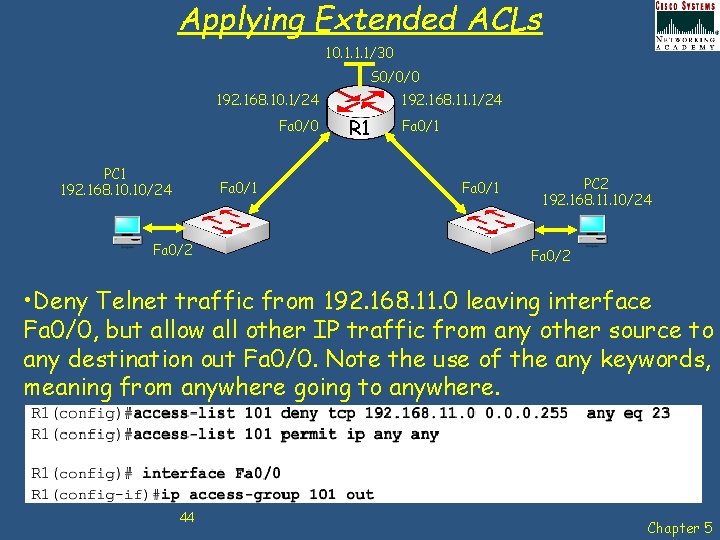
Applying Extended ACLs 10. 1. 1. 1/30 S 0/0/0 192. 168. 10. 1/24 Fa 0/0 PC 1 192. 168. 10/24 Fa 0/1 Fa 0/2 192. 168. 11. 1/24 R 1 Fa 0/1 PC 2 192. 168. 11. 10/24 Fa 0/2 • Deny Telnet traffic from 192. 168. 11. 0 leaving interface Fa 0/0, but allow all other IP traffic from any other source to any destination out Fa 0/0. Note the use of the any keywords, meaning from anywhere going to anywhere. 44 Chapter 5
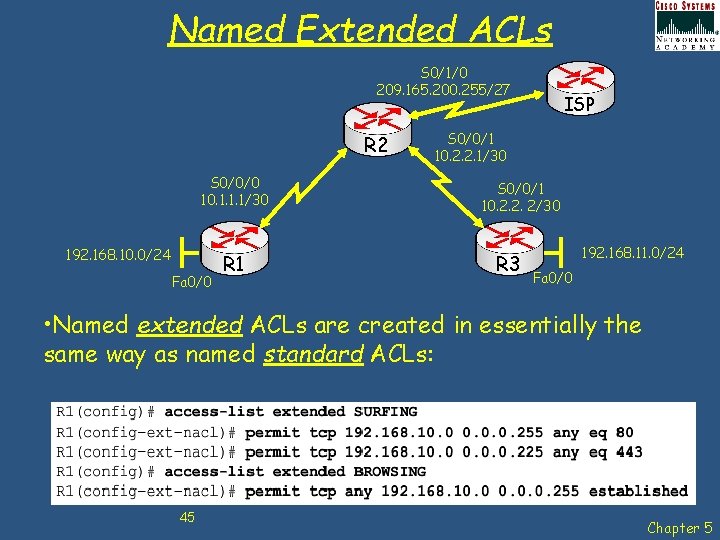
Named Extended ACLs S 0/1/0 209. 165. 200. 255/27 R 2 S 0/0/0 10. 1. 1. 1/30 192. 168. 10. 0/24 Fa 0/0 R 1 ISP S 0/0/1 10. 2. 2. 1/30 S 0/0/1 10. 2. 2. 2/30 R 3 192. 168. 11. 0/24 Fa 0/0 • Named extended ACLs are created in essentially the same way as named standard ACLs: 45 Chapter 5
Complex ACLs • Dynamic ACLs (lock-and-key) - Users that want to traverse the router are blocked until they use Telnet to connect to the router and are authenticated. • Reflexive ACLs - Allows outbound traffic and limits inbound traffic in response to sessions that originate inside the router. • Time-based ACLs - Allows for access control based on the time of day and week 46 Chapter 5
Dynamic ACLs have the following security benefits over standard and static extended ACLs: • • • Use of a challenge mechanism to authenticate individual users Simplified management in large internetworks In many cases, reduction of the amount of router processing that is required for ACLs Reduction of the opportunity for network break-ins by network hackers Creation of dynamic user access through a firewall, without compromising other configured security restrictions 47 Chapter 5
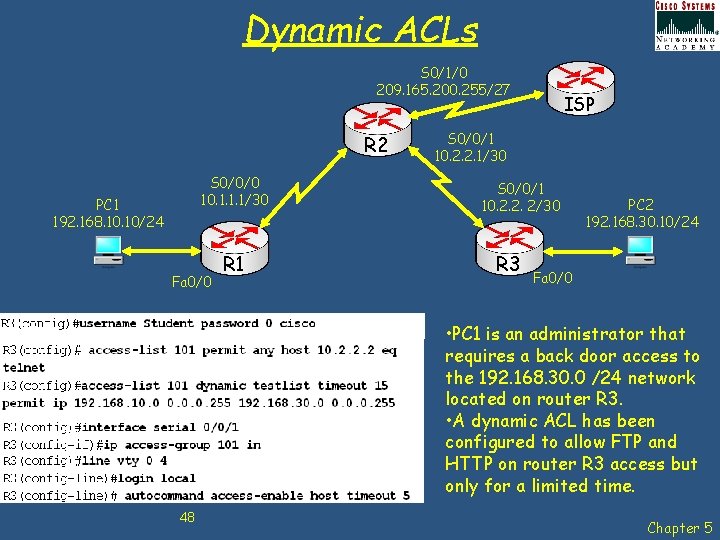
Dynamic ACLs S 0/1/0 209. 165. 200. 255/27 R 2 S 0/0/0 10. 1. 1. 1/30 PC 1 192. 168. 10/24 Fa 0/0 R 1 ISP S 0/0/1 10. 2. 2. 1/30 S 0/0/1 10. 2. 2. 2/30 R 3 PC 2 192. 168. 30. 10/24 Fa 0/0 • PC 1 is an administrator that requires a back door access to the 192. 168. 30. 0 /24 network located on router R 3. • A dynamic ACL has been configured to allow FTP and HTTP on router R 3 access but only for a limited time. 48 Chapter 5
Reflexive ACLs • • • Reflexive ACLs force the reply traffic from the destination of a known recent outbound packet to go to the source of that outbound packet. Network administrators use reflexive ACLs to allow IP traffic for sessions originating from their network while denying IP traffic for sessions originating outside the network. These ACLs allow the router to manage session traffic dynamically. Reflexive ACLs provide a truer form of session filtering than an extended ACL that uses the established parameter introduced earlier. Although similar in concept to the established parameter, reflexive ACLs also work for UDP and ICMP, which have no ACK or RST bits. 49 Chapter 5
Reflexive ACLs have the following benefits: • • • Help secure networks against network hackers and can be included in a firewall defense. Provide a level of security against spoofing and certain Do. S attacks. Reflexive ACLs are much harder to spoof because more filter criteria must match before a packet is permitted through. For example, source and destination addresses and port numbers, not just ACK and RST bits, are checked. Simple to use and, compared to basic ACLs, provide greater control over which packets entering a network. 50 Chapter 5
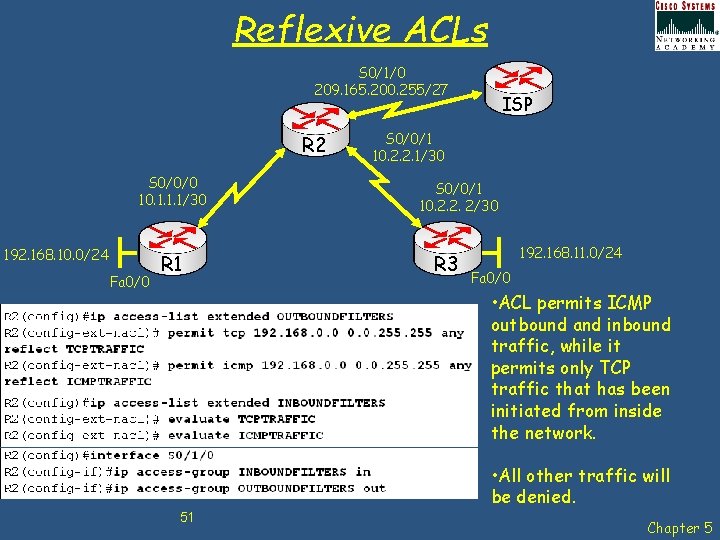
Reflexive ACLs S 0/1/0 209. 165. 200. 255/27 R 2 S 0/0/0 10. 1. 1. 1/30 192. 168. 10. 0/24 Fa 0/0 R 1 ISP S 0/0/1 10. 2. 2. 1/30 S 0/0/1 10. 2. 2. 2/30 R 3 192. 168. 11. 0/24 Fa 0/0 • ACL permits ICMP outbound and inbound traffic, while it permits only TCP traffic that has been initiated from inside the network. • All other traffic will be denied. 51 Chapter 5
Time-Based ACLs • • Time-based ACLs are similar to extended ACLs in function, but they allow for access control based on time. To implement time-based ACLs, create a time range that defines specific times of the day and week. Identify the time range with a name and then refer to it by a function. The time restrictions are imposed on the function itself. Time-based ACLs benefits include: • • Offers the network administrator more control over permitting or denying access to resources. Allows network administrators to control logging messages. ACL entries can log traffic at certain times of the day, but not constantly. 52 Chapter 5
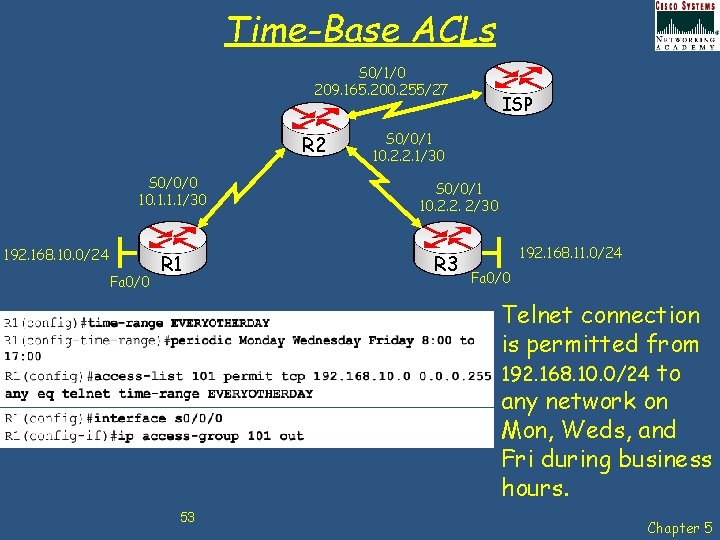
Time-Base ACLs S 0/1/0 209. 165. 200. 255/27 R 2 S 0/0/0 10. 1. 1. 1/30 192. 168. 10. 0/24 Fa 0/0 R 1 ISP S 0/0/1 10. 2. 2. 1/30 S 0/0/1 10. 2. 2. 2/30 R 3 192. 168. 11. 0/24 Fa 0/0 Telnet connection is permitted from 192. 168. 10. 0/24 to any network on Mon, Weds, and Fri during business hours. 53 Chapter 5
Chap 5 – Access Control Lists Learning Objectives • • • Explain how ACLs are used to secure a medium-size Enterprise branch office network. Configure standard ACLs in a medium-size Enterprise branch office network. Configure extended ACLs in a medium-size Enterprise branch office network. Describe complex ACLs in a medium-size Enterprise branch office network. Implement, verify and troubleshoot ACLs in an enterprise network environment. 54 Chapter 5

Any Questions? 55 Chapter 5
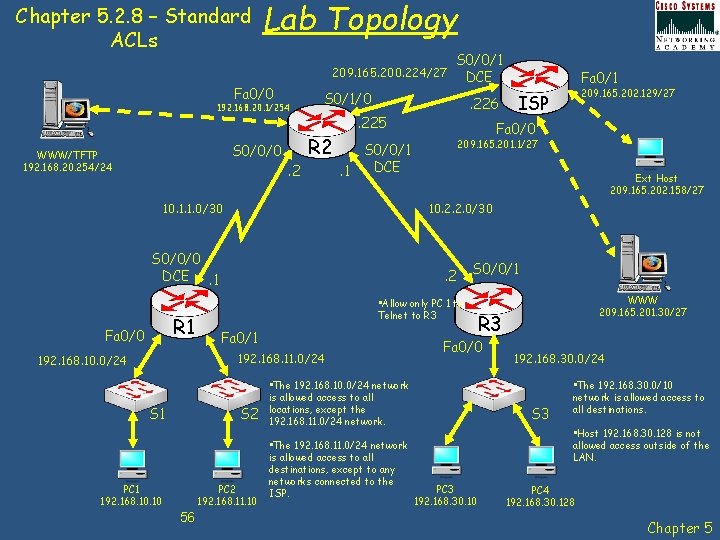
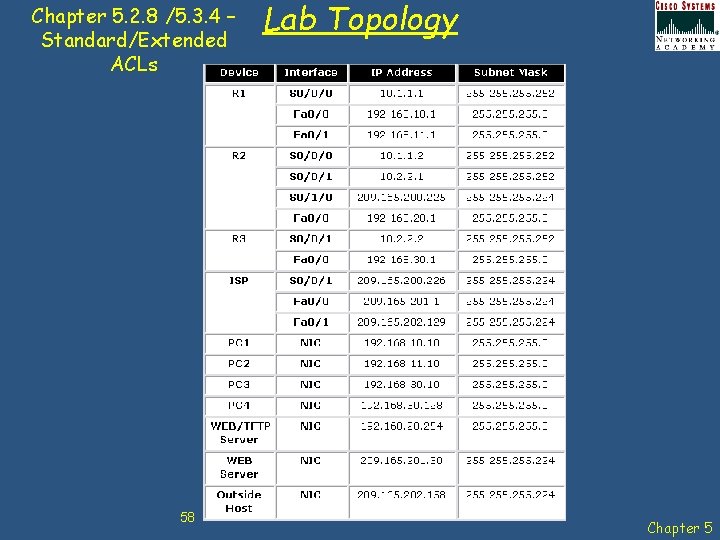
Chapter 5. 2. 8 – Standard ACLs Lab Topology 209. 165. 200. 224/27 Fa 0/0 192. 168. 20. 1/254 S 0/0/0 WWW/TFTP 192. 168. 20. 254/24 S 0/1/0 R 2. 2 S 1 Ext Host 209. 165. 202. 158/27 S 0/0/1 • Allow only PC 1 to Telnet to R 3 Fa 0/1 PC 2 192. 168. 11. 10 56 209. 165. 201. 1/27 . 2 S 2 PC 1 192. 168. 10 209. 165. 202. 129/27 ISP 10. 2. 2. 0/30 192. 168. 11. 0/24 192. 168. 10. 0/24 Fa 0/1 Fa 0/0 S 0/0/1 DCE. 1 S 0/0/0 DCE. 1 R 1 . 226 . 225 10. 1. 1. 0/30 Fa 0/0 S 0/0/1 DCE • The 192. 168. 11. 0/24 network is allowed access to all destinations, except to any networks connected to the ISP. R 3 Fa 0/0 • The 192. 168. 10. 0/24 network is allowed access to all locations, except the 192. 168. 11. 0/24 network. WWW 209. 165. 201. 30/27 192. 168. 30. 0/24 S 3 • The 192. 168. 30. 0/10 network is allowed access to all destinations. • Host 192. 168. 30. 128 is not allowed access outside of the LAN. PC 3 192. 168. 30. 10 PC 4 192. 168. 30. 128 Chapter 5
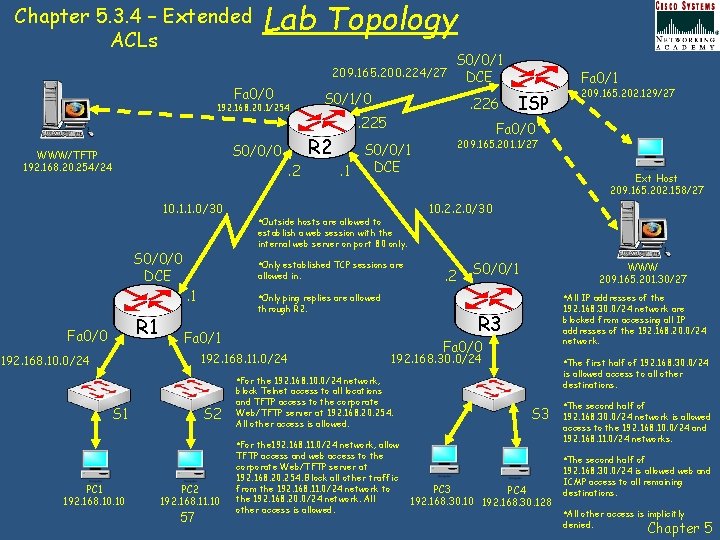
Chapter 5. 3. 4 – Extended ACLs Lab Topology 209. 165. 200. 224/27 Fa 0/0 192. 168. 20. 1/254 S 0/0/0 WWW/TFTP 192. 168. 20. 254/24 10. 1. 1. 0/30 . 225 ISP 209. 165. 201. 1/27 S 0/0/1 DCE. 1 Ext Host 209. 165. 202. 158/27 10. 2. 2. 0/30 • Outside hosts are allowed to allowed in. . 2 S 0/0/1 WWW 209. 165. 201. 30/27 • Only ping replies are allowed • All IP addresses of the through R 2. 192. 168. 11. 0/24 192. 168. 30. 0/24 network are blocked from accessing all IP addresses of the 192. 168. 20. 0/24 network. R 3 Fa 0/1 192. 168. 10. 0/24 Fa 0/0 192. 168. 30. 0/24 • The first half of 192. 168. 30. 0/24 is allowed access to all other destinations. • For the 192. 168. 10. 0/24 network, S 1 S 2 block Telnet access to all locations and TFTP access to the corporate Web/TFTP server at 192. 168. 20. 254. All other access is allowed. S 3 • For the 192. 168. 11. 0/24 network, allow PC 1 192. 168. 10 209. 165. 202. 129/27 Fa 0/0 • Only established TCP sessions are . 1 R 1 . 226 Fa 0/1 establish a web session with the internal web server on port 80 only. S 0/0/0 DCE Fa 0/0 S 0/1/0 R 2. 2 S 0/0/1 DCE PC 2 192. 168. 11. 10 57 TFTP access and web access to the corporate Web/TFTP server at 192. 168. 20. 254. Block all other traffic from the 192. 168. 11. 0/24 network to the 192. 168. 20. 0/24 network. All other access is allowed. • The second half of 192. 168. 30. 0/24 network is allowed access to the 192. 168. 10. 0/24 and 192. 168. 11. 0/24 networks. • The second half of PC 3 PC 4 192. 168. 30. 10 192. 168. 30. 128 192. 168. 30. 0/24 is allowed web and ICMP access to all remaining destinations. • All other access is implicitly denied. Chapter 5
Chapter 5. 2. 8 /5. 3. 4 – Standard/Extended ACLs 58 Lab Topology Chapter 5
- Slides: 58