
Chap 2 Computer Fundamentals Before we can dive
Chap 2. Computer Fundamentals • Before we can dive into programming, we need to understand the fundamentals of computers in general • Chapter 2 focuses on: – – components of a computer how those components interact how computers store and process information computer networks 1
Hardware Components • Central Processing Unit (CPU) – the chip that executes program commands – Intel Pentium processor, Sun Sparc processor • Input / Output devices – allow interaction with the user – keyboard, monitor, mouse 2
Hardware Components • Main memory – the primary storage area for programs and data in active use • Secondary memory devices – long-term storage – floppy disks, hard disks, tapes 3
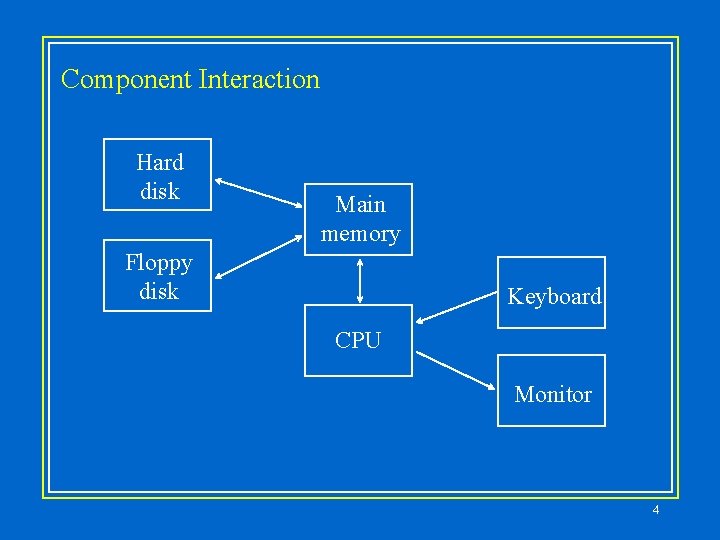
Component Interaction Hard disk Main memory Floppy disk Keyboard CPU Monitor 4
Software Categories • Operating system – – controls all machine activities provides the user interface to the computer manages resources such as the CPU and memory Windows 95, Solaris, Mac OS • Application program – generic term for any other kind of software – word processors, missile control systems, games 5
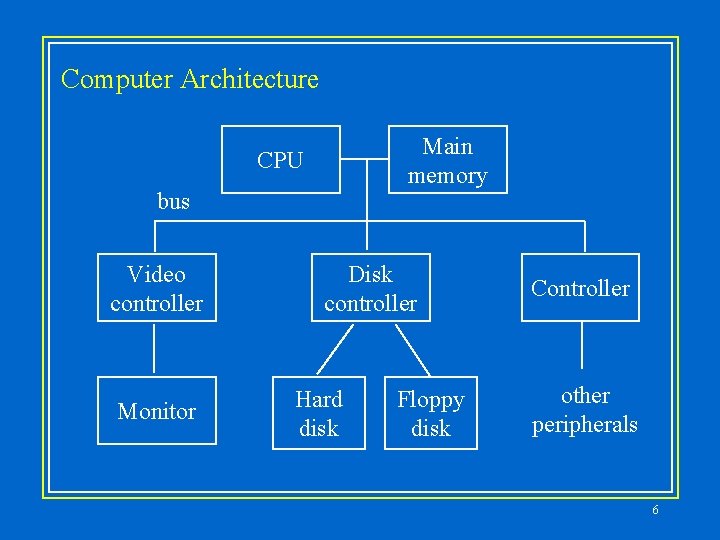
Computer Architecture Main memory CPU bus Video controller Monitor Disk controller Hard disk Floppy disk Controller other peripherals 6
Memory • Main memory is divided into many memory locations • Each memory location has an address which uniquely identifies it • Data is stored in one or more consecutive memory locations • On most computers, each memory location holds 8 bits, or 1 byte 7
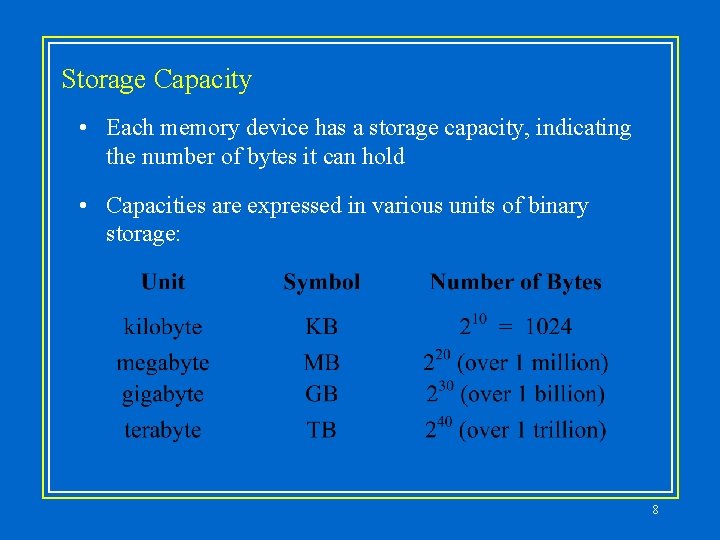
Storage Capacity • Each memory device has a storage capacity, indicating the number of bytes it can hold • Capacities are expressed in various units of binary storage: 8
Memory • Main memory is volatile - stored information is lost if the electric power is removed • Secondary memory devices are nonvolatile • Main memory and disks are random access devices, which mean that information can be reached directly • A magnetic tape is a sequential access device since its data is arranged in a linear order - you must get by the intervening data in order to access other information 9
RAM vs. ROM • RAM - Random Access Memory • ROM - Read-Only Memory • The terms RAM and main memory are basically interchangeable • ROM could be a set of memory chips, or a separate device, such as a CD ROM • Both RAM and ROM are random access devices! • RAM should probably be called Read-Write Memory 10
A Computer Specification • Consider the following specification for a personal computer: – – – 200 MHz Pentium Processor 32 MB RAM 2. 3 GB Hard Disk 12 x speed CD ROM Drive 17” Multimedia Video Display with 1280 x 1024 resolution – 33, 600 bps Data / Fax Modem 11
Networks • A network is two or more computers connected together so that information and resources can be shared • Most computers are connected to some kind of network • Each computer has its own network address, which uniquely identifies it among the others • A file server is a network computer dedicated to storing programs and data that are shared among network users • A file server often has a large amount of secondary memory 12
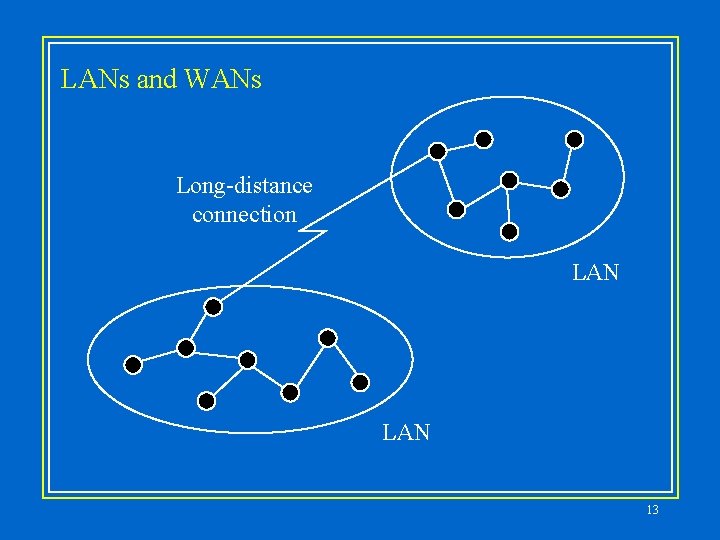
LANs and WANs Long-distance connection LAN 13
The Internet • The Internet is a WAN which spans the entire planet • The word Internet comes from the term internetworking, which implies a network of networks • It started as a United States government project, sponsored by the Advanced Research Projects Agency (ARPA), and was originally called the ARPANET • The Internet grew quickly throughout the 1980 s and 90 s • Less than 600 computers were connected to the Internet in 1983; now there are over 10 million 14
The Internet • The software which manages Internet communication is called TCP/IP • The programs in the Internet Protocol (IP) formats the information for transfer • The programs in the Transmission Control Protocol (TCP) reassembles messages and handles lost information • Each computer on the Internet has a unique IP address, such as: 204. 192. 116. 2 15
The Internet • Most computers also have a unique Internet name, which is also referred to as an Internet address: renoir. vill. edu kant. wpllabs. com • The first part indicates a particular computer (renoir) • The rest is the domain name, indicating the organization (vill. edu) 16
The Internet • The last section of each domain name usually indicates the type of organization: • edu - educational institution • com - commercial business • org - non-profit organization • Sometimes the suffix indicates the country: • uk - United Kingdom • New suffix categories are being considered 17
Internet • A domain name can have several parts • Unique domain names mean that multiple sites can have individual computers with the same local name • When used, an Internet address is translated to an IP address by software called the Domain Name System (DNS) • There is not a one-to-one correspondence between the sections of an IP address and the sections of an Internet address 18
The World-Wide Web • The World-Wide Web allows many different types of information to be accessed using a common interface • A browser is a program which accesses and presents information: text, graphics, sound, audio, and programs • A Web document usually contains links to other Web documents, creating a hypermedia environment • The term Web comes from the fact that information is not organized in a linear fashion 19
The World-Wide Web • Web documents are defined by the Hyper. Text Markup Language (HTML) • Information on the Web is found using a Uniform Resource Locator (URL): http: //www. lycos. com • A URL may indicate an HTML document, or some other kind of information 20

Chapter 2 21
- Slides: 21