
Change Management Process Purpose of this Course This





- Slides: 30
Change Management Process
Purpose of this Course This presentation covers the Front. Range Change Management Standards and Work Instructions around these standards Implementing and operationalizing standards that are aligned to industry best practice enables consistent quality; thereby aiding in our efforts to drive to zero client outages These elements of the Change Management process, like the whole, align to ITIL best practices. For purposes of training, this presentation uses the term Change regardless of whether the actual item is a Change or a Release.
Course Objective Upon completion of the training, you will be able to: • • Understand the roles and responsibilities of Change Requester, Implementer, Change Coordinator and Change Manager Use the Risk Assessment tool to determine Change Category Build Changes that meet the standards for documentation of impact assessment/risk analysis, implementation plans, test plans, verification/validation plans and back out plans Understand when your changes need to be reviewed in a Change Advisory Board (CAB) and how to bring your change to a CAB for review Understand how CABs are organized, how they operate and a typical CAB agenda. Know your role within a CAB and the expectations placed upon you Understand the minimum lead time requirements for non-urgent changes Follow the Urgent Change process and understand the CAB Emergency Committee (CAB/EC) approval requirements for Urgent Changes
Definitions • • • Product Stakeholder - approver representing the client for Product changes, a member of the Client Group. Business Stakeholder – Tenants management approval; needed for all Front. Range initiated business change requests. Risk Level 1 (Major) - A change requiring a large number of resources and/or impact likely upon other parts of the organization. This category of change is reviewed by Management Board, and CAB. Risk Level 2 (Significant) – A change requiring a significant number of resources, and/or the possibility of a significant impact. This category of change is reviewed by CAB. Risk Level 3 (Minor) - A change requiring a small number of resources and a minor impact to the business or organization Risk Level 4 (Standard) - A pre approved change preformed by the submitting team with no user impact to the business or organization Risk Level 5 (Reserved for future use) Management Board (MB) - comprised of all Service Delivery Executives and Technical Managers affected by a specific change implementation. This is an advisory group, and if the change is authorized to move forward, it will then be presented at the appropriate CAB meeting. Impact – directly reflects the impact to a client or the business as a result of an unscheduled outage. In Change Management, this is an estimate of the impact should a change be non successful and cause an outage. Change Coordinator (CC) - This is a role assigned to one or more members of a technical delivery team. The person in this role would provide technical approval of the change request, as well as be responsible for the team’s compliance to the process. The Change Coordinator replaces the peer approver & TCM approval on all changes page 4
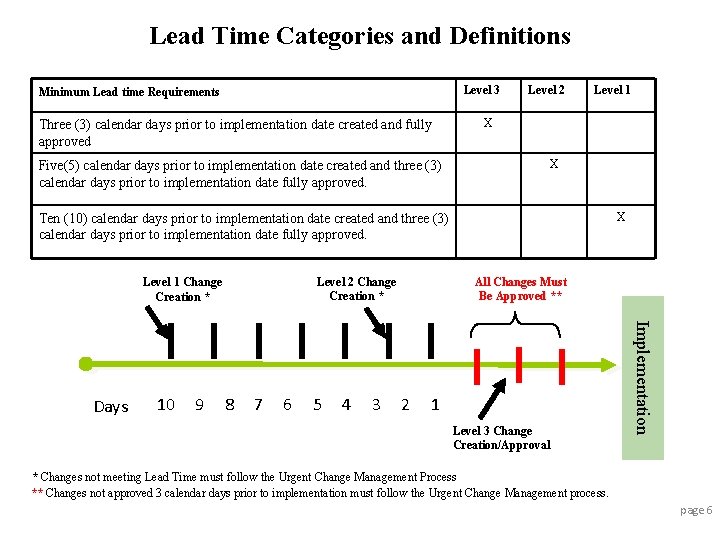
Lead Times Purpose – Lead time requirements are a key ITIL concept and have been accepted as industry best practice for decades. Lead times are necessary for proper review, approval, and communication of changes. Without lead times, accurate Forward Schedules of Change (FSCs) and proper review for potential scheduling conflicts are not possible. Definition – Lead Time is the amount of time all approvers have to review, take action (if necessary), approve/reject and communicate (plus three days). This means a change must be submitted, all required data elements and standards documented, planning completed and the change approved, by all approvers, within the defined Lead Time prior to implementation. The “Plus Three Days” – The overall Lead Time definition includes the three calendar days, immediately prior to the implementation date, where ALL approvers on the change record must have approved the change request. For example, if a change is scheduled to be implemented on Monday, Jan 4, 2010, the change must be approved by ALL approvers by Friday, Jan 1, 2009. Failure to Meet Lead Times – If a change is unable to meet the Lead Time requirements, then the Urgent Change process requirements must be executed. The reason that the Lead Time requirements could not be met must be documented in the change record. Note – The lead times stated here include calendar days. page 5
Lead Time Categories and Definitions Level 3 Minimum Lead time Requirements Three (3) calendar days prior to implementation date created and fully approved Five(5) calendar days prior to implementation date created and three (3) calendar days prior to implementation date fully approved. Level 2 Level 1 X X X Ten (10) calendar days prior to implementation date created and three (3) calendar days prior to implementation date fully approved. Level 2 Change Creation * Level 1 Change Creation * 10 9 8 7 6 5 4 3 2 1 Level 3 Change Creation/Approval Implementation Days All Changes Must Be Approved ** * Changes not meeting Lead Time must follow the Urgent Change Management Process ** Changes not approved 3 calendar days prior to implementation must follow the Urgent Change Management process. page 6
Urgent Change Process Urgent Change Types There are two types of Urgent Changes: • Emergency Change – initiated by or in prevention of an incident. The Change needs to be implemented in a time shorter than the required lead times to prevent or reduce the duration of an outage. An Emergency change record can be opened post-implementation if the time required to document the change would negatively impact restoration of service or prevention of an outage. In these cases, verbal approvals must be documented in the Change record. • Expedited Change - does not meet the stated minimum lead time due to client or other business reasons. NOTE: poor planning is not a reason to use the Urgent Process Approving Urgent Changes All Urgent changes require the normal approvals in addition to CAB Approval. The Emergency CAB Committee (CAB) approves Urgent Changes. The CAB consists of two approvals: Client Group representative, Change Coordinator ; this cannot be the Implementer. If verbal approvals are obtained, the details of the approval are to be attached to the change record. e. g. who approved, when they approved ALL URGENT CHANGE REQUIRE URGENT CHANGE COMMUNICATIONS page 7
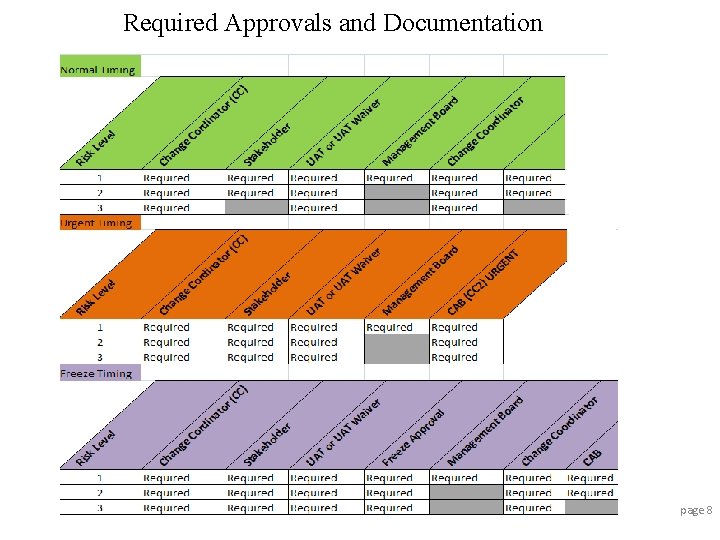
Required Approvals and Documentation page 8
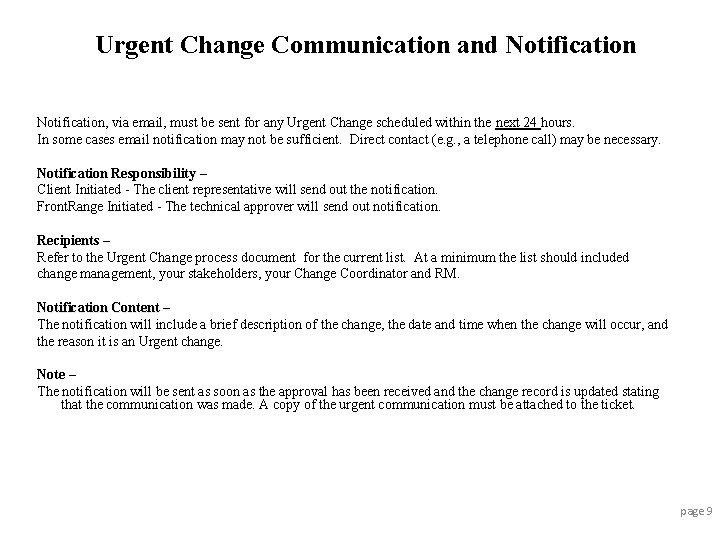
Urgent Change Communication and Notification, via email, must be sent for any Urgent Change scheduled within the next 24 hours. In some cases email notification may not be sufficient. Direct contact (e. g. , a telephone call) may be necessary. Notification Responsibility – Client Initiated - The client representative will send out the notification. Front. Range Initiated - The technical approver will send out notification. Recipients – Refer to the Urgent Change process document for the current list. At a minimum the list should included change management, your stakeholders, your Change Coordinator and RM. Notification Content – The notification will include a brief description of the change, the date and time when the change will occur, and the reason it is an Urgent change. Note – The notification will be sent as soon as the approval has been received and the change record is updated stating that the communication was made. A copy of the urgent communication must be attached to the ticket. page 9
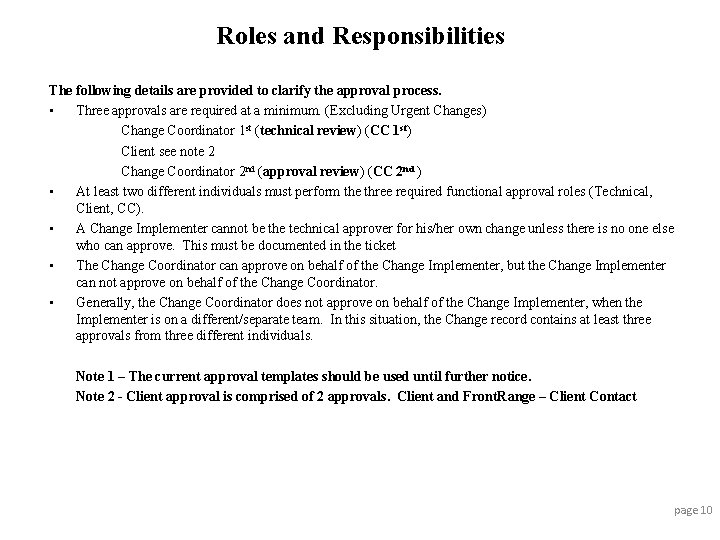
Roles and Responsibilities The following details are provided to clarify the approval process. • Three approvals are required at a minimum. (Excluding Urgent Changes) Change Coordinator 1 st (technical review) (CC 1 st) Client see note 2 Change Coordinator 2 nd (approval review) (CC 2 nd ) • At least two different individuals must perform the three required functional approval roles (Technical, Client, CC). • A Change Implementer cannot be the technical approver for his/her own change unless there is no one else who can approve. This must be documented in the ticket • The Change Coordinator can approve on behalf of the Change Implementer, but the Change Implementer can not approve on behalf of the Change Coordinator. • Generally, the Change Coordinator does not approve on behalf of the Change Implementer, when the Implementer is on a different/separate team. In this situation, the Change record contains at least three approvals from three different individuals. Note 1 – The current approval templates should be used until further notice. Note 2 - Client approval is comprised of 2 approvals. Client and Front. Range – Client Contact page 10
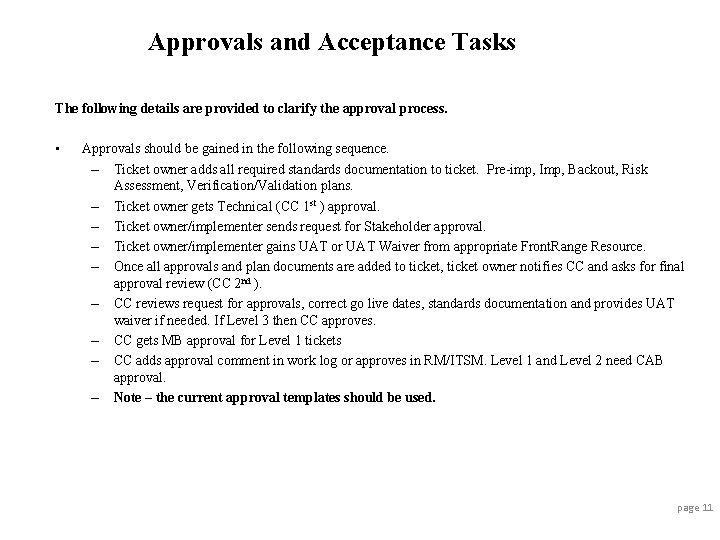
Approvals and Acceptance Tasks The following details are provided to clarify the approval process. • Approvals should be gained in the following sequence. – Ticket owner adds all required standards documentation to ticket. Pre-imp, Imp, Backout, Risk Assessment, Verification/Validation plans. – Ticket owner gets Technical (CC 1 st ) approval. – Ticket owner/implementer sends request for Stakeholder approval. – Ticket owner/implementer gains UAT or UAT Waiver from appropriate Front. Range Resource. – Once all approvals and plan documents are added to ticket, ticket owner notifies CC and asks for final approval review (CC 2 nd ). – CC reviews request for approvals, correct go live dates, standards documentation and provides UAT waiver if needed. If Level 3 then CC approves. – CC gets MB approval for Level 1 tickets – CC adds approval comment in work log or approves in RM/ITSM. Level 1 and Level 2 need CAB approval. – Note – the current approval templates should be used. page 11
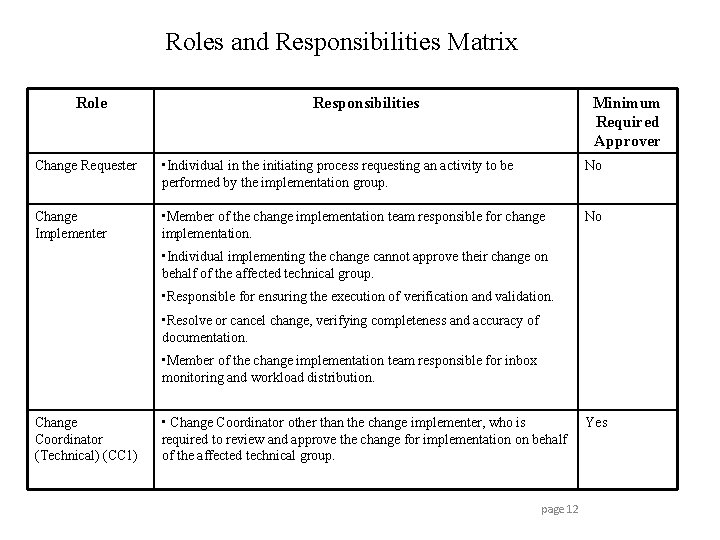
Roles and Responsibilities Matrix Role Responsibilities Minimum Required Approver Change Requester • Individual in the initiating process requesting an activity to be performed by the implementation group. No Change Implementer • Member of the change implementation team responsible for change implementation. No • Individual implementing the change cannot approve their change on behalf of the affected technical group. • Responsible for ensuring the execution of verification and validation. • Resolve or cancel change, verifying completeness and accuracy of documentation. • Member of the change implementation team responsible for inbox monitoring and workload distribution. Change Coordinator (Technical) (CC 1) • Change Coordinator other than the change implementer, who is required to review and approve the change for implementation on behalf of the affected technical group. page 12 Yes
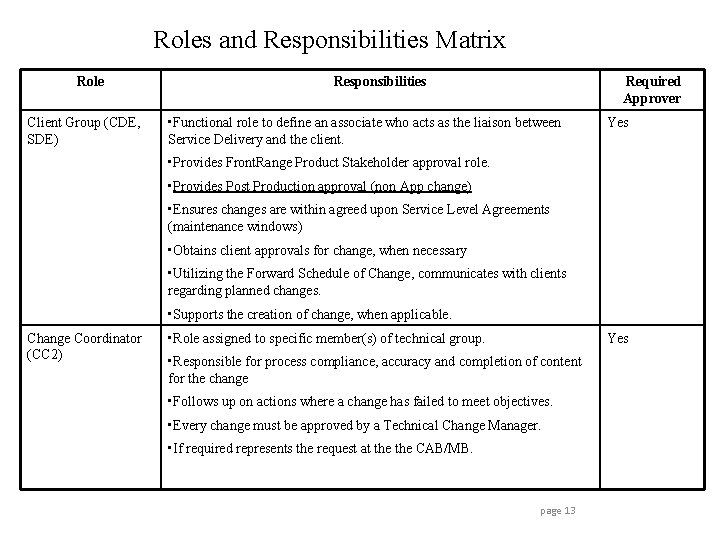
Roles and Responsibilities Matrix Role Client Group (CDE, SDE) Responsibilities Required Approver • Functional role to define an associate who acts as the liaison between Service Delivery and the client. Yes • Provides Front. Range Product Stakeholder approval role. • Provides Post Production approval (non App change) • Ensures changes are within agreed upon Service Level Agreements (maintenance windows) • Obtains client approvals for change, when necessary • Utilizing the Forward Schedule of Change, communicates with clients regarding planned changes. • Supports the creation of change, when applicable. Change Coordinator (CC 2) • Role assigned to specific member(s) of technical group. Yes • Responsible for process compliance, accuracy and completion of content for the change • Follows up on actions where a change has failed to meet objectives. • Every change must be approved by a Technical Change Manager. • If required represents the request at the CAB/MB. page 13
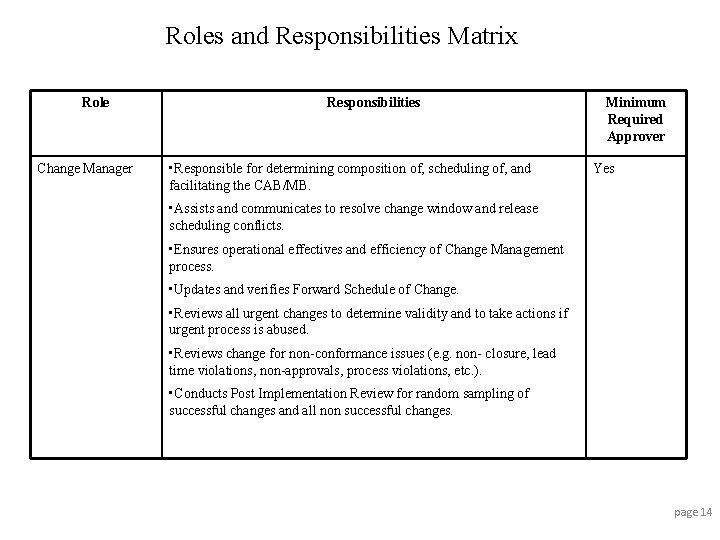
Roles and Responsibilities Matrix Role Change Manager Responsibilities • Responsible for determining composition of, scheduling of, and facilitating the CAB/MB. Minimum Required Approver Yes • Assists and communicates to resolve change window and release scheduling conflicts. • Ensures operational effectives and efficiency of Change Management process. • Updates and verifies Forward Schedule of Change. • Reviews all urgent changes to determine validity and to take actions if urgent process is abused. • Reviews change for non-conformance issues (e. g. non- closure, lead time violations, non-approvals, process violations, etc. ). • Conducts Post Implementation Review for random sampling of successful changes and all non successful changes. page 14
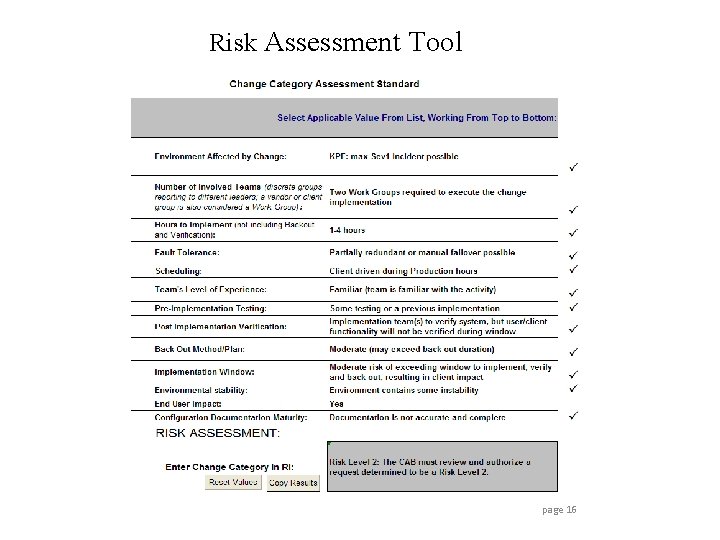
Risk Assessment Tool The tool to determine the Change Category (Level 3, Level 2, Level 1) is provided to assess risk of the change. This should be re-calculated for every new change record. • • • The questions within the tool are weighted, and must be answered beginning with the first one. There is automation to stop when answering additional questions will not affect the outcome* Buttons to clear and to copy are available. After completing the questions, the resulting Risk Level is entered into the Remedy record. A copy of the spreadsheet must be attached to the Remedy Change record. (Work Info , Risk Assessment ) * The automation requires that macros be enabled in order for the tool to function page 15
Risk Assessment Tool page 16
What is a KPE Definition of a Key Production Environment (KPE) A KPE is a service, physically represented/supported by one or more IT/Product components, whose loss or impairment will seriously impact the business of one or more (external or internal) clients and/or their clients. • An outage or serious reduction of its functionality will result in a Severity 1 Incident. Examples of areas for which significant impact to the client can be recognized are: – Business – Performance expectations – Visibility – Client performance indicators • Requirements for KPE related infrastructure – Documented including system design diagrams – System Software supported by supplier – Risk mitigation required if hardware > 3 years old – No Single Point Of Failures at critical parts • To ensure consistency of severity classification, all Sev 1 and Sev 2 incidents should map to a defined KPE page 17
Change Planning Standards In order to improve quality and consistency of change planning and documentation, change planning standards exist. It is the responsibility of the Change Coordinator to ensure compliance to these standards for their team’s Change records. The individual plans listed below must be attached to the RM/ITSM Change record, in the appropriate place. Change Plan Standards: • Implementation Plan • Impact Assessment/Risk Analysis • Pre-Implementation Test Plan • Verification/Validation Plan • Back Out Plan or contingency plan page 18
Change Plan Standards Location ? ? Each plan standard is to be attached to the ITSM record. These plans include • Pre-Implementation Test Plan • Implementation Plan • Verification/Validation Plan • Back out or contingency plan • Risk Assessment spreadsheet The naming convention should be easily recognizable as the type of plan. For example, Backout Plan. doc, Imp Plan. doc, Ver_Val Plan. doc. page 19
Verification/Validation Verification – Action that substantiates or verifies against a predetermined set of conditions or criteria and is performed by the technical staff. Validation – Action that substantiates or verifies against a predetermined set of conditions or criteria and is performed by the customer/client. Note – Front. Range current process requires that Post Production Validation occurs within 10 days of implementation for all tickets with a UAT Waiver. Successful - The change was executed as documented and approved, within the designated change window, and was verified to be working as intended without unexpected client business impact. This means that unless the change is implemented exactly as written in the record, it cannot be considered successful. page 20
Documenting Verification/Validation Post Implementation If the change has been found to be unsuccessful a Post Implementation Review (PIR) must be performed. The Change Coordinator is responsible to setup the PIR review with those people involved in the work. A completed copy of the PIR must be attached to the ticket If the work caused an incident the incident ticket must be added/Related to the CRQ using the relationship tab. page 21
Post Implementation Reviews (PIRs) Any unsuccessful changes closed in the previous week will have a PIR. In addition to the checklist for successful changes, the following questions are asked: – What is the root cause for the change being not successful? – What should have happened that did not, and what did not happen that could have prevented the change from failing? (Example - inadequate verification testing resulted in a failure to recognize that the system was unavailable to users prior to causing client impact) • • • Where does the root cause fall within the life cycle of the Change Management process? (change design, risk assessment, planning, testing, scheduling, approval, communication, implementation, verification, Backout) What actions are being taken to prevent a similar failed change in the future? List action items, owner, and due date. Did this change extend past the client maintenance window? If so, why? page 22
CAB Purpose and Goals • • The Change Advisory Board (CAB) is an advisory group comprised of technical team members and client representation The CAB will review the changes submitted, and will recommend approval, rejection, or postponement of the changes. This exercise is designed to minimize risk and business impact, and promote timely notification and awareness The CAB primarily reviews Level 2 and Level 1 Changes, but can review any change at the discretion of the Change Manager CAB meetings will be held a minimum of once a week – Internal CAB – <DAY Time PST>. Your change must pass CAB to be presented at Client CAB for final approval – Client CAB – <DAY Time PST> page 23
CAB Agenda Requirements • • • Post Implementation Review (PIR) of any non successful changes – The CAB report will contain a list of all the non successful changes since the last time it was reviewed, such as the last CAB meeting. During the CAB meeting, the technical teams will review these changes to determine root cause, and any lessons learned. Assessment of future scheduled Level 1 or Level 2 changes – Any known future Level 1 or Level 2 changes are to be brought to the CAB meeting to create an awareness and discuss for possible impact. Post Implementation Review (PIR) of a random sampling of successful changes – The CAB report will contain a list of two random successful changes for the CAB members to review. The changes will be reviewed for content and process compliance using the PIR checklist. A review of the Change Management process updates – Any changes in the current Change Management process will be announced by the Change Manager during the CAB meeting. Review of any Level 3 changes deemed necessary by the Change Manager – The Change Manager may require a review of a Level 3 change if they have any questions for the CAB members or if they feel the change needs additional review. Review of any Standard Changes or Change Models submitted for a one time review and approval/rejection, if applicable – Standard Changes or Change Models are to be brought to the CAB for review and discussion before they are approved. page 24
CAB Review Acceptance Criteria Acceptance criteria are used to review Changes in a CAB. The following list of acceptance criteria is nonexhaustive; acceptance criteria can be dependent upon the specific change. These can be seen as the minimum set of criteria. • • All involved parties are notified and prepared All the necessary documentation is completed All pre-requisites (tools, interfaces, etc. ) are in place No serious risks or impacts have been identified as show stoppers Instructions for all involved parties are clearly defined and understood A viable back out or contingency plan has been defined CAB requests for changes to the proposed plan/schedule have been complied with (for Changes reviewed in a previous CAB meeting) page 25
Management Board • • • All Level 1 category changes are required to be reviewed by a Management Board, which is comprised of all Service Delivery Executives and Technical Managers affected by a specific change implementation. This is an advisory group, and if the change is authorized to move forward, it will then be presented at the appropriate CAB meeting. Management Boards are typically ad hoc virtual bodies. The Change Coordinator is responsible for obtaining Management Board Approval is documented in the change record. Check the Change Management Share. Point site for the current MB Members page 26
Forward Schedule of Change The Forward Schedule of Change is a list of upcoming approved changes to be implemented within the next two weeks. It contains the specific details of the change scheduled. page 27
Putting It All Together: Lifecycle of an RFC 1. A Requester opens an change in ITSM/RM and assigns it to the Implementing Group. An Implementation Group Designee evaluates the record and the workload, then assigns it to an Implementer. Requester uses the Risk Assessment Tool to make a preliminary categorization. 2. The Implementer categorizes the change using the Risk Assessment tool and builds the change record according to the Plan Standards. 3. The Client Group approves/rejects the change based on scheduled window and client perspective. The Change Coordinator (not the Implementer) performs review from a technical standpoint. The Change Coordinator also approves/rejects from a process compliance standpoint, ensuring that standards are met. These approvals are completed prior to minimum lead times. 4. When needed, the change record is reviewed in the appropriate CAB meeting, and either authorized by the CAB or not. 5. The change is published on the Forward Schedule of Change (FSC). Client Groups, Change Coordinators and Change Managers evaluate the FSC for potential conflicts and take action where needed. 6. The change is implemented at the scheduled time, and is then verified and backed out if needed according to the documented plans. 7. The change record is set to resolved with the appropriate completion status and text (if needed) immediately if there is no Validation plan, or when the change is validated if there is a Validation plan. 8. The change record receives a Post Implementation Review (PIR) during the next CAB meeting if not marked Successful, and may receive a PIR on a random basis even if marked Successful. page 28
Front. Range Process Changes • • • All Change records must have the Status Reason field set to the proper status when setting the ticket status to closed. All Change plans must be attached to the RM/ITSM ticket, on the Work Info Tab, Other Attachments. (Implementation, Back out, etc) Both Implementation Planned and Actual dates and times are required in the Change record. The CC role will be responsible for process compliance. This approval, combined with the other two required approvals, will replace CM approval for Level 3 Changes. If UAT is not possible, this is documented in the record, and the CC can provide UAT Waiver If UAT is possible, the requester provides this approval. Any change not meeting the stated lead times will need to follow the Urgent Change process. IT Stakeholder approvals will be replaced with the Client Group approval. If further client approvals are needed, the Client Group representative will obtain it. Business Stakeholder approvals will still be obtained by the Requester from Front. Range management. All delivery teams are expected to be represented at the CAB meeting. If a change is not represented, it will not be approved. The Client Group representative will perform client interfacing activities, such as obtaining Freeze exception approvals, IT Stakeholder approvals, PPV approvals. page 29
Thank You Contact Change Management for additional information