
CERNs Computer Security Challenges Denise Heagerty CERN Computer
- Slides: 12
CERN’s Computer Security Challenges Denise Heagerty CERN Computer Security Officer Openlab Security Workshop, 27 Apr 2004 1
Outline n n Incident summary, 2001 -2003 Viruses, Worms and Backdoors n n Software risks and restrictions n n n Risks and actions taken so far P 2 P, IRC, IM, … Balancing risk with academic freedom Risks from visiting users Protecting control systems Protecting GRID resources Summary of CERN’s computer security challenges 2
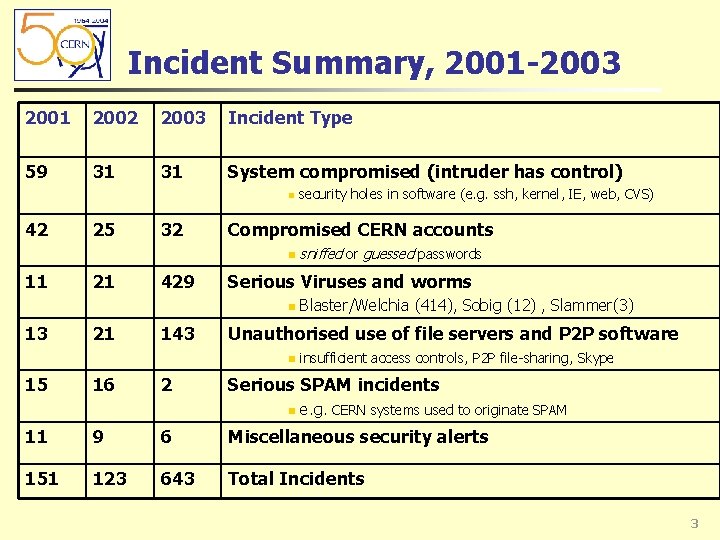
Incident Summary, 2001 -2003 2001 2002 2003 Incident Type 59 31 31 System compromised (intruder has control) n 42 25 32 Compromised CERN accounts n 11 21 429 21 143 16 2 Blaster/Welchia (414), Sobig (12) , Slammer(3) Unauthorised use of file servers and P 2 P software n 15 sniffed or guessed passwords Serious Viruses and worms n 13 security holes in software (e. g. ssh, kernel, IE, web, CVS) insufficient access controls, P 2 P file-sharing, Skype Serious SPAM incidents n e. g. CERN systems used to originate SPAM 11 9 6 Miscellaneous security alerts 151 123 643 Total Incidents 3
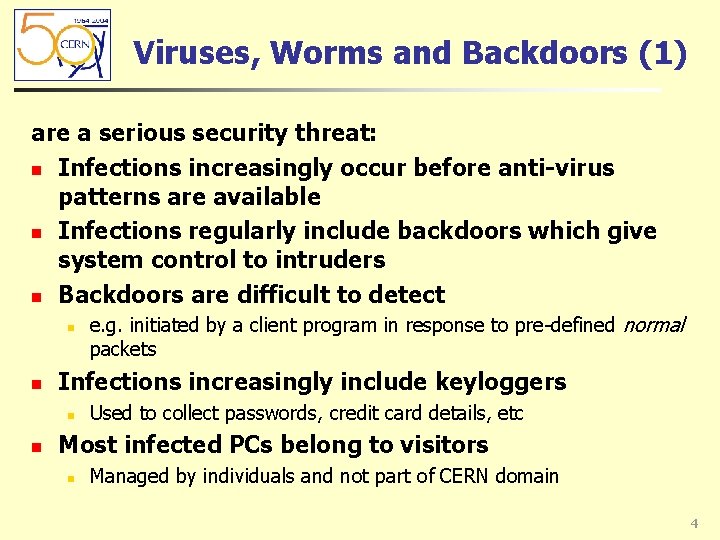
Viruses, Worms and Backdoors (1) are a serious security threat: n Infections increasingly occur before anti-virus patterns are available n Infections regularly include backdoors which give system control to intruders n Backdoors are difficult to detect n n Infections increasingly include keyloggers n n e. g. initiated by a client program in response to pre-defined normal packets Used to collect passwords, credit card details, etc Most infected PCs belong to visitors n Managed by individuals and not part of CERN domain 4
Viruses, Worms and Backdoors (2) Actions taken so far: n Pro-active anti-virus response n n Computers must be registered and kept secure n n n E. g. Beta pattern files, specific filters on mail gateways, new viruses are reported, detection tools identify infected systems to disconnect Computers detected as insecure can be blocked from the network and the registered contact informed Collaboration is generally good, but expertise is insufficient Strong management recommendation to run centrally managed systems (Windows and Linux) n n n More than 5000 Windows and 3500 Linux PCs have automated patches More than 1000 PCs are individually managed (visitors, non-standard) Dual boot systems need to keep both systems patched 5
Risks from client software n Client software bypasses traditional security checks n n P 2 P file sharing software is a target for spreading viruses n n E. g. to communicate together, to upload stolen data, to advertise tricked data IM (Instant Messaging) is targeted by intruders n n Reports say more than 50% of Ka. Za. A files contain viruses IRC (Internet Relay Chat) is used by intruders n n E. g. firewalls, application gateways, trusted web sites E. g. Compromised systems via security holes, connections to nontrusted servers (ICQ), links to tricked web sites Client systems may be converted to Bots n Allows intruders to control many systems e. g. to launch DDo. S attacks 6
Software Restrictions n Software installation and use is restricted n n Personal use of P 2 P software is NOT permitted n n n Clients are permitted and used for a professional purpose Personal installations of IM are not permitted n n http: //cern. ch/security/file-sharing http: //cern. ch/security/skype IRC bots and servers are NOT permitted n n http: //cern. ch/security/software-restrictions CERN’s standard Windows/XP configuration includes Messenger Systems and applications must be kept secure n n n http: //cern. ch/Computing. Rules Relies on user awareness and competence Competes with publicity from the “friends network” 7
Balancing risk with academic freedom Risks: n Personal use of CERN’s computing and network facilities is permitted n n n Social engineering tricks succeed n n Defined at http: //cern. ch/Computing. Rules e. g. personal email and web surfing E. g. virus infected attachments executed, insecure web sites visited Academic curiosity increases risk n E. g. Insecure software and spyware unintentionally installed Counter-Measures: n Awareness raising campaigns n Restrictive Rules 8
Risks from Visiting Users n CERN’s users are located around the world n n Visiting users increasingly bring their laptops n n Need network access to CERN services and general Internet Relies on users keeping their laptops secure Network based tools detect some problems, e. g. scanning Users need to access CERN systems remotely n n Many are based at universities and research labs Key services directly on the Internet (mail, web, files) Terminal Services offer additional functionality (client-server) VPN for special cases (users agree to additional security rules) Insecure laptops (connected directly or by VPN) are the biggest source of viruses n Enforced network registration helps to fix them quickly, but does not prevent the problem 9
Protecting Control Systems n Accelerator and technical control systems are connected on a physically separate network n n n Off-site access for specialists n n n Experts can be at home or at remote sites around the world Some systems are managed by outsourced contracts Connect via gateways, e. g. Windows Terminal Services Token based authentication proposed for critical systems Stability v Updates n n No direct Internet access to/from off-site Access restrictions on-site are difficult to manage Automated patching and software updates based on needs and risk Critical systems n Reduce risk with gateways, firewalls, one-time passwords, … 10
Protecting GRID resources n n GRID computing distributes applications across many sites with significant computing power Risks for GRID resources have been analysed n n http: //cern. ch/proj-lcg-security/risk_analysis. html Security holes are considered high risk n n Requires a rapid process for applying security updates Respond rapidly to suspected break-ins Good collaboration between CSIRTs Reduce risk by combining relevant security tools n n e. g. firewalls, access control, intrusion detection Limit the risk for Do. S attacks n n Restrict network access to GRID systems Respond rapidly to attacks, e. g. disconnect from the network 11
Summary of security challenges n Limit the impact of viruses and worms n n Avoid significant computer and network downtime Protect client and server software n n Solutions beyond vulnerability scanning and automated patching Limit the ability of users to introduce security exposures n n Prevent network access for insecure systems n n How to detect security exposures before allowing network access? Protect control systems n n P 2 P, IRC, IM are prone to social engineering tricks Solutions must be easily manageable and allow remote Internet access for authorised experts Scale security solutions to GRIDs n Tools need to be easy, fast and automated 12