
Central Control Equipment for DCN Next Generation Central
- Slides: 23
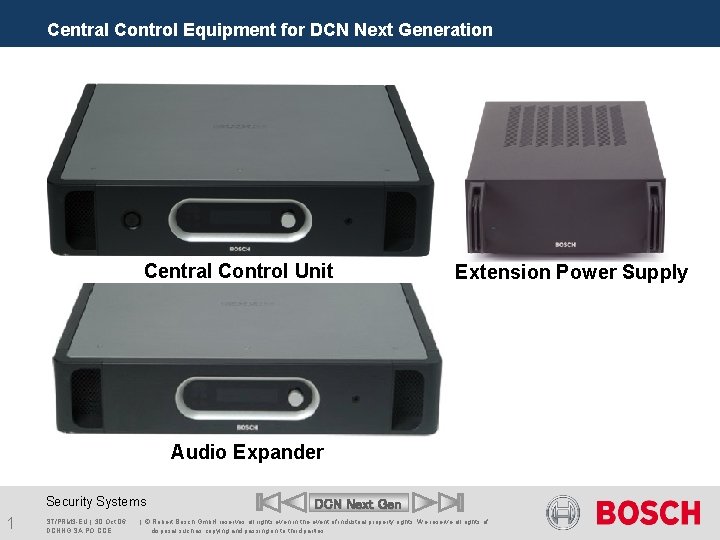
Central Control Equipment for DCN Next Generation Central Control Unit Extension Power Supply Audio Expander Security Systems 1 ST/PRM 3 -EU | 30. Oct. 06 DCNNG SA PO CCE DCN Next Gen | © Robert Bosch Gmb. H reserves all rights even in the event of industrial property rights. We reserve all rights of disposal such as copying and passing on to third parties.
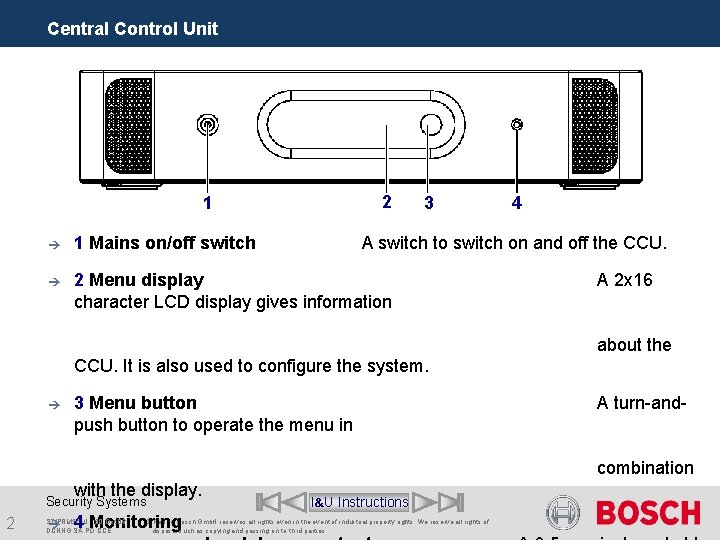
Central Control Unit 2 1 è 1 Mains on/off switch è 2 Menu display character LCD display gives information 3 4 A switch to switch on and off the CCU. A 2 x 16 about the CCU. It is also used to configure the system. è 3 Menu button push button to operate the menu in A turn-andcombination with the display. Security Systems 2 è 4 Monitoring ST/PRM 3 -EU | 30. Oct. 06 DCNNG SA PO CCE I&U Instructions | © Robert Bosch Gmb. H reserves all rights even in the event of industrial property rights. We reserve all rights of disposal such as copying and passing on to third parties.
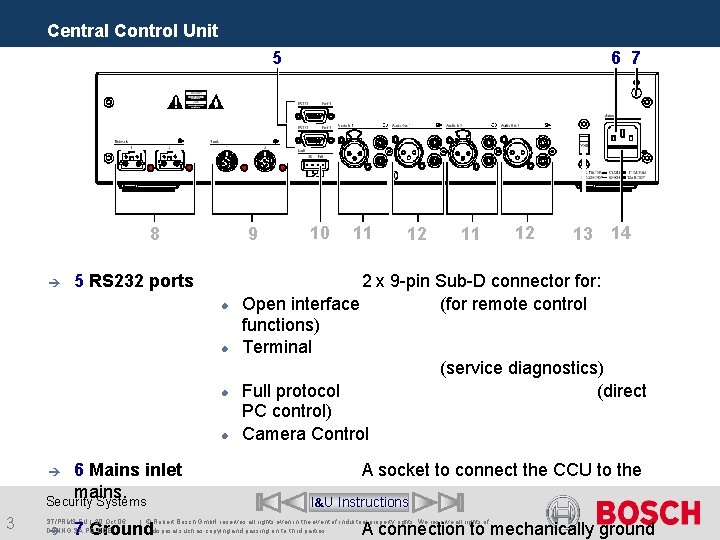
Central Control Unit 6 7 5 8 è 9 5 RS 232 ports 6 Mains inlet mains. Security Systems è 3 ST/PRM 3 -EU | 30. Oct. 06 DCNNG SA PO CCE è 10 11 12 11 13 14 2 x 9 -pin Sub-D connector for: Open interface (for remote control functions) Terminal (service diagnostics) Full protocol (direct PC control) Camera Control A socket to connect the CCU to the I&U Instructions | © Robert Bosch Gmb. H reserves all rights even in the event of industrial property rights. We reserve all rights of disposal such as copying and passing on to third parties. 7 Ground 12 A connection to mechanically ground
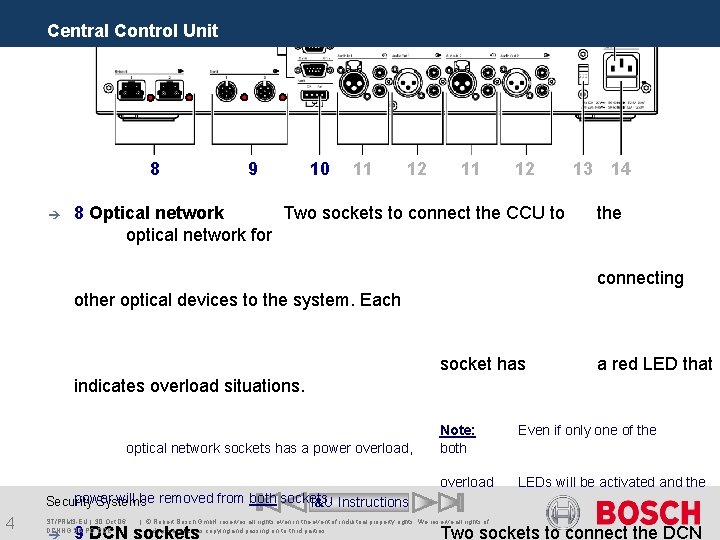
Central Control Unit 8 è 9 10 11 12 8 Optical network Two sockets to connect the CCU to optical network for 13 14 the connecting other optical devices to the system. Each socket has a red LED that indicates overload situations. optical network sockets has a power overload, Note: both Even if only one of the overload LEDs will be activated and the power will be removed from both sockets. Security Systems I&U Instructions 4 ST/PRM 3 -EU | 30. Oct. 06 DCNNG SA PO CCE è | © Robert Bosch Gmb. H reserves all rights even in the event of industrial property rights. We reserve all rights of disposal such as copying and passing on to third parties. 9 DCN sockets Two sockets to connect the DCN
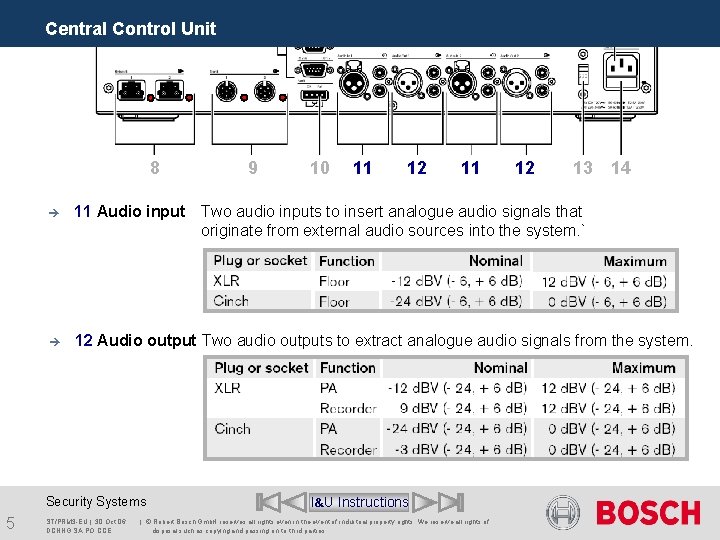
Central Control Unit 8 10 11 12 13 14 è 11 Audio input Two audio inputs to insert analogue audio signals that originate from external audio sources into the system. ` è 12 Audio output Two audio outputs to extract analogue audio signals from the system. Security Systems 5 9 ST/PRM 3 -EU | 30. Oct. 06 DCNNG SA PO CCE I&U Instructions | © Robert Bosch Gmb. H reserves all rights even in the event of industrial property rights. We reserve all rights of disposal such as copying and passing on to third parties.
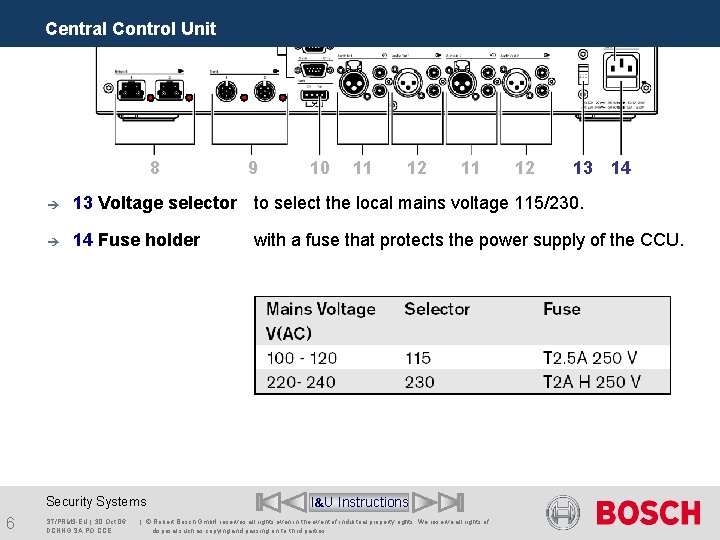
Central Control Unit 8 10 11 12 13 è 13 Voltage selector to select the local mains voltage 115/230. è 14 Fuse holder Security Systems 6 9 ST/PRM 3 -EU | 30. Oct. 06 DCNNG SA PO CCE 14 with a fuse that protects the power supply of the CCU. I&U Instructions | © Robert Bosch Gmb. H reserves all rights even in the event of industrial property rights. We reserve all rights of disposal such as copying and passing on to third parties.
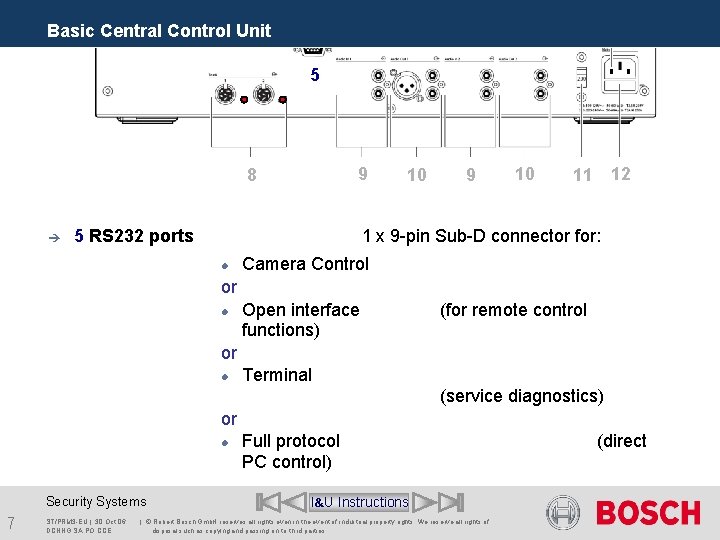
Basic Central Control Unit 5 9 8 è 5 RS 232 ports 10 9 10 12 11 1 x 9 -pin Sub-D connector for: Camera Control or Open interface functions) (for remote control or Terminal (service diagnostics) or Security Systems 7 ST/PRM 3 -EU | 30. Oct. 06 DCNNG SA PO CCE Full protocol PC control) I&U Instructions | © Robert Bosch Gmb. H reserves all rights even in the event of industrial property rights. We reserve all rights of disposal such as copying and passing on to third parties. (direct
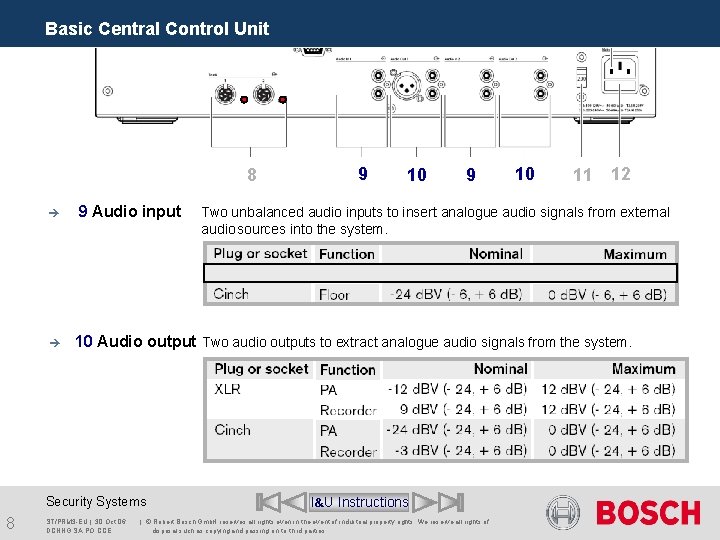
Basic Central Control Unit 8 è è 9 Audio input 10 9 10 11 12 Two unbalanced audio inputs to insert analogue audio signals from external audio sources into the system. 10 Audio output Two audio outputs to extract analogue audio signals from the system. Security Systems 8 9 ST/PRM 3 -EU | 30. Oct. 06 DCNNG SA PO CCE I&U Instructions | © Robert Bosch Gmb. H reserves all rights even in the event of industrial property rights. We reserve all rights of disposal such as copying and passing on to third parties.
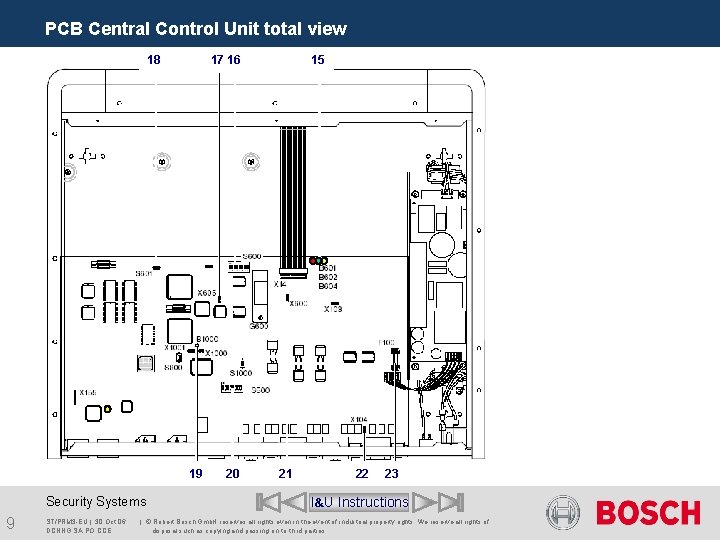
PCB Central Control Unit total view 18 17 16 19 Security Systems 9 ST/PRM 3 -EU | 30. Oct. 06 DCNNG SA PO CCE 20 15 21 22 23 I&U Instructions | © Robert Bosch Gmb. H reserves all rights even in the event of industrial property rights. We reserve all rights of disposal such as copying and passing on to third parties.
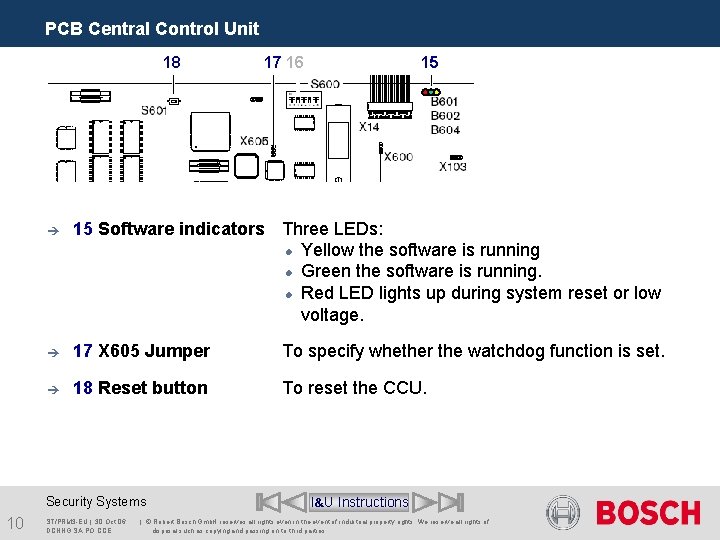
PCB Central Control Unit 18 15 è 15 Software indicators Three LEDs: Yellow the software is running Green the software is running. Red LED lights up during system reset or low voltage. è 17 X 605 Jumper To specify whether the watchdog function is set. è 18 Reset button To reset the CCU. Security Systems 10 17 16 ST/PRM 3 -EU | 30. Oct. 06 DCNNG SA PO CCE I&U Instructions | © Robert Bosch Gmb. H reserves all rights even in the event of industrial property rights. We reserve all rights of disposal such as copying and passing on to third parties.
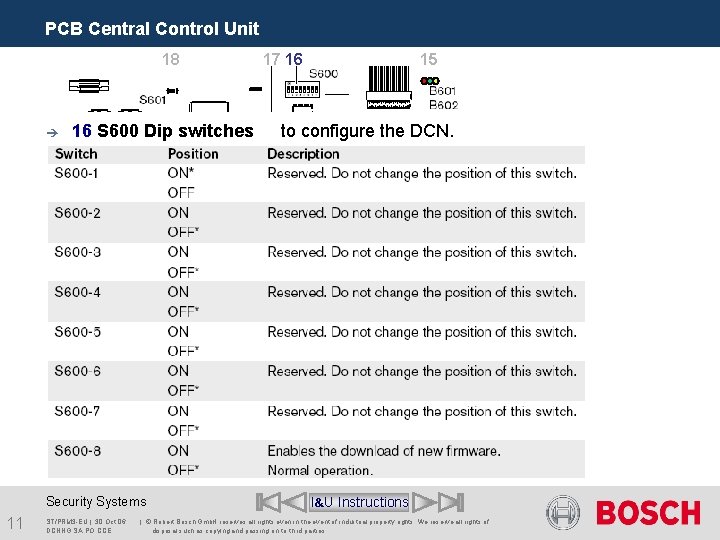
PCB Central Control Unit 18 è 16 S 600 Dip switches Security Systems 11 ST/PRM 3 -EU | 30. Oct. 06 DCNNG SA PO CCE 17 16 15 to configure the DCN. I&U Instructions | © Robert Bosch Gmb. H reserves all rights even in the event of industrial property rights. We reserve all rights of disposal such as copying and passing on to third parties.
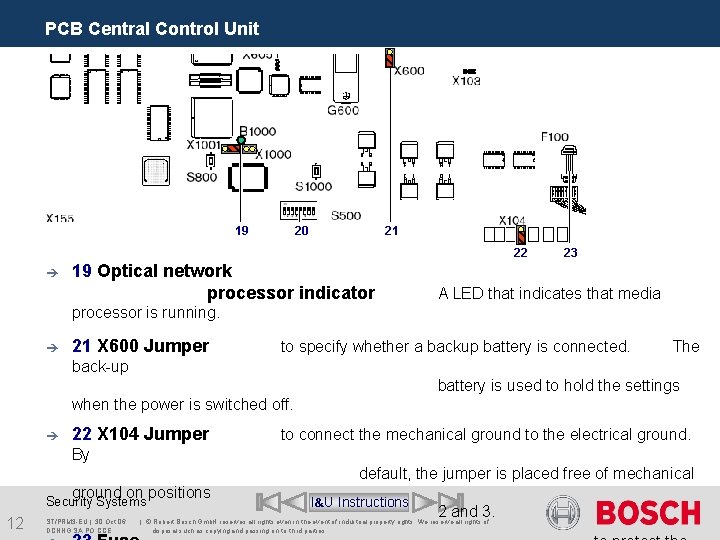
PCB Central Control Unit 19 20 21 22 è 19 Optical network processor indicator 23 A LED that indicates that media processor is running. è 21 X 600 Jumper to specify whether a backup battery is connected. The back-up battery is used to hold the settings when the power is switched off. è 22 X 104 Jumper to connect the mechanical ground to the electrical ground. By default, the jumper is placed free of mechanical ground on positions Security Systems 12 ST/PRM 3 -EU | 30. Oct. 06 DCNNG SA PO CCE I&U Instructions 2 and 3. | © Robert Bosch Gmb. H reserves all rights even in the event of industrial property rights. We reserve all rights of disposal such as copying and passing on to third parties.
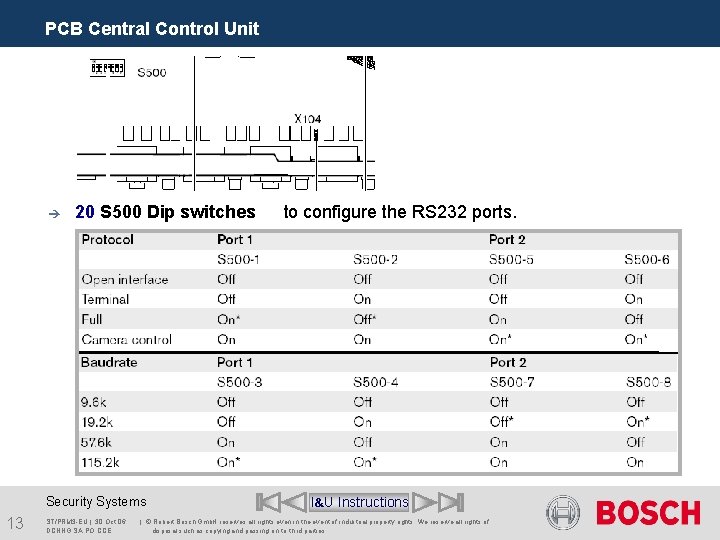
PCB Central Control Unit è 20 S 500 Dip switches Security Systems 13 ST/PRM 3 -EU | 30. Oct. 06 DCNNG SA PO CCE to configure the RS 232 ports. I&U Instructions | © Robert Bosch Gmb. H reserves all rights even in the event of industrial property rights. We reserve all rights of disposal such as copying and passing on to third parties.
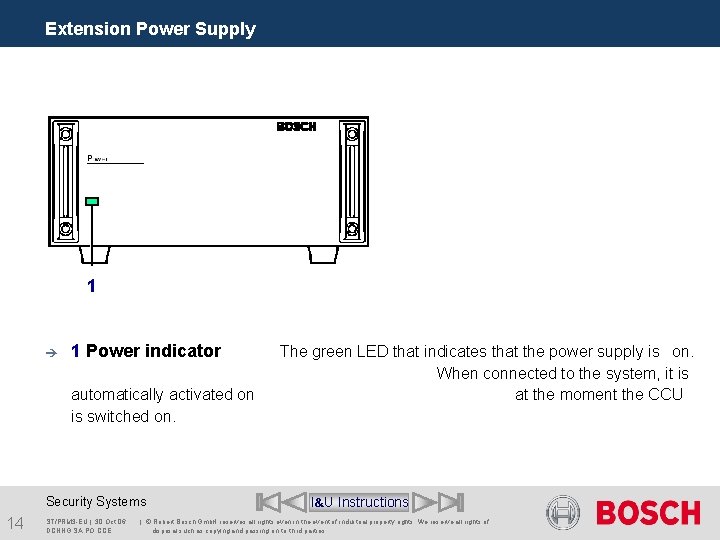
Extension Power Supply 1 è 1 Power indicator automatically activated on is switched on. Security Systems 14 ST/PRM 3 -EU | 30. Oct. 06 DCNNG SA PO CCE The green LED that indicates that the power supply is on. When connected to the system, it is at the moment the CCU I&U Instructions | © Robert Bosch Gmb. H reserves all rights even in the event of industrial property rights. We reserve all rights of disposal such as copying and passing on to third parties.
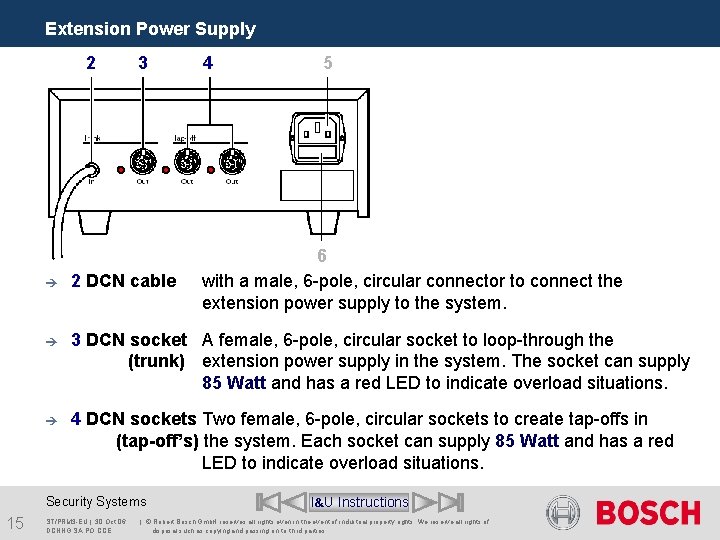
Extension Power Supply 2 3 5 6 with a male, 6 -pole, circular connector to connect the extension power supply to the system. è 2 DCN cable è 3 DCN socket A female, 6 -pole, circular socket to loop-through the (trunk) extension power supply in the system. The socket can supply 85 Watt and has a red LED to indicate overload situations. è 4 DCN sockets Two female, 6 -pole, circular sockets to create tap-offs in (tap-off’s) the system. Each socket can supply 85 Watt and has a red LED to indicate overload situations. Security Systems 15 4 ST/PRM 3 -EU | 30. Oct. 06 DCNNG SA PO CCE I&U Instructions | © Robert Bosch Gmb. H reserves all rights even in the event of industrial property rights. We reserve all rights of disposal such as copying and passing on to third parties.
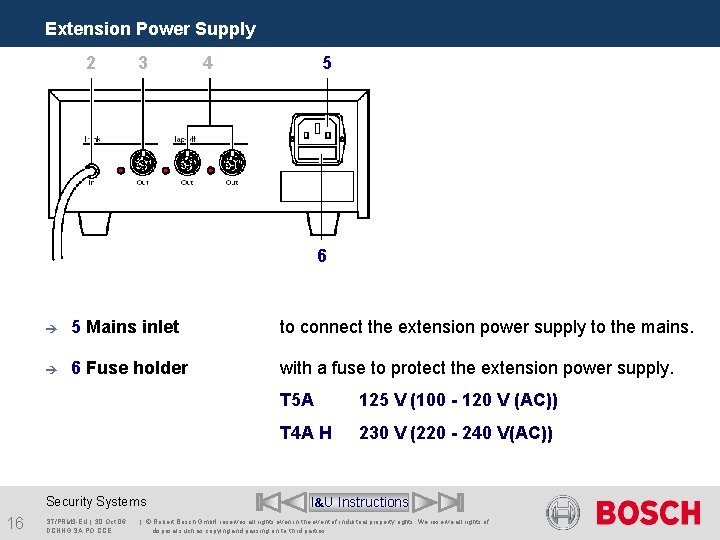
Extension Power Supply 2 3 4 5 6 è 5 Mains inlet to connect the extension power supply to the mains. è 6 Fuse holder with a fuse to protect the extension power supply. Security Systems 16 ST/PRM 3 -EU | 30. Oct. 06 DCNNG SA PO CCE T 5 A 125 V (100 - 120 V (AC)) T 4 A H 230 V (220 - 240 V(AC)) I&U Instructions | © Robert Bosch Gmb. H reserves all rights even in the event of industrial property rights. We reserve all rights of disposal such as copying and passing on to third parties.
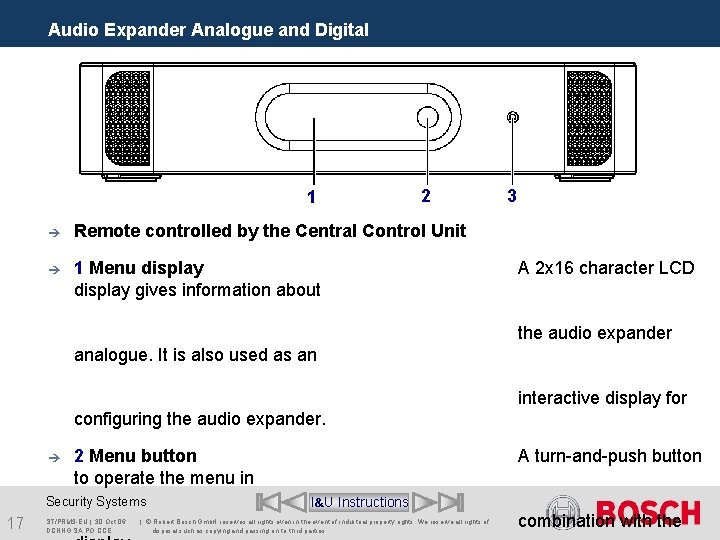
Audio Expander Analogue and Digital 1 2 è Remote controlled by the Central Control Unit è 1 Menu display gives information about 3 A 2 x 16 character LCD the audio expander analogue. It is also used as an interactive display for configuring the audio expander. è 2 Menu button to operate the menu in Security Systems 17 ST/PRM 3 -EU | 30. Oct. 06 DCNNG SA PO CCE A turn-and-push button I&U Instructions | © Robert Bosch Gmb. H reserves all rights even in the event of industrial property rights. We reserve all rights of disposal such as copying and passing on to third parties. combination with the
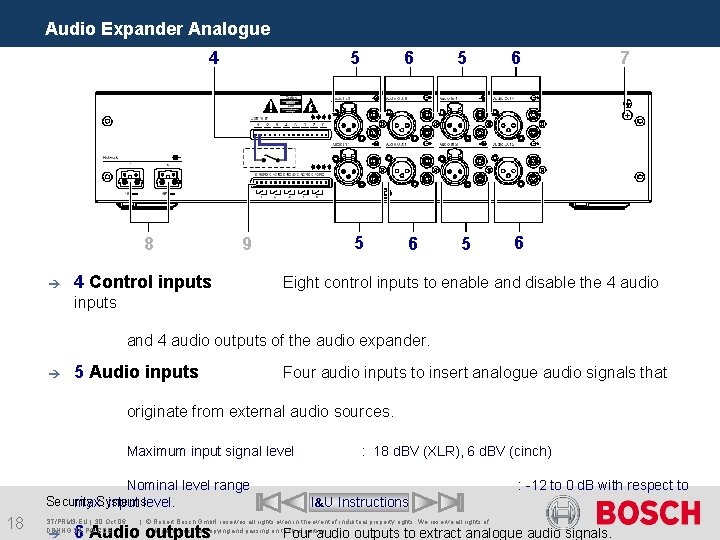
Audio Expander Analogue 4 8 è 9 4 Control inputs 5 6 5 6 7 Eight control inputs to enable and disable the 4 audio inputs and 4 audio outputs of the audio expander. è 5 Audio inputs Four audio inputs to insert analogue audio signals that originate from external audio sources. Maximum input signal level Nominal level range Security Systems max. input level. 18 ST/PRM 3 -EU | 30. Oct. 06 DCNNG SA PO CCE è : 18 d. BV (XLR), 6 d. BV (cinch) : -12 to 0 d. B with respect to I&U Instructions | © Robert Bosch Gmb. H reserves all rights even in the event of industrial property rights. We reserve all rights of disposal such as copying and passing on to third parties. 6 Audio outputs Four audio outputs to extract analogue audio signals.
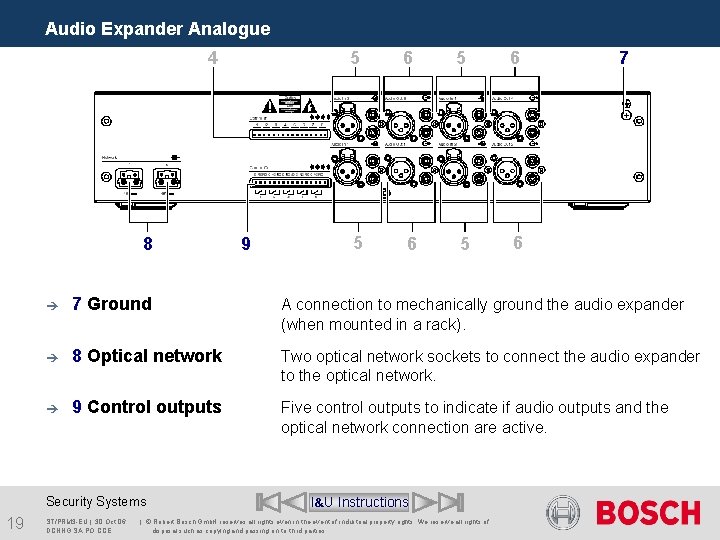
Audio Expander Analogue 4 8 6 5 6 5 6 7 è 7 Ground A connection to mechanically ground the audio expander (when mounted in a rack). è 8 Optical network Two optical network sockets to connect the audio expander to the optical network. è 9 Control outputs Five control outputs to indicate if audio outputs and the optical network connection are active. Security Systems 19 9 5 ST/PRM 3 -EU | 30. Oct. 06 DCNNG SA PO CCE I&U Instructions | © Robert Bosch Gmb. H reserves all rights even in the event of industrial property rights. We reserve all rights of disposal such as copying and passing on to third parties.
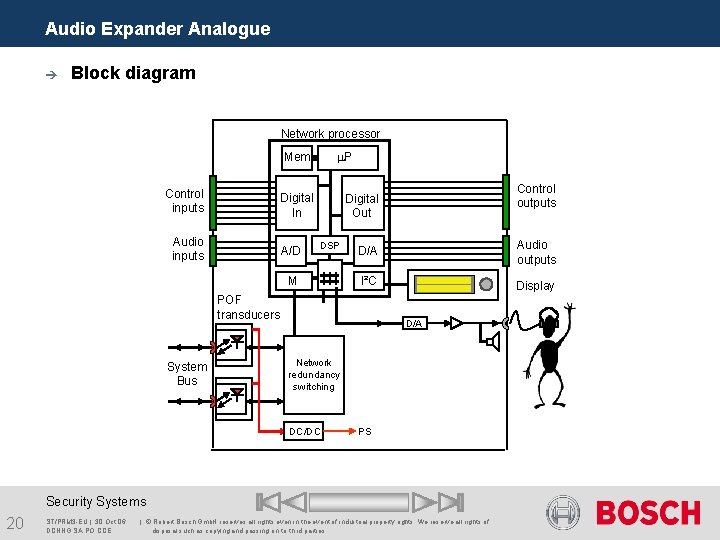
Audio Expander Analogue è Block diagram Network processor P Mem Control inputs Digital In Audio inputs A/D DSP M D/A Audio outputs I²C Display POF transducers System Bus Control outputs Digital Out D/A Network redundancy switching DC/DC PS Security Systems 20 ST/PRM 3 -EU | 30. Oct. 06 DCNNG SA PO CCE | © Robert Bosch Gmb. H reserves all rights even in the event of industrial property rights. We reserve all rights of disposal such as copying and passing on to third parties.
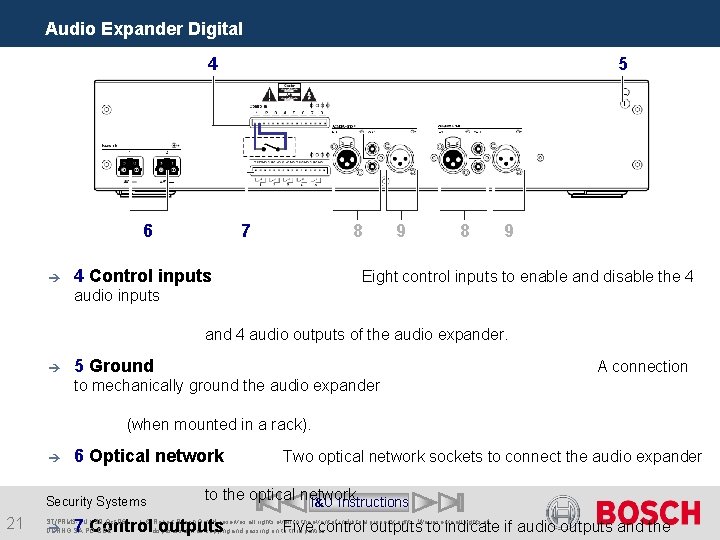
Audio Expander Digital 4 6 è 5 8 7 4 Control inputs 9 8 9 Eight control inputs to enable and disable the 4 audio inputs and 4 audio outputs of the audio expander. è 5 Ground A connection to mechanically ground the audio expander (when mounted in a rack). è 6 Optical network Security Systems 21 è to the optical network. I&U Instructions 7 Control outputs ST/PRM 3 -EU | 30. Oct. 06 DCNNG SA PO CCE Two optical network sockets to connect the audio expander | © Robert Bosch Gmb. H reserves all rights even in the event of industrial property rights. We reserve all rights of disposal such as copying and passing on to third parties. Five control outputs to indicate if audio outputs and the
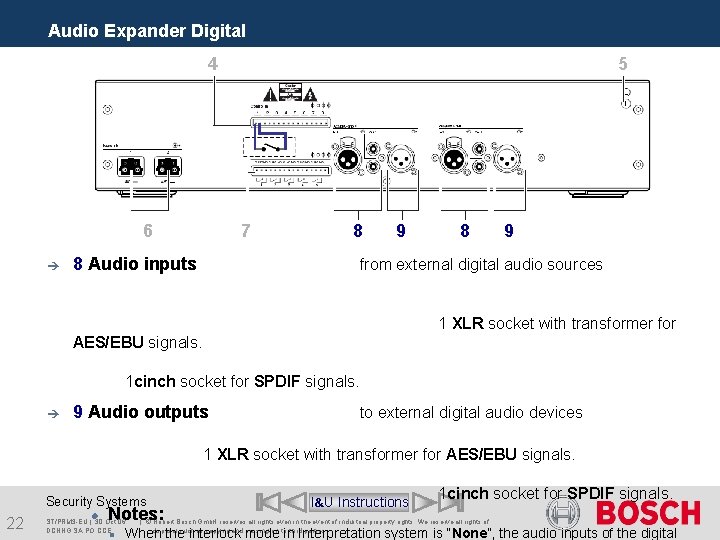
Audio Expander Digital 4 6 è 5 7 8 8 Audio inputs 9 8 9 from external digital audio sources 1 XLR socket with transformer for AES/EBU signals. 1 cinch socket for SPDIF signals. è 9 Audio outputs to external digital audio devices 1 XLR socket with transformer for AES/EBU signals. Security Systems 22 Notes: ST/PRM 3 -EU | 30. Oct. 06 DCNNG SA PO CCE I&U Instructions 1 cinch socket for SPDIF signals. | © Robert Bosch Gmb. H reserves all rights even in the event of industrial property rights. We reserve all rights of disposal such as copying and passing on to third parties. When the interlock mode in Interpretation system is “None”, the audio inputs of the digital
Central Control Equipment End of section Security Systems 23 ST/PRM 3 -EU | 30. Oct. 06 DCNNG SA PO CCE SA PO Menu | © Robert Bosch Gmb. H reserves all rights even in the event of industrial property rights. We reserve all rights of disposal such as copying and passing on to third parties.