
CENG 477 Introduction to Computer Graphics Viewing Transformations
![Perspective Projection • Let’s multiply a point [x, y, z, 1]T with this matrix:](https://slidetodoc.com/presentation_image_h2/782fec4fa669219957e534d2accb993e/image-21.jpg "Perspective Projection • Let’s multiply a point [x, y, z, 1]T with this matrix:")
![Viewport Transformation • x values in range [-1, 1] are transformed to [-0. 5,](https://slidetodoc.com/presentation_image_h2/782fec4fa669219957e534d2accb993e/image-28.jpg "Viewport Transformation • x values in range [-1, 1] are transformed to [-0. 5,")
![Viewport Transformation • x values in range [-1, 1] are transformed to [-0. 5,](https://slidetodoc.com/presentation_image_h2/782fec4fa669219957e534d2accb993e/image-29.jpg "Viewport Transformation • x values in range [-1, 1] are transformed to [-0. 5,")
![Viewport Transformation • x values in range [-1, 1] are transformed to [-0. 5,](https://slidetodoc.com/presentation_image_h2/782fec4fa669219957e534d2accb993e/image-30.jpg "Viewport Transformation • x values in range [-1, 1] are transformed to [-0. 5,")
![Z-Fighting • Note that the z-values get compressed to [0, 1] range from the](https://slidetodoc.com/presentation_image_h2/782fec4fa669219957e534d2accb993e/image-31.jpg "Z-Fighting • Note that the z-values get compressed to [0, 1] range from the")
![Z-Fighting • Note that the z-values get compressed to [0, 1] range from the](https://slidetodoc.com/presentation_image_h2/782fec4fa669219957e534d2accb993e/image-32.jpg "Z-Fighting • Note that the z-values get compressed to [0, 1] range from the")
![Summary • A point [xw, yw, zw]T in the world coordinate system can be](https://slidetodoc.com/presentation_image_h2/782fec4fa669219957e534d2accb993e/image-35.jpg "Summary • A point [xw, yw, zw]T in the world coordinate system can be")
- Slides: 35
CENG 477 Introduction to Computer Graphics Viewing Transformations
Introduction • Until now, we learned how to position the objects in the 3 D world space by modeling transformations • With viewing transformations, we position the objects on a 2 D image as seen by a camera with arbitrary position and orientation • Composed of three parts: – Camera (or eye) transformation – Projection transformation – Viewport transformation CENG 477 – Computer Graphics 2
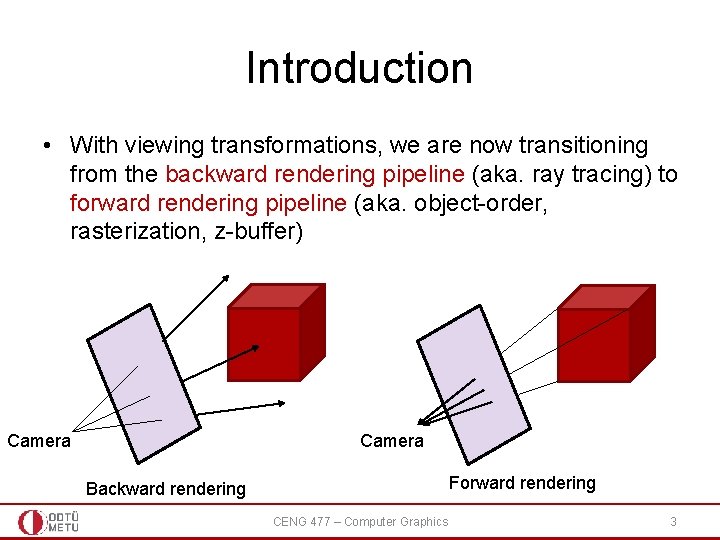
Introduction • With viewing transformations, we are now transitioning from the backward rendering pipeline (aka. ray tracing) to forward rendering pipeline (aka. object-order, rasterization, z-buffer) Camera Forward rendering Backward rendering CENG 477 – Computer Graphics 3
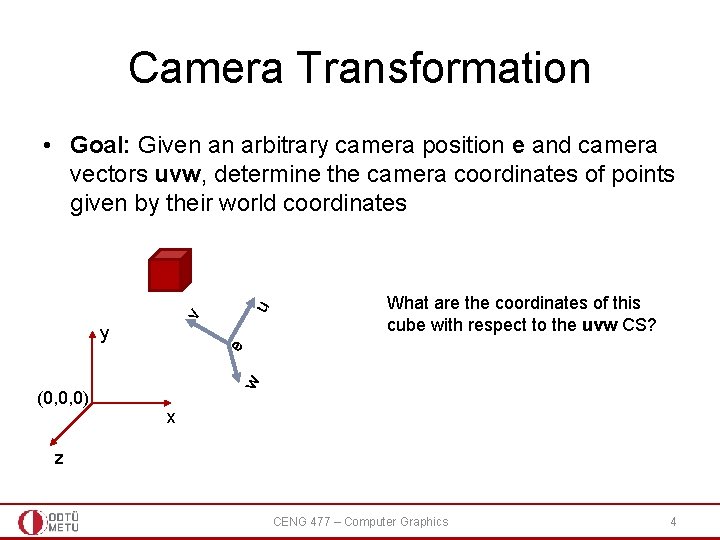
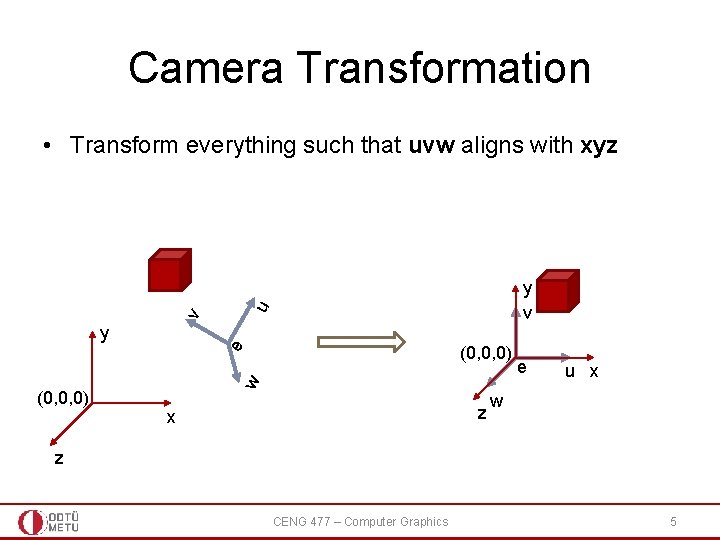
Camera Transformation v u • Goal: Given an arbitrary camera position e and camera vectors uvw, determine the camera coordinates of points given by their world coordinates (0, 0, 0) w e y What are the coordinates of this cube with respect to the uvw CS? x z CENG 477 – Computer Graphics 4
Camera Transformation • Transform everything such that uvw aligns with xyz v u y v y (0, 0, 0) w e (0, 0, 0) z x e u x w z CENG 477 – Computer Graphics 5
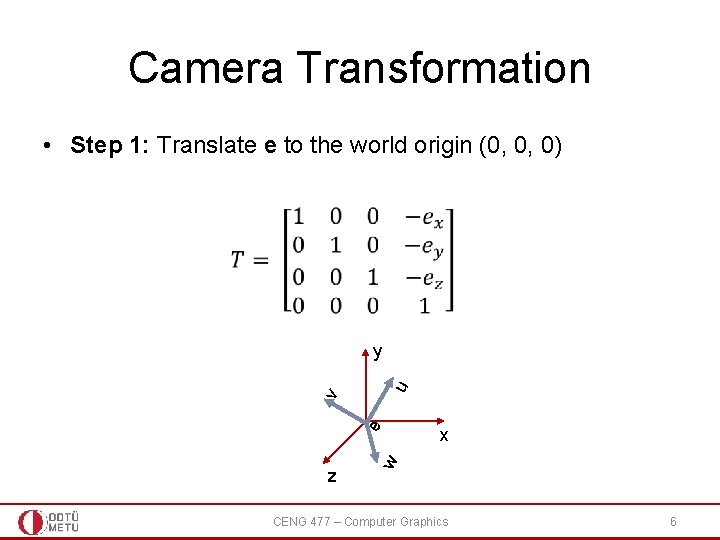
Camera Transformation • Step 1: Translate e to the world origin (0, 0, 0) z x w e v u y CENG 477 – Computer Graphics 6
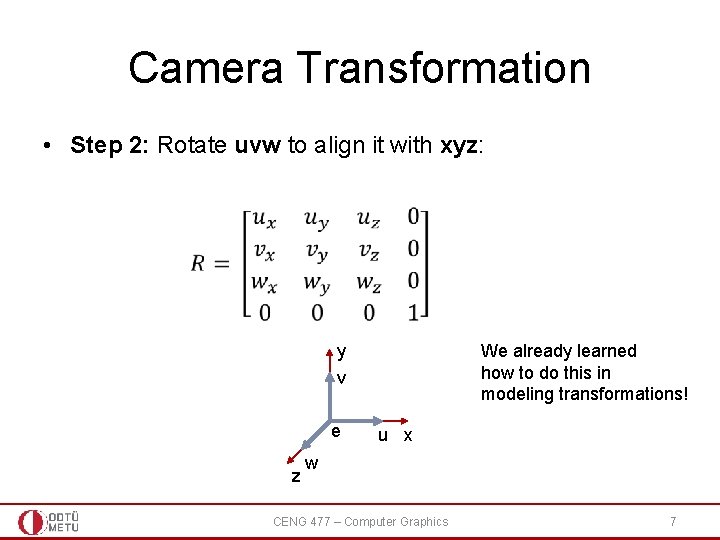
Camera Transformation • Step 2: Rotate uvw to align it with xyz: We already learned how to do this in modeling transformations! y v e z u x w CENG 477 – Computer Graphics 7
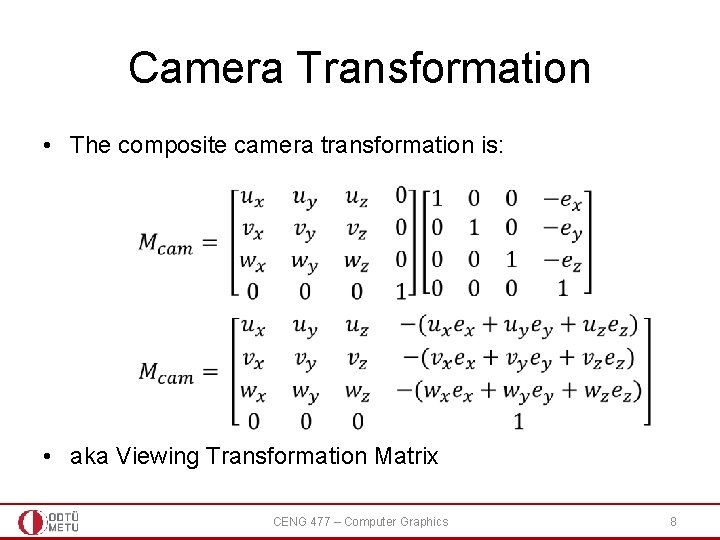
Camera Transformation • The composite camera transformation is: • aka Viewing Transformation Matrix CENG 477 – Computer Graphics 8
Camera Transformation • When points are multiplied with this matrix, their resulting coordinates will be with respect to the uvw-e coordinate system (i. e. the camera coordinate system) • Next, we need to apply a projection transformation CENG 477 – Computer Graphics 9
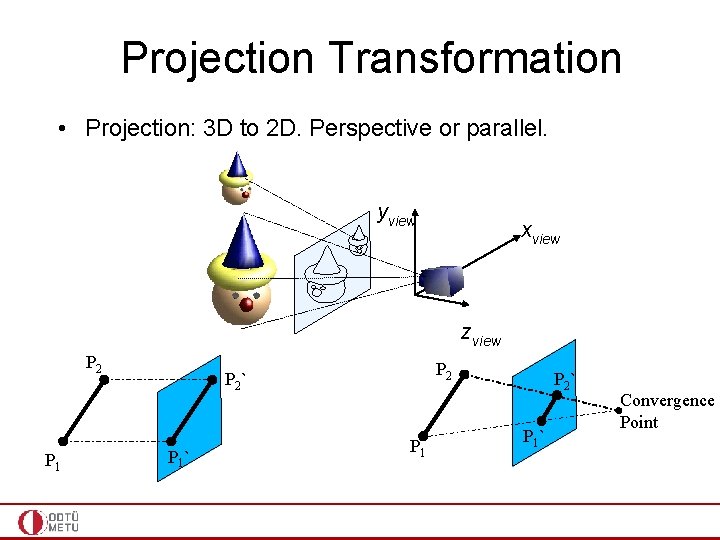
Projection Transformation • Projection: 3 D to 2 D. Perspective or parallel. yview xview zview P 2 P 1 P 2 ` P 1 ` Convergence Point
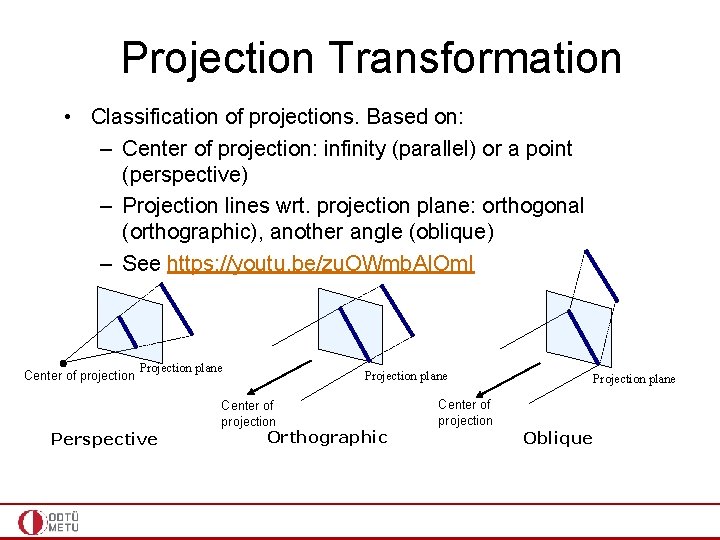
Projection Transformation • Classification of projections. Based on: – Center of projection: infinity (parallel) or a point (perspective) – Projection lines wrt. projection plane: orthogonal (orthographic), another angle (oblique) – See https: //youtu. be/zu. OWmb. AIOm. I Center of projection Projection plane Center of projection Perspective Orthographic Projection plane Center of projection Oblique
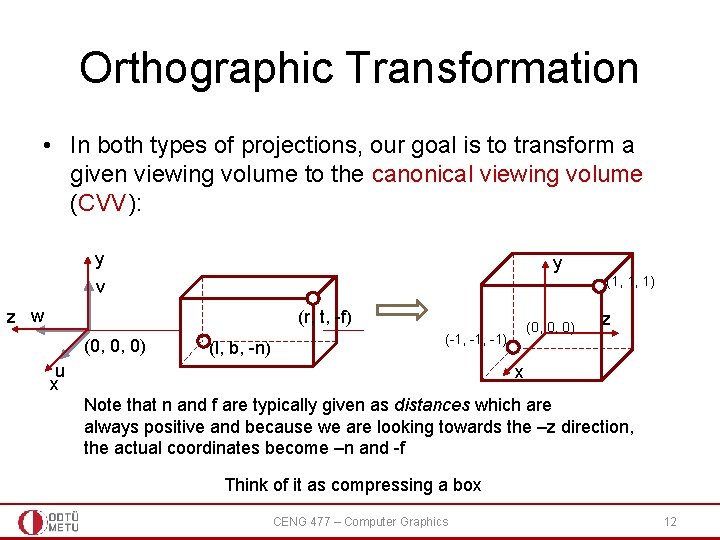
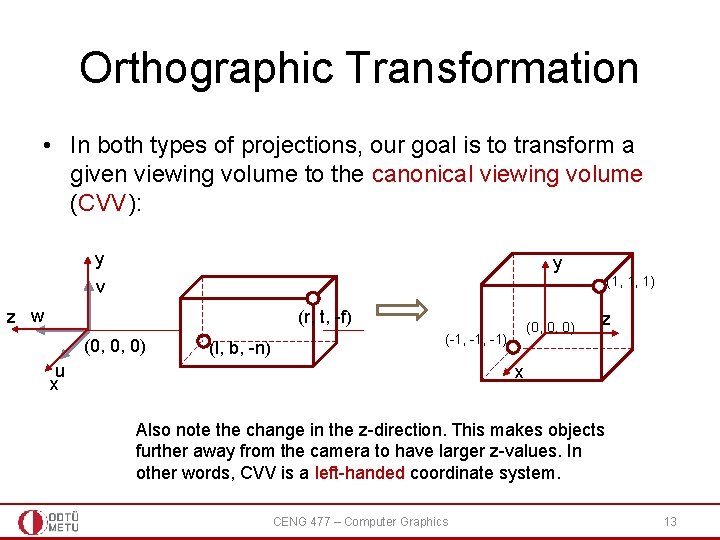
Orthographic Transformation • In both types of projections, our goal is to transform a given viewing volume to the canonical viewing volume (CVV): y y (1, 1, 1) v z w (r, t, -f) (0, 0, 0) (l, b, -n) (0, 0, 0) (-1, -1) u x z x Note that n and f are typically given as distances which are always positive and because we are looking towards the –z direction, the actual coordinates become –n and -f Think of it as compressing a box CENG 477 – Computer Graphics 12
Orthographic Transformation • In both types of projections, our goal is to transform a given viewing volume to the canonical viewing volume (CVV): y y (1, 1, 1) v z w (r, t, -f) (0, 0, 0) (l, b, -n) (0, 0, 0) (-1, -1) u x z x Also note the change in the z-direction. This makes objects further away from the camera to have larger z-values. In other words, CVV is a left-handed coordinate system. CENG 477 – Computer Graphics 13
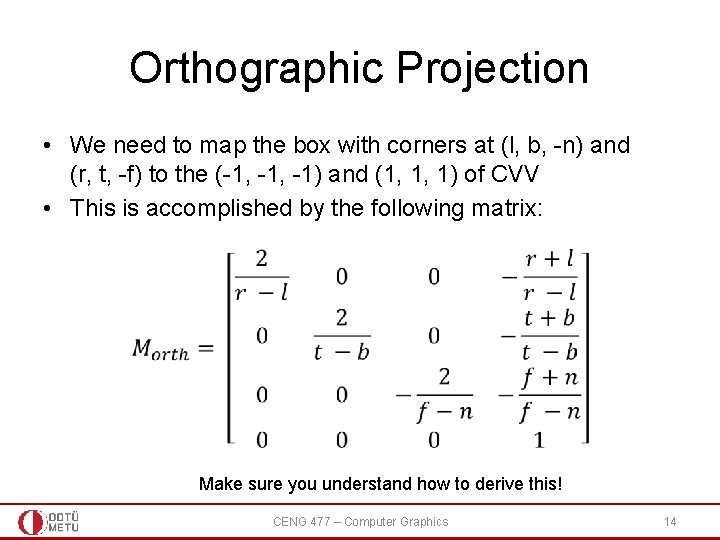
Orthographic Projection • We need to map the box with corners at (l, b, -n) and (r, t, -f) to the (-1, -1) and (1, 1, 1) of CVV • This is accomplished by the following matrix: Make sure you understand how to derive this! CENG 477 – Computer Graphics 14
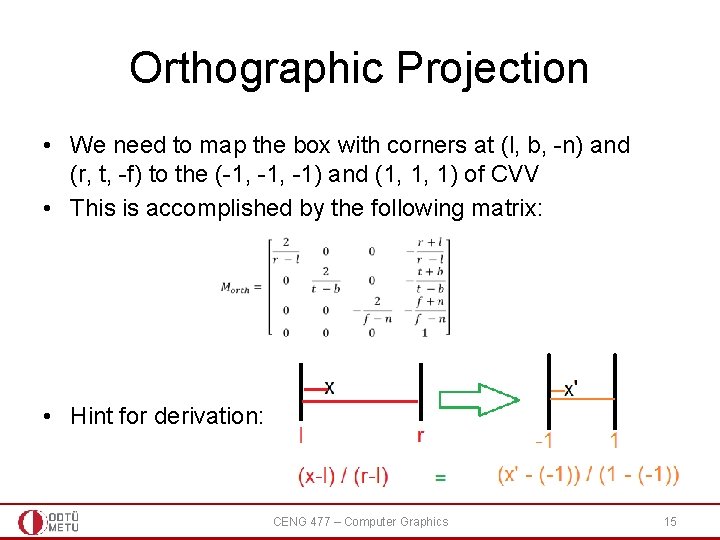
Orthographic Projection • We need to map the box with corners at (l, b, -n) and (r, t, -f) to the (-1, -1) and (1, 1, 1) of CVV • This is accomplished by the following matrix: • Hint for derivation: CENG 477 – Computer Graphics 15
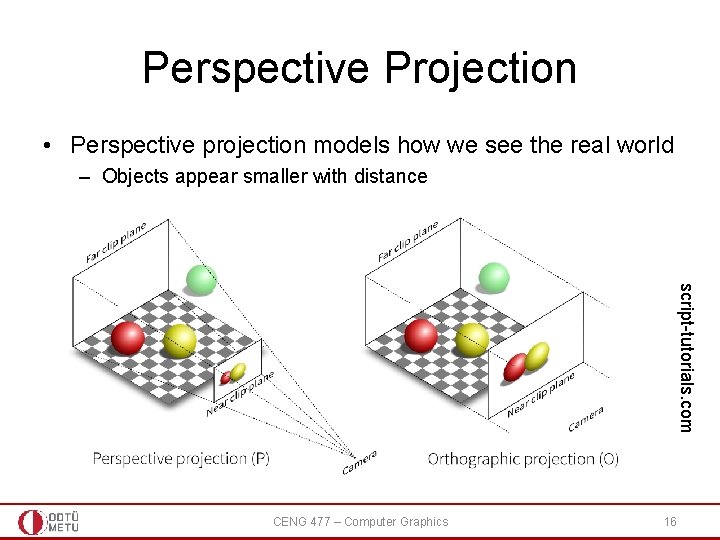
Perspective Projection • Perspective projection models how we see the real world – Objects appear smaller with distance script-tutorials. com CENG 477 – Computer Graphics 16
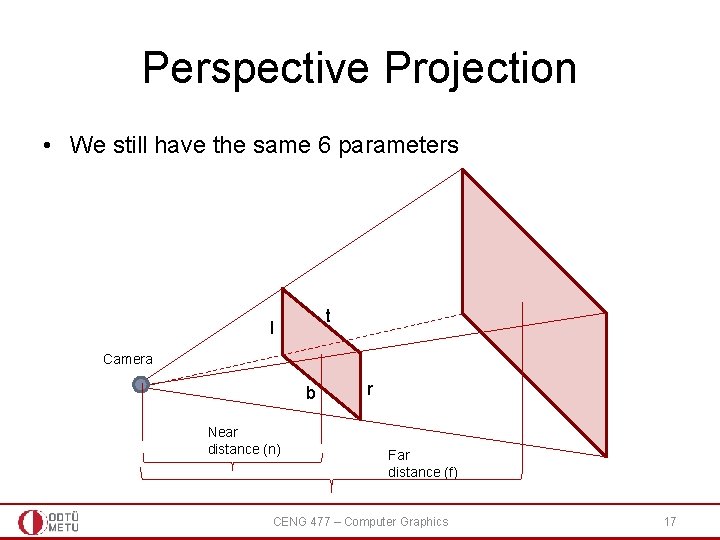
Perspective Projection • We still have the same 6 parameters t l Camera b Near distance (n) r Far distance (f) CENG 477 – Computer Graphics 17
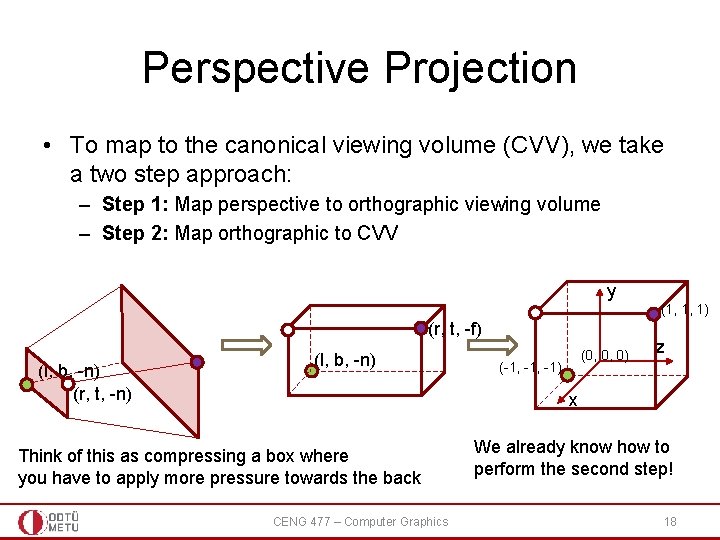
Perspective Projection • To map to the canonical viewing volume (CVV), we take a two step approach: – Step 1: Map perspective to orthographic viewing volume – Step 2: Map orthographic to CVV y (1, 1, 1) (r, t, -f) (l, b, -n) (r, t, -n) (l, b, -n) (0, 0, 0) (-1, -1) z x Think of this as compressing a box where you have to apply more pressure towards the back CENG 477 – Computer Graphics We already know how to perform the second step! 18
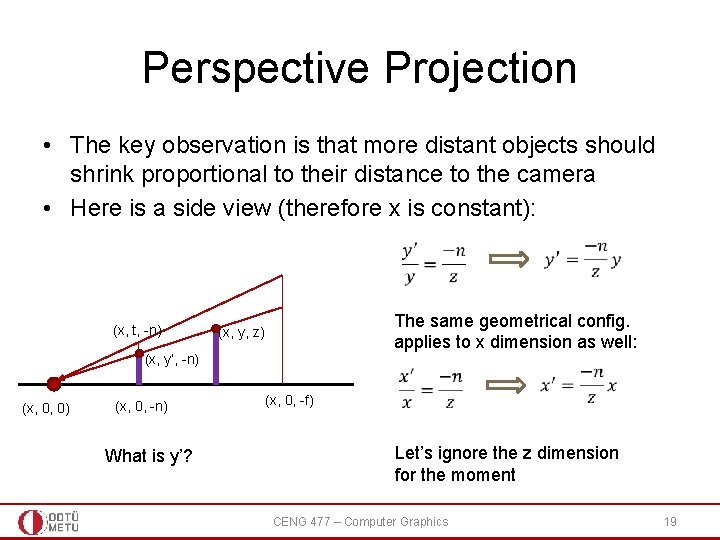
Perspective Projection • The key observation is that more distant objects should shrink proportional to their distance to the camera • Here is a side view (therefore x is constant): (x, t, -n) The same geometrical config. applies to x dimension as well: (x, y, z) (x, y’, -n) (x, 0, 0) (x, 0, -n) What is y’? (x, 0, -f) Let’s ignore the z dimension for the moment CENG 477 – Computer Graphics 19
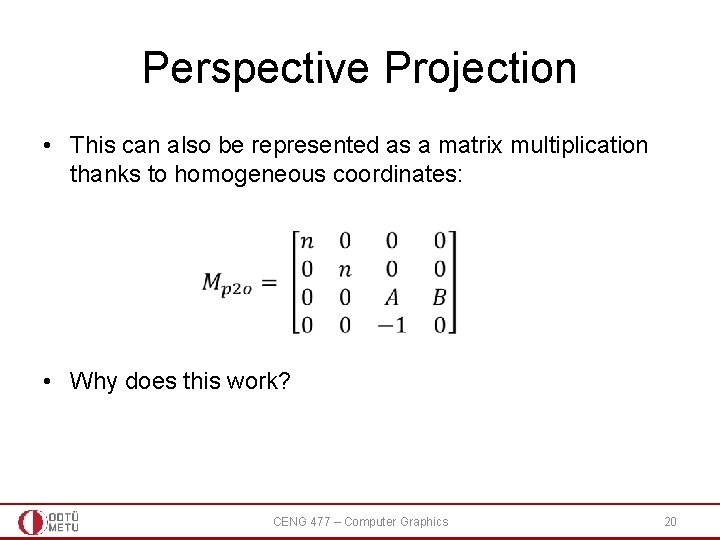
Perspective Projection • This can also be represented as a matrix multiplication thanks to homogeneous coordinates: • Why does this work? CENG 477 – Computer Graphics 20
Perspective Projection • Let’s multiply a point [x, y, z, 1]T with this matrix: Remember that in homogenous coordinates, scaling all components by the same factor does not change the point. So divide by the last comp. CENG 477 – Computer Graphics 21
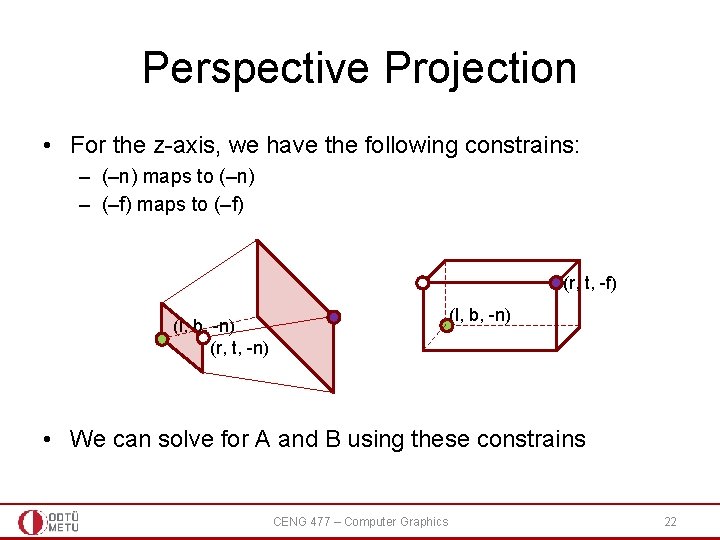
Perspective Projection • For the z-axis, we have the following constrains: – (–n) maps to (–n) – (–f) maps to (–f) (r, t, -f) (l, b, -n) (r, t, -n) • We can solve for A and B using these constrains CENG 477 – Computer Graphics 22
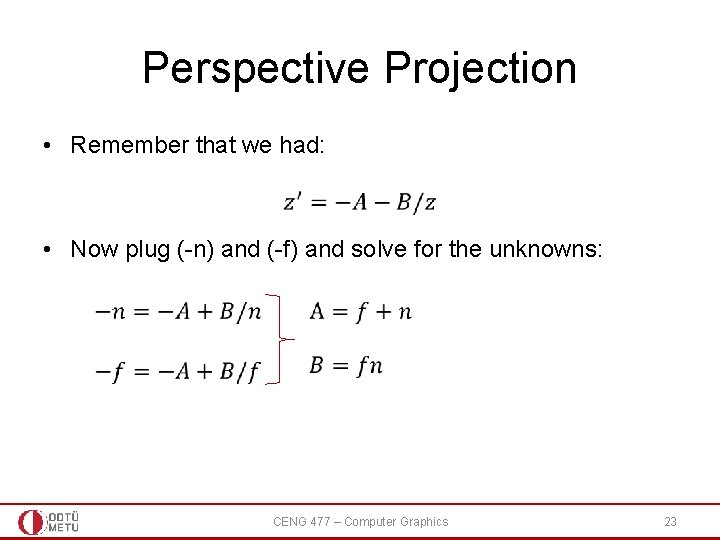
Perspective Projection • Remember that we had: • Now plug (-n) and (-f) and solve for the unknowns: CENG 477 – Computer Graphics 23
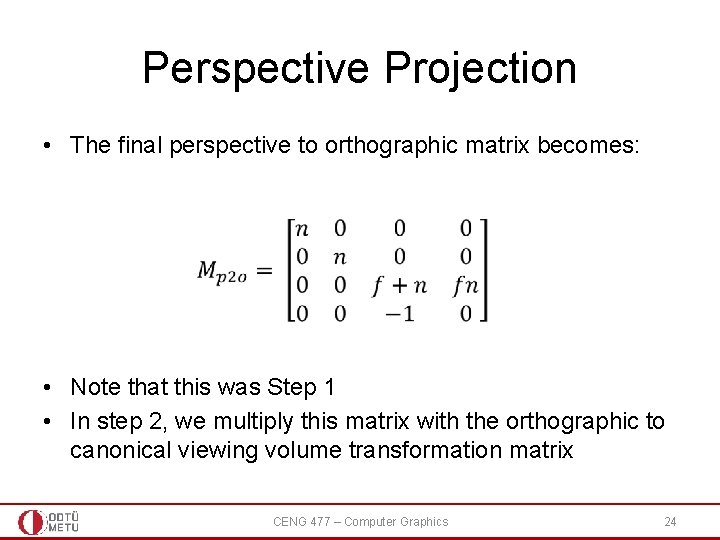
Perspective Projection • The final perspective to orthographic matrix becomes: • Note that this was Step 1 • In step 2, we multiply this matrix with the orthographic to canonical viewing volume transformation matrix CENG 477 – Computer Graphics 24
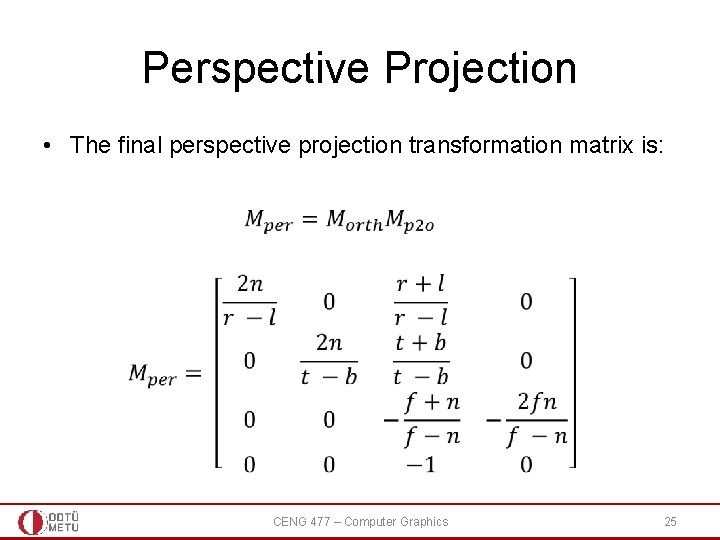
Perspective Projection • The final perspective projection transformation matrix is: CENG 477 – Computer Graphics 25
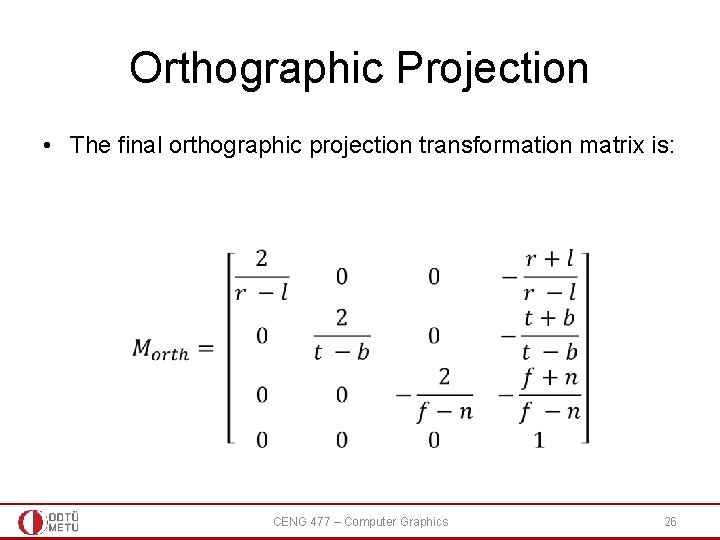
Orthographic Projection • The final orthographic projection transformation matrix is: CENG 477 – Computer Graphics 26
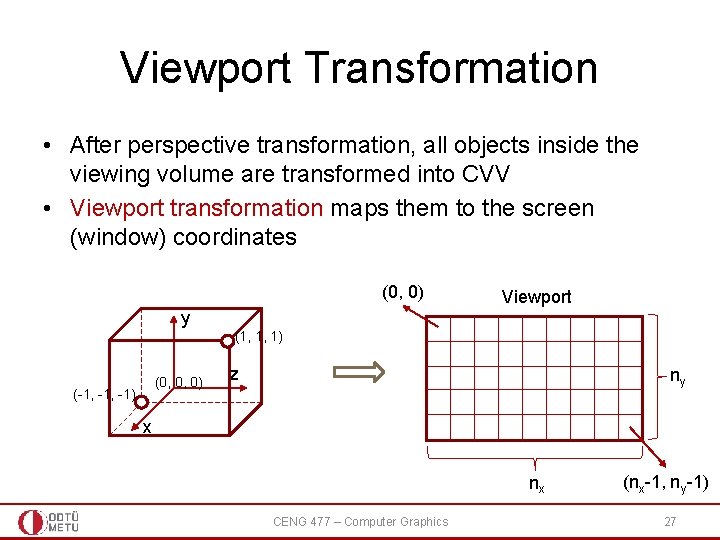
Viewport Transformation • After perspective transformation, all objects inside the viewing volume are transformed into CVV • Viewport transformation maps them to the screen (window) coordinates (0, 0) Viewport y (1, 1, 1) (0, 0, 0) (-1, -1) z ny x nx CENG 477 – Computer Graphics (nx-1, ny-1) 27
Viewport Transformation • x values in range [-1, 1] are transformed to [-0. 5, nx-0. 5] • y values in range [-1, 1] are transformed to [-0. 5, ny-0. 5] • z values in range [-1, 1] are transformed to [0, 1] for later usage Note that we don’t need to preserve the w component anymore CENG 477 – Computer Graphics 28
Viewport Transformation • x values in range [-1, 1] are transformed to [-0. 5, nx-0. 5] • y values in range [-1, 1] are transformed to [-0. 5, ny-0. 5] • z values in range [-1, 1] are transformed to [0, 1] for later usage: – Z-buffer (aka depth buffer): quick and robust decision for who is in front of who //solves the visibility problem CENG 477 – Computer Graphics 29
Viewport Transformation • x values in range [-1, 1] are transformed to [-0. 5, nx-0. 5] • y values in range [-1, 1] are transformed to [-0. 5, ny-0. 5] • z values in range [-1, 1] are transformed to [0, 1] for later usage: – Z-buffer (aka depth buffer): quick and robust decision for who is in front of who //solves the visibility problem – Z-buffer is based on the z-coordinates in the viewport ([0, 1]), not in the world coordinates • World coordinates are defined for 3 corners of a triangle; it is inefficient to fill the inside of the triangle in the world space because – A big 3 D triangle, after all the 3 D to 2 D transformations, may be behind an object in viewport so will not be visible in 2 D at all; hence a fill in 3 D is useless – A long 3 D triangle may be mapped to a small 2 D triangle in the viewport • Fast (hardware-level) rasterization algorithms to fill the inside of a 2 D viewport triangle (compared to filling a triangle hanging in 3 D) CENG 477 – Computer Graphics 30
Z-Fighting • Note that the z-values get compressed to [0, 1] range from the [-n: -f] range • Observe how it looks for n = 10 and f = 50 CENG 477 – Computer Graphics 31
Z-Fighting • Note that the z-values get compressed to [0, 1] range from the [-n: -f] range • Observe the same for n = 10 and f = 200 CENG 477 – Computer Graphics 32
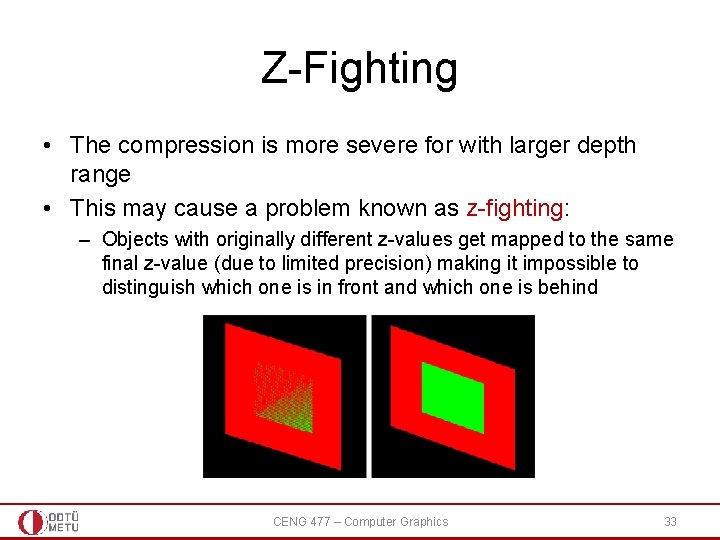
Z-Fighting • The compression is more severe for with larger depth range • This may cause a problem known as z-fighting: – Objects with originally different z-values get mapped to the same final z-value (due to limited precision) making it impossible to distinguish which one is in front and which one is behind CENG 477 – Computer Graphics 33
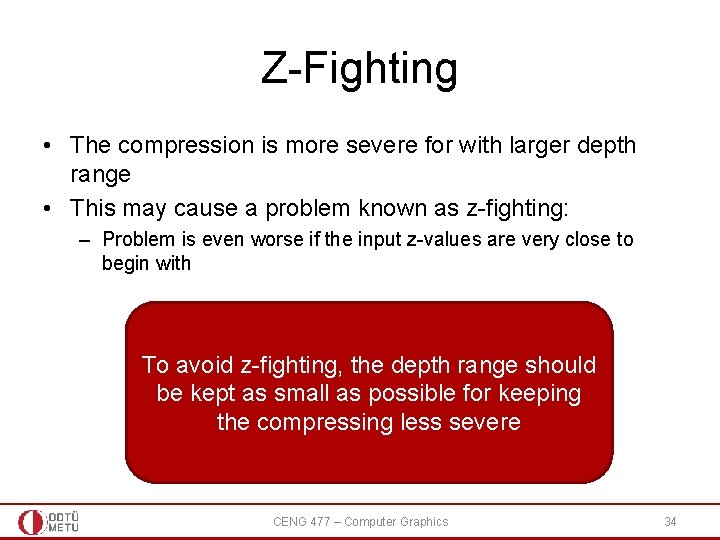
Z-Fighting • The compression is more severe for with larger depth range • This may cause a problem known as z-fighting: – Problem is even worse if the input z-values are very close to begin with To avoid z-fighting, the depth range should be kept as small as possible for keeping the compressing less severe CENG 477 – Computer Graphics 34
Summary • A point [xw, yw, zw]T in the world coordinate system can be transformed to its viewport coordinates by: • If the point is defined in its local coordinate system and we are given modeling transformations we use: CENG 477 – Computer Graphics 35