
CCRS Comprehensive Conference Registration System Preliminary Design December
CCRS Comprehensive Conference Registration System Preliminary Design December 7 th, 2012 1
Welcome Our Client: Dr. Darren Lim Professor of Computer Science Siena College S. E. E. Solutions 2
Agenda • • • • Introductions Problem Overview Project Progression User Case Narratives UML Use Case Diagram UML Deployment Diagram Website Map UML Activity Diagrams Data Flow Diagrams Requirements Inventory Data Dictionary Testing Development Environment Prototype Screens What’s Next S. E. E. Solutions 3
Introduction Kelly Bedard Team Leader Tyler Mann System Admin Co-Webmaster Jess Reinhardt Document Developer & Analyst Brett Rudloff Visionary Leader Carl Tompkins Webmaster S. E. E. Solutions 4
Agenda • • • • Problem Overview Project Progression User Case Narratives UML Use Case Diagram UML Deployment Diagram Website Map UML Activity Diagrams Data Flow Diagrams Requirements Inventory Data Dictionary Testing Development Environment Prototype Screens What’s Next S. E. E. Solutions 5
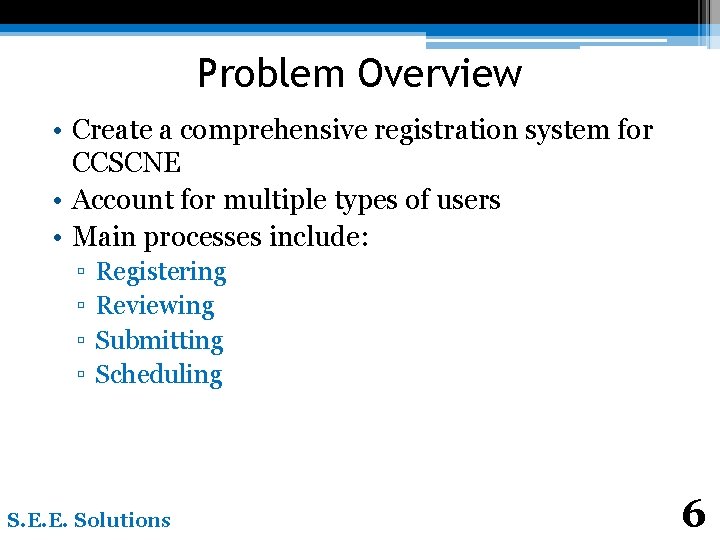
Problem Overview • Create a comprehensive registration system for CCSCNE • Account for multiple types of users • Main processes include: ▫ ▫ Registering Reviewing Submitting Scheduling S. E. E. Solutions 6
Agenda • • • • Project Progression User Case Narratives UML Use Case Diagram UML Deployment Diagram Website Map UML Activity Diagrams Data Flow Diagrams Requirements Inventory Data Dictionary Testing Development Environment Prototype Screens What’s Next S. E. E. Solutions 7
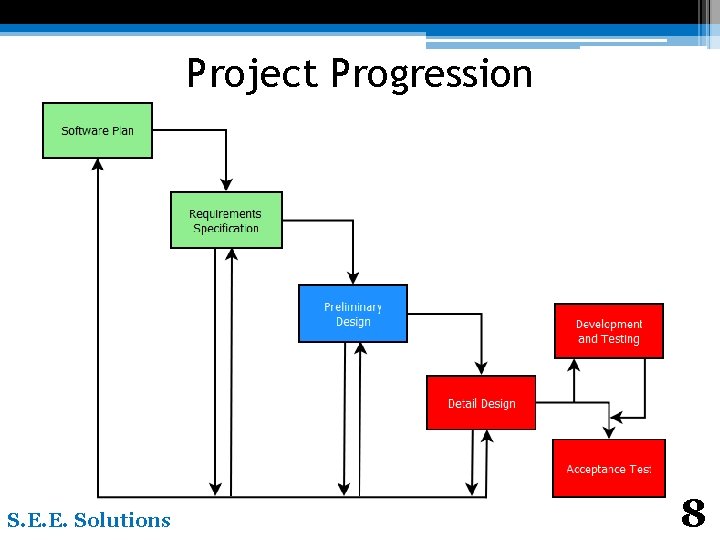
Project Progression S. E. E. Solutions 8
Agenda • • • User Case Narratives UML Use Case Diagram UML Deployment Diagram Website Map UML Activity Diagrams Data Flow Diagrams Requirements Inventory Data Dictionary Testing Development Environment Prototype Screens What’s Next S. E. E. Solutions 9
User Case Narratives • Gives brief description of each type of user • Describes how each user will interact with CCRS S. E. E. Solutions 10
All Users - User Case Narrative • Logs in/out • Change Password S. E. E. Solutions 11
Attendee - User Case Narrative • Registers for conference ▫ Supplies personal, meal and payment information • Receives confirmation communication S. E. E. Solutions 12
Conference Chair - User Case Narrative • Has access to all conference information • Can configure all conference settings ▫ Can create accounts for others • Can change the schedule S. E. E. Solutions 13
Reviewer - User Case Narrative • Downloads submissions • Uploads reviews S. E. E. Solutions 14
Submitter - User Case Narrative • Uploads submissions • Receives acceptance or rejection notification S. E. E. Solutions 15
Agenda • • • UML Use Case Diagram UML Deployment Diagram Website Map UML Activity Diagrams Data Flow Diagrams Requirements Inventory Data Dictionary Testing Development Environment Prototype Screens What’s Next S. E. E. Solutions 16
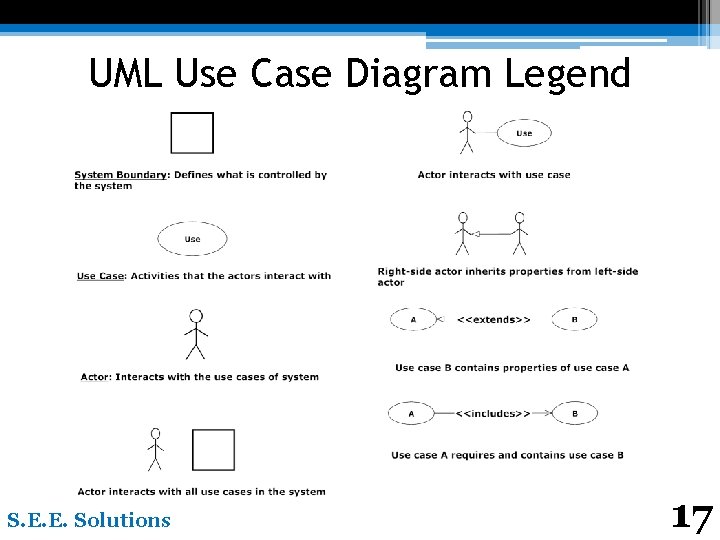
UML Use Case Diagram Legend S. E. E. Solutions 17
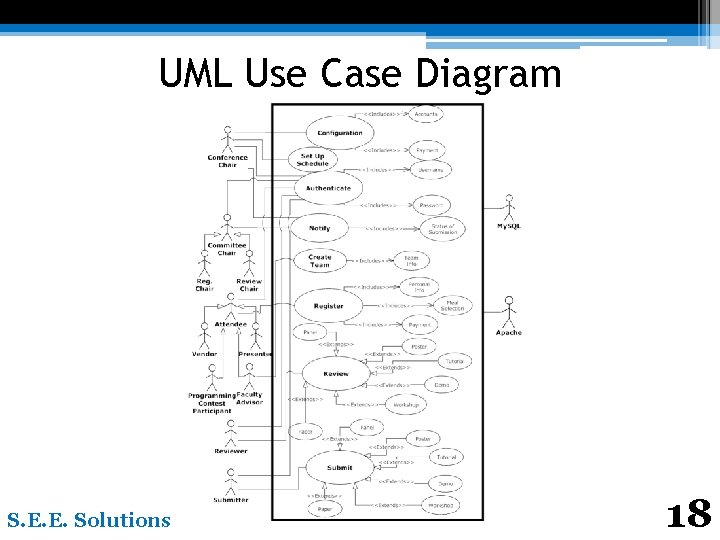
UML Use Case Diagram S. E. E. Solutions 18
Agenda • • • UML Deployment Diagram Website Map UML Activity Diagrams Data Flow Diagrams Requirements Inventory Data Dictionary Testing Development Environment Prototype Screens What’s Next S. E. E. Solutions 19
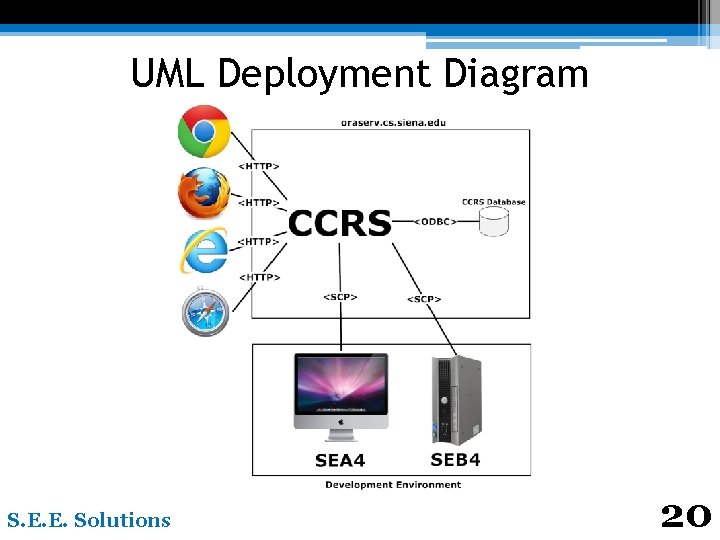
UML Deployment Diagram S. E. E. Solutions 20
Agenda • • • Website Map UML Activity Diagrams Data Flow Diagrams Requirements Inventory Data Dictionary Testing Development Environment Prototype Screens What’s Next S. E. E. Solutions 21
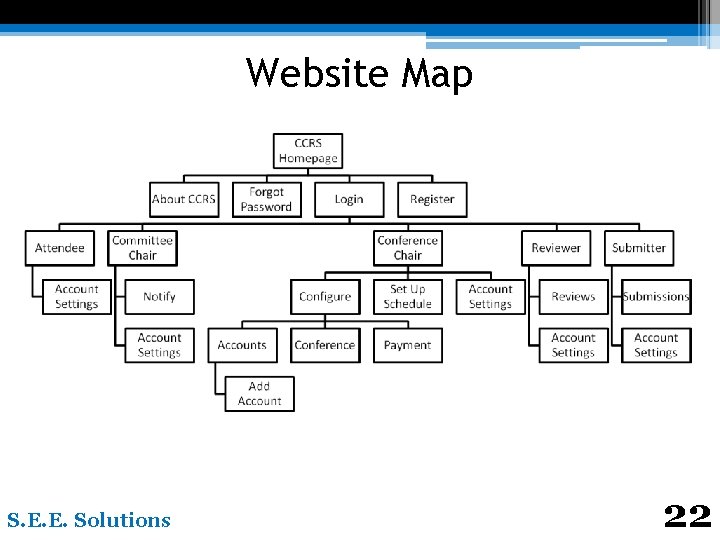
Website Map S. E. E. Solutions 22
Agenda • • UML Activity Diagrams Data Flow Diagrams Requirements Inventory Data Dictionary Testing Development Environment Prototype Screens What’s Next S. E. E. Solutions 23
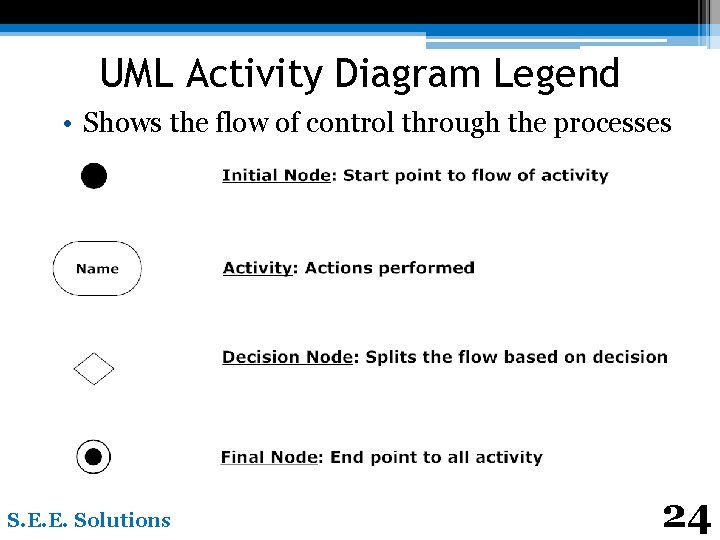
UML Activity Diagram Legend • Shows the flow of control through the processes S. E. E. Solutions 24
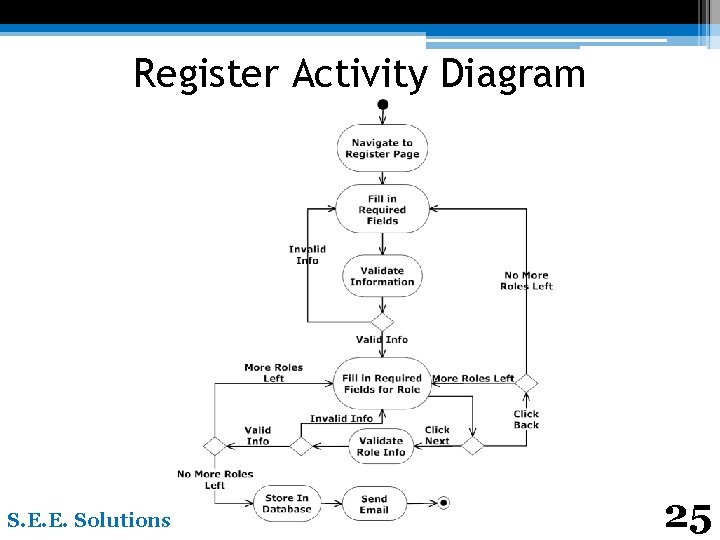
Register Activity Diagram S. E. E. Solutions 25
Agenda • • Data Flow Diagrams Requirements Inventory Data Dictionary Testing Development Environment Prototype Screens What’s Next S. E. E. Solutions 26
Data Flow Diagrams • Illustrate the movement of data within CCRS • Show CCRS: ▫ ▫ Creates data Moves data Stores data Transforms data S. E. E. Solutions 27
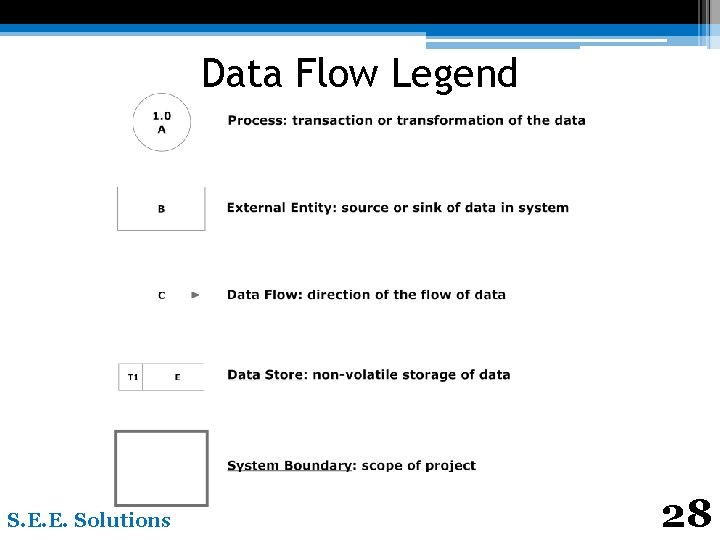
Data Flow Legend S. E. E. Solutions 28
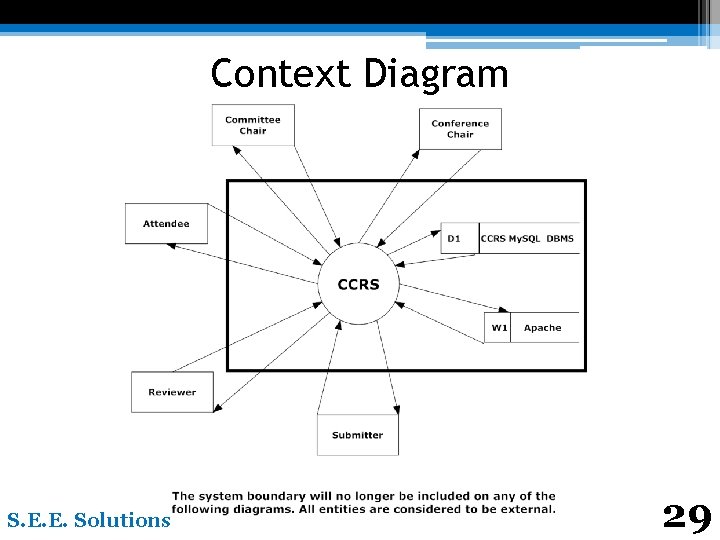
Context Diagram S. E. E. Solutions 29
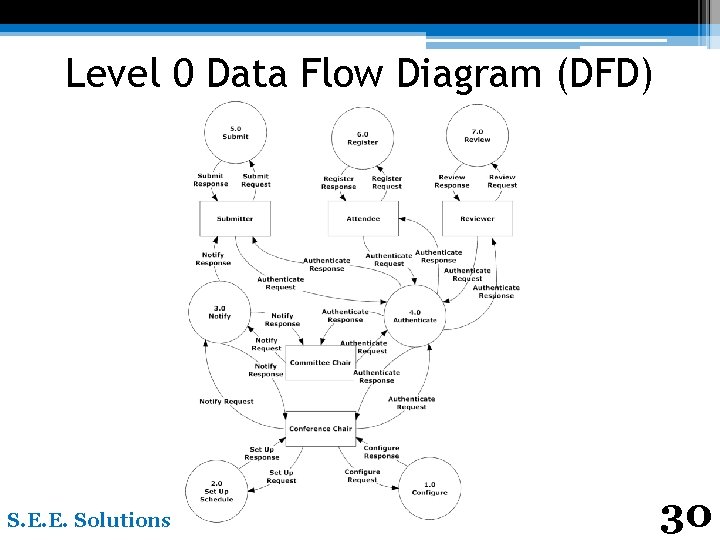
Level 0 Data Flow Diagram (DFD) S. E. E. Solutions 30
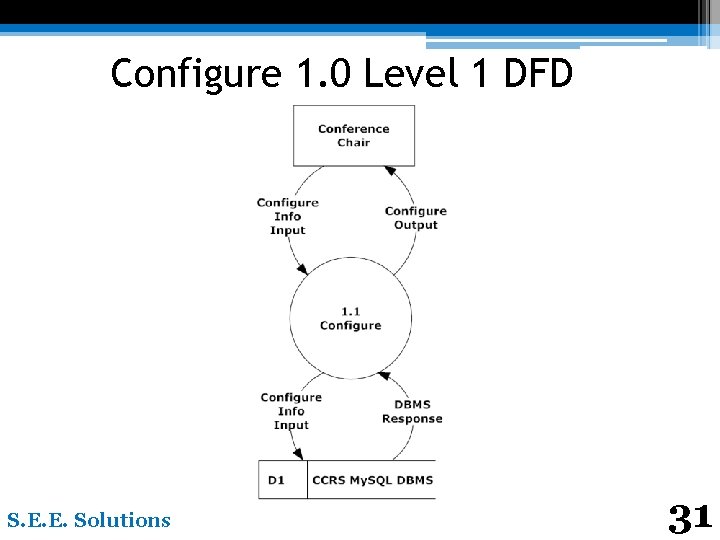
Configure 1. 0 Level 1 DFD S. E. E. Solutions 31
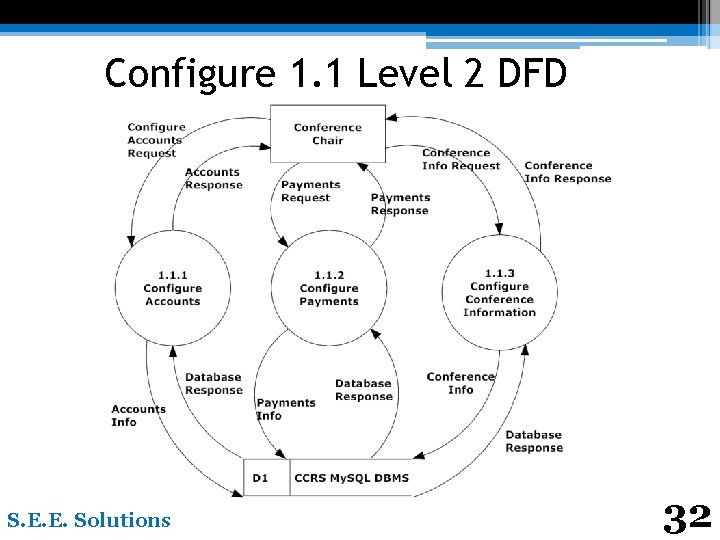
Configure 1. 1 Level 2 DFD S. E. E. Solutions 32
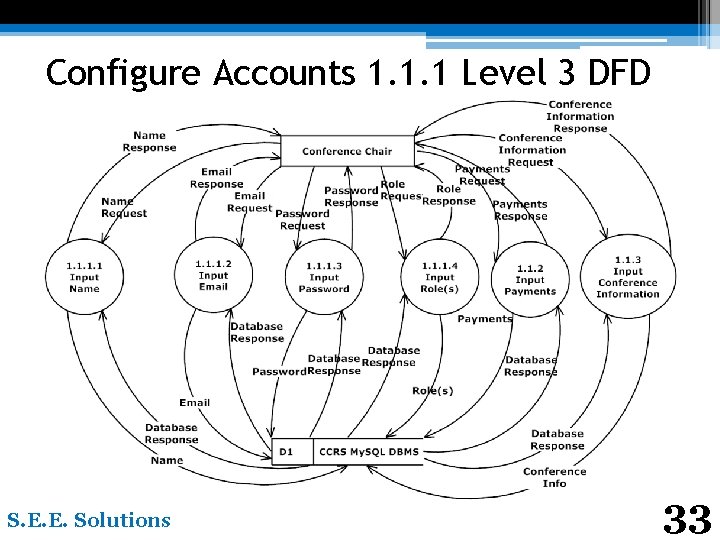
Configure Accounts 1. 1. 1 Level 3 DFD S. E. E. Solutions 33
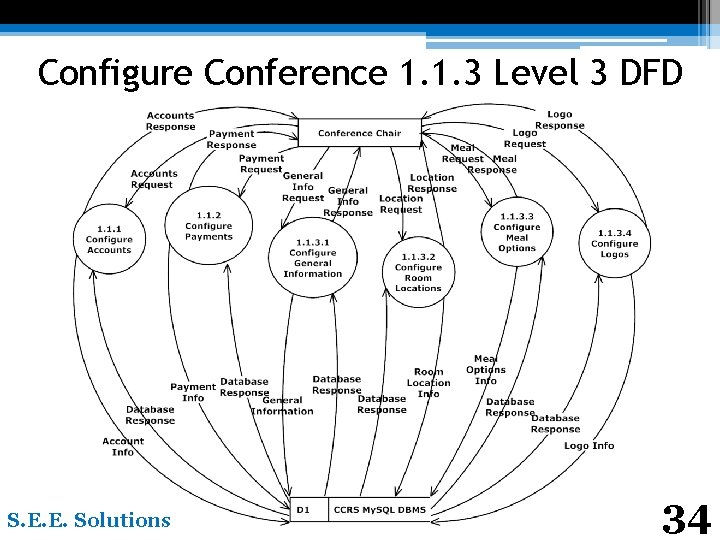
Configure Conference 1. 1. 3 Level 3 DFD S. E. E. Solutions 34
Agenda • • • Requirements Inventory Data Dictionary Testing Development Environment Prototype Screens What’s Next S. E. E. Solutions 35
Requirements Inventory • Non-Functional Requirements ▫ Not Easily Testable • Functional Requirements ▫ Easily Testable • System Requirements ▫ Specific to system rather than role S. E. E. Solutions 36
Non-Functional Requirements • The system will be: ▫ ▫ Easily maintained Stable User friendly Run efficiently S. E. E. Solutions 37
Conference Chair - Functional Requirements • Will be able to: ▫ ▫ ▫ Configure user accounts Configure payments for users Configure and/or edit schedule Configure meal options Notify reviewer and vendor application status S. E. E. Solutions 38
Attendee – Functional Requirements • Will be able to ▫ Register for the conference �Personal information �Meal selection �Payment S. E. E. Solutions 39
System Requirements • The system will be able to: ▫ ▫ ▫ Automatically generate a schedule Have drag and drop capabilities Assign Reviewers to submissions Change Submitter to Presenter when accepted E-mail users when role accepted S. E. E. Solutions 40
Agenda • • • Data Dictionary Testing Development Environment Prototype Screens What’s Next S. E. E. Solutions 41
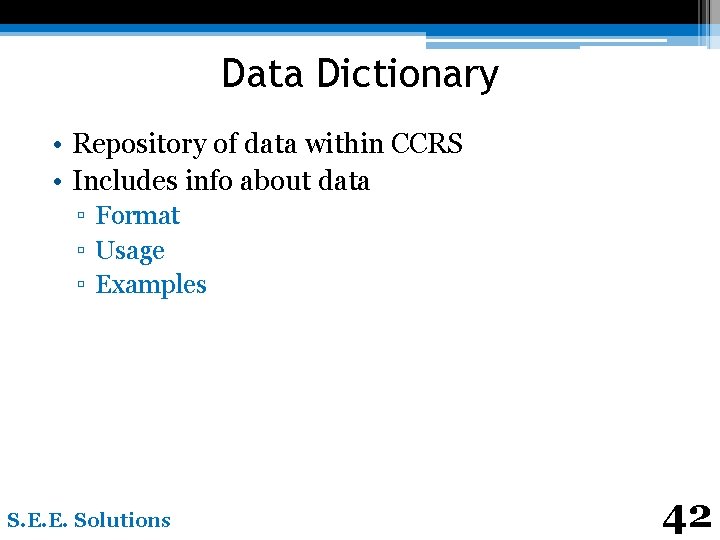
Data Dictionary • Repository of data within CCRS • Includes info about data ▫ Format ▫ Usage ▫ Examples S. E. E. Solutions 42
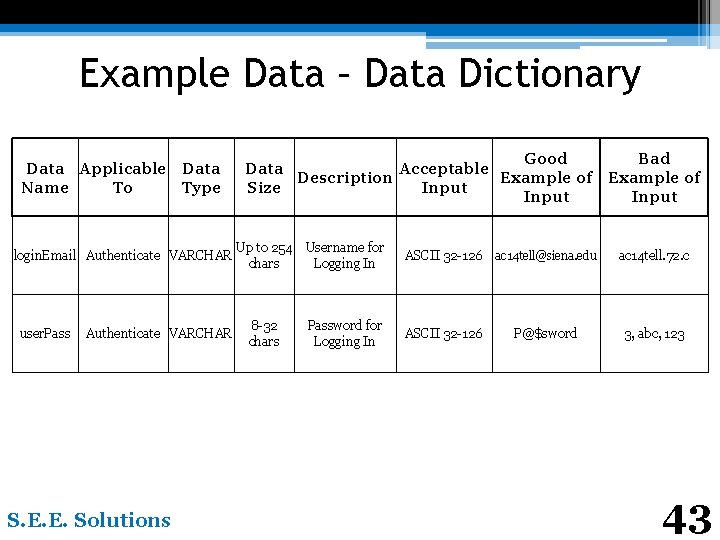
Example Data – Data Dictionary Data Applicable Data Name To Type login. Email Authenticate VARCHAR user. Pass Authenticate VARCHAR S. E. E. Solutions Good Bad Data Acceptable Description Example of Size Input Up to 254 chars Username for Logging In ASCII 32 -126 ac 14 tell@siena. edu 8 -32 chars Password for Logging In ASCII 32 -126 P@$sw 0 rd ac 14 tell. 72. c 3, abc, 123 43
Agenda • • Testing Development Environment Prototype Screens What’s Next S. E. E. Solutions 44
Testing • Will be tested on the four major browsers • Non-Functional Requirements • Functional Requirements ▫ Broken down into modules ▫ Each tested separately ▫ Tested as a whole • Will be completed in Detailed Design S. E. E. Solutions 45
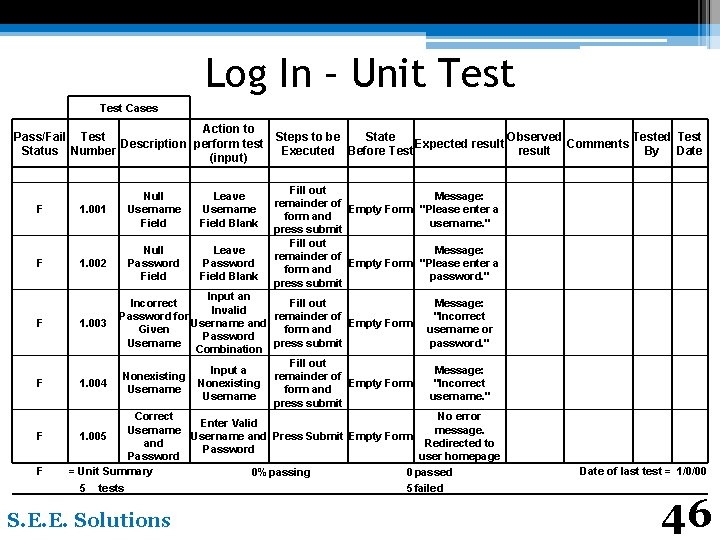
Log In – Unit Test Cases Action to Pass/Fail Test Steps to be State Observed Test Description perform test Expected result Comments Status Number Executed Before Test result By Date (input) F 1. 001 Null Username Field F 1. 002 Null Password Field F F Leave Username Field Blank Leave Password Field Blank Fill out Message: remainder of Empty Form "Please enter a form and username. " press submit Fill out Message: remainder of Empty Form "Please enter a form and password. " press submit Input an Incorrect Fill out Message: Invalid Password for remainder of "Incorrect 1. 003 Empty Form Username and Given form and username or Password Username press submit password. " Combination Fill out Input a Message: Nonexisting remainder of 1. 004 Nonexisting Empty Form "Incorrect Username form and Username username. " press submit Correct No error Enter Valid Username message. 1. 005 Username and Press Submit Empty Form and Redirected to Password user homepage = Unit Summary 0% passing 0 passed 5 tests 5 failed S. E. E. Solutions Date of last test = 1/0/00 46
Agenda • Development Environment • Prototype Screens • What’s Next S. E. E. Solutions 47
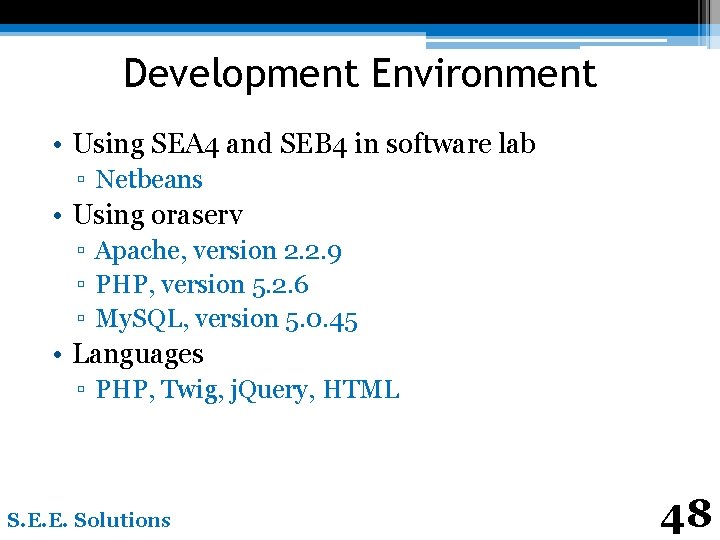
Development Environment • Using SEA 4 and SEB 4 in software lab ▫ Netbeans • Using oraserv ▫ Apache, version 2. 2. 9 ▫ PHP, version 5. 2. 6 ▫ My. SQL, version 5. 0. 45 • Languages ▫ PHP, Twig, j. Query, HTML S. E. E. Solutions 48
Agenda • Prototype Screens • What’s Next S. E. E. Solutions 49
Prototypes • Provide a basic look for system • Show what users can see ▫ Login Page ▫ Registration Page ▫ Submission Page S. E. E. Solutions 50
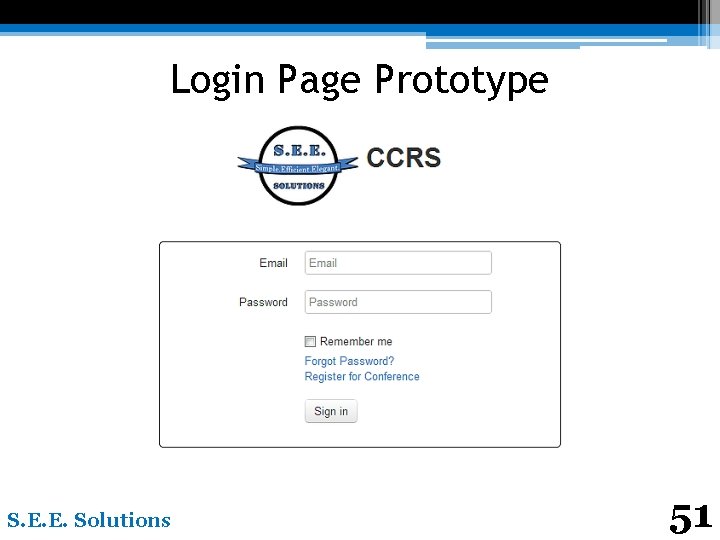
Login Page Prototype S. E. E. Solutions 51
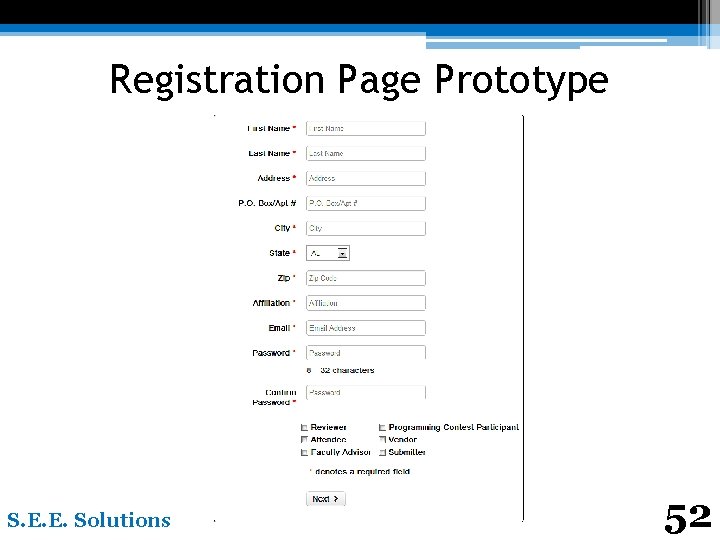
Registration Page Prototype S. E. E. Solutions 52
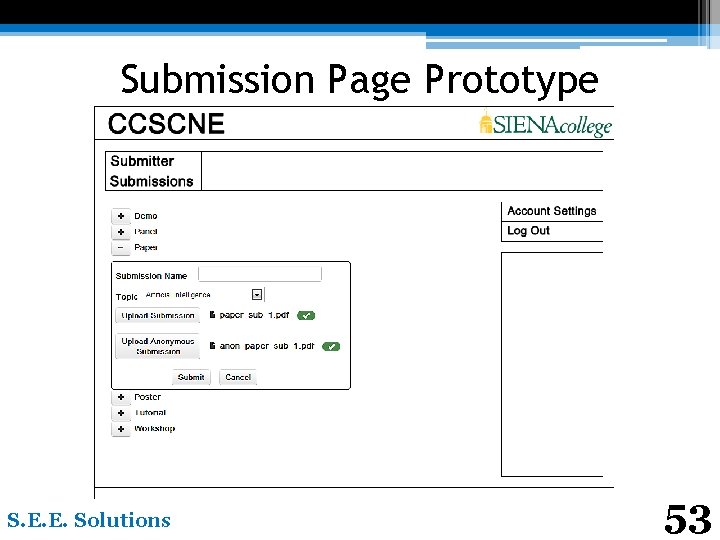
Submission Page Prototype S. E. E. Solutions 53
Agenda • What’s Next S. E. E. Solutions 54
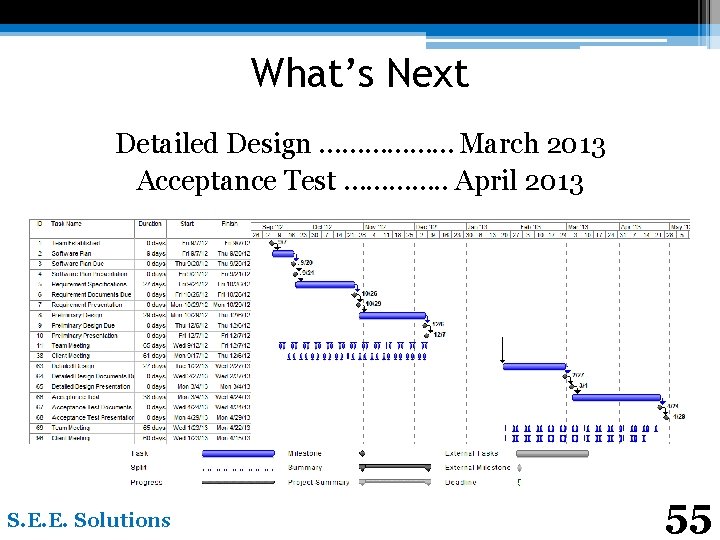
What’s Next Detailed Design ……………… March 2013 Acceptance Test …………. . April 2013 S. E. E. Solutions 55
Questions? S. E. E. Solutions 56
- Slides: 56