
Cash and Liquidity Management Scenario Overview Click process
- Slides: 13
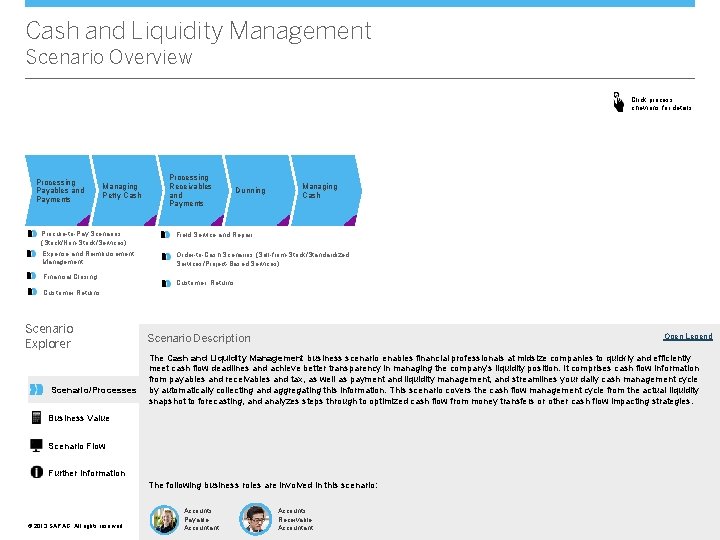
Cash and Liquidity Management Scenario Overview Click process chevrons for details Processing Payables and Payments Managing Petty Cash Processing Receivables and Payments Dunning Managing Cash Procure-to-Pay Scenarios (Stock/Non-Stock/Services) Field Service and Repair Expense and Reimbursement Management Order-to-Cash Scenarios (Sell-from-Stock/Standardized Services/Project-Based Services) Financial Closing Customer Returns Scenario Explorer Scenario/Processes Scenario Description Open Legend The Cash and Liquidity Management business scenario enables financial professionals at midsize companies to quickly and efficiently meet cash flow deadlines and achieve better transparency in managing the company's liquidity position. It comprises cash flow information from payables and receivables and tax, as well as payment and liquidity management, and streamlines your daily cash management cycle by automatically collecting and aggregating this information. This scenario covers the cash flow management cycle from the actual liquidity snapshot to forecasting, and analyzes steps through to optimized cash flow from money transfers or other cash flow impacting strategies. Business Value Scenario Flow Further Information The following business roles are involved in this scenario: © © 2013 SAP AG. All rights reserved. Accounts Payable Accountant Accounts Receivable Accountant
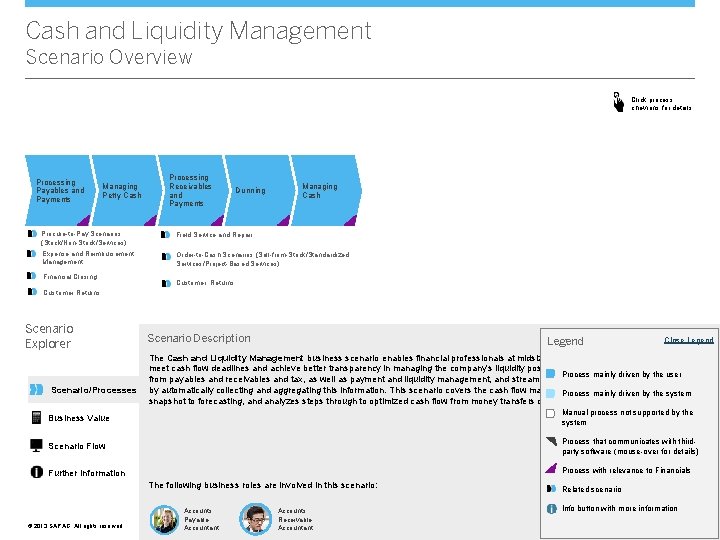
Cash and Liquidity Management Scenario Overview Click process chevrons for details Processing Payables and Payments Managing Petty Cash Processing Receivables and Payments Dunning Managing Cash Procure-to-Pay Scenarios (Stock/Non-Stock/Services) Field Service and Repair Expense and Reimbursement Management Order-to-Cash Scenarios (Sell-from-Stock/Standardized Services/Project-Based Services) Financial Closing Customer Returns Scenario Explorer Scenario/Processes Scenario Description Legend Open Close Legend The Cash and Liquidity Management business scenario enables financial professionals at midsize companies to quickly and efficiently meet cash flow deadlines and achieve better transparency in managing the company's liquidity position. It comprises cash flow information Process mainly driven by the user from payables and receivables and tax, as well as payment and liquidity management, and streamlines your daily cash management cycle by automatically collecting and aggregating this information. This scenario covers the cash flow management cycle from the by actual liquidity Process mainly driven the system snapshot to forecasting, and analyzes steps through to optimized cash flow from money transfers or other cash flow impacting strategies. Business Value Manual process not supported by the system Scenario Flow Process that communicates with thirdparty software (mouse-over for details) Process with relevance to Financials Further Information The following business roles are involved in this scenario: © © 2013 SAP AG. All rights reserved. Accounts Payable Accountant Accounts Receivable Accountant Related scenario Info button with more information <Role Name>
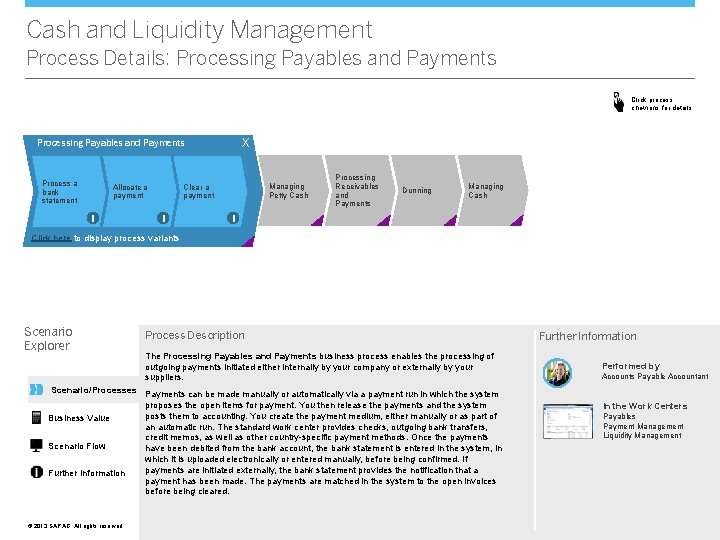
Cash and Liquidity Management Process Details: Processing Payables and Payments Click process chevrons for details X Processing Payables and Payments Center a Process chevron for bank main statement processes Allocate a payment i Managing Petty Cash Clear a payment i Processing Receivables and Payments Dunning Managing Cash i Click here to display process variants Scenario Explorer Process Description The Processing Payables and Payments business process enables the processing of outgoing payments initiated either internally by your company or externally by your suppliers. Scenario/Processes Payments can be made manually or automatically via a payment run in which the system proposes the open items for payment. You then release the payments and the system posts them to accounting. You create the payment medium, either manually or as part of Business Value an automatic run. The standard work center provides checks, outgoing bank transfers, credit memos, as well as other country-specific payment methods. Once the payments Scenario Flow have been debited from the bank account, the bank statement is entered in the system, in which it is uploaded electronically or entered manually, before being confirmed. If payments are initiated externally, the bank statement provides the notification that a Further Information payment has been made. The payments are matched in the system to the open invoices before being cleared. © © 2013 SAP AG. All rights reserved. Further Information Performed by Accounts Payable Accountant In the Work Centers Payables Payment Management Liquidity Management
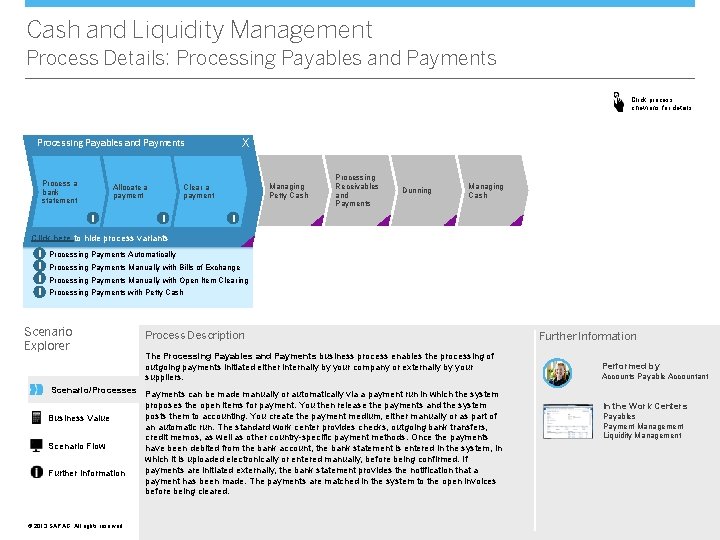
Cash and Liquidity Management Process Details: Processing Payables and Payments Click process chevrons for details X Processing Payables and Payments Center a Process chevron for bank main statement processes Allocate a payment i Managing Petty Cash Clear a payment i Processing Receivables and Payments Dunning Managing Cash i Click here to hide process variants i i Processing Payments Automatically Processing Payments Manually with Bills of Exchange Processing Payments Manually with Open Item Clearing Processing Payments with Petty Cash Scenario Explorer Process Description The Processing Payables and Payments business process enables the processing of outgoing payments initiated either internally by your company or externally by your suppliers. Scenario/Processes Payments can be made manually or automatically via a payment run in which the system proposes the open items for payment. You then release the payments and the system posts them to accounting. You create the payment medium, either manually or as part of Business Value an automatic run. The standard work center provides checks, outgoing bank transfers, credit memos, as well as other country-specific payment methods. Once the payments Scenario Flow have been debited from the bank account, the bank statement is entered in the system, in which it is uploaded electronically or entered manually, before being confirmed. If payments are initiated externally, the bank statement provides the notification that a Further Information payment has been made. The payments are matched in the system to the open invoices before being cleared. © © 2013 SAP AG. All rights reserved. Further Information Performed by Accounts Payable Accountant In the Work Centers Payables Payment Management Liquidity Management
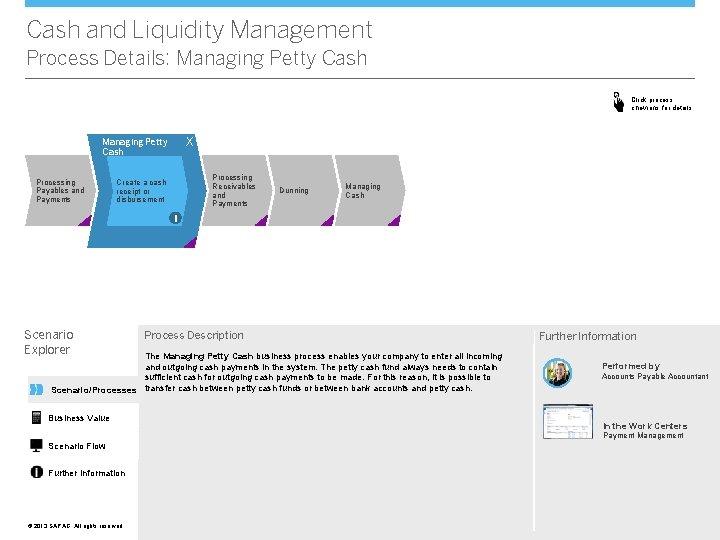
Cash and Liquidity Management Process Details: Managing Petty Cash Click process chevrons for details X Managing Petty Cash Processing Payables and Payments Processing Receivables and Payments Create a cash receipt or disbursement Dunning Managing Cash i Scenario Explorer Process Description The Managing Petty Cash business process enables your company to enter all incoming and outgoing cash payments in the system. The petty cash fund always needs to contain sufficient cash for outgoing cash payments to be made. For this reason, it is possible to Scenario/Processes transfer cash between petty cash funds or between bank accounts and petty cash. Business Value Further Information Performed by Accounts Payable Accountant In the Work Centers Payment Management Scenario Flow Further Information © © 2013 SAP AG. All rights reserved.
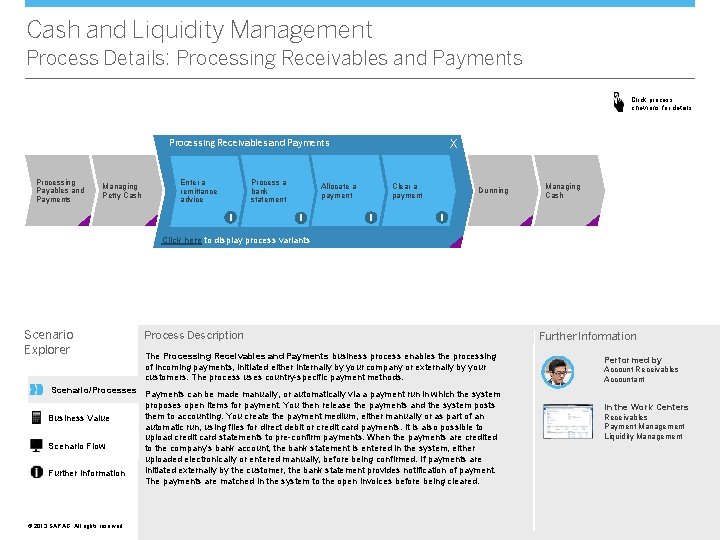
Cash and Liquidity Management Process Details: Processing Receivables and Payments Click process chevrons for details X Processing Receivables and Payments Processing Payables and Payments Managing Petty Cash Process a bank statement Enter a remittance advice i Allocate a payment i Clear a payment i Dunning Managing Cash i Click here to display process variants Scenario Explorer Process Description The Processing Receivables and Payments business process enables the processing of incoming payments, initiated either internally by your company or externally by your customers. The process uses country-specific payment methods. Scenario/Processes Payments can be made manually, or automatically via a payment run in which the system proposes open items for payment. You then release the payments and the system posts them to accounting. You create the payment medium, either manually or as part of an Business Value automatic run, using files for direct debit or credit card payments. It is also possible to upload credit card statements to pre-confirm payments. When the payments are credited Scenario Flow to the company's bank account, the bank statement is entered in the system, either uploaded electronically or entered manually, before being confirmed. If payments are initiated externally by the customer, the bank statement provides notification of payment. Further Information The payments are matched in the system to the open invoices before being cleared. © © 2013 SAP AG. All rights reserved. Further Information Performed by Account Receivables Accountant In the Work Centers Receivables Payment Management Liquidity Management
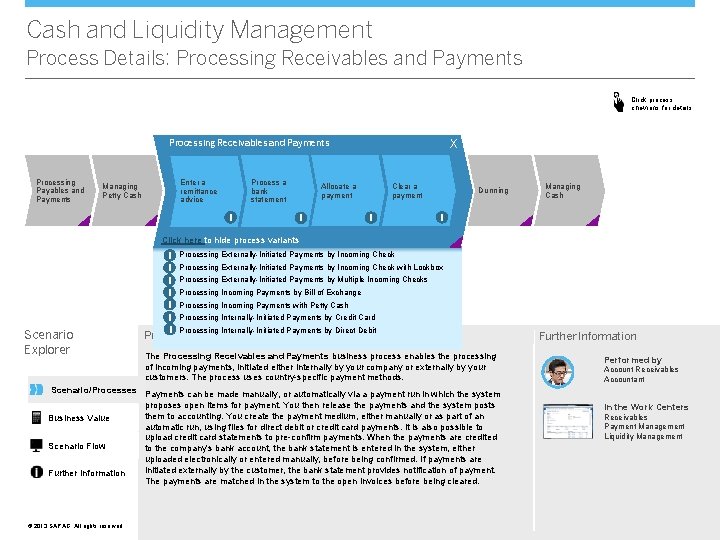
Cash and Liquidity Management Process Details: Processing Receivables and Payments Click process chevrons for details X Processing Receivables and Payments Processing Payables and Payments Managing Petty Cash Process a bank statement Enter a remittance advice i Allocate a payment i Clear a payment i Dunning Managing Cash i Click here to hide process variants Scenario Explorer i Processing Externally-Initiated Payments by Incoming Check with Lockbox i Processing Externally-Initiated Payments by Multiple Incoming Checks i Processing Incoming Payments by Bill of Exchange i Processing Incoming Payments with Petty Cash i Processing Internally-Initiated Payments by Credit Card i Processing Internally-Initiated Payments by Direct Debit Process Description The Processing Receivables and Payments business process enables the processing of incoming payments, initiated either internally by your company or externally by your customers. The process uses country-specific payment methods. Scenario/Processes Payments can be made manually, or automatically via a payment run in which the system proposes open items for payment. You then release the payments and the system posts them to accounting. You create the payment medium, either manually or as part of an Business Value automatic run, using files for direct debit or credit card payments. It is also possible to upload credit card statements to pre-confirm payments. When the payments are credited Scenario Flow to the company's bank account, the bank statement is entered in the system, either uploaded electronically or entered manually, before being confirmed. If payments are initiated externally by the customer, the bank statement provides notification of payment. Further Information The payments are matched in the system to the open invoices before being cleared. © © 2013 SAP AG. All rights reserved. Further Information Performed by Account Receivables Accountant In the Work Centers Receivables Payment Management Liquidity Management
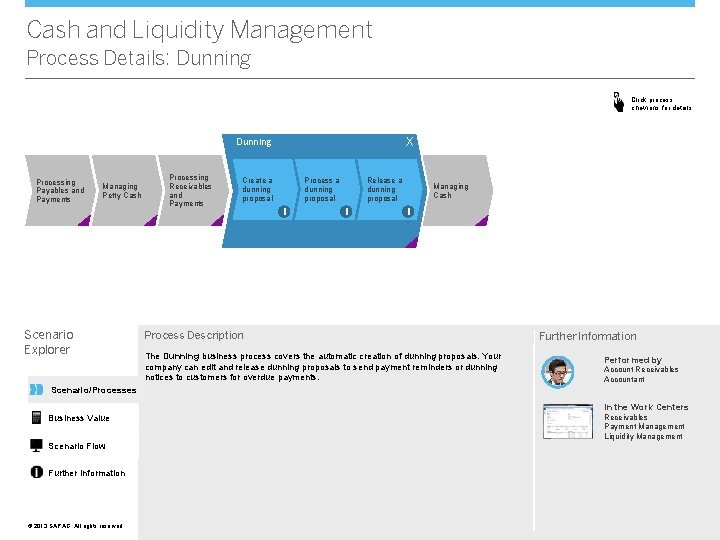
Cash and Liquidity Management Process Details: Dunning Click process chevrons for details X Dunning Processing Payables and Payments Managing Petty Cash Scenario Explorer Processing Receivables and Payments Create a dunning proposal Process a dunning proposal i Release a dunning proposal i Managing Cash i Process Description The Dunning business process covers the automatic creation of dunning proposals. Your company can edit and release dunning proposals to send payment reminders or dunning notices to customers for overdue payments. Further Information Performed by Account Receivables Accountant Scenario/Processes In the Work Centers Business Value Scenario Flow Further Information © © 2013 SAP AG. All rights reserved. Receivables Payment Management Liquidity Management
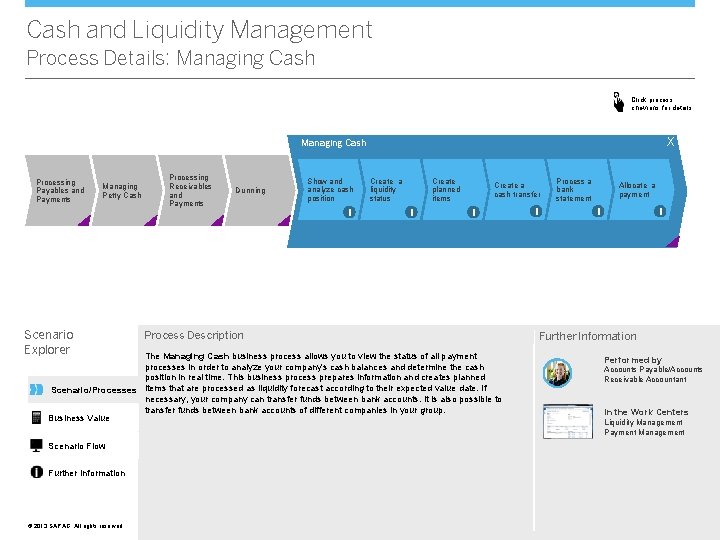
Cash and Liquidity Management Process Details: Managing Cash Click process chevrons for details X Managing Cash Processing Payables and Payments Managing Petty Cash Scenario Explorer Processing Receivables and Payments Dunning Show and analyze cash position i Create a liquidity status Create planned items i Create a cash transfer i Process Description The Managing Cash business process allows you to view the status of all payment processes in order to analyze your company's cash balances and determine the cash position in real time. This business process prepares information and creates planned Scenario/Processes items that are processed as liquidity forecast according to their expected value date. If necessary, your company can transfer funds between bank accounts. It is also possible to transfer funds between bank accounts of different companies in your group. Business Value Scenario Flow Further Information © © 2013 SAP AG. All rights reserved. i Process a bank statement Allocate a payment i i Further Information Performed by Accounts Payable/Accounts Receivable Accountant In the Work Centers Liquidity Management Payment Management
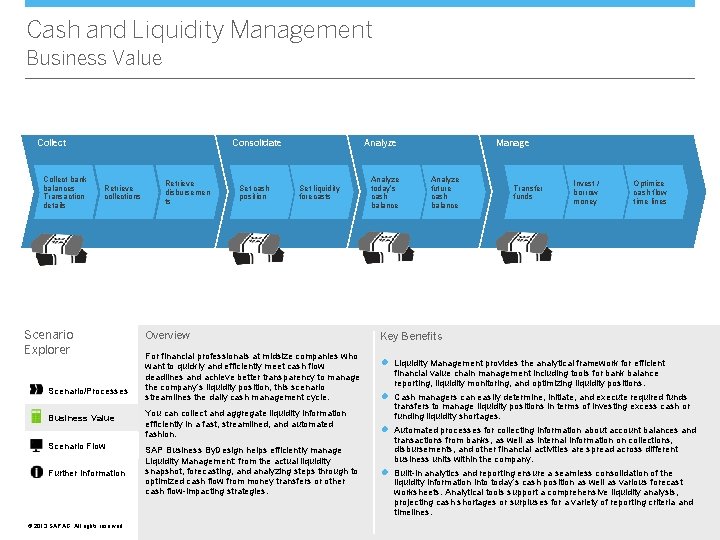
Cash and Liquidity Management Business Value Collect bank balances Transaction details Consolidate Retrieve collections Scenario Explorer Scenario/Processes Business Value Scenario Flow Further Information © © 2013 SAP AG. All rights reserved. Retrieve disbursemen ts Set cash position Analyze Set liquidity forecasts Overview For financial professionals at midsize companies who want to quickly and efficiently meet cash flow deadlines and achieve better transparency to manage the company’s liquidity position, this scenario streamlines the daily cash management cycle. You can collect and aggregate liquidity information efficiently in a fast, streamlined, and automated fashion. SAP Business By. Design helps efficiently manage Liquidity Management: from the actual liquidity snapshot, forecasting, and analyzing steps through to optimized cash flow from money transfers or other cash flow-impacting strategies. Analyze today’s cash balance Manage Analyze future cash balance Transfer funds Invest / borrow money Optimize cash flow time lines Key Benefits l Liquidity Management provides the analytical framework for efficient financial value chain management including tools for bank balance reporting, liquidity monitoring, and optimizing liquidity positions. l Cash managers can easily determine, initiate, and execute required funds transfers to manage liquidity positions in terms of investing excess cash or funding liquidity shortages. l Automated processes for collecting information about account balances and transactions from banks, as well as internal information on collections, disbursements, and other financial activities are spread across different business units within the company. l Built-in analytics and reporting ensure a seamless consolidation of the liquidity information into today’s cash position as well as various forecast worksheets. Analytical tools support a comprehensive liquidity analysis, projecting cash shortages or surpluses for a variety of reporting criteria and timelines.
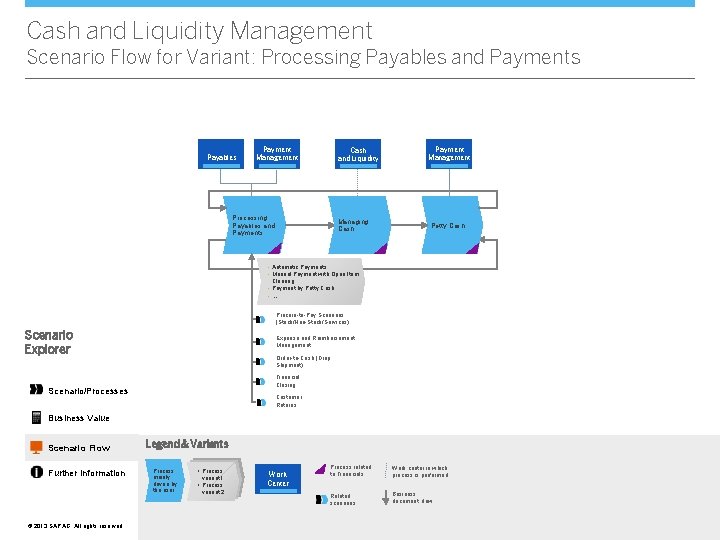
Cash and Liquidity Management Scenario Flow for Variant: Processing Payables and Payments Payables Payment Management Cash and Liquidity Processing Payables and Payments Managing Cash Payment Management Petty Cash • Automatic Payments • Manual Payment with Open Item Clearing • Payment by Petty Cash • …. Procure-to-Pay Scenarios (Stock/Non-Stock/Services) Scenario Explorer Expense and Reimbursement Management Order-to-Cash (Drop Shipment) Financial Closing Scenario/Processes Customer Returns Business Value Scenario Flow Further Information © © 2013 SAP AG. All rights reserved. Legend & Variants Process mainly driven by the user • Process variant 1 • Process variant 2 Work Center Process related to Financials Work center in which process is performed Related scenarios Business document flow
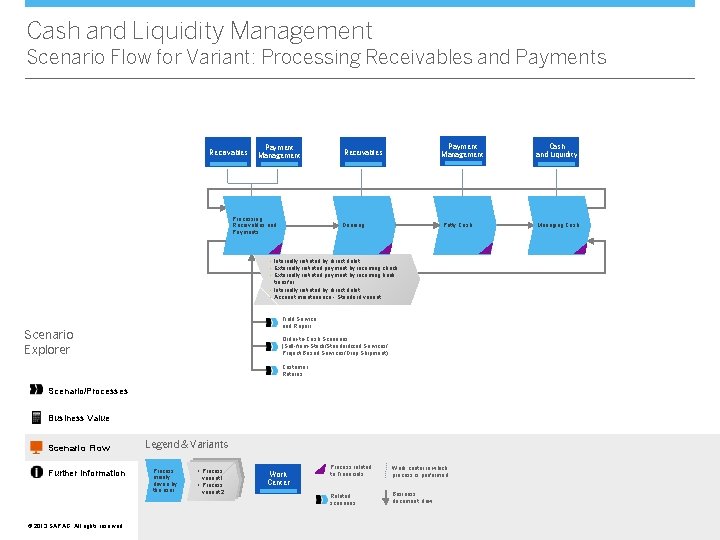
Cash and Liquidity Management Scenario Flow for Variant: Processing Receivables and Payments Receivables Payment Management Processing Receivables and Payments Receivables Dunning Payment Management Cash and Liquidity Petty Cash Managing Cash • Internally initiated by direct debit • Externally initiated payment by incoming check • Externally initiated payment by incoming bank transfer • Internally initiated by direct debit • Account maintenance - Standard variant Field Service and Repair Scenario Explorer Order-to-Cash Scenarios (Sell-from-Stock/Standardized Services/ Project-Based Services/Drop Shipment) Customer Returns Scenario/Processes Business Value Scenario Flow Further Information © © 2013 SAP AG. All rights reserved. Legend & Variants Process mainly driven by the user • Process variant 1 • Process variant 2 Work Center Process related to Financials Work center in which process is performed Related scenarios Business document flow
Cash and Liquidity Management Further Information Scenario Explorer Scenario/Processes Do you want to try it out? Do you need more information? More Details SAP provides a complete product documentation, covering all aspects of the business scenario. For more details, click here. Self-Enablement Systems If you want to try out the business scenario, click here. * Business Value VV Scenario Flow Further Information © © 2013 SAP AG. All rights reserved. Do you want to discuss with others? Forum Get in touch with experts to discuss your specific requirements. To enter the community, click here. * WIKI In addition to the product documentation, SAP provides Wikis that describe additional aspects of SAP Business By. Design. To access the WIKI, click here. * * Note that to access the links above you need to have a user in SAP Business Center. If you cannot access the page directly and if you are using Microsoft Internet Explorer®, please check http: //support. microsoft. com/kb/890474.