
Case Study Using Measurements to improve Component Selection













- Slides: 24
Case Study: Using Measurements to improve Component Selection Decisions for Component Based Software Development CS 614 d – Spring 2003 Wes J. Lloyd
Component Based Software Development (CBSD) promises: n n Higher Quality Software Faster Development Time Quality and Speed enhancements realized through the use of pre-built and pre-tested software components
CBSD – Component Selection When building component based systems, how do you select the BEST component(s) for the task?
Example Scenario Developer designs a GUI application Developer needs a calendar GUI component to allow users to specify a set of dates n In this case study, 4 viable components were found which can perform the task w How is the developer to evaluate the choices and select the best component?
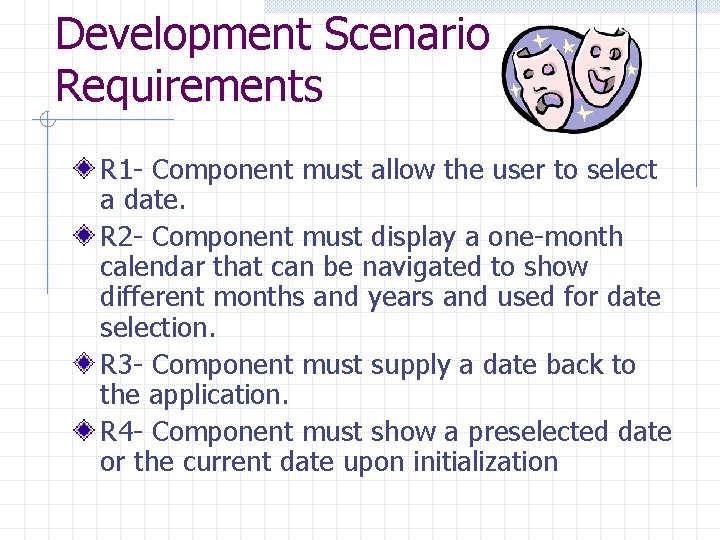
Development Scenario Requirements R 1 - Component must allow the user to select a date. R 2 - Component must display a one-month calendar that can be navigated to show different months and years and used for date selection. R 3 - Component must supply a date back to the application. R 4 - Component must show a preselected date or the current date upon initialization
Development Scenario Requirements kept simple: n n To assure that enough components could easily be found to meet minimum requirements To focus the investigation on evaluation of the components, not on certifying that they met a complex set of requirements Exploratory study to gain insight on future more formal studies Not enough time in a semester !
Component Selection Processes Konito Process n Search, Screen, Evaluate, Select Kunda/Brooks Process n Define selection criteria, search, evaluate, select Existing processes are evaluated with case studies that use mostly qualitative data about components
Component Selection Processes Kunda: “the best way of evaluating COTS products is through experimentation within the operating environment in which the product will be used “ This case study collects quantitative data from experimenting with using the components
Questions - 1 Do larger components with more feature inherently perform slower than their smaller, more compact counterparts? n (Complexity relation to performance)
Questions – 2 Does component complexity negatively affect the understandability of the component? n (Complexity relation to component understandability)
Questions – 3 Is a component that is hard to understand (has low understandability) require more time and effort to integrate into the software system being developed? n (Complexity relation to ease of integration)
Questions – 4 Will developers make more errors while integrating hard to understand software components (components with low understandability) in software systems being developed? n (Complexity relation to quality of integration)
Case Study Assessment and Observations n How complex were components ? w Size measurements n n How difficult was it to use the components in sample applications ? How long did it take to initialize each component ?
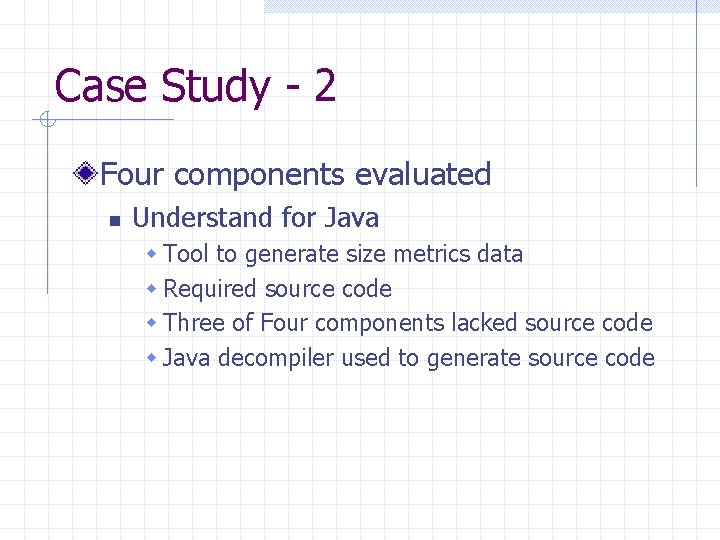
Case Study - 2 Four components evaluated n Understand for Java w Tool to generate size metrics data w Required source code w Three of Four components lacked source code w Java decompiler used to generate source code
Size of Components Component Compiled (jar) File Size Lines of Code Method Count Number of Instance Variables Number of classes in Jar file Component A AWT 167598 bytes 1979 203 109 17 Component B Swing 55160 bytes 1283 132 90 11 Component C Swing 74608 bytes 900 63 27 68 Component D Swing 68310 bytes 131 17 6 19
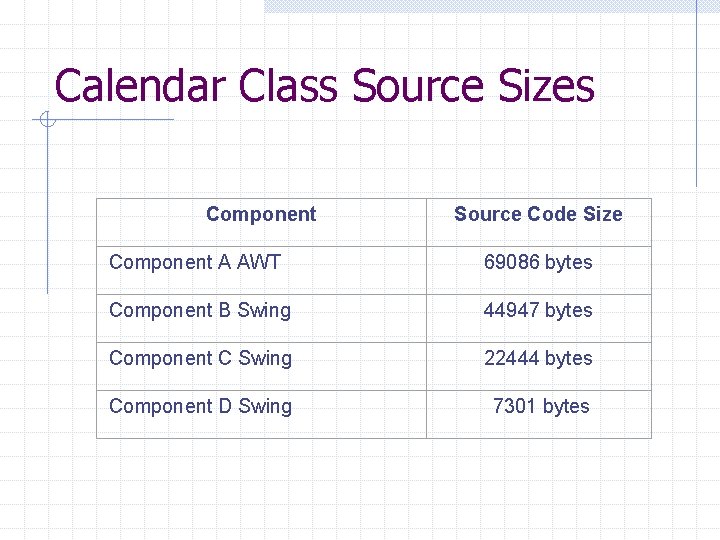
Calendar Class Source Sizes Component Source Code Size Component A AWT 69086 bytes Component B Swing 44947 bytes Component C Swing 22444 bytes Component D Swing 7301 bytes
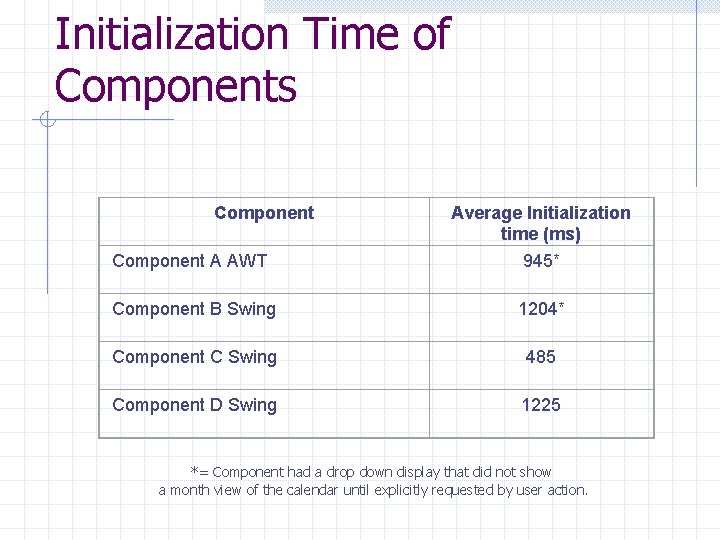
Initialization Time of Components Component A AWT Average Initialization time (ms) 945* Component B Swing 1204* Component C Swing 485 Component D Swing 1225 *= Component had a drop down display that did not show a month view of the calendar until explicitly requested by user action.
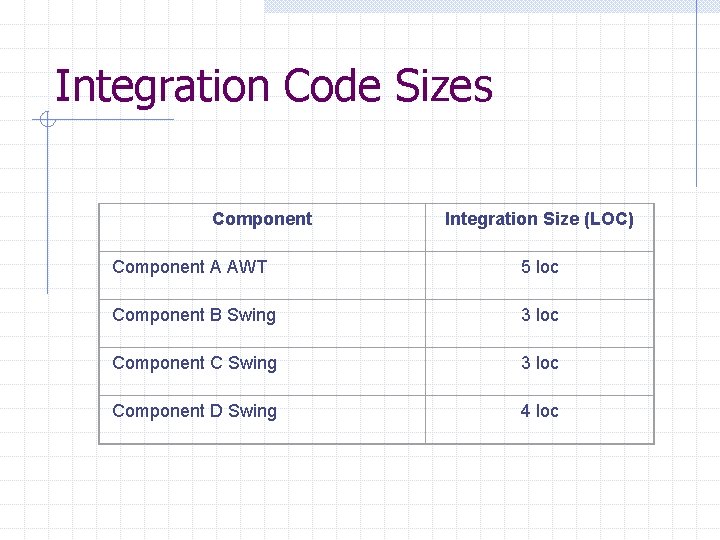
Integration Code Sizes Component Integration Size (LOC) Component A AWT 5 loc Component B Swing 3 loc Component C Swing 3 loc Component D Swing 4 loc
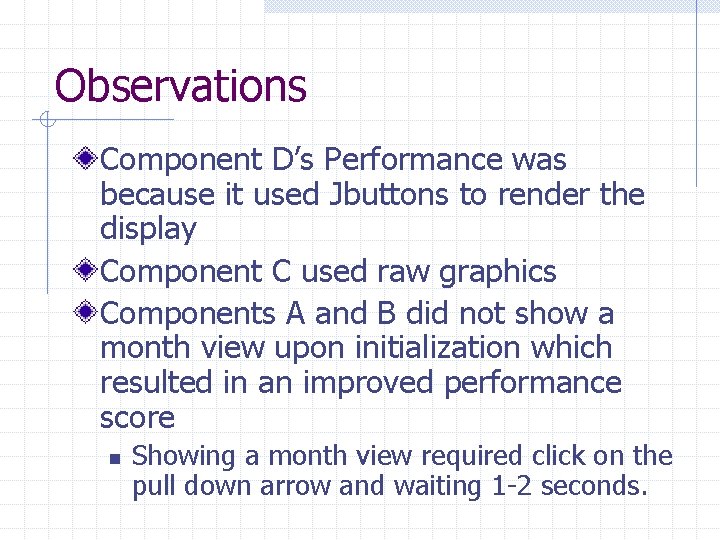
Observations Component D’s Performance was because it used Jbuttons to render the display Component C used raw graphics Components A and B did not show a month view upon initialization which resulted in an improved performance score n Showing a month view required click on the pull down arrow and waiting 1 -2 seconds.
Conclusions Simpler components seemed to perform faster with the exception of component D, which used Jbuttons to show dates in the month view Estimating expected performance based on complexity measured by size is rough at best. Complex components seemed to be more difficult to integrate. Developing the test application took somewhat more time with Component A compared to Component D.
Conclusions Using Complex Components has tradeoffs in CBSD n Good w Support more features users may desire in the future resulting in a component selection choice that will meet future needs w Better encapsulation of features may require less glue code n More methods and features may mean that the component does not require the user to perform redundant work in integration/glue code
Conclusions Using Complex Component has tradeoffs in CBSD n Bad w Components may perform worse w Components may be more difficult to learn and integrate w Difficult integration can lead to more bugs and compatibility issues
Future More formal empirical studies are desired to more formally test the relationships between component complexity and ease of integration, and understandability
Questions and Suggestions ?