
Case Study GFS Outline r NFS r Google
- Slides: 44
Case Study - GFS
Outline r NFS r Google File System (GFS)
Network File Systems r I’m on a Unix machine in MC 325; r I go to another machine in MC 325 m I see the same files m Why? r This is because you are using a networked file system r Let’s take a quick look at NFS
The Sun Network File System (NFS) r An implementation and a specification of a software system for accessing remote files across LANs (or WANs) r The implementation is part of the Solaris and Sun. OS operating systems running on Sun workstations using an unreliable datagram protocol (UDP/IP protocol) and Ethernet
NFS r You can think of a networked file system as a hierarchical tree structure r The leaf nodes represent directories on actual file systems (local to a machine) r Directories can be mounted which means that they can appear in the tree structure m The directories can be on remote machines m The remote machines may use a different OS then the client machine
NFS r Support access to files on remote servers r Must support concurrency m Make varying guarantees about locking, who “wins” with concurrent writes, etc. . . m Must gracefully handle dropped connections
NFS r An NFS file server runs on a machine (which may have large disks) that has a local file system. r An NFS client runs on an arbitrary machine and access the files on machines that run NFS servers.
NFS r When an application program calls open to obtain access to a file it is making a call to the NFS client r If the path refers to a local file, the system uses the computer’s standard file system software to access the file r If the path refers to a remote file, the system uses NFS client software to access the remote file through the NFS server
NFS r The NFS server handles incoming client requests r These requests are mapped to local file system operations
NFS Protocol r Primarily stateless m Stateless means that servers do not maintain information about their clients from one access to another m All requests must include a unique file identifier, absolute offset inside the file etc; m Operated over UDP; did not use TCP streams
NFS r Files are assumed to be shared by multiple clients r Synchronization is needed r Problem m There is a performance problem if every time a client wants to access a file it has to go to the server m Thus clients are allowed to keep a local copy of the file while they are reading and writing its contents • This is referred to as caching
NFS r UNIX Semantics m When a read follows a write the read returns the value just written m When two writes happen in quick succession followed by a read, the value read is the value stored by the last write r In a centralized systems this is easy to implement r If there is no caching in NFS then this is also easy to implement
NFS r NFS allows clients to cache for performance reasons r How then is UNIX semantics provided? r Approach 1: m Propagate all changes to cached files back to the server as they happen m Not efficient • Lots of network traffic
NFS r Approach 2: Change the semantics m NFS implements session semantics • Changes to an open file are initially visible only to the process that modified the file m Implementation • When a process closes the file, it sends a copy to the NFS server so that subsequent reads get the new value m What if two clients are caching and modifying the file at the same time?
NFS and Replication r Replication is through caching r Can have multiple caches of a file r The “master” has the copy that was last written to it
Outline r NFS r Google File System (GFS)
Motivation r Google needed a good distributed file system m Redundant storage of massive amounts of data on cheap and unreliable computers r Why not use an existing file system? m Google’s problems are different from anyone else’s • Different workload and design priorities m GFS is designed for Google apps and workloads m Google apps are designed for GFS
Google Workload Characteristics r Most files are mutated by appending new data – large sequential writes r Random writes are very uncommon r Files are written once, then they are only read r Reads are sequential r Large streaming reads and small random reads r High sustained throughput favoured over low latency
Google Workload Characteristics r Google applications: m Data analysis programs that scan through data repositories m Data streaming applications m Archiving m Applications producing (intermediate) search results
Assumptions r High component failure rates m Inexpensive commodity components fail all the time r “Modest” number of HUGE files m Just a few million m Each is 100 MB or larger; multi-GB files typical
Files and Chunks r Files are divided into fixed-size chunks r Each chunk has an identifier, chunk handle, assigned by the master at the time of chunk creation r Each chunk is replicated 3 times r Chunk size is of fixed size (64 MB)
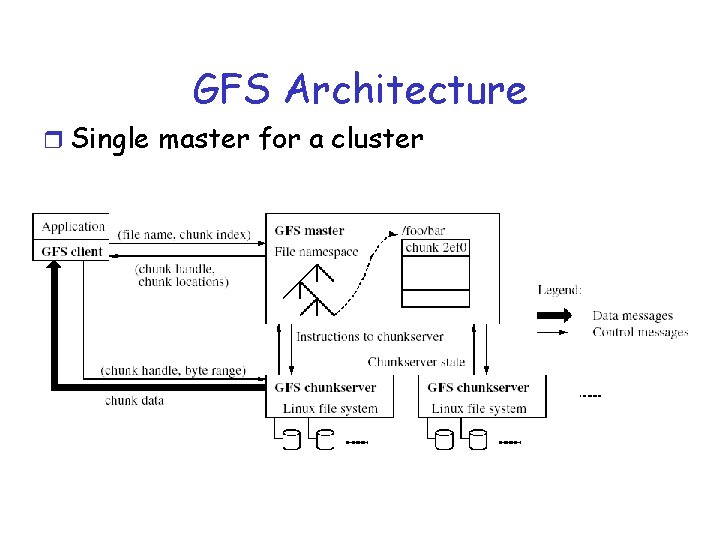
GFS Architecture r Single master for a cluster
Master r Stores metadata for files m Mapping from files to chunks m Locations of each chunk’s replicas (referred to as chunk locations) r Interacts with clients r Creates chunk replicas r Maintains an operational log m Records changes to metadata m Checkpoints log m Log can be used to recover from failures
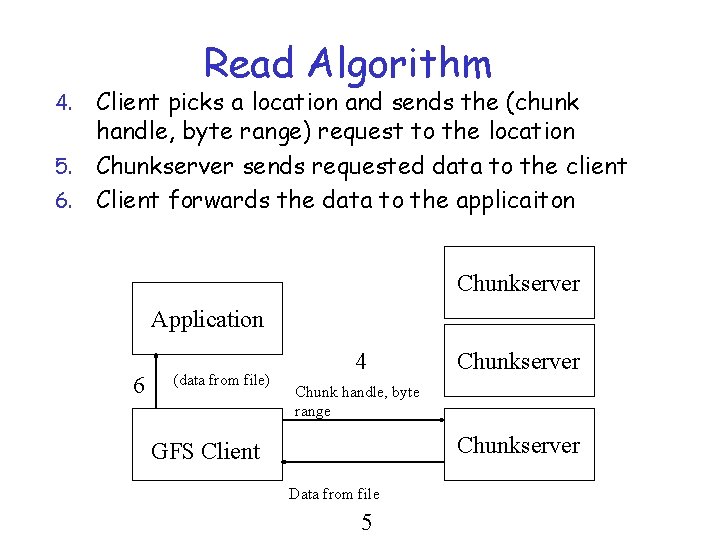
Chunkservers r Store chunks on local disks as Linux files r Read/write chunk data specified by a chunk handle and byte range
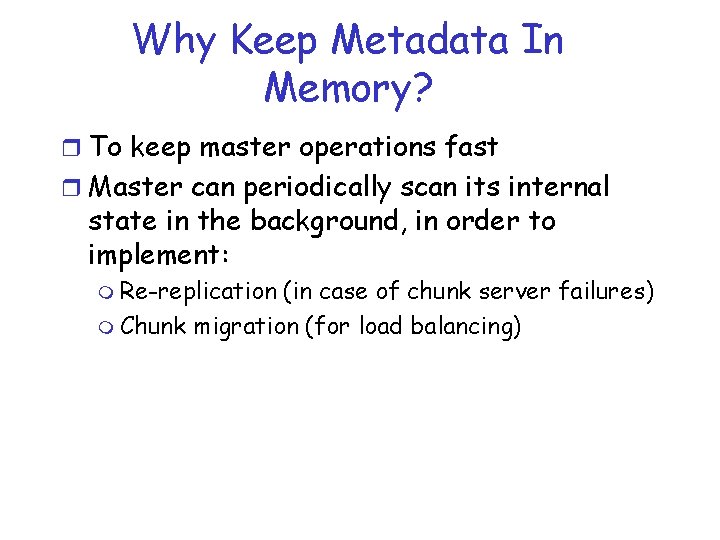
Why Keep Metadata In Memory? r To keep master operations fast r Master can periodically scan its internal state in the background, in order to implement: m Re-replication (in case of chunk server failures) m Chunk migration (for load balancing)
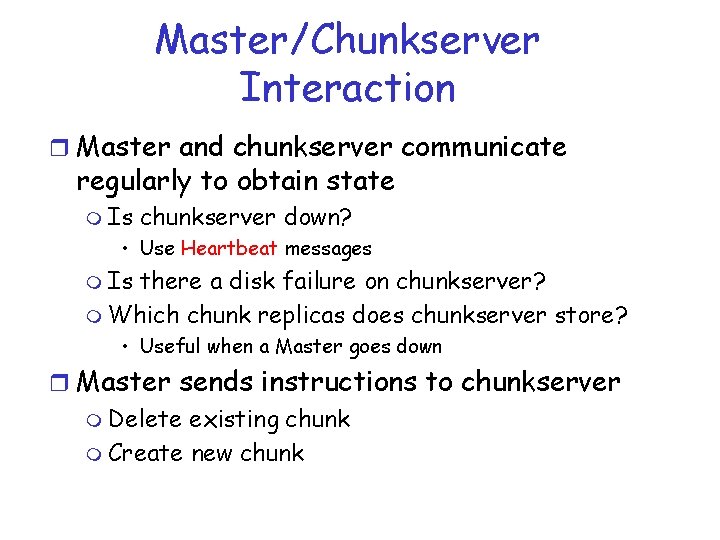
Master/Chunkserver Interaction r Master and chunkserver communicate regularly to obtain state m Is chunkserver down? • Use Heartbeat messages m Is there a disk failure on chunkserver? m Which chunk replicas does chunkserver store? • Useful when a Master goes down r Master sends instructions to chunkserver m Delete existing chunk m Create new chunk
Master/Chunkserver Interaction r Master does not need to keep chunk locations persistent since is periodically polls chunkservers for that information r Master controls initial chunk placement, migration and re-replication
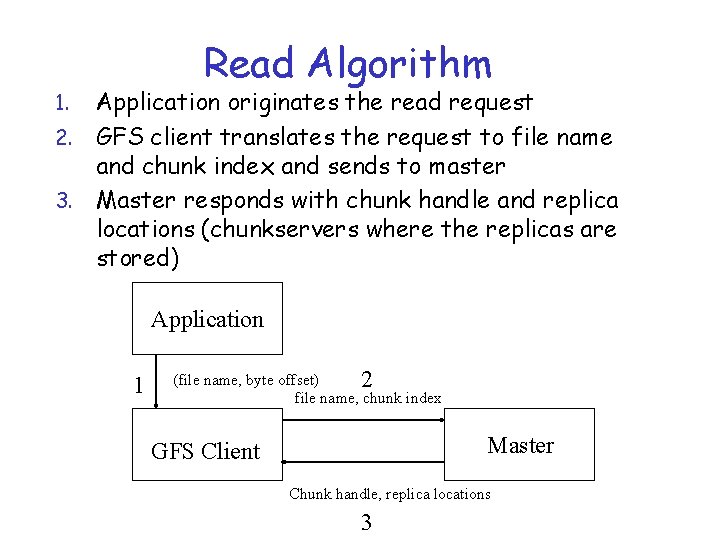
Read Algorithm Application originates the read request 2. GFS client translates the request to file name and chunk index and sends to master 3. Master responds with chunk handle and replica locations (chunkservers where the replicas are stored) 1. Application 1 (file name, byte offset) 2 file name, chunk index Master GFS Client Chunk handle, replica locations 3
Read Algorithm Client picks a location and sends the (chunk handle, byte range) request to the location 5. Chunkserver sends requested data to the client 6. Client forwards the data to the applicaiton 4. Chunkserver Application 6 (data from file) 4 Chunkserver Chunk handle, byte range Chunkserver GFS Client Data from file 5
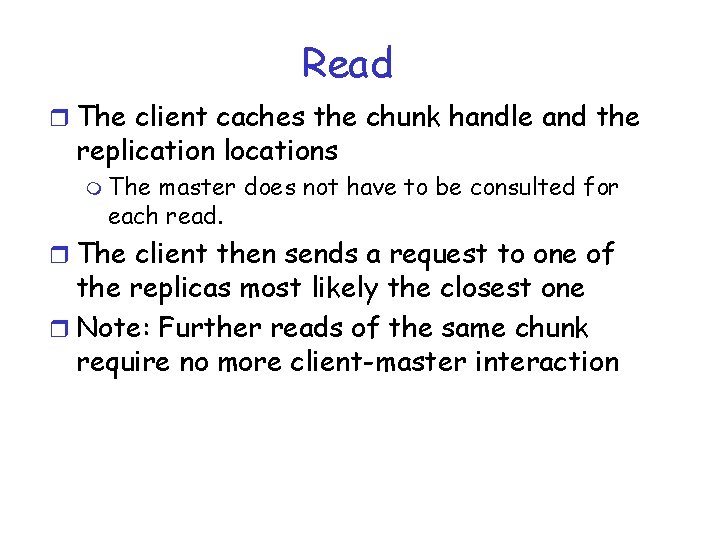
Read r The client caches the chunk handle and the replication locations m The master does not have to be consulted for each read. r The client then sends a request to one of the replicas most likely the closest one r Note: Further reads of the same chunk require no more client-master interaction
Chunk Size r Chunk size is 64 MB m Larger than typical file system block sizes r Advantages m Reduces a client’s need to interact with the master m Reduces the size of the metadata stored on the master
Chunk Size r Disadvantages m A small file consists of a small number of chunks m The chunkservers storing these chunks may become hot spots if many clients are accessing the same file • Does not occur very much in practice
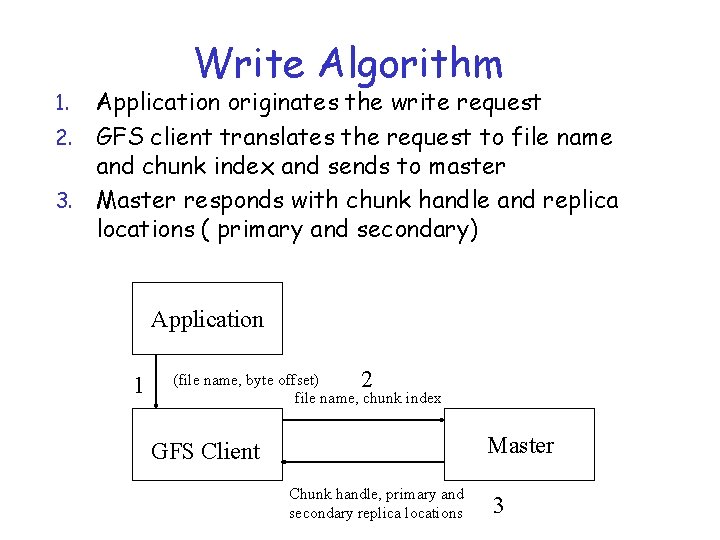
Write Algorithm Application originates the write request 2. GFS client translates the request to file name and chunk index and sends to master 3. Master responds with chunk handle and replica locations ( primary and secondary) 1. Application 1 (file name, byte offset) 2 file name, chunk index Master GFS Client Chunk handle, primary and secondary replica locations 3
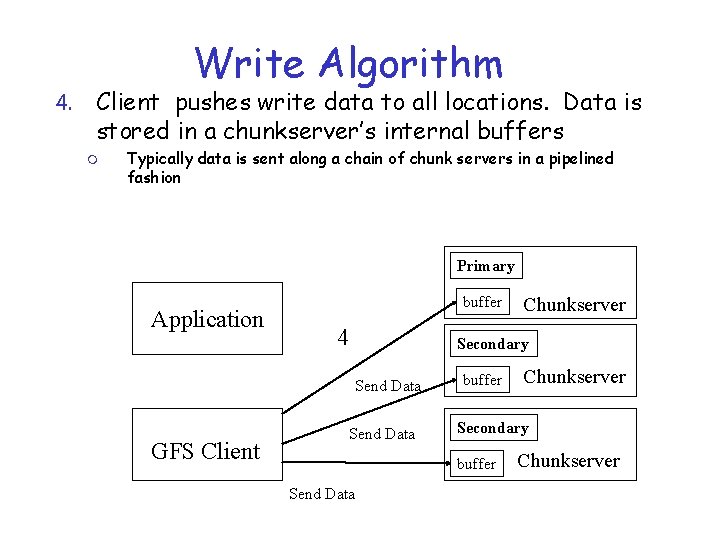
4. Write Algorithm Client pushes write data to all locations. Data is stored in a chunkserver’s internal buffers m Typically data is sent along a chain of chunk servers in a pipelined fashion Primary Application buffer 4 Secondary Send Data GFS Client Chunkserver Send Data buffer Secondary buffer Send Data Chunkserver
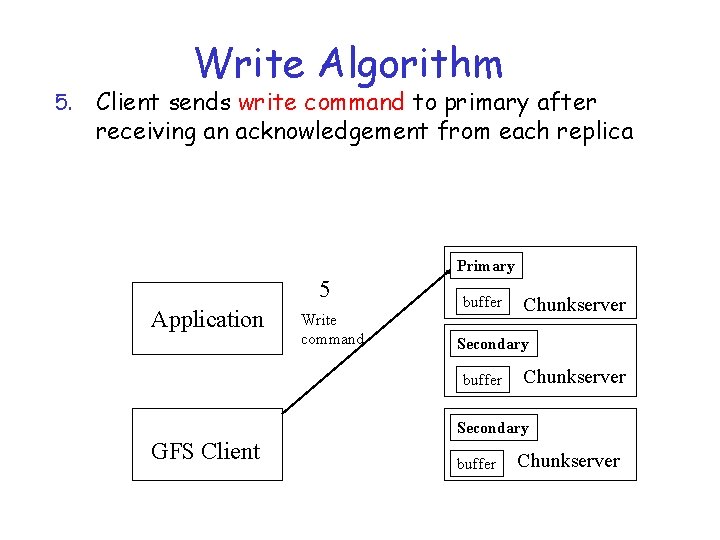
5. Write Algorithm Client sends write command to primary after receiving an acknowledgement from each replica Primary 5 Application Write command buffer Chunkserver Secondary GFS Client buffer Chunkserver
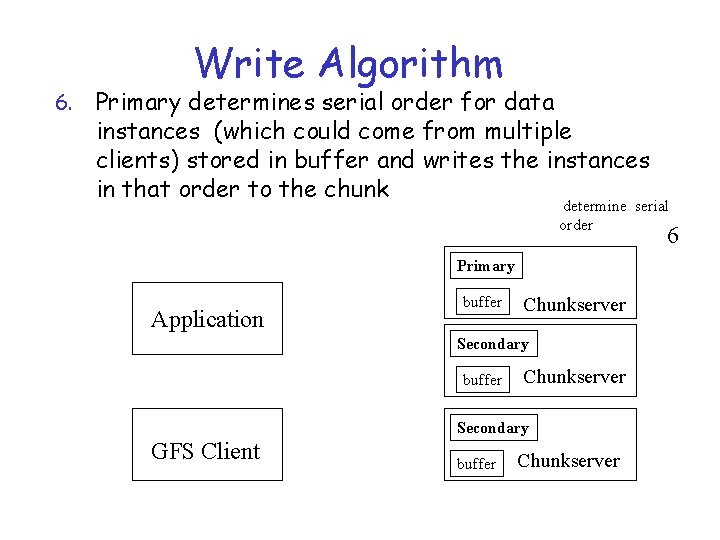
6. Write Algorithm Primary determines serial order for data instances (which could come from multiple clients) stored in buffer and writes the instances in that order to the chunk determine serial order 6 Primary Application buffer Chunkserver Secondary GFS Client buffer Chunkserver
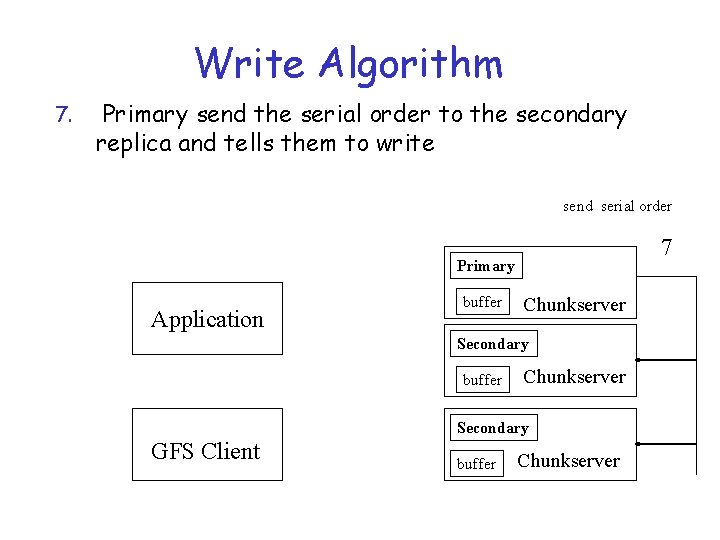
Write Algorithm 7. Primary send the serial order to the secondary replica and tells them to write send serial order 7 Primary Application buffer Chunkserver Secondary GFS Client buffer Chunkserver
Write Algorithm r Secondary replicas respond to the primary r Primary respond back to the client r If write fails at one of the chunkservers, client is informed and retries the write
Failure Handling During. Writes r If a write fails at the primary: m The primary may report failure to the client – the client will retry m If the primary does not respond, the client retries from Step 1 by contacting the master r If a write succeeds at the primary, but fails at several replicas m The client retries several times
Atomic Record Appends r The client pushes the data (a record) to all replicas of the last chunk of the file r Sends request to primary r Case 1: Record fits within the maximum size of chunk m Primary appends data to its replica m Primary tells the secondaries to write the data at the exact offset
Atomic Record Appends r Case 2: What if appending the record would cause the chunk to exceed the maximum size m Pad the chunk to the maximum size m Tell the primaries to do the same thing m Reply to client indicating that the operation should be retried on the next chunk
Data Consistency in GFS r Loose data consistency – applications are designed for it r Some replicas may have duplicate records (because of failed and retried appends) r Applications may see inconsistent data – data is different on different replicas
Data Consistency in GFS r Clients must deal with it r If clients cannot tolerate duplicates, they must insert version numbers in records r GFS pushes complexity to the client; without this, complex failure recovery scheme would need to be in place
Summary r We have presented two case studies related to file systems