
Case Management My Support Login from the Customer
- Slides: 20
Case Management
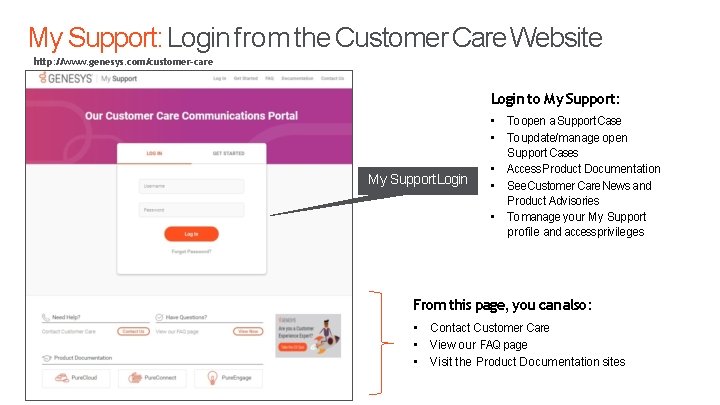
My Support: Login from the Customer Care Website http: //www. genesys. com/customer-care Login to My Support: My Support Login • To open a Support Case • To update/manage open Support Cases • Access Product Documentation • See Customer Care News and Product Advisories • To manage your My Support profile and access privileges From this page, you can also: • Contact Customer Care • View our FAQ page • Visit the Product Documentation sites Genesys confidential and proprietary information. Unauthorized disclosure is prohibited.
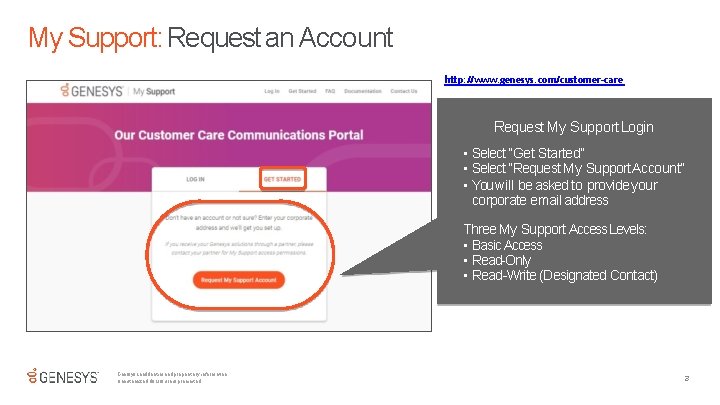
My Support: Request an Account http: //www. genesys. com/customer-care Request My Support Login • Select “Get Started” • Select “Request My Support Account” • You will be asked to provide your corporate email address Three My Support Access Levels: • Basic Access • Read-Only • Read-Write (Designated Contact) Genesys confidential and proprietary information. Unauthorized disclosure is prohibited. 3
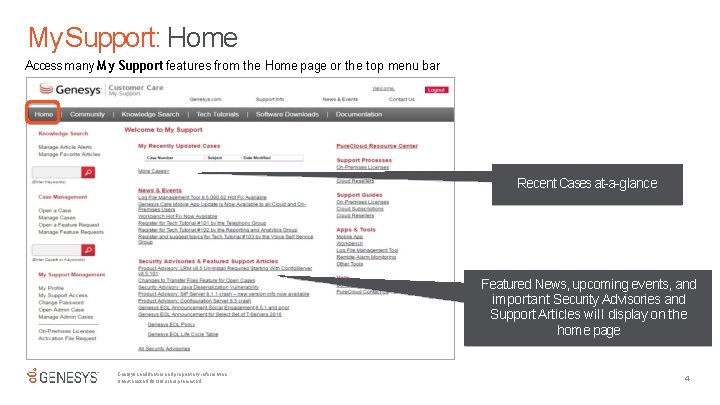
My Support: Home Access many My Support features from the Home page or the top menu bar Recent Cases at-a-glance Featured News, upcoming events, and important Security Advisories and Support Articles will display on the home page Genesys confidential and proprietary information. Unauthorized disclosure is prohibited. 4
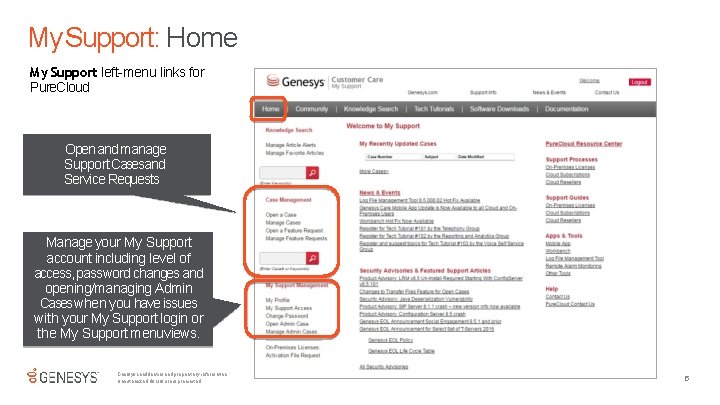
My Support: Home My Support left-menu links for Pure. Cloud Open and manage Support Casesand Service Requests Manage your My Support account including level of access, password changes and opening/managing Admin Cases when you have issues with your My Support login or the My Support menu views. Genesys confidential and proprietary information. Unauthorized disclosure is prohibited. 5
Tips: What to Check before Opening a Case If you are experiencing a problem: Conduct these quick troubleshooting actions: • Refresh the browser or desktop app. • Log out and back in. • Clear the browser cache and refresh again. • Verify that the problem occurs on another workstation. • Verify that the problem occurs for another user. • Turn the workstation off and on again. If the problem still exists, ask yourself these additional questions and provide what information you can when you submit a support case: • Have you been able to reproduce the problem (if so, please document the steps)? • Have you identified a clear business impact? • Have you described what actions you have taken so far in attempting to solve the problem? Genesys confidential and proprietary information. Unauthorized disclosure is prohibited. 6
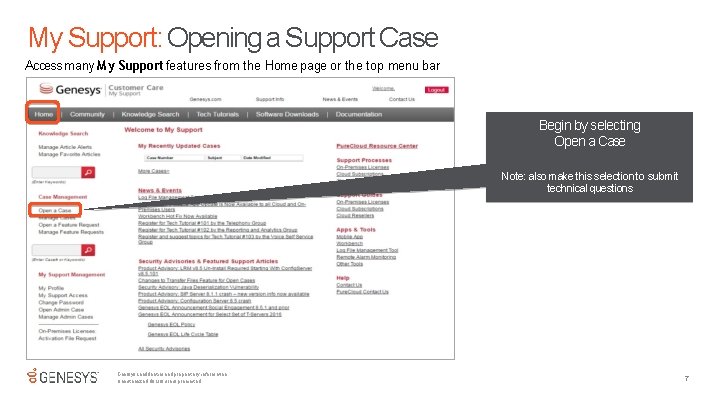
My Support: Opening a Support Case Access many My Support features from the Home page or the top menu bar Begin by selecting Open a Case Note: also make this selection to submit technical questions Genesys confidential and proprietary information. Unauthorized disclosure is prohibited. 7
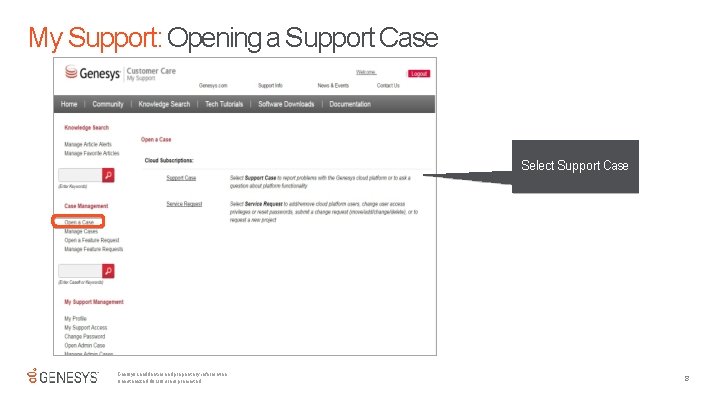
My Support: Opening a Support Case Select Support Case Genesys confidential and proprietary information. Unauthorized disclosure is prohibited. 8
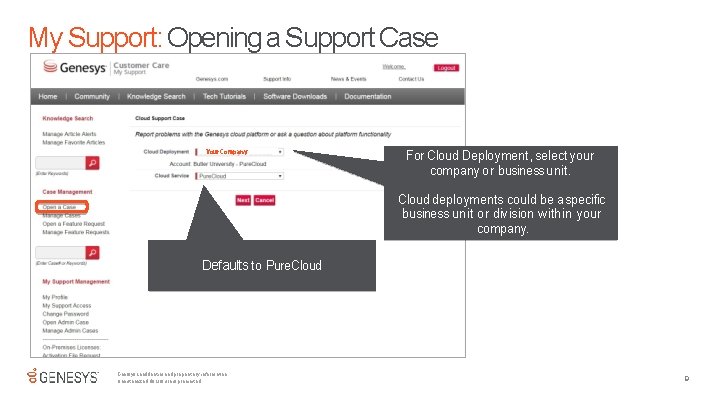
My Support: Opening a Support Case Your Company For Cloud Deployment, select your company or business unit. Cloud deployments could be a specific business unit or division within your company. Defaults to Pure. Cloud Genesys confidential and proprietary information. Unauthorized disclosure is prohibited. 9
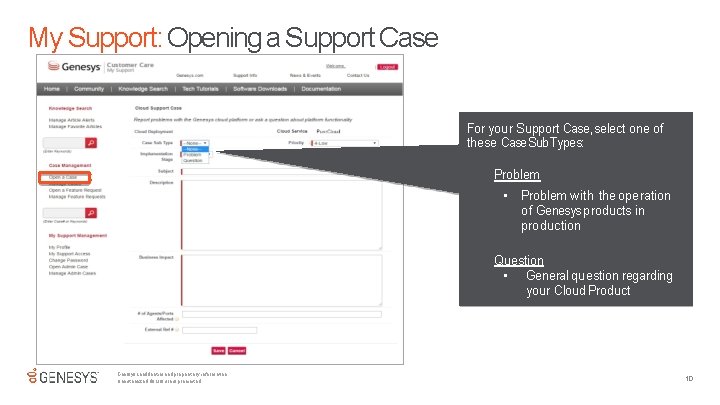
My Support: Opening a Support Case For your Support Case, select one of these Case Sub. Types: Problem • Problem with the operation of Genesys products in production Question • General question regarding your Cloud Product Genesys confidential and proprietary information. Unauthorized disclosure is prohibited. 10
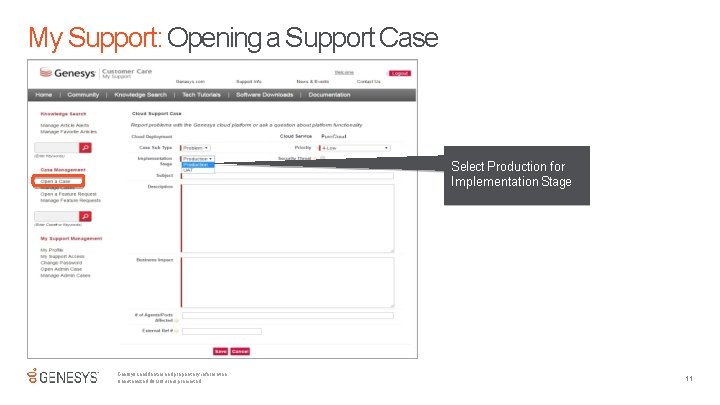
My Support: Opening a Support Case Select Production for Implementation Stage Genesys confidential and proprietary information. Unauthorized disclosure is prohibited. 11
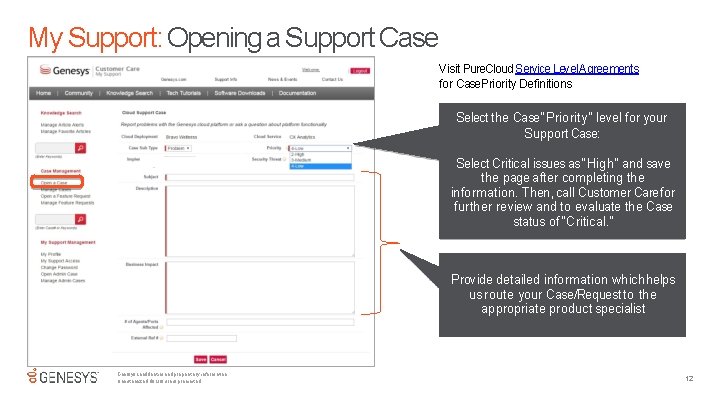
My Support: Opening a Support Case Visit Pure. Cloud Service Level Agreements for Case Priority Definitions Select the Case “Priority” level for your Support Case: Select Critical issues as “High” and save the page after completing the information. Then, call Customer Carefor further review and to evaluate the Case status of “Critical. ” Provide detailed information which helps us route your Case/Request to the appropriate product specialist Genesys confidential and proprietary information. Unauthorized disclosure is prohibited. 12
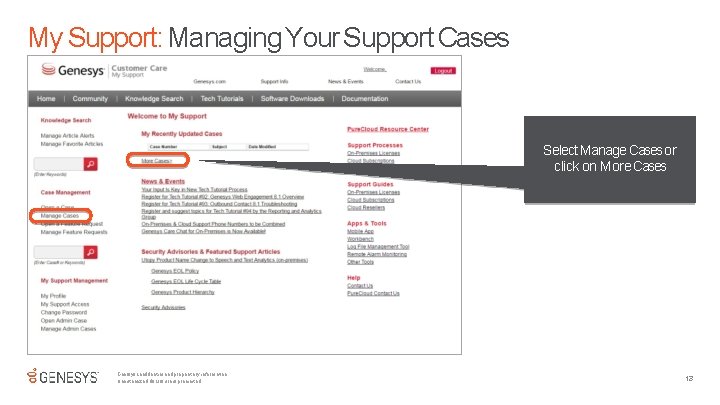
My Support: Managing Your Support Cases Select Manage Cases or click on More Cases Genesys confidential and proprietary information. Unauthorized disclosure is prohibited. 13
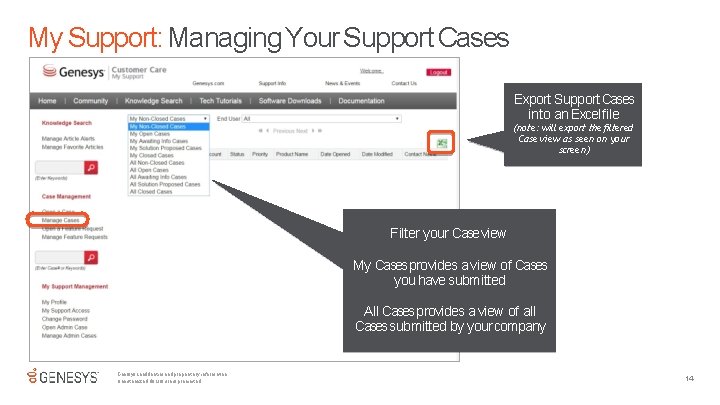
My Support: Managing Your Support Cases Export Support Cases into an Excel file (note: will export thefiltered Case view as seen on your screen) Filter your Case view My Cases provides a view of Cases you have submitted All Cases provides a view of all Cases submitted by your company Genesys confidential and proprietary information. Unauthorized disclosure is prohibited. 14
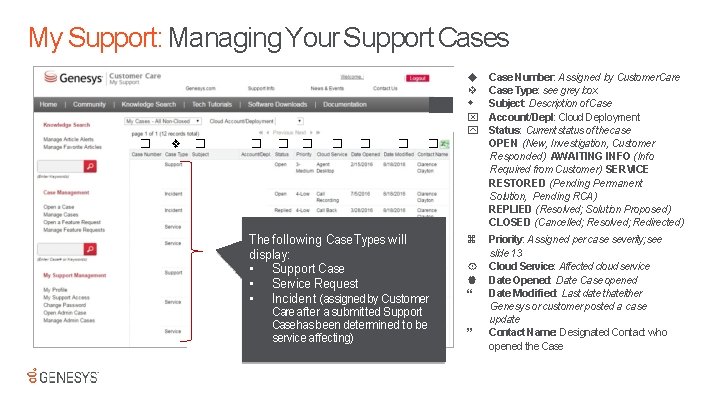
My Support: Managing Your Support Cases ❖ � ❖ � � � � The following Case Types will display: • Support Case • Service Request • Incident (assigned by Customer Care after a submitted Support Case has been determined to be service affecting) Case Number: Assigned by Customer. Care Case Type: see grey box Subject: Description of Case Account/Depl: Cloud Deployment Status: Current status of thecase OPEN (New, Investigation, Customer Responded) AWAITING INFO (Info Required from Customer) SERVICE RESTORED (Pending Permanent Solution, Pending RCA) REPLIED (Resolved; Solution Proposed) CLOSED (Cancelled; Resolved; Redirected) Priority: Assigned per case severity; see slide 13 Cloud Service: Affected cloud service Date Opened: Date Case opened Date Modified: Last date thateither Genesys or customer posted a case update Contact Name: Designated Contact who opened the Case
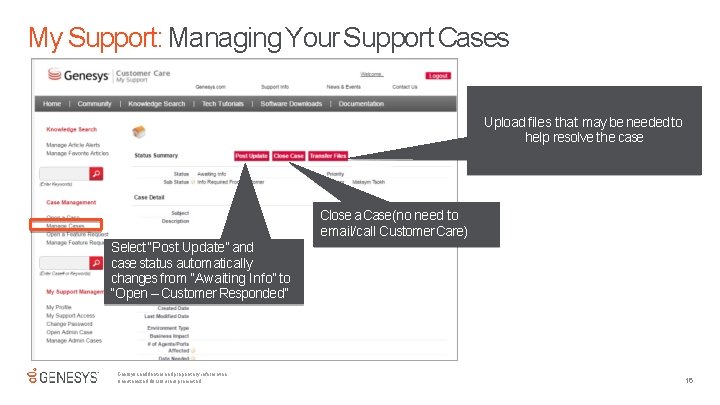
My Support: Managing Your Support Cases Upload files that may be needed to help resolve the case Close a Case (no need to email/call Customer Care) Select “Post Update” and case status automatically changes from “Awaiting Info” to “Open – Customer Responded” Genesys confidential and proprietary information. Unauthorized disclosure is prohibited. 16
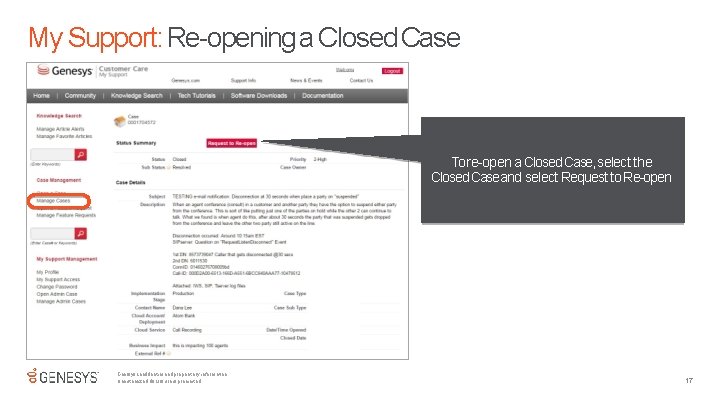
My Support: Re-opening a Closed Case To re-open a Closed Case, select the Closed Case and select Request to Re-open Genesys confidential and proprietary information. Unauthorized disclosure is prohibited. 17
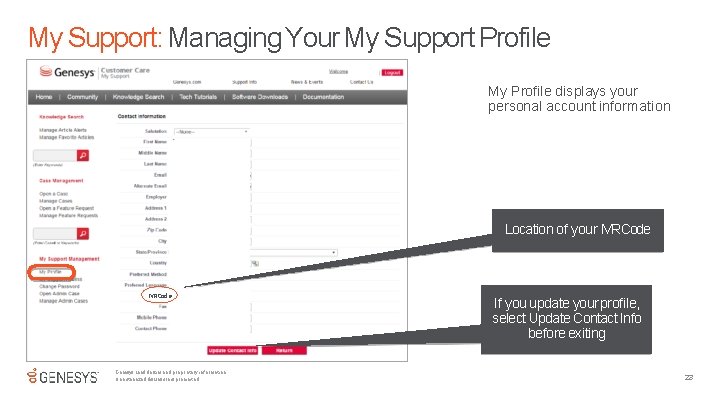
My Support: Managing Your My Support Profile My Profile displays your personal account information Location of your IVRCode IVR Cod e Genesys confidential and proprietary information. Unauthorized disclosure is prohibited. If you update your profile, select Update Contact Info before exiting 23
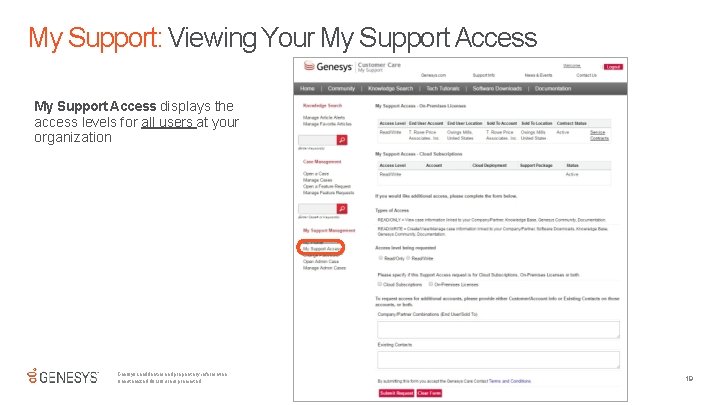
My Support: Viewing Your My Support Access displays the access levels for all users at your organization Genesys confidential and proprietary information. Unauthorized disclosure is prohibited. 19
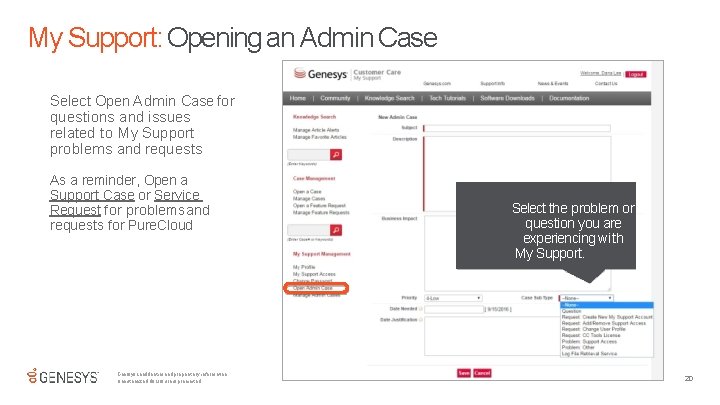
My Support: Opening an Admin Case Select Open Admin Case for questions and issues related to My Support problems and requests As a reminder, Open a Support Case or Service Request for problems and requests for Pure. Cloud Genesys confidential and proprietary information. Unauthorized disclosure is prohibited. Select the problem or question you are experiencing with My Support. 20