
Case Examples AT Solutions for Physical Disabilities Low
Case Examples AT Solutions for Physical Disabilities, Low Vision, Hearing Impairment, Learning Disabilities
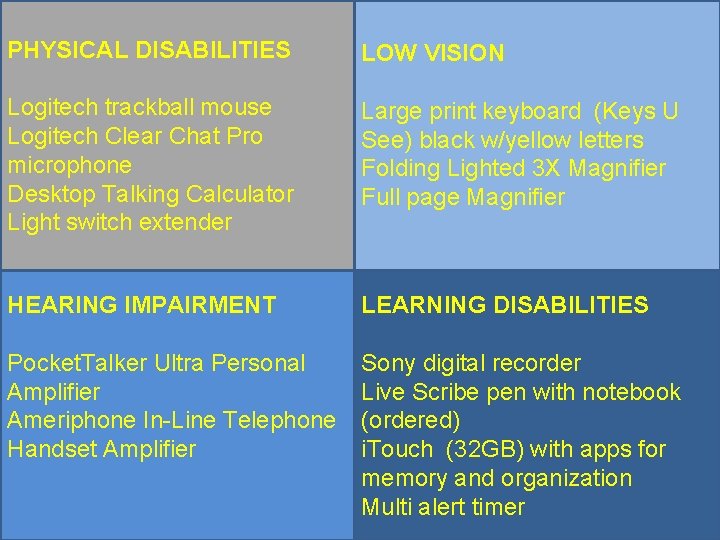
PHYSICAL DISABILITIES LOW VISION Logitech trackball mouse Logitech Clear Chat Pro microphone Desktop Talking Calculator Light switch extender Large print keyboard (Keys U See) black w/yellow letters Folding Lighted 3 X Magnifier Full page Magnifier HEARING IMPAIRMENT LEARNING DISABILITIES Pocket. Talker Ultra Personal Amplifier Ameriphone In-Line Telephone Handset Amplifier Sony digital recorder Live Scribe pen with notebook (ordered) i. Touch (32 GB) with apps for memory and organization Multi alert timer
Case Studies PHYSICAL DISABILITIES LOW VISION HEARING IMPAIRMENT LEARNING DISABILITIES
PHYSICAL DISABILITIES Logitech trackball mouse Logitech Clear Chat Pro microphone Desktop Talking Calculator Light switch extender
PHYSICAL DISABILITIES Cerebral Palsy A 15 year old 9 TH grader with cerebral palsy struggles to create class notes when using the regular keyboard and mouse.
Physical Disabilities Example 1 A 15 year old 9 th grader with cerebral palsy struggles to create class notes when using the regular keyboard and mouse. DETAILS: Replacing the regular mouse with a trackball allows the student to have better control of the mouse cursor. Additional Windows OS accessibility features such as sticky keys, filter keys and the onscreen keyboard allow for increased productivity with writing. Windows OS accessibility features for better mouse control such as slowing speed, click & drag lock, etc. OPTION: show keyboard accessibility features This slide should be hidden during live PPT presentation.
PHYSICAL DISABILITIES Example 2: Spinal Cord Injury A 10 year old female who sustained a SCI in a car accident has enough upper extremity function to selfpropel a manual wheelchair but lacks fine motor skills. She cannot independently manage light switches in the bathroom. Typing is difficult and fatiguing without assistive technology.
Physical Disabilities: Example 2 A 10 year old female who sustained a SCI in a car accident has enough upper extremity function to self-propel a manual wheelchair but lacks fine motor skills. DETAILS: She is able to turn on the light switch in the girls room using the light switch extender. She completes the majority of her typing/written work using speech recognition software which requires a headset microphone. Speech recognition could be Dragon Naturally Speaking if additional features are needed. A large print talking calculator can be used to quickly generate figures and the audio output confirms that the correct keys were selected.
LOW VISION Large print keyboard (Keys U See) black w/yellow letters Folding Lighted 3 X Magnifier Full page Magnifier
LOW VISION An 8 year old girl has low vision and reports difficulty seeing learning materials in the classroom.
Low Vision Example 1 An 8 year old girl has low vision and reports difficulty seeing learning materials in the classroom. She now uses a large print keyboard in order to better see the letters on the keyboard. Magnifiers are used to help access print materials. Windows accessibility features enlarge the computer display and inverted colors are also used. OPTION: Show accessibility features for low vision
HEARING IMPAIRMENT Pocket Talker Ultra Personal Amplifier
HEARING IMPAIRMENT A 16 year old girl who has some hearing loss is having trouble understanding what her teachers and peers are saying to her. The classroom is a very busy place with many conversations occurring at the same time.
Hearing Impairment Example 1 A 16 year old girl who has some hearing loss is having trouble understanding what her teachers and peers are saying to her. The classroom is a very busy place with many conversations occurring at the same time. A Pocket. Talker Ultra Personal Amplifier may help address the problem. KEY FEATURES of personal amplifier: Powerful sound amplifier - improves understanding of speech Compact design Compatible with telecoil-equipped hearing aids 2 AAA batteries for 100 hours of use OPTION: Show Windows accessibility features for hearing impairment
LEARNING DISABILITIES Sony digital recorder Live Scribe pen with notebook i. Touch (32 GB) with apps for memory and organization
LEARNING DISABILITIES An 18 year old senior is applying to colleges. When his guidance counselor gives him a list of items to complete for his college application, he cannot remember more than 3 items at a time, and this is slowing his productivity.
LD Example 1 An 18 year old senior with a learning disability is applying to colleges. When his guidance counselor gives him a list of items to complete for his college application, he cannot remember more than 3 items at a time, and this is slowing his productivity. By using a digital recorder to capture and replay the conversation, the student is now able to gather all the necessary items and complete his application.
LD Example 2 A 13 year old girl with ADHD is trying to manager her new freshman classes and associated assignments. She is unable to rely on her notes to fully capture all the information she needs to remember assignments she has to complete for homework because she is easily distracted by other people in the classroom. The Live. Scribe pen allows the student to acquire an audio recording while she takes notes. She can go back and listen to the material again and supplement her notes to remind her what she has to do for homework. KEY FEATURES: Sync audio with written notes Fast forward, rewind, pause, etc. High speed camera with dot positioning system Requires special paper Has earbud for private audio playback.
LEARNING DISABILITIES The same 13 year old girl finds that she spends too much time doing one homework assignment. She must be able to manage multiple tasks within the amount of time she can spend on her homework.
LD Example 3 The same 13 year old girl finds that she spends too much time doing one homework assignment. She must be able to manage multiple tasks within the amount of time she can spend on her homework. Using the i. Touch with memory/organization apps she is able to input each of the assignments she has to complete and set a multi-alarm timer to keep her aware of the elapsed time she spends on each assignment. DEMONSTRATE KEY FEATURES of i. Touch This slide should be hidden during presentation.
- Slides: 20