
Carl Zeiss IMT Evaluation of Turbine Blade Measuring
Carl Zeiss IMT Evaluation of Turbine Blade Measuring The new scanning generation Daniel Görsch 22. 11. 2020 Carl Zeiss © 2003 1
Carl Zeiss IMT Blade. Pro – Training Pro Blade – Training Daniel Görsch 22. 11. 2020 Part I Introduction Part II Functions & Features Part III Calypso Interface Part IV User Interface Part V Characteristics Carl Zeiss © 2003 2

Carl Zeiss IMT Blade. Pro • • • Overview Quality control of turbine blades based on external nominal and actual measuring data Stand alone application for MS Windows 2000 or Windows XP Build on the. NET framework of Microsoft Data import and export via XML format Communication with external application using a XML file interface (SPC) Usage online in the production process as well as offline for data research Daniel Görsch 22. 11. 2020 Carl Zeiss © 2003 3
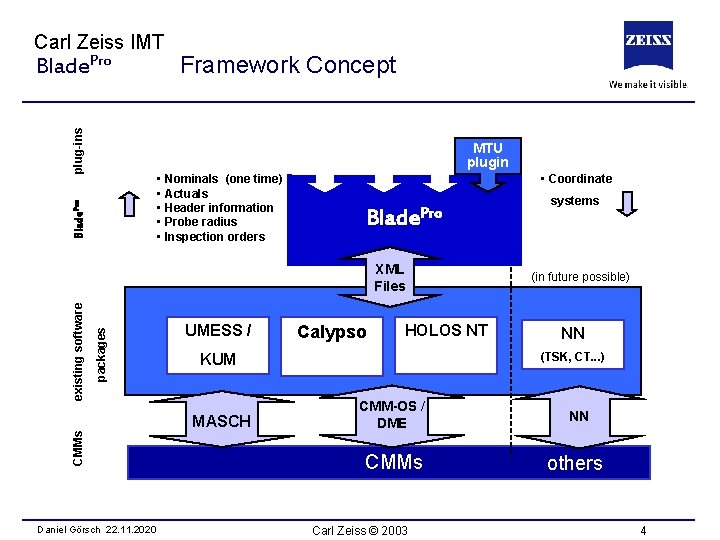
Carl Zeiss IMT plug-ins Blade. Pro Framework Concept MTU plugin Blade. Pro • Nominals (one time) • Actuals • Header information • Probe radius • Inspection orders • Coordinate Blade. Pro packages existing software XML Files UMESS / CMMs HOLOS NT (in future possible) NN (TSK, CT. . . ) KUM MASCH Daniel Görsch 22. 11. 2020 Calypso systems CMM-OS / DME NN CMMs others Carl Zeiss © 2003 4
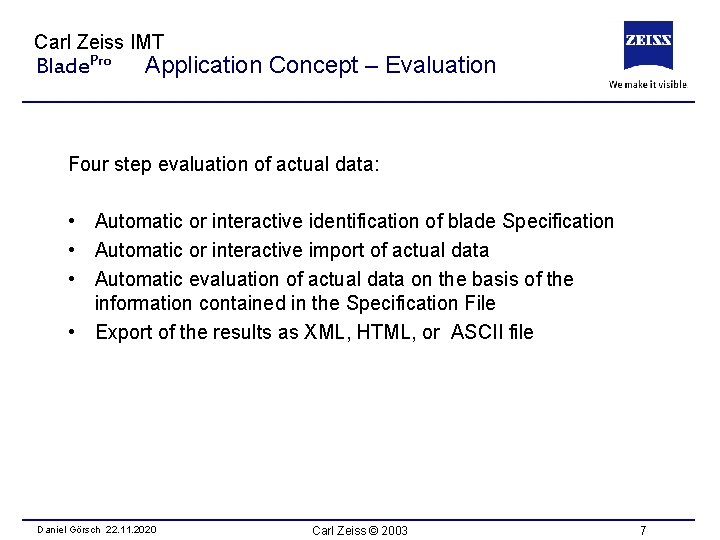
Carl Zeiss IMT Blade. Pro Application Concept – Evaluation Four step evaluation of actual data: • Automatic or interactive identification of blade Specification • Automatic or interactive import of actual data • Automatic evaluation of actual data on the basis of the information contained in the Specification File • Export of the results as XML, HTML, or ASCII file Daniel Görsch 22. 11. 2020 Carl Zeiss © 2003 7
Carl Zeiss IMT Blade. Pro – Training Pro Blade – Training Daniel Görsch 22. 11. 2020 Part I Introduction Part II Functions & Features Part III Calypso Interface Part IV User Interface Part V Characteristics Carl Zeiss © 2003 8

Carl Zeiss IMT Blade. Pro Functional Range • Computation of geometric characteristics as thickness, length, stacking point, etc. • 3 D best fit by methods of Gauss, Tschebyscheff, and modifications of these types • Selectable degrees of freedom • New kind of best fit procedure implementing the extension/contraction of the nominal profile in order to deal with large length errors (patent applied) Daniel Görsch 22. 11. 2020 Carl Zeiss © 2003 9

Carl Zeiss IMT Blade. Pro Features An assortment of selectable characteristics: • • • Shape deviation of the section profile Maximum blade thickness Maximum blade length Thickness of leading and trailing edge Radius of leading and trailing edge Thickness at arbitrary positions of the section profile Twist angle of the section Stacking point Chord line length Mean line, tangent line, etc. Daniel Görsch 22. 11. 2020 Carl Zeiss © 2003 10
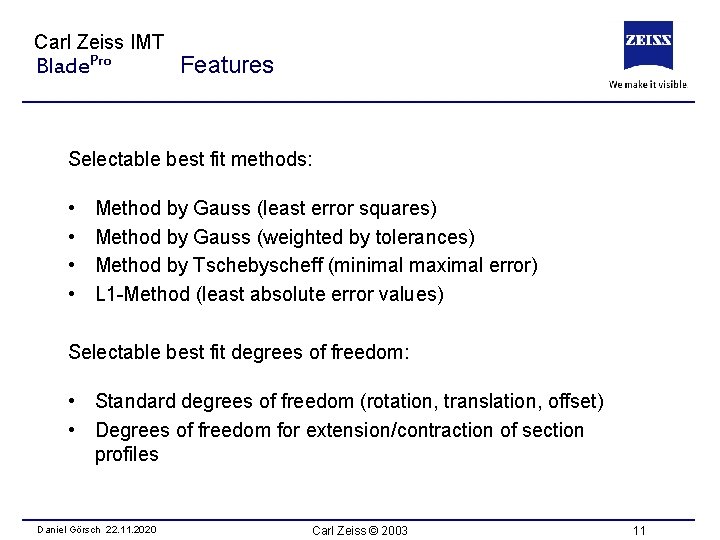
Carl Zeiss IMT Blade. Pro Features Selectable best fit methods: • • Method by Gauss (least error squares) Method by Gauss (weighted by tolerances) Method by Tschebyscheff (minimal maximal error) L 1 -Method (least absolute error values) Selectable best fit degrees of freedom: • Standard degrees of freedom (rotation, translation, offset) • Degrees of freedom for extension/contraction of section profiles Daniel Görsch 22. 11. 2020 Carl Zeiss © 2003 11
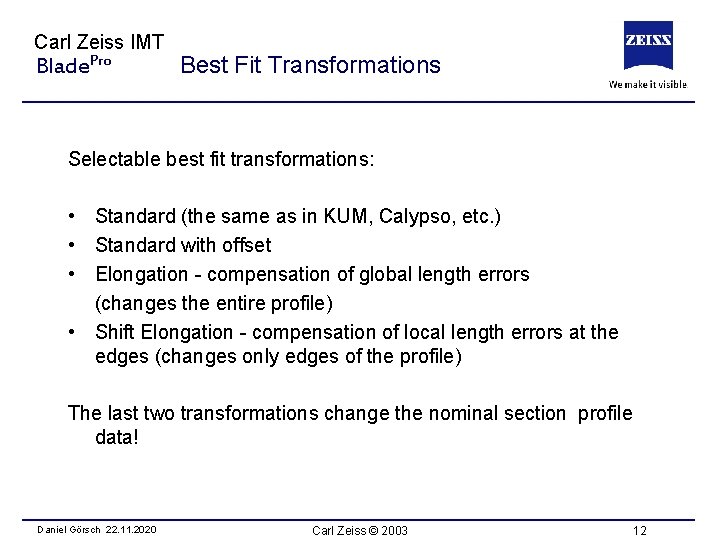
Carl Zeiss IMT Blade. Pro Best Fit Transformations Selectable best fit transformations: • Standard (the same as in KUM, Calypso, etc. ) • Standard with offset • Elongation - compensation of global length errors (changes the entire profile) • Shift Elongation - compensation of local length errors at the edges (changes only edges of the profile) The last two transformations change the nominal section profile data! Daniel Görsch 22. 11. 2020 Carl Zeiss © 2003 12
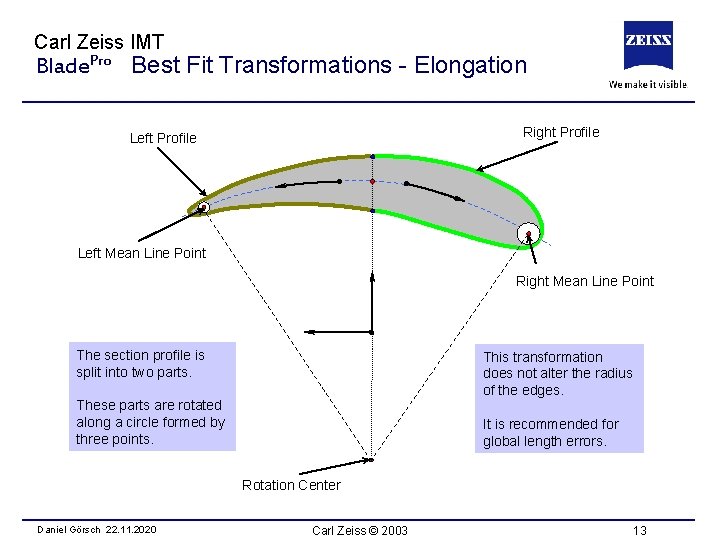
Carl Zeiss IMT Blade. Pro Best Fit Transformations - Elongation Right Profile Left Mean Line Point Right Mean Line Point The section profile is split into two parts. This transformation does not alter the radius of the edges. These parts are rotated along a circle formed by three points. It is recommended for global length errors. Rotation Center Daniel Görsch 22. 11. 2020 Carl Zeiss © 2003 13

Carl Zeiss IMT Blade. Pro Best Fit Transformations – Shift Elongation The points of the edge profile are shifted along a projection line. Transformed Edge Profile The shifting value is the same for all points. Projection Center Original Edge Profile This transformation alters the radius of the edges. It is recommended for local length errors at the profile edges. Daniel Görsch 22. 11. 2020 Carl Zeiss © 2003 14
Carl Zeiss IMT Blade. Pro – Training Pro Blade – Training Daniel Görsch 22. 11. 2020 Part I Introduction Part II Functions & Features Part III Calypso Interface Part IV User Interface Part V Characteristics Carl Zeiss © 2003 15
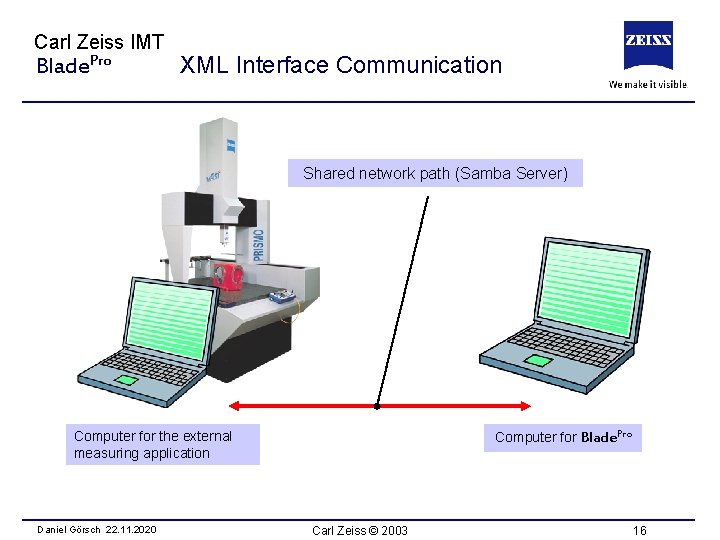
Carl Zeiss IMT Blade. Pro XML Interface Communication Shared network path (Samba Server) Computer for the external measuring application Daniel Görsch 22. 11. 2020 Computer for Blade. Pro Carl Zeiss © 2003 16
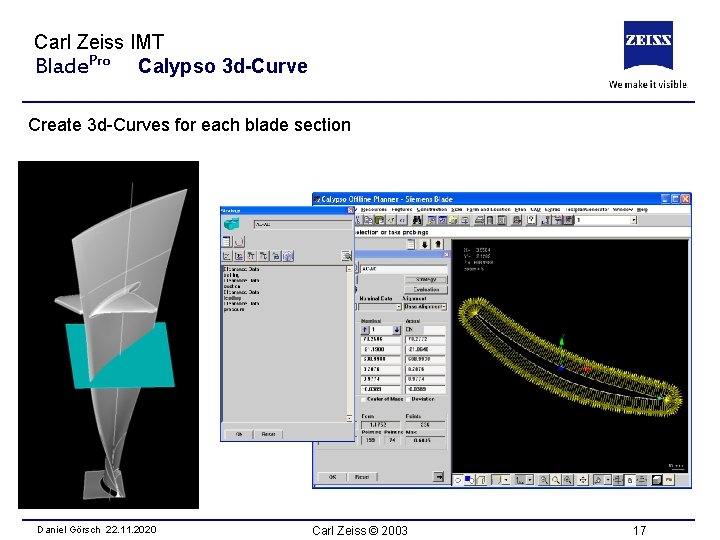
Carl Zeiss IMT Blade. Pro Calypso 3 d-Curve Create 3 d-Curves for each blade section Daniel Görsch 22. 11. 2020 Carl Zeiss © 2003 17
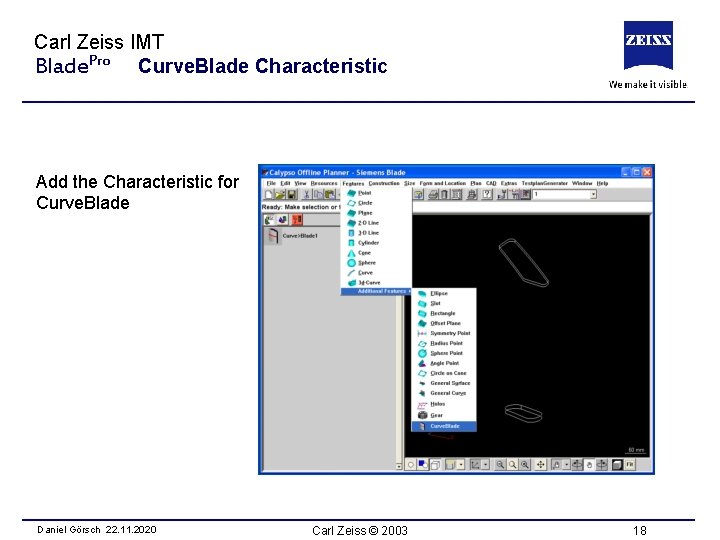
Carl Zeiss IMT Blade. Pro Curve. Blade Characteristic Add the Characteristic for Curve. Blade Daniel Görsch 22. 11. 2020 Carl Zeiss © 2003 18
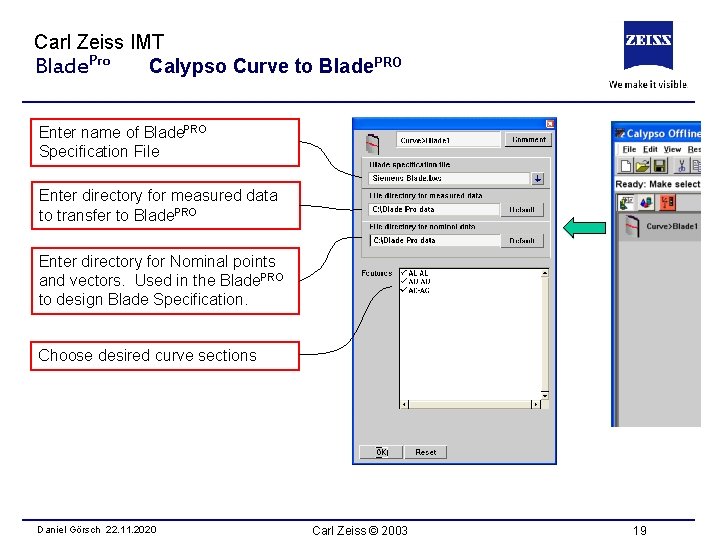
Carl Zeiss IMT Blade. Pro Calypso Curve to Blade. PRO Enter name of Blade. PRO Specification File Enter directory for measured data to transfer to Blade. PRO Enter directory for Nominal points and vectors. Used in the Blade. PRO to design Blade Specification. Choose desired curve sections Daniel Görsch 22. 11. 2020 Carl Zeiss © 2003 19
Carl Zeiss IMT Blade. Pro – Training Pro Blade – Training Daniel Görsch 22. 11. 2020 Part I Introduction Part II Functions & Features Part III Calypso Interface Part IV User Interface Part V Characteristics Carl Zeiss © 2003 20
Carl Zeiss IMT Blade. Pro User Interface - Handling Based on Microsoft guide lines for standard office applications • Document oriented working and management of blades • For all user actions there are several way of realization • Intensive use of context menus - expect an action for an element at the element itself • All dialogs are non modal and realize an instant preview of changes Daniel Görsch 22. 11. 2020 Carl Zeiss © 2003 21
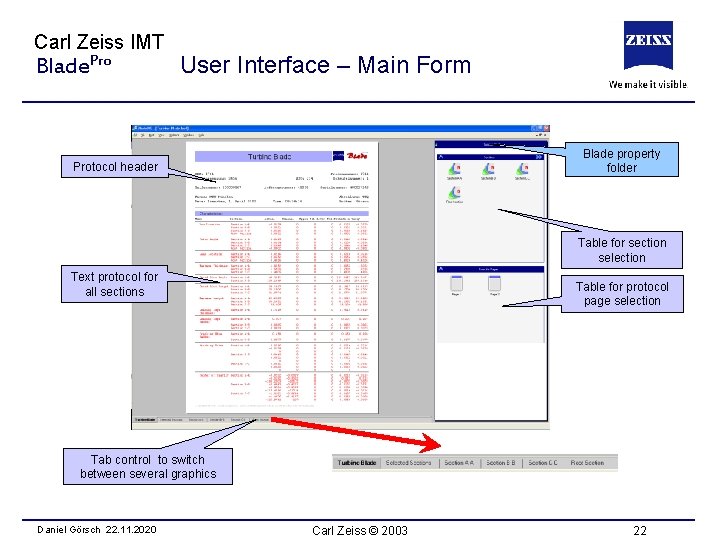
Carl Zeiss IMT Blade. Pro User Interface – Main Form Blade property folder Protocol header Table for section selection Text protocol for all sections Table for protocol page selection Tab control to switch between several graphics Daniel Görsch 22. 11. 2020 Carl Zeiss © 2003 22
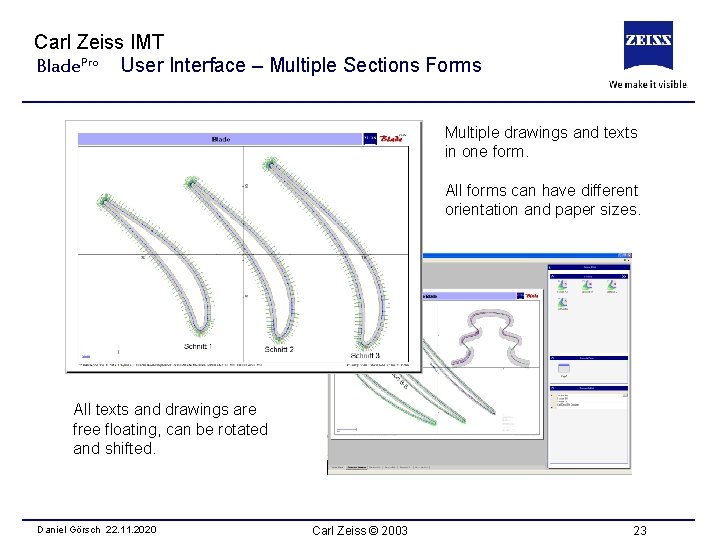
Carl Zeiss IMT Blade. Pro User Interface – Multiple Sections Forms Multiple drawings and texts in one form. All forms can have different orientation and paper sizes. All texts and drawings are free floating, can be rotated and shifted. Daniel Görsch 22. 11. 2020 Carl Zeiss © 2003 23
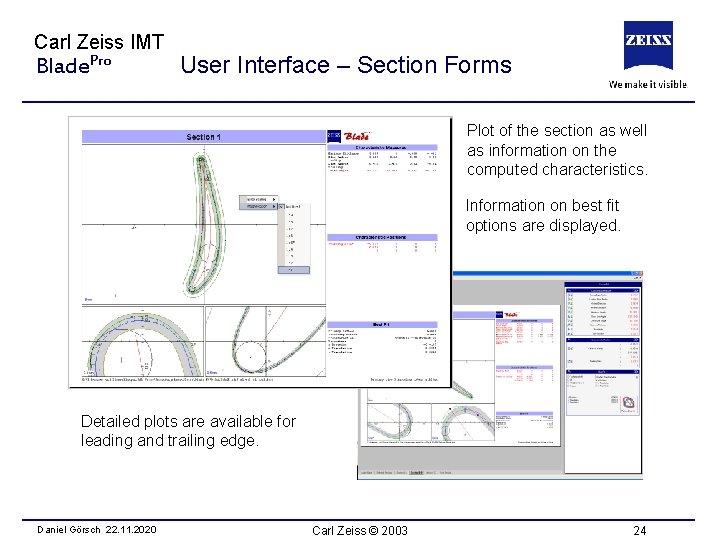
Carl Zeiss IMT Blade. Pro User Interface – Section Forms Plot of the section as well as information on the computed characteristics. Information on best fit options are displayed. Detailed plots are available for leading and trailing edge. Daniel Görsch 22. 11. 2020 Carl Zeiss © 2003 24
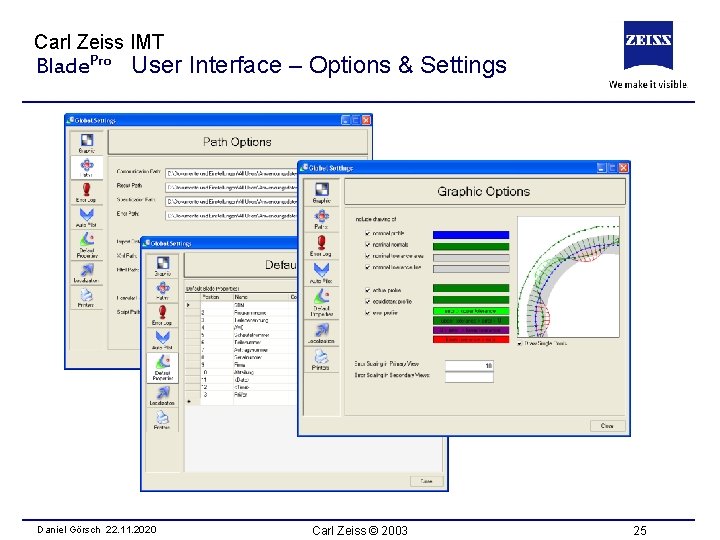
Carl Zeiss IMT Blade. Pro User Interface – Options & Settings Daniel Görsch 22. 11. 2020 Carl Zeiss © 2003 25
Carl Zeiss IMT Blade. Pro – Training Pro Blade – Training Daniel Görsch 22. 11. 2020 Part I Introduction Part II Functions & Features Part III Calypso Interface Part IV User Interface Part V Characteristics Carl Zeiss © 2003 26

Carl Zeiss IMT Blade. Pro Characteristic Geometries Blades – Rotating Vanes - Stationary Pressure Side Flow Suction Side Daniel Görsch 22. 11. 2020 Carl Zeiss © 2003 27
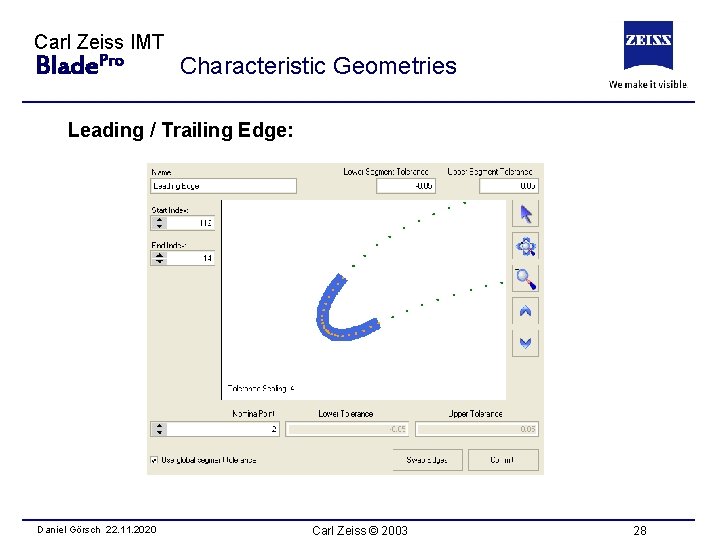
Carl Zeiss IMT Blade. Pro Characteristic Geometries Leading / Trailing Edge: Daniel Görsch 22. 11. 2020 Carl Zeiss © 2003 28
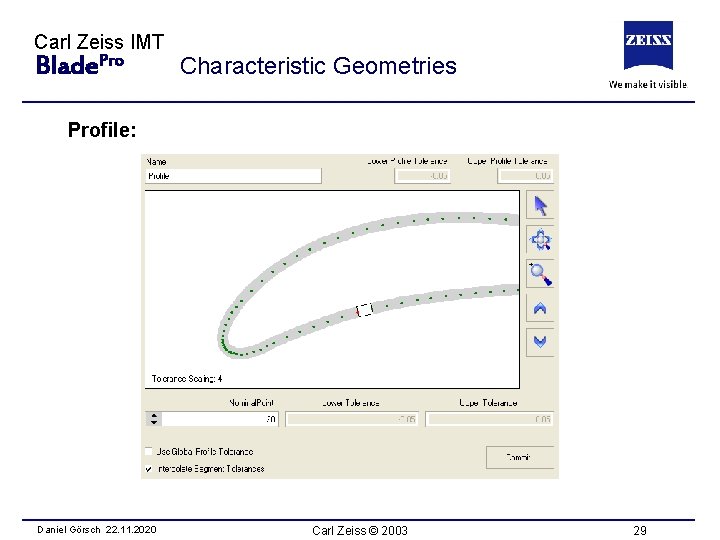
Carl Zeiss IMT Blade. Pro Characteristic Geometries Profile: Daniel Görsch 22. 11. 2020 Carl Zeiss © 2003 29
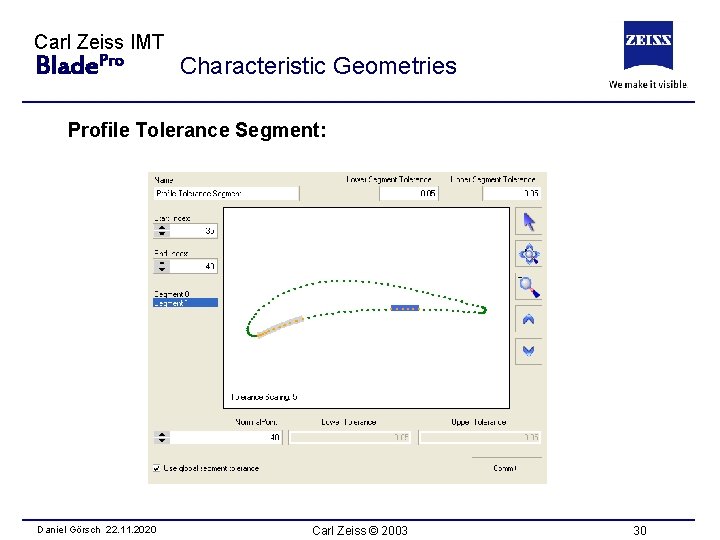
Carl Zeiss IMT Blade. Pro Characteristic Geometries Profile Tolerance Segment: Daniel Görsch 22. 11. 2020 Carl Zeiss © 2003 30
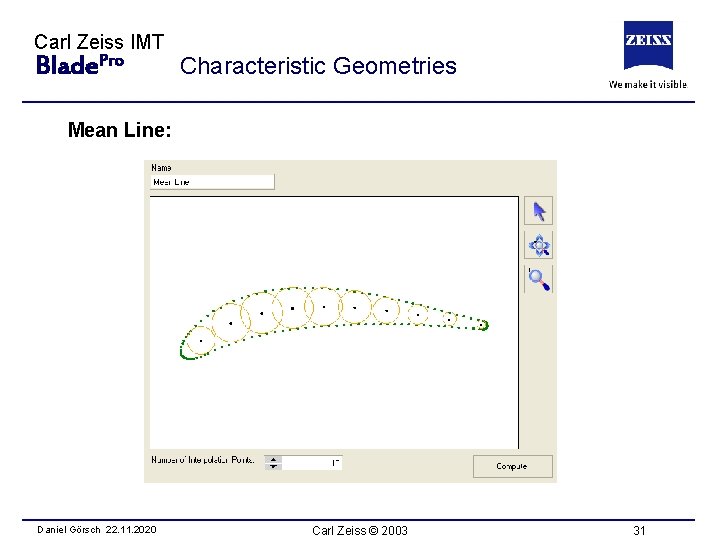
Carl Zeiss IMT Blade. Pro Characteristic Geometries Mean Line: Daniel Görsch 22. 11. 2020 Carl Zeiss © 2003 31
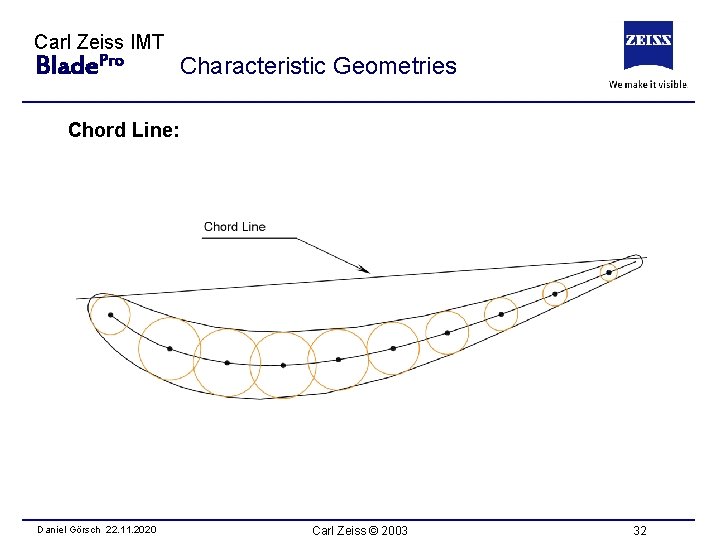
Carl Zeiss IMT Blade. Pro Characteristic Geometries Chord Line: Daniel Görsch 22. 11. 2020 Carl Zeiss © 2003 32

Carl Zeiss IMT Blade. Pro Characteristic Measures Chord Line Length: Daniel Görsch 22. 11. 2020 Carl Zeiss © 2003 33
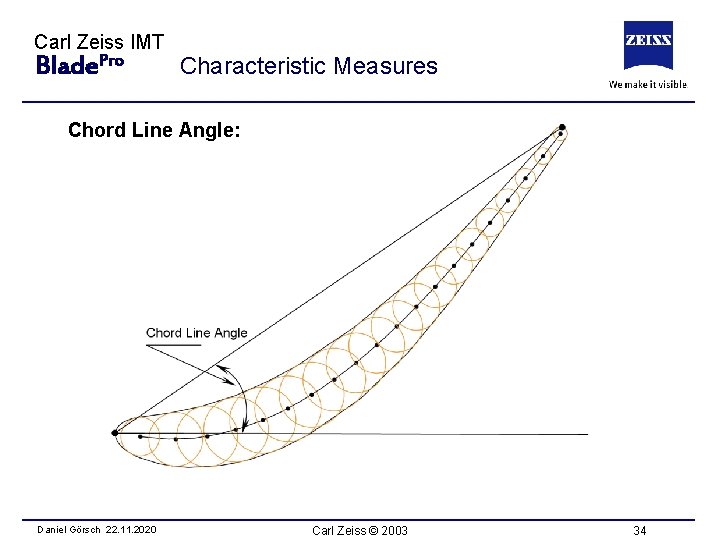
Carl Zeiss IMT Blade. Pro Characteristic Measures Chord Line Angle: Daniel Görsch 22. 11. 2020 Carl Zeiss © 2003 34
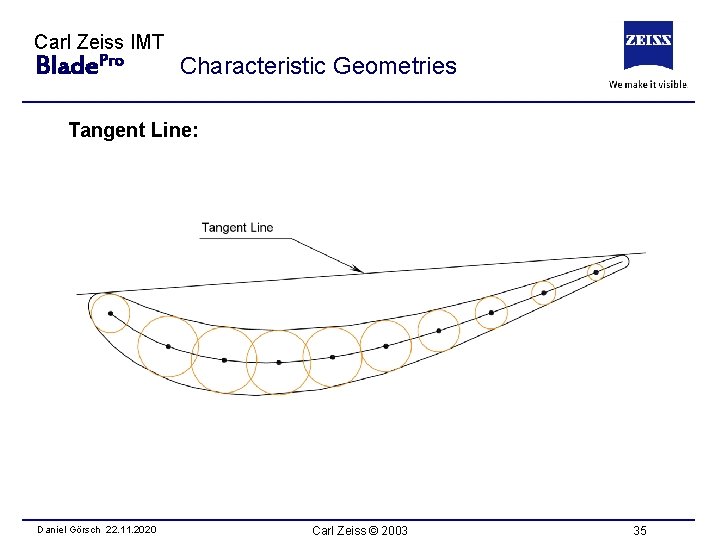
Carl Zeiss IMT Blade. Pro Characteristic Geometries Tangent Line: Daniel Görsch 22. 11. 2020 Carl Zeiss © 2003 35

Carl Zeiss IMT Blade. Pro Characteristic Geometries Bearing Surface: Daniel Görsch 22. 11. 2020 Carl Zeiss © 2003 37
Carl Zeiss IMT Blade. Pro Characteristic Measures Bow Location: y-Part of the best fit translation Lean Location: x-Part of the best fit translation Twist Angle: Angle of the best fit rotation Extreme Deviation: Maximal or minimal deviation (nominal to actual profile) Daniel Görsch 22. 11. 2020 Carl Zeiss © 2003 38
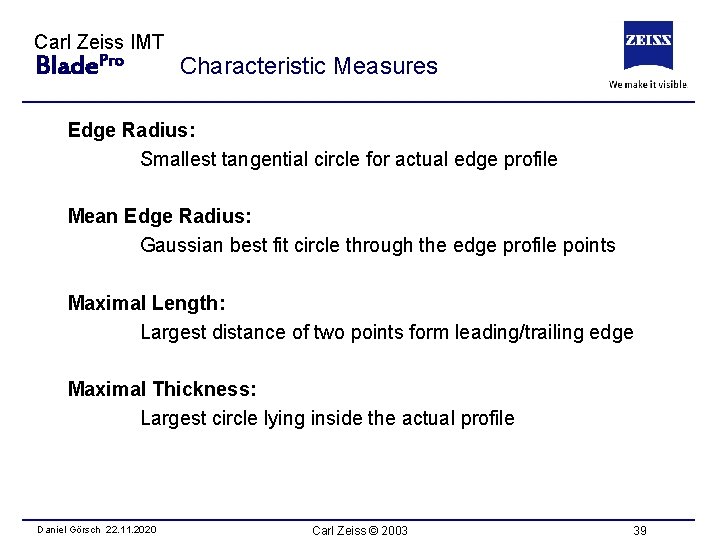
Carl Zeiss IMT Blade. Pro Characteristic Measures Edge Radius: Smallest tangential circle for actual edge profile Mean Edge Radius: Gaussian best fit circle through the edge profile points Maximal Length: Largest distance of two points form leading/trailing edge Maximal Thickness: Largest circle lying inside the actual profile Daniel Görsch 22. 11. 2020 Carl Zeiss © 2003 39
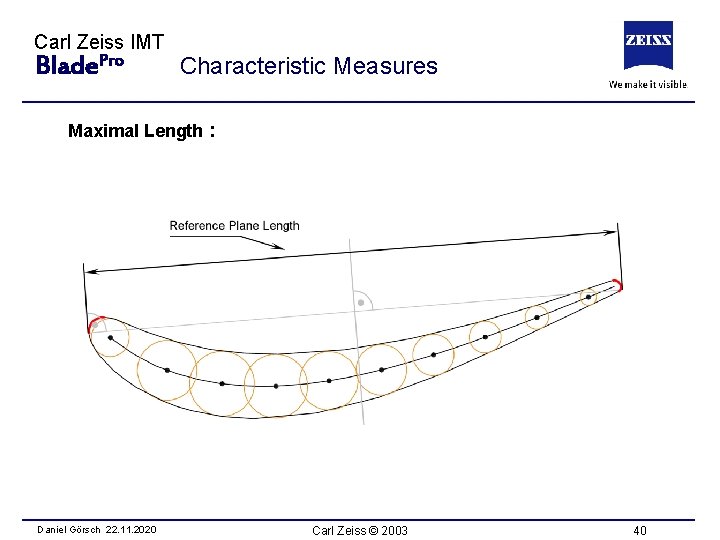
Carl Zeiss IMT Blade. Pro Characteristic Measures Maximal Length : Daniel Görsch 22. 11. 2020 Carl Zeiss © 2003 40
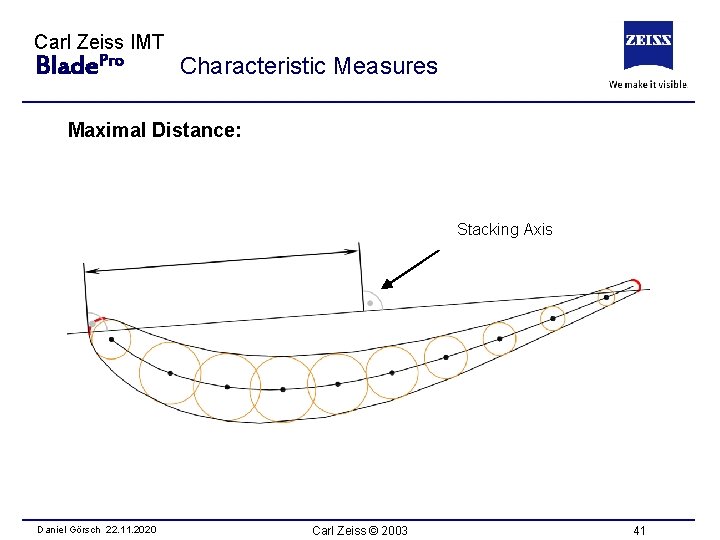
Carl Zeiss IMT Blade. Pro Characteristic Measures Maximal Distance: Stacking Axis Daniel Görsch 22. 11. 2020 Carl Zeiss © 2003 41
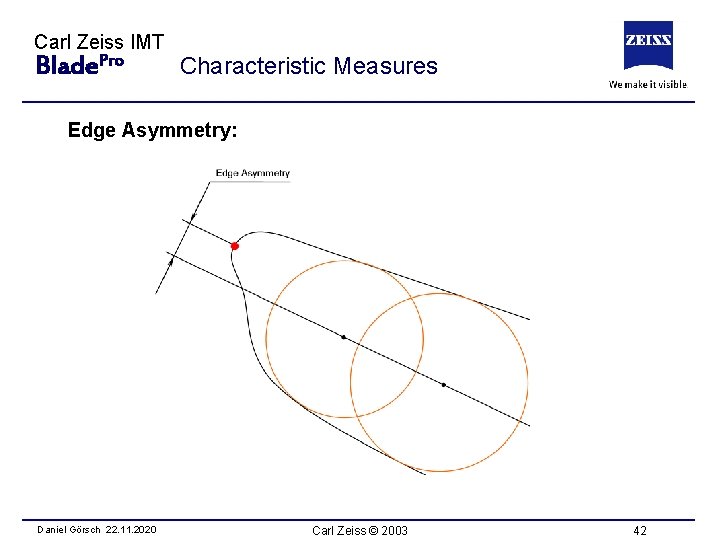
Carl Zeiss IMT Blade. Pro Characteristic Measures Edge Asymmetry: Daniel Görsch 22. 11. 2020 Carl Zeiss © 2003 42
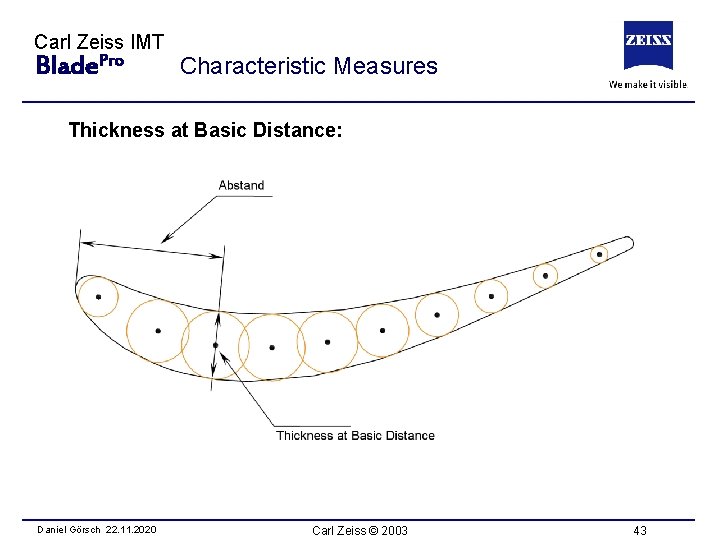
Carl Zeiss IMT Blade. Pro Characteristic Measures Thickness at Basic Distance: Daniel Görsch 22. 11. 2020 Carl Zeiss © 2003 43
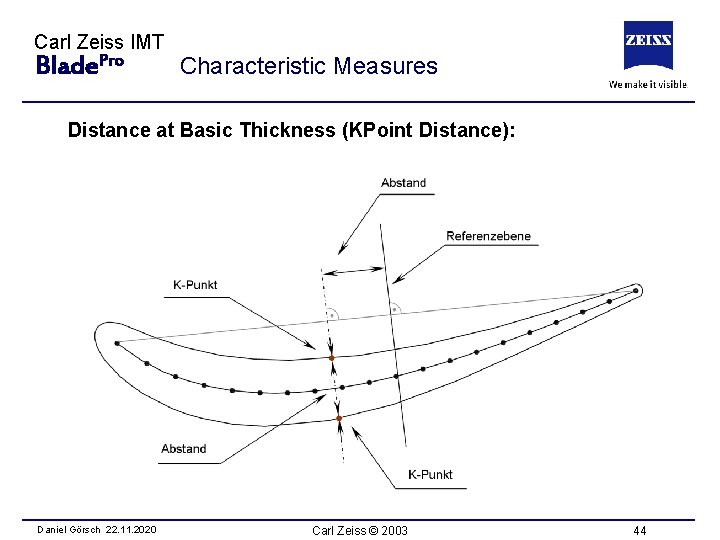
Carl Zeiss IMT Blade. Pro Characteristic Measures Distance at Basic Thickness (KPoint Distance): Daniel Görsch 22. 11. 2020 Carl Zeiss © 2003 44
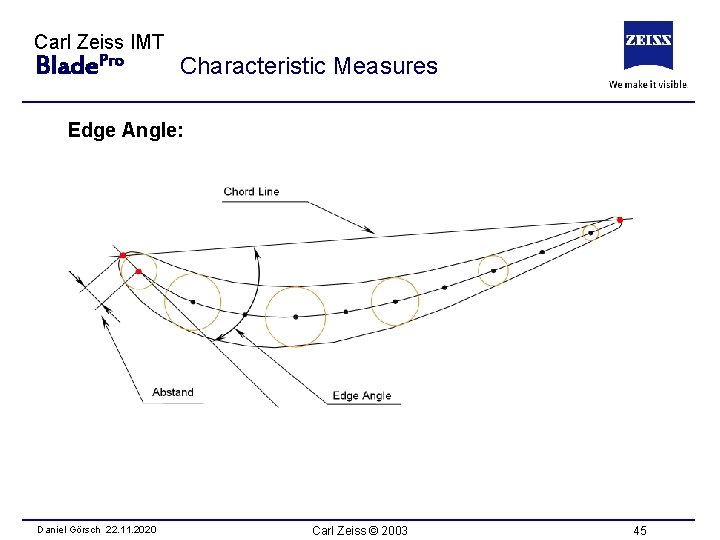
Carl Zeiss IMT Blade. Pro Characteristic Measures Edge Angle: Daniel Görsch 22. 11. 2020 Carl Zeiss © 2003 45
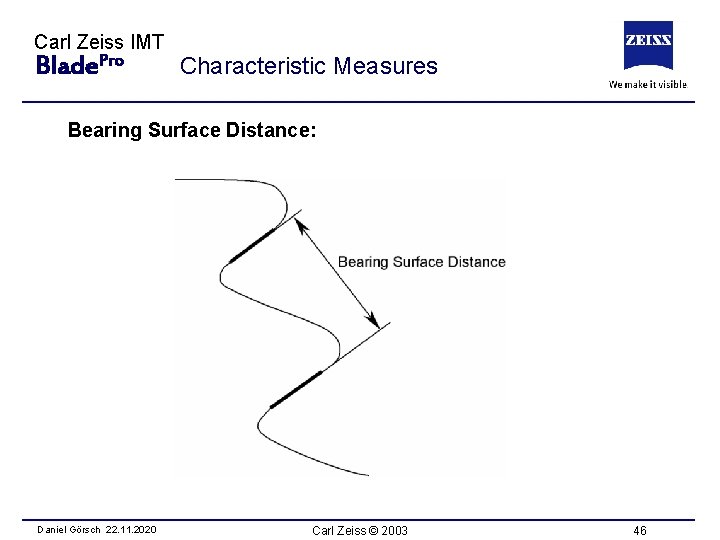
Carl Zeiss IMT Blade. Pro Characteristic Measures Bearing Surface Distance: Daniel Görsch 22. 11. 2020 Carl Zeiss © 2003 46
Carl Zeiss IMT Blade. Pro – Training Pro Blade – Training Daniel Görsch 22. 11. 2020 Part I Introduction Part II Functions & Features Part III Calypso Interface Part IV User Interface Part V Characteristics Carl Zeiss © 2003 50
- Slides: 44