
CAP 6135 Malware and Software Vulnerability Analysis Rootkits
CAP 6135: Malware and Software Vulnerability Analysis Rootkits Cliff Zou Spring 2012
The Evolution of Malware q q Malware, including spyware, adware and viruses want to be hard to detect and/or hard to remove Rootkits are a fast evolving technology to achieve these goals q q Cloaking technology applied to malware Not malware by itself Example rootkit-based viruses: W 32. Maslan. A@mm, W 32. Opasa@mm Rootkit history q Appeared as stealth viruses q q One of the first known PC viruses, Brain, was stealth First “rootkit” appeared on Sun. OS in 1994 q Replacement of core system utilities (ls, ps, etc. ) to hide malware processes
Cloaking q Modern rootkits can cloak: q q q q Several major rootkit technologies q q q Processes Services TCP/IP ports Files Registry keys User accounts User-mode API filtering Kernel-mode data structure manipulation Process hijacking Visit www. rootkit. com for tools and information
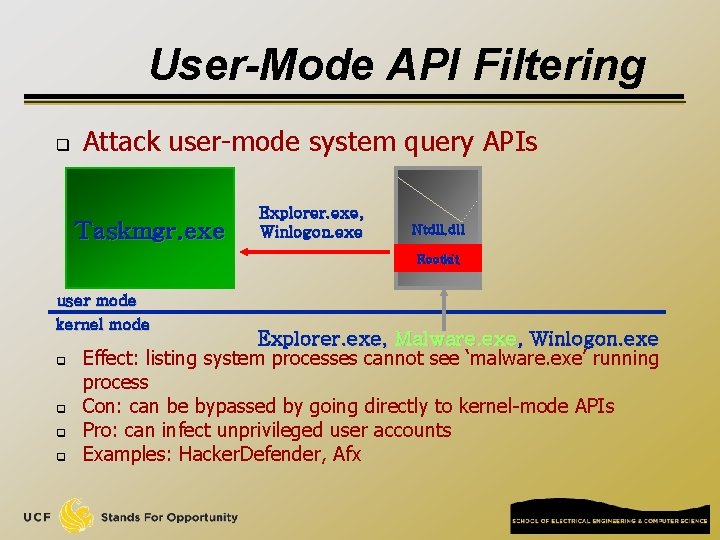
User-Mode API Filtering q Attack user-mode system query APIs Taskmgr. exe Explorer. exe, Winlogon. exe Ntdll. dll Rootkit user mode kernel mode q q Explorer. exe, Malware. exe, Winlogon. exe Effect: listing system processes cannot see ‘malware. exe’ running process Con: can be bypassed by going directly to kernel-mode APIs Pro: can infect unprivileged user accounts Examples: Hacker. Defender, Afx

Kernel-Mode API Filtering q Attack kernel-mode system query APIs Taskmgr. exe Explorer. exe, Winlogon. exe Ntdll. dll user mode kernel mode q Explorer. exe, Malware. exe, Winlogon. exe Cons: q q Requires admin privilege to install Difficult to write Pro: very thorough cloak Example: NT Rootkit Explorer. exe, Winlogon. exe Rootkit
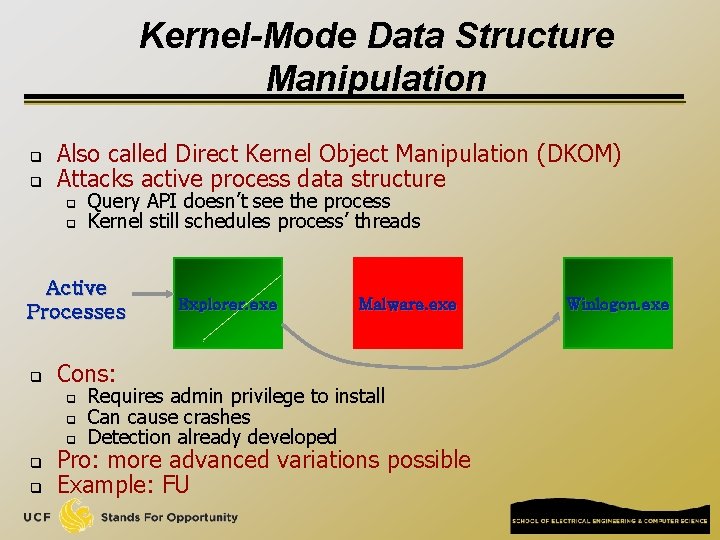
Kernel-Mode Data Structure Manipulation q q Also called Direct Kernel Object Manipulation (DKOM) Attacks active process data structure q q Query API doesn’t see the process Kernel still schedules process’ threads Active Processes q q Malware. exe Cons: q q Explorer. exe Requires admin privilege to install Can cause crashes Detection already developed Pro: more advanced variations possible Example: FU Winlogon. exe
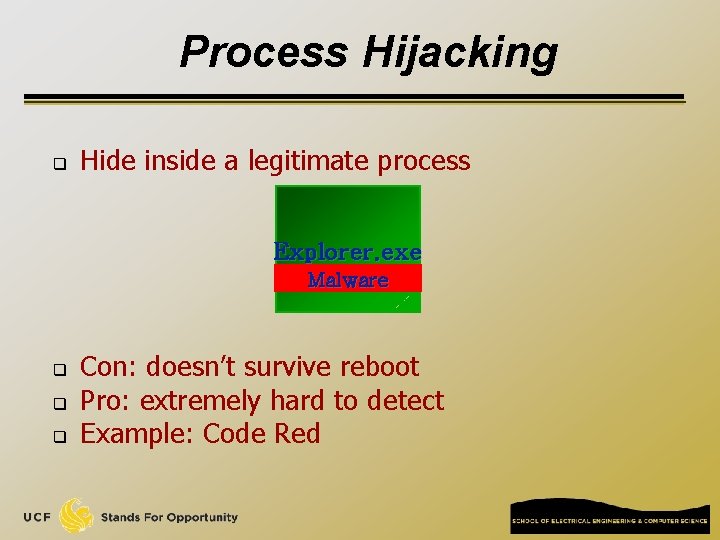
Process Hijacking q Hide inside a legitimate process Explorer. exe Malware q q q Con: doesn’t survive reboot Pro: extremely hard to detect Example: Code Red
Detecting Rootkits q All cloaks have holes q q Leave some APIs unfiltered Have detectable side effects Can’t cloak when OS is offline Rootkit detection attacks holes q q Cat-and-mouse game Several examples q q Microsoft Research Strider/Ghostbuster RKDetect Sysinternals Rootkit. Revealer F-Secure Black. Light
Simple Rootkit Detection q Perform a directory listing online and compare with secure alternate OS boot (see http: //research. microsoft. com/rootkit/ ) Offline OS is Windows PE, ERD Commander, Bart. PE dir /s /ah * > dirscan. txt windiff dirscanon. txt dirscanoff. txt q q This won’t detect non-persistent rootkits that save to disk during shutdown
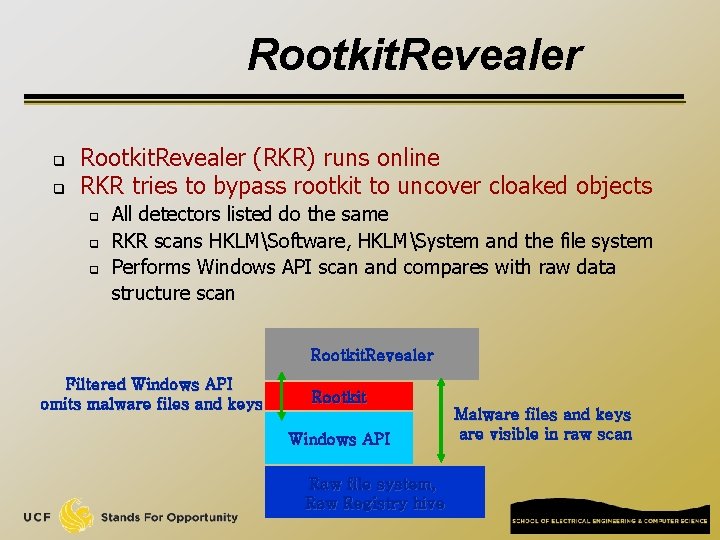
Rootkit. Revealer q q Rootkit. Revealer (RKR) runs online RKR tries to bypass rootkit to uncover cloaked objects q q q All detectors listed do the same RKR scans HKLMSoftware, HKLMSystem and the file system Performs Windows API scan and compares with raw data structure scan Rootkit. Revealer Filtered Windows API omits malware files and keys Rootkit Windows API Raw file system, Raw Registry hive Malware files and keys are visible in raw scan
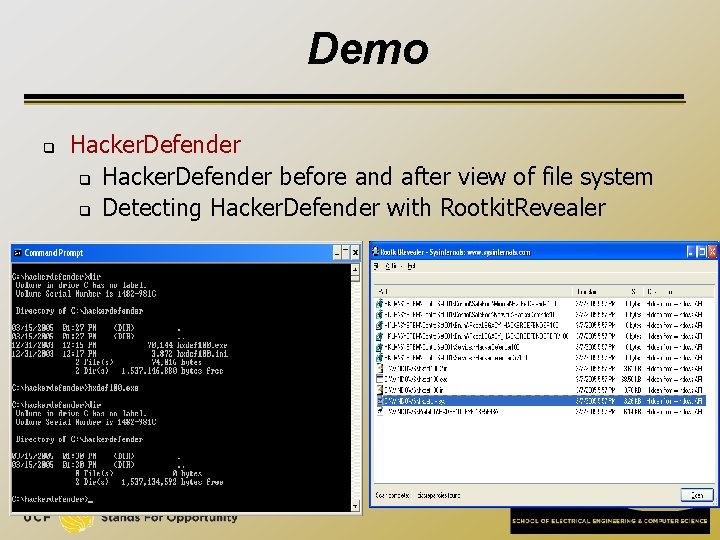
Demo q Hacker. Defender before and after view of file system q Detecting Hacker. Defender with Rootkit. Revealer
Dealing with Rootkits q Unless you have specific uninstall instructions from an authoritative source: Reformat the system and reinstall Windows! q Don’t rely on “rename” functionality offered by some rootkit detectors q q It might not have detected all a rootkit’s components The rename might not be effective
- Slides: 12