
Canadian Bioinformatics Workshops www bioinformatics ca Module Title

Canadian Bioinformatics Workshops www. bioinformatics. ca
Module #: Title of Module 2
Module 2 RNA-seq alignment and visualization (lecture) Malachi Griffith & Obi Griffith Informatics for RNA-sequence Analysis June 19 -20, 2014 (Vancouver) www. malachigriffith. org mgriffit@genome. wustl. edu www. obigriffith. org ogriffit@genome. wustl. edu
Learning objectives of the course • • Module 1: Introduction to RNA sequencing Module 2: RNA-seq alignment and visualization Module 3: Expression and Differential Expression Module 4: Isoform discovery and alternative expression • Tutorials – Provide a working example of an RNA-seq analysis pipeline – Run in a ‘reasonable’ amount of time with modest computer resources – Self contained, self explanatory, portable Module 2 – RNA-seq alignment and visualization bioinformatics. ca
Learning Objectives of Module • • RNA-seq alignment challenges and common questions Alignment strategies Bowtie/Top. Hat Introduction to the BAM and BED formats Basic manipulation of BAMs Visualization of RNA-seq alignments in IGV BAM read counting and determination of variant allele expression status Module 2 – RNA-seq alignment and visualization bioinformatics. ca
RNA-seq alignment challenges • Computational cost – 100’s of millions of reads • Introns! – Spliced vs. unspliced alignments • Can I just align my data once using one approach and be done with it? – Unfortunately probably not • Is Top. Hat the only mapper to consider for RNA-seq data? – http: //www. biostars. org/p/60478/ Module 2 – RNA-seq alignment and visualization bioinformatics. ca
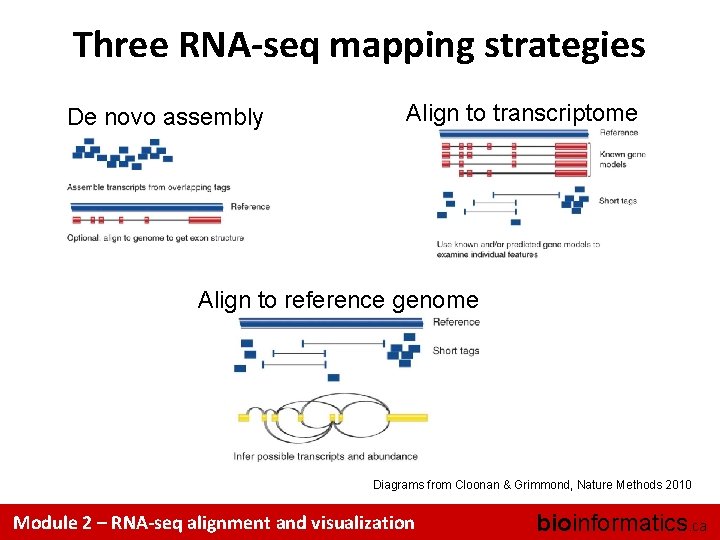
Three RNA-seq mapping strategies De novo assembly Align to transcriptome Align to reference genome Diagrams from Cloonan & Grimmond, Nature Methods 2010 Module 2 – RNA-seq alignment and visualization bioinformatics. ca
Which alignment strategy is best? • De novo assembly – If a reference genome does not exist for the species being studied – If complex polymorphisms/mutations/haplotypes might be missed by comparing to the reference genome • Align to transcriptome – If you have short reads (< 50 bp) • Align to reference genome – All other cases • Each strategy involves different alignment/assembly tools Module 2 – RNA-seq alignment and visualization bioinformatics. ca
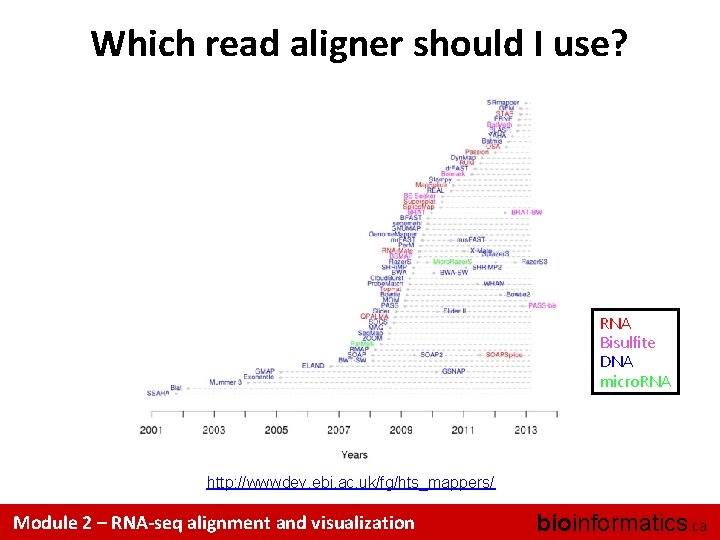
Which read aligner should I use? RNA Bisulfite DNA micro. RNA http: //wwwdev. ebi. ac. uk/fg/hts_mappers/ Module 2 – RNA-seq alignment and visualization bioinformatics. ca
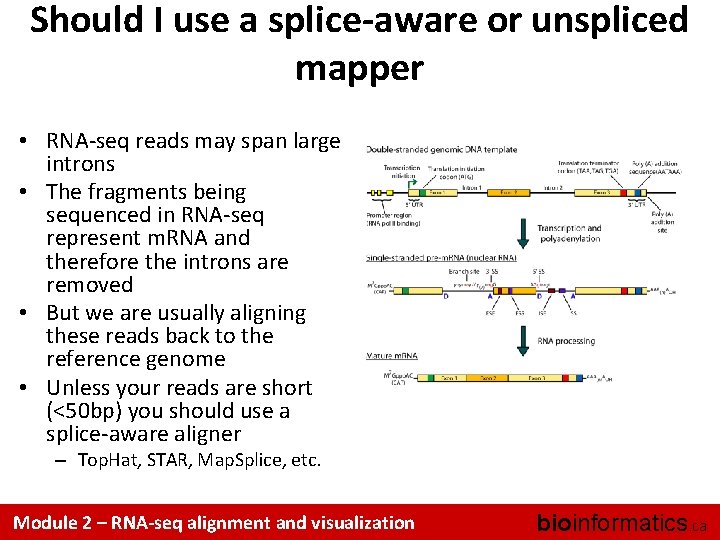
Should I use a splice-aware or unspliced mapper • RNA-seq reads may span large introns • The fragments being sequenced in RNA-seq represent m. RNA and therefore the introns are removed • But we are usually aligning these reads back to the reference genome • Unless your reads are short (<50 bp) you should use a splice-aware aligner – Top. Hat, STAR, Map. Splice, etc. Module 2 – RNA-seq alignment and visualization bioinformatics. ca
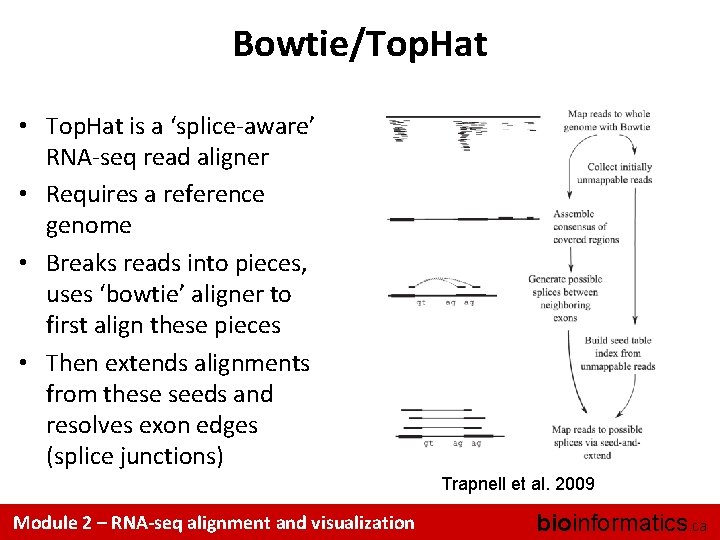
Bowtie/Top. Hat • Top. Hat is a ‘splice-aware’ RNA-seq read aligner • Requires a reference genome • Breaks reads into pieces, uses ‘bowtie’ aligner to first align these pieces • Then extends alignments from these seeds and resolves exon edges (splice junctions) Trapnell et al. 2009 Module 2 – RNA-seq alignment and visualization bioinformatics. ca
Should I allow ‘multi-mapped’ reads? • Depends on the application • In *DNA* analysis it is common to use a mapper to randomly select alignments from a series of equally good alignments • In *RNA* analysis this is less common – Perhaps disallow multi-mapped reads if you are variant calling – Definitely should allow multi-mapped reads for expression analysis with Top. Hat/Cufflinks – Definitely should allow multi-mapped reads for gene fusion discovery Module 2 – RNA-seq alignment and visualization bioinformatics. ca
What is the output of bowtie/tophat? • A SAM/BAM file – SAM stands for Sequence Alignment/Map format – BAM is the binary version of a SAM file • Remember, compressed files require special handling compared to plain text files • How can I convert BAM to SAM? – http: //www. biostars. org/p/1701/ Module 2 – RNA-seq alignment and visualization bioinformatics. ca
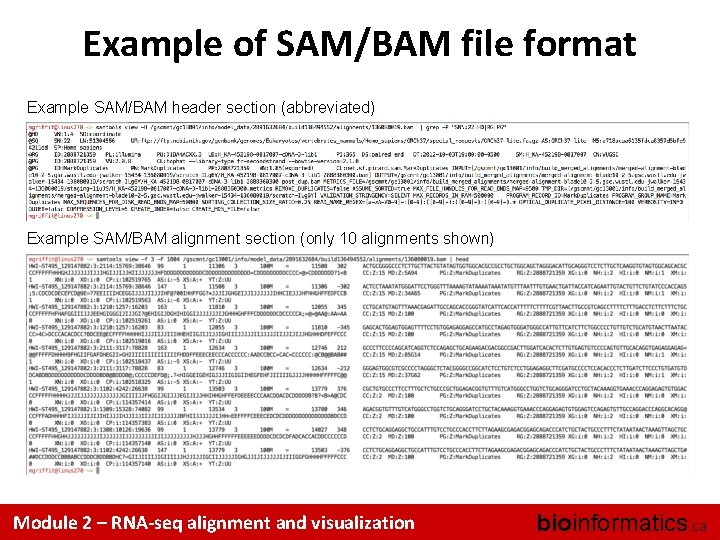
Example of SAM/BAM file format Example SAM/BAM header section (abbreviated) Example SAM/BAM alignment section (only 10 alignments shown) Module 2 – RNA-seq alignment and visualization bioinformatics. ca
Introduction to the SAM/BAM format • The specification – http: //samtools. sourceforge. net/SAM 1. pdf • The SAM format consists of two sections: – Header section • Used to describe source of data, reference sequence, method of alignment, etc. – Alignment section • Used to describe the read, quality of the read, and nature alignment of the read to a region of the genome • BAM is a compressed version of SAM – Compressed using lossless BGZF format – Other BAM compression strategies are a subject of research. See ‘CRAM’ format for example • BAM files are usually ‘indexed’ – A ‘. bai’ file will be found beside the ‘. bam’ file – Indexing aims to achieve fast retrieval of alignments overlapping a specified region without going through the whole alignments. BAM must be sorted by the reference ID and then the leftmost coordinate before indexing Module 2 – RNA-seq alignment and visualization bioinformatics. ca
SAM/BAM header section • Used to describe source of data, reference sequence, method of alignment, etc. • Each section begins with character ‘@’ followed by a two-letter record type code. These are followed by two-letter tags and values – @HD The header line • VN: format version • SO: Sorting order of alignments – @SQ Reference sequence dictionary • SN: reference sequence name • LN: reference sequence length • SP: species – @RG Read group • ID: read group identifier • CN: name of sequencing center • SM: sample name – @PG Program • PN: program name • VN: program version Module 2 – RNA-seq alignment and visualization bioinformatics. ca
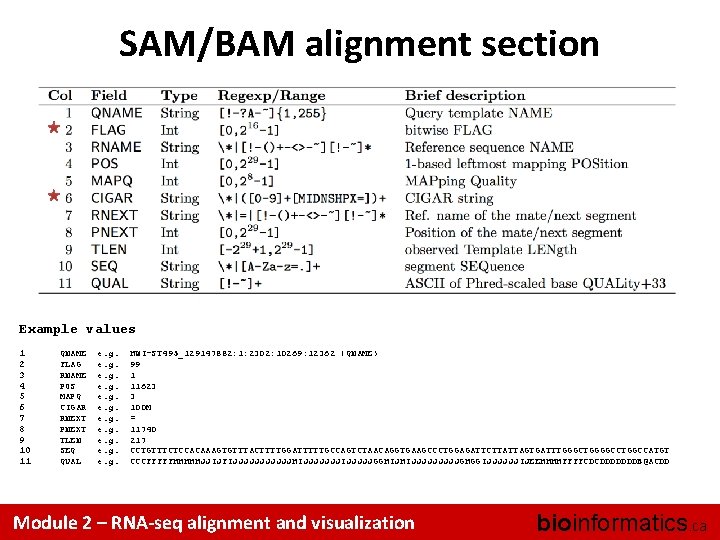
SAM/BAM alignment section Example values 1 2 3 4 5 6 7 8 9 10 11 QNAME FLAG RNAME POS MAPQ CIGAR RNEXT PNEXT TLEN SEQ QUAL e. g. HWI-ST 495_129147882: 1: 2302: 10269: 12362 (QNAME) 99 1 11623 3 100 M = 11740 217 CCTGTTTCTCCACAAAGTGTTTACTTTTGGATTTTTGCCAGTCTAACAGGTGAAGCCCTGGAGATTCTTATTAGTGATTTGGGCTGGGGCCTGGCCATGT CCCFFFFFHHHHHJJIJFIJJJJJJHIJJJJJJJIJJJJJGGHIJHIJJJJJGHGGIJJJJJJIJEEHHHHFFFFCDCDDDDDDDB@ACDD Module 2 – RNA-seq alignment and visualization bioinformatics. ca
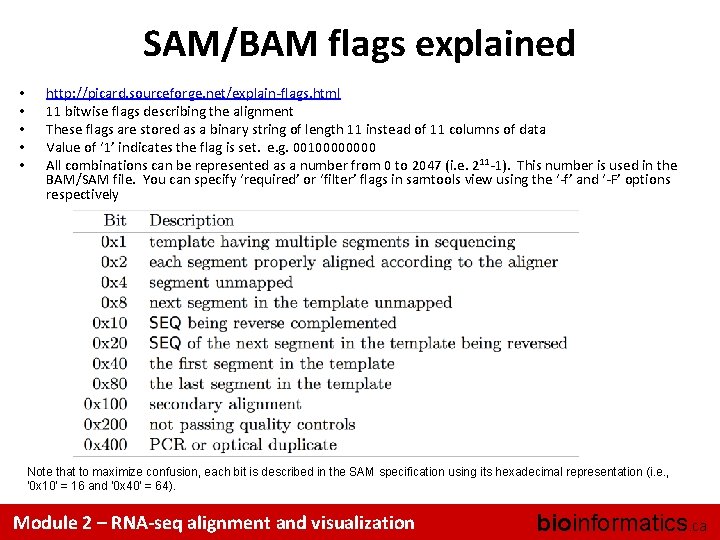
SAM/BAM flags explained • • • http: //picard. sourceforge. net/explain-flags. html 11 bitwise flags describing the alignment These flags are stored as a binary string of length 11 instead of 11 columns of data Value of ‘ 1’ indicates the flag is set. e. g. 0010000 All combinations can be represented as a number from 0 to 2047 (i. e. 211 -1). This number is used in the BAM/SAM file. You can specify ‘required’ or ‘filter’ flags in samtools view using the ‘-f’ and ‘-F’ options respectively Note that to maximize confusion, each bit is described in the SAM specification using its hexadecimal representation (i. e. , '0 x 10' = 16 and '0 x 40' = 64). Module 2 – RNA-seq alignment and visualization bioinformatics. ca
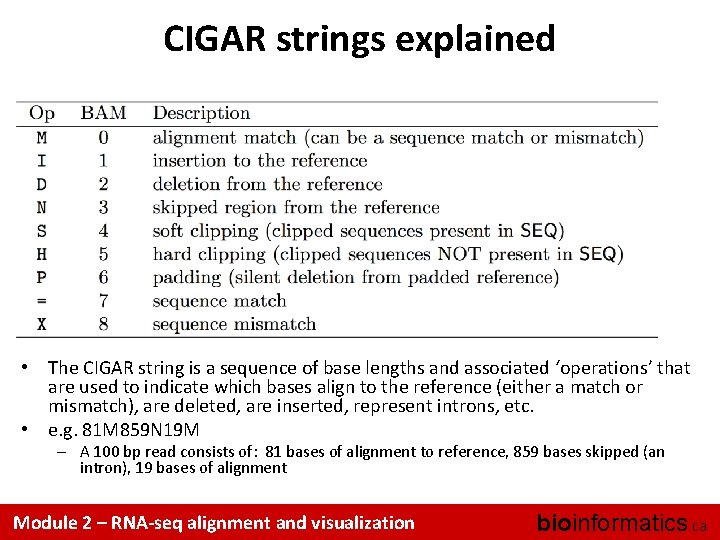
CIGAR strings explained • The CIGAR string is a sequence of base lengths and associated ‘operations’ that are used to indicate which bases align to the reference (either a match or mismatch), are deleted, are inserted, represent introns, etc. • e. g. 81 M 859 N 19 M – A 100 bp read consists of: 81 bases of alignment to reference, 859 bases skipped (an intron), 19 bases of alignment Module 2 – RNA-seq alignment and visualization bioinformatics. ca
Introduction to the BED format • When working with BAM files, it is very common to want to examine a focused subset of the reference genome – e. g. the exons of a gene • These subsets are commonly specified in ‘BED’ files – https: //genome. ucsc. edu/FAQformat. html#format 1 • Many BAM manipulation tools accept regions of interest in BED format • Basic BED format (tab separated): – Chromosome name, start position, end position – Coordinates in BED format are 0 based Module 2 – RNA-seq alignment and visualization bioinformatics. ca
Manipulation of SAM/BAM and BED files • Several tools are used ubiquitously in sequence analysis to manipulate these files • SAM/BAM files – samtools – bamtools – picard • BED files – bedtools – bedops Module 2 – RNA-seq alignment and visualization bioinformatics. ca
How should I sort my SAM/BAM file? • Generally BAM files are sorted by position – This is for performance reasons • When sorted and indexed, arbitrary positions in a massive BAM file can be accessed rapidly • Certain tools require a BAM sorted by read name – Usually this is when we need to easily identify both reads of a pair • The insert size between two reads may be large • In fusion detection we are interested in read pairs that map to different chromosomes… Module 2 – RNA-seq alignment and visualization bioinformatics. ca
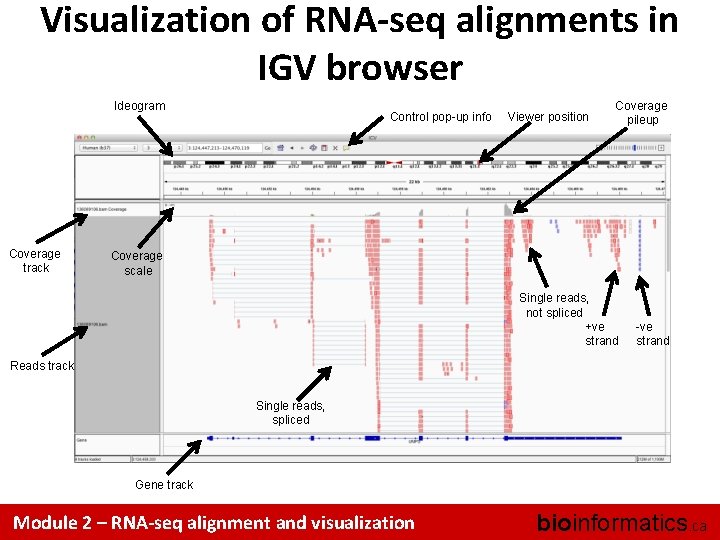
Visualization of RNA-seq alignments in IGV browser Ideogram Coverage track Control pop-up info Viewer position Coverage pileup Coverage scale Single reads, not spliced +ve strand -ve strand Reads track Single reads, spliced Gene track Module 2 – RNA-seq alignment and visualization bioinformatics. ca
Alternative viewers to IGV • Alternative viewers to IGV – http: //www. biostars. org/p/12752/ – http: //www. biostars. org/p/71300/ • Artemis, Bam. View, Chipster, gbrowse 2, Geno. Viewer, Magic. Viewer, Savant, Tablet, tview Module 2 – RNA-seq alignment and visualization bioinformatics. ca
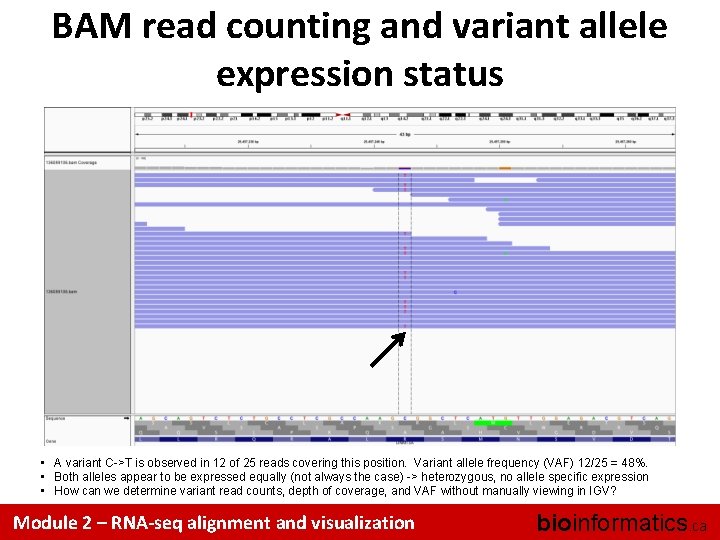
BAM read counting and variant allele expression status • A variant C->T is observed in 12 of 25 reads covering this position. Variant allele frequency (VAF) 12/25 = 48%. • Both alleles appear to be expressed equally (not always the case) -> heterozygous, no allele specific expression • How can we determine variant read counts, depth of coverage, and VAF without manually viewing in IGV? Module 2 – RNA-seq alignment and visualization bioinformatics. ca
Introduction to tutorial (Module 2) Module 2 – RNA-seq alignment and visualization bioinformatics. ca
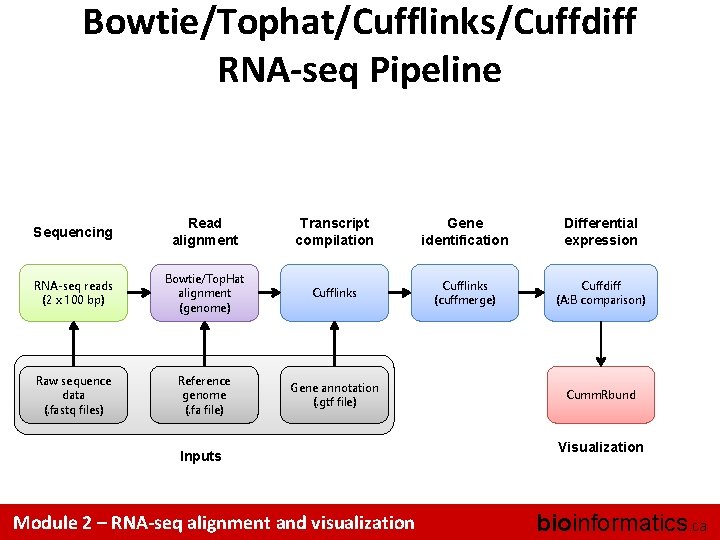
Bowtie/Tophat/Cufflinks/Cuffdiff RNA-seq Pipeline Sequencing Read alignment Transcript compilation Gene identification Differential expression RNA-seq reads (2 x 100 bp) Bowtie/Top. Hat alignment (genome) Cufflinks (cuffmerge) Cuffdiff (A: B comparison) Raw sequence data (. fastq files) Reference genome (. fa file) Gene annotation (. gtf file) Inputs Module 2 – RNA-seq alignment and visualization Cumm. Rbund Visualization bioinformatics. ca
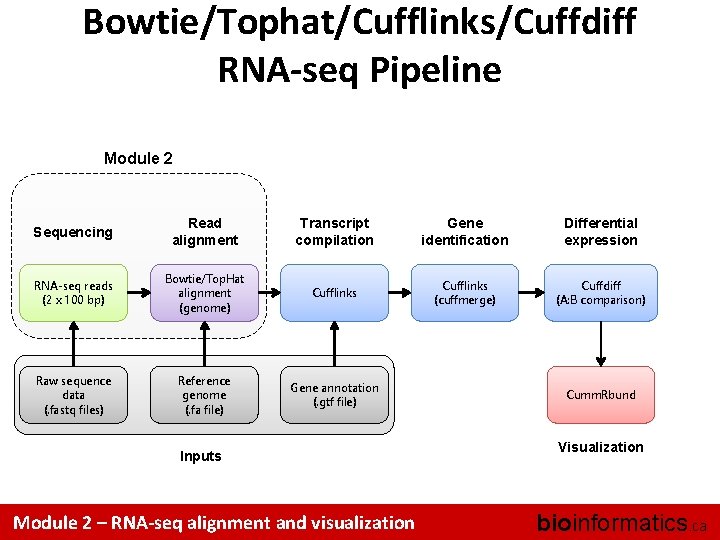
Bowtie/Tophat/Cufflinks/Cuffdiff RNA-seq Pipeline Module 2 Sequencing Read alignment Transcript compilation Gene identification Differential expression RNA-seq reads (2 x 100 bp) Bowtie/Top. Hat alignment (genome) Cufflinks (cuffmerge) Cuffdiff (A: B comparison) Raw sequence data (. fastq files) Reference genome (. fa file) Gene annotation (. gtf file) Inputs Module 2 – RNA-seq alignment and visualization Cumm. Rbund Visualization bioinformatics. ca
We are on a Coffee Break & Networking Session Module 2 – RNA-seq alignment and visualization bioinformatics. ca
- Slides: 29