
Calibration of Complex System Dynamics Models A Practitioners
Calibration of Complex System Dynamics Models A Practitioner’s Report Rod Walker Wayne Wakeland Altus Consulting, Inc. rwalker@altusinc. com Systems Science Graduate Program Portland State Univ. wakeland@pdx. edu
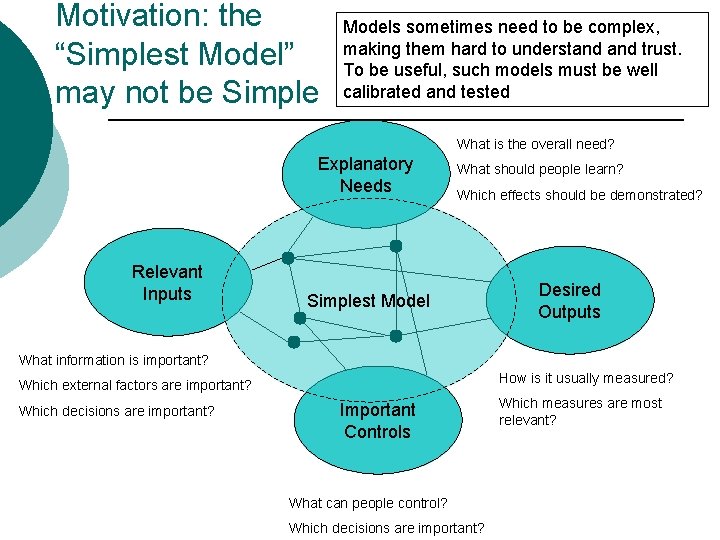
Motivation: the “Simplest Model” may not be Simple Models sometimes need to be complex, making them hard to understand trust. To be useful, such models must be well calibrated and tested What is the overall need? Explanatory Needs Relevant Inputs What should people learn? Which effects should be demonstrated? Simplest Model Desired Outputs What information is important? How is it usually measured? Which external factors are important? Which decisions are important? Important Controls What can people control? Which decisions are important? Which measures are most relevant?
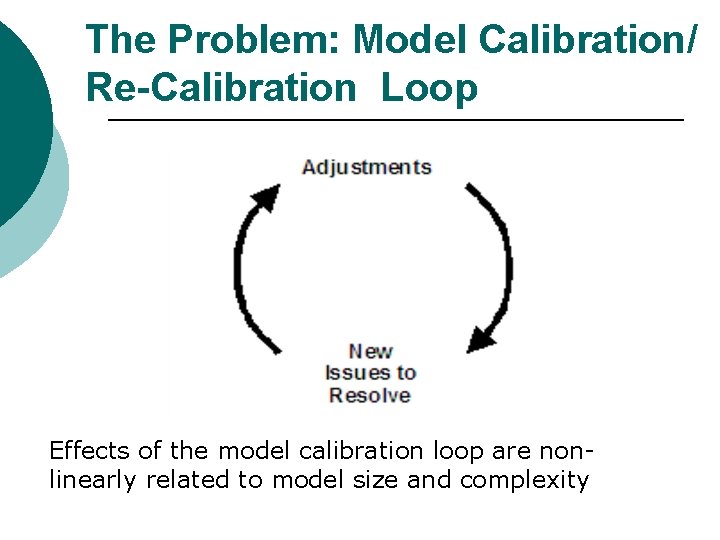
The Problem: Model Calibration/ Re-Calibration Loop Effects of the model calibration loop are nonlinearly related to model size and complexity

Effort Expended vs. Model Complexity for Two Approaches The difference out here looks deceivingly small. In fact, if the effort gets too large, people can easily just give up. In the case study model, they gave up 10 years ago and just figured out how to work with the broken model. ¡ ¡ ¡ Both approaches scale exponentially with complexity Approach A (informal calibration) can be effective for less complex models Approach B (formal calibration strategy) essential for complex models
A Case in Point Context: large, complex business training simulation model ¡ Conversion from a different SD language into I-Think® ¡ Also, design flaws in the original model had to be corrected ¡
Case Model Particulars 57 inputs, 296 outputs ¡ Strong interaction between calibration, verification, and validation ¡ Required a clear calibration strategy ¡ l Such a strategy may or may not scale usefully to smaller models (i. e. , may not be necessary)
First: Employ Fully Traditionally Advocated Best Practices 1 ¡ Some of our favorites include: l l l Units checking Sensitivity testing Transient behavior testing ¡ l Response to perturbations Graphical comparisons ¡ E. g. , model variables vs. reference behavior data c. f. , Richmond, B. (2001) An Introduction to Systems Thinking. isee systems, inc. , Lebanon, NH & Sterman, J. (2000) Business Dynamics: Systems Thinking and Modeling for a Complex World. Irwin Mc. Graw-Hill, New York, NY 1
Additional Aspects of the Calibration Strategy used for Case Model 1. 2. 3. 4. 5. Simplifying the model as much as possible and isolating interactions Redesigning along the way Carefully documenting throughout process to stay organized and minimize “cycling” Knowing when to step away Building/acquiring automated tools
1. Simplifying the Model and Isolating Interactions A. B. C. D. E. F. Submodels Shims Slowing down feedback loops Creating cause and effect maps Testing/validation at submodel level Checking qualitative variables ¡ Validating, calibrating
1. A. Submodels ¡ Take troublesome section of model, carefully redesign to be as simple as possible; re-insert into larger model l To decide where to use submodel, look for parts of model with clearly known behavior patterns, and “provide” main effects to the rest of the model Helps "de-clutter" the larger model and strip away unnecessary parts ¡ Submodels are also a great place to apply sensitivity testing ¡

1. B. Shims: Temporary Adjustment Factors ¡ At the beginning of the calibration process When creating models, we often add “shims” to help get numbers into the right range, making it easier to see which parts of the model need more work. ¡ E. g. , if market share is way off, many other numbers in the model will also be way off (production, revenue, costs, etc. ) To see if these other pieces are correct, we “force” the market share into the right range by adding a temporary adjustment factor ¡ l Highlighted on the diagram w/bold rectangle to assure later removal or proper documentation
1. C. Slowed Transitions Within Feedback Loops ¡ ¡ In complex models, oscillations can appear in one part of the model due to changes in other parts of the model Can be hard to identify cause of oscillations One technique is to temporarily slow down the rate of change around selected feedback loops using a SMTH function They provide an easy way to temporarily get parts of the model into relatively steady state to enable further calibration and testing
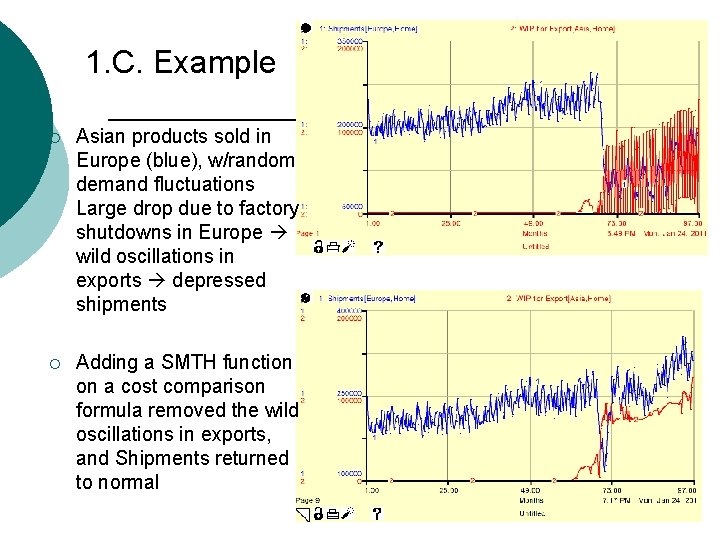
1. C. Example ¡ Asian products sold in Europe (blue), w/random demand fluctuations Large drop due to factory shutdowns in Europe wild oscillations in exports depressed shipments ¡ Adding a SMTH function on a cost comparison formula removed the wild oscillations in exports, and Shipments returned to normal
1. D. Use Simple Cause and Effect Maps to Isolate Issues Obvious, but often overlooked ¡ Simply sketch out the causal logic associated with a troublesome output ¡
1. E. Checking at the Submodel Level Thoroughly calibrate segments as individual standalone submodels before trying to calibrate the entire ensemble ¡ E. g. , the components of the logic for quality was thoroughly calibrated and reviewed with the client early on ¡
1. F. Independent Validation And Calibration of Qualitative Parts ¡ ¡ Qualitative parts of a system dynamics model can be tricky Case study model had two important qualitative components (submodels) l l ¡ A “Quality” measure which calculates outgoing product quality Factors affecting product market share ¡ Qualitative aspects such as market awareness, sales effectiveness, service perception, etc. Quite subjective: important to get them “locked down” individually before proceeding to the rest of the model
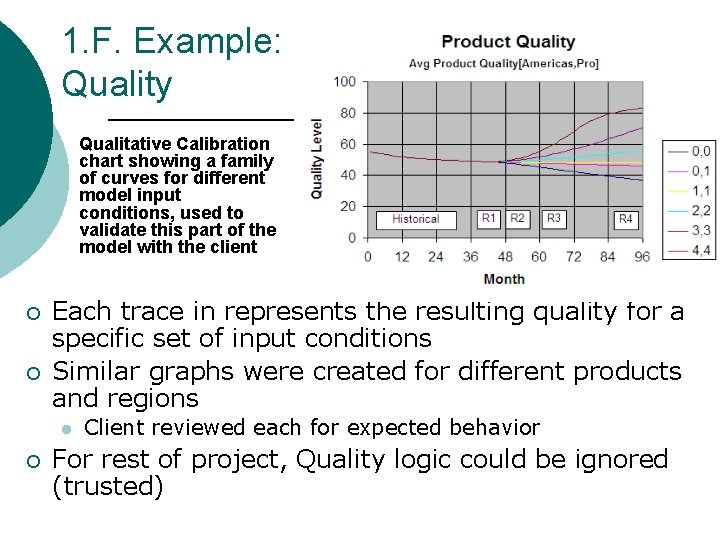
1. F. Example: Quality Qualitative Calibration chart showing a family of curves for different model input conditions, used to validate this part of the model with the client ¡ ¡ Each trace in represents the resulting quality for a specific set of input conditions Similar graphs were created for different products and regions l ¡ Client reviewed each for expected behavior For rest of project, Quality logic could be ignored (trusted)
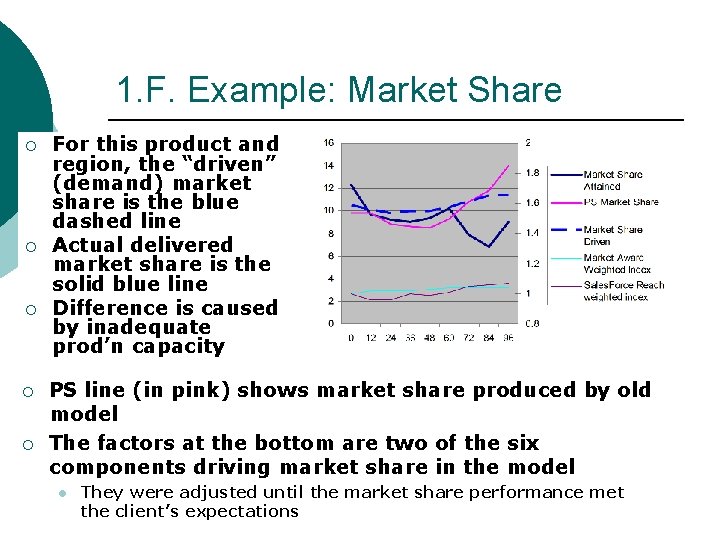
1. F. Example: Market Share ¡ ¡ ¡ For this product and region, the “driven” (demand) market share is the blue dashed line Actual delivered market share is the solid blue line Difference is caused by inadequate prod’n capacity PS line (in pink) shows market share produced by old model The factors at the bottom are two of the six components driving market share in the model l They were adjusted until the market share performance met the client’s expectations
2. Redesign Along the Way Redesign rather than continuing to tweak the model as calibration becomes difficult and elusive… ¡ Calibration issues faulty design ¡ Apply submodels, simpify logic, etc. ¡
3. Carefully Document Throughout the Process Changes made late in the calibration process affect other parts of the model that worked properly earlier in the process ¡ A. B. C. D. Documentation can be a safety net Revision management Recordkeeping Code reads Maintain a questions list.
3. A. Revision Management ¡ Naming convention l ¡ Save frequently, with iterated version number l ¡ Ver. . A 1, . A 2, . B 1, etc. Plus notes re what changed Helps with “undo” when needed
3. B. Record-keeping ¡ Change log (key to model names) l What and why This discipline is easily overlooked ¡ Remember! And take the time! ¡ Include screen shots of model & behavior, data sources, references, quotes/comments/etc. ¡
3. C. Code Reads Mindset: everything suspect until shown to be correct/reasonable ¡ May need help from outsiders ¡ l ¡ Or, at least someone other than author The convoluted logic you’ll find can be simply amazing l And yet, you will vaguely recall that you did in fact create that logic… Missing “be” or equiv
3. D. Maintain a Questions List ¡ A special part of the modeling logbook l With open check box (and perhaps room for the answer) ¡ Not checked until answered Serves as an action item list ¡ May later become part of the model documentation ¡
4. Know When to Step Away Enhance your wheel-spinning detector ¡ Take stock, document current situation in the modeling log ¡ l Knowns, unknowns, ideas Take a break ¡ After break (or even during the I don’t know if anyone else break), new insights tend to come experiences this, but I frequently get more easily the real breakthrough insights as ¡ soon as I step away – such as 5 minutes into a walk. I’ve learned to carry notecards and a pen when I take that break.
5. Build/Acquire Automated Tools A. B. C. Automated testing tools Automated analysis tools Code comparison utility
5. A. Automated Testing Tools ¡ SD platforms provide sensitivity testing l l ¡ ¡ Essential for validating the stability of submodels Help study results of combinations of the many different inputs However, preparing the inputs for the sensitivity testing can be time-consuming and error-prone Can build special Excel-based tools l l To generate inputs for these sensitivity tests To assist in analysis of the results ¡ Such as the quality profiles shown earlier
5. B. Automated Analysis Tools ¡ To help analyze results l ¡ An Excel-based tool was constructed l l ¡ With 296 outputs, it was easy to miss an undesirable change during calibration Compared results from multiple model revisions and showed the differences Looked at each time period for all 296 outputs for each model version Tool was tedious to construct l l l Thus, it was not built until late in the project ¡ Out of necessity at that point Well worth the effort In hindsight, should have been built the tool much earlier…
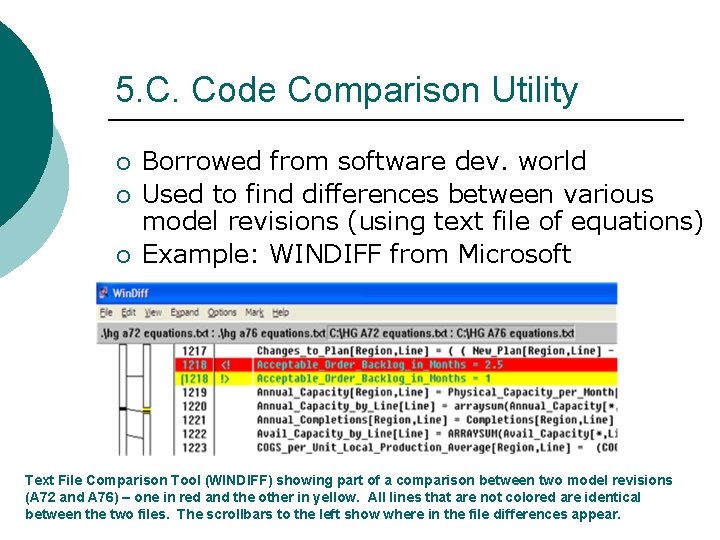
5. C. Code Comparison Utility ¡ ¡ ¡ Borrowed from software dev. world Used to find differences between various model revisions (using text file of equations) Example: WINDIFF from Microsoft Text File Comparison Tool (WINDIFF) showing part of a comparison between two model revisions (A 72 and A 76) – one in red and the other in yellow. All lines that are not colored are identical between the two files. The scrollbars to the left show where in the file differences appear.
Summary ¡ Techniques described were invaluable in hindsight, but we resisted doing them initially l l ¡ Staying organized on a big project is hard l ¡ ¡ Busy work? Perhaps on small project, but essential for the case study model Should have made the investment even earlier Submodels provided points of stability, helped to decide “the problem is elsewhere” and thereby avoid throwing out solid work by accident Having a clear strategy was critical, due to complexity and potential for endless cycling Continual redesigns improved final quality and actually reduced the total time
Bottom Line: Essential to Have a Calibration Strategy for Large Models Time needed to apply the recommended methods can be significant ¡ Benefits, however, far outweigh the costs ¡ Still…even experienced modelers often wait too long before initiating these necessary disciplines ¡
- Slides: 31