
Cache Basics Computer System Instructions and data are
Cache - Basics
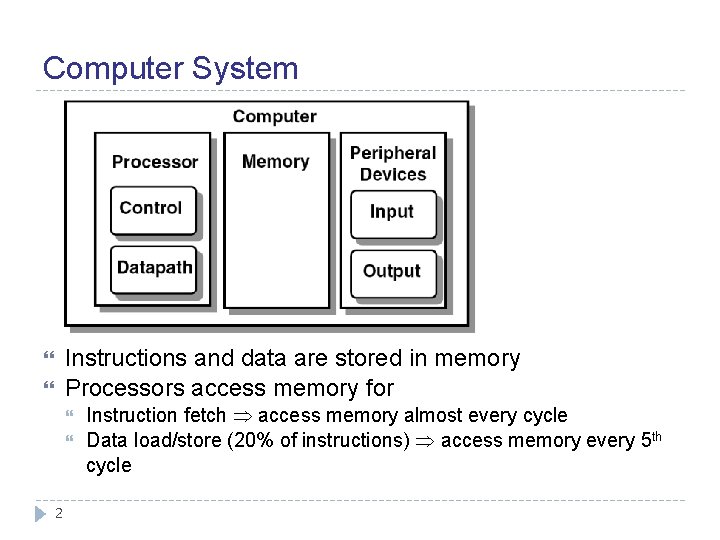
Computer System Instructions and data are stored in memory Processors access memory for 2 Instruction fetch access memory almost every cycle Data load/store (20% of instructions) access memory every 5 th cycle
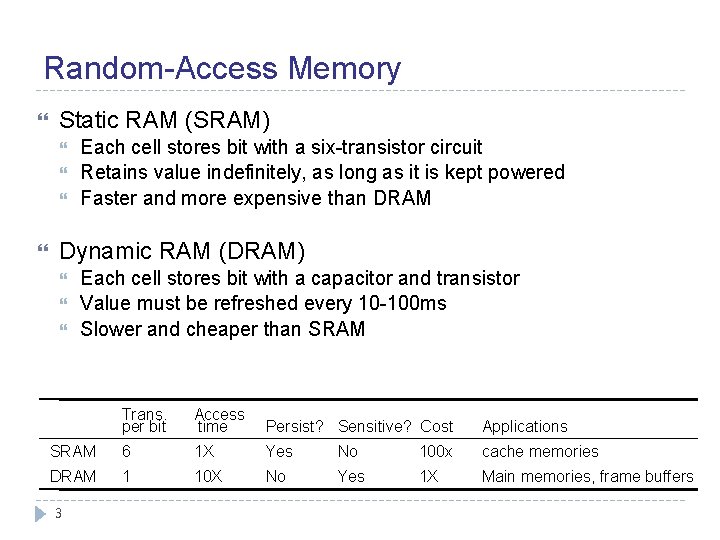
Random-Access Memory Static RAM (SRAM) Each cell stores bit with a six-transistor circuit Retains value indefinitely, as long as it is kept powered Faster and more expensive than DRAM Dynamic RAM (DRAM) Each cell stores bit with a capacitor and transistor Value must be refreshed every 10 -100 ms Slower and cheaper than SRAM Trans. per bit Access time Persist? Sensitive? Cost Applications SRAM 6 1 X Yes No 100 x cache memories DRAM 1 10 X No Yes 1 X Main memories, frame buffers 3
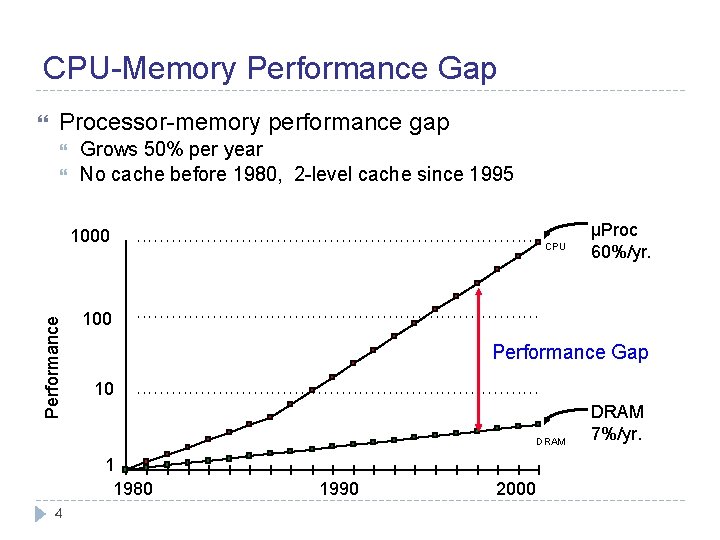
CPU-Memory Performance Gap Processor-memory performance gap Grows 50% per year No cache before 1980, 2 -level cache since 1995 Performance 1000 CPU 100 Performance Gap 10 DRAM 1 1980 4 µProc 60%/yr. 1990 2000 DRAM 7%/yr.
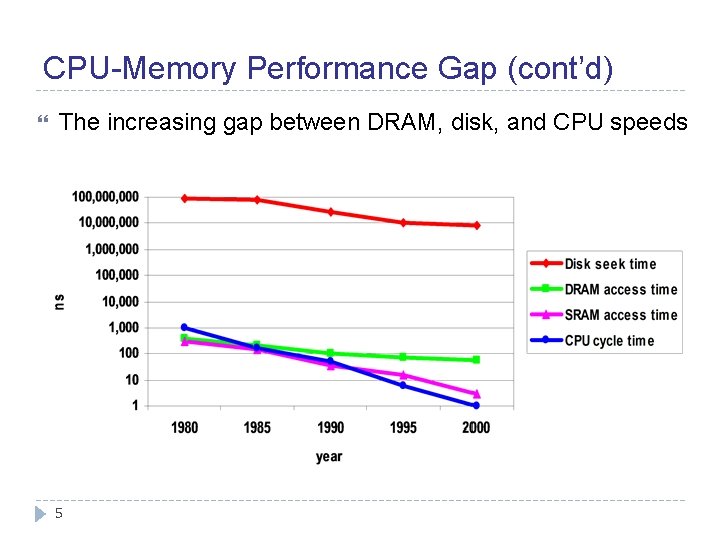
CPU-Memory Performance Gap (cont’d) The increasing gap between DRAM, disk, and CPU speeds 5
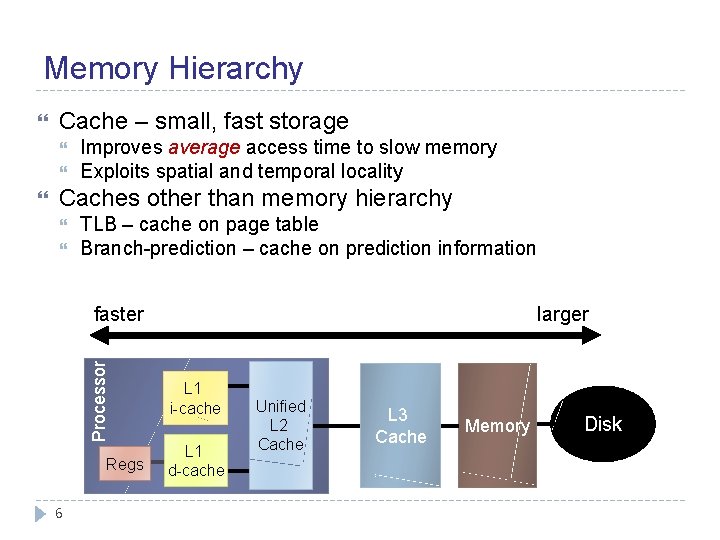
Memory Hierarchy Cache – small, fast storage Caches other than memory hierarchy TLB – cache on page table Branch-prediction – cache on prediction information faster Processor Improves average access time to slow memory Exploits spatial and temporal locality Regs 6 larger L 1 i-cache L 1 d-cache Unified L 2 Cache L 3 Cache Memory Disk
Memory Hierarchies Some fundamental and enduring properties of hardware and software: Fast storage technologies cost more per byte and have less capacity The gap between CPU and main memory speed is widening Well-written programs tend to exhibit good locality They suggest an approach for organizing memory and storage systems known as a memory hierarchy 7
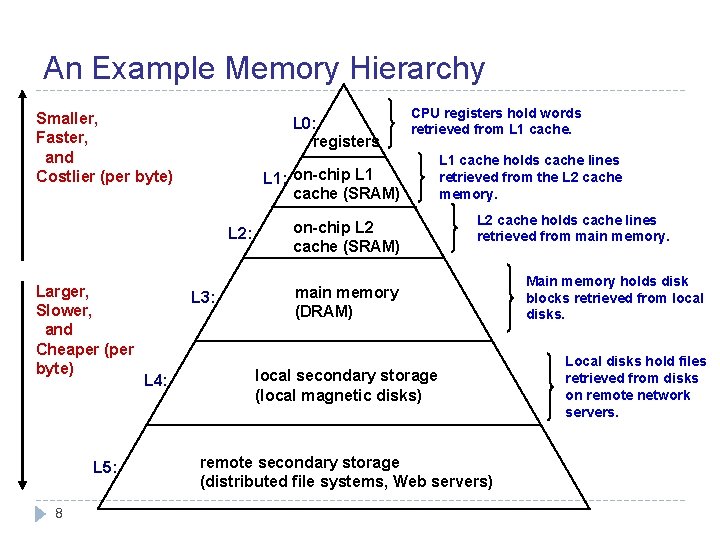
An Example Memory Hierarchy Smaller, Faster, and Costlier (per byte) L 0: registers L 1: on-chip L 1 cache (SRAM) L 2: Larger, Slower, and Cheaper (per byte) L 5: 8 L 3: L 4: CPU registers hold words retrieved from L 1 cache. on-chip L 2 cache (SRAM) L 1 cache holds cache lines retrieved from the L 2 cache memory. L 2 cache holds cache lines retrieved from main memory (DRAM) local secondary storage (local magnetic disks) remote secondary storage (distributed file systems, Web servers) Main memory holds disk blocks retrieved from local disks. Local disks hold files retrieved from disks on remote network servers.
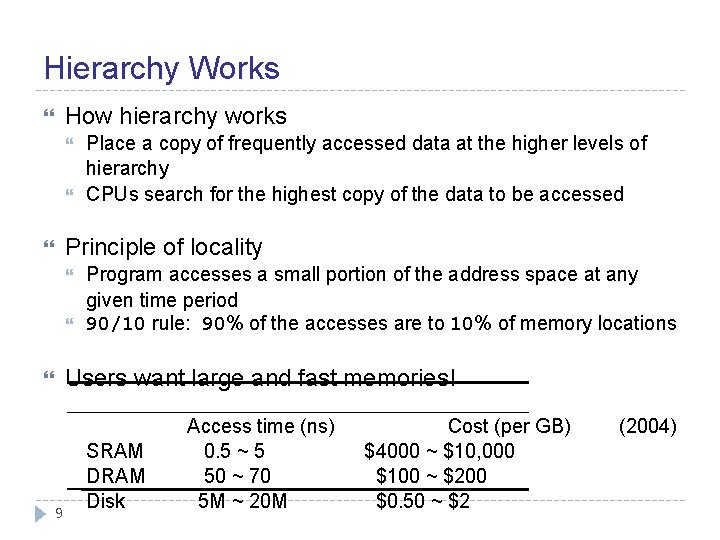
Hierarchy Works How hierarchy works Place a copy of frequently accessed data at the higher levels of hierarchy CPUs search for the highest copy of the data to be accessed Principle of locality Program accesses a small portion of the address space at any given time period 90/10 rule: 90% of the accesses are to 10% of memory locations Users want large and fast memories! 9 SRAM Disk Access time (ns) 0. 5 ~ 5 50 ~ 70 5 M ~ 20 M Cost (per GB) $4000 ~ $10, 000 $100 ~ $200 $0. 50 ~ $2 (2004)
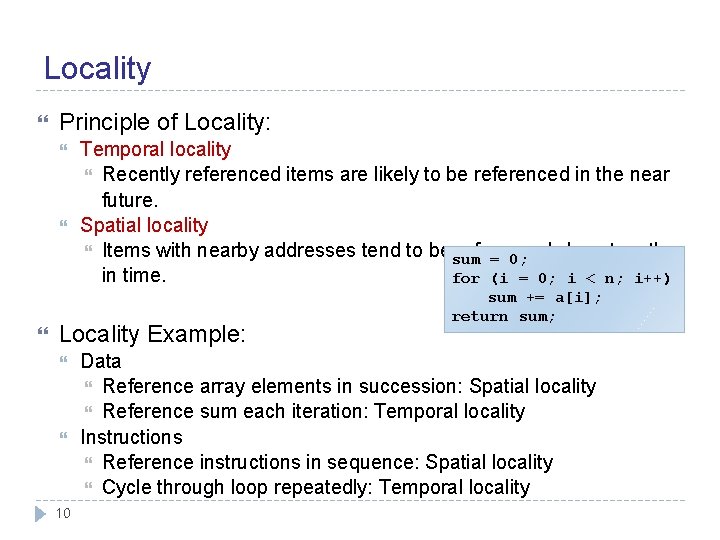
Locality Principle of Locality: Temporal locality Recently referenced items are likely to be referenced in the near future. Spatial locality Items with nearby addresses tend to be sum referenced close together = 0; in time. for (i = 0; i < n; i++) Locality Example: 10 sum += a[i]; return sum; Data Reference array elements in succession: Spatial locality Reference sum each iteration: Temporal locality Instructions Reference instructions in sequence: Spatial locality Cycle through loop repeatedly: Temporal locality
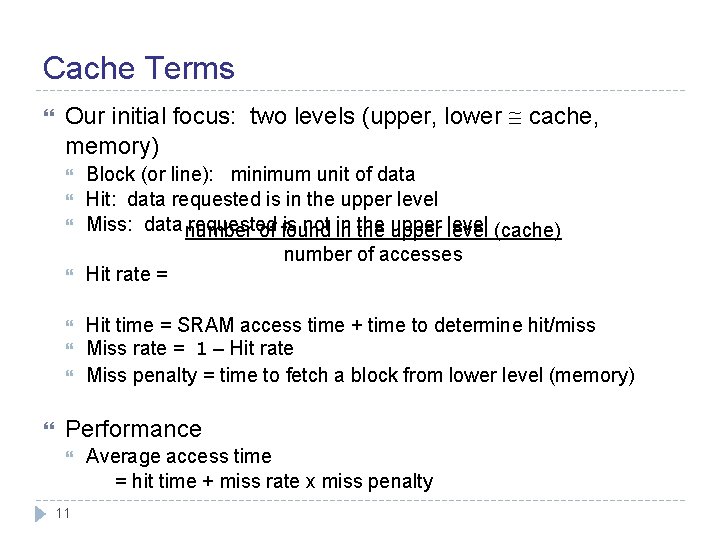
Cache Terms Our initial focus: two levels (upper, lower cache, memory) Block (or line): minimum unit of data Hit: data requested is in the upper level Miss: data number requested is not in of found in the upper level (cache) number of accesses Hit rate = Hit time = SRAM access time + time to determine hit/miss Miss rate = 1 – Hit rate Miss penalty = time to fetch a block from lower level (memory) Performance 11 Average access time = hit time + miss rate x miss penalty
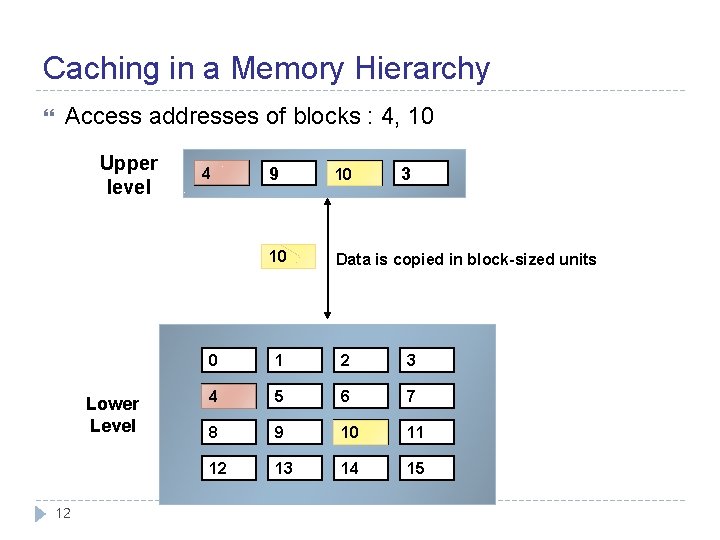
Caching in a Memory Hierarchy Access addresses of blocks : 4, 10 Upper level Lower Level 12 4 8 9 10 14 3 4 10 Data is copied in block-sized units 0 1 2 3 4 5 6 7 8 9 10 11 12 13 14 15
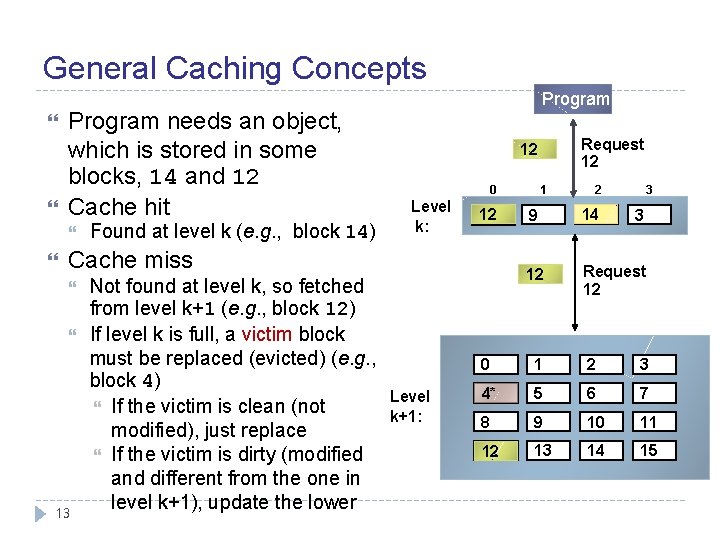
General Caching Concepts Program needs an object, which is stored in some blocks, 14 and 12 Cache hit Found at level k (e. g. , block 14) Program 0 Level k: 4* 12 Cache miss 13 Not found at level k, so fetched from level k+1 (e. g. , block 12) If level k is full, a victim block must be replaced (evicted) (e. g. , block 4) If the victim is clean (not modified), just replace If the victim is dirty (modified and different from the one in level k+1), update the lower Request 12 14 Level k+1: 1 2 3 9 14 4* 12 Request 12 3 0 1 2 3 4 4* 5 6 7 8 9 10 11 12 13 14 15
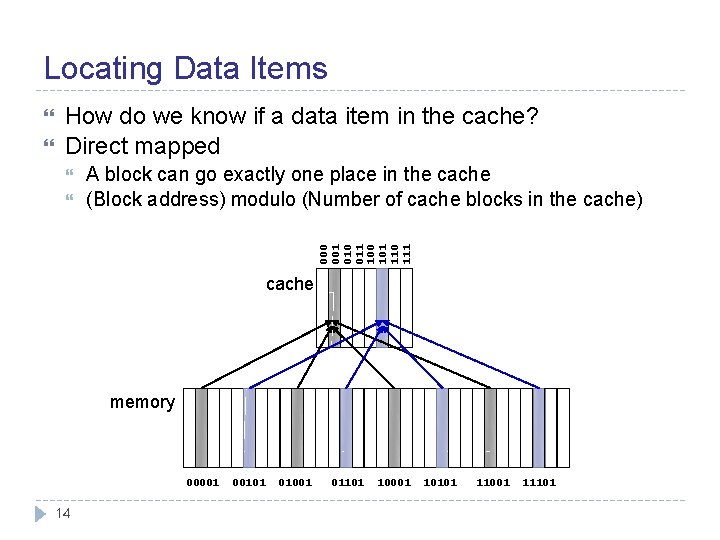
Locating Data Items How do we know if a data item in the cache? Direct mapped A block can go exactly one place in the cache (Block address) modulo (Number of cache blocks in the cache) 000 001 010 011 100 101 110 111 cache memory 00001 14 00101 01001 01101 10001 10101 11001 11101
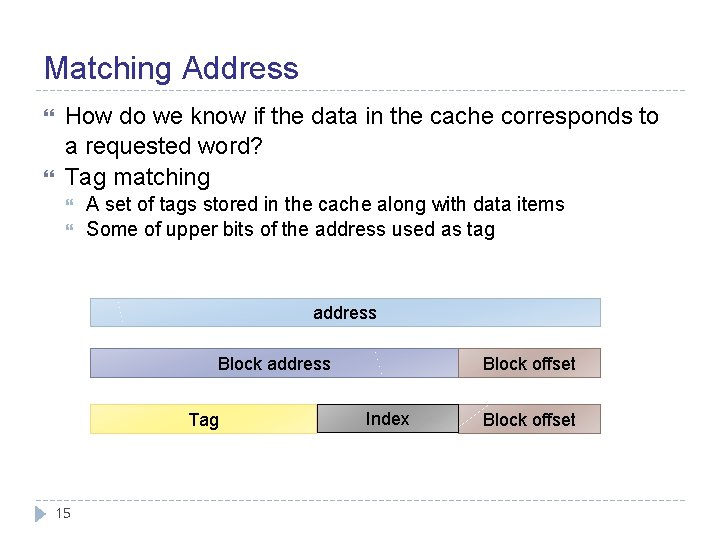
Matching Address How do we know if the data in the cache corresponds to a requested word? Tag matching A set of tags stored in the cache along with data items Some of upper bits of the address used as tag address Block address Tag 15 Block offset Index Block offset
Validating Data Items How do we know that a cache block has a valid data item? 16 Add a valid bit to the cache block entry If a valid bit = 0, not matched (i. e. information in tag and data block is invalid)
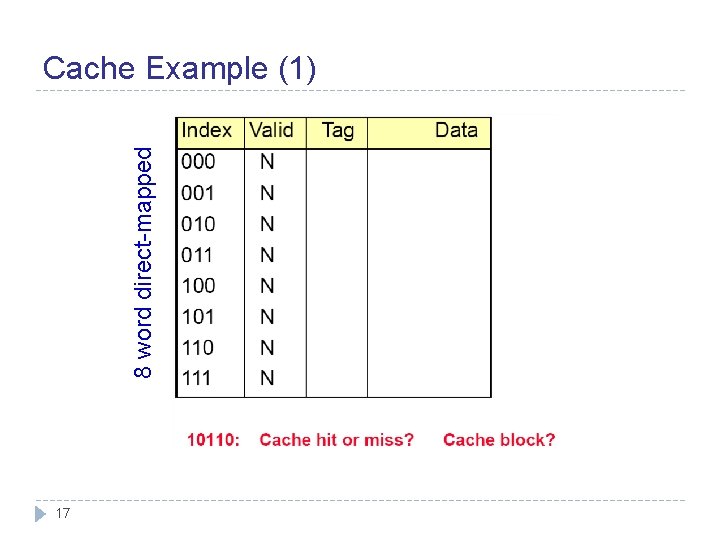
8 word direct-mapped Cache Example (1) 17
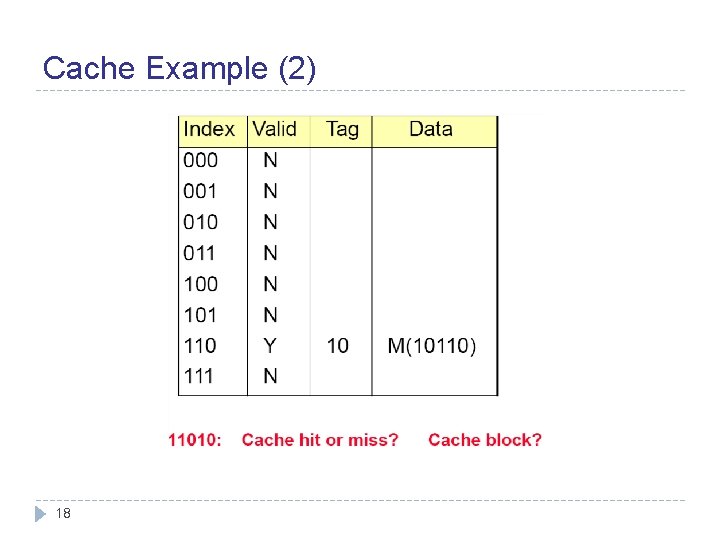
Cache Example (2) 18
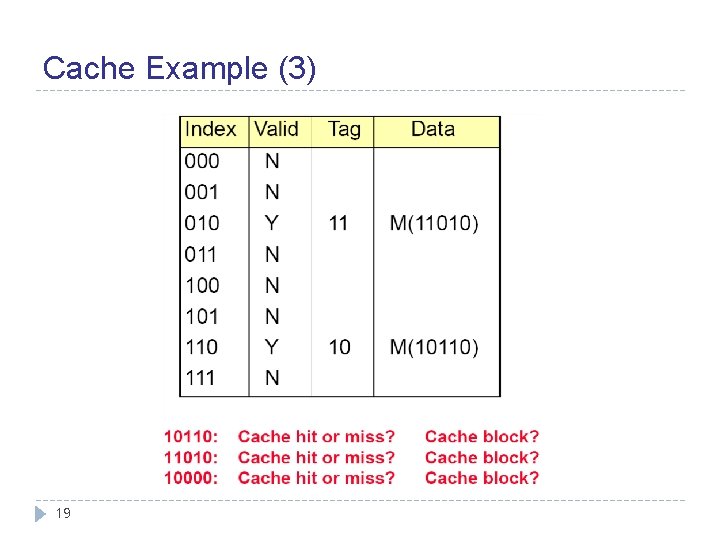
Cache Example (3) 19
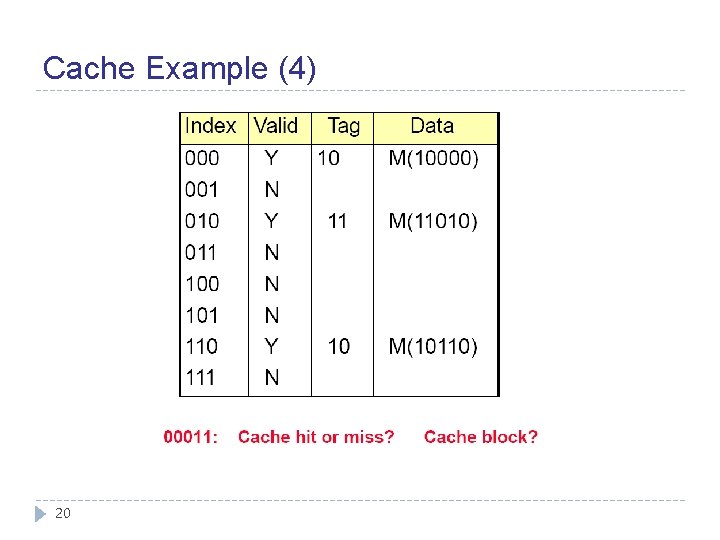
Cache Example (4) 20
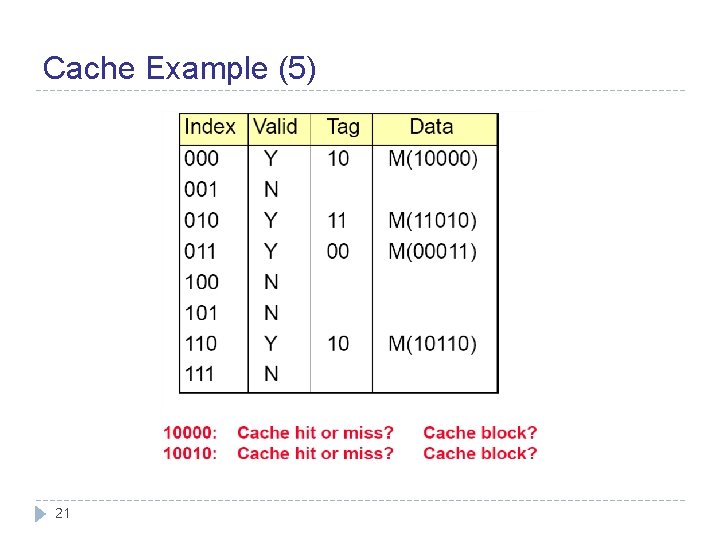
Cache Example (5) 21
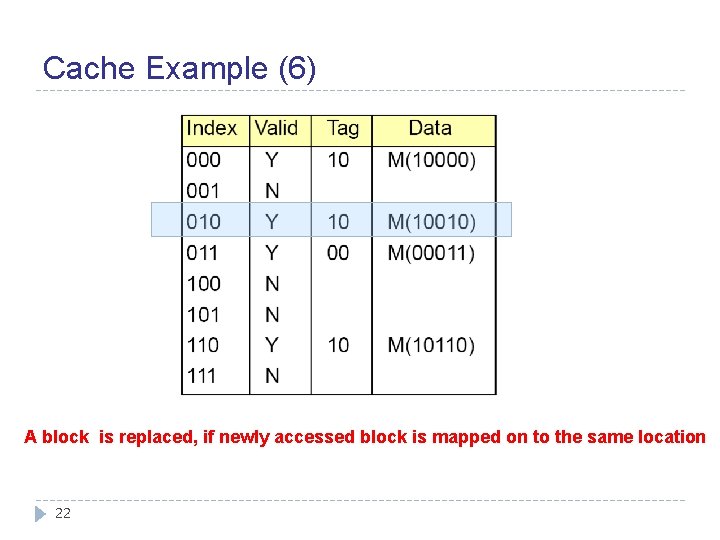
Cache Example (6) A block is replaced, if newly accessed block is mapped on to the same location 22
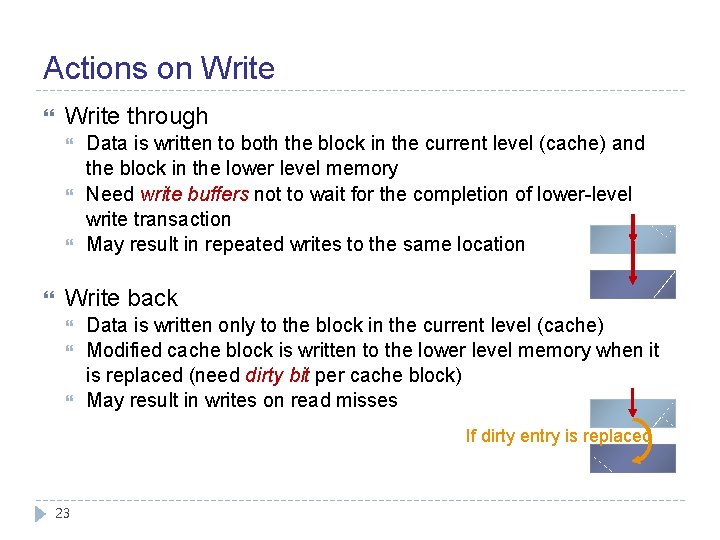
Actions on Write through Data is written to both the block in the current level (cache) and the block in the lower level memory Need write buffers not to wait for the completion of lower-level write transaction May result in repeated writes to the same location Write back Data is written only to the block in the current level (cache) Modified cache block is written to the lower level memory when it is replaced (need dirty bit per cache block) May result in writes on read misses If dirty entry is replaced 23
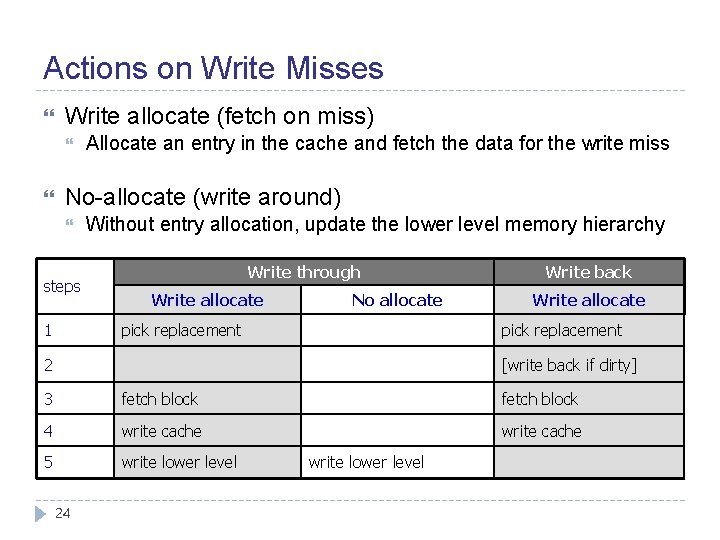
Actions on Write Misses Write allocate (fetch on miss) Allocate an entry in the cache and fetch the data for the write miss No-allocate (write around) steps 1 Without entry allocation, update the lower level memory hierarchy Write through Write allocate No allocate pick replacement Write back Write allocate pick replacement 2 [write back if dirty] 3 fetch block 4 write cache 5 write lower level 24 write lower level
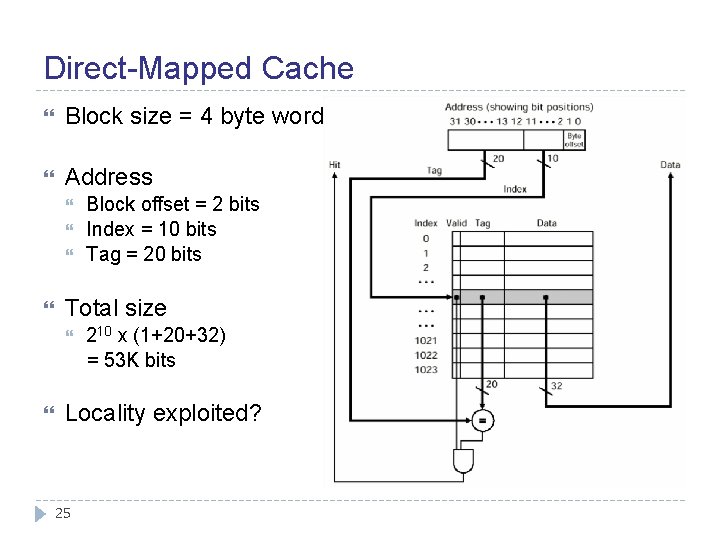
Direct-Mapped Cache Block size = 4 byte word Address Total size Block offset = 2 bits Index = 10 bits Tag = 20 bits 210 x (1+20+32) = 53 K bits Locality exploited? 25
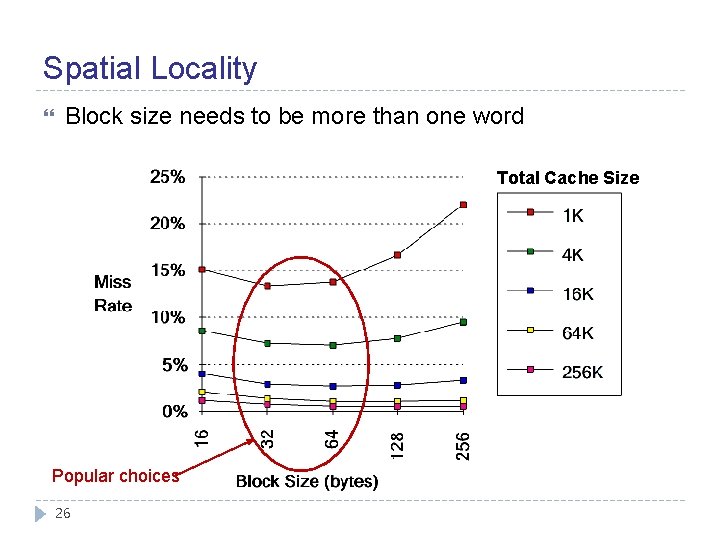
Spatial Locality Block size needs to be more than one word Total Cache Size Popular choices 26
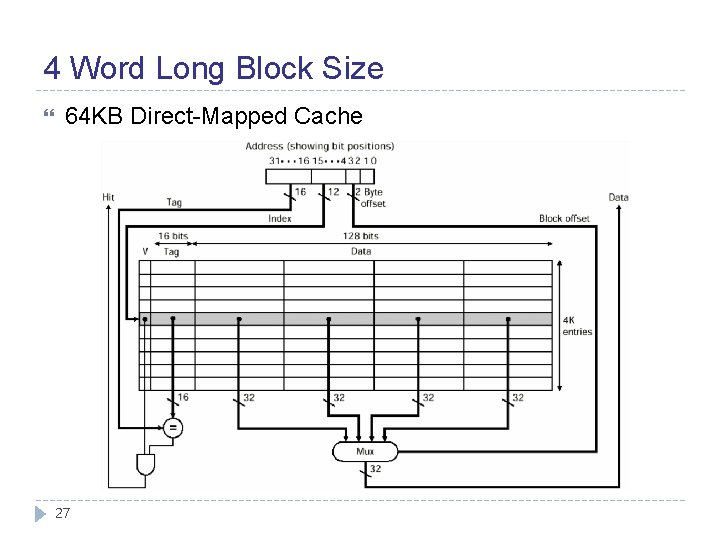
4 Word Long Block Size 64 KB Direct-Mapped Cache 27
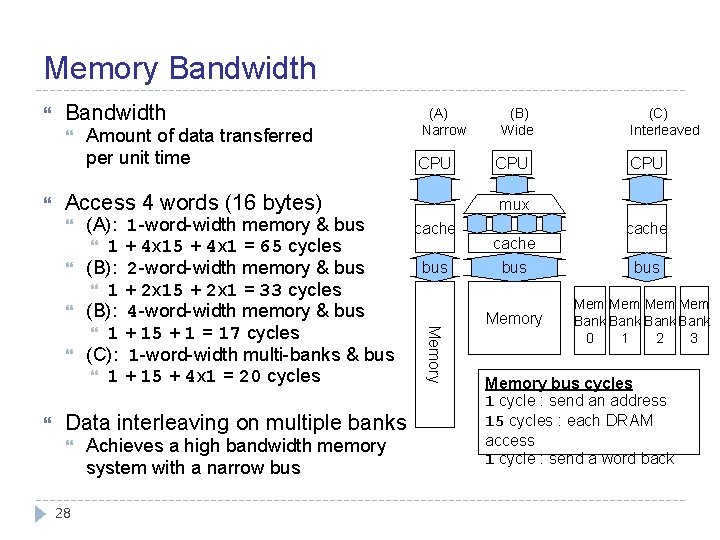
Memory Bandwidth CPU Access 4 words (16 bytes) (A): 1 -word-width memory & bus 1 + 4 x 15 + 4 x 1 = 65 cycles (B): 2 -word-width memory & bus 1 + 2 x 15 + 2 x 1 = 33 cycles (B): 4 -word-width memory & bus 1 + 15 + 1 = 17 cycles (C): 1 -word-width multi-banks & bus 1 + 15 + 4 x 1 = 20 cycles Data interleaving on multiple banks 28 Achieves a high bandwidth memory system with a narrow bus (B) Wide CPU (C) Interleaved CPU mux cache bus Memory Amount of data transferred per unit time (A) Narrow cache bus Memory cache bus Mem Mem Bank 0 1 2 3 Memory bus cycles 1 cycle : send an address 15 cycles : each DRAM access 1 cycle : send a word back
Summary Processor-Memory speed gap increases Cache Small SRAM storage for fast access from the processor Performance = average access time = hit time + miss rate x miss penalty Locality exploited Memory hierarchy works Keep recently accessed data (temporal locality) Bring data in by the block which is larger than a word (spatial locality) Cache mechanism 29 Block placement (mapping), tag matching, valid bit, … Actions on writes and write misses
- Slides: 29