
Cable Systems Universal NID Line Module and Station

Cable Systems Universal NID, Line Module and Station Protector Product Training
Cable Systems UNID Installation

Product Overview – 3 -line Universal NID (UNID) Telco Access Screw Solid Ground Bar - One Piece Welded Design Increases Continuity Ease of module installation - Instantly ‘Snaps-on’ to groundbar Telco Access Cover Rugged Weatherproof Housing – Engineering Grade Resin with Grommet-Less Tongue/Groove Design Cable Systems Heavy Duty, Bottom and Rear Entry Grommets Multiple mounting options Corning Incorporated 3
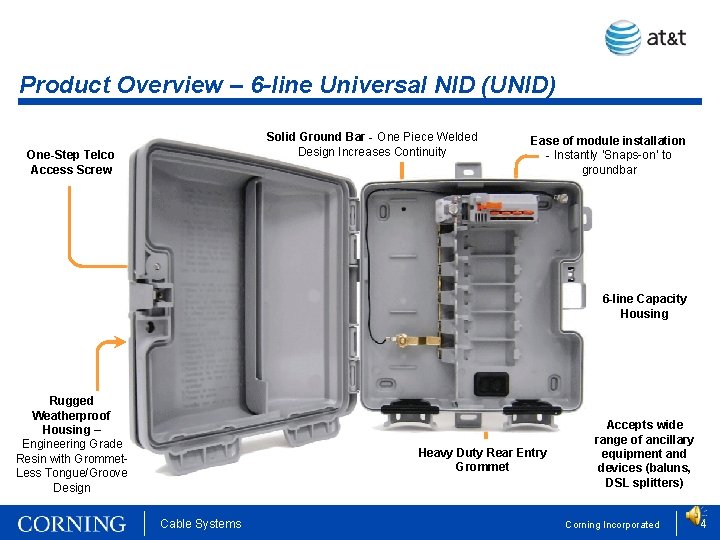
Product Overview – 6 -line Universal NID (UNID) Solid Ground Bar - One Piece Welded Design Increases Continuity One-Step Telco Access Screw Ease of module installation - Instantly ‘Snaps-on’ to groundbar 6 -line Capacity Housing Rugged Weatherproof Housing – Engineering Grade Resin with Grommet. Less Tongue/Groove Design Heavy Duty Rear Entry Grommet Cable Systems Accepts wide range of ancillary equipment and devices (baluns, DSL splitters) Corning Incorporated 4
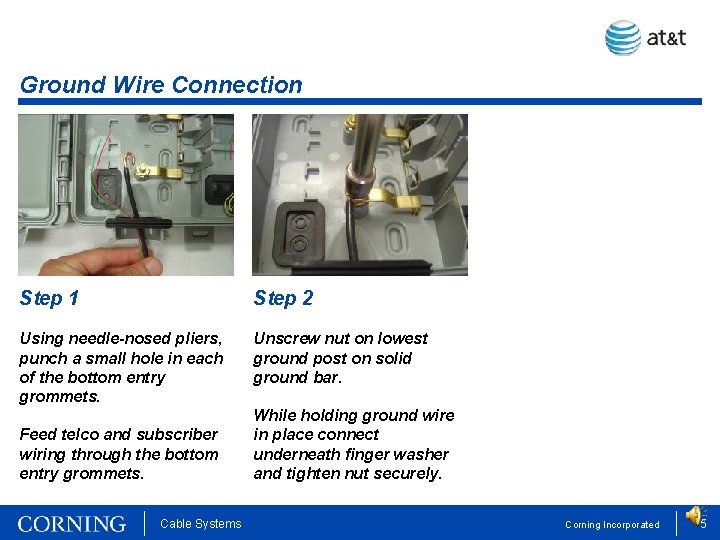
Ground Wire Connection Step 1 Step 2 Using needle-nosed pliers, punch a small hole in each of the bottom entry grommets. Unscrew nut on lowest ground post on solid ground bar. Feed telco and subscriber wiring through the bottom entry grommets. Cable Systems While holding ground wire in place connect underneath finger washer and tighten nut securely. Corning Incorporated 5
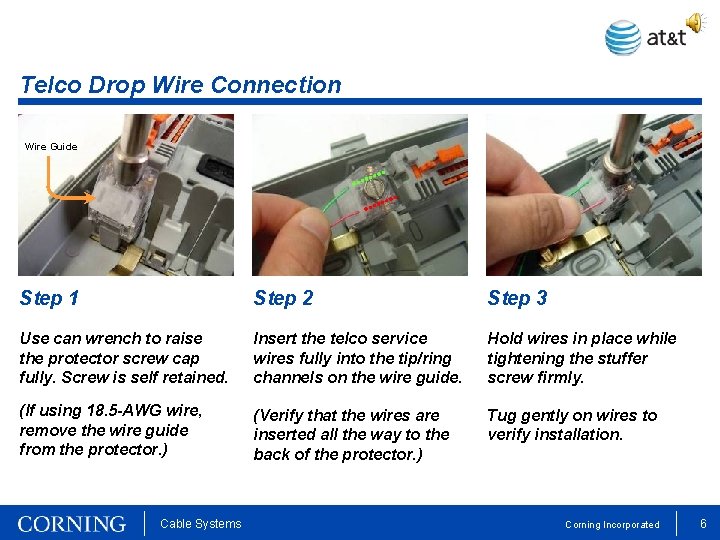
Telco Drop Wire Connection Wire Guide Step 1 Step 2 Step 3 Use can wrench to raise the protector screw cap fully. Screw is self retained. Insert the telco service wires fully into the tip/ring channels on the wire guide. Hold wires in place while tightening the stuffer screw firmly. (If using 18. 5 -AWG wire, remove the wire guide from the protector. ) (Verify that the wires are inserted all the way to the back of the protector. ) Tug gently on wires to verify installation. Cable Systems Corning Incorporated 6

Subscriber Wiring Connection Feed wires through hinge Slide right and pull to open Step 1 Step 2 Step 3 Slide the orange latch on the module to the right and pull to open. Feed subscriber wires through the hinge opening and insert fully into tip/ring retention holes. While holding wires in place, push lever down to ‘CONNECTED’ position. Slide right and pull to open Cable Systems Gently tug on wires to check connections. Close line module cover tightly. Corning Incorporated 7
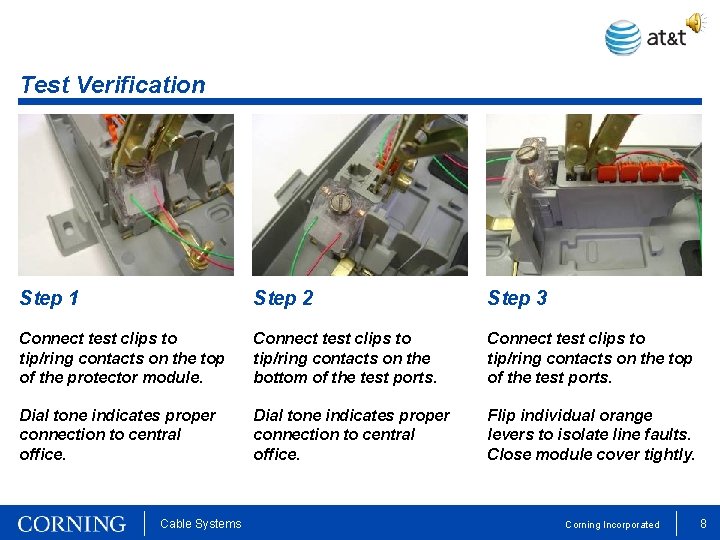
Test Verification Step 1 Step 2 Step 3 Connect test clips to tip/ring contacts on the top of the protector module. Connect test clips to tip/ring contacts on the bottom of the test ports. Connect test clips to tip/ring contacts on the top of the test ports. Dial tone indicates proper connection to central office. Flip individual orange levers to isolate line faults. Close module cover tightly. Cable Systems Corning Incorporated 8

Cable Systems Universal Line Module and Protector Add-a-Line Kit Installation
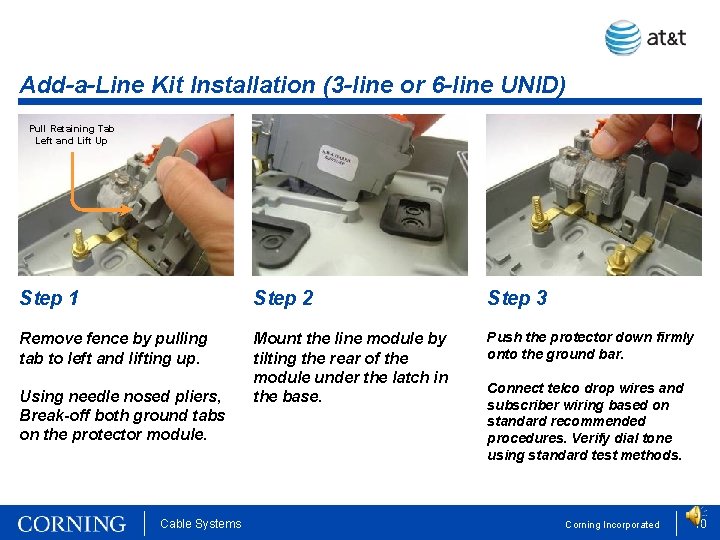
Add-a-Line Kit Installation (3 -line or 6 -line UNID) Pull Retaining Tab Left and Lift Up Step 1 Step 2 Step 3 Remove fence by pulling tab to left and lifting up. Mount the line module by tilting the rear of the module under the latch in the base. Push the protector down firmly onto the ground bar. Using needle nosed pliers, Break-off both ground tabs on the protector module. Cable Systems Connect telco drop wires and subscriber wiring based on standard recommended procedures. Verify dial tone using standard test methods. Corning Incorporated 10
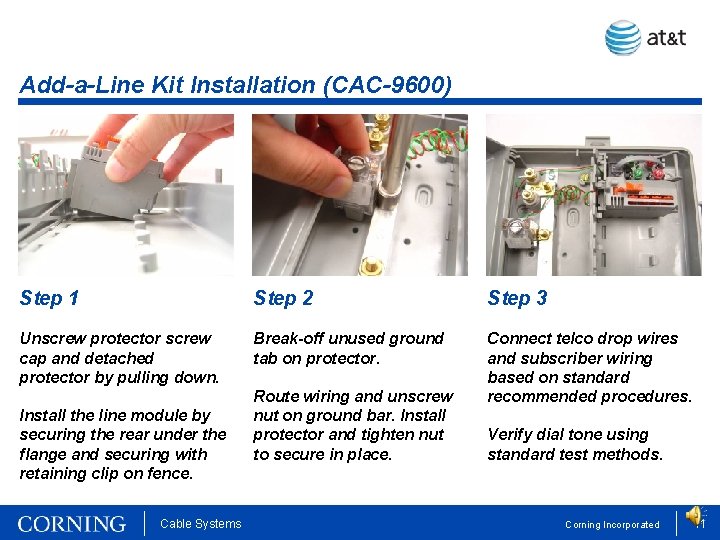
Add-a-Line Kit Installation (CAC-9600) Step 1 Step 2 Step 3 Unscrew protector screw cap and detached protector by pulling down. Break-off unused ground tab on protector. Connect telco drop wires and subscriber wiring based on standard recommended procedures. Install the line module by securing the rear under the flange and securing with retaining clip on fence. Cable Systems Route wiring and unscrew nut on ground bar. Install protector and tighten nut to secure in place. Verify dial tone using standard test methods. Corning Incorporated 11
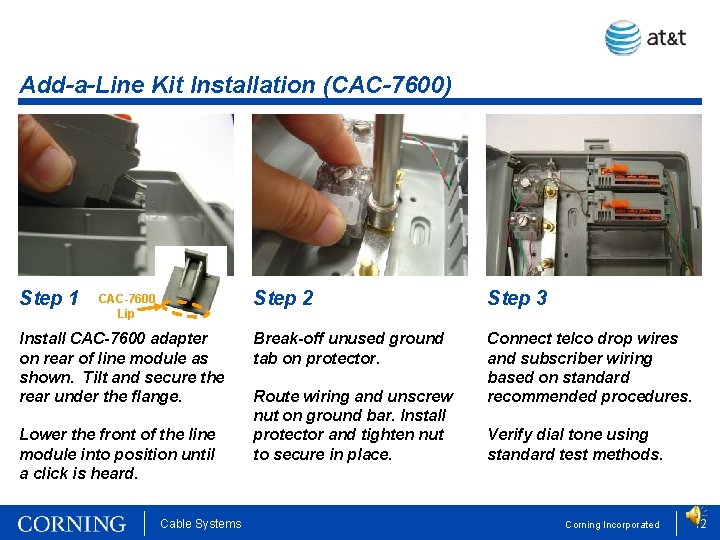
Add-a-Line Kit Installation (CAC-7600) Step 1 CAC-7600 Lip Install CAC-7600 adapter on rear of line module as shown. Tilt and secure the rear under the flange. Lower the front of the line module into position until a click is heard. Cable Systems Step 2 Step 3 Break-off unused ground tab on protector. Connect telco drop wires and subscriber wiring based on standard recommended procedures. Route wiring and unscrew nut on ground bar. Install protector and tighten nut to secure in place. Verify dial tone using standard test methods. Corning Incorporated 12
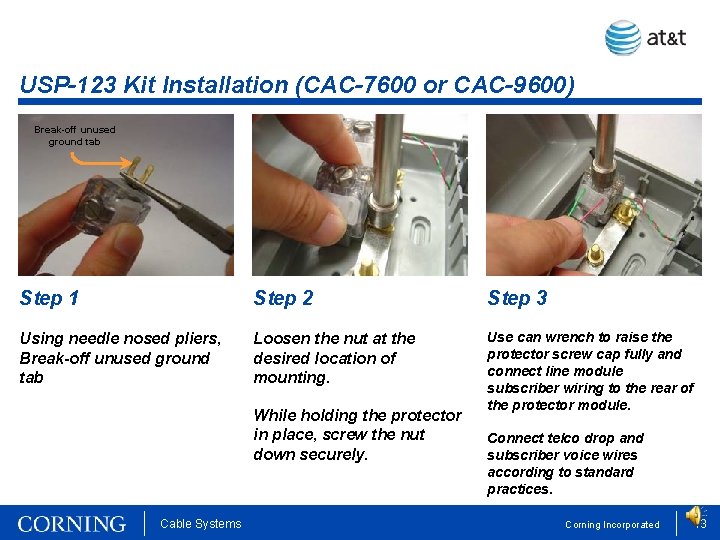
USP-123 Kit Installation (CAC-7600 or CAC-9600) Break-off unused ground tab Step 1 Step 2 Step 3 Using needle nosed pliers, Break-off unused ground tab Loosen the nut at the desired location of mounting. Use can wrench to raise the protector screw cap fully and connect line module subscriber wiring to the rear of the protector module. While holding the protector in place, screw the nut down securely. Cable Systems Connect telco drop and subscriber voice wires according to standard practices. Corning Incorporated 13
CCS Contact Information Engineering Service and Technical Support Phone: 1 -800 -743 -2671 E-mail: dutyeng@corning. com Cable Systems Corning Incorporated 14

- Slides: 15