
Business Data Communications and Networking 6 th ed
Business Data Communications and Networking, 6 th ed. Fitz. Gerald and Dennis 8 -1
Copyright © 1999 John Wiley & Sons, Inc. All rights reserved. Reproduction or translation of this work beyond that permitted in Section 117 of the 1976 United States Copyright Act without the express written permission of the copyright owner is unlawful. Request for further information should be addressed to the Permissions Department, John Wiley & Sons, Inc. The purchaser may make back-up copies for his/her own use only and not for redistribution or resale. The Publisher assumes no responsibility for errors, omissions, or damages, caused by the use of these programs or from the use of the information contained herein. 2
Chapter 8 Backbone Networks 8 -3
Objectives of Chapter 8 Understand. . . u the internetworking devices used in backbone networks, u several types of fast ethernet and fast token ring, u several types of switched ethernet and switched token ring, 4

Objectives of Chapter 8 Become familiar with… u FDDI, u ATM and fiber channel, u ways to improve backbone network performance, u key factors in selecting backbone networks. 5
INTRODUCTION 8 -6

Backbone Networks ©Jaana Porra u. A backbone network is a high speed network which usually connects every network on a single company site. u A backbone network may also be an enterprise network which connects everything within a company, regardless of whether it crosses state, national, or international boundaries. u ==> lines between backbone networks and wide area networks are blurring 7
Introduction There are two approaches to providing high speed networking. • The simplest and most straightforward is to simply “speed up” the technologies currently used in local area networks. (Fast Ethernet and Fast Token Ring) • The second approach is to develop a new high speed technology that provides a set of dedicated point-to-point communications circuits between computers. (Switched Ethernet and Switched Token Ring) 8
BACKBONE NETWORK COMPONENTS 8 -9
Backbone Network Components There are two basic components to a backbone network: u The network cable - essentially the same as used in LANs, except it is usually higher quality to provide higher data rates. u The hardware devices that connect other networks to the backbone - special purpose devices and computers that just transfer messages from one network to another. 10
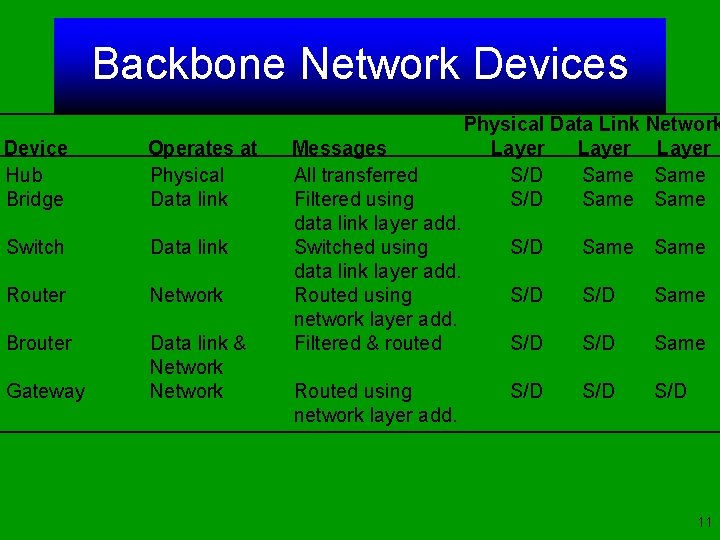
Backbone Network Devices Device Hub Bridge Operates at Physical Data link Switch Data link Router Network Brouter Data link & Network Gateway Messages All transferred Filtered using data link layer add. Switched using data link layer add. Routed using network layer add. Filtered & routed Routed using network layer add. Physical Data Link Network Layer S/D Same S/D Same S/D S/D 11
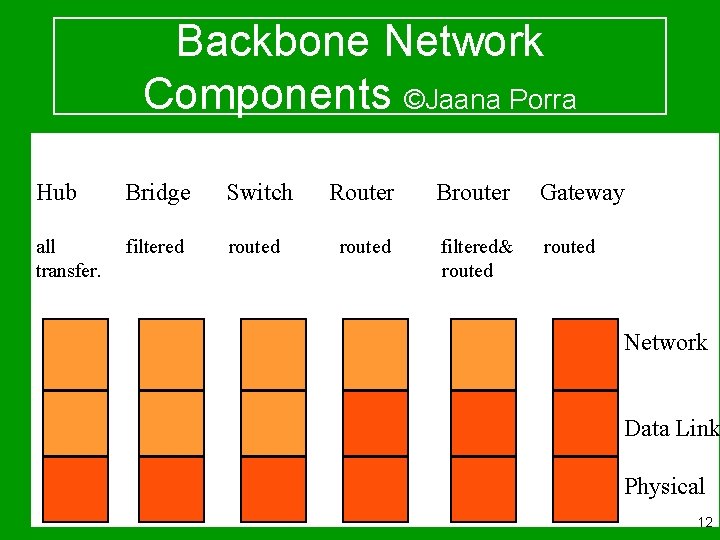
Backbone Network Components ©Jaana Porra Hub Bridge Switch all Hub transfer. filtered Bridge routed Switch Router Brouter Gateway routed Gateway Router filtered& Brouter routed Network Data Link Physical 12
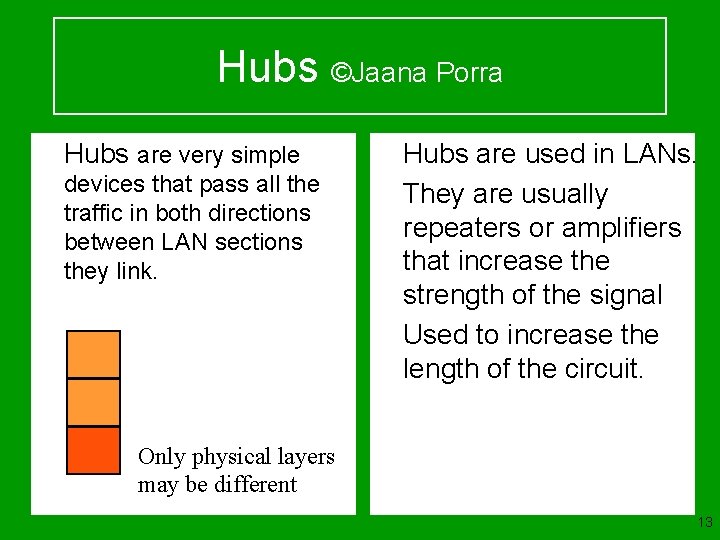
Hubs ©Jaana Porra u Hubs are very simple devices that pass all the traffic in both directions between LAN sections they link. u Hubs are used in LANs. u They are usually repeaters or amplifiers that increase the strength of the signal u Used to increase the length of the circuit. Only physical layers may be different 13
Hubs Operating at the physical layer, hubs pass all traffic in both directions between the LAN sections they link. They may connect different types of cable, but use the same data link and network protocol. Strictly speaking, hubs are not considered part of a backbone network, but are usually repeaters or amplifiers. 14
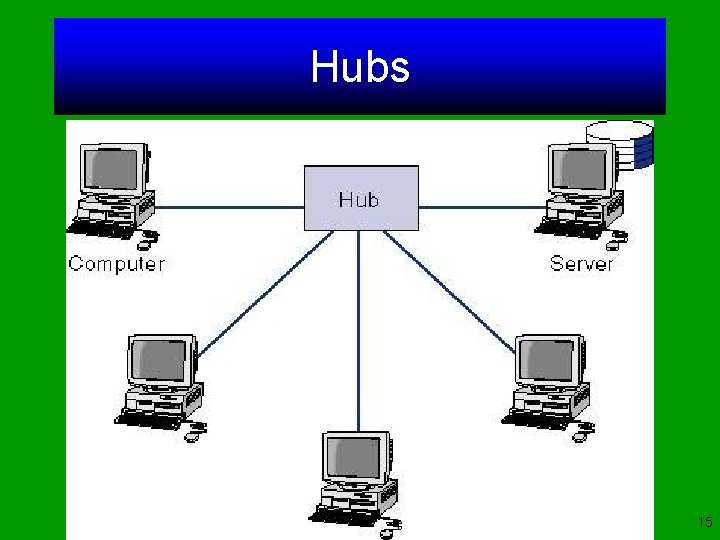
Hubs 15
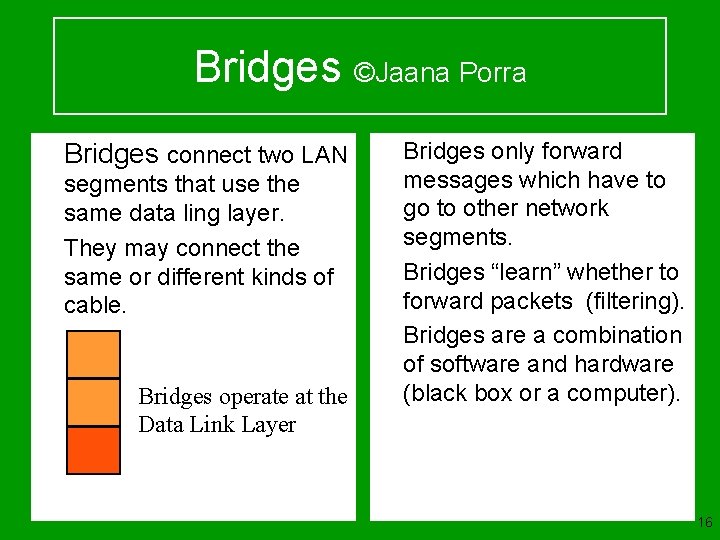
Bridges ©Jaana Porra u Bridges connect two LAN u segments that use the same data ling layer. They may connect the same or different kinds of cable. u u u Bridges operate at the Data Link Layer Bridges only forward messages which have to go to other network segments. Bridges “learn” whether to forward packets (filtering). Bridges are a combination of software and hardware (black box or a computer). 16

Bridges 17
Bridges If a bridge receives a packet with a destination address that is not in the address table, it forwards the packet to all networks or network segments except the on which it was received. Bridges are a combination of both hardware and software, typically a “black box” that sits between the two networks, but can also be a computer with two NICs and special software. 18
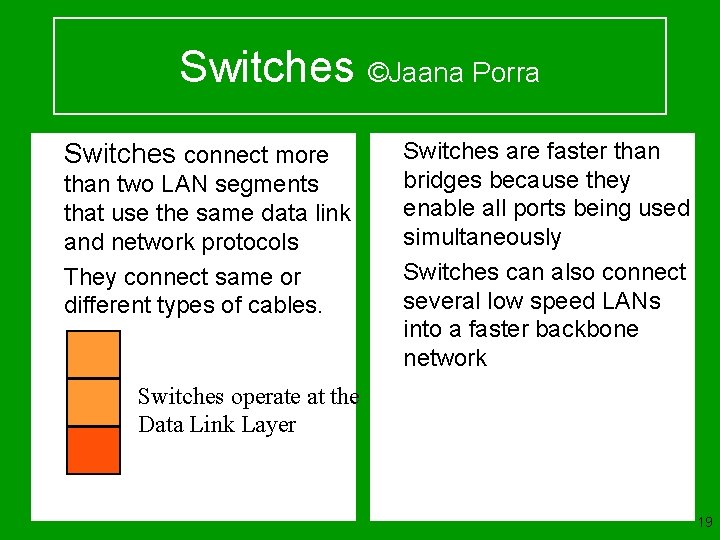
Switches ©Jaana Porra u Switches connect more u than two LAN segments that use the same data link and network protocols They connect same or different types of cables. u u Switches are faster than bridges because they enable all ports being used simultaneously Switches can also connect several low speed LANs into a faster backbone network Switches operate at the Data Link Layer 19

Switches 20
Switches operate at the same layers as bridges but differ from them in two ways: • First, most switches enable all ports to be in use simultaneously, making them faster than bridges. • Second, unlike bridges, switches don’t learn addresses, and need to have addresses defined. 21
Switches There are two types of switches: Cut-through switches examine the destination of the incoming packet and immediately connect the port with the incoming message to the correct outgoing port. Store-and-forward switches copy the incoming packet into memory before processing the destination address. 22
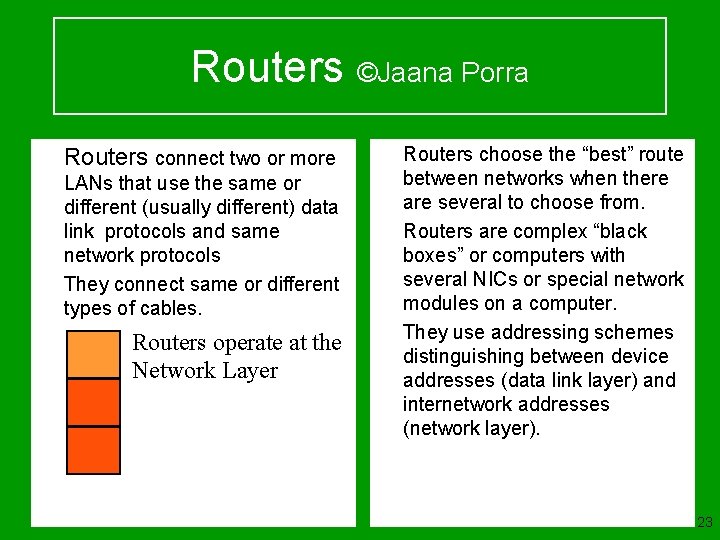
Routers ©Jaana Porra u u Routers connect two or more LANs that use the same or different (usually different) data link protocols and same network protocols They connect same or different types of cables. Routers operate at the Network Layer u u u Routers choose the “best” route between networks when there are several to choose from. Routers are complex “black boxes” or computers with several NICs or special network modules on a computer. They use addressing schemes distinguishing between device addresses (data link layer) and internetwork addresses (network layer). 23
Routers In general routers perform more processing on each message than bridges and therefore operate more slowly. 24
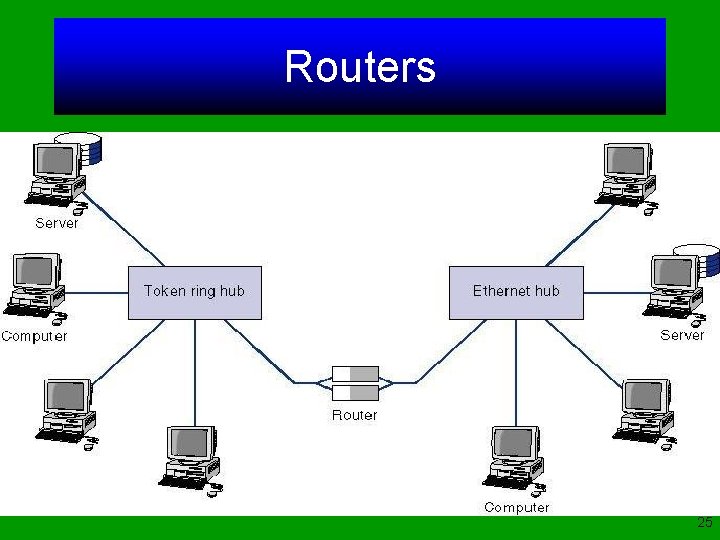
Routers 25
Routers choose the best route between networks when there are several possible routes between them. Routers also only process messages specifically addressed to it, unlike bridges. Routers make no changes to the network layer packet and user data it receives. 26
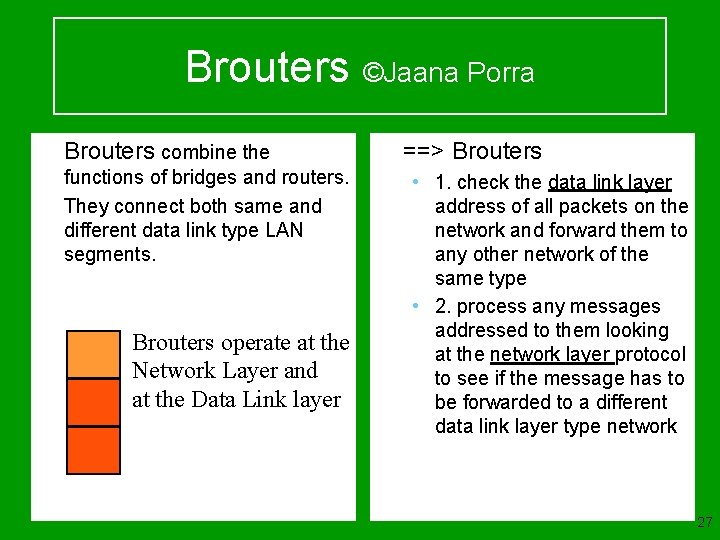
Brouters ©Jaana Porra u u Brouters combine the functions of bridges and routers. They connect both same and different data link type LAN segments. Brouters operate at the Network Layer and at the Data Link layer u ==> Brouters • 1. check the data link layer address of all packets on the network and forward them to any other network of the same type • 2. process any messages addressed to them looking at the network layer protocol to see if the message has to be forwarded to a different data link layer type network 27
Brouters are as fast as a bridge for same data link type networks, but can also connect different data link type networks. 28
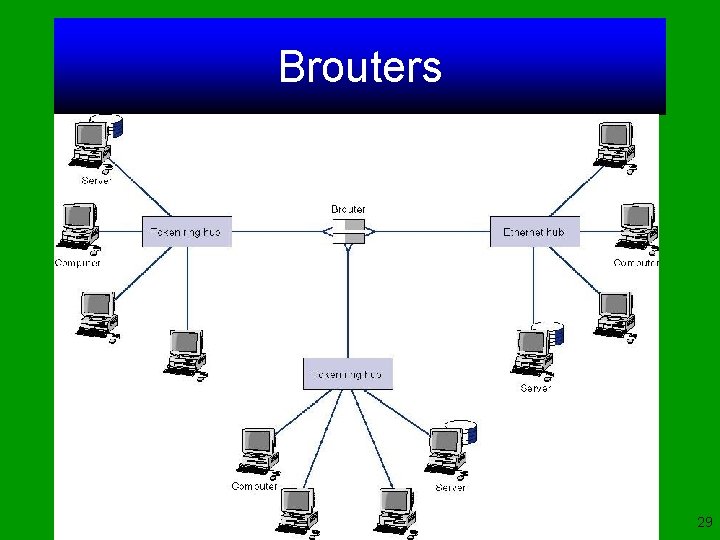
Brouters 29
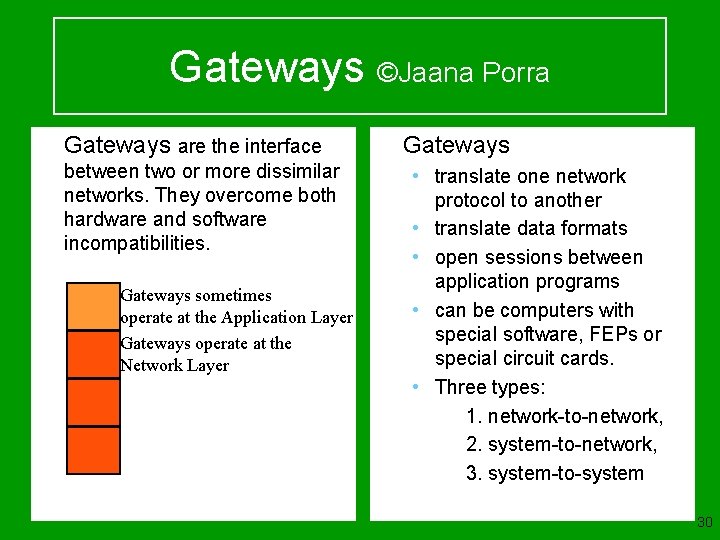
Gateways ©Jaana Porra u Gateways are the interface between two or more dissimilar networks. They overcome both hardware and software incompatibilities. Gateways sometimes operate at the Application Layer Gateways operate at the Network Layer u Gateways • translate one network protocol to another • translate data formats • open sessions between application programs • can be computers with special software, FEPs or special circuit cards. • Three types: v 1. network-to-network, v 2. system-to-network, v 3. system-to-system 30
Gateways operate at the network layer and use network layer addresses in processing messages. Gateways connect two or more LANs that use the same or different (usually different) data link and network protocols. The may connect the same or different kinds of cable. Gateways process only those messages explicitly addressed to them. 31

Gateways translate one network protocol into another, translate data formats, and open sessions between application programs, thus overcoming both hardware and software incompatibilities. A gateway may be a stand-alone microcomputer with several NICs and special software, a FEP connected to a mainframe computer, or even a special circuit card in the network server. 32

Gateways One of the most common uses of gateways is to enable LANs that use TCP/IP and ethernet to communicate with IBM mainframes that use SNA. The gateway provides both the basic system interconnection and the necessary translation between the protocols in both directions. 33
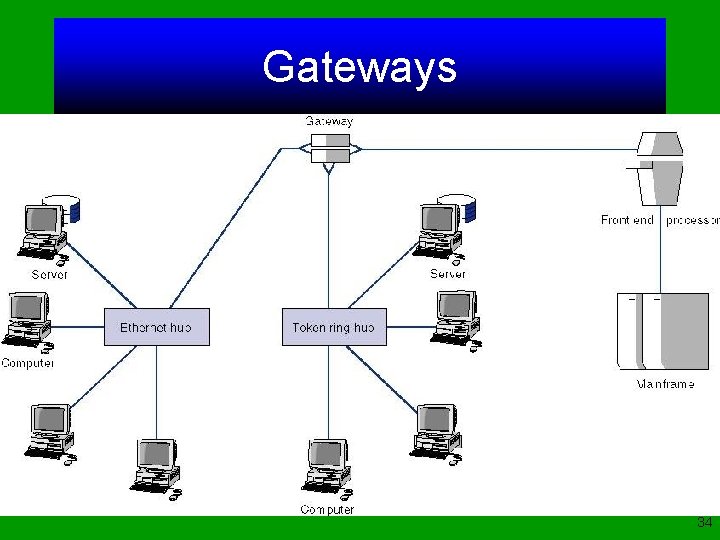
Gateways 34
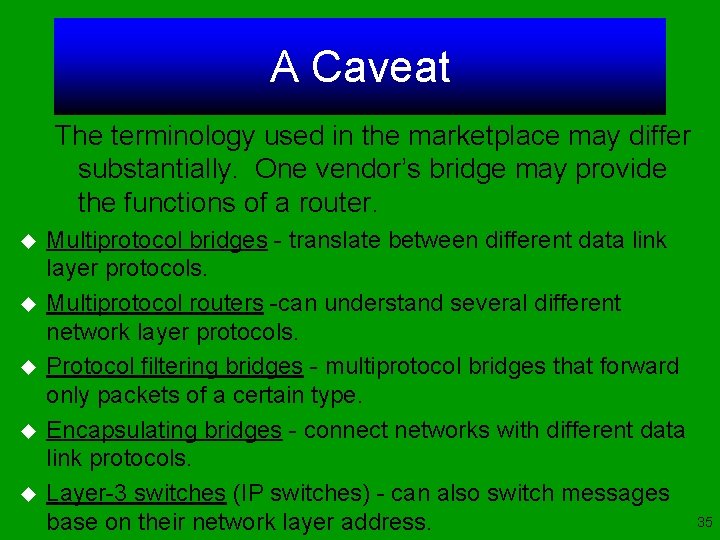
A Caveat The terminology used in the marketplace may differ substantially. One vendor’s bridge may provide the functions of a router. u u u Multiprotocol bridges - translate between different data link layer protocols. Multiprotocol routers -can understand several different network layer protocols. Protocol filtering bridges - multiprotocol bridges that forward only packets of a certain type. Encapsulating bridges - connect networks with different data link protocols. Layer-3 switches (IP switches) - can also switch messages base on their network layer address. 35
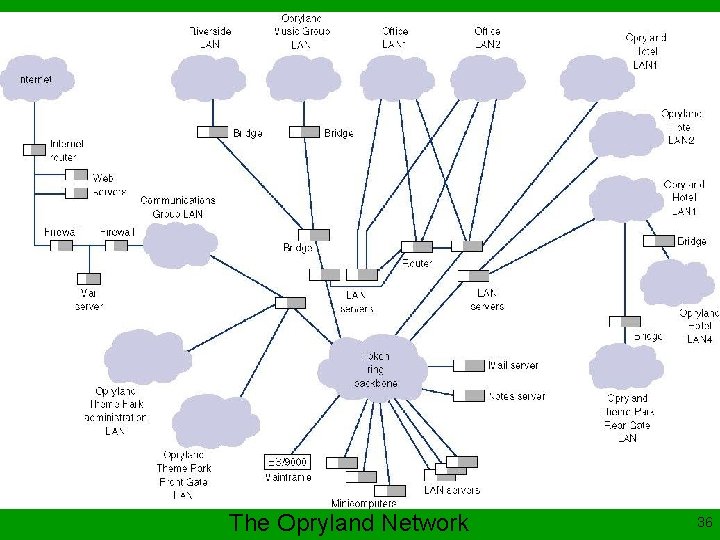
The Opryland Network 36
SHARED MEDIA TECHNOLOGIES 8 -37
Shared Media Technologies One approach to providing high speed networks is to develop faster versions of the same technology used in LANs. The technologies operate by providing a high speed circuit that is shared among all computers on the LAN or backbone network. 38
Fast Ethernet The concept behind fast ethernet is simple: take an ethernet LAN and make it run faster. There are several fundamentally different approaches in the marketplace: Those that refer to 100 Mbps “Fast Ethernet” and “faster” ethernet: gigabit ethernet and Iso. ENET. 39
100 Base-X Ethernet (IEEE 802. 13) 100 Base-X, (a. k. a. 100 Base-T), is virtually identical to 10 Base-T (IEEE 802. 3). It gives a 100 Mbps data rate using the standard ethernet bus topology, data link packets and CSMA/CD media access protocol. There are three versions of 100 Base-X that differ only at the physical layer: • 100 Base. TX uses cat 5 UTP • 100 Base. FX uses fiber optic cable • 100 Base. T 4 uses 4 sets of cat 3 UTP (inverse multiplexed) 40
100 Base. VG (IEEE 802. 12) 100 Base-VG (a. k. a. 100 VG-Any. LAN) is considered part of the fast ethernet family but is really not ethernet. There are two differences between 100 Base. VG and 100 Base-X: 100 Base-VG can send and receive both ethernet and token ring packets. 100 Base-VG does not use ethernet’s standard CSMA/CD media access control. Instead it uses demand priority access method (DPAM) which is very similar to roll call polling 41
100 Base-VG (IEEE 802. 12) In theory 100 Base-VG should be faster than 100 Base-T when network traffic becomes heavy because controlled media access techniques such as DPAM perform better than contention-based approaches like CSMA/CD. 42
100 Base-VG (IEEE 802. 12) When traffic is heavy, the throughput of ethernet drops to about 50 % because of the collisions that occur. For larger packets this is also true for 100 Base-T. For small packets of 1 K or less, 100 Bast-T operates at almost 100 Mbps. For large packets, throughput drops to about 50 Mbps. 100 Base-VG operates at close to 100 Mbps regardless. 43
Gigabit Ethernet (IEEE 802. 3 z) Similar to 100 Base-X, 1000 Base-X is a set of standards that provide 1 Gbps. One problem with 1000 Base-X is that using the standard CSMA/CD media access control on a shared network may cause problems. For this reason, gigabit ethernet may remain primarily a backbone technology for use only in point-to-point full duplex data communications links. 44

Gigabit Ethernet (IEEE 802. 3 z) Four versions of 1000 Base-X are now in use, and they differ only at the physical layer by using different media: • • 1000 Base-LX - fiber cable running up to 440 m. 1000 Base-SX - fiber cable running up to 260 m. 1000 Base-T - 4 pairs of cat 5 UTP up to 100 m. 1000 Base-CX 1 pair cat 5 UPT up to 24 m. 45
Iso-ENET (IEEE 802. 9 A) Iso-ENET (Isochronous ethernet) is standard 10 Base. T ethernet with an additional 6. 144 Mbps circuit placed on top. The two circuits are carried on the same physical UTP, but are completely separate to prevent interference. Several vendors have developed desktop videoconferencing application software that uses iso-ENET with several more multimedia products under development. 46
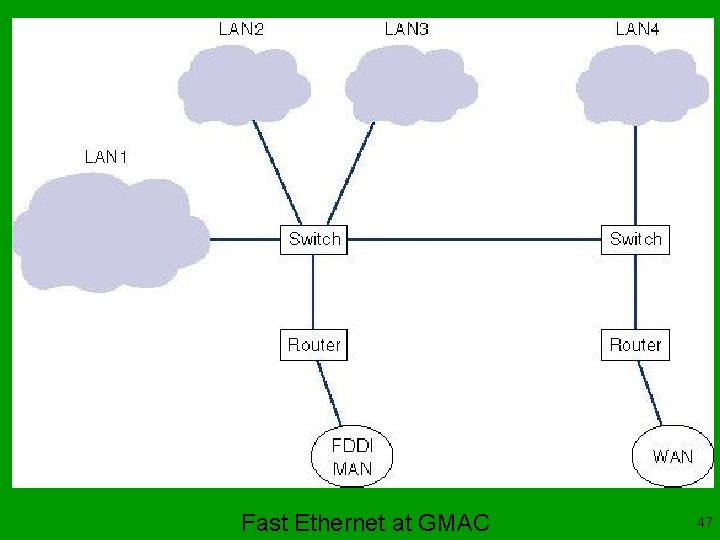
Fast Ethernet at GMAC 47

Fast Token Ring Fast token ring (a. k. a. High Speed Token Ring (HSTR)) is similar in concept to fast ethernet. Fast token ring uses the standard token ring topology, protocols, and media access control, but runs at 100 Mbps, and will run on cat 5 cable or fiber optic. Sales of token ring have declined in recent years as more and more networks have switched to ethernet, which remains cheaper. 48
Fiber Distributed Data Interface (FDDI) is a set of standards originally designed in the late 1980 s for use in MANs (ANSI X 3 T 9. 5), but has since made its way into backbone networks. FDDI is a token-passing ring network that operates at 100 Mbps over two-counterrotating fiber optic cable rings. 49
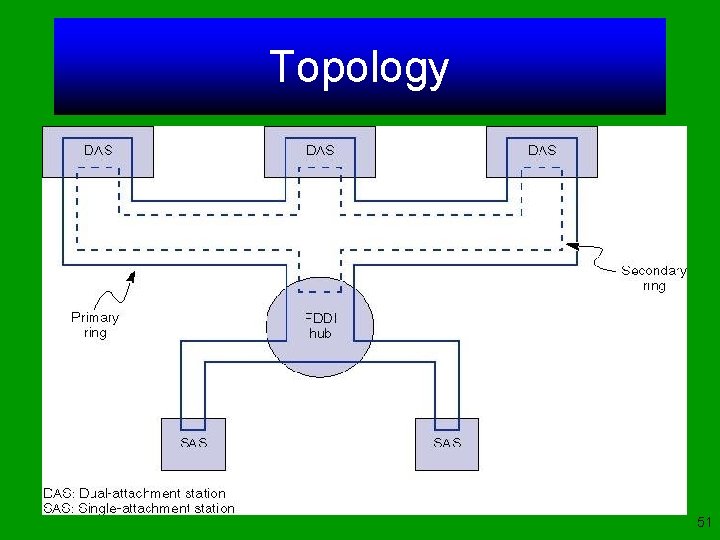
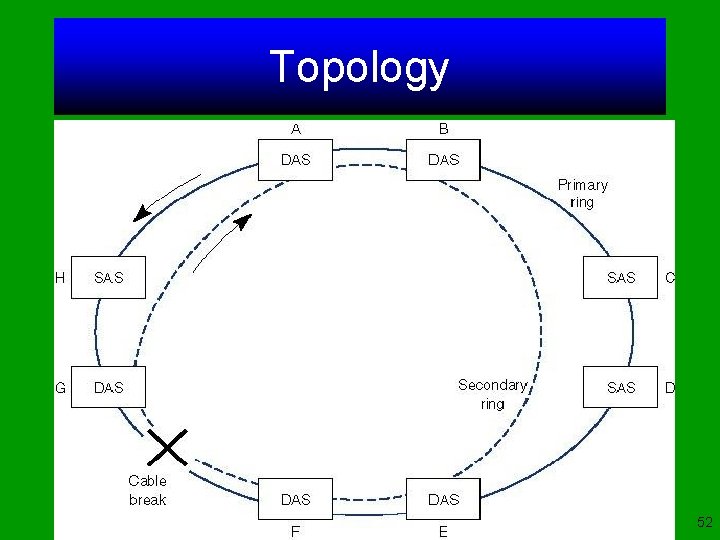
Topology The FDDI standard assumes a maximum of 1000 stations and a 200 k path that requires a repeater every 2 k. The second ring is for backup. Single attachment stations (SAS) and dualattachment stations (DAS) are both computer that can connect to one or both of the rings, respectively. If the cable in the FDDI ring is broken, the ring can still operate in a limited fashion. 50
Topology 51
Topology 52
Media Access Control The FDDI-MAC scheme uses a variation of the IEEE 802. 5 token-passing standard used for token-ring networks with two types of tokens: free tokens and busy tokens. When a computer on an FDDI network receives the token with a message attached, it first removes the token from the ring, and then transmits all messages that were attached to it. The computer then transmits whatever messages its wants before transmitting the token. 53
Types of FDDI There are two additional types of FDDI: • FDDI-C - FDDI on copper (or CDDI) uses the same topology and MAC as FDDI but uses two pairs of cat 5 STP or UTP. • FDDI-II - uses time division multiplexing to break up the available 100 Mbps into 17 separate channels, one channel at 768 Kbps (the token passing data circuit), and 16 wide band channels at 6. 144 Mbps each, which can be used for the transmission of voice and/or video. 54
SWITCHED MEDIA TECHNOLOGIES 8 -55
Switched Media Technologies Over the past few years, there has been a major change in the way we think about LANs and backbone networks. LANs have traditionally used multipoint circuits, and WANs have traditionally used point-to-point circuits. As the shared circuits in LANs and BNs have become overloaded with traffic, networks are starting to use switched point-to-point circuits rather than shared multipoint circuits. 56
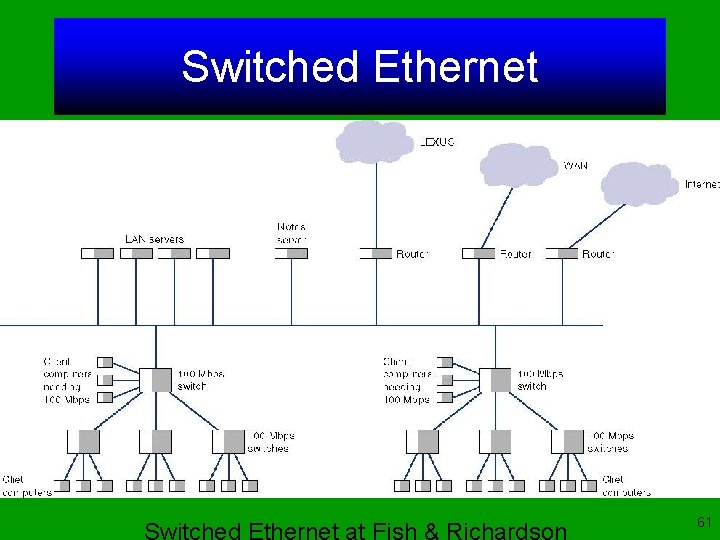
Switched Ethernet The concept behind switched ethernet - and all switched media technologies - is simple; replace the LAN hub with a switch. Each computer now has its own dedicated pointto-point circuit. Switched ethernet dramatically improves LAN performance. However, since much of the network traffic is to and from the server, the circuit to the server is often the network bottleneck. 57
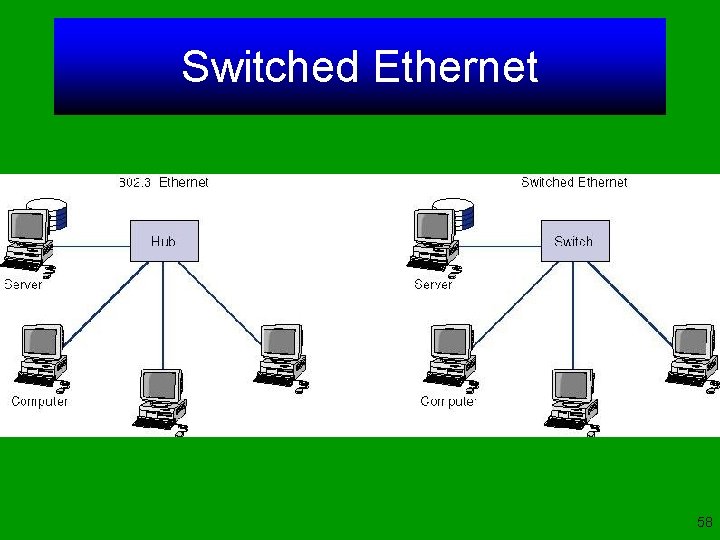
Switched Ethernet 58
Switched Ethernet One obvious solution is to increase the number of connections from the server to the switch so that traffic now can reach the server on several circuits. Other solutions include: • Full Duplex Ethernet (full duplex over traditional 10 Base-T). • 10/100 Switched Ethernet (combines 10 Base-T and 100 Base-T). This is often used to provide 10 Mbps to the clients and 100 Mbps to the server. 59
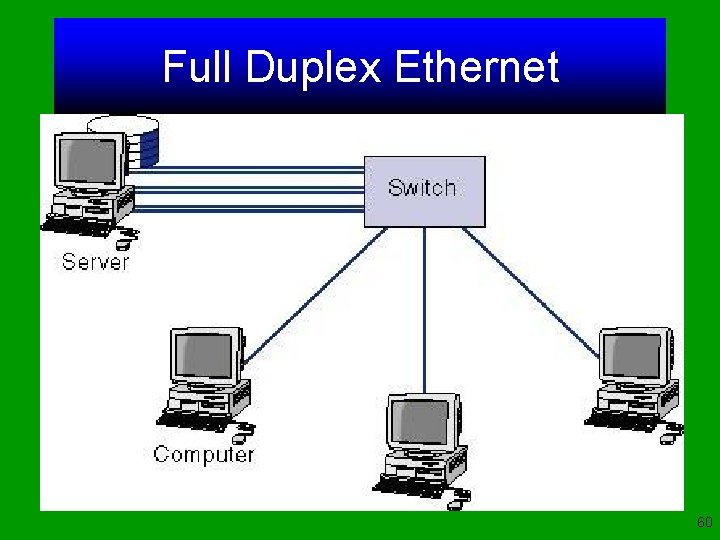
Full Duplex Ethernet 60
Switched Ethernet 61
Switched Token Ring is similar to switched ethernet, in that a token ring switch replaces the token ring hub, providing a series of point-topoint connections from the computers to the switch instead of the traditional shared circuit. The network has a star topology instead of a ring, and no token. Dedicated token ring (DTR) (or full duplex token ring)is similar to full duplex ethernet, with a full duplex connection to the switch providing a 32 Mbps data rate. 62
Switched FDDI is similar to switched ethernet, in that a FDDI switch replaces the FDDI hub, providing a series of point-to-point connections from the computers to the switch instead of the traditional shared circuit. The network has a star topology instead of a ring, and no token. It does use the FDDI packet format and is fully compatible with other FDDI hardware. 63
Asynchronous Transfer Mode (ATM) (a. k. a. cell relay) is a technology originally designed for use in wide area networks that is now often used in backbone networks. ATM backbone switches typically provide point-to-point full duplex circuits at 155 Mbps (total of 310 Mbps). 64
Asynchronous Transfer Mode (ATM) ATM is a switched network but differs from switched ethernet and switched token ring in four ways: 1. ATM uses fixed-length packets of 53 bytes. 2. ATM provides no error correction on the user data. 3. ATM uses a very different type of addressing from traditional data link layer protocols such as ethernet or token ring. 4. ATM prioritizes transmissions based on Quality of Service (Qo. S). 65
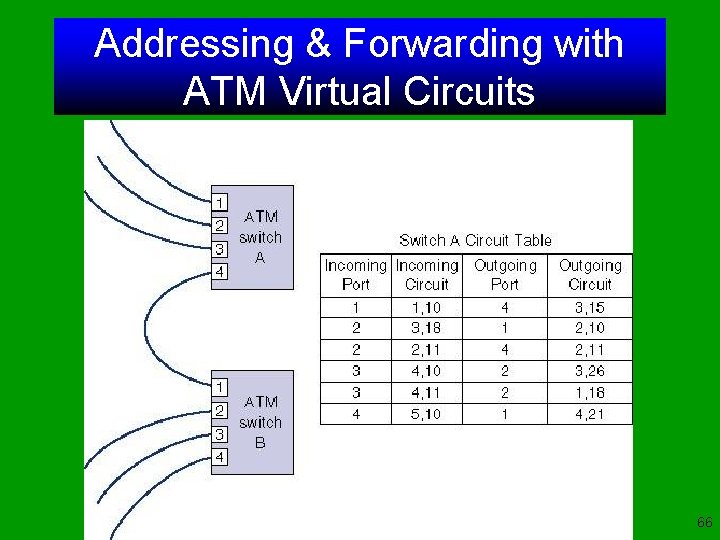
Addressing & Forwarding with ATM Virtual Circuits 66
Asynchronous Transfer Mode (ATM) is connection-oriented so all packets travel in order through the virtual circuit. A virtual circuit can either be a: u Permanent Virtual Circuit (PVC) - defined when the network is established or modified. u Switched Virtual Circuit (SVC) - defined temporarily for one transmission and deleted with the transmission is completed. 67
ATM and Traditional LANs ATM uses a very different type of protocol than traditional LANs. It has a small 53 byte fixed length packet and is connectionoriented. Ethernet and token ring use larger variable length packets and are typically connectionless. Translation must be done to enable the LAN packets to flow over the ATM backbones. There are two approaches LAN encapsulation (LANE) and Multiprotocol over ATM (MPOA). 68
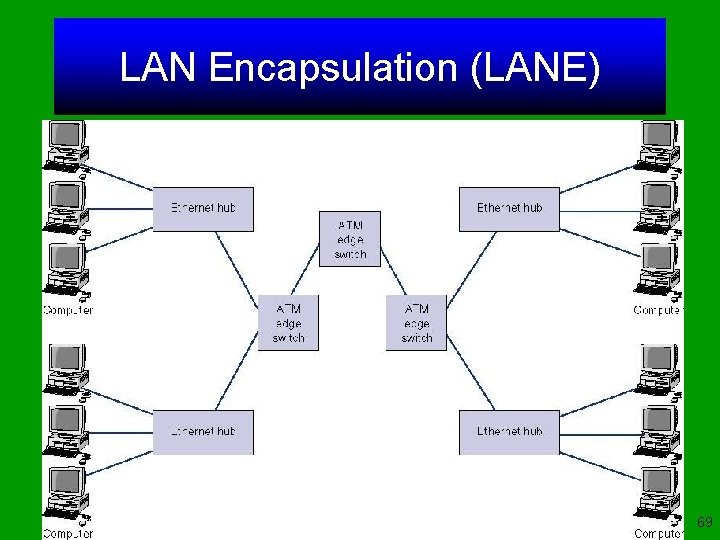
LAN Encapsulation (LANE) 69
ATM and Traditional LANs Translating from ethernet or token ring into ATM is not simple. First the ethernet address must be translated into an ATM virtual circuit identifier for the circuit that leads from the edge switch to the edge switch nearest the destination. Once the virtual circuit address for the destination data link layer address has been found, it can be used to transmit the packet through the ATM backbone. 70
ATM and Traditional LANs Once the virtual circuit is ready, the LAN packet is broken into the series of ATM cells, and transmitted over the ATM backbone using the ATM virtual circuit identifier. Unfortunately this process can cause quite a delay (a reduction of 40 to 50 %). Multiprotocol over ATM (MPOA) is an extension to LANE. 71
ATM to the Desktop ATM-25 is a low speed version of ATM which provides point-to-point full duplex circuits at 25. 6 Mbps in each direction. It is an adaptation of token ring that runs over cat 3 cable and can even use token ring hardware if modified. ATM-51 is another version designed for the desktop allowing 51. 84 Mbps from computers to the switch. 72
ATM to the Desktop Both of these ATMs appear to be good choices for desktop connections when ATM backbone networks are used. However, industry has been very slow to accept either and have instead moved to fast ethernet which is both cheaper and faster. 73
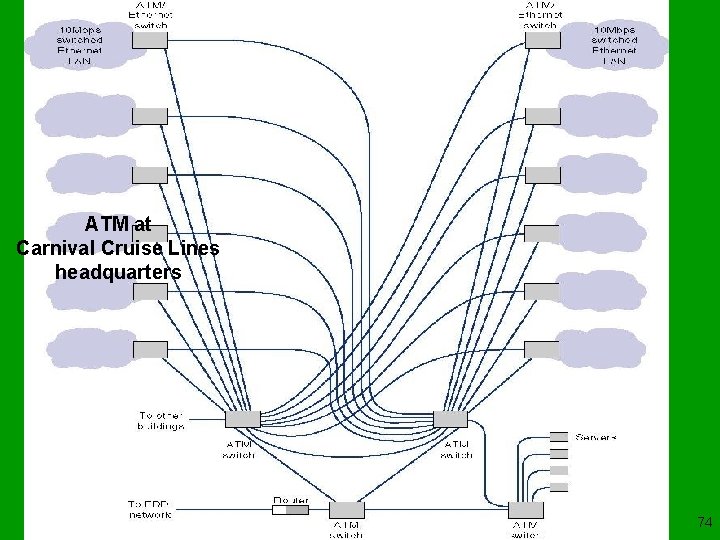
ATM at Carnival Cruise Lines headquarters 74
Fiber Channel Fiber channel is relatively new networking technology, although it has been used inside computer and disk storage devices for several years. Fiber channel was originally designed to provide high speed transmission over fiber optic cable. The maximum data rate is 1. 062 Gbps up to 10 k with higher rates under development. 75
Fiber Channel Fiber channel is a switched technology like ATM, and like ATM, all circuits are full duplex and provide several classes of service. Fiber channel uses variable length data link layer packets with a minimum of 2048 bytes of user data in each, and performs routing error control using CRC-32. 76

Fiber Channel Topologies 77
IMPROVING BACKBONE PERFORMANCE 8 -78
Improving Backbone Performance Improving the performance of backbone networks is similar to improving LAN performance. First find the bottleneck, then solve it, or move it somewhere else. You can improve performance by improving the computers and other devices in the network, by upgrading the circuits between computers, and by changing the demand placed on the network. 79

Improving Backbone Performance Increase Computer and Device Performance • Change to a more appropriate routing protocol (either a static or dynamic) • Reduce translation between different protocols Increase Circuit Capacity • Upgrade to a faster circuit • Add circuits Reduce Network Demand • Change user behavior • Reduce broadcast messages 80
Improving Computer and Device Performance The primary functions of computers and devices in backbone networks are routing and protocol translations. They can be improved with a faster routing protocol. Static routing is faster than dynamic, but can impair circuit performance in high traffic situations. Many of the newer backbone technologies have standards that are not fully developed. 81
Improving Computer and Device Performance FDDI and ATM require the translation or encapsulation of ethernet and token ring packets before they can flow through the backbone. Translating protocols typically requires more processing than encapsulation, so encapsulation can improve performance if the backbone devices are the bottleneck. Most backbone devices are store and forward devices. 82
Improving Circuit Capacity If network circuits are the bottleneck there are several options: u Increase overall circuit capacity. u Add additional circuits alongside heavily used ones. u Replace shared circuit backbones with a switched circuit backbone. If the circuit to the server is the problem: u Replace the ethernet hub with a switch and change one NIC on the server. 83
Reducing Network Demand u Restrict applications that use a lot of network capacity, like video-conferencing, imaging, or multimedia. u Reduce the number of broadcast LAN messages on non-switched LANs. u Filter broadcast LAN messages so they do not exit their native LAN. 84
SELECTING A BACKBONE NETWORK 8 -85
Selecting a Backbone Network 5 important factors to consider: u Throughput - for light traffic all are similar, for heavy, large packet traffic, 100 Base. T is worse. u Network cost u Type of application - All backbones are equally appropriate for most data apps. For voice and video, ATM is better, due to its small fixed-length packets. 86
Backbone Selection Checklist u Throughput u Cost u Type of application u Ease of network management u Compatibility with current and future technologies 87
Selecting a Backbone Network u Ease of Management - Newer technologies are harder to manage than older (FDDI). u Compatibility with current and future technologies • Ethernet LANs are compatible with fast and switched ethernet etc. • It is believed that switched technologies will replace shared multipoint circuit LANs, in the future. 88
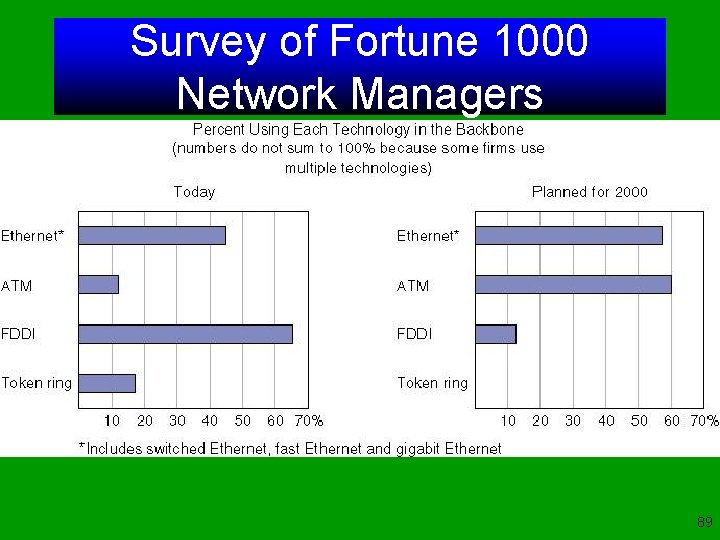
Survey of Fortune 1000 Network Managers 89

Facilities map, Next Day Air 90

End of Chapter 8 8 -91

Have a good rest of the week! © 2001 Jaana Porra University of Houston 8 -92
- Slides: 92