
Building Computer Circuits Chapter 4 4 CMPUT 101
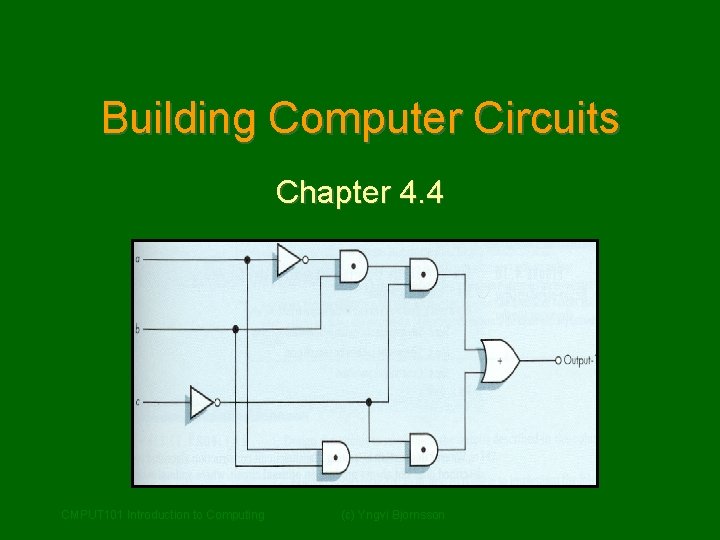
Building Computer Circuits Chapter 4. 4 CMPUT 101 Introduction to Computing (c) Yngvi Bjornsson
Purpose • We have looked at so far how to build logic gates from transistors. • Next we will look at how to build circuits from logic gates, for example: – A circuit to check if two numbers are equal. – A circuit to add two numbers. • Gates will become our new building blocks: – Human body: cells organs body – Computers: gates circuits computer CMPUT 101 Introduction to Computing (c) Yngvi Bjornsson 2
Circuit • A circuit is a collection of interconnected logic gates: – that transforms a set of binary inputs into a set of binary outputs, and – where the values of the outputs depend only on the current values of the inputs • These kind of circuits are more accurately called combinatorial circuits. CMPUT 101 Introduction to Computing (c) Yngvi Bjornsson 3
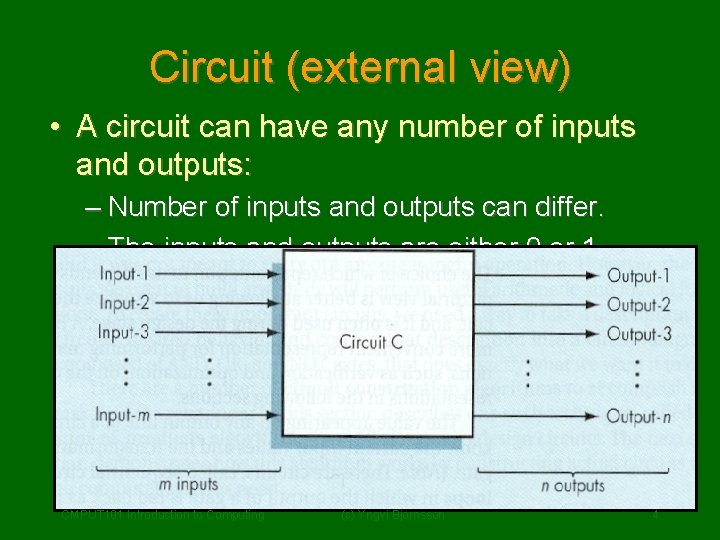
Circuit (external view) • A circuit can have any number of inputs and outputs: – Number of inputs and outputs can differ. – The inputs and outputs are either 0 or 1. CMPUT 101 Introduction to Computing (c) Yngvi Bjornsson 4
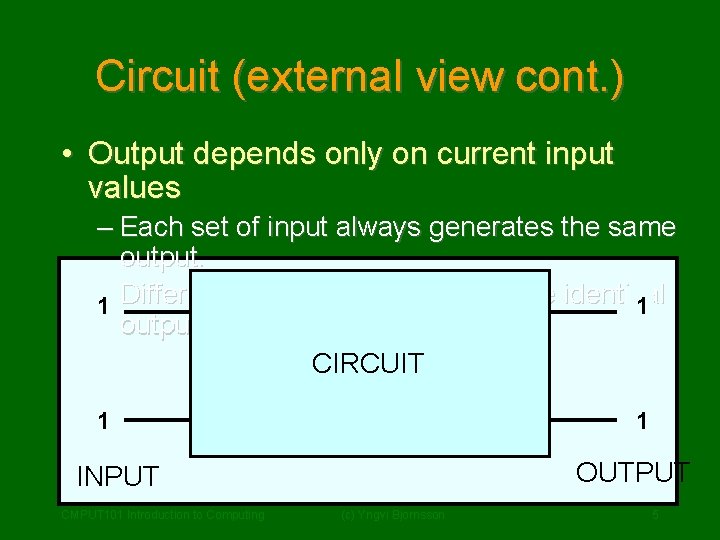
Circuit (external view cont. ) • Output depends only on current input values – Each set of input always generates the same output. – Different sets of input can generate identical 01 01 output. CIRCUIT 01 10 OUTPUT INPUT CMPUT 101 Introduction to Computing (c) Yngvi Bjornsson 5
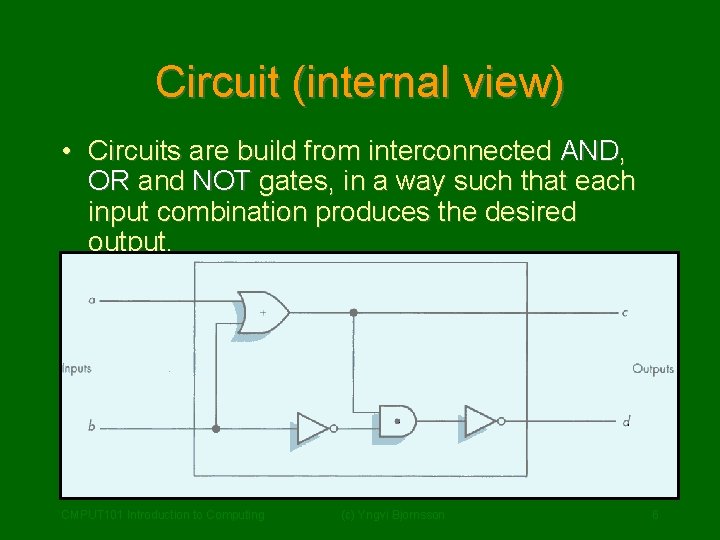
Circuit (internal view) • Circuits are build from interconnected AND, OR and NOT gates, in a way such that each input combination produces the desired output. CMPUT 101 Introduction to Computing (c) Yngvi Bjornsson 6
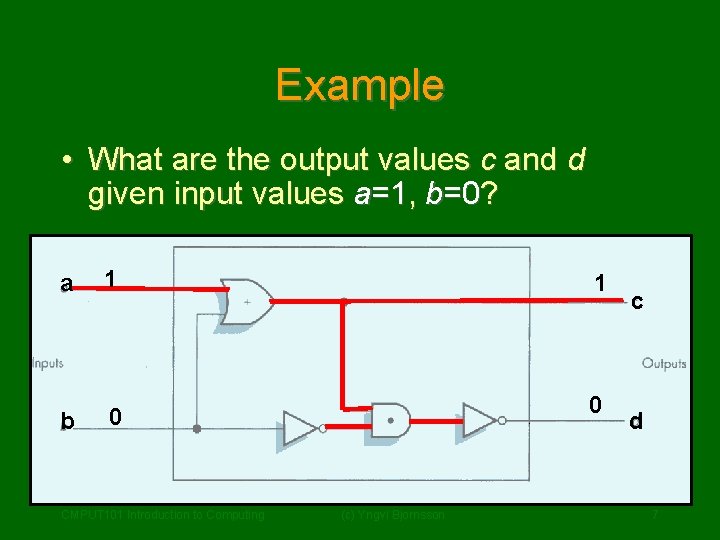
Example • What are the output values c and d given input values a=1, b=0? a 1 1 b 0 0 CMPUT 101 Introduction to Computing (c) Yngvi Bjornsson c d 7
Circuit Diagrams and Boolean Expressions • The diagrams we were looking at are called circuit diagrams. • Relationship between circuit diagrams and Boolean expr. : – Every Boolean expression can be represented pictorially as a circuit. – Every output in a circuit diagram can be written as a Boolean expression. • Example (output values c and d from previous diagram): CMPUT 101 Introduction to Computing (c) Yngvi Bjornsson 8
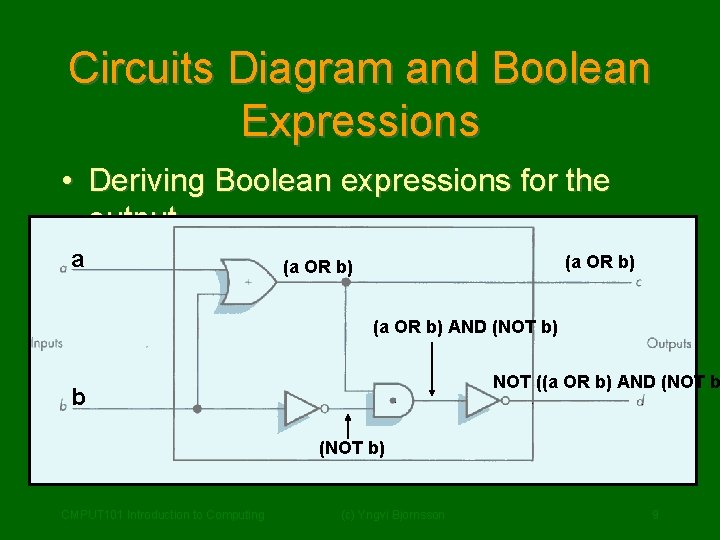
Circuits Diagram and Boolean Expressions • Deriving Boolean expressions for the output. a (a OR b) AND (NOT b) NOT ((a OR b) AND (NOT b b (NOT b) CMPUT 101 Introduction to Computing (c) Yngvi Bjornsson 9
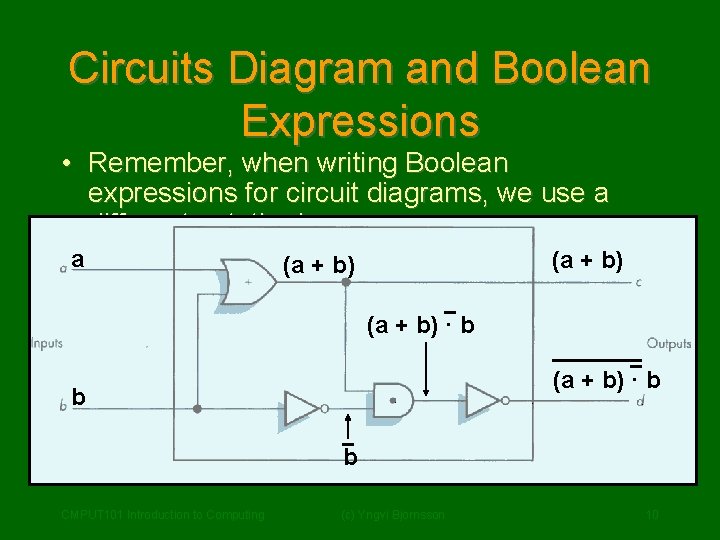
Circuits Diagram and Boolean Expressions • Remember, when writing Boolean expressions for circuit diagrams, we use a different notation! a (a + b) · b b b CMPUT 101 Introduction to Computing (c) Yngvi Bjornsson 10
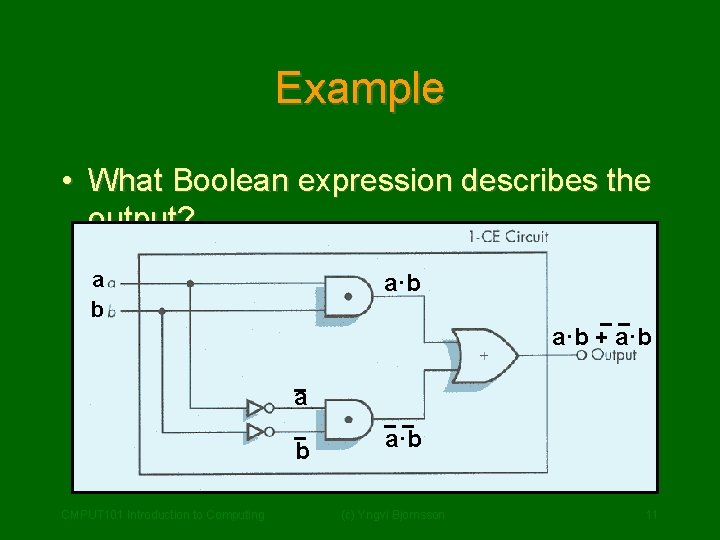
Example • What Boolean expression describes the output? a b a·b + a·b a b CMPUT 101 Introduction to Computing a·b (c) Yngvi Bjornsson 11
Constructing Circuits • How do we design and construct circuits? – We first have to know what we want the circuit to do! – This implies, that for all possible input combinations we must decide what the output should be. • Once we know that, there exists methods we can use to design the layout of the circuit. CMPUT 101 Introduction to Computing (c) Yngvi Bjornsson 12

Sum-of-Products Algorithm Step 1: Truth Table Construction Repeat steps 2, 3 and 4 for each output column Step 2: Sub-expression construction using AND and NOT gates Step 3: Sub-expression combination using OR gates Step 4: Circuit Diagram Production Step 5: Combine Circuit Diagrams Step 6: Optimize Circuit (optional) Step 7: Stop CMPUT 101 Introduction to Computing (c) Yngvi Bjornsson 13
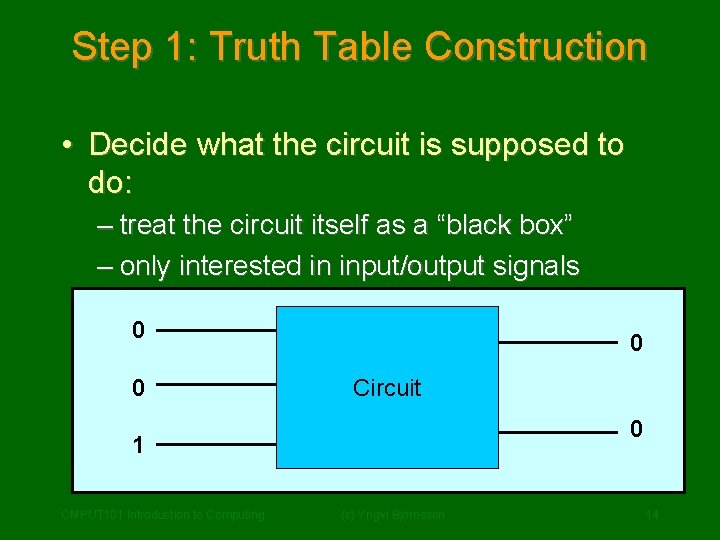
Step 1: Truth Table Construction • Decide what the circuit is supposed to do: – treat the circuit itself as a “black box” – only interested in input/output signals 0 0 0 Circuit 1 0 10 CMPUT 101 Introduction to Computing (c) Yngvi Bjornsson 14
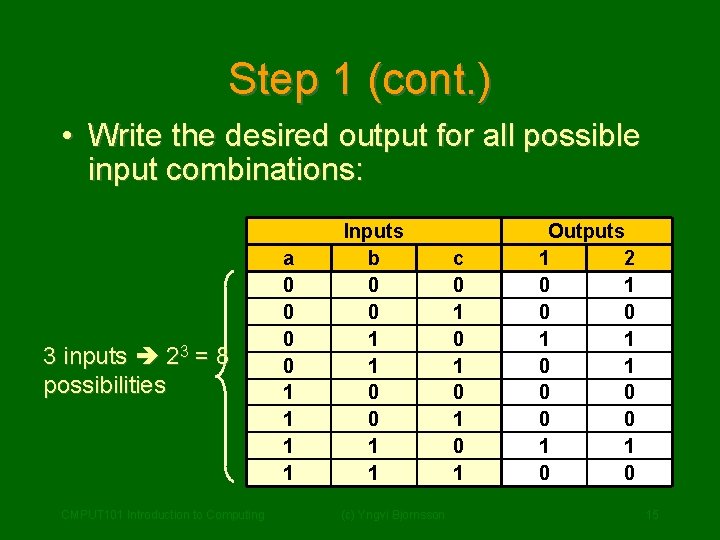
Step 1 (cont. ) • Write the desired output for all possible input combinations: 3 inputs 23 = 8 possibilities CMPUT 101 Introduction to Computing a 0 0 1 1 Inputs b 0 0 1 1 (c) Yngvi Bjornsson c 0 1 0 1 Outputs 1 2 0 1 0 0 1 1 0 0 15
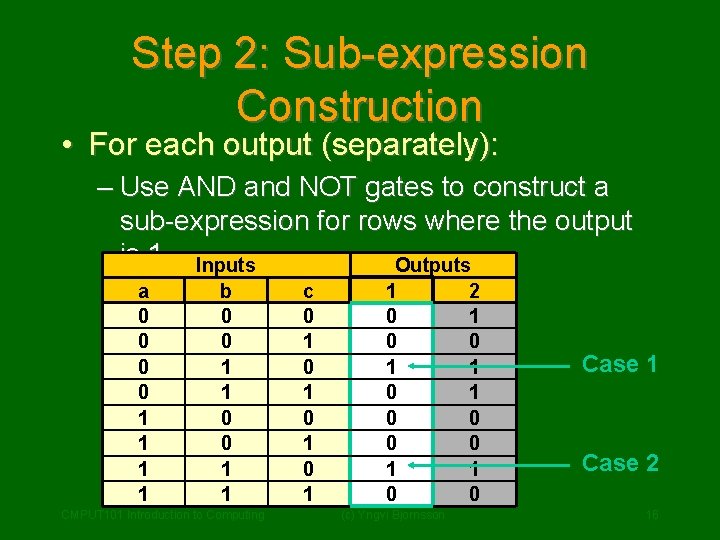
Step 2: Sub-expression Construction • For each output (separately): – Use AND and NOT gates to construct a sub-expression for rows where the output is 1 Inputs Outputs a 0 0 1 1 b 0 0 1 1 CMPUT 101 Introduction to Computing c 0 1 0 1 1 0 0 0 1 0 (c) Yngvi Bjornsson 2 1 0 1 1 0 0 1 0 Case 1 Case 2 16
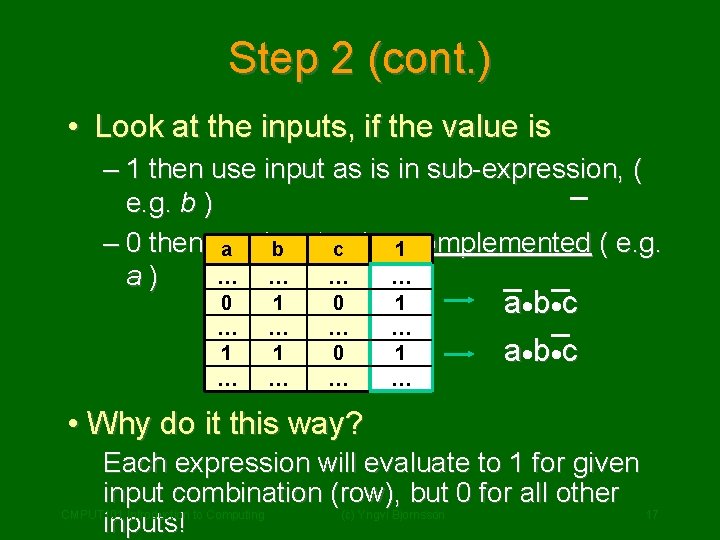
Step 2 (cont. ) • Look at the inputs, if the value is – 1 then use input as is in sub-expression, ( e. g. b ) – 0 then use input value a b c 1 complemented ( e. g. … … a) 0 … 1 … 1 … 0 … 1 … a· b· c • Why do it this way? Each expression will evaluate to 1 for given input combination (row), but 0 for all other CMPUT 101 Introduction to Computing (c) Yngvi Bjornsson 17 inputs!
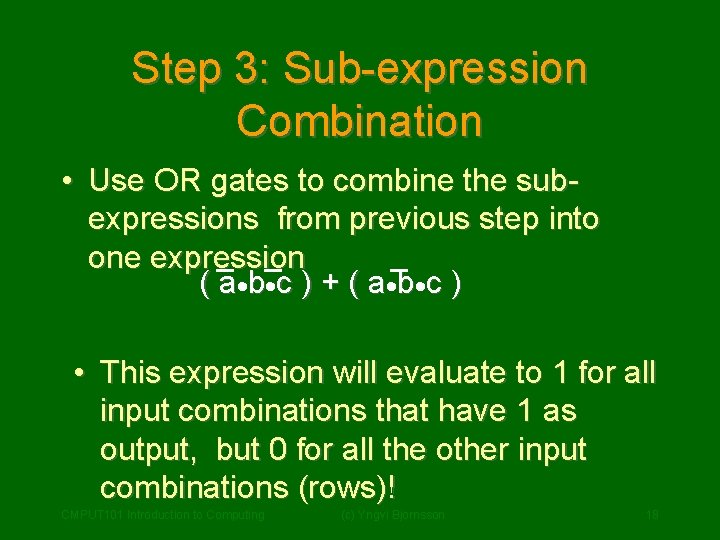
Step 3: Sub-expression Combination • Use OR gates to combine the subexpressions from previous step into one expression ( a · b· c ) + ( a · b· c ) • This expression will evaluate to 1 for all input combinations that have 1 as output, but 0 for all the other input combinations (rows)! CMPUT 101 Introduction to Computing (c) Yngvi Bjornsson 18
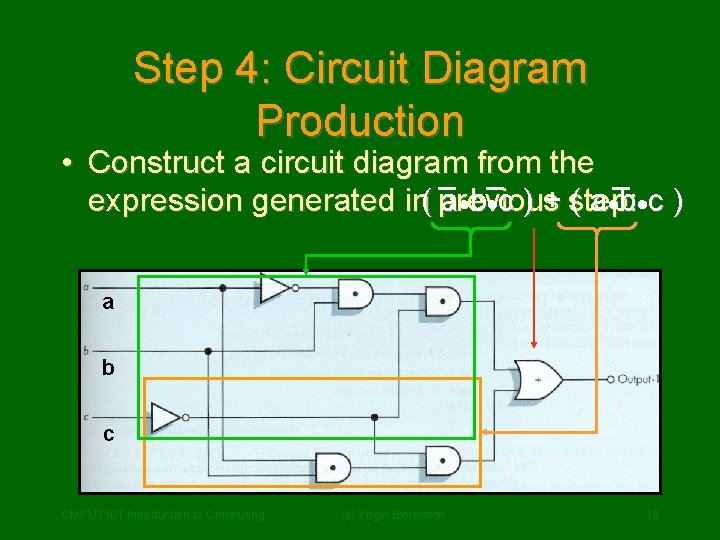
Step 4: Circuit Diagram Production • Construct a circuit diagram from the a·b·c ) + step: ( a · b· c ) expression generated in( previous a b c CMPUT 101 Introduction to Computing (c) Yngvi Bjornsson 19
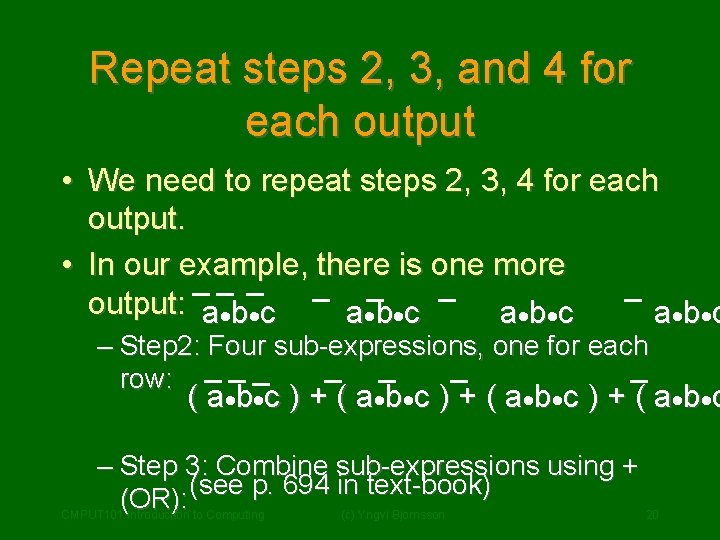
Repeat steps 2, 3, and 4 for each output • We need to repeat steps 2, 3, 4 for each output. • In our example, there is one more output: a·b·c a · b· c – Step 2: Four sub-expressions, one for each row: ( a · b· c ) + ( a · b· c – Step 3: Combine sub-expressions using + (see p. 694 in text-book) (OR): CMPUT 101 Introduction to Computing (c) Yngvi Bjornsson 20
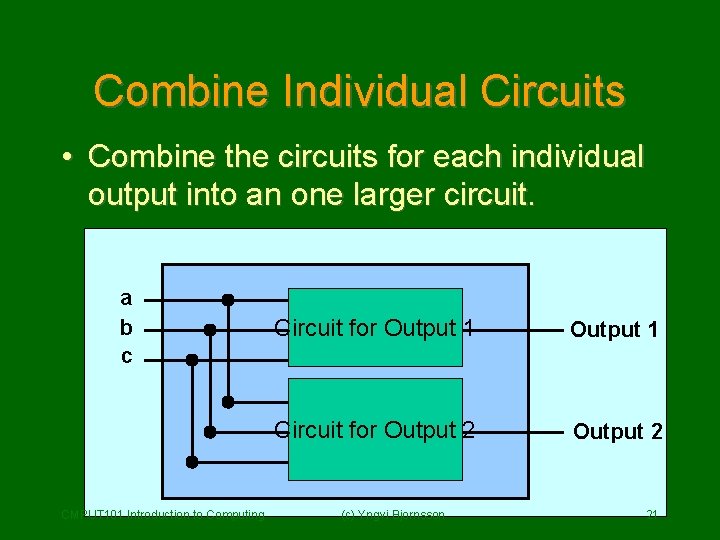
Combine Individual Circuits • Combine the circuits for each individual output into an one larger circuit. a b c CMPUT 101 Introduction to Computing Circuit for Output 1 Circuit for Output 2 (c) Yngvi Bjornsson 21
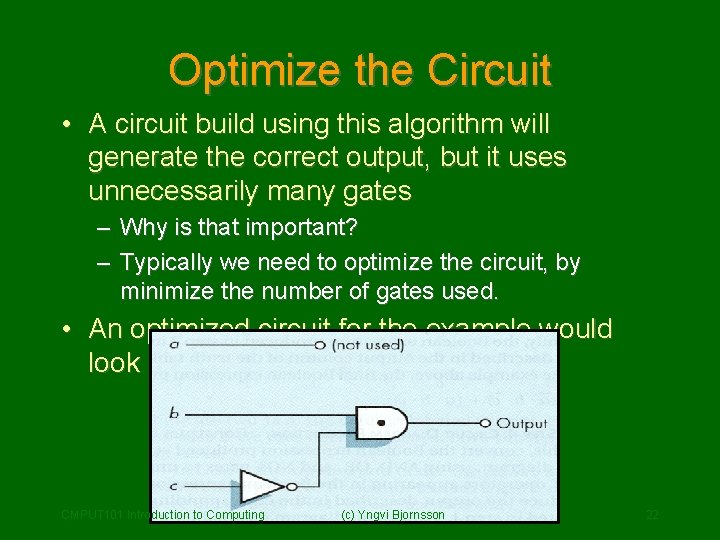
Optimize the Circuit • A circuit build using this algorithm will generate the correct output, but it uses unnecessarily many gates – Why is that important? – Typically we need to optimize the circuit, by minimize the number of gates used. • An optimized circuit for the example would look like: CMPUT 101 Introduction to Computing (c) Yngvi Bjornsson 22
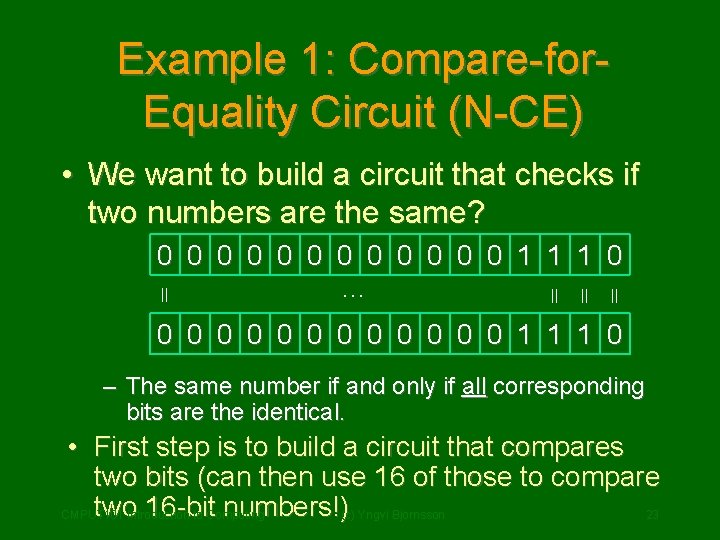
Example 1: Compare-for. Equality Circuit (N-CE) • We want to build a circuit that checks if two numbers are the same? 0 0 0 1 1 1 0 = = … 0 0 0 1 1 1 0 – The same number if and only if all corresponding bits are the identical. • First step is to build a circuit that compares two bits (can then use 16 of those to compare two. Introduction 16 -bit numbers!)(c) Yngvi Bjornsson CMPUT 101 to Computing 23
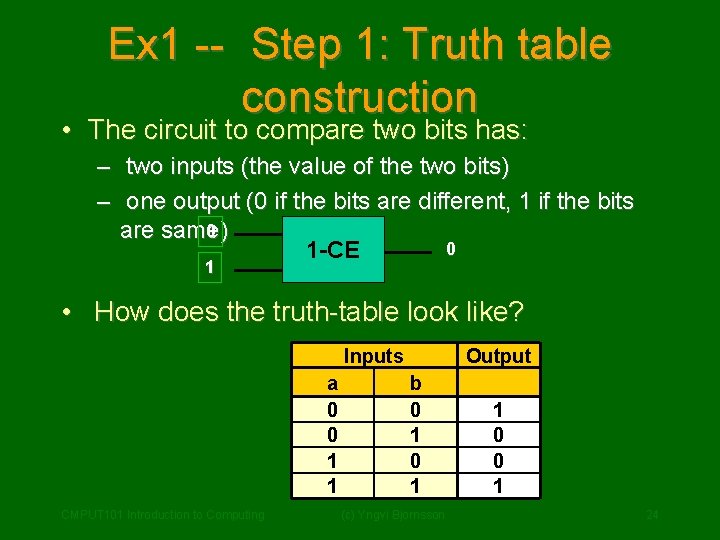
Ex 1 -- Step 1: Truth table construction • The circuit to compare two bits has: – two inputs (the value of the two bits) – one output (0 if the bits are different, 1 if the bits 0 are same) 0 1 -CE 1 • How does the truth-table look like? Inputs a 0 0 1 1 CMPUT 101 Introduction to Computing Output b 0 1 (c) Yngvi Bjornsson 1 0 0 1 24
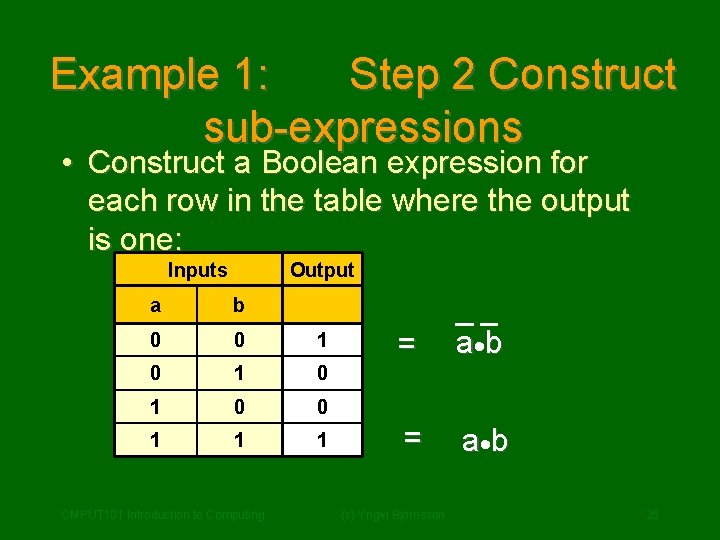
Example 1: Step 2 Construct sub-expressions • Construct a Boolean expression for each row in the table where the output is one: Inputs Output a b 0 0 1 0 1 0 0 1 1 1 CMPUT 101 Introduction to Computing = a· b (c) Yngvi Bjornsson 25
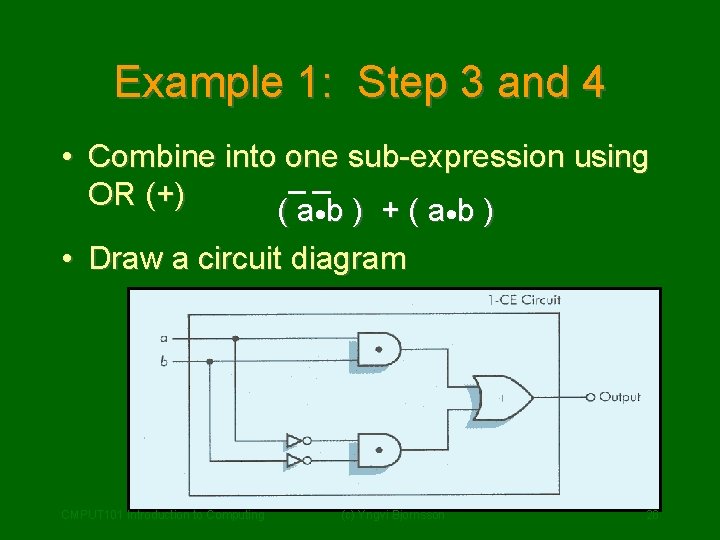
Example 1: Step 3 and 4 • Combine into one sub-expression using OR (+) ( a ·b ) + ( a ·b ) • Draw a circuit diagram CMPUT 101 Introduction to Computing (c) Yngvi Bjornsson 26
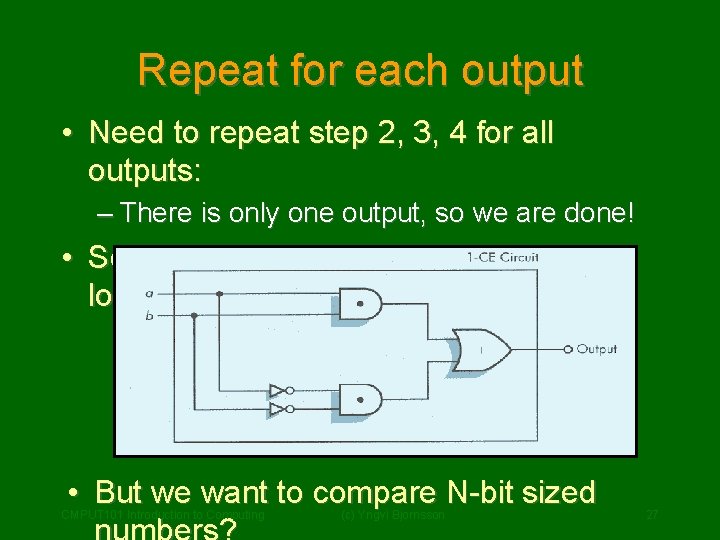
Repeat for each output • Need to repeat step 2, 3, 4 for all outputs: – There is only one output, so we are done! • So our 1 -bit compare circuit ( 1 -CE ) looks like: • But we want to compare N-bit sized CMPUT 101 Introduction to Computing (c) Yngvi Bjornsson 27
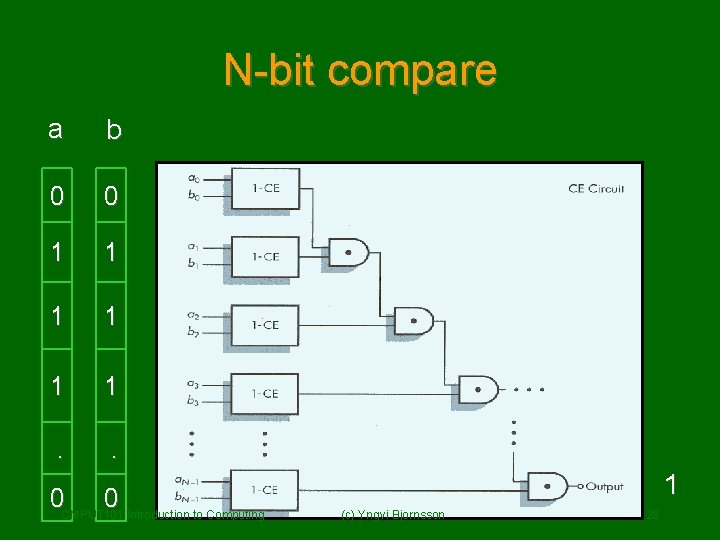
N-bit compare a b 0 0 1 1 1 . . 0 CMPUT 101 0 Introduction to Computing 1 (c) Yngvi Bjornsson 28
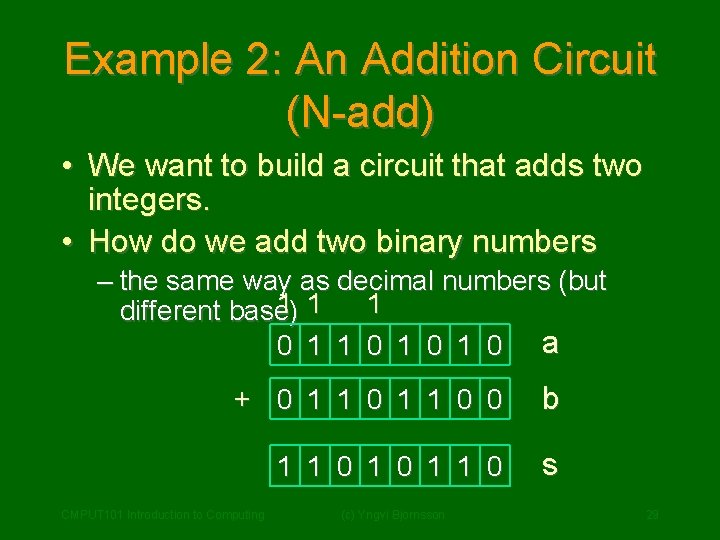
Example 2: An Addition Circuit (N-add) • We want to build a circuit that adds two integers. • How do we add two binary numbers – the same way as decimal numbers (but 1 1 1 different base) 0 1 1 0 1 0 a + 0 1 1 0 0 b 1 1 0 s CMPUT 101 Introduction to Computing (c) Yngvi Bjornsson 29
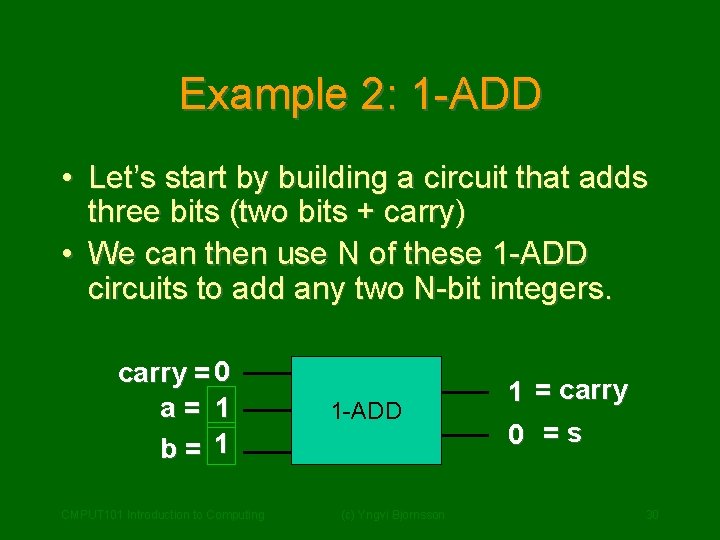
Example 2: 1 -ADD • Let’s start by building a circuit that adds three bits (two bits + carry) • We can then use N of these 1 -ADD circuits to add any two N-bit integers. carry = 0 a= 1 b= 1 CMPUT 101 Introduction to Computing 1 -ADD (c) Yngvi Bjornsson 1 = carry 0 =s 30
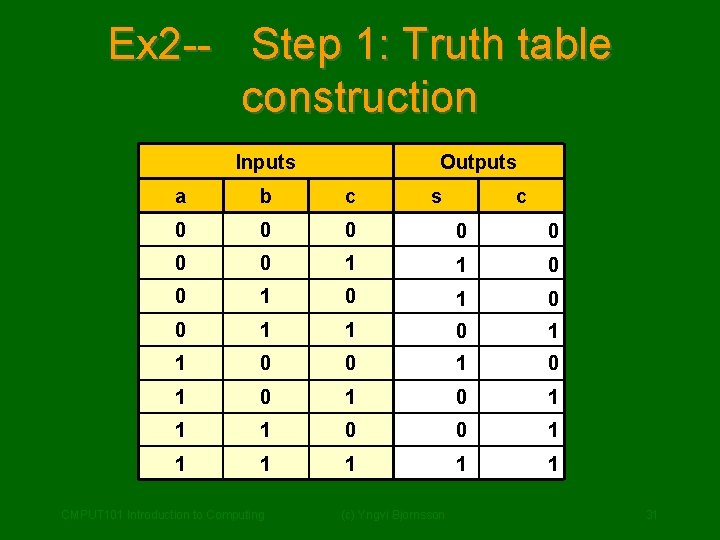
Ex 2 -- Step 1: Truth table construction Inputs Outputs a b c 0 0 0 0 1 1 0 0 1 0 1 1 1 0 0 1 1 1 CMPUT 101 Introduction to Computing s (c) Yngvi Bjornsson c 31
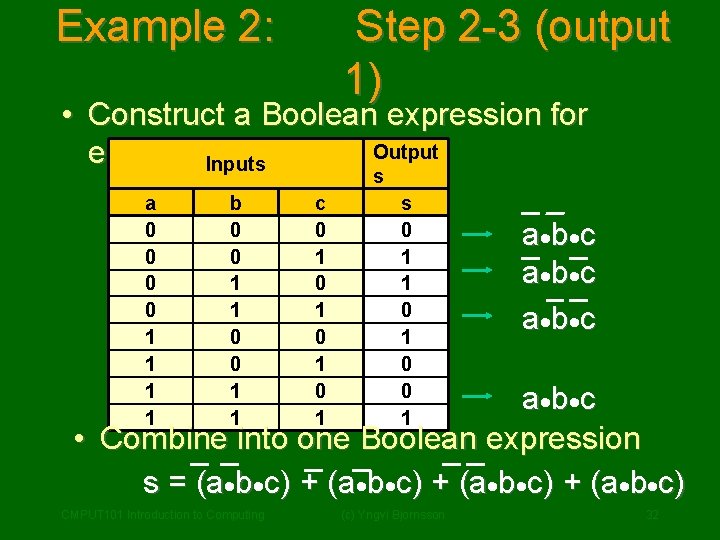
Example 2: Step 2 -3 (output 1) • Construct a Boolean expression for Output each 1 -row Inputs s a 0 0 1 1 b 0 0 1 1 c 0 1 0 1 s 0 1 1 0 0 1 a· b· c • Combine into one Boolean expression s = (a·b·c) + (a·b·c) CMPUT 101 Introduction to Computing (c) Yngvi Bjornsson 32
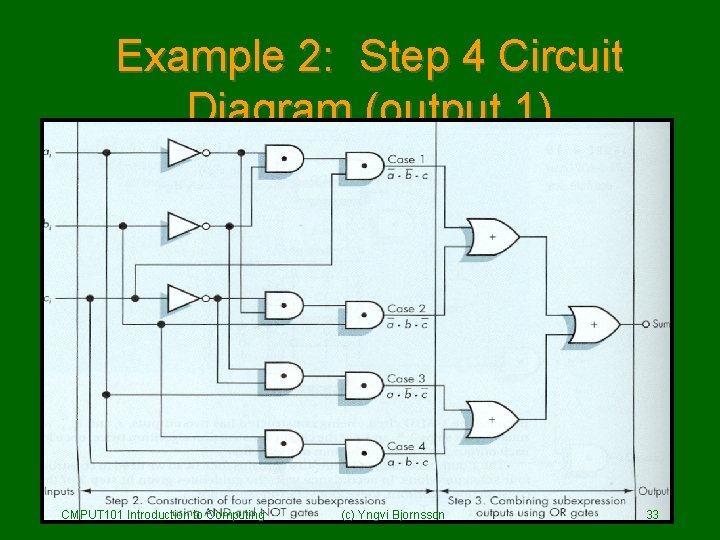
Example 2: Step 4 Circuit Diagram (output 1) CMPUT 101 Introduction to Computing (c) Yngvi Bjornsson 33
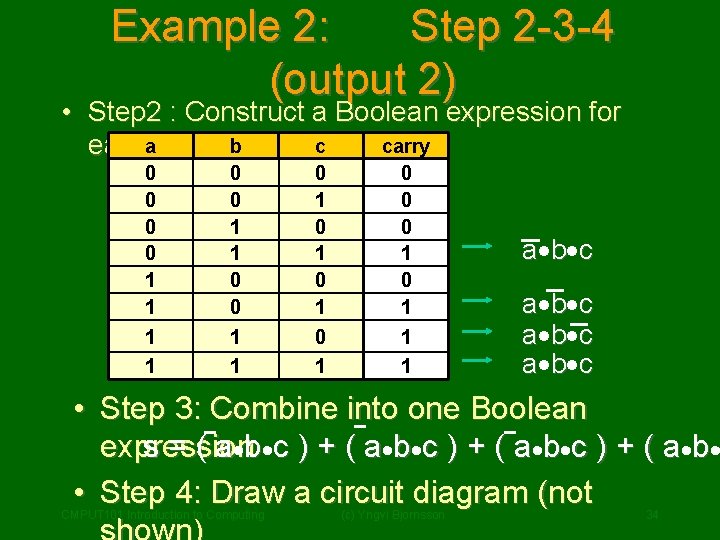
Example 2: Step 2 -3 -4 (output 2) • Step 2 : Construct a Boolean expression for c carry eacha 1 -row b 0 0 1 1 0 1 0 1 0 0 0 1 1 1 a· b· c • Step 3: Combine into one Boolean s = ( a · b· c ) + ( a · b· expression • Step 4: Draw a circuit diagram (not CMPUT 101 Introduction to Computing (c) Yngvi Bjornsson 34
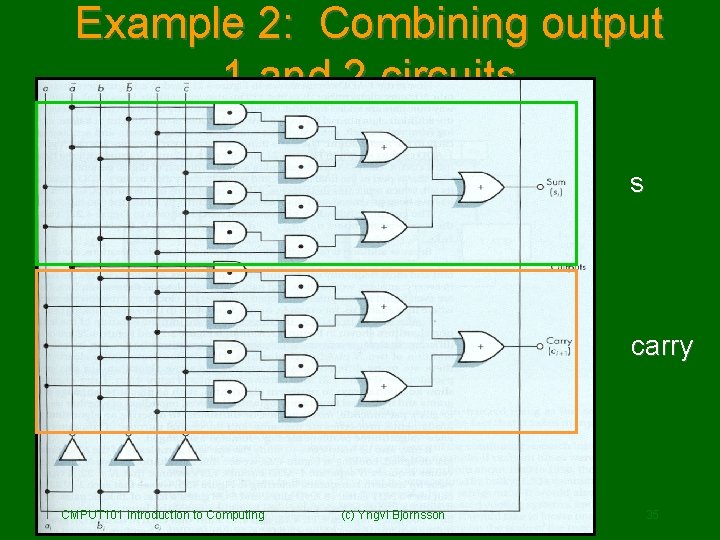
Example 2: Combining output 1 and 2 circuits s carry CMPUT 101 Introduction to Computing (c) Yngvi Bjornsson 35
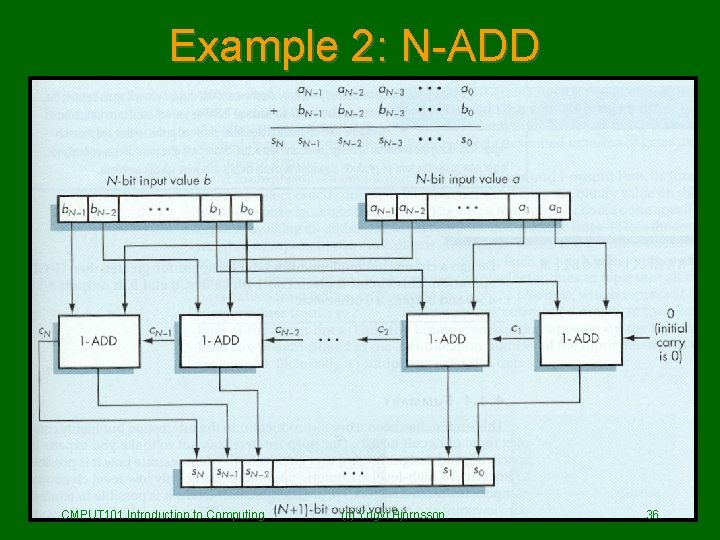
Example 2: N-ADD CMPUT 101 Introduction to Computing (c) Yngvi Bjornsson 36
Example 2: Optimize the circuit • Each 1 -ADD circuit has 25 gates (47 transistors) – 16 AND gates – 6 OR games – 3 NOT gates ( x 2 transistors) ( x 1 transistors) • To add two 32 -bits integers we need – 32 1 -ADD circuits 32 * 25 = 800 gates 1504 transistors • Optimized 32 -bits addition circuit in modern computers uses: 500 -600 transistors CMPUT 101 Introduction to Computing (c) Yngvi Bjornsson 37 – We will not learn how to optimize circuits in
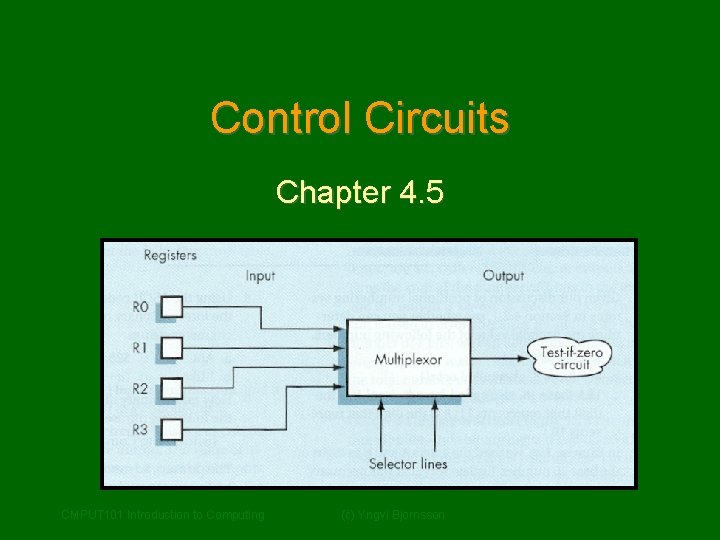
Control Circuits Chapter 4. 5 CMPUT 101 Introduction to Computing (c) Yngvi Bjornsson
Control Circuits • So far we have seen two types of circuits: – Logical ( is a = b ? ) – Arithmetic ( c = a + b) • Computers use many different logical (>, <, >=. <=, !=, …), and arithmetic (+, , *, /) circuits. • There also different kind of circuits that are essential for computers control circuits CMPUT 101 Introduction to Computing (c) Yngvi Bjornsson – We will look at two different kind of control 39
Multiplexor • A multiplexor circuit has: – 2 N – 1 –N input lines (numbered 0, …, 2 N-1) output line selector lines • The selector lines are used to choose which of the input signals becomes the output signal: – Selector lines interpreted as an N-bit integer – The signal on the input line with the CMPUT 101 Introduction to Computing (c) Yngvi Bjornsson 40 corresponding number becomes the output
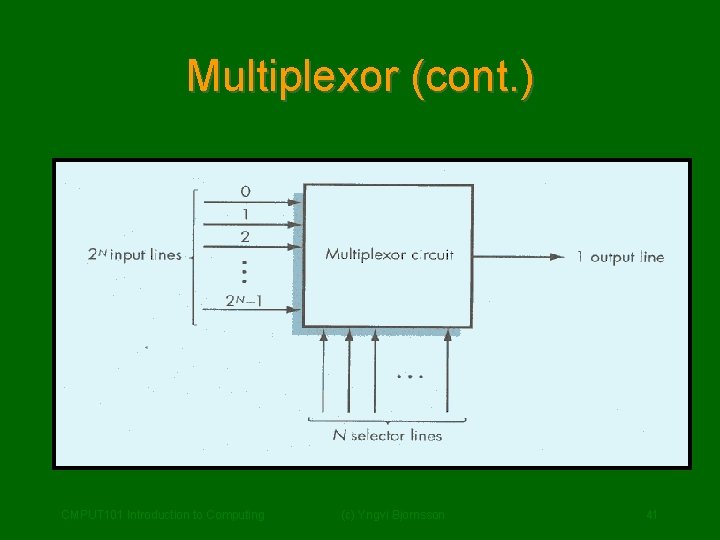
Multiplexor (cont. ) CMPUT 101 Introduction to Computing (c) Yngvi Bjornsson 41
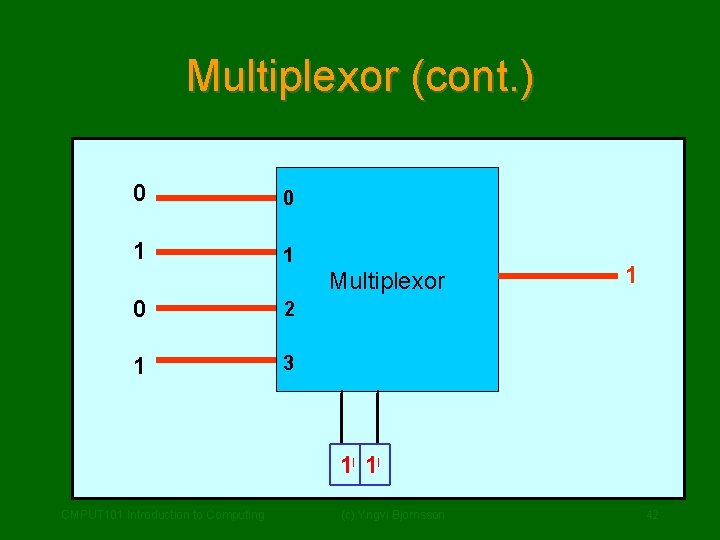
Multiplexor (cont. ) 0 0 1 1 Multiplexor 0 2 1 3 1 0 10 10 CMPUT 101 Introduction to Computing (c) Yngvi Bjornsson 42
Decoder • A decoder circuit has: – N – 2 N input lines (numbered 0, 1, …. , N-1) output line (numbered 0, 1, … 2 N-1) • Works as follows: – The N input lines are interpreted as a N-bit integer value. – The output line corresponding to the integer value is set to 1, all other to 0 CMPUT 101 Introduction to Computing (c) Yngvi Bjornsson 43
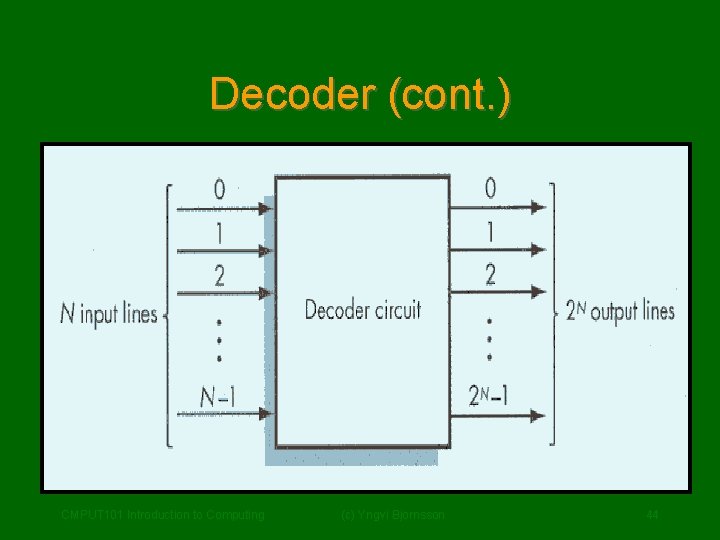
Decoder (cont. ) CMPUT 101 Introduction to Computing (c) Yngvi Bjornsson 44
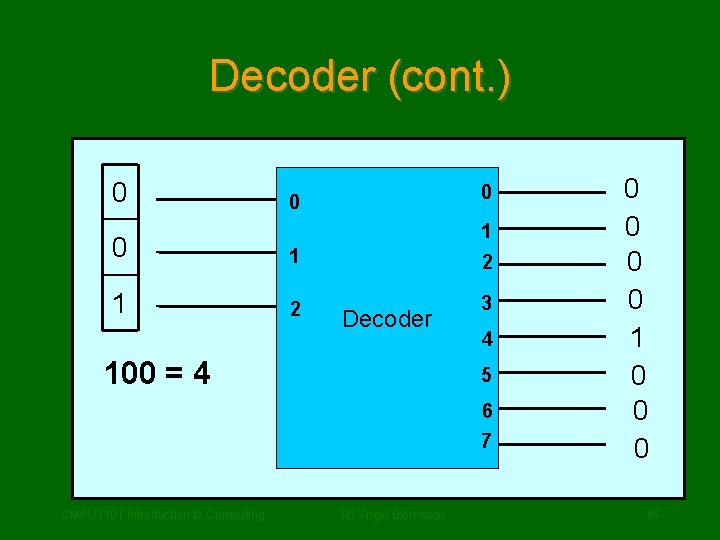
Decoder (cont. ) 0 0 0 1 2 1 2 3 Decoder 100 = 4 4 5 6 7 CMPUT 101 Introduction to Computing (c) Yngvi Bjornsson 0 0 1 0 0 0 45
Summary • We looked at how computers represent data: – Internal vs External Representation – Basic storage unit is a binary digit bit – Data is represented internally as binary data. – Use the binary number system. • We learned why computers use binary data: – Main reason is reliability (c) Yngvi Bjornsson CMPUT 101 Introduction to Computing 46
Summary (cont. ) • We looked at the basic building blocks used in computers: – Binary Storage Device = Transistor • We saw how to build logic gates (AND, OR, NOT): – Transistors Gates – Boolean logic • We saw how to build circuits: • Gates Circuits CMPUT 101 Introduction to Computing Yngvi Bjornsson • Looked at logical, (c)arithmetic, and control 47
Summary (cont. ) • Now that we have seen the basic building blocks (low-level view), in the next chapter we will look at the “big picture” (high-level view). • We will look at the basic architecture underlying design of all computers: – Look at higher level computer components, such as processors and memory. – Understand better how computers execute programs. CMPUT 101 Introduction to Computing (c) Yngvi Bjornsson 48
- Slides: 48