
Building and Maintaining Information Systems 1 Opening Case
Building and Maintaining Information Systems 1
Opening Case: Yahoo! Store • Allows small businesses to create their own online store – • No programming needed The standardized store structure allows Yahoo! to provide store management information 2
Phases of an Information System 3
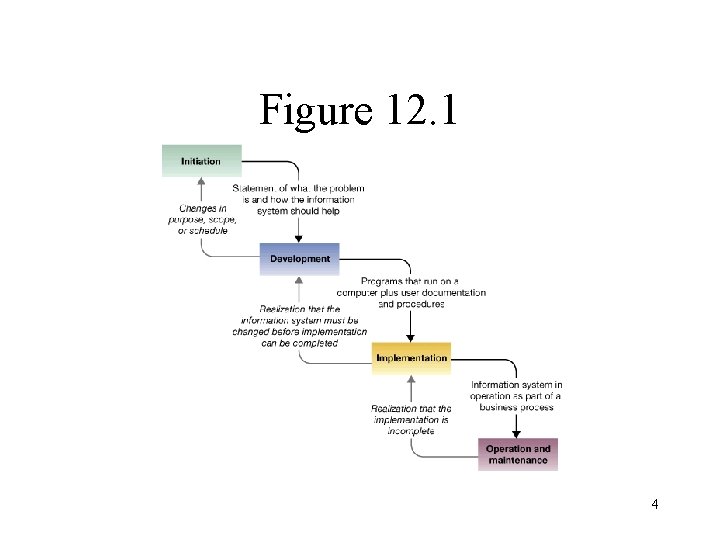
Figure 12. 1 4
Initiation • • • The process of defining the need to change an existing work system, who should be involved, and describing in general terms the features of the new system Understand the proposed system purposes and goals Some projects never go beyond this phase 5
Development • • The process of building or acquiring and configuring the needed resources Must make sure that the system features really solve the user needs – Problem with inconsistencies and ambiguities in user requirements 6
Implementation • • The process of making the new system operational Activities include: – – Planning User training Conversion to the new system Follow-up to make sure that the system is operating effectively 7
Operation and Maintenance • • The ongoing operation of the system + efforts to enhance the system and correct bugs The importance of this phase is often overlooked 8
Overview of Alternative Approaches for Building Information Systems • The traditional life cycle uses a prescribed sequence of steps and deliverables – The capability maturity model (CMM) tracks the extent to which an IT organization uses this type of life cycle in its development work • A prototype IS is a working model built to learn about the true requirements of the system 9
• An application package consists of commercially available software that addresses a specific type of business application – • Installed and operated by the IS department End-user development is the development of ISs by work system participants 10
Traditional System Life Cycle 11
• • Goal: keep the project under control and assure that the IS produces satisfies well-formulated requirements Divides the project into a number of steps, steps each with distinct deliverables 12
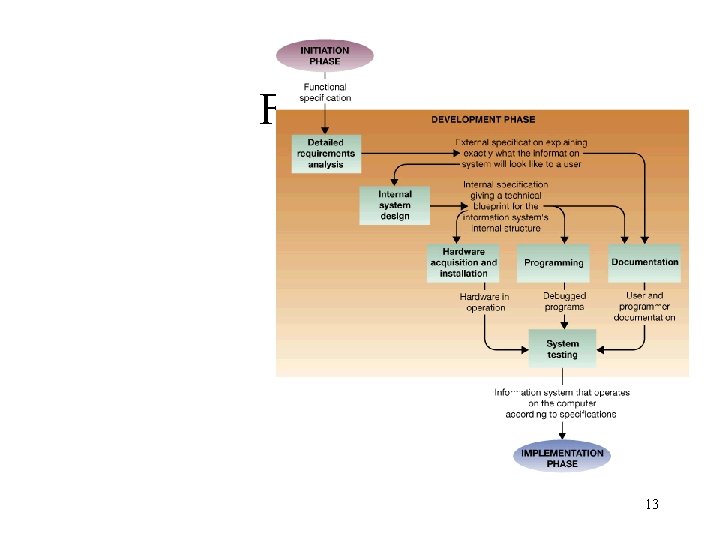
Figure 12. 3 13
Initiation • Feasibility study – a user-oriented view of the proposed system’s purpose – – – • Economic feasibility Technical feasibility Organizational feasibility If the IS appears to be feasible, functional specifications are produced – Must be approved by both users and IS personnel 14
Development • • Creates the programs and the installed hardware necessary for the data processing specified in the functional specifications Detailed requirement analysis – Results in a document called external specification – shows the data input screens and major reports, and explains the calculations that will be automated 15
• Internal system design – • • Produces the internal specification – the computer environment for the IS, the database content, and the inputs and outputs for all programs and subsystems Hardware acquisition and installation Programming – Unit testing – treats the programs in isolation 16
• Documentation – • User and technical documentation System testing (or integration testing) – Testing plan – a precise statement of how exactly the IS is going to be tested 17
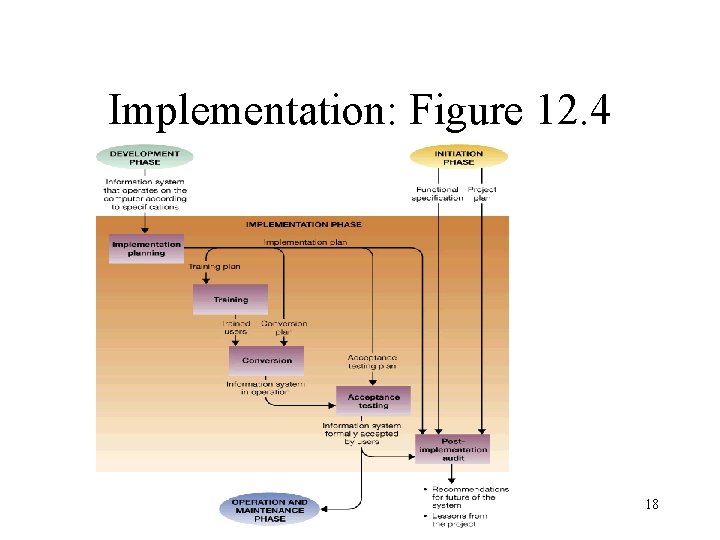
Implementation: Figure 12. 4 18
• Implementation planning – • • Creating plans for training, conversion, and acceptance testing Training Conversion – – Turn on the new system at a chosen date Phased approach Running in parallel Pilot implementation 19
• Acceptance testing – • Testing of the IS by the users as it goes into operation Post-implementation audit – Determine whether the project has met its objectives + make recommendations for the future 20
Operation & Maintenance • Ongoing operation and support – • Ensuring that the technical system components continue to operate correctly, and that the users use the system effectively Maintenance – The process of modifying the IS over time 21
• Pros and cons of the traditional life cycle: – – • Adherence to fixed deliverables improves control but also guarantees a lengthy process Having specific deliverables makes it easier to monitor the work and take corrective actions early The traditional life cycle is the standard against which other approaches are compared 22
Prototypes A working model built to learn how an improved work system could operate if it included an improved IS 23
• Throwaway prototype – designed to be discarded – • Useful for comparing alternatives Evolutionary prototype – designed to be adapted for permanent use – Should be built using the system tools that will be used for the final IS 24
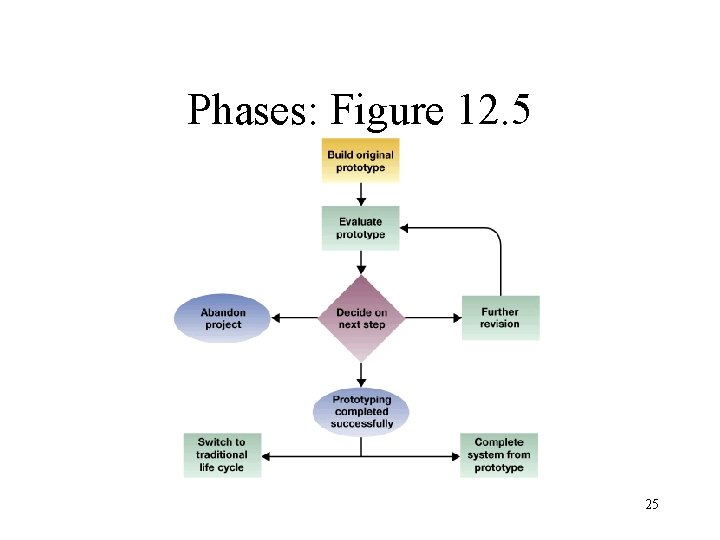
Phases: Figure 12. 5 25

• Initiation – • The problem is not well understood and/or the users are unable to say exactly what they want Development – Emphasizes speed and rapid feedback 26
• Implementation – • Part of the implementation is done in parallel with development Operation and maintenance 27
Advantages & Disadvantages • Advantages: – – – Users have a tangible IS to work with during development Early user involvement may reduce skepticism Building prototypes is becoming easier 28
• Disadvantages: – – – Too much user involvement Many changes Frequent deadlines are stressful 29
Application Packages 30
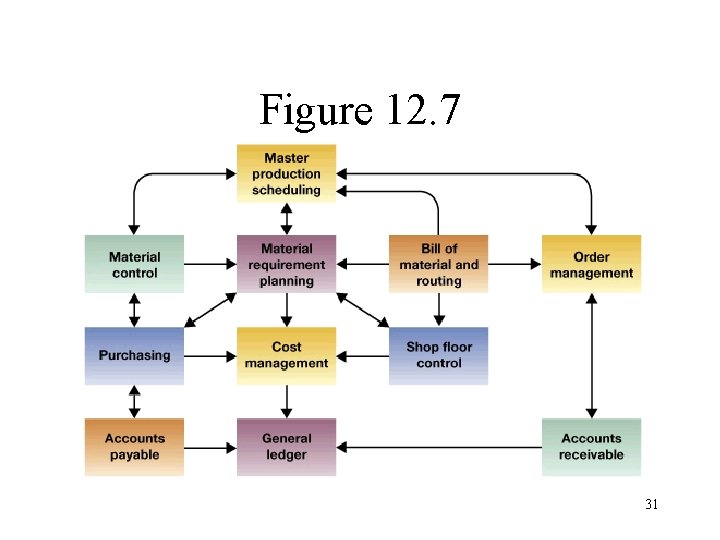
Figure 12. 7 31
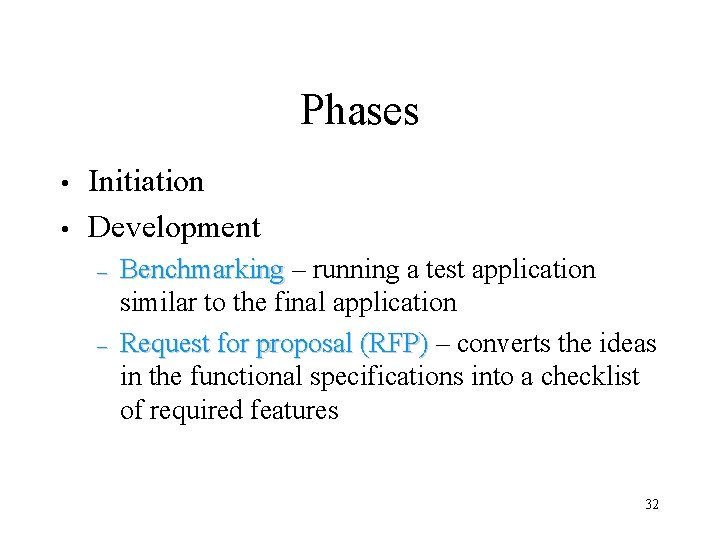
Phases • • Initiation Development – – Benchmarking – running a test application similar to the final application Request for proposal (RFP) – converts the ideas in the functional specifications into a checklist of required features 32
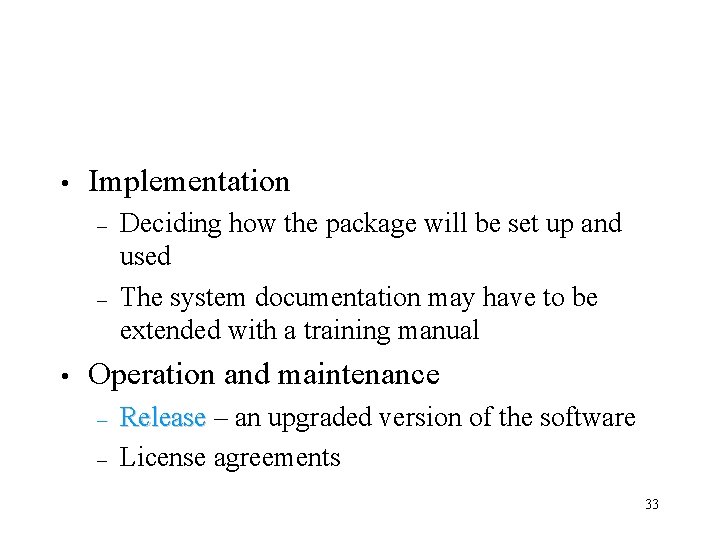
• Implementation – – • Deciding how the package will be set up and used The system documentation may have to be extended with a training manual Operation and maintenance – – Release – an upgraded version of the software License agreements 33
Advantages and Disadvantages • Advantages: – – • Benefits accrue sooner Risks are reduced Disadvantages: – – – The features may not fit the business process No control over the term direction of the software Rarely provide sustainable competitive advantage 34
End–User Development End-user Computing (EUC) 35
• Applies when: – – – Requirements are not stringent The project is limited to a department and is not on a critical path for other projects Proven technology is used 36
Phases • • Initiation Development – • Implementation – • IS staff to support the user development No training Operation and maintenance – The responsibility of the end users 37
Supporting the Users • • Site license – blanket contracts covering the use of a particular software product at the site by a certain number of users Data availability issues 38
Advantages and Disadvantages • Advantages: – – – • Reduces the need for programmers Minimizes training Eliminates delays and political negotiations Disadvantages: – – – Applies only in a limited number of situations The systems are often less well designed and constructed, and more prone to bugs Long-term maintenance often a problem 39
Deciding Which Combination of Methods to Use • • Comparing advantages & disadvantages Combining system development approaches – Some alternatives: • • Use a prototype as part of the traditional life cycle Use a small application package as a prototype Adopt aspect of a traditional life cycle to purchasing an application package Add a user development component to the traditional life cycle 40

- Slides: 41