
Building a Cosell Operating Model in Partner Center

Building a Co-sell Operating Model in Partner Center In this guide you will find guidance to delineate an operating framework based on the three core activities any partner performs to manage referrals with the availability of Power Automate Connectors to integrate with your company’s CRM instance. This guide is for any size organization with any volume of leads or opportunities shared. We recommend you consult with your Partner Center admin to understand how your organization has configured Partner Center. Core actions Manage leads: The process for accepting, declining, and tracking a lead from Microsoft Manage Co-sell opportunities: The process for accepting, declining, sharing, and tracking opportunities for joint selling with another partner or Microsoft seller Register Deals: The process for notifying Microsoft when an opportunity is closed as a win and meets the co-sell requirement Operating frameworks User Interface [UI] is recommended when a partner: • Shares or receives fewer than 30 referrals a month • Has multiple co-sell offerings or a single high-volume offer • Has a CRM system that can be updated to include additional co-sell fields • Does not have a CRM system Automated [API] is recommended when a partner: • Shares or receive more than 30 referrals a month • Has more than five co-sell offerings • Has a CRM system that meets the API technical requirements with prebuilt connectors or writing script to Rest API Sharing Leads and Co-sell Opportunities Lead is identified with customers Qualified lead is shared Submitting Deal Registrations Lead is accepted, Contract is signed teams are introduced (Services and/or IP) Deal validation + deal review Deal closed and registered Microsoft or partner Partner
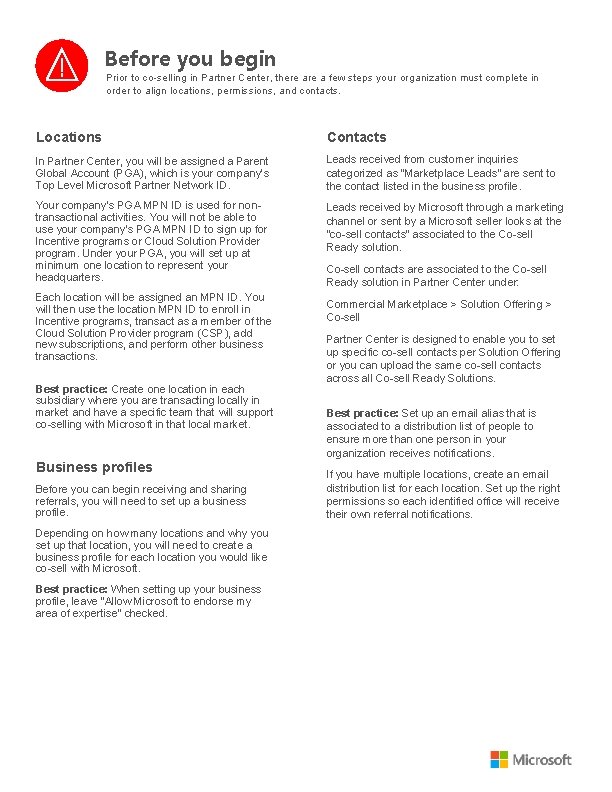
Before you begin Prior to co-selling in Partner Center, there a few steps your organization must complete in order to align locations, permissions, and contacts. Locations Contacts In Partner Center, you will be assigned a Parent Global Account (PGA), which is your company’s Top Level Microsoft Partner Network ID. Leads received from customer inquiries categorized as “Marketplace Leads” are sent to the contact listed in the business profile. Your company’s PGA MPN ID is used for nontransactional activities. You will not be able to use your company’s PGA MPN ID to sign up for Incentive programs or Cloud Solution Provider program. Under your PGA, you will set up at minimum one location to represent your headquarters. Leads received by Microsoft through a marketing channel or sent by a Microsoft seller looks at the “co-sell contacts” associated to the Co-sell Ready solution. Each location will be assigned an MPN ID. You will then use the location MPN ID to enroll in Incentive programs, transact as a member of the Cloud Solution Provider program (CSP), add new subscriptions, and perform other business transactions. Best practice: Create one location in each subsidiary where you are transacting locally in market and have a specific team that will support co-selling with Microsoft in that local market. Business profiles Before you can begin receiving and sharing referrals, you will need to set up a business profile. Depending on how many locations and why you set up that location, you will need to create a business profile for each location you would like co-sell with Microsoft. Best practice: When setting up your business profile, leave “Allow Microsoft to endorse my area of expertise” checked. Co-sell contacts are associated to the Co-sell Ready solution in Partner Center under: Commercial Marketplace > Solution Offering > Co-sell Partner Center is designed to enable you to set up specific co-sell contacts per Solution Offering or you can upload the same co-sell contacts across all Co-sell Ready Solutions. Best practice: Set up an email alias that is associated to a distribution list of people to ensure more than one person in your organization receives notifications. If you have multiple locations, create an email distribution list for each location. Set up the right permissions so each identified office will receive their own referral notifications.
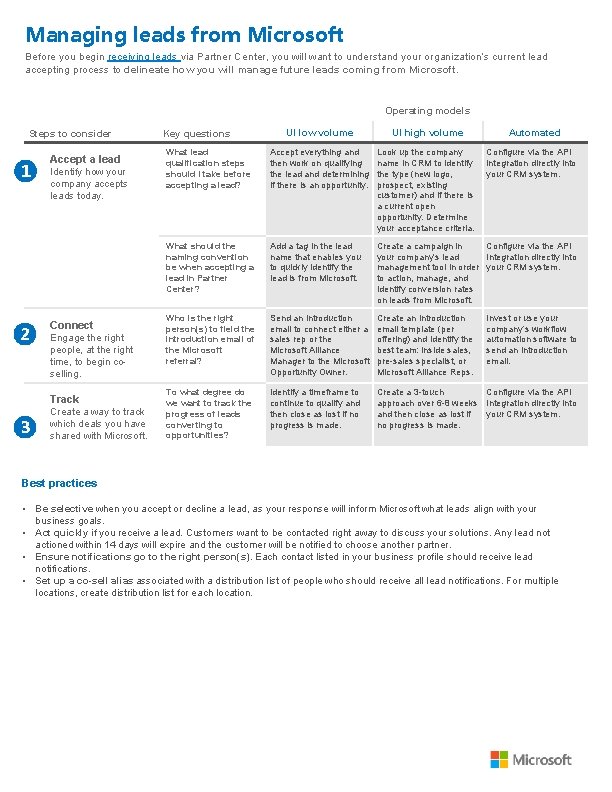
Managing leads from Microsoft Before you begin receiving leads via Partner Center, you will want to understand your organization’s current lead accepting process to delineate how you will manage future leads coming from Microsoft. Operating models Steps to consider 1 2 Accept a lead Identify how your company accepts leads today. Connect Engage the right people, at the right time, to begin coselling. Track 3 Create a way to track which deals you have shared with Microsoft. UI low volume UI high volume What lead qualification steps should I take before accepting a lead? Accept everything and then work on qualifying the lead and determining if there is an opportunity. Look up the company name in CRM to identify the type (new logo, prospect, existing customer) and if there is a current open opportunity. Determine your acceptance criteria. What should the naming convention be when accepting a lead in Partner Center? Add a tag in the lead name that enables you to quickly identify the lead is from Microsoft. Create a campaign in Configure via the API your company’s lead Integration directly into management tool in order your CRM system. to action, manage, and identify conversion rates on leads from Microsoft. Who is the right person(s) to field the introduction email of the Microsoft referral? Send an introduction email to connect either a sales rep or the Microsoft Alliance Manager to the Microsoft Opportunity Owner. Create an introduction email template (per offering) and identify the best team: inside sales, pre-sales specialist, or Microsoft Alliance Reps. To what degree do we want to track the progress of leads converting to opportunities? Identify a timeframe to continue to qualify and then close as lost if no progress is made. Create a 3 -touch Configure via the API approach over 6 -8 weeks Integration directly into and then close as lost if your CRM system. no progress is made. Key questions Automated Configure via the API integration directly into your CRM system. Invest or use your company’s workflow automation software to send an introduction email. Best practices • Be selective when you accept or decline a lead, as your response will inform Microsoft what leads align with your business goals. • Act quickly if you receive a lead. Customers want to be contacted right away to discuss your solutions. Any lead not actioned within 14 days will expire and the customer will be notified to choose another partner. • Ensure notifications go to the right person(s). Each contact listed in your business profile should receive lead notifications. • Set up a co-sell alias associated with a distribution list of people who should receive all lead notifications. For multiple locations, create distribution list for each location.
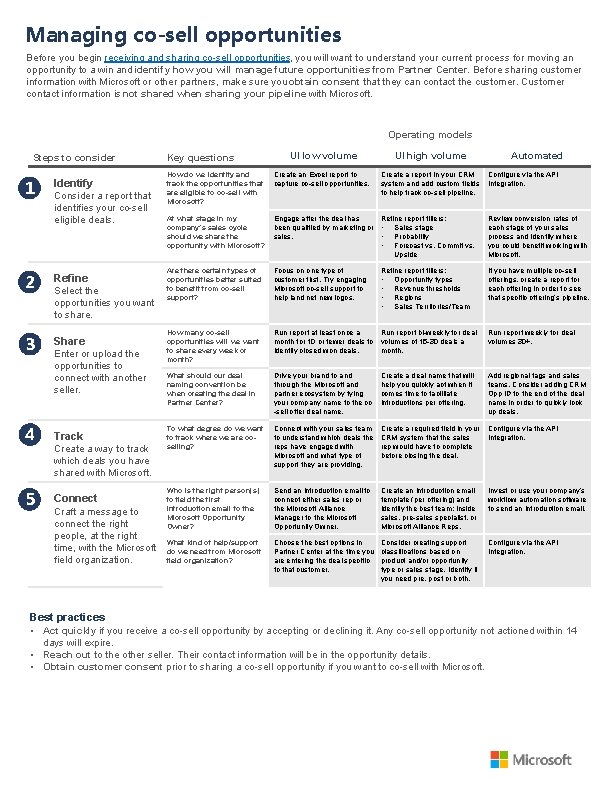
Managing co-sell opportunities Before you begin receiving and sharing co-sell opportunities, you will want to understand your current process for moving an opportunity to a win and identify how you will manage future opportunities from Partner Center. Before sharing customer information with Microsoft or other partners, make sure you obtain consent that they can contact the customer. Customer contact information is not shared when sharing your pipeline with Microsoft. Operating models Steps to consider 1 Identify Consider a report that identifies your co-sell eligible deals. 2 Refine 3 Share Select the opportunities you want to share. Enter or upload the opportunities to connect with another seller. 4 Track 5 Connect Create a way to track which deals you have shared with Microsoft. Craft a message to connect the right people, at the right time, with the Microsoft field organization. UI low volume UI high volume How do we identify and track the opportunities that are eligible to co-sell with Microsoft? Create an Excel report to capture co-sell opportunities. Create a report in your CRM system and add custom fields to help track co-sell pipeline. At what stage in my company’s sales cycle should we share the opportunity with Microsoft? Engage after the deal has Refine report filters: been qualified by marketing or • Sales stage sales. • Probability • Forecast vs. Commit vs. Upside Review conversion rates of each stage of your sales process and identify where you could benefit working with Microsoft. Are there certain types of opportunities better suited to benefit from co-sell support? Focus on one type of customer first. Try engaging Microsoft co-sell support to help land net new logos. If you have multiple co-sell offerings, create a report for each offering in order to see that specific offering’s pipeline. How many co-sell opportunities will we want to share every week or month? Run report at least once a Run report bi-weekly for deal month for 10 or fewer deals to volumes of 15 -30 deals a identify closed won deals. month. Run report weekly for deal volumes 30+. What should our deal naming convention be when creating the deal in Partner Center? Drive your brand to and through the Microsoft and partner ecosystem by tying your company name to the co -sell offer deal name. Create a deal name that will help you quickly act when it comes time to facilitate introductions per offering. Add regional tags and sales teams. Consider adding CRM Opp ID to the end of the deal name in order to quickly look up deals. To what degree do we want to track where we are coselling? Connect with your sales team to understand which deals the reps have engaged with Microsoft and what type of support they are providing. Create a required field in your CRM system that the sales rep would have to complete before closing the deal. Configure via the API Integration. Who is the right person(s) to field the first introduction email to the Microsoft Opportunity Owner? Send an introduction email to connect either sales rep or the Microsoft Alliance Manager to the Microsoft Opportunity Owner. Create an introduction email template (per offering) and identify the best team: inside sales, pre-sales specialist, or Microsoft Alliance Reps. Invest or use your company’s workflow automation software to send an introduction email. What kind of help/support do we need from Microsoft field organization? Choose the best options in Partner Center at the time you are entering the deal specific to that customer. Consider creating support classifications based on product and/or opportunity type or sales stage. Identify if you need pre, post or both. Configure via the API Integration. Key questions Refine report filters: • Opportunity types • Revenue thresholds • Regions • Sales Territories/Team Automated Configure via the API Integration. Best practices • Act quickly if you receive a co-sell opportunity by accepting or declining it. Any co-sell opportunity not actioned within 14 days will expire. • Reach out to the other seller. Their contact information will be in the opportunity details. • Obtain customer consent prior to sharing a co-sell opportunity if you want to co-sell with Microsoft.
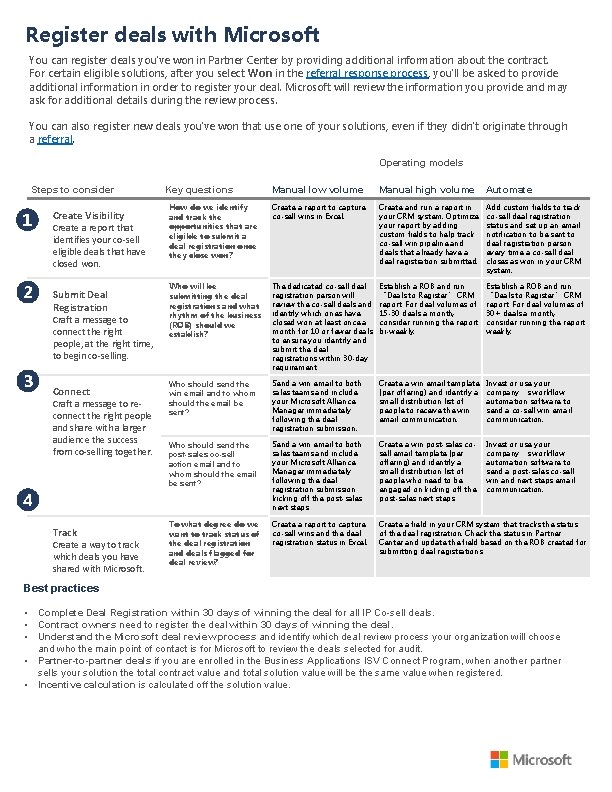
Register deals with Microsoft You can register deals you've won in Partner Center by providing additional information about the contract. For certain eligible solutions, after you select Won in the referral response process, you'll be asked to provide additional information in order to register your deal. Microsoft will review the information you provide and may ask for additional details during the review process. You can also register new deals you've won that use one of your solutions, even if they didn't originate through a referral. Operating models Steps to consider 1 2 Create Visibility Create a report that identifies your co-sell eligible deals that have closed won. Submit Deal Registration Craft a message to connect the right people, at the right time, to begin co-selling. 3 Connect Craft a message to reconnect the right people and share with a larger audience the success from co-selling together. Key questions Manual low volume Manual high volume Automate How do we identify and track the opportunities that are eligible to submit a deal registration once they close won? Create a report to capture co-sell wins in Excel. Create and run a report in your CRM system. Optimize your report by adding custom fields to help track co-sell win pipeline and deals that already have a deal registration submitted. Add custom fields to track co-sell deal registration status and set up an email notification to be sent to deal registration person every time a co-sell deal closes as won in your CRM system. Who will be submitting the deal registrations and what rhythm of the business (ROB) should we establish? The dedicated co-sell deal registration person will review the co-sell deals and identify which ones have closed won at least once a month for 10 or fewer deals to ensure you identify and submit the deal registrations within 30 -day requirement. Establish a ROB and run “Deals to Register” CRM report. For deal volumes of 15 -30 deals a month, consider running the report bi-weekly. Establish a ROB and run “Deals to Register” CRM report. For deal volumes of 30+ deals a month, consider running the report weekly. Who should send the win email and to whom should the email be sent? Send a win email to both sales teams and include your Microsoft Alliance Manager immediately following the deal registration submission. Create a win email template (per offering) and identify a small distribution list of people to receive the win email communication. Invest or use your company’s workflow automation software to send a co-sell win email communication. Who should send the post-sales co-sell action email and to whom should the email be sent? Send a win email to both sales teams and include your Microsoft Alliance Manager immediately following the deal registration submission kicking off the post-sales next steps. Create a win post-sales cosell email template (per offering) and identify a small distribution list of people who need to be engaged on kicking off the post-sales next steps. Invest or use your company’s workflow automation software to send a post-sales co-sell win and next steps email communication. To what degree do we want to track status of the deal registration and deals flagged for deal review? Create a report to capture co-sell wins and the deal registration status in Excel. Create a field in your CRM system that tracks the status of the deal registration. Check the status in Partner Center and update the field based on the ROB created for submitting deal registrations. 4 Track Create a way to track which deals you have shared with Microsoft. Best practices • Complete Deal Registration within 30 days of winning the deal for all IP Co-sell deals. • Contract owners need to register the deal within 30 days of winning the deal. • Understand the Microsoft deal review process and identify which deal review process your organization will choose and who the main point of contact is for Microsoft to review the deals selected for audit. • Partner-to-partner deals if you are enrolled in the Business Applications ISV Connect Program, when another partner sells your solution the total contract value and total solution value will be the same value when registered. • Incentive calculation is calculated off the solution value.
Resources Co-sell • Co-sell with Microsoft • Co-sell Experience Gallery • Referral Management how-to documentation • API documentation • Power Automate Connectors • Co-sell connector for Dynamics 365 CRM • Co-sell connector for Salesforce CRM Microsoft commercial marketplace • Publisher Guide for Partners • Marketplace Support for Publishers More information and help • Partner Center documentation • Partner support
- Slides: 7