
Budget Reconciler UNT Budget Office budget unt edu

Budget Reconciler UNT Budget Office budget. unt. edu
Agenda Objective 4 Reasons for Reconciliations Payroll Soft Encumbrances
Objective 1. Learn the purpose of a reconciliation workbook and identify the items to plan for 2. Identify an alternative to reconciliation workbooks
Purpose of Reconciliation Workbooks & Items to Plan For
Purpose of Reconciliations • The purpose of Reconciliation Workbooks is to obtain accurate chartstring balances and avoid deficits • This is done by: 1. Accounting for transactions in process 2. Accounting for planned future revenues & expenses 3. Ensuring the accuracy of charges 4. Forecasting
1. Transactions in Process Transactions in-process are those transactions that have occurred but are not reflected in Cognos. Transactions in process should be reflected on your reconciliation workbook or in Cognos via soft encumbrances.
Transactions in Process 1. Work Orders o Contact: Facilities x 2700 o Visit the Facilities website to search for open/closed workorders o Work completed through ~25 th of the month is submitted to Financial Reporting the last week of the month. • Ex. Work completed between 03/26 -04/25 will be submitted to financial reporting the last week of April. o Recommend obtaining estimates if the work will be expensive o Consider assigning work-order submissions to a single person
Transactions in Process 2. PCARDs o Contact: pcard@untsystem. edu o Charges post within 20 -45 days from statement close. • Assume a transaction posted to Citibank between 02/04/18 -03/03/18. • That transaction will be recorded between March 20 th to ~April 15 th. • The transactions will apply to the March period (period 7). o Consider implementing a process by which the reconciler is notified of all charges when they occur • This is primarily important for those chartstrings with low available balances • This may not be possible for all department structures
Transactions in Process 3. Printing Services o Contact: Printing Services printing. services@unt. edu (x 2005) o Charges are submitted to financial reporting within 1 week of project completion. o During peak times (June and July and August), charges are submitted to FR within 2 weeks of completion.
Transactions in Process 4. IDTs o Owner: Financial Reporting FRO_Cash&Campus. Acctg@untsystem. edu o IDTs will post to Cognos within 5 business days from when the IDT is received assuming no errors. o During peak times (AFR close Sept 1 – Nov 30) IDTs may take 4 -6 weeks to post. • Staff resources are fully dedicated to closing AFR
Transactions in Process 5. ABAs o Contact: Budget Office – budget. office@unt. edu o Online ABAs post within 2 -5 business days from when the ABA reaches the Budget Office queue, assuming no errors. o Paper ABAs post within 5 business days from when the ABA reaches the Budget Office assuming no errors. • Most ABAs should be processed online. o During Peak times (AFR close Sept 1 – Nov 30) ABAs may take 2 -3 weeks to post. 6. Other items to consider: Travel, Catering, Mail
2. Planned Revenues & Expenses o Planned revenues and expenses are those that have not occurred but that the department knows will occur during the year. o Examples: Travel, conferences, paying for an event table, software license renewals, etc.
3. Accuracy of Charges o Unknown transactions may post throughout the year. o Research is required to determine what the transactions are and to assess whether they were correctly recorded. o To obtain supporting documentation for a transaction, contact the department responsible for the charge: • For example, contact Facilities for a work-order
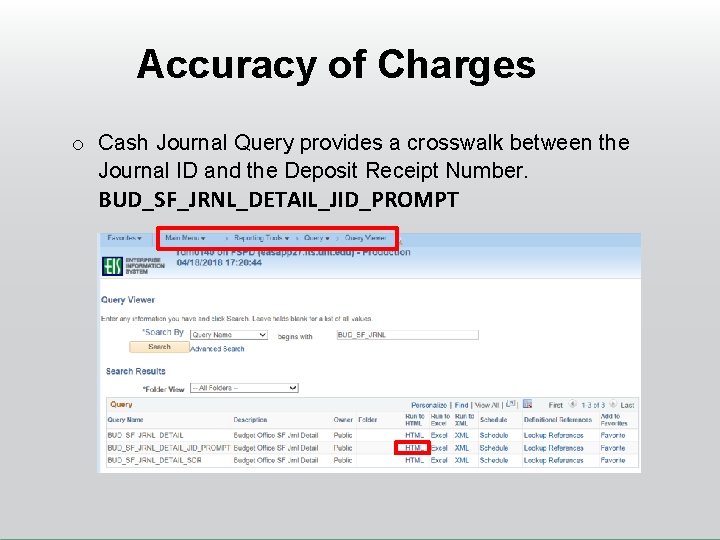
Accuracy of Charges o Cash Journal Query provides a crosswalk between the Journal ID and the Deposit Receipt Number. BUD_SF_JRNL_DETAIL_JID_PROMPT
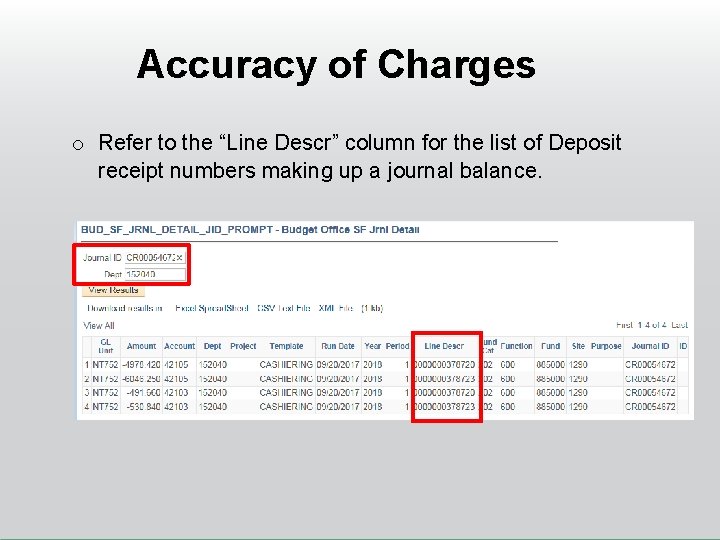
Accuracy of Charges o Refer to the “Line Descr” column for the list of Deposit receipt numbers making up a journal balance.
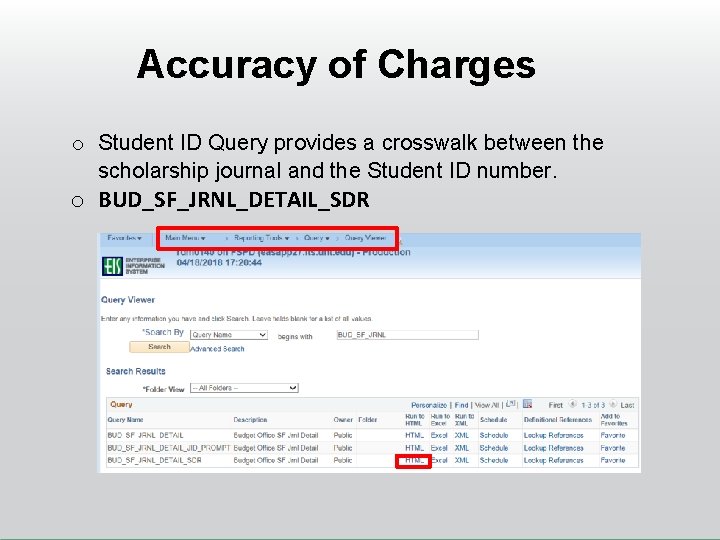
Accuracy of Charges o Student ID Query provides a crosswalk between the scholarship journal and the Student ID number. o BUD_SF_JRNL_DETAIL_SDR
Accuracy of Charges o Correcting incorrect charges • Salaries - Correct via an e. Par redistribution • Requisitions - Cancel and re-enter • POs – Generally, let the PO run its course then correct the chartstring once the invoice is paid. o Voucher Corrections – Should be submitted when: 1. The From or To chartstring contains Fund Cat 105 or 106, AND 2. The From Fund and To Fund are not the same. o All other invoices corrected via an IDT
Accuracy of Charges TIP: For recurring transactions, contact the initiating department to correct the chartstring or the charges will continue to post each month on the incorrect chartstring. Example: • Scholarships • Contact Advancement/Foundation to update the revenue distribution chartstring • Contact Student Accounting to correct the scholarship expense chartstring
4. Forecasting o At year end there will be pending charges/transfers/etc – the budget should be planned so that when all charges post, the ending balance is not in deficit o Forecasts should be performed in March/April to ensure the department is on track for year end. o If the chartstring is deficit or will be in deficit, additional funding sources should be found o Cover deficits with other funds as appropriate o Consider Summer Wages
4. Forecasting - Payroll o Tracking payroll is recommended to identify unused funds that can be used to cover forecasted expenses • Centrally Funded Chartstrings - Salary savings can be used to cover permanent and one-time salary items* *VP areas may establish their own rules for how these funds may be used. • Non-Centrally Funded Chartstrings - Unused funds may be used to cover non-salary items
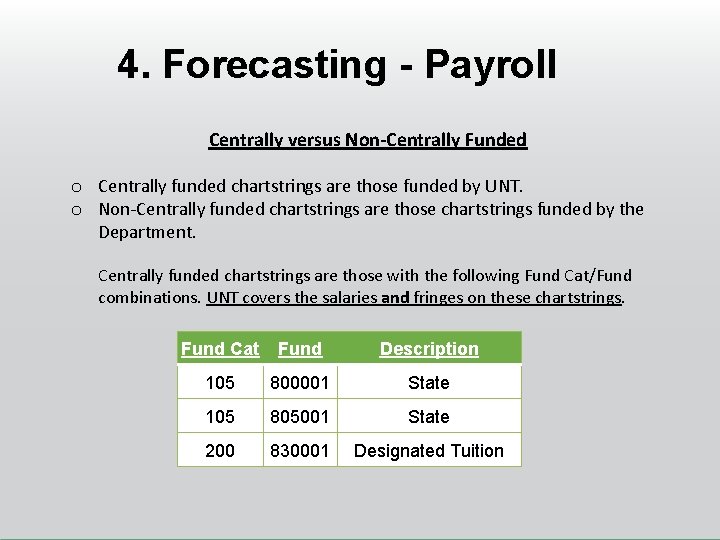
4. Forecasting - Payroll Centrally versus Non-Centrally Funded o Centrally funded chartstrings are those funded by UNT. o Non-Centrally funded chartstrings are those chartstrings funded by the Department. Centrally funded chartstrings are those with the following Fund Cat/Fund combinations. UNT covers the salaries and fringes on these chartstrings. Fund Cat Fund Description 105 800001 State 105 805001 State 200 830001 Designated Tuition
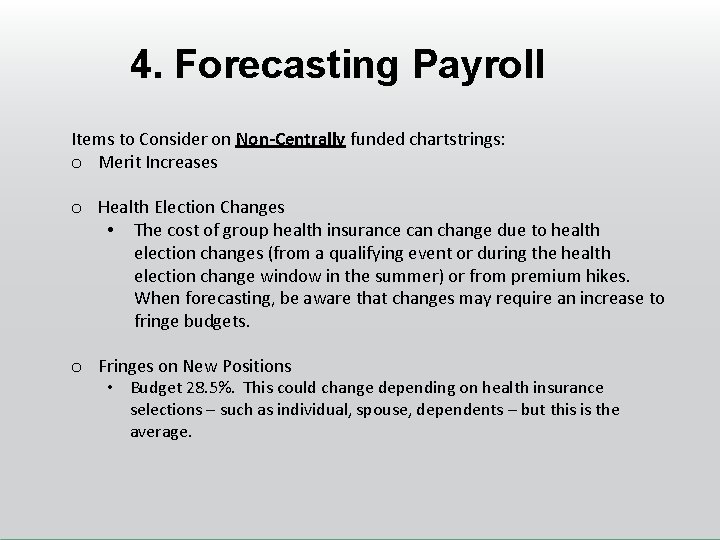
4. Forecasting Payroll Items to Consider on Non-Centrally funded chartstrings: o Merit Increases o Health Election Changes • The cost of group health insurance can change due to health election changes (from a qualifying event or during the health election change window in the summer) or from premium hikes. When forecasting, be aware that changes may require an increase to fringe budgets. o Fringes on New Positions • Budget 28. 5%. This could change depending on health insurance selections – such as individual, spouse, dependents – but this is the average.
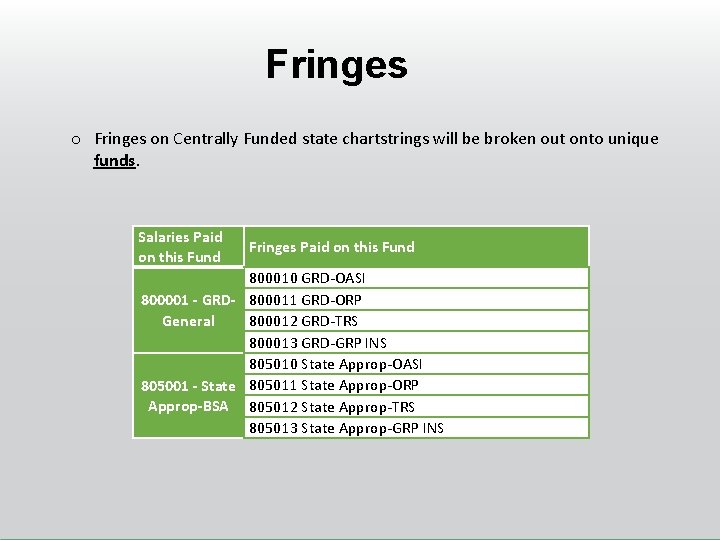
Fringes on Centrally Funded state chartstrings will be broken out onto unique funds. Salaries Paid on this Fund Fringes Paid on this Fund 800010 GRD-OASI 800001 - GRD- 800011 GRD-ORP General 800012 GRD-TRS 800013 GRD-GRP INS 805010 State Approp-OASI 805001 - State 805011 State Approp-ORP Approp-BSA 805012 State Approp-TRS 805013 State Approp-GRP INS
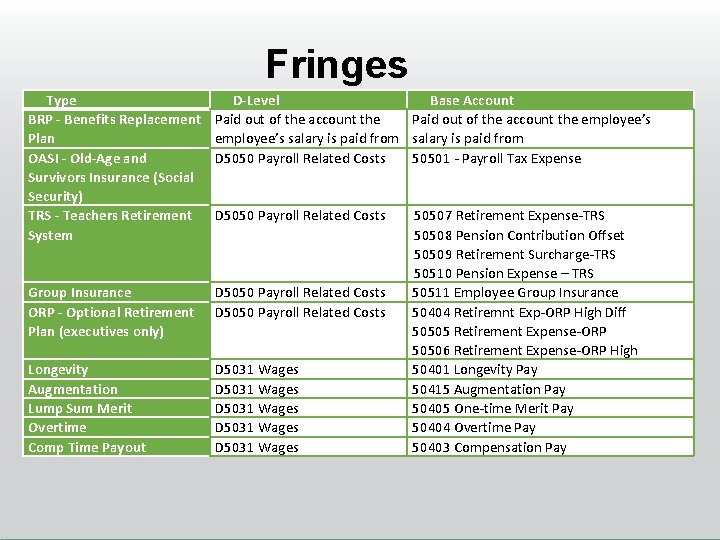
Fringes Type BRP - Benefits Replacement Plan OASI - Old-Age and Survivors Insurance (Social Security) TRS - Teachers Retirement System D-Level Base Account Paid out of the account the employee’s salary is paid from D 5050 Payroll Related Costs 50501 - Payroll Tax Expense Group Insurance ORP - Optional Retirement Plan (executives only) D 5050 Payroll Related Costs Longevity Augmentation Lump Sum Merit Overtime Comp Time Payout D 5031 Wages D 5031 Wages D 5050 Payroll Related Costs 50507 Retirement Expense-TRS 50508 Pension Contribution Offset 50509 Retirement Surcharge-TRS 50510 Pension Expense – TRS 50511 Employee Group Insurance 50404 Retiremnt Exp-ORP High Diff 50505 Retirement Expense-ORP 50506 Retirement Expense-ORP High 50401 Longevity Pay 50415 Augmentation Pay 50405 One-time Merit Pay 50404 Overtime Pay 50403 Compensation Pay
Alternative to Reconciliation Workbooks – Soft Encumbrances
Soft Encumbrances What is it? A “soft encumbrance” is a temporary charge on the Cognos report – a placeholder – that is carried until the actual charge posts. This tool is an alternative to reconciling worksheets.
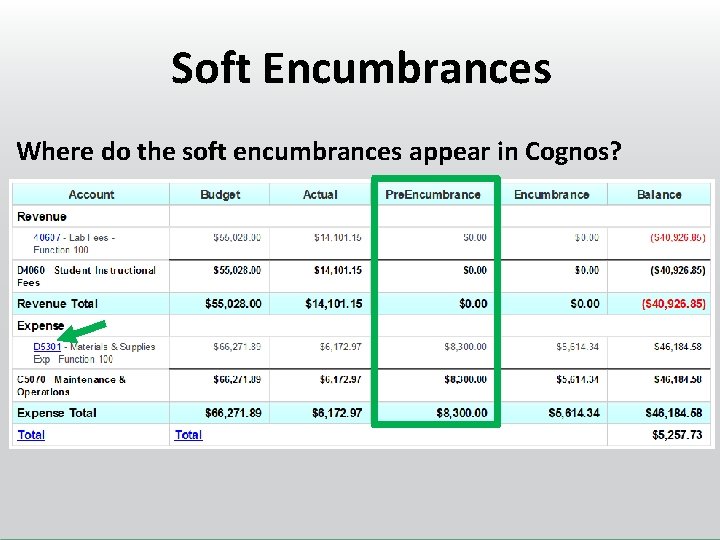
Soft Encumbrances Where do the soft encumbrances appear in Cognos?
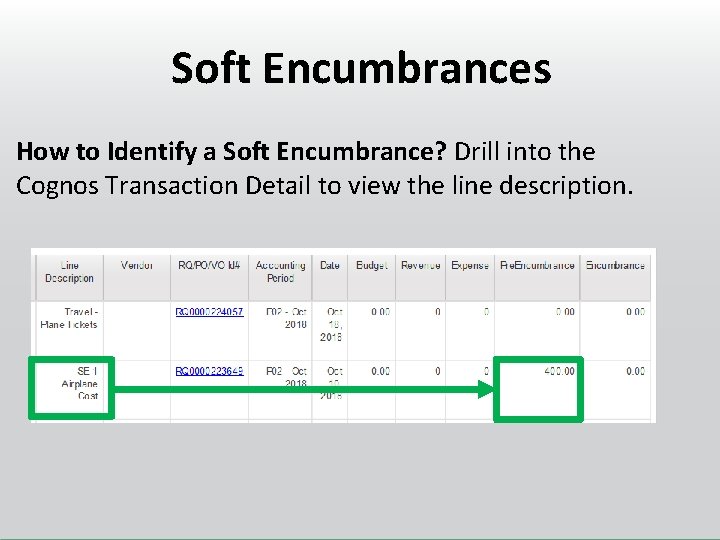
Soft Encumbrances How to Identify a Soft Encumbrance? Drill into the Cognos Transaction Detail to view the line description.
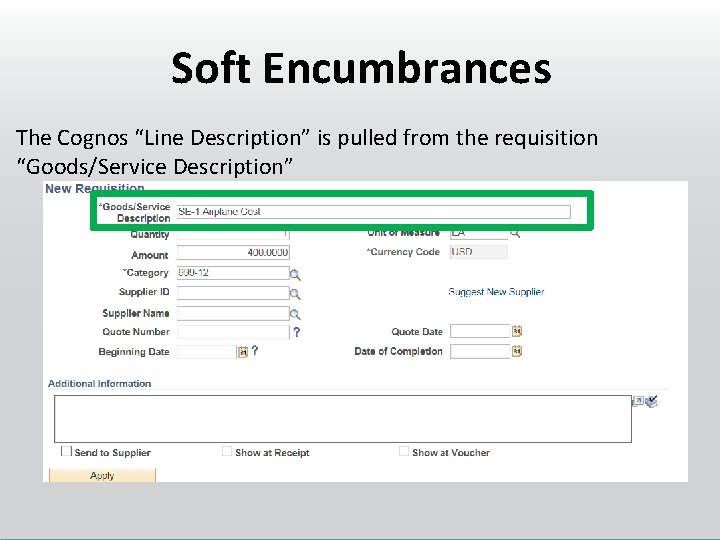
Soft Encumbrances The Cognos “Line Description” is pulled from the requisition “Goods/Service Description”
Soft Encumbrances How is a Soft Encumbrance created? It is created by starting a requisition, saving the requisition, and not submitting it for approval. All open, valid requisitions are technically “soft encumbrances”.
Soft Encumbrances How is a Soft Encumbrance Removed? It is removed by cancelling and budget checking the requisition. Are Soft Encumbrances Required? No. Use as much or as little as needed.
Soft Encumbrances Limitations? Soft Encumbrances are requisitions. Thus, they can only be entered by users with requisition-write access. They cannot be entered by users who have “requisition approval” access. Are Soft Encumbrances Required? No. Use as much or as little as needed.
Soft Encumbrances Who benefits? – Org Dept Holders, Project Holders, or PIs who rely solely on Cognos to monitor budgets – Reconcilers who use workbooks to track a minimal number of outstanding items (items not yet posted to Cognos) – Division/College Budget Officers who monitor budget balances for management but don’t have insight into each department’s reconciliation workbooks
Questions?

Thank You.
- Slides: 35