
Budget Basics UNT Budget Office Agenda Objective Financial

Budget Basics UNT Budget Office
Agenda Objective Financial Resources Chart of Accounts Budget 101 Questions Appendix: Chartfield Setup/Change Form
Objectives Seven training objectives. 1. 2. 3. 4. 5. 6. 7. Distinguish between State, Local, Auxiliary, and Restricted chartstrings, Identify and describe the differences between a project / departmental chartstring, Identify and describe the differences between budgetary and non-budgetary chartstrings, Identify and describe the difference between centrally and non-centrally funded chartstrings, Learn the concept of "budget checking" and how that differs by chartstring type, Define what an account is, understand how it differs from a chartstring, and be able to explain account hierarchies, and Identify where to find budget resource documents online.

Financial Resources
Financial Resources The University of North Texas has 4 primary categories (sources) of funding. Each category is governed by specific rules. 1. State Funds (Educational & General, E&G). Funds given by the state of Texas. At UNT, State Funds are primarily used for salaries. 2. Designated Operating Funds (Local). Funds that are not State Funds, Auxiliary Funds, or Restricted Funds. Local Funds primarily come from tuition and fees paid by students. These Funds also include, but are not limited to, revenues related to camps, conferences, and events. 3. Auxiliary Funds come from self-supporting, business enterprises that provide services to students, faculty, staff, and the general public. Auxiliary units can have both internal and external customers. Examples include: housing, dining, parking, and transportation. 4. Restricted Funds. Restricted funds are given by donors or external agencies, for nothing in return, for specific purposes. Examples include grants, gifts, and endowments.
Chart of Accounts (COA)
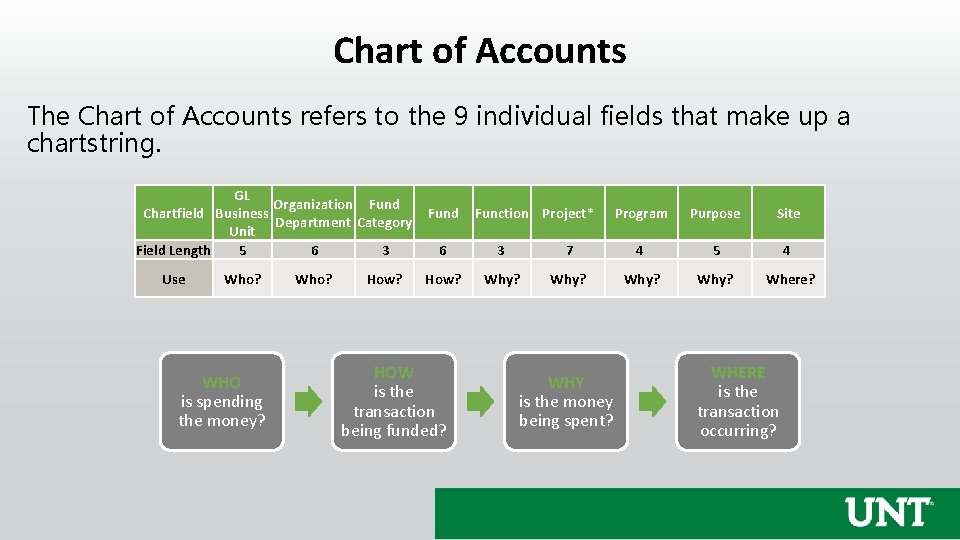
Chart of Accounts The Chart of Accounts refers to the 9 individual fields that make up a chartstring. GL Organization Fund Chartfield Business Department Category Unit Field Length 5 6 3 Use Who? WHO is spending the money? Who? How? Fund Function Project* Program Purpose Site 6 3 7 4 5 4 How? Why? Where? HOW is the transaction being funded? WHY is the money being spent? WHERE is the transaction occurring?
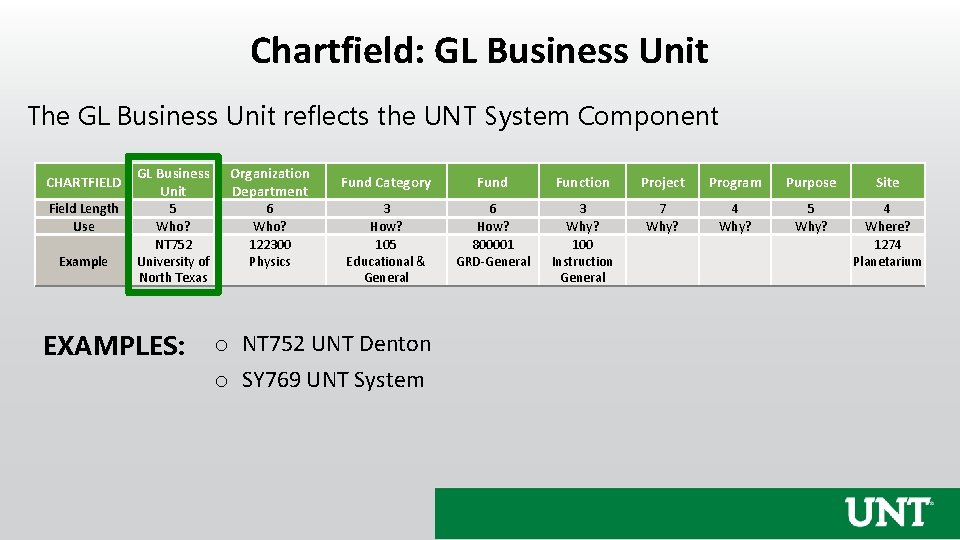
Chartfield: GL Business Unit The GL Business Unit reflects the UNT System Component CHARTFIELD Field Length Use Example GL Business Unit Organization Department 5 Who? NT 752 University of North Texas 6 Who? 122300 Physics EXAMPLES: Fund Category Fund Function Project Program Purpose Site 3 How? 105 Educational & General 6 How? 800001 GRD-General 3 Why? 100 Instruction General 7 Why? 4 Why? 5 Why? 4 Where? 1274 Planetarium o NT 752 UNT Denton o SY 769 UNT System
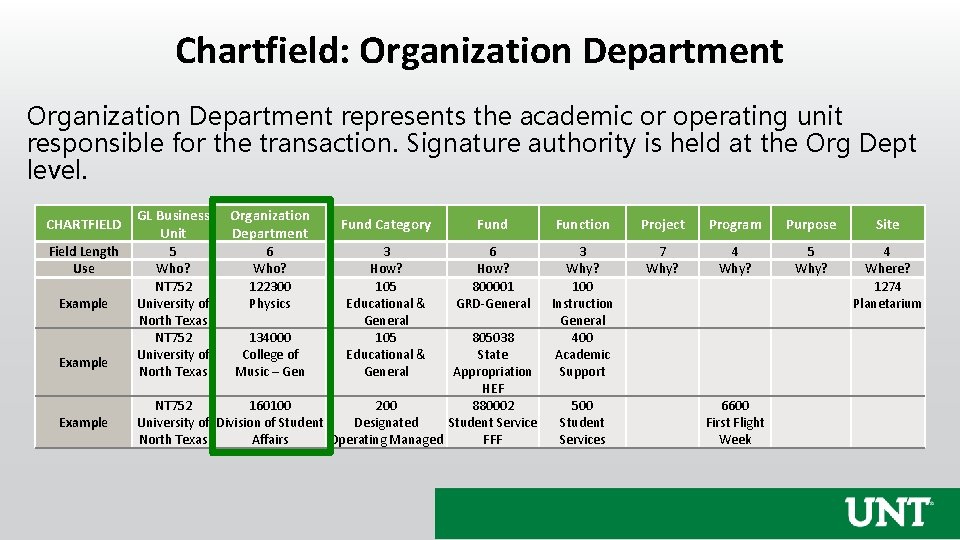
Chartfield: Organization Department represents the academic or operating unit responsible for the transaction. Signature authority is held at the Org Dept level. CHARTFIELD Field Length Use Example GL Business Unit Organization Department 5 Who? NT 752 University of North Texas 6 Who? 122300 Physics 134000 College of Music – Gen Fund Category Fund Function Project Program Purpose Site 3 How? 105 Educational & General 6 How? 800001 GRD-General 3 Why? 100 Instruction General 400 Academic Support 7 Why? 4 Why? 5 Why? 4 Where? 1274 Planetarium 805038 State Appropriation HEF NT 752 160100 200 880002 University of Division of Student Designated Student Service North Texas Affairs Operating Managed FFF 500 Student Services 6600 First Flight Week
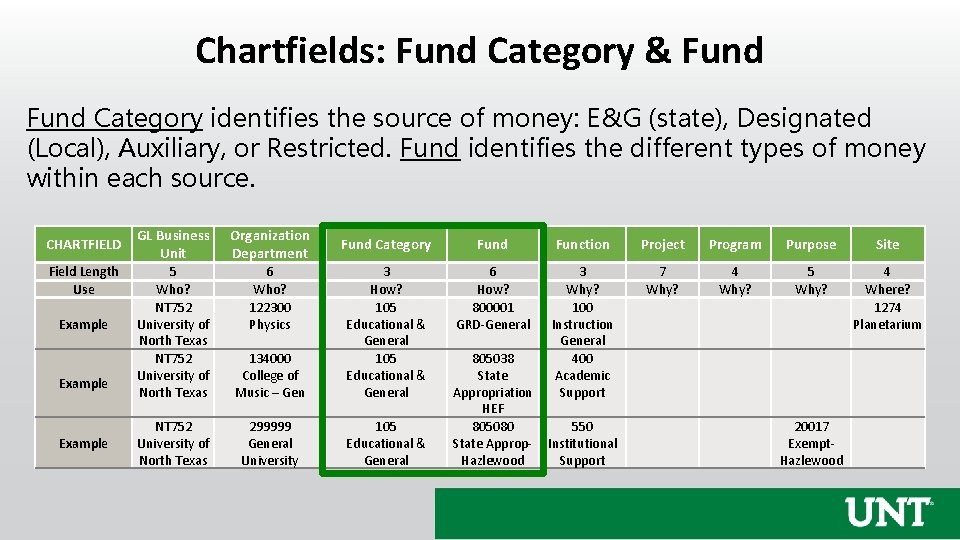
Chartfields: Fund Category & Fund Category identifies the source of money: E&G (state), Designated (Local), Auxiliary, or Restricted. Fund identifies the different types of money within each source. CHARTFIELD Field Length Use Example GL Business Unit Organization Department 5 Who? NT 752 University of North Texas 6 Who? 122300 Physics NT 752 University of North Texas Fund Category Fund Function Project Program Purpose Site 6 How? 800001 GRD-General 3 Why? 100 Instruction General 400 Academic Support 7 Why? 4 Why? 5 Why? 4 Where? 1274 Planetarium 134000 College of Music – Gen 3 How? 105 Educational & General 299999 General University 105 Educational & General 805038 State Appropriation HEF 805080 State Approp. Hazlewood 550 Institutional Support 20017 Exempt. Hazlewood
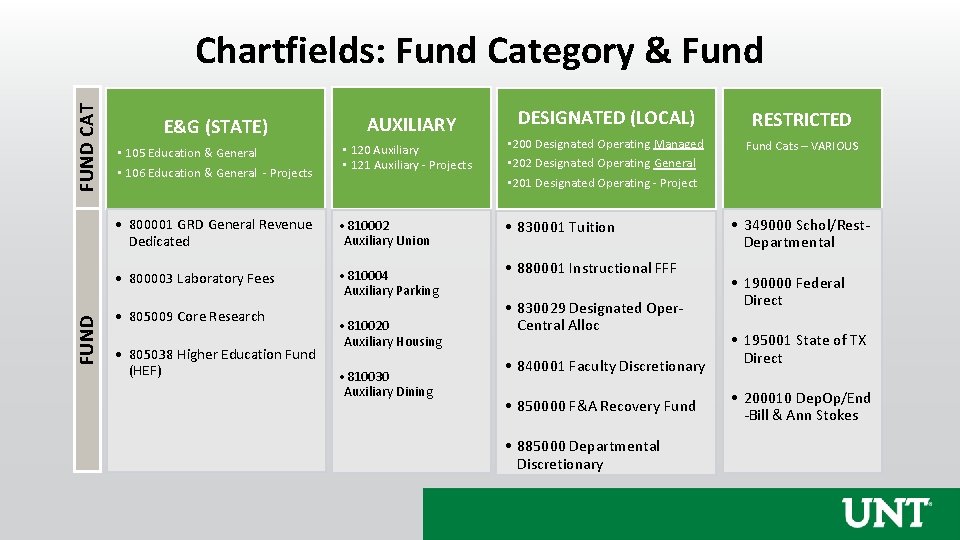
FUND CAT Chartfields: Fund Category & Fund E&G (STATE) AUXILIARY DESIGNATED (LOCAL) RESTRICTED Fund Cats – VARIOUS • 105 Education & General • 106 Education & General - Projects • 120 Auxiliary • 121 Auxiliary - Projects • 200 Designated Operating Managed • 202 Designated Operating General • 201 Designated Operating - Project • 800001 GRD General Revenue Dedicated • 810002 Auxiliary Union • 830001 Tuition • 800003 Laboratory Fees • 810004 Auxiliary Parking • 805009 Core Research • 805038 Higher Education Fund (HEF) • 810020 Auxiliary Housing • 810030 Auxiliary Dining • 880001 Instructional FFF • 830029 Designated Oper. Central Alloc • 840001 Faculty Discretionary • 850000 F&A Recovery Fund • 885000 Departmental Discretionary • 349000 Schol/Rest. Departmental • 190000 Federal Direct • 195001 State of TX Direct • 200010 Dep. Op/End -Bill & Ann Stokes
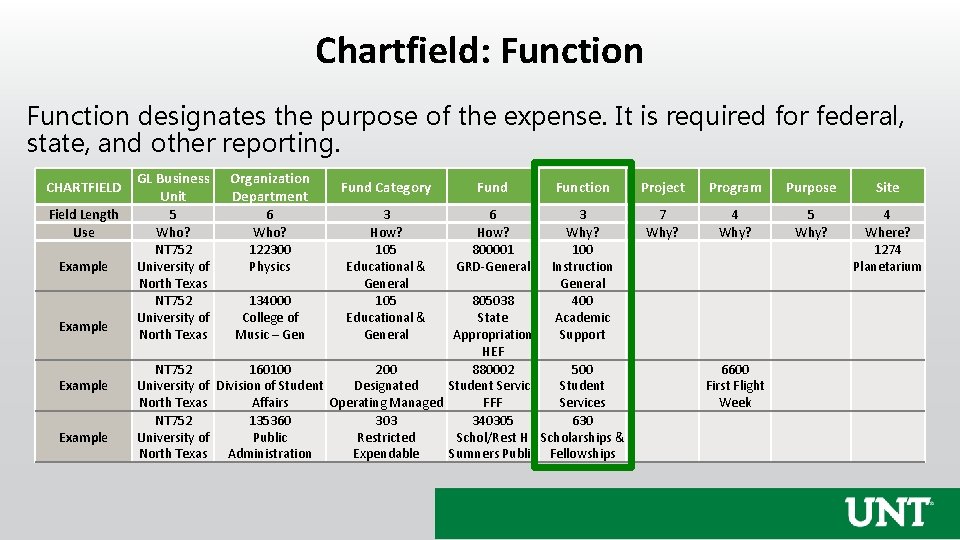
Chartfield: Function designates the purpose of the expense. It is required for federal, state, and other reporting. CHARTFIELD Field Length Use Example GL Business Unit Organization Department 5 Who? NT 752 University of North Texas 6 Who? 122300 Physics NT 752 University of North Texas 134000 College of Music – Gen Fund Category Fund Function Project Program Purpose Site 3 How? 105 Educational & General 6 How? 800001 GRD-General 3 Why? 100 Instruction General 400 Academic Support 7 Why? 4 Why? 5 Why? 4 Where? 1274 Planetarium 805038 State Appropriation HEF 160100 200 880002 500 Division of Student Designated Student Service Student Affairs Operating Managed FFF Services 135360 303 340305 630 Public Restricted Schol/Rest H Scholarships & Administration Expendable Sumners Public Fellowships 6600 First Flight Week
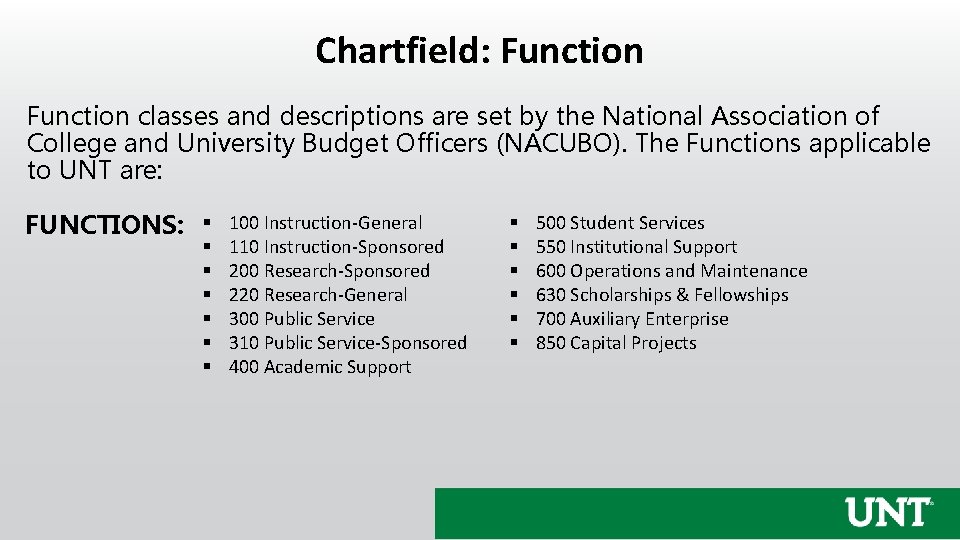
Chartfield: Function classes and descriptions are set by the National Association of College and University Budget Officers (NACUBO). The Functions applicable to UNT are: FUNCTIONS: § § § § 100 Instruction-General 110 Instruction-Sponsored 200 Research-Sponsored 220 Research-General 300 Public Service 310 Public Service-Sponsored 400 Academic Support § § § 500 Student Services 550 Institutional Support 600 Operations and Maintenance 630 Scholarships & Fellowships 700 Auxiliary Enterprise 850 Capital Projects
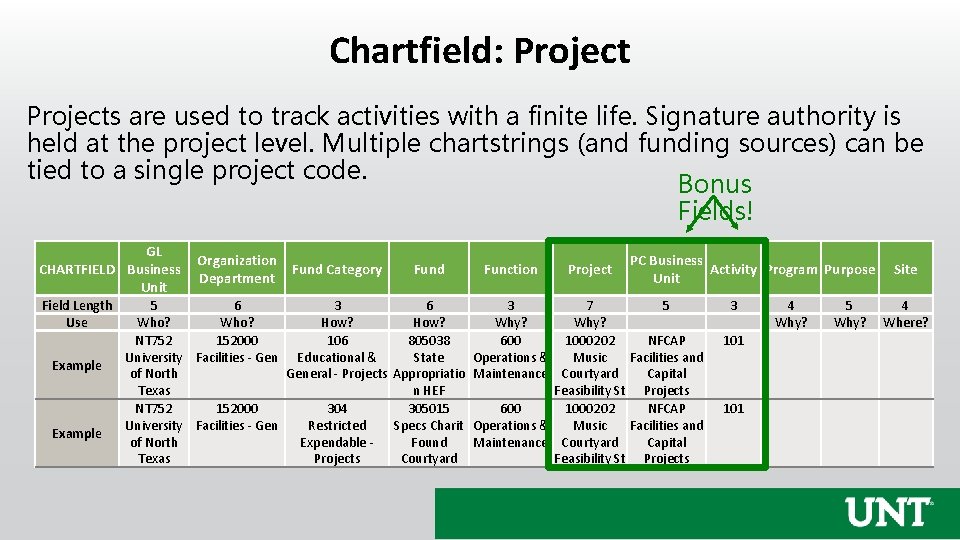
Chartfield: Projects are used to track activities with a finite life. Signature authority is held at the project level. Multiple chartstrings (and funding sources) can be tied to a single project code. Bonus Fields! GL Organization CHARTFIELD Business Fund Category Department Unit Field Length Use Example Fund Function 5 6 3 Who? How? Why? NT 752 152000 106 805038 600 University Facilities - Gen Educational & State Operations & of North General - Projects Appropriatio Maintenance Texas n HEF NT 752 152000 304 305015 600 University Facilities - Gen Restricted Specs Charit Operations & of North Expendable Found Maintenance Texas Projects Courtyard Project PC Business Activity Program Purpose Unit 7 5 Why? 1000202 NFCAP Music Facilities and Courtyard Capital Feasibility St Projects 3 101 4 Why? 5 Why? Site 4 Where?
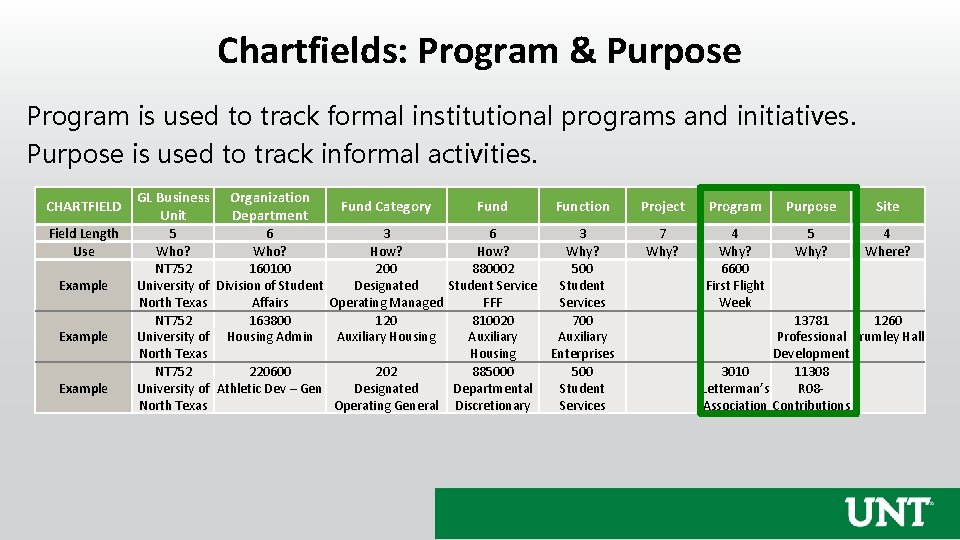
Chartfields: Program & Purpose Program is used to track formal institutional programs and initiatives. Purpose is used to track informal activities. CHARTFIELD Field Length Use Example GL Business Unit Organization Department Fund Category Fund Function 5 6 3 Who? How? Why? NT 752 160100 200 880002 500 University of Division of Student Designated Student Service Student North Texas Affairs Operating Managed FFF Services NT 752 163800 120 810020 700 University of Housing Admin Auxiliary Housing Auxiliary North Texas Housing Enterprises NT 752 220600 202 885000 500 University of Athletic Dev – Gen Designated Departmental Student North Texas Operating General Discretionary Services Project Program Purpose Site 7 Why? 4 Why? 6600 First Flight Week 5 Why? 4 Where? 13781 1260 Professional Crumley Hall Development 3010 11308 Letterman’s R 08 Association Contributions
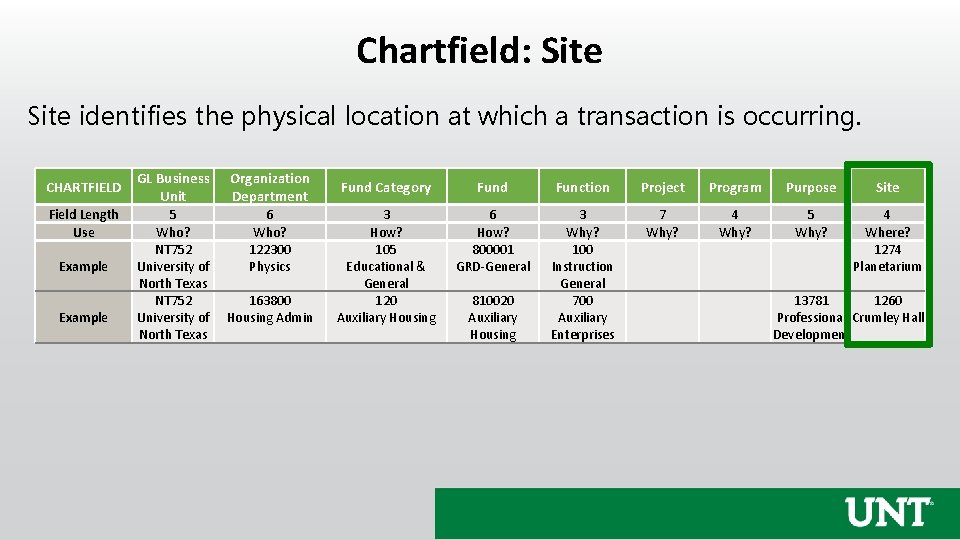
Chartfield: Site identifies the physical location at which a transaction is occurring. CHARTFIELD Field Length Use Example GL Business Unit Organization Department 5 Who? NT 752 University of North Texas 6 Who? 122300 Physics 163800 Housing Admin Fund Category Fund Function Project Program Purpose Site 3 How? 105 Educational & General 120 Auxiliary Housing 6 How? 800001 GRD-General 3 Why? 100 Instruction General 700 Auxiliary Enterprises 7 Why? 4 Why? 5 Why? 4 Where? 1274 Planetarium 810020 Auxiliary Housing 13781 1260 Professional Crumley Hall Development
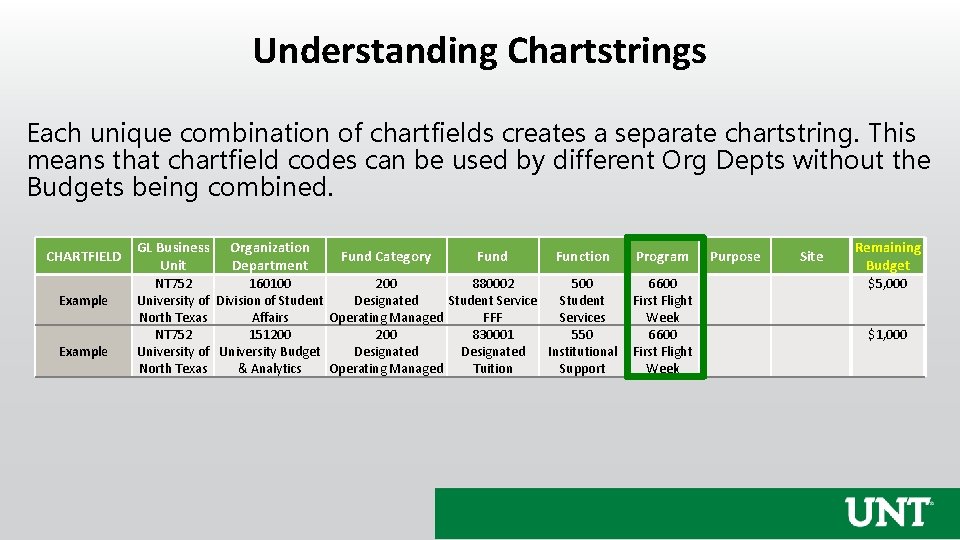
Understanding Chartstrings Each unique combination of chartfields creates a separate chartstring. This means that chartfield codes can be used by different Org Depts without the Budgets being combined. CHARTFIELD Example GL Business Unit Organization Department Fund Category Fund Function NT 752 160100 200 880002 500 University of Division of Student Designated Student Service Student North Texas Affairs Operating Managed FFF Services NT 752 151200 830001 550 University of University Budget Designated Institutional North Texas & Analytics Operating Managed Tuition Support Program 6600 First Flight Week Purpose Site Remaining Budget $5, 000 $1, 000
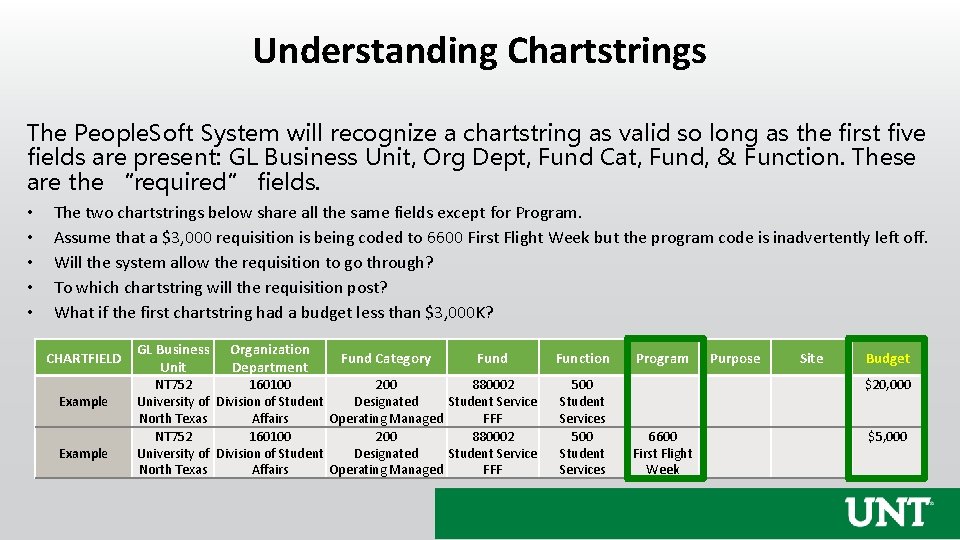
Understanding Chartstrings The People. Soft System will recognize a chartstring as valid so long as the first five fields are present: GL Business Unit, Org Dept, Fund Cat, Fund, & Function. These are the “required” fields. • • • The two chartstrings below share all the same fields except for Program. Assume that a $3, 000 requisition is being coded to 6600 First Flight Week but the program code is inadvertently left off. Will the system allow the requisition to go through? To which chartstring will the requisition post? What if the first chartstring had a budget less than $3, 000 K? CHARTFIELD Example GL Business Unit Organization Department Fund Category Fund NT 752 160100 200 880002 University of Division of Student Designated Student Service North Texas Affairs Operating Managed FFF Function 500 Student Services Program Purpose Site Budget $20, 000 6600 First Flight Week $5, 000
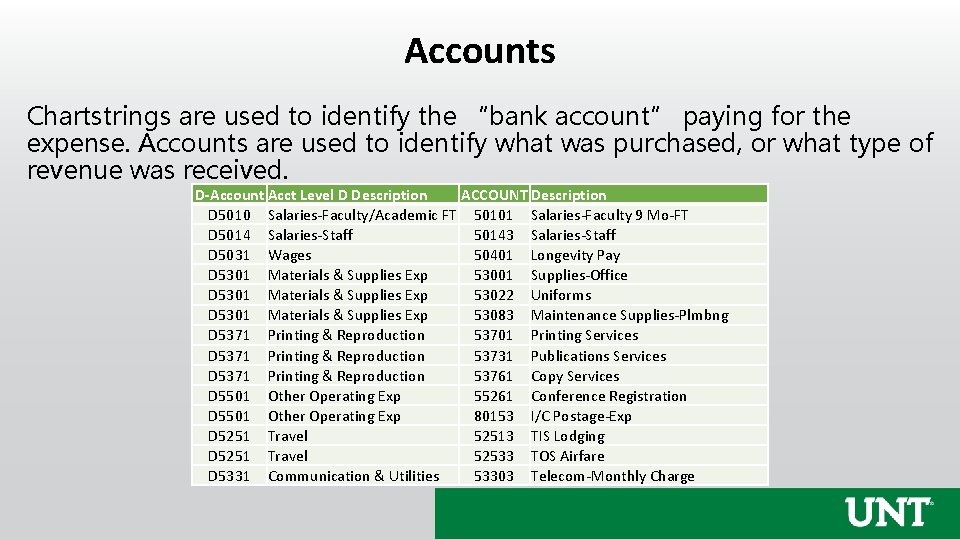
Accounts Chartstrings are used to identify the “bank account” paying for the expense. Accounts are used to identify what was purchased, or what type of revenue was received. D-Account Acct Level D Description ACCOUNT Description D 5010 Salaries-Faculty/Academic FT 50101 Salaries-Faculty 9 Mo-FT D 5014 Salaries-Staff 50143 Salaries-Staff D 5031 Wages 50401 Longevity Pay D 5301 Materials & Supplies Exp 53001 Supplies-Office D 5301 Materials & Supplies Exp 53022 Uniforms D 5301 Materials & Supplies Exp 53083 Maintenance Supplies-Plmbng D 5371 Printing & Reproduction 53701 Printing Services D 5371 Printing & Reproduction 53731 Publications Services D 5371 Printing & Reproduction 53761 Copy Services D 5501 Other Operating Exp 55261 Conference Registration D 5501 Other Operating Exp 80153 I/C Postage-Exp D 5251 Travel 52513 TIS Lodging D 5251 Travel 52533 TOS Airfare D 5331 Communication & Utilities 53303 Telecom-Monthly Charge
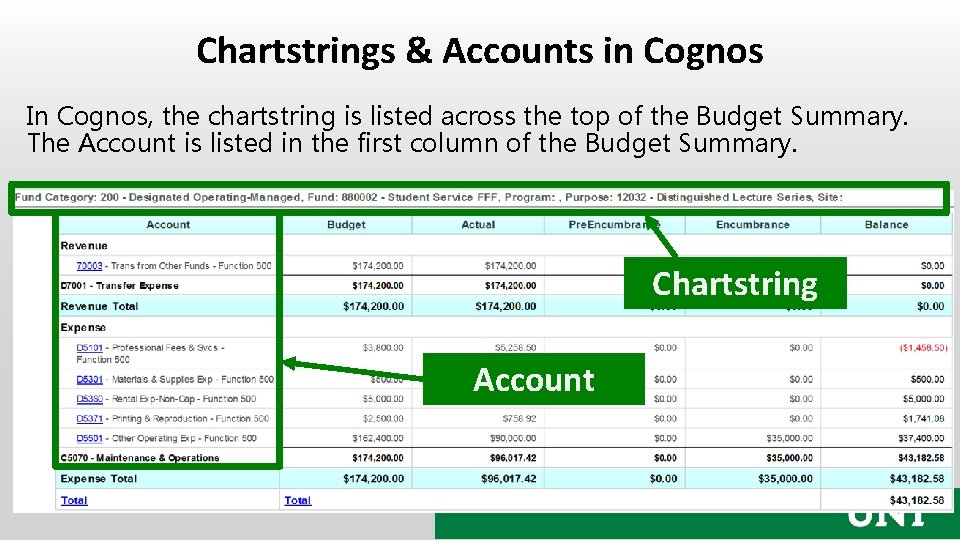
Chartstrings & Accounts in Cognos In Cognos, the chartstring is listed across the top of the Budget Summary. The Account is listed in the first column of the Budget Summary. Chartstring Account
Chart of Accounts Hierarchies Each chartfield has a hierarchy structure. • There is a base chartfield level (all numeric characters) where transactions are coded. • Each base chartfield value rolls-up to a higher level. These levels begin with alphacharacters: “A, ” “B, ” “C, ” etc.
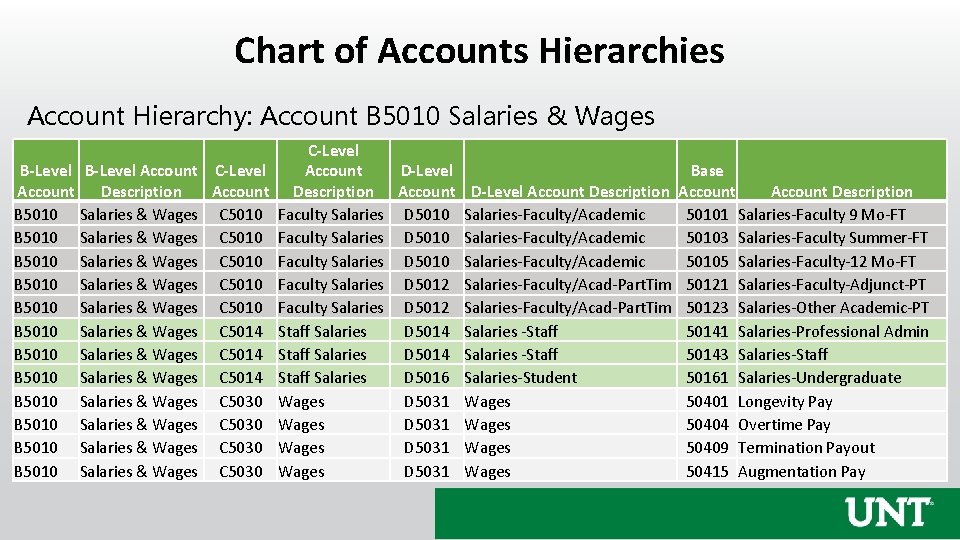
Chart of Accounts Hierarchies Account Hierarchy: Account B 5010 Salaries & Wages B-Level Account C-Level Account Description Account B 5010 Salaries & Wages C 5010 B 5010 Salaries & Wages C 5010 B 5010 Salaries & Wages C 5014 B 5010 Salaries & Wages C 5030 C-Level D-Level Account Description Account D-Level Account Description Faculty Salaries D 5010 Salaries-Faculty/Academic Faculty Salaries D 5012 Salaries-Faculty/Acad-Part. Tim Staff Salaries D 5014 Salaries -Staff Salaries D 5016 Salaries-Student Wages D 5031 Wages Base Account Description Account 50101 Salaries-Faculty 9 Mo-FT 50103 Salaries-Faculty Summer-FT 50105 Salaries-Faculty-12 Mo-FT 50121 Salaries-Faculty-Adjunct-PT 50123 Salaries-Other Academic-PT 50141 Salaries-Professional Admin 50143 Salaries-Staff 50161 Salaries-Undergraduate 50401 Longevity Pay 50404 Overtime Pay 50409 Termination Payout 50415 Augmentation Pay
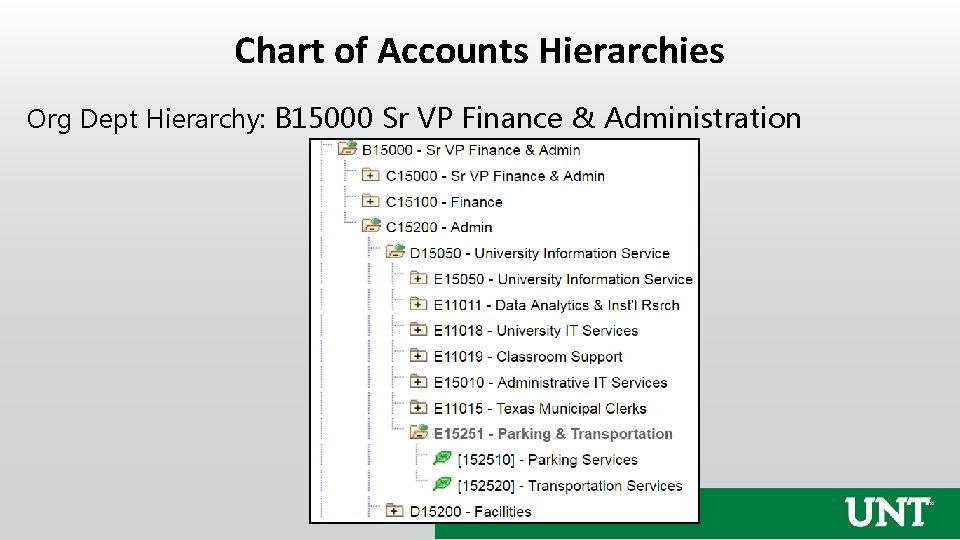
Chart of Accounts Hierarchies Org Dept Hierarchy: B 15000 Sr VP Finance & Administration
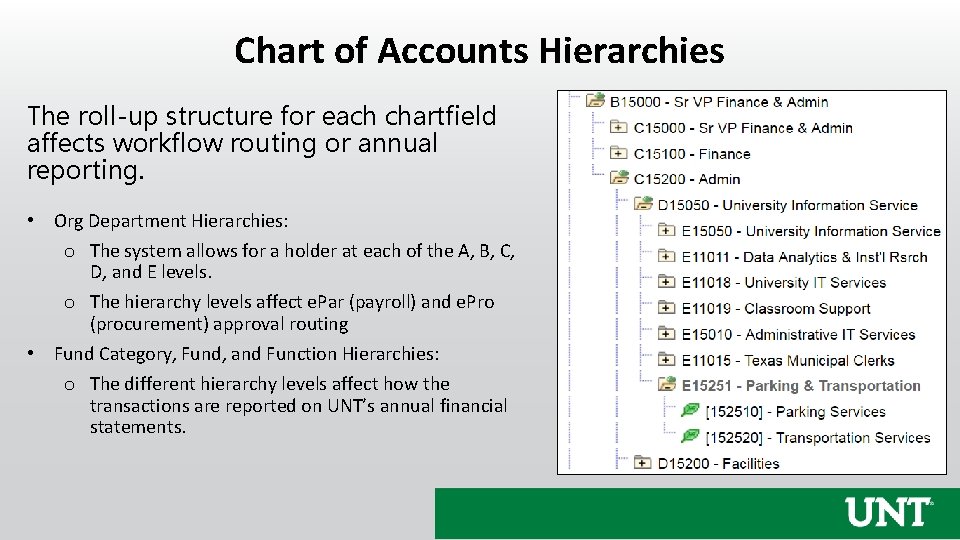
Chart of Accounts Hierarchies The roll-up structure for each chartfield affects workflow routing or annual reporting. • Org Department Hierarchies: o The system allows for a holder at each of the A, B, C, D, and E levels. o The hierarchy levels affect e. Par (payroll) and e. Pro (procurement) approval routing • Fund Category, Fund, and Function Hierarchies: o The different hierarchy levels affect how the transactions are reported on UNT’s annual financial statements.
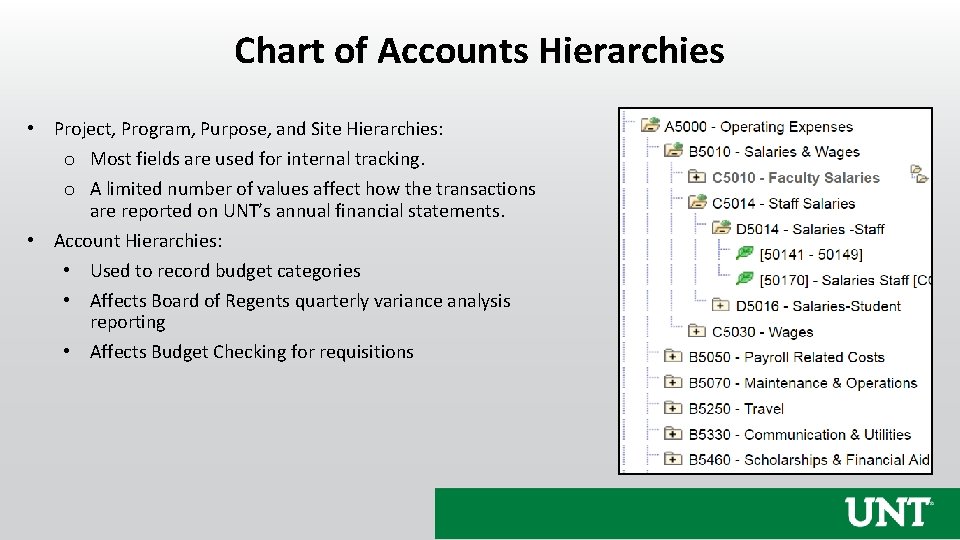
Chart of Accounts Hierarchies • Project, Program, Purpose, and Site Hierarchies: o Most fields are used for internal tracking. o A limited number of values affect how the transactions are reported on UNT’s annual financial statements. • Account Hierarchies: • Used to record budget categories • Affects Board of Regents quarterly variance analysis reporting • Affects Budget Checking for requisitions

Questions?

Budget 101
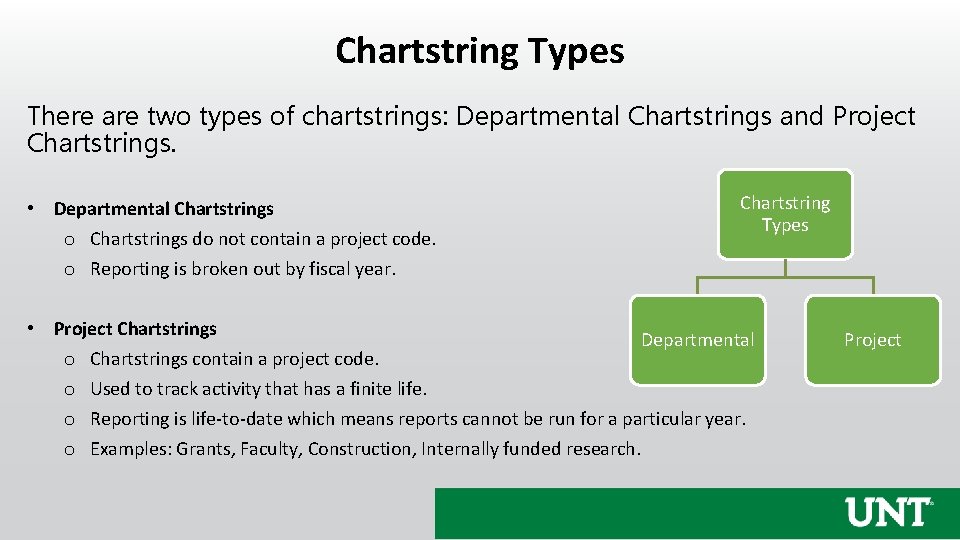
Chartstring Types There are two types of chartstrings: Departmental Chartstrings and Project Chartstrings. • Departmental Chartstrings o Chartstrings do not contain a project code. o Reporting is broken out by fiscal year. Chartstring Types • Project Chartstrings Departmental o Chartstrings contain a project code. o Used to track activity that has a finite life. o Reporting is life-to-date which means reports cannot be run for a particular year. o Examples: Grants, Faculty, Construction, Internally funded research. Project
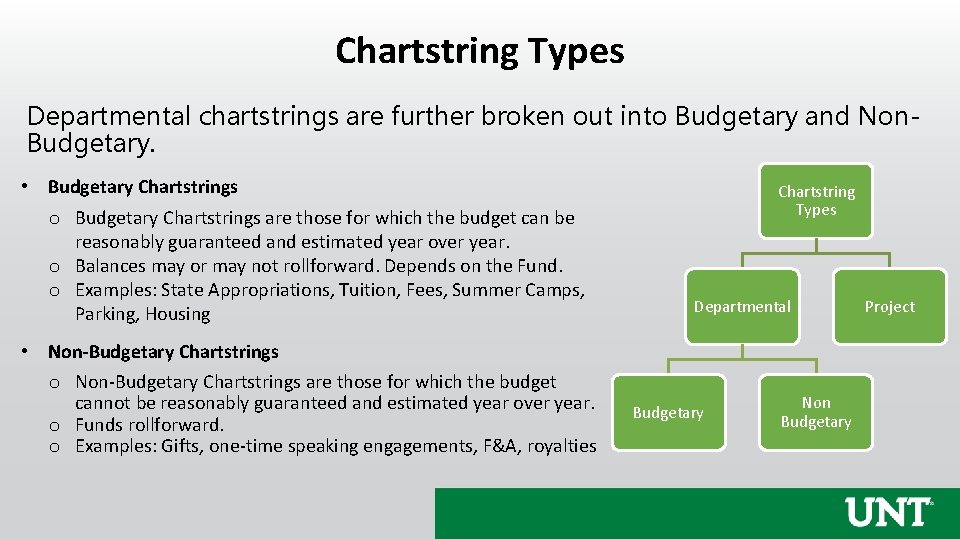
Chartstring Types Departmental chartstrings are further broken out into Budgetary and Non. Budgetary. • Budgetary Chartstrings o Budgetary Chartstrings are those for which the budget can be reasonably guaranteed and estimated year over year. o Balances may or may not rollforward. Depends on the Fund. o Examples: State Appropriations, Tuition, Fees, Summer Camps, Parking, Housing • Non-Budgetary Chartstrings o Non-Budgetary Chartstrings are those for which the budget cannot be reasonably guaranteed and estimated year over year. o Funds rollforward. o Examples: Gifts, one-time speaking engagements, F&A, royalties Chartstring Types Departmental Budgetary Non Budgetary Project
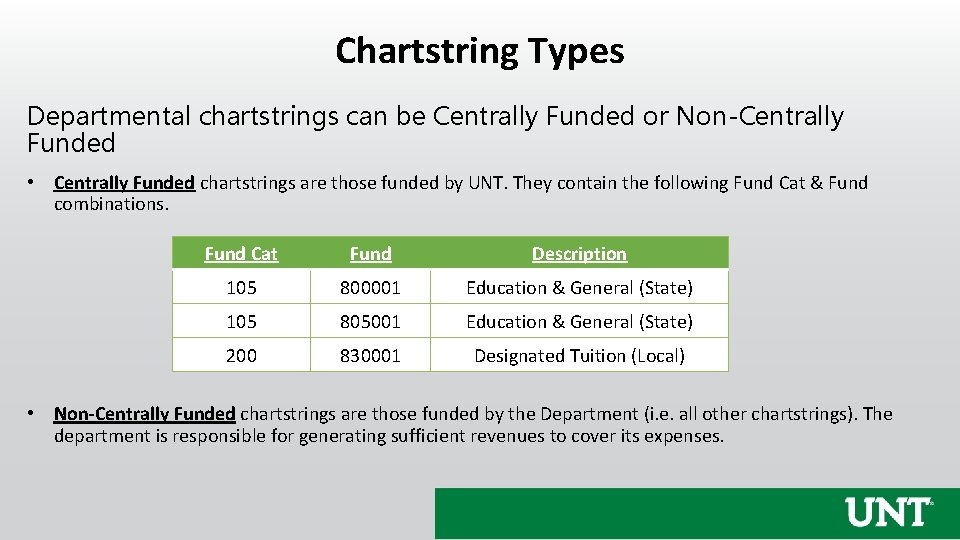
Chartstring Types Departmental chartstrings can be Centrally Funded or Non-Centrally Funded • Centrally Funded chartstrings are those funded by UNT. They contain the following Fund Cat & Fund combinations. Fund Cat Fund Description 105 800001 Education & General (State) 105 805001 Education & General (State) 200 830001 Designated Tuition (Local) • Non-Centrally Funded chartstrings are those funded by the Department (i. e. all other chartstrings). The department is responsible for generating sufficient revenues to cover its expenses.
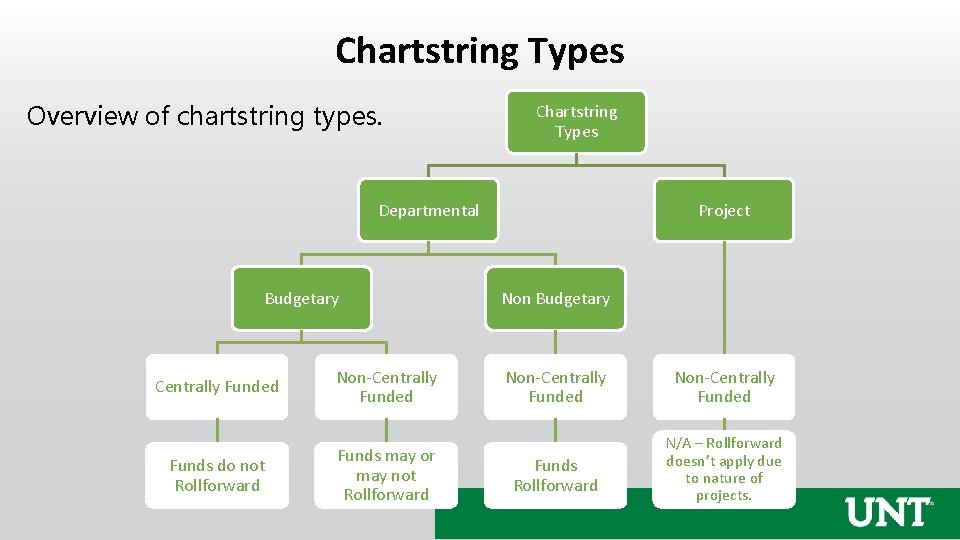
Chartstring Types Overview of chartstring types. Chartstring Types Departmental Budgetary Centrally Funded Non-Centrally Funded Funds do not Rollforward Funds may or may not Rollforward Project Non Budgetary Non-Centrally Funded Funds Rollforward N/A – Rollforward doesn’t apply due to nature of projects.
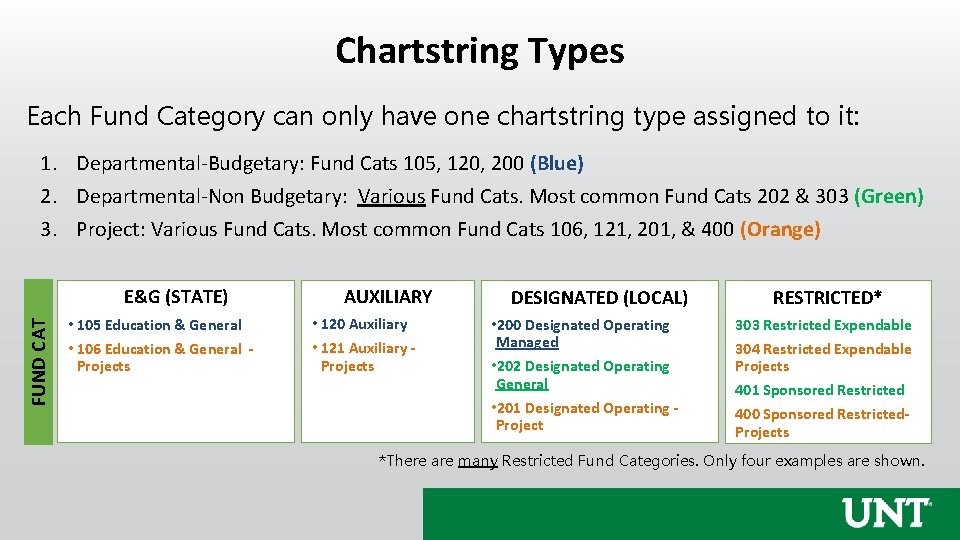
Chartstring Types Each Fund Category can only have one chartstring type assigned to it: 1. Departmental-Budgetary: Fund Cats 105, 120, 200 (Blue) 2. Departmental-Non Budgetary: Various Fund Cats. Most common Fund Cats 202 & 303 (Green) 3. Project: Various Fund Cats. Most common Fund Cats 106, 121, 201, & 400 (Orange) FUND CAT E&G (STATE) • 105 Education & General • 106 Education & General - Projects AUXILIARY • 120 Auxiliary • 121 Auxiliary - Projects DESIGNATED (LOCAL) • 200 Designated Operating Managed • 202 Designated Operating General • 201 Designated Operating - Project RESTRICTED* 303 Restricted Expendable 304 Restricted Expendable Projects 401 Sponsored Restricted 400 Sponsored Restricted. Projects *There are many Restricted Fund Categories. Only four examples are shown.
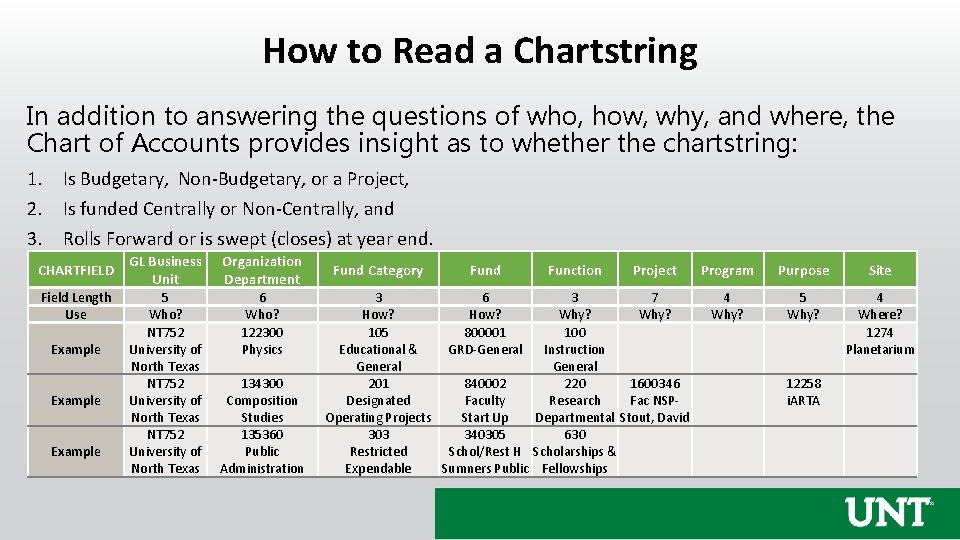
How to Read a Chartstring In addition to answering the questions of who, how, why, and where, the Chart of Accounts provides insight as to whether the chartstring: 1. Is Budgetary, Non-Budgetary, or a Project, 2. Is funded Centrally or Non-Centrally, and 3. Rolls Forward or is swept (closes) at year end. CHARTFIELD Field Length Use Example GL Business Unit Organization Department 5 Who? NT 752 University of North Texas 6 Who? 122300 Physics 134300 Composition Studies 135360 Public Administration Fund Category Fund Function Project 3 6 3 7 How? Why? 105 800001 100 Educational & GRD-General Instruction General 201 840002 220 1600346 Designated Faculty Research Fac NSPOperating Projects Start Up Departmental Stout, David 303 340305 630 Restricted Schol/Rest H Scholarships & Expendable Sumners Public Fellowships Program Purpose Site 4 Why? 5 Why? 4 Where? 1274 Planetarium 12258 i. ARTA
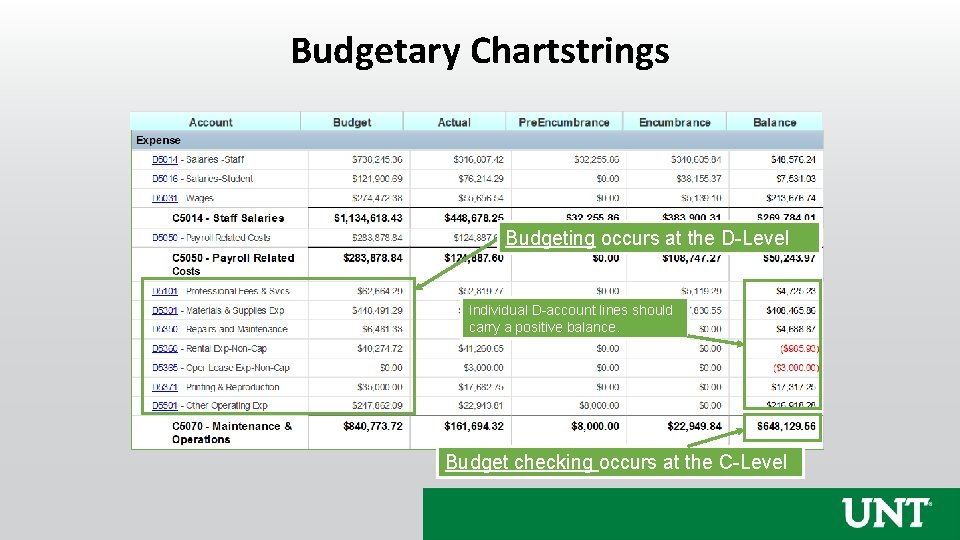
Budgetary Chartstrings Budgeting occurs at the D-Level Individual D-account lines should carry a positive balance. Budget checking occurs at the C-Level
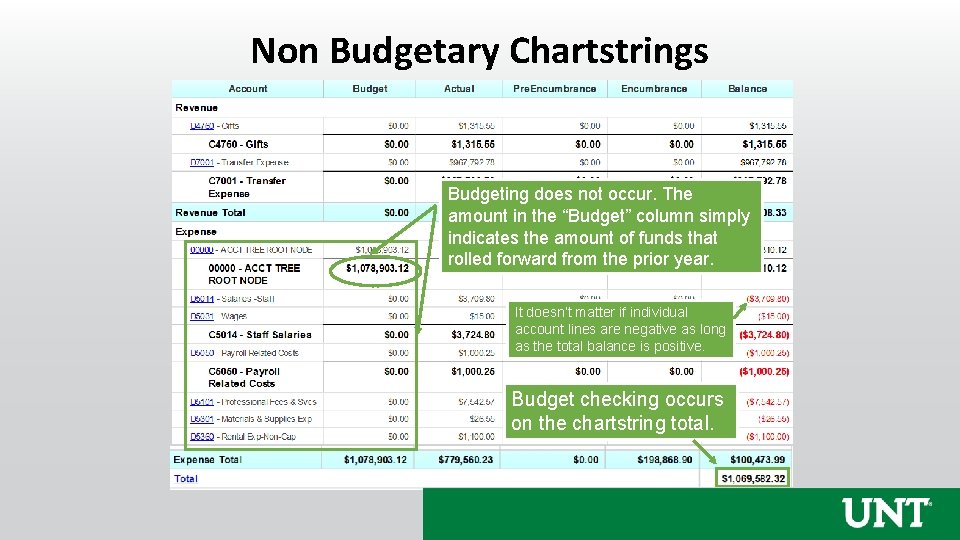
Non Budgetary Chartstrings Budgeting does not occur. The amount in the “Budget” column simply indicates the amount of funds that rolled forward from the prior year. It doesn’t matter if individual account lines are negative as long as the total balance is positive. Budget checking occurs on the chartstring total.
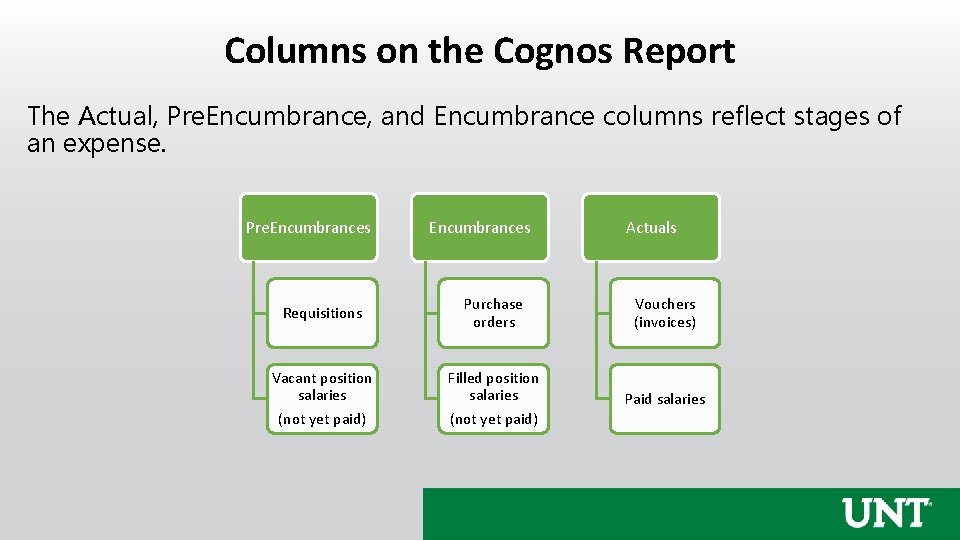
Columns on the Cognos Report The Actual, Pre. Encumbrance, and Encumbrance columns reflect stages of an expense. Pre. Encumbrances Actuals Requisitions Purchase orders Vouchers (invoices) Vacant position salaries (not yet paid) Filled position salaries (not yet paid) Paid salaries
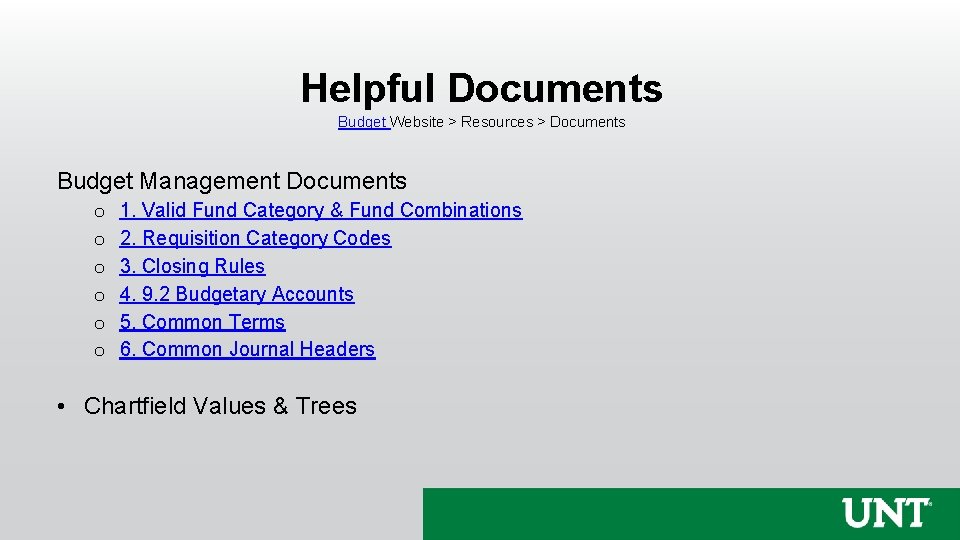
Helpful Documents Budget Website > Resources > Documents Budget Management Documents o o o 1. Valid Fund Category & Fund Combinations 2. Requisition Category Codes 3. Closing Rules 4. 9. 2 Budgetary Accounts 5. Common Terms 6. Common Journal Headers • Chartfield Values & Trees

Questions?
Appendix: Chartfield Setup Change Form
Overview • A Chartfield Setup/Change Form is used to create or edit an existing field, not an entire chartstring. • Creating Chartstrings – Chartstrings are “created” once they are transacted on for the first time. • Revenue, Expense, ABA, Journal Entry • Inactivating Chartstrings – Chartstrings are “inactivated” once they carry a zero balance.
Overview Prior to submission, visit the Budget Website to view values that already exist: ● Fund ● Function ● Project ● Program ● Purpose ● Site Once the field is created, the department is responsible for setting up the chartstring. The chartstring will appear in COGNOS within 24 hours of the first transaction posting in People. Soft.
Holder Changes • Grants – NGRCT Projects o Contact the Office for Grants and Contracts Administration (OGCA) (i. e. the Research Office) for assistance • All other Holder Changes o Email the Budget Office. 1. CC the current holder and the new holder 2. Identify the Org Dept Number and Name 3. Include the Name and Empl ID of the current holder and the new holder 4. Indicate the Effective Date
Holder Changes – Example Email TO: Budget. Office@unt. edu CC: Jane. Smith@unt. edu , John. Smith@unt. edu Please update the Org Dept Holder for 151210 Movie Department from Jane Smith(10300001) to John Smith (10400020) effective 09/01/2021.

Thank You.
- Slides: 44