
Broad Cast Receiver Created by Prof Maulik Parekh
Broad. Cast Receiver Created by: Prof. Maulik Parekh
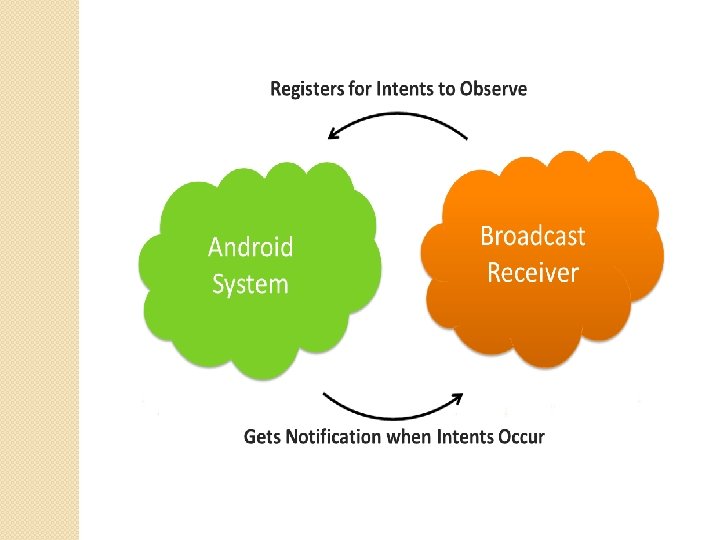
What is Android Broadcast Receiver? A broadcast receiver is a component of the Android system. Only an Intent (for which it is registered) can bring it into action. The Broadcast Receiver’s job is to pass a notification to the user, in case a specific event occurs. Using a Broadcast Receiver, applications can register for a particular event. Once the event occurs, the system will notify all the registered applications. It’s used for Asynchronous Inter-Process communication.
Broadcast receivers are components in your Android application that listen in on broadcast messages(or events) from different outlets: • From other applications • From the system itself • From your application Meaning, that they are invoked when a certain action has occurred that they have been programmed to listen to (I. E. , a broadcast). A broadcast is simply a message wrapped inside of an Intent object. A broadcast can either be implicit or explicit. • An implicit broadcast is one that does not target your application specifically so it is not exclusive to your application. To register for one, you need to use an Intent. Filter and declare it in your manifest. You need to do all of this because the Android operating system goes over all the declared intent filters in your manifest and sees if there is a match. Because of this behavior, implicit broadcasts do not have a target attribute. An example for an implicit broadcast would be an action of an incoming SMS message. • An explicit broadcast is one that is targeted specifically for your application on a component that is known in advance. This happens due to the target attribute that contains the application’s package name or a component class name.
Registration of Broadcast Receiver There are two ways to register a Broadcast Receiver; one is Static and the other Dynamic. 1)Static: Use <receiver> (Android. Manifest. xml) tag in your Manifest file. 2) Dynamic: Use Context. register. Receiver() method to dynamically register an instance. Classes of Broadcasts The two major classes of broadcasts are: 1) Ordered Broadcasts: These broadcasts are synchronous, and therefore follow a specific order. The order is defined using android: priority attribute. The receivers with greater priority would receive the broadcast first. In case there are receivers with same priority levels, the broadcast would not follow an order. Each receiver (when it receives the broadcast) can either pass on the notification to the next one, or abort the broadcast completely. On abort, the notification would not be passed on to the receivers next in line.
2) Normal Broadcasts: Normal broadcasts are not orderly. Therefore, the registered receivers often run all at the same time. This is very efficient, but the Receivers are unable to utilize the results. Sometimes to avoid system overload, the system delivers the broadcasts one at a time, even in case of normal broadcasts. However, the receivers still cannot use the results. For instance, a Broadcast receiver triggers battery Low notification that you see on your mobile screen. Other instances caused by a Broadcast Receiver are new friend notifications, new friend feeds, new message etc. on your Facebook app.
Following are some of the important system wide generated intents. android. intent. action. BATTERY_CHANGED – This keeps track of the battery’s charging state, percentage, and other information about the battery. android. intent. action. BATTERY_LOW – It indicates the low battery condition. android. intent. action. POWER_CONNECTED – It indicates that the power is connected to the device. android. intent. action. POWER_DISCONNECTED – The power is disconnected from the device. android. intent. action. BOOT_COMPLETED – This broadcast is shown only once when the device boots for the first time. android. intent. action. CALL – This intent is to perform a call to some specific person, according to data. android. intent. action. DATE_CHANGED – This means the date of the device has changed. android. intent. action. REBOOT – This means that the device has rebooted. android. intent. action. CONNECTIVITY_CHANGE – This shows the network connectivity of the device has changed.
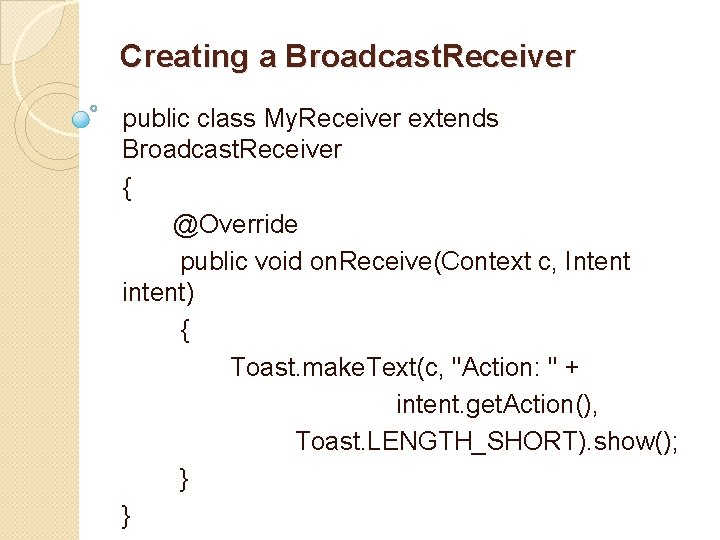
Creating a Broadcast. Receiver public class My. Receiver extends Broadcast. Receiver { @Override public void on. Receive(Context c, Intent intent) { Toast. make. Text(c, "Action: " + intent. get. Action(), Toast. LENGTH_SHORT). show(); } }
Broadcast. Receiver is an abstract class with the on. Receive() method being abstract. The on. Receive() method is first called on the registered Broadcast Receivers when any event occurs. The intent object is passed with all the additional data. A Context object is also available and is used to start an activity or service using context. start. Activity(my. Intent); or context. start. Service(my. Service); respectively. Note: - To Unregister a Broadcast Receiver the following method is used unregister. Receiver(obj example) of My. Reciver. Class(as per our
Security As the broadcast receivers have a global work-space, security is very important concern here. If you do not define the limitations and filters for the registered receivers, other applications can abuse them. Here a few limitations that might help: üWhenever you publish a receiver in your application’s manifest, make it unavailable to external applications by using android: exported=”false”. You might think that specifying Intent filters while publishing the receiver would do the task for you, when in reality they are not enough. üWhen you send a broadcast, it is possible for the external applications too to receive them. This can be prevented by specifying a few limitations. üSimilarly, when you register your receiver using register. Receiver, any application may send it broadcasts. This can be prevented using permissions as well. Note: - As of Android 3. 1, the Android system will not receive any external Intent, so the system is comparatively secure now
How to Send Broad. Cast? There are two ways to send broadcasts: The send. Ordered. Broadcast method, makes sure to send broadcasts to only one receiver at a time. Each broadcast can in turn, pass along data to the one following it, or to stop the propagation of the broadcast to the receivers that follow The send. Broadcast is similar to the method mentioned above, with one difference. All broadcast receivers receive the message and do not depend on one another
- Slides: 11