
BRIDGEPORT SCHOOL DISTRICT Aresta Johnson Superintendent 2019 20
BRIDGEPORT SCHOOL DISTRICT Aresta Johnson, Superintendent 2019‐ 20 FISCAL MANAGEMENT FOR SCHOOL ADMINISTRATORS FINANCE OFFICE Marlene Siegel, Chief Financial Officer July 2019 FISCAL MANAGEMENT FOR SCHOOL ADMINISTRATORS V 1 7‐ 1‐ 2019 1
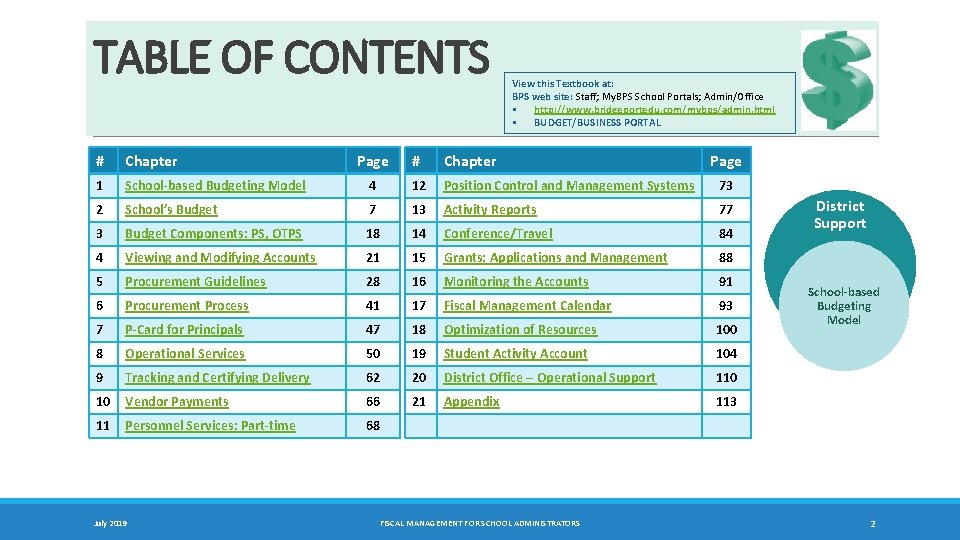
TABLE OF CONTENTS # Chapter 1 View this Textbook at: BPS web site: Staff; My. BPS School Portals; Admin/Office § http: //www. bridgeportedu. com/mybps/admin. html § BUDGET/BUSINESS PORTAL Page # Chapter School‐based Budgeting Model 4 12 Position Control and Management Systems 73 2 School’s Budget 7 13 Activity Reports 77 3 Budget Components: PS, OTPS 18 14 Conference/Travel 84 4 Viewing and Modifying Accounts 21 15 Grants: Applications and Management 88 5 Procurement Guidelines 28 16 Monitoring the Accounts 91 6 Procurement Process 41 17 Fiscal Management Calendar 93 7 P‐Card for Principals 47 18 Optimization of Resources 100 8 Operational Services 50 19 Student Activity Account 104 9 Tracking and Certifying Delivery 62 20 District Office – Operational Support 110 10 Vendor Payments 66 21 Appendix 113 11 Personnel Services: Part‐time 68 July 2019 FISCAL MANAGEMENT FOR SCHOOL ADMINISTRATORS Page District Support School‐based Budgeting Model 2
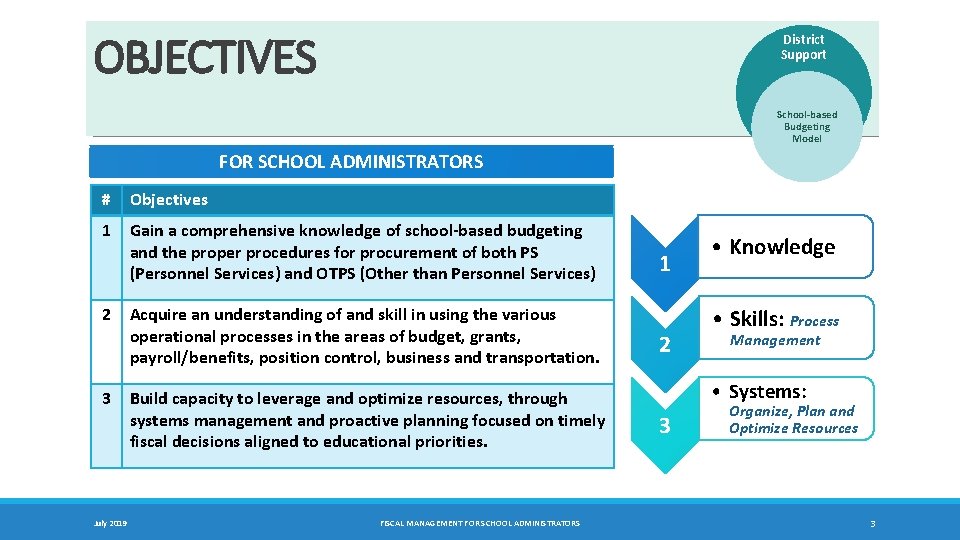
OBJECTIVES District Support School‐based Budgeting Model FOR SCHOOL ADMINISTRATORS # Objectives 1 Gain a comprehensive knowledge of school‐based budgeting and the proper procedures for procurement of both PS (Personnel Services) and OTPS (Other than Personnel Services) 2 3 July 2019 Acquire an understanding of and skill in using the various operational processes in the areas of budget, grants, payroll/benefits, position control, business and transportation. Build capacity to leverage and optimize resources, through systems management and proactive planning focused on timely fiscal decisions aligned to educational priorities. FISCAL MANAGEMENT FOR SCHOOL ADMINISTRATORS 1 2 • Knowledge • Skills: Process Management • Systems: 3 Organize, Plan and Optimize Resources 3
Chapter 1 School-based Budgeting Model • POSITION ALLOCATION • OPERATING ALLOCATION July 2019 FISCAL MANAGEMENT FOR SCHOOL ADMINISTRATORS 4 TC
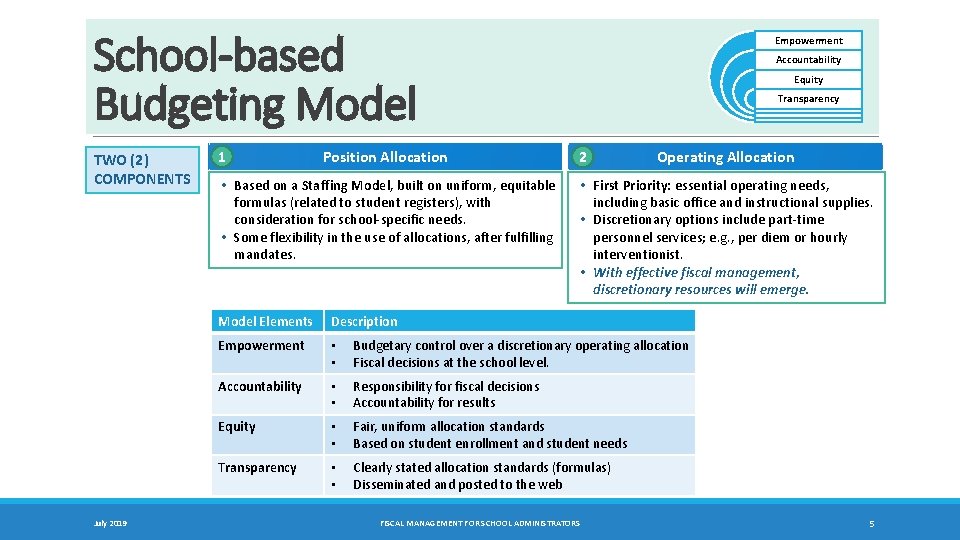
School-based Budgeting Model TWO (2) COMPONENTS July 2019 1 Position Allocation • Based on a Staffing Model, built on uniform, equitable formulas (related to student registers), with consideration for school-specific needs. • Some flexibility in the use of allocations, after fulfilling mandates. Empowerment Accountability Equity Transparency 2 Operating Allocation • First Priority: essential operating needs, including basic office and instructional supplies. • Discretionary options include part-time personnel services; e. g. , per diem or hourly interventionist. • With effective fiscal management, discretionary resources will emerge. Model Elements Description Empowerment • • Budgetary control over a discretionary operating allocation Fiscal decisions at the school level. Accountability • • Responsibility for fiscal decisions Accountability for results Equity • • Fair, uniform allocation standards Based on student enrollment and student needs Transparency • • Clearly stated allocation standards (formulas) Disseminated and posted to the web FISCAL MANAGEMENT FOR SCHOOL ADMINISTRATORS 5
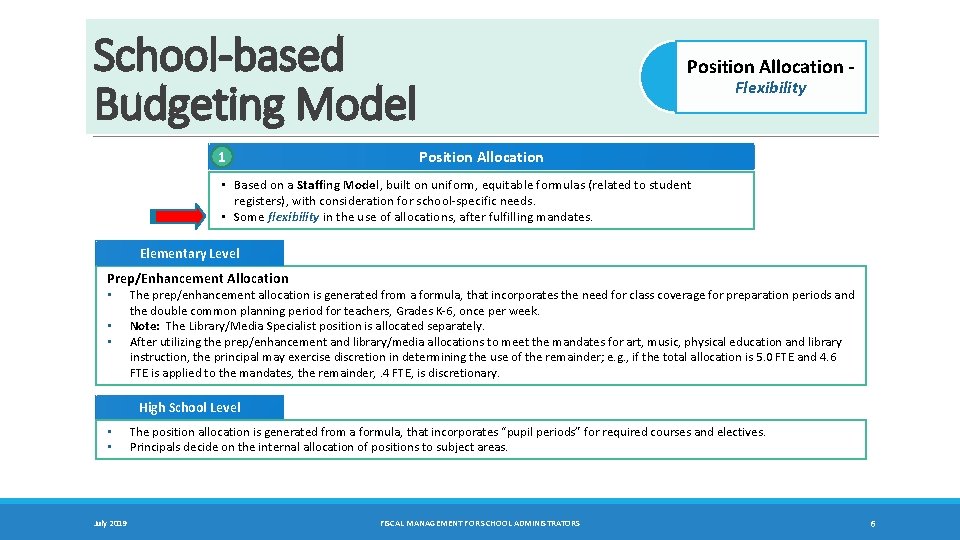
School-based Budgeting Model 1 Position Allocation ‐ Flexibility Position Allocation • Based on a Staffing Model, built on uniform, equitable formulas (related to student registers), with consideration for school-specific needs. • Some flexibility in the use of allocations, after fulfilling mandates. Elementary Level Prep/Enhancement Allocation • • • The prep/enhancement allocation is generated from a formula, that incorporates the need for class coverage for preparation periods and the double common planning period for teachers, Grades K-6, once per week. Note: The Library/Media Specialist position is allocated separately. After utilizing the prep/enhancement and library/media allocations to meet the mandates for art, music, physical education and library instruction, the principal may exercise discretion in determining the use of the remainder; e. g. , if the total allocation is 5. 0 FTE and 4. 6 FTE is applied to the mandates, the remainder, . 4 FTE, is discretionary. High School Level • • July 2019 The position allocation is generated from a formula, that incorporates “pupil periods” for required courses and electives. Principals decide on the internal allocation of positions to subject areas. FISCAL MANAGEMENT FOR SCHOOL ADMINISTRATORS 6
Chapter 2 FISCAL YEAR: July 1 – June 30 School’s Budget • SCHOOL-BASED CONTROL ACCOUNTS • SCHOOL-SPECIFIC GRANT & DISTRICT ALLOCATIONS • SCHOOL/DISTRICT RESPONSIBILITIES July 2019 FISCAL MANAGEMENT FOR SCHOOL ADMINISTRATORS 7 TC
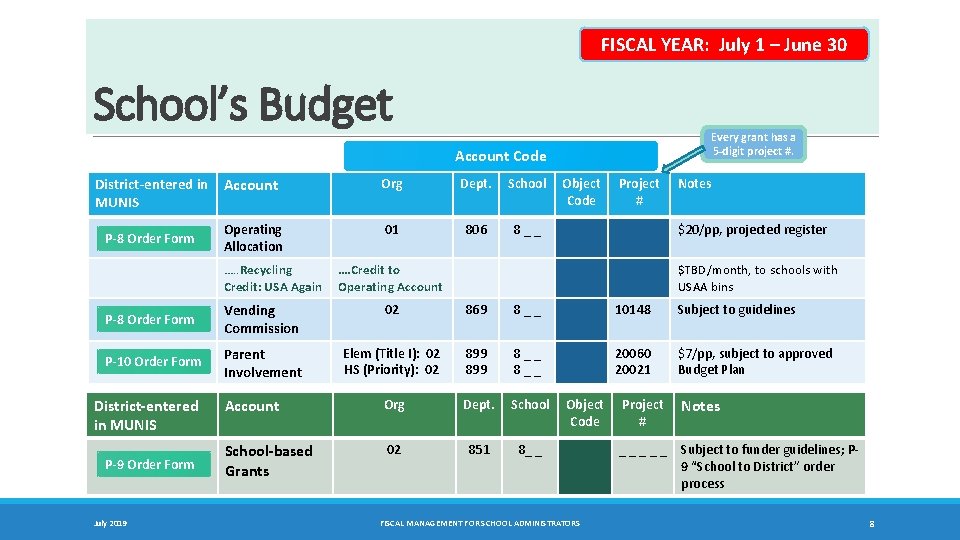
FISCAL YEAR: July 1 – June 30 School’s Budget Every grant has a 5‐digit project #. Account Code District‐entered in Account MUNIS P‐ 8 Order Form Operating Allocation …. . Recycling Credit: USA Again Org Dept. School 01 806 8 _ _ Object Code Project # Notes $20/pp, projected register …. Credit to Operating Account $TBD/month, to schools with USAA bins P‐ 8 Order Form Vending Commission 02 869 8 _ _ 10148 Subject to guidelines P‐ 10 Order Form Parent Involvement Elem (Title I): 02 HS (Priority): 02 899 8 _ _ 20060 20021 $7/pp, subject to approved Budget Plan Account Org Dept. School‐based Grants 02 851 8_ _ District‐entered in MUNIS P‐ 9 Order Form July 2019 Object Code FISCAL MANAGEMENT FOR SCHOOL ADMINISTRATORS Project # Notes _ _ _ Subject to funder guidelines; P‐ 9 “School to District” order process 8
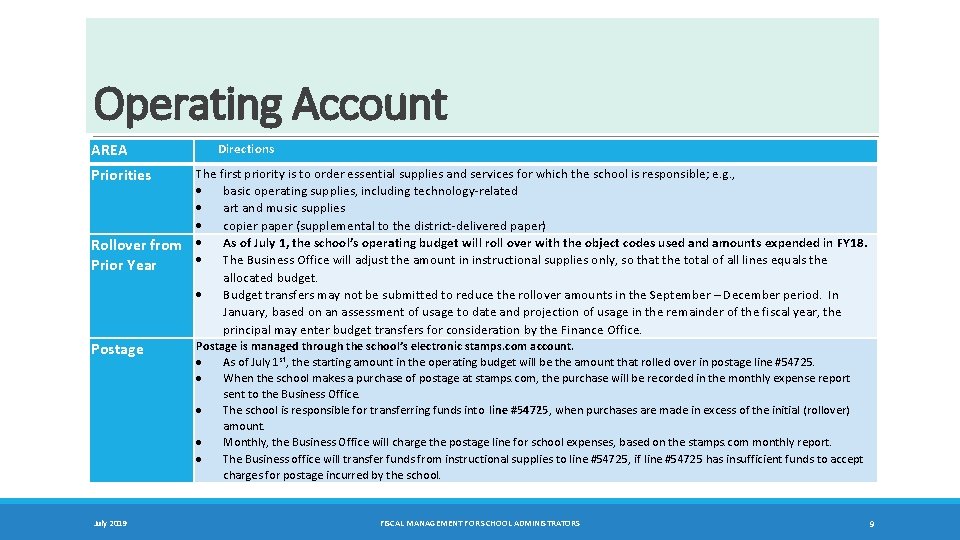
Operating Account AREA Directions The first priority is to order essential supplies and services for which the school is responsible; e. g. , basic operating supplies, including technology-related art and music supplies copier paper (supplemental to the district-delivered paper) Rollover from As of July 1, the school’s operating budget will roll over with the object codes used and amounts expended in FY 18. The Business Office will adjust the amount in instructional supplies only, so that the total of all lines equals the Prior Year allocated budget. Budget transfers may not be submitted to reduce the rollover amounts in the September – December period. In January, based on an assessment of usage to date and projection of usage in the remainder of the fiscal year, the principal may enter budget transfers for consideration by the Finance Office. Priorities Postage July 2019 Postage is managed through the school’s electronic stamps. com account. As of July 1 st, the starting amount in the operating budget will be the amount that rolled over in postage line #54725. When the school makes a purchase of postage at stamps. com, the purchase will be recorded in the monthly expense report sent to the Business Office. The school is responsible for transferring funds into line #54725, when purchases are made in excess of the initial (rollover) amount. Monthly, the Business Office will charge the postage line for school expenses, based on the stamps. com monthly report. The Business office will transfer funds from instructional supplies to line #54725, if line #54725 has insufficient funds to accept charges for postage incurred by the school. FISCAL MANAGEMENT FOR SCHOOL ADMINISTRATORS 9
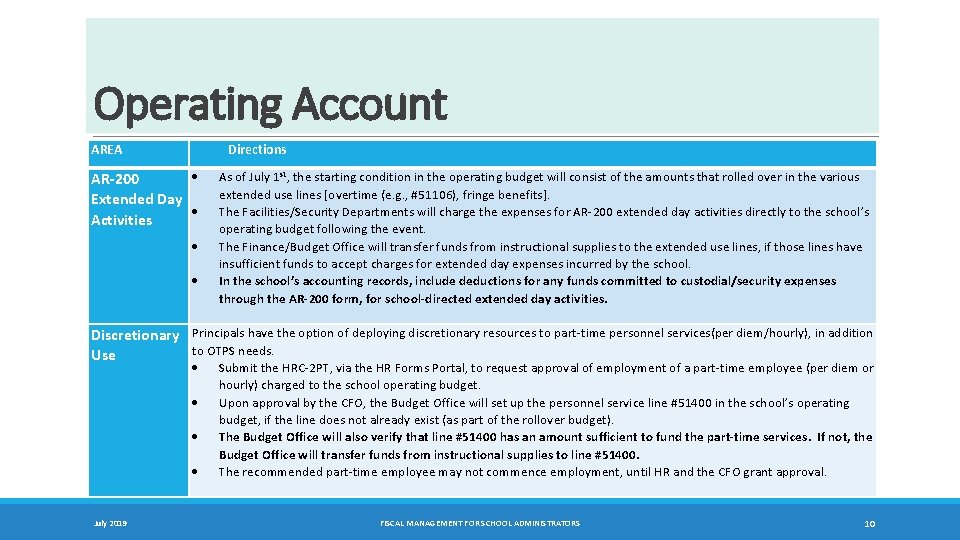
Operating Account AREA Directions AR‐ 200 Extended Day Activities As of July 1 st, the starting condition in the operating budget will consist of the amounts that rolled over in the various extended use lines [overtime (e. g. , #51106), fringe benefits]. The Facilities/Security Departments will charge the expenses for AR-200 extended day activities directly to the school’s operating budget following the event. The Finance/Budget Office will transfer funds from instructional supplies to the extended use lines, if those lines have insufficient funds to accept charges for extended day expenses incurred by the school. In the school’s accounting records, include deductions for any funds committed to custodial/security expenses through the AR‐ 200 form, for school‐directed extended day activities. Discretionary Principals have the option of deploying discretionary resources to part-time personnel services(per diem/hourly), in addition to OTPS needs. Use July 2019 Submit the HRC-2 PT, via the HR Forms Portal, to request approval of employment of a part-time employee (per diem or hourly) charged to the school operating budget. Upon approval by the CFO, the Budget Office will set up the personnel service line #51400 in the school’s operating budget, if the line does not already exist (as part of the rollover budget). The Budget Office will also verify that line #51400 has an amount sufficient to fund the part‐time services. If not, the Budget Office will transfer funds from instructional supplies to line #51400. The recommended part-time employee may not commence employment, until HR and the CFO grant approval. FISCAL MANAGEMENT FOR SCHOOL ADMINISTRATORS 10
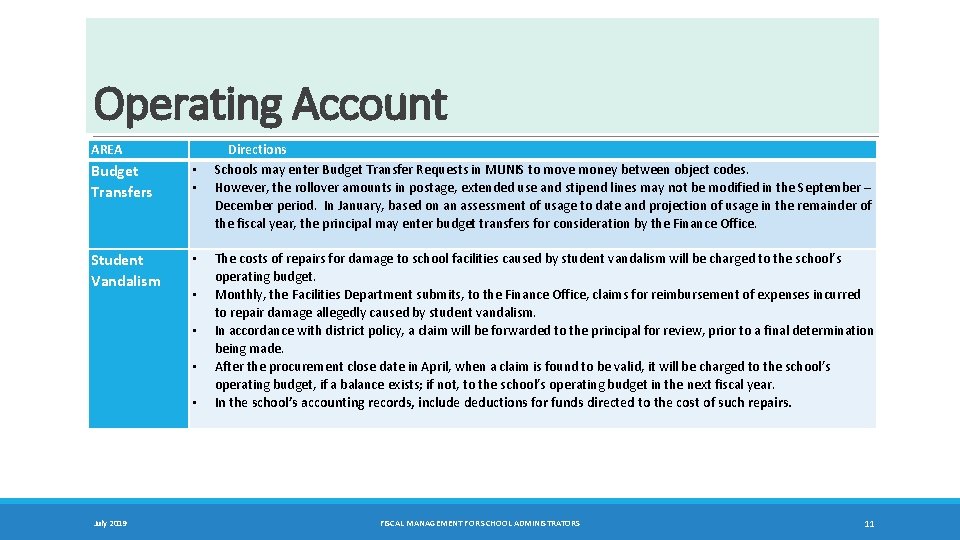
Operating Account AREA Budget Transfers • • Student Vandalism • • • July 2019 Directions Schools may enter Budget Transfer Requests in MUNIS to move money between object codes. However, the rollover amounts in postage, extended use and stipend lines may not be modified in the September – December period. In January, based on an assessment of usage to date and projection of usage in the remainder of the fiscal year, the principal may enter budget transfers for consideration by the Finance Office. The costs of repairs for damage to school facilities caused by student vandalism will be charged to the school’s operating budget. Monthly, the Facilities Department submits, to the Finance Office, claims for reimbursement of expenses incurred to repair damage allegedly caused by student vandalism. In accordance with district policy, a claim will be forwarded to the principal for review, prior to a final determination being made. After the procurement close date in April, when a claim is found to be valid, it will be charged to the school’s operating budget, if a balance exists; if not, to the school’s operating budget in the next fiscal year. In the school’s accounting records, include deductions for funds directed to the cost of such repairs. FISCAL MANAGEMENT FOR SCHOOL ADMINISTRATORS 11
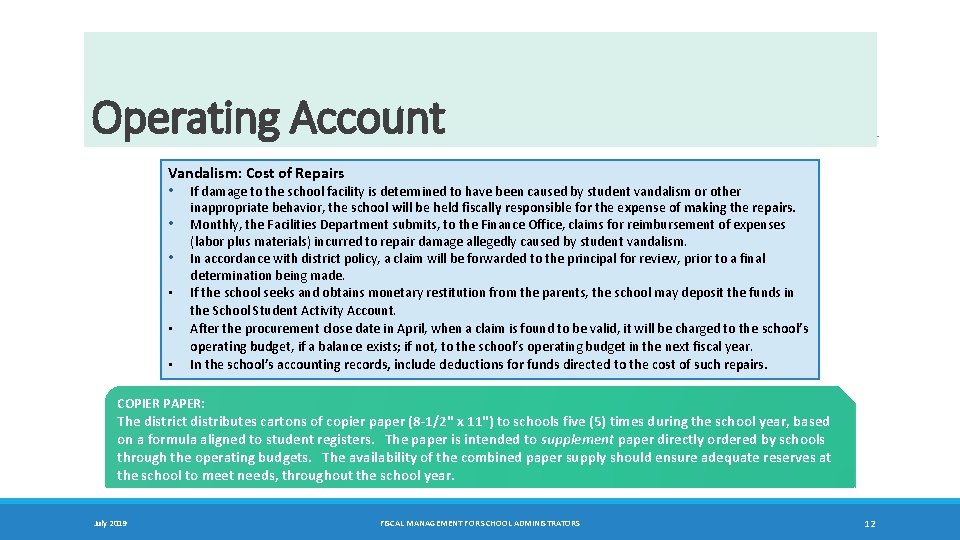
Operating Account Vandalism: Cost of Repairs • • • If damage to the school facility is determined to have been caused by student vandalism or other inappropriate behavior, the school will be held fiscally responsible for the expense of making the repairs. Monthly, the Facilities Department submits, to the Finance Office, claims for reimbursement of expenses (labor plus materials) incurred to repair damage allegedly caused by student vandalism. In accordance with district policy, a claim will be forwarded to the principal for review, prior to a final determination being made. If the school seeks and obtains monetary restitution from the parents, the school may deposit the funds in the School Student Activity Account. After the procurement close date in April, when a claim is found to be valid, it will be charged to the school’s operating budget, if a balance exists; if not, to the school’s operating budget in the next fiscal year. In the school’s accounting records, include deductions for funds directed to the cost of such repairs. COPIER PAPER: The district distributes cartons of copier paper (8‐ 1/2" x 11") to schools five (5) times during the school year, based on a formula aligned to student registers. The paper is intended to supplement paper directly ordered by schools through the operating budgets. The availability of the combined paper supply should ensure adequate reserves at the school to meet needs, throughout the school year. July 2019 FISCAL MANAGEMENT FOR SCHOOL ADMINISTRATORS 12
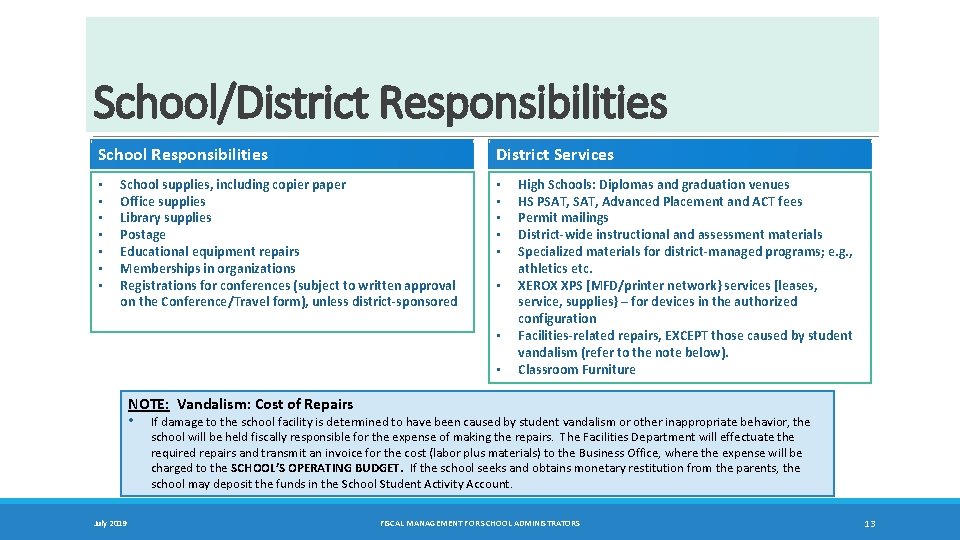
School/District Responsibilities School Responsibilities • • District Services School supplies, including copier paper Office supplies Library supplies Postage Educational equipment repairs Memberships in organizations Registrations for conferences (subject to written approval on the Conference/Travel form), unless district‐sponsored • • High Schools: Diplomas and graduation venues HS PSAT, Advanced Placement and ACT fees Permit mailings District‐wide instructional and assessment materials Specialized materials for district‐managed programs; e. g. , athletics etc. XEROX XPS [MFD/printer network} services [leases, service, supplies} – for devices in the authorized configuration Facilities‐related repairs, EXCEPT those caused by student vandalism (refer to the note below). Classroom Furniture NOTE: Vandalism: Cost of Repairs • If damage to the school facility is determined to have been caused by student vandalism or other inappropriate behavior, the school will be held fiscally responsible for the expense of making the repairs. The Facilities Department will effectuate the required repairs and transmit an invoice for the cost (labor plus materials) to the Business Office, where the expense will be charged to the SCHOOL’S OPERATING BUDGET. If the school seeks and obtains monetary restitution from the parents, the school may deposit the funds in the School Student Activity Account. July 2019 FISCAL MANAGEMENT FOR SCHOOL ADMINISTRATORS 13
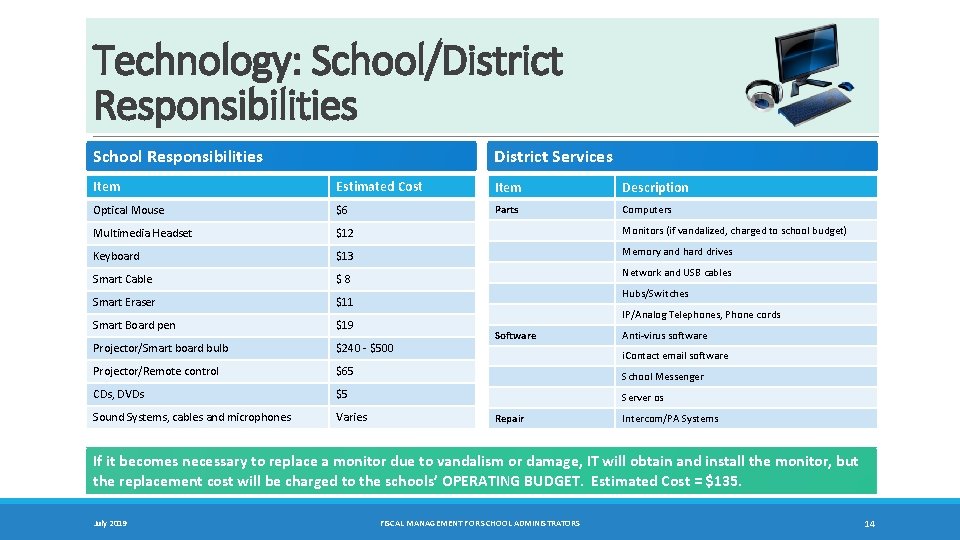
Technology: School/District Responsibilities School Responsibilities District Services Item Estimated Cost Item Description Optical Mouse $6 Parts Computers Multimedia Headset $12 Monitors (if vandalized, charged to school budget) Keyboard $13 Memory and hard drives Smart Cable $ 8 Smart Eraser $11 Smart Board pen $19 Projector/Smart board bulb $240 - $500 Projector/Remote control $65 School Messenger CDs, DVDs $5 Server os Sound Systems, cables and microphones Varies Network and USB cables Hubs/Switches IP/Analog Telephones, Phone cords Software Anti-virus software i. Contact email software Repair Intercom/PA Systems If it becomes necessary to replace a monitor due to vandalism or damage, IT will obtain and install the monitor, but the replacement cost will be charged to the schools’ OPERATING BUDGET. Estimated Cost = $135. July 2019 FISCAL MANAGEMENT FOR SCHOOL ADMINISTRATORS 14
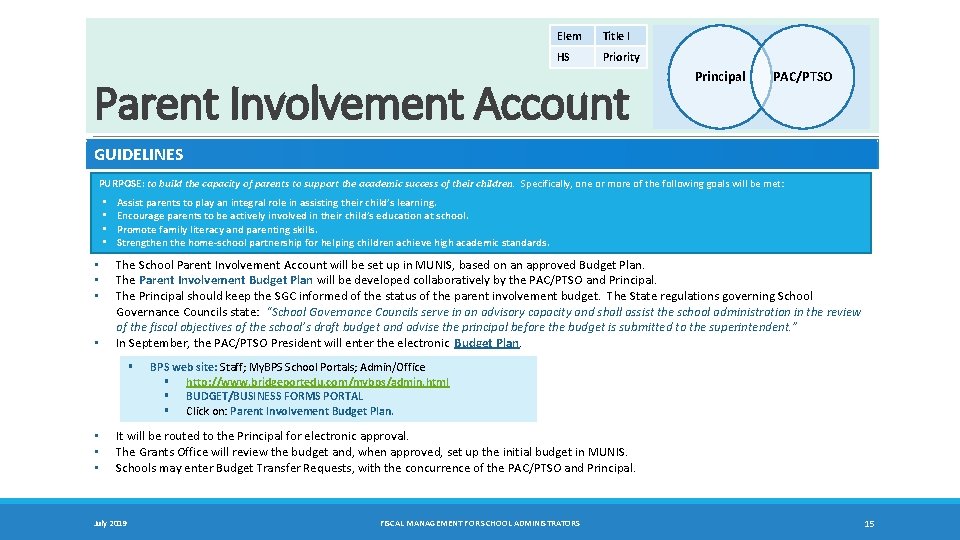
Elem Title I HS Priority Parent Involvement Account Principal PAC/PTSO GUIDELINES PURPOSE: to build the capacity of parents to support the academic success of their children. Specifically, one or more of the following goals will be met: • • Assist parents to play an integral role in assisting their child’s learning. Encourage parents to be actively involved in their child’s education at school. Promote family literacy and parenting skills. Strengthen the home‐school partnership for helping children achieve high academic standards. The School Parent Involvement Account will be set up in MUNIS, based on an approved Budget Plan. The Parent Involvement Budget Plan will be developed collaboratively by the PAC/PTSO and Principal. The Principal should keep the SGC informed of the status of the parent involvement budget. The State regulations governing School Governance Councils state: “School Governance Councils serve in an advisory capacity and shall assist the school administration in the review of the fiscal objectives of the school’s draft budget and advise the principal before the budget is submitted to the superintendent. ” In September, the PAC/PTSO President will enter the electronic Budget Plan. § • • • BPS web site: Staff; My. BPS School Portals; Admin/Office § http: //www. bridgeportedu. com/mybps/admin. html § BUDGET/BUSINESS FORMS PORTAL § Click on: Parent Involvement Budget Plan. It will be routed to the Principal for electronic approval. The Grants Office will review the budget and, when approved, set up the initial budget in MUNIS. Schools may enter Budget Transfer Requests, with the concurrence of the PAC/PTSO and Principal. July 2019 FISCAL MANAGEMENT FOR SCHOOL ADMINISTRATORS 15
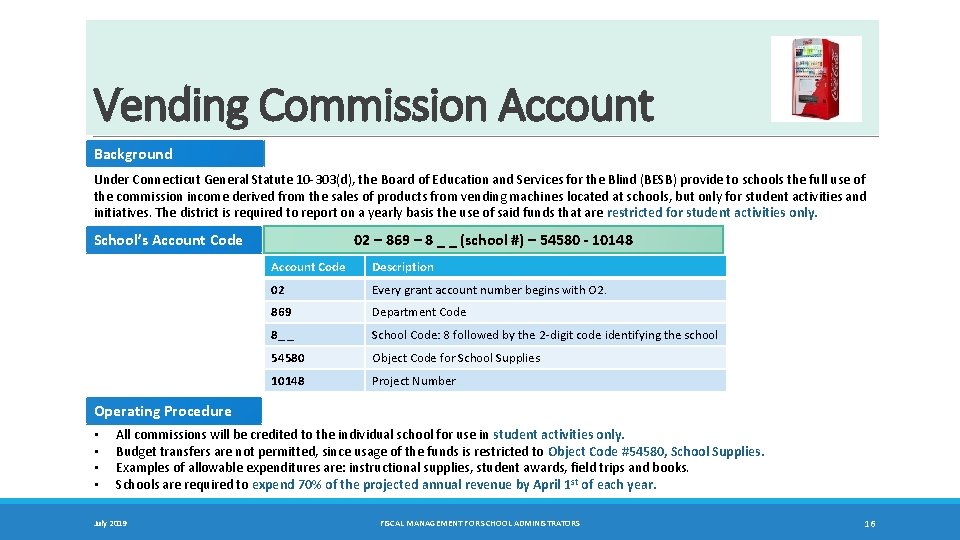
Vending Commission Account Background Under Connecticut General Statute 10 -303(d), the Board of Education and Services for the Blind (BESB) provide to schools the full use of the commission income derived from the sales of products from vending machines located at schools, but only for student activities and initiatives. The district is required to report on a yearly basis the use of said funds that are restricted for student activities only. School’s Account Code 02 – 869 – 8 _ _ (school #) – 54580 ‐ 10148 Account Code Description 02 Every grant account number begins with O 2. 869 Department Code 8_ _ School Code: 8 followed by the 2 -digit code identifying the school 54580 Object Code for School Supplies 10148 Project Number Operating Procedure • • All commissions will be credited to the individual school for use in student activities only. Budget transfers are not permitted, since usage of the funds is restricted to Object Code #54580, School Supplies. Examples of allowable expenditures are: instructional supplies, student awards, field trips and books. Schools are required to expend 70% of the projected annual revenue by April 1 st of each year. July 2019 FISCAL MANAGEMENT FOR SCHOOL ADMINISTRATORS 16
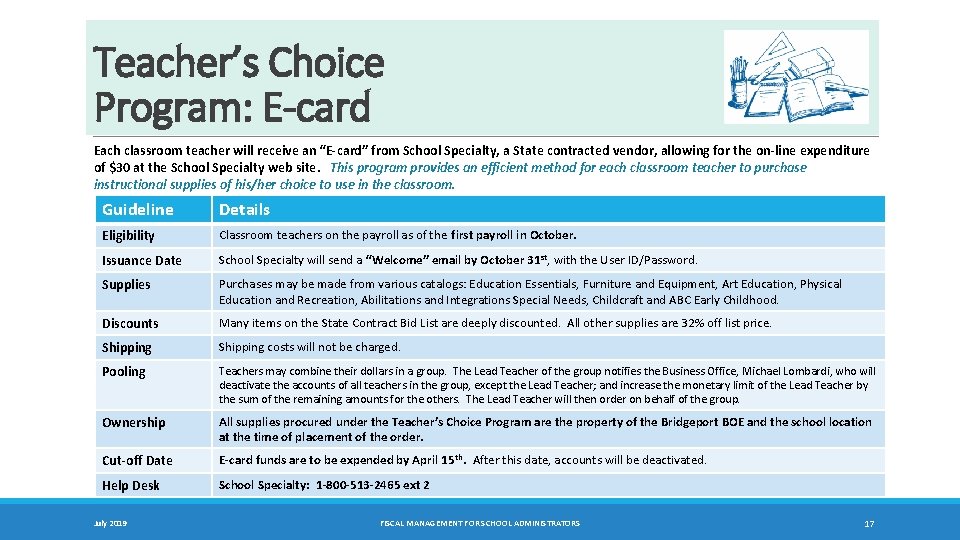
Teacher’s Choice Program: E-card Each classroom teacher will receive an “E‐card” from School Specialty, a State contracted vendor, allowing for the on‐line expenditure of $30 at the School Specialty web site. This program provides an efficient method for each classroom teacher to purchase instructional supplies of his/her choice to use in the classroom. Guideline Details Eligibility Classroom teachers on the payroll as of the first payroll in October. Issuance Date School Specialty will send a “Welcome” email by October 31 st, with the User ID/Password. Supplies Purchases may be made from various catalogs: Education Essentials, Furniture and Equipment, Art Education, Physical Education and Recreation, Abilitations and Integrations Special Needs, Childcraft and ABC Early Childhood. Discounts Many items on the State Contract Bid List are deeply discounted. All other supplies are 32% off list price. Shipping costs will not be charged. Pooling Teachers may combine their dollars in a group. The Lead Teacher of the group notifies the Business Office, Michael Lombardi, who will deactivate the accounts of all teachers in the group, except the Lead Teacher; and increase the monetary limit of the Lead Teacher by the sum of the remaining amounts for the others. The Lead Teacher will then order on behalf of the group. Ownership All supplies procured under the Teacher’s Choice Program are the property of the Bridgeport BOE and the school location at the time of placement of the order. Cut‐off Date E‐card funds are to be expended by April 15 th. After this date, accounts will be deactivated. Help Desk School Specialty: 1‐ 800‐ 513‐ 2465 ext 2 July 2019 FISCAL MANAGEMENT FOR SCHOOL ADMINISTRATORS 17
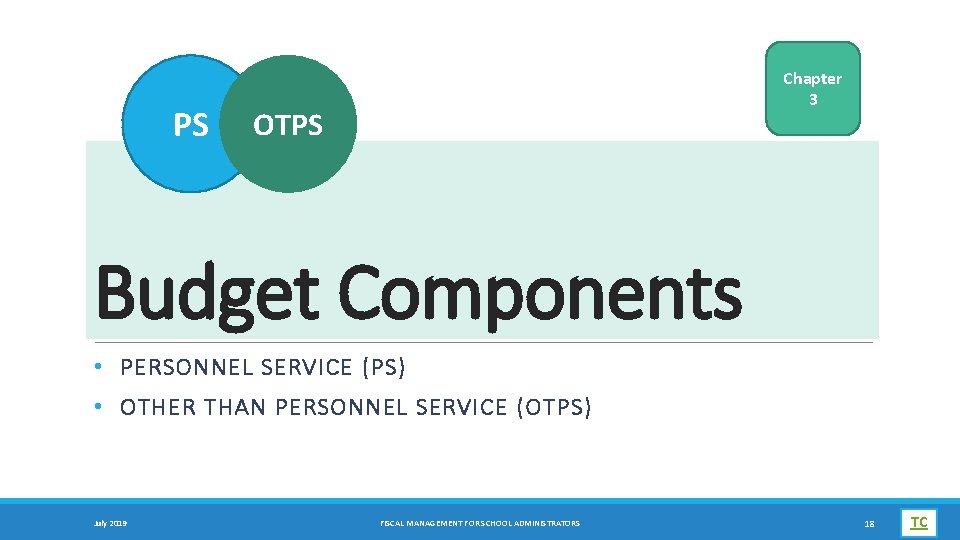
PS Chapter 3 OTPS Budget Components • PERSONNEL SERVICE (PS) • OTHER THAN PERSONNEL SERVICE (OTPS) July 2019 FISCAL MANAGEMENT FOR SCHOOL ADMINISTRATORS 18 TC
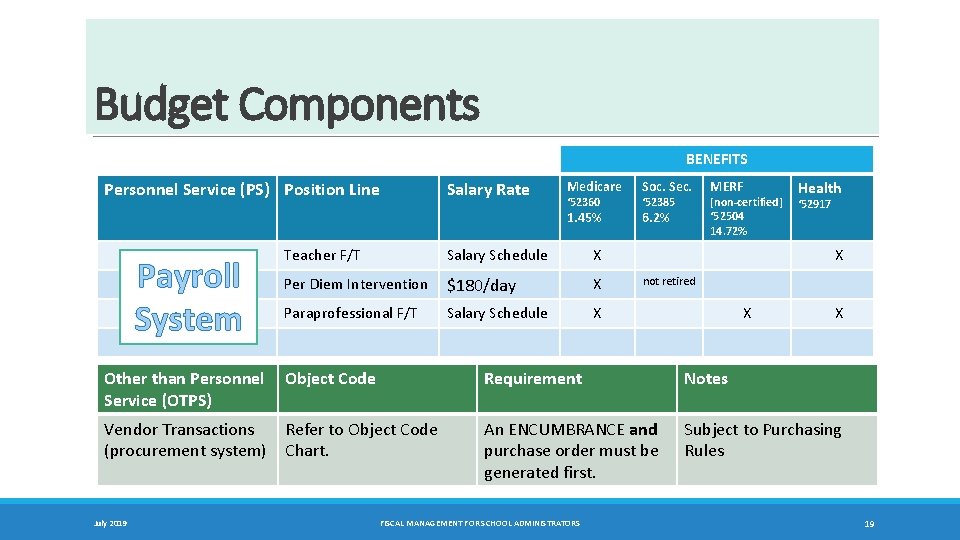
Budget Components BENEFITS Personnel Service (PS) Position Line Payroll System Salary Rate Medicare Soc. Sec. 1. 45% 6. 2% ‘ 52360 Teacher F/T Salary Schedule X Per Diem Intervention $180/day X Paraprofessional F/T Salary Schedule X ‘ 52385 MERF [non‐certified] ‘ 52504 14. 72% Health ‘ 52917 X not retired X X Other than Personnel Object Code Service (OTPS) Requirement Notes Vendor Transactions (procurement system) An ENCUMBRANCE and purchase order must be generated first. Subject to Purchasing Rules July 2019 Refer to Object Code Chart. FISCAL MANAGEMENT FOR SCHOOL ADMINISTRATORS 19
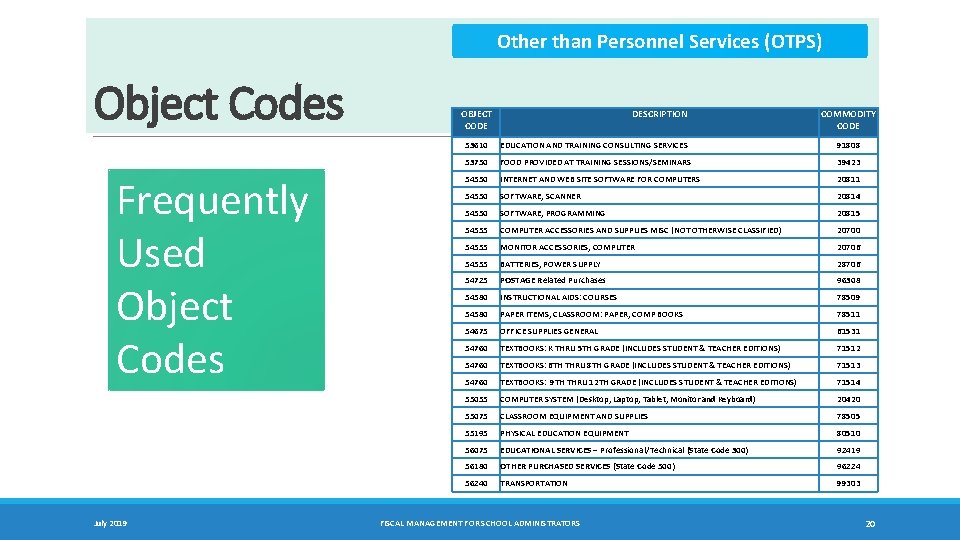
Other than Personnel Services (OTPS) Object Codes Frequently Used Object Codes July 2019 OBJECT CODE DESCRIPTION COMMODITY CODE 53610 EDUCATION AND TRAINING CONSULTING SERVICES 91808 53750 FOOD PROVIDED AT TRAINING SESSIONS/SEMINARS 39423 54550 INTERNET AND WEB SITE SOFTWARE FOR COMPUTERS 20811 54550 SOFTWARE, SCANNER 20814 54550 SOFTWARE, PROGRAMMING 20815 54555 COMPUTER ACCESSORIES AND SUPPLIES MISC (NOT OTHERWISE CLASSIFIED) 20700 54555 MONITOR ACCESSORIES, COMPUTER 20706 54555 BATTERIES, POWER SUPPLY 28706 54725 POSTAGE Related Purchases 96308 54580 INSTRUCTIONAL AIDS: COURSES 78509 54580 PAPER ITEMS, CLASSROOM: PAPER, COMP BOOKS 78511 54675 OFFICE SUPPLIES GENERAL 61531 54760 TEXTBOOKS: K THRU 5 TH GRADE (INCLUDES STUDENT & TEACHER EDITIONS) 71512 54760 TEXTBOOKS: 6 TH THRU 8 TH GRADE (INCLUDES STUDENT & TEACHER EDITIONS) 71513 54760 TEXTBOOKS: 9 TH THRU 12 TH GRADE (INCLUDES STUDENT & TEACHER EDITIONS) 71514 55055 COMPUTER SYSTEM (Desktop, Laptop, Tablet, Monitor and Keyboard) 20420 55075 CLASSROOM EQUIPMENT AND SUPPLIES 78505 55195 PHYSICAL EDUCATION EQUIPMENT 80510 56075 EDUCATIONAL SERVICES – Professional/Technical (State Code 300) 92419 56180 OTHER PURCHASED SERVICES (State Code 500) 96224 56240 TRANSPORTATION 99303 FISCAL MANAGEMENT FOR SCHOOL ADMINISTRATORS 20
Chapter 4 Viewing and Modifying Accounts • BU DGE T FIELDS: BY OBJECT CODE [PS AND OTPS ] • BU DGE T MO DIFICATIO NS • MU N IS: DI RECTIONS July 2019 FISCAL MANAGEMENT FOR SCHOOL ADMINISTRATORS 21 TC
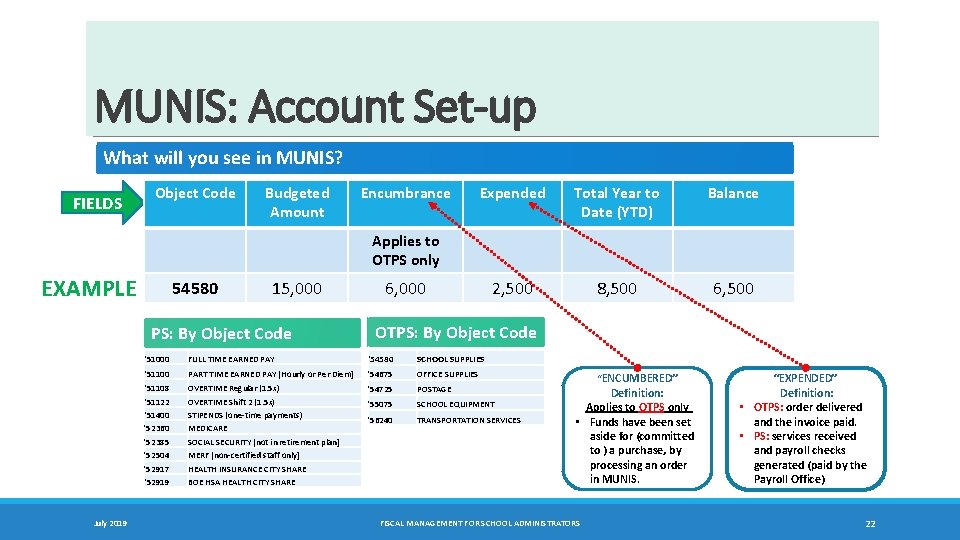
MUNIS: Account Set-up What will you see in MUNIS? FIELDS Object Code Budgeted Amount Encumbrance Expended Total Year to Date (YTD) Balance 2, 500 8, 500 6, 500 Applies to OTPS only EXAMPLE 54580 15, 000 PS: By Object Code July 2019 6, 000 OTPS: By Object Code ‘ 51000 FULL TIME EARNED PAY '54580 SCHOOL SUPPLIES ‘ 51100 PART TIME EARNED PAY [Hourly or Per Diem] '54675 OFFICE SUPPLIES ‘ 51108 ‘ 51122 ‘ 51400 '52360 '52385 '52504 '52917 ‘ 52919 OVERTIME Regular (1. 5 x) OVERTIME Shift 2 (1. 5 x) STIPENDS (one-time payments) MEDICARE SOCIAL SECURITY [not in retirement plan] MERF [non-certified staff only] HEALTH INSURANCE CITY SHARE BOE HSA HEALTH CITY SHARE '54725 POSTAGE '55075 SCHOOL EQUIPMENT '56240 TRANSPORTATION SERVICES “ENCUMBERED” Definition: Applies to OTPS only • Funds have been set aside for (committed to ) a purchase, by processing an order in MUNIS. FISCAL MANAGEMENT FOR SCHOOL ADMINISTRATORS “EXPENDED” Definition: • OTPS: order delivered and the invoice paid. • PS: services received and payroll checks generated (paid by the Payroll Office) 22
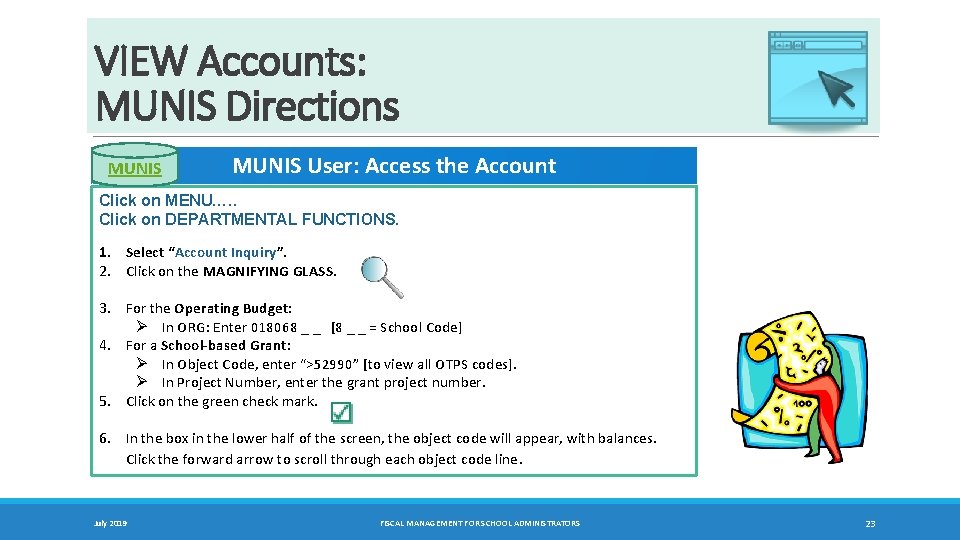
VIEW Accounts: MUNIS Directions MUNIS User: Access the Account Click on MENU…. . Click on DEPARTMENTAL FUNCTIONS. 1. Select “Account Inquiry”. 2. Click on the MAGNIFYING GLASS. 3. For the Operating Budget: Ø In ORG: Enter 018068 _ _ [8 _ _ = School Code] 4. For a School‐based Grant: Ø In Object Code, enter “>52990” [to view all OTPS codes]. Ø In Project Number, enter the grant project number. 5. Click on the green check mark. 6. In the box in the lower half of the screen, the object code will appear, with balances. Click the forward arrow to scroll through each object code line. July 2019 FISCAL MANAGEMENT FOR SCHOOL ADMINISTRATORS 23
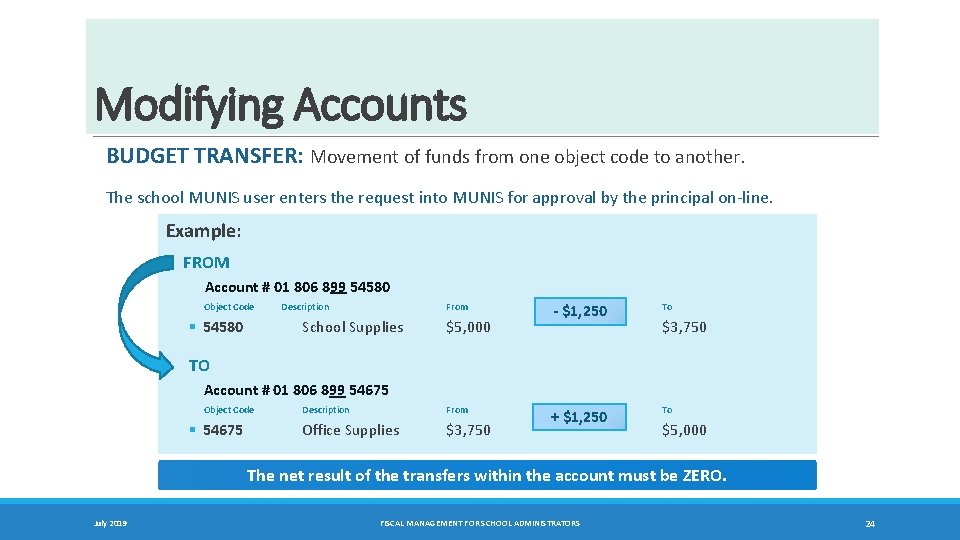
Modifying Accounts BUDGET TRANSFER: Movement of funds from one object code to another. The school MUNIS user enters the request into MUNIS for approval by the principal on-line. Example: FROM Account # 01 806 899 54580 Object Code Description § 54580 From School Supplies $5, 000 ‐ $1, 250 To + $1, 250 To $3, 750 TO Account # 01 806 899 54675 Object Code § 54675 Description Office Supplies From $3, 750 $5, 000 The net result of the transfers within the account must be ZERO. July 2019 FISCAL MANAGEMENT FOR SCHOOL ADMINISTRATORS 24
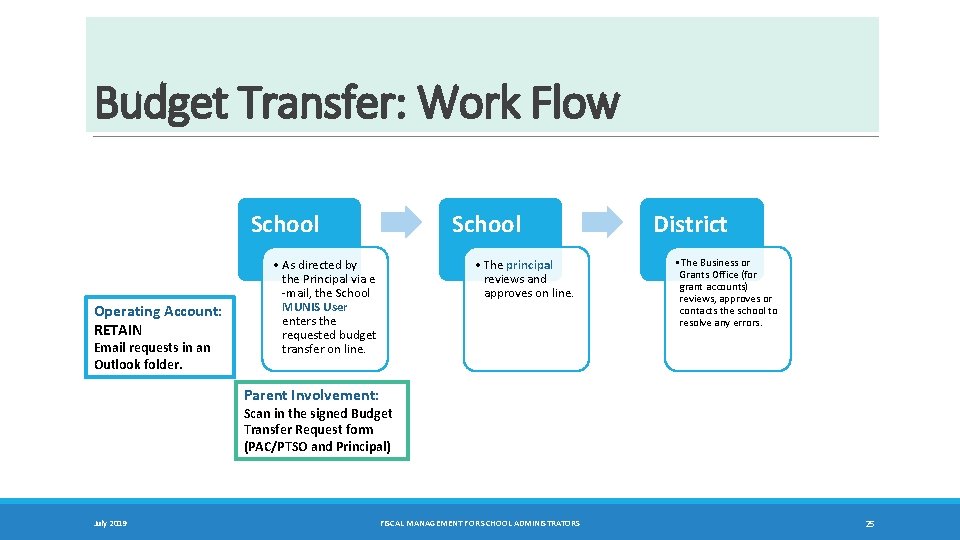
Budget Transfer: Work Flow School Operating Account: RETAIN Email requests in an Outlook folder. School • As directed by the Principal via e -mail, the School MUNIS User enters the requested budget transfer on line. • The principal reviews and approves on line. District • The Business or Grants Office (for grant accounts) reviews, approves or contacts the school to resolve any errors. Parent Involvement: Scan in the signed Budget Transfer Request form (PAC/PTSO and Principal) July 2019 FISCAL MANAGEMENT FOR SCHOOL ADMINISTRATORS 25
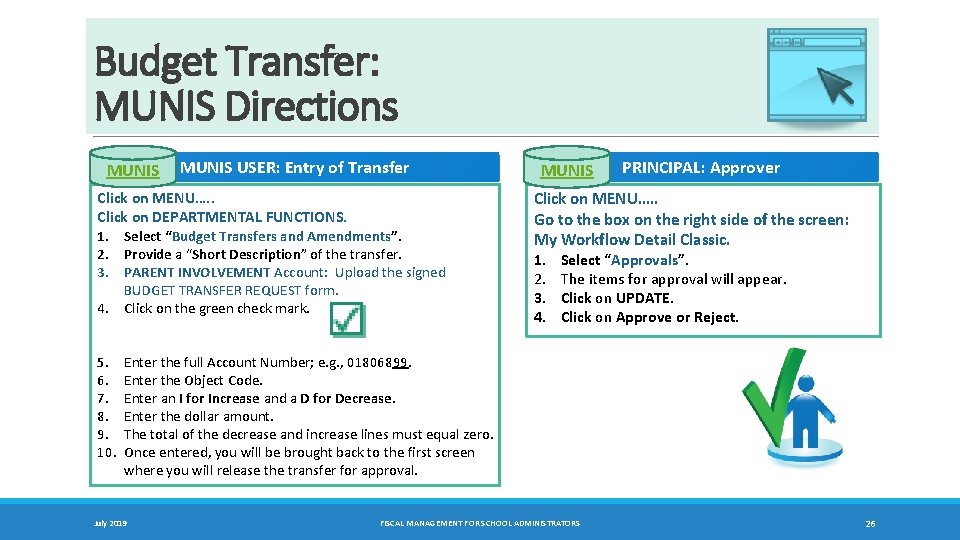
Budget Transfer: MUNIS Directions MUNIS USER: Entry of Transfer Click on MENU…. . Click on DEPARTMENTAL FUNCTIONS. 1. Select “Budget Transfers and Amendments”. 2. Provide a “Short Description” of the transfer. 3. PARENT INVOLVEMENT Account: Upload the signed 4. 5. 6. 7. 8. 9. 10. BUDGET TRANSFER REQUEST form. Click on the green check mark. MUNIS PRINCIPAL: Approver Click on MENU…. . Go to the box on the right side of the screen: My Workflow Detail Classic. 1. Select “Approvals”. 2. The items for approval will appear. 3. Click on UPDATE. 4. Click on Approve or Reject. Enter the full Account Number; e. g. , 01806899. Enter the Object Code. Enter an I for Increase and a D for Decrease. Enter the dollar amount. The total of the decrease and increase lines must equal zero. Once entered, you will be brought back to the first screen where you will release the transfer for approval. July 2019 FISCAL MANAGEMENT FOR SCHOOL ADMINISTRATORS 26
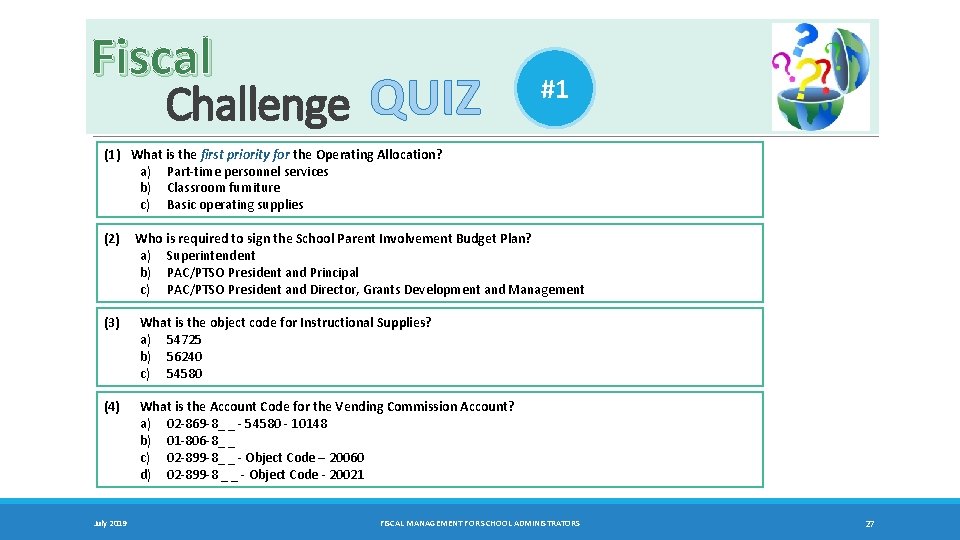
Fiscal Challenge QUIZ #1 (1) What is the first priority for the Operating Allocation? a) Part-time personnel services b) Classroom furniture c) Basic operating supplies (2) Who is required to sign the School Parent Involvement Budget Plan? a) Superintendent b) PAC/PTSO President and Principal c) PAC/PTSO President and Director, Grants Development and Management (3) What is the object code for Instructional Supplies? a) 54725 b) 56240 c) 54580 (4) What is the Account Code for the Vending Commission Account? a) 02 -869 -8_ _ - 54580 - 10148 b) 01 -806 -8_ _ c) 02 -899 -8_ _ - Object Code – 20060 d) 02 -899 -8 _ _ - Object Code - 20021 July 2019 FISCAL MANAGEMENT FOR SCHOOL ADMINISTRATORS 27
Chapter 5 Procurement Guidelines • VENDOR REGISTRATION • PROHIBITION ON TELEPHONE ORDERS • PROCUREMENT RULES • PROFESSIONAL/TECHNICAL SERVICES • VENDOR BACKGROUND CHECKS July 2019 FISCAL MANAGEMENT FOR SCHOOL ADMINISTRATORS 28 TC
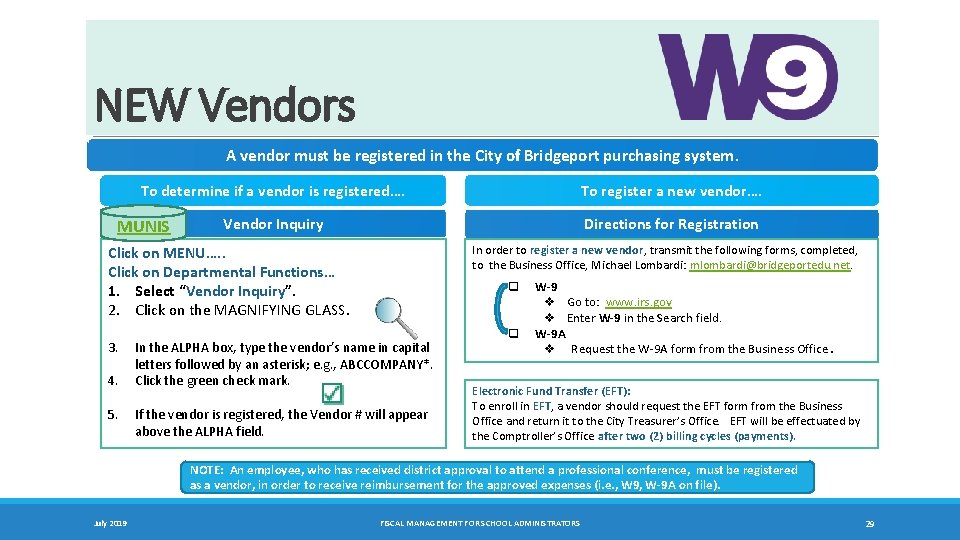
NEW Vendors A vendor must be registered in the City of Bridgeport purchasing system. To determine if a vendor is registered…. To register a new vendor…. Vendor Inquiry Directions for Registration MUNIS Click on MENU…. . Click on Departmental Functions… 1. Select “Vendor Inquiry”. 2. Click on the MAGNIFYING GLASS. 3. 4. 5. In order to register a new vendor, transmit the following forms, completed, to the Business Office, Michael Lombardi: mlombardi@bridgeportedu. net. q In the ALPHA box, type the vendor’s name in capital letters followed by an asterisk; e. g. , ABCCOMPANY*. Click the green check mark. If the vendor is registered, the Vendor # will appear above the ALPHA field. q W‐ 9 v Go to: www. irs. gov v Enter W‐ 9 in the Search field. W‐ 9 A v Request the W-9 A form from the Business Office. Electronic Fund Transfer (EFT): To enroll in EFT, a vendor should request the EFT form from the Business Office and return it to the City Treasurer’s Office. EFT will be effectuated by the Comptroller’s Office after two (2) billing cycles (payments). NOTE: An employee, who has received district approval to attend a professional conference, must be registered as a vendor, in order to receive reimbursement for the approved expenses (i. e. , W 9, W‐ 9 A on file). July 2019 FISCAL MANAGEMENT FOR SCHOOL ADMINISTRATORS 29
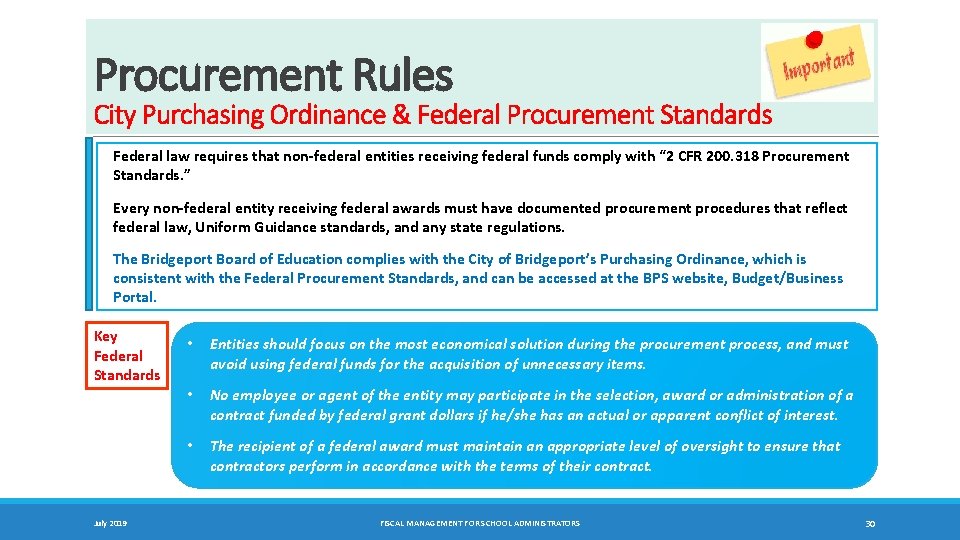
Procurement Rules City Purchasing Ordinance & Federal Procurement Standards Federal law requires that non‐federal entities receiving federal funds comply with “ 2 CFR 200. 318 Procurement Standards. ” Every non‐federal entity receiving federal awards must have documented procurement procedures that reflect federal law, Uniform Guidance standards, and any state regulations. The Bridgeport Board of Education complies with the City of Bridgeport’s Purchasing Ordinance, which is consistent with the Federal Procurement Standards, and can be accessed at the BPS website, Budget/Business Portal. Key Federal Standards July 2019 • Entities should focus on the most economical solution during the procurement process, and must avoid using federal funds for the acquisition of unnecessary items. • No employee or agent of the entity may participate in the selection, award or administration of a contract funded by federal grant dollars if he/she has an actual or apparent conflict of interest. • The recipient of a federal award must maintain an appropriate level of oversight to ensure that contractors perform in accordance with the terms of their contract. FISCAL MANAGEMENT FOR SCHOOL ADMINISTRATORS 30
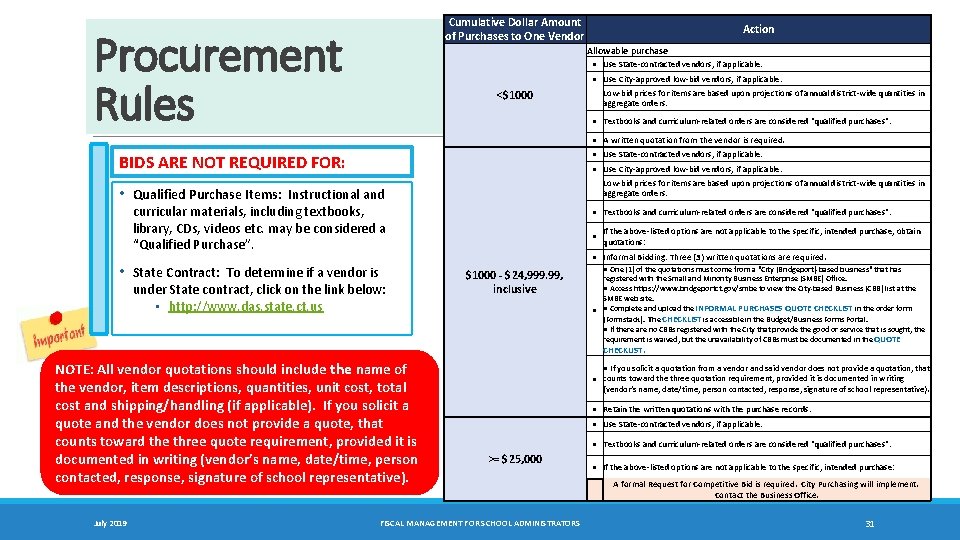
Cumulative Dollar Amount of Purchases to One Vendor Procurement Rules Action Allowable purchase ● Use State-contracted vendors, if applicable. ● Use City-approved low-bid vendors, if applicable. <$1000 Low-bid prices for items are based upon projections of annual district-wide quantities in aggregate orders. ● Textbooks and curriculum-related orders are considered "qualified purchases". ● A written quotation from the vendor is required. BIDS ARE NOT REQUIRED FOR: ● Use State-contracted vendors, if applicable. • • ● Use City-approved low-bid vendors, if applicable. Qualified Purchase Items: Instructional and curricular materials, including textbooks, library, CDs, videos etc. may be considered a “Qualified Purchase”. State Contract: To determine if a vendor is under State contract, click on the link below: • http: //www. das. state. ct. us Low-bid prices for items are based upon projections of annual district-wide quantities in aggregate orders. ● Textbooks and curriculum-related orders are considered "qualified purchases". ● If the above-listed options are not applicable to the specific, intended purchase, obtain quotations: ● Informal Bidding: Three (3) written quotations are required. $1000 ‐ $24, 999. 99, inclusive ● One (1) of the quotations must come from a "City (Bridgeport)‐based business" that has registered with the Small and Minority Business Enterprise (SMBE) Office. ● Access https: //www. bridgeportct. gov/smbe to view the City‐based Business (CBB) list at the SMBE web site. ● ● Complete and upload the INFORMAL PURCHASES QUOTE CHECKLIST in the order form (Formstack). The CHECKLIST is accessible in the Budget/Business Forms Portal. ● If there are no CBBs registered with the City that provide the good or service that is sought, the requirement is waived, but the unavailability of CBBs must be documented in the QUOTE CHECKLIST. NOTE: All vendor quotations should include the name of the vendor, item descriptions, quantities, unit cost, total cost and shipping/handling (if applicable). If you solicit a quote and the vendor does not provide a quote, that counts toward the three quote requirement, provided it is documented in writing (vendor’s name, date/time, person contacted, response, signature of school representative). July 2019 ● If you solicit a quotation from a vendor and said vendor does not provide a quotation, that ● counts toward the three quotation requirement, provided it is documented in writing (vendor’s name, date/time, person contacted, response, signature of school representative). ● Retain the written quotations with the purchase records. ● Use State-contracted vendors, if applicable. ● Textbooks and curriculum-related orders are considered "qualified purchases". >= $25, 000 FISCAL MANAGEMENT FOR SCHOOL ADMINISTRATORS ● If the above-listed options are not applicable to the specific, intended purchase: A formal Request for Competitive Bid is required. City Purchasing will implement. Contact the Business Office. 31
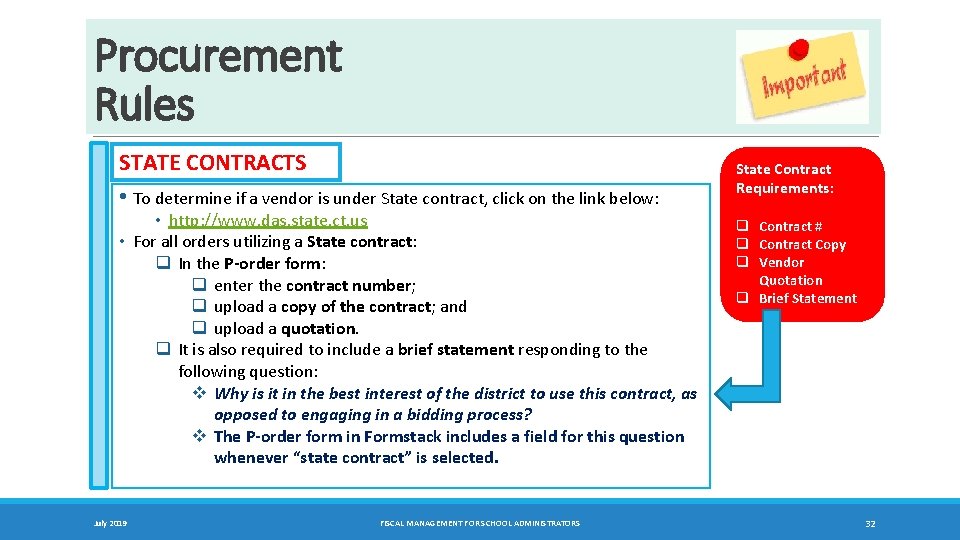
Procurement Rules STATE CONTRACTS • To determine if a vendor is under State contract, click on the link below: • http: //www. das. state. ct. us • For all orders utilizing a State contract: q In the P‐order form: q enter the contract number; q upload a copy of the contract; and q upload a quotation. q It is also required to include a brief statement responding to the following question: v Why is it in the best interest of the district to use this contract, as opposed to engaging in a bidding process? v The P‐order form in Formstack includes a field for this question whenever “state contract” is selected. July 2019 FISCAL MANAGEMENT FOR SCHOOL ADMINISTRATORS State Contract Requirements: q Contract # q Contract Copy q Vendor Quotation q Brief Statement 32
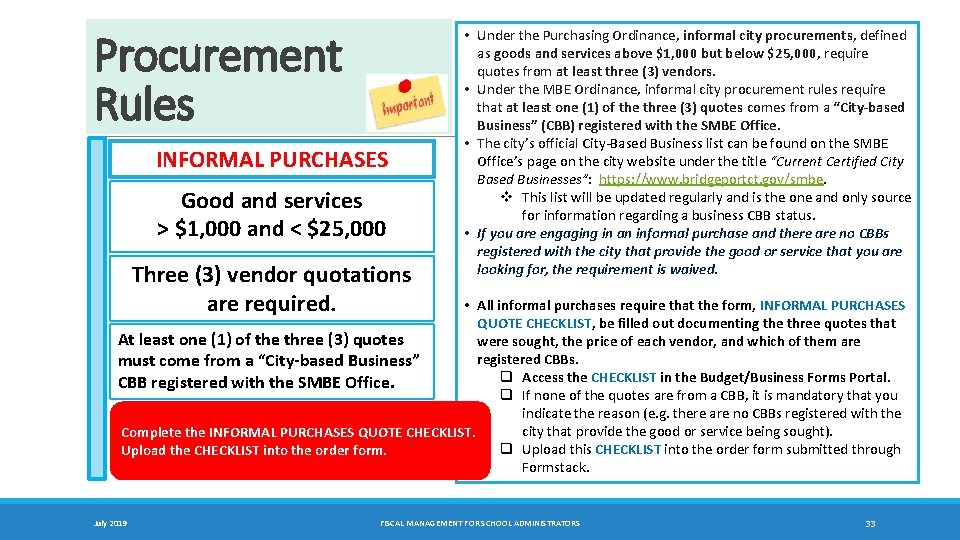
Procurement Rules INFORMAL PURCHASES Good and services > $1, 000 and < $25, 000 Three (3) vendor quotations are required. • Under the Purchasing Ordinance, informal city procurements, defined as goods and services above $1, 000 but below $25, 000, require quotes from at least three (3) vendors. • Under the MBE Ordinance, informal city procurement rules require that at least one (1) of the three (3) quotes comes from a “City‐based Business” (CBB) registered with the SMBE Office. • The city’s official City-Based Business list can be found on the SMBE Office’s page on the city website under the title “Current Certified City Based Businesses”: https: //www. bridgeportct. gov/smbe. v This list will be updated regularly and is the one and only source for information regarding a business CBB status. • If you are engaging in an informal purchase and there are no CBBs registered with the city that provide the good or service that you are looking for, the requirement is waived. • All informal purchases require that the form, INFORMAL PURCHASES QUOTE CHECKLIST, be filled out documenting the three quotes that At least one (1) of the three (3) quotes were sought, the price of each vendor, and which of them are registered CBBs. must come from a “City‐based Business” q Access the CHECKLIST in the Budget/Business Forms Portal. CBB registered with the SMBE Office. q If none of the quotes are from a CBB, it is mandatory that you indicate the reason (e. g. there are no CBBs registered with the city that provide the good or service being sought). Complete the INFORMAL PURCHASES QUOTE CHECKLIST. q Upload this CHECKLIST into the order form submitted through Upload the CHECKLIST into the order form. Formstack. July 2019 FISCAL MANAGEMENT FOR SCHOOL ADMINISTRATORS 33
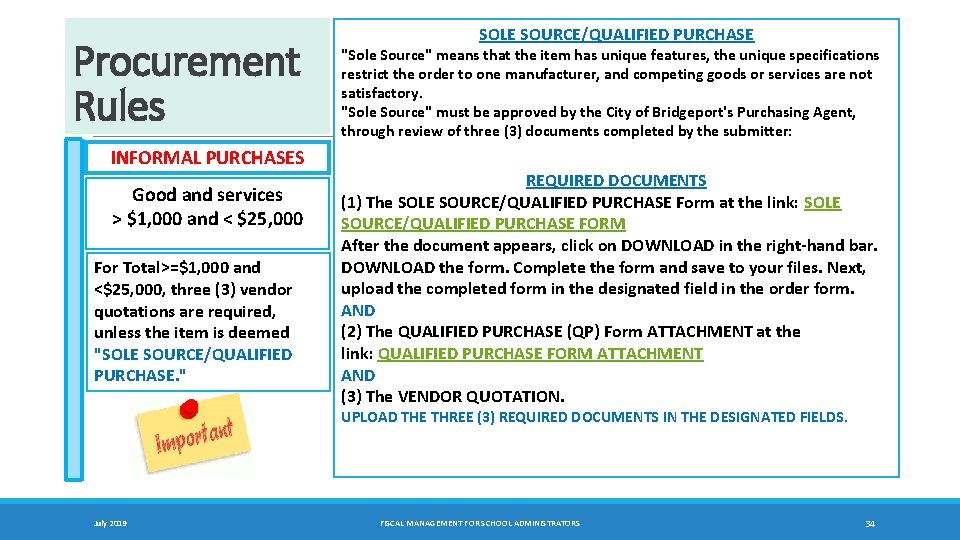
Procurement Rules INFORMAL PURCHASES Good and services > $1, 000 and < $25, 000 For Total>=$1, 000 and <$25, 000, three (3) vendor quotations are required, unless the item is deemed "SOLE SOURCE/QUALIFIED PURCHASE. " SOLE SOURCE/QUALIFIED PURCHASE "Sole Source" means that the item has unique features, the unique specifications restrict the order to one manufacturer, and competing goods or services are not satisfactory. "Sole Source" must be approved by the City of Bridgeport's Purchasing Agent, through review of three (3) documents completed by the submitter: REQUIRED DOCUMENTS (1) The SOLE SOURCE/QUALIFIED PURCHASE Form at the link: SOLE SOURCE/QUALIFIED PURCHASE FORM After the document appears, click on DOWNLOAD in the right‐hand bar. DOWNLOAD the form. Complete the form and save to your files. Next, upload the completed form in the designated field in the order form. AND (2) The QUALIFIED PURCHASE (QP) Form ATTACHMENT at the link: QUALIFIED PURCHASE FORM ATTACHMENT AND (3) The VENDOR QUOTATION. UPLOAD THE THREE (3) REQUIRED DOCUMENTS IN THE DESIGNATED FIELDS. July 2019 FISCAL MANAGEMENT FOR SCHOOL ADMINISTRATORS 34
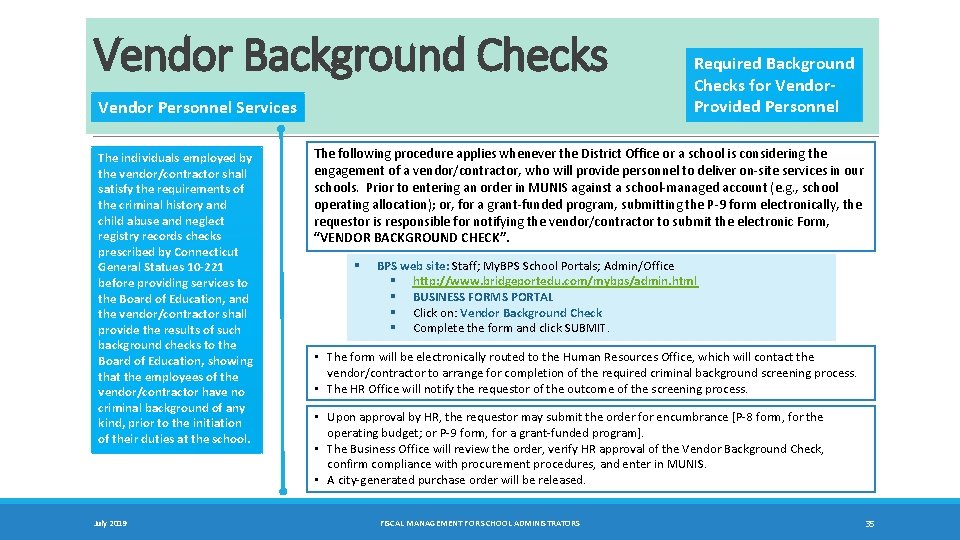
Vendor Background Checks Vendor Personnel Services The individuals employed by the vendor/contractor shall satisfy the requirements of the criminal history and child abuse and neglect registry records checks prescribed by Connecticut General Statues 10‐ 221 before providing services to the Board of Education, and the vendor/contractor shall provide the results of such background checks to the Board of Education, showing that the employees of the vendor/contractor have no criminal background of any kind, prior to the initiation of their duties at the school. July 2019 Required Background Checks for Vendor‐ Provided Personnel The following procedure applies whenever the District Office or a school is considering the engagement of a vendor/contractor, who will provide personnel to deliver on-site services in our schools. Prior to entering an order in MUNIS against a school-managed account (e. g. , school operating allocation); or, for a grant-funded program, submitting the P-9 form electronically, the requestor is responsible for notifying the vendor/contractor to submit the electronic Form, “VENDOR BACKGROUND CHECK”. § BPS web site: Staff; My. BPS School Portals; Admin/Office § http: //www. bridgeportedu. com/mybps/admin. html § BUSINESS FORMS PORTAL § Click on: Vendor Background Check § Complete the form and click SUBMIT. • The form will be electronically routed to the Human Resources Office, which will contact the vendor/contractor to arrange for completion of the required criminal background screening process. • The HR Office will notify the requestor of the outcome of the screening process. • Upon approval by HR, the requestor may submit the order for encumbrance [P-8 form, for the operating budget; or P-9 form, for a grant-funded program]. • The Business Office will review the order, verify HR approval of the Vendor Background Check, confirm compliance with procurement procedures, and enter in MUNIS. • A city-generated purchase order will be released. FISCAL MANAGEMENT FOR SCHOOL ADMINISTRATORS 35
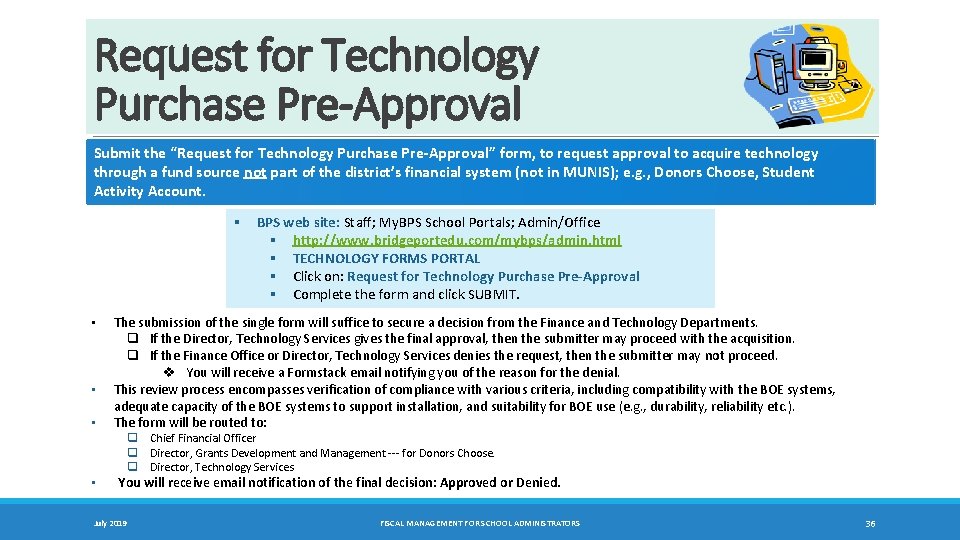
Request for Technology Purchase Pre-Approval Submit the “Request for Technology Purchase Pre‐Approval” form, to request approval to acquire technology through a fund source not part of the district’s financial system (not in MUNIS); e. g. , Donors Choose, Student Activity Account. § BPS web site: Staff; My. BPS School Portals; Admin/Office § http: //www. bridgeportedu. com/mybps/admin. html § TECHNOLOGY FORMS PORTAL § Click on: Request for Technology Purchase Pre‐Approval § Complete the form and click SUBMIT. • • The submission of the single form will suffice to secure a decision from the Finance and Technology Departments. q If the Director, Technology Services gives the final approval, then the submitter may proceed with the acquisition. q If the Finance Office or Director, Technology Services denies the request, then the submitter may not proceed. v You will receive a Formstack email notifying you of the reason for the denial. This review process encompasses verification of compliance with various criteria, including compatibility with the BOE systems, adequate capacity of the BOE systems to support installation, and suitability for BOE use (e. g. , durability, reliability etc. ). The form will be routed to: q Chief Financial Officer q Director, Grants Development and Management --- for Donors Choose. q Director, Technology Services You will receive email notification of the final decision: Approved or Denied. July 2019 FISCAL MANAGEMENT FOR SCHOOL ADMINISTRATORS 36
Prohibition on Splitting Orders Splitting orders to a vendor is prohibited. [excluding vendors with State or City contracts; “qualified” purchases for curriculum] Definition Three Vendor Quotations [$1, 000 ‐ $24, 999] An order to a single vendor totaling $1, 000 or above cannot be split into multiple orders to that vendor, since to do so would be a violation of the purchasing ordinance. In accordance with the purchasing ordinance, for an order to a single vendor in an amount between $1, 000 and $24, 999, it is required to obtain three (3) vendor quotations. July 2019 FISCAL MANAGEMENT FOR SCHOOL ADMINISTRATORS 37
Prerequisite for Vendors: An Official City-generated Purchase Order • A vendor is prohibited from providing any goods or services to a BOE school or office without first receiving an official City‐generated purchase order. • A BOE employee is prohibited from placing an order directly with a vendor by telephone, email or any other means. • Only upon receipt of the official City‐generated purchase order is the vendor authorized to proceed to provide the designated goods or services to the school or office. • The correct procedure is to request a vendor quotation, or three quotations (when required for purchases between $1, 000 and $24, 999), and submit the correct P-order form in Formstack for processing. • If the P-order form is approved by the Finance/Business Office, then the Business Office will enter a requisition in MUNIS for approval by the City Purchasing Office. • The City Purchasing Office will issue an official purchase order to the vendor. • This procedure accomplished the following objectives: v Verifies availability of funds in the correct account for the purchase; v Enables proper debiting of that account, through an encumbrance, so that account balances are kept up to date; v Secures approval of the school or office supervisor and Finance/Business Office prior to placement of the order; v Assures the vendor, upon receipt of the official purchase order, that funds have been encumbered to pay for the purchase, following delivery of the goods or services. • After a vendor completes a delivery, based upon prior receipt of the official purchase order, the vendor will issue an invoice. • The invoice is not entered in Formstack, but transmitted directly to the Business Office, where delivery will be confirmed and payment processed (against the prior encumbrance in MUNIS). • Any P-order entered in Formstack with only an invoice uploaded will be returned to the originator of that order. The originator will then be required to comply with the established procurement procedures, and may be subject to disciplinary action for a violation of the standard operating procedures. July 2019 FISCAL MANAGEMENT FOR SCHOOL ADMINISTRATORS 38
Prohibition on Telephone Orders • • Telephone orders are prohibited. This means that a BOE employee may not contact vendors by telephone to place orders, or place an order directly with a vendor by telephone, email or any other means. All school orders must be processed by first submitting the electronic P‐ 8, P‐ 9 or P‐ 10 form, approved by the Principal. A District Office order is processed by first submitting the electronic P-9 D form, approved by the district office supervisor. Following review, the Business Office will enter the order in MUNIS, creating a requisition. The entry in MUNIS will encumber funds against the designated budget account. The encumbrance will result in the City generating and sending to the vendor the official Purchase Order (PO). The vendor must be in receipt of the PO, prior to acting on delivery of materials and/or services. In this way, vendors will fill orders with assurance of availability of funds and accounts (district and school) will accurately reflect liabilities. Anyone who violates the prohibition may be subject to disciplinary action and/or be held personally liable for the expenditure. July 2019 FISCAL MANAGEMENT FOR SCHOOL ADMINISTRATORS 39
Procurement Rules: Professional/Technical Services Consulting Services: Organizations and Individuals (Independent Contractors) Step 1 – Written Agreement (or Contract) • • Organizations (e. g. , universities) Ø Obtain a signed, written agreement between the organization and the Bridgeport School District (on behalf of the school). Ø The agreement should specify the following: services to be provided by the organization, by whom, location, dates/times, rate of pay, maximum total amount, and invoice schedule. Individuals – Independent Contractors (not employees of the Bridgeport School District) Ø Compose a written agreement between the individual and the Bridgeport School District (on behalf of the school). Ø Contact the CFO to request a sample. The CFO is a signatory on all agreements with individual contractors. Ø The agreement will specify: Services to be provided by the individual contractor (description, location, dates/times), Duration of Assignment (summary of days/hours by time period), Compensation (rate of pay, maximum amount, invoice schedule). Step 2 – Submit an electronic order (to encumber funds). The funds must be encumbered and a City Purchase Order generated, before services may be rendered. • • • Operating budget: Submit the electronic P‐ 8 form. Upload the signed, written agreement. Parent involvement budget: Submit the electronic P‐ 10 form. Upload the signed, written agreement. School‐specific grants & district allocations: Submit the electronic P‐ 9 form. Upload the signed, written agreement. The contractor must be a registered vendor, in order for an order to be encumbered. July 2019 FISCAL MANAGEMENT FOR SCHOOL ADMINISTRATORS 40
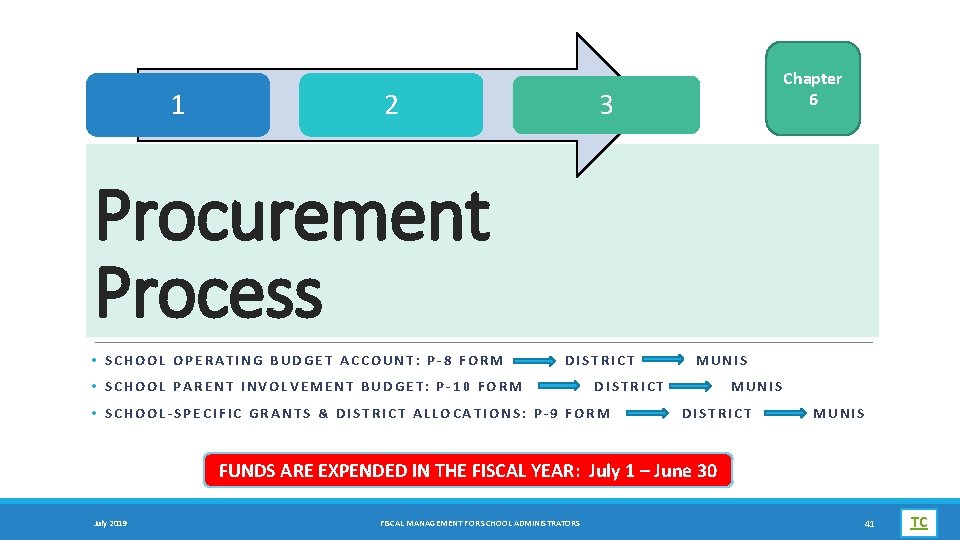
1 2 3 Chapter 6 Procurement Process • S C H O O L O P E R A T I N G B U D G E T A C C O U N T : P ‐ 8 F O R M D I S T R I C T MUNIS • SCHOOL PARENT INVOLVEMENT BUDGET: P‐ 10 FORM DISTRICT MUNIS • S C H O O L ‐ S P E C I F I C G R A N T S & D I S T R I C T A L L O C A T I O N S : P ‐ 9 F O R M D I S T R I C T M U N I S FUNDS ARE EXPENDED IN THE FISCAL YEAR: July 1 – June 30 July 2019 FISCAL MANAGEMENT FOR SCHOOL ADMINISTRATORS 41 TC
![School Operating Budget v Operating Budget [includes Vending Commissions] The clerical completes and submits](http://slidetodoc.com/presentation_image/316f12773d61f3e345844a0e0022327c/image-42.jpg "School Operating Budget v Operating Budget [includes Vending Commissions] The clerical completes and submits")
School Operating Budget v Operating Budget [includes Vending Commissions] The clerical completes and submits the electronic School Order Form P‐ 8. § BPS web site: Staff; My. BPS School Portals; Admin/Office § http: //www. bridgeportedu. com/mybps/admin. html § BUDGET/BUSINESS FORMS PORTAL § Click on: School Order Form P‐ 8: Operating Budget 1. For computer hardware and software orders, check “Yes” to the question, “Is this order for computer hardware/software? ”. 2. First, the P-8 order is routed to the principal for electronic approval. 3. For computer hardware/software, the order is routed to the Director, Technology Services for approval. 4. At the District, the order is reviewed by the Business Office to verify compliance with procurement regulations and availability of funds in the school’s account. 5. The Business Office encumbers the P-8 in MUNIS for action by City Purchasing. 6. A City-generated Purchase Order is sent to the vendor. 7. The vendor delivers the goods/services to the school. 8. The vendor submits the invoice to the Business Office, City Hall, 45 Lyon Terrace – Room 320, Bridgeport, CT 06604. Attention: Michael Lombardi, mlombardi@bridgeportedu. net. 9. The Business Office contacts the school to confirm delivery and enters the “Receiver” in MUNIS. 10. The Business Office transmits the invoice to City Accounts Payable for processing. The City operates on a 30 -45 day payment cycle. REMINDER: Before submitting the P‐ 8 order, VERIFY that the OBJECT CODE in the account has sufficient funds. July 2019 FISCAL MANAGEMENT FOR SCHOOL ADMINISTRATORS P‐ 8 42
![School Operating Budget v Operating Budget [includes Vending Commissions] v Operating Budget [includes Vending](http://slidetodoc.com/presentation_image/316f12773d61f3e345844a0e0022327c/image-43.jpg "School Operating Budget v Operating Budget [includes Vending Commissions] v Operating Budget [includes Vending")
School Operating Budget v Operating Budget [includes Vending Commissions] v Operating Budget [includes Vending Commission Account] 1. Each school remains accountable to ensure that the allocated budget is managed with integrity, in compliance with regulations and in balance. 2. Each school will be responsible to view the status of the allocated accounts in MUNIS: amounts allocated by code, encumbrances, expenditures to date, balance. REMINDER: Vending Commission: • • July 2019 School Supplies only Object Code 54580 FISCAL MANAGEMENT FOR SCHOOL ADMINISTRATORS 43
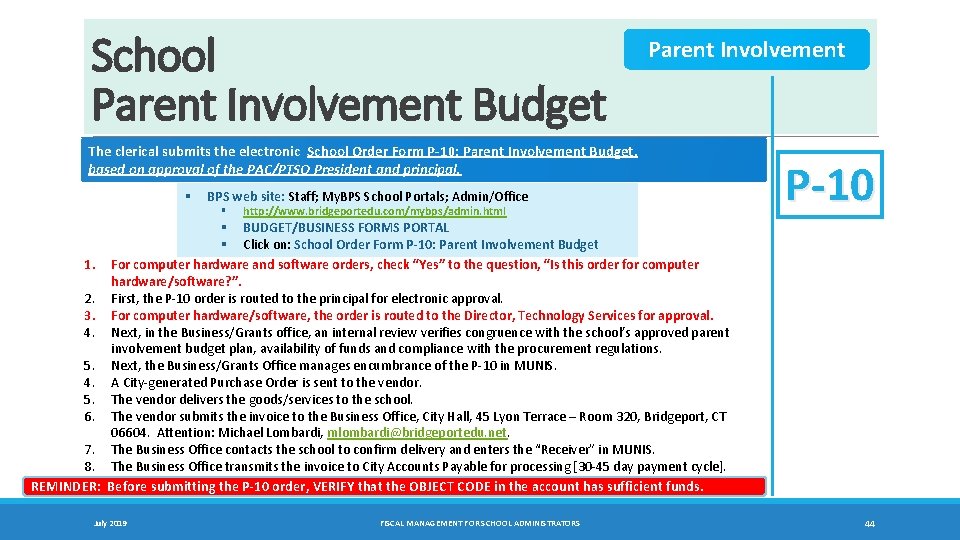
School Parent Involvement Budget Parent Involvement The clerical submits the electronic School Order Form P‐ 10: Parent Involvement Budget, based on approval of the PAC/PTSO President and principal. § BPS web site: Staff; My. BPS School Portals; Admin/Office § http: //www. bridgeportedu. com/mybps/admin. html P‐ 10 § BUDGET/BUSINESS FORMS PORTAL § Click on: School Order Form P‐ 10: Parent Involvement Budget 1. For computer hardware and software orders, check “Yes” to the question, “Is this order for computer hardware/software? ”. 2. First, the P-10 order is routed to the principal for electronic approval. 3. For computer hardware/software, the order is routed to the Director, Technology Services for approval. 4. Next, in the Business/Grants office, an internal review verifies congruence with the school’s approved parent involvement budget plan, availability of funds and compliance with the procurement regulations. 5. Next, the Business/Grants Office manages encumbrance of the P-10 in MUNIS. 4. A City-generated Purchase Order is sent to the vendor. 5. The vendor delivers the goods/services to the school. 6. The vendor submits the invoice to the Business Office, City Hall, 45 Lyon Terrace – Room 320, Bridgeport, CT 06604. Attention: Michael Lombardi, mlombardi@bridgeportedu. net. 7. The Business Office contacts the school to confirm delivery and enters the “Receiver” in MUNIS. 8. The Business Office transmits the invoice to City Accounts Payable for processing [30 -45 day payment cycle]. REMINDER: Before submitting the P‐ 10 order, VERIFY that the OBJECT CODE in the account has sufficient funds. July 2019 FISCAL MANAGEMENT FOR SCHOOL ADMINISTRATORS 44
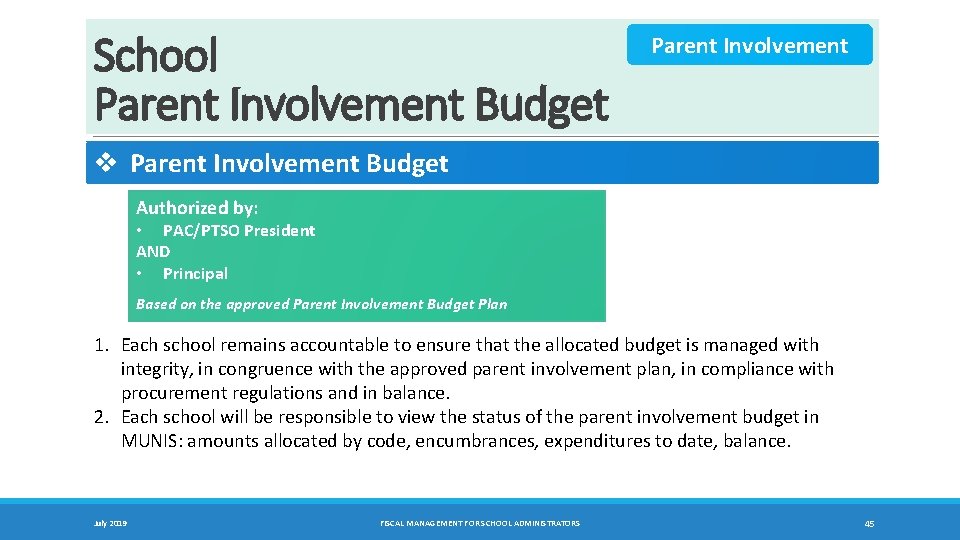
School Parent Involvement Budget Parent Involvement v Parent Involvement Budget Authorized by: • PAC/PTSO President AND • Principal Based on the approved Parent Involvement Budget Plan 1. Each school remains accountable to ensure that the allocated budget is managed with integrity, in congruence with the approved parent involvement plan, in compliance with procurement regulations and in balance. 2. Each school will be responsible to view the status of the parent involvement budget in MUNIS: amounts allocated by code, encumbrances, expenditures to date, balance. July 2019 FISCAL MANAGEMENT FOR SCHOOL ADMINISTRATORS 45
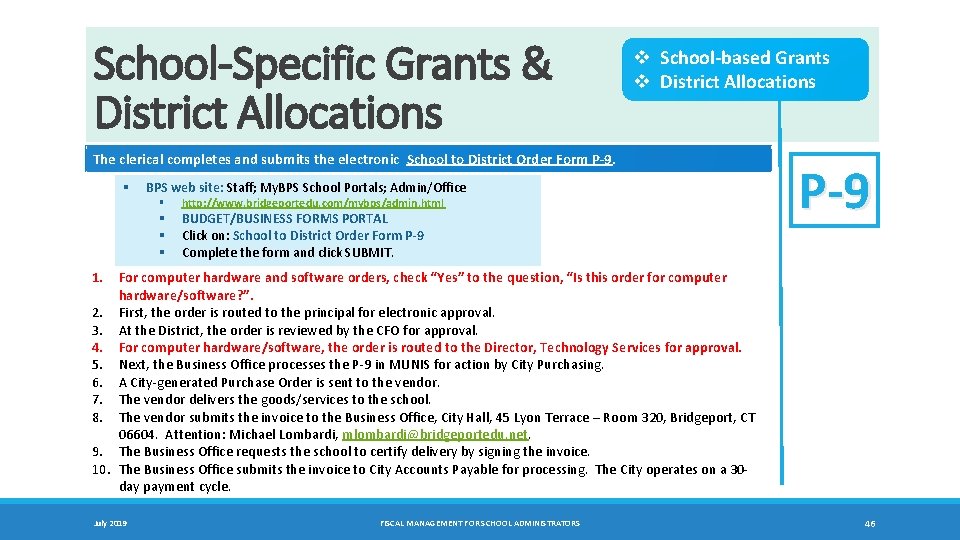
School-Specific Grants & District Allocations v School‐based Grants v District Allocations The clerical completes and submits the electronic School to District Order Form P‐ 9. § BPS web site: Staff; My. BPS School Portals; Admin/Office § § http: //www. bridgeportedu. com/mybps/admin. html BUDGET/BUSINESS FORMS PORTAL Click on: School to District Order Form P‐ 9 Complete the form and click SUBMIT. P‐ 9 1. For computer hardware and software orders, check “Yes” to the question, “Is this order for computer hardware/software? ”. 2. First, the order is routed to the principal for electronic approval. 3. At the District, the order is reviewed by the CFO for approval. 4. For computer hardware/software, the order is routed to the Director, Technology Services for approval. 5. Next, the Business Office processes the P-9 in MUNIS for action by City Purchasing. 6. A City-generated Purchase Order is sent to the vendor. 7. The vendor delivers the goods/services to the school. 8. The vendor submits the invoice to the Business Office, City Hall, 45 Lyon Terrace – Room 320, Bridgeport, CT 06604. Attention: Michael Lombardi, mlombardi@bridgeportedu. net. 9. The Business Office requests the school to certify delivery by signing the invoice. 10. The Business Office submits the invoice to City Accounts Payable for processing. The City operates on a 30 day payment cycle. July 2019 FISCAL MANAGEMENT FOR SCHOOL ADMINISTRATORS 46
Chapter 7 P-Card for Principals • OVERVIEW, PURPOSE, LIMITS • STATEMENTS, APPLICATION, EXPIRATION DATE July 2019 FISCAL MANAGEMENT FOR SCHOOL ADMINISTRATORS 47 TC
P-Card: Overview, Purpose, Regulations Bridgeport Public Schools (BPS) offers Purchasing Cards (P‐card) for principals, as a procurement mode supplemental to MUNIS for use in particular circumstances. The P‐card is intended to assist with flexibility, time saving and convenience. Overview • • • The Principal is delegated authority to use the P-card to purchase supplies for school-related operations and pay for such purchases on behalf of the Bridgeport School District, using the P-card. All purchases made with the P-card must be consistent with the limits set by the district. Compliance with the PURCHASING RULES is required. Purpose • • The P-card may be used to rapidly meet urgent needs and/or simplify procurement of essential supplies, within specified limits on transactions. The P-card does not replace the MUNIS ordering system. It is a supplemental mode of purchasing, intended for use under specific circumstances. For major purchases to meet future, emergent or ongoing needs, it remains necessary to plan proactively and place orders in sufficient time, in MUNIS. The P-card is linked to the school’s operating allocation. All expenditures made to the P-card will be deducted from the school’s operating allocation. Limits • • Individual transaction: $250 Monthly transaction: $500 Exceptions (case by case basis): Email the CFO. July 2019 FISCAL MANAGEMENT FOR SCHOOL ADMINISTRATORS 48
P-Card: Procedures, Application Statements • • The bank will e-mail the following monthly statements within (5) business days after the 30 day billing cycle. Ø To the Principal ‐‐‐ Cardholder Statement of Account v All purchases, credits and the transaction data that the cardholder has made in the 30 day billing cycle v The principal is required to retain these monthly statements for a period of six (6) years. Ø To the Business Office ‐ Approving Official Account Summary v A record of all cardholder activity for each principal Ø To the Business Office – Official Invoice v The invoice which BPS will pay by charging each school’s operating budget for the P-card expenditures of the principal in the month. The cardholder is responsible to reconcile his/her statement and notify the Business Office of any discrepancies immediately. Regulations • https: //bridgeportedu. formstack. com/forms/untitled_form_9_copy All regulations pertinent to the P-card are delineated in the on-line Application: “Principal’s Agreement: Delegation of Authority for P‐Card Purchases. ” Application (on‐line) Apply by June 1 st, to guarantee receipt by July 15 th. § P‐cards will expire on May 30 th. BPS web site: Staff; My. BPS School Portals; Admin/Office § § § July 2019 http: //www. bridgeportedu. com/mybps/admin. html BUDGET/BUSINESS FORMS PORTAL Click on: Principal’s Agreement: P‐Card FISCAL MANAGEMENT FOR SCHOOL ADMINISTRATORS 49
Chapter 8 Operational Services • MFD/PRINTER NETWORK • POSTAGE SERVICES • FREE FIELD TRIPS • DESTINY: INVENTORY SYSTEM • ALL OTHER FIELD TRIPS • FOOD/NUTRITION SERVICES July 2019 FISCAL MANAGEMENT FOR SCHOOL ADMINISTRATORS 50 TC
XEROX XPS NETWORK (Xerox Print Services) The Business Office manages the XPS configuration (equipment, lease, service and supplies). The Technology Office manages the XPS connectivity (drivers, software workflow, scanning etc. ) • All Xerox MFDs (Multi-function Devices) are part of the XPS network, funded by the district for the lease, service and supplies (except paper and staples). • Printers that are included in the district’s authorized 1: 4 (1 printer: 4 employees) configuration are part of the XPS network, funded by the district for service and supplies (except paper and staples). Ø The XPS-supported printers are tagged with a Xerox label. Ø Printers that are not labeled are not supported by XPS and are the responsibility of the school or user. • Schools are responsible for ordering paper and staples with funding from their school operating budgets. TO ORDER Telephone Supplies (included in XPS) 866 -237 -9728 Service 866 -237 -9728 Supplies – Billable (e. g. , staples) The Business Office will charge the invoice to the school’s operating budget. 866 -237 -9728 Report issues related to service/supply orders or copier operations to the Xerox Docu. Care Associate: Tom Morrision ‐‐‐ tmorrison@bridgeportedu. net July 2019 FISCAL MANAGEMENT FOR SCHOOL ADMINISTRATORS 51
![Free Field Trips BRIDGEPORT LOCALE: Bridgeport and the surrounding communities [Fairfield, Stratford, Trumbull] WE](http://slidetodoc.com/presentation_image/316f12773d61f3e345844a0e0022327c/image-52.jpg "Free Field Trips BRIDGEPORT LOCALE: Bridgeport and the surrounding communities [Fairfield, Stratford, Trumbull] WE")
Free Field Trips BRIDGEPORT LOCALE: Bridgeport and the surrounding communities [Fairfield, Stratford, Trumbull] WE Transport provides 100 free field (bus) trips in the Bridgeport locale in the school year, up to ten (10) free busses in each month. Requests for free bus transportation for planned field trips will be submitted electronically, to the Transportation Office. • Free bus trips will be granted, on a first come, first serve basis. Each request will be time stamped in Form. Stack. • For each month, any requests received for transportation in that month, after #10 has been granted, will be declined. If ten (10) free bus trips are not utilized in any particular month, the remainder will be added to the number available in the next month. For example, if only 8 bus trips are utilized in September, then 12 [10 + 2] bus trips will be available in October. § BPS web site: Staff; My. BPS School Portals; Admin/Office § http: //www. bridgeportedu. com/mybps/admin. html § STUDENT SUPPORT FORMS PORTAL § Click on: TR‐ 1: Request for Free Field (Bus) Trip § Complete the form and click SUBMIT. • The request will be routed to the Transportation Office. Ø If the Transportation Office approves the request (within the available free local bus trips for the month), it will be routed electronically to WE Transport for processing. Ø The principal will receive email notification of the decision (approved or denied) from Form. Stack. In the event of a denial, the reason for the denial will be noted in the notification email in the field labeled, “Transportation Office – Comments”. July 2019 FISCAL MANAGEMENT FOR SCHOOL ADMINISTRATORS 52
All Other Field Trips The school is responsible for funding any field trips, beyond free trips provide by the district. 1. WE Transport Quotation q Complete the WE Transport quotation form; fax or email to the WE Transport Office. q Email Andrew Ifill: andrwi@wetransport. com FAX: 203 -883 -8082 Tel: 203 -883 -8081 2. Process an order to WE Transport. q P-8 (operating budget); P-9 (school-specific grant); P-10 (parent involvement) q Submit the electronic P-8, P-9 or P-10 form. q Upload the quotation into the electronic form. q The form will be routed electronically to the principal for approval. 3. At the district, the Business Office will review and, if acceptable, enter in MUNIS. 4. The City Purchasing Office will generate and send the official Purchase order to the vendor. 5. Following the bus trip, WE Transport will transmit an invoice to the Business Office for processing of payment against the encumbered order. 6. The Business Office will contact the school to confirm receipt of the service and enter the “Receiver” in MUNIS. July 2019 FISCAL MANAGEMENT FOR SCHOOL ADMINISTRATORS 53
TR-2: TRANSPORTATION REQUEST AFTER THE SCHOOL YEAR BEGINS: For students eligible for bus transportation to school… THE TR‐ 2 FORM IS TO BE SUBMITTED BY: • SCHOOLS ‐ FOR REGULAR EDUCATION • Schools: Bridgeport public schools, charter, private, parochial, State technical, Trumbull Agriscience. • OFFICE OF BILINGUAL EDUCATION ‐ FOR BILINGUAL EDUCATION Students • OFFICE OF SPECIALIZED INSTRUCTION ‐ FOR SPECIAL EDUCATION Students • SCIENCE OFFICE ‐ For TALENTED AND GIFTED (TAG) Students [Batalla, Winthrop] • STUDENT SUPPORT SERVICES ‐ For Overcrowded Transfers Submit this form to either: (a) Confirm a bus stop for a student ASSIGNED to an existing bus route at the school or district level. OR (b) Request a BUS route and stop when an existing route is not available for the student's address. OR (c) Request a CHANGE in bus stop for a child currently assigned to a bus route. Bus Stop CHANGE Requests for REGULAR EDUCATION will be reviewed, starting October 9, 2018. All other requests will be reviewed as received. July 2019 FISCAL MANAGEMENT FOR SCHOOL ADMINISTRATORS 54
Postage Services Stamps. com Postage Services: Each school has access to an on‐line "electronic postage meter", with a simple method for adding funds to the meter and the convenience of on‐line printing of postage. The District Office has set up a General Postage Fund. Each school remains fiscally empowered and accountable for the cost of postage used at the school level. Ø The school will set up funds in the Postage object code #54725 of the operating budget. Ø The meter will reflect the balance as of June 30 th, when the new fiscal year begins. § TO ADD POSTAGE: As directed by the Principal, the School User should click on "Buy Postage" in the Postage Balance box in the lower left-hand corner of their screen, select the postage amount within the meter’s limit and school budget, and click “OK”. This action will draw upon the district’s General Postage Fund. § Prior to loading the meter, be sure that the operating budget has sufficient funds on the postage line. Ø The Business Office will charge the monthly postage deducted from the General Fund to the school's operating budget (postage line) or, if requested by the school, a school-specific grant account (postage line). Ø Based on monthly usage reports, the Business Office will process journal entries to charge the school accounts for the postage used. • • • Continuing principals have access to Stamps. com via existing passwords. For newly assigned principals, the District Office will reset the school password and the principal may then change the password for internal school use. The principal should give the school password to the clerical responsible for managing posting of mail. Stamps. com offers Webinar training on Tuesdays and Thursdays. On-line training and teaching tools are embedded in the software. PERMIT MAILINGS [at least 200 envelopes, identical letter]: • Request and pick up the “permit” envelopes from the Business Office. Load and label the envelopes at the school. Sort by zip code, in bundles of 50. • Tabulate the number by zip code and total count. Bring the envelopes to the Business office, with the counts by zip and total count specified. • The mailing will be processed by the district at the pre‐sort rate authorized by USPS, as a district expense. July 2019 FISCAL MANAGEMENT FOR SCHOOL ADMINISTRATORS 55
Destiny Asset Management Textbooks Access: BPS web site, Staff, My. BPS Portals, Admin/Office http: //www. bridgeportedu. com/mybps/admin. html DESTINY is the district’s Asset Management System for textbook inventory and control. • • Schools are accountable for protecting and conserving all textbook resources, those ordered by the district and school. Schools are accountable for utilizing the Destiny textbook inventory system, as prescribed by the district. All hard cover (non‐consumable) textbooks are bar‐coded and inventoried in the Destiny system Ø Textbooks are checked out of Destiny and checked back in, at the end of the course. All consumable books are inventoried in the system, by title and count only (not bar-coded) Ø Consumables books are checked out once, never checked back in. Ordering Books for the New School Year • • • Step One: Determine the Need Ø Compare the number of available books, by course, to the projected number of books that will be needed, based on the projected register. Ø Identify the quantities of additional books needed for the new school year. Step Two: Complete the Order Forms Ø Access the Textbook Order Forms workbook in the BPS Budget/Business Portal. Ø Complete the forms in the workbook. Ø Transmit to Chief Financial Officer. Step Three: Collection and Transmittal of Fines for Lost Books Ø If the school was able to collect fines for books not returned, the fines should be deposited in the school’s Student Activity Account. Ø Write a check to the Bridgeport Board of Education for the amount collected and deliver to Michael Lombardi, Business Office, Room 320. The district will deposit the funds in the district operating budget, to offset the cost of the purchase of additional books for the school. Destiny Inventory Support: Contact the Business Office. July 2019 FISCAL MANAGEMENT FOR SCHOOL ADMINISTRATORS 56
Destiny Asset Management Technology Access: BPS web site, Staff, My. BPS Portals, Admin/Office http: //www. bridgeportedu. com/mybps/admin. html DESTINY is the district’s Asset Management System for technology: laptops, tablets, chromebooks etc. • • • Schools are accountable for protecting and conserving all technological assets, those ordered by the district and school. Schools are accountable for utilizing the Destiny asset inventory system, as prescribed by the district. The Information Technology Office (IT) is responsible for the initial inventory of all technological devices placed in the schools. Ø All devices are bar‐coded and inventoried in the Destiny system. At the school level, the school is responsible for maintaining the inventory. This means checking out the equipment in Destiny to teachers (e. g. , a chromebook cart to a teacher for use in the classroom) and checking back in the equipment in Destiny, when no longer in use. Compliance with the “check out/check in” procedure ensures that the assignment and availability of assets can be accurately tracked in Destiny at all times. These actions are essential to ensure accountability for the district’s valuable assets. Destiny Inventory Support: Contact the Business Office. July 2019 FISCAL MANAGEMENT FOR SCHOOL ADMINISTRATORS 57
FOOD/NUTRITION SERVICES Breakfast in the Classroom BREAKFAST IN THE CLASSROOM: Electronic Accountability • A custom web page has been developed for the administrator/teacher portal that allows the end user to: Ø Enter the daily Breakfast served to each child present in the classroom, along with their attendance for the day. • Elementary schools participating in daily Breakfast in the Classroom will indicate which children received a reimbursable breakfast by checking the students’ name in the corresponding data entry field, adjacent to the Attendance/Absent box. Adherence to this daily procedure is essential, in order to ensure accountability for the breakfast program. July 2019 FISCAL MANAGEMENT FOR SCHOOL ADMINISTRATORS 58
FOOD/NUTRITION SERVICES Food and Beverage Requirements for Fundraisers http: //www. sde. ct. gov/sde/lib/sde/PDF/deps/Nutrition/HFC/Fundhfc. pdf Requirements Acceptable Foods and Beverages http: //www. sde. ct. gov/sde/cwp/view. asp? a=2626&q=322432 This document summarizes the requirements for food and beverage fundraisers in public schools that choose to implement Healthy Food Certification (HFC) under Section 10 -215 f of the Connecticut General Statutes (C. G. S. ). “Fundraisers” are any activities during which money or its equivalent (such as tickets, coupons, tokens and similar items) is exchanged for the purchase of a product in support of the school or school‐related activities. • Requirements for food fundraisers: Connecticut Nutrition Standards (CNS) of C. G. S. Section 10 -215 e, the state competitive foods regulations (Section 10 -Guide to 215 b-23 of the Regulations of Connecticut State Agencies) and the state requirement to sell healthy food choices (C. G. S. Section 10 -221 p). • Requirements for beverage fundraisers: State beverage requirements, C. G. S. Section 10 -221 q and U. S. Department of Agriculture (USDA) Smart Snacks nutrition standards for competitive foods, National School Lunch Program and School Breakfast Program: Nutrition Standards for All Foods Sold in School. • The laws apply to all fundraising activities conducted on school premises by school‐related organizations (such as student clubs, sports teams and music programs) and outside organizations not affiliated with the school, such as scouting programs and other youth‐based community organizations. HFC districts must comply with the CNS for all foods sold to students separately from reimbursable school meals anywhere on school premises, such as cafeterias, vending machines, school stores and fundraisers. All foods and beverages sold must be compliant with the List of Acceptable Foods and Beverages during the school day. July 2019 FISCAL MANAGEMENT FOR SCHOOL ADMINISTRATORS 59
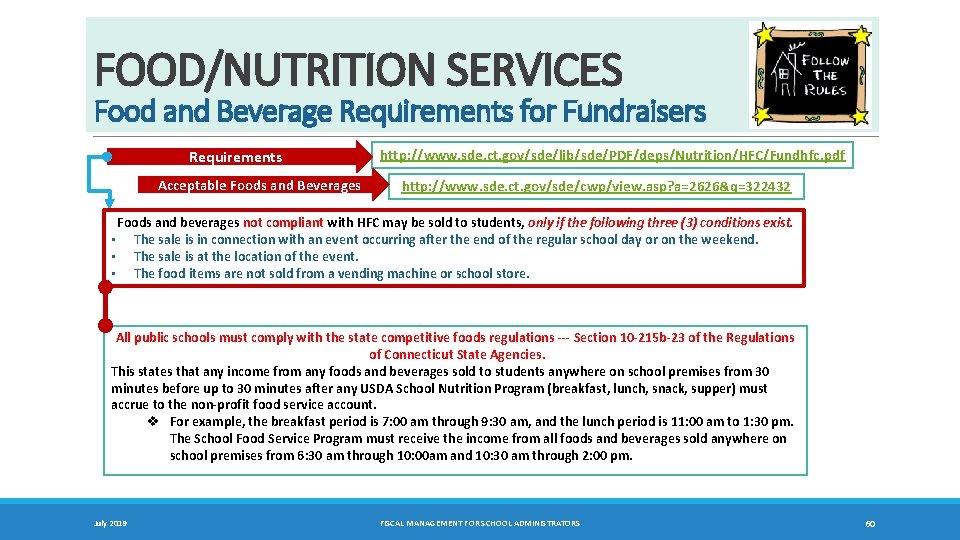
FOOD/NUTRITION SERVICES Food and Beverage Requirements for Fundraisers Requirements Acceptable Foods and Beverages http: //www. sde. ct. gov/sde/lib/sde/PDF/deps/Nutrition/HFC/Fundhfc. pdf http: //www. sde. ct. gov/sde/cwp/view. asp? a=2626&q=322432 Foods and beverages not compliant with HFC may be sold to students, only if the following three (3) conditions exist. • The sale is in connection with an event occurring after the end of the regular school day or on the weekend. • The sale is at the location of the event. • The food items are not sold from a vending machine or school store. All public schools must comply with the state competitive foods regulations ‐‐‐ Section 10‐ 215 b‐ 23 of the Regulations of Connecticut State Agencies. This states that any income from any foods and beverages sold to students anywhere on school premises from 30 minutes before up to 30 minutes after any USDA School Nutrition Program (breakfast, lunch, snack, supper) must accrue to the non‐profit food service account. v For example, the breakfast period is 7: 00 am through 9: 30 am, and the lunch period is 11: 00 am to 1: 30 pm. The School Food Service Program must receive the income from all foods and beverages sold anywhere on school premises from 6: 30 am through 10: 00 am and 10: 30 am through 2: 00 pm. July 2019 FISCAL MANAGEMENT FOR SCHOOL ADMINISTRATORS 60
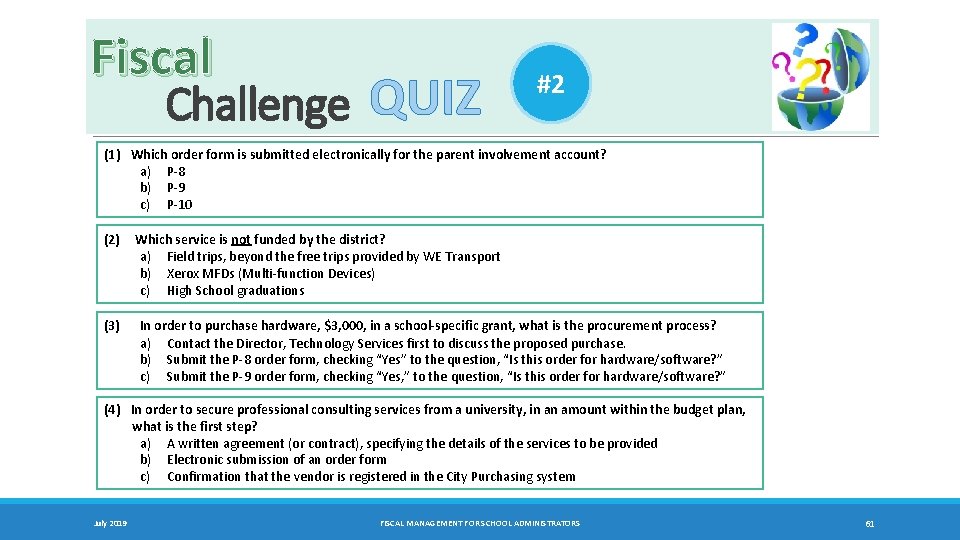
Fiscal Challenge QUIZ #2 (1) Which order form is submitted electronically for the parent involvement account? a) P-8 b) P-9 c) P-10 (2) (3) Which service is not funded by the district? a) Field trips, beyond the free trips provided by WE Transport b) Xerox MFDs (Multi-function Devices) c) High School graduations In order to purchase hardware, $3, 000, in a school‐specific grant, what is the procurement process? a) Contact the Director, Technology Services first to discuss the proposed purchase. b) Submit the P-8 order form, checking “Yes” to the question, “Is this order for hardware/software? ” c) Submit the P-9 order form, checking “Yes, ” to the question, “Is this order for hardware/software? ” (4) In order to secure professional consulting services from a university, in an amount within the budget plan, what is the first step? a) A written agreement (or contract), specifying the details of the services to be provided b) Electronic submission of an order form c) Confirmation that the vendor is registered in the City Purchasing system July 2019 FISCAL MANAGEMENT FOR SCHOOL ADMINISTRATORS 61
Chapter 9 Tracking and Certifying Delivery • STATUS OF ORDERS: VENDOR INQUIRY • CERTIFICATION OF DELIVERY • SCHOOL INVENTORY MANAGEMENT July 2019 FISCAL MANAGEMENT FOR SCHOOL ADMINISTRATORS 62 TC
Status of Orders: Vendor Inquiry FOR ALL ACCOUNTS: • PURCHASE ORDER q When City Purchasing generates and sends the Purchase Order (PO) to the vendor: q City Purchasing will also send a copy of the PO to the Business/Grants Office. • VENDOR INQUIRY q In general, delivery of any order to the school should occur within 15 -30 calendar days. q If the expected delivery date passes or the 30 -day point is approaching, the school clerical should contact the Business Office to inquire about the status of delivery. q The Business Office will contact the vendor and follow up with the school. July 2019 FISCAL MANAGEMENT FOR SCHOOL ADMINISTRATORS 63
Certification of Delivery FOR ALL ACCOUNTS: • The vendor delivers the goods/services to the school. • The vendor submits the invoice to the Business Office, City Hall, 45 Lyon Terrace – Room 320, Bridgeport, CT 06604. • The Business Office contacts the school to confirm delivery of the order. • The Business Office enters the “Receiver” in MUNIS. At the school level, if you receive an invoice and the items or services have been delivered, sign and date to certify the delivery, and transmit immediately to the Business Office. July 2019 FISCAL MANAGEMENT FOR SCHOOL ADMINISTRATORS 64
Inventory Management Inventory FOR ALL ACCOUNTS: • Upon receipt of the order, the school is responsible for taking the following actions: q Confirm that the contents of the delivery match the items ordered. q Review and retain the packing slip. q Place the items in a secure location. q Maintain the school inventory for non-consumable items, specifying: item type, manufacturer, model #, serial #, vendor, cost, school location, date received. • If a shortage, overage or damage is identified, report the condition to the Business Office promptly. q The Business Office will contact the vendor. July 2019 FISCAL MANAGEMENT FOR SCHOOL ADMINISTRATORS 65
Chapter 10 Vendor Payments • INVOICES AND PAYMENTS • OPEN ORDERS July 2019 FISCAL MANAGEMENT FOR SCHOOL ADMINISTRATORS 66 TC
Invoices and Payments INVOICES • Purchase Orders include the direction to the vendor to send the invoice, following delivery, to the Business Office, 45 Lyon Terrace – Room 320, Bridgeport, CT 06604. • Each invoice should reference a purchase order number. • At the school level, if you receive an invoice and the items or services have been delivered, sign and date to certify the delivery, and transmit immediately to the Business Office. PAYMENTS • The Business Office processes all CERTIFIED INVOICES (i. e. , delivery confirmed) for transmittal to the City Accounts Payable Department. • The City operates on a 30 -45 day payment cycle. • Checks (Payments) are generated on Friday. Once a check has been generated: • A vendor should receive the paper check, by postal mail, within 7 -8 business days. • A vendor with an ETF account should see the payment in the ETF account within 2 business days of the computer entry. July 2019 FISCAL MANAGEMENT FOR SCHOOL ADMINISTRATORS 67
![Chapter 11 Personnel Services (PS): Part-time • PART-TIME PERSONNEL [PER DIEM OR HOURLY] •](http://slidetodoc.com/presentation_image/316f12773d61f3e345844a0e0022327c/image-68.jpg "Chapter 11 Personnel Services (PS): Part-time • PART-TIME PERSONNEL [PER DIEM OR HOURLY] •")
Chapter 11 Personnel Services (PS): Part-time • PART-TIME PERSONNEL [PER DIEM OR HOURLY] • EMPLOYMENT AUTHORIZATION AND TIME SHEETS July 2019 FISCAL MANAGEMENT FOR SCHOOL ADMINISTRATORS 68 TC
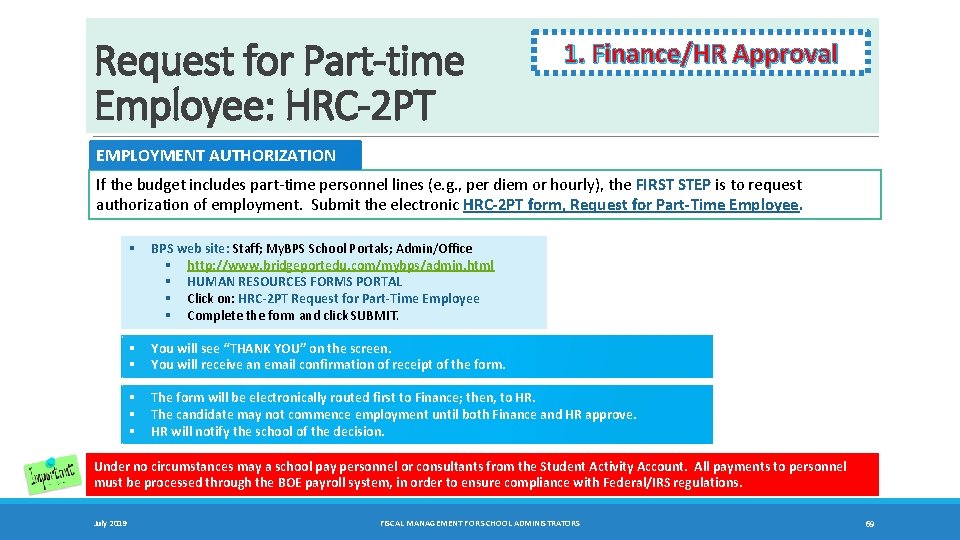
Request for Part-time Employee: HRC-2 PT 1. Finance/HR Approval EMPLOYMENT AUTHORIZATION If the budget includes part-time personnel lines (e. g. , per diem or hourly), the FIRST STEP is to request authorization of employment. Submit the electronic HRC‐ 2 PT form, Request for Part‐Time Employee. § BPS web site: Staff; My. BPS School Portals; Admin/Office § http: //www. bridgeportedu. com/mybps/admin. html § HUMAN RESOURCES FORMS PORTAL § Click on: HRC‐ 2 PT Request for Part‐Time Employee § Complete the form and click SUBMIT. § § You will see “THANK YOU” on the screen. You will receive an email confirmation of receipt of the form. § § § The form will be electronically routed first to Finance; then, to HR. The candidate may not commence employment until both Finance and HR approve. HR will notify the school of the decision. Under no circumstances may a school pay personnel or consultants from the Student Activity Account. All payments to personnel must be processed through the BOE payroll system, in order to ensure compliance with Federal/IRS regulations. July 2019 FISCAL MANAGEMENT FOR SCHOOL ADMINISTRATORS 69
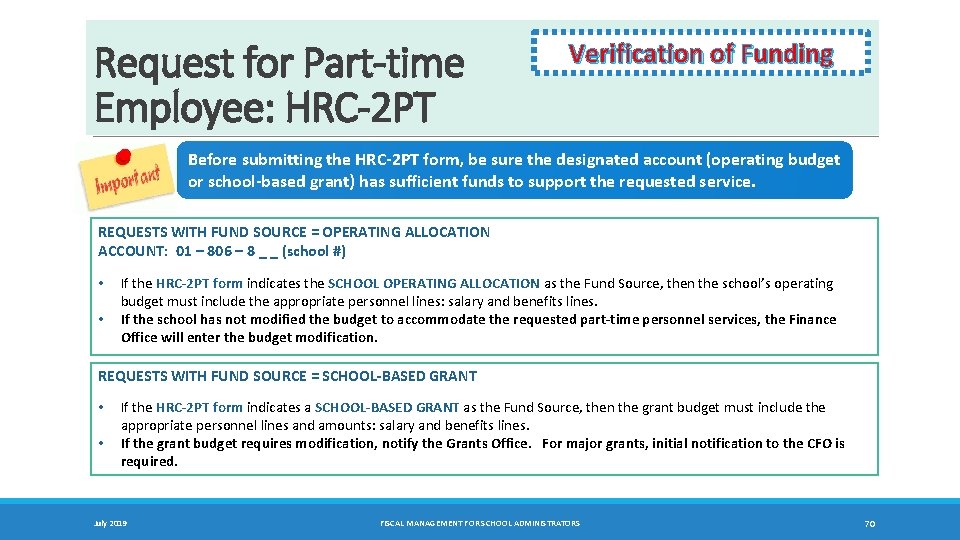
Request for Part-time Employee: HRC-2 PT Verification of Funding Before submitting the HRC‐ 2 PT form, be sure the designated account (operating budget or school‐based grant) has sufficient funds to support the requested service. REQUESTS WITH FUND SOURCE = OPERATING ALLOCATION ACCOUNT: 01 – 806 – 8 _ _ (school #) • • If the HRC‐ 2 PT form indicates the SCHOOL OPERATING ALLOCATION as the Fund Source, then the school’s operating budget must include the appropriate personnel lines: salary and benefits lines. If the school has not modified the budget to accommodate the requested part‐time personnel services, the Finance Office will enter the budget modification. REQUESTS WITH FUND SOURCE = SCHOOL‐BASED GRANT • • If the HRC‐ 2 PT form indicates a SCHOOL‐BASED GRANT as the Fund Source, then the grant budget must include the appropriate personnel lines and amounts: salary and benefits lines. If the grant budget requires modification, notify the Grants Office. For major grants, initial notification to the CFO is required. July 2019 FISCAL MANAGEMENT FOR SCHOOL ADMINISTRATORS 70
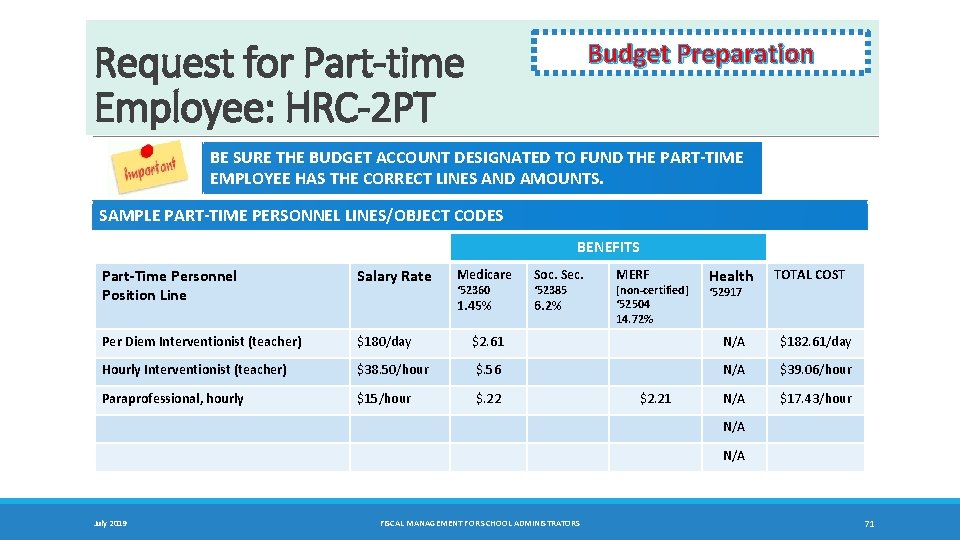
Request for Part-time Employee: HRC-2 PT Budget Preparation BE SURE THE BUDGET ACCOUNT DESIGNATED TO FUND THE PART‐TIME EMPLOYEE HAS THE CORRECT LINES AND AMOUNTS. SAMPLE PART‐TIME PERSONNEL LINES/OBJECT CODES BENEFITS Part‐Time Personnel Position Line Salary Rate Per Diem Interventionist (teacher) $180/day $2. 61 N/A $182. 61/day Hourly Interventionist (teacher) $38. 50/hour $. 56 N/A $39. 06/hour Paraprofessional, hourly $15/hour $. 22 N/A $17. 43/hour Medicare Soc. Sec. 1. 45% 6. 2% ‘ 52360 ‘ 52385 MERF [non‐certified] ‘ 52504 14. 72% $2. 21 Health TOTAL COST ‘ 52917 N/A July 2019 FISCAL MANAGEMENT FOR SCHOOL ADMINISTRATORS 71
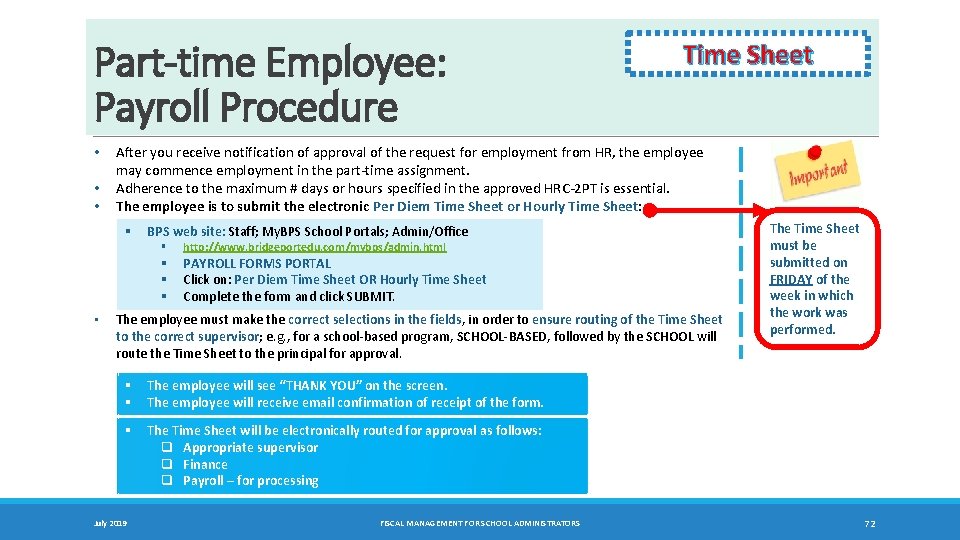
Part-time Employee: Payroll Procedure • • • After you receive notification of approval of the request for employment from HR, the employee may commence employment in the part-time assignment. Adherence to the maximum # days or hours specified in the approved HRC-2 PT is essential. The employee is to submit the electronic Per Diem Time Sheet or Hourly Time Sheet: § BPS web site: Staff; My. BPS School Portals; Admin/Office § § • Time Sheet http: //www. bridgeportedu. com/mybps/admin. html PAYROLL FORMS PORTAL Click on: Per Diem Time Sheet OR Hourly Time Sheet Complete the form and click SUBMIT. The employee must make the correct selections in the fields, in order to ensure routing of the Time Sheet to the correct supervisor; e. g. , for a school-based program, SCHOOL‐BASED, followed by the SCHOOL will route the Time Sheet to the principal for approval. § § The employee will see “THANK YOU” on the screen. The employee will receive email confirmation of receipt of the form. § The Time Sheet will be electronically routed for approval as follows: q Appropriate supervisor q Finance q Payroll – for processing July 2019 FISCAL MANAGEMENT FOR SCHOOL ADMINISTRATORS The Time Sheet must be submitted on FRIDAY of the week in which the work was performed. 72
Chapter 12 Position Control and Management Systems • POSITION CONTROL: FORMS AND PROCESS • SAMS: SOURCE 4 ABSENCE MANAGEMENT SYSTEM July 2019 FISCAL MANAGEMENT FOR SCHOOL ADMINISTRATORS 73 TC
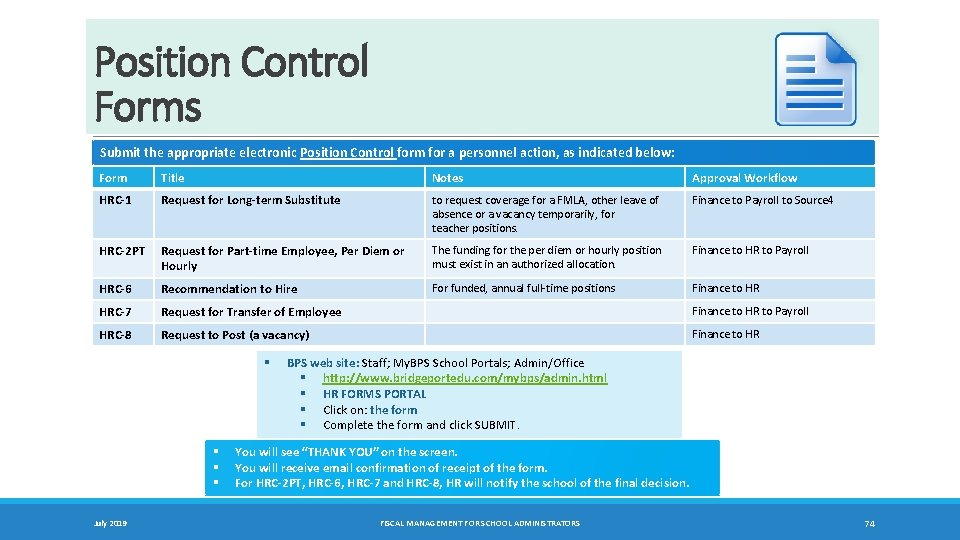
Position Control Forms Submit the appropriate electronic Position Control form for a personnel action, as indicated below: Form Title Notes Approval Workflow HRC‐ 1 Request for Long‐term Substitute to request coverage for a FMLA, other leave of absence or a vacancy temporarily, for teacher positions. Finance to Payroll to Source 4 HRC‐ 2 PT Request for Part‐time Employee, Per Diem or Hourly The funding for the per diem or hourly position must exist in an authorized allocation. Finance to HR to Payroll HRC‐ 6 Recommendation to Hire For funded, annual full-time positions Finance to HR HRC‐ 7 Request for Transfer of Employee Finance to HR to Payroll HRC‐ 8 Request to Post (a vacancy) Finance to HR § § July 2019 BPS web site: Staff; My. BPS School Portals; Admin/Office § http: //www. bridgeportedu. com/mybps/admin. html § HR FORMS PORTAL § Click on: the form § Complete the form and click SUBMIT. You will see “THANK YOU” on the screen. You will receive email confirmation of receipt of the form. For HRC‐ 2 PT, HRC‐ 6, HRC‐ 7 and HRC‐ 8, HR will notify the school of the final decision. FISCAL MANAGEMENT FOR SCHOOL ADMINISTRATORS 74
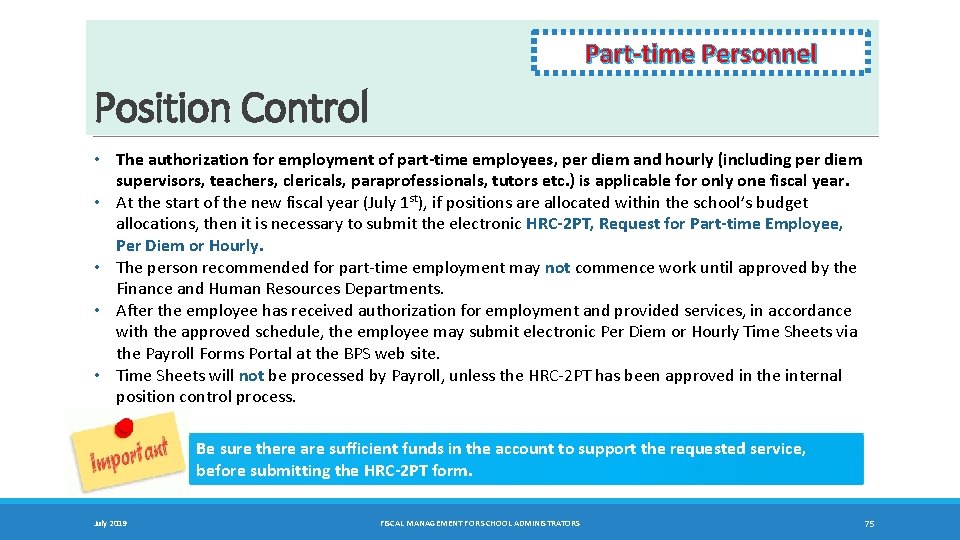
Part‐time Personnel Position Control • The authorization for employment of part‐time employees, per diem and hourly (including per diem supervisors, teachers, clericals, paraprofessionals, tutors etc. ) is applicable for only one fiscal year. • At the start of the new fiscal year (July 1 st), if positions are allocated within the school’s budget allocations, then it is necessary to submit the electronic HRC‐ 2 PT, Request for Part‐time Employee, Per Diem or Hourly. • The person recommended for part-time employment may not commence work until approved by the Finance and Human Resources Departments. • After the employee has received authorization for employment and provided services, in accordance with the approved schedule, the employee may submit electronic Per Diem or Hourly Time Sheets via the Payroll Forms Portal at the BPS web site. • Time Sheets will not be processed by Payroll, unless the HRC-2 PT has been approved in the internal position control process. Be sure there are sufficient funds in the account to support the requested service, before submitting the HRC‐ 2 PT form. July 2019 FISCAL MANAGEMENT FOR SCHOOL ADMINISTRATORS 75
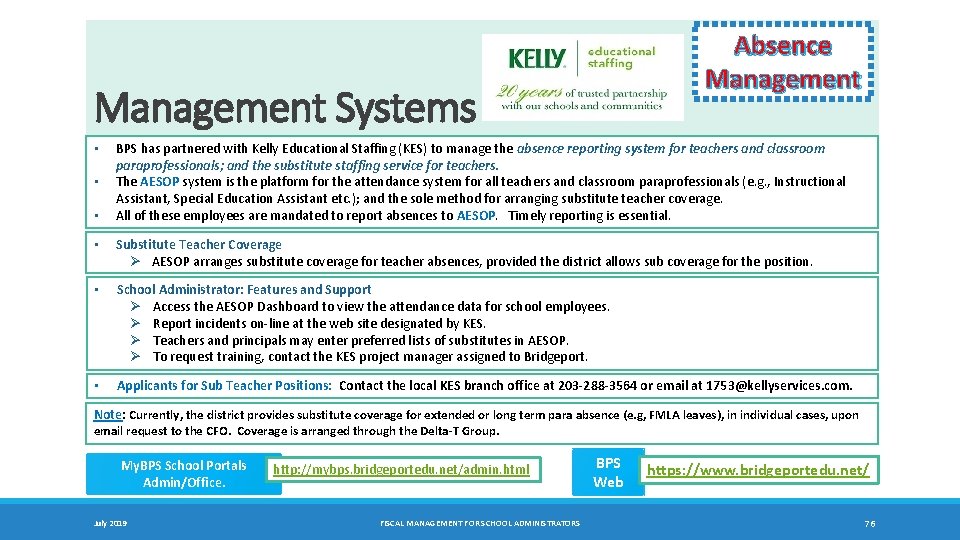
Absence Management Systems • • • BPS has partnered with Kelly Educational Staffing (KES) to manage the absence reporting system for teachers and classroom paraprofessionals; and the substitute staffing service for teachers. The AESOP system is the platform for the attendance system for all teachers and classroom paraprofessionals (e. g. , Instructional Assistant, Special Education Assistant etc. ); and the sole method for arranging substitute teacher coverage. All of these employees are mandated to report absences to AESOP. Timely reporting is essential. • Substitute Teacher Coverage Ø AESOP arranges substitute coverage for teacher absences, provided the district allows sub coverage for the position. • School Administrator: Features and Support Ø Access the AESOP Dashboard to view the attendance data for school employees. Ø Report incidents on-line at the web site designated by KES. Ø Teachers and principals may enter preferred lists of substitutes in AESOP. Ø To request training, contact the KES project manager assigned to Bridgeport. • Applicants for Sub Teacher Positions: Contact the local KES branch office at 203‐ 288‐ 3564 or email at 1753@kellyservices. com. Note: Currently, the district provides substitute coverage for extended or long term para absence (e. g, FMLA leaves), in individual cases, upon email request to the CFO. Coverage is arranged through the Delta‐T Group. My. BPS School Portals Admin/Office. July 2019 http: //mybps. bridgeportedu. net/admin. html FISCAL MANAGEMENT FOR SCHOOL ADMINISTRATORS BPS Web https: //www. bridgeportedu. net/ 76
Chapter 13 Activity Reports • AR-100: ACTIVITY REPORT: PARENT INVOLVEMENT – DISTRICT TITLE I AND LIGHTHOUSE FUNDED • AR-199: ACTIVITY REPORT: PARENT INVOLVEMENT – SCHOOL FUNDED • AR-200: ACTIVITY REPORT - NOT PARENT INVOLVEMENT • CUSTODIAL AND SECURITY SERVICES July 2019 FISCAL MANAGEMENT FOR SCHOOL ADMINISTRATORS 77 TC
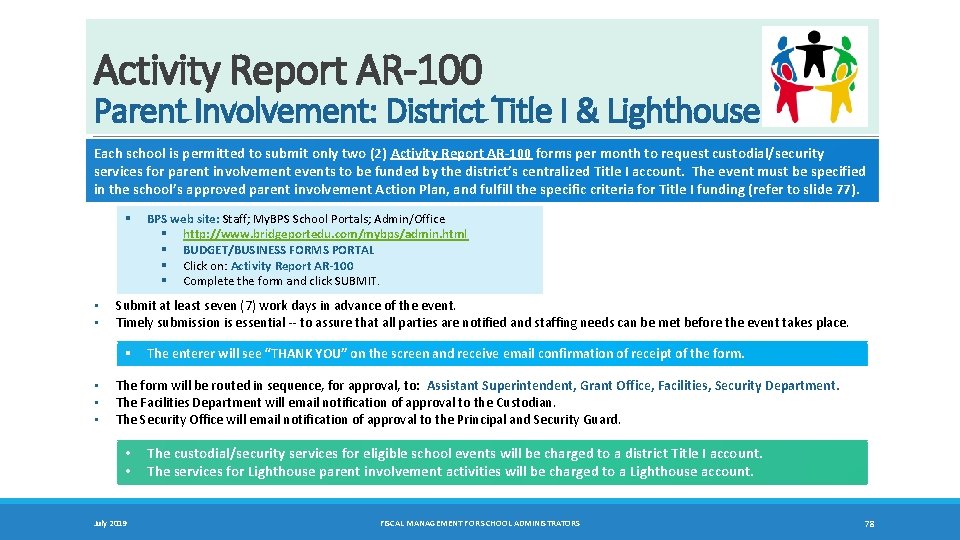
Activity Report AR-100 Parent Involvement: District Title I & Lighthouse Each school is permitted to submit only two (2) Activity Report AR‐ 100 forms per month to request custodial/security services for parent involvement events to be funded by the district’s centralized Title I account. The event must be specified in the school’s approved parent involvement Action Plan, and fulfill the specific criteria for Title I funding (refer to slide 77). § • • Submit at least seven (7) work days in advance of the event. Timely submission is essential -- to assure that all parties are notified and staffing needs can be met before the event takes place. § • • • BPS web site: Staff; My. BPS School Portals; Admin/Office § http: //www. bridgeportedu. com/mybps/admin. html § BUDGET/BUSINESS FORMS PORTAL § Click on: Activity Report AR‐ 100 § Complete the form and click SUBMIT. The enterer will see “THANK YOU” on the screen and receive email confirmation of receipt of the form. The form will be routed in sequence, for approval, to: Assistant Superintendent, Grant Office, Facilities, Security Department. The Facilities Department will email notification of approval to the Custodian. The Security Office will email notification of approval to the Principal and Security Guard. • • July 2019 The custodial/security services for eligible school events will be charged to a district Title I account. The services for Lighthouse parent involvement activities will be charged to a Lighthouse account. FISCAL MANAGEMENT FOR SCHOOL ADMINISTRATORS 78
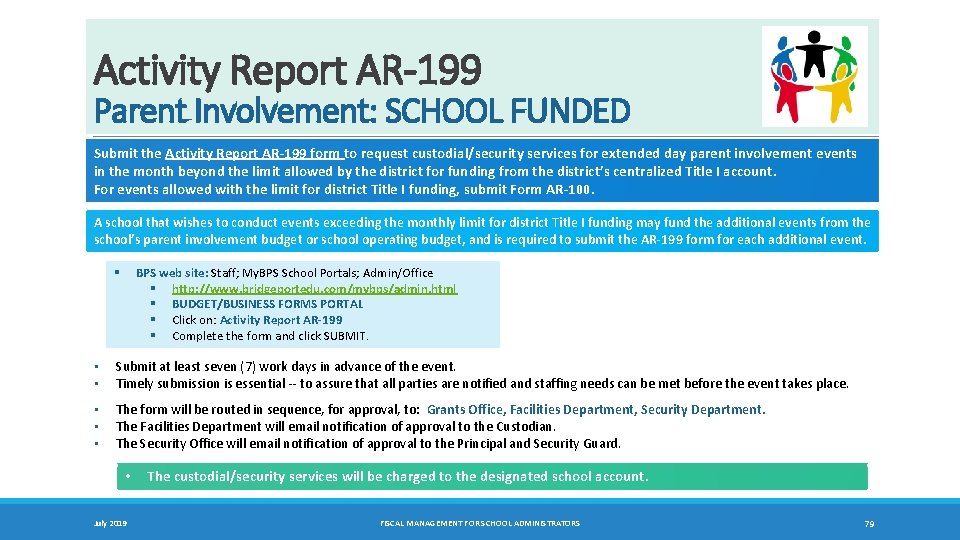
Activity Report AR-199 Parent Involvement: SCHOOL FUNDED Submit the Activity Report AR‐ 199 form to request custodial/security services for extended day parent involvement events in the month beyond the limit allowed by the district for funding from the district’s centralized Title I account. For events allowed with the limit for district Title I funding, submit Form AR‐ 100. A school that wishes to conduct events exceeding the monthly limit for district Title I funding may fund the additional events from the school’s parent involvement budget or school operating budget, and is required to submit the AR‐ 199 form for each additional event. BPS web site: Staff; My. BPS School Portals; Admin/Office § http: //www. bridgeportedu. com/mybps/admin. html § BUDGET/BUSINESS FORMS PORTAL § Click on: Activity Report AR‐ 199 § Complete the form and click SUBMIT. § • • Submit at least seven (7) work days in advance of the event. Timely submission is essential -- to assure that all parties are notified and staffing needs can be met before the event takes place. • • • The form will be routed in sequence, for approval, to: Grants Office, Facilities Department, Security Department. The Facilities Department will email notification of approval to the Custodian. The Security Office will email notification of approval to the Principal and Security Guard. • July 2019 The custodial/security services will be charged to the designated school account. FISCAL MANAGEMENT FOR SCHOOL ADMINISTRATORS 79
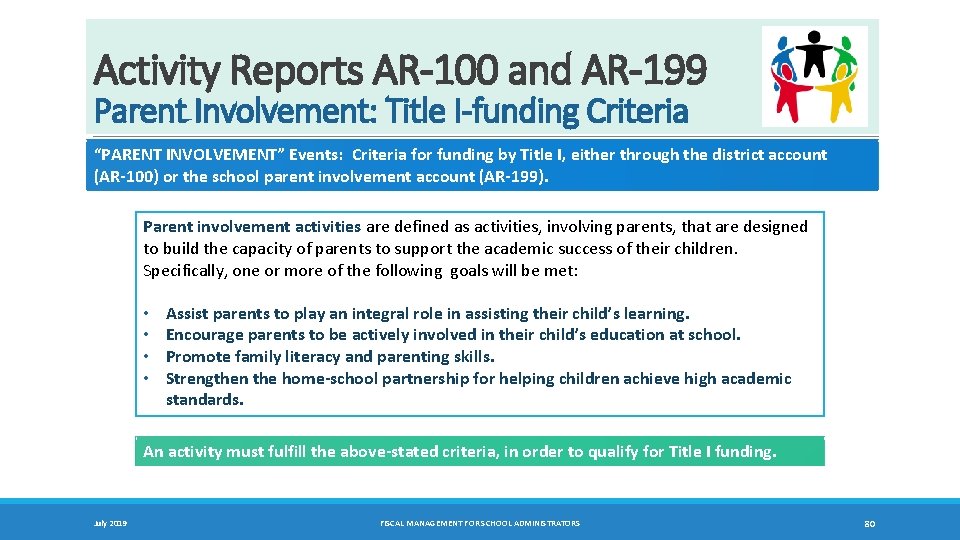
Activity Reports AR-100 and AR-199 Parent Involvement: Title I-funding Criteria “PARENT INVOLVEMENT” Events: Criteria for funding by Title I, either through the district account (AR‐ 100) or the school parent involvement account (AR‐ 199). Parent involvement activities are defined as activities, involving parents, that are designed to build the capacity of parents to support the academic success of their children. Specifically, one or more of the following goals will be met: • • Assist parents to play an integral role in assisting their child’s learning. Encourage parents to be actively involved in their child’s education at school. Promote family literacy and parenting skills. Strengthen the home‐school partnership for helping children achieve high academic standards. An activity must fulfill the above‐stated criteria, in order to qualify for Title I funding. July 2019 FISCAL MANAGEMENT FOR SCHOOL ADMINISTRATORS 80
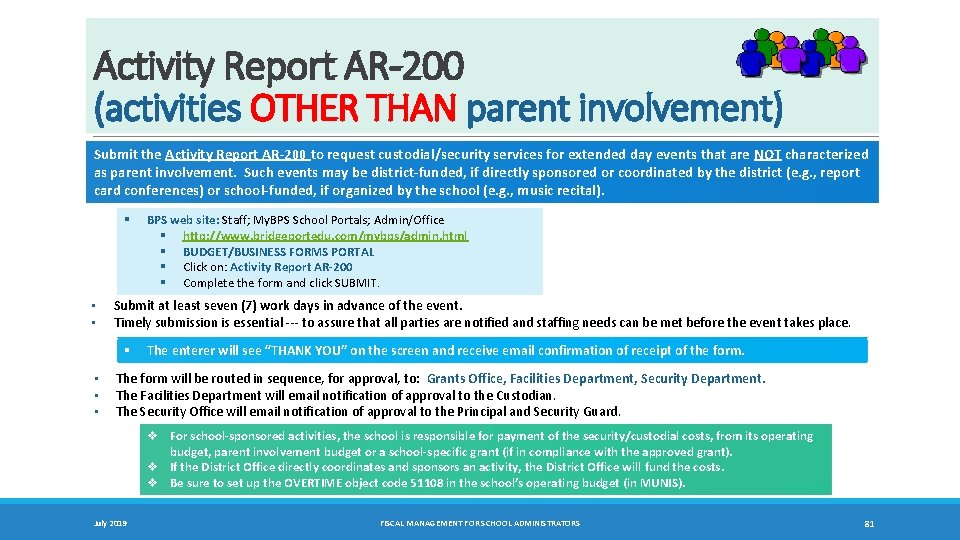
Activity Report AR-200 (activities OTHER THAN parent involvement) Submit the Activity Report AR‐ 200 to request custodial/security services for extended day events that are NOT characterized as parent involvement. Such events may be district‐funded, if directly sponsored or coordinated by the district (e. g. , report card conferences) or school‐funded, if organized by the school (e. g. , music recital). § • • Submit at least seven (7) work days in advance of the event. Timely submission is essential --- to assure that all parties are notified and staffing needs can be met before the event takes place. § • • • BPS web site: Staff; My. BPS School Portals; Admin/Office § http: //www. bridgeportedu. com/mybps/admin. html § BUDGET/BUSINESS FORMS PORTAL § Click on: Activity Report AR‐ 200 § Complete the form and click SUBMIT. The enterer will see “THANK YOU” on the screen and receive email confirmation of receipt of the form. The form will be routed in sequence, for approval, to: Grants Office, Facilities Department, Security Department. The Facilities Department will email notification of approval to the Custodian. The Security Office will email notification of approval to the Principal and Security Guard. v For school‐sponsored activities, the school is responsible for payment of the security/custodial costs, from its operating budget, parent involvement budget or a school‐specific grant (if in compliance with the approved grant). v If the District Office directly coordinates and sponsors an activity, the District Office will fund the costs. v Be sure to set up the OVERTIME object code 51108 in the school’s operating budget (in MUNIS). July 2019 FISCAL MANAGEMENT FOR SCHOOL ADMINISTRATORS 81
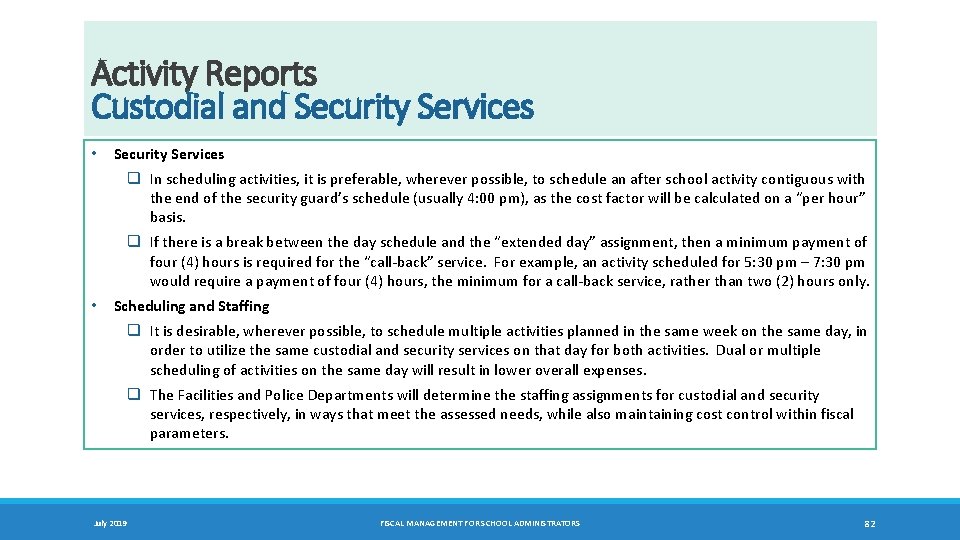
Activity Reports Custodial and Security Services • Security Services q In scheduling activities, it is preferable, wherever possible, to schedule an after school activity contiguous with the end of the security guard’s schedule (usually 4: 00 pm), as the cost factor will be calculated on a “per hour” basis. q If there is a break between the day schedule and the “extended day” assignment, then a minimum payment of four (4) hours is required for the “call-back” service. For example, an activity scheduled for 5: 30 pm – 7: 30 pm would require a payment of four (4) hours, the minimum for a call-back service, rather than two (2) hours only. • Scheduling and Staffing q It is desirable, wherever possible, to schedule multiple activities planned in the same week on the same day, in order to utilize the same custodial and security services on that day for both activities. Dual or multiple scheduling of activities on the same day will result in lower overall expenses. q The Facilities and Police Departments will determine the staffing assignments for custodial and security services, respectively, in ways that meet the assessed needs, while also maintaining cost control within fiscal parameters. July 2019 FISCAL MANAGEMENT FOR SCHOOL ADMINISTRATORS 82
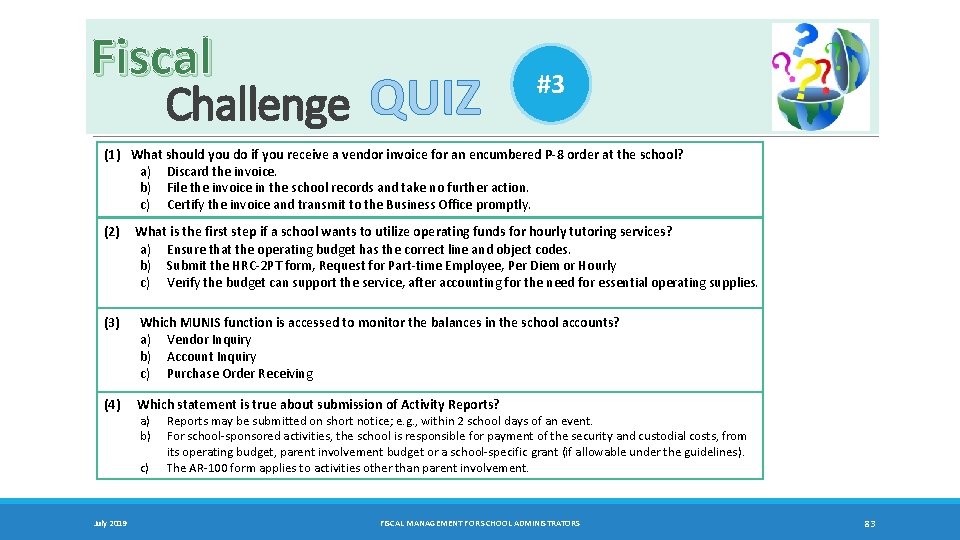
Fiscal Challenge QUIZ #3 (1) What should you do if you receive a vendor invoice for an encumbered P‐ 8 order at the school? a) Discard the invoice. b) File the invoice in the school records and take no further action. c) Certify the invoice and transmit to the Business Office promptly. (2) (3) What is the first step if a school wants to utilize operating funds for hourly tutoring services? a) Ensure that the operating budget has the correct line and object codes. b) Submit the HRC-2 PT form, Request for Part-time Employee, Per Diem or Hourly c) Verify the budget can support the service, after accounting for the need for essential operating supplies. Which MUNIS function is accessed to monitor the balances in the school accounts? a) Vendor Inquiry b) Account Inquiry c) Purchase Order Receiving (4) Which statement is true about submission of Activity Reports? a) b) c) July 2019 Reports may be submitted on short notice; e. g. , within 2 school days of an event. For school-sponsored activities, the school is responsible for payment of the security and custodial costs, from its operating budget, parent involvement budget or a school-specific grant (if allowable under the guidelines). The AR-100 form applies to activities other than parent involvement. FISCAL MANAGEMENT FOR SCHOOL ADMINISTRATORS 83
Chapter 14 Conference/Travel • CONFERENCE/TRAVEL AUTHORIZATION REQUEST • CONFERENCE/TRAVEL REIMBURSEMENT REQUEST • CONFERENCE REPORT July 2019 FISCAL MANAGEMENT FOR SCHOOL ADMINISTRATORS 84 TC
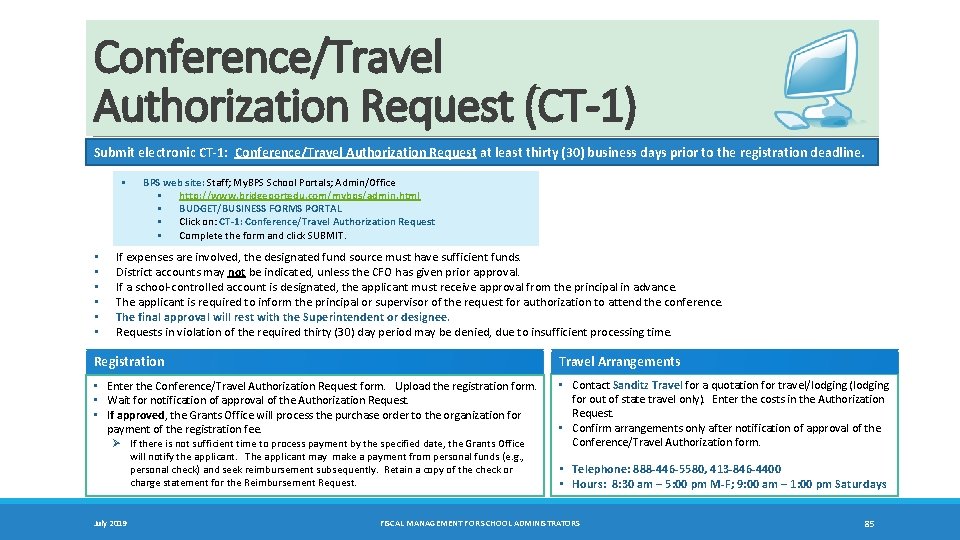
Conference/Travel Authorization Request (CT-1) Submit electronic CT‐ 1: Conference/Travel Authorization Request at least thirty (30) business days prior to the registration deadline. § • • • BPS web site: Staff; My. BPS School Portals; Admin/Office § http: //www. bridgeportedu. com/mybps/admin. html § BUDGET/BUSINESS FORMS PORTAL § Click on: CT‐ 1: Conference/Travel Authorization Request § Complete the form and click SUBMIT. If expenses are involved, the designated fund source must have sufficient funds. District accounts may not be indicated, unless the CFO has given prior approval. If a school-controlled account is designated, the applicant must receive approval from the principal in advance. The applicant is required to inform the principal or supervisor of the request for authorization to attend the conference. The final approval will rest with the Superintendent or designee. Requests in violation of the required thirty (30) day period may be denied, due to insufficient processing time. Registration Travel Arrangements • Enter the Conference/Travel Authorization Request form. Upload the registration form. • Wait for notification of approval of the Authorization Request. • If approved, the Grants Office will process the purchase order to the organization for payment of the registration fee. • Contact Sanditz Travel for a quotation for travel/lodging (lodging for out of state travel only). Enter the costs in the Authorization Request. • Confirm arrangements only after notification of approval of the Conference/Travel Authorization form. Ø If there is not sufficient time to process payment by the specified date, the Grants Office will notify the applicant. The applicant may make a payment from personal funds (e. g. , personal check) and seek reimbursement subsequently. Retain a copy of the check or charge statement for the Reimbursement Request. July 2019 • Telephone: 888‐ 446‐ 5580, 413‐ 846‐ 4400 • Hours: 8: 30 am – 5: 00 pm M‐F; 9: 00 am – 1: 00 pm Saturdays FISCAL MANAGEMENT FOR SCHOOL ADMINISTRATORS 85
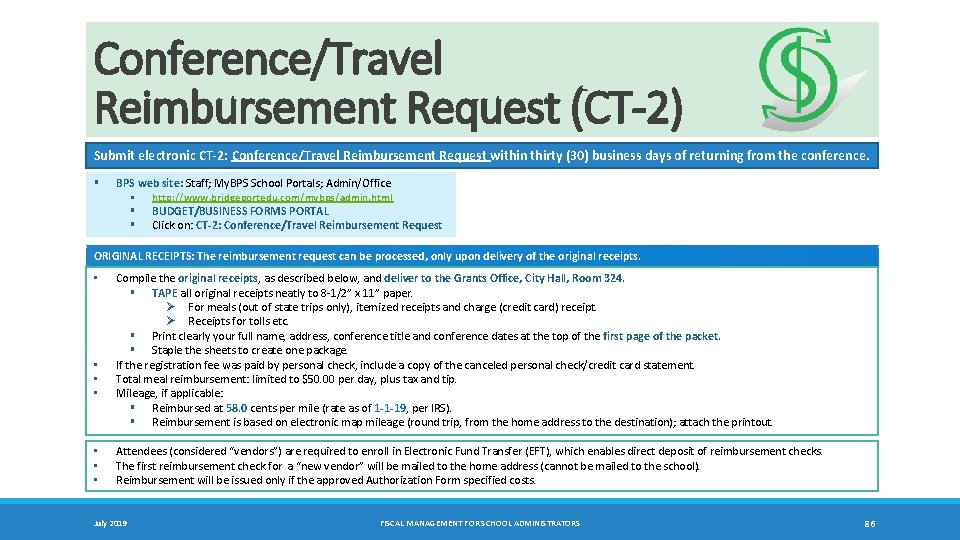
Conference/Travel Reimbursement Request (CT-2) Submit electronic CT‐ 2: Conference/Travel Reimbursement Request within thirty (30) business days of returning from the conference. § BPS web site: Staff; My. BPS School Portals; Admin/Office § http: //www. bridgeportedu. com/mybps/admin. html § BUDGET/BUSINESS FORMS PORTAL § Click on: CT‐ 2: Conference/Travel Reimbursement Request ORIGINAL RECEIPTS: The reimbursement request can be processed, only upon delivery of the original receipts. • • Compile the original receipts, as described below, and deliver to the Grants Office, City Hall, Room 324. § TAPE all original receipts neatly to 8 -1/2” x 11” paper. Ø For meals (out of state trips only), itemized receipts and charge (credit card) receipt. Ø Receipts for tolls etc. § Print clearly your full name, address, conference title and conference dates at the top of the first page of the packet. § Staple the sheets to create one package. If the registration fee was paid by personal check, include a copy of the canceled personal check/credit card statement. Total meal reimbursement: limited to $50. 00 per day, plus tax and tip. Mileage, if applicable: § Reimbursed at 58. 0 cents per mile (rate as of 1‐ 1‐ 19, per IRS). § Reimbursement is based on electronic map mileage (round trip, from the home address to the destination); attach the printout. Attendees (considered “vendors”) are required to enroll in Electronic Fund Transfer (EFT), which enables direct deposit of reimbursement checks. The first reimbursement check for a “new vendor” will be mailed to the home address (cannot be mailed to the school). Reimbursement will be issued only if the approved Authorization Form specified costs. July 2019 FISCAL MANAGEMENT FOR SCHOOL ADMINISTRATORS 86
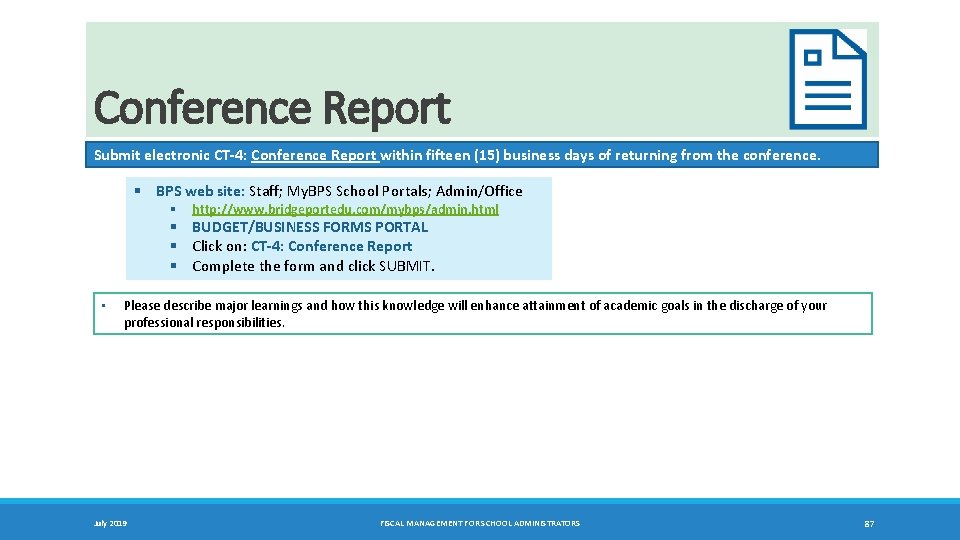
Conference Report Submit electronic CT‐ 4: Conference Report within fifteen (15) business days of returning from the conference. § BPS web site: Staff; My. BPS School Portals; Admin/Office § http: //www. bridgeportedu. com/mybps/admin. html § BUDGET/BUSINESS FORMS PORTAL § Click on: CT‐ 4: Conference Report § Complete the form and click SUBMIT. • Please describe major learnings and how this knowledge will enhance attainment of academic goals in the discharge of your professional responsibilities. July 2019 FISCAL MANAGEMENT FOR SCHOOL ADMINISTRATORS 87
Chapter 15 Grants: Applications and Management • APPLICATIONS • MANAGEMENT July 2019 FISCAL MANAGEMENT FOR SCHOOL ADMINISTRATORS 88 TC
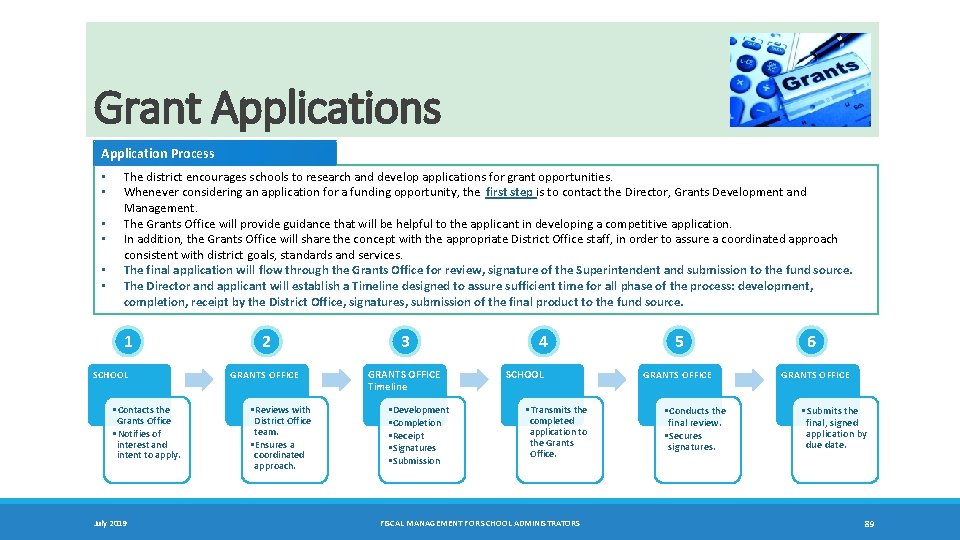
Grant Applications Application Process • • • The district encourages schools to research and develop applications for grant opportunities. Whenever considering an application for a funding opportunity, the first step is to contact the Director, Grants Development and Management. The Grants Office will provide guidance that will be helpful to the applicant in developing a competitive application. In addition, the Grants Office will share the concept with the appropriate District Office staff, in order to assure a coordinated approach consistent with district goals, standards and services. The final application will flow through the Grants Office for review, signature of the Superintendent and submission to the fund source. The Director and applicant will establish a Timeline designed to assure sufficient time for all phase of the process: development, completion, receipt by the District Office, signatures, submission of the final product to the fund source. 1 SCHOOL • Contacts the Grants Office • Notifies of interest and intent to apply. July 2019 2 3 GRANTS OFFICE Timeline • Reviews with District Office team. • Ensures a coordinated approach. • Development • Completion • Receipt • Signatures • Submission 4 SCHOOL • Transmits the completed application to the Grants Office. FISCAL MANAGEMENT FOR SCHOOL ADMINISTRATORS 5 GRANTS OFFICE • Conducts the final review. • Secures signatures. 6 GRANTS OFFICE • Submits the final, signed application by due date. 89
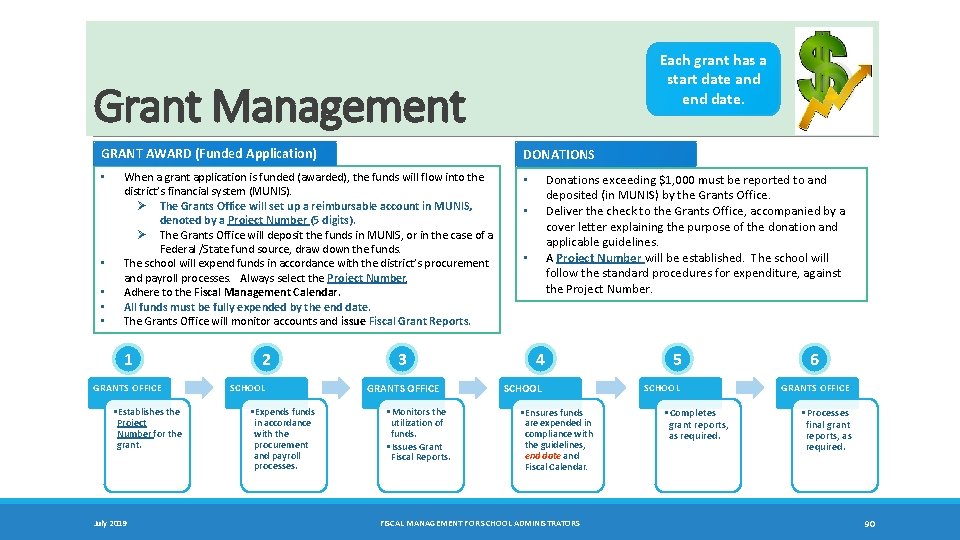
Each grant has a start date and end date. Grant Management GRANT AWARD (Funded Application) • • • DONATIONS When a grant application is funded (awarded), the funds will flow into the district’s financial system (MUNIS). Ø The Grants Office will set up a reimbursable account in MUNIS, denoted by a Project Number (5 digits). Ø The Grants Office will deposit the funds in MUNIS, or in the case of a Federal /State fund source, draw down the funds. The school will expend funds in accordance with the district’s procurement and payroll processes. Always select the Project Number. Adhere to the Fiscal Management Calendar. All funds must be fully expended by the end date. The Grants Office will monitor accounts and issue Fiscal Grant Reports. 1 GRANTS OFFICE • Establishes the Project Number for the grant. July 2019 2 SCHOOL • Expends funds in accordance with the procurement and payroll processes. 3 GRANTS OFFICE • Monitors the utilization of funds. • Issues Grant Fiscal Reports. Donations exceeding $1, 000 must be reported to and deposited (in MUNIS) by the Grants Office. Deliver the check to the Grants Office, accompanied by a cover letter explaining the purpose of the donation and applicable guidelines. A Project Number will be established. The school will follow the standard procedures for expenditure, against the Project Number. • • • 4 SCHOOL • Ensures funds are expended in compliance with the guidelines, end date and Fiscal Calendar. FISCAL MANAGEMENT FOR SCHOOL ADMINISTRATORS 5 SCHOOL • Completes grant reports, as required. 6 GRANTS OFFICE • Processes final grant reports, as required. 90
Chapter 16 Monitoring the Accounts Systematic Internal Process • VIEW BUDGET BALANCES REGULARLY July 2019 FISCAL MANAGEMENT FOR SCHOOL ADMINISTRATORS 91 TC
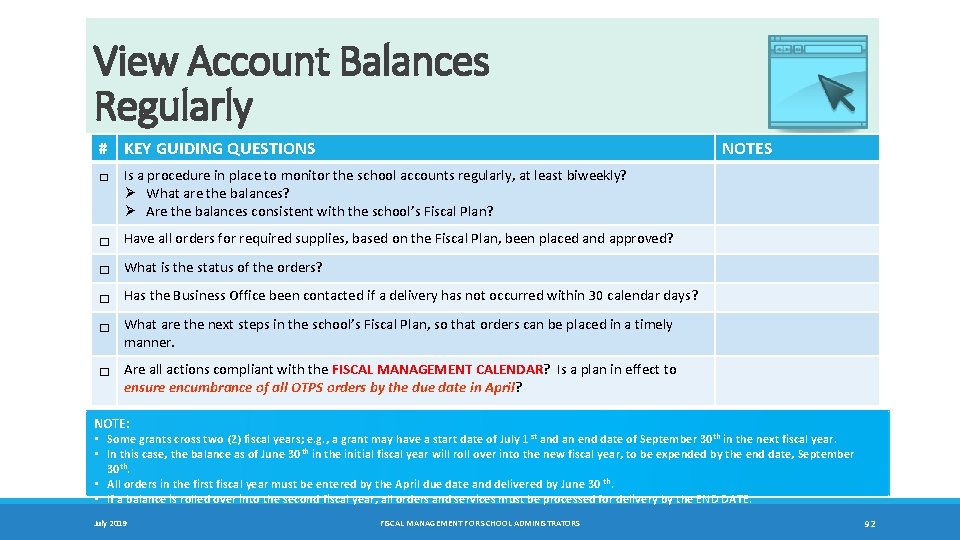
View Account Balances Regularly # KEY GUIDING QUESTIONS NOTES □ Is a procedure in place to monitor the school accounts regularly, at least biweekly? Ø What are the balances? Ø Are the balances consistent with the school’s Fiscal Plan? □ Have all orders for required supplies, based on the Fiscal Plan, been placed and approved? □ What is the status of the orders? □ Has the Business Office been contacted if a delivery has not occurred within 30 calendar days? □ What are the next steps in the school’s Fiscal Plan, so that orders can be placed in a timely manner. □ Are all actions compliant with the FISCAL MANAGEMENT CALENDAR? Is a plan in effect to ensure encumbrance of all OTPS orders by the due date in April? NOTE: • Some grants cross two (2) fiscal years; e. g. , a grant may have a start date of July 1 st and an end date of September 30 th in the next fiscal year. • In this case, the balance as of June 30 th in the initial fiscal year will roll over into the new fiscal year, to be expended by the end date, September 30 th. • All orders in the first fiscal year must be entered by the April due date and delivered by June 30 th. • If a balance is rolled over into the second fiscal year, all orders and services must be processed for delivery by the END DATE. July 2019 FISCAL MANAGEMENT FOR SCHOOL ADMINISTRATORS 92
Chapter 17 Fiscal Management Calendar • DUE DATES • PROACTIVE PLANNING TOOL July 2019 FISCAL MANAGEMENT FOR SCHOOL ADMINISTRATORS 93 TC
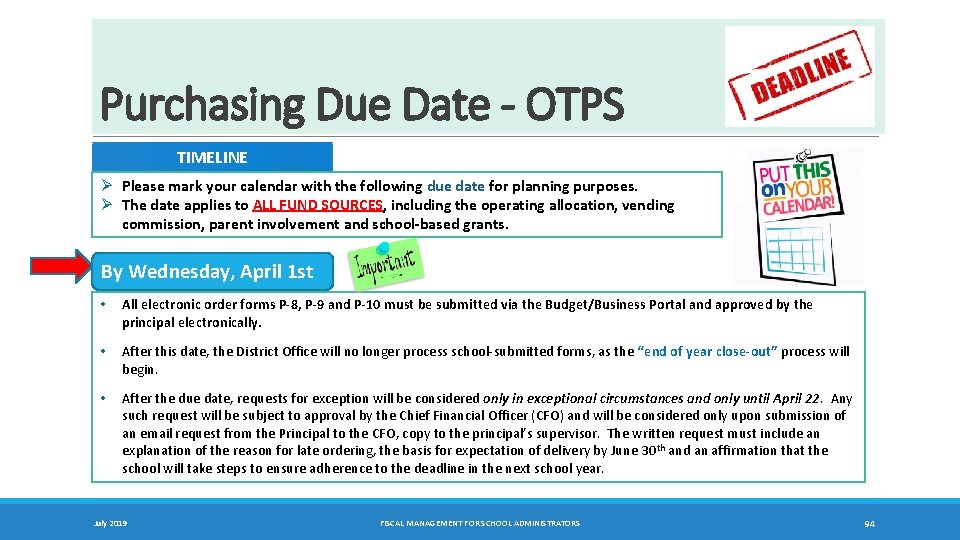
Purchasing Due Date - OTPS TIMELINE Ø Please mark your calendar with the following due date for planning purposes. Ø The date applies to ALL FUND SOURCES, including the operating allocation, vending commission, parent involvement and school‐based grants. By Wednesday, April 1 st • All electronic order forms P‐ 8, P‐ 9 and P‐ 10 must be submitted via the Budget/Business Portal and approved by the principal electronically. • After this date, the District Office will no longer process school-submitted forms, as the “end of year close‐out” process will begin. • After the due date, requests for exception will be considered only in exceptional circumstances and only until April 22. Any such request will be subject to approval by the Chief Financial Officer (CFO) and will be considered only upon submission of an email request from the Principal to the CFO, copy to the principal’s supervisor. The written request must include an explanation of the reason for late ordering, the basis for expectation of delivery by June 30 th and an affirmation that the school will take steps to ensure adherence to the deadline in the next school year. July 2019 FISCAL MANAGEMENT FOR SCHOOL ADMINISTRATORS 94
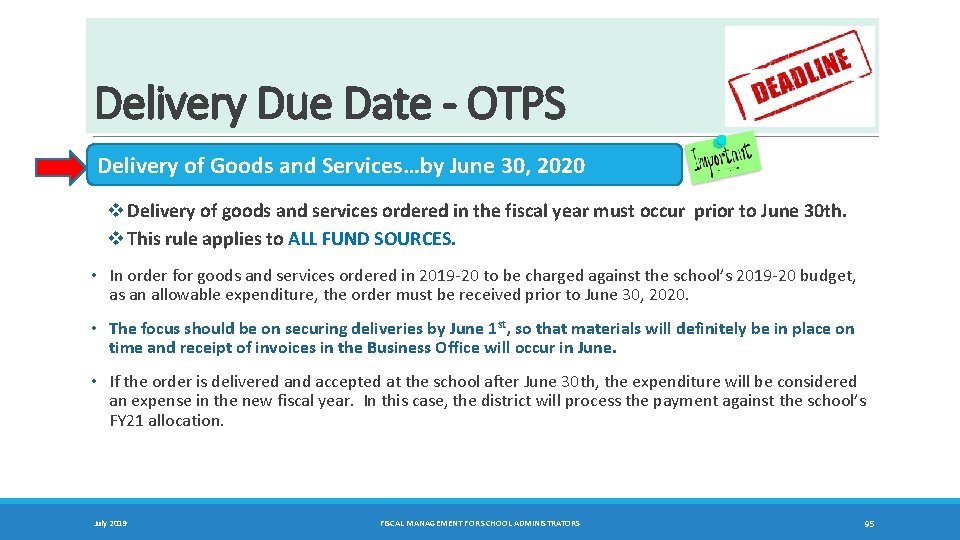
Delivery Due Date - OTPS Delivery of Goods and Services…by June 30, 2020 v Delivery of goods and services ordered in the fiscal year must occur prior to June 30 th. v This rule applies to ALL FUND SOURCES. • In order for goods and services ordered in 2019 -20 to be charged against the school’s 2019 -20 budget, as an allowable expenditure, the order must be received prior to June 30, 2020. • The focus should be on securing deliveries by June 1 st, so that materials will definitely be in place on time and receipt of invoices in the Business Office will occur in June. • If the order is delivered and accepted at the school after June 30 th, the expenditure will be considered an expense in the new fiscal year. In this case, the district will process the payment against the school’s FY 21 allocation. July 2019 FISCAL MANAGEMENT FOR SCHOOL ADMINISTRATORS 95
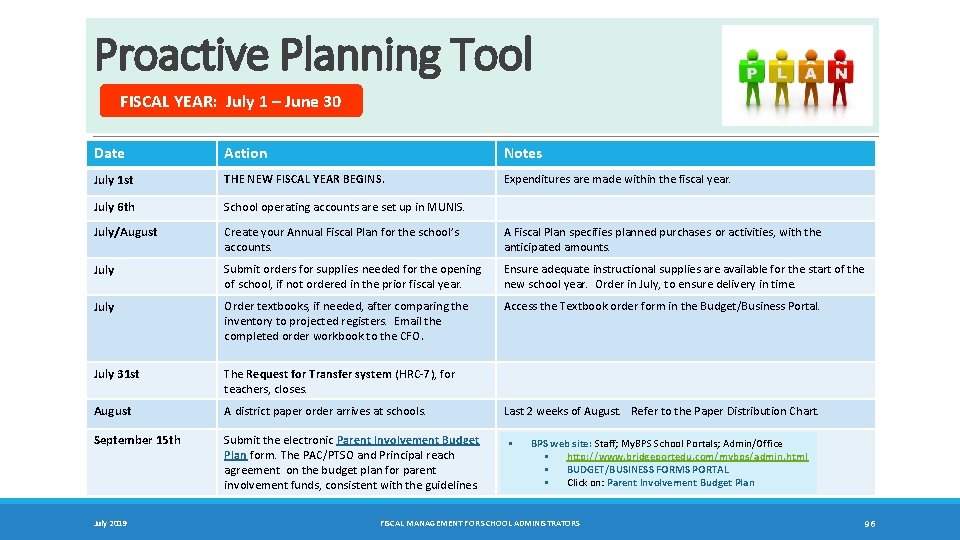
Proactive Planning Tool FISCAL YEAR: July 1 – June 30 Date Action Notes July 1 st THE NEW FISCAL YEAR BEGINS. Expenditures are made within the fiscal year. July 6 th School operating accounts are set up in MUNIS. July/August Create your Annual Fiscal Plan for the school’s accounts. A Fiscal Plan specifies planned purchases or activities, with the anticipated amounts. July Submit orders for supplies needed for the opening of school, if not ordered in the prior fiscal year. Ensure adequate instructional supplies are available for the start of the new school year. Order in July, to ensure delivery in time. July Order textbooks, if needed, after comparing the inventory to projected registers. Email the completed order workbook to the CFO. Access the Textbook order form in the Budget/Business Portal. July 31 st The Request for Transfer system (HRC-7), for teachers, closes. August A district paper order arrives at schools. September 15 th Submit the electronic Parent Involvement Budget Plan form. The PAC/PTSO and Principal reach agreement on the budget plan for parent involvement funds, consistent with the guidelines. July 2019 Last 2 weeks of August. Refer to the Paper Distribution Chart. § BPS web site: Staff; My. BPS School Portals; Admin/Office § http: //www. bridgeportedu. com/mybps/admin. html § BUDGET/BUSINESS FORMS PORTAL § Click on: Parent Involvement Budget Plan FISCAL MANAGEMENT FOR SCHOOL ADMINISTRATORS 96
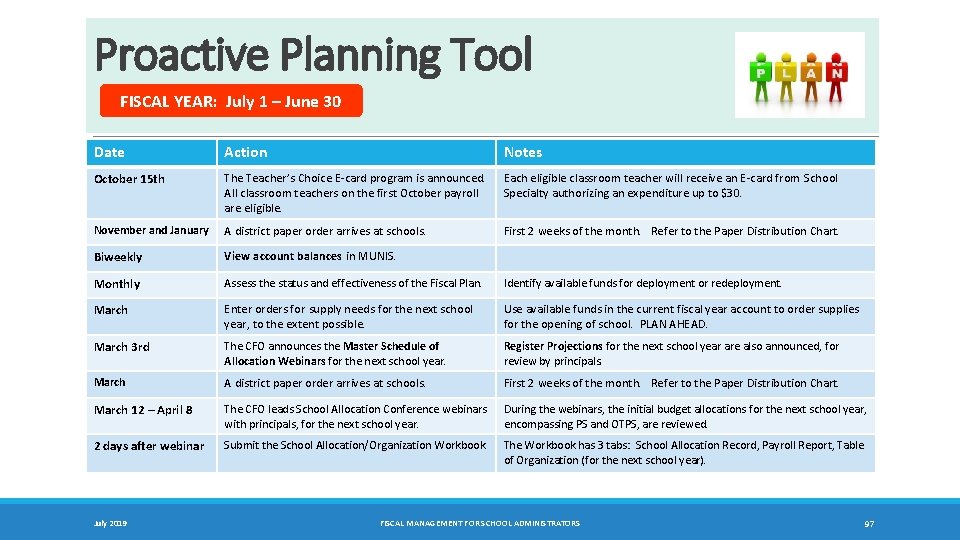
Proactive Planning Tool FISCAL YEAR: July 1 – June 30 Date Action October 15 th The Teacher’s Choice E-card program is announced. Each eligible classroom teacher will receive an E-card from School All classroom teachers on the first October payroll Specialty authorizing an expenditure up to $30. are eligible. November and January A district paper order arrives at schools. Biweekly View account balances in MUNIS. Monthly Assess the status and effectiveness of the Fiscal Plan. Identify available funds for deployment or redeployment. March Enter orders for supply needs for the next school year, to the extent possible. Use available funds in the current fiscal year account to order supplies for the opening of school. PLAN AHEAD. March 3 rd The CFO announces the Master Schedule of Allocation Webinars for the next school year. Register Projections for the next school year are also announced, for review by principals. March A district paper order arrives at schools. First 2 weeks of the month. Refer to the Paper Distribution Chart. March 12 – April 8 The CFO leads School Allocation Conference webinars with principals, for the next school year. During the webinars, the initial budget allocations for the next school year, encompassing PS and OTPS, are reviewed. 2 days after webinar Submit the School Allocation/Organization Workbook. The Workbook has 3 tabs: School Allocation Record, Payroll Report, Table of Organization (for the next school year). July 2019 Notes First 2 weeks of the month. Refer to the Paper Distribution Chart. FISCAL MANAGEMENT FOR SCHOOL ADMINISTRATORS 97
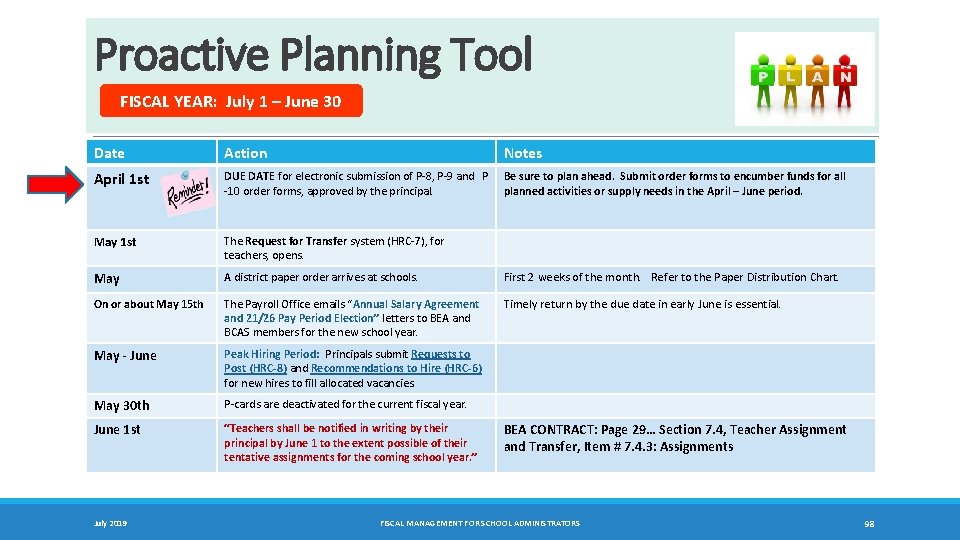
Proactive Planning Tool FISCAL YEAR: July 1 – June 30 Date Action Notes April 1 st DUE DATE for electronic submission of P-8, P-9 and P -10 order forms, approved by the principal. Be sure to plan ahead. Submit order forms to encumber funds for all planned activities or supply needs in the April – June period. May 1 st The Request for Transfer system (HRC-7), for teachers, opens. May A district paper order arrives at schools. First 2 weeks of the month. Refer to the Paper Distribution Chart. On or about May 15 th The Payroll Office emails “Annual Salary Agreement and 21/26 Pay Period Election” letters to BEA and BCAS members for the new school year. Timely return by the due date in early June is essential. May ‐ June Peak Hiring Period: Principals submit Requests to Post (HRC‐ 8) and Recommendations to Hire (HRC‐ 6) for new hires to fill allocated vacancies. May 30 th P-cards are deactivated for the current fiscal year. June 1 st “Teachers shall be notified in writing by their principal by June 1 to the extent possible of their tentative assignments for the coming school year. ” July 2019 BEA CONTRACT: Page 29… Section 7. 4, Teacher Assignment and Transfer, Item # 7. 4. 3: Assignments FISCAL MANAGEMENT FOR SCHOOL ADMINISTRATORS 98
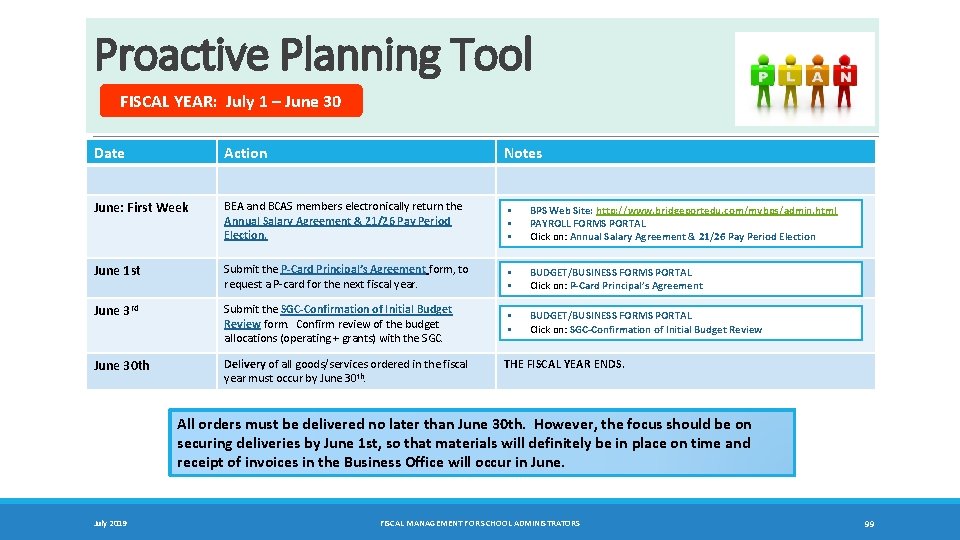
Proactive Planning Tool FISCAL YEAR: July 1 – June 30 Date Action Notes June: First Week BEA and BCAS members electronically return the Annual Salary Agreement & 21/26 Pay Period Election. § § § BPS Web Site: http: //www. bridgeportedu. com/mybps/admin. html PAYROLL FORMS PORTAL Click on: Annual Salary Agreement & 21/26 Pay Period Election June 1 st Submit the P‐Card Principal’s Agreement form, to request a P-card for the next fiscal year. § § BUDGET/BUSINESS FORMS PORTAL Click on: P‐Card Principal’s Agreement June 3 rd Submit the SGC‐Confirmation of Initial Budget Review form. Confirm review of the budget allocations (operating + grants) with the SGC. § § BUDGET/BUSINESS FORMS PORTAL Click on: SGC‐Confirmation of Initial Budget Review June 30 th Delivery of all goods/services ordered in the fiscal year must occur by June 30 th. THE FISCAL YEAR ENDS. All orders must be delivered no later than June 30 th. However, the focus should be on securing deliveries by June 1 st, so that materials will definitely be in place on time and receipt of invoices in the Business Office will occur in June. July 2019 FISCAL MANAGEMENT FOR SCHOOL ADMINISTRATORS 99
Chapter 18 Optimization of Resources • COST C ONT RO L AND MANAGEMENT • TIMELY DEPLO YMENT OF RESOURCES • ENE RG Y CO NSERV ATIO N July 2019 FISCAL MANAGEMENT FOR SCHOOL ADMINISTRATORS 100 TC
Cost Control and Management Essential Budget Management Strategies. # ESSENTIAL ACTION REMINDER □ Project the needs of the school prior to the start of the school year. □ Spend prudently and over time, in order to have sufficient funds to meet needs. □ Select the vendors who can provide the best quality at lowest cost, always complying with the purchasing rules. □ Consider State-contracted vendors wherever possible, since contracted prices are usually lower than for other vendors. The Business Office will issue City-approved low cost vendors for basic supplies. □ At the start of the school year, place orders only for essential supplies or services, in order to conserve fiscal resources. □ Plan to submit electronic order forms by the due date in April. This requires anticipation of activities in the April – June period and processing of orders for those events by the due date. July 2019 FISCAL MANAGEMENT FOR SCHOOL ADMINISTRATORS 101
Timely Deployment of Resources Principals are empowered to make decisions at the school level about the utilization of resources, in conjunction with the School Governance Council. The academic priorities of the school and corresponding needs of students should drive fiscal decisions. # ESSENTIAL ACTION REMINDER □ Ensure that funds are allocated in the operating account to meet all basic operating needs for the entire school year. The operating budget includes funds for art/music supplies. □ Establish reserves to address potential emergency or unforeseen situations that may arise. □ Monitor school accounts regularly. Identify available funds that may be redeployed to meet needs, while ensuring stability in school operations. Ø Consider redeployment of funds to part-time personnel; e. g. , an hourly tutor, per diem interventionist. □ Comply with the FISCAL MANAGEMENT CALENDAR. July 2019 FISCAL MANAGEMENT FOR SCHOOL ADMINISTRATORS APRIL 1 st: Last day for electronic submission of P‐ 8, P‐ 9 and P‐ 10 order forms. 102
Conservation of Energy OVERVIEW Energy Conservation Campaign A districtwide initiative aimed at controlling energy usage in response to the pressure of increased rates on the district budget. When the cost of utilities rises, it means that less money is available in the Operating Budget to pursue the other important services in our educational plan, but energy usage can be controlled and resources conserved as a result. Overarching Goal To mobilize everyone --- administrators/supervisors, principals, assistant principals, teachers, paraprofessionals, facilities staff, nutrition staff and all school employees - to help to improve energy efficiency through changes in operating practices. The expected outcomes are sustainable reductions in energy costs over the long term. ACTION STEPS • • • Operating Practices in Buildings Ø Schools institute practices that conserve energy, without affecting school operations; e. g. , turn off lights and computers when leaving a room. SMART‐EE Teams [School Mobilization to Achieve Reachable Targets – Energy Efficiency] Ø School teams, led by the principal and custodian, focus on maintaining and assessing energy reduction strategies within the school. Student Green Squads Ø Green Squads help to establish energy efficiency measures, while expanding their knowledge of energy conversation within the environment. July 2019 FISCAL MANAGEMENT FOR SCHOOL ADMINISTRATORS 103
Chapter 19 Student Activity Account • OPERATING PROCEDURES July 2019 FISCAL MANAGEMENT FOR SCHOOL ADMINISTRATORS 104 TC
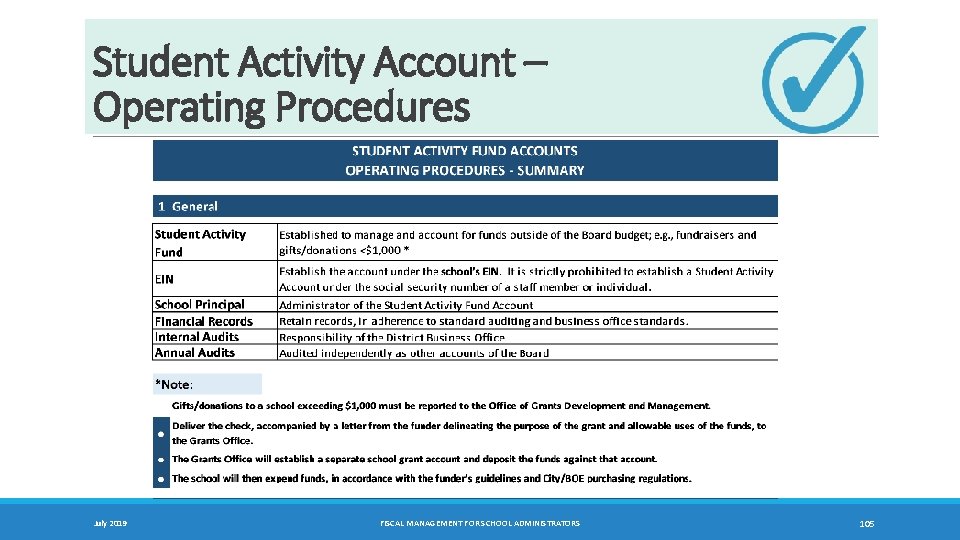
Student Activity Account – Operating Procedures July 2019 FISCAL MANAGEMENT FOR SCHOOL ADMINISTRATORS 105
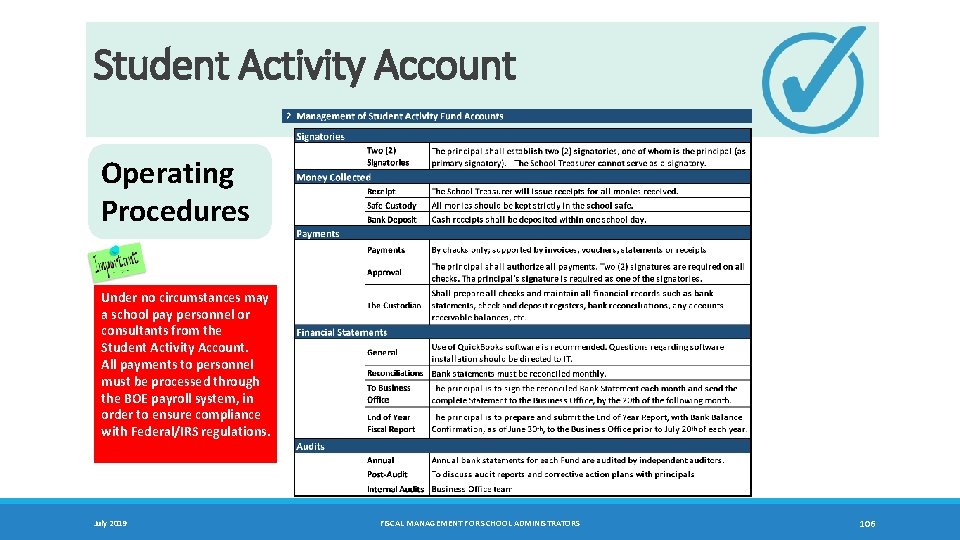
Student Activity Account Operating Procedures Under no circumstances may a school pay personnel or consultants from the Student Activity Account. All payments to personnel must be processed through the BOE payroll system, in order to ensure compliance with Federal/IRS regulations. July 2019 FISCAL MANAGEMENT FOR SCHOOL ADMINISTRATORS 106
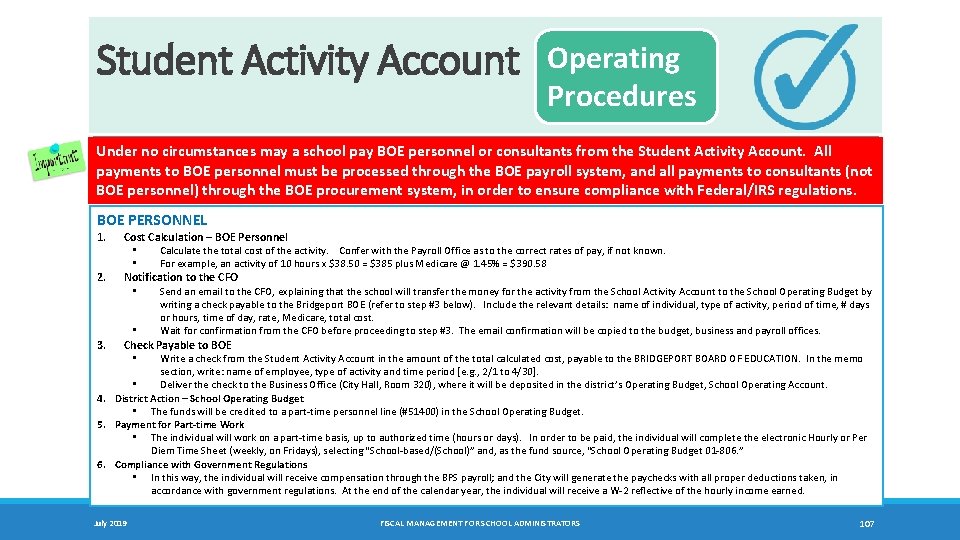
Student Activity Account Operating Procedures Under no circumstances may a school pay BOE personnel or consultants from the Student Activity Account. All payments to BOE personnel must be processed through the BOE payroll system, and all payments to consultants (not BOE personnel) through the BOE procurement system, in order to ensure compliance with Federal/IRS regulations. BOE PERSONNEL 1. 2. 3. 4. 5. 6. Cost Calculation – BOE Personnel • Calculate the total cost of the activity. Confer with the Payroll Office as to the correct rates of pay, if not known. • For example, an activity of 10 hours x $38. 50 = $385 plus Medicare @ 1. 45% = $390. 58 Notification to the CFO • Send an email to the CFO, explaining that the school will transfer the money for the activity from the School Activity Account to the School Operating Budget by writing a check payable to the Bridgeport BOE (refer to step #3 below). Include the relevant details: name of individual, type of activity, period of time, # days or hours, time of day, rate, Medicare, total cost. Wait for confirmation from the CFO before proceeding to step #3. The email confirmation will be copied to the budget, business and payroll offices. • Check Payable to BOE • Write a check from the Student Activity Account in the amount of the total calculated cost, payable to the BRIDGEPORT BOARD OF EDUCATION. In the memo section, write: name of employee, type of activity and time period [e. g. , 2/1 to 4/30]. • Deliver the check to the Business Office (City Hall, Room 320), where it will be deposited in the district’s Operating Budget, School Operating Account. District Action – School Operating Budget • The funds will be credited to a part-time personnel line (#51400) in the School Operating Budget. Payment for Part‐time Work • The individual will work on a part-time basis, up to authorized time (hours or days). In order to be paid, the individual will complete the electronic Hourly or Per Diem Time Sheet (weekly, on Fridays), selecting “School-based/(School)” and, as the fund source, “School Operating Budget 01 -806. ” Compliance with Government Regulations • In this way, the individual will receive compensation through the BPS payroll; and the City will generate the paychecks with all proper deductions taken, in accordance with government regulations. At the end of the calendar year, the individual will receive a W-2 reflective of the hourly income earned. July 2019 FISCAL MANAGEMENT FOR SCHOOL ADMINISTRATORS 107
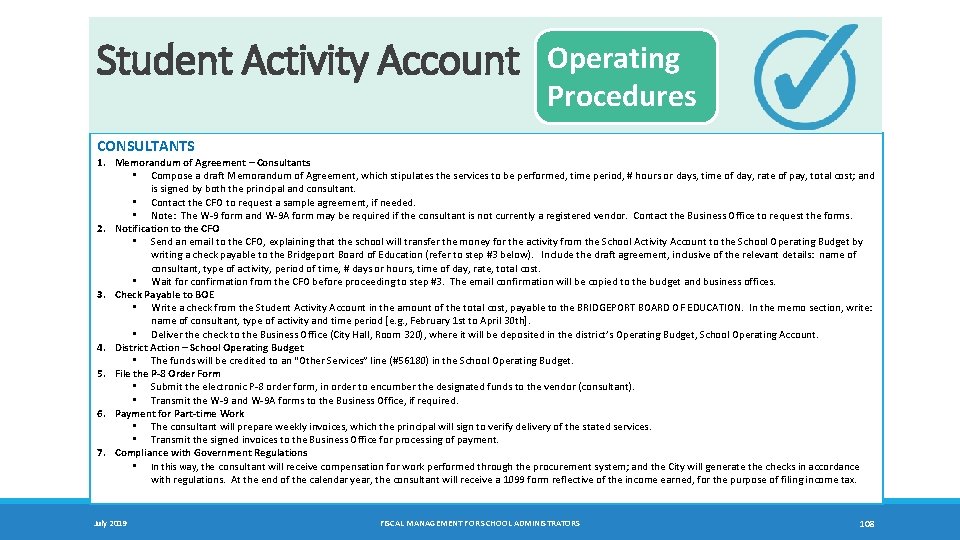
Student Activity Account Operating Procedures CONSULTANTS 1. Memorandum of Agreement – Consultants • Compose a draft Memorandum of Agreement, which stipulates the services to be performed, time period, # hours or days, time of day, rate of pay, total cost; and is signed by both the principal and consultant. • Contact the CFO to request a sample agreement, if needed. • Note: The W-9 form and W-9 A form may be required if the consultant is not currently a registered vendor. Contact the Business Office to request the forms. 2. Notification to the CFO • Send an email to the CFO, explaining that the school will transfer the money for the activity from the School Activity Account to the School Operating Budget by writing a check payable to the Bridgeport Board of Education (refer to step #3 below). Include the draft agreement, inclusive of the relevant details: name of consultant, type of activity, period of time, # days or hours, time of day, rate, total cost. • Wait for confirmation from the CFO before proceeding to step #3. The email confirmation will be copied to the budget and business offices. 3. Check Payable to BOE • Write a check from the Student Activity Account in the amount of the total cost, payable to the BRIDGEPORT BOARD OF EDUCATION. In the memo section, write: name of consultant, type of activity and time period [e. g. , February 1 st to April 30 th]. • Deliver the check to the Business Office (City Hall, Room 320), where it will be deposited in the district’s Operating Budget, School Operating Account. 4. District Action – School Operating Budget • The funds will be credited to an “Other Services” line (#56180) in the School Operating Budget. 5. File the P‐ 8 Order Form • Submit the electronic P-8 order form, in order to encumber the designated funds to the vendor (consultant). • Transmit the W-9 and W-9 A forms to the Business Office, if required. 6. Payment for Part‐time Work • The consultant will prepare weekly invoices, which the principal will sign to verify delivery of the stated services. • Transmit the signed invoices to the Business Office for processing of payment. 7. Compliance with Government Regulations • In this way, the consultant will receive compensation for work performed through the procurement system; and the City will generate the checks in accordance with regulations. At the end of the calendar year, the consultant will receive a 1099 form reflective of the income earned, for the purpose of filing income tax. July 2019 FISCAL MANAGEMENT FOR SCHOOL ADMINISTRATORS 108
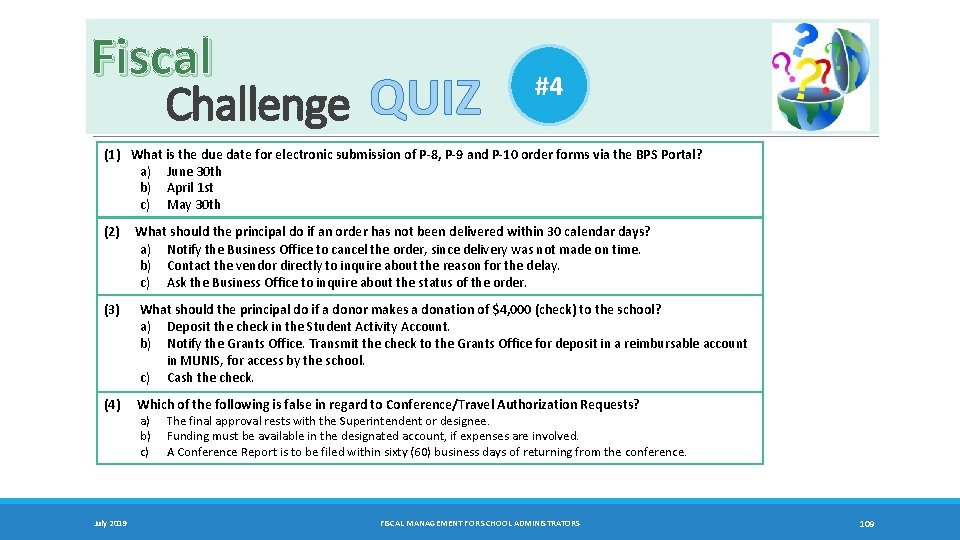
Fiscal Challenge QUIZ #4 (1) What is the due date for electronic submission of P‐ 8, P‐ 9 and P‐ 10 order forms via the BPS Portal? a) June 30 th b) April 1 st c) May 30 th (2) (3) What should the principal do if an order has not been delivered within 30 calendar days? a) Notify the Business Office to cancel the order, since delivery was not made on time. b) Contact the vendor directly to inquire about the reason for the delay. c) Ask the Business Office to inquire about the status of the order. What should the principal do if a donor makes a donation of $4, 000 (check) to the school? a) Deposit the check in the Student Activity Account. b) Notify the Grants Office. Transmit the check to the Grants Office for deposit in a reimbursable account in MUNIS, for access by the school. c) Cash the check. (4) Which of the following is false in regard to Conference/Travel Authorization Requests? a) b) c) July 2019 The final approval rests with the Superintendent or designee. Funding must be available in the designated account, if expenses are involved. A Conference Report is to be filed within sixty (60) business days of returning from the conference. FISCAL MANAGEMENT FOR SCHOOL ADMINISTRATORS 109
Chapter 20 District Office – Operational Support • • July 2019 BUDGET GRANTS BUSINESS PAYROLL • TECHNOLOGY • TRANSPORTATION • FOOD SERVICES FISCAL MANAGEMENT FOR SCHOOL ADMINISTRATORS 110 TC
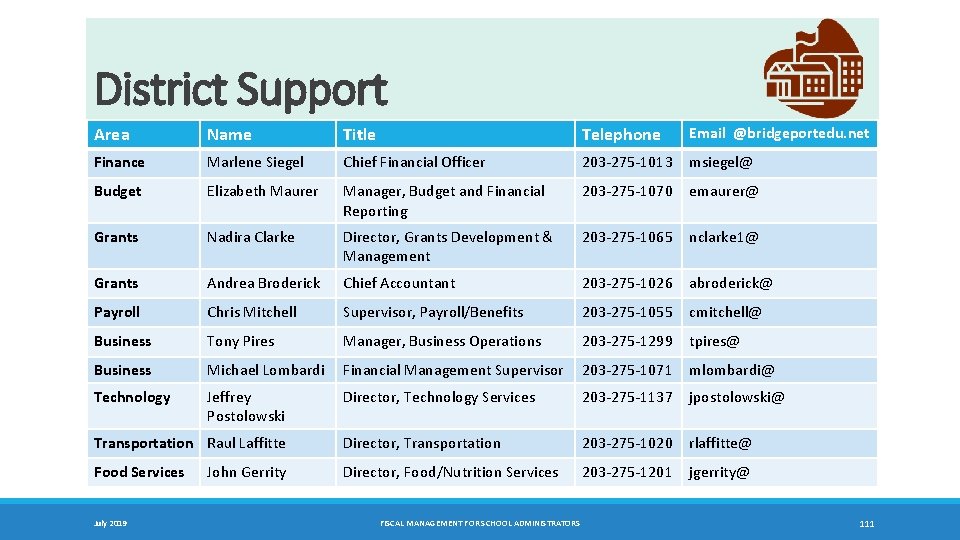
District Support Area Name Title Telephone Email @bridgeportedu. net Finance Marlene Siegel Chief Financial Officer 203 -275 -1013 msiegel@ Budget Elizabeth Maurer Manager, Budget and Financial Reporting 203 -275 -1070 emaurer@ Grants Nadira Clarke Director, Grants Development & Management 203 -275 -1065 nclarke 1@ Grants Andrea Broderick Chief Accountant 203 -275 -1026 abroderick@ Payroll Chris Mitchell Supervisor, Payroll/Benefits 203 -275 -1055 cmitchell@ Business Tony Pires Manager, Business Operations 203 -275 -1299 tpires@ Business Michael Lombardi Financial Management Supervisor 203 -275 -1071 mlombardi@ Technology Jeffrey Postolowski Director, Technology Services 203 -275 -1137 jpostolowski@ Transportation Raul Laffitte Director, Transportation 203 -275 -1020 rlaffitte@ Food Services Director, Food/Nutrition Services 203 -275 -1201 jgerrity@ July 2019 John Gerrity FISCAL MANAGEMENT FOR SCHOOL ADMINISTRATORS 111
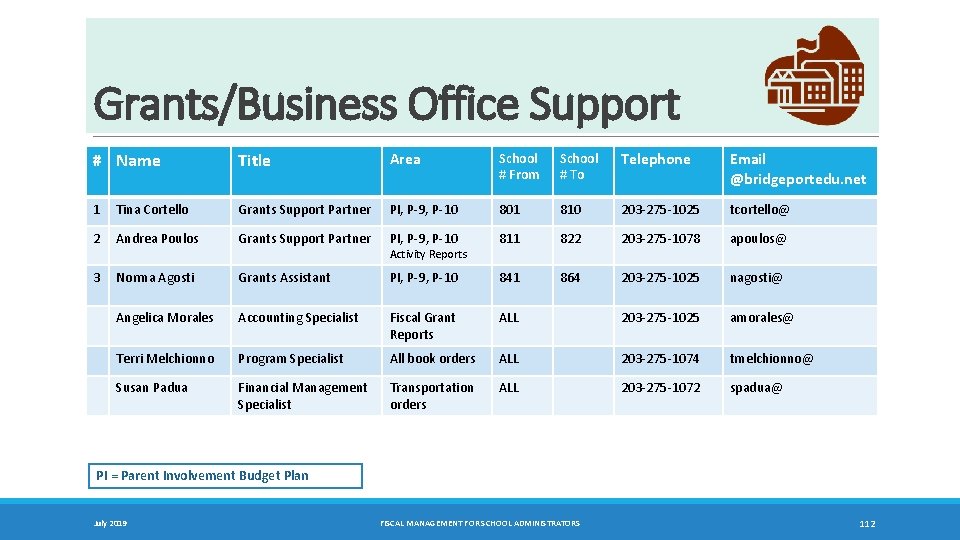
Grants/Business Office Support # Name Title Area School # From School # To Telephone Email @bridgeportedu. net 1 Tina Cortello Grants Support Partner PI, P-9, P-10 801 810 203 -275 -1025 tcortello@ 2 Andrea Poulos Grants Support Partner PI, P-9, P-10 811 822 203 -275 -1078 apoulos@ 3 Norma Agosti Grants Assistant PI, P-9, P-10 841 864 203 -275 -1025 nagosti@ Angelica Morales Accounting Specialist Fiscal Grant Reports ALL 203 -275 -1025 amorales@ Terri Melchionno Program Specialist All book orders ALL 203 -275 -1074 tmelchionno@ Susan Padua Financial Management Specialist Transportation orders ALL 203 -275 -1072 spadua@ Activity Reports PI = Parent Involvement Budget Plan July 2019 FISCAL MANAGEMENT FOR SCHOOL ADMINISTRATORS 112
Chapter 21 BPS web site: Staff; My. BPS School Portals; Admin/Office § http: //www. bridgeportedu. com/mybps/admin. html § BUDGET/BUSINESS PORTAL: Forms and Financial Management Resources Ø Financial Management for School Administrators Ø Parent Involvement Budget Toolkit APPENDIX • EFFECTIVE FISCAL MANAGEMENT: PARADIGM • SCHOOL/LOCATION CODES • MUNIS SCREENSHOTS: REFER TO THE SEPARATE APPENDIX. July 2019 FISCAL MANAGEMENT FOR SCHOOL ADMINISTRATORS 113 TC
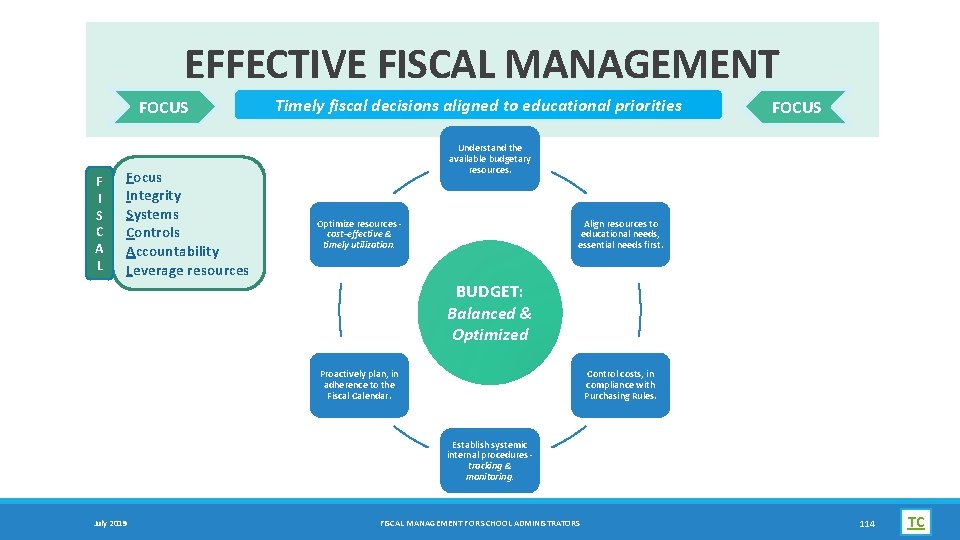
EFFECTIVE FISCAL MANAGEMENT FOCUS F I S C A L Focus Integrity Systems Controls Accountability Leverage resources Timely fiscal decisions aligned to educational priorities FOCUS Understand the available budgetary resources. Optimize resources ‐ cost-effective & timely utilization. Align resources to educational needs, essential needs first. BUDGET: Balanced & Optimized Proactively plan, in adherence to the Fiscal Calendar. Control costs, in compliance with Purchasing Rules. Establish systemic internal procedures ‐ tracking & monitoring. July 2019 July 2015 FISCAL MANAGEMENT FOR SCHOOL ADMINISTRATORS 114 TC
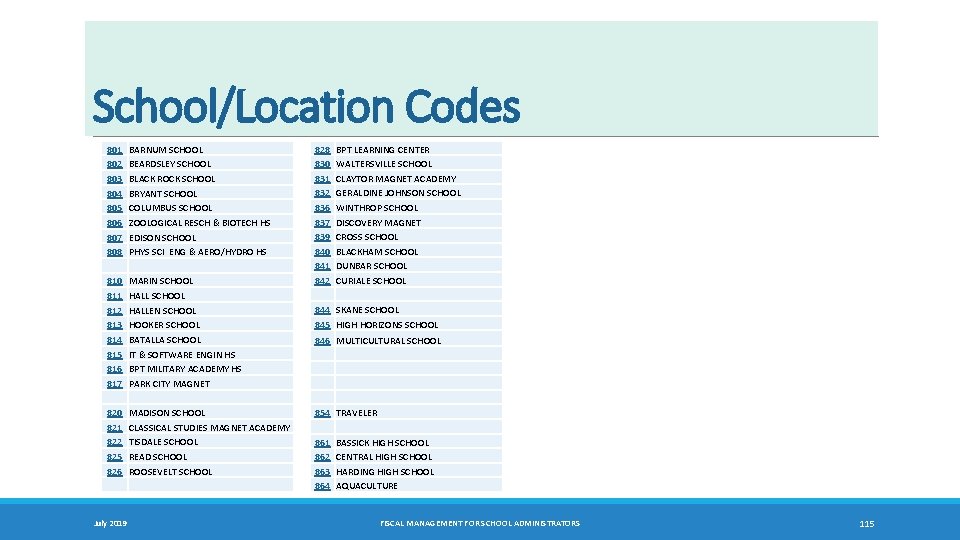
School/Location Codes 801 802 803 804 805 806 807 808 BARNUM SCHOOL BEARDSLEY SCHOOL BLACK ROCK SCHOOL BRYANT SCHOOL COLUMBUS SCHOOL ZOOLOGICAL RESCH & BIOTECH HS EDISON SCHOOL PHYS SCI ENG & AERO/HYDRO HS 810 811 812 813 814 815 816 817 MARIN SCHOOL HALLEN SCHOOL HOOKER SCHOOL BATALLA SCHOOL IT & SOFTWARE ENGIN HS BPT MILITARY ACADEMY HS PARK CITY MAGNET 820 821 822 825 826 MADISON SCHOOL CLASSICAL STUDIES MAGNET ACADEMY TISDALE SCHOOL READ SCHOOL ROOSEVELT SCHOOL July 2019 828 830 831 832 836 837 839 840 841 842 BPT LEARNING CENTER WALTERSVILLE SCHOOL CLAYTOR MAGNET ACADEMY GERALDINE JOHNSON SCHOOL WINTHROP SCHOOL DISCOVERY MAGNET CROSS SCHOOL BLACKHAM SCHOOL DUNBAR SCHOOL CURIALE SCHOOL 844 SKANE SCHOOL 845 HIGH HORIZONS SCHOOL 846 MULTICULTURAL SCHOOL 854 TRAVELER 861 862 863 864 BASSICK HIGH SCHOOL CENTRAL HIGH SCHOOL HARDING HIGH SCHOOL AQUACULTURE FISCAL MANAGEMENT FOR SCHOOL ADMINISTRATORS 115
- Slides: 115