
Branch instructions Well implement branch instructions for the
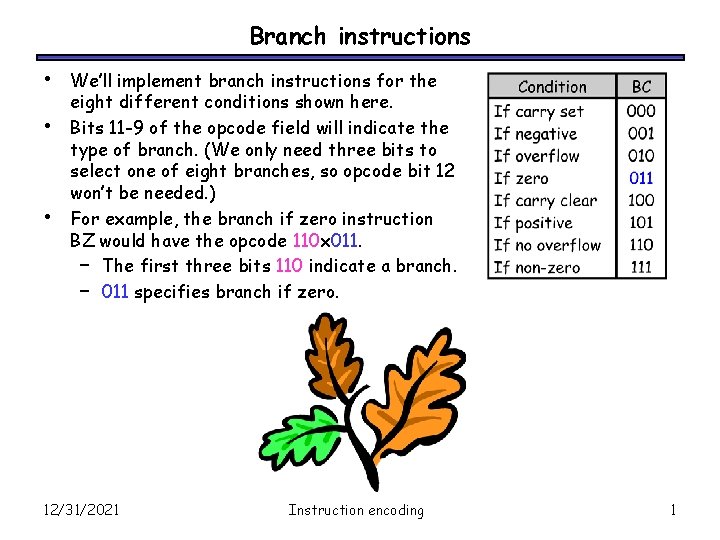
Branch instructions • • • We’ll implement branch instructions for the eight different conditions shown here. Bits 11 -9 of the opcode field will indicate the type of branch. (We only need three bits to select one of eight branches, so opcode bit 12 won’t be needed. ) For example, the branch if zero instruction BZ would have the opcode 110 x 011. – The first three bits 110 indicate a branch. – 011 specifies branch if zero. 12/31/2021 Instruction encoding 1
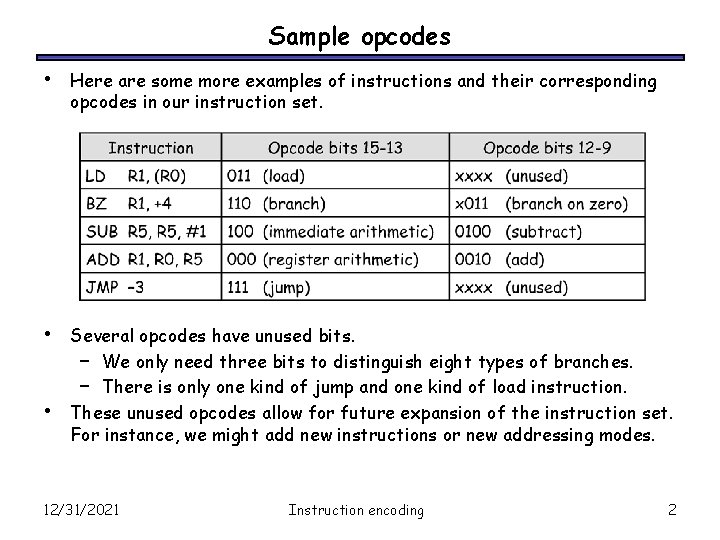
Sample opcodes • Here are some more examples of instructions and their corresponding opcodes in our instruction set. • Several opcodes have unused bits. – We only need three bits to distinguish eight types of branches. – There is only one kind of jump and one kind of load instruction. These unused opcodes allow for future expansion of the instruction set. For instance, we might add new instructions or new addressing modes. • 12/31/2021 Instruction encoding 2
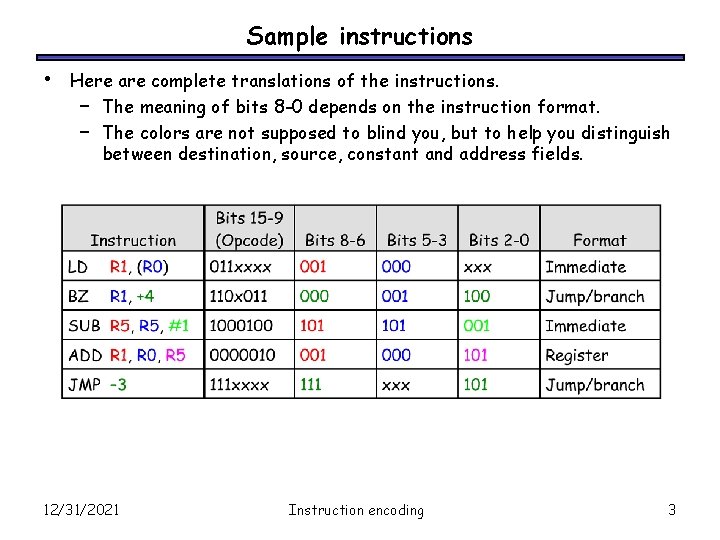
Sample instructions • Here are complete translations of the instructions. – The meaning of bits 8 -0 depends on the instruction format. – The colors are not supposed to blind you, but to help you distinguish between destination, source, constant and address fields. 12/31/2021 Instruction encoding 3
Summary of Instruction Encoding • • • We defined a binary machine language for the instruction set we defined earlier. – Different instructions have different operands and formats, but keeping the formats uniform will help simplify our hardware. – We also try to assign similar opcodes to “similar” instructions. – The instruction encodings and datapath are closely related. For example, our opcodes include ALU selection codes, and the number of available registers is limited by the size of each instruction. This is just one example of how to define a machine language. On Wednesday we’ll show to build a control unit corresponding to our datapath and instruction set. This will complete our processor! 12/31/2021 Instruction encoding 4
Control units • • • In the last lecture, we introduced the basic structure of a control unit, and translated our assembly instructions into a binary representation. Today we fill in the last piece of the processor and build a control unit to convert these binary instructions into datapath signals. At the end of the lecture, we’ll have a complete example processor! July 24, 2002 © 2000 -2002 Howard Huang 5
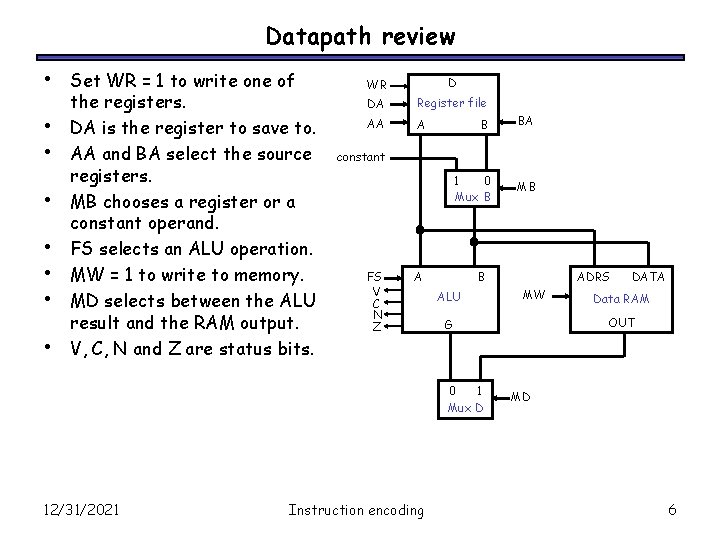
Datapath review • • Set WR = 1 to write one of the registers. DA is the register to save to. AA and BA select the source registers. MB chooses a register or a constant operand. FS selects an ALU operation. MW = 1 to write to memory. MD selects between the ALU result and the RAM output. V, C, N and Z are status bits. WR D DA Register file AA A B constant 1 0 Mux B FS V C N Z A Instruction encoding MB B ALU ADRS MW DATA Data RAM OUT G 0 1 Mux D 12/31/2021 BA MD 6

Instruction format review • • We have three different instruction formats, each 16 bits long with a seven-bit opcode and nine bits for source registers or constants. The first three bits of the opcode determine the instruction category, while the other four bits indicate the exact instruction. – For ALU/shift instructions, the four bits choose an ALU operation. – For branches, the bits select one of eight branch conditions. – We only support one load, one store and one jump instruction. 15 12/31/2021 9 8 6 5 Instruction encoding 3 2 0 7
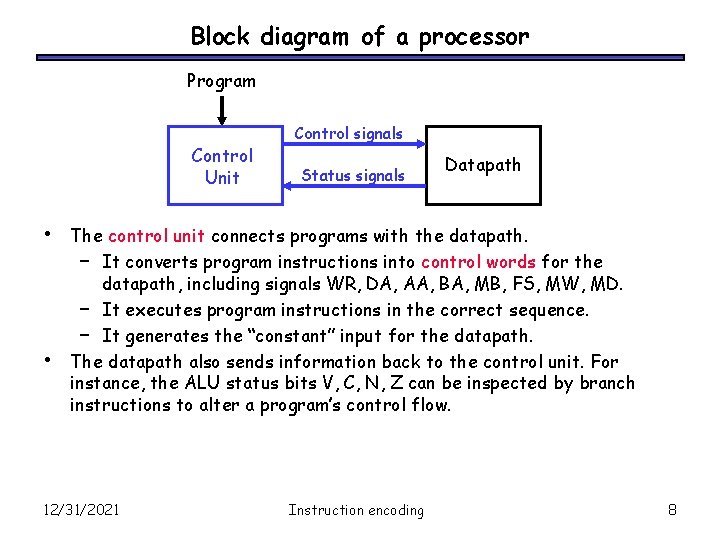
Block diagram of a processor Program Control Unit • • Control signals Status signals Datapath The control unit connects programs with the datapath. – It converts program instructions into control words for the datapath, including signals WR, DA, AA, BA, MB, FS, MW, MD. – It executes program instructions in the correct sequence. – It generates the “constant” input for the datapath. The datapath also sends information back to the control unit. For instance, the ALU status bits V, C, N, Z can be inspected by branch instructions to alter a program’s control flow. 12/31/2021 Instruction encoding 8
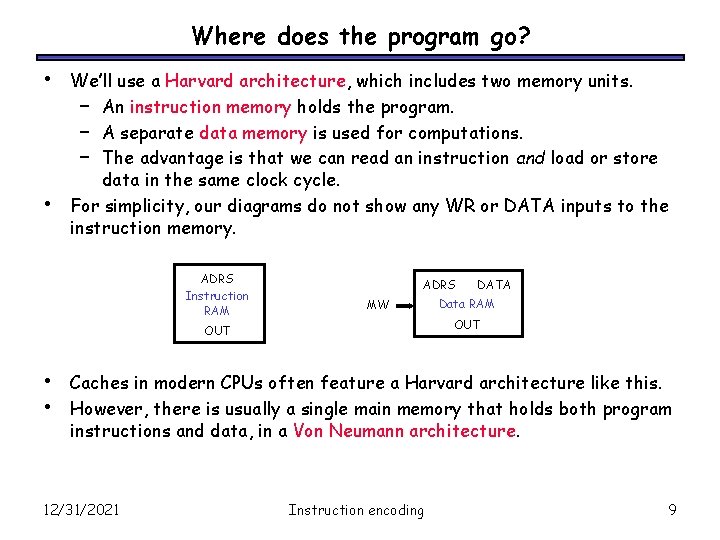
Where does the program go? • • We’ll use a Harvard architecture, which includes two memory units. – An instruction memory holds the program. – A separate data memory is used for computations. – The advantage is that we can read an instruction and load or store data in the same clock cycle. For simplicity, our diagrams do not show any WR or DATA inputs to the instruction memory. ADRS Instruction RAM ADRS MW Data RAM OUT • • DATA Caches in modern CPUs often feature a Harvard architecture like this. However, there is usually a single main memory that holds both program instructions and data, in a Von Neumann architecture. 12/31/2021 Instruction encoding 9
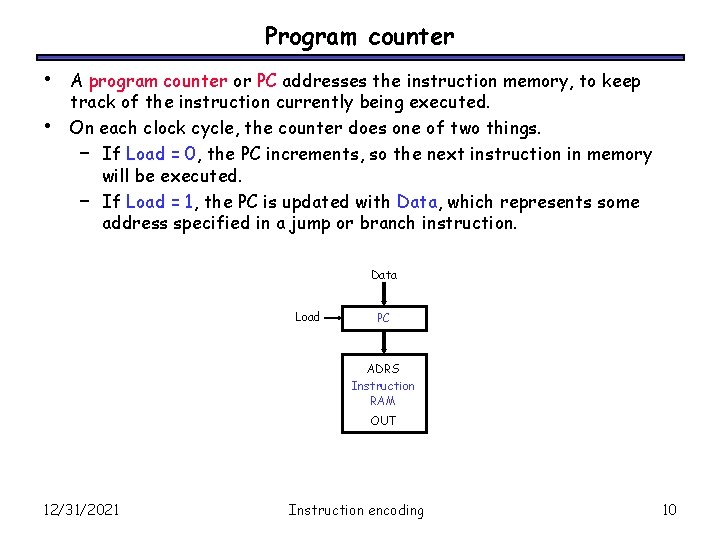
Program counter • • A program counter or PC addresses the instruction memory, to keep track of the instruction currently being executed. On each clock cycle, the counter does one of two things. – If Load = 0, the PC increments, so the next instruction in memory will be executed. – If Load = 1, the PC is updated with Data, which represents some address specified in a jump or branch instruction. Data Load PC ADRS Instruction RAM OUT 12/31/2021 Instruction encoding 10
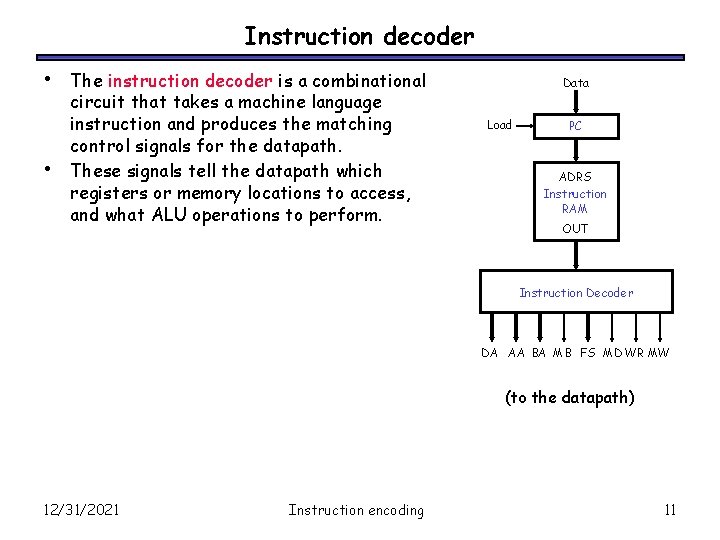
Instruction decoder • • The instruction decoder is a combinational circuit that takes a machine language instruction and produces the matching control signals for the datapath. These signals tell the datapath which registers or memory locations to access, and what ALU operations to perform. Data Load PC ADRS Instruction RAM OUT Instruction Decoder DA AA BA MB FS MD WR MW (to the datapath) 12/31/2021 Instruction encoding 11
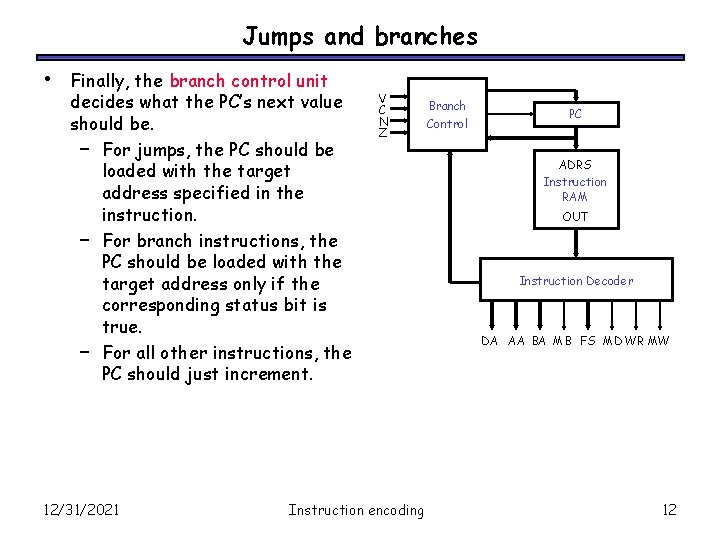
Jumps and branches • Finally, the branch control unit decides what the PC’s next value should be. – For jumps, the PC should be loaded with the target address specified in the instruction. – For branch instructions, the PC should be loaded with the target address only if the corresponding status bit is true. – For all other instructions, the PC should just increment. 12/31/2021 V C N Z Instruction encoding Branch Control PC ADRS Instruction RAM OUT Instruction Decoder DA AA BA MB FS MD WR MW 12
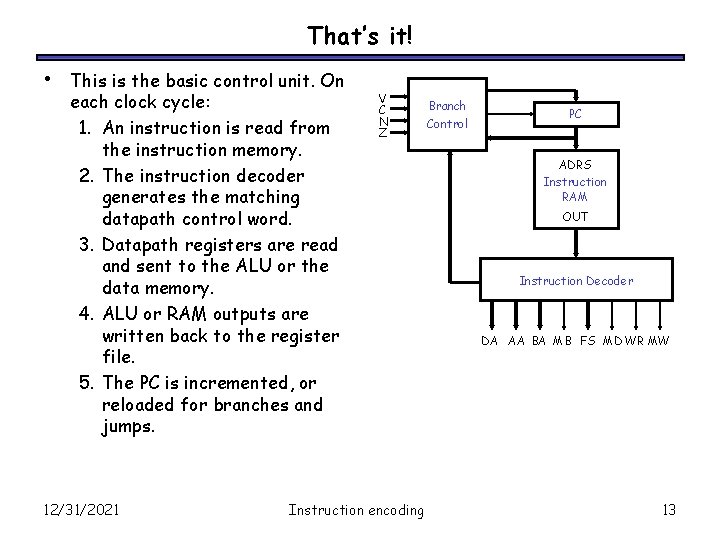
That’s it! • This is the basic control unit. On each clock cycle: 1. An instruction is read from the instruction memory. 2. The instruction decoder generates the matching datapath control word. 3. Datapath registers are read and sent to the ALU or the data memory. 4. ALU or RAM outputs are written back to the register file. 5. The PC is incremented, or reloaded for branches and jumps. 12/31/2021 V C N Z Instruction encoding Branch Control PC ADRS Instruction RAM OUT Instruction Decoder DA AA BA MB FS MD WR MW 13
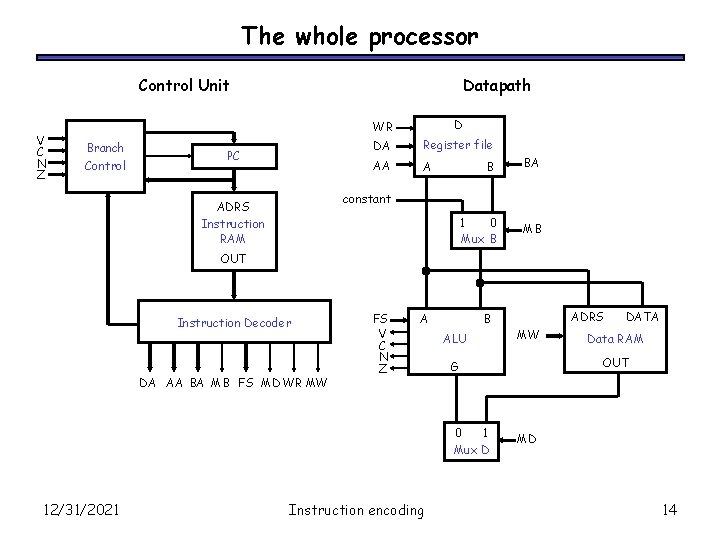
The whole processor Control Unit V C N Z Branch Control Datapath PC WR D DA Register file AA A B BA constant ADRS Instruction RAM 1 0 Mux B MB OUT Instruction Decoder DA AA BA MB FS MD WR MW FS V C N Z A B ALU Instruction encoding MW DATA Data RAM OUT G 0 1 Mux D 12/31/2021 ADRS MD 14
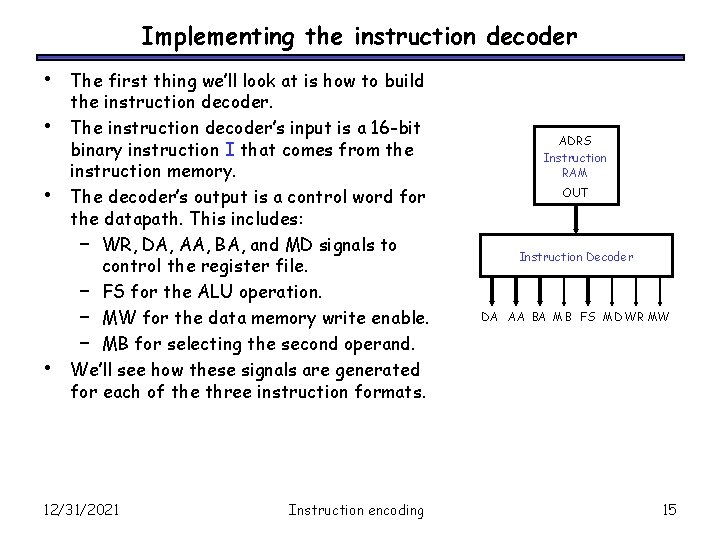
Implementing the instruction decoder • • The first thing we’ll look at is how to build the instruction decoder. The instruction decoder’s input is a 16 -bit binary instruction I that comes from the instruction memory. The decoder’s output is a control word for the datapath. This includes: – WR, DA, AA, BA, and MD signals to control the register file. – FS for the ALU operation. – MW for the data memory write enable. – MB for selecting the second operand. We’ll see how these signals are generated for each of the three instruction formats. 12/31/2021 Instruction encoding ADRS Instruction RAM OUT Instruction Decoder DA AA BA MB FS MD WR MW 15
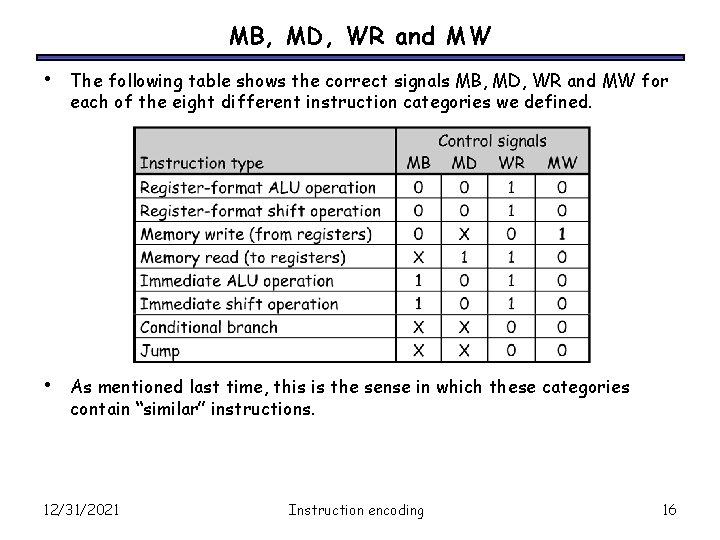
MB, MD, WR and MW • The following table shows the correct signals MB, MD, WR and MW for each of the eight different instruction categories we defined. • As mentioned last time, this is the sense in which these categories contain “similar” instructions. 12/31/2021 Instruction encoding 16
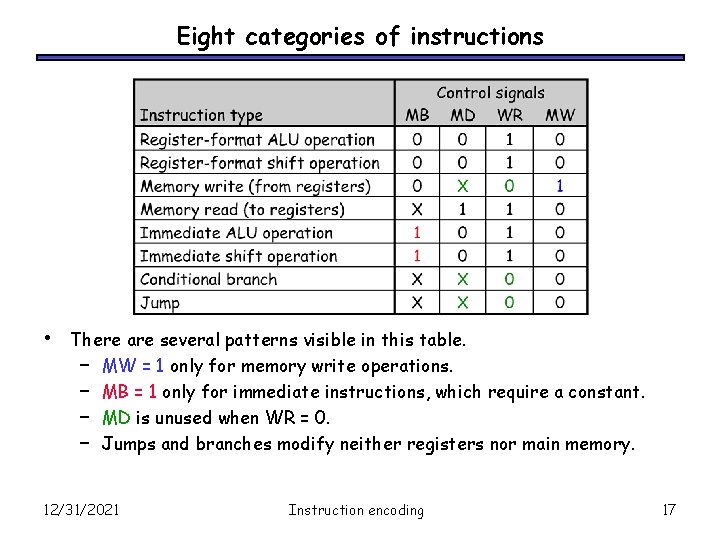
Eight categories of instructions • There are several patterns visible in this table. – MW = 1 only for memory write operations. – MB = 1 only for immediate instructions, which require a constant. – MD is unused when WR = 0. – Jumps and branches modify neither registers nor main memory. 12/31/2021 Instruction encoding 17
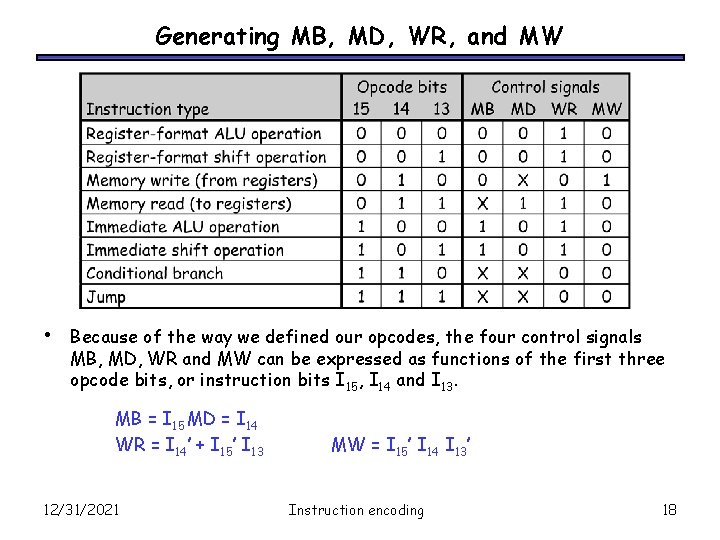
Generating MB, MD, WR, and MW • Because of the way we defined our opcodes, the four control signals MB, MD, WR and MW can be expressed as functions of the first three opcode bits, or instruction bits I 15, I 14 and I 13. MB = I 15 MD = I 14 WR = I 14’ + I 15’ I 13 12/31/2021 MW = I 15’ I 14 I 13’ Instruction encoding 18
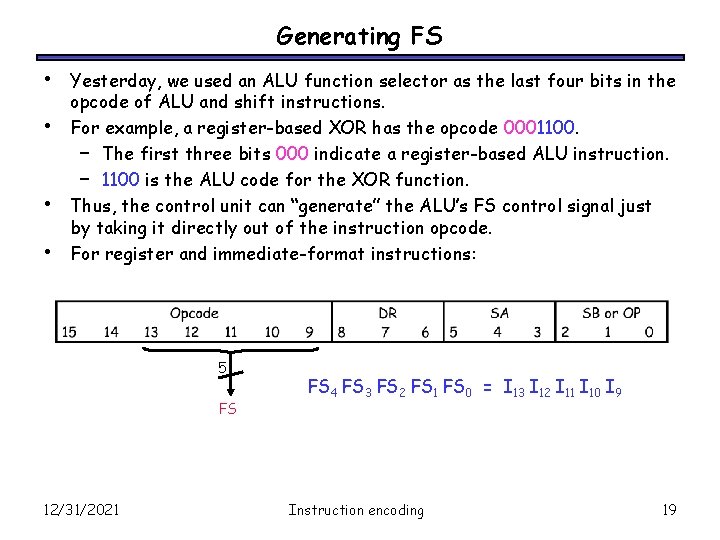
Generating FS • • Yesterday, we used an ALU function selector as the last four bits in the opcode of ALU and shift instructions. For example, a register-based XOR has the opcode 0001100. – The first three bits 000 indicate a register-based ALU instruction. – 1100 is the ALU code for the XOR function. Thus, the control unit can “generate” the ALU’s FS control signal just by taking it directly out of the instruction opcode. For register and immediate-format instructions: 5 FS 12/31/2021 FS 4 FS 3 FS 2 FS 1 FS 0 = I 13 I 12 I 11 I 10 I 9 Instruction encoding 19
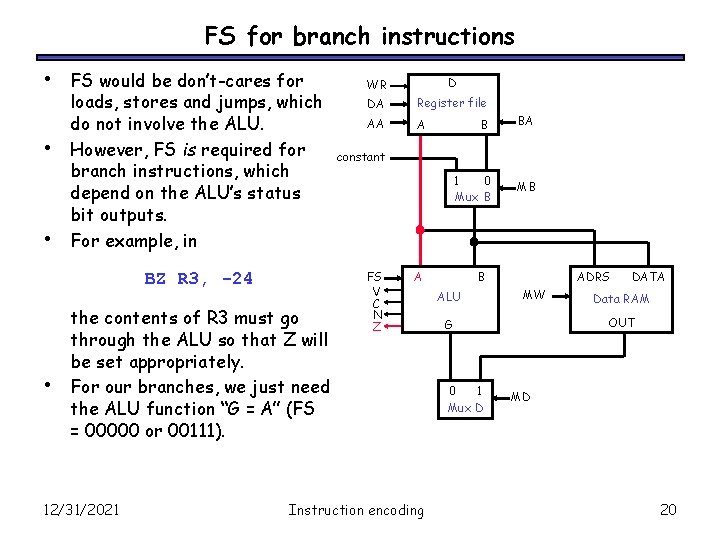
FS for branch instructions • • • FS would be don’t-cares for loads, stores and jumps, which do not involve the ALU. However, FS is required for branch instructions, which depend on the ALU’s status bit outputs. For example, in BZ R 3, -24 • the contents of R 3 must go through the ALU so that Z will be set appropriately. For our branches, we just need the ALU function “G = A” (FS = 00000 or 00111). 12/31/2021 WR D DA Register file AA A B BA constant 1 0 Mux B FS V C N Z A Instruction encoding MB B ALU ADRS MW Data RAM OUT G 0 1 Mux D DATA MD 20
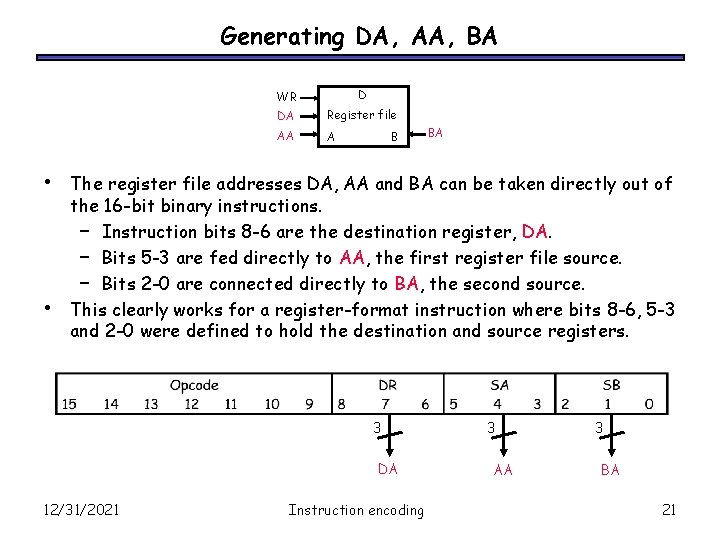
Generating DA, AA, BA • • WR D DA Register file AA A B BA The register file addresses DA, AA and BA can be taken directly out of the 16 -bit binary instructions. – Instruction bits 8 -6 are the destination register, DA. – Bits 5 -3 are fed directly to AA, the first register file source. – Bits 2 -0 are connected directly to BA, the second source. This clearly works for a register-format instruction where bits 8 -6, 5 -3 and 2 -0 were defined to hold the destination and source registers. 3 DA 12/31/2021 Instruction encoding 3 AA 3 BA 21
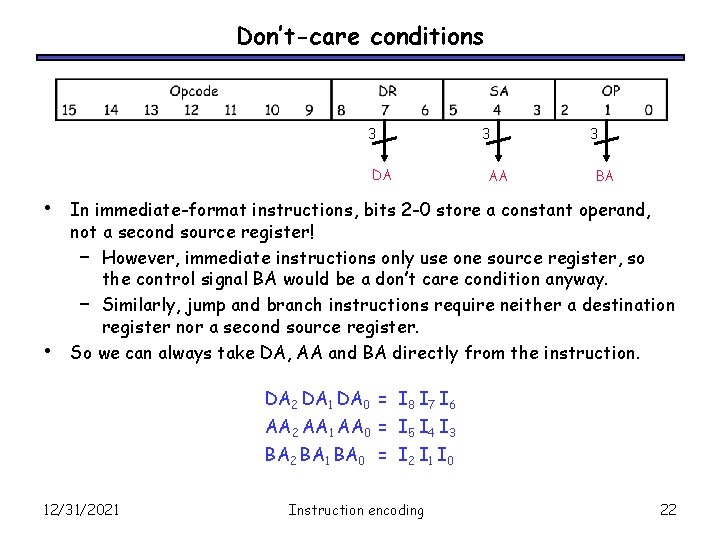
Don’t-care conditions 3 DA • • 3 AA 3 BA In immediate-format instructions, bits 2 -0 store a constant operand, not a second source register! – However, immediate instructions only use one source register, so the control signal BA would be a don’t care condition anyway. – Similarly, jump and branch instructions require neither a destination register nor a second source register. So we can always take DA, AA and BA directly from the instruction. DA 2 DA 1 DA 0 = I 8 I 7 I 6 AA 2 AA 1 AA 0 = I 5 I 4 I 3 BA 2 BA 1 BA 0 = I 2 I 1 I 0 12/31/2021 Instruction encoding 22
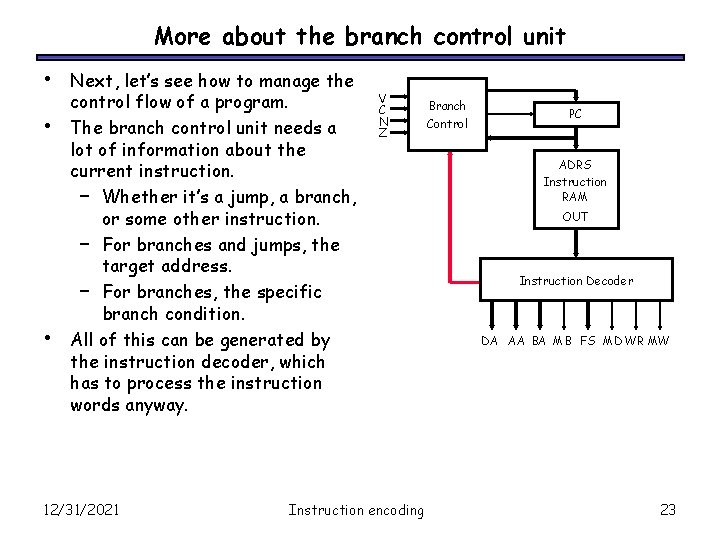
More about the branch control unit • • • Next, let’s see how to manage the control flow of a program. The branch control unit needs a lot of information about the current instruction. – Whether it’s a jump, a branch, or some other instruction. – For branches and jumps, the target address. – For branches, the specific branch condition. All of this can be generated by the instruction decoder, which has to process the instruction words anyway. 12/31/2021 V C N Z Instruction encoding Branch Control PC ADRS Instruction RAM OUT Instruction Decoder DA AA BA MB FS MD WR MW 23
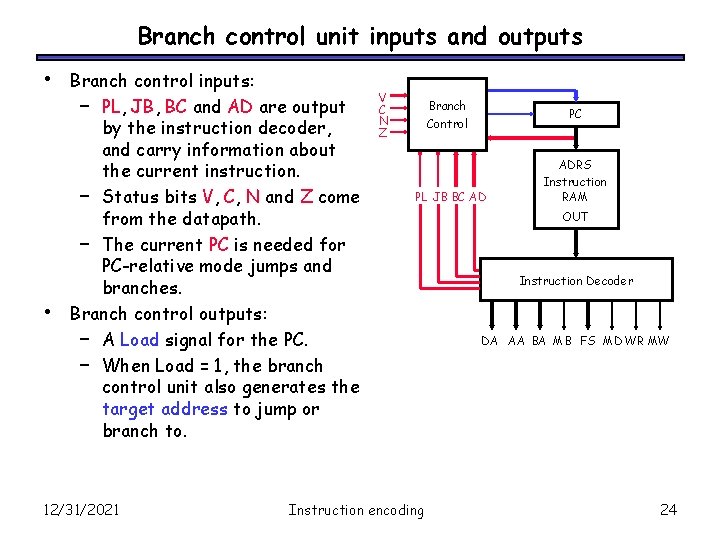
Branch control unit inputs and outputs • • Branch control inputs: – PL, JB, BC and AD are output by the instruction decoder, and carry information about the current instruction. – Status bits V, C, N and Z come from the datapath. – The current PC is needed for PC-relative mode jumps and branches. Branch control outputs: – A Load signal for the PC. – When Load = 1, the branch control unit also generates the target address to jump or branch to. 12/31/2021 V C N Z Branch Control PC PL JB BC AD Instruction encoding ADRS Instruction RAM OUT Instruction Decoder DA AA BA MB FS MD WR MW 24
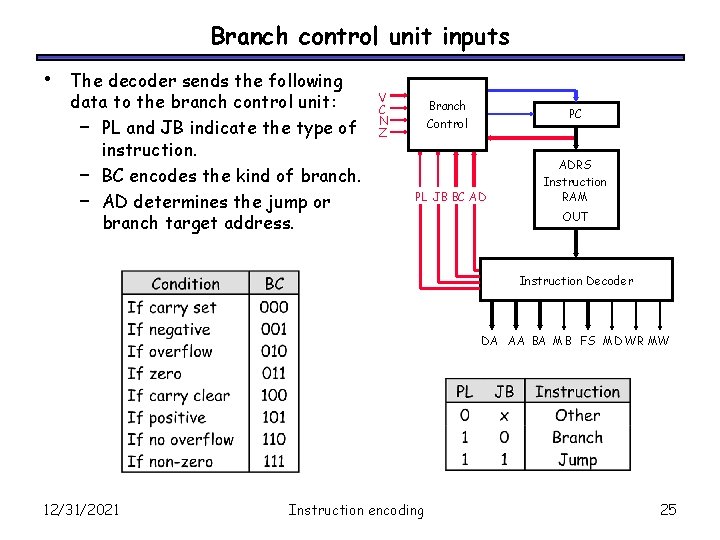
Branch control unit inputs • The decoder sends the following data to the branch control unit: – PL and JB indicate the type of instruction. – BC encodes the kind of branch. – AD determines the jump or branch target address. V C N Z Branch Control PC PL JB BC AD ADRS Instruction RAM OUT Instruction Decoder DA AA BA MB FS MD WR MW 12/31/2021 Instruction encoding 25
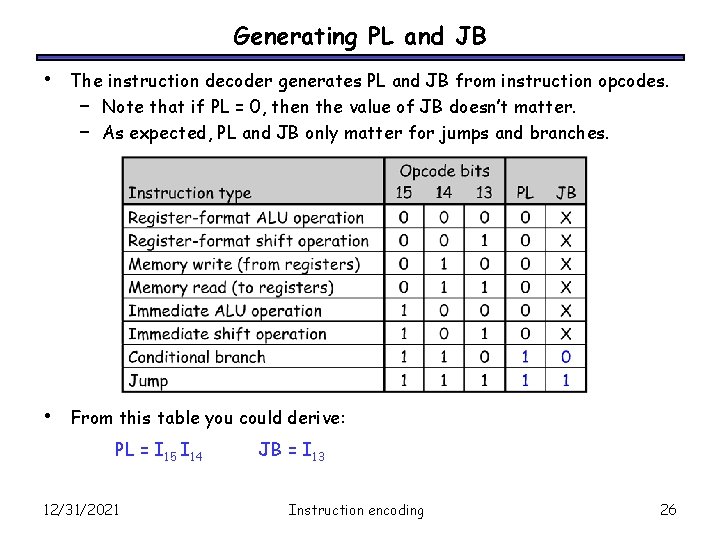
Generating PL and JB • The instruction decoder generates PL and JB from instruction opcodes. – Note that if PL = 0, then the value of JB doesn’t matter. – As expected, PL and JB only matter for jumps and branches. • From this table you could derive: PL = I 15 I 14 12/31/2021 JB = I 13 Instruction encoding 26
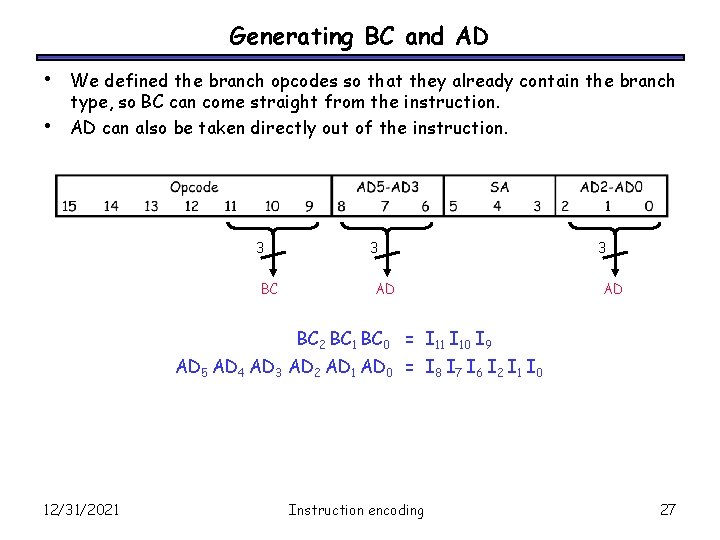
Generating BC and AD • • We defined the branch opcodes so that they already contain the branch type, so BC can come straight from the instruction. AD can also be taken directly out of the instruction. 3 BC 3 AD BC 2 BC 1 BC 0 = I 11 I 10 I 9 AD 5 AD 4 AD 3 AD 2 AD 1 AD 0 = I 8 I 7 I 6 I 2 I 1 I 0 12/31/2021 Instruction encoding 27
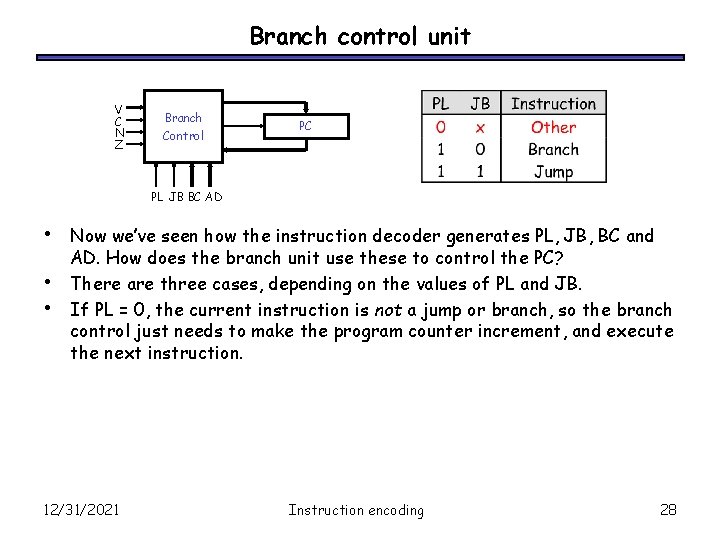
Branch control unit V C N Z Branch Control PC PL JB BC AD • • • Now we’ve seen how the instruction decoder generates PL, JB, BC and AD. How does the branch unit use these to control the PC? There are three cases, depending on the values of PL and JB. If PL = 0, the current instruction is not a jump or branch, so the branch control just needs to make the program counter increment, and execute the next instruction. 12/31/2021 Instruction encoding 28
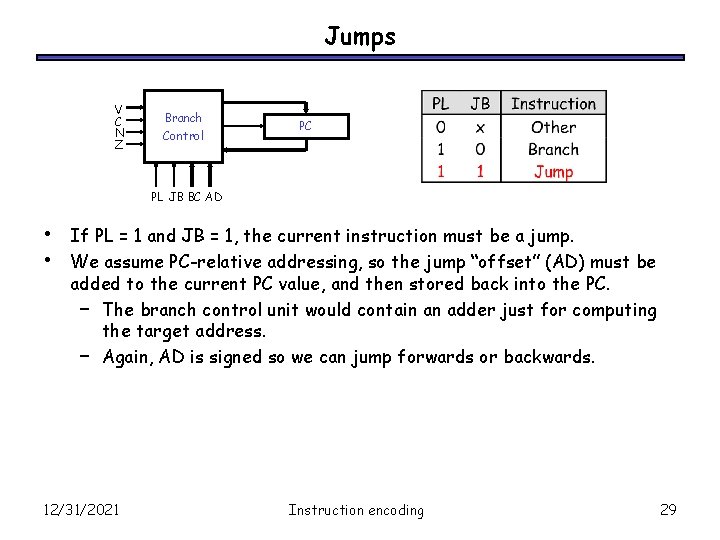
Jumps V C N Z Branch Control PC PL JB BC AD • • If PL = 1 and JB = 1, the current instruction must be a jump. We assume PC-relative addressing, so the jump “offset” (AD) must be added to the current PC value, and then stored back into the PC. – The branch control unit would contain an adder just for computing the target address. – Again, AD is signed so we can jump forwards or backwards. 12/31/2021 Instruction encoding 29
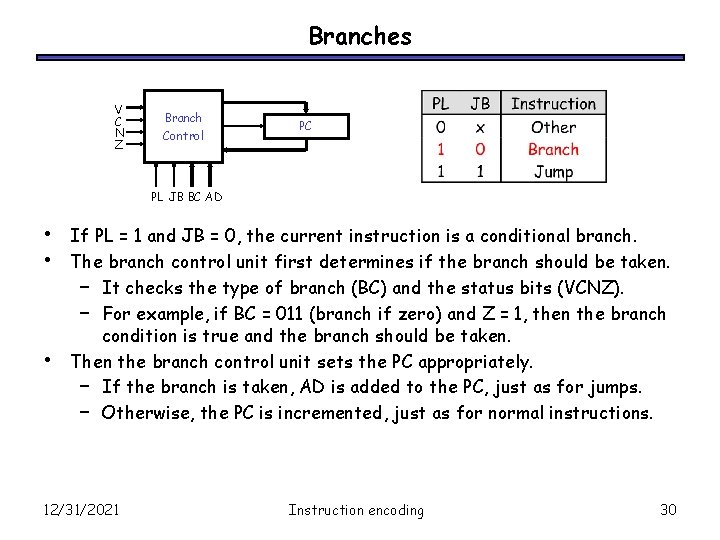
Branches V C N Z Branch Control PC PL JB BC AD • • • If PL = 1 and JB = 0, the current instruction is a conditional branch. The branch control unit first determines if the branch should be taken. – It checks the type of branch (BC) and the status bits (VCNZ). – For example, if BC = 011 (branch if zero) and Z = 1, then the branch condition is true and the branch should be taken. Then the branch control unit sets the PC appropriately. – If the branch is taken, AD is added to the PC, just as for jumps. – Otherwise, the PC is incremented, just as for normal instructions. 12/31/2021 Instruction encoding 30
Summary • • • Today we saw an outline of the control unit hardware. – The program counter points into a special instruction memory, which contains a machine language program. – An instruction decoder looks at each instruction and generates the correct control signals for the datapath and a branching unit. – The branch control unit handles instruction sequencing. The control unit implementation depends on both the instruction set architecture and the datapath. – Careful selection of opcodes and instruction formats can make the control unit simpler. – In MP 4 you’ll design the control unit for a slightly different CPU. We now have a whole processor! This is the culmination of everything we did this semester, starting from those tiny little primitive gates. 12/31/2021 Instruction encoding 31
- Slides: 31