
Blue Shield Medicare Online Certification Site Quick Reference
Blue Shield Medicare Online Certification Site Quick Reference Guide View Quick Reference Guide
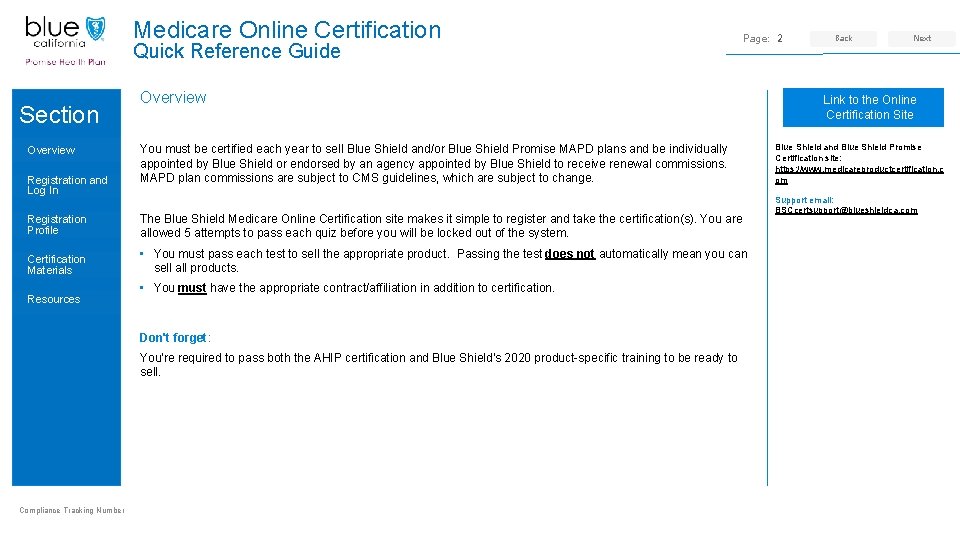
Medicare Online Certification Quick Reference Guide Section Overview Registration and Log In Page: 2 Overview You must be certified each year to sell Blue Shield and/or Blue Shield Promise MAPD plans and be individually appointed by Blue Shield or endorsed by an agency appointed by Blue Shield to receive renewal commissions. MAPD plan commissions are subject to CMS guidelines, which are subject to change. Registration Profile The Blue Shield Medicare Online Certification site makes it simple to register and take the certification(s). You are allowed 5 attempts to pass each quiz before you will be locked out of the system. Certification Materials • You must pass each test to sell the appropriate product. Passing the test does not automatically mean you can sell all products. Resources • You must have the appropriate contract/affiliation in addition to certification. Don't forget: You're required to pass both the AHIP certification and Blue Shield's 2020 product-specific training to be ready to sell. Compliance Tracking Number Back Next • Link to the Online Certification Site Blue Shield and Blue Shield Promise Certification site: https: //www. medicareproductcertification. c om Support email: BSCcertsupport@blueshieldca. com

Medicare Online Certification Registration and Log In View Section
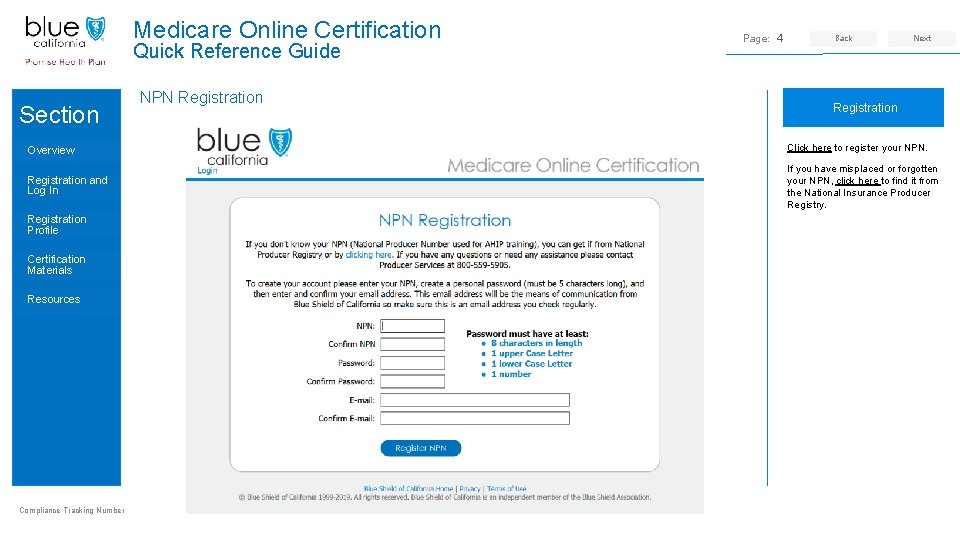
Medicare Online Certification Quick Reference Guide Section NPN Registration Page: 4 Back Next • Registration Overview Click here to register your NPN. Registration and Log In If you have misplaced or forgotten your NPN, click here to find it from the National Insurance Producer Registry. Registration Profile Certification Materials Resources Compliance Tracking Number

Medicare Online Certification Quick Reference Guide Section Overview Registration and Log In Registration Profile Certification Materials Resources Compliance Tracking Number Getting Started Page: 5 Back Next • Before Logging In Click here to be taken to the AHIP Training for Producers site. Follow the steps below to complete your AHIP, Blue Shield and/or Blue Shield Promise certifications: 1. Pass the AHIP annual training. 2. Transmit your results to Blue Shield.
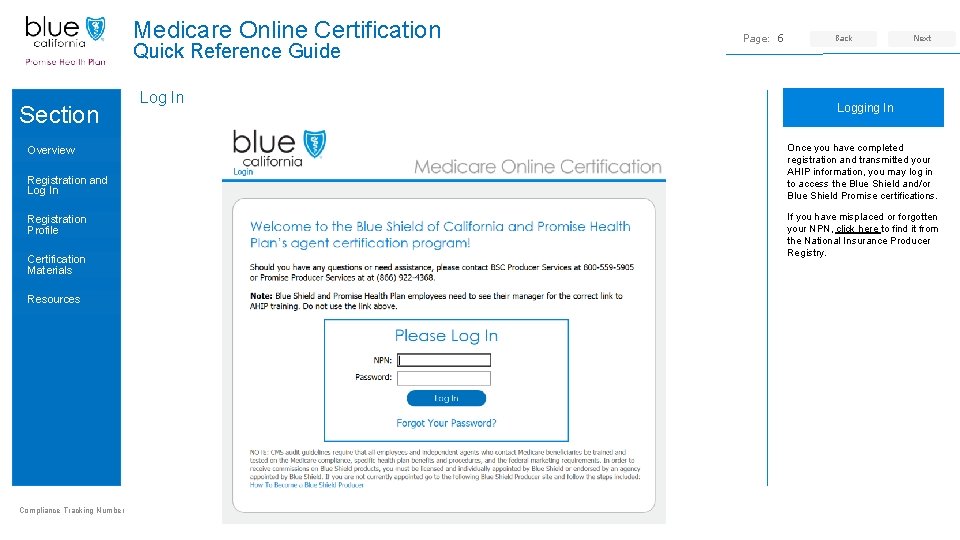
Medicare Online Certification Quick Reference Guide Section Overview Registration and Log In Registration Profile Certification Materials Resources Compliance Tracking Number Log In Page: 6 Back Next • Logging In Once you have completed registration and transmitted your AHIP information, you may log in to access the Blue Shield and/or Blue Shield Promise certifications. If you have misplaced or forgotten your NPN, click here to find it from the National Insurance Producer Registry.

Registration Profile Medicare Online Certification Site View Section
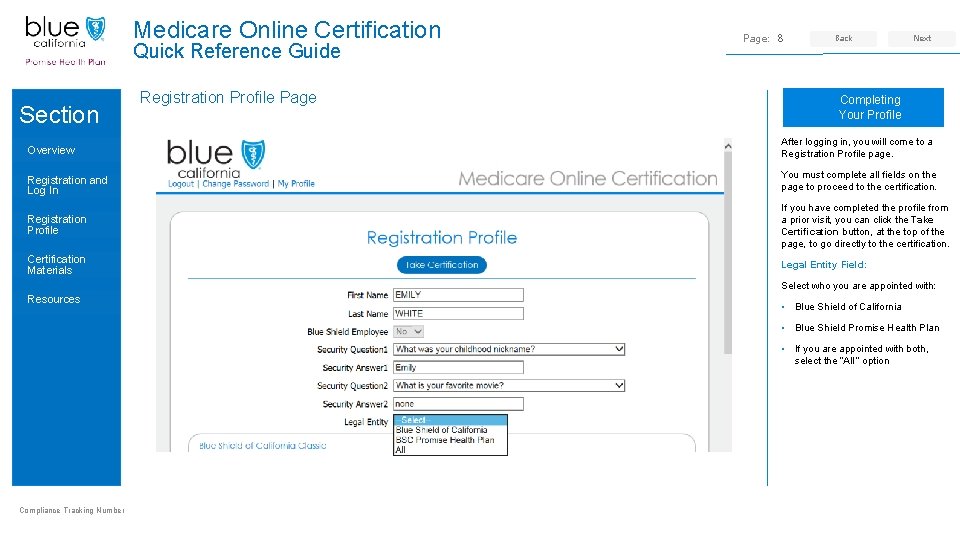
Medicare Online Certification Quick Reference Guide Section Registration Profile Page: 8 Back Next • Completing Your Profile Overview After logging in, you will come to a Registration Profile page. Registration and Log In You must complete all fields on the page to proceed to the certification. Registration Profile If you have completed the profile from a prior visit, you can click the Take Certification button, at the top of the page, to go directly to the certification. Certification Materials Legal Entity Field: Select who you are appointed with: Resources • Blue Shield of California • Blue Shield Promise Health Plan • If you are appointed with both, select the “All” option Compliance Tracking Number
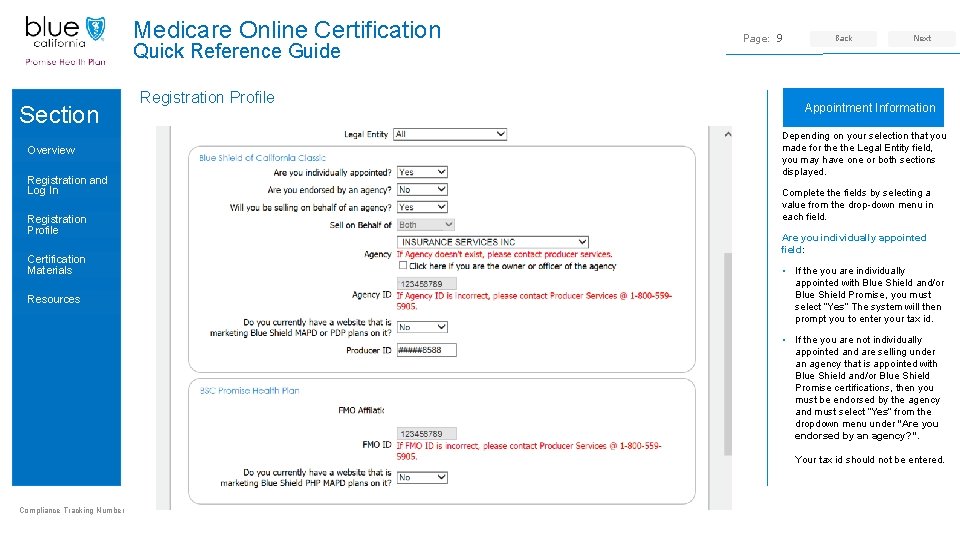
Medicare Online Certification Quick Reference Guide Section Overview Registration and Log In Registration Profile Certification Materials Resources Registration Profile Page: 9 Back Next • Appointment Information Depending on your selection that you made for the Legal Entity field, you may have one or both sections displayed. Complete the fields by selecting a value from the drop-down menu in each field. Are you individually appointed field: • If the you are individually appointed with Blue Shield and/or Blue Shield Promise, you must select “Yes” The system will then prompt you to enter your tax id. • If the you are not individually appointed and are selling under an agency that is appointed with Blue Shield and/or Blue Shield Promise certifications, then you must be endorsed by the agency and must select “Yes” from the dropdown menu under “Are you endorsed by an agency? ”. Your tax id should not be entered. Compliance Tracking Number
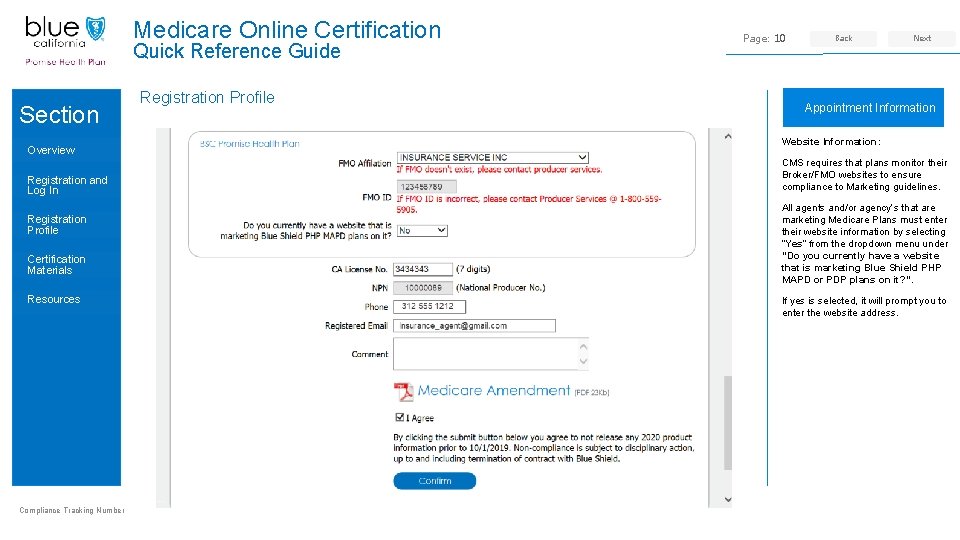
Medicare Online Certification Quick Reference Guide Section Overview Registration and Log In Registration Profile Certification Materials Resources Compliance Tracking Number Registration Profile Page: 10 Back Next • Appointment Information Website Information: CMS requires that plans monitor their Broker/FMO websites to ensure compliance to Marketing guidelines. All agents and/or agency’s that are marketing Medicare Plans must enter their website information by selecting “Yes” from the dropdown menu under “Do you currently have a website that is marketing Blue Shield PHP MAPD or PDP plans on it? ”. If yes is selected, it will prompt you to enter the website address.
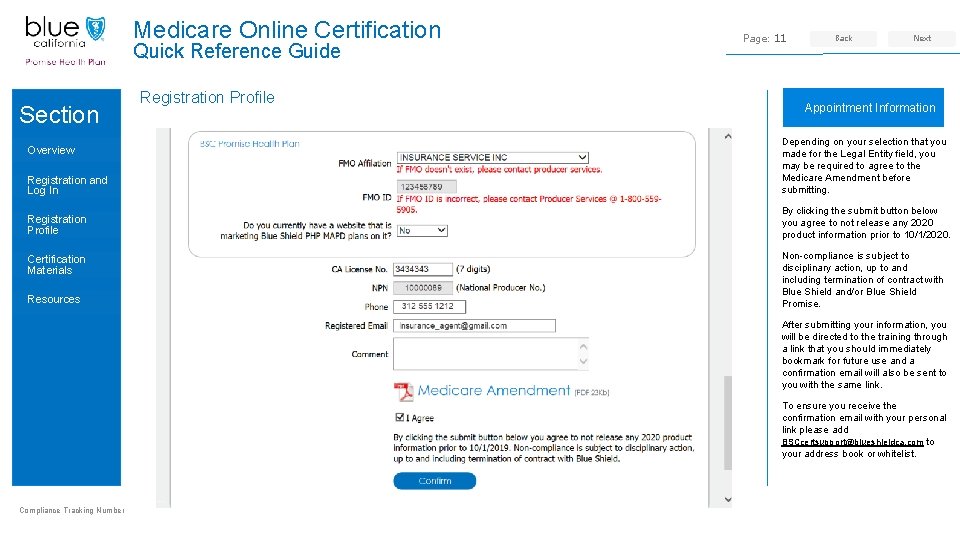
Medicare Online Certification Quick Reference Guide Section Registration Profile Page: 11 Back Next • Appointment Information Registration and Log In Depending on your selection that you made for the Legal Entity field, you may be required to agree to the Medicare Amendment before submitting. Registration Profile By clicking the submit button below you agree to not release any 2020 product information prior to 10/1/2020. Overview Certification Materials Resources Non-compliance is subject to disciplinary action, up to and including termination of contract with Blue Shield and/or Blue Shield Promise. After submitting your information, you will be directed to the training through a link that you should immediately bookmark for future use and a confirmation email will also be sent to you with the same link. To ensure you receive the confirmation email with your personal link please add BSCcertsupport@blueshieldca. com to your address book or whitelist. Compliance Tracking Number

Certification Annual Medicare Certification Testing View Section
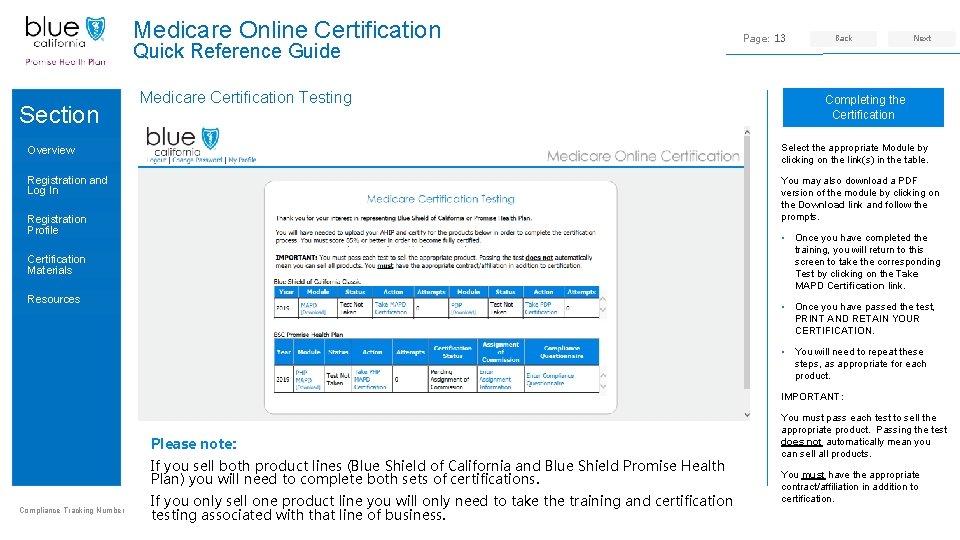
Medicare Online Certification Quick Reference Guide Section Medicare Certification Testing Page: 13 Back Next • Completing the Certification Overview Select the appropriate Module by clicking on the link(s) in the table. Registration and Log In You may also download a PDF version of the module by clicking on the Download link and follow the prompts. Registration Profile • Once you have completed the training, you will return to this screen to take the corresponding Test by clicking on the Take MAPD Certification link. Certification Materials Resources • Once you have passed the test, PRINT AND RETAIN YOUR CERTIFICATION. • You will need to repeat these steps, as appropriate for each product. IMPORTANT: Please note: If you sell both product lines (Blue Shield of California and Blue Shield Promise Health Plan) you will need to complete both sets of certifications. Compliance Tracking Number If you only sell one product line you will only need to take the training and certification testing associated with that line of business. You must pass each test to sell the appropriate product. Passing the test does not automatically mean you can sell all products. You must have the appropriate contract/affiliation in addition to certification.
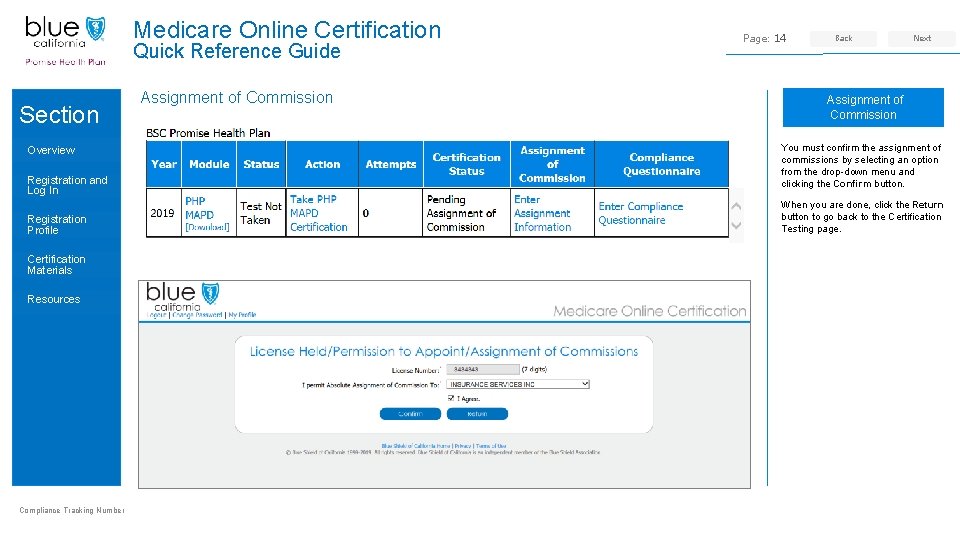
Medicare Online Certification Quick Reference Guide Section Overview Registration and Log In Registration Profile Certification Materials Resources Compliance Tracking Number Assignment of Commission Page: 14 Back Next • Assignment of Commission You must confirm the assignment of commissions by selecting an option from the drop-down menu and clicking the Confirm button. When you are done, click the Return button to go back to the Certification Testing page.
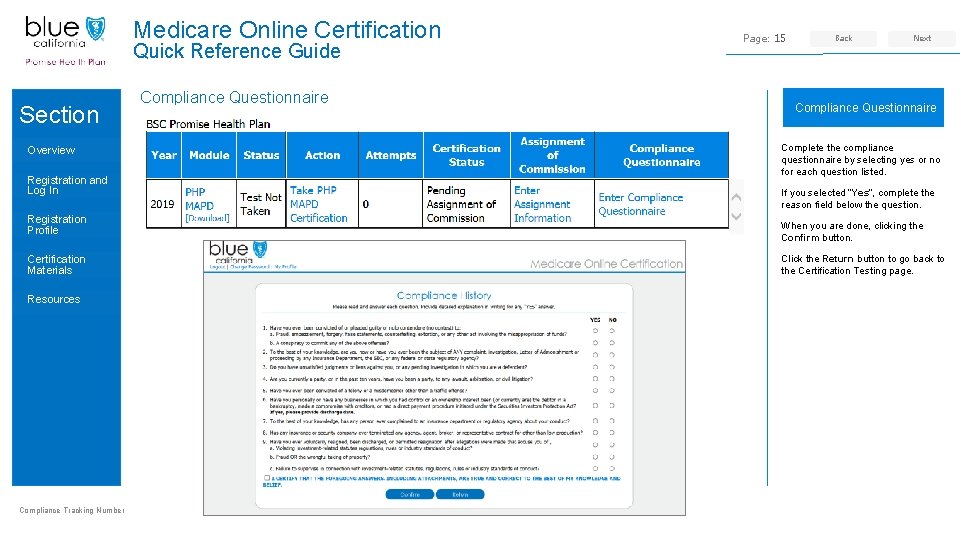
Medicare Online Certification Quick Reference Guide Section Overview Registration and Log In Registration Profile Certification Materials Resources Compliance Tracking Number Compliance Questionnaire Page: 15 Back Next • Compliance Questionnaire Complete the compliance questionnaire by selecting yes or no for each question listed. If you selected “Yes”, complete the reason field below the question. When you are done, clicking the Confirm button. Click the Return button to go back to the Certification Testing page.
Medicare Online Certification Quick Reference Guide Section Resources • Blue Shield and Blue Shield Promise Certification site: https: //www. medicareproductcertification. com Overview Registration and Log In • Register your NPN: https: //dev. medicareproductcertification. com/registration. aspx Registration Profile • National Insurance Producer Registry: https: //pdb. nipr. com/html/Pac. Npn. Search. html Certification Materials • AHIP Training for Producers site: http: //www. ahipmedicaretraining. com/clients/blueshieldca Resources • Broker Connection Site: https: //www. blueshieldca. com/producer/login. sp Compliance Tracking Number Page: 16 Back Next • Contact US Producer Services Phone Number: 1 -800 -559 -5905 Support email: BSCcertsupport@blueshieldca. com
- Slides: 16