
Bilkent University Department of Computer Engineering CS 342
Bilkent University Department of Computer Engineering CS 342 Operating Systems Chapter 12 Mass Storage Last Update: Dec 14, 2017 1
Objectives and Outline Objectives • Describe the physical structure of secondary and tertiary storage devices and the resulting effects on the uses of the devices • Explain the performance characteristics of mass-storage devices • Discuss operating-system services provided for mass storage, including RAID and HSM Outline • Overview of Mass Storage Structure • Disk Attachment • Disk Scheduling • Disk Management • Swap-Space Management • RAID Structure • Disk Attachment • Stable-Storage Implementation • Tertiary Storage Devices • Operating System Issues • Performance Issues 2
Mass Storage • Mass Storage : permanent storage; large volume of data can be stored permanently (powering off will not cause loss of data) – Secondary storage: always online; hard disk – Tertiary storage; tapes, etc. 3
Overview of Mass Storage Systems: Magnetic Disks • Magnetic disks provide bulk of secondary storage of modern computers – Drives rotate at 60 to 200 times per second – Transfer rate is rate at which data flow between drive and computer – Positioning time (random-access time) is time to move disk arm to desired cylinder (seek time) and time for desired sector to rotate under the disk head (rotational latency) – Head crash results from disk head making contact with the disk surface • That’s bad – Disks can be removable 4

Moving-head Disk Mechanism 5

Overview of Mass Storage Systems: Magnetic Tapes • Magnetic tape – Was early secondary-storage medium – Relatively permanent and holds large quantities of data • 20 -200 GB typical storage – Mainly used for backup, storage of infrequently-used data, transfer medium between systems – Access time slow – Random access ~1000 times slower than disk – Once data under head, transfer rates comparable to disk – Common technologies are 4 mm, 8 mm, 19 mm, LTO-2 and SDLT 6
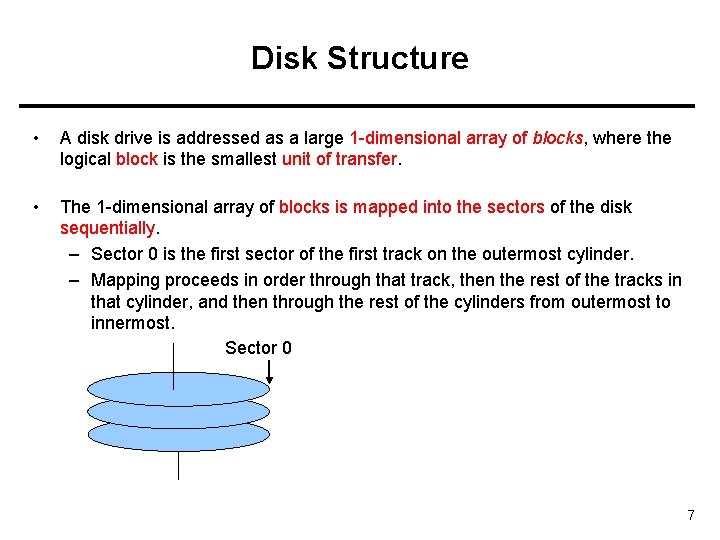
Disk Structure • A disk drive is addressed as a large 1 -dimensional array of blocks, where the logical block is the smallest unit of transfer. • The 1 -dimensional array of blocks is mapped into the sectors of the disk sequentially. – Sector 0 is the first sector of the first track on the outermost cylinder. – Mapping proceeds in order through that track, then the rest of the tracks in that cylinder, and then through the rest of the cylinders from outermost to innermost. Sector 0 7
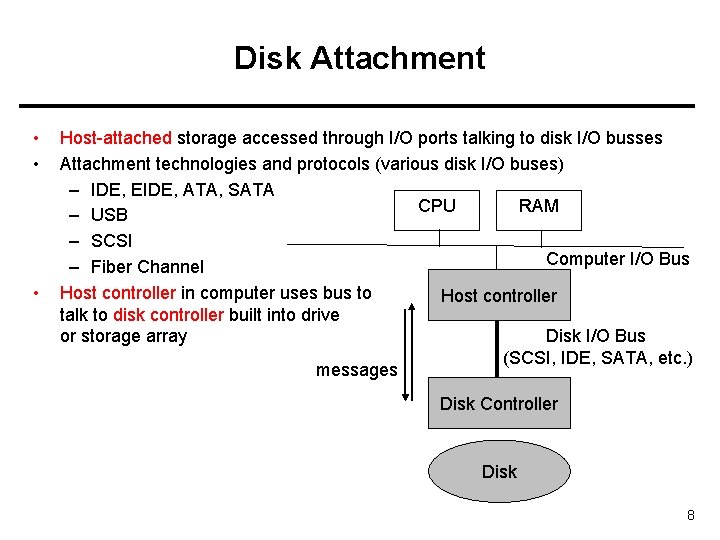
Disk Attachment • • • Host-attached storage accessed through I/O ports talking to disk I/O busses Attachment technologies and protocols (various disk I/O buses) – IDE, EIDE, ATA, SATA CPU RAM – USB – SCSI Computer I/O Bus – Fiber Channel Host controller in computer uses bus to Host controller talk to disk controller built into drive Disk I/O Bus or storage array (SCSI, IDE, SATA, etc. ) messages Disk Controller Disk 8
Disk Attachment Example: SCSI and Fiber Channel • SCSI itself is a bus, up to 16 devices on one cable, SCSI initiator requests operation and SCSI targets perform tasks – Each target can have up to 8 logical units (disks attached to device controller • FC (fiber channel) is high-speed serial architecture – Can be switched fabric with 24 -bit address space – the basis of storage area networks (SANs) in which many hosts attach to many storage units – Can be arbitrated loop (FC-AL) of 126 devices 9
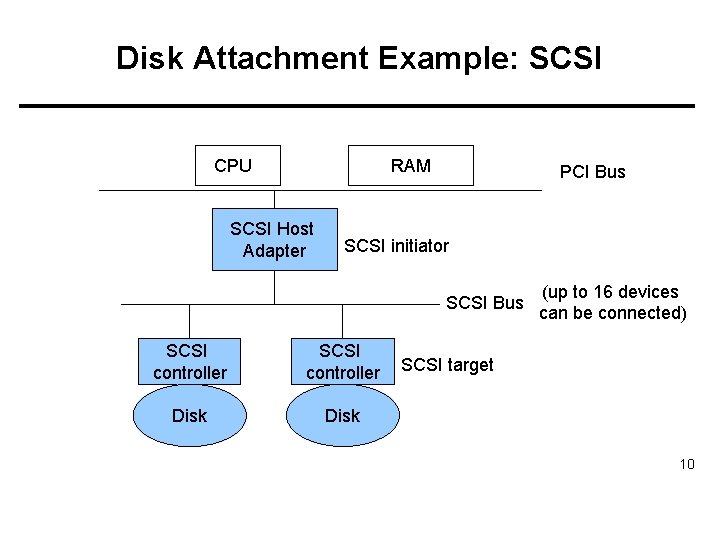
Disk Attachment Example: SCSI RAM CPU SCSI Host Adapter PCI Bus SCSI initiator SCSI Bus SCSI controller Disk (up to 16 devices can be connected) SCSI target 10
Network Attached Storage • Network-attached storage (NAS) is storage made available over a network rather than over a local connection (such as a bus) • NFS and CIFS are common distributed file system protocols used for network attached storage – We use those protocols to access remote storage that is connected to a network. Implemented via remote procedure calls (RPCs) between host and storage • • New i. SCSI protocol uses IP network to carry the SCSI protocol – SCSI bus/cable (local/host attached) – i. SCSI – TCP/IP network (network attached) 11
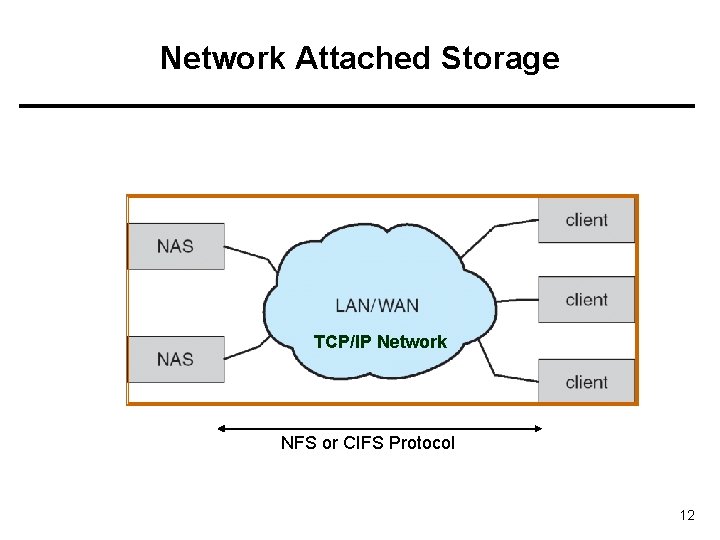
Network Attached Storage TCP/IP Network NFS or CIFS Protocol 12
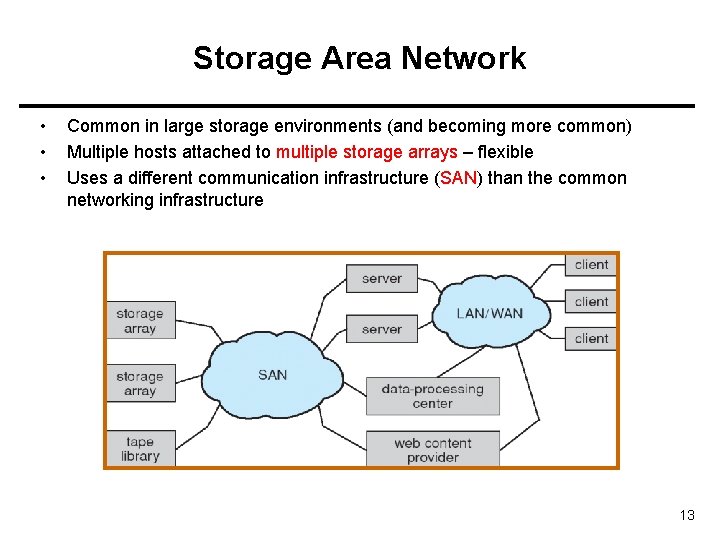
Storage Area Network • • • Common in large storage environments (and becoming more common) Multiple hosts attached to multiple storage arrays – flexible Uses a different communication infrastructure (SAN) than the common networking infrastructure 13
Disk Scheduling • The operating system is responsible for using hardware efficiently — for the disk drives, this means having a fast access time and large disk bandwidth. • Disk access time has two major components – Seek time is the time for the disk to move the head to the cylinder containing the desired sector (block). – Rotational latency is the additional waiting time for the disk to rotate the desired sector under the disk head. Minimize seek time Seek time seek distance (between cylinders) • • • Disk bandwidth is the total number of bytes transferred, divided by the total time between the first request for service and the completion of the last transfer. 14
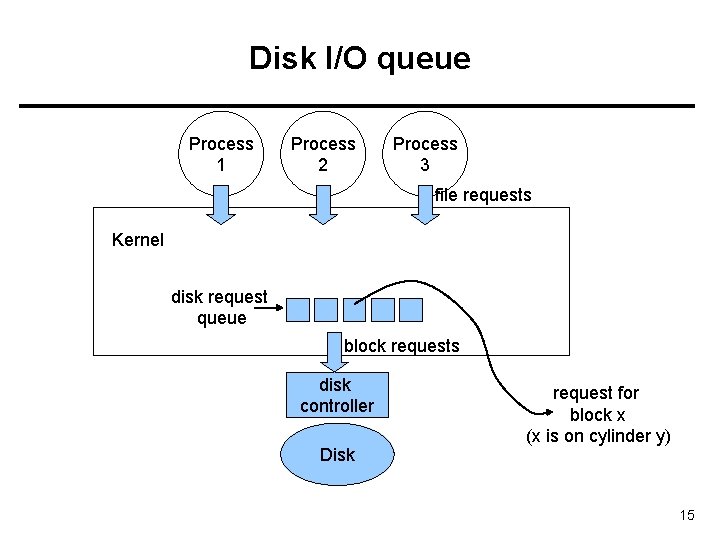
Disk I/O queue Process 1 Process 2 Process 3 file requests Kernel disk request queue block requests disk controller Disk request for block x (x is on cylinder y) 15
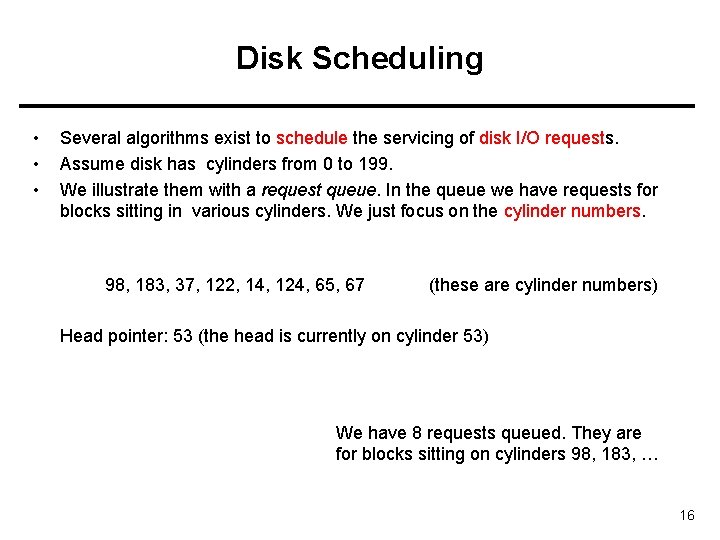
Disk Scheduling • • • Several algorithms exist to schedule the servicing of disk I/O requests. Assume disk has cylinders from 0 to 199. We illustrate them with a request queue. In the queue we have requests for blocks sitting in various cylinders. We just focus on the cylinder numbers. 98, 183, 37, 122, 14, 124, 65, 67 (these are cylinder numbers) Head pointer: 53 (the head is currently on cylinder 53) We have 8 requests queued. They are for blocks sitting on cylinders 98, 183, … 16
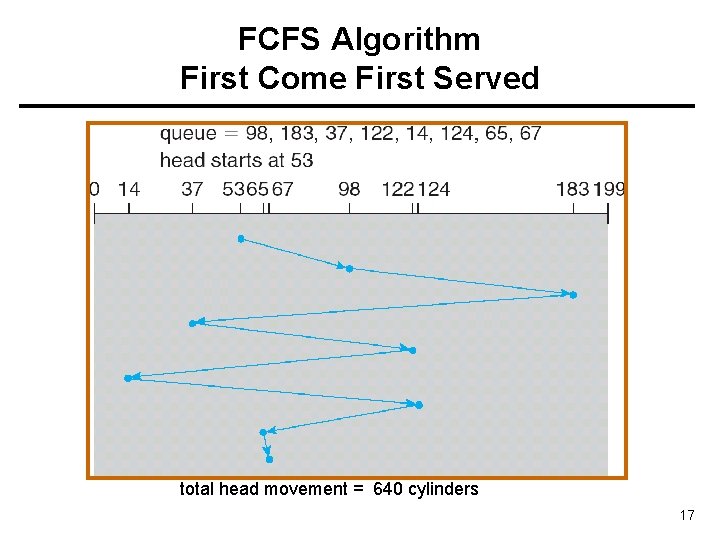
FCFS Algorithm First Come First Served total head movement = 640 cylinders 17
SSTF Algorithm Shortest Seek Time First • • Selects the request with the minimum seek time from the current head position. SSTF scheduling is a form of SJF scheduling; may cause starvation of some requests. 18
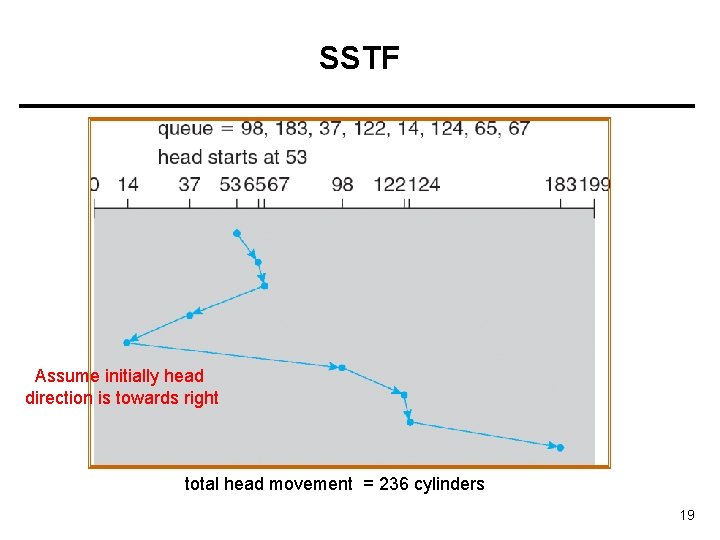
SSTF Assume initially head direction is towards right total head movement = 236 cylinders 19
SCAN/ELEVATOR Algorithm • The disk arm starts at one end of the disk, and moves toward the other end, servicing requests until it gets to the other end of the disk, where the head movement is reversed and servicing continues. • Sometimes called the elevator algorithm. • Several variations of the algorithm exist: – C-SCAN – LOOK – C-LOOK 20
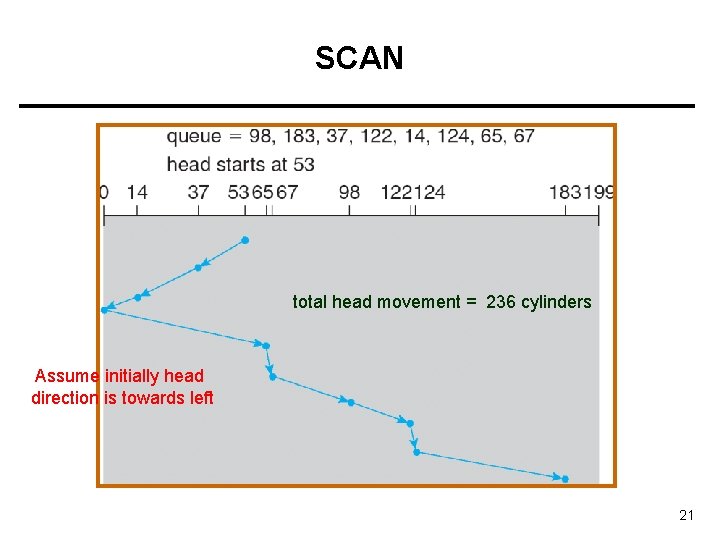
SCAN total head movement = 236 cylinders Assume initially head direction is towards left 21
C-SCAN • • C-SCAN: Circular SCAN Provides a more uniform wait time than SCAN. – Wait time for request: time between arrival of request to the queue and completion of handling the request. • The head moves from one end of the disk to the other; servicing requests as it goes. When it reaches the other end, however, it immediately returns to the beginning of the disk, without servicing any requests on the return trip. • Treats the cylinders as a circular list that wraps around from the last cylinder to the first one. 22
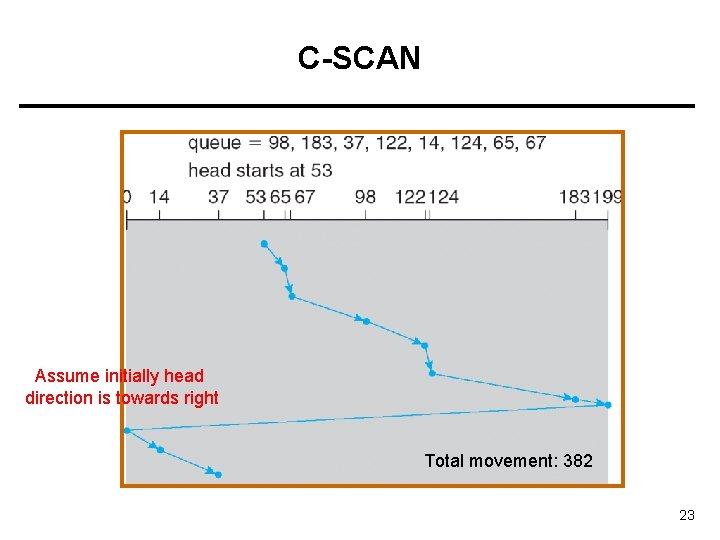
C-SCAN Assume initially head direction is towards right Total movement: 382 23
C-LOOK • Version of C-SCAN • Arm only goes as far as the last request in each direction, then reverses direction immediately (without first going all the way to the end of the disk); and goes to the first request in the other end of the disk. 24
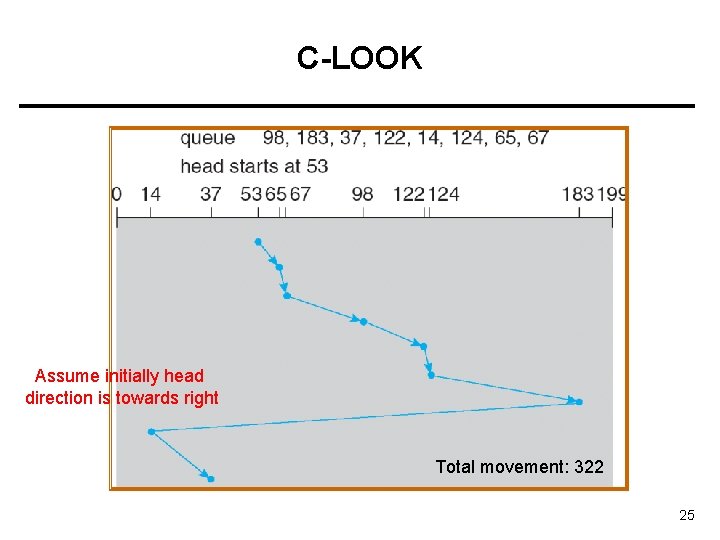
C-LOOK Assume initially head direction is towards right Total movement: 322 25
LOOK • • From 53 to 183 (sweep meanwhile) From 183 to 14 (sweep meanwhile) • Total = 299 26
Selecting a Disk-Scheduling Algorithm • SSTF is common and has a natural appeal • SCAN and C-SCAN perform better for systems that place a heavy load on the disk. • Performance depends on the number and types of requests. • Requests for disk service can be influenced by the file-allocation method. • The disk-scheduling algorithm should be written as a separate module of the operating system, allowing it to be replaced with a different algorithm if necessary. • Either SSTF or LOOK is a reasonable choice for the default algorithm. 27
Disk Management • Low-level formatting, or physical formatting — Dividing a disk into sectors that the disk controller can read and write. • To use a disk to hold files, the operating system still needs to record its own data structures on the disk. – Partition the disk into one or more groups of cylinders (volumes). – Logical formatting or “making a file system”. 28
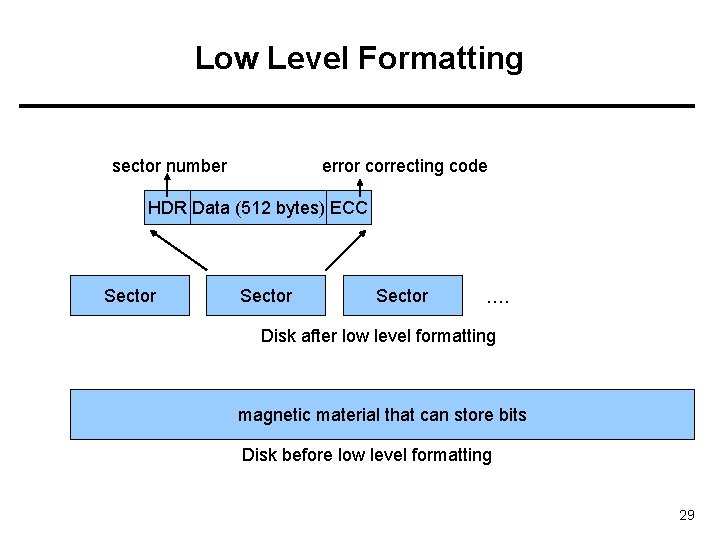
Low Level Formatting sector number error correcting code HDR Data (512 bytes) ECC Sector …. Disk after low level formatting magnetic material that can store bits Disk before low level formatting 29
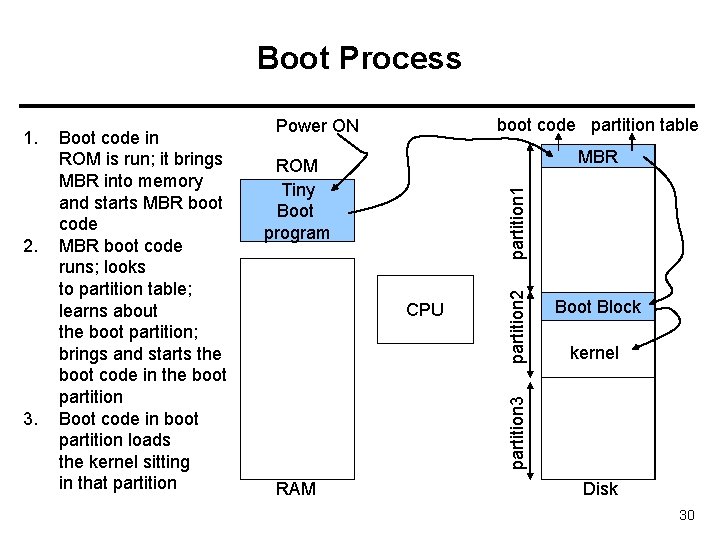
Boot Process 3. boot code partition table Power ON MBR partition 1 ROM Tiny Boot program CPU partition 2 2. Boot code in ROM is run; it brings MBR into memory and starts MBR boot code runs; looks to partition table; learns about the boot partition; brings and starts the boot code in the boot partition Boot code in boot partition loads the kernel sitting in that partition Boot Block kernel partition 3 1. RAM Disk 30
Bad Blocks • Disk sectors (blocks) may become defective. Can no longer store data. – Hardware defect – System should not put data there. • Possible Strategy: – A bad block X can be remapped to a good block Y • Whenever OS tries to access X, disk controller accesses Y. – Some sectors (blocks) of disk can be reserved for this mapping. • This is called sector sparing. 31
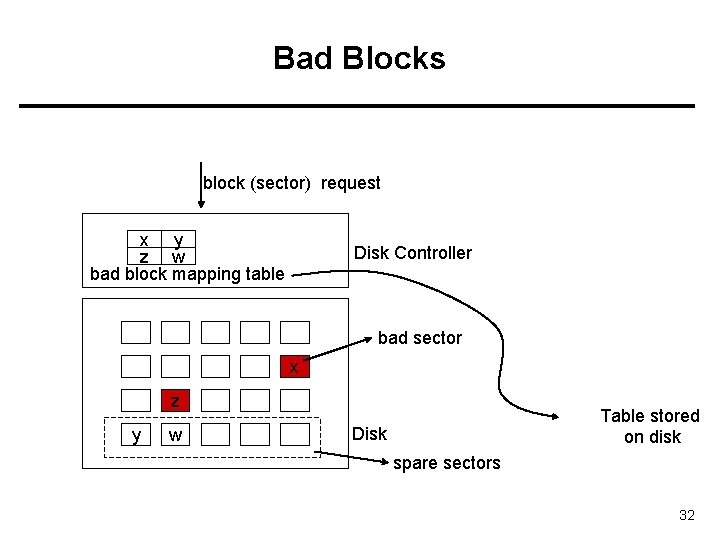
Bad Blocks block (sector) request x y z w bad block mapping table Disk Controller bad sector x z y w Table stored on disk Disk spare sectors 32
Swap Space Management • Swap-space — Virtual memory uses disk space as an extension of main memory. • Swap-space can be carved out of the normal file system, or, more commonly, it can be in a separate disk partition. • Swap-space management – Kernel uses swap maps to track swap-space use. – Example: 4. 3 BSD OS allocates swap space when process starts; holds text segment (the program) and data segment. – Example: Solaris 2 OS allocates swap space only when a page is forced out of physical memory, not when the virtual memory page is first created. 33
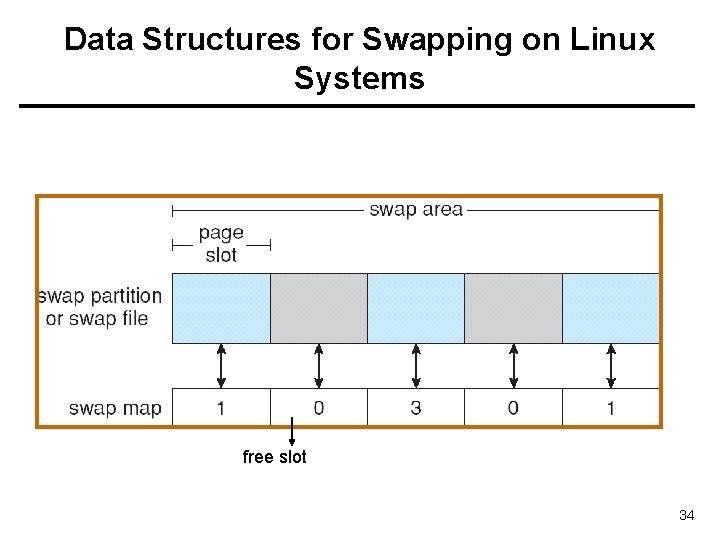
Data Structures for Swapping on Linux Systems free slot 34
RAID Structure • RAID: Redundant Array of Independent Disks – Multiple disk drives provides reliability via redundancy. – Multiple disks can be organized in different ways for Reliability and Performance (RAID is arranged into different levels/schemes) • If you have many disks: The probability of one of them failing becomes higher. The probability of all of them failing (at the same time) becomes lower. 35
RAID • RAID schemes improve performance and improve the reliability of the storage system by storing redundant data. • • Redundancy improves reliability (and also performance to some extend) Disk striping improves performance – Disk striping uses a group of disks as one storage unit and distributes (stripes) the data over those disks • Redundancy by: – Mirroring or shadowing keeps duplicate of each disk. – Use of parity bits or ECC (error correction codes) causes much less redundancy. 36
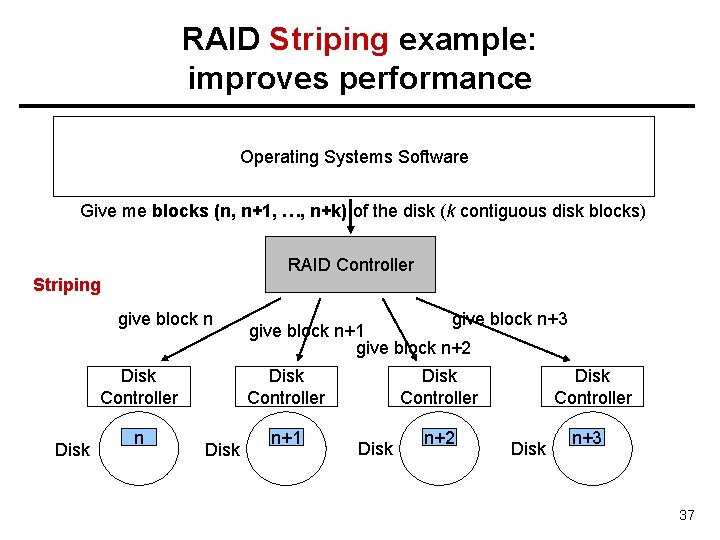
RAID Striping example: improves performance Operating Systems Software Give me blocks (n, n+1, …, n+k) of the disk (k contiguous disk blocks) RAID Controller Striping give block n Disk Controller Disk n give block n+3 give block n+1 give block n+2 Disk Controller Disk n+1 Disk n+2 Disk Controller Disk n+3 37
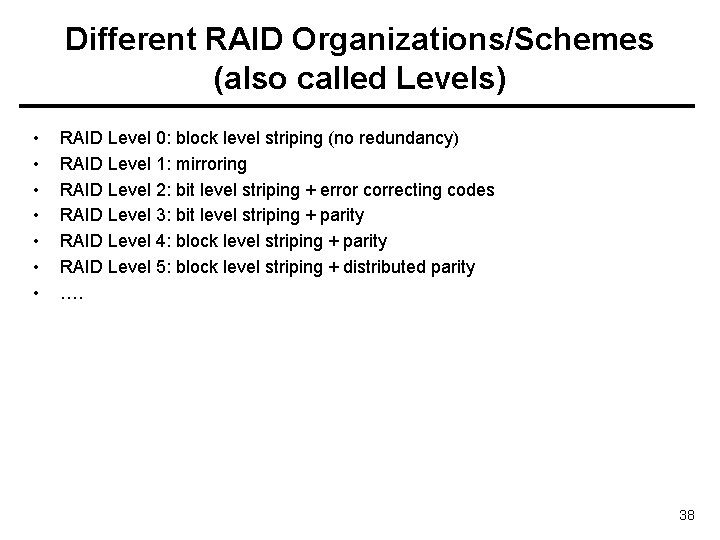
Different RAID Organizations/Schemes (also called Levels) • • RAID Level 0: block level striping (no redundancy) RAID Level 1: mirroring RAID Level 2: bit level striping + error correcting codes RAID Level 3: bit level striping + parity RAID Level 4: block level striping + parity RAID Level 5: block level striping + distributed parity …. 38
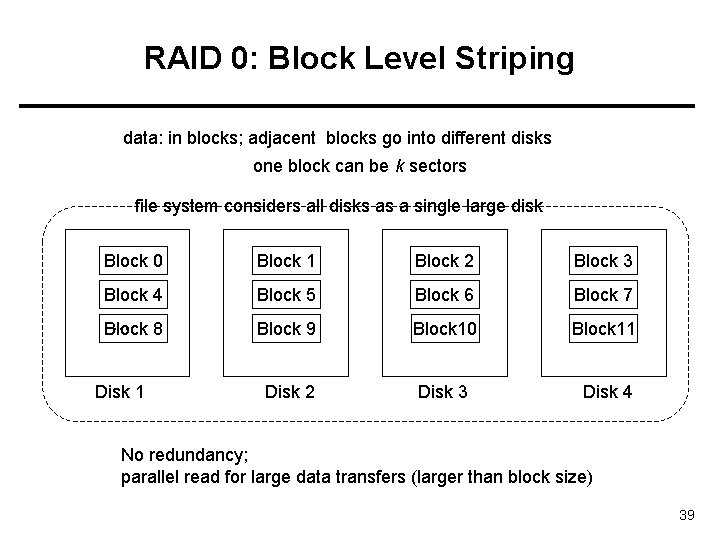
RAID 0: Block Level Striping data: in blocks; adjacent blocks go into different disks one block can be k sectors file system considers all disks as a single large disk Block 0 Block 1 Block 2 Block 3 Block 4 Block 5 Block 6 Block 7 … 8 Block 9 Block 10 Block 11 Disk 2 Disk 3 Disk 4 Disk 1 No redundancy; parallel read for large data transfers (larger than block size) 39
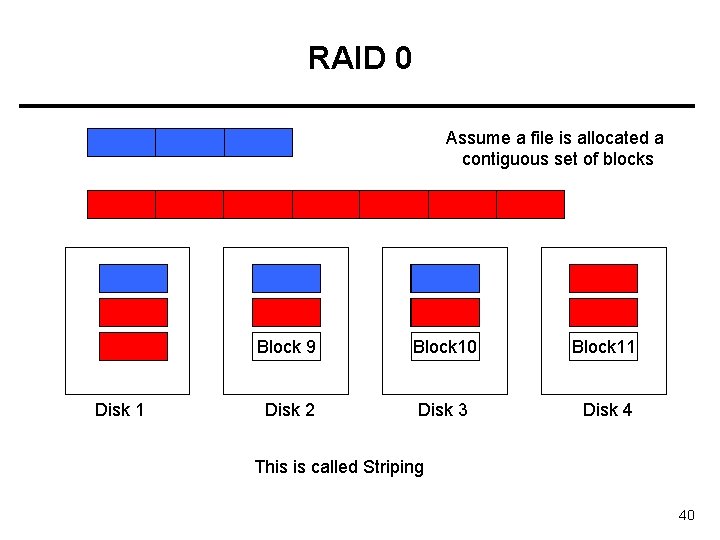
RAID 0 Assume a file is allocated a contiguous set of blocks file X file Y Block 0 Block 1 Block 2 Block 3 Block 4 Block 5 Block 6 Block 7 … 8 Block 9 Block 10 Block 11 Disk 2 Disk 3 Disk 4 Disk 1 This is called Striping 40
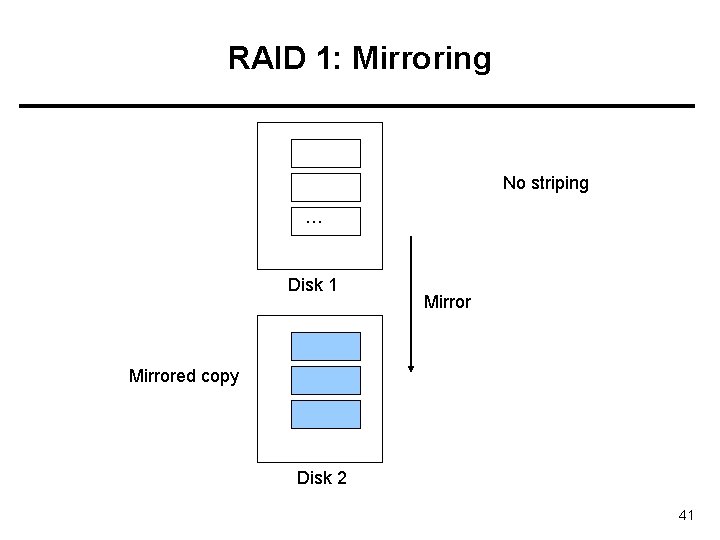
RAID 1: Mirroring No striping … Disk 1 Mirrored copy Disk 2 41
RAID 1 • We are just mirroring the disks (copying one disk to another one). • Without striping: no performance gain, except for reads (doubled read-rate) • Reliability provided. If one disk fails, data can be recovered from the other disk. • If there are originally N (N >= 1) disks; we need N more disks to mirror – Quite costly in terms of disks required. This cost is for reliability. We can express the cost as: overhead/data = 1/1 42
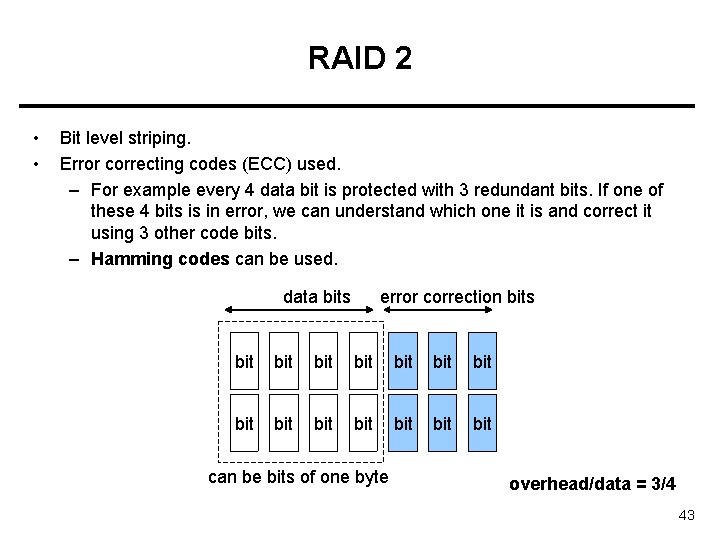
RAID 2 • • Bit level striping. Error correcting codes (ECC) used. – For example every 4 data bit is protected with 3 redundant bits. If one of these 4 bits is in error, we can understand which one it is and correct it using 3 other code bits. – Hamming codes can be used. data bits error correction bits bit bit bit bit can be bits of one byte overhead/data = 3/4 43
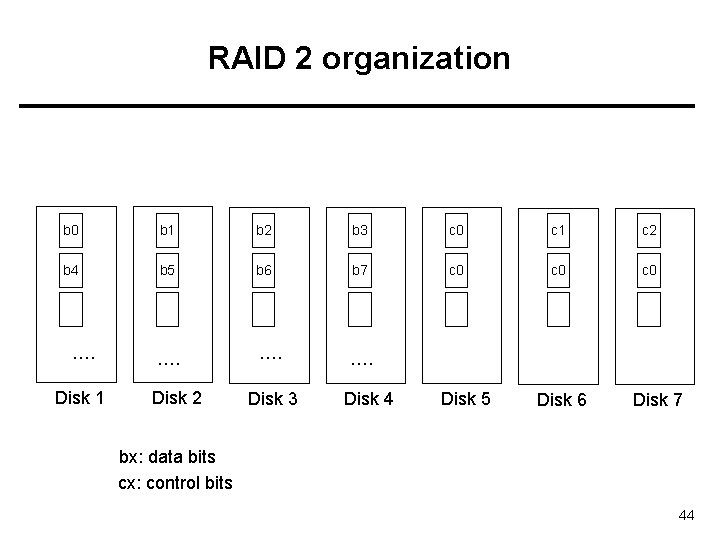
RAID 2 organization b 0 b 1 b 2 b 3 c 0 c 1 c 2 b 4 b 5 b 6 b 7 c 0 c 0 …. …. Disk 1 Disk 2 Disk 3 Disk 4 Disk 5 Disk 6 Disk 7 bx: data bits cx: control bits 44
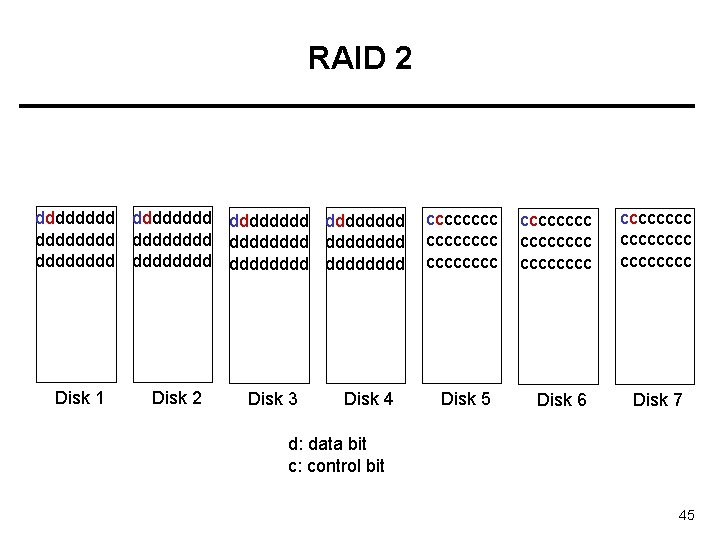
RAID 2 dddddddd dddddddd dddddddd Disk 1 Disk 2 Disk 3 Disk 4 cccccccc Disk 5 cccccccc Disk 6 cccccccc Disk 7 d: data bit c: control bit 45
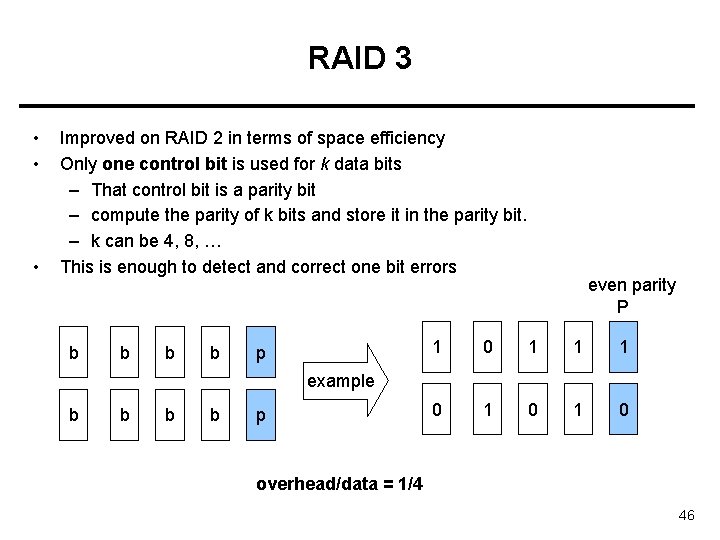
RAID 3 • • • Improved on RAID 2 in terms of space efficiency Only one control bit is used for k data bits – That control bit is a parity bit – compute the parity of k bits and store it in the parity bit. – k can be 4, 8, … This is enough to detect and correct one bit errors b b p even parity P 1 0 1 1 1 0 1 0 example b b p overhead/data = 1/4 46
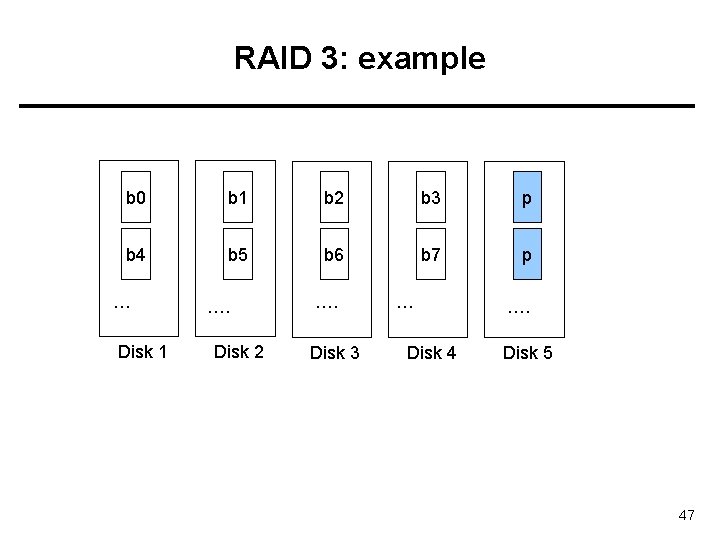
RAID 3: example b 0 b 1 b 2 b 3 p b 4 b 5 b 6 b 7 p … Disk 1 …. Disk 2 …. Disk 3 … Disk 4 …. Disk 5 47
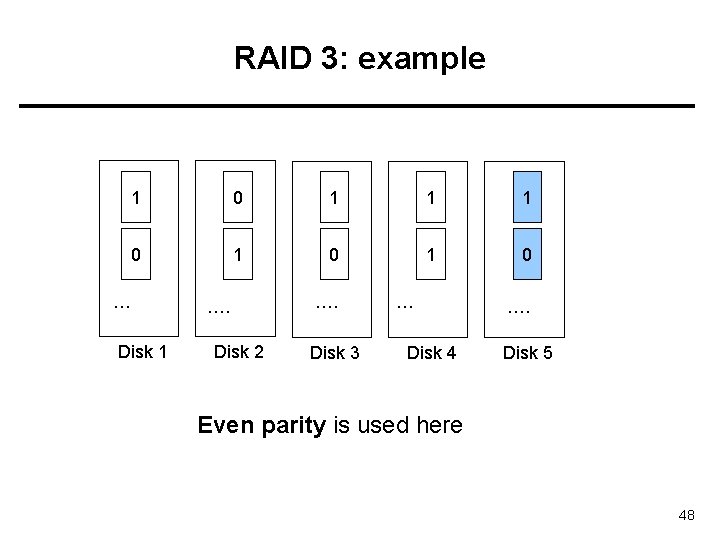
RAID 3: example 1 0 1 1 1 0 1 0 … Disk 1 …. Disk 2 …. Disk 3 … Disk 4 …. Disk 5 Even parity is used here 48
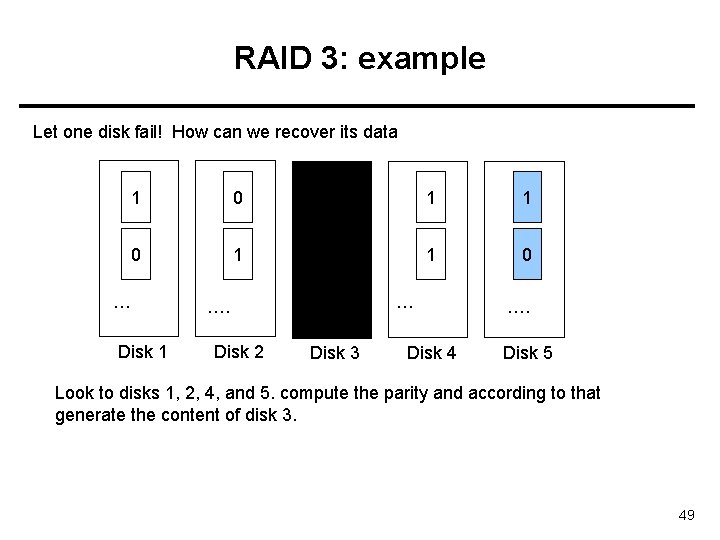
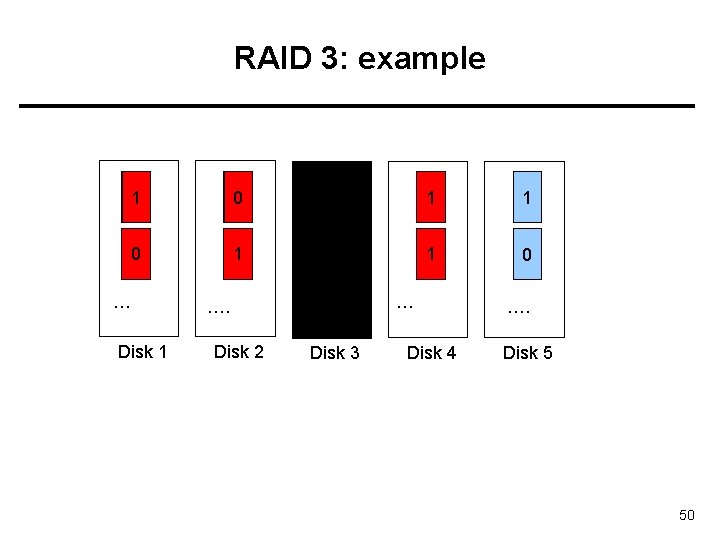
RAID 3: example Let one disk fail! How can we recover its data 1 0 1 1 1 0 1 0 … Disk 1 …. Disk 2 …. Disk 3 … Disk 4 …. Disk 5 Look to disks 1, 2, 4, and 5. compute the parity and according to that generate the content of disk 3. 49
RAID 3: example 1 0 11 1 1 00 1 0 … Disk 1 …. Disk 2 …. Disk 3 … Disk 4 …. Disk 5 50
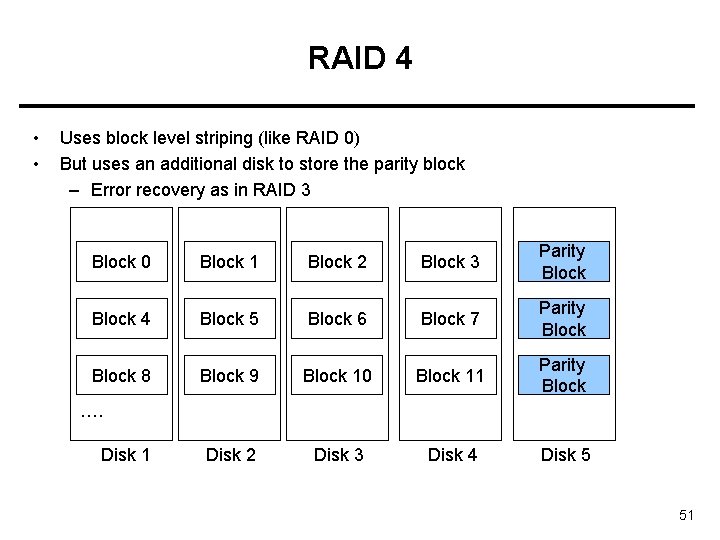
RAID 4 • • Uses block level striping (like RAID 0) But uses an additional disk to store the parity block – Error recovery as in RAID 3 Block 0 Block 1 Block 2 Block 3 Parity Block 4 Block 5 Block 6 Block 7 Parity Block 8 Block 9 Block 10 Block 11 Parity Block Disk 2 Disk 3 Disk 4 Disk 5 …. Disk 1 51
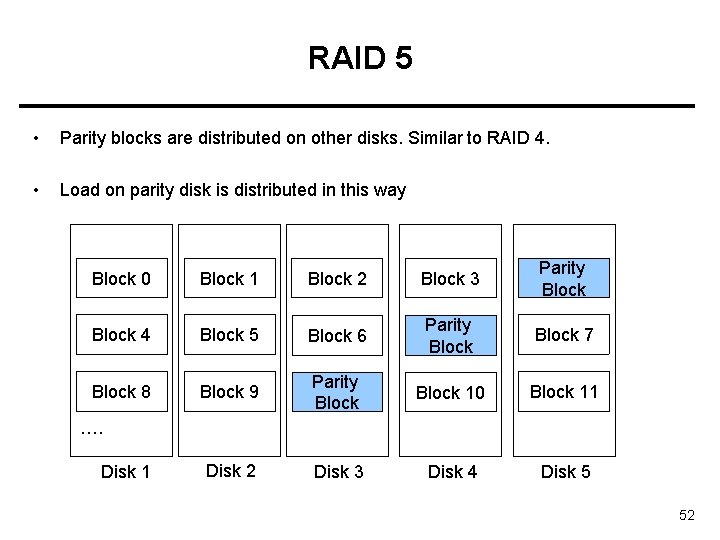
RAID 5 • Parity blocks are distributed on other disks. Similar to RAID 4. • Load on parity disk is distributed in this way Block 0 Block 1 Block 2 Block 3 Parity Block 4 Block 5 Block 6 Parity Block 7 Block 8 Block 9 Parity Block 10 Block 11 Disk 2 Disk 3 Disk 4 Disk 5 …. Disk 1 52
RAID 6 • Similar to RAID level 5 but uses not only a single parity bit, but multiple ECC bits to guards against multiple disk failures • Called also as: P+Q scheme. • Reed-Solomon codes are used as ECC code. • Example: 2 -bits ECC code can be used for every 4 -bits data. 53
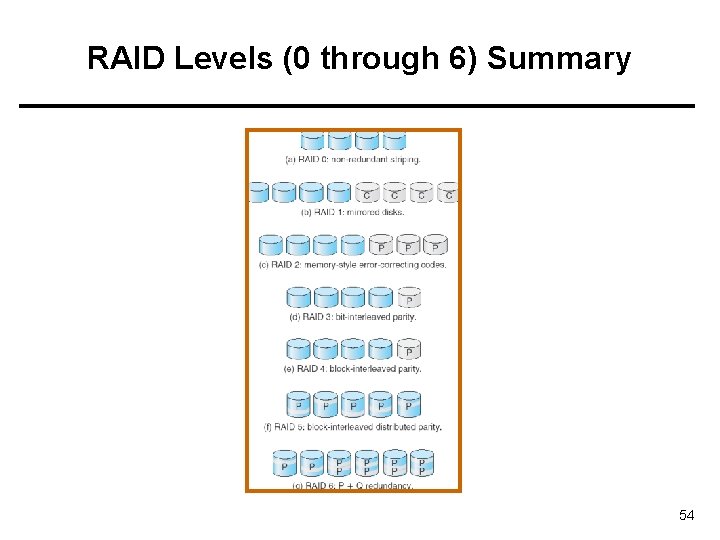
RAID Levels (0 through 6) Summary 54
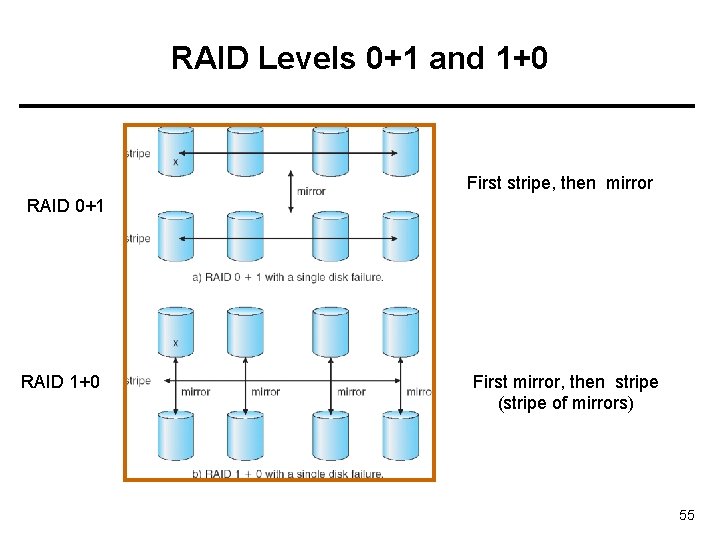
RAID Levels 0+1 and 1+0 First stripe, then mirror RAID 0+1 RAID 1+0 First mirror, then stripe (stripe of mirrors) 55
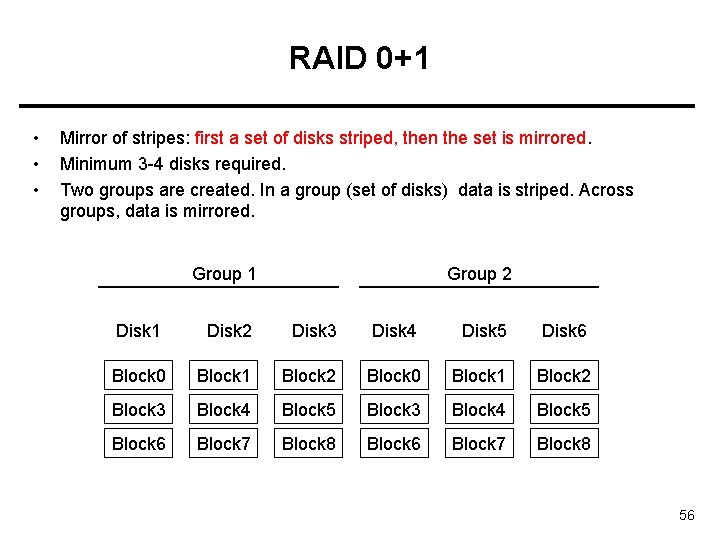
RAID 0+1 • • • Mirror of stripes: first a set of disks striped, then the set is mirrored. Minimum 3 -4 disks required. Two groups are created. In a group (set of disks) data is striped. Across groups, data is mirrored. Group 1 Group 2 Disk 1 Disk 2 Disk 3 Disk 4 Disk 5 Disk 6 Block 0 Block 1 Block 2 Block 3 Block 4 Block 5 Block 6 Block 7 Block 8 56
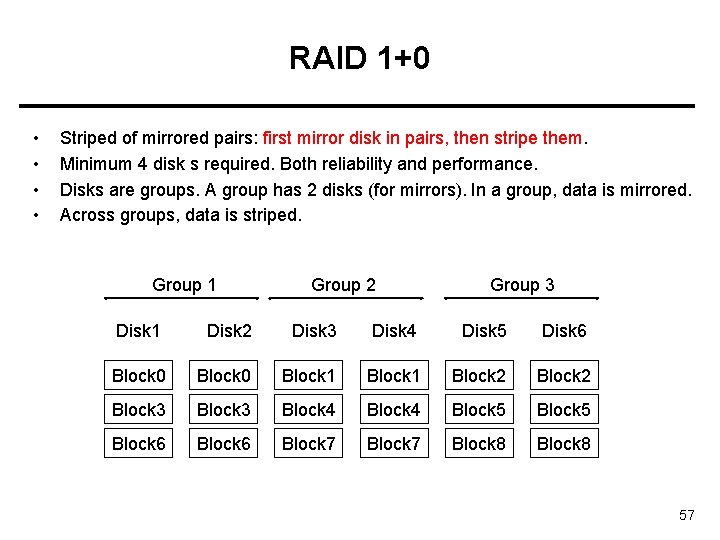
RAID 1+0 • • Striped of mirrored pairs: first mirror disk in pairs, then stripe them. Minimum 4 disk s required. Both reliability and performance. Disks are groups. A group has 2 disks (for mirrors). In a group, data is mirrored. Across groups, data is striped. Group 1 Group 2 Group 3 Disk 1 Disk 2 Disk 3 Disk 4 Disk 5 Disk 6 Block 0 Block 1 Block 2 Block 3 Block 4 Block 5 Block 6 Block 7 Block 8 57
• • RAID 1+0 has better reliability than RAID 0+1 Advantage of 1+0 over 0+1: – In 0+1, if a single disk fails, the entire stripe will not be available any more. The other stripe will be used. – In 1+0, if a single disk fails, the mirror of it is available, hence both of the stripes. 58
Stable Storage Implementation • • Write-ahead log scheme requires stable storage. Stable storage definition: information residing in stable storage is never lost. A write to a block is either fully successful, or non-reflected and did not corrupt the existing data (previous data is intact). • To implement stable storage: – Replicate information on more than one nonvolatile storage media with independent failure modes. – Update information in a controlled manner to ensure that we can recover the stable data after any failure during data transfer or recovery. 59
Tertiary Storage Devices • Low cost is the defining characteristic of tertiary storage. • Generally, tertiary storage is built using removable media • Common examples of removable media are – floppy disks and – CD-ROMs; 60
Removable Disks • Floppy disk — thin flexible disk coated with magnetic material, enclosed in a protective plastic case. – Most floppies hold about 1 MB; similar technology is used for removable disks that hold more than 1 GB. – Removable magnetic disks can be nearly as fast as hard disks, but they are at a greater risk of damage from exposure. 61
Removable Disks • A magneto-optic disk records data on a rigid platter coated with magnetic material. • Optical disks do not use magnetism; they employ special materials that are altered by laser light. 62
WORM Disks • The data on read-write disks can be modified over and over. • • • WORM (“Write Once, Read Many Times”) disks can be written only once. Thin aluminum film sandwiched between two glass or plastic platters. To write a bit, the drive uses a laser light to burn a small hole through the aluminum; information can be destroyed but not altered. Very durable and reliable. Read Only disks, such ad CD-ROM and DVD, come from the factory with the data pre-recorded. • • 63
Tapes • • Compared to a disk, a tape is less expensive and holds more data, but random access is much slower. Tape is an economical medium for purposes that do not require fast random access, e. g. , backup copies of disk data, holding huge volumes of data. Large tape installations typically use robotic tape changers that move tapes between tape drives and storage slots in a tape library. – stacker – library that holds a few tapes – silo – library that holds thousands of tapes A disk-resident file can be archived to tape for low cost storage; the computer can stage it back into disk storage for active use. 64
Operating System Issues • Major OS jobs are to manage physical devices and to present a virtual machine abstraction to applications • For hard disks, the OS provides two abstraction: – Raw device – an array of data blocks. – File system – the OS queues and schedules the interleaved requests from several applications. 65
Application Interface • Most OSs handle removable disks almost exactly like fixed disks — a new cartridge is formatted an empty file system is generated on the disk. • Tapes are presented as a raw storage medium, i. e. , and application does not open a file on the tape, it opens the whole tape drive as a raw device. – Usually the tape drive is reserved for the exclusive use of that application. – Since the OS does not provide file system services, the application must decide how to use the array of blocks. – Since every application makes up its own rules for how to organize a tape, a tape full of data can generally only be used by the program that created it. 66
Tape drives • The basic operations for a tape drive differ from those of a disk drive. • locate positions the tape to a specific block (corresponds to seek). • The read position operation returns the block number where the tape head is. • Tape drives are “append-only” devices; updating a block in the middle of the tape also effectively erases everything beyond that block. • An EOT mark is placed after a block that is written. 67
File Naming • The issue of naming files on removable media is especially difficult when we want to write data on a removable cartridge on one computer, and then use the cartridge in another computer. • Contemporary OSs generally leave the name space problem unsolved for removable media, and it depends on applications and users to figure out how to access and interpret the data. • Some kinds of removable media (e. g. , CDs) are so well standardized that all computers use them the same way. 68
Hierarchical Storage Management (HSM) • A hierarchical storage system extends the storage hierarchy beyond primary memory and secondary storage to incorporate tertiary storage — usually implemented as a jukebox of tapes or removable disks. • Usually incorporate tertiary storage by extending the file system. – Small and frequently used files remain on disk. – Large, old, inactive files are archived to the jukebox. • HSM is usually found in supercomputing centers and other large installations that have enormous volumes of data. 69
Speed • Two aspects of speed in tertiary storage are bandwidth and latency. • Bandwidth is measured in bytes per second. – Sustained bandwidth – average data rate during a large transfer; # of bytes/transfer time. Data rate when the data stream is actually flowing. – Effective bandwidth – average over the entire I/O time, including seek or locate, and cartridge switching. Drive’s overall data rate. • Effective bandwidth <= sustained bandwidth 70
Speed • Access latency – amount of time needed to locate data. – Access time for a disk – move the arm to the selected cylinder and wait for the rotational latency; < 35 milliseconds. – Access on tape requires winding the tape reels until the selected block reaches the tape head; tens or hundreds of seconds. • Generally say that random access within a tape cartridge is about a thousand times slower than random access on disk. • The low cost of tertiary storage is a result of having many cheap cartridges share a few expensive drives. • A removable library is best devoted to the storage of infrequently used data, because the library can only satisfy a relatively small number of I/O requests per hour. 71
Reliability • A fixed disk drive is likely to be more reliable than a removable disk or tape drive. • An optical cartridge is likely to be more reliable than a magnetic disk or tape. • A head crash in a fixed hard disk generally destroys the data, whereas the failure of a tape drive or optical disk drive often leaves the data cartridge unharmed. 72
Cost • Main memory is much more expensive than disk storage • The cost per megabyte of hard disk storage is competitive with magnetic tape if only one tape is used per drive. • The cheapest tape drives and the cheapest disk drives have had about the same storage capacity over the years. • Tertiary storage gives a cost savings only when the number of cartridges is considerably larger than the number of drives. 73
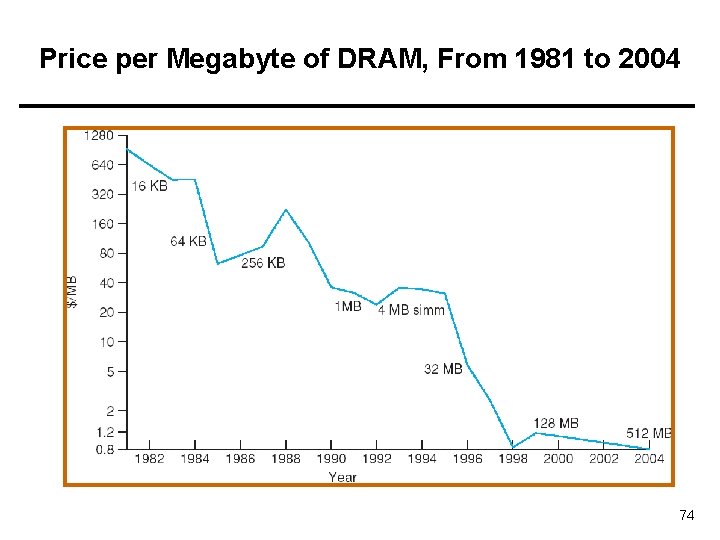
Price per Megabyte of DRAM, From 1981 to 2004 74
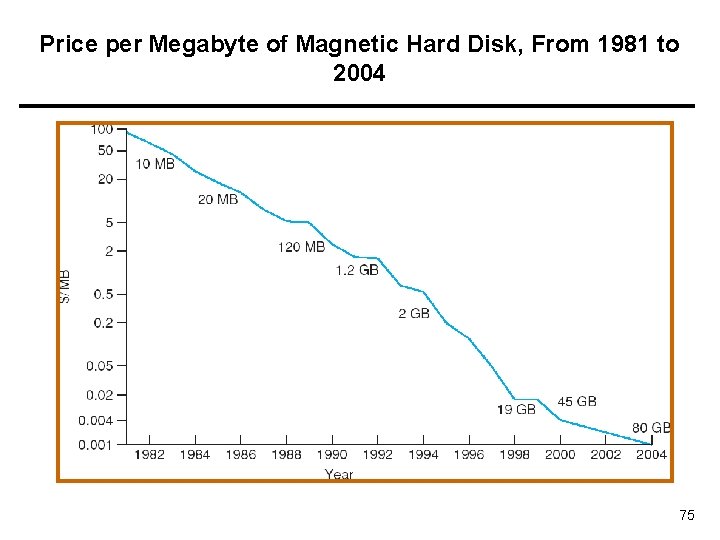
Price per Megabyte of Magnetic Hard Disk, From 1981 to 2004 75
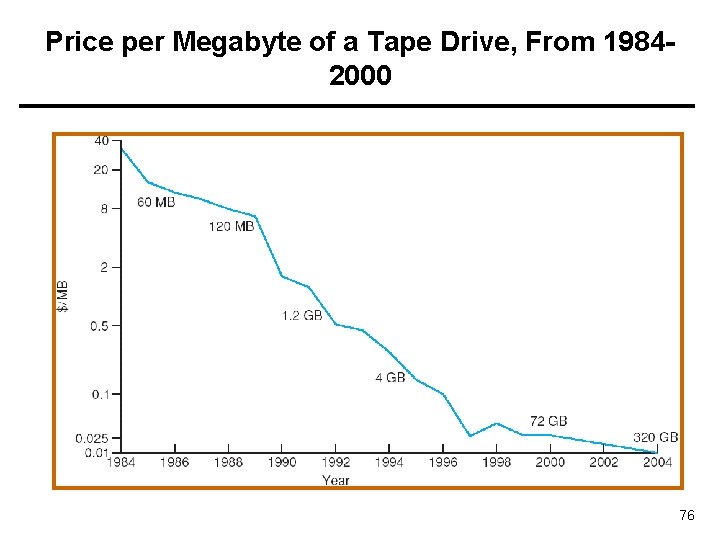
Price per Megabyte of a Tape Drive, From 19842000 76
References • • The slides here adapted/modified from the textbook and its slides: Operating System Concepts, Silberschatz et al. , 7 th & 8 th editions, Wiley. Operating System Concepts, 7 th and 8 th editions, Silberschatz et al. Wiley. Modern Operating Systems, Andrew S. Tanenbaum, 3 rd edition, 2009. 77
- Slides: 77