
Bilkent University Department of Computer Engineering CS 342
Bilkent University Department of Computer Engineering CS 342 Operating Systems Chapter 9 Virtual Memory Last Update: April 9, 2019 1
Objectives and Outline Objectives • To describe the benefits of a virtual memory system • To explain the concepts of demand paging, – page-replacement algorithms, and – allocation of page frames • To discuss the principle of the workingset model Outline • Background • Demand Paging • Copy-on-Write • Page Replacement • Allocation of Frames • Thrashing • Memory-Mapped Files • Allocating Kernel Memory • Other Considerations • Operating-System Examples 2
Background • Virtual memory – program uses virtual memory which can be partially loaded into physical memory • Benefits: – Only part of the program needs to be in memory for execution • more concurrent programs – Logical address space can therefore be much larger than physical address space • execute programs larger than RAM size – Easy sharing of address spaces by several processes • Library or a memory segment can be shared – Allows for more efficient process creation 3
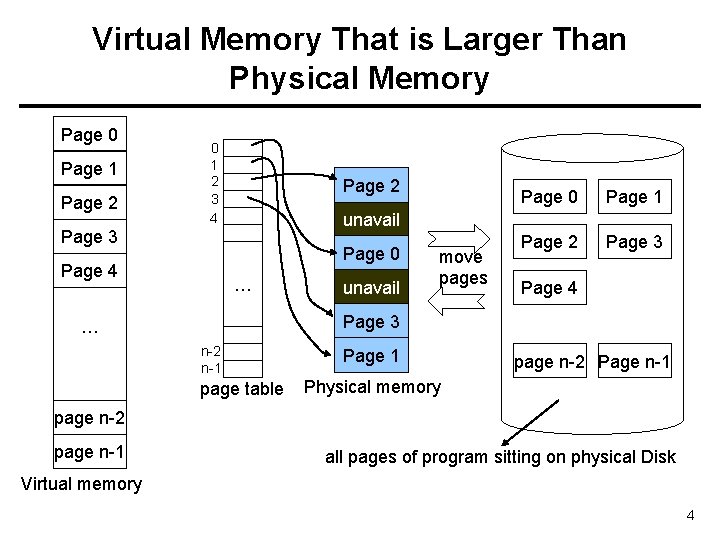
Virtual Memory That is Larger Than Physical Memory Page 0 Page 1 Page 2 0 1 2 3 4 Page 2 Page 1 Page 2 Page 3 unavail Page 3 Page 0 Page 4 Page 0 … unavail move pages Page 4 Page 3 … n-2 n-1 page table Page 1 page n-2 Page n-1 Physical memory page n-2 page n-1 all pages of program sitting on physical Disk Virtual memory 4
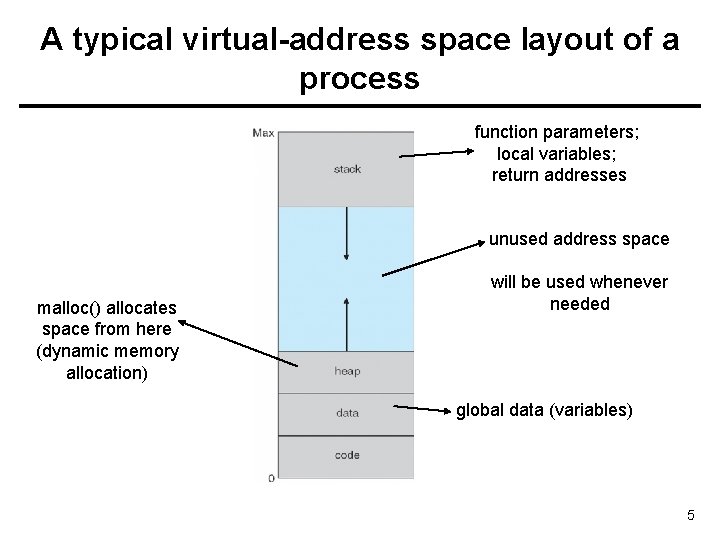
A typical virtual-address space layout of a process function parameters; local variables; return addresses unused address space malloc() allocates space from here (dynamic memory allocation) will be used whenever needed global data (variables) 5
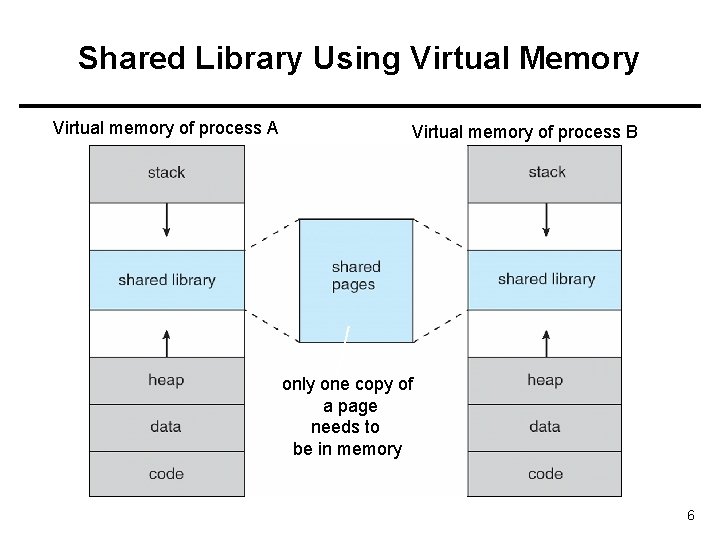
Shared Library Using Virtual Memory Virtual memory of process A Virtual memory of process B only one copy of a page needs to be in memory 6
Implementing Virtual Memory • Virtual memory can be implemented via: – Demand paging • Bring pages into memory when they are used, i. e. , allocate memory for pages when they are used (accessed/references/needed). – Demand segmentation • Bring segments into memory when they are used, i. e. , allocate memory for segments when they are used. 7
Demand Paging • Bring a page into memory only when it is needed – Less I/O needed – Less memory needed – Faster response – More users • Page is needed when running program makes a reference to it – invalid reference (page is not in used portion of address space) abort – not-in-memory bring to memory • Pager never brings a page into memory unless page will be needed 8
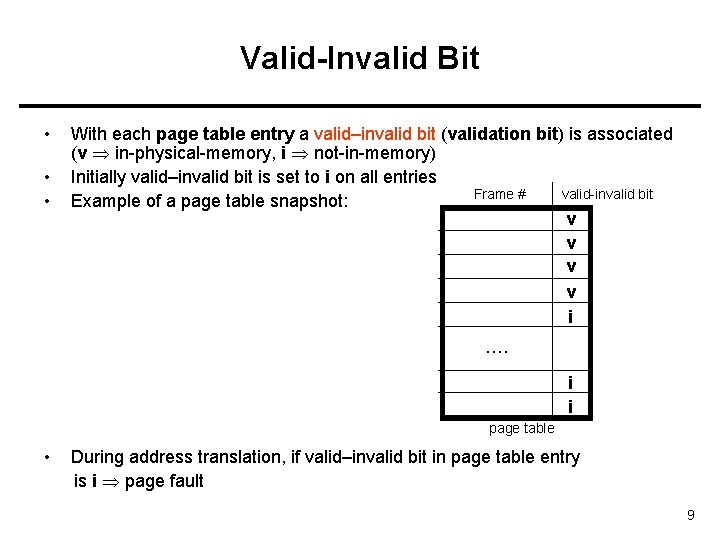
Valid-Invalid Bit • • • With each page table entry a valid–invalid bit (validation bit) is associated (v in-physical-memory, i not-in-memory) Initially valid–invalid bit is set to i on all entries Frame # valid-invalid bit Example of a page table snapshot: v v i …. i i page table • During address translation, if valid–invalid bit in page table entry is i page fault 9
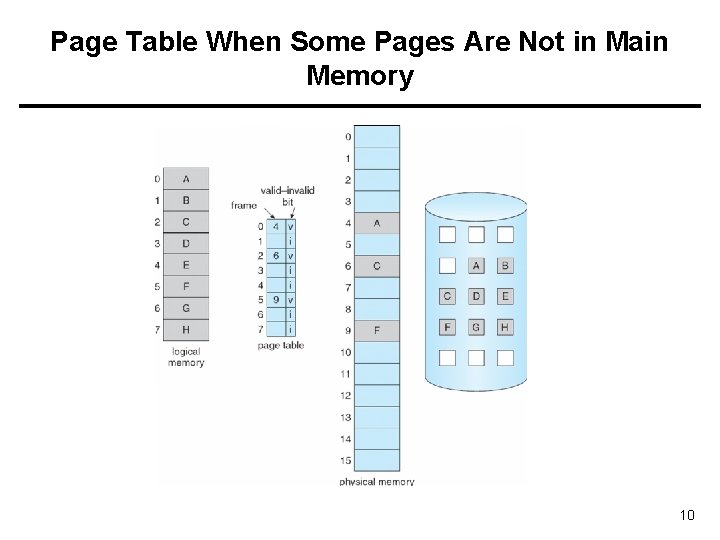
Page Table When Some Pages Are Not in Main Memory 10
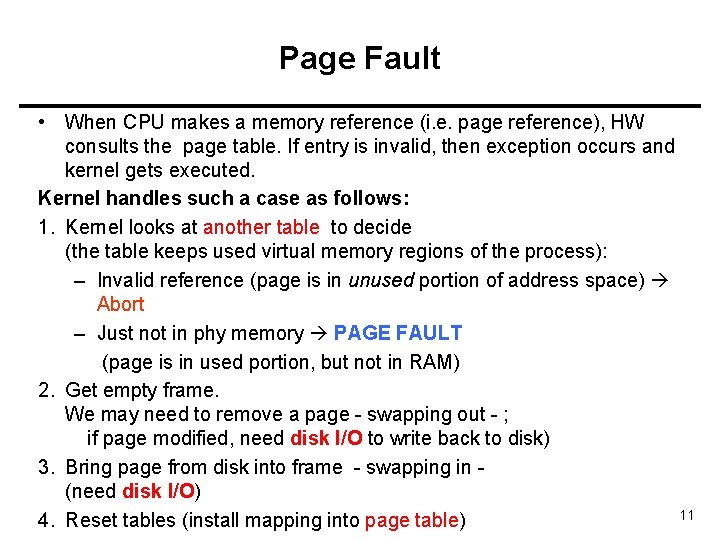
Page Fault • When CPU makes a memory reference (i. e. page reference), HW consults the page table. If entry is invalid, then exception occurs and kernel gets executed. Kernel handles such a case as follows: 1. Kernel looks at another table to decide (the table keeps used virtual memory regions of the process): – Invalid reference (page is in unused portion of address space) Abort – Just not in phy memory PAGE FAULT (page is in used portion, but not in RAM) 2. Get empty frame. We may need to remove a page - swapping out - ; if page modified, need disk I/O to write back to disk) 3. Bring page from disk into frame - swapping in (need disk I/O) 11 4. Reset tables (install mapping into page table)
Page Fault (Cont. ) • If page fault occurs while trying to fetch an instruction, fetch the instruction again after bringing the page in. • If page fault occurs while we are executing an instruction: Restart the instruction after bringing the page in. • For most instructions, restarting the instruction is no problem. – But for some, we need to be careful. 12
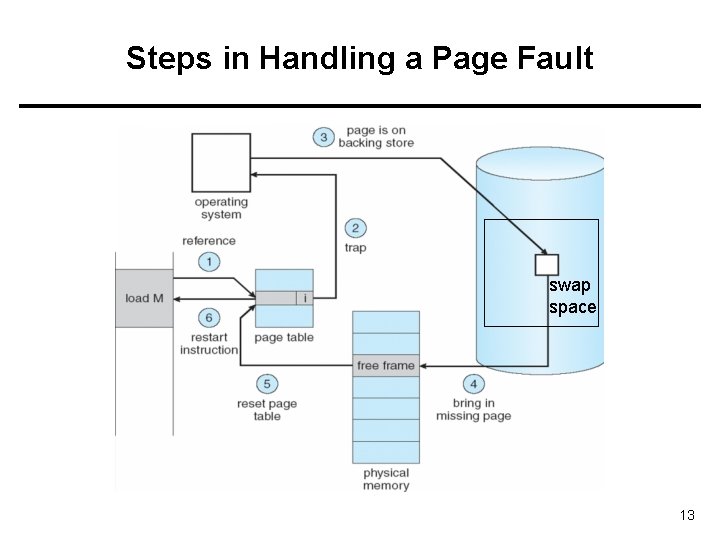
Steps in Handling a Page Fault swap space 13
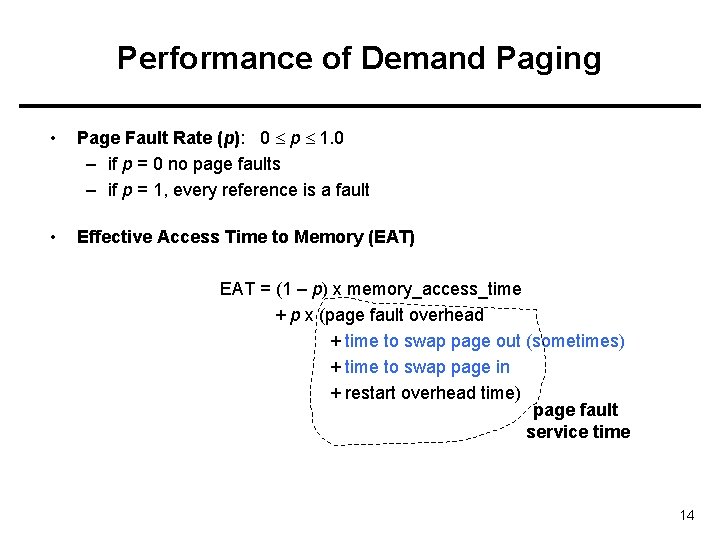
Performance of Demand Paging • Page Fault Rate (p): 0 p 1. 0 – if p = 0 no page faults – if p = 1, every reference is a fault • Effective Access Time to Memory (EAT) EAT = (1 – p) x memory_access_time + p x (page fault overhead + time to swap page out (sometimes) + time to swap page in + restart overhead time) page fault service time 14
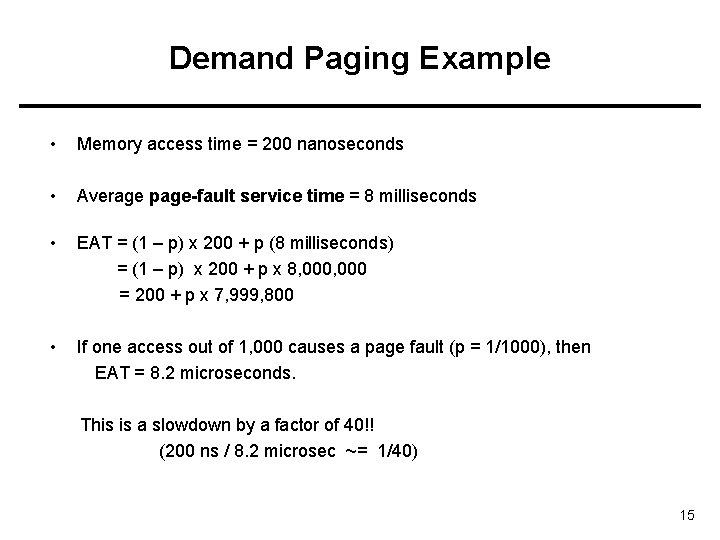
Demand Paging Example • Memory access time = 200 nanoseconds • Average page-fault service time = 8 milliseconds • EAT = (1 – p) x 200 + p (8 milliseconds) = (1 – p) x 200 + p x 8, 000 = 200 + p x 7, 999, 800 • If one access out of 1, 000 causes a page fault (p = 1/1000), then EAT = 8. 2 microseconds. This is a slowdown by a factor of 40!! (200 ns / 8. 2 microsec ~= 1/40) 15
Other benefits of virtual memory • Virtual memory has other benefits: – Copy-on-Write (fast process creation) – Memory-Mapped Files (later) 16
Copy-on-Write • Copy-on-Write (COW) allows both parent and child processes to initially share the same pages in memory If either process modifies a shared page, only then is the page copied • COW allows more efficient process creation as only modified pages are copied 17
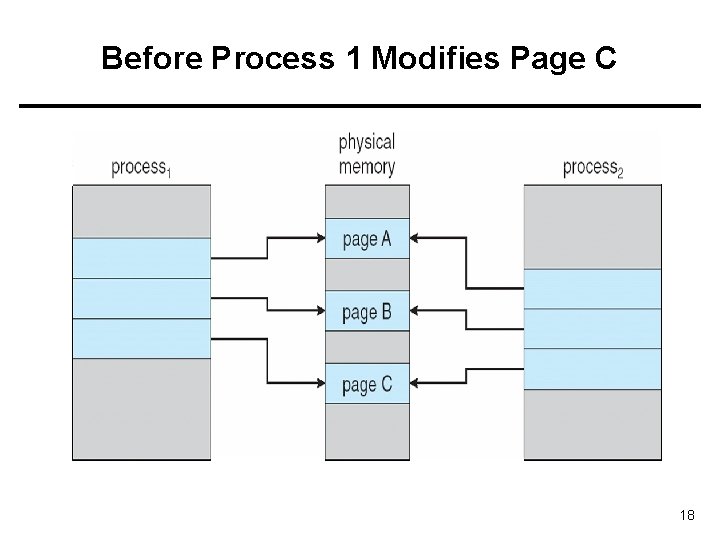
Before Process 1 Modifies Page C 18
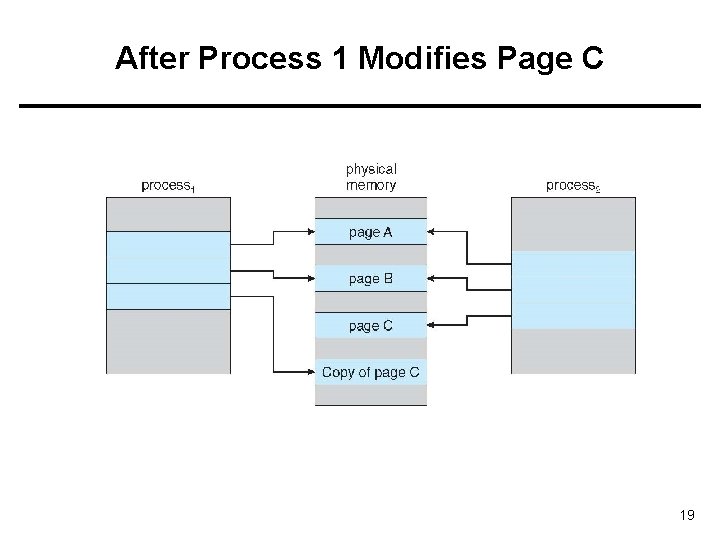
After Process 1 Modifies Page C 19
Page Replacement 20
What happens if there is no free frame? • Page replacement – find some page in memory, but not really in use, swap it out – Algorithm ? Which page should be removed? – performance – want an algorithm which will result in minimum number of page faults • With page replacement, a page may be brought into memory several times (memory disk) • Prevent over-allocation of memory by modifying page-fault service routine to include page replacement 21
Page Replacement • Use modify (dirty) bit to reduce overhead of page transfers – only modified pages are written to disk while removing/replacing a page. • Page replacement completes separation between logical memory and physical memory – large virtual memory can be provided on a smaller physical memory 22
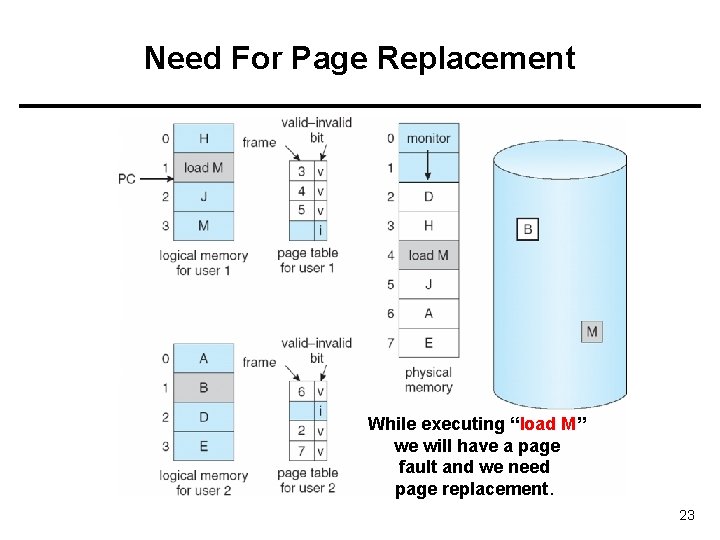
Need For Page Replacement While executing “load M” we will have a page fault and we need page replacement. 23
Basic Page Replacement Steps performed by OS while replacing a page upon a page fault: 1. Find the location of the desired page on disk 2. Find a free frame: - if there is a free frame, use it - if there is no free frame, use a page replacement algorithm to select a victim frame; - if the victim page is modified, write it back to disk. 3. Bring the desired page into the (new) free frame; update the page and frame tables 4. Restart the process 24
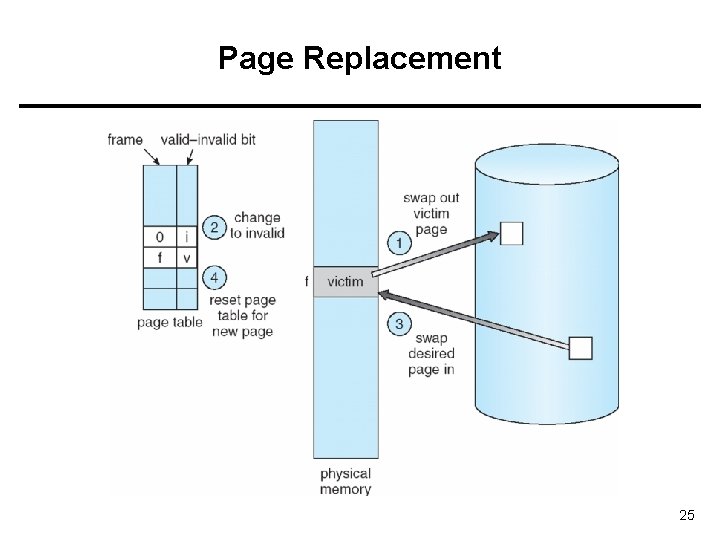
Page Replacement 25
Page Replacement Algorithms • Want lowest page-fault rate • Evaluate an algorithm by running it on a particular string of page (memory) references (reference string) and computing the number of page faults on that string • In all our examples, the page reference string is 1, 2, 3, 4, 1, 2, 5, 1, 2, 3, 4, 5 26
Driving reference string • Assume process makes the following memory references (in decimal) in a system with 100 bytes per page: • 0100 0432 0101 0612 0103 0104 0101 0611 0102 0103 0104 0101 0610 0102 0103 0104 0609 0102 0105 • Example: Bytes (addresses) 0… 99 will be in page 0 • Pages referenced are: – 1, 4, 1, 6, 1, 1, 6, 1, 1 • Corresponding page reference string – 1, 4, 1, 6, 1 27
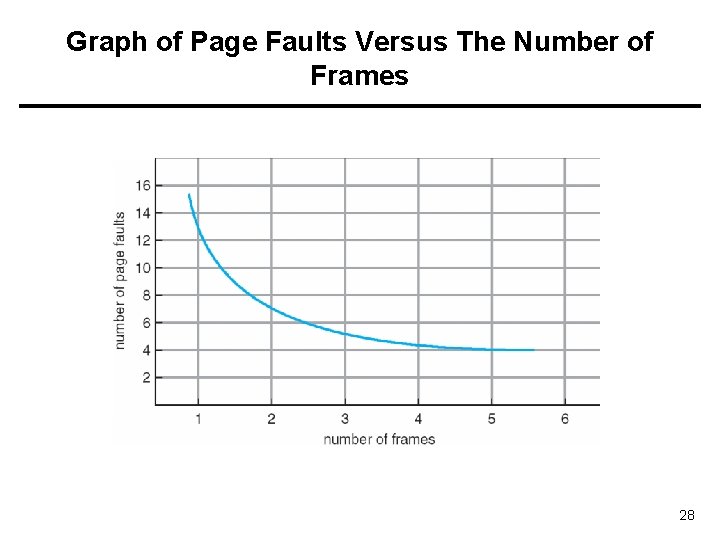
Graph of Page Faults Versus The Number of Frames 28
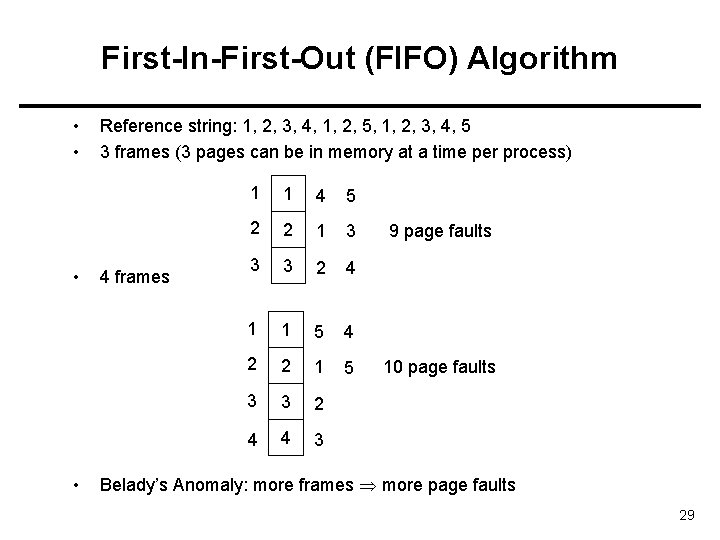
First-In-First-Out (FIFO) Algorithm • • Reference string: 1, 2, 3, 4, 1, 2, 5, 1, 2, 3, 4, 5 3 frames (3 pages can be in memory at a time per process) 4 frames 1 1 4 5 2 2 1 3 3 3 2 4 1 1 5 4 2 2 1 5 3 3 2 4 4 3 9 page faults 10 page faults Belady’s Anomaly: more frames more page faults 29
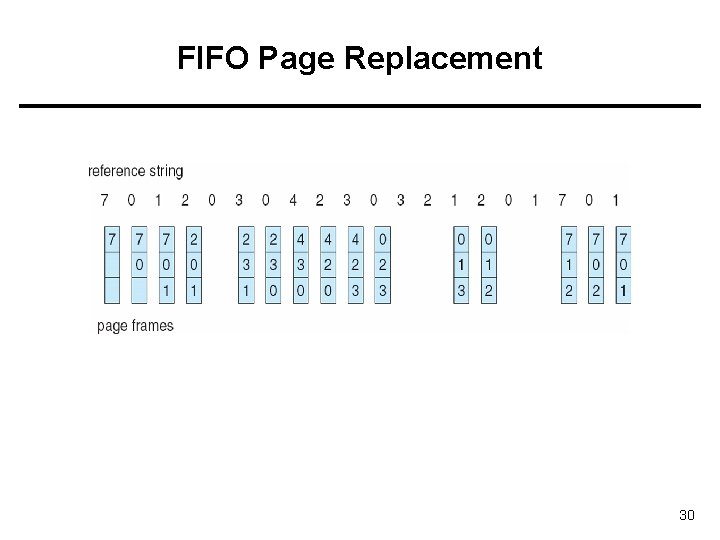
FIFO Page Replacement 30
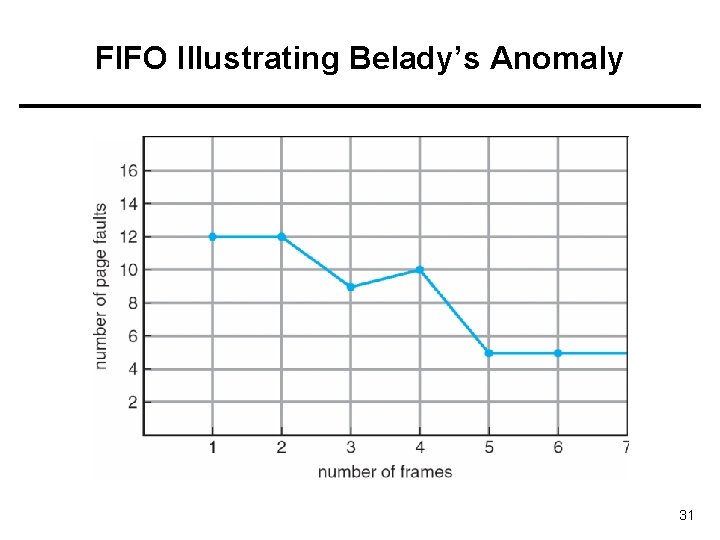
FIFO Illustrating Belady’s Anomaly 31
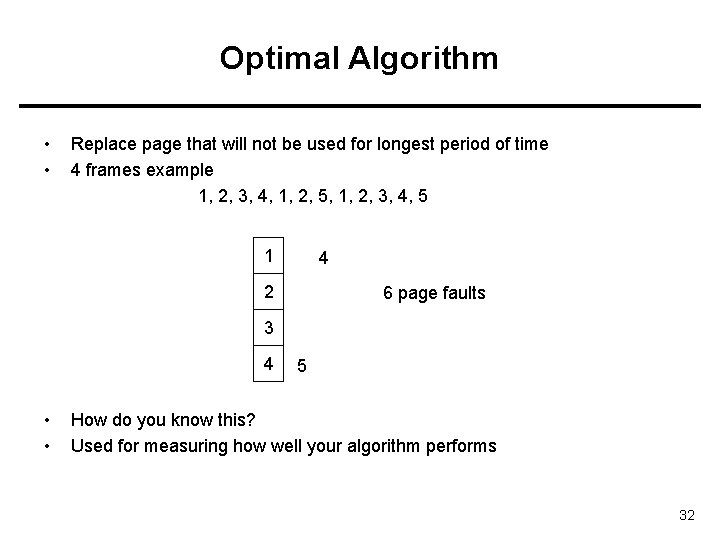
Optimal Algorithm • • Replace page that will not be used for longest period of time 4 frames example 1, 2, 3, 4, 1, 2, 5, 1, 2, 3, 4, 5 1 4 2 6 page faults 3 4 • • 5 How do you know this? Used for measuring how well your algorithm performs 32
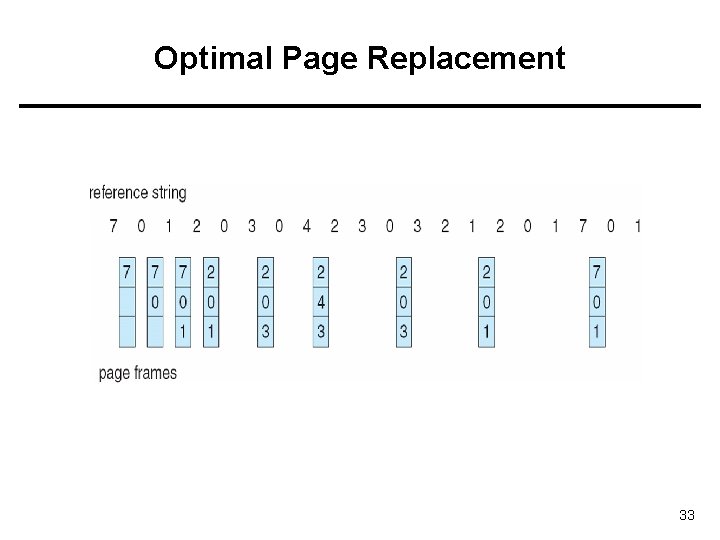
Optimal Page Replacement 33
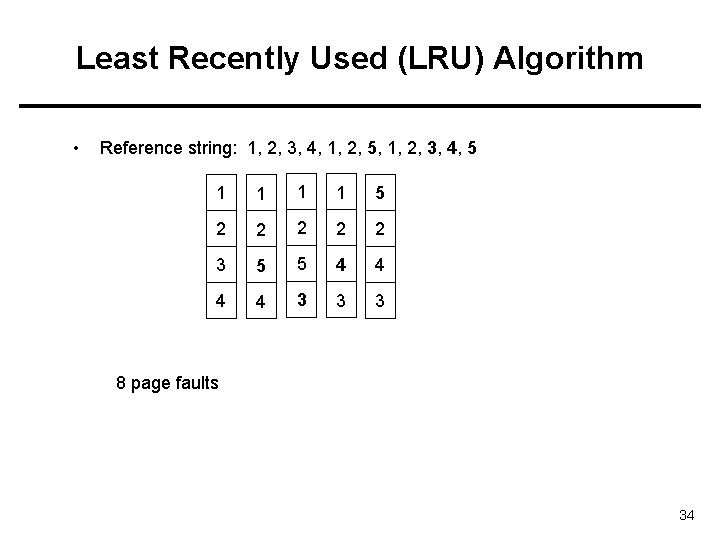
Least Recently Used (LRU) Algorithm • Reference string: 1, 2, 3, 4, 1, 2, 5, 1, 2, 3, 4, 5 1 1 5 2 2 2 3 5 5 4 4 3 3 3 8 page faults 34
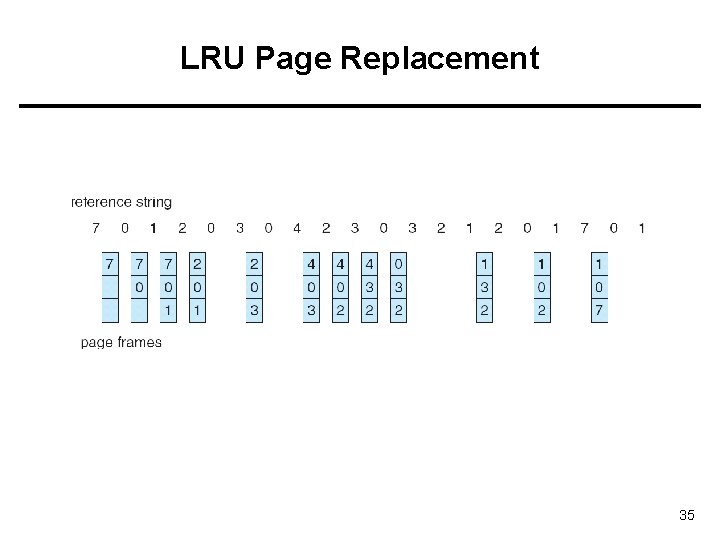
LRU Page Replacement 35
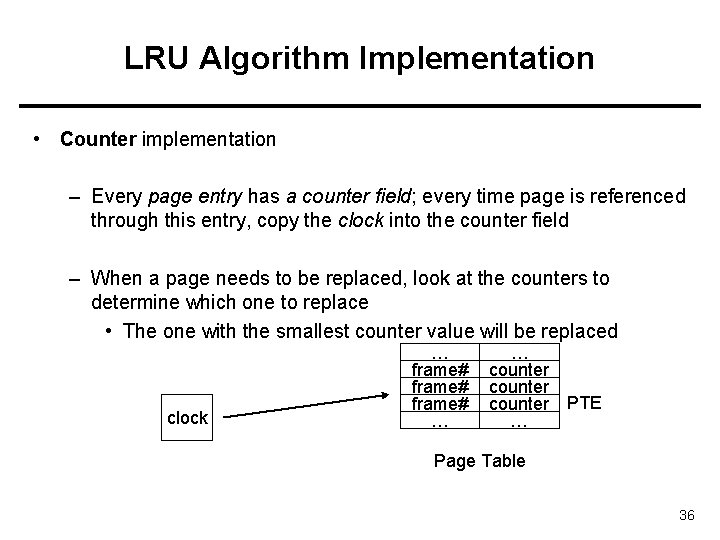
LRU Algorithm Implementation • Counter implementation – Every page entry has a counter field; every time page is referenced through this entry, copy the clock into the counter field – When a page needs to be replaced, look at the counters to determine which one to replace • The one with the smallest counter value will be replaced clock … frame# … … counter PTE … Page Table 36
LRU Algorithm Implementation • Stack implementation – keep a stack of page numbers in a double link form: – Page referenced: • move it to the top • requires 6 pointers to be changed (with every memory reference; costly) – No search for replacement (replacement fast) 37
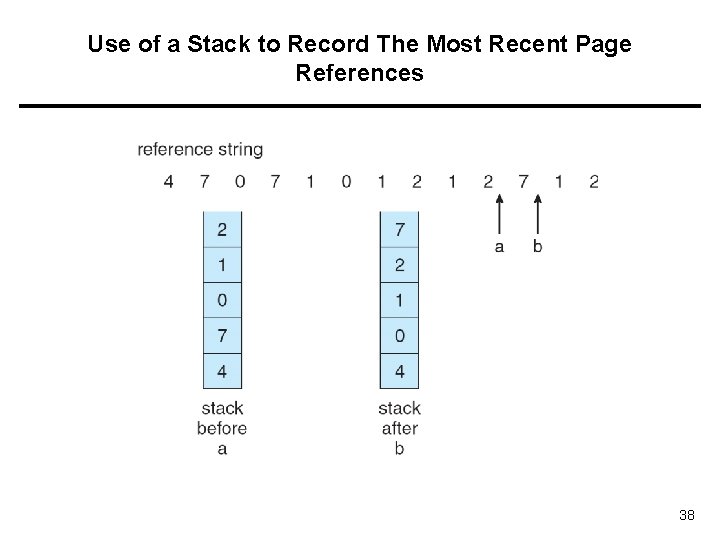
Use of a Stack to Record The Most Recent Page References 38
LRU Approximation Algorithms • • • Reference bit Additional Reference bits Second Chance 1 (clock) Enhanced Second Chance 39
Reference Bit • Use of reference bit (R bit) – With each page associate a bit, initially = 0 (not referenced/used) – When page is referenced, bit set to 1 – Replace the page which R bit 0 (if one exists) • We do not know the order, however (several pages may have 0 value) – Reference bits are cleared periodically • (with every timer interrupt, for example) – For example: every 10 ms. 40
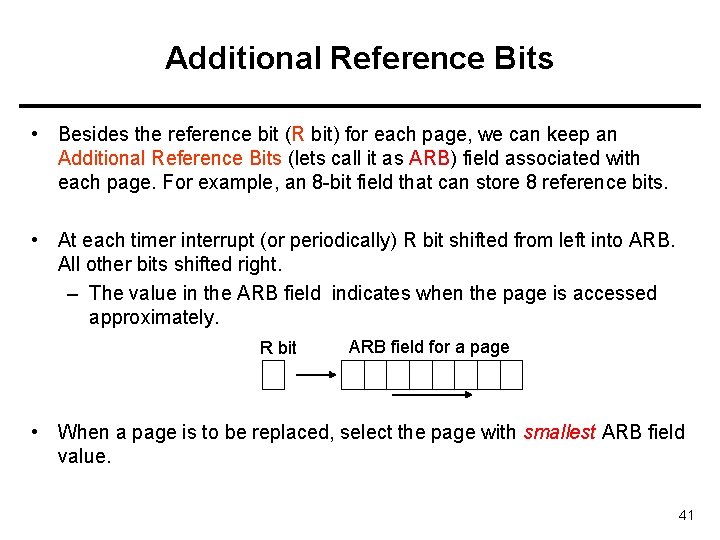
Additional Reference Bits • Besides the reference bit (R bit) for each page, we can keep an Additional Reference Bits (lets call it as ARB) field associated with each page. For example, an 8 -bit field that can store 8 reference bits. • At each timer interrupt (or periodically) R bit shifted from left into ARB. All other bits shifted right. – The value in the ARB field indicates when the page is accessed approximately. R bit ARB field for a page • When a page is to be replaced, select the page with smallest ARB field value. 41
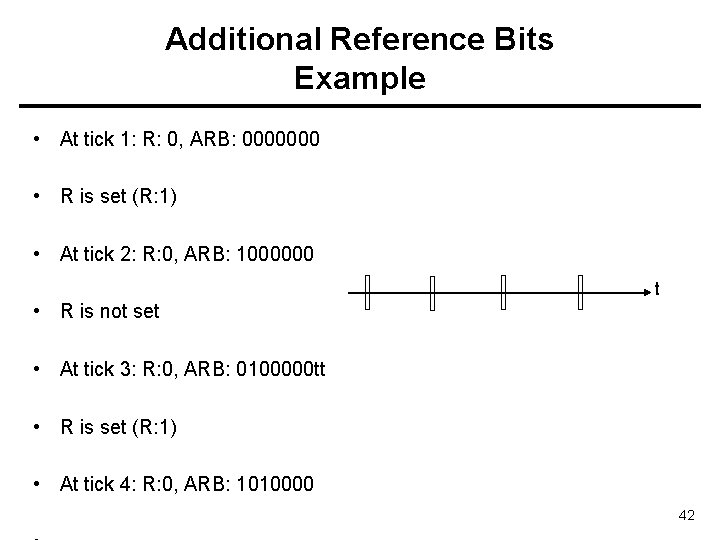
Additional Reference Bits Example • At tick 1: R: 0, ARB: 0000000 • R is set (R: 1) • At tick 2: R: 0, ARB: 1000000 t • R is not set • At tick 3: R: 0, ARB: 0100000 tt • R is set (R: 1) • At tick 4: R: 0, ARB: 1010000 42
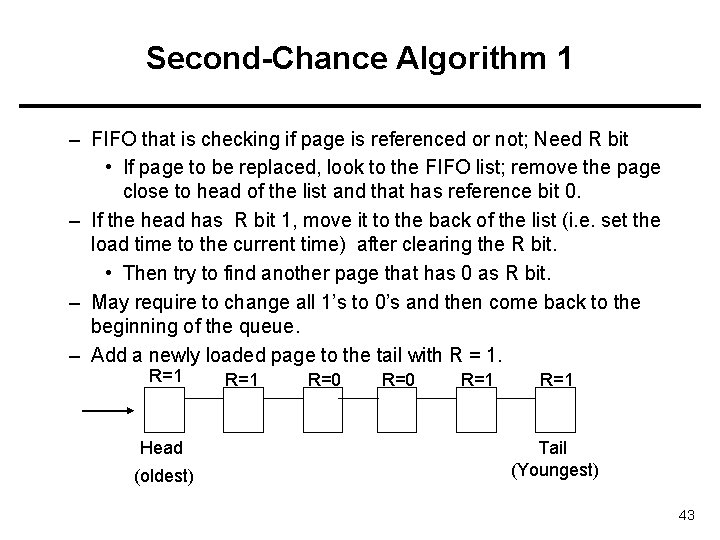
Second-Chance Algorithm 1 – FIFO that is checking if page is referenced or not; Need R bit • If page to be replaced, look to the FIFO list; remove the page close to head of the list and that has reference bit 0. – If the head has R bit 1, move it to the back of the list (i. e. set the load time to the current time) after clearing the R bit. • Then try to find another page that has 0 as R bit. – May require to change all 1’s to 0’s and then come back to the beginning of the queue. – Add a newly loaded page to the tail with R = 1. R=1 Head (oldest) R=1 R=0 R=1 Tail (Youngest) 43
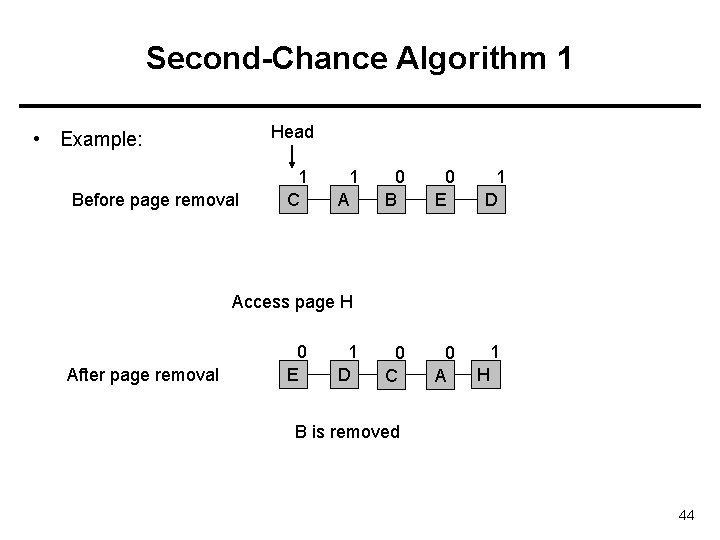
Second-Chance Algorithm 1 Head • Example: Before page removal 1 C 1 A 0 B 0 E 1 D 0 C 0 A 1 Access page H After page removal 0 E 1 D H B is removed 44
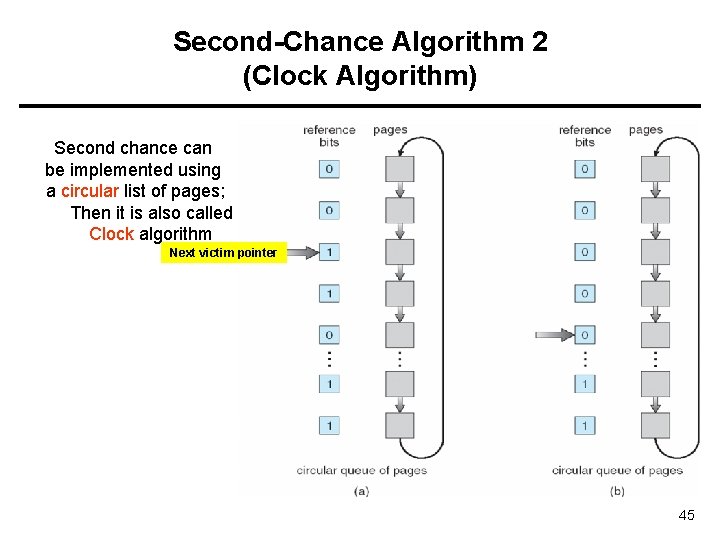
Second-Chance Algorithm 2 (Clock Algorithm) Second chance can be implemented using a circular list of pages; Then it is also called Clock algorithm Next victim pointer 45
Enhanced Second-Change Algorithm • Consider also the reference bits and the modified bits (dirty bit) of pages – Reference (R) bit: page is referenced in the last interval – Modified (M) bit: page is modified after being loaded into memory • Four possible cases (R, M): – 0, 0: neither recently used nor modified – 0, 1: not recently used but modified – 1, 0: recently used but clean – 1, 1: recently used and modified • We replace the first page encountered in the lowest non-empty class. • Rest is the same with second-chance algorithm 46
Counting Algorithms • Keep a counter of the number of references that have been made to each page • LFU Algorithm: replaces page with smallest count • MFU Algorithm: based on the argument that the page with the smallest count was probably just brought in and has yet to be used 47
Allocation of Frames • Each process needs minimum number of pages • Example: IBM 370 – 6 pages to handle SS MOVE instruction: – instruction is 6 bytes, might span 2 pages – 2 pages to handle from – 2 pages to handle to • Various allocation approaches – fixed allocation (this is a kind of local allocation) • Equal allocation • Proportional allocation (proportional to the size) – priority allocation (this is a kind of global allocation) – global allocation – local allocation 48
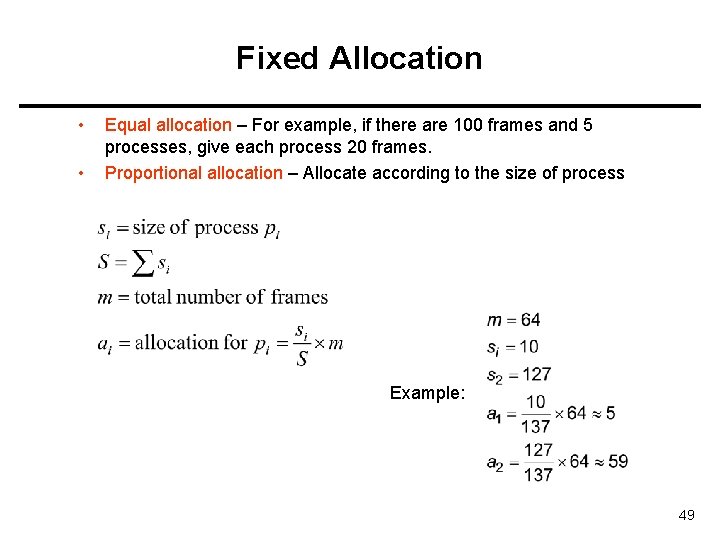
Fixed Allocation • • Equal allocation – For example, if there are 100 frames and 5 processes, give each process 20 frames. Proportional allocation – Allocate according to the size of process Example: 49
Priority Allocation • Use a proportional allocation scheme using priorities rather than size • If process Pi generates a page fault, – select for replacement one of its frames – select for replacement a frame from a process with lower priority number 50
Global versus Local Allocation • When a page fault occurs for a process and we need page replacement, there are two general approaches: – Global replacement – can select a victim frame from the set of all frames; • one process can take a frame from another – Local replacement – can select a victim frame only from the frames allocated to the process. • A process uses always its allocated frames 51
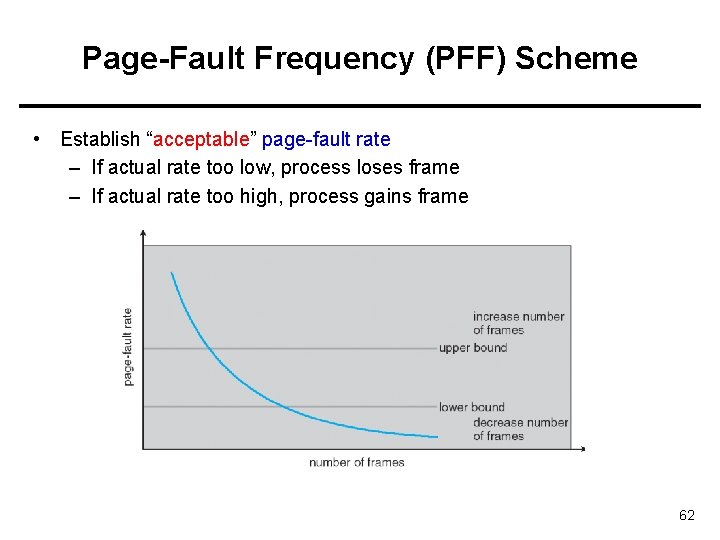
Thrashing • If a process does not have “enough” pages, the page-fault rate is very high. This leads to: – low CPU utilization – operating system thinks that it needs to increase the degree of multiprogramming – another process added to the system • Thrashing a process is busy swapping pages in and out 52
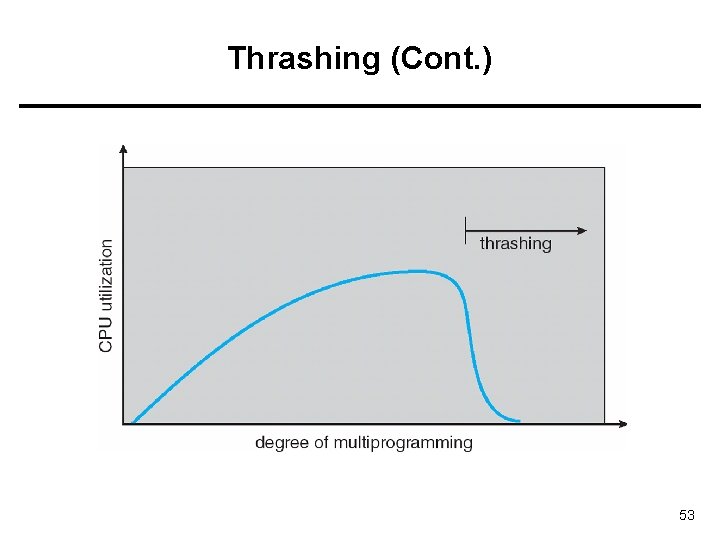
Thrashing (Cont. ) 53
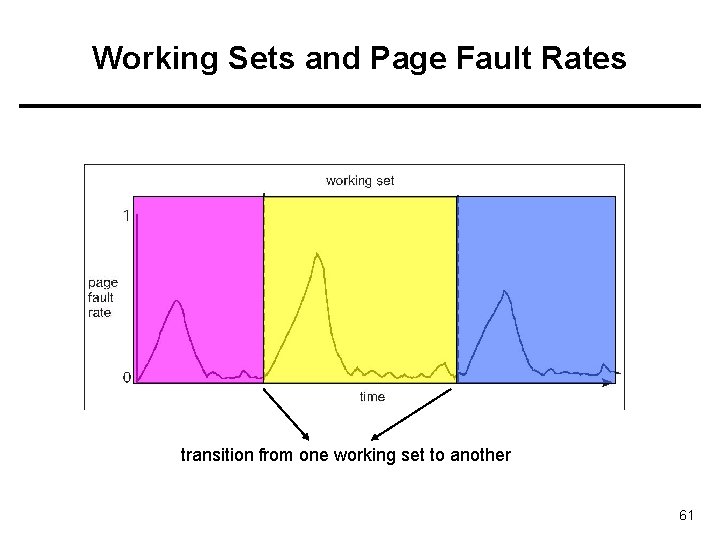
Demand Paging and Thrashing • Why does demand paging work? Locality model (locality of reference) – Process migrates from one locality to another – Localities may overlap • Why does thrashing occur? size of locality > total physical memory size 54
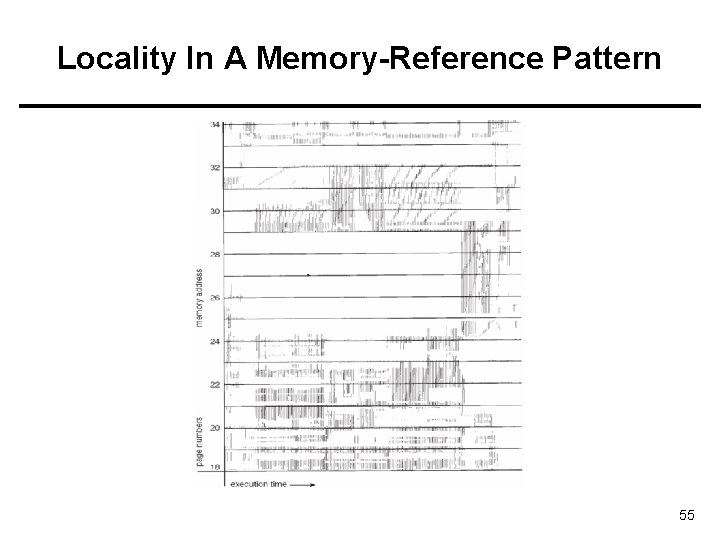
Locality In A Memory-Reference Pattern 55
Working-Set Model • A method for deciding a) how many frames to allocate to a process, and also b) for selecting which page to replace. • Maintain a Working Set (WS) for each process. – Look to the past page references – working-set window a fixed number of page references • WSSi (working set size of Process Pi) = total number of distinct pages referenced in the most recent – WSS varies in time – Value of is important • if too small, will not encompass entire locality • if too large, will encompass several localities • if = will encompass entire program 56
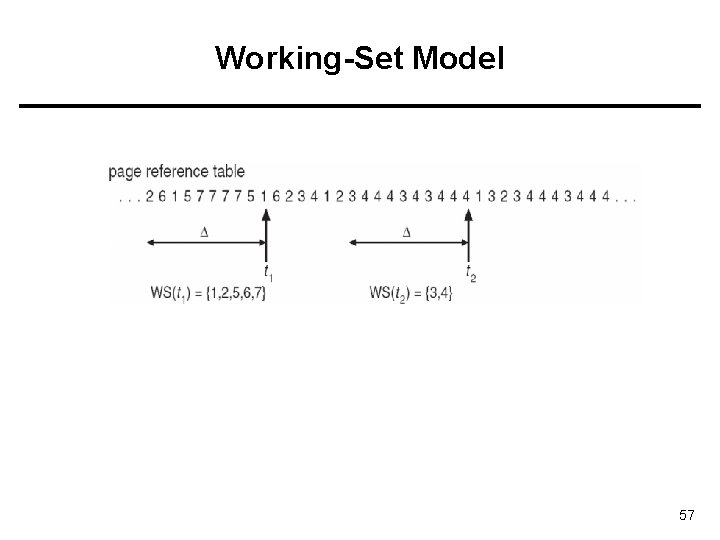
Working-Set Model 57
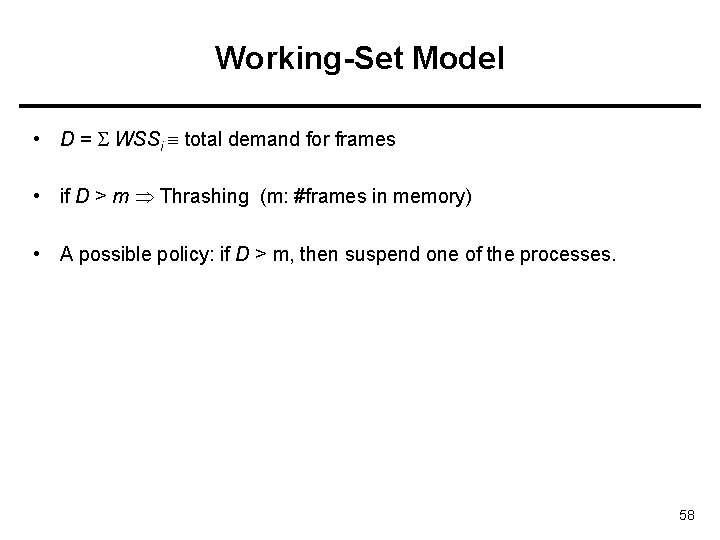
Working-Set Model • D = WSSi total demand for frames • if D > m Thrashing (m: #frames in memory) • A possible policy: if D > m, then suspend one of the processes. 58
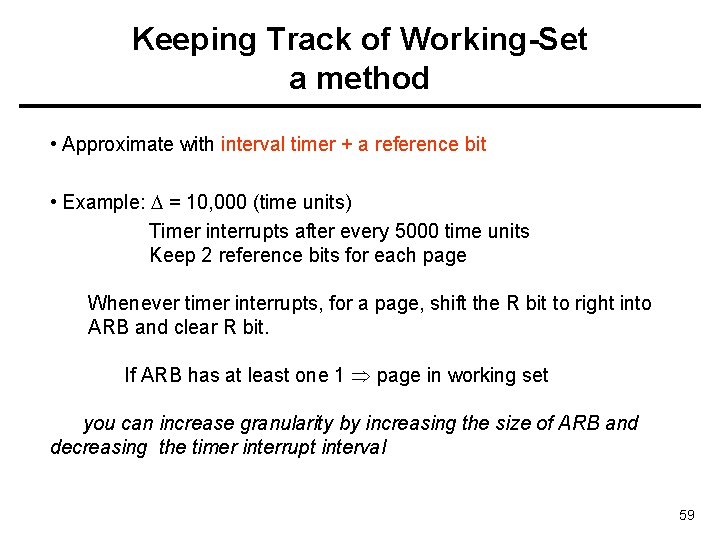
Keeping Track of Working-Set a method • Approximate with interval timer + a reference bit • Example: = 10, 000 (time units) Timer interrupts after every 5000 time units Keep 2 reference bits for each page Whenever timer interrupts, for a page, shift the R bit to right into ARB and clear R bit. If ARB has at least one 1 page in working set you can increase granularity by increasing the size of ARB and decreasing the timer interrupt interval 59
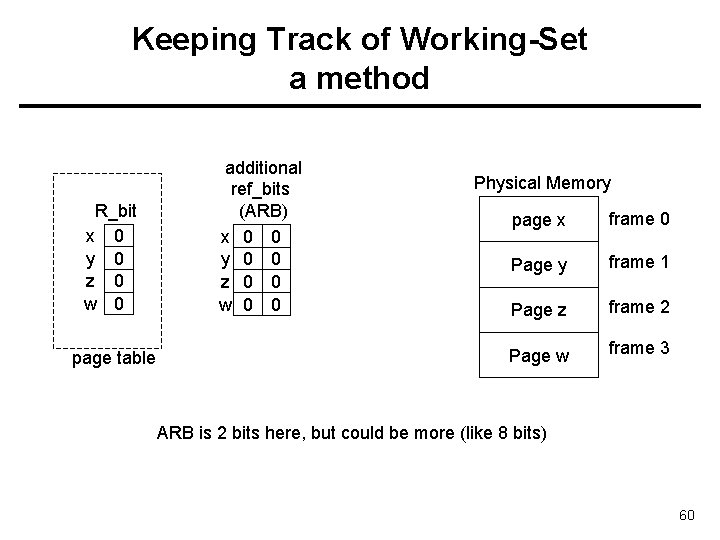
Keeping Track of Working-Set a method R_bit x 0 y 0 z 0 w 0 page table additional ref_bits (ARB) x 0 0 y 0 0 z 0 0 w 0 0 Physical Memory page x frame 0 Page y frame 1 Page z frame 2 Page w frame 3 ARB is 2 bits here, but could be more (like 8 bits) 60
Working Sets and Page Fault Rates transition from one working set to another 61
Page-Fault Frequency (PFF) Scheme • Establish “acceptable” page-fault rate – If actual rate too low, process loses frame – If actual rate too high, process gains frame 62
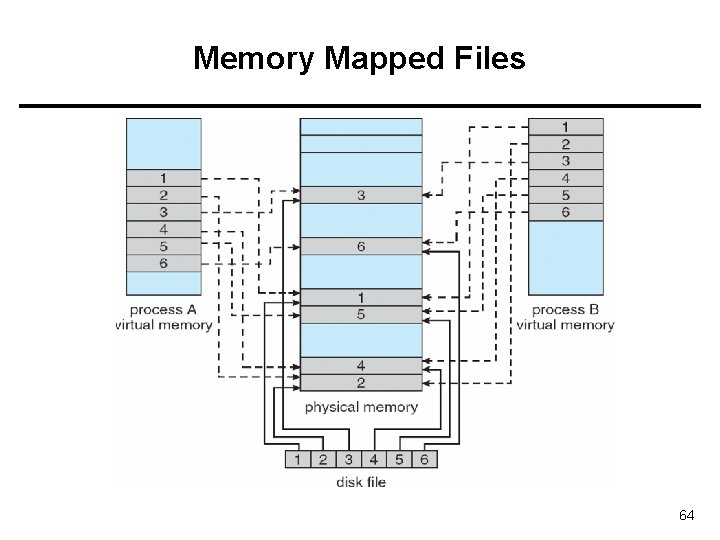
Memory-Mapped Files • Memory-mapped file I/O allows file I/O to be treated as routine memory access by mapping a disk block to a page in memory • A file is initially read using demand paging. A page-sized portion of the file is read from the file system into a physical page. Subsequent reads/writes to/from the file are treated as ordinary memory accesses. • Simplifies file access by treating file I/O through memory rather than read() write() system calls • Also allows several processes to map the same file allowing the pages in memory to be shared 63
Memory Mapped Files 64
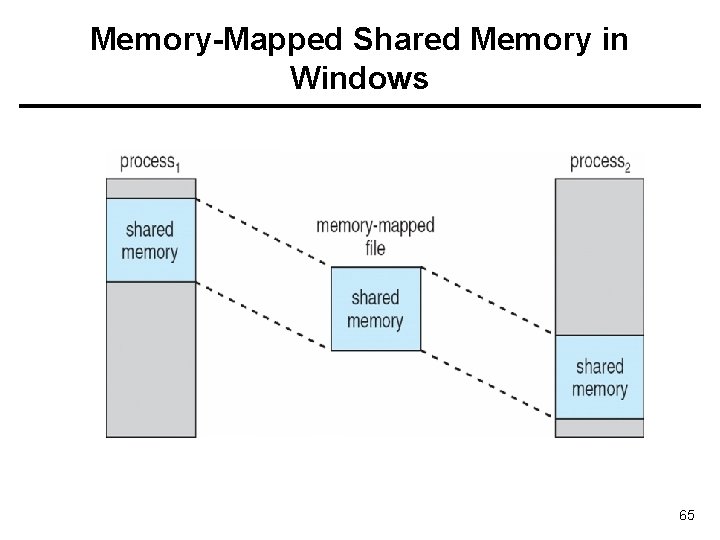
Memory-Mapped Shared Memory in Windows 65
Allocating Kernel Memory • Treated differently from user memory. Why? • Often allocated from a free-memory pool – Kernel requests memory for structures (objects) of varying sizes • Object types: process descriptors, semaphores, file objects, … • Allocation of object type size requested many times. – Those structures have sizes much less than the page size – Some kernel memory needs to be contiguous • This is dynamic memory allocation problem. • But using first-fit like strategies (heap management strategies) cause external fragmentation 66
Allocating Kernel Memory • We will see two methods – Buddy System Allocator – Slab Allocator 67
Buddy System Allocator • Allocates memory from fixed-size segment consisting of physicallycontiguous pages • Memory allocated using power-of-2 allocator – Satisfies requests in units sized as power of 2 – Request rounded up to next highest power of 2 – When smaller allocation needed than is available, current free chunk split into two buddies of next-lower power of 2 • Continue until appropriate sized free chunk obtained 68
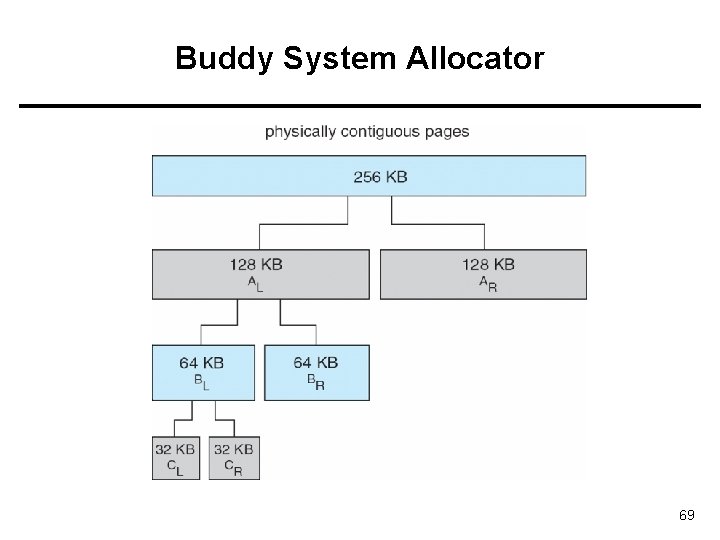
Buddy System Allocator 69
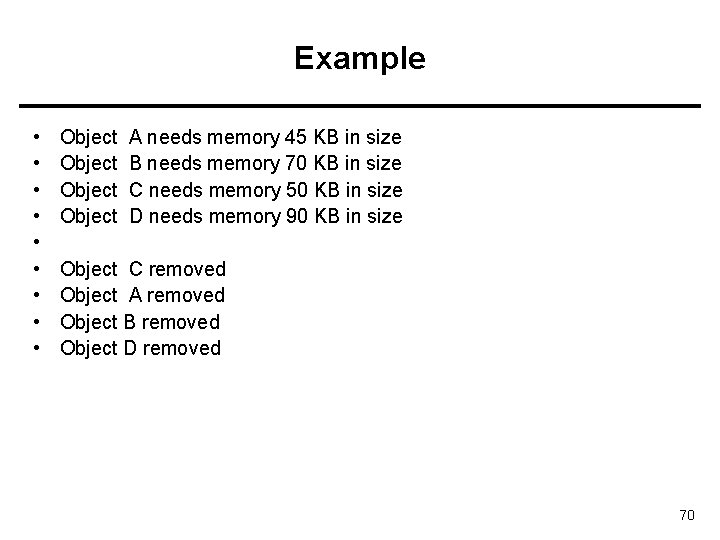
Example • • • Object A needs memory 45 KB in size B needs memory 70 KB in size C needs memory 50 KB in size D needs memory 90 KB in size Object C removed Object A removed Object B removed Object D removed 70
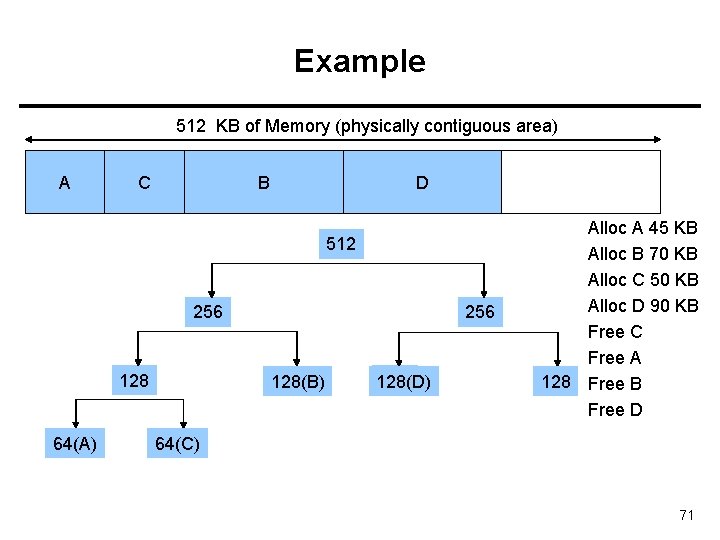
Example 512 KB of Memory (physically contiguous area) A C B D 512 256 128 64(A) 64 256 128(B) 128 128(D) Alloc A 45 KB Alloc B 70 KB Alloc C 50 KB Alloc D 90 KB Free C Free A 128 Free B Free D 64(C) 64 71
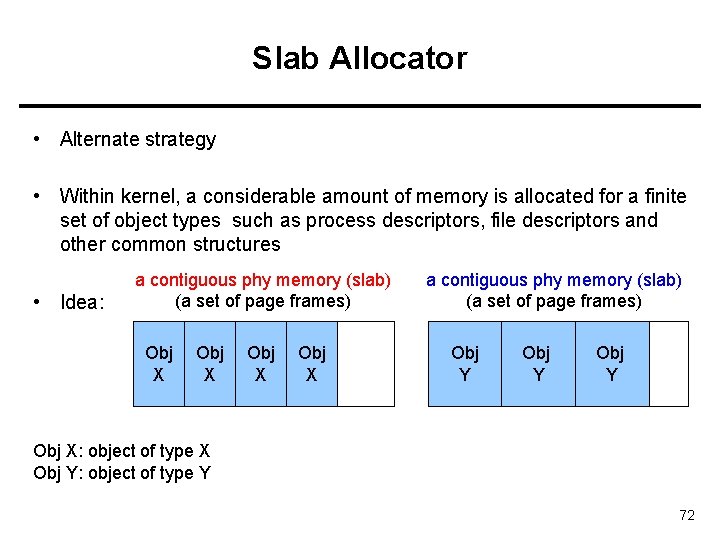
Slab Allocator • Alternate strategy • Within kernel, a considerable amount of memory is allocated for a finite set of object types such as process descriptors, file descriptors and other common structures • Idea: a contiguous phy memory (slab) (a set of page frames) Obj X a contiguous phy memory (slab) (a set of page frames) Obj Y Obj X: object of type X Obj Y: object of type Y 72
Slab Allocator • Slab is one or more physically contiguous pages • Cache consists of one or more slabs • Single cache for each unique kernel data structure – Each cache filled with objects of same type – instantiations of the data structure • When cache created, filled with slots (objects) marked as free • When objects (structures) stored, slots marked as used • If slab is full, next object allocated from empty slab – If no empty slab, new slab allocated • Benefits include – no fragmentation, – fast memory request satisfaction 73
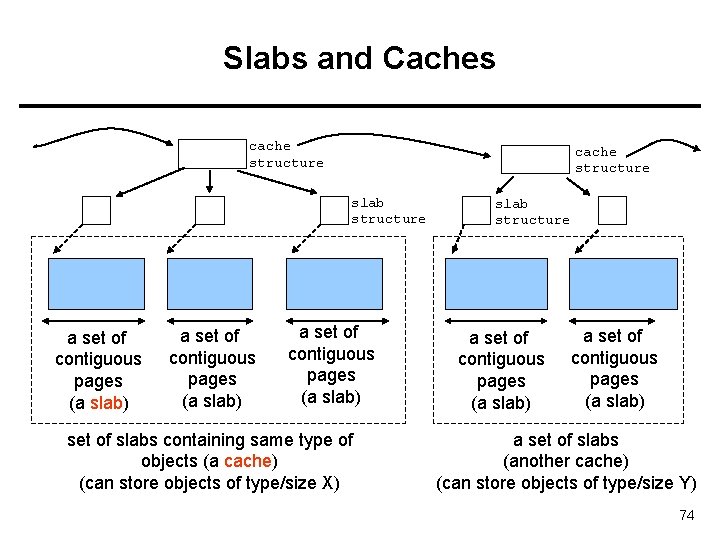
Slabs and Caches cache structure slab structure a set of contiguous pages (a slab) set of slabs containing same type of objects (a cache) (can store objects of type/size X) slab structure a set of contiguous pages (a slab) a set of slabs (another cache) (can store objects of type/size Y) 74
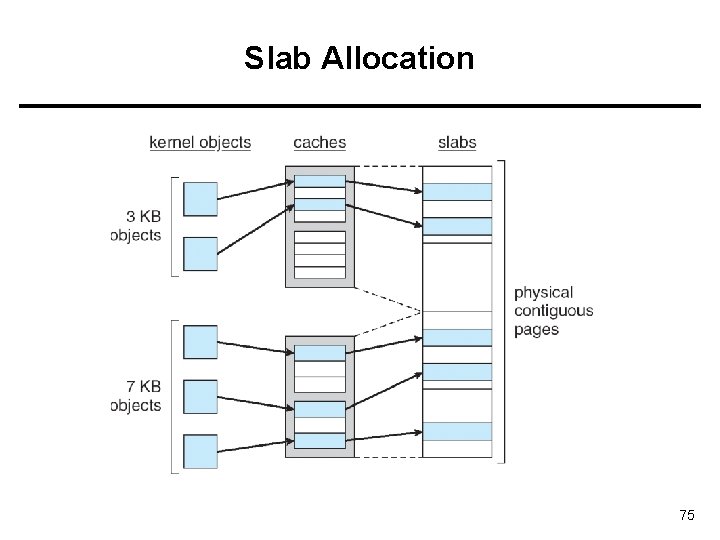
Slab Allocation 75
Prepaging • Prepaging – To reduce the large number of page faults that occur at process startup – Prepage all or some of the pages a process will need, before they are referenced – If prepaged pages are not used, I/O and memory wasted – Assume s pages are prepaged and ratio of pages used is α • Is cost of s * α save pages faults > or < than the cost of prepaging s * (1 - α) unnecessary pages? • α near zero prepaging loses 76
Other Issues – Page Size • Page size selection must take into consideration: – Fragmentation • Small page size reduces fragmentation – Table size • Large page size reduces page table size – I/O overhead • Large page size reduce I/O overhead (seek time, rotation time) – Locality • Locality is improved with smaller page size. 77
Other Issues – TLB Reach • TLB Reach - The amount of memory accessible from the TLB • TLB Reach = (TLB Size) x (Page Size) • Ideally, the working set of each process is stored in the TLB – Otherwise there is a high degree of page faults • To increase TLB reach: – Increase the Page Size • This may lead to an increase in fragmentation as not all applications require a large page size – Provide Multiple Page Sizes • This allows applications that require larger page sizes the opportunity to use them without an increase in fragmentation 78
![Other Issues – Program Structure • Program structure – int[128, 128] data; – Each](http://slidetodoc.com/presentation_image_h2/5c9d6c4470c81a5bdf284c7c832a49cf/image-79.jpg "Other Issues – Program Structure • Program structure – int[128, 128] data; – Each")
Other Issues – Program Structure • Program structure – int[128, 128] data; – Each row is stored in one page assuming pagesize=512 bytes page 0 int int Page 1 int int int Page 127 int int – Program 1 for (j = 0; j <128; j++) for (i = 0; i < 128; i++) data[i, j] = 0; 128 x 128 = 16, 384 page faults – Program 2 for (i = 0; i < 128; i++) for (j = 0; j < 128; j++) data[i, j] = 0; 128 page faults 79
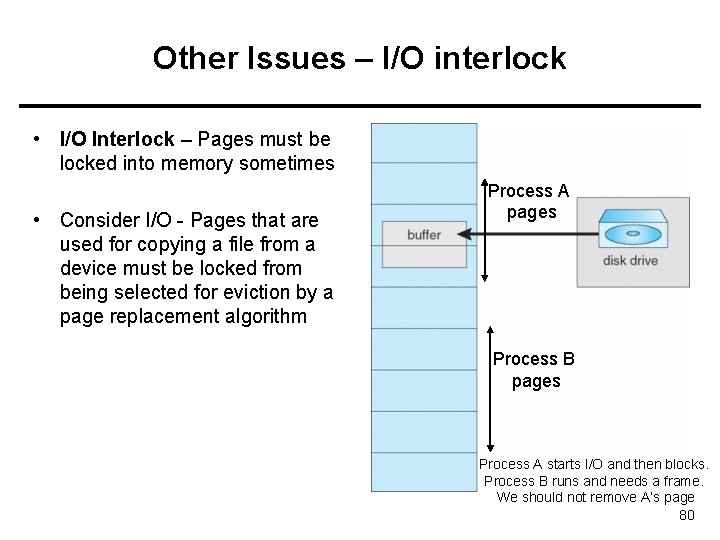
Other Issues – I/O interlock • I/O Interlock – Pages must be locked into memory sometimes • Consider I/O - Pages that are used for copying a file from a device must be locked from being selected for eviction by a page replacement algorithm Process A pages Process B pages Process A starts I/O and then blocks. Process B runs and needs a frame. We should not remove A’s page 80
Additional Study Material 81
Operating System Examples • Windows XP • Solaris 82
Windows XP • Uses demand paging with clustering. Clustering brings in pages surrounding the faulting page • Processes are assigned working set minimum and working set maximum • Working set minimum is the minimum number of pages the process is guaranteed to have in memory • A process may be assigned as many pages up to its working set maximum • When the amount of free memory in the system falls below a threshold, automatic working set trimming is performed to restore the amount of free memory • Working set trimming removes pages from processes that have pages in excess of their working set minimum 83
Solaris • Maintains a list of free pages to assign faulting processes • Lotsfree – threshold parameter (amount of free memory) to begin paging • Desfree – threshold parameter to increasing paging • Minfree – threshold parameter to being swapping • Paging is performed by pageout process • Pageout scans pages using modified clock algorithm • Scanrate is the rate at which pages are scanned. This ranges from slowscan to fastscan • Pageout is called more frequently depending upon the amount of free memory available 84
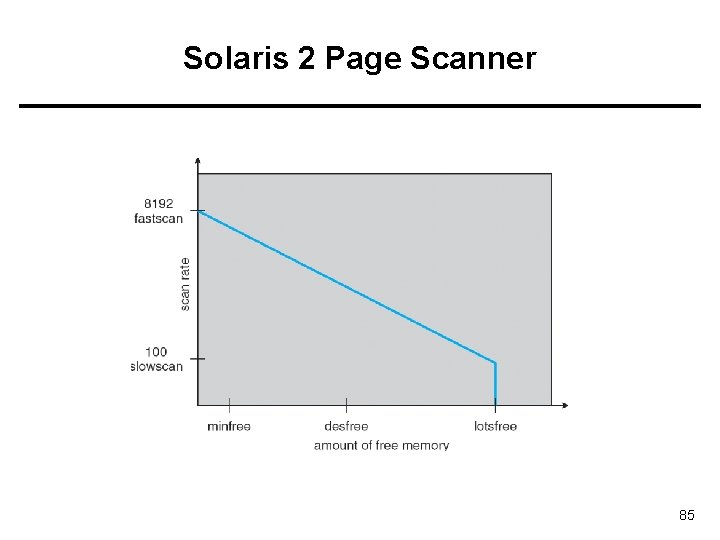
Solaris 2 Page Scanner 85
Slab Allocation in Linux Kernel 86
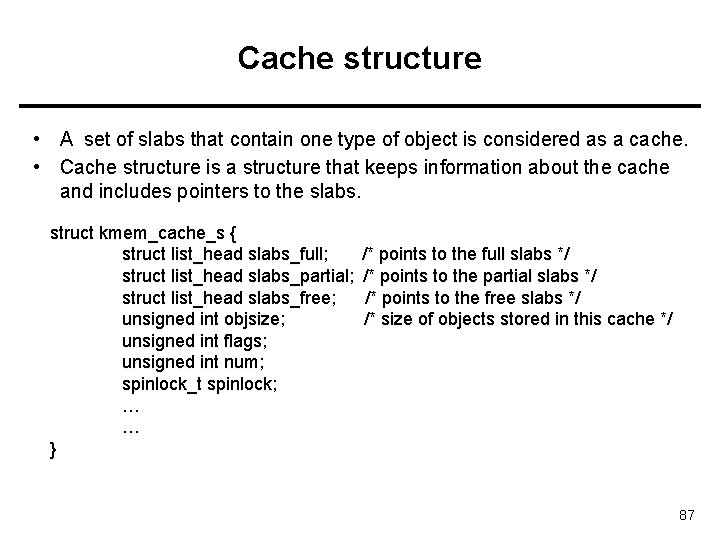
Cache structure • A set of slabs that contain one type of object is considered as a cache. • Cache structure is a structure that keeps information about the cache and includes pointers to the slabs. struct kmem_cache_s { struct list_head slabs_full; struct list_head slabs_partial; struct list_head slabs_free; unsigned int objsize; unsigned int flags; unsigned int num; spinlock_t spinlock; … … } /* points to the full slabs */ /* points to the partial slabs */ /* points to the free slabs */ /* size of objects stored in this cache */ 87
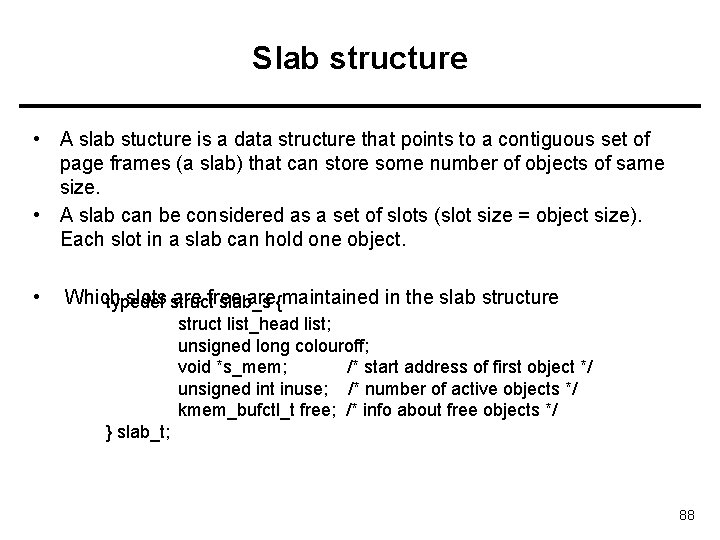
Slab structure • A slab stucture is a data structure that points to a contiguous set of page frames (a slab) that can store some number of objects of same size. • A slab can be considered as a set of slots (slot size = object size). Each slot in a slab can hold one object. • Which slots struct are free are{maintained in the slab structure typedef slab_s struct list_head list; unsigned long colouroff; void *s_mem; /* start address of first object */ unsigned int inuse; /* number of active objects */ kmem_bufctl_t free; /* info about free objects */ } slab_t; 88
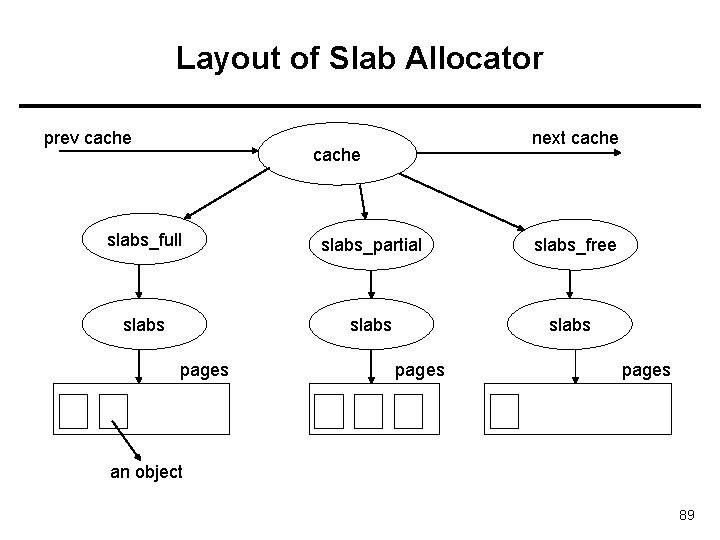
Layout of Slab Allocator prev cache next cache slabs_full slabs_partial slabs pages slabs_free slabs pages an object 89
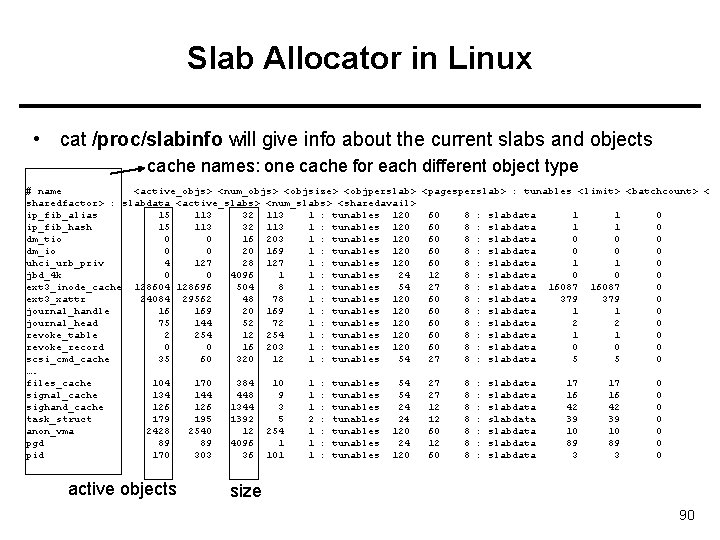
Slab Allocator in Linux • cat /proc/slabinfo will give info about the current slabs and objects cache names: one cache for each different object type # name <active_objs> <num_objs> <objsize> <objperslab> <pagesperslab> : tunables <limit> <batchcount> < sharedfactor> : slabdata <active_slabs> <num_slabs> <sharedavail> ip_fib_alias 15 113 32 113 1 : tunables 120 60 8 : slabdata 1 1 0 ip_fib_hash 15 113 32 113 1 : tunables 120 60 8 : slabdata 1 1 0 dm_tio 0 0 16 203 1 : tunables 120 60 8 : slabdata 0 0 0 dm_io 0 0 20 169 1 : tunables 120 60 8 : slabdata 0 0 0 uhci_urb_priv 4 127 28 127 1 : tunables 120 60 8 : slabdata 1 1 0 jbd_4 k 0 0 4096 1 1 : tunables 24 12 8 : slabdata 0 0 0 ext 3_inode_cache 128604 128696 504 8 1 : tunables 54 27 8 : slabdata 16087 0 ext 3_xattr 24084 29562 48 78 1 : tunables 120 60 8 : slabdata 379 0 journal_handle 16 169 20 169 1 : tunables 120 60 8 : slabdata 1 1 0 journal_head 75 144 52 72 1 : tunables 120 60 8 : slabdata 2 2 0 revoke_table 2 254 1 : tunables 120 60 8 : slabdata 1 1 0 revoke_record 0 0 16 203 1 : tunables 120 60 8 : slabdata 0 0 0 scsi_cmd_cache 35 60 320 12 1 : tunables 54 27 8 : slabdata 5 5 0 …. files_cache 104 170 384 10 1 : tunables 54 27 8 : slabdata 17 17 0 signal_cache 134 144 448 9 1 : tunables 54 27 8 : slabdata 16 16 0 sighand_cache 126 1344 3 1 : tunables 24 12 8 : slabdata 42 42 0 task_struct 179 195 1392 5 2 : tunables 24 12 8 : slabdata 39 39 0 anon_vma 2428 2540 12 254 1 : tunables 120 60 8 : slabdata 10 10 0 pgd 89 89 4096 1 1 : tunables 24 12 8 : slabdata 89 89 0 pid 170 303 36 101 1 : tunables 120 60 8 : slabdata 3 3 0 active objects size 90
References • The slides here adapted/modified from the textbook and its slides: Operating System Concepts, Silberschatz et al. , 7 th & 8 th editions, Wiley. • Operating System Concepts, 7 th and 8 th editions, Silberschatz et al. Wiley. • Modern Operating Systems, Andrew S. Tanenbaum, 3 rd edition, 2009. 91
- Slides: 91