
Big Plants with KNX Topology Devices Planing rules
Big Plants with KNX - Topology - Devices - Planing, rules - Commissioning Title - Applications with heating/cooling-changeover © Siemens Switzerland Ltd 2007
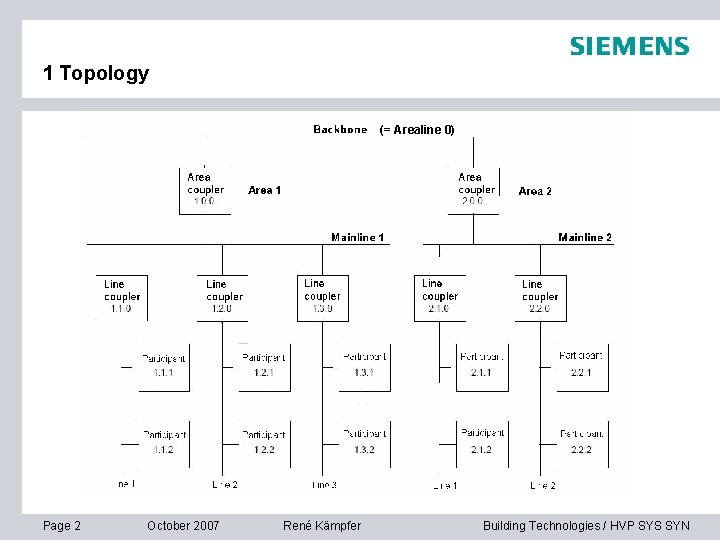
1 Topology (= Arealine 0) Page 2 October 2007 René Kämpfer © Siemens Switzerland Ltd 2007 Building Technologies / HVP SYS SYN

1 Topology RMZ 792 OZW 775 RM. . Arealine 0 (Backbone) ACS Area 1 Area 2 N 140/13 Area coupler Area 3 N 140/13 Area coupler RM. . Mainline 2 Mainline 1 Line 1 October 2007 RMB. . Mainline 3 RM. . RXB 2. . Line 1 N 140/13 Line coupler Page 3 ACS Alarm, Pager, SMS, FAX RMB. . RXB 2. . Line 1 N 140/13 Line coupler © Siemens Switzerland Ltd 2007 René Kämpfer Building Technologies / HVP SYS SYN

1 Topology ACS Max. 64 Synco – Devices RM. . 0. 0. 2 RMZ 792 0. 0. 1 OZW 775 0. 0. 64 Backbone 0 N 140/13 Area coupler 1. 0. 0 Area 1 Max. 64 Synco – Devices RXB 2. . 7. 0. 2 RM. . 1. 0. 63 RRM. . 1. 0. 64 RXB 2. . 7. 0. 64 Max. 64 Synco – Devices Line 2 RM. . 1. 1. 1 Max. 64 Synco – Devices October 2007 René Kämpfer RM. . 15. 0. 63 RXB 2. . 15. 0. 64 N 140/13 Line coupler 15. 0 Line 15 RM. . 1. 2. 1 Max. 64 Synco – Devices RM. . 1. 2. 63 RM. . 1. 1. 63 Page 4 RMB. . 15. 0. 1 N 140/13 Line coupler 1. 2. 0 N 140/13 Line coupler 1. 1. 0 Line 1 Area 15 Max. 64 Synco – Devices Area 7 RM. . 1. 0. 1 Area coupler 7. 0. 0 RMB. . 7. 01 N 140/13 Aera coupler 15. 0. 0 RM. . 15. 1 RM. . 15. 63 © Siemens Switzerland Ltd 2007 Building Technologies / HVP SYS SYN

2 System devices Area-/Line coupler N 140/13 IP Router N 146 5 WG 1 140 -1 AB 13 5 WG 1 146 -1 AB 01 Bus power supply unit N 125/x 1 5 WG 1 125 -1 ABx 1 For more information see: www. automation. siemens. com/et/gamma/ Page 5 October 2007 René Kämpfer © Siemens Switzerland Ltd 2007 Building Technologies / HVP SYS SYN
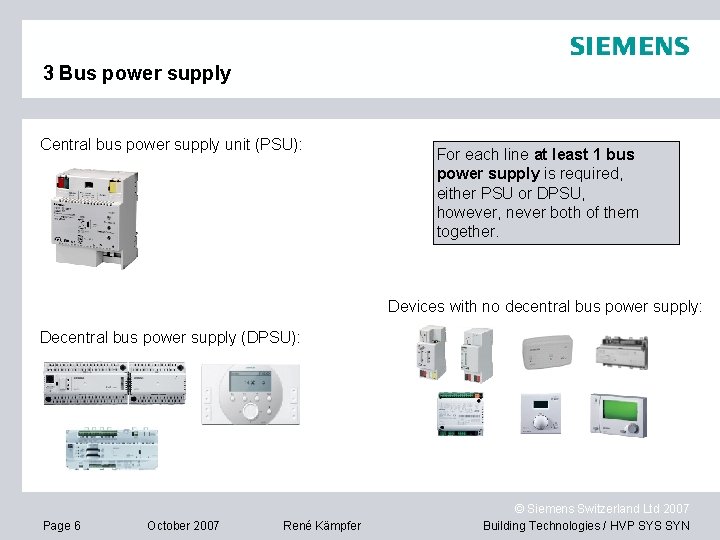
3 Bus power supply Central bus power supply unit (PSU): For each line at least 1 bus power supply is required, either PSU or DPSU, however, never both of them together. Devices with no decentral bus power supply: Decentral bus power supply (DPSU): Page 6 October 2007 René Kämpfer © Siemens Switzerland Ltd 2007 Building Technologies / HVP SYS SYN
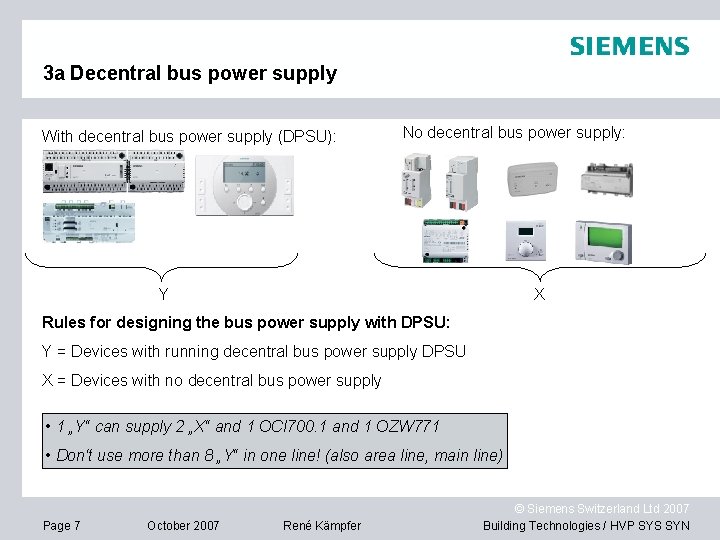
3 a Decentral bus power supply With decentral bus power supply (DPSU): No decentral bus power supply: Y X Rules for designing the bus power supply with DPSU: Y = Devices with running decentral bus power supply DPSU X = Devices with no decentral bus power supply • 1 „Y“ can supply 2 „X“ and 1 OCI 700. 1 and 1 OZW 771 • Don‘t use more than 8 „Y“ in one line! (also area line, main line) Page 7 October 2007 René Kämpfer © Siemens Switzerland Ltd 2007 Building Technologies / HVP SYS SYN
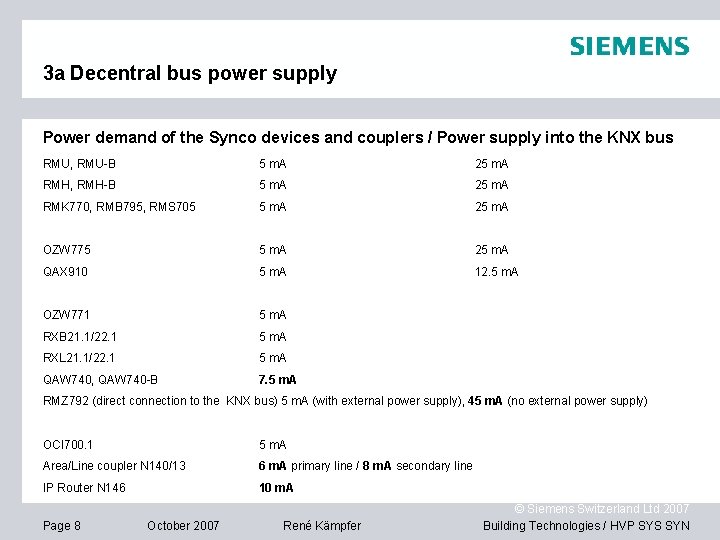
3 a Decentral bus power supply Power demand of the Synco devices and couplers / Power supply into the KNX bus RMU, RMU-B 5 m. A 25 m. A RMH, RMH-B 5 m. A 25 m. A RMK 770, RMB 795, RMS 705 5 m. A 25 m. A OZW 775 5 m. A 25 m. A QAX 910 5 m. A 12. 5 m. A OZW 771 5 m. A RXB 21. 1/22. 1 5 m. A RXL 21. 1/22. 1 5 m. A QAW 740, QAW 740 -B 7. 5 m. A RMZ 792 (direct connection to the KNX bus) 5 m. A (with external power supply), 45 m. A (no external power supply) OCI 700. 1 5 m. A Area/Line coupler N 140/13 6 m. A primary line / 8 m. A secondary line IP Router N 146 10 m. A Page 8 October 2007 René Kämpfer © Siemens Switzerland Ltd 2007 Building Technologies / HVP SYS SYN
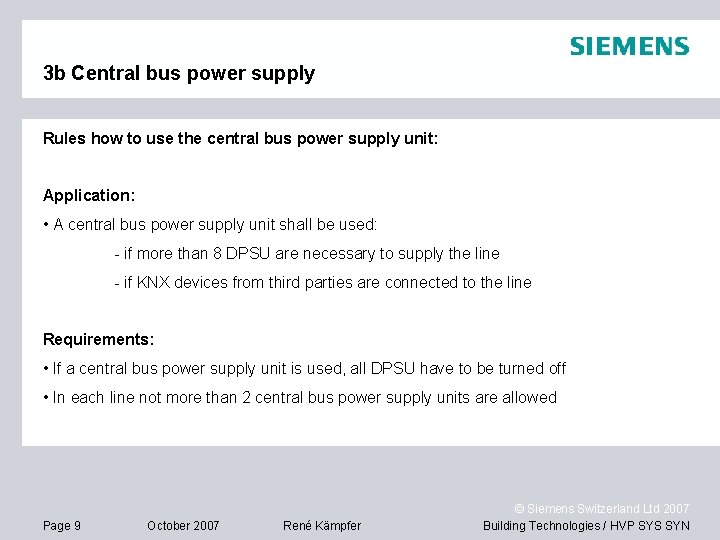
3 b Central bus power supply Rules how to use the central bus power supply unit: Application: • A central bus power supply unit shall be used: - if more than 8 DPSU are necessary to supply the line - if KNX devices from third parties are connected to the line Requirements: • If a central bus power supply unit is used, all DPSU have to be turned off • In each line not more than 2 central bus power supply units are allowed Page 9 October 2007 René Kämpfer © Siemens Switzerland Ltd 2007 Building Technologies / HVP SYS SYN
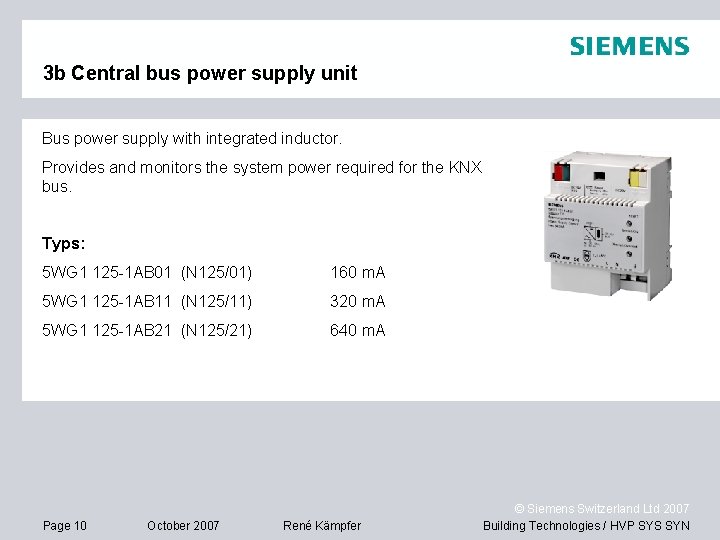
3 b Central bus power supply unit Bus power supply with integrated inductor. Provides and monitors the system power required for the KNX bus. Typs: 5 WG 1 125 -1 AB 01 (N 125/01) 160 m. A 5 WG 1 125 -1 AB 11 (N 125/11) 320 m. A 5 WG 1 125 -1 AB 21 (N 125/21) 640 m. A Page 10 October 2007 René Kämpfer © Siemens Switzerland Ltd 2007 Building Technologies / HVP SYS SYN

4 Area / Line coupler Arealine Mainline N 140/13 Line coupler Line Mainline N 140/13 Area coupler Purpose of the Area /Line coupler and IP Router: • To extend the plant when more than 64 bus devices are needed • Reduction of the data traffic by using programmed filter tables Page 11 October 2007 René Kämpfer © Siemens Switzerland Ltd 2007 Building Technologies / HVP SYS SYN

4 Area / Line coupler Area couplers Line couplers How to address the coupler: N 140/13 Area /Line coupler Page 12 1. Put the coupler into the address mode 2. Edit device list 3. Define the address 4. Refresh device list October 2007 René Kämpfer © Siemens Switzerland Ltd 2007 Building Technologies / HVP SYS SYN

5 IP Router IP Network N 146 IP Router Mainline / Line (Auxiliary power supply AC/DC 24 V needed) Page 13 How to address the router: 1. Put the coupler into the address mode 2. Edit device list 3. Define the address 4. Refresh device list October 2007 René Kämpfer © Siemens Switzerland Ltd 2007 Building Technologies / HVP SYS SYN
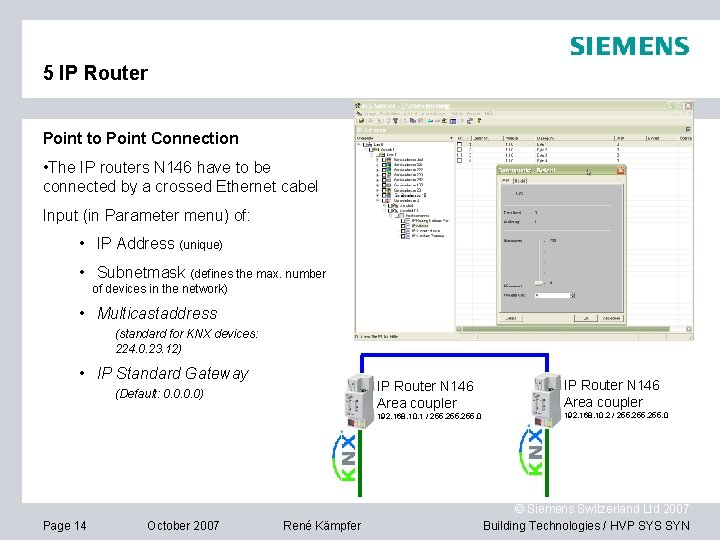
5 IP Router Point to Point Connection • The IP routers N 146 have to be connected by a crossed Ethernet cabel Input (in Parameter menu) of: • IP Address (unique) • Subnetmask (defines the max. number of devices in the network) • Multicastaddress (standard for KNX devices: 224. 0. 23. 12) • IP Standard Gateway IP Router N 146 Area coupler (Default: 0. 0) 192. 168. 10. 1 / 255. 0 Page 14 October 2007 René Kämpfer IP Router N 146 Area coupler 192. 168. 10. 2 / 255. 0 © Siemens Switzerland Ltd 2007 Building Technologies / HVP SYS SYN
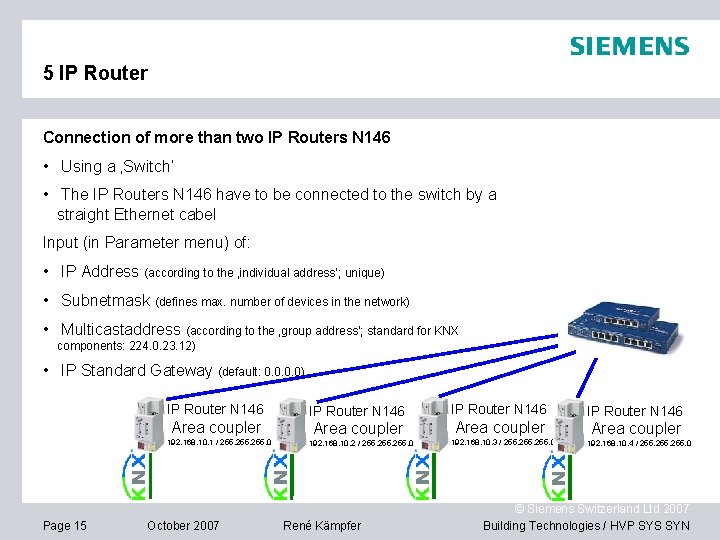
5 IP Router Connection of more than two IP Routers N 146 • Using a ‚Switch‘ • The IP Routers N 146 have to be connected to the switch by a straight Ethernet cabel Input (in Parameter menu) of: • IP Address (according to the ‚individual address‘; unique) • Subnetmask (defines max. number of devices in the network) • Multicastaddress (according to the ‚group address‘; standard for KNX components: 224. 0. 23. 12) • IP Standard Gateway (default: 0. 0) IP Router N 146 Area coupler 192. 168. 10. 1 / 255. 0 Page 15 October 2007 IP Router N 146 Area coupler 192. 168. 10. 2 / 255. 0 René Kämpfer IP Router N 146 Area coupler 192. 168. 10. 3 / 255. 0 IP Router N 146 Area coupler 192. 168. 10. 4 / 255. 0 © Siemens Switzerland Ltd 2007 Building Technologies / HVP SYS SYN
5 IP Router Settings IP Router in existing network The following points have to be discussed with the network administrator: • automatic allocation of the IP Address (DHCP – Service) or • manual allocation of the IP address • IP Address • Subnetmask • Multicastaddress (standard for KNX components: 224. 0. 23. 12) • IP Standard Gateway (default: 0. 0) Page 16 October 2007 René Kämpfer © Siemens Switzerland Ltd 2007 Building Technologies / HVP SYS SYN
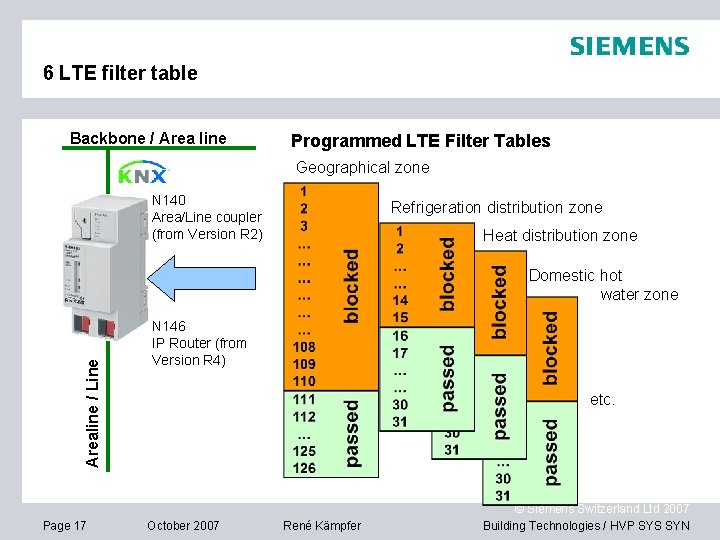
6 LTE filter table Backbone / Area line Programmed LTE Filter Tables Geographical zone N 140 Area/Line coupler (from Version R 2) Refrigeration distribution zone Heat distribution zone Arealine / Line Domestic hot water zone Page 17 N 146 IP Router (from Version R 4) etc. October 2007 René Kämpfer © Siemens Switzerland Ltd 2007 Building Technologies / HVP SYS SYN
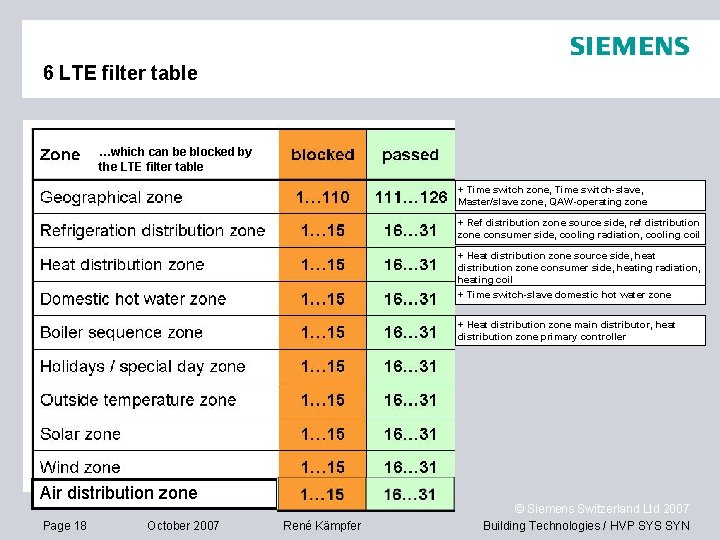
6 LTE filter table …which can be blocked by the LTE filter table + Time switch zone, Time switch-slave, Master/slave zone, QAW-operating zone + Ref distribution zone source side, ref distribution zone consumer side, cooling radiation, cooling coil + Heat distribution zone source side, heat distribution zone consumer side, heating radiation, heating coil + Time switch-slave domestic hot water zone + Heat distribution zone main distributor, heat distribution zone primary controller Air distribution zone Page 18 October 2007 René Kämpfer © Siemens Switzerland Ltd 2007 Building Technologies / HVP SYS SYN
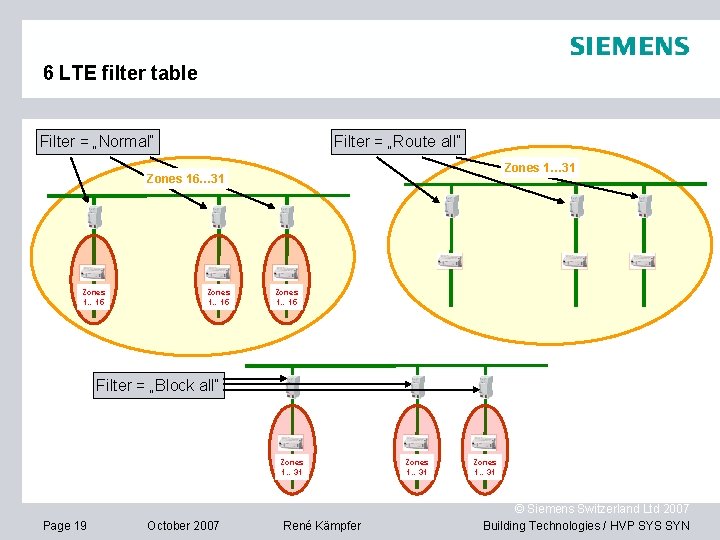
6 LTE filter table Filter = „Normal“ Filter = „Route all“ Zones 1… 31 Zones 16… 31 Zones 1… 15 Filter = „Block all“ Zones 1… 31 Page 19 October 2007 René Kämpfer Zones 1… 31 © Siemens Switzerland Ltd 2007 Building Technologies / HVP SYS SYN
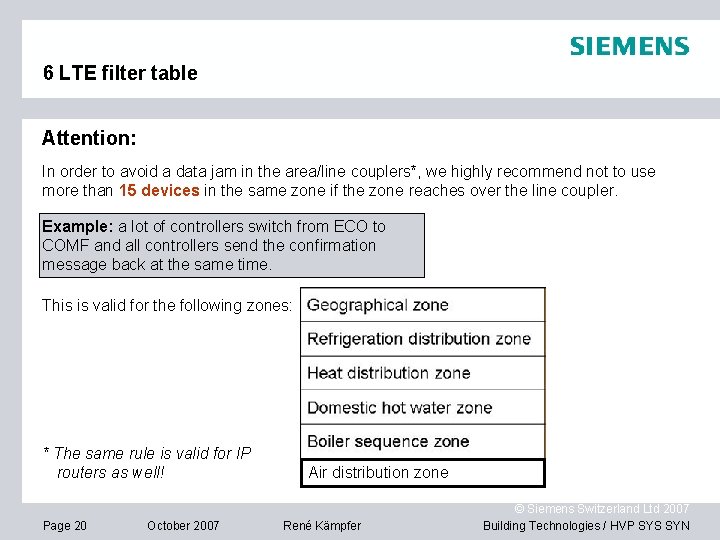
6 LTE filter table Attention: In order to avoid a data jam in the area/line couplers*, we highly recommend not to use more than 15 devices in the same zone if the zone reaches over the line coupler. Example: a lot of controllers switch from ECO to COMF and all controllers send the confirmation message back at the same time. This is valid for the following zones: * The same rule is valid for IP routers as well! Page 20 October 2007 Air distribution zone René Kämpfer © Siemens Switzerland Ltd 2007 Building Technologies / HVP SYS SYN
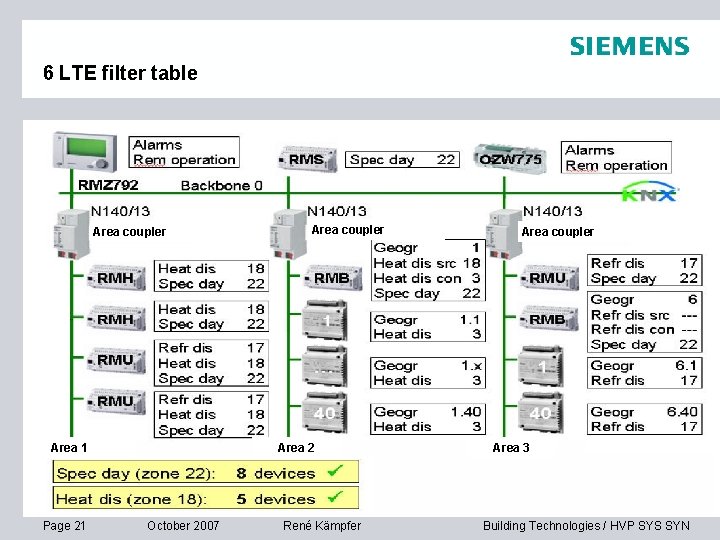
6 LTE filter table Area coupler Area 1 Page 21 Area coupler Area 2 October 2007 René Kämpfer Area coupler Area 3 © Siemens Switzerland Ltd 2007 Building Technologies / HVP SYS SYN
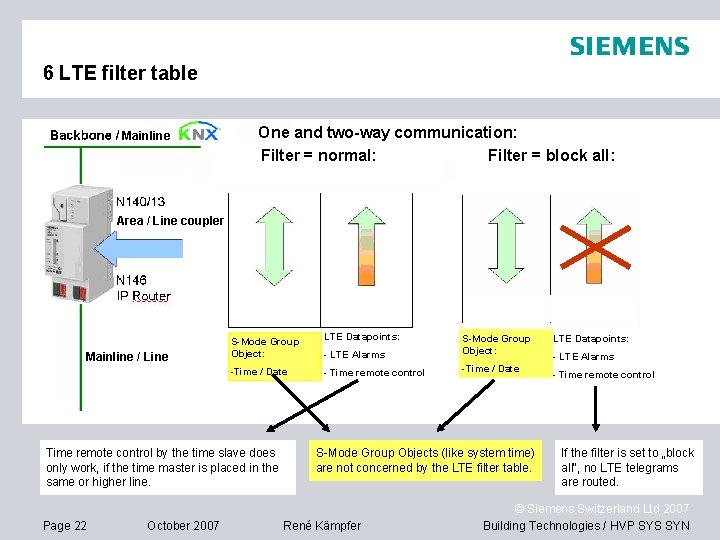
6 LTE filter table Mainline One and two-way communication: Filter = normal: Filter = block all: Area / Line coupler Zeit / Datum Mainline / Line S-Mode Group Object: LTE Datapoints: - LTE Alarms S-Mode Group Object: -Time / Date - Time remote control -Time / Date Time remote control by the time slave does only work, if the time master is placed in the same or higher line. Page 22 October 2007 S-Mode Group Objects (like system time) are not concerned by the LTE filter table. René Kämpfer LTE Alarme LTE Datapoints: - LTE Alarms - Time remote control If the filter is set to „block all“, no LTE telegrams are routed. © Siemens Switzerland Ltd 2007 Building Technologies / HVP SYS SYN
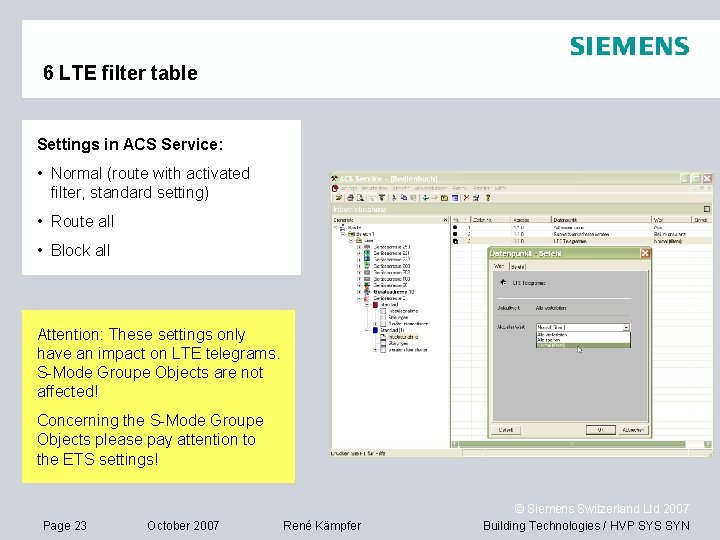
6 LTE filter table Settings in ACS Service: • Normal (route with activated filter, standard setting) • Route all • Block all Attention: These settings only have an impact on LTE telegrams. S-Mode Groupe Objects are not affected! Concerning the S-Mode Groupe Objects please pay attention to the ETS settings! Page 23 October 2007 René Kämpfer © Siemens Switzerland Ltd 2007 Building Technologies / HVP SYS SYN
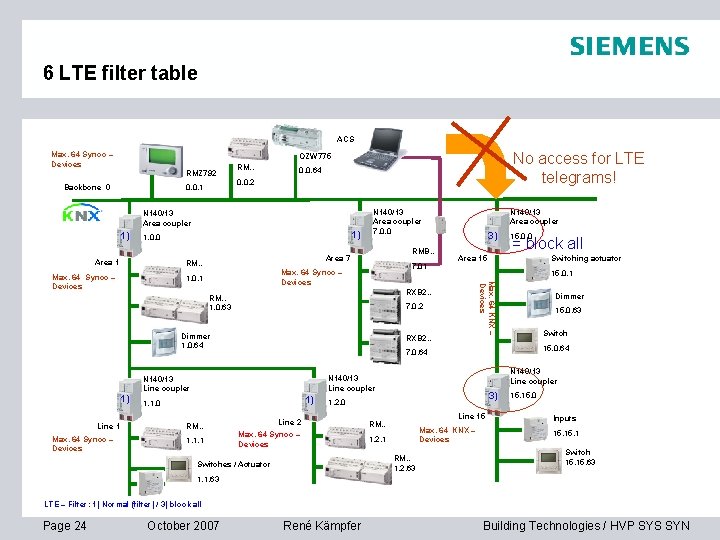
6 LTE filter table ACS Max. 64 Synco – Devices No access for LTE telegrams! OZW 775 RMZ 792 Backbone 0 0. 0. 1 RM. . 0. 0. 64 0. 0. 2 N 140/13 Area coupler 1) 1) 1. 0. 0 Area 1 RMB. . Area 7 RM. . 7. 01 Max. 64 Synco – Devices 1. 0. 1 Max. 64 Synco – Devices Switching actuator Dimmer 15. 0. 63 Switch 15. 0. 64 7. 0. 64 N 140/13 Line coupler 1) 1. 1. 0 1. 1. 1 = block all 15. 0. 1 RXB 2. . N 140/13 Line coupler RM. . 15. 0. 0 Area 15 7. 0. 2 Dimmer 1. 0. 64 Line 1 3) RXB 2. . RM. . 1. 0. 63 1) N 140/13 Area coupler Max. 64 KNX – Devices Max. 64 Synco – Devices N 140/13 Area coupler 7. 0. 0 3) 1. 2. 0 Line 2 Max. 64 Synco – Devices Line 15 RM. . Max. 64 KNX – Devices 1. 2. 1 RM. . 1. 2. 63 Switches / Actuator 15. 0 Inputs 15. 1 Switch 15. 63 1. 1. 63 LTE – Filter: 1) Normal (filter) / 3) block all Page 24 October 2007 René Kämpfer © Siemens Switzerland Ltd 2007 Building Technologies / HVP SYS SYN

7 Topology with IP Page 25 October 2007 René Kämpfer © Siemens Switzerland Ltd 2007 Building Technologies / HVP SYS SYN
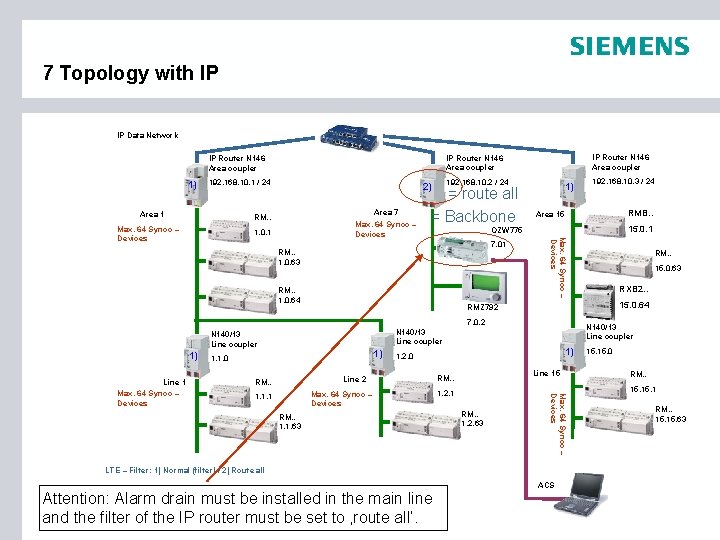
7 Topology with IP IP Data Network 1) 192. 168. 10. 1 / 24 Area 1 192. 168. 10. 2 / 24 2) Area 7 RM. . Max. 64 Synco – Devices 1. 0. 1 = route all = Backbone 1) RMB. . Area 15 15. 0. 1 OZW 775 7. 01 RM. . 1. 0. 63 RM. . 1. 0. 64 1) 1. 1. 0 1) 1. 2. 0 Line 2 RM. . 1. 1. 63 Line 15 RM. . 1. 2. 1 RM. . 1. 2. 63 Max. 64 Synco – Devices 1. 1. 1 RXB 2. . N 140/13 Line coupler RM. . 15. 0. 63 15. 0. 64 7. 0. 2 Line 1 Max. 64 Synco – Devices RM. . RMZ 792 N 140/13 Line coupler 1) 192. 168. 10. 3 / 24 Max. 64 Synco – Devices IP Router N 146 Area coupler 15. 0 RM. . 15. 1 RM. . 15. 63 LTE – Filter: 1) Normal (filter) / 2) Route all ACS Attention: Alarm drain must be installed in the main line and the filter of. October the IP 2007 router must René be set to ‚route all‘. Page 26 Kämpfer © Siemens Switzerland Ltd 2007 Building Technologies / HVP SYS SYN
8 How to plan a big plant Topics: 1. Number of bus devices in a area / line / network 2. - Distance between bus devices and the next bus power supply unit - Length of bus lines 3. Location of alarm drains 4. Location of room units Page 27 October 2007 René Kämpfer © Siemens Switzerland Ltd 2007 Building Technologies / HVP SYS SYN
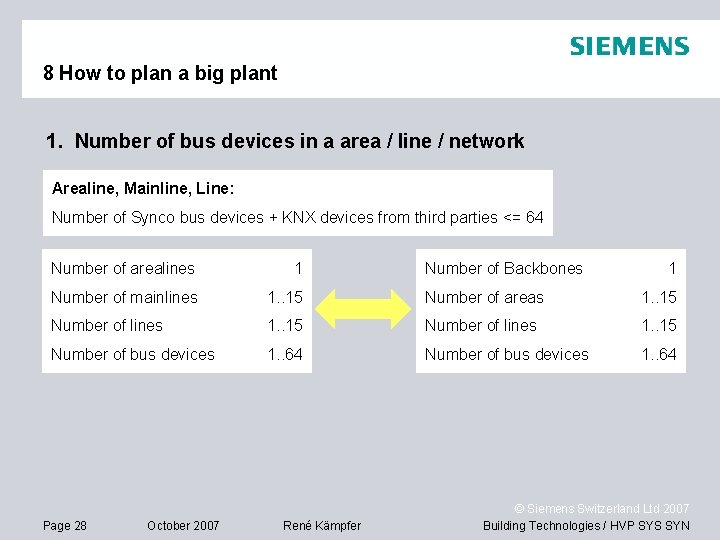
8 How to plan a big plant 1. Number of bus devices in a area / line / network Arealine, Mainline, Line: Number of Synco bus devices + KNX devices from third parties <= 64 Number of arealines 1 Number of mainlines 1. . 15 Number of areas 1. . 15 Number of lines 1. . 15 Number of bus devices 1. . 64 Page 28 October 2007 René Kämpfer Number of Backbones 1 © Siemens Switzerland Ltd 2007 Building Technologies / HVP SYS SYN
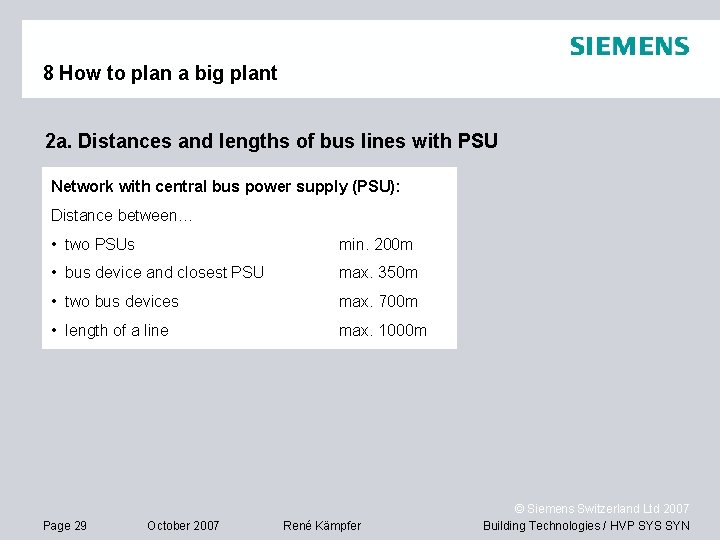
8 How to plan a big plant 2 a. Distances and lengths of bus lines with PSU Network with central bus power supply (PSU): Distance between… • two PSUs min. 200 m • bus device and closest PSU max. 350 m • two bus devices max. 700 m • length of a line max. 1000 m Page 29 October 2007 René Kämpfer © Siemens Switzerland Ltd 2007 Building Technologies / HVP SYS SYN
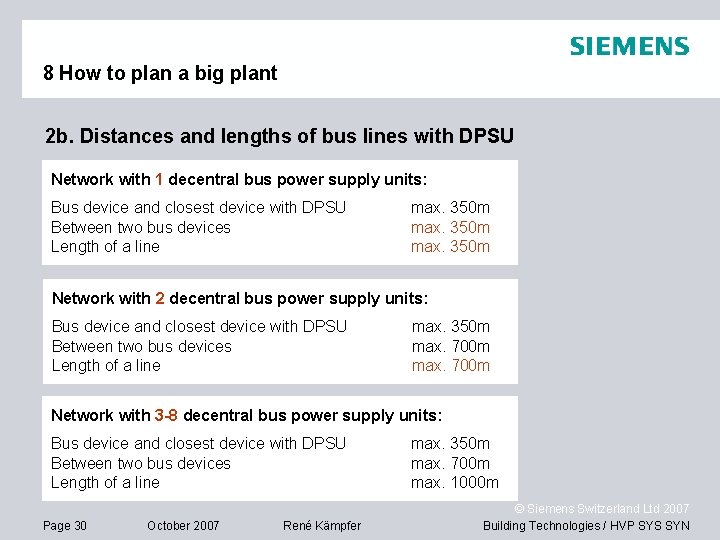
8 How to plan a big plant 2 b. Distances and lengths of bus lines with DPSU Network with 1 decentral bus power supply units: Bus device and closest device with DPSU Between two bus devices Length of a line max. 350 m Network with 2 decentral bus power supply units: Bus device and closest device with DPSU Between two bus devices Length of a line max. 350 m max. 700 m Network with 3 -8 decentral bus power supply units: Bus device and closest device with DPSU Between two bus devices Length of a line Page 30 October 2007 René Kämpfer max. 350 m max. 700 m max. 1000 m © Siemens Switzerland Ltd 2007 Building Technologies / HVP SYS SYN
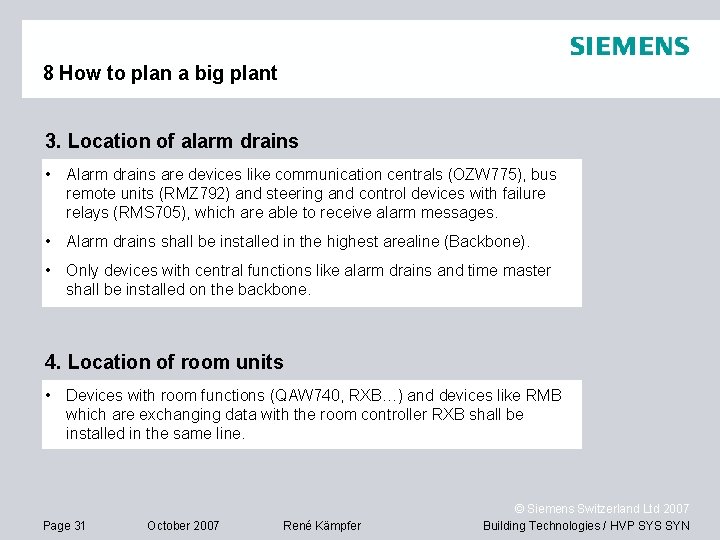
8 How to plan a big plant 3. Location of alarm drains • Alarm drains are devices like communication centrals (OZW 775), bus remote units (RMZ 792) and steering and control devices with failure relays (RMS 705), which are able to receive alarm messages. • Alarm drains shall be installed in the highest arealine (Backbone). • Only devices with central functions like alarm drains and time master shall be installed on the backbone. 4. Location of room units • Devices with room functions (QAW 740, RXB…) and devices like RMB which are exchanging data with the room controller RXB shall be installed in the same line. Page 31 October 2007 René Kämpfer © Siemens Switzerland Ltd 2007 Building Technologies / HVP SYS SYN
9 Commissioning General points to check: 1. Bus devices and field devices are installed 2. Wiring has been checked 3. Power supply available at all devices 4. Bus power supply available in all lines Check the communication: 1. Bus power supply available 2. Device addresses defined between 1… 253 (254 only for OCI 700. 1) 3. Devices are not in the commissioning mode 4. Time and Date are up to date 5. Zones are defined and the devices are able to communicate using the same zone addresses Page 32 October 2007 René Kämpfer © Siemens Switzerland Ltd 2007 Building Technologies / HVP SYS SYN
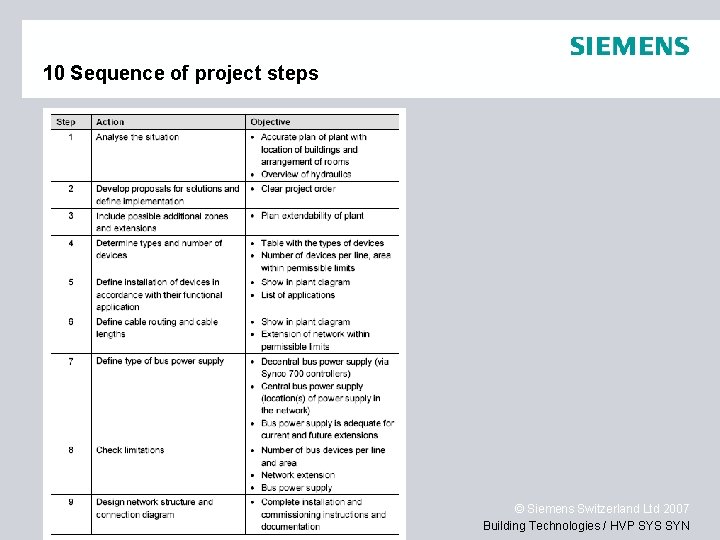
10 Sequence of project steps Page 33 October 2007 René Kämpfer © Siemens Switzerland Ltd 2007 Building Technologies / HVP SYS SYN
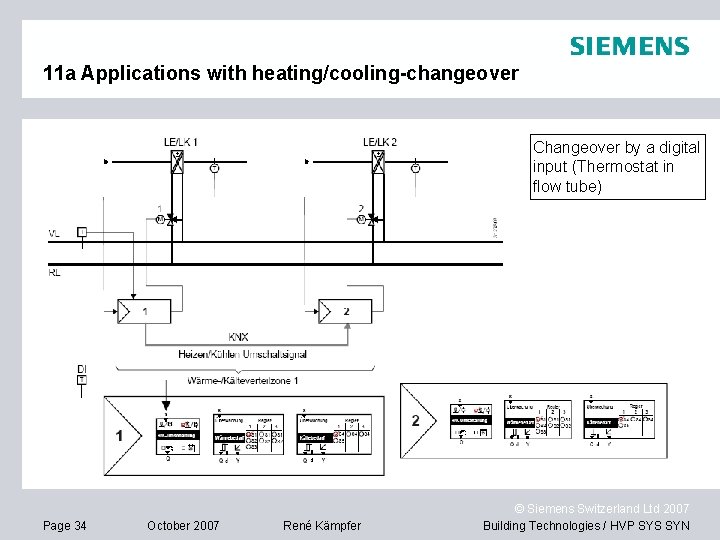
11 a Applications with heating/cooling-changeover Changeover by a digital input (Thermostat in flow tube) Page 34 October 2007 René Kämpfer © Siemens Switzerland Ltd 2007 Building Technologies / HVP SYS SYN
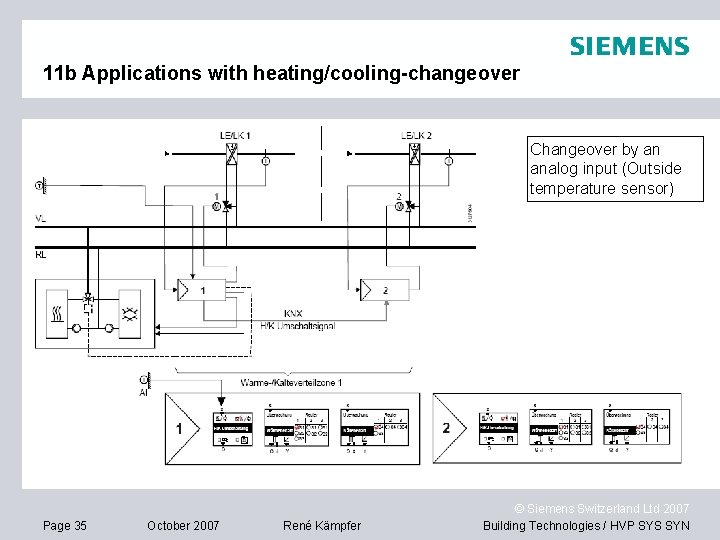
11 b Applications with heating/cooling-changeover Changeover by an analog input (Outside temperature sensor) Page 35 October 2007 René Kämpfer © Siemens Switzerland Ltd 2007 Building Technologies / HVP SYS SYN
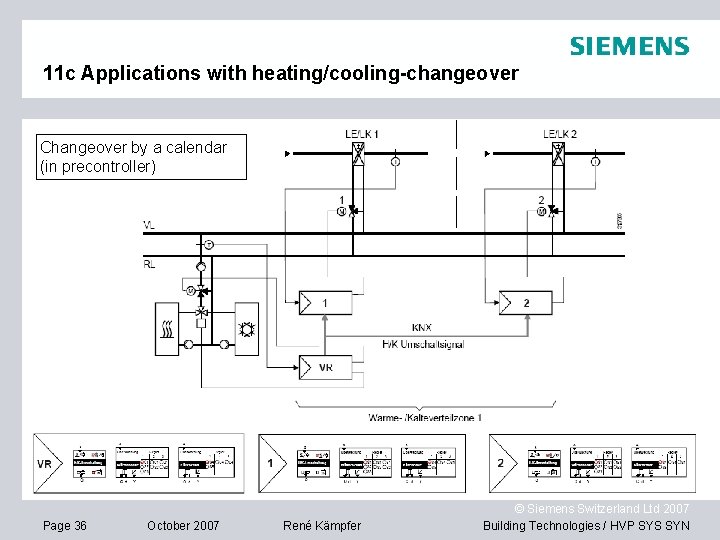
11 c Applications with heating/cooling-changeover Changeover by a calendar (in precontroller) Page 36 October 2007 René Kämpfer © Siemens Switzerland Ltd 2007 Building Technologies / HVP SYS SYN
- Slides: 36