
Big Data Approaches And On Demand App Generation
Big Data Approaches And On Demand App Generation Ian Crosland - PM Data Management
Big Data Landscape Beyond the Hype Unclear Strategy & Direction Big & Wide Data Scientist Bottleneck Skills Gap Rapidly Evolving Technology Landscape Data Warehouse Augmentation

The Big Data User Deep drilling Depth of Coverage Data Scientists Mostly drilling, some exploration Data Experts Mostly exploration, some drilling Data Explorers Breadth of Coverage
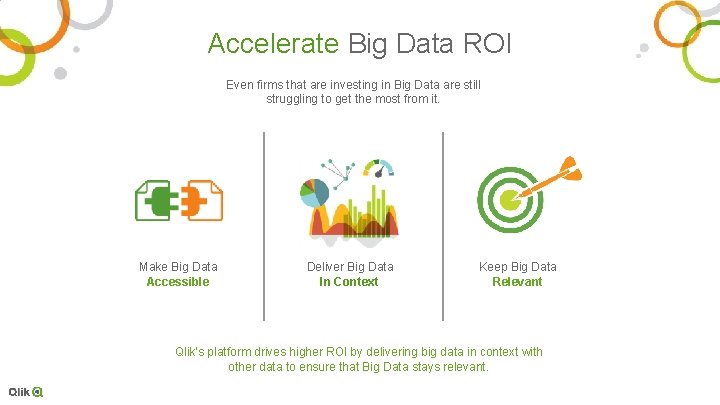
Accelerate Big Data ROI Even firms that are investing in Big Data are still struggling to get the most from it. Make Big Data Accessible Deliver Big Data In Context Keep Big Data Relevant Qlik’s platform drives higher ROI by delivering big data in context with other data to ensure that Big Data stays relevant.
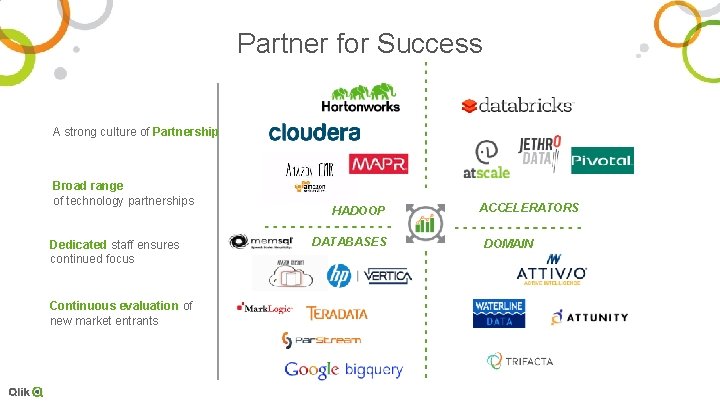
Partner for Success A strong culture of Partnership Broad range of technology partnerships Dedicated staff ensures continued focus HADOOP DATABASES ACCELERATORS DOMAIN Continuous evaluation of new market entrants And more…
Hadoop
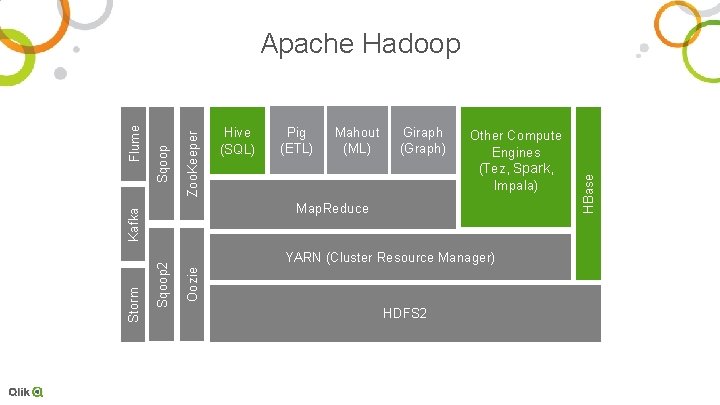
Pig (ETL) Mahout (ML) Giraph (Graph) Other Compute Engines (Tez, Spark, Impala) Oozie YARN (Cluster Resource Manager) HDFS 2 HBase Zoo. Keeper Sqoop 2 Storm Hive (SQL) Map. Reduce Kafka Flume Apache Hadoop
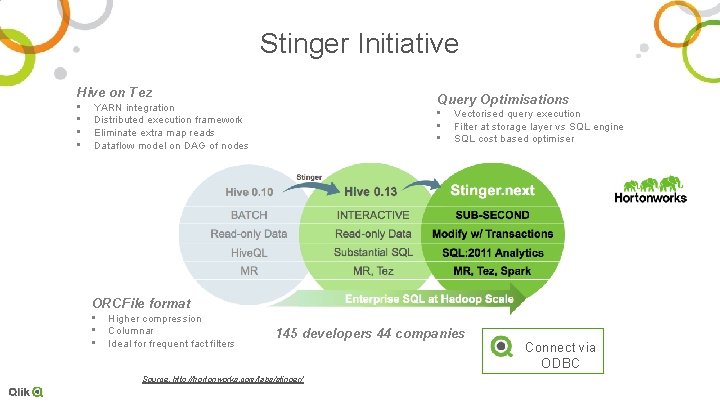
Stinger Initiative Hive on Tez • • Query Optimisations YARN integration Distributed execution framework Eliminate extra map reads Dataflow model on DAG of nodes • • • Vectorised query execution Filter at storage layer vs SQL engine SQL cost based optimiser ORCFile format • • • Higher compression Columnar Ideal for frequent fact filters 145 developers 44 companies Source: http: //hortonworks. com/labs/stinger/ Connect via ODBC
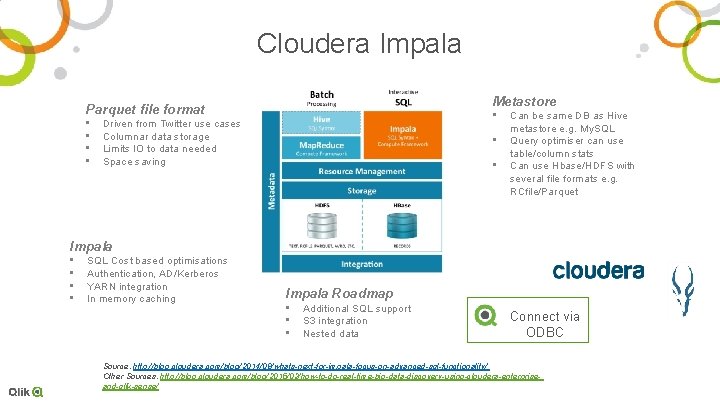
Cloudera Impala Metastore Parquet file format • • • Driven from Twitter use cases Columnar data storage Limits IO to data needed Space saving • • Can be same DB as Hive metastore e. g. My. SQL Query optimiser can use table/column stats Can use Hbase/HDFS with several file formats e. g. RCfile/Parquet Impala • • SQL Cost based optimisations Authentication, AD/Kerberos YARN integration In memory caching Impala Roadmap • • • Additional SQL support S 3 integration Nested data Connect via ODBC Source: http: //blog. cloudera. com/blog/2014/08/whats-next-for-impala-focus-on-advanced-sql-functionality/ Other Sources: http: //blog. cloudera. com/blog/2015/02/how-to-do-real-time-big-data-discovery-using-cloudera-enterpriseand-qlik-sense/
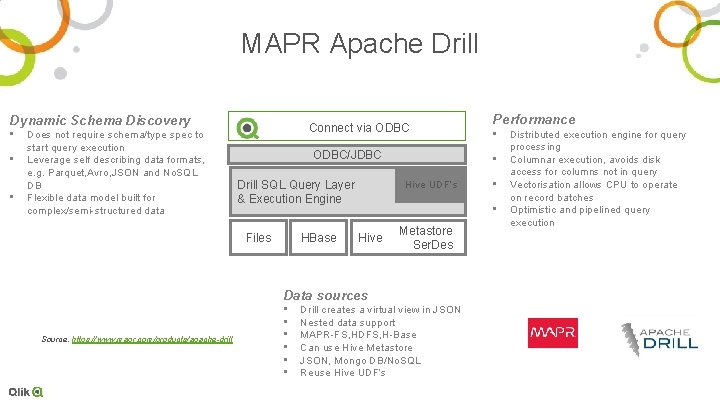
MAPR Apache Drill Dynamic Schema Discovery • • • Does not require schema/type spec to start query execution Leverage self describing data formats, e. g. Parquet, Avro, JSON and No. SQL DB Flexible data model built for complex/semi-structured data Connect via ODBC/JDBC Drill SQL Query Layer & Execution Engine Files HBase Source: https: //www. mapr. com/products/apache-drill • • Hive UDF’s • • Hive Metastore Ser. Des Data sources • • • Performance Drill creates a virtual view in JSON Nested data support MAPR-FS, HDFS, H-Base Can use Hive Metastore JSON, Mongo DB/No. SQL Reuse Hive UDF’s Distributed execution engine for query processing Columnar execution, avoids disk access for columns not in query Vectorisation allows CPU to operate on record batches Optimistic and pipelined query execution
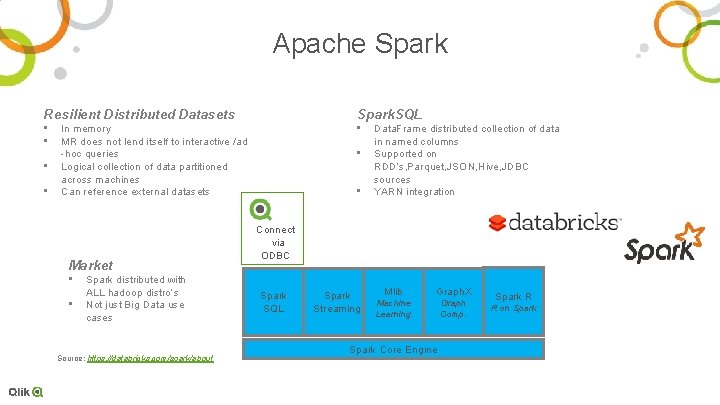
Apache Spark Resilient Distributed Datasets Spark. SQL • • • In memory MR does not lend itself to interactive /ad -hoc queries Logical collection of data partitioned across machines Can reference external datasets Market • • Spark distributed with ALL hadoop distro’s Not just Big Data use cases Source: https: //databricks. com/spark/about • • Data. Frame distributed collection of data in named columns Supported on RDD’s, Parquet, JSON, Hive, JDBC sources YARN integration Connect via ODBC Spark SQL Spark Streaming Mlib Graph. X Machine Learning Graph Comp. Spark Core Engine Spark R R on Spark
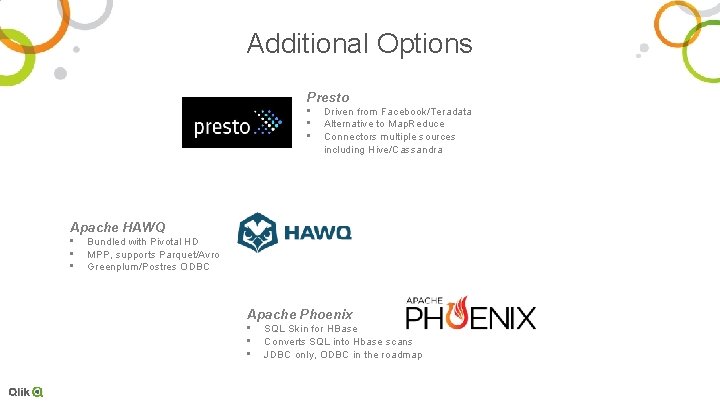
Additional Options Presto • • • Driven from Facebook/Teradata Alternative to Map. Reduce Connectors multiple sources including Hive/Cassandra Apache HAWQ • • • Bundled with Pivotal HD MPP, supports Parquet/Avro Greenplum/Postres ODBC Apache Phoenix • • • SQL Skin for HBase Converts SQL into Hbase scans JDBC only, ODBC in the roadmap

Deeper Dive
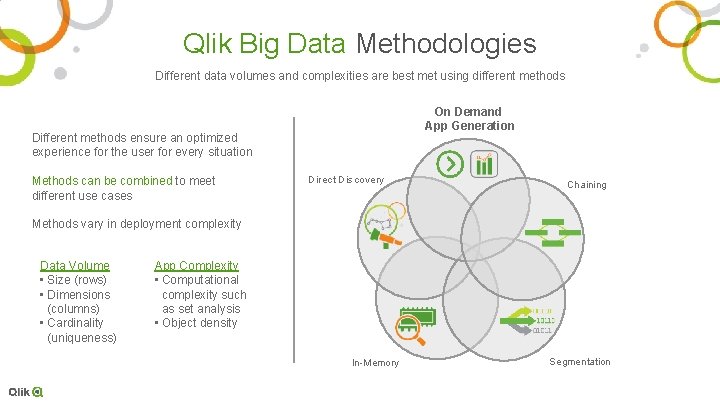
Qlik Big Data Methodologies Different data volumes and complexities are best met using different methods On Demand App Generation Different methods ensure an optimized experience for the user for every situation Methods can be combined to meet different use cases Direct Discovery Chaining Methods vary in deployment complexity Data Volume • Size (rows) • Dimensions (columns) • Cardinality (uniqueness) App Complexity • Computational complexity such as set analysis • Object density In-Memory Segmentation
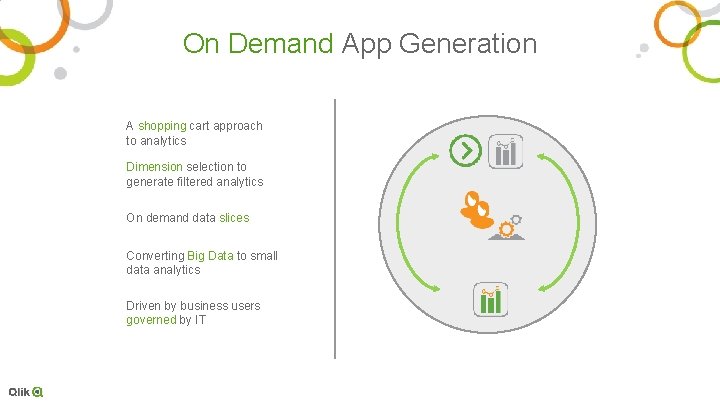
On Demand App Generation A shopping cart approach to analytics Dimension selection to generate filtered analytics On demand data slices Converting Big Data to small data analytics Driven by business users governed by IT
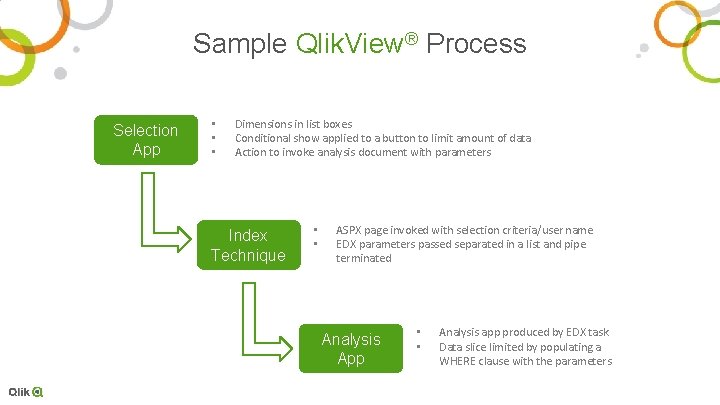
Sample Qlik. View® Process Selection App • • • Dimensions in list boxes Conditional show applied to a button to limit amount of data Action to invoke analysis document with parameters Index Technique • • ASPX page invoked with selection criteria/user name EDX parameters passed separated in a list and pipe terminated Analysis App • • Analysis app produced by EDX task Data slice limited by populating a WHERE clause with the parameters
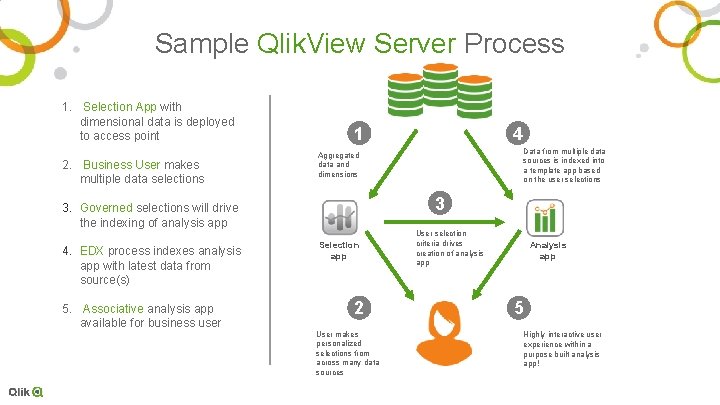
Sample Qlik. View Server Process 1. Selection App with dimensional data is deployed to access point 2. Business User makes multiple data selections 1 5. Associative analysis app available for business user Data from multiple data sources is indexed into a template app based on the user selections Aggregated data and dimensions 3 3. Governed selections will drive the indexing of analysis app 4. EDX process indexes analysis app with latest data from source(s) 4 Selection app 2 User makes personalized selections from across many data sources User selection criteria drives creation of analysis app Analysis app 5 Highly interactive user experience within a purpose built analysis app!
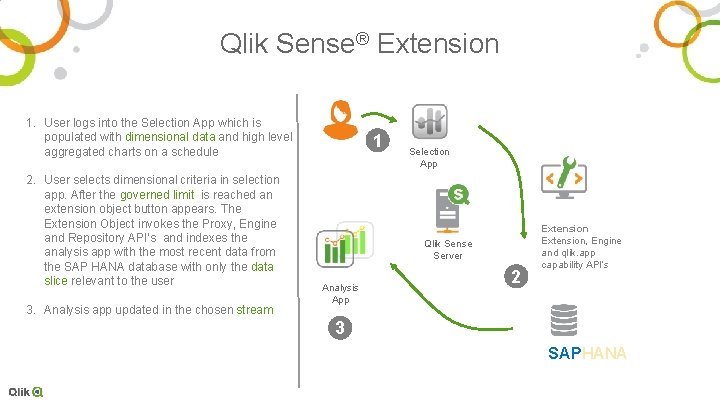
Qlik Sense® Extension 1. User logs into the Selection App which is populated with dimensional data and high level aggregated charts on a schedule 2. User selects dimensional criteria in selection app. After the governed limit is reached an extension object button appears. The Extension Object invokes the Proxy, Engine and Repository API’s and indexes the analysis app with the most recent data from the SAP HANA database with only the data slice relevant to the user 3. Analysis app updated in the chosen stream 1 Selection App Qlik Sense Server Analysis App 2 Extension, Engine and qlik. app capability API’s 3 SAPHANA
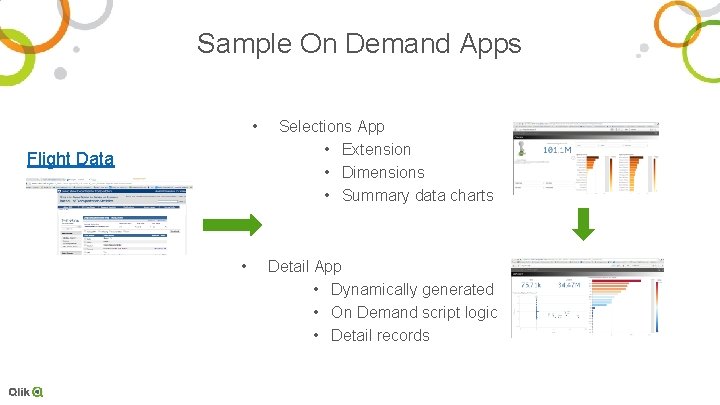
Sample On Demand Apps • Flight Data • Selections App • Extension • Dimensions • Summary data charts Detail App • Dynamically generated • On Demand script logic • Detail records
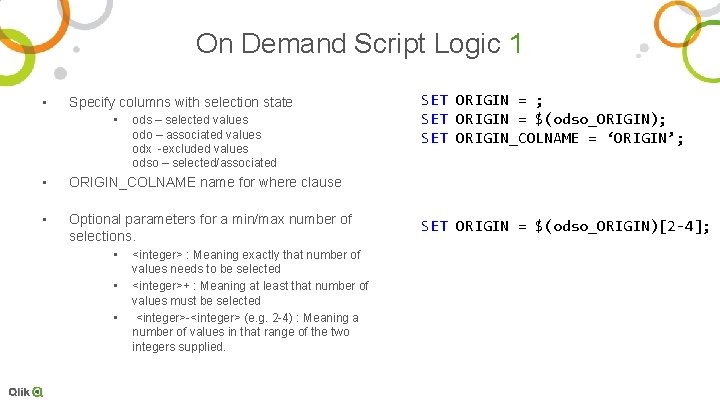
On Demand Script Logic 1 • Specify columns with selection state • ods – selected values odo – associated values odx -excluded values odso – selected/associated • ORIGIN_COLNAME name for where clause • Optional parameters for a min/max number of selections. • • • <integer> : Meaning exactly that number of values needs to be selected <integer>+ : Meaning at least that number of values must be selected <integer>-<integer> (e. g. 2 -4) : Meaning a number of values in that range of the two integers supplied. SET ORIGIN = ; SET ORIGIN = $(odso_ORIGIN); SET ORIGIN_COLNAME = ‘ORIGIN’; SET ORIGIN = $(odso_ORIGIN)[2 -4];
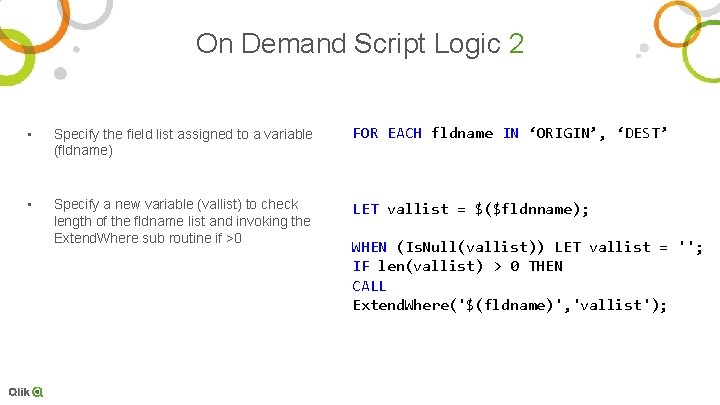
On Demand Script Logic 2 • Specify the field list assigned to a variable (fldname) FOR EACH fldname IN ‘ORIGIN’, ‘DEST’ • Specify a new variable (vallist) to check length of the fldname list and invoking the Extend. Where sub routine if >0 LET vallist = $($fldnname); WHEN (Is. Null(vallist)) LET vallist = ''; IF len(vallist) > 0 THEN CALL Extend. Where('$(fldname)', 'vallist');
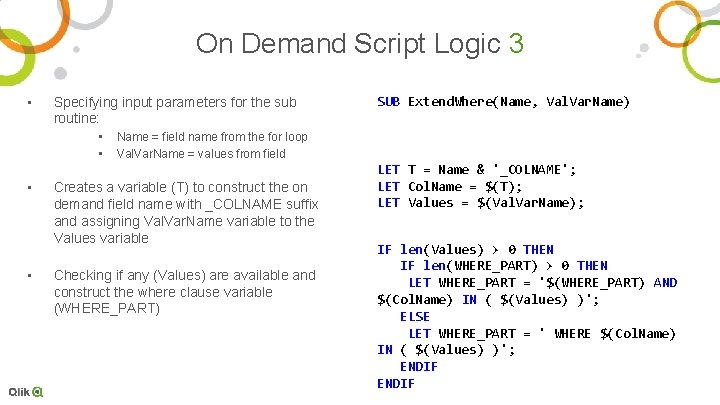
On Demand Script Logic 3 • Specifying input parameters for the sub routine: • • SUB Extend. Where(Name, Val. Var. Name) Name = field name from the for loop Val. Var. Name = values from field Creates a variable (T) to construct the on demand field name with _COLNAME suffix and assigning Val. Var. Name variable to the Values variable Checking if any (Values) are available and construct the where clause variable (WHERE_PART) LET T = Name & '_COLNAME'; LET Col. Name = $(T); LET Values = $(Val. Var. Name); IF len(Values) > 0 THEN IF len(WHERE_PART) > 0 THEN LET WHERE_PART = '$(WHERE_PART) AND $(Col. Name) IN ( $(Values) )'; ELSE LET WHERE_PART = ' WHERE $(Col. Name) IN ( $(Values) )'; ENDIF
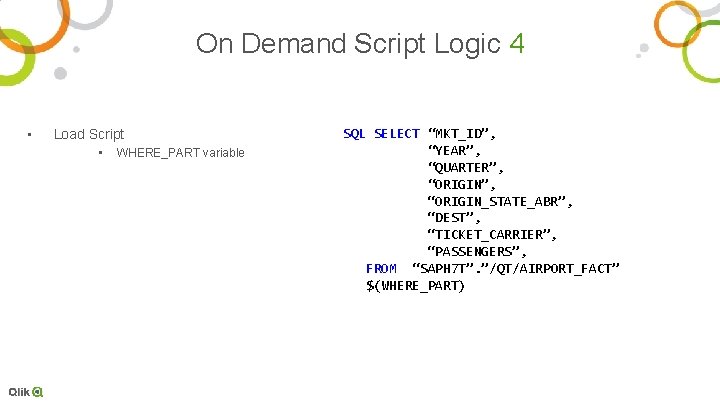
On Demand Script Logic 4 • Load Script • WHERE_PART variable SQL SELECT “MKT_ID”, “YEAR”, “QUARTER”, “ORIGIN_STATE_ABR”, “DEST”, “TICKET_CARRIER”, “PASSENGERS”, FROM “SAPH 7 T”. ”/QT/AIRPORT_FACT” $(WHERE_PART)
Customer Use Cases
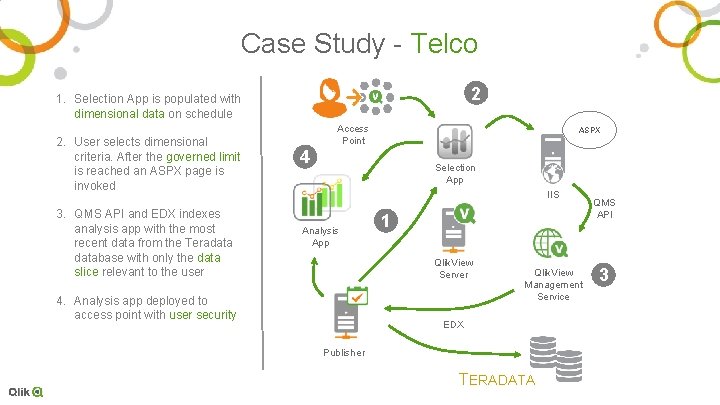
Case Study - Telco 2 1. Selection App is populated with dimensional data on schedule 2. User selects dimensional criteria. After the governed limit is reached an ASPX page is invoked 3. QMS API and EDX indexes analysis app with the most recent data from the Teradatabase with only the data slice relevant to the user Access Point ASPX 4 Selection App IIS Analysis App 1 Qlik. View Server 4. Analysis app deployed to access point with user security Qlik. View Management Service EDX Publisher TERADATA QMS API 3
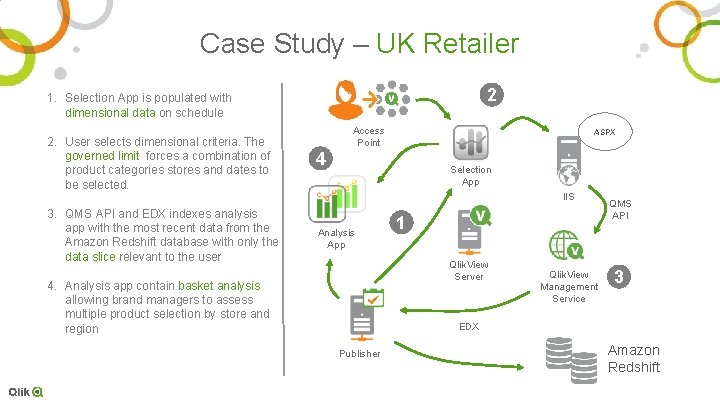
Case Study – UK Retailer 2 1. Selection App is populated with dimensional data on schedule 2. User selects dimensional criteria. The governed limit forces a combination of product categories stores and dates to be selected. 3. QMS API and EDX indexes analysis app with the most recent data from the Amazon Redshift database with only the data slice relevant to the user Access Point ASPX 4 Selection App IIS Analysis App 1 Qlik. View Server 4. Analysis app contain basket analysis allowing brand managers to assess multiple product selection by store and region Qlik. View Management Service QMS API 3 EDX Publisher Amazon Redshift
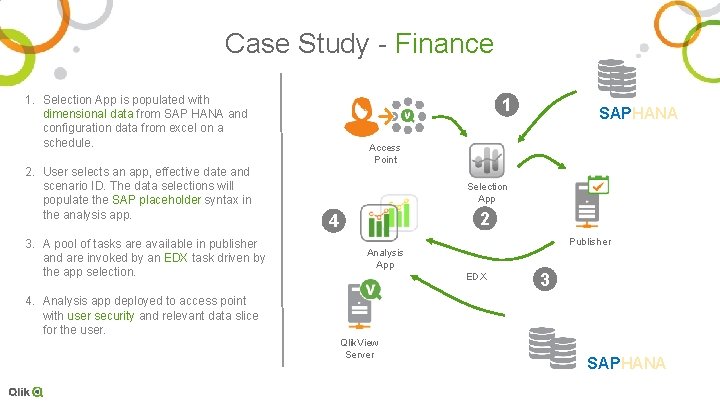
Case Study - Finance 1. Selection App is populated with dimensional data from SAP HANA and configuration data from excel on a schedule. 2. User selects an app, effective date and scenario ID. The data selections will populate the SAP placeholder syntax in the analysis app. 3. A pool of tasks are available in publisher and are invoked by an EDX task driven by the app selection. 1 SAPHANA Access Point Selection App 2 4 Publisher Analysis App EDX 3 4. Analysis app deployed to access point with user security and relevant data slice for the user. Qlik. View Server SAPHANA

Thank You
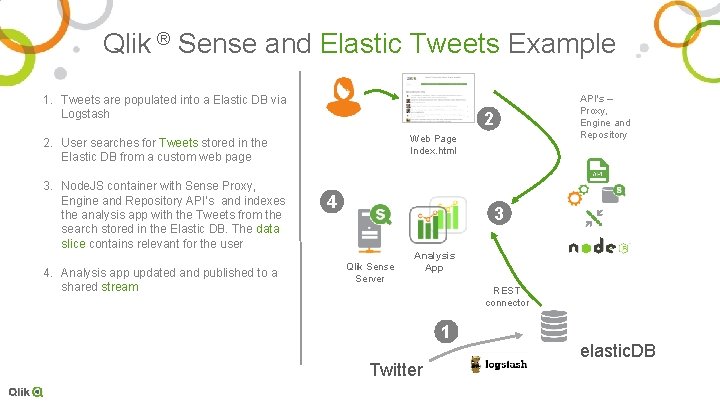
Qlik ® Sense and Elastic Tweets Example 1. Tweets are populated into a Elastic DB via Logstash 2 Web Page Index. html 2. User searches for Tweets stored in the Elastic DB from a custom web page 3. Node. JS container with Sense Proxy, Engine and Repository API’s and indexes the analysis app with the Tweets from the search stored in the Elastic DB. The data slice contains relevant for the user 4. Analysis app updated and published to a shared stream API’s – Proxy, Engine and Repository 4 3 Qlik Sense Server Analysis App REST connector 1 Twitter elastic. DB
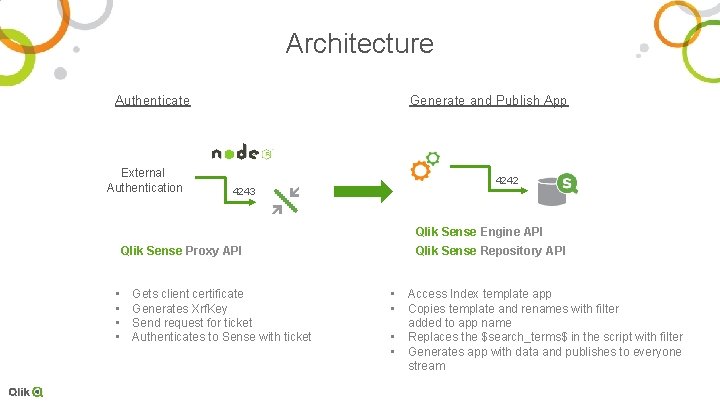
Architecture Authenticate External Authentication Generate and Publish App 4242 4243 Qlik Sense Engine API Qlik Sense Proxy API • • Gets client certificate Generates Xrf. Key Send request for ticket Authenticates to Sense with ticket Qlik Sense Repository API • • Access Index template app Copies template and renames with filter added to app name Replaces the $search_terms$ in the script with filter Generates app with data and publishes to everyone stream
- Slides: 30