
BGP 102 Scaling the Network Avi Freedman Server
BGP 102: Scaling the Network Avi Freedman Server. Central
Introduction • BGP is relatively easy to get configured and basically announcing and using routes. • It is difficult to scale to the tens-to-hundreds of routers scale with full i. BGP mesh, ASPath filters, and AS-Path padding as the only tools. • We present Communities, Confederations, and local-pref use, and some other features, and show them used in context.
Topics (1) • Review basic BGP concepts • Simple BGP Scaling concepts – Inserting BGP Routes – Stable Routing and Scaling w/ Loopbacks – Save CPU and Typing w/ Peer-Groups – Route Refresh, Soft-Reconfig – TTL Hack/Security
Topics (2) • • • Scalable Advertisements with Communities Scalable Route-Selection with local-prefs Load Balancing with BGP i. BGP Scaling Issues BGP Confederations BGP Scaling with Confederations + Route Reflectors
Topics (3) • Supporting Multi-Homed Customers • Backup Transit • • Sample Network - Topology Sample Network - Design Goals Sample Network - Implementation Review Router Configuration

BGP Concept Review
BGP Intro • BGP 4 is the protocol used on the Internet to exchange routing information between providers, and to propagate external routing information through networks. • Each autonomous network is called an Autonomous System. • ASs which inject routing information on their own behalf have ASNs.
BGP Peering • BGP-speaking routers peer with each other over TCP sessions, and exchange routes through the peering sessions. • Providers typically try to peer at multiple places. Either by peering with the same AS multiple times, or because some ASs are multi-homed, a typical network will have many candidate paths to a given prefix.
The BGP Route • The BGP route is, conceptually, a “promise” to carry data to a section of IP space. The route is a “bag” of attributes. • The section of IP space is called the “prefix” attribute of the route. • As a BGP route travels from AS to AS, the ASN of each AS is stamped on it when it leaves that AS. Called the AS_PATH attribute, or “as-path” in Cisco-speak.
BGP Route Attributes • In addition to the prefix, the as-path, and the next-hop, the BGP route has other attributes, affectionately known as “knobs and twiddles” – weight, rarely used - “sledgehammer” – local-pref, sometimes used - “hammer” – origin code, rarely used – MED (“metric”) - a gentle nudge
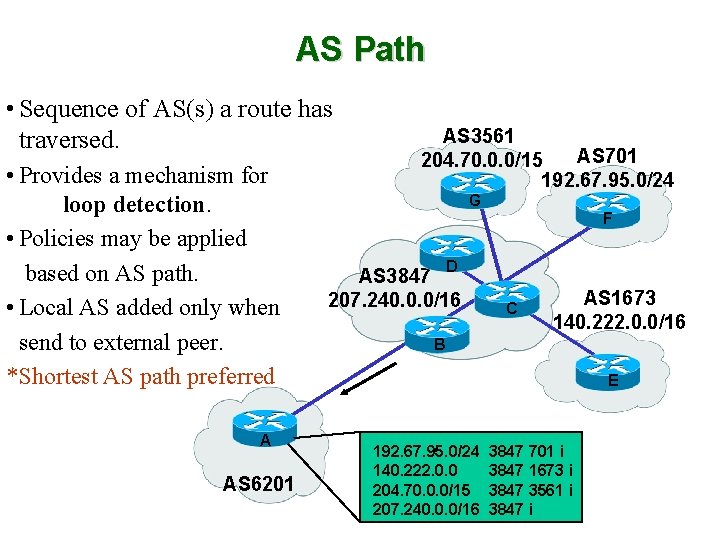
AS Path • Sequence of AS(s) a route has traversed. • Provides a mechanism for loop detection. • Policies may be applied based on AS path. • Local AS added only when send to external peer. * Shortest AS path preferred A AS 6201 AS 3561 AS 701 204. 70. 0. 0/15 192. 67. 95. 0/24 G F D AS 3847 207. 240. 0. 0/16 C AS 1673 140. 222. 0. 0/16 B E 192. 67. 95. 0/24 140. 222. 0. 0 204. 70. 0. 0/15 207. 240. 0. 0/16 3847 701 i 3847 1673 i 3847 3561 i 3847 i
4 Byte ASNs • 4 Byte ASNs are coming but… • There isn’t yet universal support. • Format will be 16 bit (or 1. 100 for 65636) • Still, now you have to ask in some regions for 2 byte ASNs and soon it may become harder to get 2 byte ASNs.
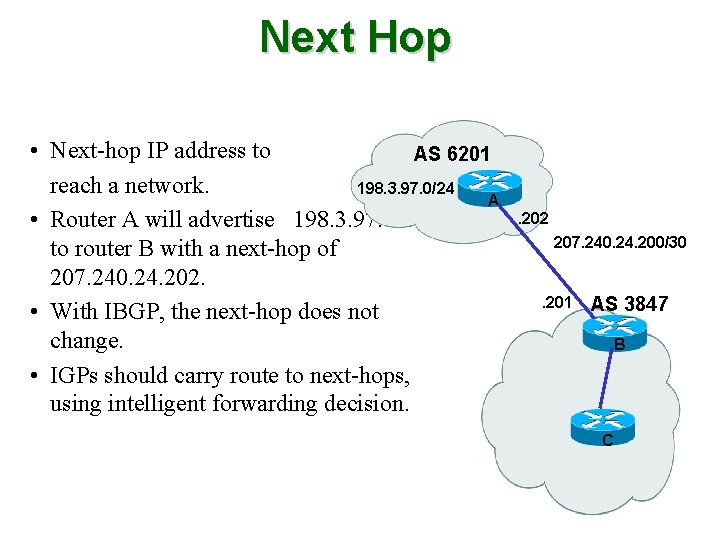
Next Hop • Next-hop IP address to AS 6201 reach a network. 198. 3. 97. 0/24 A • Router A will advertise 198. 3. 97. 0/24 to router B with a next-hop of 207. 240. 24. 202. • With IBGP, the next-hop does not change. • IGPs should carry route to next-hops, using intelligent forwarding decision. . 202 207. 240. 24. 200/30 . 201 AS 3847 B C
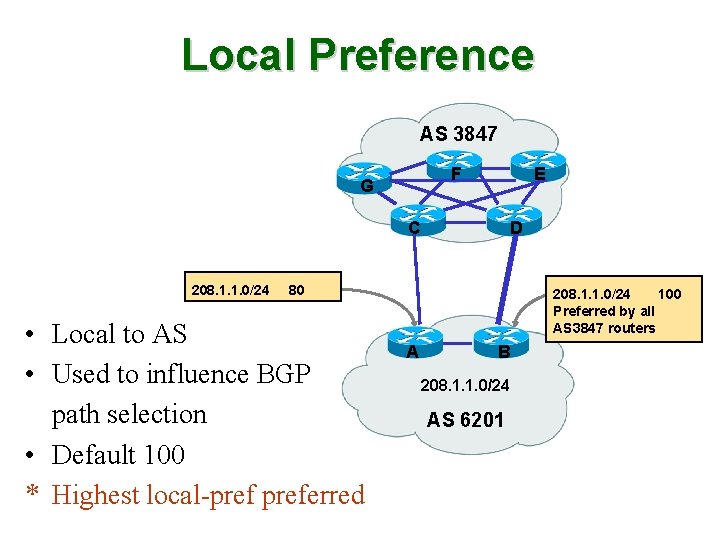
Local Preference AS 3847 F G E C 208. 1. 1. 0/24 D 80 • Local to AS • Used to influence BGP path selection • Default 100 * Highest local-preferred 208. 1. 1. 0/24 100 Preferred by all AS 3847 routers A B 208. 1. 1. 0/24 AS 6201
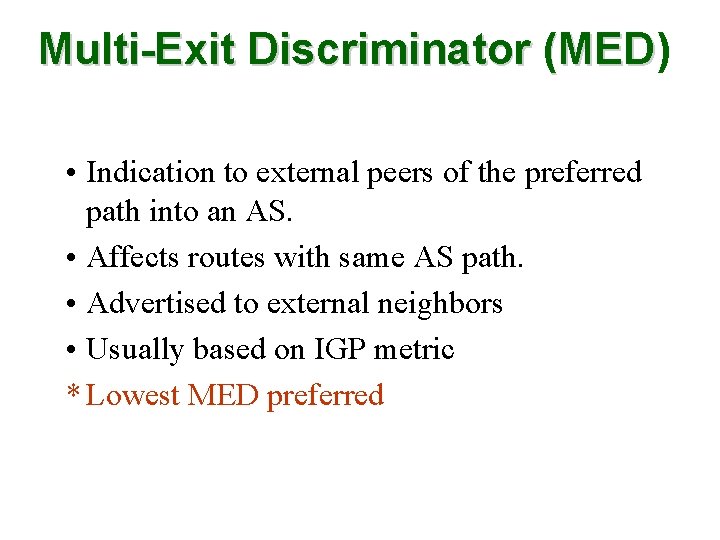
Multi-Exit Discriminator (MED) (MED • Indication to external peers of the preferred path into an AS. • Affects routes with same AS path. • Advertised to external neighbors • Usually based on IGP metric * Lowest MED preferred
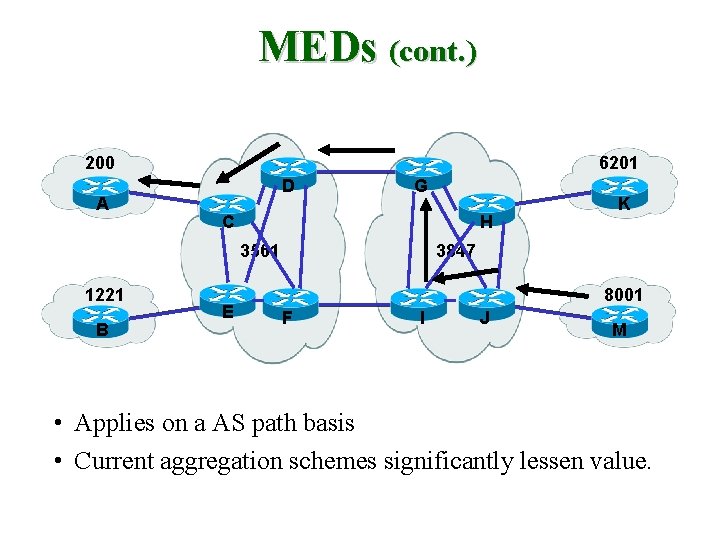
MEDs (cont. ) 200 A 6201 D G C H 3561 1221 B E K 3847 8001 F I J M • Applies on a AS path basis • Current aggregation schemes significantly lessen value.
Origin • IGP (i) –Network statement under router BGP • EGP (e) –Redistributed from EGP • Incomplete (? ) –Redistributed from IGP
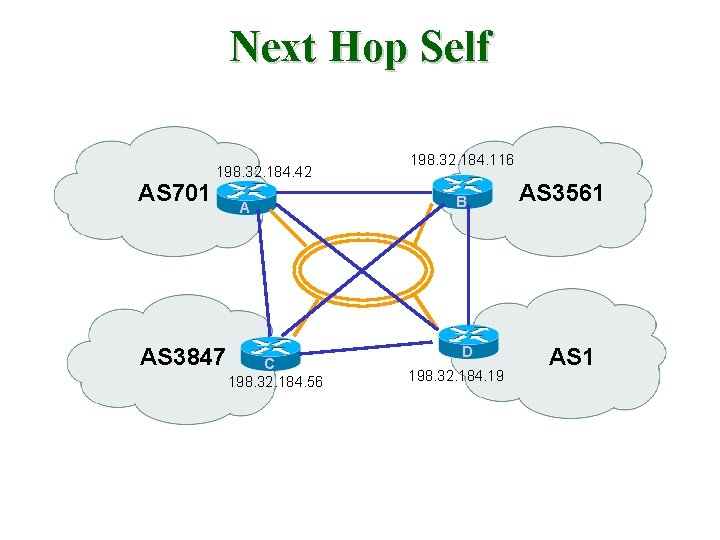
Next Hop Self AS 701 198. 32. 184. 42 AS 3847 A C 198. 32. 184. 56 198. 32. 184. 116 B D 198. 32. 184. 19 AS 3561 AS 1
BGP Policy • BGP was designed to allow ASs to express a routing policy. This is done by filtering certain routes, based on prefix, as-path, or other attributes - or by adjusting some of the attributes to influence the best-route selection process.
BGP Best-Route Selection • With all of the paths that a router may accumulate to a given prefix, how does the BGP router choose which is the “best” path? • Through an RFC-specified (mostly) route selection algorithm. • BUT each vendor can and does differ subtly! • Watch out for weights (can cause routing loops) and be aware that local-prefs override what remote providers are trying to tell you with as-path padding.
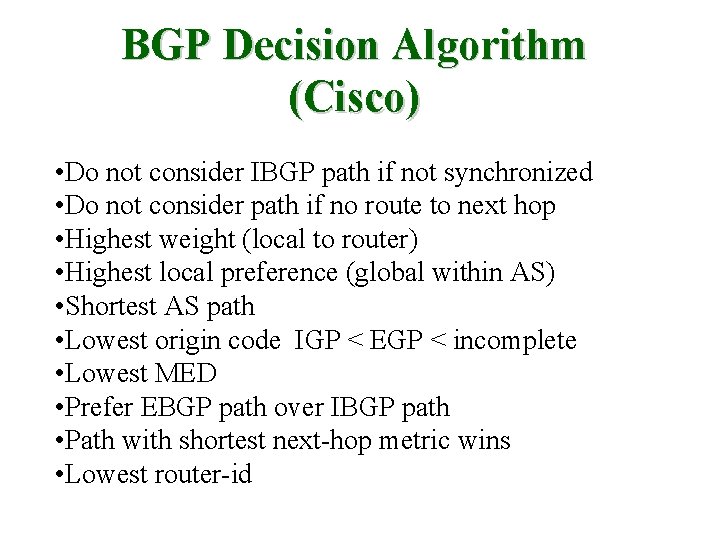
BGP Decision Algorithm (Cisco) • Do not consider IBGP path if not synchronized • Do not consider path if no route to next hop • Highest weight (local to router) • Highest local preference (global within AS) • Shortest AS path • Lowest origin code IGP < EGP < incomplete • Lowest MED • Prefer EBGP path over IBGP path • Path with shortest next-hop metric wins • Lowest router-id
Routing Decision Process • Important note for those using Cisco in particular – Ciscos choose which route makes it into the IP routing table by using “administative distances”. • So for a given route you may have a connected, a static, an OSPF, a BGP version, etc, all competing to make it into the IP routing table then the FIB • But – by default, the e. BGP administrative distance may be better than your IGP distance. This could be bad, especially if you don’t properly filter your internal routes from getting in from e. BGP peers. • ‘distance bgp 200 200’ • May want to set the 2 nd # (i. BGP) < IGP metric
Communities • Used to group destinations to which routing decisions can be applied. • Each destination can belong to multiple communities. • Usually applied with route-maps.
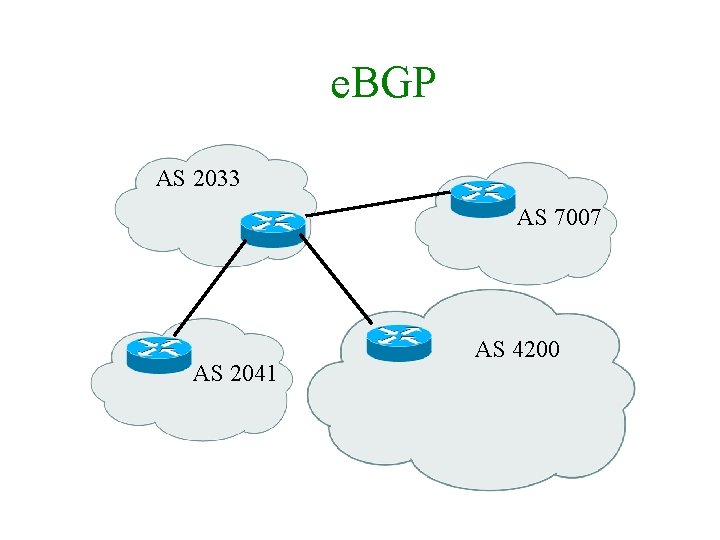
e. BGP AS 2033 AS 7007 AS 2041 AS 4200
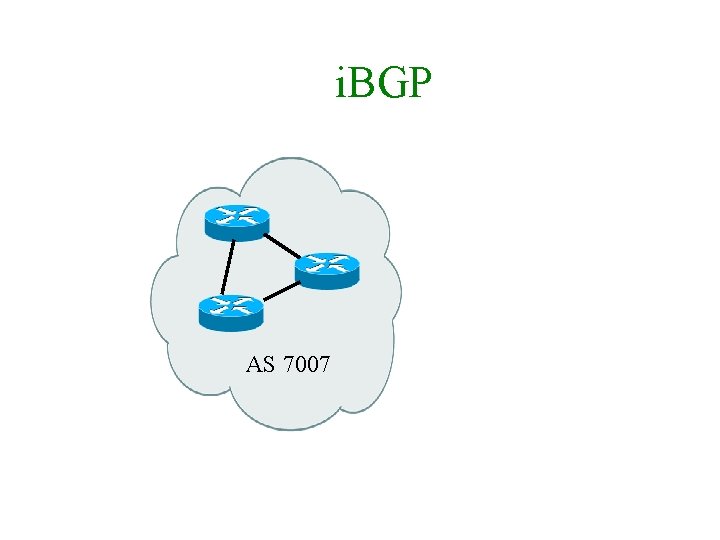
i. BGP AS 7007
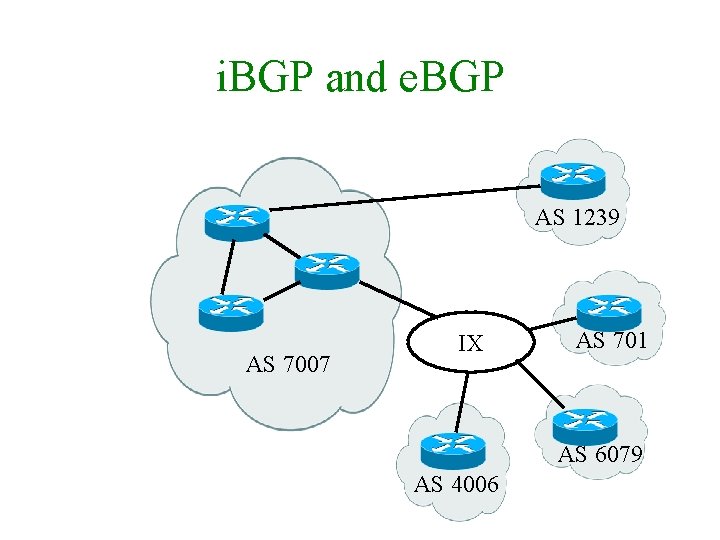
i. BGP and e. BGP AS 1239 AS 7007 IX AS 701 AS 6079 AS 4006
Determining Policy • What do you want to do? • The tricky part. • Configuring is easier…
Typical Starting Point • Use network statements to inject. • Use AS-Path lists to control advertisement. • Use AS-Path padding to prefer or de-prefer externally-heard paths. • Have full i. BGP mesh.
Inserting Routes into BGP
Route Insertion Methods • Static Insertion/network statement - most common – Sometimes thought of as “non-scalable” • Aggregation/aggregate-address statement – difficult to punch holes • redistributing through filters (usually with aggregate-address statements) – difficult to punch holes – dangerous as filters are altered
Using Static Insertion • Best to use static insertion of routes (network statements on Cisco). Don’t worry about not being fancy. Stick the network statement on the router the customer is on, or on multiple routers for LAN-attach customers. • Easy to support customers who want to advertise more specifics with BGP. • Also easy to apply per-route-maps.
Stable Routing and Scaling with Loopbacks
Stable BGP - Loobacks (1) • Watch out for flapping routes. • Sites think that if a site shows instability, it is worth blackholing for some time (30 -90 minutes) until it stabilizes, though fewer networks have been using dampening in recent years. • But, dampening hurts and flapping hurts also. • So, nail non-multi-homed routes to loopback.
Stable BGP - Loopbacks (2) • Also - peering between loopbacks enhances stability, since loopbacks don’t go down. • Also, good for load-balancing (balaned statics used underlying one peering session caused load-balancing for BGP-heard routes). • Set up lo 0, then • “neigh x. y. z. q update-source looback 0”
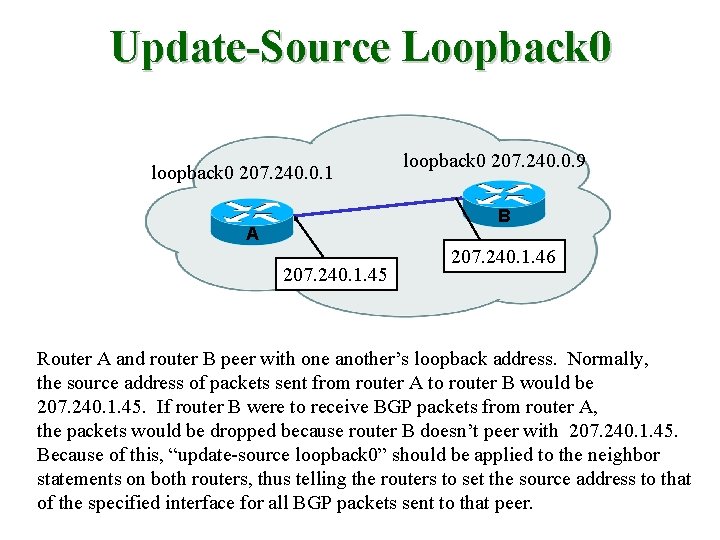
Update-Source Loopback 0 loopback 0 207. 240. 0. 1 loopback 0 207. 240. 0. 9 B A 207. 240. 1. 45 207. 240. 1. 46 Router A and router B peer with one another’s loopback address. Normally, the source address of packets sent from router A to router B would be 207. 240. 1. 45. If router B were to receive BGP packets from router A, the packets would be dropped because router B doesn’t peer with 207. 240. 1. 45. Because of this, “update-source loopback 0” should be applied to the neighbor statements on both routers, thus telling the routers to set the source address to that of the specified interface for all BGP packets sent to that peer.
Scaling with Loopbacks • Only have to remember loopback IP of each router. • Easy to make sure you’ve “got” all routers for i. BGP mesh. • You know you have a configured loopback interface, with in-addr, to nail routes to. • Good for logging and tac authentication eliminates multiple serials showing up. • Also, i. BGP peer between loopbacks – for stability and if you filter those IPs externally, security as well.
BGP Stability – Route Refresh • If both you and your neighbors support Route Refresh (Dynamic Reconfig) capability, this is better than soft-reconfig since it uses no extra memory. (RFC 2918) • It’s just a soft request to resend routes so you can re-apply your filters. • Route Refresh should come up beween peers without negotiation on modern IOS/Jun. OS. Check with ‘sho ip bgp neigh foo’ • If not use soft-reconfig.
BGP Stability - soft-reconfig • Instead of hammering a session to cause reevaluation (“clear ip bgp” drops the TCP session), “clear ip bgp soft” can be used. • “clear ip bgp x. y. z. q soft out” is low cpu; it issues withdrawls for all currentlyadvertised routes and recomputes and resends roues. • Enabling soft inbound so you can do “clear ip bgp x. y. z. q soft in” can cause memory issues, as it needs to keep copy of all routes received.
BGP Security • BGP passwords (really on TCP) are possible but deprecated in practice. • Use the BGP “TTL Hack” (RFC 5082). • You set your router to expect TTL 254 and your neighbor sets their router to TTL 255. • www. nanog. org/mtg-0302/hack. html
Max Prefix Filtering • In terms of routing, the limitations in a router are RAM and CPU, not interface speed. • # of prefixes heard from peers affects both, but in particular we’re concerned with blocking accidental reannouncement and protecting our RAM. • Enable max-prefix filtering per external peer. You can set warning thresholds (you need to syslog to be helpful), and can set various actions if triggered.
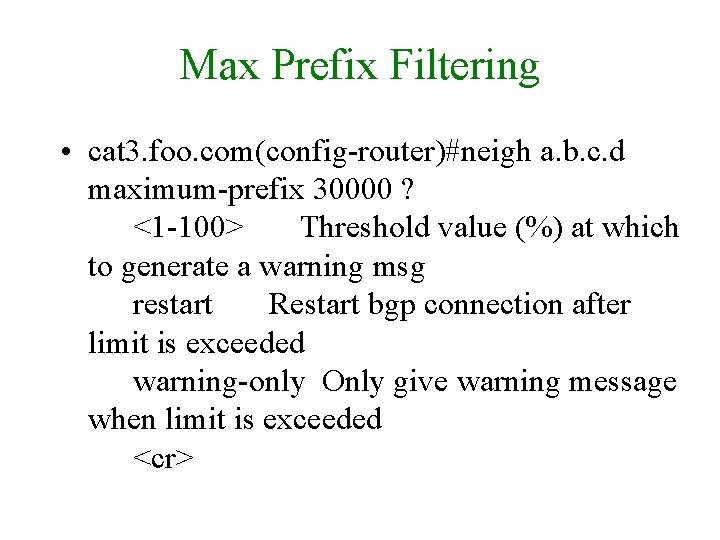
Max Prefix Filtering • cat 3. foo. com(config-router)#neigh a. b. c. d maximum-prefix 30000 ? <1 -100> Threshold value (%) at which to generate a warning msg restart Restart bgp connection after limit is exceeded warning-only Only give warning message when limit is exceeded <cr>
Logging • In general you want to enable logging via syslog but for BGP you in particular want to know about session resets + reasons, and maxprefix warnings. • Use ‘bgp log-neighbor-changes’ in the bgp clause. Then ‘logging facility daemon’, ‘logging source-interface <intname>’, ‘logging <loghost>’, maybe ‘logging rate-limit N’
Save CPU and Typing with peer-groups
Peer Groups (1) • Peer-groups were not designed to save typing, actually. • By grouping neighbors with common policy together, routers can save lots of CPU by creating once a route object and then advertising that object to multiple peers. • Also, saves typing : )
Peer Groups (2) • Major restriction - next-hop is part of the object (one of the attributes), so a given peer -group can/should only be applied for peers on a common interface. • So, useful for e. BGP peers but sometimes not for i. BGP peers. • Still, can express different inbound policy per peer.
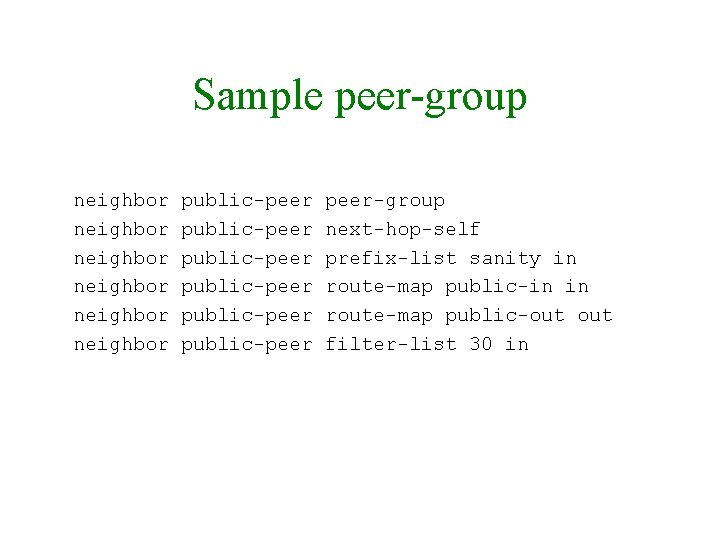
Sample peer-group neighbor neighbor public-peer public-peer-group next-hop-self prefix-list sanity in route-map public-in in route-map public-out filter-list 30 in

Scalable Advertisements with Communities
AS-Path Filtering • You can either announce routes by prefix or by as-path filtering. Updating a distributed prefix table is more difficult; as-path filtering (allowing routes from you or from customer ASs to be advertised), combined with aggressive inbound prefix-based filtering, is a good first approach. • But. . .
Limitation of AS-filtering • Either have to list all peers, or all customers. Gets really tricky when you peer with customers, or customers of peers, or peers of customers. • These lists get difficult to read and distribute as you grow. • So… Look at Communities to express policy.
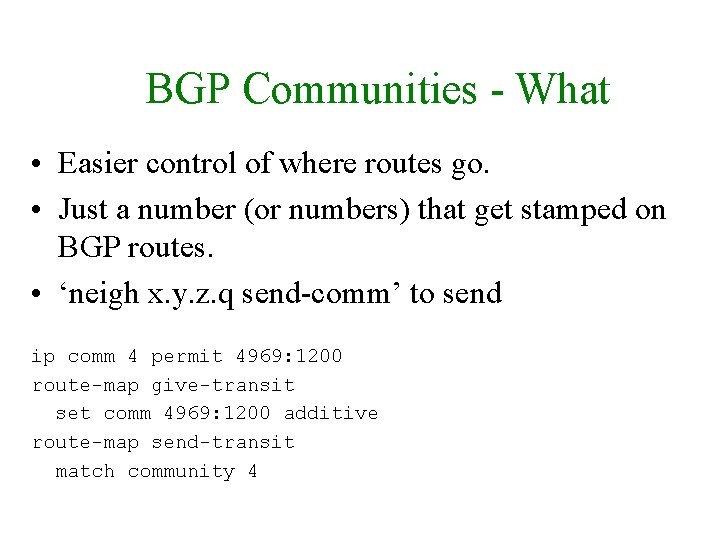
BGP Communities - What • Easier control of where routes go. • Just a number (or numbers) that get stamped on BGP routes. • ‘neigh x. y. z. q send-comm’ to send ip comm 4 permit 4969: 1200 route-map give-transit set comm 4969: 1200 additive route-map send-transit match community 4
BGP Communities - Why • Give customers control of how you announce them • Let customers see where you get routes • Peering community; transit community; partial-transit community. • Example – Philly-area ISP uses community 401 to transit some PHL-area providers to each other; 401 is the address of a PHL pop. These #s don’t really matter in particular, however.
BGP Communities • Well-known communities – no-export - don’t advertise to e. BGP peers – no-advertise - don’t advertise to any peer • Very Important – – If you use communities, remember to enable sending communities internally on all i. BGP sessions. Check how your software sends by default to external and internal peers.
Sample Communities • • 4969: 12392 means “pad 2 times to Sprint” 49690: 7010 means “don’t announce to uunet” 4969: 2 means “pad me twice to *” Some providers will make communities flexibly; some won’t. Ask for their doc before buying! • http: //www. nlayer. net/bgp_communities • For a larger-scale network use a wildcardbased community system instead of manually creating route-maps per peer.
Scaling with Local-Prefs
AS-Path Padding • A 1 st-cut approach to load-balancing or quality-balancing might be to de-prefer any routes heard via a provider you’re seeing problems with. How? • First approach is to add an extra copy of the next-hop AS to the AS-Path, so ^7007$ becomes ^7007$. Longer AS-Paths are less preferred, all else being equal. • You can implement complex policy with this, in fact.
Limitations of AS-padding • A typical first way to select between multiple outbound paths is by padding the less-preferred paths as they come into your network. • This works reasonably well, unless you have to redistribute these paths to others. • Local-prefs make implementing this easier, though there is a caveat.
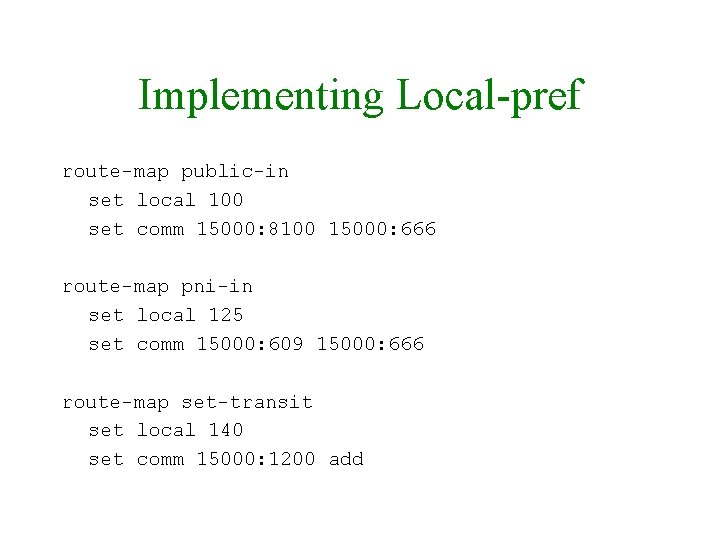
Local-Prefs • The local-pref is a “powerful” BGP attribute - it comes before as-path length in the selection algorithm. • Setting can override as-path length consider the provider with a Gige and a 10 Gig who WANTS you to pay attention to the 7 -times-padded path… • Come up with a unified scheme. • CUSTOMER ROUTES ARE SACRED.
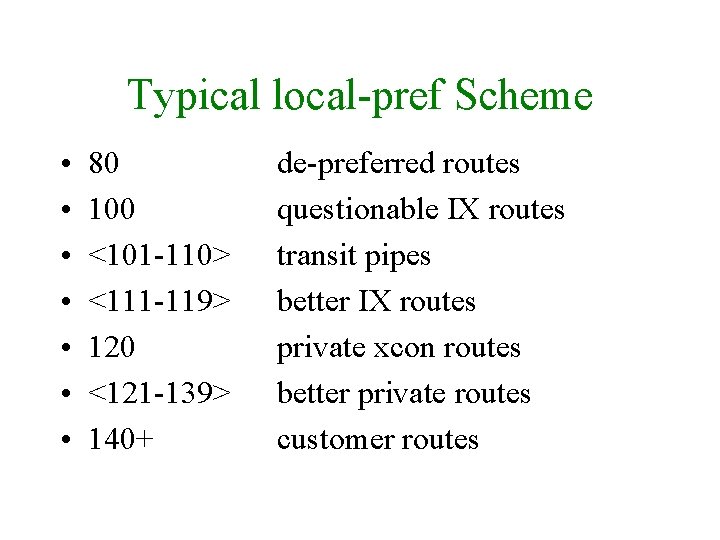
Typical local-pref Scheme • • 80 100 <101 -110> <111 -119> 120 <121 -139> 140+ de-preferred routes questionable IX routes transit pipes better IX routes private xcon routes better private routes customer routes
Implementing Local-pref route-map public-in set local 100 set comm 15000: 8100 15000: 666 route-map pni-in set local 125 set comm 15000: 609 15000: 666 route-map set-transit set local 140 set comm 15000: 1200 add
BGP Load Balancing
BGP Load Balancing: Outbound • Outbound is easiest. • Everyone controls their outbound completely. • But as a corrolary, noone controls their inbound completely. • General method for outbound is to either use communities or just start preffing based on AS.
BGP Load Balancing: Outbound • First question: AS-Path pad or local-pref? • AS padding is tricky if you have downstream customers but it does honor the ‘pref’ remote networks are showing you by padding on some paths but not others. • local-pref is a bigger hammer but generally more used.
BGP Load Balancing: Outbound • Second question: What to change? • Simplest: Start with some big networks and pref/depref them on one pipe. 701, 1239, 3561, 3356, … • Apply changes soft in • Or – use your providers’ communities to pref/depref routes from various sources
BGP Load Balancing: Inbound • Only sure way to pref inbound is to deaggregate – advertise a /24 on one pipe and a /23 that covers on both • But you can ‘suggest’ with as-path padding a prefix on one or more pipes.
Scaling i. BGP with Confederations
i. BGP vs. e. BGP Review • i. BGP and e. BGP are the same protocol; just different rules. • Rules are counter-intuitive – e. BGP advertises everything to everyone by default. Not the correct policy, most likely. – i. BGP does NOT advertise “ 3 rd-party routes” to other i. BGP peers. Why? • No way to do loop detection with i. BGP, so this solves it.
i. BGP Scaling Issues • So you have to have ALL BGP-speaking routers in your as peer with each other. Really. • With 10 routers, an i. BGP mesh is OK • With 30 routes it is stretched • With 100 it is taxed • Eventually, CPU to deal with multiple sessions is nasty.
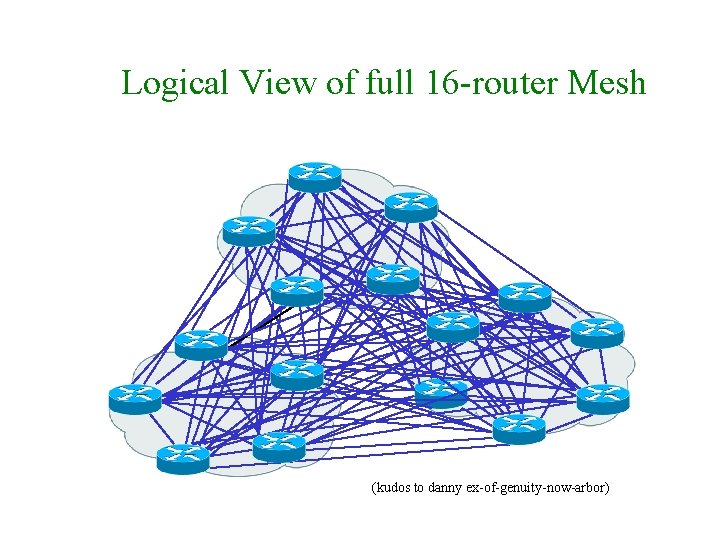
Logical View of full 16 -router Mesh (kudos to danny ex-of-genuity-now-arbor)
Two Approaches • There are two approaches to allow the i. BGP redistribution restriction to be broken: – Confederations – Route Reflectors • We present confederations more heavily here, which you may want to consider for a smaller multi-pop network. Also gives you traffic engineering flexibility without MPLS. • Route Reflectors are more commonly used now.
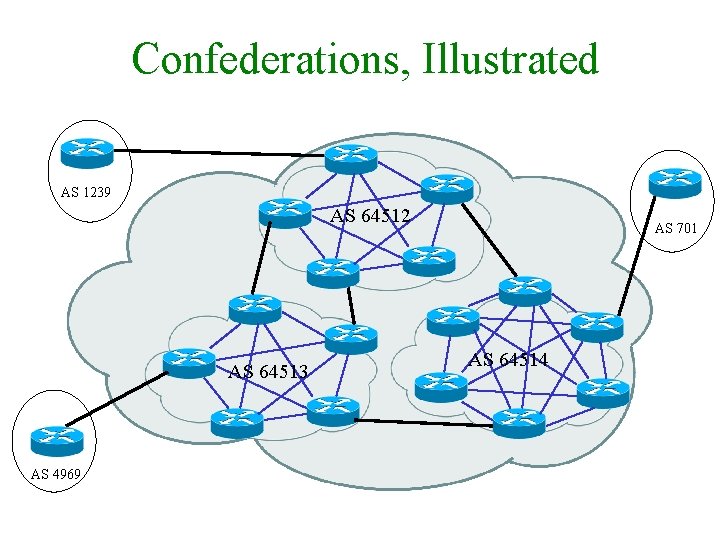
Confederations (1) • Makes i. BGP more promiscuous • How? – Fully-mesh all BGP speakers at a POP – Use fake ASNs at each POP – Between POPs, use e. BGP rules (send everything) – Within POPs, use i. BGP rules – Preserve local_prefs between POPs
Confederations, Illustrated AS 1239 AS 64512 AS 64513 AS 4969 AS 701 AS 64514
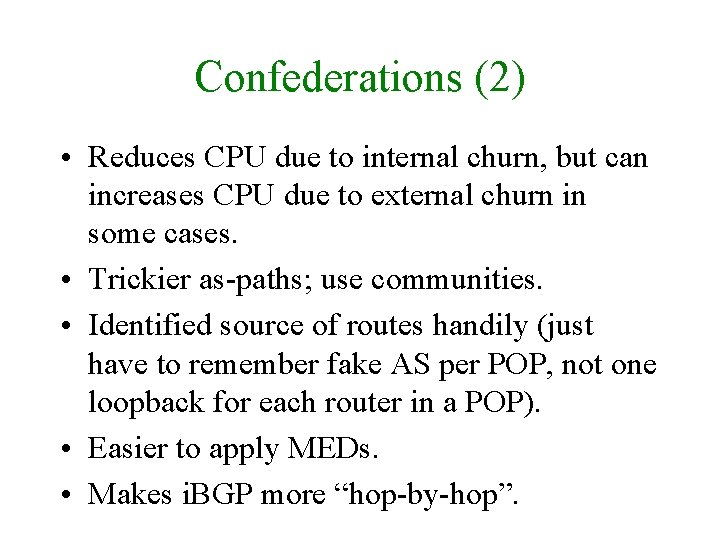
Confederations (2) • Reduces CPU due to internal churn, but can increases CPU due to external churn in some cases. • Trickier as-paths; use communities. • Identified source of routes handily (just have to remember fake AS per POP, not one loopback for each router in a POP). • Easier to apply MEDs. • Makes i. BGP more “hop-by-hop”.
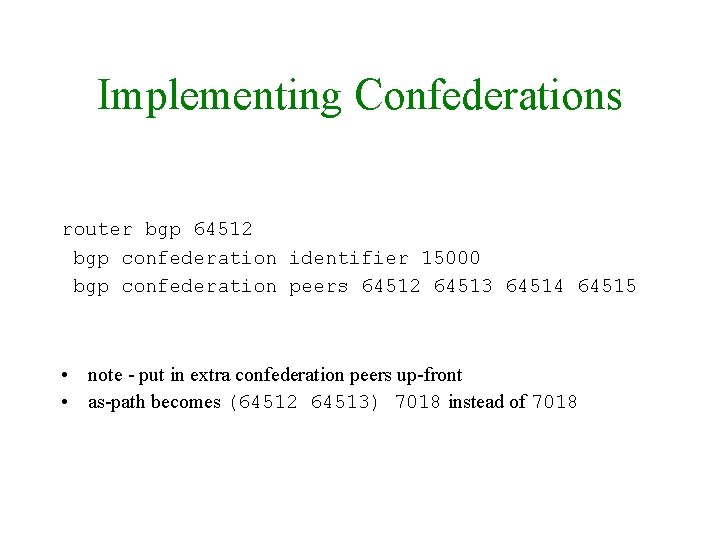
Implementing Confederations router bgp 64512 bgp confederation identifier 15000 bgp confederation peers 64512 64513 64514 64515 • note - put in extra confederation peers up-front • as-path becomes (64512 64513) 7018 instead of 7018
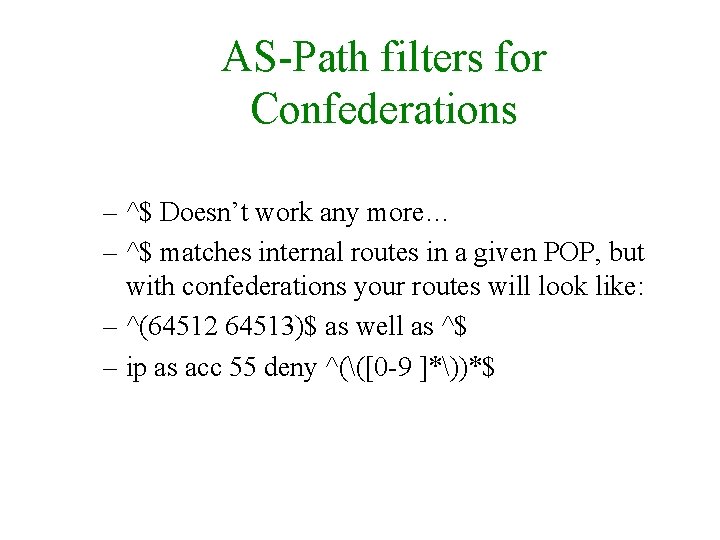
AS-Path filters for Confederations – ^$ Doesn’t work any more… – ^$ matches internal routes in a given POP, but with confederations your routes will look like: – ^(64512 64513)$ as well as ^$ – ip as acc 55 deny ^(([0 -9 ]*))*$
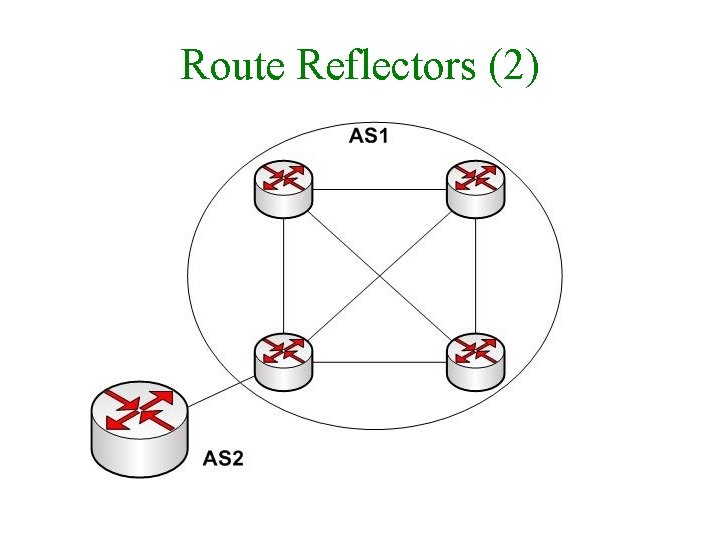
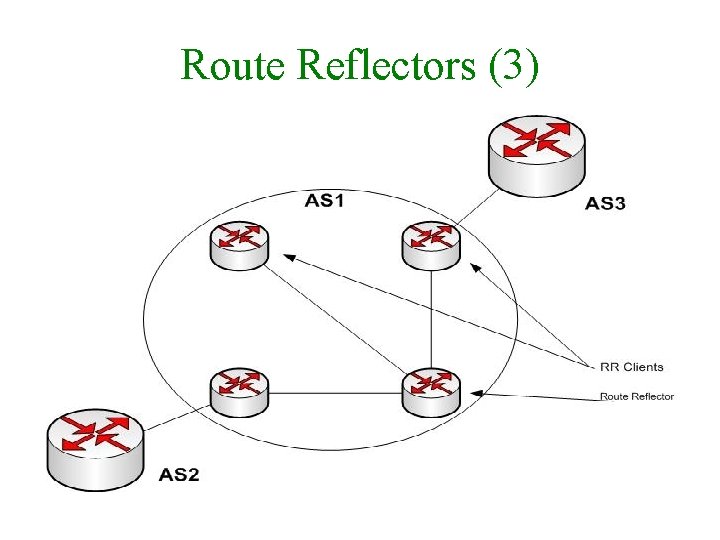
Route Reflectors (1) • One or two routers in a ‘cluster’ (often a POP) are allowed to break the rules for their ‘clients’ and ‘reflect’ routes heard from other i. BGP speakers. • i. BGP routes heard from non-clients are sent to clients but not to other non-clients. • i. BGP routes heard from clients are sent to e. BGP peers, client peers, and non-clients. • e. BGP works as normal. • RRs themselves are then fully meshed.
Route Reflectors (2)
Route Reflectors (3)
Route Reflectors (4) • On the route-reflector server, tag each client as ‘neigh X route-reflector-client’ • All route-reflector servers must peer with each other • (note: Enabling will reset sessions. ) • Two new attributes: – ORIGINATOR_ID, the Router ID of the originator. Updates never sent back to that router. – CLUSTER_LIST, a list of the CLUSTER_IDs the route has passed through. Loop detection here also.
Route Reflectors (5) • sho ip bgp <route> will identify ‘Originator: 10. 0. 1. 1, Cluster list: 10. 0. 1. 3’ and on a core mesh member: ‘<aspath>, (Received from a RR-client)’ • On the route-reflector you can also issue ‘show ip bgp update-group’ for more info. • Best path selection: Shortest cluster list len
Supporting Multi-Homed Customers
Supporting Multi-Homed Custs • What they need from you is routes to the ‘net, and some ability to be flexible in how you announce their routes. • Routes to the ‘net - give them your communities (“neighbor x. y. z. q sendcommunities”). Publish your communities so they know what they mean. WARN if you change community semantics.
Supporting Multi-Homed Custs • Be prepared to punch holes in your aggregates. – Using network statements, or filters, no problem. – Otherwise, be prepared to use suppress-maps if you use aggregate-address statements. • Set up communities they can use to control which pipes you advertise them to, and what their routes look like.
Backup Transit
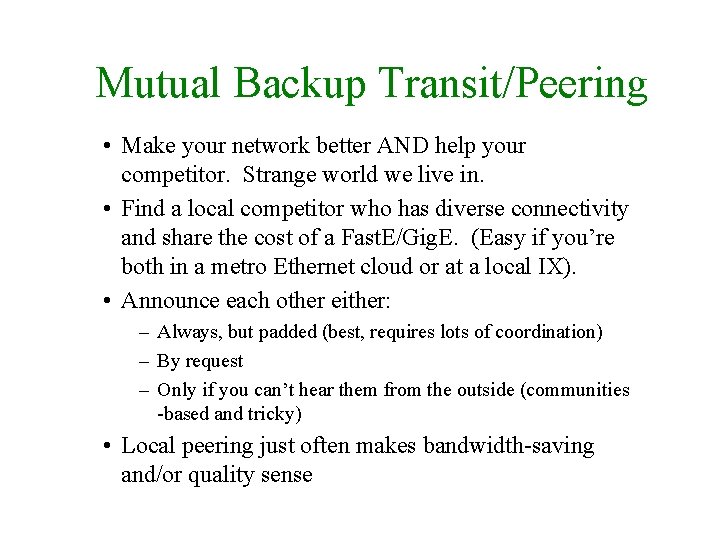
Mutual Backup Transit/Peering • Make your network better AND help your competitor. Strange world we live in. • Find a local competitor who has diverse connectivity and share the cost of a Fast. E/Gig. E. (Easy if you’re both in a metro Ethernet cloud or at a local IX). • Announce each other either: – Always, but padded (best, requires lots of coordination) – By request – Only if you can’t hear them from the outside (communities -based and tricky) • Local peering just often makes bandwidth-saving and/or quality sense
Router Configs
Review - Basic Router Configuration
“How do I log config changes? ” • Run tacacs+ on most gear and it’ll log all commands (including ‘conf term’ commands). • You might want to look into rancid and other router-config tools. • Once you start Mac. Guyver-ing things it’s hard to go back
![Cisco Regular Expressions. * + ? ^ $ _ [] - Period matches any](http://slidetodoc.com/presentation_image_h/f50cdf85018c0da6be54c0a348ce2767/image-88.jpg "Cisco Regular Expressions. * + ? ^ $ _ [] - Period matches any")
Cisco Regular Expressions. * + ? ^ $ _ [] - Period matches any single character, including white space. Asterisk matches 0 or more sequences of the pattern. Plus sign matches 1 or more sequences of the pattern. Question mark matches 0 or 1 occurrences of the pattern Caret matches the beginning of the input string. Dollar sign matches the end of the input string. Underscore matches a comma (, ), left brace ({), right brace (}), left parenthesis, right parenthesis, the beginning or end of the input string, or a space. Brackets designate a range of single character patterns. Hyphen separates the endpoints of a range.
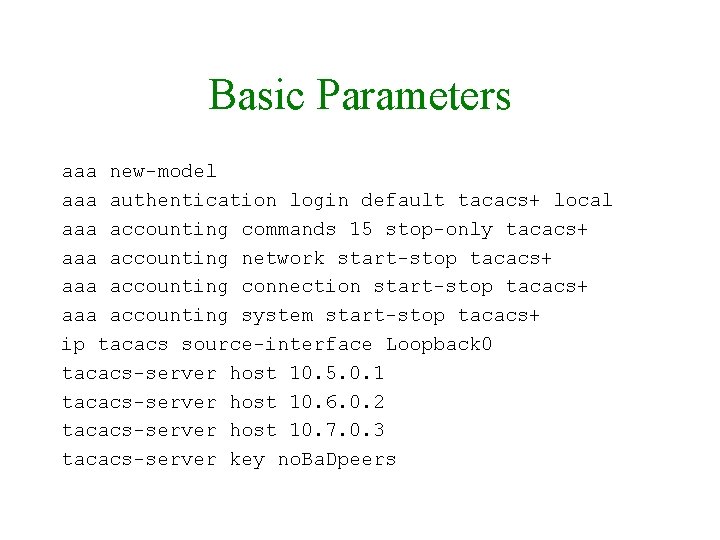
Basic Parameters aaa new-model aaa authentication login default tacacs+ local aaa accounting commands 15 stop-only tacacs+ aaa accounting network start-stop tacacs+ aaa accounting connection start-stop tacacs+ aaa accounting system start-stop tacacs+ ip tacacs source-interface Loopback 0 tacacs-server host 10. 5. 0. 1 tacacs-server host 10. 6. 0. 2 tacacs-server host 10. 7. 0. 3 tacacs-server key no. Ba. Dpeers
Config for Sample Network
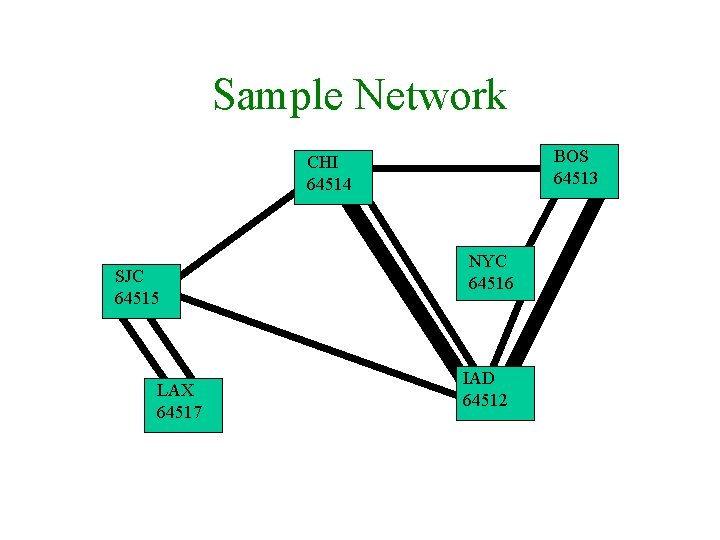
Sample Network BOS 64513 CHI 64514 SJC 64515 LAX 64517 NYC 64516 IAD 64512
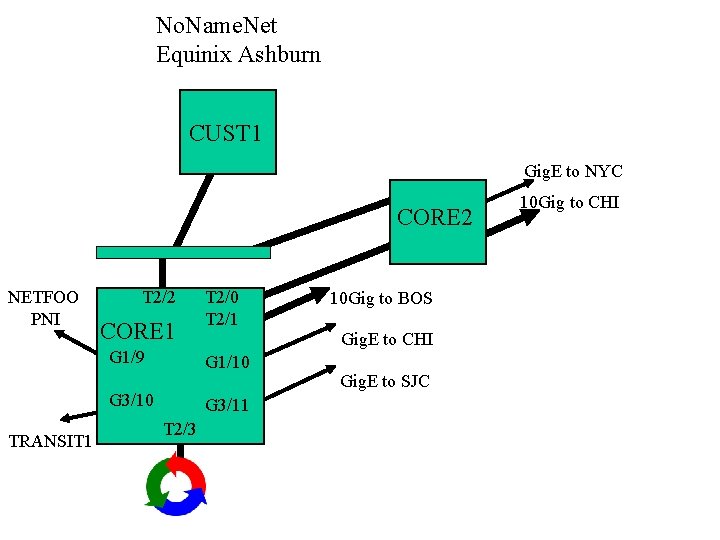
No. Name. Net Equinix Ashburn CUST 1 Gig. E to NYC CORE 2 NETFOO PNI T 2/2 CORE 1 G 1/9 G 3/11 T 2/3 10 Gig to BOS Gig. E to CHI G 1/10 G 3/10 TRANSIT 1 T 2/0 T 2/1 Gig. E to SJC 10 Gig to CHI
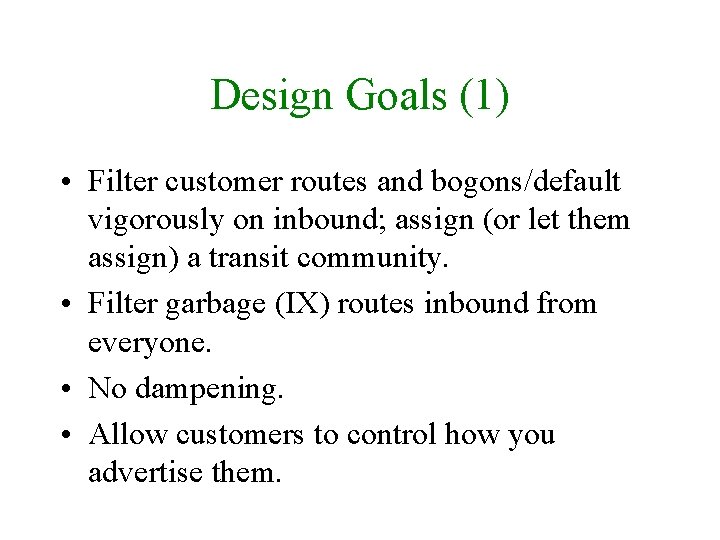
Design Goals (1) • Filter customer routes and bogons/default vigorously on inbound; assign (or let them assign) a transit community. • Filter garbage (IX) routes inbound from everyone. • No dampening. • Allow customers to control how you advertise them.
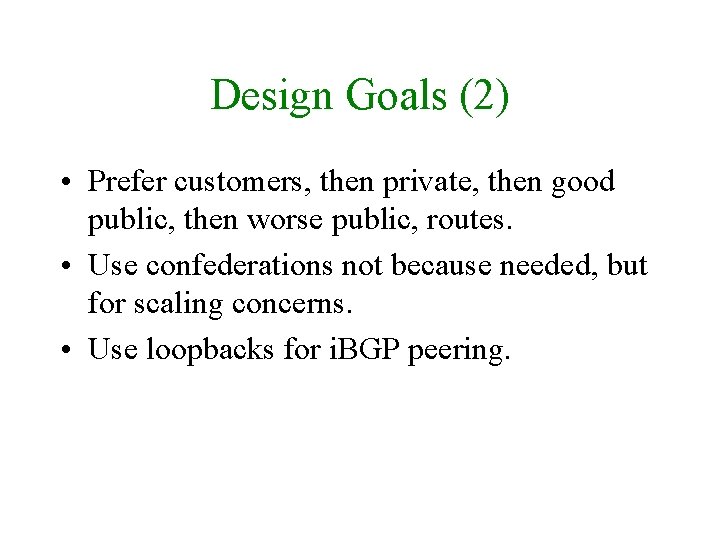
Design Goals (2) • Prefer customers, then private, then good public, then worse public, routes. • Use confederations not because needed, but for scaling concerns. • Use loopbacks for i. BGP peering.
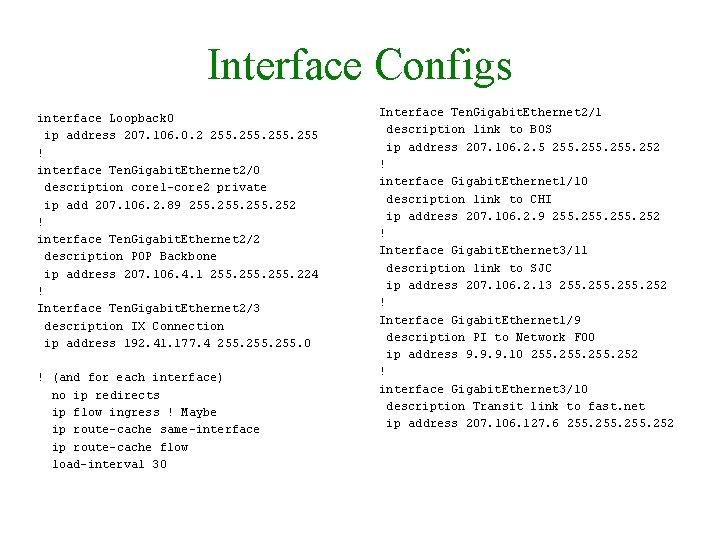
Interface Configs interface Loopback 0 ip address 207. 106. 0. 2 255 ! interface Ten. Gigabit. Ethernet 2/0 description core 1 -core 2 private ip add 207. 106. 2. 89 255. 252 ! interface Ten. Gigabit. Ethernet 2/2 description POP Backbone ip address 207. 106. 4. 1 255. 224 ! Interface Ten. Gigabit. Ethernet 2/3 description IX Connection ip address 192. 41. 177. 4 255. 0 ! (and for each interface) no ip redirects ip flow ingress ! Maybe ip route-cache same-interface ip route-cache flow load-interval 30 Interface Ten. Gigabit. Ethernet 2/1 description link to BOS ip address 207. 106. 2. 5 255. 252 ! interface Gigabit. Ethernet 1/10 description link to CHI ip address 207. 106. 2. 9 255. 252 ! Interface Gigabit. Ethernet 3/11 description link to SJC ip address 207. 106. 2. 13 255. 252 ! Interface Gigabit. Ethernet 1/9 description PI to Network FOO ip address 9. 9. 9. 10 255. 252 ! interface Gigabit. Ethernet 3/10 description Transit link to fast. net ip address 207. 106. 127. 6 255. 252
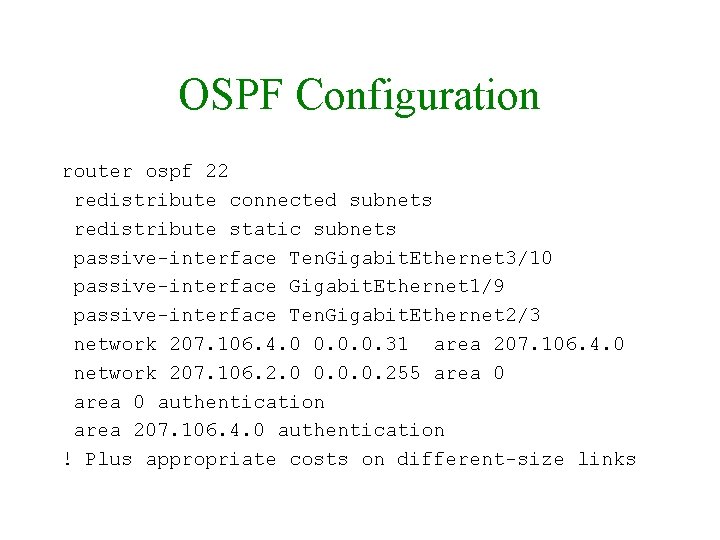
OSPF Configuration router ospf 22 redistribute connected subnets redistribute static subnets passive-interface Ten. Gigabit. Ethernet 3/10 passive-interface Gigabit. Ethernet 1/9 passive-interface Ten. Gigabit. Ethernet 2/3 network 207. 106. 4. 0 0. 0. 0. 31 area 207. 106. 4. 0 network 207. 106. 2. 0 0. 0. 0. 255 area 0 authentication area 207. 106. 4. 0 authentication ! Plus appropriate costs on different-size links
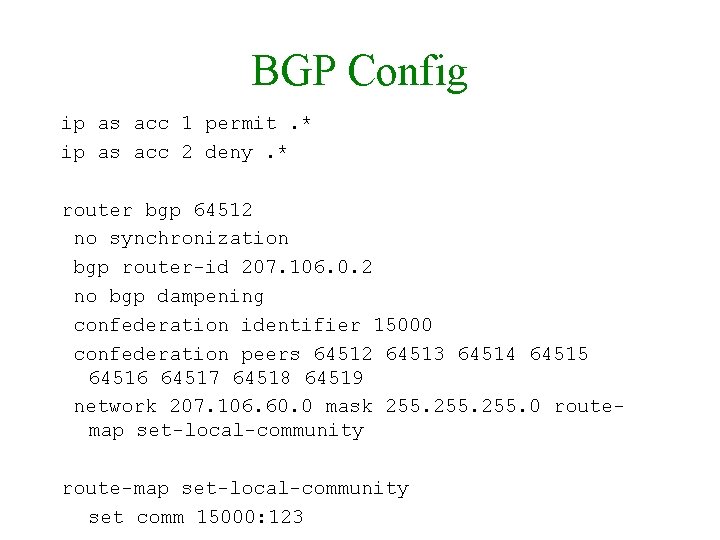
BGP Config ip as acc 1 permit. * ip as acc 2 deny. * router bgp 64512 no synchronization bgp router-id 207. 106. 0. 2 no bgp dampening confederation identifier 15000 confederation peers 64512 64513 64514 64515 64516 64517 64518 64519 network 207. 106. 60. 0 mask 255. 0 routemap set-local-community route-map set-local-community set comm 15000: 123
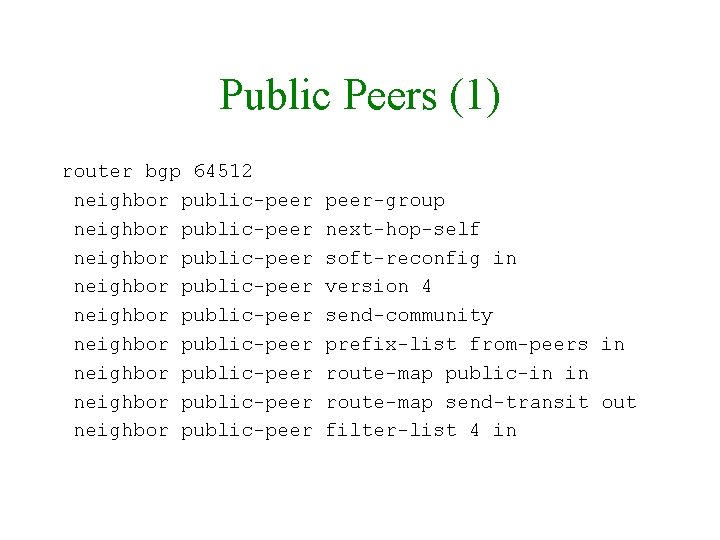
Public Peers (1) router bgp 64512 neighbor public-peer neighbor public-peer neighbor public-peer-group next-hop-self soft-reconfig in version 4 send-community prefix-list from-peers in route-map public-in in route-map send-transit out filter-list 4 in
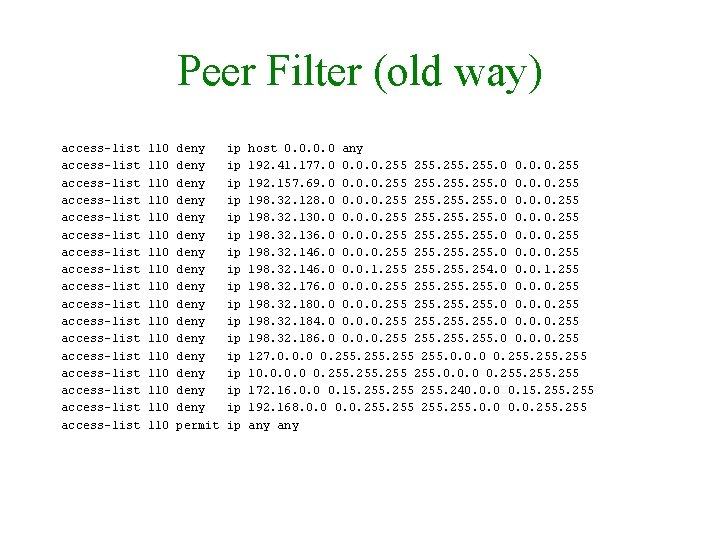
Peer Filter (old way) access-list access-list access-list access-list access-list 110 110 110 110 110 deny deny deny deny permit ip ip ip ip ip host 0. 0 any 192. 41. 177. 0 0. 0. 0. 255 192. 157. 69. 0 0. 0. 0. 255 198. 32. 128. 0 0. 0. 0. 255 198. 32. 130. 0. 0. 255. 0 0. 0. 0. 255 198. 32. 136. 0 0. 0. 0. 255 255. 0 0. 0. 0. 255 198. 32. 146. 0 0. 0. 1. 255. 254. 0 0. 0. 1. 255 198. 32. 176. 0 0. 0. 0. 255 198. 32. 180. 0. 0. 255. 0 0. 0. 0. 255 198. 32. 184. 0 0. 0. 0. 255 198. 32. 186. 0 0. 0. 0. 255 127. 0. 0. 0 0. 255 10. 0 0. 255. 0. 0. 0 0. 255 172. 16. 0. 0 0. 15. 255 255. 240. 0. 0 0. 15. 255 192. 168. 0. 0. 255 255. 0. 0. 255 any
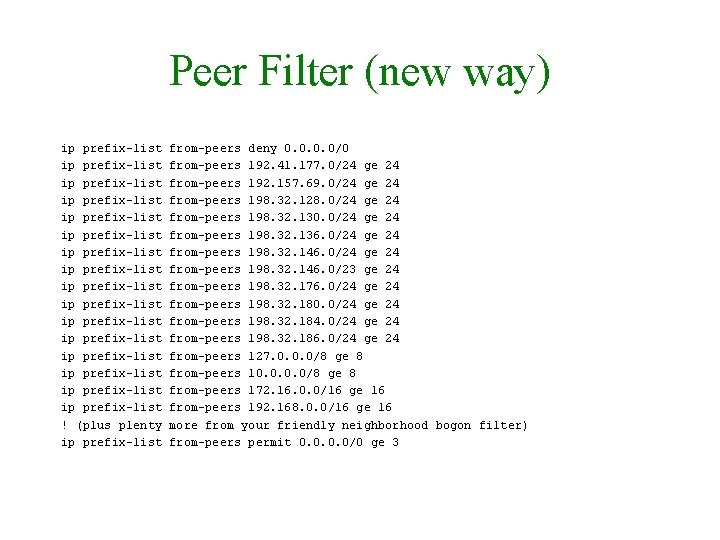
Peer Filter (new way) ip prefix-list ip prefix-list ip prefix-list ip prefix-list ! (plus plenty ip prefix-list from-peers deny 0. 0/0 from-peers 192. 41. 177. 0/24 ge 24 from-peers 192. 157. 69. 0/24 ge 24 from-peers 198. 32. 128. 0/24 ge 24 from-peers 198. 32. 130. 0/24 ge 24 from-peers 198. 32. 136. 0/24 ge 24 from-peers 198. 32. 146. 0/23 ge 24 from-peers 198. 32. 176. 0/24 ge 24 from-peers 198. 32. 180. 0/24 ge 24 from-peers 198. 32. 184. 0/24 ge 24 from-peers 198. 32. 186. 0/24 ge 24 from-peers 127. 0. 0. 0/8 ge 8 from-peers 10. 0/8 ge 8 from-peers 172. 16. 0. 0/16 ge 16 from-peers 192. 168. 0. 0/16 ge 16 more from your friendly neighborhood bogon filter) from-peers permit 0. 0/0 ge 3
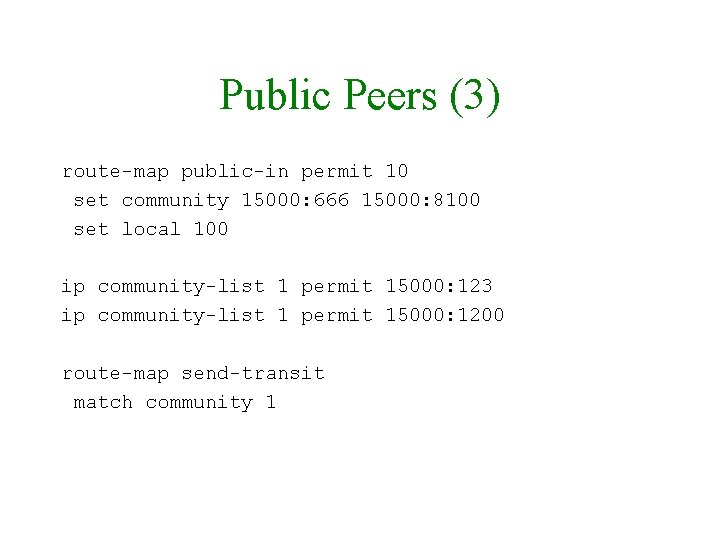
Public Peers (3) route-map public-in permit 10 set community 15000: 666 15000: 8100 set local 100 ip community-list 1 permit 15000: 123 ip community-list 1 permit 15000: 1200 route-map send-transit match community 1
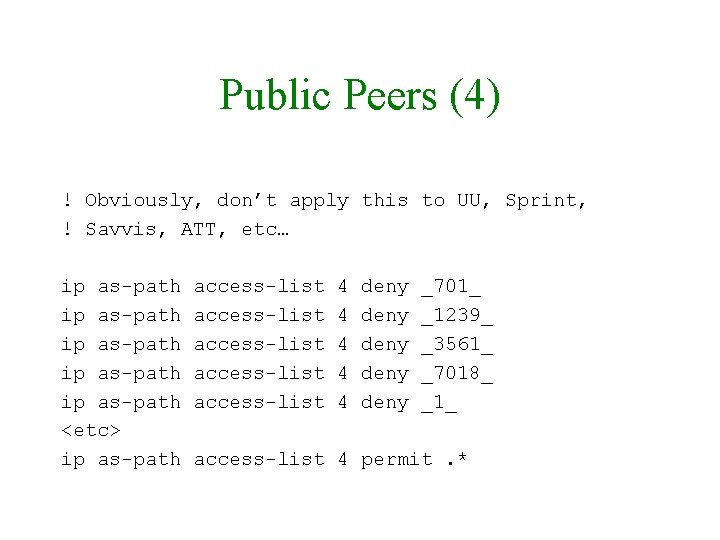
Public Peers (4) ! Obviously, don’t apply this to UU, Sprint, ! Savvis, ATT, etc… ip as-path ip as-path <etc> ip as-path access-list access-list 4 4 4 deny deny _701_ _1239_ _3561_ _7018_ _1_ access-list 4 permit. *
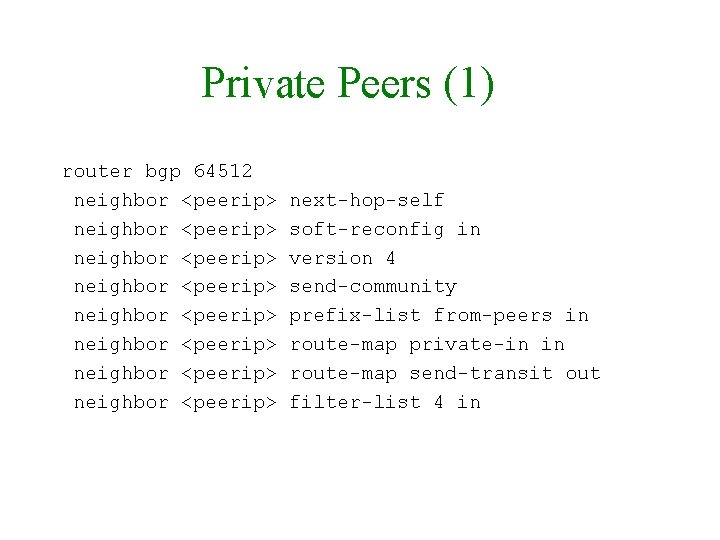
Private Peers (1) router bgp 64512 neighbor <peerip> neighbor <peerip> next-hop-self soft-reconfig in version 4 send-community prefix-list from-peers in route-map private-in in route-map send-transit out filter-list 4 in
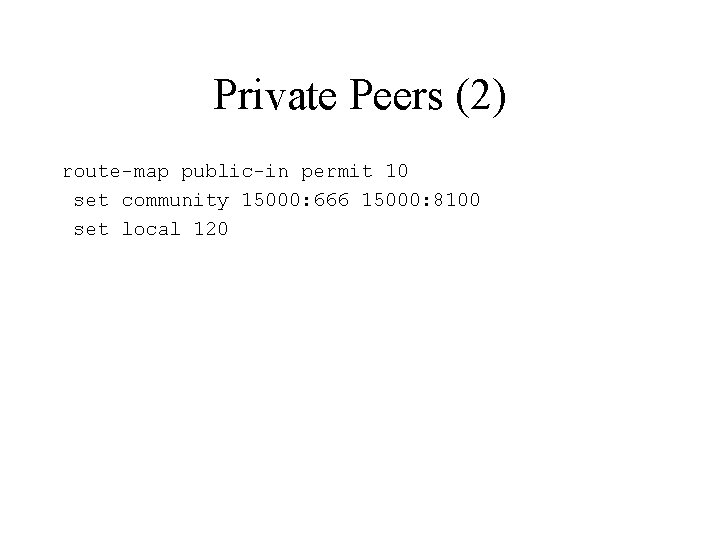
Private Peers (2) route-map public-in permit 10 set community 15000: 666 15000: 8100 set local 120
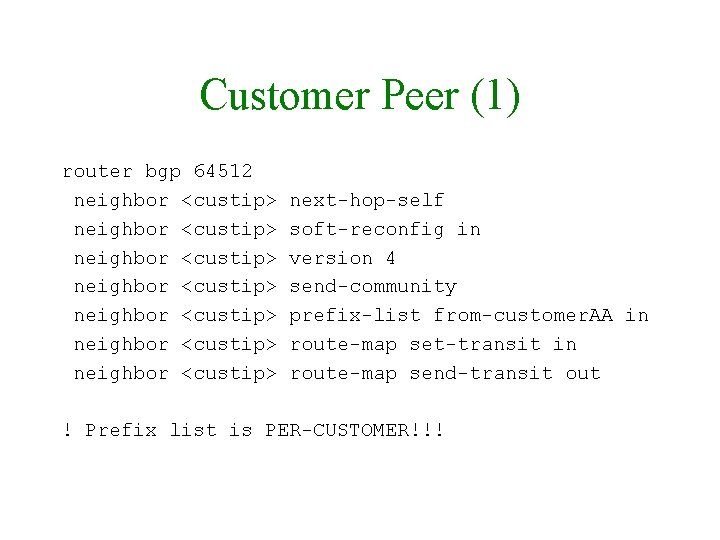
Customer Peer (1) router bgp 64512 neighbor <custip> neighbor <custip> next-hop-self soft-reconfig in version 4 send-community prefix-list from-customer. AA in route-map set-transit in route-map send-transit out ! Prefix list is PER-CUSTOMER!!!
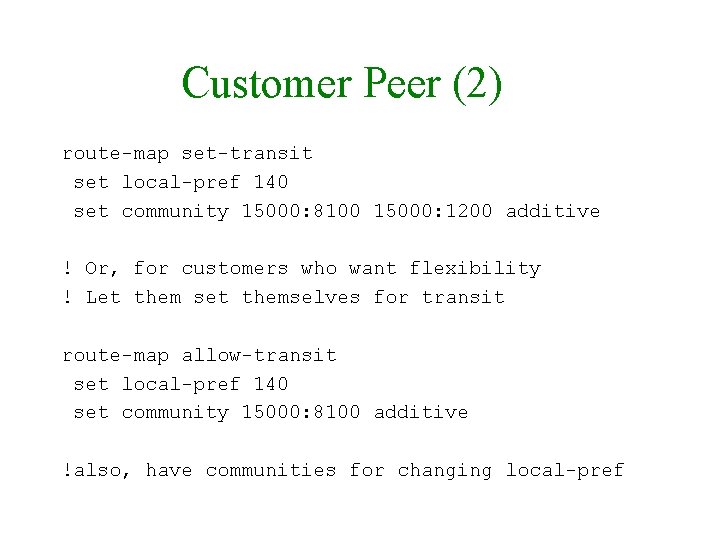
Customer Peer (2) route-map set-transit set local-pref 140 set community 15000: 8100 15000: 1200 additive ! Or, for customers who want flexibility ! Let them set themselves for transit route-map allow-transit set local-pref 140 set community 15000: 8100 additive !also, have communities for changing local-pref
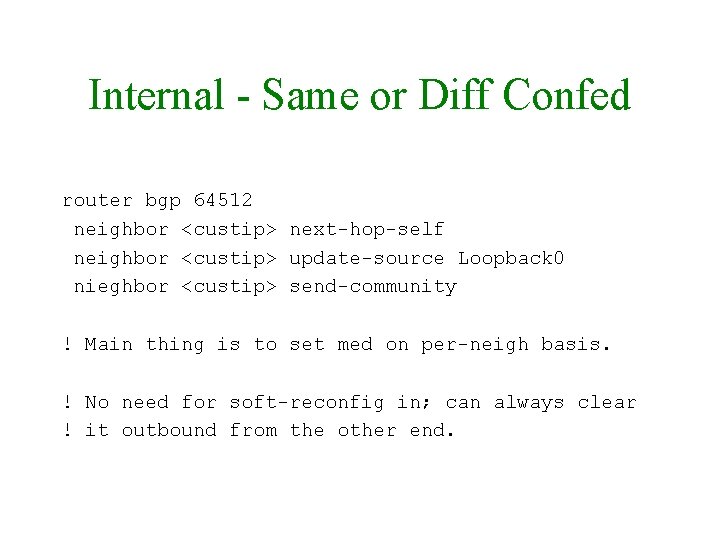
Internal - Same or Diff Confed router bgp 64512 neighbor <custip> next-hop-self neighbor <custip> update-source Loopback 0 nieghbor <custip> send-community ! Main thing is to set med on per-neigh basis. ! No need for soft-reconfig in; can always clear ! it outbound from the other end.
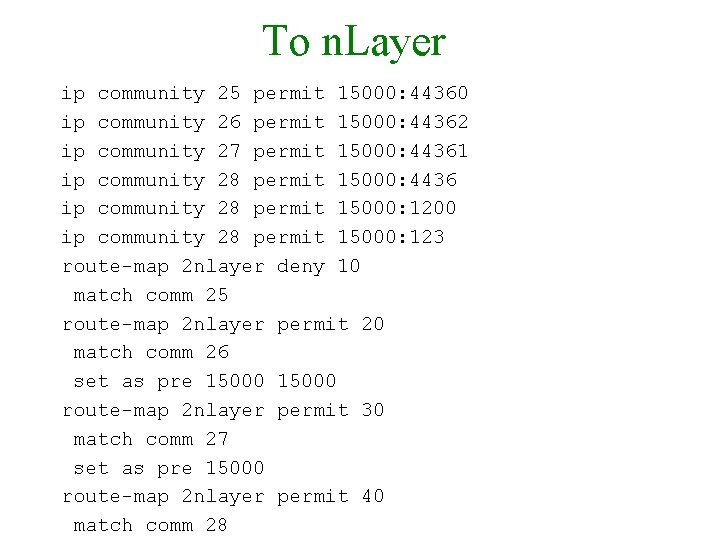
To n. Layer ip community 25 permit 15000: 44360 ip community 26 permit 15000: 44362 ip community 27 permit 15000: 44361 ip community 28 permit 15000: 4436 ip community 28 permit 15000: 1200 ip community 28 permit 15000: 123 route-map 2 nlayer deny 10 match comm 25 route-map 2 nlayer permit 20 match comm 26 set as pre 15000 route-map 2 nlayer permit 30 match comm 27 set as pre 15000 route-map 2 nlayer permit 40 match comm 28
Communities Caveat There are better (more generic), though more complex, ways of doing communities systems with wildcards that work on Cisco, Juniper, and Foundry (search NANOG presentations).
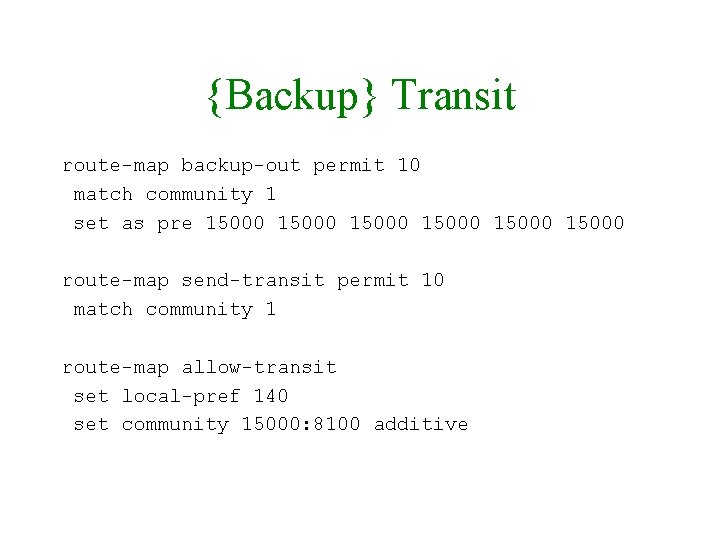
{Backup} Transit route-map backup-out permit 10 match community 1 set as pre 15000 15000 route-map send-transit permit 10 match community 1 route-map allow-transit set local-pref 140 set community 15000: 8100 additive
- Slides: 110