
Bell Labs ONOS Benchmarking with NETCONF Protocol Sessions
Bell Labs ONOS Benchmarking with NETCONF Protocol Sessions • Date: April 11 th 2018 • TRAN Quang Huy , PHAM Van Quan, Dominique VERCHERE • quang-huy. tran@polytechnique. edu, quan. pham_van@nokia. com, dominique. verchere@nokia-bell-labs. com 1 © Nokia 2018 Restricted
INTRODUCTION Network Configuration Protocol: NETCONF • The Network Configuration Protocol (NETCONF) provides mechanisms to install, manipulate, and delete the configuration of network devices • NETCONF uses a remote procedure call (RPC) paradigm • A NETCONF session is the logical connection between a network administrator or a SDN controller (the client) and a network device (the server) • Messages are encoded in Extensible Markup Language (XML) and exchanged on top of a secure transport protocol (SSH) • Specified and standardized by IETF in RFC 6241: https: //tools. ietf. org/html/rfc 6241 Bell Labs 2
EXPERIMENTS Benchmarking Scenario Control Plane Data Plane LINC LINC Bell Labs 3
EXPERIMENTS System environment • CPU: 2 cores • RAM: 2 GB • OS: Ubuntu 16. 04 LTS • ONOS 1. 13 (master release) Bell Labs 4
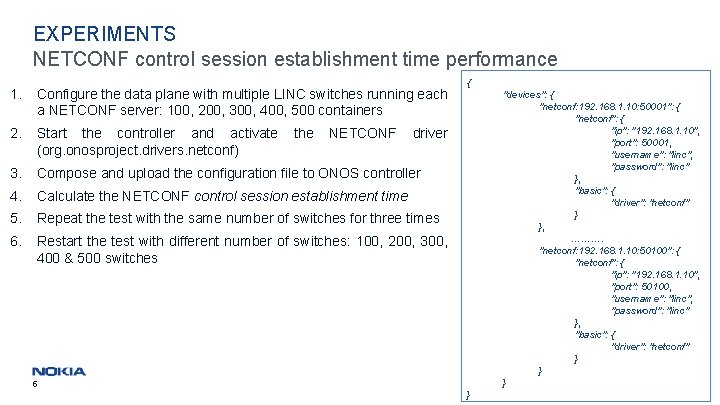
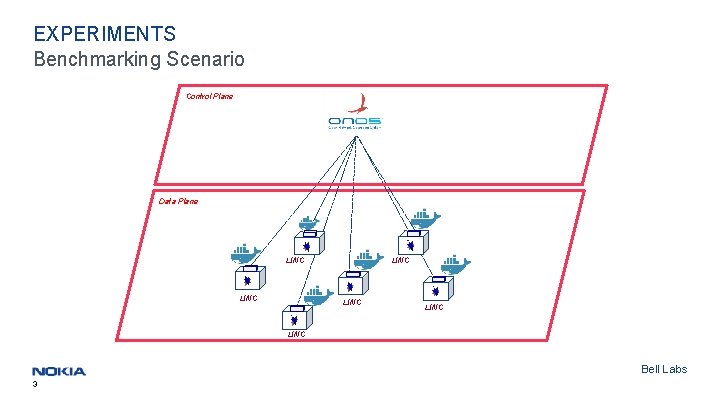
EXPERIMENTS NETCONF control session establishment time performance 1. Configure the data plane with multiple LINC switches running each a NETCONF server: 100, 200, 300, 400, 500 containers 2. Start the controller and activate (org. onosproject. drivers. netconf) 3. Compose and upload the configuration file to ONOS controller 4. Calculate the NETCONF control session establishment time 5. Repeat the test with the same number of switches for three times 6. Restart the test with different number of switches: 100, 200, 300, 400 & 500 switches the NETCONF { "devices": { "netconf: 192. 168. 1. 10: 50001": { "netconf": { "ip": "192. 168. 1. 10", "port": 50001, "username": "linc", "password": "linc" }, "basic": { "driver": "netconf" } }, ………. "netconf: 192. 168. 1. 10: 50100": { "netconf": { "ip": "192. 168. 1. 10", "port": 50100, "username": "linc", "password": "linc" }, "basic": { "driver": "netconf" } Bell Labs } } driver 5 }
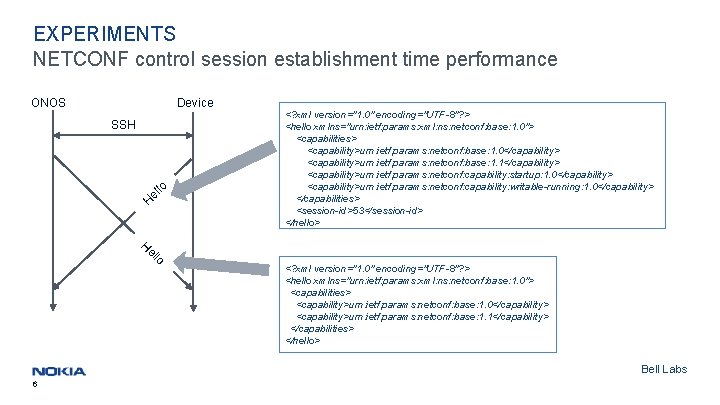
EXPERIMENTS NETCONF control session establishment time performance ONOS Device SSH lo el H <? xml version="1. 0" encoding="UTF-8"? > <hello xmlns="urn: ietf: params: xml: ns: netconf: base: 1. 0"> <capabilities> <capability>urn: ietf: params: netconf: base: 1. 0</capability> <capability>urn: ietf: params: netconf: base: 1. 1</capability> <capability>urn: ietf: params: netconf: capability: startup: 1. 0</capability> <capability>urn: ietf: params: netconf: capability: writable-running: 1. 0</capability> </capabilities> <session-id>53</session-id> </hello> He llo <? xml version="1. 0" encoding="UTF-8"? > <hello xmlns="urn: ietf: params: xml: ns: netconf: base: 1. 0"> <capabilities> <capability>urn: ietf: params: netconf: base: 1. 0</capability> <capability>urn: ietf: params: netconf: base: 1. 1</capability> </capabilities> </hello> Bell Labs 6
EXPERIMENTS Bell Labs 7
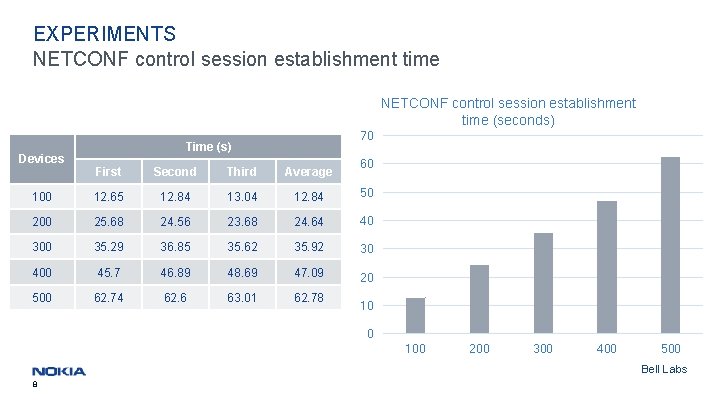
EXPERIMENTS NETCONF control session establishment time (seconds) Devices 70 Time (s) 60 First Second Third Average 100 12. 65 12. 84 13. 04 12. 84 50 200 25. 68 24. 56 23. 68 24. 64 40 300 35. 29 36. 85 35. 62 35. 92 30 400 45. 7 46. 89 48. 69 47. 09 20 500 62. 74 62. 6 63. 01 62. 78 10 0 100 200 300 400 500 Bell Labs 8
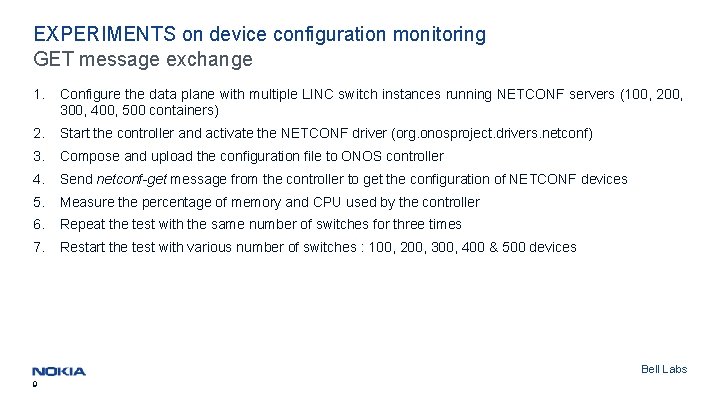
EXPERIMENTS on device configuration monitoring GET message exchange 1. Configure the data plane with multiple LINC switch instances running NETCONF servers (100, 200, 300, 400, 500 containers) 2. Start the controller and activate the NETCONF driver (org. onosproject. drivers. netconf) 3. Compose and upload the configuration file to ONOS controller 4. Send netconf-get message from the controller to get the configuration of NETCONF devices 5. Measure the percentage of memory and CPU used by the controller 6. Repeat the test with the same number of switches for three times 7. Restart the test with various number of switches : 100, 200, 300, 400 & 500 devices Bell Labs 9
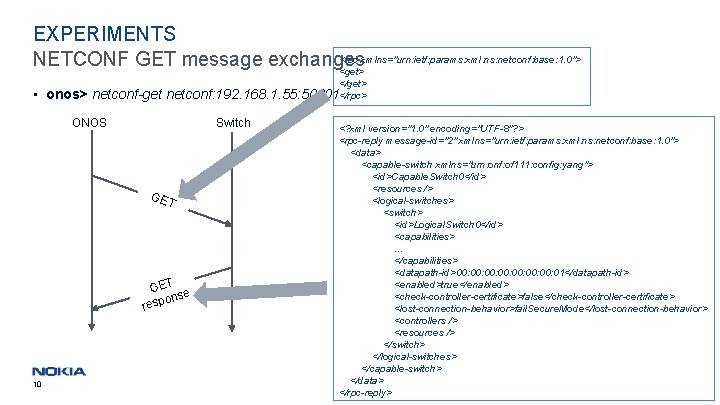
EXPERIMENTS <rpc xmlns="urn: ietf: params: xml: ns: netconf: base: 1. 0"> NETCONF GET message exchanges <get> </get> • onos> netconf-get netconf: 192. 168. 1. 55: 50001</rpc> ONOS Switch GE T GET e ons resp 10 <? xml version="1. 0" encoding="UTF-8"? > <rpc-reply message-id="2" xmlns="urn: ietf: params: xml: ns: netconf: base: 1. 0"> <data> <capable-switch xmlns="urn: onf: of 111: config: yang"> <id>Capable. Switch 0</id> <resources /> <logical-switches> <switch> <id>Logical. Switch 0</id> <capabilities>. . . </capabilities> <datapath-id>00: 00: 01</datapath-id> <enabled>true</enabled> <check-controller-certificate>false</check-controller-certificate> <lost-connection-behavior>fail. Secure. Mode</lost-connection-behavior> <controllers /> <resources /> </switch> </logical-switches> </capable-switch> Bell Labs </data> </rpc-reply>
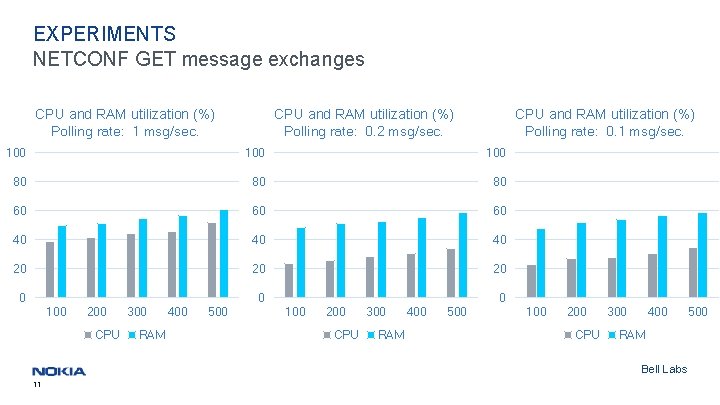
EXPERIMENTS NETCONF GET message exchanges CPU and RAM utilization (%) Polling rate: 1 msg/sec. CPU and RAM utilization (%) Polling rate: 0. 2 msg/sec. CPU and RAM utilization (%) Polling rate: 0. 1 msg/sec. 100 100 80 80 80 60 60 60 40 40 40 20 20 20 0 0 100 200 CPU 300 RAM 400 500 100 200 CPU 300 400 RAM Bell Labs 11 500
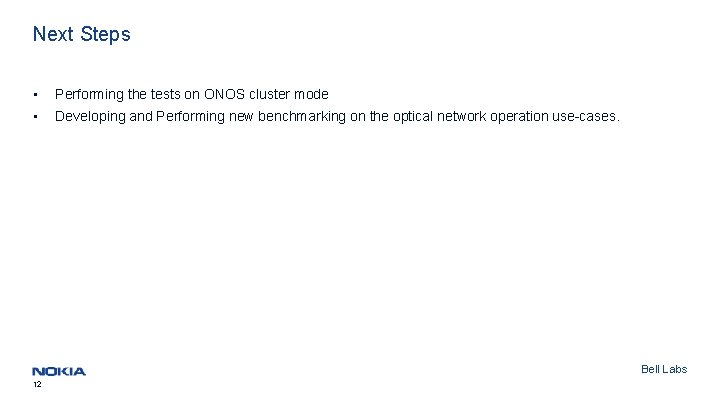
Next Steps • Performing the tests on ONOS cluster mode • Developing and Performing new benchmarking on the optical network operation use-cases. Bell Labs 12

13 Confidential © Nokia 2018 Bell Labs
- Slides: 13