
Beginner Programming Lesson Basic Sequencer BY EV 3
Beginner Programming Lesson: Basic Sequencer BY EV 3 LESSONS. COM AND DROIDS ROBOTICS COPYRIGHT DROIDS ROBOTICS © 2014 WWW. DROIDSROBOTICS. ORG, WWW. EV 3 LESSONS. COM
Using EV 3 Brick Buttons as a Sensor ØAll the EV 3 brick buttons (except the OFF button) are like the touch sensor ØYou can use the buttons to make a game, run different actions based on each button, or make a sequencer (explained on slide 4). ØYou do not need to waste a sensor port on a touch sensor if you plan to use the touch sensor like a button. ØThe first step to making a Basic Sequencer is to learn how to use the “Wait for Button Press” feature. See next slide (slide 3) COPYRIGHT DROIDS ROBOTICS © 2014 WWW. DROIDSROBOTICS. ORG, WWW. EV 3 LESSONS. COM
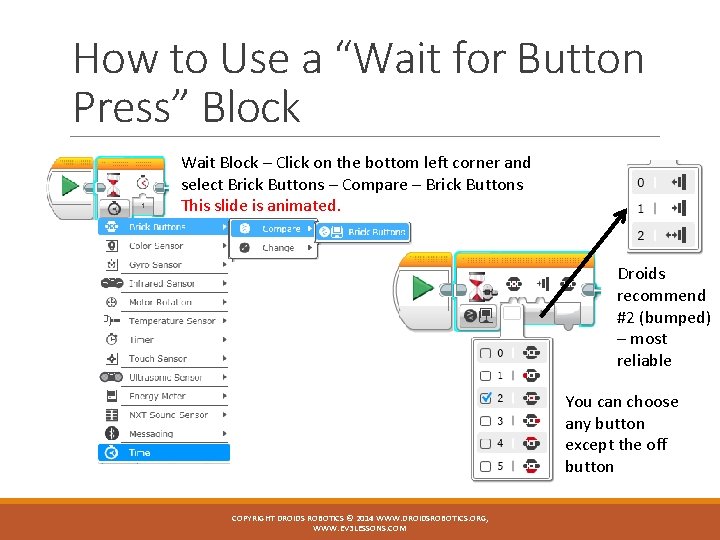
How to Use a “Wait for Button Press” Block Wait Block – Click on the bottom left corner and select Brick Buttons – Compare – Brick Buttons This slide is animated. Droids recommend #2 (bumped) – most reliable You can choose any button except the off button COPYRIGHT DROIDS ROBOTICS © 2014 WWW. DROIDSROBOTICS. ORG, WWW. EV 3 LESSONS. COM
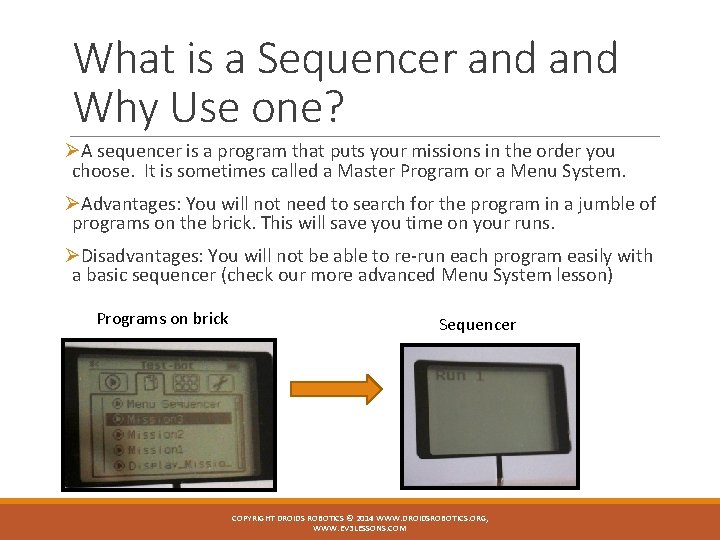
What is a Sequencer and Why Use one? ØA sequencer is a program that puts your missions in the order you choose. It is sometimes called a Master Program or a Menu System. ØAdvantages: You will not need to search for the program in a jumble of programs on the brick. This will save you time on your runs. ØDisadvantages: You will not be able to re-run each program easily with a basic sequencer (check our more advanced Menu System lesson) Programs on brick Sequencer COPYRIGHT DROIDS ROBOTICS © 2014 WWW. DROIDSROBOTICS. ORG, WWW. EV 3 LESSONS. COM
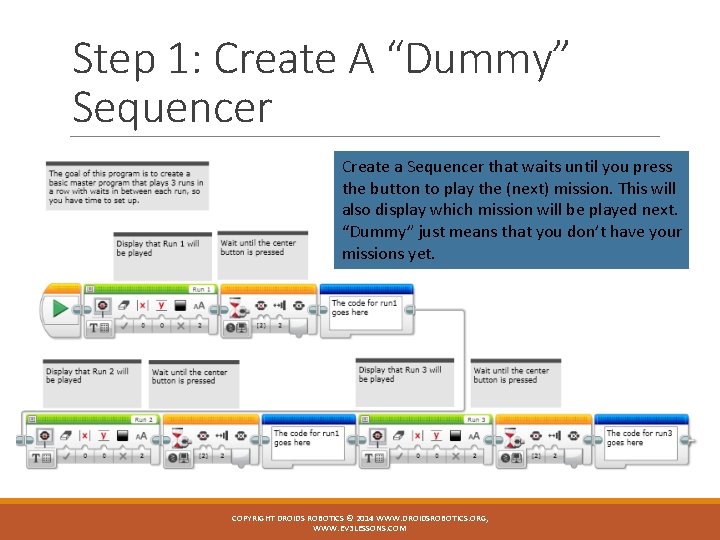
Step 1: Create A “Dummy” Sequencer Create a Sequencer that waits until you press the button to play the (next) mission. This will also display which mission will be played next. “Dummy” just means that you don’t have your missions yet. COPYRIGHT DROIDS ROBOTICS © 2014 WWW. DROIDSROBOTICS. ORG, WWW. EV 3 LESSONS. COM
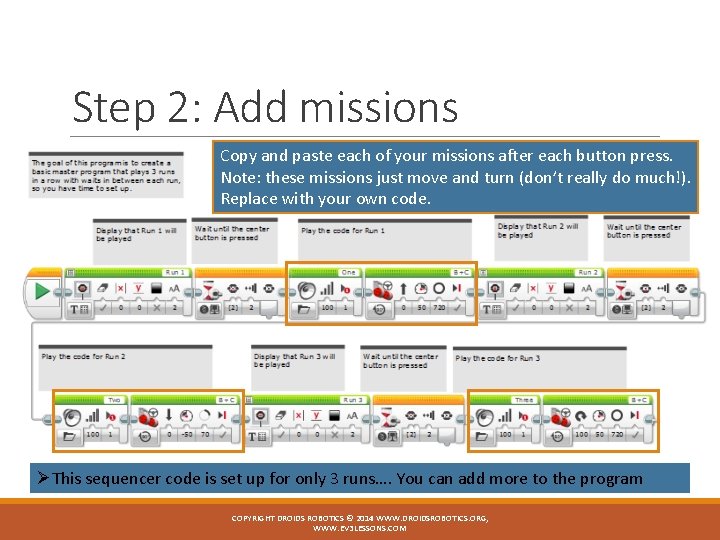
Step 2: Add missions Copy and paste each of your missions after each button press. Note: these missions just move and turn (don’t really do much!). Replace with your own code. ØThis sequencer code is set up for only 3 runs…. You can add more to the program COPYRIGHT DROIDS ROBOTICS © 2014 WWW. DROIDSROBOTICS. ORG, WWW. EV 3 LESSONS. COM
Credits ØThis lesson was written by Sanjay Seshan and Arvind Seshan from Droids Robotics. ØFeel free to use and adapt, but give credit to the original authors. ØA more advanced Sequencer lesson can be found on ev 3 lessons. com ØMore lessons are available at www. ev 3 lessons. com COPYRIGHT DROIDS ROBOTICS © 2014 WWW. DROIDSROBOTICS. ORG, WWW. EV 3 LESSONS. COM
- Slides: 7