
Beginner Keyboarding Touch Typing Unit Pacing Guide Weekly
Beginner Keyboarding Touch Typing Unit Pacing Guide Weekly Instructions

Beginner Keyboarding Be seated and QUIET Login with your username & password to computers. Click on edutyping & login to the site with info: Liscense ID: pierce Username: student-# Password: lunch #
Career Readiness www. gacollege 411. org • Login to site by clicking on “SIGN IN” at the top. • Username: 20 flastname • (grad year, first initial & last name) • Password: lunch #
Beginner Keyboarding Essential questions: Where are the homerow keys located? Which fingers do you use to key the homerow? What is proper keyboarding technique? MSBCS-BCSI – 4 Students will identify the home row keys and use correct keyboarding technique. Learning Tasks • Complete Lessons 1. 1, 1. 2, 2. 1, 2. 2 • Review Proper Touch Typing Techniques – – Sit up straight Fingers curved on home row Feet on floor Wrists lifted, elbows by your side • Homerow 30 sec & 1 min timed practice
Beginner Keyboarding Essential questions: Where are the home row keys located? Which fingers do you use to key the home row? What is proper keyboarding technique? Which fingers press the letters E, H, I and R? MSBCS-BCSI – 4 Students will develop keyboarding skills by touch with speed and accuracy. Learning Tasks • Complete Lessons 3. 1, 3. 2, 4. 1, 4. 2 • Review Proper Touch Typing Techniques – – Sit up straight Fingers curved on home row Feet on floor Wrists lifted, elbows by your side • Lesson 1 -5 30 sec & 1 min timed practice
Beginner Keyboarding Essential questions: Which fingers do you use to key the home row? What is proper keyboarding technique? Which fingers press the letters E, H, I, R, O, T, N & G? MSBCS-BCSI – 4 Students will develop keyboarding skills by touch with speed and accuracy. Learning Tasks • Complete Lessons 6. 1, 6. 2, 7. 1, 7. 2 • Review Proper Touch Typing Techniques – – Sit up straight Fingers curved on home row Feet on floor Wrists lifted, elbows by your side • Computer Basics – self guided video reading & notes completion.
Beginner Keyboarding Essential questions: Which fingers do you use to key the home row? What is proper keyboarding technique? Which fingers press the letters E, H, I, R, O, T, N & G? When do we need to use the SHIFT key? Which finger presses (. ) period for punctuation? MSBCS-BCSI – 4 Students will develop keyboarding skills by touch with speed and accuracy. Learning Tasks • Complete Lessons 8. 1, 8. 2, 10. 1, 10. 2 • Review Proper Touch Typing Techniques – – Sit up straight Fingers curved on home row Feet on floor Wrists lifted, elbows by your side • Lessons 6 -9 Timings (30 sec & 1 min) complete
Beginner Keyboarding Essential questions: Which fingers do you use to key the home row? What is proper keyboarding technique? Which fingers press the letters N & G, W, B & Y? When do we need to use the left or right SHIFT key? Which finger presses (. ) period for punctuation? MSBCS-BCSI – 4 Students will develop keyboarding skills by touch with speed and accuracy. Learning Tasks • Complete Lessons 11. 1, 12. 1, 13. 1 • Review Proper Touch Typing Techniques – – Sit up straight Fingers curved on home row Feet on floor Wrists lifted, elbows by your side • Timed Practice 10 -13 (30 sec & 1 min) complete
Beginner Keyboarding Essential questions: Which fingers do you use to key the home row? What is proper keyboarding technique? Which fingers press the letters N & G, W, B & Y? When do we need to use the left or right SHIFT key? Which finger presses (. ) period for punctuation? MSBCS-BCSI – 4 Students will develop keyboarding skills by touch with speed and accuracy. Learning Tasks • Finish last week’s lessons {11. 1, 12. 1, 13. 1} • Computer Basics 2 hardware vs. software Notes page & discussion –Write on the sheet. Use the website to answer • Complete Lessons 14. 1, 15. 1 • Review Proper Touch Typing Techniques – – Sit up straight Fingers curved on home row Feet on floor Wrists lifted, elbows by your side • Quiz Friday from Notes page- Log on to classroom and look for the link. Click and answer.
Beginner Keyboarding Essential questions: Which fingers do you use to key the home row? What is proper keyboarding technique? Which fingers press the letters N & G, W, B & Y? When do we need to use the left or right SHIFT key? Which finger presses (. ) period for punctuation? MSBCS-BCSI – 4 Students will develop keyboarding skills by touch with speed and accuracy. Learning Tasks • Finish last week’s lessons {11. 1, 12. 1, 13. 1, 14. 1, 15. 1} • Computer Basics 2 hardware vs. software Notes page & discussion –Write on the sheet. Use the website to answer • Complete Lessons 16. 1, 18. 1 • Cyber Surfer Island 6 th grade Lesson 1 & 2, 3 • Quiz Friday from Notes
Beginner Keyboarding Essential questions: Which fingers do you use to key the home row? What is proper keyboarding technique? Which fingers press the letters N & G, W, B & Y? When do we need to use the left or right SHIFT key? Which finger presses (. ) period for punctuation? MSBCS-BCSI – 4 Students will develop keyboarding skills by touch with speed and accuracy. Learning Tasks • Finish last week’s lessons {11. 1, 12. 1, 13. 1, 14. 1, 15. 1, 16. 1, 18. 1} • Type ONE Article – From In the News Section 1: • “Back to School Tech Gadgets” • Timings – Choose TWO 2 min. timings from the 1 C section and record your score at the bottom of your chart. Try this more than one time if needed you must get 20 wpm** • Cyber Surfer Island Lesson 1 -7 • When finished you will turn in ALL your handouts stapled together in order at the end of the week.
Google Classroom • Go to chrome • Access GMAIL • Click “Sign in” at top corner – Username: • Firstnamemlastname@pierce. k 12. ga. us • Whole first name, middle initial, whole last name • All lowercase! – Password: • Pcs 12345 (lunch number) • Has one capital letter! • When logged in…your name will be in top right corner.
LOGIN • Login to Edutyping • Login to Google Classroom
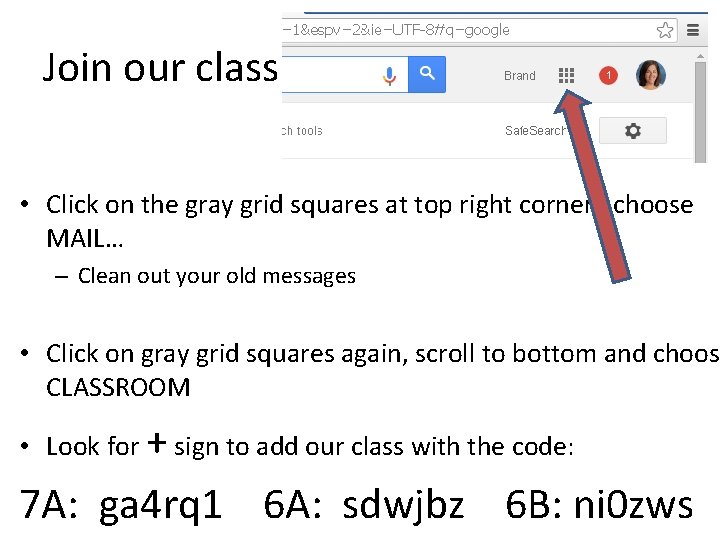
Join our class • Click on the gray grid squares at top right corner…choose MAIL… – Clean out your old messages • Click on gray grid squares again, scroll to bottom and choose CLASSROOM • Look for + sign to add our class with the code: 7 A: ga 4 rq 1 6 A: sdwjbz 6 B: ni 0 zws
Literacy Skills Silly Story Spin It was one minute before midnight when we got there and…
- Slides: 15