
Basic Web Applications Basic Web Applications n In
Basic Web Applications
Basic Web Applications n In this chapter, we will learn about: – Electronic mail or Email – search engines, – E-Commerce – E-Learning.
Email n Email = Electronic mail - exchanging mail messages electronically - Internet. n Internet’s ‘killer’ application. n Efficient, quick and cheap way of communication.
Email n An email can be simply – Text – Attachments (pictures or documents. – a newsletter for subscribers – Encrypted message
What makes up an email? The actual email - header and the body (Before Opening). n The header contains information about n – The sender and the receiver – The sent time – The subject and size of the message. After Opening- Message Details n Attachments (icons or embedded). n
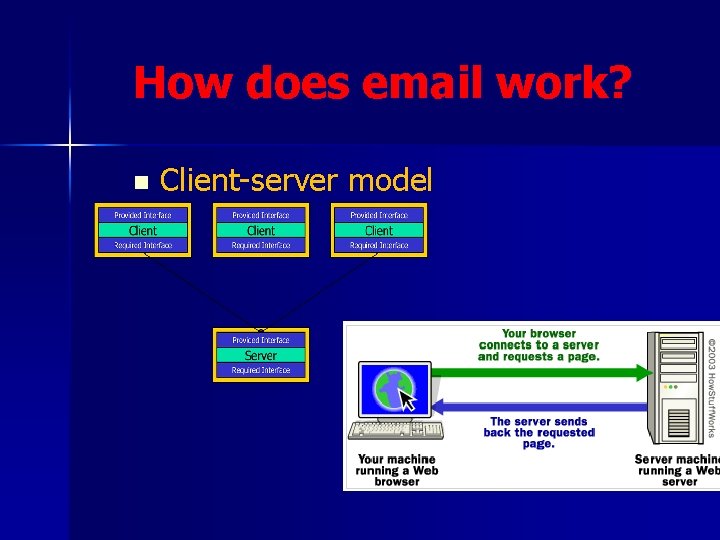
How does email work? n Client-server model
Clients Forms n Clients can appear in various forms: – Application based: installed onto users’ machines and include Microsoft Outlook – Web based web browser’s window and include Hotmail, Yahoo, Google
Clients Functionality n Clients Basic functions include: – Create new emails. – Display and store received emails. – Hold address lists of contacts, a calendar, journal and other ……… – The client is also configured with the account information (IP addresses of the email servers with which it will be communicating).
Email Server n The email server has the following capabilities: – Store the list of users and rules. – the capability to receive, send and store emails and attachments.
How does email work? • Servers operates without constant user intervention. • Client -- connect to the email server when n n Sends checks/receives new email. • Clients may be permanently connected to the server to (LAN Based): n allow access to shared address books or calendar information
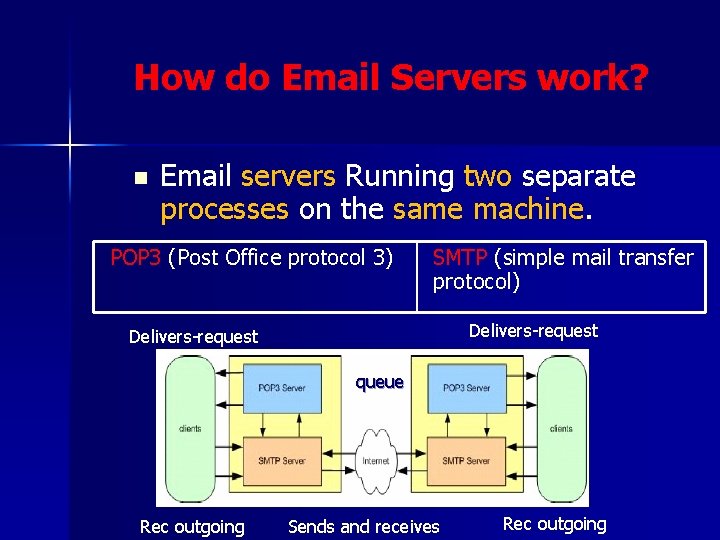
How do Email Servers work? n Email servers Running two separate processes on the same machine. POP 3 (Post Office protocol 3) SMTP (simple mail transfer protocol) Delivers-request queue Rec outgoing Sends and receives Rec outgoing
How do email servers work? n TCP/IP ports: – SMTP on port 25 to send/receive emails. – POP 3 on port 110 to hold/Check for new emails. IANA (Internet Assigned Numbers Authority) 65535

How do email servers work?
TCP/IP ports and email? n n Each server has one or more unique TCP/IP (transmission control protocol/internet protocol) addresses. Attached to all TCP/IP addresses are many ports that range from 0 to 65, 535. TCP/IP uses ports to allocate different jobs to different services. The server will listen for a client or application to call it on a port and direct traffic from that port to the required service.
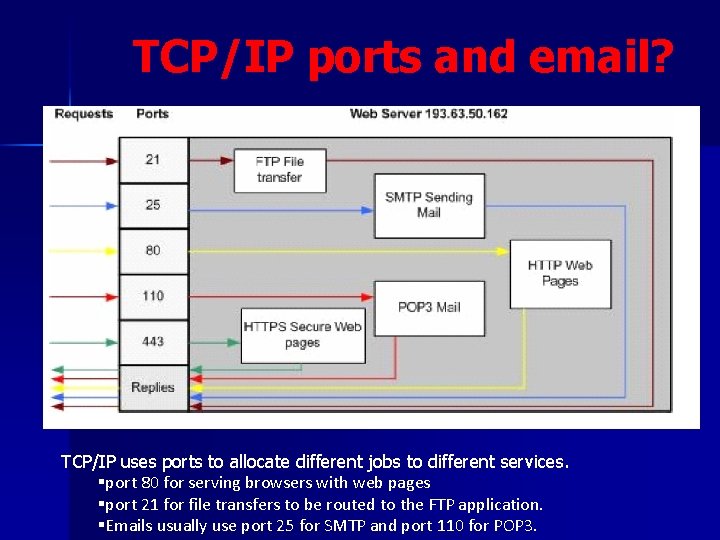
TCP/IP ports and email? TCP/IP uses ports to allocate different jobs to different services. §port 80 for serving browsers with web pages §port 21 for file transfers to be routed to the FTP application. §Emails usually use port 25 for SMTP and port 110 for POP 3.
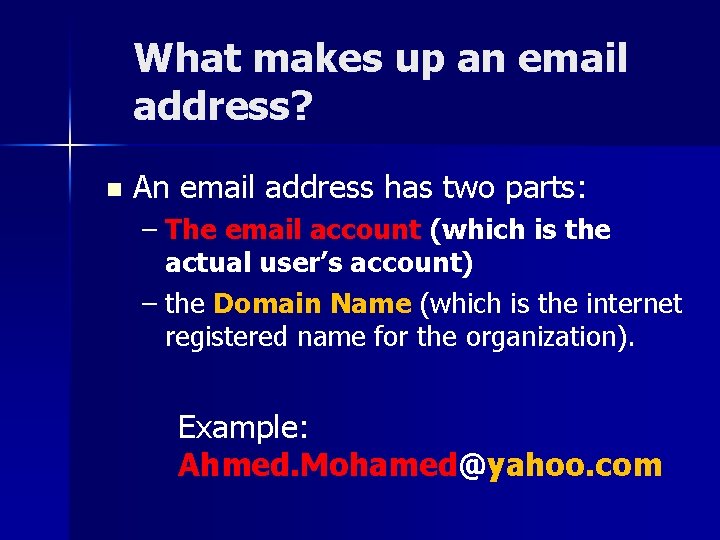
What makes up an email address? n An email address has two parts: – The email account (which is the actual user’s account) – the Domain Name (which is the internet registered name for the organization). Example: Ahmed. Mohamed@yahoo. com
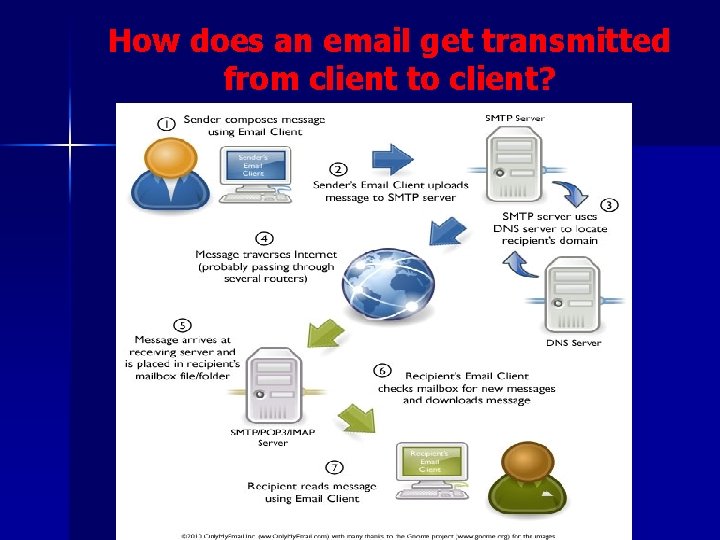
How does an email get transmitted from client to client?
What should we look for in an email server? Full support for POP 3, SMTP and webbased clients n Support for multiple antivirus products. n Public folders n shared address books. n Auto-responder support. n Anti Spam. n Easy backup and restore tasks. n
How does an email system send attachments? n n n SMTP transmit text only What about images, video …? ? ? . SMTP gets around this problem by using two different methods. – UUencode (binary, encryption, Header, no multiple attachment) – MIME (similar to Uuencode, encode images and sound) – Most modern servers use MIME however keep UUencode for compatibility.
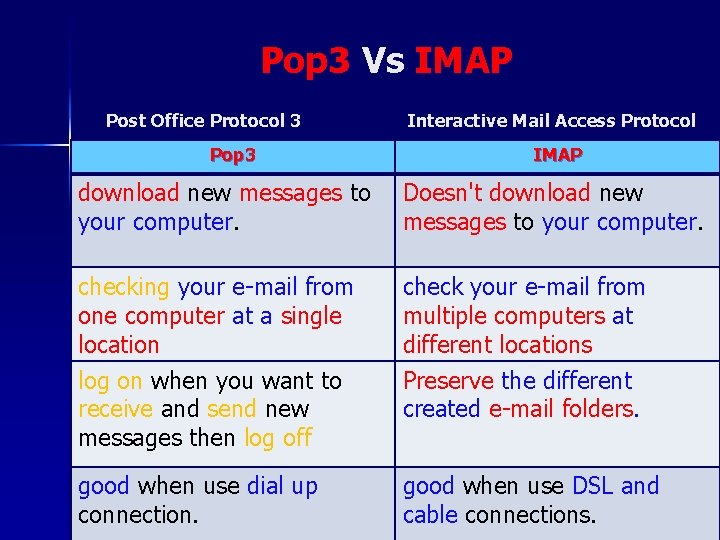
Pop 3 Vs IMAP Post Office Protocol 3 Pop 3 Interactive Mail Access Protocol IMAP download new messages to your computer. Doesn't download new messages to your computer. checking your e-mail from one computer at a single location check your e-mail from multiple computers at different locations log on when you want to receive and send new messages then log off Preserve the different created e-mail folders. good when use dial up connection. good when use DSL and cable connections.
E Commerce n E Commerce is digitally enabled commercial transactions between and among organizations and individuals. n Commercial transactions – exchange of value (e. g. money) across organizational or individual boundaries in return for products and services.
E Business n E Business is a digitally enabled transactions and processes within a firm. – Involve Information Systems controlled by the firm (no commercial transactions).
E Commerce n Ecommerce involves: – Info sharing (Web catalogues, ads, communities) – Ordering (e-mail, e-forms) – Payment (traditional, credit cards, EDI, digital cash) – Fulfillment (Web-site, e-mail, fax, phone) – Service & support (FAQs, bulletin boards, e-mail)
Benefits of E-Commerce Ecommerce carry out businesses without the barriers of time or distance. n The direct cost-of-sale for an order taken from a web site is lower than through traditional means. n Ideal for niche products. n the cheapest means of doing business. n
Limitation of E-Commerce n Lack of universal for standard, security and reliability. n Lack of bandwidth to support E-Commerce especially for m-commerce. n Software development for E-Commerce is still maturing. n Implementing E-Commerce require special servers to support it which may increase cost.
Non-technological limitations Legal issues to be resolve. n Products are not able to be tested first. n People lack in trust when trading with strangers. n FRAUD cases are increasing. n
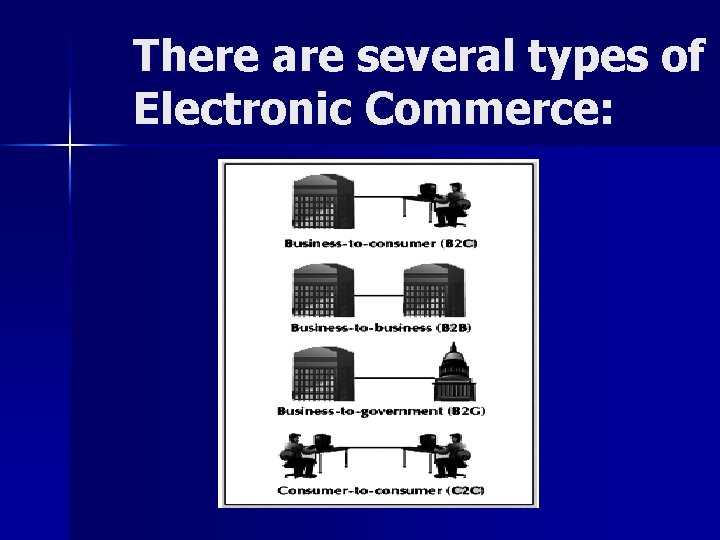
There are several types of Electronic Commerce:
Steps to E-Commerce 1) 2) 3) 4) 5) Generating Demand. Ordering & Fulfillment. Process Payment: Cash Model, Check Model or Credit Model. Service & Support. Security (SSL Security Socket Layer Protocol)
Steps to E-Commerce n ADVERTISING (Banner Ads, Banner Exchange. . ) – Referrer Sites (Barnes & Noble and Amazon). – Opt-in E-Mail – Spam email – Targeted email – Search engine
PAYMENT PROCESSING n Cash Model (BANK) n n Check Model n n Credit Model (SET == (secure electronic transactions)
Web portal n In the IT World –> gateway starting point for any user experience.
Portal Types Information Portals n Content Management Portals n Portals can be static or personalized
Information Portals n Consolidate many different types of information from multi sources onto a single screen or user experience. n People who use an Information Portal typically are not or do not publish to it
Information Portals examples n Local Weather- News ( content feeds - RSS, XML) n Access to (email client, calendars, or any type of central business application) where viewing of items is required. n Corporate information such as HR. n Reports - or forms that allow information to be requested - to assist with business choices. n Access to smaller information portals via the primary information portal.
Content Management Portals n self-service publishing features to post and share any kind – Document – digital asset – Record – Web content n Should be accessed from anywhere (Geographically).
Content Management Portals n n n Add information to the portal authorizations to modify, delete, and expire information produced by others. publish, read, retrieve, modify, archive and delete content or information within the portal 'window'. the ability to check-in and check-out 'in progress' information. Tracking Workflow
Another portal classification Application Centric Portals n Content Centric Portals such as: n – Web Content Management System (WCMS) – Document Management System (DMS) – Digital asset management (DAM) – Recruitment Management Software (RMS)
Vertical Vs Horizontal portal n The Vertical (specific) or Horizontal (wide) Enterprise Portal – Not related to how the content is being managed that is making up the user experience – It related to audience size --niche experience – or very wide audience.
E-learning n E-Learning is the use of technology to enable people to learn anytime and anywhere. n As a general rule – different people need to learn in many different ways and at different times. – To support that you will need different elearning delivery methods. – you will need a way to develop and manage e-learning.
E-Learning Delivery Methodology Self-paced Courses n Self-paced courses are created with elearning authoring tools. n Self-paced courses can be delivered By: – Internet – Intranet or Local Area Networks – CD-ROM or DVD
E-Learning Delivery Methodology Self-paced features: n Multimedia: n Interactivity: n Bookmarking: n Tracking -- Learning Management System (LMS)
E-Learning Delivery Methodology n Advanced Features: – Simulation: – Online Experts: – Multiple Bookmarks – Search through a course – Notes and Highlights
E-Learning Delivery Methodology Discussion Groups n A discussion group is: – message boards – bulletin boards – discussion forums.
E-Learning Delivery Methodology n Virtual Classroom A virtual classroom provides: – – – A place to meet Take attendance Teachners and learnres can use n n Slide presentation Audio and video conferencing Application sharing Shared whiteboard
E-Learning Delivery Methodology n Interaction with students: – audio and – instant messaging – chat. Quizzes n Breakout Sessions: single package. n
E-Learning Delivery Methodology n Audio and Video Conferencing Audio conferencing can be implemented in two ways: – Computers connected to the Internet (Voice-over-IP) – Phone conferences. People dial the same number to participate in an audio conference. n Video conferencing can also be implemented in two ways: – Computers connected to the Internet + digital cameras. – Special video conferencing devices (Internet or phone lines)
E-Learning Delivery Methodology Shared Whiteboard n A shared whiteboard lets a group of people communicate by n – typing comments – Drawing – highlighting – pointing.
- Slides: 47