
Basic Network Security Lesson 9 Objectives Exam Objective
Basic Network Security Lesson 9
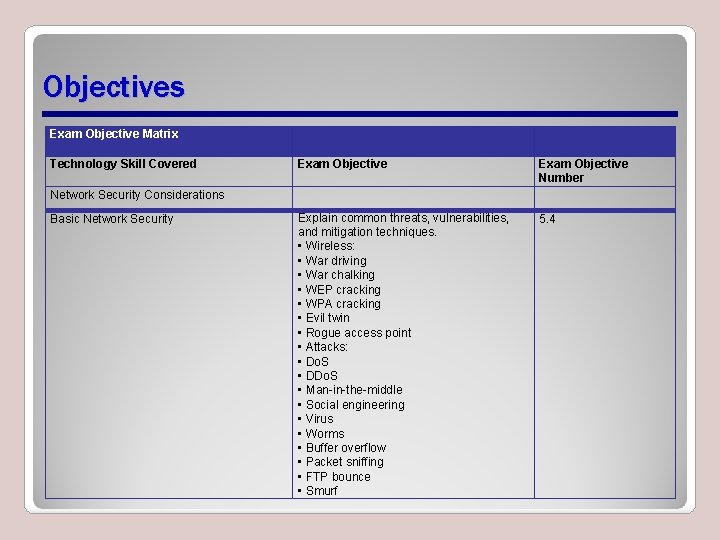
Objectives Exam Objective Matrix Technology Skill Covered Exam Objective Number Explain common threats, vulnerabilities, and mitigation techniques. • Wireless: • War driving • War chalking • WEP cracking • WPA cracking • Evil twin • Rogue access point • Attacks: • Do. S • DDo. S • Man-in-the-middle • Social engineering • Virus • Worms • Buffer overflow • Packet sniffing • FTP bounce • Smurf 5. 4 Network Security Considerations Basic Network Security
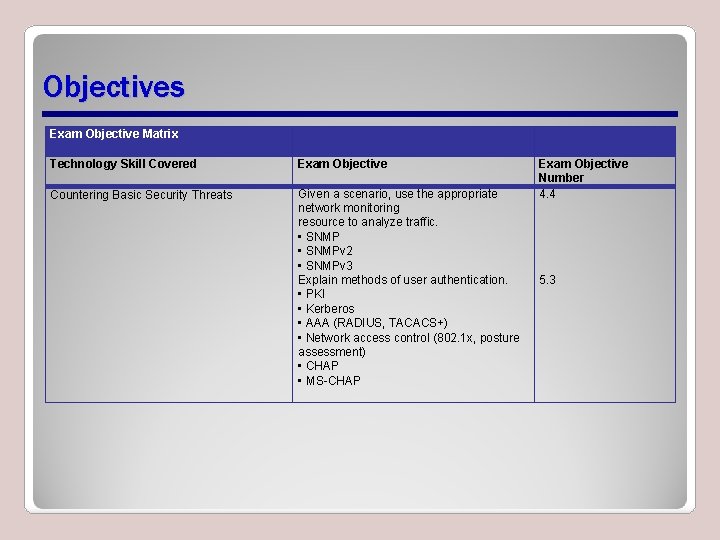
Objectives Exam Objective Matrix Technology Skill Covered Exam Objective Countering Basic Security Threats Given a scenario, use the appropriate network monitoring resource to analyze traffic. • SNMPv 2 • SNMPv 3 Explain methods of user authentication. • PKI • Kerberos • AAA (RADIUS, TACACS+) • Network access control (802. 1 x, posture assessment) • CHAP • MS-CHAP Exam Objective Number 4. 4 5. 3
Network Security Considerations • Security policies should address: – Security threats your organization has to combat – What you can do to combat a security threat – What you should do after a security violation has taken place
Social Engineering • Tricking or manipulating a person into revealing important information Phishing Stealing password s Identity theft Dumpster diving
Phishing • Using various means to trick people into revealing passwords, account numbers, social security numbers, and various other sensitive pieces of information • Common phishing scenarios – Foreign/unknown entities offering large transfers of money – E-mail requests to update banking information
Phishing (Continued) • Countering threats – Verification of identifying picture – Verification of identifying question(s) – Development of other methods
Stealing Passwords • Hackers find stealing passwords easier than breaking into a computer system – Many passwords are obvious phrases specific to users • Methods used to steal passwords – Phishing/asking user about family, pets, friends, and so on – Printed document hidden nearby computer
Stealing Passwords (Continued) • Protecting passwords – Do not write password on paper – Create passwords that are easy to remember but difficult to crack – Check the strength of the password – Do not discuss password development techniques
Identity Theft • The act of presenting yourself as someone you are not in order to steal in one way or another from the person you are presenting yourself to be • Common techniques – Stealing pin and/or bank account number and illegitimately representing self as owner – Elaborate phishing schemes
Identity Theft (Continued) • Ways to protect information – Closely monitor financial activities – Pay third-party to monitor financial activities – Vigorously investigate and resolve any unusual transactions
Dumpster Diving • The act of going through someone's garbage looking for personal information that can be used for identity theft • Information sources – Preapproved credit card applications – Company intellectual property
Malicious Software • A broad category that includes any software that is used against a company or person • Intent behind the malicious software varies – A harmless prank – A deliberate attempt to cause extreme harm – To capture information from a victim; used for identity theft or targeted marketing
Spyware • Software that is slipped onto a computer for the purpose of gaining private information about the target computer or how the computer is used • Can be slipped onto computers: – Via web browsers – By tricking people into installing it along with software they intended to install – Through e-mail
Viruses • A type of malicious software that modifies the code of existing programs in an attempt to cause harm, reproduce itself, and/or to escape detection – A macro virus attaches to documents produced by common software applications – Anti-virus software greatly reduces occurrences – Software updates limit damage with built-in warnings
Worms • Complete stand-alone programs that are smuggled onto a computer via some legitimate-seeming method and designed to carry out specific instructions that are detrimental to the computer or its user without the user's knowledge – Identification of worms – Ways smuggled in – Options to avoid
Trojans • Malicious programs that actively masquerade as legitimate programs that belong on your computer • Designed to sneak onto a target system and run without interference • Used to create botnet systems
Threats from Attackers • Social engineering • Denial of Service (Do. S) and Distributed Denial of Service (DDo. S) threats • Smurf attacks • Buffer overflow • Man-in-the-middle attacks • Packet sniffing • FTP bounce
Social Engineering • Social engineering is single biggest threat from attacked network • Effective network protection gained through training – To identify and understand – To thwart attackers – To report observed or suspected activity
Denial of Service • Denial of Service (Do. S) and Distributed Denial of Service (DDo. S) • Do. S threats attempt to deny computer services in some way or another • DDo. S attacks are launched from multiple locations against one or multiple targets all at once – Zombie network or botnet
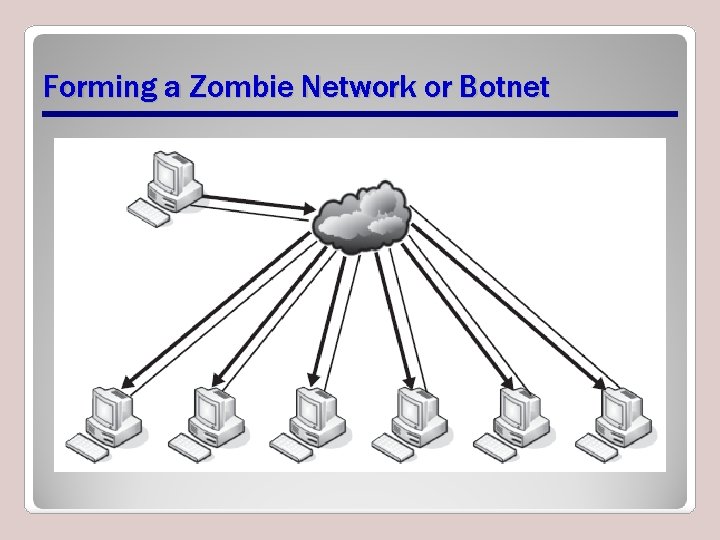
Forming a Zombie Network or Botnet
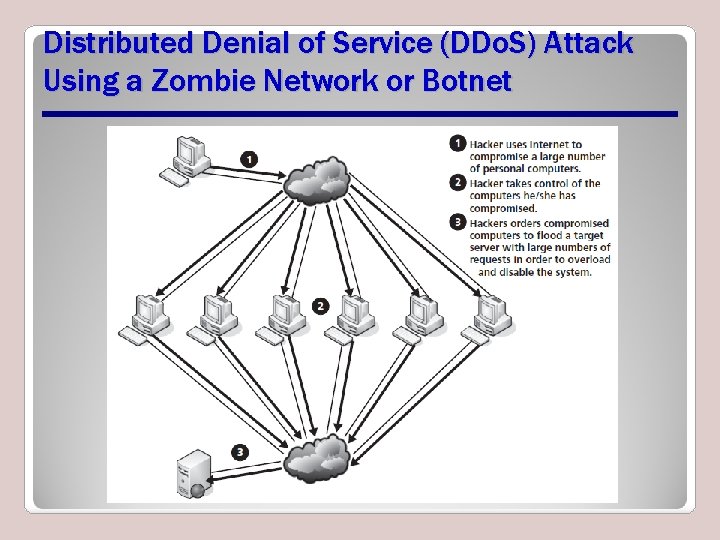
Distributed Denial of Service (DDo. S) Attack Using a Zombie Network or Botnet
Smurf Attacks • A Do. S attack in which the target server or network is flooded with Internet Control Message Protocol (ICMP) replies – Causes overloading of inbound network lines – Named after Smurf Trojan; similar to a Fraggle attack – No longer common
Buffer Overflows • Buffer is a section of memory that has been set aside to use for actions related to a program • Buffer overflow (overrun) occurs when too much data in one section causes it to take space in adjacent memory locations – Overflow attacks vary with operating systems – Different attacks produce different results
Man-in-the-Middle (MITM) Attacks • A person positions him- or herself between two other people and eavesdrops on them • MITM attacks also known as – Bucket-brigade, fire-brigade, monkey-in-the middle, session and TCP hijacking • Attacks used to intercept – HTTP and HTTPS communications – E-mail communications – Encryption key exchanges
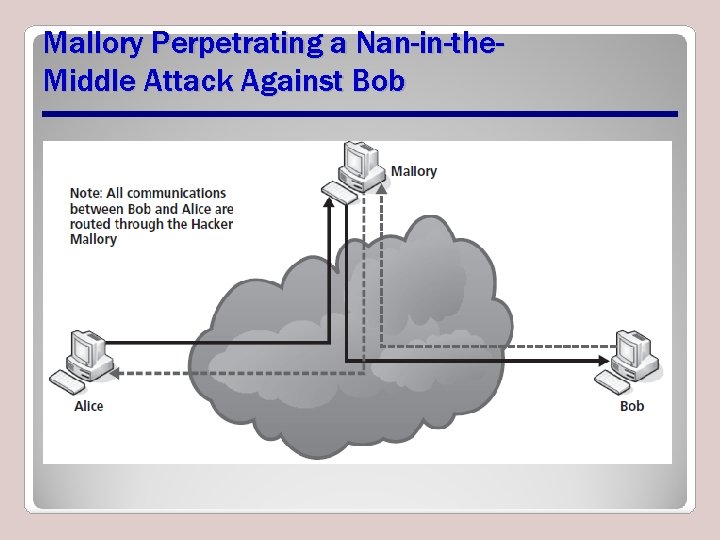
Mallory Perpetrating a Nan-in-the. Middle Attack Against Bob
Packet Sniffing • The practice of capturing packets as they go by on the network and then opening them to see what is in them • Is used to – Spoof addresses – Determine network protocols – View contents of captured packets
FTP Bounce • An exploit against the FTP protocol in which the attacker uses the PORT command to indirectly gain access to ports that are opened on the computer they are attempting to attack • Ports may be reassigned for another purpose • Attack minimizes scan being detected • nmap program can utilize FTP bounce
Wireless Threats • War driving – Warchalking • WEP cracking • WPA cracking • Rogue access points – Evil twin
War Driving • The practice of driving around in a car in an area or neighborhood looking for open wireless networks that can be used by the driver for their own purposes • Warchalking (variation on war driving) – Symbols placed on outdoor surfaces indicating availability and type of wireless access points
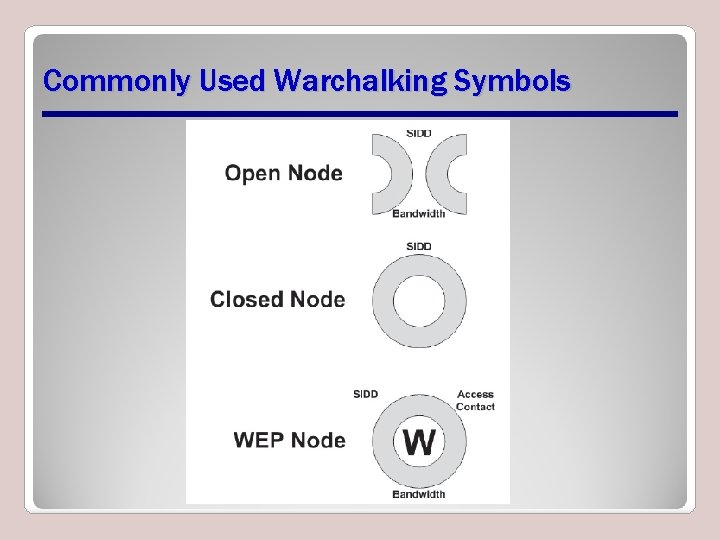
Commonly Used Warchalking Symbols
WEP Cracking • Breaking or decoding an encryption scheme used for passwords, wireless network access, or any other encrypted object • Easiest scheme to crack • Downloadable tools available
WPA Cracking • Same as WEP cracking except encryption protocol targeted is WPA • Has both encryption and authentication functions • Downloadable tools available
Rogue Access Points • Unauthorized access points added to a wireless network • May be malicious or benign • Often used in many man-in-the-middle attacks • Determining legitimate access points • Evil twin
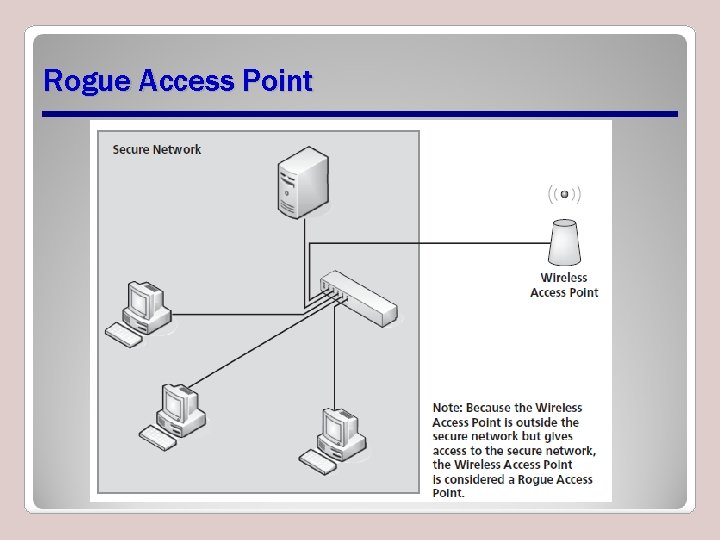
Rogue Access Point
Countering Basic Security Threats Device security Passwords Certificates Encryption Authentication
Device Security • Physical security • Restricting local and remote access – Local access via LAN – Remote access via WAN • Secure versus unsecure access methods – What you know – What you have – What you are
Device Security (Continued) • Protocols – Predefined standardized sets of rules used to communicate on a network • Secure protocols – Predefined standardized sets of rules used to secure communications on a network • Security strives for: – Confidentiality, integrity, authentication
Device Security (Continued) • Examples of secure protocols – Secure Shell (SSH) – Hypertext Transfer Protocol Secure (HTTPS) – Simple Network Management Protocol Version 3 (SNMPV 3) – Secure File Transfer Protocol (SFTP) – Secure Copy Protocol (SCP)
Device Security (Continued) • Examples of unsecure protocols – Telnet – Hypertext Transfer Protocol (HTTP) – File Transfer Protocol (FTP) – Remote Shell (RSH) – Fibre Channel Protocol (FCP) – Simple Network Management Protocol Versions 1 and 2 (SNMPV 1/2)
Passwords • Are used to verify that the person attempting to access a system is the person they claim to be • Should be complex enough to not be easily guessed • Should be renewed and changed periodically • Should not use the same password for everything
Encryption • The process by which a mathematical algorithm is run on a set of data to make it unreadable to someone who does not know the mathematical algorithm used to encode it – Private key encryption – Public key encryption • Network security through confidentiality and integrity
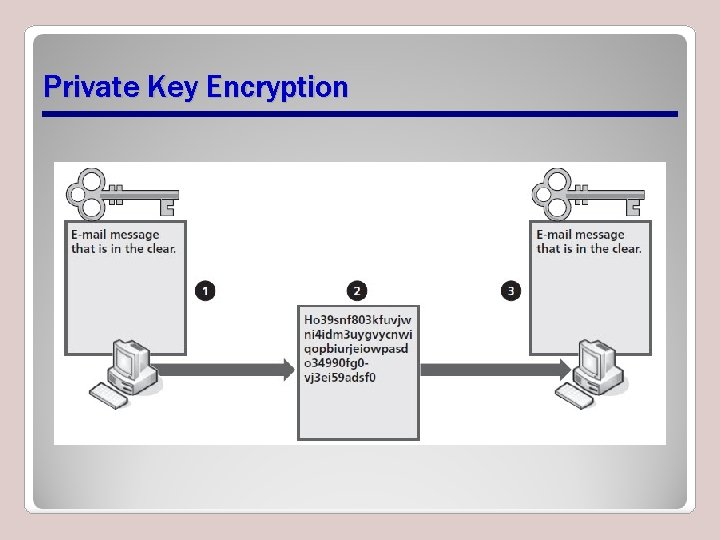
Private Key Encryption
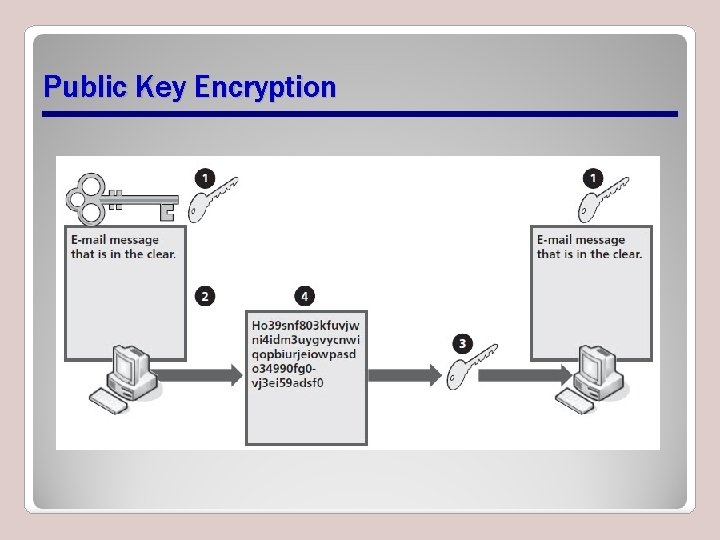
Public Key Encryption
Certificates • Are certifications that a public key is valid • Also called public key certificates or digital certificates • Identify owner of public key (holder) • Contain actual public key • Identify issuer of public key and digital certificate (certificate authority) • Public Key Infrastructure (PKI) • Temporal Key Integrity Protocol (TKIP)
Authentication • The process of verifying a user or computer to be who or what they claim to be • Includes: – Multi-factor authentication – Two-factor authentication – Single sign-on – More
Public Key Infrastructure (PKI) • A set of people, policies, software, and equipment needed to handle digital certificates for various applications – End user is person that wishes to use PKI – Registration authority (RA) verifies that a specific public key belongs to a specific end user – Certificate authority (CA) issues digital certificate to end user, sends information about certificate to a validation authority (VA) – VA verifies certificate when requested by ecommerce site or other online service
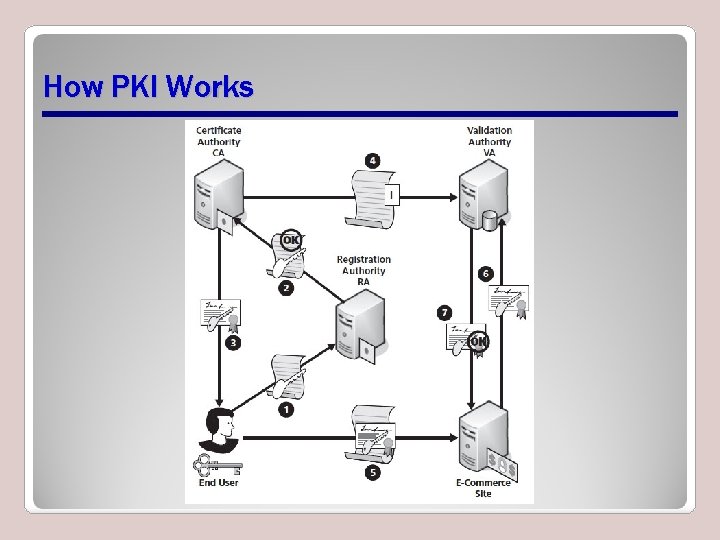
How PKI Works
Kerberos • An authentication protocol that authenticates clients over an unsecured network, most commonly LANs • Most commonly used by Windows-based client/server networks • Composed of an authentication service (AS), a ticket granting service (TGS), and a network services (NS)
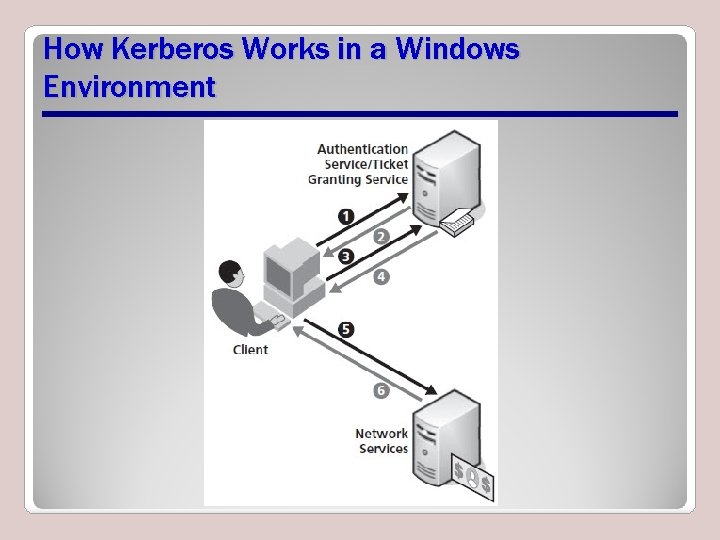
How Kerberos Works in a Windows Environment
Challenge-Handshake Authentication Protocol (CHAP) • An authentication method used by Point-to -Point Protocol (PPP) to verify the identity of a client after a connection has been successfully established • Sends the challenge and response in clear text • Uses three-way handshake to maintain security
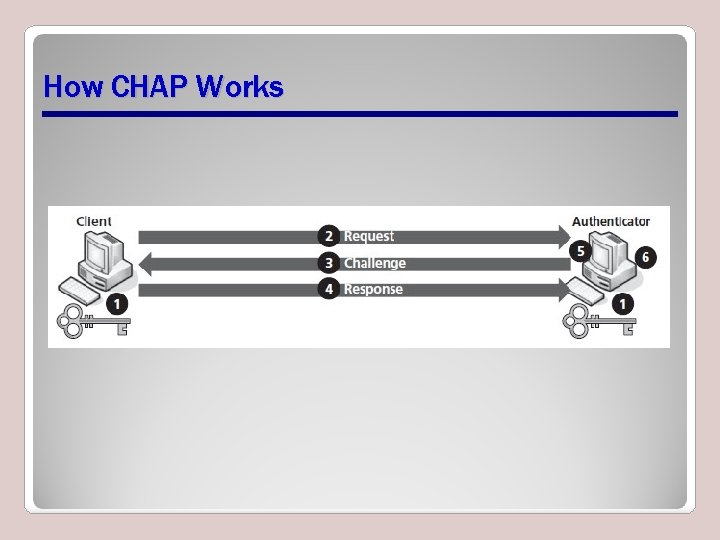
How CHAP Works
Microsoft Challenge-Handshake Authentication Protocol (MS-CHAP) • Closely related to standard CHAP • Designed to work with Microsoft OSs • How MS-CHAP differs from CHAP – Does not require authenticator to store a clear text or reversible encryption secret – Includes mechanisms for allowing retries and changing passwords – Returns failure codes to client if client failed to authenticate on the authenticator
Extensible Authentication Protocol (EAP) • An authentication protocol used primarily in wireless communications • Defines a wide variety of methods to authenticate packets on a network • WAP and WAP 2 use EAP authentication methods
802. 11 x • A standard used to secure wireless LANs (WLANs) that follow 802. 11 standards • Allows a user on a WLAN to be authenticated by a central authentication authority • Key components – Supplicant – Authenticator – Authentication server – Unauthorized state
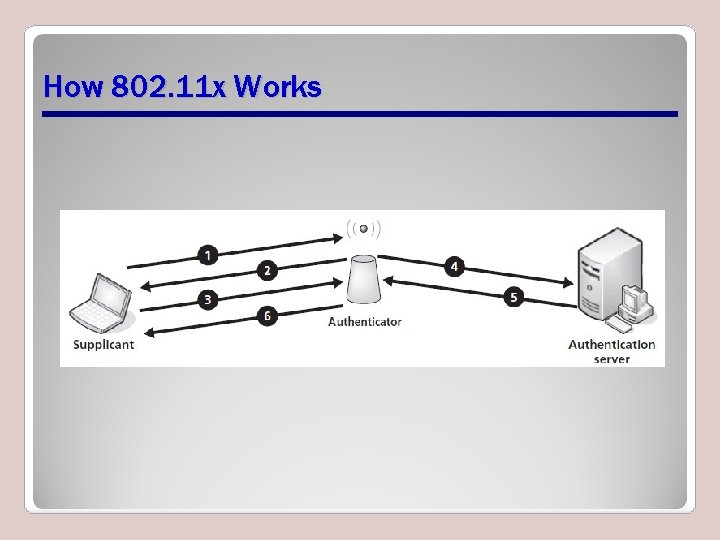
How 802. 11 x Works
Authentication, Authorization, and Accounting (AAA) • Authentication: An identity verification process • Authorization: A process that verifies an entity’s permission to perform some activity or access to a resource • Accounting: Tracking network events • Includes – Remote Authentication Dial-In User Service (RADIUS) – Terminal Access Controller Access-Control System Plus (TACACS+)
Network Access Control (NAC) • Limits what a host, client, or device can do on a proprietary network • Includes authentication and additional security assets – Intrusion detection/prevention software – Antivirus software – Anti-spyware components • Posture assessment
After an Attack Has Occurred Mitigation techniques Incident response
Mitigation Techniques • Things that limit the impact of security threats and/or breaches – Training and awareness – Patch management
Incident Response • Assess the attack using networking tools • Things to review after an attack – How access was gained – Whether attack was stopped before or after imparting damage or suffering theft – Point at which network was breached – Determine what attacker was after or what was stolen – Action needed to avoid future attacks
Network Tools that Can Be Used for Good or Bad • • • Intrusion detection software (IDS) Intrusion prevention software (IPS) Packet sniffers Port scanners Key loggers Password capturing/cracking software
Intrusion Detection Software (IDS) • Software able to detect an intruder has broken into a network or computer – Software firewall – Different from traditional firewall • Detects intruders through – Intrusion database definitions – Comparison of baseline to current activity • Warns of suspected activity
Intrusion Prevention Software (IPS) • An extension of IDS • Capable of taking action against intruders – Closes ports – Blocks specific protocols – Blocks suspiciously behaving IP addresses • Modern IDSs are a combination IDS/IPS
Packet Sniffers (Packet Analyzers) • Programs designed to capture and analyze network packets • Visible data – Source and destination logical addresses – Source and destination MAC addresses – Protocols to transport data – Kind and type of data transported • Results used to detect and take action against intruders
Port Scanners • Programs designed to search for port addresses that are open but not in use • Network administrators search for ports to be closed • Hackers search ports that can be exploited
Key Loggers • Software programs or hardware devices loaded or plugged into a computer to record the keystrokes typed into the keyboard – Useful tool to troubleshoot data entry mistakes – Hackers use to determine usernames and passwords – Parents use to monitor kids’ activities
Password Capturing/Cracking Software • Password capturing is used to capture passwords – Differs from key loggers by capturing encrypted usernames or passwords • Password cracking software is designed to take a captured password and decrypt it – Dictionary attack on passwordlists – Brute force attack with continuing substitution of letters, numbers, and special characters
Summary • Network security considerations should address ways to recognize, combat, and prevent attacks • Social networking includes tricking a person into revealing important information through phishing, stealing passwords, identity theft, and dumpster diving • Malicious software such as spyware, viruses, worms, and Trojans may be used against a company or person
Summary (Continued) • Threats from attackers are undertaken through social engineering, Denial of Service (Do. S) and Distributed Denial of Service (DDo. S) threats, Smurf attacks, buffer overflows, man-in-the-middle attacks, packet sniffing, and FTP bouncing • Wireless threats include war driving, warchalking, WEP cracking, WPA cracking, and exploiting rogue access points
Summary (Continued) • Effective methods to counter basic security threats integrate device security, passwords, encryption, valid certificates, and authentication • Network access control limits access to a proprietary network through authentication and additional security assets to develop and continually refine a posture assessment
Summary (Continued) • Mitigation techniques and incident responses are to be launched after an attack has occurred • Network tools include IDSs, IPSs, packet sniffers, port scanners, key loggers, and password capturing/cracking software
- Slides: 72