
Basic Linux Networking Operation by using Virtual Box
Basic Linux Networking Operation by using Virtual. Box and Virtual Machine Linux 101 Fall 2019, Dr. Cliff Zou
Setup Multiple Virtual Machines in the Same LAN In your computer’s Virtual. Box, install ready the Kali Linux and Metasploitable 2 Linux VM In Virutal. Box Manager, create the default ‘Nat. Network’ ◦ Refer to Page 30 in ‘Virtual. Machine. ppt’ lecture
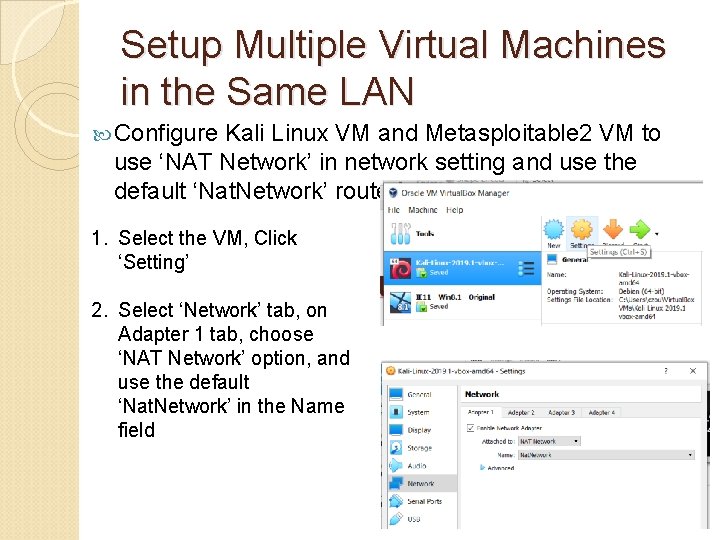
Setup Multiple Virtual Machines in the Same LAN Configure Kali Linux VM and Metasploitable 2 VM to use ‘NAT Network’ in network setting and use the default ‘Nat. Network’ router 1. Select the VM, Click ‘Setting’ 2. Select ‘Network’ tab, on Adapter 1 tab, choose ‘NAT Network’ option, and use the default ‘Nat. Network’ in the Name field
Setup Multiple Virtual Machines in the Same LAN Use Ping command to verify these two VMs are accessible to each other ◦ Running both VMs Account: Kali (root: toor), Metasploitable 2 (msfadmin: msfadmin) ◦ Check each VM’s IP address using ‘ifconfig’ command Refer Page 24 in ‘Virtual. Machine. ppt’ lecture ◦ Run Ping on each VM to ping the other VM Refer Page 25 in ‘Virtual. Machine. ppt’ lecture ◦ Ping should go through on both VMs Note: Metasploitable 2 VM only has text-based
SSH – Secure Remote Login SSH: ‘Secure Shell’ to replace original Telnet program ◦ Connect to a remote Linux computer securely The client/server connection is authenticated using a digital certificate and password is encrypted ◦ Run programs remotely (similar to remote desktop in Windows) ◦ Once connected, you have a command terminal on the remote Linux, and can run text-based commands In this class, Metasploitable 2 Linux has a SSH server running by default ◦ You can connect to it by SSH from Kali Linux VM
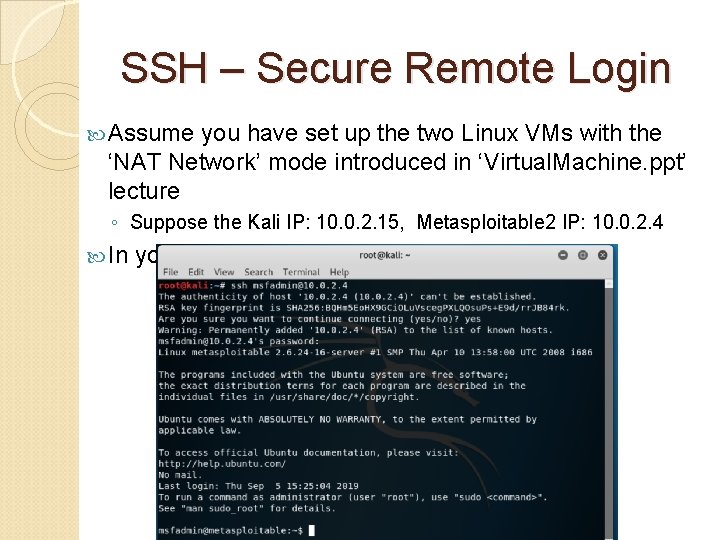
SSH – Secure Remote Login Assume you have set up the two Linux VMs with the ‘NAT Network’ mode introduced in ‘Virtual. Machine. ppt’ lecture ◦ Suppose the Kali IP: 10. 0. 2. 15, Metasploitable 2 IP: 10. 0. 2. 4 In your Kali Linux command terminal:
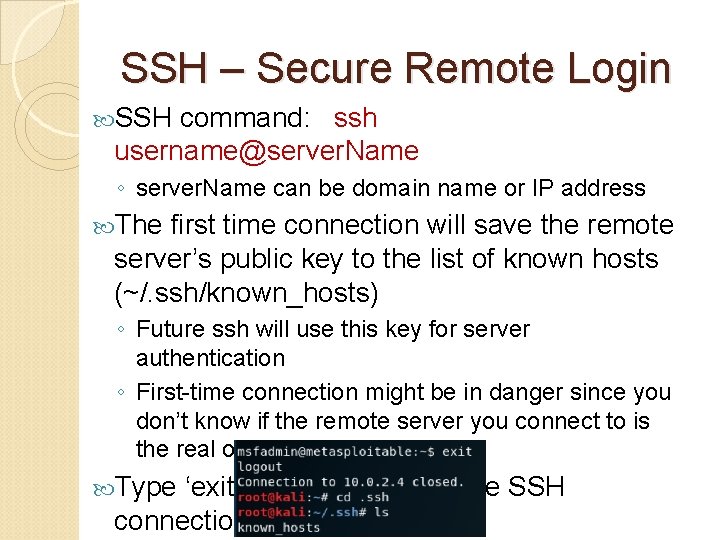
SSH – Secure Remote Login SSH command: ssh username@server. Name ◦ server. Name can be domain name or IP address The first time connection will save the remote server’s public key to the list of known hosts (~/. ssh/known_hosts) ◦ Future ssh will use this key for server authentication ◦ First-time connection might be in danger since you don’t know if the remote server you connect to is the real one or not Type ‘exit’ command to exit the SSH connection
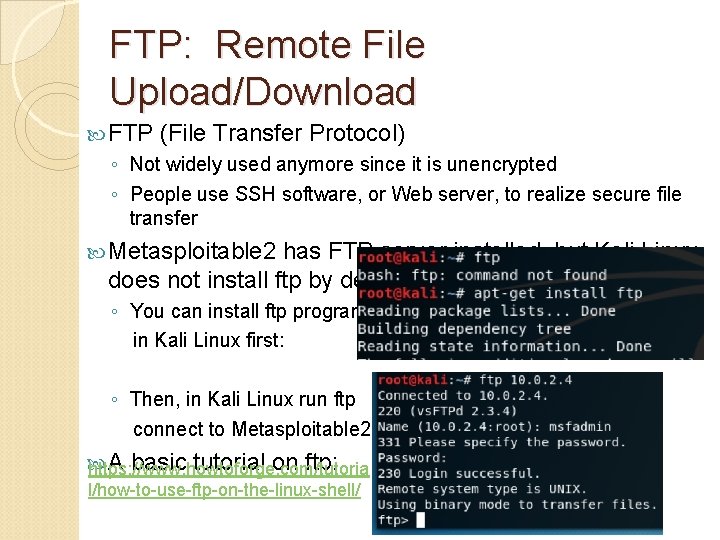
FTP: Remote File Upload/Download FTP (File Transfer Protocol) ◦ Not widely used anymore since it is unencrypted ◦ People use SSH software, or Web server, to realize secure file transfer Metasploitable 2 has FTP server installed, but Kali Linux does not install ftp by default ◦ You can install ftp program in Kali Linux first: ◦ Then, in Kali Linux run ftp connect to Metasploitable 2: A basic tutorial on ftp: https: //www. howtoforge. com/tutoria l/how-to-use-ftp-on-the-linux-shell/
Basic Network Scanning: Nmap is popular free & open-source network port scanner (https: //nmap. org/) ◦ A running server (web, email, ssh…) must open its predefined port to accept incoming connections ◦ Nmap sends a flood of connection requests to check what ports on remote machine are open, these running services are potential attack venue A port can be: ◦ Closed (not in use) ◦ Open (listening), or ◦ Filtered (the client computer asked for open or closed status report, and the target computer did not reply, usually due to a firewall. )
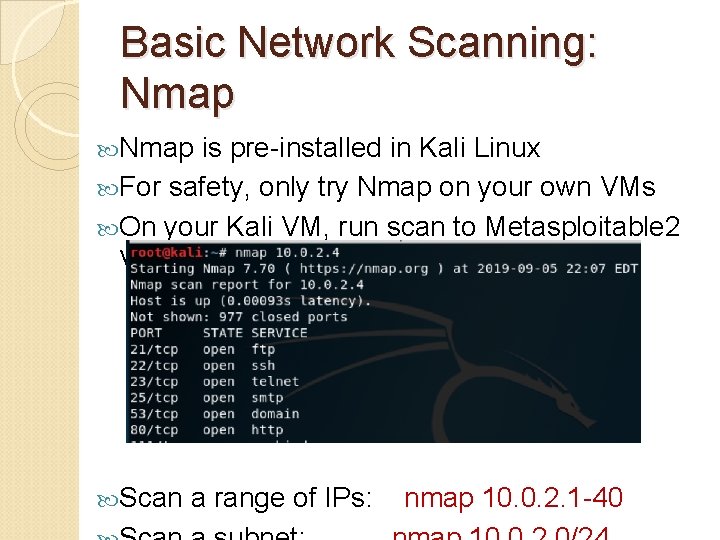
Basic Network Scanning: Nmap is pre-installed in Kali Linux For safety, only try Nmap on your own VMs On your Kali VM, run scan to Metasploitable 2 VM Scan a range of IPs: nmap 10. 0. 2. 1 -40
Basic Network Scanning: Nmap Scan multiple predefined ports ◦ nmap -p 21, 22, 80 10. 0. 2. 4 (scan ftp, ssh, web services) Detect Operating System besides normal scan ◦ nmap -O 10. 0. 2. 4 Run scan script looking for known vulnerability ◦ nmap --script vuln 10. 0. 2. 4 ◦ Note: this is a much slower scanning process, be patient
Check Your Password Security Kali Linux pre-installed several password cracking tools, and has several password dictionaries ◦ They contain most used passwords known to hackers Some password files: ◦ /usr/share/wordlists/metasploit/ : many default passwords for various services ◦ /usr/share/wordlists/rockyou. txt. gz: 533 MB comprehensive passwords ◦ /usr/share/john/password. lst: used by Jt. R cracker
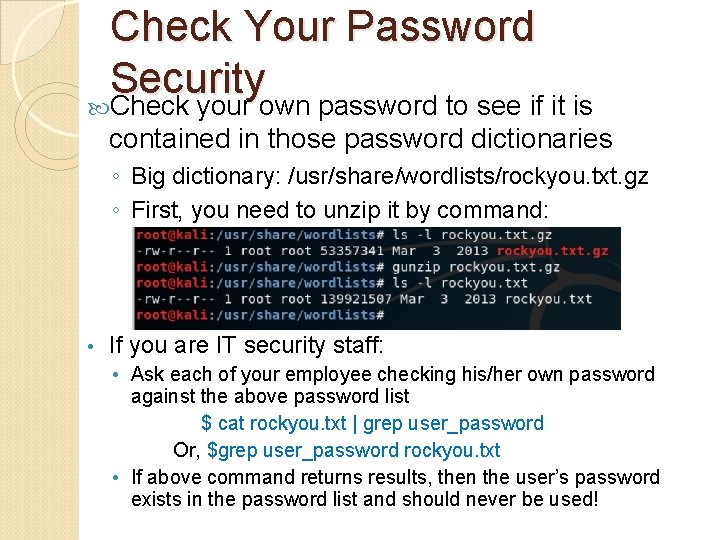
Check Your Password Security Check your own password to see if it is contained in those password dictionaries ◦ Big dictionary: /usr/share/wordlists/rockyou. txt. gz ◦ First, you need to unzip it by command: • If you are IT security staff: • Ask each of your employee checking his/her own password against the above password list $ cat rockyou. txt | grep user_password Or, $grep user_password rockyou. txt • If above command returns results, then the user’s password exists in the password list and should never be used!
- Slides: 13