
Basic layout for KS 2 3 and 4
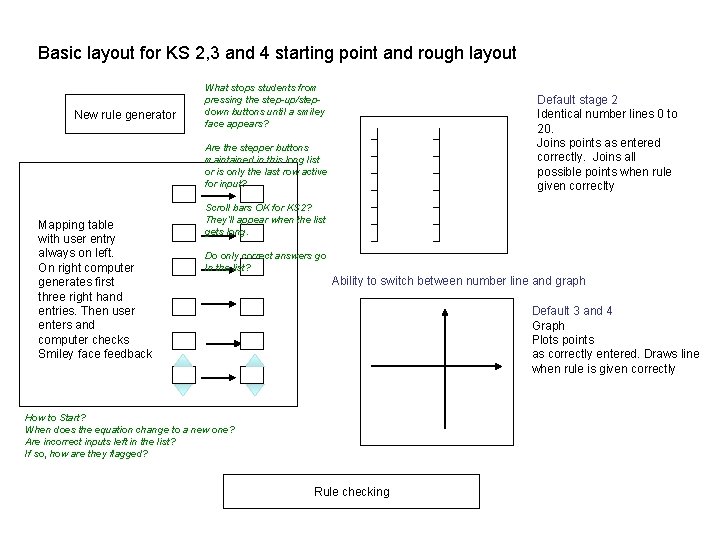
Basic layout for KS 2, 3 and 4 starting point and rough layout New rule generator What stops students from pressing the step-up/stepdown buttons until a smiley face appears? Default stage 2 Identical number lines 0 to 20. Joins points as entered correctly. Joins all possible points when rule given correclty Are the stepper buttons maintained in this long list or is only the last row active for input? Mapping table with user entry always on left. On right computer generates first three right hand entries. Then user enters and computer checks Smiley face feedback Scroll bars OK for KS 2? They’ll appear when the list gets long. Do only correct answers go In the list? Ability to switch between number line and graph Default 3 and 4 Graph Plots points as correctly entered. Draws line when rule is given correctly How to Start? When does the equation change to a new one? Are incorrect inputs left in the list? If so, how are they flagged? Rule checking
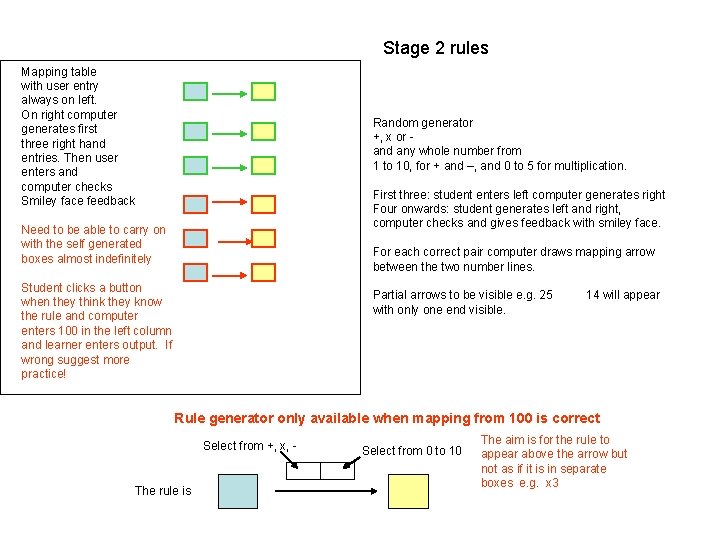
Stage 2 rules Mapping table with user entry always on left. On right computer generates first three right hand entries. Then user enters and computer checks Smiley face feedback Random generator +, x or and any whole number from 1 to 10, for + and –, and 0 to 5 for multiplication. First three: student enters left computer generates right Four onwards: student generates left and right, computer checks and gives feedback with smiley face. Need to be able to carry on with the self generated boxes almost indefinitely For each correct pair computer draws mapping arrow between the two number lines. Student clicks a button when they think they know the rule and computer enters 100 in the left column and learner enters output. If wrong suggest more practice! Partial arrows to be visible e. g. 25 with only one end visible. 14 will appear Rule generator only available when mapping from 100 is correct Select from +, x, - The rule is Select from 0 to 10 The aim is for the rule to appear above the arrow but not as if it is in separate boxes e. g. x 3
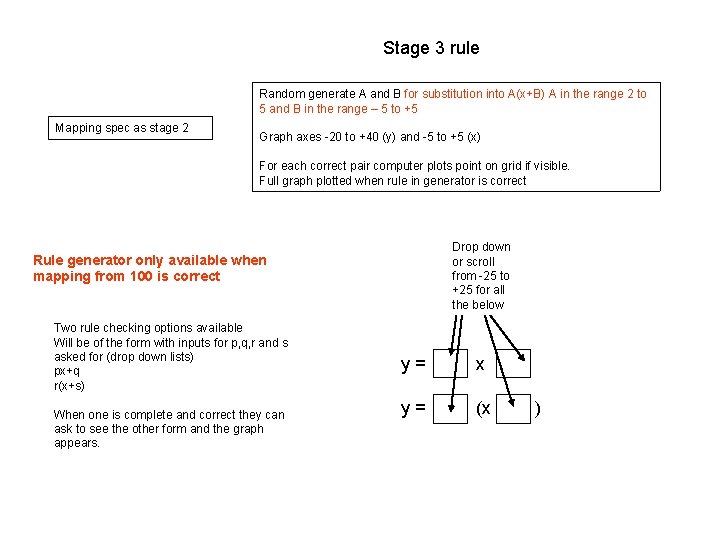
Stage 3 rule Random generate A and B for substitution into A(x+B) A in the range 2 to 5 and B in the range – 5 to +5 Mapping spec as stage 2 Graph axes -20 to +40 (y) and -5 to +5 (x) For each correct pair computer plots point on grid if visible. Full graph plotted when rule in generator is correct Drop down or scroll from -25 to +25 for all the below Rule generator only available when mapping from 100 is correct Two rule checking options available Will be of the form with inputs for p, q, r and s asked for (drop down lists) px+q r(x+s) When one is complete and correct they can ask to see the other form and the graph appears. y= x y= (x )
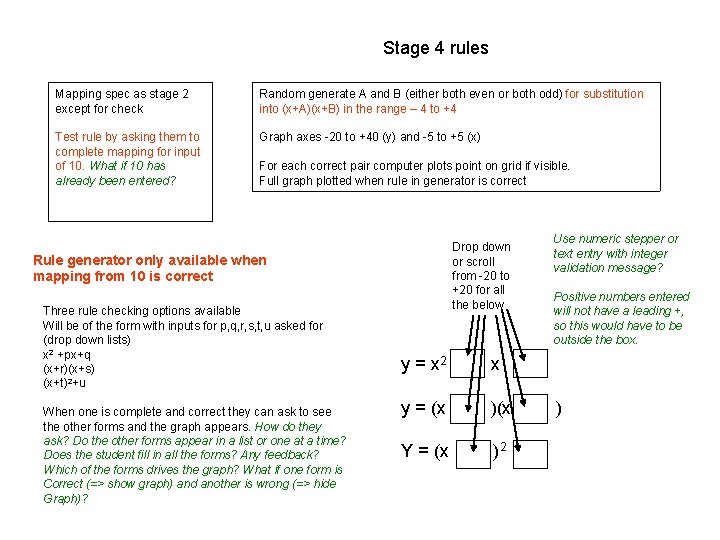
Stage 4 rules Mapping spec as stage 2 except for check Random generate A and B (either both even or both odd) for substitution into (x+A)(x+B) in the range – 4 to +4 Test rule by asking them to complete mapping for input of 10. What if 10 has already been entered? Graph axes -20 to +40 (y) and -5 to +5 (x) For each correct pair computer plots point on grid if visible. Full graph plotted when rule in generator is correct Drop down or scroll from -20 to +20 for all the below Rule generator only available when mapping from 10 is correct Three rule checking options available Will be of the form with inputs for p, q, r, s, t, u asked for (drop down lists) x 2 +px+q (x+r)(x+s) (x+t)2+u When one is complete and correct they can ask to see the other forms and the graph appears. How do they ask? Do the other forms appear in a list or one at a time? Does the student fill in all the forms? Any feedback? Which of the forms drives the graph? What if one form is Correct (=> show graph) and another is wrong (=> hide Graph)? y = x 2 x y = (x )(x Y = (x )2 Use numeric stepper or text entry with integer validation message? Positive numbers entered will not have a leading +, so this would have to be outside the box. )
- Slides: 4