
Basic Electricity and Electronics Copyright Texas Education Agency
Basic Electricity and Electronics Copyright © Texas Education Agency, 2012. All rights reserved.
Transistor Basics n n A semiconductor device Conductivity is controlled by current n n An example of a voltage controlled device is a MOSFET Made from a silicon crystal Doped with impurities to allow conductivity to be controlled N and P type doping use different conducting particles (electrons and holes) Copyright © Texas Education Agency, 2012. All rights reserved.

n Here is the same circuit, shown using schematic symbols: RC RB VBB IC VCC IB n IB = VBB -. 7 / RB n IC = VCC (- VCE) / RC n IE = I C + IB IB << IC Copyright © Texas Education Agency, 2012. All rights reserved.
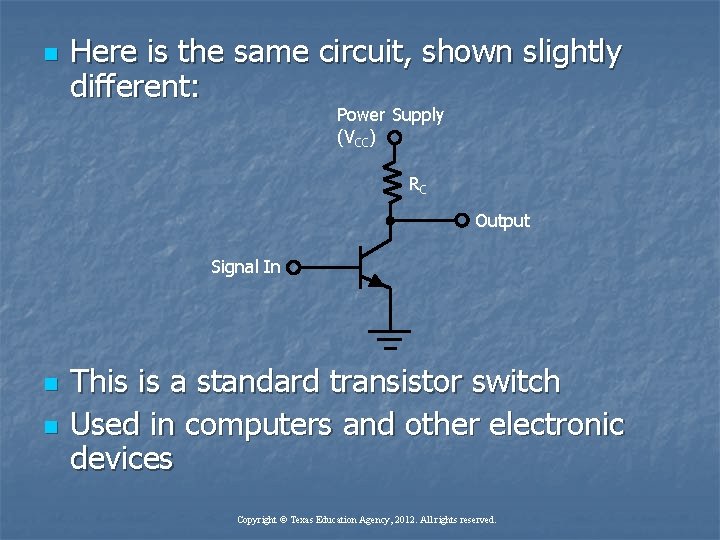
n Here is the same circuit, shown slightly different: Power Supply (VCC) RC Output Signal In n n This is a standard transistor switch Used in computers and other electronic devices Copyright © Texas Education Agency, 2012. All rights reserved.
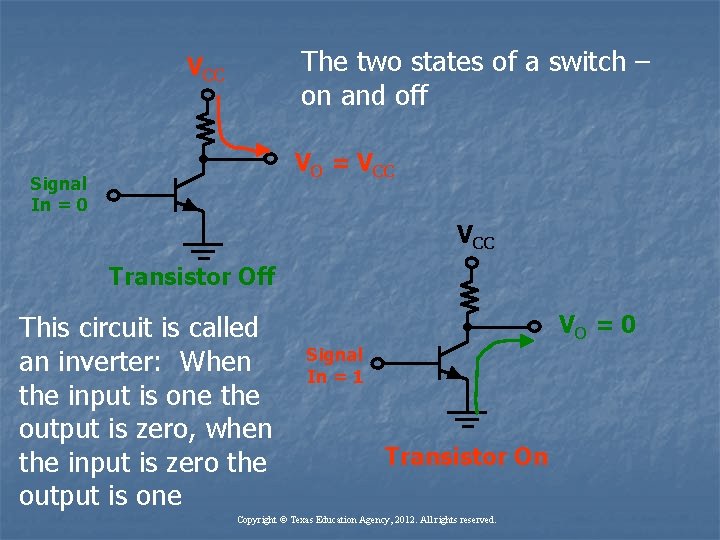
The two states of a switch – on and off VCC VO = VCC Signal In = 0 VCC Transistor Off This circuit is called an inverter: When the input is one the output is zero, when the input is zero the output is one VO = 0 Signal In = 1 Transistor On Copyright © Texas Education Agency, 2012. All rights reserved.
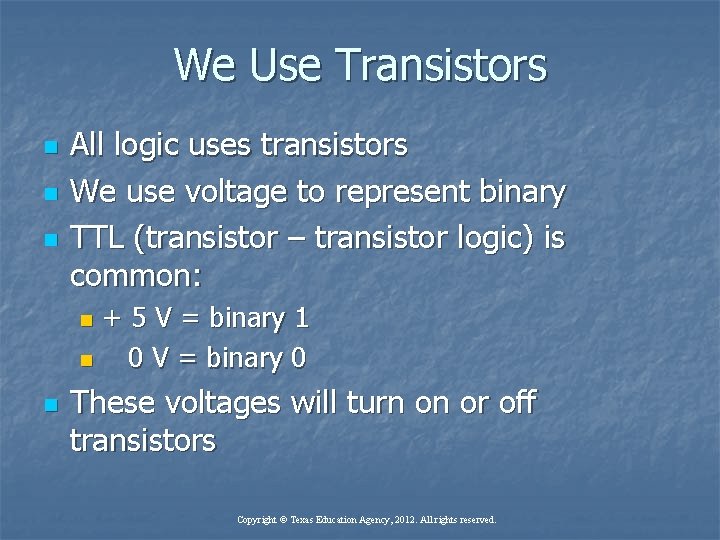
We Use Transistors n n n All logic uses transistors We use voltage to represent binary TTL (transistor – transistor logic) is common: + 5 V = binary 1 n 0 V = binary 0 n n These voltages will turn on or off transistors Copyright © Texas Education Agency, 2012. All rights reserved.
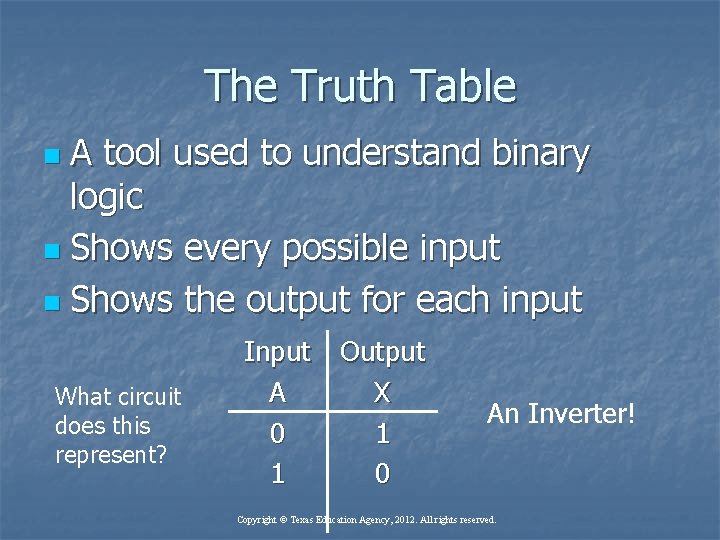
The Truth Table A tool used to understand binary logic n Shows every possible input n Shows the output for each input n What circuit does this represent? Input Output A X 0 1 1 0 An Inverter! Copyright © Texas Education Agency, 2012. All rights reserved.
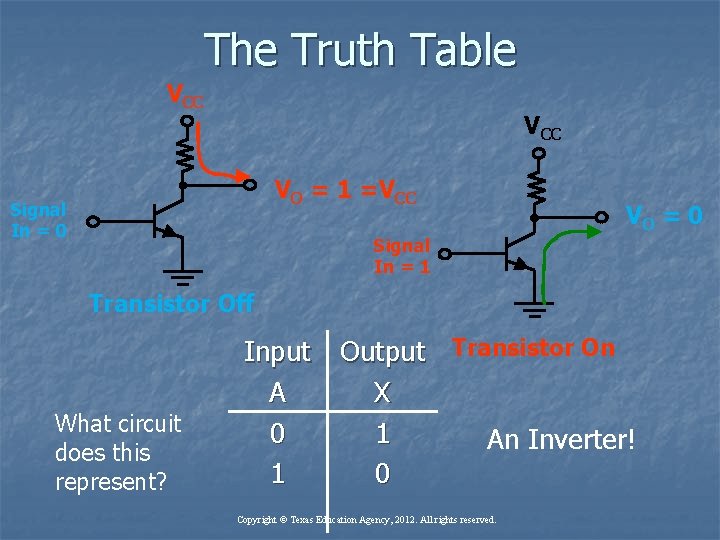
The Truth Table VCC VO = 1 =VCC Signal In = 0 VO = 0 Signal In = 1 Transistor Off What circuit does this represent? Input Output Transistor On A X 0 1 An Inverter! 1 0 Copyright © Texas Education Agency, 2012. All rights reserved.
Binary Logic n n n A set of rules that applies to a digital circuit Logic defines the way the circuit will act Given a set of inputs, the output will produce a specific outcome Always acts exactly the same way We use a truth table to help us define how we want the logic circuit to act Copyright © Texas Education Agency, 2012. All rights reserved.
n n n We build the circuit to perform the logic Always does the same thing with the same inputs We must define each possible input or input combination We have to define exactly what output we want for a particular input Lets look at an example Copyright © Texas Education Agency, 2012. All rights reserved.
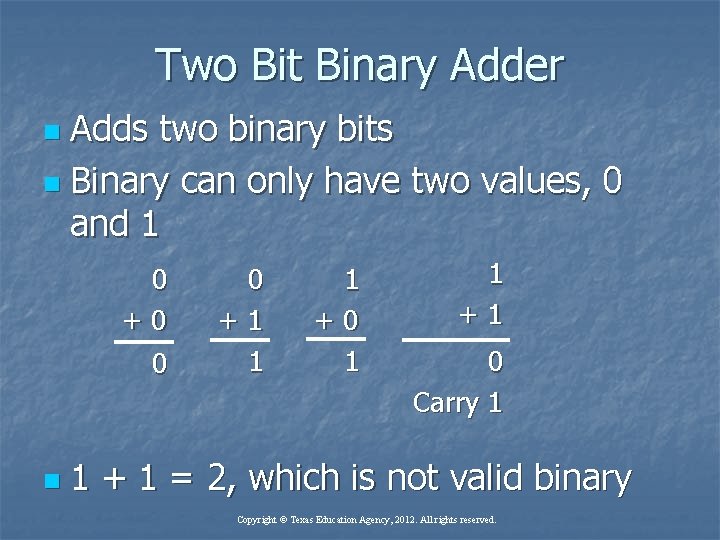
Two Bit Binary Adder Adds two binary bits n Binary can only have two values, 0 and 1 n 0 +0 0 n 0 +1 1 1 +0 1 1 +1 0 Carry 1 1 + 1 = 2, which is not valid binary Copyright © Texas Education Agency, 2012. All rights reserved.
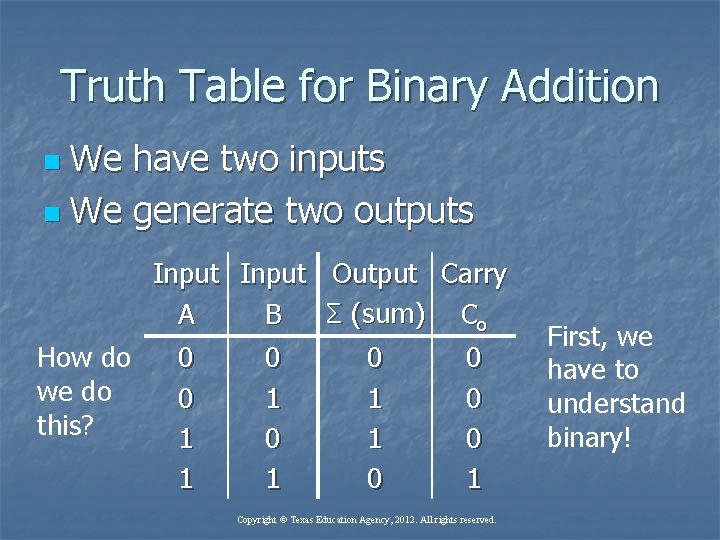
Truth Table for Binary Addition We have two inputs n We generate two outputs n Input Output Carry Σ (sum) Co A B How do we do this? 0 0 1 1 0 1 0 1 1 0 0 1 Copyright © Texas Education Agency, 2012. All rights reserved. First, we have to understand binary!
Binary Numbers n n n Binary only has two values, 0 and 1 The decimal number system has ten values, 0 through 9 How do we count higher than 9 in decimal? We add decimal places How do we count higher than one in binary? We add binary bits Copyright © Texas Education Agency, 2012. All rights reserved.
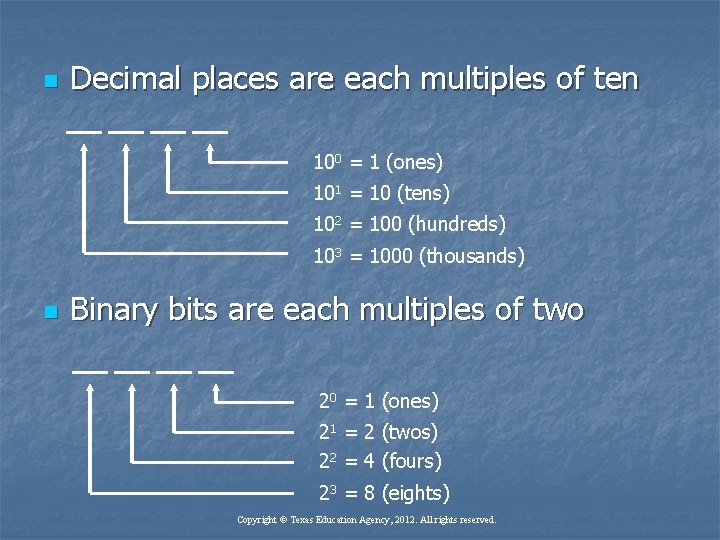
n Decimal places are each multiples of ten 100 = 1 (ones) 101 = 10 (tens) 102 = 100 (hundreds) 103 = 1000 (thousands) n Binary bits are each multiples of two 20 = 1 (ones) 21 = 2 (twos) 22 = 4 (fours) 23 = 8 (eights) Copyright © Texas Education Agency, 2012. All rights reserved.
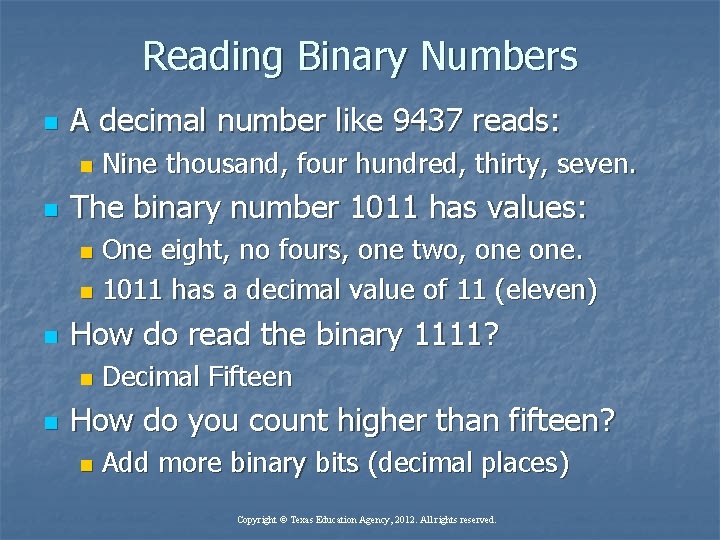
Reading Binary Numbers n A decimal number like 9437 reads: n n Nine thousand, four hundred, thirty, seven. The binary number 1011 has values: One eight, no fours, one two, one. n 1011 has a decimal value of 11 (eleven) n n How do read the binary 1111? n n Decimal Fifteen How do you count higher than fifteen? n Add more binary bits (decimal places) Copyright © Texas Education Agency, 2012. All rights reserved.
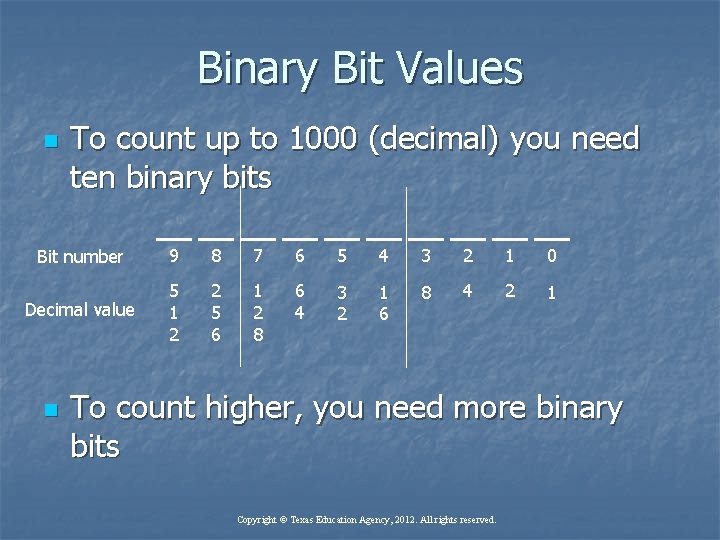
Binary Bit Values n To count up to 1000 (decimal) you need ten binary bits Bit number 9 8 7 6 5 4 3 2 1 0 Decimal value 5 1 2 2 5 6 1 2 8 6 4 3 2 1 6 8 4 2 1 n To count higher, you need more binary bits Copyright © Texas Education Agency, 2012. All rights reserved.
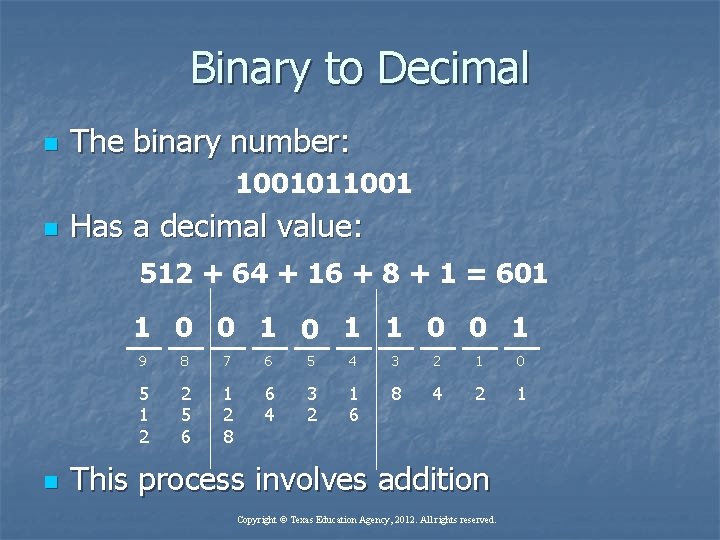
Binary to Decimal n The binary number: 1001011001 n Has a decimal value: 512 + 64 + 16 + 8 + 1 = 601 1 0 0 1 n 9 8 7 6 5 4 3 2 1 0 5 1 2 2 5 6 1 2 8 6 4 3 2 1 6 8 4 2 1 This process involves addition Copyright © Texas Education Agency, 2012. All rights reserved.
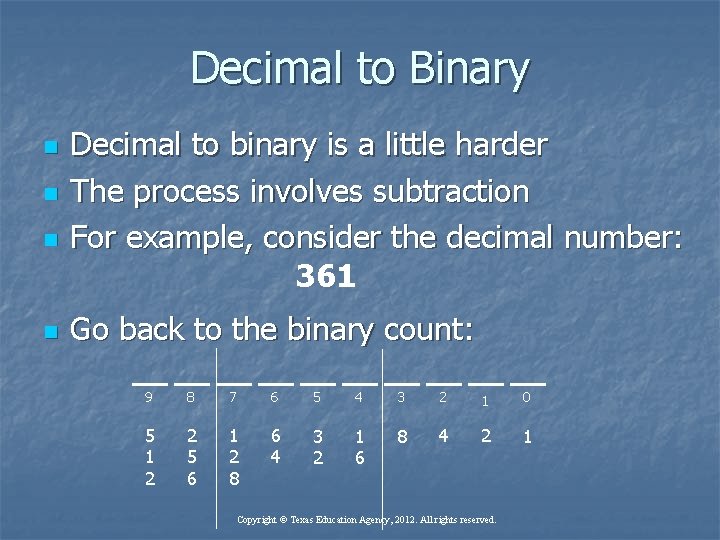
Decimal to Binary n n Decimal to binary is a little harder The process involves subtraction For example, consider the decimal number: 361 Go back to the binary count: 9 8 7 6 5 4 3 2 1 0 5 1 2 2 5 6 1 2 8 6 4 3 2 1 6 8 4 2 1 Copyright © Texas Education Agency, 2012. All rights reserved.
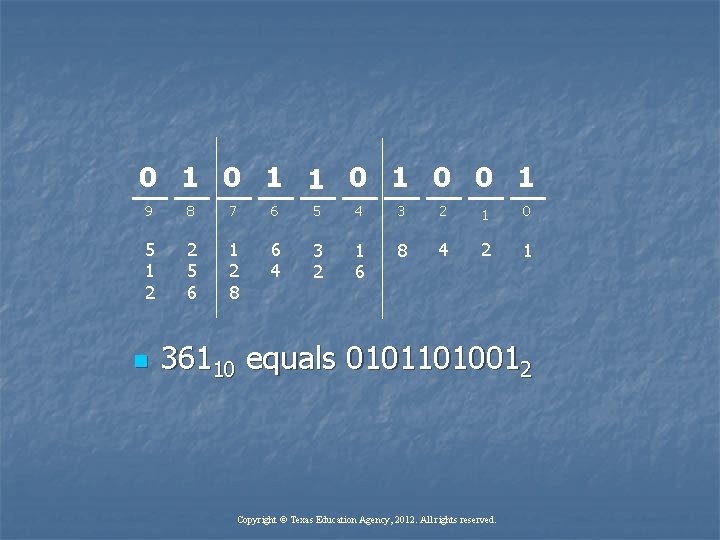
0 1 1 0 0 1 9 8 7 6 5 4 3 2 1 0 5 1 2 2 5 6 1 2 8 6 4 3 2 1 6 8 4 2 1 n 36110 equals 01011010012 Copyright © Texas Education Agency, 2012. All rights reserved.
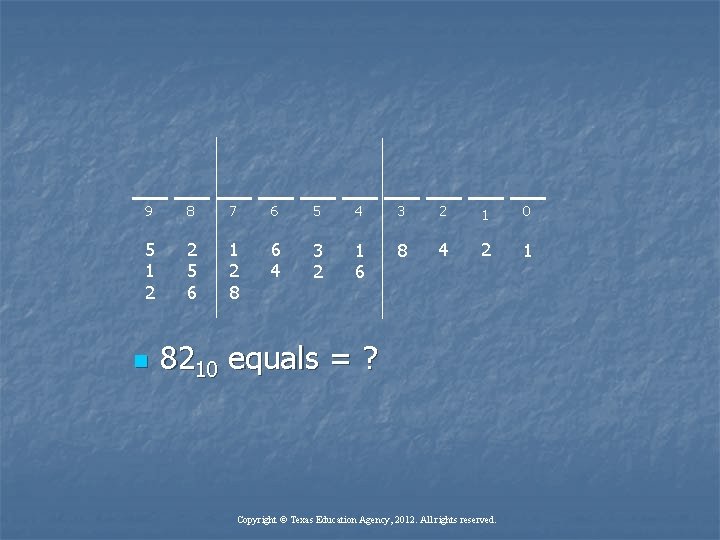
9 8 7 6 5 4 3 2 1 0 5 1 2 2 5 6 1 2 8 6 4 3 2 1 6 8 4 2 1 n 8210 equals = ? Copyright © Texas Education Agency, 2012. All rights reserved.
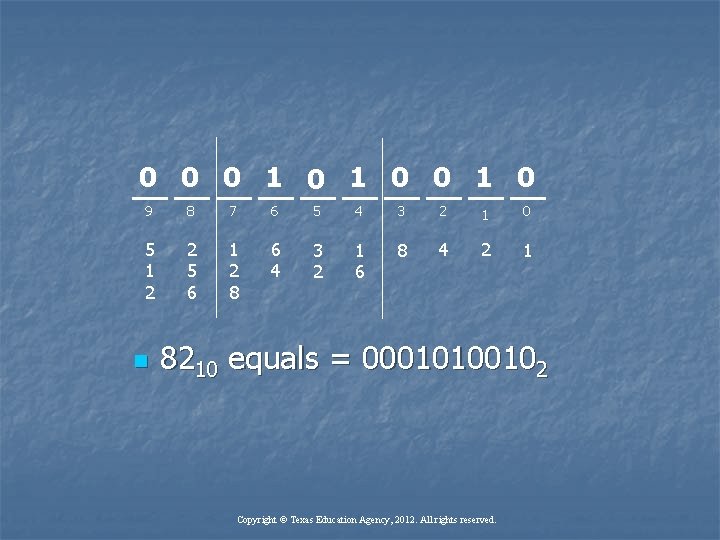
0 0 0 1 0 9 8 7 6 5 4 3 2 1 0 5 1 2 2 5 6 1 2 8 6 4 3 2 1 6 8 4 2 1 n 8210 equals = 00010100102 Copyright © Texas Education Agency, 2012. All rights reserved.
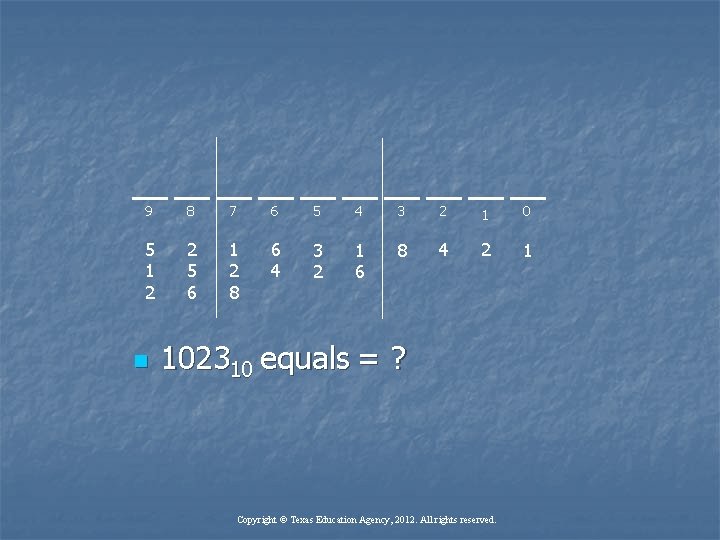
9 8 7 6 5 4 3 2 1 0 5 1 2 2 5 6 1 2 8 6 4 3 2 1 6 8 4 2 1 n 102310 equals = ? Copyright © Texas Education Agency, 2012. All rights reserved.
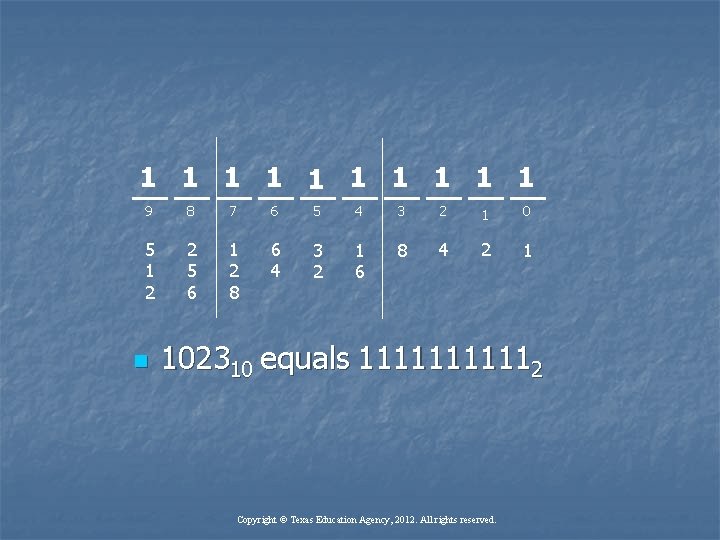
1 1 1 1 1 9 8 7 6 5 4 3 2 1 0 5 1 2 2 5 6 1 2 8 6 4 3 2 1 6 8 4 2 1 n 102310 equals 111112 Copyright © Texas Education Agency, 2012. All rights reserved.
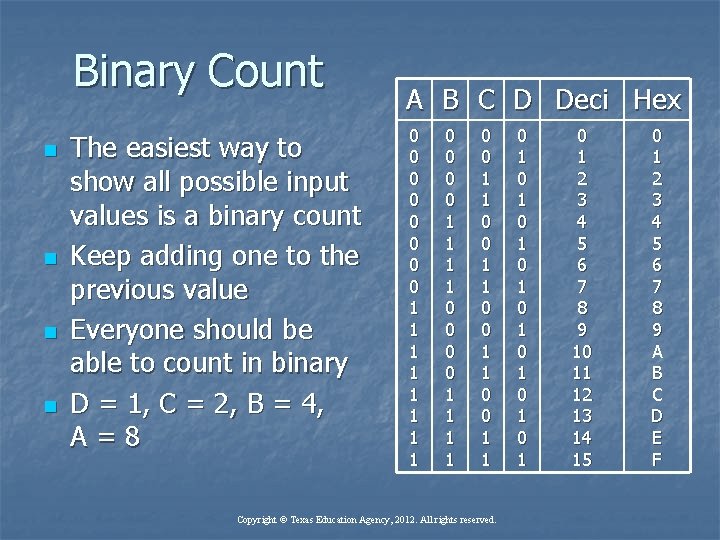
Binary Count n n The easiest way to show all possible input values is a binary count Keep adding one to the previous value Everyone should be able to count in binary D = 1, C = 2, B = 4, A=8 A B C D Deci Hex 0 0 0 0 1 1 1 1 0 0 1 1 Copyright © Texas Education Agency, 2012. All rights reserved. 0 1 0 1 0 1 2 3 4 5 6 7 8 9 10 11 12 13 14 15 0 1 2 3 4 5 6 7 8 9 A B C D E F
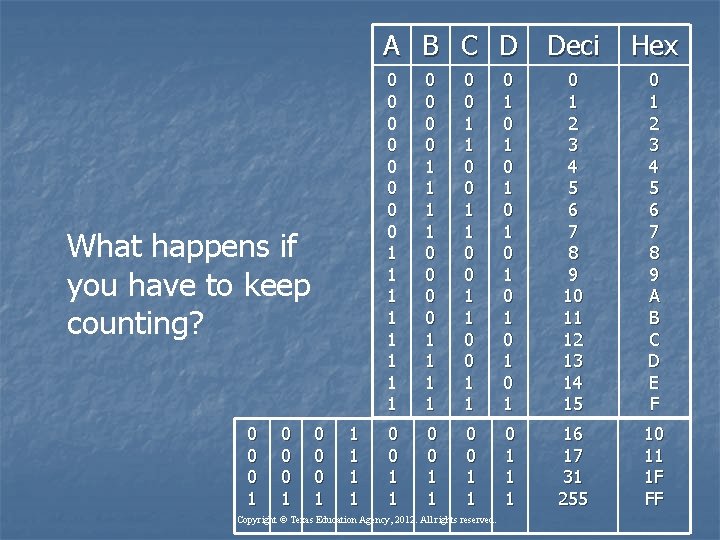
A B C D Deci What happens if you have to keep counting? 0 0 0 1 1 1 Hex 0 0 0 0 1 1 1 1 0 0 1 1 0 1 0 1 0 1 2 3 4 5 6 7 8 9 10 11 12 13 14 15 0 1 2 3 4 5 6 7 8 9 A B C D E F 0 0 1 1 1 16 17 31 255 10 11 1 F FF Copyright © Texas Education Agency, 2012. All rights reserved.
Hexadecimal n n n Computers and electronic devices communicate in binary All those 1’s and 0’s are confusing Is there an easy way to tell what the binary values are? YES – it’s called Hexadecimal is a base 16 number system Hexadecimal exactly represents 4 binary bits Copyright © Texas Education Agency, 2012. All rights reserved.
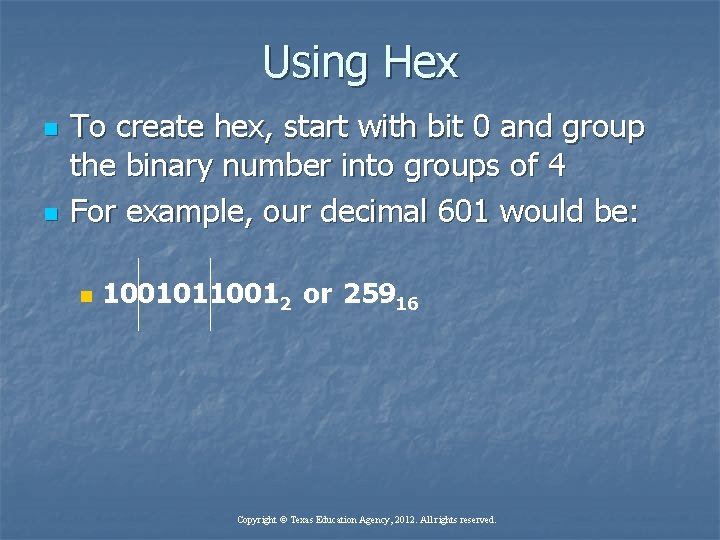
Using Hex n n To create hex, start with bit 0 and group the binary number into groups of 4 For example, our decimal 601 would be: n 10010110012 or 25916 Copyright © Texas Education Agency, 2012. All rights reserved.
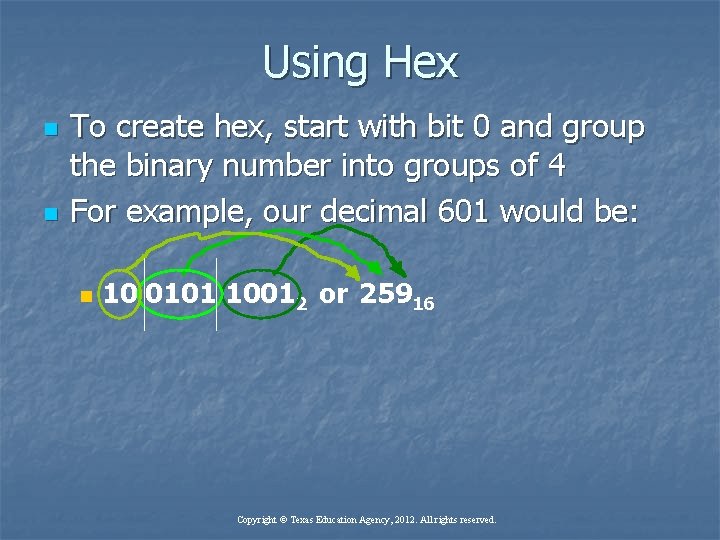
Using Hex n n To create hex, start with bit 0 and group the binary number into groups of 4 For example, our decimal 601 would be: n 10 0101 10012 or 25916 Copyright © Texas Education Agency, 2012. All rights reserved.
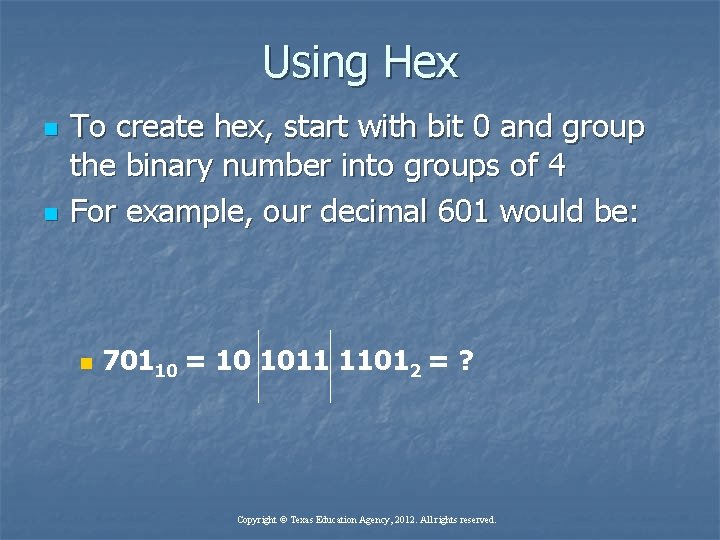
Using Hex n n To create hex, start with bit 0 and group the binary number into groups of 4 For example, our decimal 601 would be: n 70110 = 10 1011 11012 = ? Copyright © Texas Education Agency, 2012. All rights reserved.
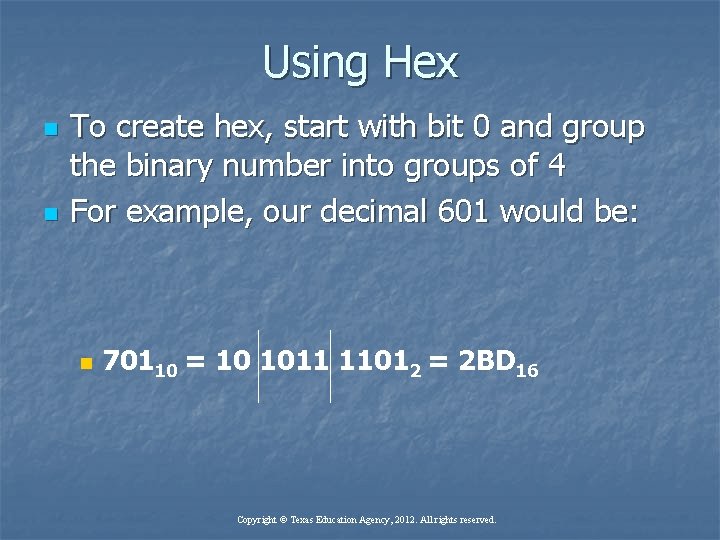
Using Hex n n To create hex, start with bit 0 and group the binary number into groups of 4 For example, our decimal 601 would be: n 70110 = 10 1011 11012 = 2 BD 16 Copyright © Texas Education Agency, 2012. All rights reserved.
n There are several ways to indicate the hex number system: n n n Use the subscript 16 Use a lower case h right after the number Use a dollar sign, e. g. $2 BD Hex is a shorthand way of representing binary The hex number always exactly represents 4 binary bits Copyright © Texas Education Agency, 2012. All rights reserved.
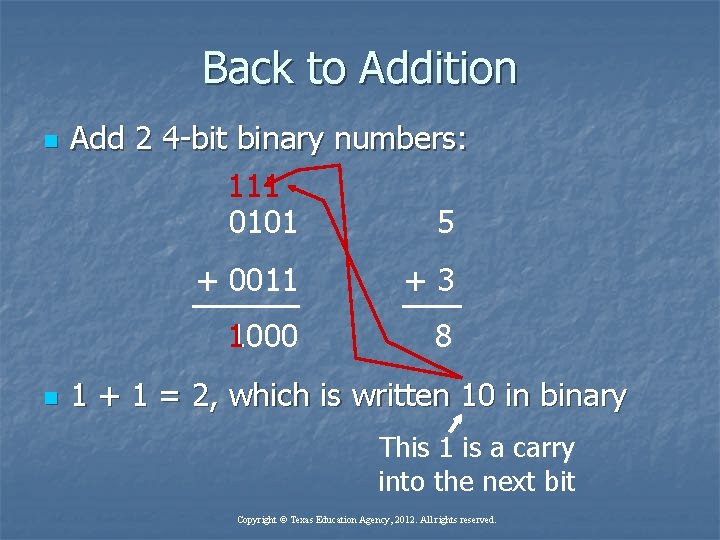
Back to Addition n n Add 2 4 -bit binary numbers: 111 0101 5 + 0011 +3 11000 8 1 + 1 = 2, which is written 10 in binary This 1 is a carry into the next bit Copyright © Texas Education Agency, 2012. All rights reserved.
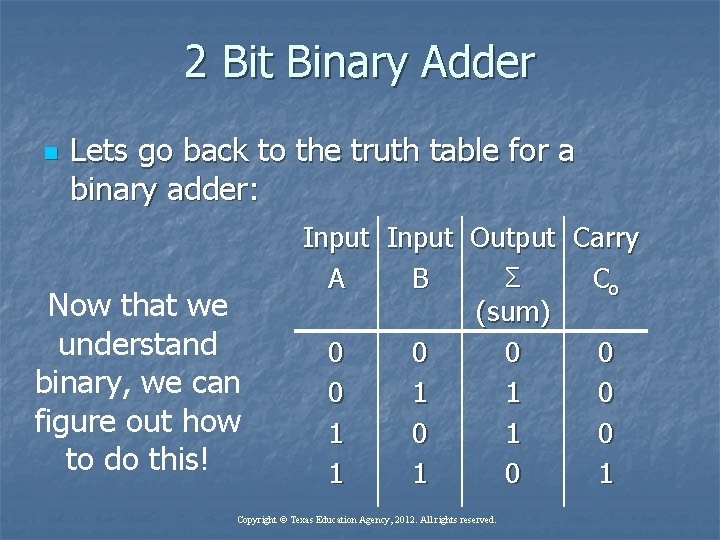
2 Bit Binary Adder n Lets go back to the truth table for a binary adder: Now that we understand binary, we can figure out how to do this! Input Output Carry Σ A B Co (sum) 0 0 0 1 1 0 1 0 1 Copyright © Texas Education Agency, 2012. All rights reserved.
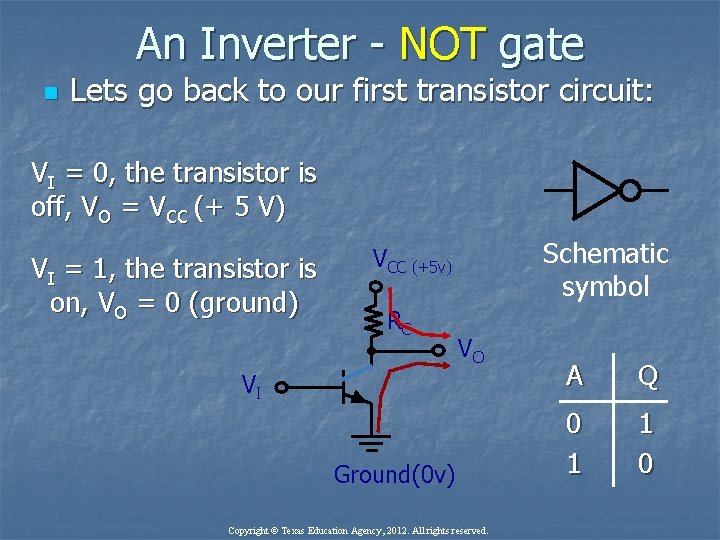
An Inverter - NOT gate n Lets go back to our first transistor circuit: VI = 0, the transistor is off, VO = VCC (+ 5 V) VI = 1, the transistor is on, VO = 0 (ground) Schematic symbol VCC (+5 v) RC VO VI Ground(0 v) Copyright © Texas Education Agency, 2012. All rights reserved. A Q 0 1 1 0
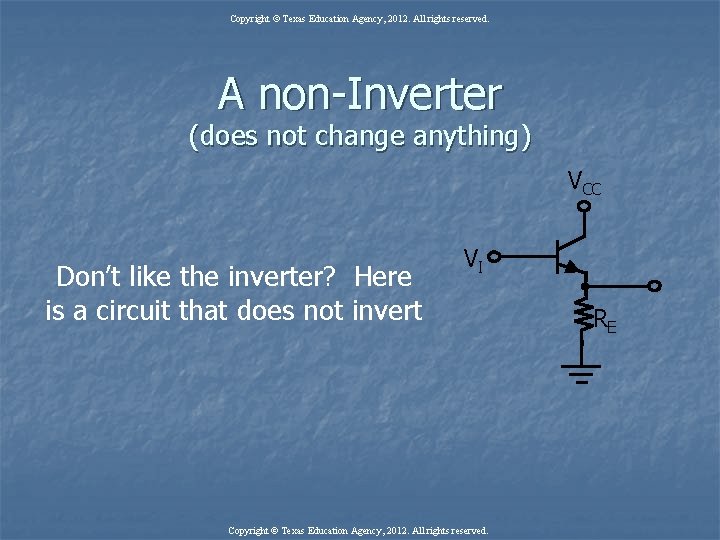
Copyright © Texas Education Agency, 2012. All rights reserved. A non-Inverter (does not change anything) VCC Don’t like the inverter? Here is a circuit that does not invert VI Copyright © Texas Education Agency, 2012. All rights reserved. RE
n n We have established the concept that voltage turns on or off transistors We use transistors to make the circuits that do what we need Copyright © Texas Education Agency, 2012. All rights reserved.
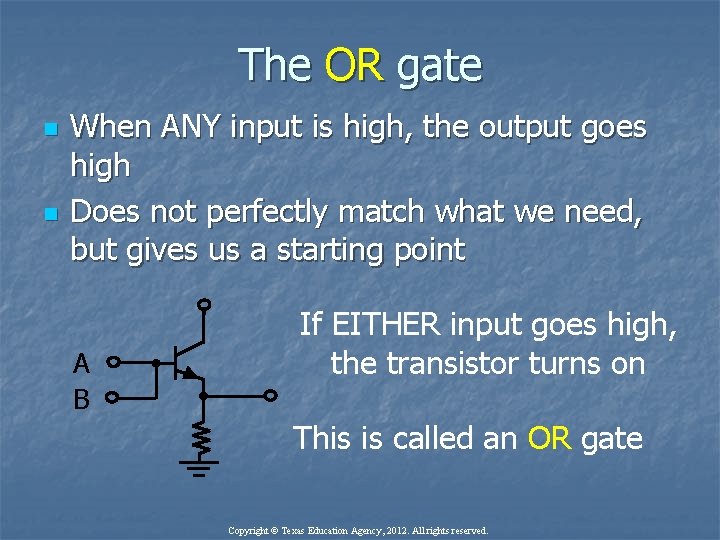
The OR gate n n When ANY input is high, the output goes high Does not perfectly match what we need, but gives us a starting point A B If EITHER input goes high, the transistor turns on This is called an OR gate Copyright © Texas Education Agency, 2012. All rights reserved.
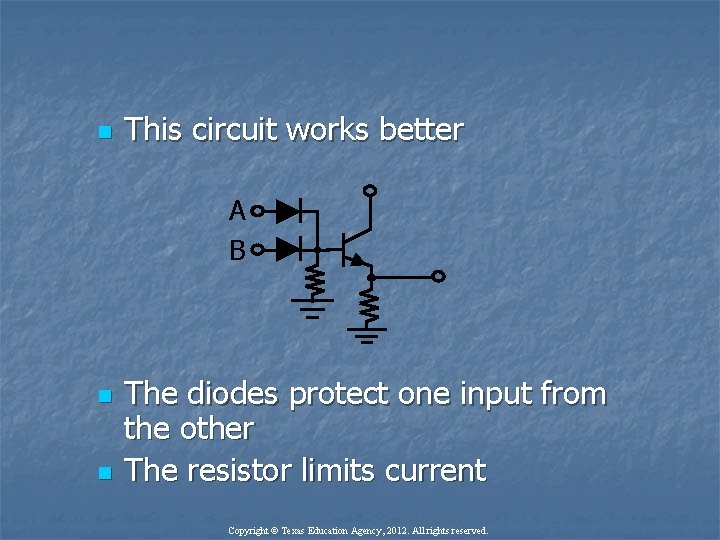
n This circuit works better A B n n The diodes protect one input from the other The resistor limits current Copyright © Texas Education Agency, 2012. All rights reserved.
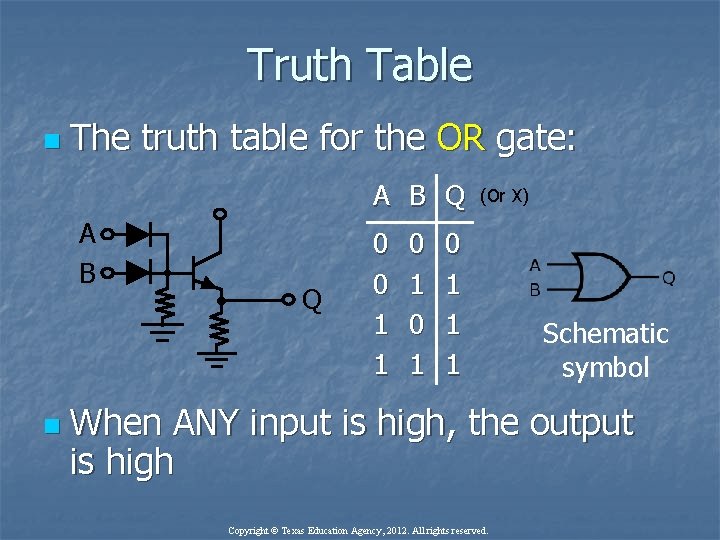
Truth Table n The truth table for the OR gate: A B Q A B n Q 0 0 1 1 0 1 (Or X) 0 1 1 1 Schematic symbol When ANY input is high, the output is high Copyright © Texas Education Agency, 2012. All rights reserved.
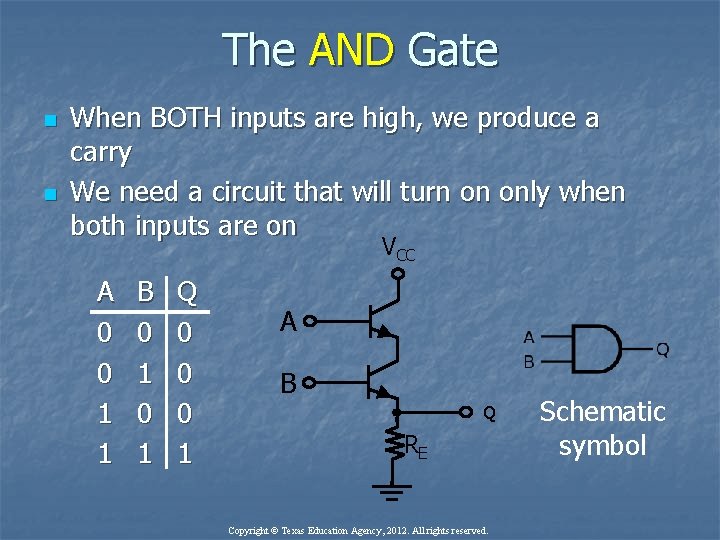
The AND Gate n n When BOTH inputs are high, we produce a carry We need a circuit that will turn on only when both inputs are on VCC A 0 0 1 1 B 0 1 Q 0 0 0 1 A B Q RE Copyright © Texas Education Agency, 2012. All rights reserved. Schematic symbol
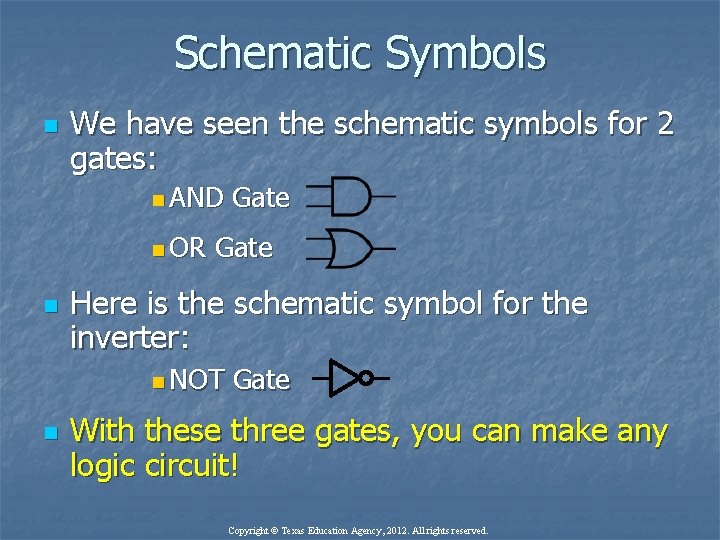
Schematic Symbols n We have seen the schematic symbols for 2 gates: n AND n OR n Gate Here is the schematic symbol for the inverter: n NOT n Gate With these three gates, you can make any logic circuit! Copyright © Texas Education Agency, 2012. All rights reserved.
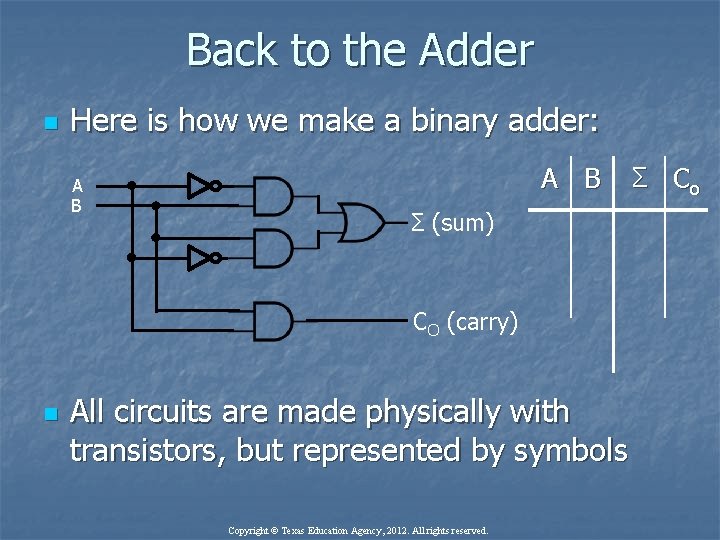
Back to the Adder n Here is how we make a binary adder: A B Σ (sum) CO (carry) n All circuits are made physically with transistors, but represented by symbols Copyright © Texas Education Agency, 2012. All rights reserved. Σ Co
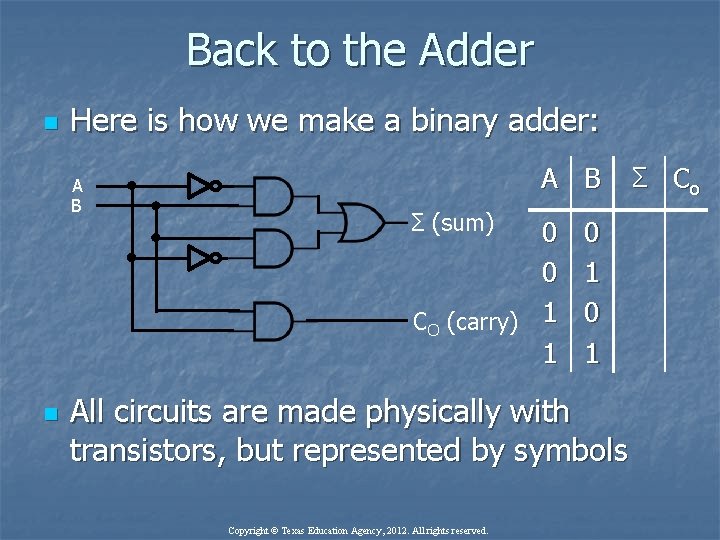
Back to the Adder n Here is how we make a binary adder: A B n A B Σ (sum) 0 0 CO (carry) 1 1 0 1 All circuits are made physically with transistors, but represented by symbols Copyright © Texas Education Agency, 2012. All rights reserved. Σ Co
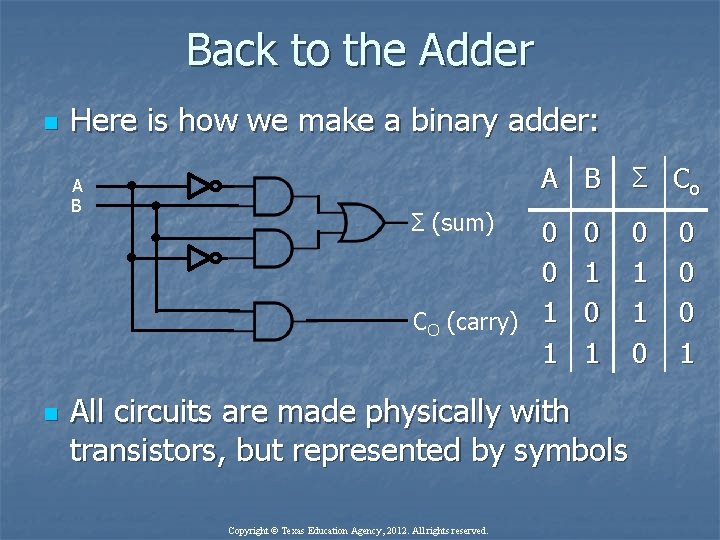
Back to the Adder n Here is how we make a binary adder: A B n A B Σ (sum) 0 0 CO (carry) 1 1 0 1 All circuits are made physically with transistors, but represented by symbols Copyright © Texas Education Agency, 2012. All rights reserved. Σ Co 0 1 1 0 0 1
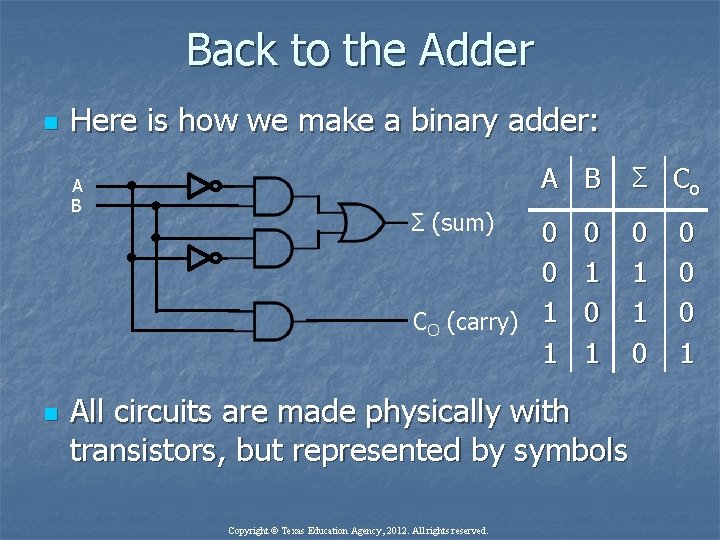
Back to the Adder n Here is how we make a binary adder: A B n A B Σ (sum) 0 0 CO (carry) 1 1 0 1 All circuits are made physically with transistors, but represented by symbols Copyright © Texas Education Agency, 2012. All rights reserved. Σ Co 0 1 1 0 0 1
Digital Logic n n Digital logic is used for circuit design Also used for mathematical operations n n There are 7 total logic gates n n Called “Boolean Algebra” AND, OR, NOT, NAND, NOR, Exclusive-NOR These gates are the building blocks for computers Copyright © Texas Education Agency, 2012. All rights reserved.
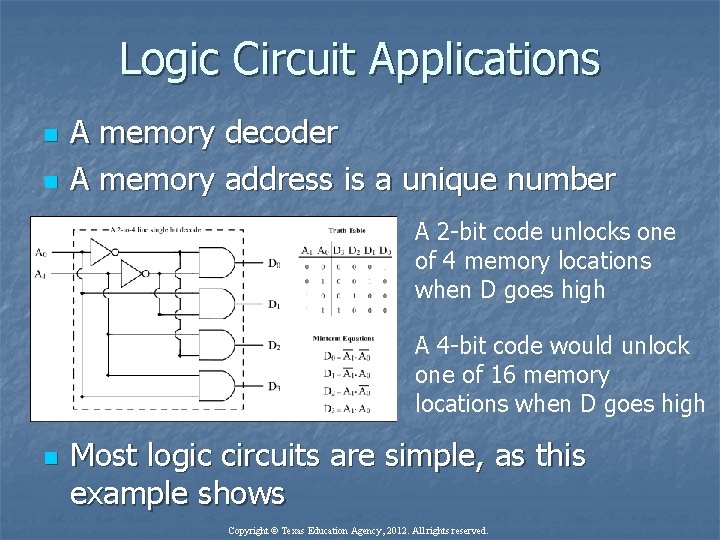
Logic Circuit Applications n n A memory decoder A memory address is a unique number A 2 -bit code unlocks one of 4 memory locations when D goes high A 4 -bit code would unlock one of 16 memory locations when D goes high n Most logic circuits are simple, as this example shows Copyright © Texas Education Agency, 2012. All rights reserved.
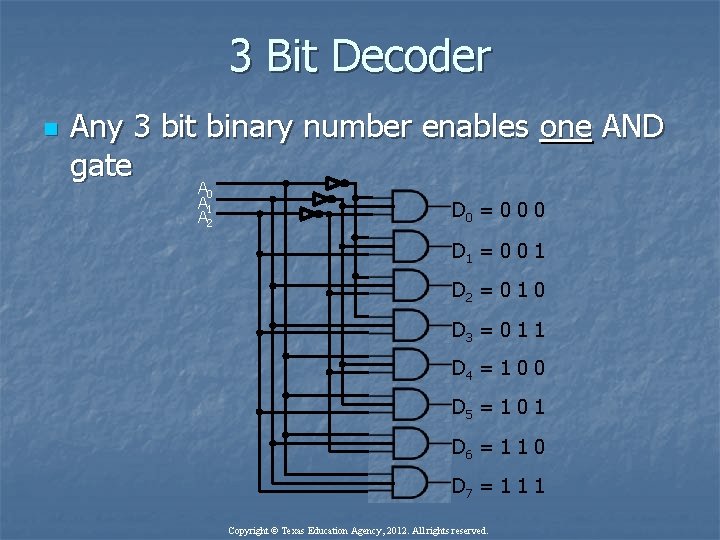
3 Bit Decoder n Any 3 bit binary number enables one AND gate A 0 A 1 A 2 D 0 = 0 0 0 D 1 = 0 0 1 D 2 = 0 1 0 D 3 = 0 1 1 D 4 = 1 0 0 D 5 = 1 0 1 D 6 = 1 1 0 D 7 = 1 1 1 Copyright © Texas Education Agency, 2012. All rights reserved.
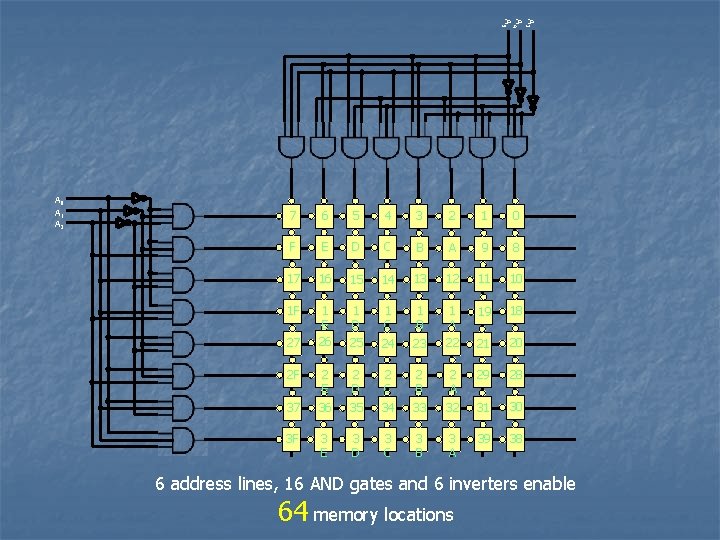
A 3 A 4 A 5 A 0 A 1 A 2 7 6 5 4 3 2 1 0 F E D C B A 9 8 17 16 15 14 13 12 11 10 1 F 1 E 26 1 D 25 1 C 1 B 19 18 24 23 1 A 22 21 20 2 F 2 E 2 D 2 C 2 B 2 A 29 28 37 36 35 34 33 32 31 30 3 F 3 E 3 D 3 C 3 B 3 A 39 38 27 6 address lines, 16 AND gates and 6 inverters enable 64 memory locations
Computer Basics n n A computer uses voltage on wires to communicate Communication involves data, addresses, and instructions Each of these are represented by binary numbers in a code A logic circuit similar to what we have just seen is used to decode each of these Copyright © Texas Education Agency, 2012. All rights reserved.
Bill Gates -1 st Personal Computer n Watch video on how the 1 st personal computer worked HERE. Copyright © Texas Education Agency, 2012. All rights reserved.
A computer has several basic parts n The input unit n n The output unit n n Monitor, printer, modem Memory n n Keyboard, mouse, modem, transducer RAM (Random Access Memory), hard drive, CD-ROM CPU Central processing unit n Also called a microprocessor n Copyright © Texas Education Agency, 2012. All rights reserved.
The CPU n n n The CPU is also called the microprocessor The brains of the computer Performs arithmetic and logic n n n Has an internal ALU (Arithmetic Logic Unit) Works based on an internal program called microcode The primary job of a CPU is to execute instructions Copyright © Texas Education Agency, 2012. All rights reserved.
The CPU n n n The CPU is also called the microprocessor The brains of the computer Performs arithmetic and logic n n n Has an internal ALU (Arithmetic Logic Unit) Works based on an internal program called microcode The primary job of a CPU is to execute instructions Copyright © Texas Education Agency, 2012. All rights reserved.
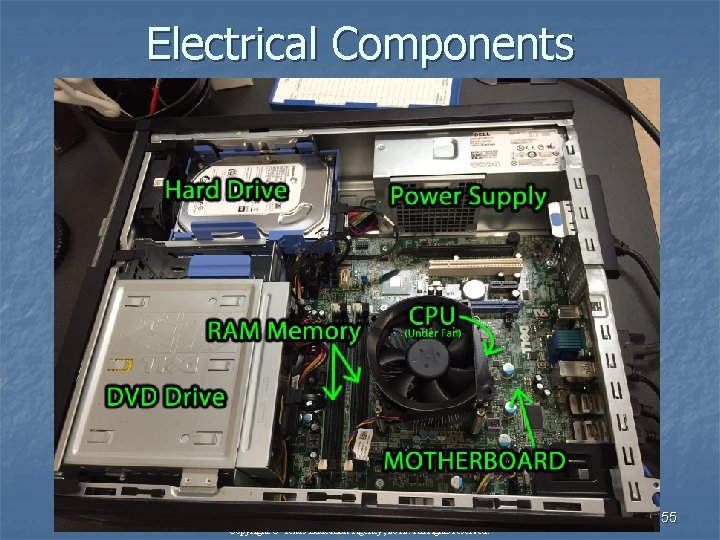
Electrical Components Copyright © Texas Education Agency, 2012. All rights reserved. 55
How a CPU (microprocessor) works n Watch video on how a CPU works HERE. Copyright © Texas Education Agency, 2012. All rights reserved.
How a robot warehouse works n Watch a video on how a robots work in a modern warehouse HERE. Copyright © Texas Education Agency, 2012. All rights reserved.
- Slides: 57